

LogicFlow: WiFi ইভেন্ট এবং ট্রিগারগুলি অটোমেট করা
This authoritative technical reference guide covers Purple's LogicFlow, an enterprise-grade WiFi event automation engine that enables IT managers and network architects to build intelligent, trigger-based workflows across hospitality, retail, stadium, and public-sector venues. It details the platform's Event-Decision-Action architecture, explores the full range of available triggers, and provides concrete implementation guidance with real-world case studies from hotel and retail deployments. For venue operators and IT teams, this guide demonstrates how to transform passive WiFi infrastructure into a proactive, revenue-generating, and operationally efficient platform.
🎧 Listen to this Guide
View Transcript
কার্যনির্বাহী সারাংশ
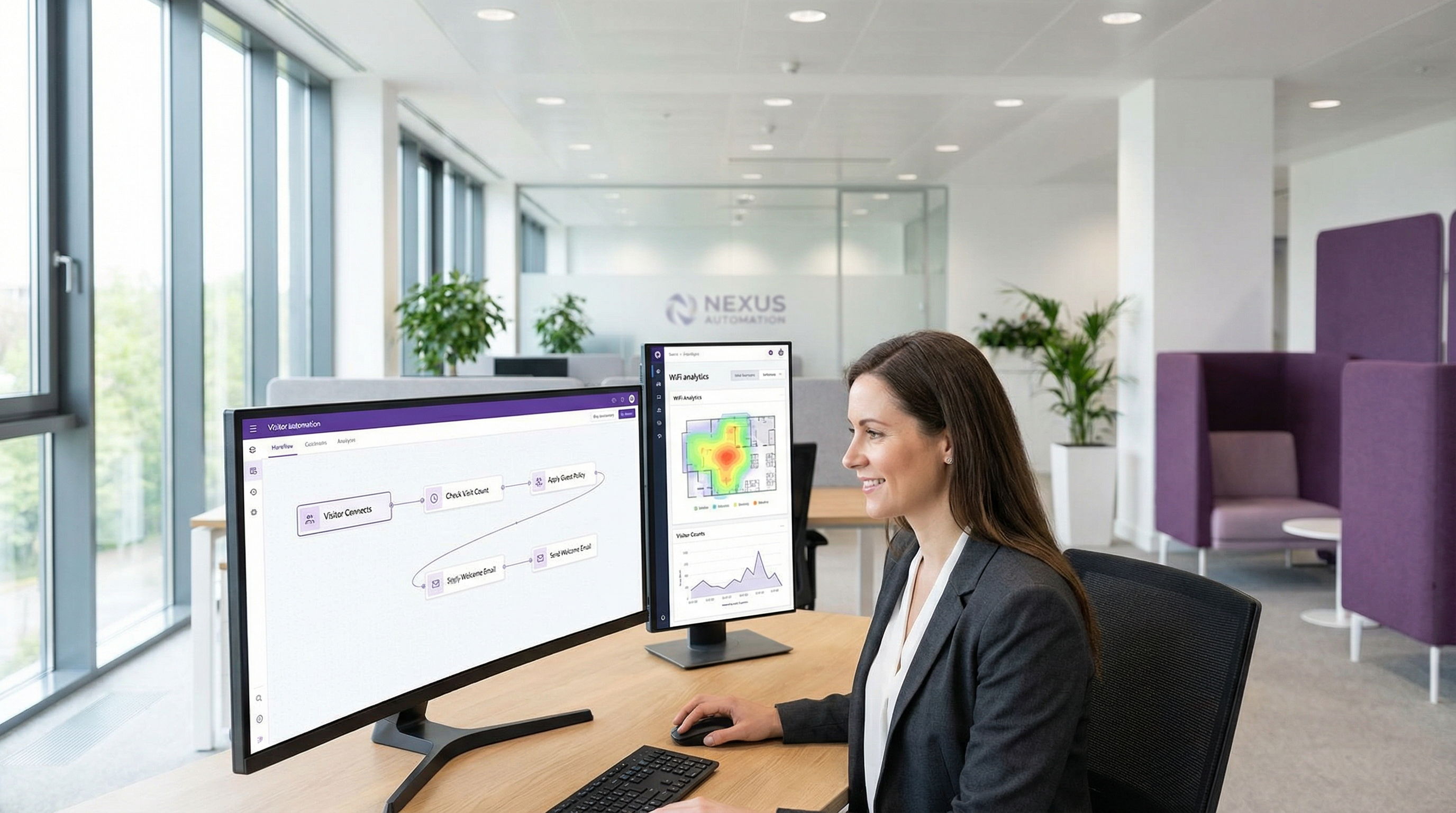
এন্টারপ্রাইজ নেটওয়ার্কিংয়ের প্রতিযোগিতামূলক প্রেক্ষাপটে, রিয়েল-টাইম ইভেন্টগুলির প্রতিক্রিয়া অটোমেট করার ক্ষমতা এখন আর কোনও বিলাসিতা নয় বরং একটি মূল অপারেশনাল প্রয়োজনীয়তা। আইটি ম্যানেজার, নেটওয়ার্ক আর্কিটেক্ট এবং ভেন্যু অপারেটরদের জন্য, মূল চ্যালেঞ্জটি হলো র-নেটওয়ার্ক ডেটাকে তাৎক্ষণিক এবং ভ্যালু-ড্রিভেন পদক্ষেপে রূপান্তরিত করা। Purple-এর LogicFlow হলো একটি এন্টারপ্রাইজ-গ্রেড অটোমেশন ইঞ্জিন যা সরাসরি এই চ্যালেঞ্জ মোকাবেলার জন্য ডিজাইন করা হয়েছে। এটি বিভিন্ন ধরনের WiFi এবং ভিজিটর-সম্পর্কিত ইভেন্ট দ্বারা ট্রিগার হওয়া অত্যাধুনিক ওয়ার্কফ্লো তৈরি করার জন্য একটি ভিজ্যুয়াল, ড্র্যাগ-অ্যান্ড-ড্রপ ইন্টারফেস প্রদান করে। এই গাইডটি মার্কেটিংয়ের ধারণার বাইরে গিয়ে কার্যকর ইমপ্লিমেন্টেশন গাইডেন্স প্রদান করার মাধ্যমে LogicFlow-এর একটি টেকনিক্যাল ডিপ-ডাইভ হিসেবে কাজ করে। আমরা প্ল্যাটফর্মের আর্কিটেকচার বিশ্লেষণ করব, হসপিটালিটি এবং রিটেইলের মতো ইন্ডাস্ট্রিগুলোতে সাধারণ ডিপ্লয়মেন্ট সিনারিওগুলো এক্সপ্লোর করব এবং অপারেশনাল দক্ষতা, উন্নত গেস্ট এঙ্গেজমেন্ট এবং ঝুঁকি হ্রাসের ক্ষেত্রে ROI পরিমাপ করব। সিটিও (CTO)-দের জন্য, এই ডকুমেন্টটি বিদ্যমান WiFi ইনফ্রাস্ট্রাকচারকে একটি প্রোঅ্যাকটিভ, ইন্টেলিজেন্ট সিস্টেম হিসেবে ব্যবহার করার কৌশল তুলে ধরে যা ব্যবসায়িক ফলাফল নিয়ে আসে। আইটি ম্যানেজার এবং ডেভেলপারদের জন্য, এটি শক্তিশালী, স্বয়ংক্রিয় ওয়ার্কফ্লো ডিপ্লয় করার একটি ব্যবহারিক হ্যান্ডবুক যা GDPR এবং PCI DSS-এর মতো মূল কমপ্লায়েন্স স্ট্যান্ডার্ডগুলোর সাথে সামঞ্জস্যপূর্ণ এবং নিরাপত্তা ও নিরবচ্ছিন্ন ইউজার এক্সপেরিয়েন্স উভয়ই নিশ্চিত করে।
টেকনিক্যাল ডিপ-ডাইভ
LogicFlow হলো Purple প্ল্যাটফর্মের সেন্ট্রাল নার্ভাস সিস্টেম হিসেবে কাজ করে, যা পূর্বনির্ধারিত অ্যাকশন ট্রিগার করতে ডেটা পয়েন্টগুলোর একটি নিরবচ্ছিন্ন স্ট্রিম প্রসেস করে। এর আর্কিটেকচার তিনটি মূল ধারণার ওপর ভিত্তি করে তৈরি: ইভেন্ট, ডিসিশন, এবং অ্যাকশন। এই মডেলটি জটিল, স্টেটফুল ওয়ার্কফ্লো তৈরির সুযোগ দেয় যা রিয়েল-টাইমে পরিবর্তনশীল পরিস্থিতির সাথে খাপ খাইয়ে নিতে পারে।
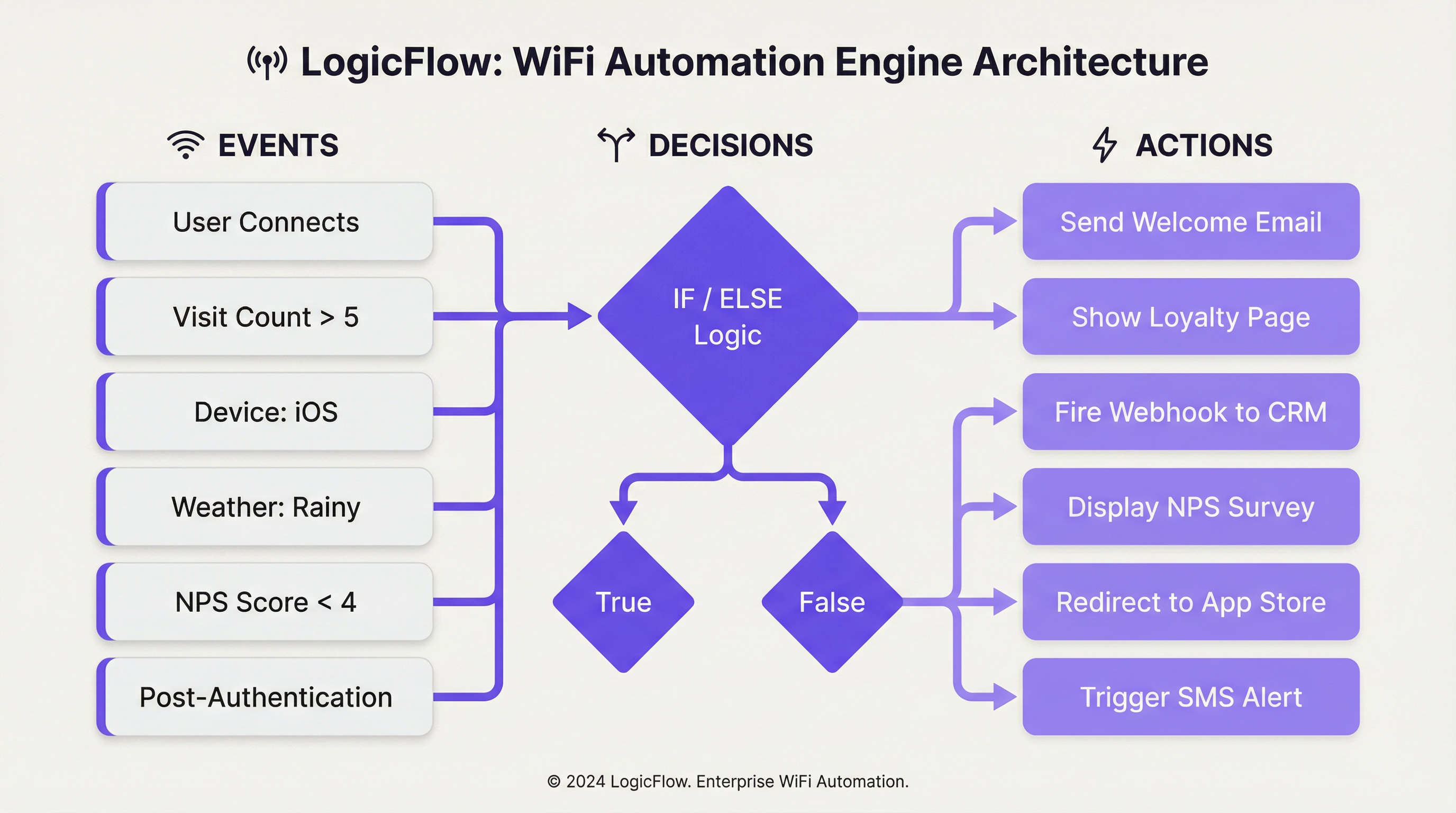
ইভেন্ট ট্রিগার: কোনো ইভেন্ট শনাক্ত হলে প্রক্রিয়াটি শুরু হয়। LogicFlow ট্রিগারগুলোর একটি বিস্তৃত সেট সাপোর্ট করে, যেগুলোকে বিস্তৃতভাবে ক্যাটাগরি করা যেতে পারে:
| ক্যাটাগরি | নির্দিষ্ট ট্রিগার | টেকনিক্যাল কনটেক্সট |
|---|---|---|
| অনবোর্ডিং ইভেন্ট | প্রি-অথেনটিকেশন, পোস্ট-অথেনটিকেশন, অনলাইন | এগুলো গেস্ট WiFi কানেকশন জার্নির বিভিন্ন ধাপের সাথে সম্পর্কিত। প্রি-অথেনটিকেশন অ্যাকশনগুলো সীমিত কারণ ইউজার তখনও অনলাইনে থাকেন না, অন্যদিকে পোস্ট-অথেনটিকেশন এবং অনলাইন ট্রিগারগুলো আরও সমৃদ্ধ ডেটাসেট ব্যবহার করতে পারে। |
| ভিজিটর ডেমোগ্রাফিক্স | বয়স, লিঙ্গ, ভাষা, ইমেইল অ্যাড্রেস, ভিজিট কাউন্ট | Captive Portal লগইন ফর্ম বা সোশ্যাল সাইন-অন থেকে সংগৃহীত এই ডেটা অত্যন্ত পার্সোনালাইজড ইউজার জার্নি তৈরি করতে সক্ষম করে। এই ডেটা ব্যবহার করার সময় GDPR-এর মতো ডেটা প্রাইভেসি রেগুলেশন মেনে চলা অত্যন্ত গুরুত্বপূর্ণ। |
| ডিভাইস এবং নেটওয়ার্ক | অপারেটিং সিস্টেম, ব্রাউজার, SSID, অ্যাক্সেস পয়েন্ট MAC/নাম, ম্যানুফ্যাকচারার | ডিভাইস-নির্দিষ্ট অপ্টিমাইজেশন (যেমন, iOS ইউজারদের কাছে অ্যাপ ডাউনলোডের নোটিফিকেশন পাঠানো) বা ইউজার কোন AP-এর সাথে কানেক্টেড তার ওপর ভিত্তি করে লোকেশন-নির্দিষ্ট অ্যাকশনের জন্য অপরিহার্য। |
| এনভায়রনমেন্টাল ডেটা | ভেন্যু লোকেশন (দেশ, ট্যাগ), আবহাওয়া (অবস্থা, তাপমাত্রা), সময়/দিন/তারিখ | কনটেক্সট-অ্যাওয়ার অটোমেশনের সুযোগ দেয়, যেমন রিটেইল স্টোরের স্প্ল্যাশ পেজে 'বৃষ্টির দিনের' অফার প্রদর্শন করা বা জাতীয় ছুটির দিনের ওপর ভিত্তি করে কনটেন্ট পরিবর্তন করা। |
| ইউজার বিহেভিয়ার | NPS রেসপন্স, মাইক্রো-সার্ভে উত্তর, লগইন মেথড, পেইড WiFi প্ল্যান | সরাসরি ইউজারের ফিডব্যাক বা পছন্দের ওপর ভিত্তি করে ট্রিগার হয়, যা তাৎক্ষণিক সার্ভিস রিকভারি বা আপসেলিংয়ের সুযোগ তৈরি করে। |
ডিসিশন নোড: কোনো ইভেন্ট ট্রিগার হওয়ার পর, এটি একটি ডিসিশন নোডে পাস করা হয়। এখানেই LogicFlow-এর 'লজিক' থাকে। 'True/False' বা 'If/Else' স্টেটমেন্ট ব্যবহার করে, অ্যাডমিনিস্ট্রেটররা ইভেন্ট ডেটার শর্ত পূরণের ওপর ভিত্তি করে ব্রাঞ্চিং পাথ তৈরি করতে পারেন। উদাহরণস্বরূপ, একটি 'If/Else' নোড একজন ভিজিটরের visit_count চেক করতে পারে। যদি এটি ৫-এর বেশি হয় (একজন লয়াল কাস্টমার), তবে এটি 'True' পাথ অনুসরণ করে; অন্যথায়, এটি নতুন ভিজিটরদের জন্য 'False' পাথ অনুসরণ করে। 'AND'/'OR' লজিক ব্যবহার করে একাধিক শর্ত গ্রুপ করা যেতে পারে, যা অত্যন্ত গ্র্যানুলার টার্গেটিংয়ের সুযোগ দেয়।
অ্যাকশন নোড: চূড়ান্ত ধাপ হলো অ্যাকশন নোড, যা একটি নির্দিষ্ট কাজ সম্পাদন করে। ইভেন্টের ধরনের ওপর ভিত্তি করে অ্যাকশনগুলো কনটেক্সট-নির্ভর হয়।
- প্রি-অথেনটিকেশন: মূলত
Splash Pageঅ্যাকশন, যা লোকেশন বা দিনের সময়ের ওপর ভিত্তি করে ডায়নামিক ব্র্যান্ডিংয়ের সুযোগ দেয়。 - পোস্ট-অথেনটিকেশন: আরও বিস্তৃত পরিসরের অ্যাকশন পাওয়া যায়, যার মধ্যে রয়েছে
NPS/Micro-surveyপ্রেজেন্টেশন, থার্ড-পার্টি সিস্টেমেWebhookফায়ারিং,Mediaডিসপ্লে (যেমন, একটি ভিডিও বিজ্ঞাপন), বা একটিPaid WiFiটিয়ারে অ্যাসাইন করা। - অনলাইন: ইউজার সম্পূর্ণ নেটওয়ার্ক অ্যাক্সেস পাওয়ার পর যে অ্যাকশনগুলো ঘটে, যেমন একটি নির্দিষ্ট URL-এ
Redirectকরা, একটিEmail/SMS Campaignপাঠানো, বা তাদের পরবর্তী ভিজিটে একটি ভিন্নSplash Pageপ্রদর্শন করা।
এই কাঠামোগত পদ্ধতি নিশ্চিত করে যে ওয়ার্কফ্লোগুলো শক্তিশালী এবং মেইনটেইনেবল উভয়ই, যা অটোমেশন এবং ইভেন্ট-ড্রিভেন আর্কিটেকচারের জন্য স্ট্যান্ডার্ড বেস্ট প্র্যাকটিসগুলো মেনে চলে।
ইমপ্লিমেন্টেশন গাইড
LogicFlow কার্যকরভাবে ডিপ্লয় করার জন্য একটি কাঠামোগত পদ্ধতি প্রয়োজন, যা স্ট্র্যাটেজিক লক্ষ্য থেকে ট্যাকটিক্যাল কনফিগারেশনের দিকে অগ্রসর হয়। নিচের ধাপগুলো ইমপ্লিমেন্টেশনের জন্য একটি ভেন্ডর-নিউট্রাল ফ্রেমওয়ার্ক প্রদান করে।
ধাপ ১ — ব্যবসায়িক উদ্দেশ্য নির্ধারণ করুন: কোনো ওয়ার্কফ্লো তৈরি করার আগে, কাঙ্ক্ষিত ফলাফল স্পষ্টভাবে সংজ্ঞায়িত করুন। লক্ষ্য কি লয়্যালটি অ্যাপ ডাউনলোড বাড়ানো, গেস্ট স্যাটিসফ্যাকশন স্কোর উন্নত করা, নাকি কোনো নির্দিষ্ট এলাকায় লোকসমাগম বাড়ানো? একটি স্পষ্ট উদ্দেশ্য প্রয়োজনীয় ট্রিগার এবং অ্যাকশনগুলো নির্ধারণ করে।
ধাপ ২ — কাস্টমার জার্নি ম্যাপ করুন: ভিজিটর এক্সপেরিয়েন্সের মূল টাচপয়েন্টগুলো চিহ্নিত করুন যেখানে অটোমেশন ভ্যালু যোগ করতে পারে। এটি সাধারণত WiFi অ্যাক্সেস জার্নির প্রি-অথেনটিকেশন, পোস্ট-অথেনটিকেশন এবং অনলাইন ধাপগুলোর সাথে সামঞ্জস্যপূর্ণ।
ধাপ ৩ — ওয়ার্কফ্লো তৈরি করুন: একটি একক, সাধারণ ওয়ার্কফ্লো দিয়ে শুরু করুন। উদাহরণস্বরূপ, ফিরে আসা ভিজিটরদের জন্য একটি 'Welcome Back' মেসেজ। LogicFlow v2-এর মধ্যে, 'Add logic flow' নির্বাচন করুন এবং উপযুক্ত ইভেন্টের ধরন বেছে নিন। ক্যানভাসে একটি 'Visitor' ডিসিশন নোড ড্র্যাগ করুন এবং এটিকে একটি 'True/False' শর্ত দিয়ে কনফিগার করুন: visit_count হলো greater than 1। 'True' পাথের জন্য, একটি Email Campaign অ্যাকশন নোড যোগ করুন এবং একটি পূর্ব-কনফিগার করা 'Welcome Back' ইমেইল টেমপ্লেট নির্বাচন করুন। 'False' পাথের জন্য (নতুন ভিজিটর), একটি ভিন্ন অ্যাকশন যোগ করুন, যেমন একটি 'First Visit Discount' ইমেইল। সমস্ত নোড কানেক্ট করুন, নিশ্চিত করুন যে প্রতিটি পাথ একটি 'End' নোড দিয়ে শেষ হয়।
ধাপ ৪ — ভ্যালিডেট এবং পাবলিশ করুন: লজিকে কোনো ত্রুটি আছে কিনা তা চেক করতে বিল্ট-ইন 'Validate' টুল ব্যবহার করুন। ভ্যালিড হওয়ার পর, ওয়ার্কফ্লোটি 'Publish' করুন।
ধাপ ৫ — অ্যাক্সেস জার্নিতে অ্যাসাইন করুন: পাবলিশ করা LogicFlow-কে একটি নির্দিষ্ট অ্যাক্সেস জার্নির (কোনো নির্দিষ্ট ভেন্যু বা SSID-এর জন্য Captive Portal এক্সপেরিয়েন্স) সাথে লিঙ্ক করুন। এটি ওয়ার্কফ্লোটিকে সক্রিয় করে。
ধাপ ৬ — মনিটর এবং ইটারেট করুন: ওয়ার্কফ্লোর প্রভাব পরিমাপ করতে প্ল্যাটফর্মের অ্যানালিটিক্স ব্যবহার করুন। ইমেইল ওপেন রেট, রিডেম্পশন রেট এবং ভিজিট ফ্রিকোয়েন্সি ট্র্যাক করুন। সময়ের সাথে সাথে লজিক পরিমার্জন করতে এবং পারফরম্যান্স উন্নত করতে এই ডেটা ব্যবহার করুন।
বেস্ট প্র্যাকটিস
সহজভাবে শুরু করুন, বুদ্ধিমত্তার সাথে স্কেল করুন: শুরুতেই অতিরিক্ত জটিল, মনোলিথিক ওয়ার্কফ্লো তৈরি করা এড়িয়ে চলুন। সিঙ্গেল-পারপাস ফ্লো দিয়ে শুরু করুন এবং আত্মবিশ্বাস অর্জন ও ডেটা সংগ্রহের সাথে সাথে সেগুলোকে একত্রিত করুন। পরিমাপযোগ্য ফলাফল প্রদানকারী একটি সুবিন্যস্ত ওয়ার্কফ্লো দশটি দুর্বল-টার্গেটেড ওয়ার্কফ্লোর চেয়ে বেশি মূল্যবান।
কমপ্লায়েন্স স্ট্যান্ডার্ড মেনে চলুন: ডেমোগ্রাফিক ডেটা ব্যবহার করার সময়, নিশ্চিত করুন যে আপনার লজিক ইউজারের সম্মতিকে সম্মান করে এবং GDPR-এর মতো রেগুলেশনগুলোর সাথে সামঞ্জস্যপূর্ণ। কোনো মার্কেটিং অ্যাকশন ট্রিগার করার আগে emailable ফ্ল্যাগ চেক করে এমন একটি ডিসিশন নোড তৈরি করুন। পেমেন্ট ডেটা হ্যান্ডেল করা ভেন্যুগুলোর জন্য, নিশ্চিত করুন যে আর্থিক লেনদেনের সাথে জড়িত ওয়ার্কফ্লোগুলো PCI DSS প্রয়োজনীয়তার বিপরীতে রিভিউ করা হয়েছে।
ইন্টিগ্রেশনের জন্য ওয়েবহুক ব্যবহার করুন: LogicFlow-এর সক্ষমতা বাড়ানোর জন্য ওয়েবহুক একটি শক্তিশালী টুল। এক্সটার্নাল CRM সিস্টেমে ডেটা পুশ করতে, অপারেশনাল ড্যাশবোর্ডে (যেমন Slack বা Microsoft Teams) অ্যালার্ট ট্রিগার করতে, বা বিল্ডিং ম্যানেজমেন্ট সিস্টেমের সাথে ইন্টিগ্রেট করতে এগুলো ব্যবহার করুন। এটি একটি ভেন্ডর-নিউট্রাল, API-ফার্স্ট ইন্টিগ্রেশন স্ট্র্যাটেজিকে প্রোমোট করে যা আপনার প্রযুক্তিগত বিনিয়োগকে সুরক্ষিত রাখে।
নেমিং কনভেনশন ব্যবহার করুন: ওয়ার্কফ্লোর সংখ্যা বাড়ার সাথে সাথে, একটি সামঞ্জস্যপূর্ণ নেমিং কনভেনশন — উদাহরণস্বরূপ, [Venue]-[Objective]-[Trigger] — মেইনটেইনেবিলিটি এবং টিমের কোলাবোরেশনের জন্য অপরিহার্য হয়ে ওঠে。
নিয়মিত অডিট এবং প্রুন করুন: সমস্ত সক্রিয় ওয়ার্কফ্লো বর্তমান ব্যবসায়িক উদ্দেশ্যগুলোর সাথে সামঞ্জস্যপূর্ণ কিনা তা নিশ্চিত করতে পর্যায়ক্রমে সেগুলো রিভিউ করুন। জটিলতা কমাতে এবং অনাকাঙ্ক্ষিত পরিণতির ঝুঁকি এড়াতে অপ্রচলিত ফ্লোগুলো ডিঅ্যাক্টিভেট বা আর্কাইভ করুন।
ট্রাবলশুটিং এবং ঝুঁকি হ্রাস
সমস্যা — ওয়ার্কফ্লো ট্রিগার হচ্ছে না: সবচেয়ে সাধারণ সমস্যা হলো অ্যাসাইনমেন্টে মিসকনফিগারেশন। যাচাই করুন যে LogicFlow সঠিকভাবে পাবলিশ করা হয়েছে এবং টার্গেট ভেন্যু বা SSID-এর জন্য সক্রিয় অ্যাক্সেস জার্নিতে অ্যাসাইন করা হয়েছে। এছাড়াও ডিসিশন নোডগুলোর ভেতরের লজিক চেক করুন; একটি অতিরিক্ত সীমাবদ্ধ শর্ত ট্রিগার ফায়ার হতে বাধা দিতে পারে।
সমস্যা — অনাকাঙ্ক্ষিত ইউজার এক্সপেরিয়েন্স: অনেকগুলো ব্রাঞ্চসহ একটি জটিল ওয়ার্কফ্লো অপ্রত্যাশিত ফলাফলের দিকে নিয়ে যেতে পারে। লাইভ এনভায়রনমেন্টে রোল আউট করার আগে 'Validate' টুল ব্যবহার করুন এবং একটি নন-প্রোডাকশন SSID দিয়ে পুঙ্খানুপুঙ্খভাবে টেস্ট করুন। বিশেষ করে পোস্ট-অথেনটিকেশন ফ্লোতে যেখানে একাধিক অ্যাকশন (যেমন, একটি সার্ভে এবং একটি রিডাইরেক্ট) প্রতিযোগিতা করতে পারে, সেখানে অপারেশনের ক্রম বিবেচনা করুন।
ঝুঁকি — অ্যালার্ট ফ্যাটিগ: ইমেইল বা ওয়েবহুকের মাধ্যমে অ্যালার্ট অটোমেট করা শক্তিশালী, তবে সতর্কতার সাথে পরিচালনা না করলে এটি 'অ্যালার্ট ফ্যাটিগ' বা অ্যালার্ট ক্লান্তির কারণ হতে পারে। এমন ডিসিশন লজিক ইমপ্লিমেন্ট করুন যা প্রতিটি একক কানেকশন ইভেন্টের পরিবর্তে শুধুমাত্র হাই-প্রায়োরিটি ইভেন্টগুলোর জন্য অ্যালার্ট ট্রিগার করে — উদাহরণস্বরূপ, ১ থেকে ৩-এর একটি NPS স্কোর, যা একটি উল্লেখযোগ্য সার্ভিস ফেইলিওর নির্দেশ করে।
ঝুঁকি — ডেটা প্রাইভেসি লঙ্ঘন: ব্যক্তিগত ডেটা (বয়স, লিঙ্গ, ইমেইল) ব্যবহার করা একটি মূল ফিচার তবে এটি একটি উল্লেখযোগ্য দায়িত্বও। ডেটা মিনিমাইজেশনের নীতি কঠোরভাবে মেনে চলার মাধ্যমে এই ঝুঁকি কমানো যায়। শুধুমাত্র একটি নির্দিষ্ট, সংজ্ঞায়িত উদ্দেশ্যের জন্য প্রয়োজনীয় ডেটা সংগ্রহ করুন এবং নিশ্চিত করুন যে এই ডেটা ব্যবহার করে এমন সমস্ত ওয়ার্কফ্লো ইউজারের সম্মতি চেক করে। GDPR বাধ্যবাধকতার বিপরীতে নিয়মিত ফ্লোগুলো রিভিউ করুন এবং একটি আপ-টু-ডেট ডেটা প্রসেসিং রেজিস্টার বজায় রাখুন।
ROI এবং ব্যবসায়িক প্রভাব
অপারেশনাল দক্ষতা: সার্ভিস রিকভারি অ্যালার্ট বা লয়্যালটি প্রোগ্রাম সাইন-আপের মতো কাজগুলো অটোমেট করা স্টাফদের ম্যানুয়াল কাজের চাপ কমায়। কোনো গেস্ট WiFi-এ কানেক্ট করার পর যদি খারাপ NPS রেটিং দেন, তবে একটি হোটেল স্বয়ংক্রিয়ভাবে একটি মেইনটেন্যান্স টিকিট ট্রিগার করতে পারে এবং ফ্রন্ট ডেস্ক ম্যানেজারকে সতর্ক করতে পারে, যা তাৎক্ষণিক হস্তক্ষেপ সক্ষম করে। এটি সরাসরি অপারেশনাল ওভারহেড হ্রাস এবং দ্রুত সমস্যা সমাধানের দিকে নিয়ে যায় — যা স্টাফদের বাঁচানো সময় এবং গেস্ট স্যাটিসফ্যাকশন স্কোরে পরিমাপযোগ্য।
কাস্টমার লাইফটাইম ভ্যালু (CLV) বৃদ্ধি: গেস্ট এক্সপেরিয়েন্স পার্সোনালাইজ করার মাধ্যমে, ভেন্যুগুলো লয়্যালটি এবং রিপিট বিজনেস বাড়াতে পারে। একটি রিটেইল চেইন যা ৯০ দিন ধরে দেখা যায়নি এমন ভিজিটরদের একটি টার্গেটেড ডিসকাউন্ট ভাউচার পাঠাতে LogicFlow ব্যবহার করে, তারা সক্রিয়ভাবে কাস্টমার চার্ন রোধ করতে কাজ করছে। এই অফারগুলোর রিডেম্পশন রেট এবং টার্গেটেড কোহর্টের পরবর্তী ভিজিট ফ্রিকোয়েন্সি ট্র্যাক করে এর সাফল্য পরিমাপ করা যেতে পারে।
উন্নত ভেন্যু ইন্টেলিজেন্স: LogicFlow দ্বারা জেনারেট করা ডেটা ভিজিটরদের আচরণ সম্পর্কে গভীর ইনসাইট প্রদান করে। একটি স্টেডিয়াম নির্দিষ্ট AP-গুলোর কাছাকাছি ডিভাইসের ঘনত্ব ট্র্যাক করে বিশ্লেষণ করতে পারে যে নির্দিষ্ট সময়ে কোন কনসেশন এলাকাগুলো সবচেয়ে জনপ্রিয়, এবং ভবিষ্যতের ইভেন্টগুলোর জন্য স্টাফিং এবং ইনভেন্টরি অপ্টিমাইজ করতে এই ডেটা ব্যবহার করতে পারে। ভেন্যু ম্যানেজমেন্টের এই ডেটা-ড্রিভেন পদ্ধতি উচ্চতর থ্রুপুট এবং ভিজিটর প্রতি আয় বৃদ্ধির দিকে নিয়ে যায়।
কমপ্লায়েন্স এবং ঝুঁকি হ্রাস: কমপ্লায়েন্স চেকগুলো অটোমেট করা — যেমন বছরের প্রথম ভিজিটে প্রতিটি ইউজারকে সর্বশেষ টার্মস অ্যান্ড কন্ডিশনস উপস্থাপন করা নিশ্চিত করা — আইনি এবং আর্থিক ঝুঁকি কমায়। GDPR-এর মতো রেগুলেশনগুলো না মানার খরচ যথেষ্ট হতে পারে, যা স্বয়ংক্রিয় এনফোর্সমেন্টকে যেকোনো ROI গণনার একটি গুরুত্বপূর্ণ উপাদানে পরিণত করে।
Key Terms & Definitions
LogicFlow
A visual, drag-and-drop workflow automation engine within the Purple platform that enables the triggering of specific actions based on a wide range of WiFi events, visitor demographics, device data, and environmental context.
IT teams use LogicFlow to move beyond providing simple connectivity, transforming their WiFi network into an intelligent, responsive system that can drive marketing, operational, and security objectives without manual intervention.
Event-Driven Architecture (EDA)
A software architecture paradigm that promotes the production, detection, consumption of, and reaction to events. LogicFlow is a practical, no-code application of EDA principles for enterprise WiFi networks.
For a network architect, understanding that LogicFlow is based on EDA principles clarifies its asynchronous, non-blocking nature. It is not about polling for status; it is about reacting instantly when a specific event, such as a new user connection or a negative survey response, occurs.
Webhook
An automated HTTP callback sent from one application to another when a specific event occurs. In LogicFlow, a webhook is an action node that can push data to an external system in real-time upon a trigger condition being met.
A developer can use a webhook action in LogicFlow to send guest data to a corporate CRM, trigger an alert in a Slack channel, or instruct a building management system to take an action, providing limitless integration possibilities with any platform that exposes a REST API.
Access Journey
The complete sequence of steps and pages a visitor interacts with from the moment they connect to a WiFi SSID to the point they are granted online access. A published LogicFlow must be assigned to an Access Journey to become active.
Venue operations directors are concerned with the Access Journey as a whole. LogicFlow gives them the power to make this journey dynamic, ensuring the branding, messaging, and any required steps are appropriate for the specific venue, event, or user type.
Captive Portal
A web page that is displayed to newly connected users of a WiFi network before they are granted broader access to network resources. It is the primary source of demographic and consent data for many LogicFlow triggers.
While IT managers deploy captive portals for authentication and security, LogicFlow allows them to transform the portal from a simple gatekeeper into a strategic tool for data collection and personalised engagement, without requiring changes to the underlying network infrastructure.
Decision Node
A component in the LogicFlow canvas that evaluates incoming event data against a set of predefined conditions and directs the workflow down a specific path based on the outcome, using True/False or If/Else logic.
For an IT professional configuring a workflow, the Decision Node is the core component for creating targeted logic. It is where the 'if-then' intelligence of the automation is defined, ensuring actions are only performed on the intended segment of users.
SSID (Service Set Identifier)
The public name of a wireless local area network (WLAN). A single venue may broadcast multiple SSIDs — for example, 'Hotel-Guest', 'Hotel-Conference', and 'Hotel-Staff' — each of which can be assigned a different Access Journey and LogicFlow.
Network architects can use the SSID as a trigger in LogicFlow to apply completely different automation rules depending on which network a user connects to, ensuring that a conference delegate and a hotel guest in the same building have entirely different and contextually appropriate online experiences.
GDPR (General Data Protection Regulation)
A regulation in EU law on data protection and privacy for all individuals within the European Union and the European Economic Area, governing how personal data is collected, processed, and stored.
When a CTO or IT Manager designs a LogicFlow that uses personal data such as email address or age, they must build in checks to ensure compliance with GDPR. This means using LogicFlow's capabilities to verify consent before triggering any marketing actions, mitigating significant legal and financial risk.
NPS (Net Promoter Score)
A widely used customer experience metric that measures customer loyalty by asking respondents to rate, on a scale of 0 to 10, how likely they are to recommend a product or service. Scores of 9–10 are Promoters, 7–8 are Passives, and 0–6 are Detractors.
In LogicFlow, an NPS survey can be presented as a Post-Authentication or Online action, and the resulting score can be used as a decision trigger. This enables real-time service recovery for Detractors and automated review solicitation for Promoters, directly impacting online reputation management.
Case Studies
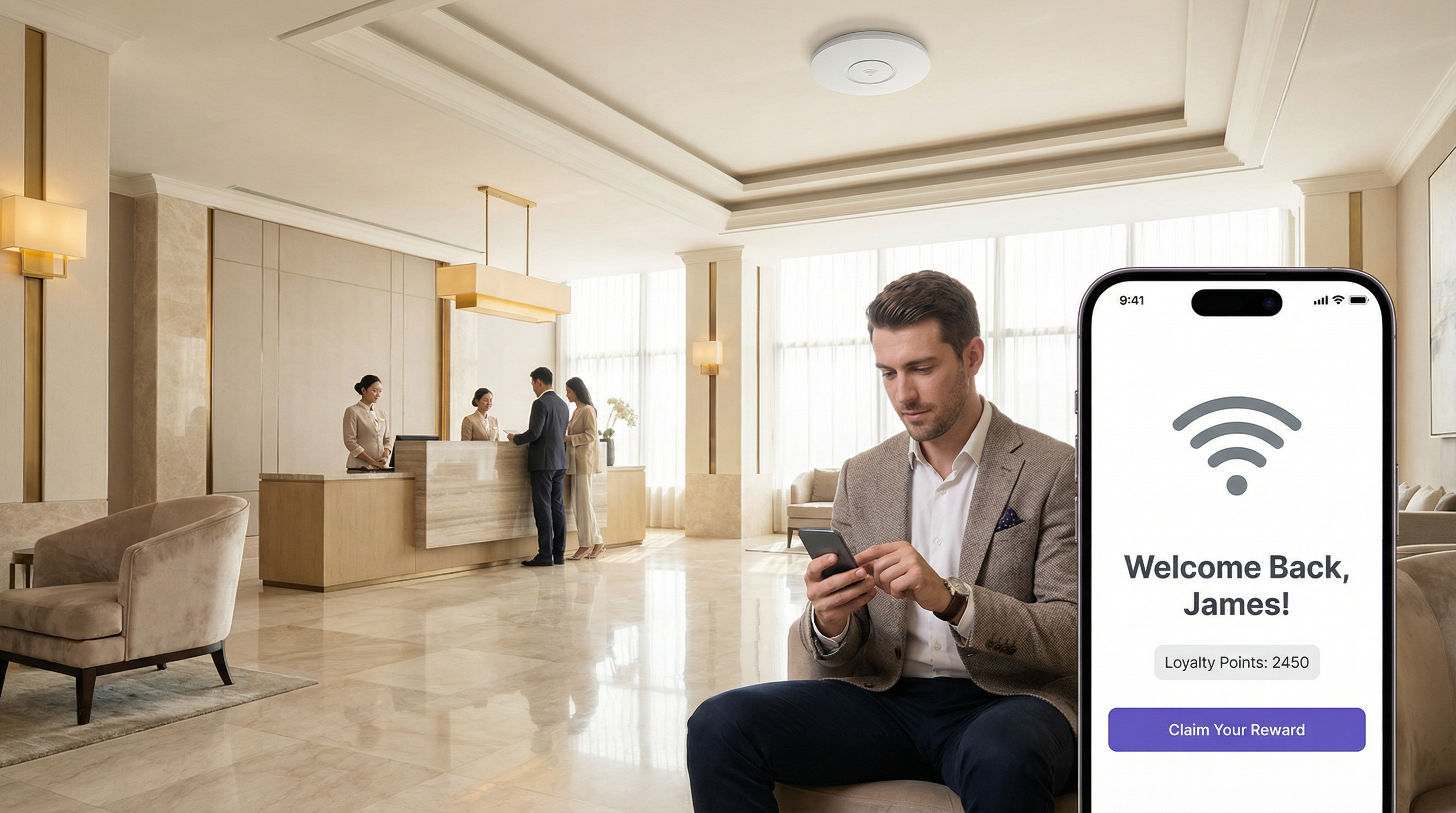
A 500-room luxury hotel wants to improve its guest satisfaction scores and encourage positive online reviews. They have identified two key visitor segments: first-time guests and returning VIP members. How can they use LogicFlow to create a tailored experience for each segment?
The IT Director implements a multi-path LogicFlow triggered on the 'Post-Authentication' event.
Workflow Configuration:
- Start Node: Triggers after a guest successfully authenticates on the hotel WiFi.
- Decision Node 1 (If/Else): Checks the visitor's profile for a 'VIP Member' tag, synced from the hotel's Property Management System via the Purple API.
- IF True (VIP Member): Route to Path A.
- ELSE (First-Time or Regular Guest): Route to Path B.
- Path A — VIP Member:
- Action Node 1:
Redirectthe guest to a personalised welcome page (https://hotel.com/vip-welcome) with exclusive offers and an upgrade prompt. - Action Node 2:
Email Campaigntriggered with a 1-hour delay, sending a 'Welcome Back' email with a direct link to book spa treatments.
- Action Node 1:
- Path B — First-Time Guest:
- Action Node 1:
NPS Surveypresented immediately to capture initial sentiment. - Decision Node 2 (If/Else): Evaluates the NPS Survey response.
- IF
NPS Scoreis between 9 and 10 (Promoter): Trigger anEmail Campaignwith a 24-hour delay, thanking the guest and providing a direct link to leave a review on TripAdvisor. - ELSE (Score 0–8): Trigger a
Webhookaction that sends an immediate alert to the Front Desk Manager's Slack channel with the guest's name and room number, enabling proactive service recovery.
- IF
- Action Node 1:
- End Node: All paths terminate here.
A large retail shopping centre with over 200 stores wants to increase downloads of its new loyalty and wayfinding app. How can they leverage their existing guest WiFi infrastructure to drive app adoption without disrupting the experience for loyal customers?
The Head of Digital Marketing deploys a LogicFlow that specifically targets users based on device type and visit frequency.
Workflow Configuration:
- Start Node: Triggers on the 'Online' event, once the visitor has full network access.
- Decision Node 1 (True/False): Checks if
visit_countisless than3. This targets newer visitors who are less likely to have downloaded the app. - Decision Node 2 (True/False): Nested under the 'True' path of Node 1. Checks if
Operating SystemisiOSORAndroid. This filters out laptops and other non-mobile devices where an app download is not relevant. - Action Node (True path of Node 2):
Redirectthe user to a custom, mobile-friendly landing page. This page explains the benefits of the app — interactive maps, exclusive offers, loyalty points — and has prominent, one-click buttons to the Apple App Store and Google Play Store. - Alternative Paths: The 'False' path from either decision node (a visitor with more than 3 visits, or a laptop user) proceeds without any redirect, ensuring a standard browsing experience for loyal customers or those on non-mobile devices.
- End Node: All paths terminate here.
Scenario Analysis
Q1. A multi-national coffee chain wants to ensure a consistent global brand experience while also promoting location-specific specials. How would you configure LogicFlow to show a global branding page to all visitors, but also surface a location-specific offer for visitors in specific cities?
💡 Hint:Consider using a combination of Pre-Authentication and Online event triggers. How can venue tags or venue names be used as decision criteria?
Show Recommended Approach
You would implement two LogicFlows. The first is a Pre-Authentication flow assigned globally to all venues. It contains a single Action node to display the main corporate-branded Splash Page, ensuring brand consistency across all locations. The second is an Online flow. It uses a Decision node based on 'Venue Name' or 'Venue Tags'. For each specific venue (e.g., tagged 'London-Covent-Garden'), you create a path that redirects the user to a page for the local special offer. Venues without a specific tag follow a default path with no redirect. This layered approach meets both requirements without requiring separate infrastructure configurations per venue.
Q2. A stadium is hosting a major sporting event and wants to manage network congestion. How could LogicFlow be used to mitigate performance issues for general attendees while preserving bandwidth for press and VIP guests?
💡 Hint:Think about how different SSIDs can be used in conjunction with LogicFlow. What actions can influence user behaviour to reduce bandwidth consumption during peak periods?
Show Recommended Approach
The network architect should configure multiple SSIDs: 'Stadium-Public', 'Stadium-VIP', and 'Stadium-Press'. The VIP and Press SSIDs receive higher QoS priority at the network infrastructure level (IEEE 802.11e/WMM). A LogicFlow is then applied to the 'Stadium-Public' Access Journey with a 'Day/Time' decision node. During peak periods such as halftime, the flow triggers a 'Redirect' action that sends public users to a cached, lightweight page with game statistics and social media feeds rather than allowing unrestricted internet access. This contains traffic and reduces load on the main internet uplink. The VIP and Press SSIDs have no such restriction, preserving their performance for critical use cases.
Q3. A conference centre wants to gather feedback on individual speaker sessions. How can they use LogicFlow to send a targeted micro-survey to attendees shortly after a specific session ends, without surveying attendees who were in a different room?
💡 Hint:This requires integrating location data from the network infrastructure. How can AP naming conventions and time-based triggers be combined to achieve room-level targeting?
Show Recommended Approach
This use case requires precise AP naming. Each conference room's access points are named with a room identifier (e.g., 'Room-101-AP1'). An Online LogicFlow uses a Decision node checking the 'Access Point Name' field. If a user was associated with an AP containing 'Room-101' between the session start and end times (using the 'Time' decision node), they are added to a tagged segment. A second LogicFlow, triggered 15 minutes after the session end time, sends an Email Campaign or Micro Survey to all visitors in that segment, asking specifically about the session in Room 101. This requires disciplined AP naming conventions and careful time-based logic, but delivers highly relevant, timely feedback that is directly attributable to a specific session.
Key Takeaways
- ✓LogicFlow is Purple's visual, event-driven automation engine that transforms passive WiFi infrastructure into an intelligent, responsive business platform.
- ✓Every workflow follows the Event-Decision-Action architecture: a trigger event feeds into If/Else logic, which executes a targeted action.
- ✓Key trigger categories include visitor demographics, device and network data, environmental context (including real-time weather), and user behaviour such as NPS responses.
- ✓Common high-value use cases include real-time service recovery, personalised loyalty engagement, targeted app download campaigns, and dynamic venue branding.
- ✓Webhooks are the primary integration mechanism, enabling LogicFlow to communicate with external CRMs, operational dashboards, and building management systems via REST APIs.
- ✓GDPR compliance must be built into every marketing workflow by checking user consent flags before triggering any communications.
- ✓Implementation best practice is to start with single-purpose, clearly-scoped workflows, validate thoroughly on a non-production SSID, and iterate based on measurable outcomes.




