

Passpoint (Hotspot 2.0): নিরাপদ এবং নিরবচ্ছিন্ন WiFi রোমিংয়ের একটি পূর্ণাঙ্গ গাইড
This guide provides a comprehensive technical overview of Passpoint (Hotspot 2.0) for IT leaders and network architects, covering the IEEE 802.11u standard, GAS/ANQP discovery protocols, WPA3-Enterprise security, and the WBA OpenRoaming federation. It delivers a vendor-neutral implementation framework with phased deployment guidance, real-world case studies from hospitality and retail, and a clear analysis of the ROI and compliance benefits for enterprise venue operators.
🎧 Listen to this Guide
View Transcript

কার্যনির্বাহী সারাংশ
বড় পরিসরের ভেন্যুগুলোর আইটি এক্সিকিউটিভ এবং নেটওয়ার্ক আর্কিটেক্টদের জন্য, একটি নিরবচ্ছিন্ন এবং নিরাপদ WiFi অভিজ্ঞতা প্রদান করা এখন আর কেবল সুবিধা নয়, বরং একটি মূল পরিচালনাগত অপরিহার্যতা। মূল চ্যালেঞ্জটি হলো শক্তিশালী নিরাপত্তা বজায় রাখা এবং ব্যবহারকারীদের সম্পর্কে মূল্যবান ধারণা (insight) অর্জনের পাশাপাশি Captive Portal এবং অনিরাপদ ওপেন নেটওয়ার্কের জটিলতা দূর করা। Passpoint, যা Hotspot 2.0 নামেও পরিচিত, সরাসরি এই চ্যালেঞ্জটি মোকাবেলা করে। এটি IEEE 802.11u স্ট্যান্ডার্ডের ওপর ভিত্তি করে তৈরি একটি Wi-Fi Alliance সার্টিফাইড প্রোটোকল, যা মোবাইল ডিভাইসগুলোকে এন্টারপ্রাইজ-গ্রেড WPA3 নিরাপত্তার সাথে স্বয়ংক্রিয়ভাবে WiFi নেটওয়ার্ক খুঁজে পেতে এবং প্রমাণীকরণ (authenticate) করতে সক্ষম করে, যা সেলুলার রোমিংয়ের নিরবচ্ছিন্ন অভিজ্ঞতারই প্রতিফলন।
এই গাইডটি সিদ্ধান্ত গ্রহণকারীদের জন্য একটি ব্যবহারিক রেফারেন্স হিসেবে কাজ করে, যা Passpoint আর্কিটেকচার, একটি ভেন্ডর-নিরপেক্ষ বাস্তবায়ন ফ্রেমওয়ার্ক এবং এর ROI-এর বিশ্লেষণের ওপর একটি প্রযুক্তিগত গভীর ধারণা (deep-dive) প্রদান করে। Passpoint ব্যবহার করে, প্রতিষ্ঠানগুলো অতিথিদের অভিজ্ঞতা উল্লেখযোগ্যভাবে উন্নত করতে, আইটি সাপোর্টের খরচ কমাতে, তাদের নিরাপত্তা ব্যবস্থা সুদৃঢ় করতে এবং ডেটা-চালিত এনগেজমেন্টের নতুন সুযোগ উন্মোচন করতে পারে — যা শেষ পর্যন্ত তাদের WiFi পরিকাঠামোকে একটি খরচের কেন্দ্র (cost centre) থেকে একটি কৌশলগত সম্পদে রূপান্তরিত করে।
টেকনিক্যাল ডিপ-ডাইভ
Passpoint মূলত WiFi সংযোগের ধারণাকে নেটওয়ার্ক-কেন্দ্রিক (একটি নির্দিষ্ট SSID-তে সংযুক্ত হওয়া) থেকে ব্যবহারকারী-কেন্দ্রিক (ব্যবহারকারীর ক্রেডেনশিয়াল বিশ্বাস করে এমন যেকোনো নেটওয়ার্কে সংযুক্ত হওয়া) মডেলে রূপান্তরিত করে। এটি একাধিক প্রি-অ্যাসোসিয়েশন কোয়েরি এবং প্রতিষ্ঠিত ইন্ডাস্ট্রি স্ট্যান্ডার্ডের ওপর নির্মিত একটি শক্তিশালী নিরাপত্তা ফ্রেমওয়ার্কের মাধ্যমে অর্জিত হয়。
মূল আর্কিটেকচার: GAS এবং ANQP
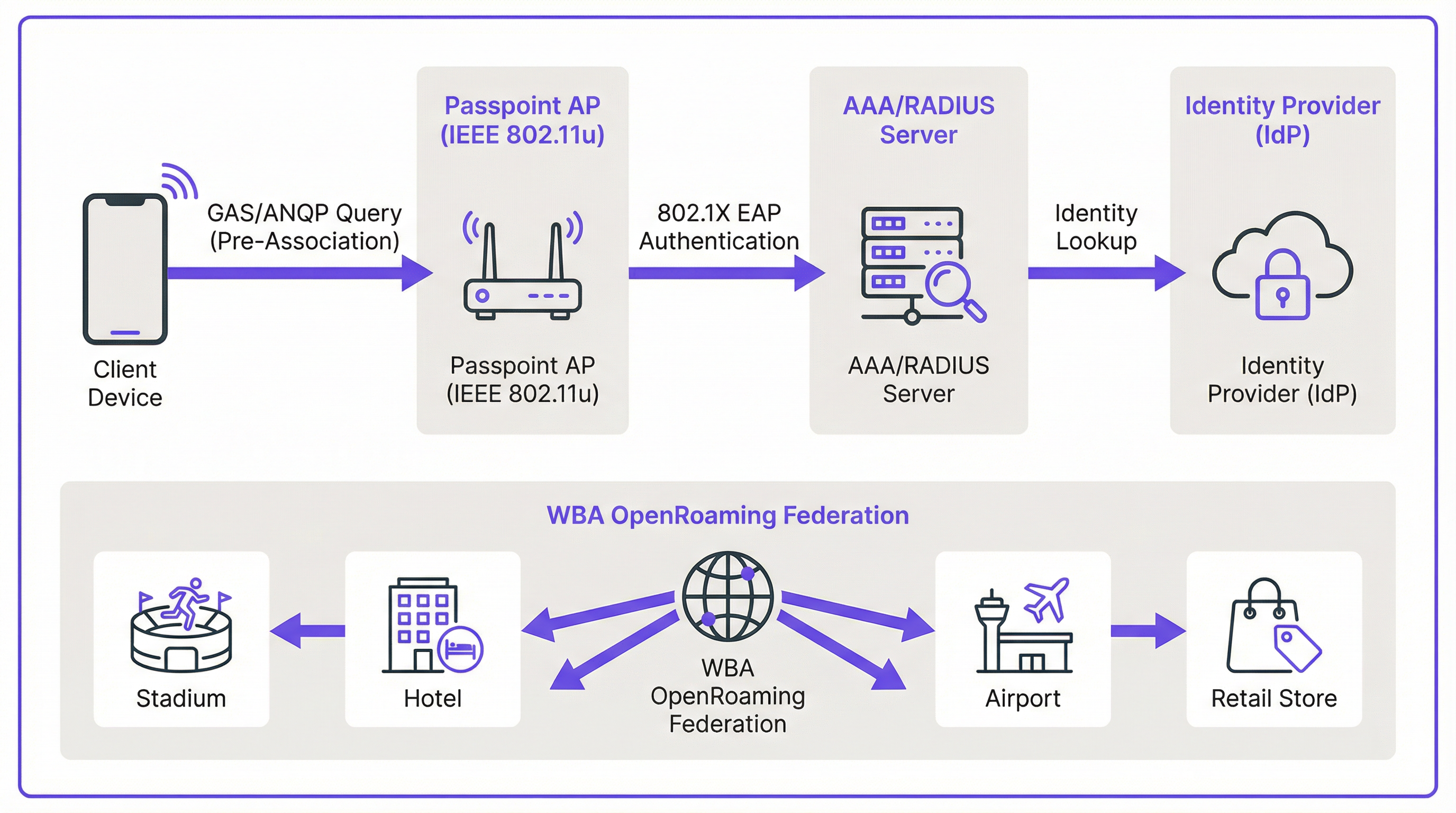
নিরবচ্ছিন্ন ডিসকভারি সক্ষম করার মেকানিজমটি IEEE 802.11u সংশোধনীতে সংজ্ঞায়িত করা হয়েছে। একটি ক্লায়েন্ট ডিভাইস কোনো অ্যাক্সেস পয়েন্টের সাথে যুক্ত হওয়ার চেষ্টা করার আগেই, কোনো রোমিং চুক্তি আছে কি না তা নির্ধারণ করতে নেটওয়ার্কে কোয়েরি করতে পারে। এই প্রি-অ্যাসোসিয়েশন কথোপকথনটি একসাথে কাজ করা দুটি মূল প্রোটোকল ব্যবহার করে।
Generic Advertisement Service (GAS) প্রমাণীকরণ (authentication) হওয়ার আগে একটি ক্লায়েন্ট স্টেশন এবং সার্ভারের মধ্যে অ্যাডভার্টাইজমেন্ট ফ্রেমের জন্য ট্রান্সপোর্ট লেয়ার প্রদান করে। Access Network Query Protocol (ANQP) হলো মূল কোয়েরি প্রোটোকল, যা GAS ফ্রেমের মধ্যে বহন করা হয়। ক্লায়েন্ট ডিভাইসটি নেটওয়ার্ককে নির্দিষ্ট প্রশ্ন জিজ্ঞাসা করতে ANQP ব্যবহার করে, যার মধ্যে সবচেয়ে গুরুত্বপূর্ণ হলো: এটি কোন রোমিং কনসোর্টিয়াম বা আইডেন্টিটি প্রোভাইডারদের সমর্থন করে?
সংযোগের প্রক্রিয়াটি নিম্নরূপ। একটি Passpoint-সক্ষম অ্যাক্সেস পয়েন্ট (AP) এর বীকন ফ্রেমে একটি Interworking Element অন্তর্ভুক্ত করে, যা Hotspot 2.0 সক্ষমতা ঘোষণা করার জন্য একটি ফ্ল্যাগ হিসেবে কাজ করে। একটি সামঞ্জস্যপূর্ণ ডিভাইস এই ফ্ল্যাগটি দেখতে পায় এবং AP-তে একটি ANQP কোয়েরি সম্বলিত একটি GAS রিকোয়েস্ট পাঠায়। কোয়েরিটি জানতে চায় যে নেটওয়ার্কটি কোন Roaming Consortium Organizational Identifiers (RCOIs) সমর্থন করে। যদি AP-এর রেসপন্সে এমন কোনো RCOI থাকে যা ডিভাইসের কোনো প্রোফাইলের সাথে মিলে যায় — উদাহরণস্বরূপ, কোনো মোবাইল ক্যারিয়ারের প্রোফাইল, বা একটি WBA OpenRoaming প্রোফাইল — তবে ডিভাইসটি সুরক্ষিত 802.1X হ্যান্ডশেক নিয়ে এগিয়ে যায়।
নিরাপত্তা: WPA3-Enterprise এবং 802.1X
নিরাপত্তাই হলো Passpoint-এর মূল ভিত্তি। একটি ওপেন, আনএনক্রিপ্টেড নেটওয়ার্কের ওপর থাকা Captive Portal-এর বিপরীতে, Passpoint WPA2-Enterprise বা WPA3-Enterprise-এর ব্যবহার বাধ্যতামূলক করে। এটি 802.1X প্রমাণীকরণ কার্যকর করে, যেখানে প্রতিটি ব্যবহারকারীর ডিভাইস একটি RADIUS সার্ভারের মাধ্যমে আলাদাভাবে যাচাই করা হয়। এই আর্কিটেকচারটি বেশ কিছু গুরুত্বপূর্ণ নিরাপত্তা সুবিধা প্রদান করে যা সরাসরি PCI DSS এবং GDPR কমপ্লায়েন্স বাধ্যবাধকতার সাথে প্রাসঙ্গিক।
ক্লায়েন্ট ডিভাইস এবং অ্যাক্সেস পয়েন্টের মধ্যবর্তী সমস্ত ট্রাফিক আলাদাভাবে এনক্রিপ্ট করা থাকে, যা প্যাসিভ ইভসড্রপিংয়ের (আড়িপাতা) ঝুঁকি দূর করে। যেহেতু প্রমাণীকরণ বিশ্বস্ত ক্রেডেনশিয়াল এবং সার্টিফিকেটের ওপর ভিত্তি করে হয়, তাই ব্যবহারকারীরা 'ইভিল টুইন' (evil twin) আক্রমণ থেকে সুরক্ষিত থাকেন, যেখানে কোনো ক্ষতিকারক ব্যক্তি ট্রাফিক ইন্টারসেপ্ট করার জন্য একটি ভুয়া SSID সম্প্রচার করে। এতে কোনো প্রি-শেয়ারড কী (PSKs) নেই, যা বেহাত হলে পুরো নেটওয়ার্ক ল্যাটারাল মুভমেন্টের (lateral movement) ঝুঁকিতে পড়তে পারে।
Passpoint বনাম OpenRoaming: একটি গুরুত্বপূর্ণ পার্থক্য
Passpoint স্ট্যান্ডার্ড এবং WBA OpenRoaming ফ্রেমওয়ার্কের মধ্যে পার্থক্য করা অত্যন্ত জরুরি, কারণ এই দুটি শব্দ প্রায়শই গুলিয়ে ফেলা হয়। এর সবচেয়ে কার্যকর উপমা হলো একটি গাড়ি এবং একটি হাইওয়ে সিস্টেমের মধ্যকার পার্থক্য।
Passpoint হলো গাড়ি: প্রযুক্তিগত স্ট্যান্ডার্ড (IEEE 802.11u) এবং Wi-Fi Alliance সার্টিফিকেশন যা একটি ডিভাইসকে স্বয়ংক্রিয়ভাবে নেটওয়ার্ক খুঁজে পেতে এবং সংযুক্ত হতে দেয়। OpenRoaming হলো হাইওয়ে: ওয়্যারলেস ব্রডব্যান্ড অ্যালায়েন্স (WBA) দ্বারা পরিচালিত একটি গ্লোবাল ফেডারেশন ফ্রেমওয়ার্ক, যা হাজার হাজার আইডেন্টিটি প্রোভাইডার (IdPs) — যেমন মোবাইল ক্যারিয়ার এবং ডিভাইস প্রস্তুতকারক — এবং অ্যাক্সেস নেটওয়ার্ক প্রোভাইডার (ANPs) যেমন হোটেল, স্টেডিয়াম এবং রিটেইল চেইনের মধ্যে একটি বিশ্বস্ত ইকোসিস্টেম তৈরি করে। একটি প্রাইভেট Passpoint ডিপ্লয়মেন্ট OpenRoaming ছাড়াই কাজ করতে পারে, তবে OpenRoaming-এ অংশগ্রহণের জন্য Passpoint প্রয়োজন।
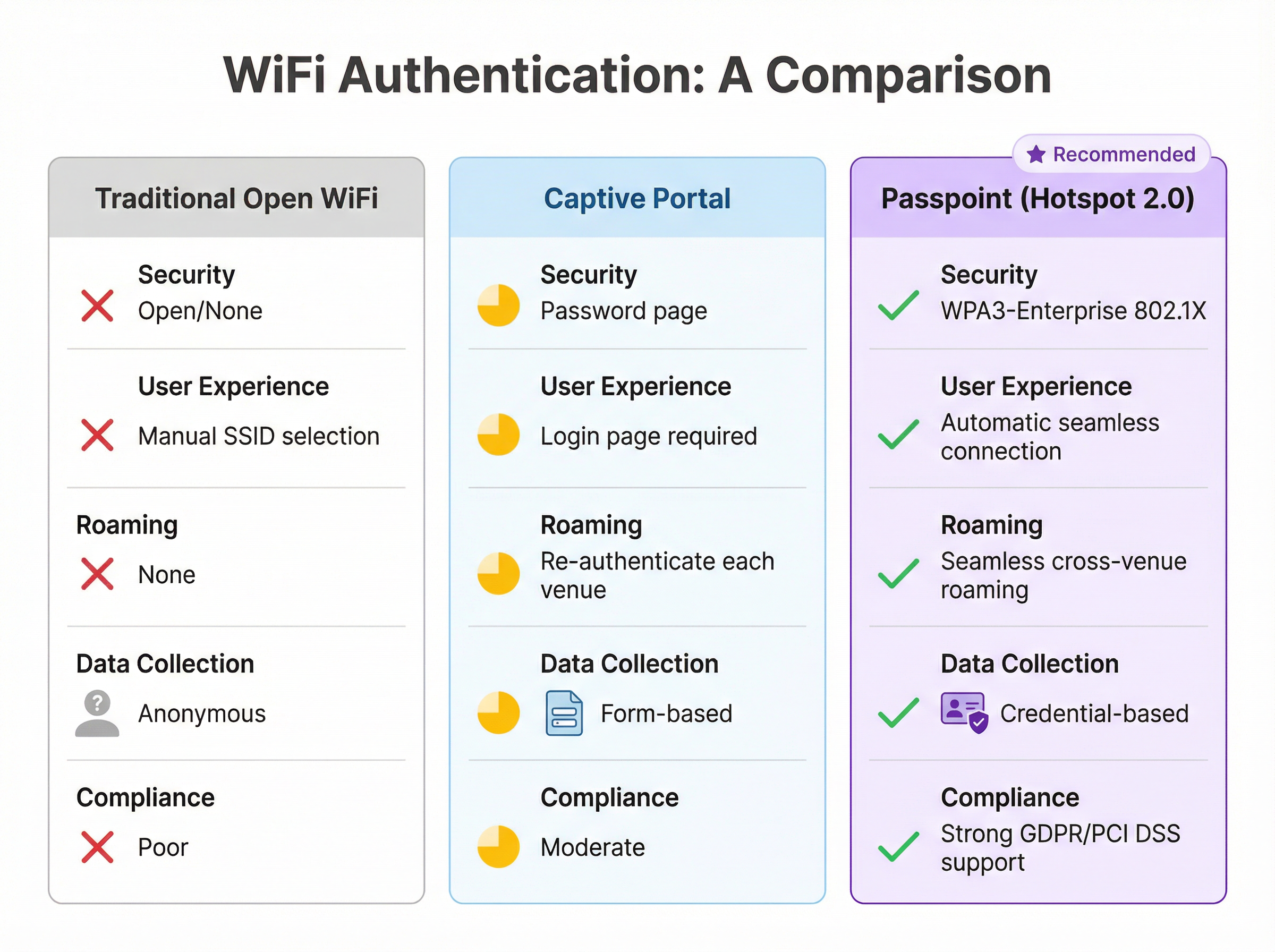
| বৈশিষ্ট্য | প্রথাগত ওপেন WiFi | Captive Portal | Passpoint (Hotspot 2.0) |
|---|---|---|---|
| নিরাপত্তা স্ট্যান্ডার্ড | নেই (ওপেন) | পরিবর্তনশীল (প্রায়শই ওপেন) | WPA3-Enterprise (802.1X) |
| ব্যবহারকারীর অভিজ্ঞতা | ম্যানুয়াল SSID নির্বাচন | লগইন পেজ প্রয়োজন | সম্পূর্ণ স্বয়ংক্রিয় |
| ক্রস-ভেন্যু রোমিং | নেই | প্রতিবার পুনরায় প্রমাণীকরণ | নিরবচ্ছিন্ন |
| ডেটা সংগ্রহ | বেনামী | ফর্ম-ভিত্তিক (GDPR ঝুঁকি) | ক্রেডেনশিয়াল-ভিত্তিক |
| PCI DSS অ্যালাইনমেন্ট | দুর্বল | মাঝারি | শক্তিশালী |
বাস্তবায়ন গাইড
Passpoint ডিপ্লয় করা একটি সুগঠিত প্রক্রিয়া যা মূল্যায়ন থেকে শুরু করে ইনফ্রাস্ট্রাকচার কনফিগারেশন, পাইলট টেস্টিং এবং সম্পূর্ণ রোলআউট পর্যন্ত অগ্রসর হয়। একটি পর্যায়ক্রমিক পদ্ধতি একটি মসৃণ রূপান্তর নিশ্চিত করে এবং বিদ্যমান ব্যবহারকারীদের জন্য ব্যাঘাত কমায়।
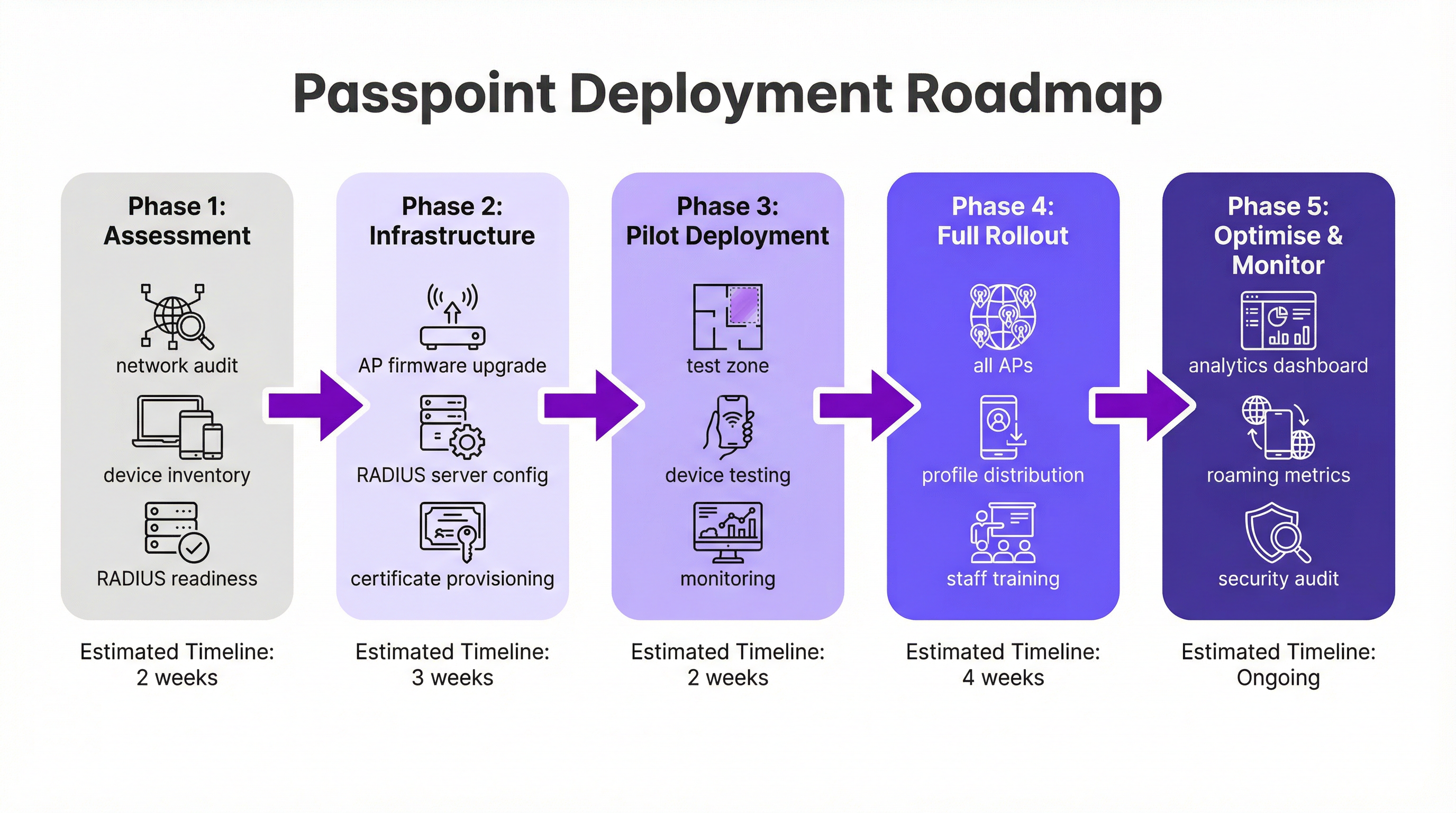
পর্যায় ১: মূল্যায়ন এবং পরিকল্পনা (২ সপ্তাহ)। আপনার বিদ্যমান WiFi হার্ডওয়্যার প্রয়োজনীয় IEEE 802.11u বৈশিষ্ট্যগুলো সমর্থন করে কি না তা যাচাই করতে একটি সম্পূর্ণ নেটওয়ার্ক অডিট দিয়ে শুরু করুন। গত পাঁচ থেকে সাত বছরে তৈরি হওয়া বেশিরভাগ এন্টারপ্রাইজ-গ্রেড হার্ডওয়্যার এর সাথে সামঞ্জস্যপূর্ণ, তবে প্রায়শই একটি ফার্মওয়্যার আপডেটের প্রয়োজন হয়। একই সাথে, আপনার RADIUS ইনফ্রাস্ট্রাকচারের ধারণক্ষমতা, হাই-অ্যাভেইলেবিলিটি এবং সার্টিফিকেট-ভিত্তিক EAP পদ্ধতিগুলো পরিচালনা করার সক্ষমতা মূল্যায়ন করুন। আপনার আইডেন্টিটি কৌশল নির্ধারণ করুন: আপনি কি কোনো লয়্যালটি প্রোগ্রাম ডেটাবেসের বিপরীতে ব্যবহারকারীদের প্রমাণীকরণ করবেন, কোনো মোবাইল ক্যারিয়ার পার্টনারের সাথে ইন্টিগ্রেট করবেন, নাকি WBA OpenRoaming ফেডারেশনে যোগ দেবেন?
পর্যায় ২: ইনফ্রাস্ট্রাকচার কনফিগারেশন (৩ সপ্তাহ)। সমস্ত AP এবং কন্ট্রোলারগুলোতে ফার্মওয়্যার আপডেট রোলআউট করুন। নির্বাচিত EAP ধরনগুলো সমর্থন করার জন্য আপনার RADIUS সার্ভার কনফিগার করুন — সার্টিফিকেট-ভিত্তিক প্রমাণীকরণের জন্য EAP-TLS হলো সবচেয়ে নিরাপদ বিকল্প, যেখানে EAP-TTLS একটি অধিকতর নমনীয় বিকল্প প্রদান করে। OpenRoaming-এ অংশগ্রহণ করলে, প্রয়োজনীয় WBA PKI সার্টিফিকেট সংগ্রহ করুন। প্রাসঙ্গিক RCOI-সহ Hotspot 2.0 বৈশিষ্ট্যগুলো চালু করে WPA3-Enterprise-এর জন্য কনফিগার করা একটি ডেডিকেটেড WLAN প্রোফাইল তৈরি করুন। সর্বাধিক ডিভাইস সামঞ্জস্যের জন্য, স্ট্যান্ডার্ড সেটেলমেন্ট-ফ্রি RCOI (5A-03-BA) এবং লিগ্যাসি Cisco RCOI (00-40-96) উভয়ই সম্প্রচার করুন।
পর্যায় ৩: পাইলট ডিপ্লয়মেন্ট (২ সপ্তাহ)। পাইলটের জন্য আপনার ভেন্যুর একটি সীমিত, নিয়ন্ত্রিত এলাকা — একটি নির্দিষ্ট ফ্লোর, একটি নির্দিষ্ট কনফারেন্স রুম, বা রিটেইল স্টোরের একটি জোন — নির্ধারণ করুন। iOS, Android এবং Windows প্ল্যাটফর্ম জুড়ে টেস্ট ডিভাইসগুলো অনবোর্ড করুন। নিরবচ্ছিন্ন ডিসকভারি, প্রমাণীকরণ এবং AP-থেকে-AP রোমিং যাচাই করতে RADIUS লগ এবং নেটওয়ার্ক পারফরম্যান্স নিবিড়ভাবে পর্যবেক্ষণ করুন।
পর্যায় ৪: সম্পূর্ণ রোলআউট এবং প্রোফাইল ডিস্ট্রিবিউশন (৪ সপ্তাহ)। ভেন্যু জুড়ে সমস্ত AP-তে যাচাইকৃত কনফিগারেশন প্রয়োগ করুন। আপনার প্রোফাইল ডিস্ট্রিবিউশন কৌশল নির্ধারণ করুন: হসপিটালিটি এবং রিটেইলের জন্য একটি ব্র্যান্ডেড মোবাইল অ্যাপে ইন্টিগ্রেশন হলো গোল্ড স্ট্যান্ডার্ড, যেখানে কর্পোরেট পরিবেশের জন্য একটি MDM প্ল্যাটফর্ম হলো উপযুক্ত মাধ্যম। নতুন আর্কিটেকচার এবং সাধারণ ট্রাবলশুটিং পদ্ধতি সম্পর্কে আইটি সাপোর্ট স্টাফদের প্রশিক্ষণ দিন。
পর্যায় ৫: অপ্টিমাইজ এবং মনিটর (চলমান)। রোমিং প্যাটার্ন, প্রমাণীকরণের সাফল্যের হার এবং ডিভাইসের ধরনের ডিস্ট্রিবিউশন পর্যবেক্ষণ করতে নেটওয়ার্ক অ্যানালিটিক্স ব্যবহার করুন। ব্যবহারকারীর অভিজ্ঞতা উন্নত করতে এবং CRM, PMS, বা মার্কেটিং অটোমেশন প্ল্যাটফর্মগুলোর সাথে আরও গভীরভাবে ইন্টিগ্রেট করার সুযোগ অন্বেষণ করতে এই ডেটা ব্যবহার করুন। PCI DSS এবং GDPR প্রয়োজনীয়তাগুলোর সাথে কমপ্লায়েন্স বজায় রাখতে নিয়মিত সিকিউরিটি অডিট পরিচালনা করুন।
বেস্ট প্র্যাকটিস
হসপিটালিটি, রিটেইল এবং ট্রান্সপোর্ট সেক্টর জুড়ে বড় পরিসরের Passpoint ডিপ্লয়মেন্ট থেকে বেশ কিছু ভেন্ডর-নিরপেক্ষ বেস্ট প্র্যাকটিস উঠে এসেছে।
সামঞ্জস্যের জন্য একাধিক RCOI সম্প্রচার করা অপরিহার্য। স্ট্যান্ডার্ড সেটেলমেন্ট-ফ্রি RCOI (5A-03-BA) OpenRoaming-এ অন্তর্ভুক্ত বেশিরভাগ আধুনিক ডিভাইস কভার করে, যেখানে লিগ্যাসি Cisco RCOI (00-40-96) পুরোনো Android ডিভাইস এবং OneUI চালিত Samsung হ্যান্ডসেটগুলোর জন্য অত্যন্ত গুরুত্বপূর্ণ। লিগ্যাসি RCOI বাদ দিলে তা নীরবে আপনার ব্যবহারকারী বেসের একটি উল্লেখযোগ্য অংশকে বাদ দিতে পারে।
সমস্ত নতুন ডিপ্লয়মেন্টের জন্য WPA3-Enterprise ডিফল্ট হওয়া উচিত। যদিও WPA2-Enterprise এখনও সমর্থিত, WPA3 একটি বাধ্যতামূলক বৈশিষ্ট্য হিসেবে Protected Management Frames (PMF) চালু করেছে, যা ডিঅথেনটিকেশন (deauthentication) আক্রমণের বিরুদ্ধে সুরক্ষার একটি অতিরিক্ত স্তর প্রদান করে।
লয়্যালটি বা গেস্ট অ্যাপ থাকা ব্র্যান্ডগুলোর জন্য, সরাসরি অ্যাপের মধ্যে Passpoint প্রোফাইল ইনস্টলেশন ইন্টিগ্রেট করা হলো সবচেয়ে কার্যকর ডিস্ট্রিবিউশন মেকানিজম। ব্যবহারকারীর প্রথম লগইনের সময় প্রোফাইলটি স্বয়ংক্রিয়ভাবে পুশ করা যেতে পারে, যা একটি সম্পূর্ণ বাধাহীন অনবোর্ডিং অভিজ্ঞতা তৈরি করে এবং পরবর্তী ভিজিটগুলোতে ব্যবহারকারীর কোনো পদক্ষেপের প্রয়োজন হয় না।
কমপ্লায়েন্সের জন্য VLAN-এর মাধ্যমে নেটওয়ার্ক সেগমেন্টেশন হলো একটি আপসহীন বেস্ট প্র্যাকটিস। Passpoint ট্রাফিককে অভ্যন্তরীণ কর্পোরেট নেটওয়ার্ক এবং পেমেন্ট কার্ড ডেটা পরিচালনা করে এমন যেকোনো সিস্টেম থেকে আলাদা রাখা উচিত, যা একটি পরিচ্ছন্ন PCI DSS স্কোপ বাউন্ডারি নিশ্চিত করে।
ট্রাবলশুটিং এবং ঝুঁকি প্রশমন
ডিপ্লয়মেন্টের আগে সবচেয়ে সাধারণ ফেইলিওর মোডগুলো (failure modes) বোঝা একটি সমস্যামূলক গো-লাইভের (go-live) ঝুঁকি উল্লেখযোগ্যভাবে হ্রাস করে।
সবচেয়ে সাধারণ সমস্যাটি হলো একটি ডিভাইসের স্বয়ংক্রিয়ভাবে সংযুক্ত হতে ব্যর্থ হওয়া। এর মূল কারণ প্রায় সবসময়ই ক্লায়েন্ট ডিভাইসে একটি অনুপস্থিত, ভুলভাবে ফর্ম্যাট করা, বা মেয়াদোত্তীর্ণ Passpoint প্রোফাইল। প্রোফাইলটি সঠিকভাবে ইনস্টল করা আছে কি না এবং এটি যে RCOI নির্দিষ্ট করে তা নেটওয়ার্ক দ্বারা সম্প্রচারিত RCOI-এর সাথে মেলে কি না তা যাচাই করুন। iOS-এ, Settings অ্যাপের মাধ্যমে প্রোফাইলগুলো পরীক্ষা করা যেতে পারে; Android-এ, প্রক্রিয়াটি প্রস্তুতকারকের ওপর নির্ভর করে পরিবর্তিত হয়।
প্রমাণীকরণ ব্যর্থতা হলো দ্বিতীয় সবচেয়ে সাধারণ সমস্যা। RADIUS সার্ভার লগগুলো হলো চূড়ান্ত ডায়াগনস্টিক টুল। ব্যর্থতাগুলো সাধারণত ভুল ক্রেডেনশিয়াল ফর্ম্যাট, মেয়াদোত্তীর্ণ সার্টিফিকেট, বা কোনো আপস্ট্রিম আইডেন্টিটি প্রোভাইডারের সাথে একটি ভাঙা ট্রাস্ট রিলেশনশিপ থেকে উদ্ভূত হয়। OpenRoaming-এ যোগ দেওয়ার সময়, নিশ্চিত করুন যে WBA রুট সার্টিফিকেটগুলো আপনার RADIUS সার্ভারের ট্রাস্ট স্টোরে সঠিকভাবে ইনস্টল করা আছে।
ফায়ারওয়াল মিসকনফিগারেশন হলো একটি ডিপ্লয়মেন্ট-ব্লকিং ঝুঁকি যা সহজেই এড়িয়ে যাওয়া হয়। আপনার RADIUS সার্ভার এবং যেকোনো ফেডারেটেড রোমিং পার্টনার বা OpenRoaming প্রক্সি সার্ভারের মধ্যে RadSec ট্রাফিক (TCP পোর্ট 2083) অবশ্যই অনুমোদিত হতে হবে। গো-লাইভের আগে এই নিয়মটি স্পষ্টভাবে যাচাই করুন।
RADIUS ইনফ্রাস্ট্রাকচারের হাই-অ্যাভেইলেবিলিটি হলো সবচেয়ে জটিল পরিচালনাগত ঝুঁকি। একটি RADIUS সার্ভার আউটেজ সমস্ত Passpoint প্রমাণীকরণ প্রতিরোধ করবে, যা কার্যকরভাবে সমস্ত নিবন্ধিত ব্যবহারকারীর জন্য নেটওয়ার্ক ডাউন করে দেবে। ক্লাস্টার করা বা ভৌগোলিকভাবে রিডান্ড্যান্ট (redundant) এক জোড়া RADIUS সার্ভার ডিপ্লয় করুন এবং প্রোডাকশন রোলআউটের আগে ফেইলওভার (failover) মেকানিজম পরীক্ষা করুন।
ROI এবং ব্যবসায়িক প্রভাব
Passpoint বাস্তবায়ন করা বেশ কয়েকটি ডোমেইন জুড়ে পরিমাপযোগ্য ব্যবসায়িক মান প্রদান করে, যা আইটি এবং বৃহত্তর ব্যবসা উভয়ের জন্যই বিনিয়োগের ক্ষেত্রটিকে আকর্ষণীয় করে তোলে।
সবচেয়ে তাৎক্ষণিক পরিচালনাগত সুবিধা হলো আইটি সাপোর্ট খরচ হ্রাস। ব্যবহারকারীদের ম্যানুয়ালি SSID নির্বাচন, পাসওয়ার্ড প্রবেশ করানো, বা সেশন টাইমআউটের পরে পুনরায় প্রমাণীকরণ করার প্রয়োজনীয়তা দূর করে, Passpoint নাটকীয়ভাবে WiFi-সম্পর্কিত সাপোর্ট টিকিটের পরিমাণ কমিয়ে দেয়। একটি বড় হোটেল বা কনফারেন্স সেন্টারের জন্য, এটি ফ্রন্ট-ডেস্ক এবং আইটি হেল্পডেস্কের কাজের চাপ উল্লেখযোগ্যভাবে হ্রাস করতে পারে।
অতিথিদের সন্তুষ্টি একটি প্রত্যক্ষ এবং পরিমাপযোগ্য ফলাফল। হসপিটালিটি সেক্টরে, গেস্ট স্যাটিসফ্যাকশন সার্ভেগুলোতে WiFi-এর মান ধারাবাহিকভাবে শীর্ষ বিষয়গুলোর মধ্যে থাকে। একটি নিরবচ্ছিন্ন, স্বয়ংক্রিয় সংযোগের অভিজ্ঞতা — বিশেষ করে ফিরে আসা অতিথিদের জন্য যাদের কোনো পদক্ষেপ ছাড়াই চিনে নেওয়া হয় এবং সংযুক্ত করা হয় — একটি শক্তিশালী ইতিবাচক ধারণা তৈরি করে যা লয়্যালটি এবং রিপিট বিজনেস (repeat business) বৃদ্ধি করে।
বেনামী ওপেন-নেটওয়ার্ক ডেটা থেকে ক্রেডেনশিয়াল-ভিত্তিক Passpoint ডেটাতে রূপান্তর উল্লেখযোগ্য অ্যানালিটিক্যাল ভ্যালু উন্মোচন করে। ভেন্যুগুলো ভিজিট ফ্রিকোয়েন্সি, লোকেশন অনুযায়ী ডোয়েন টাইম (dwell time) এবং ডিভাইসের ডেমোগ্রাফিক্স এমন নিখুঁতভাবে বুঝতে পারে যা একটি Captive Portal-এর মাধ্যমে কোনোভাবেই সম্ভব নয়। এই ডেটা, যখন CRM এবং মার্কেটিং প্ল্যাটফর্মগুলোর সাথে ইন্টিগ্রেট করা হয়, তখন পার্সোনালাইজড এনগেজমেন্ট সক্ষম করে যা টার্গেটেড প্রমোশন এবং আপসেল (upsell) সুযোগের মাধ্যমে ক্রমবর্ধমান আয় বৃদ্ধি করে।
পরিশেষে, Passpoint-এর কমপ্লায়েন্স এবং ঝুঁকি প্রশমনের মানকে অবমূল্যায়ন করা উচিত নয়। GDPR এবং PCI DSS-এর অধীনে ক্রমবর্ধমান রেগুলেটরি স্ক্রুটিনির পরিবেশে, WPA3-Enterprise-এর এন্টারপ্রাইজ-গ্রেড নিরাপত্তা ওপেন বা PSK-ভিত্তিক নেটওয়ার্কগুলোর চেয়ে তুলনামূলকভাবে শক্তিশালী নিরাপত্তা ব্যবস্থা প্রদান করে। এটি ডেটা ব্রিচের ঝুঁকি এবং এর সাথে যুক্ত আর্থিক ও সুনামের ক্ষতি হ্রাস করে।
Key Terms & Definitions
IEEE 802.11u
An amendment to the IEEE 802.11 WiFi standard that enables network discovery and information exchange between a client device and an access point before an association is established. It is the foundational standard underpinning Passpoint.
When evaluating WiFi hardware for a Passpoint deployment, IT teams should verify that the access points and controllers explicitly list IEEE 802.11u support in their technical specifications. Its presence confirms the hardware is capable of Hotspot 2.0 features.
ANQP (Access Network Query Protocol)
The protocol used by a client device to query a Hotspot 2.0-enabled access point for information before associating, including its roaming partners, venue name, IP address type availability, and network capabilities.
During troubleshooting, a network architect can use a wireless packet analyser to inspect ANQP frames and confirm that the AP is correctly advertising its roaming consortium OIs and that the client is receiving and processing the response.
RCOI (Roaming Consortium Organizational Identifier)
A unique identifier that represents a group of network providers who have a roaming agreement. A client device will only attempt to connect to a Passpoint network if the RCOI broadcast by the AP matches an RCOI specified in one of its installed Passpoint profiles.
This is the most critical configuration parameter in a Passpoint deployment. Incorrect or missing RCOIs are the most common cause of devices failing to connect automatically. The standard OpenRoaming RCOI is 5A-03-BA; the legacy Cisco RCOI is 00-40-96.
RADIUS (Remote Authentication Dial-In User Service)
A networking protocol providing centralised Authentication, Authorization, and Accounting (AAA) management for users connecting to a network service. In a Passpoint deployment, the RADIUS server is the core authentication engine.
The RADIUS server is the single most critical piece of infrastructure in a Passpoint deployment. Its availability directly determines the availability of the Passpoint network. IT teams should deploy RADIUS in a high-availability cluster and monitor it proactively.
EAP (Extensible Authentication Protocol)
An authentication framework used in 802.1X networks that supports multiple authentication methods. Common EAP types used with Passpoint include EAP-TLS (certificate-based, highest security), EAP-TTLS (tunnelled credentials), and EAP-SIM/AKA (SIM-card based, used by mobile carriers).
The choice of EAP method determines the security level and operational complexity of the deployment. EAP-TLS requires a PKI to issue client certificates, which is operationally demanding but provides the strongest security. EAP-TTLS is a common, more manageable alternative for enterprise deployments.
WBA (Wireless Broadband Alliance)
A global industry organisation that promotes the adoption of interoperable wireless services. The WBA manages the OpenRoaming federation, including its PKI, policy framework, and the onboarding of Identity Providers and Access Network Providers.
When a venue operator decides to join OpenRoaming, they are entering into a legal and technical framework governed by the WBA. This involves signing a participation agreement, obtaining WBA PKI certificates, and configuring their network to comply with the OpenRoaming technical specifications.
Identity Provider (IdP)
An entity that creates, maintains, and manages identity information and provides authentication services to relying parties. In the Passpoint/OpenRoaming ecosystem, IdPs include mobile carriers (e.g., Verizon, EE), device manufacturers (e.g., Samsung), and enterprises.
Understanding the IdP model is essential for scoping a Passpoint deployment. The venue operator (as the Access Network Provider) does not need to manage user identities; it delegates that responsibility to trusted IdPs via the roaming federation.
RadSec (RADIUS over TLS)
A protocol that secures RADIUS communication by tunnelling it over Transport Layer Security (TLS), typically on TCP port 2083. It replaces the traditional UDP-based RADIUS transport, providing encryption and mutual authentication for RADIUS traffic.
RadSec is a mandatory component of the OpenRoaming framework. IT teams must ensure that firewall rules explicitly permit TCP port 2083 between their RADIUS server and the OpenRoaming proxy servers. This is a frequently overlooked configuration step that can block all federated authentication.
Case Studies
A 500-room luxury hotel with a large conference centre wants to replace its legacy captive portal system. The goal is to provide seamless, secure WiFi for hotel guests, conference attendees, and staff, while also enabling personalised engagement through the hotel's loyalty app.
The recommended approach is a phased Passpoint deployment integrated with the hotel's loyalty programme. Begin with a full audit of the existing Cisco Meraki network to confirm all APs support Hotspot 2.0. Configure the hotel's RADIUS server to authenticate loyalty members using EAP-TTLS against the loyalty programme's member database. Update the hotel's mobile app to include a Passpoint profile installation flow, triggered automatically upon the user's first login. Create two distinct WLAN profiles: one for guests and loyalty members broadcasting the hotel's specific RCOI, and a second for conference attendees that utilises the WBA OpenRoaming RCOI (5A-03-BA) to allow attendees from diverse organisations to connect automatically without any pre-registration. In the loyalty app, configure a trigger to send a personalised welcome notification upon guest arrival, detected via the Passpoint connection event, including their room number and a link to book restaurant reservations.
A large retail chain with 300 stores across the country uses a basic open guest WiFi network. They face challenges with network abuse, a poor user experience, and an inability to gather meaningful customer data. They need a scalable, secure solution that can be managed centrally.
The retailer should implement a Passpoint solution federated with WBA OpenRoaming, managed via a centralised cloud platform. Replace the existing consumer-grade access points with enterprise-grade hardware from a vendor such as HPE Aruba Networking, managed through Aruba Central. Deploy a cloud-based RADIUS infrastructure for scalability and simplified management across all 300 locations. Configure the WLAN profile on Aruba Central to enable Passpoint and broadcast the OpenRoaming RCOI. The RADIUS server proxies all authentication requests to the OpenRoaming federation, meaning any shopper with a Passpoint profile from their mobile carrier can connect automatically and securely at any of the 300 stores without any pre-registration. Leverage the anonymised, credential-based data from RADIUS accounting logs to analyse footfall and dwell times by store zone, without collecting personal information via a captive portal, thereby simplifying GDPR compliance significantly.
Scenario Analysis
Q1. You are the network architect for a major international airport. You have been tasked with improving the passenger WiFi experience, which currently uses a slow, cumbersome captive portal. The airport hosts dozens of different airlines, and passengers arrive from all over the world with devices from hundreds of different carriers. What is your recommended strategy for implementing Passpoint?
💡 Hint:Consider the diversity of users and the need for a globally interoperable solution. How can you avoid the operational burden of managing bilateral roaming agreements with hundreds of mobile carriers?
Show Recommended Approach
The optimal strategy is to deploy a Passpoint-certified network and join the WBA OpenRoaming federation. This allows the airport to accept credentials from a vast ecosystem of identity providers — including major global mobile carriers and device manufacturers — without negotiating individual roaming agreements. The implementation involves upgrading the airport's WiFi infrastructure to be Passpoint-compliant (802.11u-capable APs with current firmware), configuring the RADIUS servers to proxy authentication requests to the OpenRoaming network via RadSec, and broadcasting the standard OpenRoaming RCOI (5A-03-BA) alongside the legacy Cisco RCOI (00-40-96) for compatibility. This provides a seamless, secure, automatic connection experience for the majority of travellers, dramatically improving satisfaction scores and reducing WiFi-related support burden.
Q2. A large university campus wants to extend its secure Eduroam WiFi service into the surrounding student-heavy cafes and local businesses. The goal is to allow students and staff to seamlessly roam from the campus network to these partner venues. How would you use Passpoint to achieve this?
💡 Hint:Eduroam is itself a roaming federation based on 802.1X. Consider how you can extend the university's identity trust to third-party venues without requiring those venues to manage student credentials directly.
Show Recommended Approach
This is a well-suited use case for a private Passpoint federation. The university acts as the central Identity Provider. The partner cafes and shops become Access Network Providers. The university's IT department provides the partner venues with access to a cloud-based RADIUS proxy that is configured to trust the university's main RADIUS server. The cafes' APs are configured to broadcast a specific RCOI designated for this 'Campus Community' network. The university then updates the Passpoint profile on student and staff devices — distributed via the university's MDM platform — to include this new RCOI. When a student enters a partner cafe, their device recognises the RCOI, initiates an 802.1X connection, and the cafe's network proxies the authentication back to the university's trusted RADIUS server. Students are connected automatically and securely; the cafe never handles student credentials directly.
Q3. Your organisation has deployed Passpoint in its corporate headquarters. During the pilot phase, Android devices are connecting successfully, but a significant number of corporate-issued iPhones are failing to connect automatically. What is the most likely cause and how would you systematically troubleshoot it?
💡 Hint:Device operating systems handle Passpoint profiles differently. In a corporate environment, consider how profiles are created, signed, and distributed to managed iOS devices.
Show Recommended Approach
The most likely cause is an issue with the Passpoint configuration profile on the managed iPhones. iOS devices in a corporate environment are typically managed via an MDM platform, and Passpoint profiles must be correctly structured as Apple Configuration Profiles (.mobileconfig). The systematic troubleshooting process is: (1) Check the MDM console to confirm the profile has been successfully pushed to the affected devices; (2) On a test iPhone, navigate to Settings > General > VPN & Device Management to verify the profile is installed and not showing an error; (3) Manually install a known-good, manually created profile on a test iPhone to determine if the issue is with the profile content or the MDM delivery mechanism; (4) Inspect the RADIUS server logs for authentication attempts from the failing iPhones — the rejection reason (e.g., 'client certificate not trusted', 'unknown EAP type') will identify the specific misconfiguration; (5) Verify that the trusted root certificate for the RADIUS server is included in the MDM-pushed profile, as iOS requires explicit trust for the server certificate used in EAP authentication.
Key Takeaways
- ✓Passpoint (Hotspot 2.0) is a Wi-Fi Alliance certification based on IEEE 802.11u that enables automatic, secure WiFi connection without manual SSID selection or captive portal login.
- ✓The technology uses GAS and ANQP protocols for pre-association network discovery, allowing devices to identify compatible networks using Roaming Consortium Organizational Identifiers (RCOIs) before committing to a connection.
- ✓All Passpoint connections are secured with WPA2 or WPA3-Enterprise and 802.1X authentication, providing enterprise-grade encryption and eliminating the risk of rogue AP attacks.
- ✓WBA OpenRoaming is a global federation built on Passpoint that enables large-scale, interoperable roaming between thousands of networks without bilateral agreements — the recommended approach for large public venues.
- ✓A successful deployment requires three pillars: compliant 802.11u infrastructure, a highly available RADIUS server, and a clear strategy for distributing Passpoint profiles to user devices.
- ✓The business case is compelling: reduced IT support costs, measurably improved guest satisfaction, richer credential-based analytics, and a stronger compliance posture under GDPR and PCI DSS.
- ✓For maximum device compatibility, always broadcast both the standard OpenRoaming RCOI (5A-03-BA) and the legacy Cisco RCOI (00-40-96) on your Passpoint WLAN.




