

গেস্ট WiFi-এর জন্য সোশ্যাল লগইন: Facebook, Google, Apple এবং LinkedIn
This guide provides a comprehensive technical reference for IT managers, network architects, and venue operators deploying social login on guest WiFi networks. It covers the OAuth 2.0 Authorization Code Flow underpinning Facebook, Google, Apple, and LinkedIn authentication, the specific data each platform provides, and the critical iOS compatibility constraints affecting Google OAuth in captive portal environments. Compliance obligations under UK GDPR, platform selection frameworks, and real-world deployment case studies from hospitality and retail are included to support implementation decisions this quarter.
🎧 Listen to this Guide
View Transcript
কার্যনির্বাহী সারাংশ
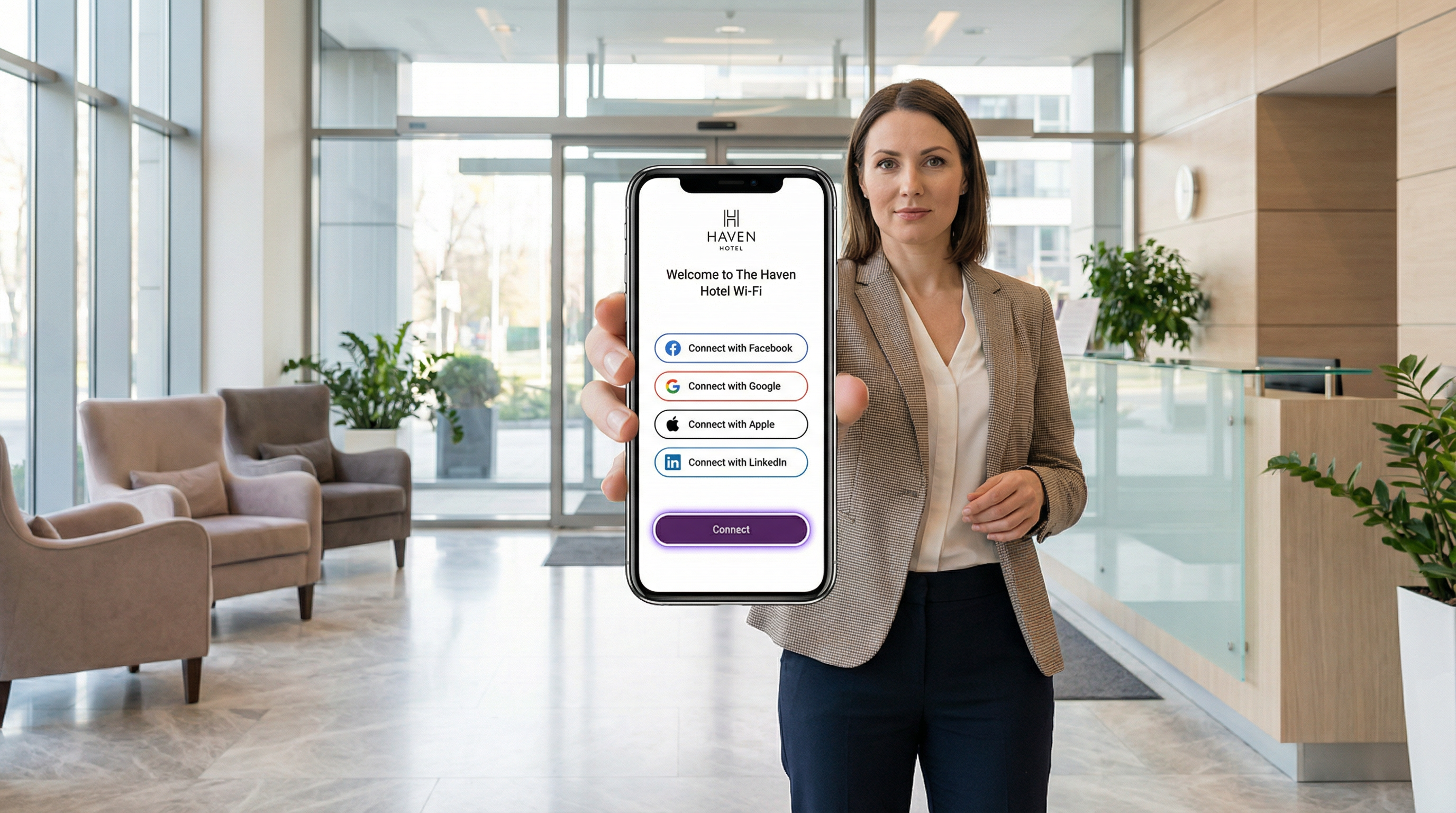
সোশ্যাল লগইন WiFi ভেন্যু অপারেটরদের বেনামী ক্লিক-থ্রু অ্যাক্সেসের পরিবর্তে পরিচয়-যাচাইকৃত প্রমাণীকরণ ব্যবহার করার সুবিধা দেয়, যা প্রতিটি গেস্ট WiFi সংযোগকে একটি ফার্স্ট-পার্টি ডেটা অ্যাসেটে পরিণত করে। Facebook, Google, Apple ID, বা LinkedIn-এর সাথে OAuth 2.0 ইন্টিগ্রেট করার মাধ্যমে হসপিটালিটি, রিটেইল, ইভেন্ট এবং পাবলিক সেক্টরের সংস্থাগুলো নেটওয়ার্ক অ্যাক্সেসের সময়ই যাচাইকৃত গেস্ট প্রোফাইল — নাম, ইমেল, ডেমোগ্রাফিক বৈশিষ্ট্য এবং LinkedIn-এর ক্ষেত্রে পেশাদার প্রেক্ষাপট — সংগ্রহ করতে পারে।
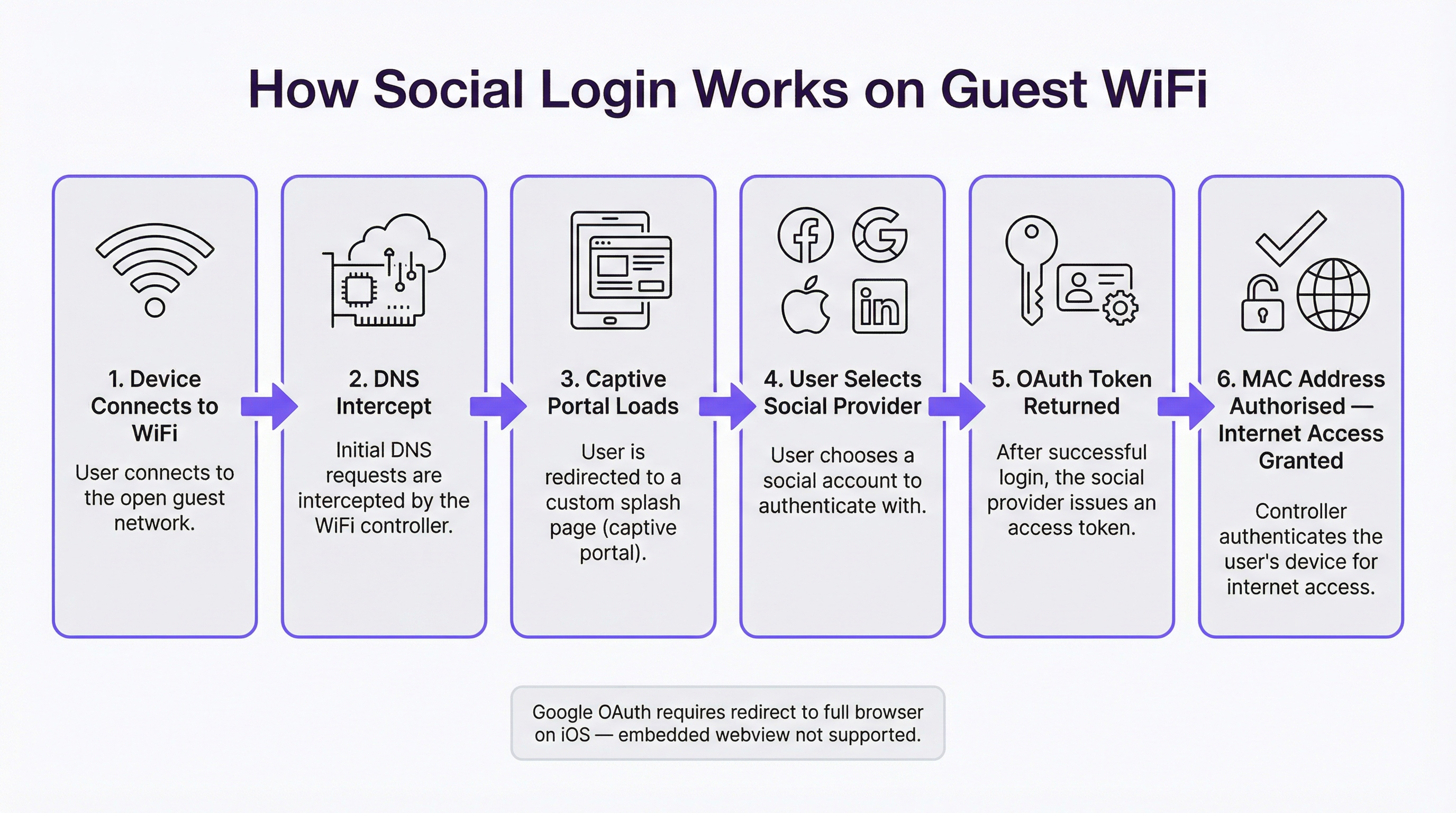
এর টেকনিক্যাল আর্কিটেকচারটি বেশ সহজ: একটি Captive Portal গেস্টের প্রাথমিক DNS রিকোয়েস্ট ইন্টারসেপ্ট করে, একটি ব্র্যান্ডেড স্প্ল্যাশ পেজ প্রদর্শন করে এবং নির্বাচিত আইডেন্টিটি প্রোভাইডারের সাথে একটি OAuth Authorization Code Flow শুরু করে। প্রাপ্ত অ্যাক্সেস টোকেনটি প্রোফাইল ডেটা পুনরুদ্ধার করতে ব্যবহৃত হয়, যা নেটওয়ার্ক অ্যাক্সেস দেওয়ার আগে গেস্টের MAC অ্যাড্রেসের বিপরীতে স্টোর করা হয়। সাধারণ পরিস্থিতিতে সম্পূর্ণ ফ্লোটি তিন থেকে আট সেকেন্ডের মধ্যে সম্পন্ন হয়।
তবে, প্ল্যাটফর্ম-নির্দিষ্ট সীমাবদ্ধতাগুলো — বিশেষ করে এমবেডেড ওয়েবভিউতে OAuth-এর উপর Google-এর নিষেধাজ্ঞা, যা সরাসরি iOS Captive Portal-এর আচরণকে প্রভাবিত করে — গো-লাইভের আগে সুচিন্তিত ইঞ্জিনিয়ারিং সিদ্ধান্তের দাবি রাখে। যেকোনো UK বা EU ডিপ্লয়মেন্টের জন্য GDPR কমপ্লায়েন্স, ডেটা মিনিমাইজেশনের বাধ্যবাধকতা এবং রিটেনশন পলিসি প্রয়োগ করা অপরিহার্য। এই গাইডটি আপনার টিমকে সঠিক প্ল্যাটফর্ম নির্বাচন, সঠিকভাবে বাস্তবায়ন এবং নিয়ন্ত্রক সীমার মধ্যে কাজ করার জন্য প্রস্তুত করবে।
টেকনিক্যাল ডিপ-ডাইভ
একটি Captive Portal প্রেক্ষাপটে OAuth 2.0 Authorization Code Flow
OAuth 2.0 হলো RFC 6749-এ সংজ্ঞায়িত একটি ওপেন অথরাইজেশন ফ্রেমওয়ার্ক যা একটি থার্ড-পার্টি অ্যাপ্লিকেশনকে — এক্ষেত্রে, আপনার Captive Portal-কে — ব্যবহারকারীর পাসওয়ার্ড শেয়ার করার প্রয়োজন ছাড়াই কোনো সোশ্যাল প্ল্যাটফর্মে ব্যবহারকারীর অ্যাকাউন্টে সীমিত অ্যাক্সেস পাওয়ার অনুমতি দেয়। গেস্ট WiFi ডিপ্লয়মেন্টের জন্য, প্রাসঙ্গিক ফ্লোটি হলো Authorization Code Flow (যাকে কখনো কখনো থ্রি-লেগড OAuth ফ্লো বলা হয়), যা সবচেয়ে সুরক্ষিত ভ্যারিয়েন্ট এবং চারটি প্রধান প্ল্যাটফর্ম দ্বারাই বাধ্যতামূলক।
ফ্লোটি নিম্নরূপভাবে কাজ করে। যখন কোনো গেস্ট WiFi SSID-এর সাথে সংযুক্ত হন, তখন ইন্টারনেট অ্যাক্সেস আছে কিনা তা নির্ধারণ করতে তাদের ডিভাইসের অপারেটিং সিস্টেম একটি প্রোব রিকোয়েস্ট পাঠায় — সাধারণত captive.apple.com বা connectivitycheck.gstatic.com-এর মতো পরিচিত URL-এ একটি HTTP GET রিকোয়েস্ট। নেটওয়ার্ক কন্ট্রোলার DNS হাইজ্যাকিং বা HTTP রিডাইরেক্টের মাধ্যমে এই রিকোয়েস্টটি ইন্টারসেপ্ট করে এবং এর পরিবর্তে Captive Portal স্প্ল্যাশ পেজটি রিটার্ন করে। গেস্টের ডিভাইস এই পেজটি প্রদর্শন করে, যা iOS এবং macOS-এ একটি ডেডিকেটেড Captive Network Assistant (CNA) মিনি-ব্রাউজারে অথবা Android-এ সিস্টেম ব্রাউজারে দেখা যায়।
যখন গেস্ট কোনো সোশ্যাল লগইন প্রোভাইডার নির্বাচন করেন, তখন পোর্টালটি একটি অথরাইজেশন রিকোয়েস্ট তৈরি করে যাতে অ্যাপ্লিকেশনের client_id, রিকোয়েস্ট করা scopes (ডেটা পারমিশন), পোর্টালের কলব্যাক এন্ডপয়েন্টে নির্দেশকারী একটি redirect_uri এবং CSRF সুরক্ষার জন্য একটি state প্যারামিটার থাকে। গেস্টকে আইডেন্টিটি প্রোভাইডারের অথরাইজেশন এন্ডপয়েন্টে রিডাইরেক্ট করা হয় — উদাহরণস্বরূপ, accounts.google.com/o/oauth2/v2/auth। প্রোভাইডার ব্যবহারকারীকে প্রমাণীকরণ করে (যদি তারা আগে থেকেই লগইন করে থাকেন তবে তাদের বিদ্যমান সেশন কুকি ব্যবহার করে, অথবা না থাকলে ক্রেডেনশিয়ালস চায়), রিকোয়েস্ট করা পারমিশনগুলোর তালিকা সহ একটি কনসেন্ট স্ক্রিন উপস্থাপন করে এবং অনুমোদন পাওয়ার পর একটি স্বল্পস্থায়ী authorisation code সহ পোর্টালের কলব্যাক URI-তে রিডাইরেক্ট করে।
এরপর পোর্টালের সার্ভার-সাইড কম্পোনেন্ট প্রোভাইডারের টোকেন এন্ডপয়েন্টে একটি ব্যাক-চ্যানেল POST রিকোয়েস্ট করে, যা অথরাইজেশন কোড পরিবর্তন করে একটি access token এবং একটি ID token (পরবর্তীটি হলো ব্যবহারকারীর প্রোফাইল ক্লেইম ধারণকারী একটি JSON Web Token) গ্রহণ করে। পোর্টালটি গেস্টের প্রোফাইল ডেটা পুনরুদ্ধার করতে অ্যাক্সেস টোকেন ব্যবহার করে প্রোভাইডারের userinfo API এন্ডপয়েন্টকে কল করে, এর ডেটাবেসে একটি গেস্ট রেকর্ড তৈরি বা আপডেট করে এবং সবশেষে নেটওয়ার্ক কন্ট্রোলারকে অনুমোদিত ক্লায়েন্ট লিস্টে গেস্টের MAC অ্যাড্রেস যোগ করার নির্দেশ দেয়। এরপর ইন্টারনেট অ্যাক্সেস প্রদান করা হয়।
প্ল্যাটফর্ম-ভিত্তিক ডেটা বিশ্লেষণ
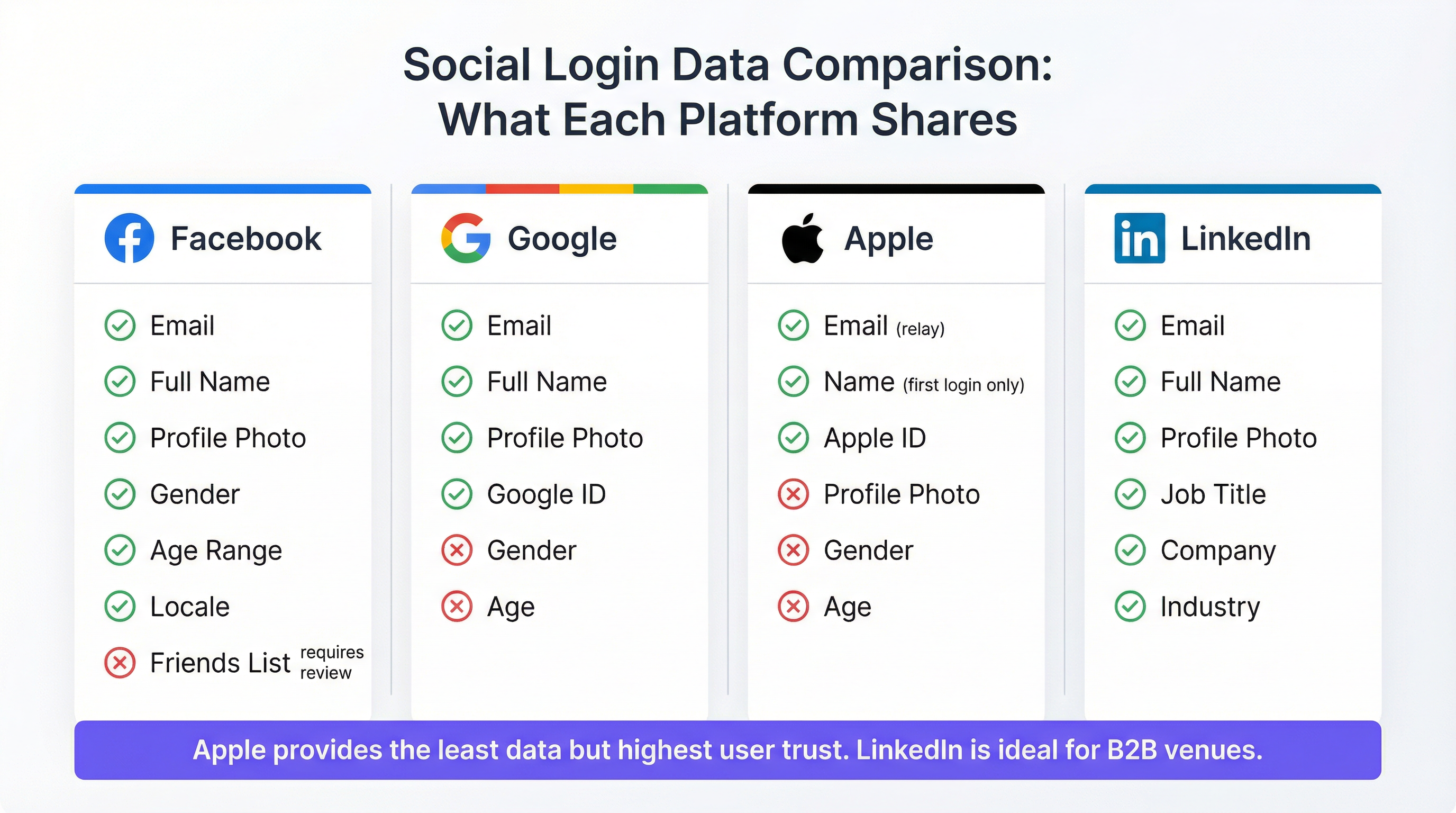
প্রতিটি প্ল্যাটফর্মের OAuth ইমপ্লিমেন্টেশনের মাধ্যমে উপলব্ধ ডেটা উল্লেখযোগ্যভাবে পরিবর্তিত হয় এবং এই পার্থক্যগুলোর মার্কেটিং কৌশল ও অ্যানালিটিক্স সক্ষমতার উপর সরাসরি প্রভাব রয়েছে।
কনজিউমার ভেন্যু ডিপ্লয়মেন্টের জন্য Facebook এখনো সবচেয়ে ডেটা-সমৃদ্ধ বিকল্প। স্ট্যান্ডার্ড public_profile এবং email স্কোপগুলো অতিরিক্ত অ্যাপ রিভিউ ছাড়াই নাম, ইমেল অ্যাড্রেস, প্রোফাইল ছবি, Facebook ইউজার ID, লিঙ্গ, বয়সের সীমা এবং লোকাল (locale) প্রদান করে। বর্ধিত পারমিশন — যেমন ফ্রেন্ডস লিস্ট বা বিস্তারিত লোকেশন ডেটা — এর জন্য Facebook-এর আনুষ্ঠানিক অ্যাপ রিভিউ প্রক্রিয়ার প্রয়োজন হয় এবং WiFi ব্যবহারের ক্ষেত্রে এগুলো খুব কমই অনুমোদিত হয়। এটি মনে রাখা গুরুত্বপূর্ণ যে Facebook ২০২৩ সালে তাদের ডেডিকেটেড "Facebook WiFi" প্রোডাক্টটি বাতিল করেছে; বর্তমান ইন্টিগ্রেশনগুলো স্ট্যান্ডার্ড Graph API OAuth ফ্লো ব্যবহার করে। কেমব্রিজ অ্যানালিটিকা ঘটনার প্রতিক্রিয়ায় ২০১৮ সাল থেকে Facebook-এর API পারমিশনগুলো ক্রমান্বয়ে সীমিত করা হয়েছে এবং অপারেটরদের তাদের ইন্টিগ্রেশনের স্কোপ নির্ধারণের আগে developers.facebook.com-এ বর্তমান পারমিশন গাইডটি পর্যালোচনা করা উচিত।
Google স্ট্যান্ডার্ড openid, email এবং profile স্কোপের মাধ্যমে ইমেল, পুরো নাম, প্রোফাইল ছবি এবং একটি ইউনিক Google ID প্রদান করে। স্ট্যান্ডার্ড স্কোপের মাধ্যমে লিঙ্গ, বয়স এবং লোকেশন পাওয়া যায় না। Captive Portal ডিপ্লয়মেন্টের ক্ষেত্রে Google-এর প্রধান সীমাবদ্ধতা হলো এর এমবেডেড ওয়েবভিউ পলিসি, যা সেপ্টেম্বর ২০২১ থেকে কার্যকর হয়েছে: Google এমবেডেড ব্রাউজার কম্পোনেন্ট যেমন iOS-এ WKWebView বা Android WebView থেকে আসা OAuth রিকোয়েস্ট প্রসেস করবে না। যেহেতু Apple-এর Captive Network Assistant Captive Portal প্রদর্শনের জন্য একটি এমবেডেড ওয়েবভিউ ব্যবহার করে, তাই পোর্টালটি ব্যবহারকারীকে স্পষ্টভাবে Safari খোলার জন্য রিডাইরেক্ট না করলে iOS-এ Google প্রমাণীকরণ ব্যর্থ হবে। ট্রাবলশুটিং বিভাগে এটি বিস্তারিতভাবে আলোচনা করা হয়েছে।
Apple ID (Sign in with Apple) হলো সবচেয়ে বেশি গোপনীয়তা-রক্ষাকারী বিকল্প। এটি দুটি গুরুত্বপূর্ণ শর্তসহ ব্যবহারকারীর নাম এবং ইমেল অ্যাড্রেস প্রদান করে। ব্যবহারকারীর নাম শুধুমাত্র প্রথম প্রমাণীকরণের সময় ট্রান্সমিট করা হয়; পরবর্তী লগইনগুলোতে নাম ডেটা পুনরায় শেয়ার করা হয় না, যার ফলে পোর্টালটিকে প্রাথমিক লগইন থেকে নামটি সংরক্ষণ করতে হয়। Apple ব্যবহারকারীদের তাদের আসল ইমেল অ্যাড্রেস লুকানোর বিকল্পও দেয়, যার পরিবর্তে [random-string]@privaterelay.appleid.com ফর্ম্যাটে একটি ইউনিক রিলে অ্যাড্রেস ব্যবহার করা হয়। এই রিলে অ্যাড্রেসে পাঠানো ইমেলগুলো ব্যবহারকারীর আসল ইনবক্সে ফরোয়ার্ড করা হয়, যা এটিকে মার্কেটিং কমিউনিকেশনের জন্য কার্যকর করে তোলে, তবে এটি অন্যান্য ডেটা সোর্সের সাথে ক্রস-রেফারেন্সিং করতে বাধা দেয়। Apple কোনো প্রোফাইল ছবি, লিঙ্গ, বয়স বা লোকেশন ডেটা প্রদান করে না। Apple বাধ্যতামূলক করেছে যে থার্ড-পার্টি সোশ্যাল লগইন অফার করে এমন যেকোনো অ্যাপ্লিকেশনকে অবশ্যই Sign in with Apple অফার করতে হবে, যা অন্যান্য সোশ্যাল বিকল্প অন্তর্ভুক্ত করে এমন যেকোনো পোর্টালের জন্য এটিকে একটি কমপ্লায়েন্স রিকোয়ারমেন্ট করে তোলে।
পেশাদার ভেন্যু প্রেক্ষাপটের জন্য LinkedIn হলো কৌশলগতভাবে সবচেয়ে আলাদা বিকল্প। LinkedIn-এর OpenID Connect ইমপ্লিমেন্টেশন ইমেল, পুরো নাম, প্রোফাইল ছবি, জব টাইটেল, কোম্পানির নাম এবং ইন্ডাস্ট্রি সেক্টর প্রদান করে। এই পেশাদার প্রেক্ষাপটের ডেটা অন্য কোনো সোশ্যাল লগইন প্রোভাইডারের কাছে পাওয়া যায় না এবং এটি কনফারেন্স সেন্টার, কো-ওয়ার্কিং স্পেস, এয়ারপোর্ট বিজনেস লাউঞ্জ এবং হোটেলের মিটিং ও ইভেন্ট সুবিধাগুলোর জন্য বিশেষভাবে মূল্যবান। LinkedIn-এর API v2 একটি আনুষ্ঠানিক পার্টনারশিপ চুক্তি ছাড়া বর্ধিত প্রোফাইল ফিল্ডগুলোতে অ্যাক্সেস সীমিত করে, তবে স্ট্যান্ডার্ড openid, profile এবং email স্কোপের মাধ্যমে উপলব্ধ ফিল্ডগুলো বেশিরভাগ ভেন্যু অ্যানালিটিক্স ব্যবহারের ক্ষেত্রে যথেষ্ট。
| প্ল্যাটফর্ম | ইমেল | নাম | ছবি | লিঙ্গ | বয়সের সীমা | পেশাদার ডেটা | iOS CNA সামঞ্জস্যপূর্ণ |
|---|---|---|---|---|---|---|---|
| হ্যাঁ | হ্যাঁ | হ্যাঁ | হ্যাঁ | হ্যাঁ | না | হ্যাঁ | |
| হ্যাঁ | হ্যাঁ | হ্যাঁ | না | না | না | না — Safari রিডাইরেক্ট প্রয়োজন | |
| Apple ID | হ্যাঁ (রিলে) | শুধুমাত্র প্রথম লগইন | না | না | না | না | হ্যাঁ |
| হ্যাঁ | হ্যাঁ | হ্যাঁ | না | না | জব টাইটেল, কোম্পানি, ইন্ডাস্ট্রি | হ্যাঁ |
নেটওয়ার্ক আর্কিটেকচার বিবেচনা
সোশ্যাল লগইন WiFi অ্যাপ্লিকেশন লেয়ারে (Layer 7) কাজ করে এবং এটি ওয়্যারলেস সিকিউরিটি লেয়ার থেকে আর্কিটেকচারগতভাবে স্বাধীন। সোশ্যাল লগইন ডিপ্লয় করা গেস্ট SSID-গুলো সাধারণত ওভার-দ্য-এয়ার এনক্রিপশনের জন্য WPA3-SAE (Simultaneous Authentication of Equals) বা WPA2-PSK ব্যবহার করে, যেখানে Captive Portal অ্যাপ্লিকেশন লেয়ারে পরিচয় যাচাইকরণ পরিচালনা করে। এটি IEEE 802.1X পোর্ট-ভিত্তিক নেটওয়ার্ক অ্যাক্সেস কন্ট্রোল থেকে আলাদা, যা কর্পোরেট এবং স্টাফ নেটওয়ার্কগুলোর জন্য উপযুক্ত ফ্রেমওয়ার্ক এবং Layer 2-তে কাজ করে।
প্রস্তাবিত নেটওয়ার্ক আর্কিটেকচারটি SSID লেয়ারে গেস্ট এবং কর্পোরেট ট্র্যাফিককে আলাদা করে, যেখানে গেস্ট SSID একটি ডেডিকেটেড VLAN-এর মাধ্যমে একটি ইন্টারনেট ব্রেকআউট পয়েন্টে রাউট করে। Captive Portal কন্ট্রোলার — তা ক্লাউড-হোস্টেড (যেমন Purple-এর প্ল্যাটফর্ম) বা অন-প্রিমিসেস যাই হোক না কেন — ইন-লাইন বা একটি রিডাইরেক্ট পাথে অবস্থান করে, আনঅথেনটিকেটেড ট্র্যাফিক ইন্টারসেপ্ট করে এবং OAuth ফ্লো সম্পন্ন হওয়ার পর তা রিলিজ করে। প্রমাণীকরণের পরে অ্যাক্সেস দেওয়ার জন্য MAC অ্যাড্রেস অথরাইজেশন হলো স্ট্যান্ডার্ড মেকানিজম; সেশনের সময়কাল এবং ব্যান্ডউইথ পলিসিগুলো কন্ট্রোলার লেয়ারে প্রয়োগ করা হয়।
একটি বড় এস্টেট জুড়ে একাধিক অ্যাক্সেস পয়েন্ট থাকা ভেন্যুগুলোর জন্য — যেমন ২০০টি রুমের একটি হোটেল, ৫০টি শাখার একটি রিটেইল চেইন, বা ডিস্ট্রিবিউটেড কভারেজ সহ একটি স্টেডিয়াম — অপারেশনাল স্কেলেবিলিটি এবং সেন্ট্রালাইজড গেস্ট ডেটা অ্যাগ্রিগেশন উভয়ের জন্যই অন-প্রিমিসেস কন্ট্রোলারের চেয়ে ক্লাউড-ম্যানেজড আর্কিটেকচার অনেক বেশি পছন্দনীয়।
ইমপ্লিমেন্টেশন গাইড
প্রি-ডিপ্লয়মেন্ট চেকলিস্ট
আপনার গেস্ট WiFi-এ সোশ্যাল লগইন কনফিগার করার আগে, নিম্নলিখিত পূর্বশর্তগুলো পূরণ করতে হবে। প্রতিটি সোশ্যাল প্ল্যাটফর্মের জন্য একটি নিবন্ধিত ডেভেলপার অ্যাপ্লিকেশন প্রয়োজন: একটি Facebook অ্যাপ (developers.facebook.com-এর মাধ্যমে), OAuth 2.0 ক্রেডেনশিয়ালস সহ একটি Google Cloud প্রজেক্ট (console.cloud.google.com-এর মাধ্যমে), Sign in with Apple সক্ষমতা চালু থাকা একটি Apple Developer অ্যাকাউন্ট এবং একটি LinkedIn Developer অ্যাপ্লিকেশন (developer.linkedin.com-এর মাধ্যমে)। প্রতিটি অ্যাপ্লিকেশন নিবন্ধনের জন্য আপনার Captive Portal-এর কলব্যাক এন্ডপয়েন্টের সাথে মিলে যাওয়া একটি যাচাইকৃত রিডাইরেক্ট URI প্রয়োজন — এই URI-তে অবশ্যই HTTPS ব্যবহার করতে হবে।
আপনার Captive Portal প্ল্যাটফর্মটিকে অবশ্যই OAuth 2.0 সার্ভার-সাইড ফ্লো সমর্থন করতে হবে। ক্লায়েন্ট-সাইড (ইমপ্লিসিট) ফ্লো সমস্ত প্রধান প্রোভাইডার দ্বারা বাতিল করা হয়েছে এবং এগুলো ব্যবহার করা উচিত নয়। নিশ্চিত করুন যে আপনার প্ল্যাটফর্মটি OAuth state প্যারামিটার স্টোর করে এবং CSRF আক্রমণ প্রতিরোধ করতে কলব্যাকের সময় এটি যাচাই করে।
EU বা UK-এর বাসিন্দাদের ব্যক্তিগত ডেটা সংগ্রহ করে এমন যেকোনো ডিপ্লয়মেন্টের জন্য গো-লাইভের আগে একটি Data Protection Impact Assessment (DPIA) সম্পন্ন করা উচিত, বিশেষ করে যেখানে ডেটা মার্কেটিং প্রোফাইলিংয়ের জন্য ব্যবহার করা হবে। সোশ্যাল লগইন ডেটা সংগ্রহ, জড়িত আইডেন্টিটি প্রোভাইডার এবং যে উদ্দেশ্যে ডেটা ব্যবহার করা হবে তা প্রতিফলিত করার জন্য আপনার প্রাইভেসি নোটিশ আপডেট করতে হবে।
ধাপে ধাপে ডিপ্লয়মেন্ট
আপনি কোন সোশ্যাল প্রোভাইডারগুলো চালু করছেন তা নির্বিশেষে ডিপ্লয়মেন্ট প্রক্রিয়াটি একটি সামঞ্জস্যপূর্ণ প্যাটার্ন অনুসরণ করে। প্রতিটি প্রোভাইডারের ডেভেলপার কনসোলে আপনার অ্যাপ্লিকেশন নিবন্ধন করে এবং ক্লায়েন্ট ID ও ক্লায়েন্ট সিক্রেট সংগ্রহ করে শুরু করুন। আপনার Captive Portal প্ল্যাটফর্মে এই ক্রেডেনশিয়ালসগুলো কনফিগার করুন — Purple-এর ক্ষেত্রে, এটি পোর্টাল কনফিগারেশন ইন্টারফেসের মাধ্যমে করা হয়, যা সার্ভার-সাইডে OAuth ফ্লো পরিচালনা করে।
এরপর, আপনার ভেন্যুর ধরনের জন্য উপযুক্ত সোশ্যাল লগইন বিকল্পগুলো উপস্থাপন করতে আপনার পোর্টালের স্প্ল্যাশ পেজ কনফিগার করুন। কনজিউমার হসপিটালিটির জন্য, Facebook এবং Google হলো সর্বোচ্চ-কনভার্সন বিকল্প; iOS ব্যবহারকারীদের কভারেজ সর্বাধিক করতে Apple ID যোগ করুন; পেশাদার ভেন্যুগুলোর জন্য LinkedIn যোগ করুন। নিশ্চিত করুন যে একটি ফলব্যাক প্রমাণীকরণ পদ্ধতি — ইমেল নিবন্ধন বা ক্লিক-থ্রু শর্তাবলী গ্রহণ — সর্বদা উপলব্ধ থাকে।
বিশেষ করে Google প্রমাণীকরণের জন্য, iOS CNA ডিটেকশন প্রয়োগ করুন। iOS-এ Captive Network Assistant একটি স্বতন্ত্র ইউজার এজেন্ট স্ট্রিং পাঠায়। যখন এই ইউজার এজেন্ট শনাক্ত করা হয়, তখন পোর্টালটির ইনলাইনে Google OAuth ফ্লো রেন্ডার করার চেষ্টা করার পরিবর্তে একটি "Tap here to open in Safari" প্রম্পট উপস্থাপন করা উচিত। এই একক ইমপ্লিমেন্টেশন ধাপটি সোশ্যাল WiFi ডিপ্লয়মেন্টের সবচেয়ে সাধারণ ব্যর্থতার মোড প্রতিরোধ করে।
আপনার GDPR কনসেন্ট ক্যাপচার কনফিগার করুন। কনসেন্ট স্ক্রিনে অবশ্যই প্রাইভেসি নোটিশ উপস্থাপন করতে হবে, প্রতিটি সোশ্যাল প্রোভাইডারকে ডেটা সোর্স হিসেবে চিহ্নিত করতে হবে এবং ডেটার যেকোনো মার্কেটিং ব্যবহারের জন্য সুস্পষ্ট অপ্ট-ইন পেতে হবে। WiFi অ্যাক্সেস নিজে মার্কেটিং কনসেন্টের উপর শর্তযুক্ত হওয়া উচিত নয় — এই দুটি অবশ্যই আলাদা করার যোগ্য হতে হবে। প্রতিটি গেস্টের টাইমস্ট্যাম্প, IP অ্যাড্রেস এবং কনসেন্ট পছন্দগুলো রেকর্ড করার জন্য একটি কনসেন্ট অডিট লগ প্রয়োগ করুন।
সবশেষে, আপনার ডেটা রিটেনশন পলিসি সংজ্ঞায়িত এবং কনফিগার করুন। আপনার সংজ্ঞায়িত রিটেনশন হরাইজনে গেস্ট রেকর্ডগুলোর স্বয়ংক্রিয় মুছে ফেলা বা বেনামীকরণ সেট করুন — সাধারণত ট্রানজিয়েন্ট হসপিটালিটি গেস্টদের জন্য ১২ মাস, লয়্যালটি প্রোগ্রাম সদস্যদের জন্য ২৪ মাস পর্যন্ত।
বেস্ট প্র্যাকটিস
নিম্নলিখিত সুপারিশগুলো এন্টারপ্রাইজ গেস্ট WiFi ডিপ্লয়মেন্টের জন্য ইন্ডাস্ট্রি-স্ট্যান্ডার্ড প্র্যাকটিস প্রতিফলিত করে এবং এগুলো UK GDPR-এর প্রয়োজনীয়তা, IEEE 802.1X নেটওয়ার্ক সেগমেন্টেশনের নীতি এবং মাল্টি-সাইট ভেন্যু এস্টেটের অপারেশনাল বাস্তবতার উপর ভিত্তি করে তৈরি।
সর্বদা একাধিক সোশ্যাল লগইন প্রোভাইডার অফার করুন। একটি সিঙ্গেল-প্রোভাইডার পোর্টাল অপ্রয়োজনীয় ঘর্ষণ তৈরি করে এবং সেই প্ল্যাটফর্মটি নিষ্ক্রিয় করেছেন বা ব্যবহার করেন না এমন গেস্টদের বাদ দেয়। গবেষণায় ধারাবাহিকভাবে দেখা গেছে যে তিন থেকে চারটি বিকল্প অফার করা ব্যবহারকারীদের বিভ্রান্ত না করেই লগইন কনভার্সন সর্বাধিক করে। Facebook, Google, Apple ID এবং একটি ফলব্যাক ইমেল ফর্মের সংমিশ্রণ গেস্ট ডিভাইস প্রোফাইলগুলোর বিশাল সংখ্যাগরিষ্ঠ অংশ কভার করে।
SSID লেয়ারে গেস্ট এবং কর্পোরেট ট্র্যাফিক আলাদা করুন। গেস্ট WiFi — প্রমাণীকরণ পদ্ধতি যাই হোক না কেন — কর্পোরেট ইনফ্রাস্ট্রাকচার থেকে একটি পৃথক SSID এবং VLAN-এ থাকতে হবে। সোশ্যাল লগইন 802.1X সার্টিফিকেট-ভিত্তিক প্রমাণীকরণের নিরাপত্তা নিশ্চয়তা প্রদান করে না; এটি একটি পরিচয় এবং ডেটা ক্যাপচার মেকানিজম, কোনো নেটওয়ার্ক সিকিউরিটি কন্ট্রোল নয়।
সম্পূর্ণ Captive Portal ফ্লো জুড়ে HTTPS প্রয়োগ করুন। সমস্ত পোর্টাল পেজ, OAuth রিডাইরেক্ট এবং কলব্যাক এন্ডপয়েন্টগুলোতে অবশ্যই TLS ব্যবহার করতে হবে। HTTP Captive Portal-গুলো বাতিল করা হয়েছে এবং আধুনিক ডিভাইসগুলোতে ব্রাউজার সিকিউরিটি ওয়ার্নিং ট্রিগার করবে। আপনার পোর্টাল ডোমেইনের জন্য একটি বিশ্বস্ত CA থেকে একটি বৈধ সার্টিফিকেট সংগ্রহ করুন।
কঠোরভাবে ডেটা মিনিমাইজেশন প্রয়োগ করুন। শুধুমাত্র সেই OAuth স্কোপগুলোর জন্য রিকোয়েস্ট করুন যার জন্য আপনার একটি ডকুমেন্টেড, নির্দিষ্ট উদ্দেশ্য রয়েছে। যদি আপনার অ্যানালিটিক্স প্ল্যাটফর্ম লিঙ্গ ডেটা ব্যবহার না করে, তবে Facebook থেকে লিঙ্গ স্কোপের রিকোয়েস্ট করবেন না। অপ্রয়োজনীয় ডেটা সংগ্রহ ব্যবসায়িক মূল্য যোগ না করেই কমপ্লায়েন্স ঝুঁকি বাড়ায়।
Captive Network Assistant ব্যবহার করে ফিজিক্যাল iOS ডিভাইসে পরীক্ষা করুন। ব্রাউজার-ভিত্তিক টেস্টিং CNA পরিবেশের প্রতিলিপি তৈরি করে না। গো-লাইভের আগে, টেস্ট নেটওয়ার্কে একটি ফিজিক্যাল iPhone সংযুক্ত করুন এবং যাচাই করুন যে প্রতিটি সোশ্যাল লগইন বিকল্প ম্যানুয়ালি খোলা Safari-এর মাধ্যমে নয়, বরং CNA পপআপের মাধ্যমে সফলভাবে সম্পন্ন হয়।
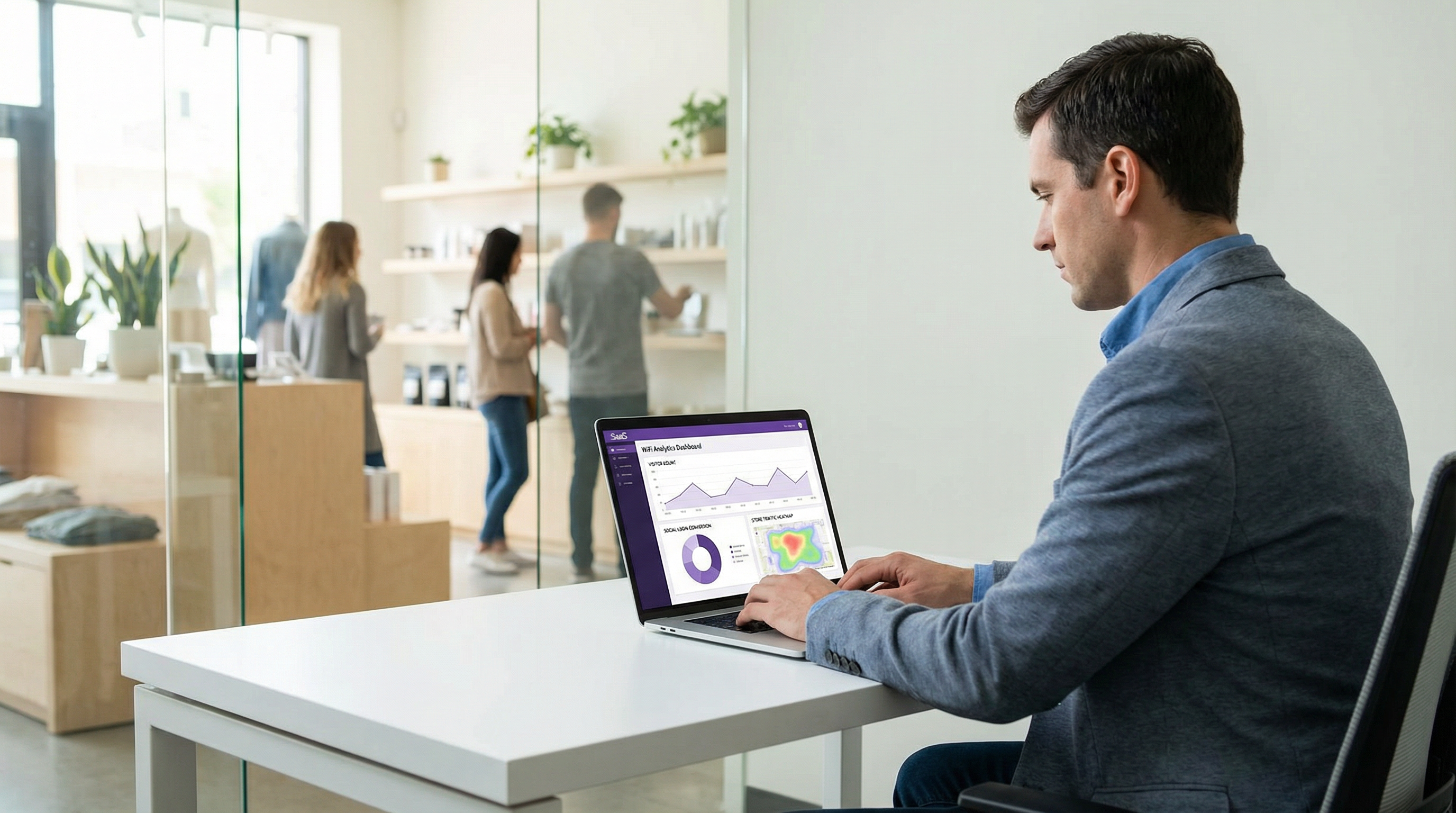
প্রোভাইডার অনুযায়ী লগইন কনভার্সন রেট মনিটর করুন। একটি সুসজ্জিত ডিপ্লয়মেন্ট ট্র্যাক করে যে প্রতিটি গেস্ট কোন সোশ্যাল প্রোভাইডার ব্যবহার করে, প্রতিটি প্রোভাইডারের OAuth ফ্লো-এর কমপ্লিশন রেট এবং ড্রপ-অফ পয়েন্টগুলো কী। এই ডেটা প্ল্যাটফর্ম-নির্দিষ্ট সমস্যাগুলো (যেমন Google iOS সমস্যা) শনাক্ত করে এবং পোর্টাল UI-তে কোন প্রোভাইডারগুলোকে অগ্রাধিকার দিতে হবে সে সম্পর্কে সিদ্ধান্ত নিতে সহায়তা করে।
ট্রাবলশুটিং এবং ঝুঁকি প্রশমন
iOS-এ Google OAuth ব্যর্থতা
সোশ্যাল WiFi ডিপ্লয়মেন্টে এটি সবচেয়ে বেশি সম্মুখীন হওয়া সমস্যা। লক্ষণ: iPhone ব্যবহারকারী গেস্টরা "Connect with Google" নির্বাচন করেন এবং একটি এরর মেসেজ, একটি ফাঁকা স্ক্রিন পান, অথবা প্রমাণীকরণ সম্পন্ন না করেই পোর্টালে ফিরে আসেন। মূল কারণ: সেপ্টেম্বর ২০২১ থেকে কার্যকর হওয়া Google-এর এমবেডেড ওয়েবভিউ পলিসি Apple-এর Captive Network Assistant দ্বারা ব্যবহৃত WKWebView কম্পোনেন্ট থেকে আসা OAuth রিকোয়েস্ট ব্লক করে।
সমাধান: Captive Portal-এ ইউজার এজেন্ট ডিটেকশন প্রয়োগ করুন। যখন CNA ইউজার এজেন্ট শনাক্ত করা হয় (CaptiveNetworkSupport স্ট্রিং বা স্ট্যান্ডার্ড Safari আইডেন্টিফায়ারের অনুপস্থিতি দ্বারা শনাক্তযোগ্য), তখন ইনলাইন Google OAuth বোতামটি পরিবর্তন করে ব্যবহারকারীকে Safari-তে পোর্টালটি খোলার নির্দেশ প্রদানকারী একটি প্রম্পট দিন। খোলার URL-টি সম্পূর্ণ পোর্টাল URL হওয়া উচিত, যা Safari একটি স্ট্যান্ডার্ড ওয়েব পেজ হিসেবে লোড করবে যেখানে Google OAuth স্বাভাবিকভাবে কাজ করে। কিছু পোর্টাল প্ল্যাটফর্ম এটি স্বয়ংক্রিয়ভাবে পরিচালনা করে; আপনার ভেন্ডরের সাথে যাচাই করুন।
Apple ইমেল রিলে-এর কারণে CRM ম্যাচিং ব্যর্থতা
লক্ষণ: Apple ID লগইনের মাধ্যমে তৈরি করা গেস্ট রেকর্ডগুলো বিদ্যমান CRM রেকর্ড বা লয়্যালটি প্রোগ্রাম ডেটাবেসের সাথে মেলানো যায় না। মূল কারণ: Apple-এর ইমেল রিলে প্রতিটি অ্যাপ্লিকেশনের জন্য একটি ইউনিক অ্যাড্রেস তৈরি করে, যা অন্যান্য সিস্টেমে সংরক্ষিত গেস্টের আসল ইমেল অ্যাড্রেসের সাথে মেলে না।
সমাধান: Apple ID ব্যবহারকারীদের জন্য ক্যানোনিকাল আইডেন্টিফায়ার হিসেবে রিলে অ্যাড্রেসটি গ্রহণ করুন। রিলে অ্যাড্রেসটিকে আসল ইমেলে রূপান্তর করার চেষ্টা করবেন না — Apple এর জন্য কোনো মেকানিজম প্রদান করে না এবং এটি এড়ানোর চেষ্টা করা Apple-এর টার্মস অফ সার্ভিস লঙ্ঘন করে। লয়্যালটি প্রোগ্রাম ইন্টিগ্রেশনের জন্য, Apple ID ব্যবহারকারীদের WiFi-এর সাথে সংযুক্ত হওয়ার পরে তাদের লয়্যালটি অ্যাকাউন্ট ম্যানুয়ালি লিঙ্ক করার জন্য প্রম্পট করুন।
GDPR কনসেন্ট বাতিলকরণ
লক্ষণ: একটি ডেটা সাবজেক্ট অ্যাক্সেস রিকোয়েস্ট বা রেগুলেটরি অডিট প্রকাশ করে যে মার্কেটিং কনসেন্ট WiFi অ্যাক্সেস কনসেন্টের সাথে যুক্ত ছিল, অথবা ডেটা সংগ্রহের আগে প্রাইভেসি নোটিশ উপস্থাপন করা হয়নি। ঝুঁকি: UK GDPR আর্টিকেল ৮৩-এর অধীনে এনফোর্সমেন্ট অ্যাকশন, যার জরিমানা ১৭.৫ মিলিয়ন পাউন্ড বা গ্লোবাল বার্ষিক টার্নওভারের ৪% পর্যন্ত হতে পারে।
সমাধান: আপনার কনসেন্ট ক্যাপচার ফ্লো অডিট করুন। WiFi অ্যাক্সেস এবং মার্কেটিং অপ্ট-ইন অবশ্যই পৃথক, স্বাধীনভাবে নির্বাচনযোগ্য পছন্দ হিসেবে উপস্থাপন করতে হবে। প্রাইভেসি নোটিশটি গেস্ট তাদের সোশ্যাল লগইন সাবমিট করার আগে উপস্থিত হতে হবে — পরে নয়। একটি কনসেন্ট ম্যানেজমেন্ট প্ল্যাটফর্ম প্রয়োগ করুন বা নিশ্চিত করুন যে আপনার Captive Portal ভেন্ডরের বিল্ট-ইন কনসেন্ট টুলগুলো এই প্রয়োজনীয়তাগুলো পূরণ করে।
MAC অ্যাড্রেস র্যান্ডমাইজেশন
লক্ষণ: ফিরে আসা গেস্টদের রিটার্নিং ভিজিটর হিসেবে স্বীকৃতি দেওয়া হয় না; সেশন ডেটা খণ্ডিত বলে মনে হয়। মূল কারণ: iOS 14 এবং পরবর্তী সংস্করণ, Android 10 এবং পরবর্তী সংস্করণ এবং Windows 10 সবগুলোই ডিফল্টভাবে MAC অ্যাড্রেস র্যান্ডমাইজেশন প্রয়োগ করে, যা প্রতিটি WiFi নেটওয়ার্ক অ্যাসোসিয়েশনের জন্য একটি নতুন সিউডো-র্যান্ডম MAC অ্যাড্রেস তৈরি করে।
সমাধান: MAC অ্যাড্রেসের পরিবর্তে প্রাথমিক গেস্ট আইডেন্টিফায়ার হিসেবে OAuth-প্রাপ্ত ইউজার আইডেন্টিফায়ার (Facebook ID, Google ID, Apple ID, বা LinkedIn ID) ব্যবহার করুন। MAC অ্যাড্রেস শুধুমাত্র বর্তমান সেশনের নেটওয়ার্ক অথরাইজেশনের জন্য ব্যবহার করা উচিত, কোনো স্থায়ী আইডেন্টিফায়ার হিসেবে নয়। নিশ্চিত করুন যে আপনার Captive Portal প্ল্যাটফর্ম গেস্ট রেকর্ডগুলোর জন্য প্রাইমারি কী হিসেবে সোশ্যাল ID ব্যবহার করে।
ROI এবং ব্যবসায়িক প্রভাব
সাফল্য পরিমাপ
সোশ্যাল লগইন WiFi-এর বিজনেস কেস তিনটি ভ্যালু ড্রাইভারের উপর নির্ভর করে: ফার্স্ট-পার্টি ডেটা সংগ্রহ, গেস্ট এক্সপেরিয়েন্সের মান এবং অপারেশনাল দক্ষতা। প্রতিটিকে নির্দিষ্ট KPI দিয়ে পরিমাপ করা যেতে পারে।
ফার্স্ট-পার্টি ডেটা সংগ্রহ যাচাইকৃত কন্ট্যাক্ট রেট দ্বারা পরিমাপ করা হয় — WiFi সেশনের সেই শতাংশ যার ফলে একটি যাচাইকৃত ইমেল অ্যাড্রেস এবং প্রোফাইল রেকর্ড পাওয়া যায়। সোশ্যাল লগইন ধারাবাহিকভাবে ফর্ম-ফিল নিবন্ধনের (যা ভুয়া বা ভুল টাইপ করা ইমেল অ্যাড্রেসের উচ্চ হারের কারণে ক্ষতিগ্রস্ত হয়) চেয়ে ভালো পারফর্ম করে এবং ক্লিক-থ্রু অ্যাক্সেসের (যা কোনো ডেটাই ক্যাপচার করে না) চেয়ে উল্লেখযোগ্যভাবে ভালো পারফর্ম করে। হসপিটালিটি পরিবেশে একটি সু-স্থাপিত সোশ্যাল WiFi ইমপ্লিমেন্টেশন সাধারণত মোট WiFi সেশনের ৫৫ থেকে ৭০ শতাংশ যাচাইকৃত কন্ট্যাক্ট রেট অর্জন করে।
গেস্ট এক্সপেরিয়েন্সের মান লগইন কমপ্লিশন টাইম (লক্ষ্য: একটি সক্রিয় সোশ্যাল সেশন থাকা রিটার্নিং ব্যবহারকারীদের জন্য ১০ সেকেন্ডের নিচে) এবং অ্যাবানডনমেন্ট রেট (লক্ষ্য: ১৫ শতাংশের নিচে) দ্বারা পরিমাপ করা হয়। ২০ শতাংশের উপরে অ্যাবানডনমেন্ট সাধারণত একটি UX সমস্যা নির্দেশ করে — খুব বেশি ধাপ, একটি ব্যর্থ প্রোভাইডার, বা একটি অতিরিক্ত জটিল কনসেন্ট ফ্লো।
অপারেশনাল দক্ষতা বৃদ্ধির মধ্যে রয়েছে ভাউচার কোড ম্যানেজমেন্ট ওভারহেড দূর করা, ফ্রন্ট-ডেস্ক WiFi সাপোর্ট কোয়েরি হ্রাস করা এবং গেস্ট ডেটা ক্যাপচারের অটোমেশন যার জন্য অন্যথায় ম্যানুয়াল ফর্ম সংগ্রহের প্রয়োজন হতো।
কেস স্টাডি ১: ২০০-রুমের বিজনেস হোটেল, সেন্ট্রাল লন্ডন
সেন্ট্রাল লন্ডনের একটি ২০০-রুমের বিজনেস হোটেল তাদের ভাউচার-কোড গেস্ট WiFi সিস্টেম পরিবর্তন করে Purple-এর প্ল্যাটফর্মের সাথে ইন্টিগ্রেট করা সোশ্যাল লগইন (Facebook, Google, Apple ID) চালু করেছে। ডিপ্লয়মেন্টের আগে, হোটেলটি প্রায় ১২ শতাংশ WiFi সেশন থেকে গেস্ট কন্ট্যাক্ট ডেটা ক্যাপচার করত — যে গেস্টরা চেক-ইনের সময় স্বেচ্ছায় তাদের ইমেল প্রদান করতেন। ডিপ্লয়মেন্টের পর, প্রথম ত্রৈমাসিকের মধ্যেই যাচাইকৃত কন্ট্যাক্ট রেট ৬১ শতাংশ WiFi সেশনে পৌঁছেছে। হোটেলের মার্কেটিং টিম প্রাপ্ত ফার্স্ট-পার্টি ডেটা ব্যবহার করে সেগমেন্টেড ইমেল ক্যাম্পেইন তৈরি করেছে, যা পোস্ট-স্টে কমিউনিকেশনে ৩৪ শতাংশ ওপেন রেট অর্জন করেছে — যা হসপিটালিটি ইন্ডাস্ট্রির গড় ২১ শতাংশের চেয়ে উল্লেখযোগ্যভাবে বেশি। পরবর্তীতে হোটেলের মিটিং এবং ইভেন্ট সুবিধাগুলোর জন্য LinkedIn বিকল্পটি যোগ করা হয়েছিল, যা কনফারেন্স প্রতিনিধিদের পেশাদার ডেমোগ্রাফিক ডেটা প্রদান করে একটি প্রধান আর্থিক পরিষেবা সংস্থার সাথে সফল কর্পোরেট রেট আলোচনায় সহায়তা করেছিল।
কেস স্টাডি ২: ৪৫-স্টোরের রিটেইল চেইন, UK
৪৫টি স্টোর বিশিষ্ট একটি মিড-মার্কেট UK রিটেইল চেইন তাদের এস্টেট জুড়ে সোশ্যাল WiFi ডিপ্লয় করেছে, যা একটি ইমেল ফলব্যাক সহ Facebook এবং Google লগইন অফার করে। প্রাথমিক উদ্দেশ্য ছিল থার্ড-পার্টি কুকি বাতিলের বিরুদ্ধে একটি ফার্স্ট-পার্টি কাস্টমার ডেটা অ্যাসেট তৈরি করা। ছয় মাসের মধ্যে, চেইনটি ২৮০,০০০ যাচাইকৃত গেস্ট প্রোফাইল ক্যাপচার করেছিল, যার মধ্যে ৬৭ শতাংশ মার্কেটিং কমিউনিকেশনে অপ্ট-ইন করেছিল। সোশ্যাল লগইন ডেটা — বিশেষ করে Facebook থেকে বয়সের সীমা এবং লোকাল — মার্কেটিং টিমকে শনাক্ত করতে সক্ষম করেছে যে উত্তর ইংল্যান্ডের ইন-স্টোর WiFi ব্যবহারকারীদের একটি উল্লেখযোগ্য অংশ ৪৫-থেকে-৫৪ বছর বয়সী, যা চেইনের বিদ্যমান লয়্যালটি প্রোগ্রামে একটি আন্ডাররিপ্রেজেন্টেড ডেমোগ্রাফিক। এই ইনসাইট সরাসরি একটি টার্গেটেড অ্যাকুইজিশন ক্যাম্পেইনে সহায়তা করেছে। চেইনের IT টিম লক্ষ্য করেছে যে Safari রিডাইরেক্ট প্রয়োগ করার আগে Google iOS সমস্যাটি প্রায় ৮ শতাংশ Google লগইন প্রচেষ্টাকে প্রভাবিত করেছিল — যা ফিক্স করার পরে ১ শতাংশের নিচে নেমে এসেছে।
ভেন্যুর ধরন অনুযায়ী প্রত্যাশিত ফলাফল
| ভেন্যুর ধরন | প্রস্তাবিত প্রোভাইডার | প্রত্যাশিত যাচাইকৃত কন্ট্যাক্ট রেট | প্রাইমারি ডেটা ভ্যালু |
|---|---|---|---|
| হোটেল (লিজার) | Facebook, Google, Apple ID | ৫৫–৬৫% | ইমেল, বয়সের সীমা, লোকাল |
| হোটেল (বিজনেস) | Google, LinkedIn, Apple ID | ৪৫–৫৫% | পেশাদার প্রোফাইল, কোম্পানি |
| রিটেইল | Facebook, Google | ৫০–৬০% | বয়সের সীমা, লিঙ্গ, লোকাল |
| কনফারেন্স সেন্টার | LinkedIn, Google | ৪০–৫০% | জব টাইটেল, কোম্পানি, ইন্ডাস্ট্রি |
| স্টেডিয়াম / ইভেন্ট | Facebook, Google, Apple ID | ৬০–৭০% | বয়সের সীমা, লিঙ্গ |
| পাবলিক সেক্টর | ইমেল ফলব্যাক প্রাইমারি | ৩০–৪০% | শুধুমাত্র ইমেল (GDPR কনজারভেটিভ) |
এই গাইডটি এন্টারপ্রাইজ WiFi ইন্টেলিজেন্স প্ল্যাটফর্ম Purple দ্বারা তৈরি করা হয়েছে। ডিপ্লয়মেন্ট সাপোর্ট, প্ল্যাটফর্ম ডকুমেন্টেশন এবং GDPR কমপ্লায়েন্স টুলের জন্য, ভিজিট করুন purple.ai।
Key Terms & Definitions
OAuth 2.0
An open authorisation framework (RFC 6749) that allows a third-party application to obtain limited access to a user's account on a social platform without requiring the user to share their password. In guest WiFi contexts, OAuth 2.0 is the protocol that enables the captive portal to retrieve a guest's profile data from Facebook, Google, Apple, or LinkedIn.
IT teams encounter OAuth 2.0 when configuring social login integrations. Understanding the Authorization Code Flow — specifically the distinction between the authorisation code, access token, and ID token — is essential for debugging authentication failures and for scoping the correct API permissions.
Captive Portal
A web page presented to a newly connected network user before they are granted full internet access. The captive portal intercepts the user's initial HTTP or DNS request and redirects it to a branded splash page where authentication or terms acceptance occurs. In social WiFi deployments, the captive portal hosts the OAuth login flow.
Captive portals are the user-facing component of guest WiFi systems. IT teams are responsible for configuring the portal's authentication methods, branding, consent capture, and integration with the network controller for MAC address authorisation.
Captive Network Assistant (CNA)
The system component on iOS and macOS that automatically detects captive WiFi networks and presents the captive portal in a mini-browser popup. The CNA uses an embedded WKWebView component rather than the full Safari browser, which has significant implications for social login compatibility — specifically, Google OAuth will not function in the CNA due to Google's embedded webview policy.
The CNA is the source of the most common social WiFi compatibility issue: Google authentication failing on iPhones. IT teams must implement a Safari redirect mechanism to route Google OAuth flows out of the CNA and into the full Safari browser.
Authorization Code Flow
The OAuth 2.0 flow in which the identity provider returns a short-lived authorisation code to the client application, which the application then exchanges for an access token via a back-channel server-to-server request. This is the most secure OAuth flow and is required by all major social login providers for web-based applications.
IT teams should verify that their captive portal platform uses the Authorization Code Flow (not the deprecated Implicit Flow) for all social login integrations. The back-channel token exchange is a security requirement — it prevents access tokens from being exposed in browser history or server logs.
Access Token
A credential issued by an identity provider after a successful OAuth authorisation that allows the client application to access the user's data on the provider's API. Access tokens are short-lived (typically one hour) and scoped to specific permissions. In guest WiFi contexts, the access token is used to call the provider's userinfo endpoint to retrieve the guest's profile data.
IT teams encounter access tokens when debugging social login integrations. A common failure mode is attempting to use an expired access token — the portal should handle token expiry gracefully by re-initiating the OAuth flow rather than presenting an error to the guest.
OAuth Scope
A parameter in an OAuth authorisation request that specifies which user data or API capabilities the application is requesting access to. For social login, scopes determine which profile fields are available. Examples include 'email' (email address), 'profile' (name and photo), and LinkedIn's 'r_liteprofile' (basic professional profile).
Scope selection is a GDPR data minimisation decision as well as a technical configuration choice. IT teams and data protection officers should jointly review the scopes requested for each social login integration and remove any scope for which there is no documented, specific business purpose.
MAC Address Authorisation
The mechanism by which a network controller grants internet access to a specific device after the captive portal authentication flow completes. The controller adds the device's MAC address to an authorised client list, allowing its traffic to pass through to the internet. Session duration and bandwidth policies are enforced at the MAC address level.
MAC address authorisation is the bridge between the application-layer OAuth flow and the network-layer access control. IT teams must understand that MAC address randomisation (default on iOS 14+, Android 10+, Windows 10+) means MAC addresses cannot be used as persistent guest identifiers — the OAuth-derived social ID must be used instead.
Apple Private Email Relay
A privacy feature of Sign in with Apple that allows users to hide their real email address from third-party applications. When enabled, Apple generates a unique relay address (in the format [random-string]@privaterelay.appleid.com) that forwards emails to the user's real inbox. The venue operator receives the relay address, not the user's real email.
IT teams and marketing managers must understand the email relay when planning CRM integration for Apple ID logins. The relay address is functional for email marketing but cannot be matched against existing customer records. Loyalty programme integration for Apple ID users requires a manual linking step.
IEEE 802.1X
An IEEE standard for port-based network access control that provides an authentication framework for devices wishing to attach to a LAN or WLAN. 802.1X uses the Extensible Authentication Protocol (EAP) and typically integrates with a RADIUS server for credential verification. It is the appropriate authentication standard for corporate and staff networks.
IT teams must clearly distinguish between 802.1X (for corporate/staff networks) and social login via captive portal (for guest networks). These are complementary, not competing, technologies. A correctly architected venue network uses 802.1X on the corporate SSID and social login on a separate, isolated guest SSID.
GDPR Data Minimisation
The principle under UK GDPR Article 5(1)(c) that personal data collected must be adequate, relevant, and limited to what is necessary for the specified purpose. In the context of social WiFi, this means requesting only the OAuth scopes for which there is a documented, specific business purpose — not requesting all available data by default.
Data minimisation is both a legal obligation and a risk management principle. IT teams and DPOs should conduct a joint review of social login scopes at deployment and annually thereafter, removing any scope that cannot be justified against a specific, documented data use case.
Case Studies
A 200-room business hotel in London wants to deploy social WiFi login to capture guest data for its CRM and post-stay marketing campaigns. The hotel's guest mix is approximately 60% corporate travellers and 40% leisure guests. The IT manager is concerned about iOS compatibility and GDPR compliance. Which social login providers should be configured, and what are the key implementation steps?
Given the mixed corporate and leisure guest profile, the recommended provider configuration is Google (primary for corporate guests), Facebook (primary for leisure guests), Apple ID (mandatory for iOS conversion), and LinkedIn (for meeting and events facilities). The implementation proceeds as follows.
Step 1 — Developer Application Registration. Register a Google Cloud project at console.cloud.google.com with OAuth 2.0 credentials, a Facebook App at developers.facebook.com with the public_profile and email permissions, an Apple Developer account with Sign in with Apple enabled, and a LinkedIn Developer application at developer.linkedin.com. All redirect URIs must use HTTPS and match the captive portal callback endpoint exactly.
Step 2 — Portal Configuration. Configure the captive portal (Purple or equivalent) with the client ID and client secret for each provider. Set the portal to present all four social options plus an email fallback. Configure the portal's splash page with the hotel's branding.
Step 3 — Google iOS Fix. Implement CNA user agent detection. When the portal detects the iOS Captive Network Assistant, replace the inline Google OAuth button with a 'Tap to open in Safari' prompt. Verify this works on a physical iPhone before go-live.
Step 4 — GDPR Consent Flow. Configure the consent screen to present: (a) a link to the privacy notice, (b) acceptance of terms of use as a condition of WiFi access, and (c) a separate, optional checkbox for marketing communications. Ensure these are not bundled. Implement a consent audit log.
Step 5 — Data Retention. Set automated deletion of guest records after 12 months for transient guests. For guests who opt into the loyalty programme, extend to 24 months with a re-consent prompt at 12 months.
Step 6 — Testing. Test each provider on iOS (via CNA), Android, Windows, and macOS. Verify that the Google Safari redirect works. Verify that Apple ID relay emails are stored correctly. Verify that LinkedIn job title and company fields are populated.
A national retail chain with 80 stores is planning to deploy social WiFi across its estate. The marketing director wants to use the data to build audience segments for targeted advertising and to measure footfall attribution. The legal team has flagged GDPR concerns. The IT team is worried about the operational overhead of managing social login credentials across 80 sites. How should this deployment be architected?
Architecture Decision — Cloud-Managed Platform. For an 80-site estate, a cloud-managed captive portal platform is essential. On-premises controllers at each site create an unmanageable operational overhead and prevent centralised data aggregation. The social login credentials (client IDs and secrets) are configured once at the platform level and applied across all sites — the IT team does not manage per-site OAuth configuration.
Provider Selection. For a consumer retail environment, Facebook and Google are the primary providers, with an email fallback. Apple ID should be included to maximise iOS conversion. LinkedIn is not recommended for a general retail context.
Data Architecture. The platform must use the OAuth-derived social ID (not MAC address) as the primary guest identifier to handle MAC address randomisation. Guest records should include: social ID, email, name, age range (Facebook), gender (Facebook), locale, first visit date, visit frequency, and store location. This data structure supports the footfall attribution and audience segmentation use cases.
GDPR Compliance. The legal team's concerns are valid. Key mitigations: (1) Consent must be granular — WiFi access separate from marketing opt-in. (2) A Data Protection Impact Assessment must be completed before go-live, given the scale of data collection and the profiling use case. (3) The privacy notice must explicitly describe the use of data for advertising audience creation. (4) If data is shared with advertising platforms (Meta Custom Audiences, Google Customer Match), this must be disclosed and a Data Processing Agreement must be in place with each platform. (5) A 12-month retention period with automated deletion should be enforced.
Operational Model. Designate a central IT owner for the social login developer applications. Rotate client secrets annually. Monitor login conversion rates centrally via the platform dashboard. Implement alerting for provider-level failures (e.g., a Facebook API outage affecting all 80 sites simultaneously).
A major conference centre hosts 150 events per year, with attendees ranging from technology professionals to government officials. The venue director wants to use guest WiFi data to demonstrate audience demographics to potential event sponsors. The IT manager is evaluating whether LinkedIn login is worth the additional implementation complexity. What is the recommendation?
Recommendation: Yes, implement LinkedIn login as the primary option for this venue.
The conference centre use case is precisely the scenario for which LinkedIn login provides unique value unavailable from any other social provider. The ability to capture job title, company name, and industry sector transforms the WiFi analytics from a basic visitor count into a professional audience profile — the kind of data that event sponsors pay significant premiums to access.
Implementation Approach. Register a LinkedIn Developer application and enable the Sign In with LinkedIn using OpenID Connect product. Request the openid, profile, and email scopes. Configure the captive portal to present LinkedIn as the featured option (top of the list) for conference events, with Google and email fallback as secondary options. Consider event-specific portal configurations — for a technology conference, LinkedIn is the obvious primary; for a consumer trade show, Facebook may be more appropriate.
Data Use for Sponsorship. Aggregate the LinkedIn-derived data (job titles, companies, industries) into anonymised audience reports. A report showing that 68% of WiFi users at a financial services conference were C-suite or VP-level professionals from FTSE 350 companies is a compelling sponsorship proposition. Ensure that these reports use aggregated, anonymised data — individual profiles must not be shared with sponsors without explicit consent from each guest.
GDPR Note. The purpose of collecting professional data for sponsorship reporting must be disclosed in the privacy notice. This is a legitimate interest use case, but it requires a Legitimate Interests Assessment (LIA) or explicit consent, depending on how the data is used. Consult your DPO before implementing sponsorship reporting.
Scenario Analysis
Q1. Your venue is a 500-seat conference centre that hosts 120 events per year. The commercial director wants to offer event sponsors an audience demographics report based on WiFi login data. The IT manager has configured Facebook and Google social login. The data protection officer has raised concerns. What changes, if any, should be made to the social login configuration and the data use policy?
💡 Hint:Consider both the provider selection (is LinkedIn missing?) and the GDPR implications of using guest data for commercial sponsorship reporting. What lawful basis applies, and what must be disclosed to guests?
Show Recommended Approach
Three changes are required. First, add LinkedIn as a social login option — it is the only provider that supplies professional demographic data (job title, company, industry), which is the data of highest value for sponsorship audience reports. Facebook and Google do not provide this. Second, update the privacy notice on the captive portal to explicitly disclose that anonymised, aggregated audience data may be used for commercial reporting purposes. This is a new processing purpose that was not covered by the original privacy notice and must be disclosed before data collection. Third, conduct a Legitimate Interests Assessment (LIA) for the sponsorship reporting use case, or obtain explicit consent from guests for this purpose. Using guest data for commercial benefit beyond the direct provision of WiFi service requires a clearly documented lawful basis under UK GDPR Article 6. The DPO's concerns are valid and must be resolved before the sponsorship reporting programme launches. Ensure that all sponsorship reports use aggregated, anonymised data — individual guest profiles must never be shared with sponsors.
Q2. A hotel's IT team reports that approximately 15% of guests who attempt to log in with Google on their iPhones are failing to complete authentication and abandoning the WiFi login entirely. The portal is otherwise functioning correctly. What is the most likely root cause, and what is the remediation?
💡 Hint:Consider the interaction between Google's OAuth policy (enforced since September 2021) and Apple's Captive Network Assistant. What browser environment does the CNA use, and why does this cause Google OAuth to fail?
Show Recommended Approach
The root cause is Google's embedded webview policy. Apple's Captive Network Assistant (CNA) — the system that automatically displays the captive portal popup when an iPhone joins a new WiFi network — uses a WKWebView embedded browser component, not the full Safari browser. Since September 2021, Google has blocked OAuth 2.0 authorisation requests originating from embedded webviews, returning a 'disallowed_useragent' error. The remediation is to implement iOS CNA detection on the captive portal. When the portal detects the CNA user agent string, it should replace the inline Google OAuth button with a prompt directing the user to open the portal URL in Safari (e.g., 'Tap here to sign in with Google in Safari'). Once the user opens the portal in Safari, the Google OAuth flow completes normally. This fix should be tested on a physical iPhone using the CNA — not by opening the portal URL in Safari directly — before deployment. After implementing the fix, the 15% abandonment rate for Google on iOS should drop to below 2%.
Q3. A retail chain's marketing team wants to use social WiFi data to create Custom Audience segments on Meta's advertising platform (Facebook Ads). The IT manager needs to assess the technical and compliance requirements. What are the key considerations?
💡 Hint:Consider the data flow: guest data is collected at the captive portal, then shared with Meta for audience creation. What GDPR obligations apply to this data sharing? What technical mechanism is used to create Custom Audiences from email data?
Show Recommended Approach
There are three key considerations. First, the lawful basis for data sharing with Meta must be established. Collecting an email address for WiFi access does not automatically authorise sharing that email with Meta for advertising purposes. The privacy notice must explicitly disclose that email addresses may be shared with Meta for Custom Audience creation, and either explicit consent or a documented Legitimate Interests Assessment is required. Second, a Data Processing Agreement must be in place with Meta, as Meta is acting as a data processor when creating Custom Audiences from the retailer's first-party data. Third, the technical mechanism for Custom Audience creation is hashed email matching — the retailer uploads a hashed (SHA-256) list of guest email addresses to Meta's Ads Manager, and Meta matches these against its user database to create the audience segment. The hashing provides a degree of privacy protection but does not remove the GDPR obligation to disclose the data sharing. Apple ID relay email addresses will not match against Meta's database (since the relay address is not the user's Facebook-registered email), so Apple ID users will be excluded from Custom Audience matching — this is an expected limitation, not a technical error.
Q4. A venue operator is planning a new guest WiFi deployment and is deciding between offering only Facebook login (simplest to implement) versus a multi-provider setup (Facebook, Google, Apple ID, email fallback). The IT manager argues that Facebook alone is sufficient since it has the highest adoption. What is the counter-argument, and what is the recommended approach?
💡 Hint:Consider the trends in Facebook account ownership, the iOS user base in UK hospitality, and the GDPR implications of a single-provider approach that excludes guests who do not have Facebook accounts.
Show Recommended Approach
The counter-argument rests on three points. First, Facebook account ownership has declined significantly among younger demographics and among privacy-conscious users — a meaningful proportion of guests, particularly in business travel contexts, will not have an active Facebook account or will be unwilling to use it for WiFi authentication. A single-provider portal that offers only Facebook will generate a higher abandonment rate than a multi-provider portal. Second, iPhone users represent a significant proportion of guests in UK hospitality — typically 50 to 60 percent of devices. Apple's App Store guidelines require that any application offering third-party social login must also offer Sign in with Apple. While this rule applies to native apps rather than web-based portals, offering Apple ID alongside other providers maximises conversion among iOS users who prefer the native Apple authentication experience. Third, from a GDPR perspective, a portal that offers only Facebook as a social login option and no fallback creates a situation where guests who do not have Facebook accounts cannot access the WiFi without providing personal data — this may be challenged as coercive data collection. The recommended approach is a multi-provider portal with at minimum Facebook, Google, Apple ID, and an email/click-through fallback. The marginal implementation cost of adding Google and Apple ID to an existing Facebook integration is low, and the conversion rate improvement justifies it.
Key Takeaways
- ✓Social login WiFi uses the OAuth 2.0 Authorization Code Flow to authenticate guests via Facebook, Google, Apple ID, or LinkedIn, capturing verified profile data and authorising network access via MAC address — the full flow completes in three to eight seconds.
- ✓Google OAuth is incompatible with Apple's Captive Network Assistant (iOS embedded webview) due to Google's embedded webview policy enforced since September 2021 — a Safari redirect must be implemented for Google login to function on iPhones.
- ✓Each platform provides a distinct data profile: Facebook offers the richest demographic data (age range, gender, locale); Google provides clean identity data; Apple ID maximises user trust but provides minimal data and may relay email addresses; LinkedIn uniquely provides professional context (job title, company, industry) and is the preferred option for B2B venues.
- ✓Under UK GDPR, WiFi access and marketing consent must be presented as separate, independently selectable choices — bundling them invalidates the consent and exposes the operator to enforcement risk under Article 83.
- ✓MAC address randomisation (default on iOS 14+, Android 10+, Windows 10+) makes MAC addresses unsuitable as persistent guest identifiers — the OAuth-derived social ID must be used as the primary key in the guest data model.
- ✓Always offer multiple social login providers plus a non-social fallback (email registration or click-through) — a single-provider portal creates unnecessary friction and may exclude a significant proportion of guests.
- ✓The business case for social WiFi rests on first-party data acquisition: a well-deployed implementation in hospitality achieves a verified contact rate of 55 to 70 percent of WiFi sessions, significantly outperforming voucher codes or click-through access.




