

স্টাফ WiFi: কর্মীদের জন্য নিরাপদ এবং দক্ষ নেটওয়ার্ক অ্যাক্সেসের একটি পূর্ণাঙ্গ নির্দেশিকা
A comprehensive technical reference for IT leaders on designing, deploying, and managing secure, high-performance staff WiFi networks. This guide provides actionable best practices for authentication, network segmentation, and bandwidth management to enhance operational efficiency and mitigate security risks.
🎧 Listen to this Guide
View Transcript

কার্যনির্বাহী সারাংশ
হসপিটালিটি, রিটেইল বা বৃহৎ পরিসরের পাবলিক ভেন্যুতে পরিচালিত যেকোনো আধুনিক এন্টারপ্রাইজের জন্য, স্টাফ WiFi এখন আর কেবল একটি সুবিধা নয়; এটি একটি গুরুত্বপূর্ণ অপারেশনাল ইনফ্রাস্ট্রাকচার। একটি সুগঠিত স্টাফ ওয়্যারলেস নেটওয়ার্ক সরাসরি বর্ধিত উৎপাদনশীলতা, উন্নত গ্রাহক পরিষেবা এবং একটি শক্তিশালী নিরাপত্তা ব্যবস্থা নিশ্চিত করে। অন্যদিকে, একটি দুর্বলভাবে কনফিগার করা নেটওয়ার্ক উল্লেখযোগ্য কমপ্লায়েন্স ঝুঁকি, অপারেশনাল বাধা এবং দুর্বলতা তৈরি করে। এই নির্দেশিকাটি আইটি ম্যানেজার, নেটওয়ার্ক আর্কিটেক্ট এবং সিটিওদের (CTO) জন্য একটি সুনির্দিষ্ট প্রযুক্তিগত রেফারেন্স হিসেবে কাজ করে, যাদের দায়িত্ব হলো কর্মীদের নিরাপদ এবং দক্ষ ওয়্যারলেস অ্যাক্সেস প্রদান করা। এটি তাত্ত্বিক ধারণার বাইরে গিয়ে বাস্তব-বিশ্বের ডিপ্লয়মেন্ট পরিস্থিতির ওপর ভিত্তি করে ভেন্ডর-নিরপেক্ষ, কার্যকরী নির্দেশনা প্রদান করে। আমরা নেটওয়ার্ক সেগমেন্টেশনের প্রয়োজনীয় আর্কিটেকচারাল নীতি, অনিরাপদ প্রি-শেয়ার্ড কি-এর (pre-shared keys) পরিবর্তে IEEE 802.1X অথেন্টিকেশনের অত্যন্ত গুরুত্ব এবং WPA3-Enterprise সিকিউরিটি স্ট্যান্ডার্ডে মাইগ্রেট করার ব্যবসায়িক যৌক্তিকতা নিয়ে আলোচনা করব। উপরন্তু, এই ডকুমেন্টটি একটি ধাপে ধাপে বাস্তবায়ন ফ্রেমওয়ার্ক, প্রাসঙ্গিক শিল্পগুলো থেকে বিস্তারিত কেস স্টাডি এবং একটি সঠিকভাবে ডিজাইন করা স্টাফ WiFi সলিউশনের রিটার্ন অন ইনভেস্টমেন্ট (ROI) পরিমাপ করার জন্য ব্যবহারিক টুলস প্রদান করে। মূল কথা হলো, স্টাফ WiFi-এ একটি কৌশলগত বিনিয়োগ হলো সমগ্র সংস্থার অপারেশনাল মেরুদণ্ডে একটি বিনিয়োগ।
প্রযুক্তিগত বিস্তারিত আলোচনা
আর্কিটেকচারাল আবশ্যকতা: সেগমেন্টেশন
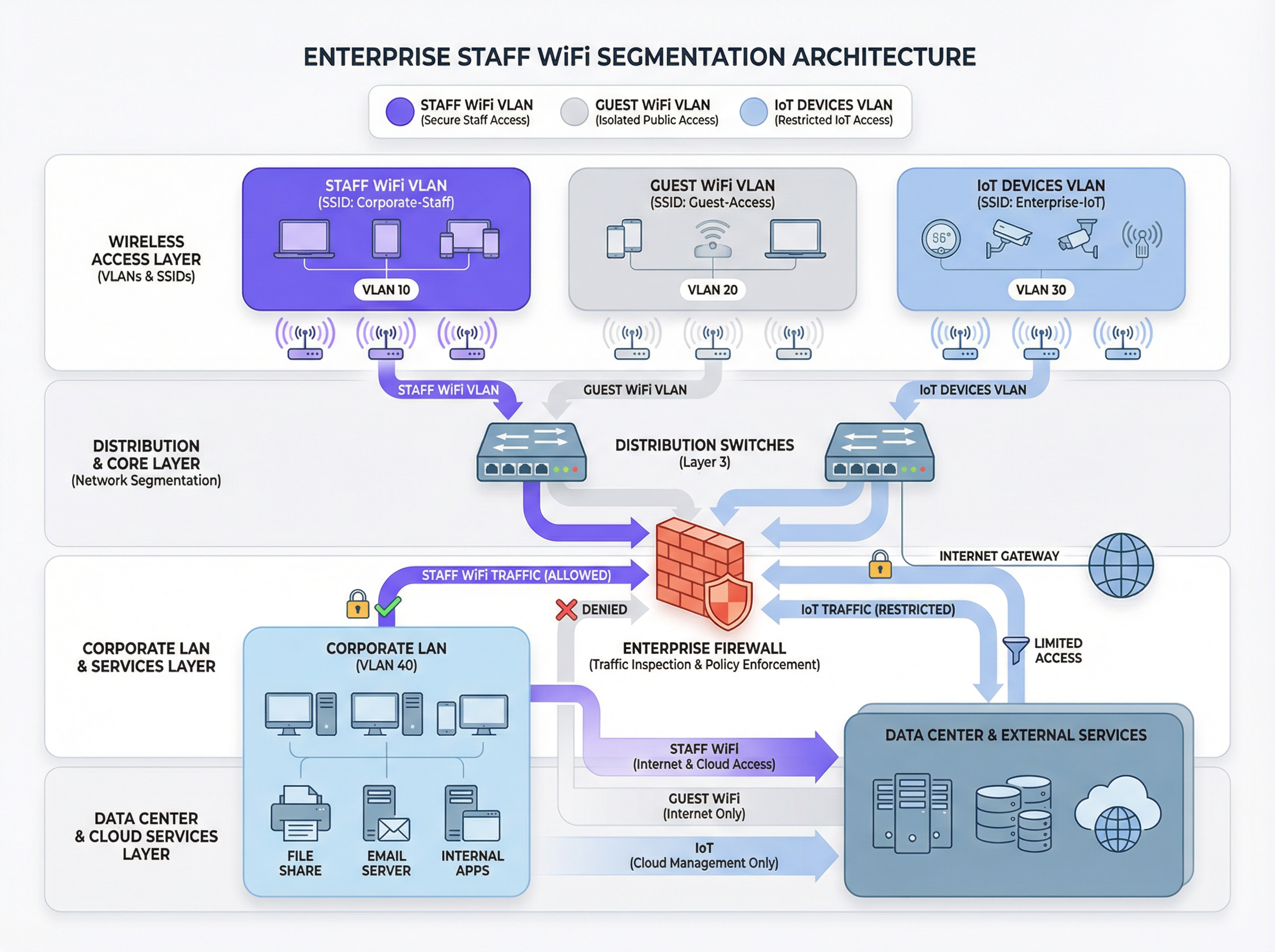
নিরাপদ স্টাফ WiFi-এর মূল ভিত্তি হলো নেটওয়ার্ক সেগমেন্টেশন। একটি ফ্ল্যাট নেটওয়ার্ক যেখানে স্টাফ ডিভাইস, গেস্ট ডিভাইস, IoT হার্ডওয়্যার এবং সংবেদনশীল ব্যাক-অফিস সিস্টেমগুলো একসাথে অবস্থান করে, তা একটি উল্লেখযোগ্য নিরাপত্তা ঝুঁকি। ওয়্যারলেস পরিবেশে সেগমেন্টেশন অর্জনের প্রাথমিক প্রক্রিয়া হলো VLANs (Virtual Local Area Networks)-এর ব্যবহার। প্রতিটি SSID-কে একটি নির্দিষ্ট VLAN-এর সাথে ম্যাপ করা উচিত, যা লজিক্যালি আইসোলেটেড ব্রডকাস্ট ডোমেইন তৈরি করে এবং এটি নেটওয়ার্ক সুইচ লেভেলে প্রয়োগ করা হয়।
একটি সাধারণ বেস্ট-প্র্যাকটিস আর্কিটেকচারে অন্তত তিনটি আলাদা VLAN অন্তর্ভুক্ত থাকে:
- স্টাফ VLAN: কর্মীদের ব্যবহৃত কর্পোরেট-মালিকানাধীন এবং পরিচালিত ডিভাইসগুলোর জন্য। এই VLAN-কে নির্দিষ্ট ফায়ারওয়াল নিয়মের মাধ্যমে অভ্যন্তরীণ রিসোর্স যেমন ফাইল সার্ভার, পয়েন্ট-অফ-সেল (POS) সিস্টেম এবং প্রপার্টি ম্যানেজমেন্ট সিস্টেম (PMS)-এ নিয়ন্ত্রিত অ্যাক্সেস দেওয়া হয়।
- গেস্ট VLAN: পাবলিক-ফেসিং WiFi অ্যাক্সেসের জন্য। এই VLAN-কে অবশ্যই সমস্ত অভ্যন্তরীণ কর্পোরেট রিসোর্স থেকে সম্পূর্ণ আলাদা রাখতে হবে। এই VLAN-এর ট্রাফিক সরাসরি ইন্টারনেটে রাউট করা উচিত এবং গেস্ট ডিভাইসগুলো যাতে একে অপরের সাথে যোগাযোগ করতে না পারে তার জন্য ক্লায়েন্ট আইসোলেশন চালু রাখতে হবে।
- IoT VLAN: সিকিউরিটি ক্যামেরা, ডিজিটাল সাইনেজ এবং HVAC সিস্টেমের মতো 'হেডলেস' ডিভাইসগুলোর জন্য। এই ডিভাইসগুলোর সাধারণত সাধারণ নিরাপত্তা ক্ষমতা থাকে এবং এদেরকে অত্যন্ত কঠোর নিয়মসহ নিজস্ব নেটওয়ার্ক সেগমেন্টে আলাদা রাখা উচিত, যাতে তারা কেবল কাজ করার জন্য প্রয়োজনীয় নির্দিষ্ট সার্ভারগুলোতেই অ্যাক্সেস পায়।
এই সেগমেন্টেড পদ্ধতিটি কেবল একটি সুপারিশ নয়; পেমেন্ট কার্ড ইন্ডাস্ট্রি ডেটা সিকিউরিটি স্ট্যান্ডার্ড (PCI DSS)-এর আওতাভুক্ত যেকোনো সংস্থার জন্য এটি একটি বাধ্যতামূলক প্রয়োজনীয়তা [1]। অন্যান্য নেটওয়ার্ক থেকে কার্ডহোল্ডার ডেটা এনভায়রনমেন্টকে আলাদা করতে ব্যর্থ হওয়া একটি বড় ধরনের কমপ্লায়েন্স ব্যর্থতা হিসেবে গণ্য হয়।
অথেন্টিকেশন এবং অ্যাক্সেস কন্ট্রোল: প্রি-শেয়ার্ড কি-এর বাইরে
স্টাফ WiFi ডিপ্লয়মেন্টের ক্ষেত্রে সবচেয়ে সাধারণ এবং গুরুতর ভুল হলো সকল কর্মীর জন্য একটি একক প্রি-শেয়ার্ড কি (PSK) ব্যবহার করা। সেটআপ করা সহজ হলেও, একটি PSK কোনো ব্যক্তিগত জবাবদিহিতা প্রদান করে না এবং যখন কোনো কর্মী সংস্থা ছেড়ে চলে যান তখন এটি একটি উল্লেখযোগ্য নিরাপত্তা ঝুঁকি তৈরি করে। এর ইন্ডাস্ট্রি-স্ট্যান্ডার্ড সমাধান হলো IEEE 802.1X, যা পোর্ট-ভিত্তিক নেটওয়ার্ক অ্যাক্সেস কন্ট্রোল প্রদান করে।
একটি 802.1X ডিপ্লয়মেন্টে, একটি কেন্দ্রীয় RADIUS (Remote Authentication Dial-In User Service) সার্ভার অথেন্টিকেশন অথরিটি হিসেবে কাজ করে। এর ওয়ার্কফ্লো নিচে দেওয়া হলো:
- সাপ্লিক্যান্ট (ক্লায়েন্ট ডিভাইস): কর্মীর ডিভাইসটি স্টাফ SSID-তে অ্যাক্সেসের অনুরোধ করে।
- অথেন্টিকেটর (ওয়্যারলেস অ্যাক্সেস পয়েন্ট): AP অনুরোধটি ইন্টারসেপ্ট করে এবং ক্রেডেনশিয়াল চায়।
- অথেন্টিকেশন সার্ভার (RADIUS): AP ক্রেডেনশিয়ালগুলো RADIUS সার্ভারে ফরোয়ার্ড করে, যা একটি ইউজার ডিরেক্টরির (যেমন, Active Directory, LDAP, বা Azure AD বা Okta-এর মতো ক্লাউড আইডেন্টিটি প্রোভাইডার) বিপরীতে সেগুলোকে যাচাই করে।
- অথোরাইজেশন: সফল অথেন্টিকেশনের পর, RADIUS সার্ভার AP-তে একটি
Access-Acceptমেসেজ ফেরত পাঠায়, যা এরপর ডিভাইসটিকে নেটওয়ার্কে অ্যাক্সেস প্রদান করে। RADIUS সার্ভার অথোরাইজেশন অ্যাট্রিবিউটগুলোও ফেরত পাঠাতে পারে, যেমন একটি নির্দিষ্ট VLAN ID বা একটি কোয়ালিটি অফ সার্ভিস (QoS) প্রোফাইল, যা রোল-ভিত্তিক অ্যাক্সেস কন্ট্রোল সক্ষম করে।
এই মডেলটি ব্যবহারকারী-ভিত্তিক অথেন্টিকেশন এবং একটি বিস্তারিত অডিট ট্রেইল প্রদান করে, যা নিরাপত্তা তদন্ত এবং কমপ্লায়েন্স রিপোর্টিংয়ের জন্য অপরিহার্য।
সিকিউরিটি প্রোটোকল: WPA2-Enterprise বনাম WPA3-Enterprise
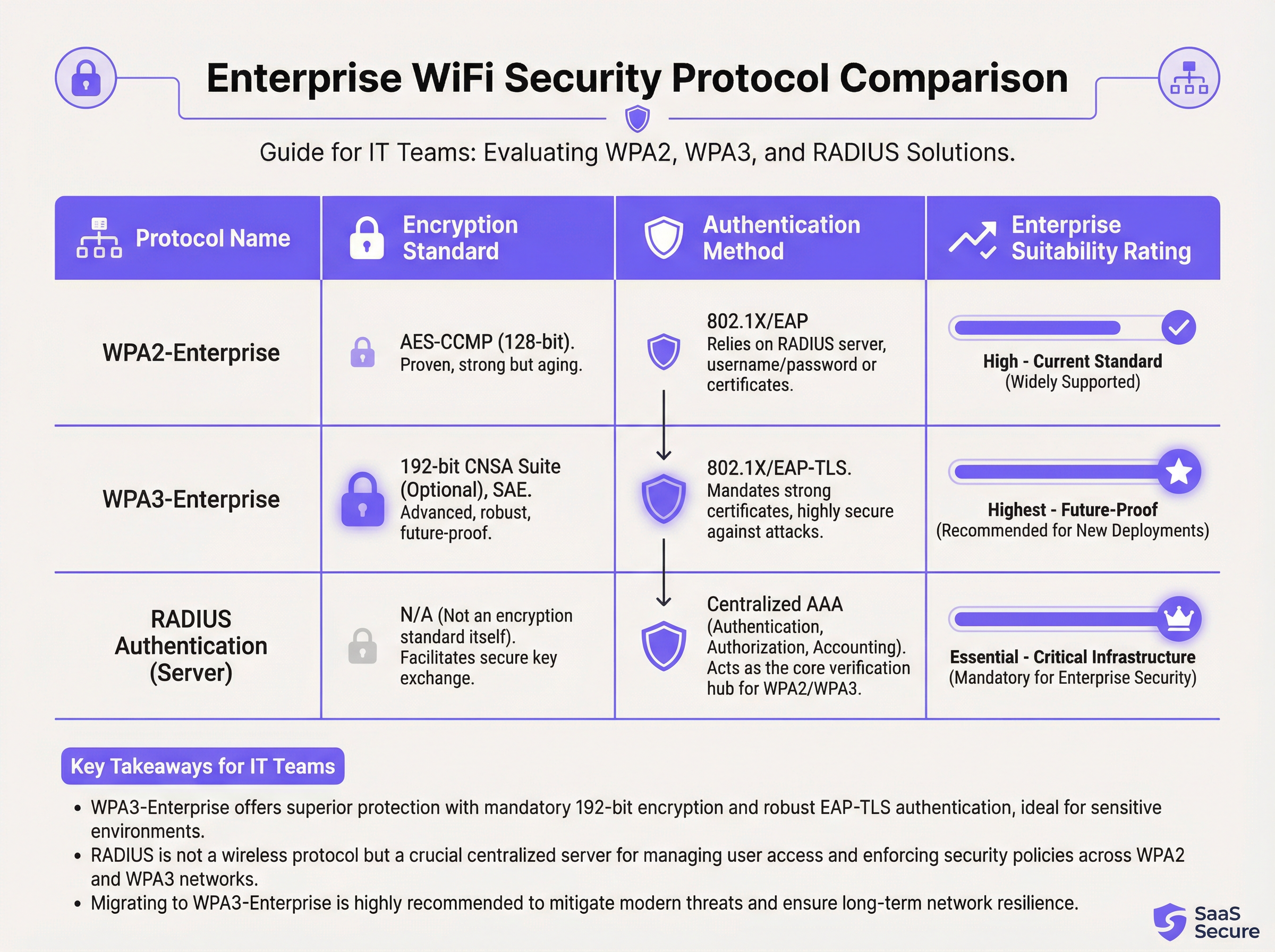
যদিও 802.1X অথেন্টিকেশন পরিচালনা করে, ওয়্যারলেস ট্রাফিককে অবশ্যই এনক্রিপ্ট করা থাকতে হবে। প্রোটোকল নির্বাচনের ক্ষেত্রে উল্লেখযোগ্য নিরাপত্তা প্রভাব রয়েছে।
- WPA2-Enterprise (Wi-Fi Protected Access 2): দীর্ঘস্থায়ী এন্টারপ্রাইজ স্ট্যান্ডার্ড, যা AES-CCMP 128-বিট এনক্রিপশন ব্যবহার করে। এটি শক্তিশালী এবং ব্যাপকভাবে সমর্থিত। তবে, যদি কোনো আক্রমণকারী প্রাথমিক ফোর-ওয়ে হ্যান্ডশেক ক্যাপচার করতে পারে, তবে এটি অফলাইন ডিকশনারি অ্যাটাকের জন্য ঝুঁকিপূর্ণ।
- WPA3-Enterprise (Wi-Fi Protected Access 3): বর্তমান প্রজন্মের নিরাপত্তা ব্যবস্থা। এটি WPA2 হ্যান্ডশেককে Simultaneous Authentication of Equals (SAE) দ্বারা প্রতিস্থাপন করে, যা অফলাইন ডিকশনারি অ্যাটাক প্রতিরোধ করতে সক্ষম। WPA3-Enterprise ম্যানেজমেন্ট ট্রাফিকের আড়িপাতা এবং জালিয়াতি রোধ করতে Protected Management Frames (PMF)-এর ব্যবহার বাধ্যতামূলক করে। উচ্চ-নিরাপত্তা পরিবেশের জন্য, এটি কমার্শিয়াল ন্যাশনাল সিকিউরিটি অ্যালগরিদম (CNSA) স্যুটের সাথে সামঞ্জস্যপূর্ণ একটি ঐচ্ছিক 192-বিট সিকিউরিটি স্যুট অফার করে [2]।
যেকোনো নতুন ডিপ্লয়মেন্ট বা হার্ডওয়্যার রিফ্রেশের জন্য, WPA3-Enterprise-কে ডিফল্ট স্ট্যান্ডার্ড হওয়া উচিত। যদি ক্লায়েন্ট ডিভাইস এবং ইনফ্রাস্ট্রাকচার এটি সমর্থন করে, তবে এর নিরাপত্তা সুবিধাগুলো সামান্য ইমপ্লিমেন্টেশন ওভারহেডের চেয়ে অনেক বেশি মূল্যবান।
বাস্তবায়ন নির্দেশিকা
একটি নিরাপদ এবং দক্ষ স্টাফ WiFi নেটওয়ার্ক স্থাপন করা একটি বহুমুখী প্রক্রিয়া যার জন্য সতর্ক পরিকল্পনার প্রয়োজন।
পর্যায় ১: ডিসকভারি এবং ডিজাইন
- বিদ্যমান ইনফ্রাস্ট্রাকচার অডিট করুন: ওয়্যারলেস অ্যাক্সেস প্রয়োজন এমন সমস্ত ডিভাইস চিহ্নিত করুন এবং সেগুলোকে শ্রেণীবদ্ধ করুন (স্টাফ, গেস্ট, IoT, BYOD)।
- অ্যাক্সেস পলিসি নির্ধারণ করুন: প্রতিটি ক্যাটাগরির জন্য, তাদের কোন নেটওয়ার্ক রিসোর্সগুলোতে অ্যাক্সেস প্রয়োজন তা নির্ধারণ করুন। একটি পলিসি ম্যাট্রিক্স তৈরি করুন যা আপনার ফায়ারওয়াল নিয়মগুলোকে নির্দেশ করবে।
- VLAN এবং IP স্কিমা ডিজাইন করুন: আপনার VLAN আর্কিটেকচার ডিজাইন করুন এবং প্রতিটি VLAN-এর জন্য IP সাবনেট বরাদ্দ করুন। নিশ্চিত করুন যে আপনার কোর নেটওয়ার্ক সুইচ এবং রাউটারগুলো নতুন VLAN সমর্থন করার জন্য কনফিগার করা হয়েছে।
পর্যায় ২: ইনফ্রাস্ট্রাকচার ডিপ্লয়মেন্ট
- RADIUS সার্ভার ডিপ্লয় করুন: রিডান্ডেন্সির জন্য একটি প্রাইমারি এবং একটি সেকেন্ডারি RADIUS সার্ভার সেট আপ করুন। আপনার নির্বাচিত ইউজার ডিরেক্টরির সাথে ইন্টিগ্রেট করুন।
- ওয়্যারলেস ল্যান কন্ট্রোলার (WLC) কনফিগার করুন: নতুন SSID তৈরি করুন (যেমন,
Staff-Secure,Guest-WiFi)। আপনার RADIUS সার্ভারগুলোকে নির্দেশ করে 802.1X অথেন্টিকেশনসহ WPA3-Enterprise-এর জন্য স্টাফ SSID কনফিগার করুন। - SSID-গুলোকে VLAN-এ ম্যাপ করুন: নিশ্চিত করুন যে প্রতিটি SSID তার সংশ্লিষ্ট VLAN ID-এর সাথে সঠিকভাবে ট্যাগ করা হয়েছে।
পর্যায় ৩: টেস্টিং এবং রোলআউট
- পাইলট টেস্টিং: একটি পাইলট প্রোগ্রামে আইটি এবং অপারেশনাল স্টাফদের একটি ছোট গ্রুপকে অন্তর্ভুক্ত করুন। অথেন্টিকেশন, রিসোর্স অ্যাক্সেস এবং রোমিং পারফরম্যান্স পরীক্ষা করুন।
- ডিভাইস অনবোর্ডিং: নতুন এবং বিদ্যমান ডিভাইসগুলো এনরোল করার জন্য একটি স্পষ্ট প্রক্রিয়া তৈরি করুন। কর্পোরেট-মালিকানাধীন ডিভাইসগুলোর জন্য, এটি একটি মোবাইল ডিভাইস ম্যানেজমেন্ট (MDM) প্ল্যাটফর্মের মাধ্যমে স্বয়ংক্রিয় হওয়া উচিত।
- পূর্ণাঙ্গ রোলআউট: পাইলট টেস্টিং সফল হলে, সংস্থা জুড়ে পর্যায়ক্রমিক রোলআউট শুরু করুন। এন্ড-ইউজারদের জন্য স্পষ্ট ডকুমেন্টেশন এবং সহায়তা প্রদান করুন।
পর্যায় ৪: মনিটরিং এবং অপ্টিমাইজেশন
- মনিটরিং বাস্তবায়ন করুন: অথেন্টিকেশন সাফল্য/ব্যর্থতার হার, নেটওয়ার্ক পারফরম্যান্স এবং ডিভাইস-স্তরের কার্যকলাপ নিরীক্ষণ করতে Purple-এর মতো একটি নেটওয়ার্ক ইন্টেলিজেন্স প্ল্যাটফর্ম ব্যবহার করুন।
- QoS কনফিগার করুন: গুরুত্বপূর্ণ অ্যাপ্লিকেশনগুলোকে (যেমন, ভয়েস, POS ট্রাফিক) অগ্রাধিকার দিতে এবং অপ্রয়োজনীয় ট্রাফিককে সমস্ত উপলব্ধ ব্যান্ডউইথ ব্যবহার করা থেকে বিরত রাখতে কোয়ালিটি অফ সার্ভিস (QoS) পলিসি বাস্তবায়ন করুন।
- নিয়মিত অডিট: ফায়ারওয়াল নিয়ম, ব্যবহারকারীর অ্যাক্সেস অধিকার এবং নেটওয়ার্ক পারফরম্যান্স মেট্রিক্সের ত্রৈমাসিক পর্যালোচনার সময়সূচী নির্ধারণ করুন।
বেস্ট প্র্যাকটিস
- সার্টিফিকেট-ভিত্তিক অথেন্টিকেশন প্রয়োগ করুন: কর্পোরেট-মালিকানাধীন ডিভাইসগুলোর জন্য, EAP-TLS ব্যবহার করুন, যা ইউজারনেম এবং পাসওয়ার্ডের পরিবর্তে ডিজিটাল সার্টিফিকেটের ওপর নির্ভর করে। এটি ক্রেডেনশিয়াল ফিশিংয়ের ঝুঁকি দূর করে এবং সবচেয়ে শক্তিশালী অথেন্টিকেশন প্রদান করে।
- ফাস্ট রোমিং (802.11r) বাস্তবায়ন করুন: বড় ভেন্যুগুলোতে, মোবাইল স্টাফদের কানেকশন ড্রপ হওয়া রোধ করতে অ্যাক্সেস পয়েন্টগুলোর মধ্যে দ্রুত এবং নিরবচ্ছিন্ন রোমিং নিশ্চিত করুন।
- BYOD ট্রাফিক আইসোলেট করুন: যদি আপনি কর্মীদের ব্যক্তিগত ডিভাইস (Bring Your Own Device) কানেক্ট করার অনুমতি দেন, তবে সেগুলোকে কর্পোরেট-মালিকানাধীন ডিভাইসের চেয়ে আলাদা এবং আরও বেশি নিয়ন্ত্রিত VLAN-এ রাখুন।
- নিয়মিত RF সার্ভে পরিচালনা করুন: ইন্টারফারেন্সের উৎসগুলো চিহ্নিত ও প্রশমিত করতে এবং কভারেজ ও ক্যাপাসিটি উভয়ের জন্য সর্বোত্তম AP প্লেসমেন্ট নিশ্চিত করতে রেডিও ফ্রিকোয়েন্সি (RF) সার্ভে সম্পাদন করুন।
- লিগ্যাসি প্রোটোকল নিষ্ক্রিয় করুন: আপনার ওয়্যারলেস ইনফ্রাস্ট্রাকচারে WEP, WPA এবং TKIP-এর মতো সেকেলে এবং অনিরাপদ প্রোটোকলগুলো সক্রিয়ভাবে নিষ্ক্রিয় করুন।
ট্রাবলশুটিং এবং ঝুঁকি প্রশমন
| সাধারণ সমস্যা | মূল কারণ | প্রশমন কৌশল |
|---|---|---|
| অথেন্টিকেশন ব্যর্থতা | ভুল ক্রেডেনশিয়াল, মেয়াদোত্তীর্ণ সার্টিফিকেট, RADIUS সার্ভার আউটেজ। | RADIUS সার্ভারগুলোতে শক্তিশালী মনিটরিং বাস্তবায়ন করুন। সার্টিফিকেট নবায়ন স্বয়ংক্রিয় করতে MDM ব্যবহার করুন। ক্রেডেনশিয়াল ম্যানেজমেন্টের ওপর স্পষ্ট ব্যবহারকারী নির্দেশনা প্রদান করুন। |
| দুর্বল রোমিং পারফরম্যান্স | 802.11r/k/v সাপোর্টের অভাব, ভুলভাবে কনফিগার করা AP পাওয়ার লেভেল। | নিশ্চিত করুন যে কন্ট্রোলার এবং AP-গুলো ফাস্ট রোমিং স্ট্যান্ডার্ডের জন্য কনফিগার করা হয়েছে। AP সেটিংস অপ্টিমাইজ করতে ডিপ্লয়মেন্ট-পরবর্তী একটি RF সার্ভে পরিচালনা করুন। |
| নেটওয়ার্ক কনজেশন | অপর্যাপ্ত ব্যান্ডউইথ, QoS-এর অভাব, অপ্রয়োজনীয় ট্রাফিক স্যাচুরেশন। | গুরুত্বপূর্ণ ট্রাফিককে অগ্রাধিকার দিতে QoS পলিসি বাস্তবায়ন করুন। ব্যান্ডউইথ-ক্ষুধার্ত অ্যাপ্লিকেশনগুলো চিহ্নিত করতে এবং রেট-লিমিট করতে একটি নেটওয়ার্ক অ্যানালিটিক্স প্ল্যাটফর্ম ব্যবহার করুন। |
| রগ অ্যাক্সেস পয়েন্ট (Rogue APs) | কর্মীদের দ্বারা কর্পোরেট নেটওয়ার্কে প্লাগ করা অননুমোদিত AP। | আপনার ওয়্যারলেস কন্ট্রোলারে রগ AP ডিটেকশন চালু করুন। অননুমোদিত ডিভাইসগুলোকে নেটওয়ার্ক অ্যাক্সেস পাওয়া থেকে বিরত রাখতে ওয়্যার্ড সুইচগুলোতে 802.1X পোর্ট সিকিউরিটি ব্যবহার করুন। |
ROI এবং ব্যবসায়িক প্রভাব
একটি নিরাপদ স্টাফ WiFi নেটওয়ার্কে বিনিয়োগ বেশ কয়েকটি ক্ষেত্রে পরিমাপযোগ্য রিটার্ন প্রদান করে:
- বর্ধিত উৎপাদনশীলতা: নির্ভরযোগ্য, উচ্চ-পারফরম্যান্সের WiFi কর্মীদের মোবাইল অ্যাপ্লিকেশন ব্যবহার করতে, তথ্যে অ্যাক্সেস পেতে এবং কোনো বাধা ছাড়াই যোগাযোগ করতে দেয়, যা সরাসরি অপারেশনাল দক্ষতা উন্নত করে। Wi-Fi Alliance-এর একটি গবেষণায় দেখা গেছে যে WiFi বার্ষিক বৈশ্বিক অর্থনৈতিক মূল্যে $5 ট্রিলিয়নেরও বেশি অবদান রাখে [3]।
- নিরাপত্তা ঘটনা হ্রাস: সঠিক সেগমেন্টেশন এবং শক্তিশালী অথেন্টিকেশন অ্যাটাক সারফেসকে নাটকীয়ভাবে হ্রাস করে, যার ফলে নিরাপত্তা ঘটনা কমে যায়, প্রতিকার খরচ কমে এবং ব্যয়বহুল ডেটা ব্রিচের ঝুঁকি হ্রাস পায়।
- স্ট্রিমলাইনড কমপ্লায়েন্স: বিস্তারিত লগিং সুবিধাসহ একটি 802.1X-ভিত্তিক নেটওয়ার্ক PCI DSS, GDPR এবং HIPAA-এর মতো স্ট্যান্ডার্ডগুলোর জন্য কমপ্লায়েন্স অডিটকে সহজ করে, যা শত শত কর্মঘণ্টা বাঁচায়।
- উন্নত ব্যবসায়িক তত্পরতা: একটি স্কেলেবল এবং নিরাপদ ওয়্যারলেস ভিত্তি রেস্তোরাঁয় টেবিলসাইড অর্ডারিং থেকে শুরু করে রিটেইলে মোবাইল পয়েন্ট-অফ-সেল পর্যন্ত নতুন মোবাইল-ফার্স্ট উদ্যোগগুলোর দ্রুত বাস্তবায়ন সক্ষম করে।
ROI গণনা করতে, নতুন ইনফ্রাস্ট্রাকচারের টোটাল কস্ট অফ ওনারশিপ (TCO)-কে পরিমাপযোগ্য সুবিধাগুলোর সাথে তুলনা করুন, যেমন উন্নত দক্ষতার মাধ্যমে বাঁচানো সময়, সম্ভাব্য ডেটা ব্রিচের খরচ এড়ানো এবং কমপ্লায়েন্স অডিটের খরচ হ্রাস।
তথ্যসূত্র
[1] PCI Security Standards Council. (2022). Payment Card Industry Data Security Standard (PCI DSS) v4.0. https://www.pcisecuritystandards.org/documents/PCI-DSS-v4_0.pdf [2] Wi-Fi Alliance. (2024). WPA3™ Specification. https://www.wi-fi.org/discover-wi-fi/security [3] Wi-Fi Alliance. (2021). The Global Economic Value of Wi-Fi. https://www.wi-fi.org/file/the-global-economic-value-of-wi-fi
Key Terms & Definitions
IEEE 802.1X
An IEEE standard for port-based Network Access Control (PNAC). It provides an authentication mechanism to devices wishing to attach to a LAN or WLAN.
This is the core technology that enables per-user authentication on a WiFi network, moving away from insecure shared passwords. IT teams implement 802.1X to meet compliance requirements and enable robust access control.
RADIUS
A networking protocol that provides centralized Authentication, Authorization, and Accounting (AAA) management for users who connect and use a network service.
The RADIUS server is the 'brain' of an 802.1X deployment. It checks the user's credentials against a directory and tells the access point whether to allow or deny access. A failed RADIUS server means no one can log in.
VLAN
A Virtual Local Area Network is any broadcast domain that is partitioned and isolated in a computer network at the data link layer (OSI layer 2).
VLANs are the primary tool for segmenting a network. IT teams use VLANs to create separate, isolated networks for staff, guests, and IoT devices on the same physical hardware, preventing traffic from one from spilling over into another.
WPA3-Enterprise
The third generation of the Wi-Fi Protected Access security protocol, designed for enterprise environments. It uses 192-bit encryption and replaces the PSK handshake with Simultaneous Authentication of Equals (SAE).
This is the current, most secure standard for enterprise WiFi. Network architects should specify WPA3-Enterprise for all new deployments to protect against modern threats and ensure long-term security.
EAP-TLS
Extensible Authentication Protocol-Transport Layer Security. An EAP method that uses digital certificates for mutual authentication between the client and the server.
This is the gold standard for 802.1X authentication. Instead of a user typing a password, the device presents a certificate that is cryptographically verified. It is immune to phishing and credential theft.
QoS (Quality of Service)
The use of mechanisms or technologies to control traffic and ensure the performance of critical applications to the level required by the business.
In a staff WiFi context, QoS is used to prioritize applications like voice calls or payment processing over less important traffic like software updates or web browsing, ensuring operational systems are always responsive.
Client Isolation
A security feature on a wireless access point that prevents wireless clients connected to the same AP from communicating with each other.
This is a mandatory feature for guest WiFi networks. It prevents a malicious guest from attacking another guest's device on the same network. It should be enabled on all non-staff VLANs.
PCI DSS
The Payment Card Industry Data Security Standard is an information security standard for organizations that handle branded credit cards from the major card schemes.
For any business that processes, stores, or transmits credit card information, PCI DSS compliance is mandatory. A key requirement is the segmentation of the network that handles card data from all other networks, which directly impacts staff WiFi design.
Case Studies
A 300-room luxury hotel needs to upgrade its staff WiFi network. The current system uses a single PSK for all staff, including front desk, housekeeping, and management. The hotel uses a cloud-based Property Management System (PMS) and has corporate-owned tablets for housekeeping staff and BYOD for most other employees. They must comply with PCI DSS.
- Architecture: Design a three-VLAN architecture:
VLAN 10 (Staff-Corp)for corporate tablets,VLAN 20 (Staff-BYOD)for personal devices, andVLAN 30 (Guest). - Authentication: Deploy a redundant cloud-based RADIUS solution integrated with the hotel's Azure AD. Configure two SSIDs:
Hotel-Staffusing WPA3-Enterprise with EAP-TLS (certificate-based) for the corporate tablets, andHotel-BYODusing WPA2-Enterprise with PEAP-MSCHAPv2 (credential-based) for personal devices. - Access Control: The
Staff-CorpVLAN is granted access to the PMS cloud endpoints and internal management systems. TheStaff-BYODVLAN is only allowed internet access and access to the PMS cloud endpoints. TheGuestVLAN is completely isolated and routes directly to the internet. - Onboarding: Use the hotel's MDM (e.g., Intune) to automatically provision certificates and the
Hotel-Staffprofile to all corporate tablets. Provide a self-service portal for BYOD users to connect to theHotel-BYODnetwork after authenticating with their Azure AD credentials.
A retail chain with 50 stores wants to deploy staff WiFi for inventory management scanners and manager tablets. The scanners are ruggedized Android devices, and the tablets are iPads. The primary goal is to ensure reliable connectivity in both the front-of-store and back-of-house/stockroom areas, with secure access to the central inventory management system.
- RF Design: Conduct a predictive RF survey for a template store layout, focusing on achieving -67 dBm or better signal strength in all operational areas, especially the dense shelving of the stockroom. Plan for sufficient AP density to handle the capacity of all devices operating concurrently.
- Network Design: Implement a standardized two-VLAN staff architecture across all stores:
VLAN 50 (Scanners)andVLAN 60 (Management). Both SSIDs will use WPA3-Enterprise with 802.1X authentication against a central RADIUS server located at the corporate data center. - Authentication: Use certificate-based authentication (EAP-TLS) for both the Android scanners and the iPads, managed via an MDM platform. This avoids staff having to type complex passwords on devices without full keyboards.
- QoS: Configure QoS policies to prioritize the inventory management application's traffic over any other traffic on the network. This ensures that scanner updates and lookups are always responsive, even during busy periods.
- Roaming: Enable 802.11r (Fast BSS Transition) to ensure the inventory scanners, which are constantly in motion, can roam seamlessly between access points without dropping their connection to the inventory system.
Scenario Analysis
Q1. A large conference center is hosting a high-profile tech event with 1,000 attendees and 200 event staff. The staff need reliable access to an event management app, while attendees need basic internet access. How would you structure the wireless network to ensure the staff app remains performant?
💡 Hint:Consider both segmentation and bandwidth management.
Show Recommended Approach
Deploy at least two SSIDs: Event-Staff and Event-Guest. The Event-Staff SSID would be on its own VLAN with WPA2/3-Enterprise authentication. Crucially, implement QoS policies to prioritize the event management app's traffic and assign a guaranteed minimum bandwidth (e.g., 20% of total capacity) to the Staff VLAN. The Event-Guest SSID would be on an isolated VLAN with a per-client bandwidth limit to prevent attendees from impacting staff network performance.
Q2. Your CFO has questioned the expense of deploying a RADIUS server, suggesting that a complex, rotating PSK would be sufficient for the 150 employees in your office. How do you justify the need for 802.1X?
💡 Hint:Focus on accountability, compliance, and operational overhead.
Show Recommended Approach
The justification has three parts: 1. Accountability: With a PSK, all actions are anonymous. With 802.1X, every connection is logged against a specific user, which is essential for security incident response. 2. Compliance: Many regulatory frameworks (like PCI DSS or HIPAA) require individual accountability, making a shared key non-compliant. 3. Operational Efficiency: With 802.1X, terminating an employee's access is as simple as disabling their Active Directory account. With a PSK, the entire key must be changed and redistributed to all 149 other employees, which is inefficient and disruptive.
Q3. You are deploying a new staff WiFi network in a hospital. The primary users are doctors and nurses using corporate-owned tablets to access patient records (EHR). What is the single most effective security configuration you can implement, and why?
💡 Hint:Think beyond just encryption. How do you provide the strongest possible authentication for sensitive data?
Show Recommended Approach
The single most effective configuration is WPA3-Enterprise with EAP-TLS (certificate-based) authentication. The use of WPA3 provides the strongest available encryption. However, the critical element is EAP-TLS. By using device-specific digital certificates managed by an MDM platform, you eliminate passwords entirely for this user group. This prevents credential theft via phishing or social engineering, which is a major attack vector. Given the sensitivity of patient data (EHR), removing the password from the equation provides a fundamental security uplift that credential-based methods cannot match.
Key Takeaways
- ✓Staff WiFi is not a convenience; it is critical operational infrastructure.
- ✓Always segment staff, guest, and IoT traffic using separate VLANs.
- ✓Use IEEE 802.1X with a RADIUS server for authentication; never use a Pre-Shared Key (PSK).
- ✓Deploy WPA3-Enterprise for all new networks to ensure the strongest encryption.
- ✓For corporate-owned devices, use certificate-based authentication (EAP-TLS) to eliminate password-related risks.
- ✓Implement Quality of Service (QoS) to prioritize critical applications and guarantee performance.
- ✓A well-architected staff WiFi network delivers measurable ROI through increased productivity and reduced security risk.




