

WiFi চ্যানেল নির্বাচনের চূড়ান্ত গাইড: পারফরম্যান্স অপ্টিমাইজ করা এবং ইন্টারফারেন্স এড়ানো
This guide provides a comprehensive, step-by-step explanation of how to change WiFi channels on different routers and operating systems. It covers the reasons for changing channels (interference, congestion), how to identify the least congested channels using WiFi analyzer tools (with specific recommendations and screenshots), and the potential impact on network performance. It differentiates itself by offering practical advice for both home and business users, including advanced configurations and troubleshooting tips for common issues.
🎧 Listen to this Guide
View Transcript
এক্সিকিউটিভ সামারি
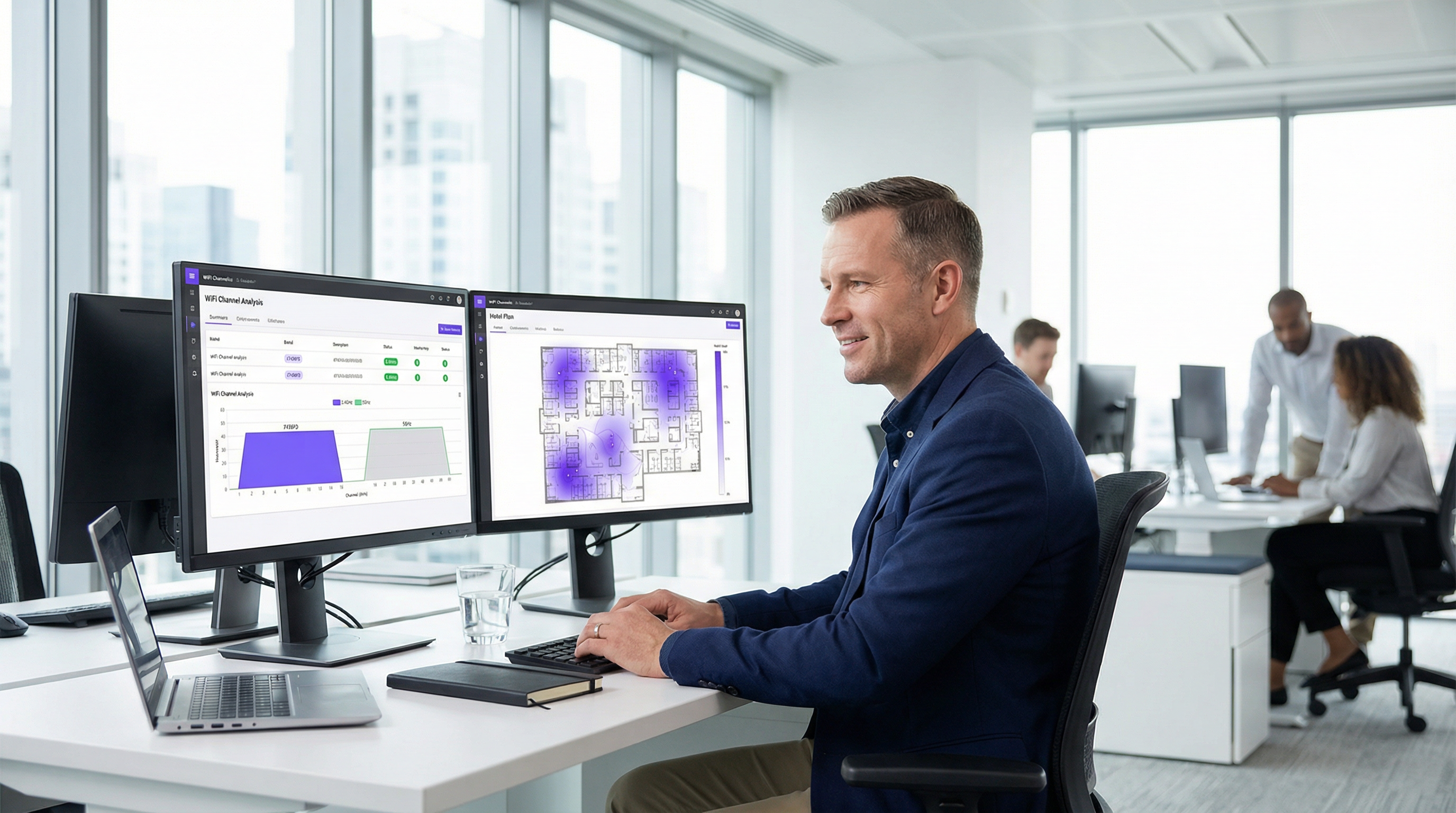
অধিক জনসমাগমপূর্ণ বাণিজ্যিক স্থানগুলোতে কানেক্টিভিটি পরিচালনাকারী আইটি লিডারদের জন্য, সাবঅপ্টিমাল WiFi পারফরম্যান্স কেবল একটি সাধারণ অসুবিধাই নয়; এটি রাজস্ব এবং অপারেশনাল দক্ষতার ক্ষেত্রে একটি সরাসরি বাধা। এই গাইডটি WiFi চ্যানেল নির্বাচনের জন্য একটি প্রামাণিক এবং কার্যকর ফ্রেমওয়ার্ক প্রদান করে, যা তাত্ত্বিক ধারণার বাইরে গিয়ে বাস্তবসম্মত ডিপ্লয়মেন্ট নির্দেশনা প্রদান করে। আমরা রেডিও ফ্রিকোয়েন্সি (RF) ইন্টারফারেন্স এবং চ্যানেল কনজেশনের মতো ব্যাপক চ্যালেঞ্জগুলো নিয়ে আলোচনা করেছি, যা হোটেল, রিটেইল চেইন এবং স্টেডিয়ামের মতো ঘনবসতিপূর্ণ পরিবেশে নেটওয়ার্ক থ্রুপুট এবং নির্ভরযোগ্যতা হ্রাস করে। এর মূল প্রতিপাদ্য হলো, একটি সুপরিকল্পিত এবং ডেটা-চালিত চ্যানেল ম্যানেজমেন্ট স্ট্র্যাটেজি কোনো ঐচ্ছিক বিষয় নয়, বরং এটি এন্টারপ্রাইজ-গ্রেড ওয়্যারলেস আর্কিটেকচারের একটি মৌলিক উপাদান। 2.4GHz ব্যান্ডের নন-ওভারল্যাপিং চ্যানেলগুলোর নীতি আয়ত্ত করে, 5GHz ব্যান্ডে কৌশলগতভাবে চ্যানেল উইডথ ব্যবহার করে এবং ডায়নামিক ফ্রিকোয়েন্সি সিলেকশন (DFS)-এর অপারেশনাল প্রভাবগুলো বোঝার মাধ্যমে, নেটওয়ার্ক আর্কিটেক্টরা ঝুঁকি কমাতে, ব্যবহারকারীর অভিজ্ঞতা উন্নত করতে এবং তাদের ওয়্যারলেস ইনফ্রাস্ট্রাকচারের ROI সর্বাধিক করতে পারেন। এই রেফারেন্সটি একটি শক্তিশালী চ্যানেল অপ্টিমাইজেশন প্রজেক্টকে ন্যায্যতা দিতে এবং কার্যকর করতে প্রয়োজনীয় টেকনিক্যাল ডিপ-ডাইভ, ভেন্ডর-নিরপেক্ষ বাস্তবায়ন পদক্ষেপ এবং বিজনেস-ইমপ্যাক্ট অ্যানালাইসিস প্রদান করে।
টেকনিক্যাল ডিপ-ডাইভ
রেডিও ফ্রিকোয়েন্সি (RF) স্পেকট্রাম হলো একটি সসীম এবং শেয়ার্ড রিসোর্স, যা ভৌত আইন এবং নিয়ন্ত্রক ডোমেইন দ্বারা পরিচালিত হয়। কার্যকর WiFi চ্যানেল ম্যানেজমেন্ট এই স্পেকট্রামটি কীভাবে বরাদ্দ করা হয় এবং প্রাথমিক ফ্রিকোয়েন্সি ব্যান্ডগুলোর (2.4 GHz এবং 5 GHz) অন্তর্নিহিত বৈশিষ্ট্যগুলো গভীরভাবে বোঝার ওপর নির্ভর করে।
2.4 GHz ব্যান্ড: একটি জনবহুল ইউটিলিটি লেন
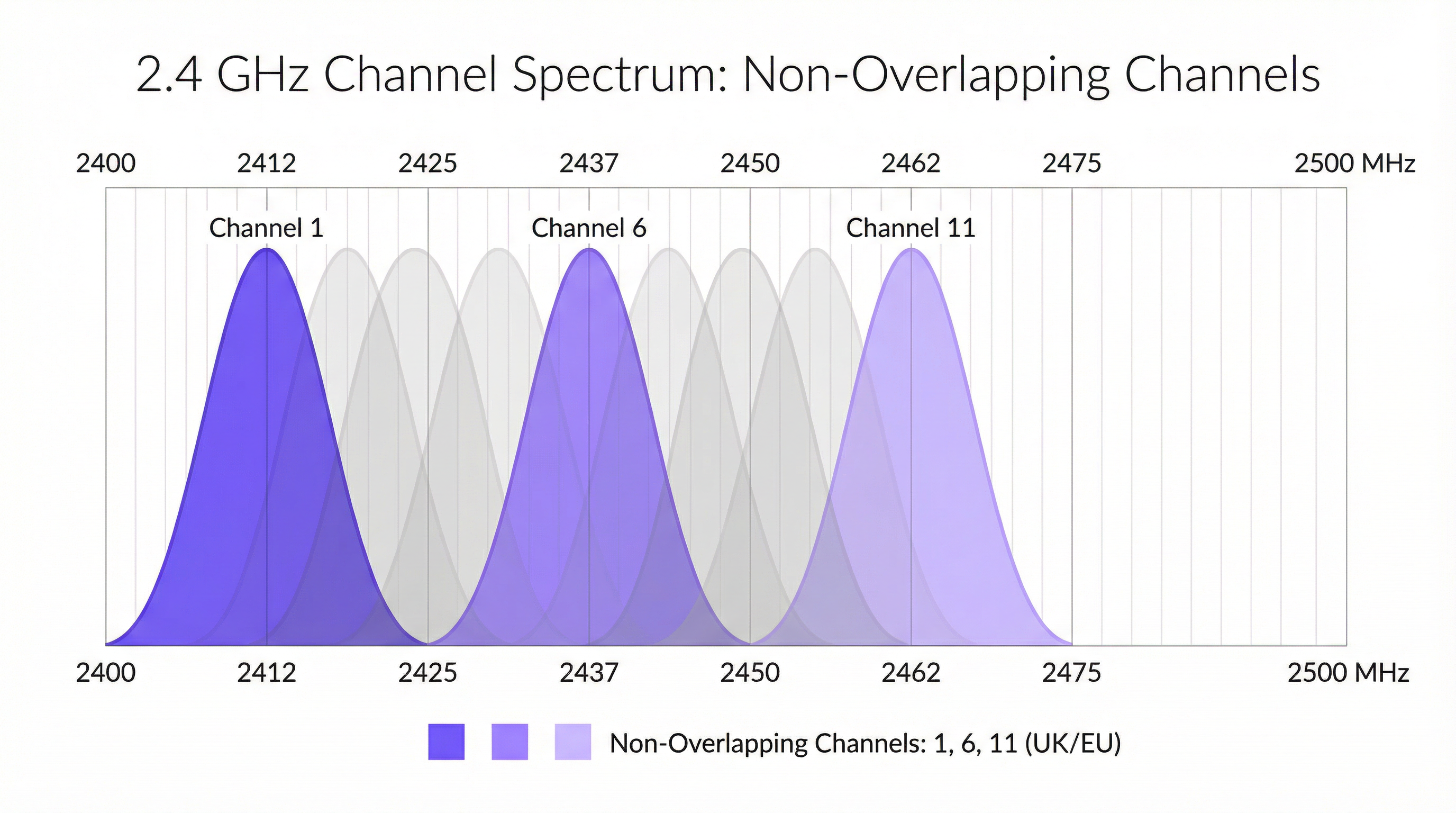
2.4 GHz ব্যান্ড হলো WiFi-এর একটি লিগ্যাসি ওয়ার্কহর্স, যা চমৎকার সিগন্যাল প্রোপাগেশন এবং ওয়াল পেনিট্রেশন প্রদান করে। তবে, এটি অত্যন্ত জনবহুল এবং ইন্টারফারেন্সের প্রতি সংবেদনশীল। যুক্তরাজ্য এবং ইউরোপে, এই ব্যান্ডটিকে ১৩টি চ্যানেলে ভাগ করা হয়েছে, কিন্তু তাদের কাছাকাছি স্পেসিং (5 MHz) এবং উইডথের (20-22 MHz) কারণে, এগুলো উল্লেখযোগ্যভাবে ওভারল্যাপ করে। এটি অ্যাডজাসেন্ট-চ্যানেল এবং কো-চ্যানেল ইন্টারফারেন্স তৈরি করে, যেখানে অ্যাক্সেস পয়েন্টগুলো (APs) কার্যকরভাবে একে অপরের ওপর প্রভাব ফেলে, ডেটা প্যাকেটগুলোকে করাপ্ট করে এবং রিট্রান্সমিশনে বাধ্য করে। এটি কমানোর একমাত্র উপায় হলো ওভারল্যাপ করে না এমন তিনটি চ্যানেল ব্যবহার করা: 1, 6, এবং 11। যেকোনো প্রফেশনাল ডিপ্লয়মেন্টের জন্য এটি একটি অপরিহার্য বেস্ট প্র্যাকটিস। 1, 6, বা 11 ব্যতীত অন্য কোনো চ্যানেলে কনফিগার করা যেকোনো AP সক্রিয়ভাবে স্পেকট্রাম দূষণে অবদান রাখে।
অধিকন্তু, 2.4 GHz ব্যান্ড হলো একটি আনলাইসেন্সড স্পেকট্রাম, যার অর্থ এটি ব্লুটুথ পেরিফেরাল, মাইক্রোওয়েভ ওভেন, কর্ডলেস ফোন এবং জিগবি-ভিত্তিক আইওটি (IoT) সেন্সরসহ অসংখ্য অন্যান্য ডিভাইসের জন্য উন্মুক্ত। এই নন-WiFi ইন্টারফারেন্স অপ্রত্যাশিত নয়েজের আরেকটি স্তর যুক্ত করে যা পারফরম্যান্সকে মারাত্মকভাবে হ্রাস করতে পারে।
5 GHz ব্যান্ড: হাই-স্পিড মোটরওয়ে
5 GHz ব্যান্ড হলো হাই-পারফরম্যান্স WiFi-এর মূল চাবিকাঠি। এটি উল্লেখযোগ্যভাবে আরও বেশি চ্যানেল (যুক্তরাজ্যে ২০টিরও বেশি) অফার করে যা ডিজাইনের দিক থেকে নন-ওভারল্যাপিং এবং এতে নন-WiFi ইন্টারফারেন্স অনেক কম হয়। এটি ভিডিও স্ট্রিমিং, ভয়েস-ওভার-আইপি (VoIP) এবং বড় ফাইল ট্রান্সফারের মতো ব্যান্ডউইথ-নিবিড় অ্যাপ্লিকেশনগুলোর জন্য এটিকে একটি বাধ্যতামূলক পছন্দে পরিণত করে। তবে, এর উচ্চতর ফ্রিকোয়েন্সি সিগন্যালগুলোর রেঞ্জ কম এবং দেয়াল ও মেঝের মতো ভৌত বাধাগুলোর কারণে এগুলো সহজেই দুর্বল হয়ে পড়ে।
5 GHz ব্যান্ডের মধ্যে, নেটওয়ার্ক আর্কিটেক্টরা থ্রুপুট বাড়ানোর জন্য চ্যানেল উইডথ কনফিগার করতে পারেন:
- 20 MHz: বেসলাইন উইডথ। এটি সর্বনিম্ন ইন্টারফারেন্সের সম্ভাবনা প্রদান করে এবং উচ্চ-ঘনত্বের পরিবেশের জন্য আদর্শ যেখানে অনেকগুলো AP একসাথে থাকে।
- 40 MHz: দুটি 20 MHz চ্যানেলকে যুক্ত করে। এটি সম্ভাব্য ডেটা রেট দ্বিগুণ করে কিন্তু স্পেকট্রাম ফুটপ্রিন্টও দ্বিগুণ করে, যা এটিকে ইন্টারফারেন্সের প্রতি আরও সংবেদনশীল করে তোলে।
- 80 MHz: চারটি 20 MHz চ্যানেলকে যুক্ত করে। এটি খুব উচ্চ ডেটা রেট অফার করে তবে এটি শুধুমাত্র কম AP ঘনত্বের পরিচ্ছন্ন RF পরিবেশে ব্যবহার করা উচিত।
- 160 MHz: আটটি 2.4 GHz চ্যানেলকে যুক্ত করে। যদিও এটি 802.11ac/ax দ্বারা সমর্থিত, তবে এর ব্যাপক স্পেকট্রাম ব্যবহারের কারণে এন্টারপ্রাইজ সেটিংসে এটি খুব কমই বাস্তবসম্মত।
ডায়নামিক ফ্রিকোয়েন্সি সিলেকশন (DFS)
5 GHz ব্যান্ডে একটি গুরুত্বপূর্ণ বিবেচ্য বিষয় হলো ডায়নামিক ফ্রিকোয়েন্সি সিলেকশন (DFS)। UNII-2 এবং UNII-2e ব্যান্ডের নির্দিষ্ট কিছু চ্যানেল আবহাওয়া এবং সামরিক রাডার সিস্টেমের সাথে শেয়ার করা হয়। IEEE 802.11h স্ট্যান্ডার্ড অনুযায়ী, যদি কোনো AP একটি DFS চ্যানেলে রাডার সিগন্যাল শনাক্ত করে, তবে তাকে অবশ্যই কমপক্ষে ৩০ মিনিটের জন্য সেই চ্যানেলটি খালি করতে হবে। ব্যবহারকারীদের জন্য, এটি হঠাৎ করে, যদিও সংক্ষিপ্ত সময়ের জন্য, কানেকশন ড্রপের কারণ হতে পারে। যদিও DFS চ্যানেলগুলো প্রচুর পরিমাণে অতিরিক্ত স্পেকট্রাম উন্মুক্ত করে, তবে এগুলোর ব্যবহারের জন্য সতর্ক পরিকল্পনার প্রয়োজন। একটি নির্দিষ্ট স্থানে রাডার ইভেন্টের ঝুঁকি নির্ধারণের জন্য একটি সাইট সার্ভে অপরিহার্য। মিশন-ক্রিটিক্যাল ডিপ্লয়মেন্টের ক্ষেত্রে, সর্বোচ্চ স্থিতিশীলতা নিশ্চিত করতে প্রাথমিকভাবে AP-গুলোকে নন-DFS চ্যানেলে (যেমন, 36, 40, 44, 48) সীমাবদ্ধ রাখা প্রায়শই বুদ্ধিমানের কাজ।
ইমপ্লিমেন্টেশন গাইড
তত্ত্ব থেকে একটি লাইভ প্রোডাকশন পরিবেশে স্থানান্তরের জন্য একটি পদ্ধতিগত এবং ঝুঁকিমুক্ত পদ্ধতির প্রয়োজন। নিচের ধাপগুলো একটি চ্যানেল প্ল্যান আপডেট কার্যকর করার জন্য একটি ভেন্ডর-নিরপেক্ষ ব্লুপ্রিন্ট প্রদান করে।
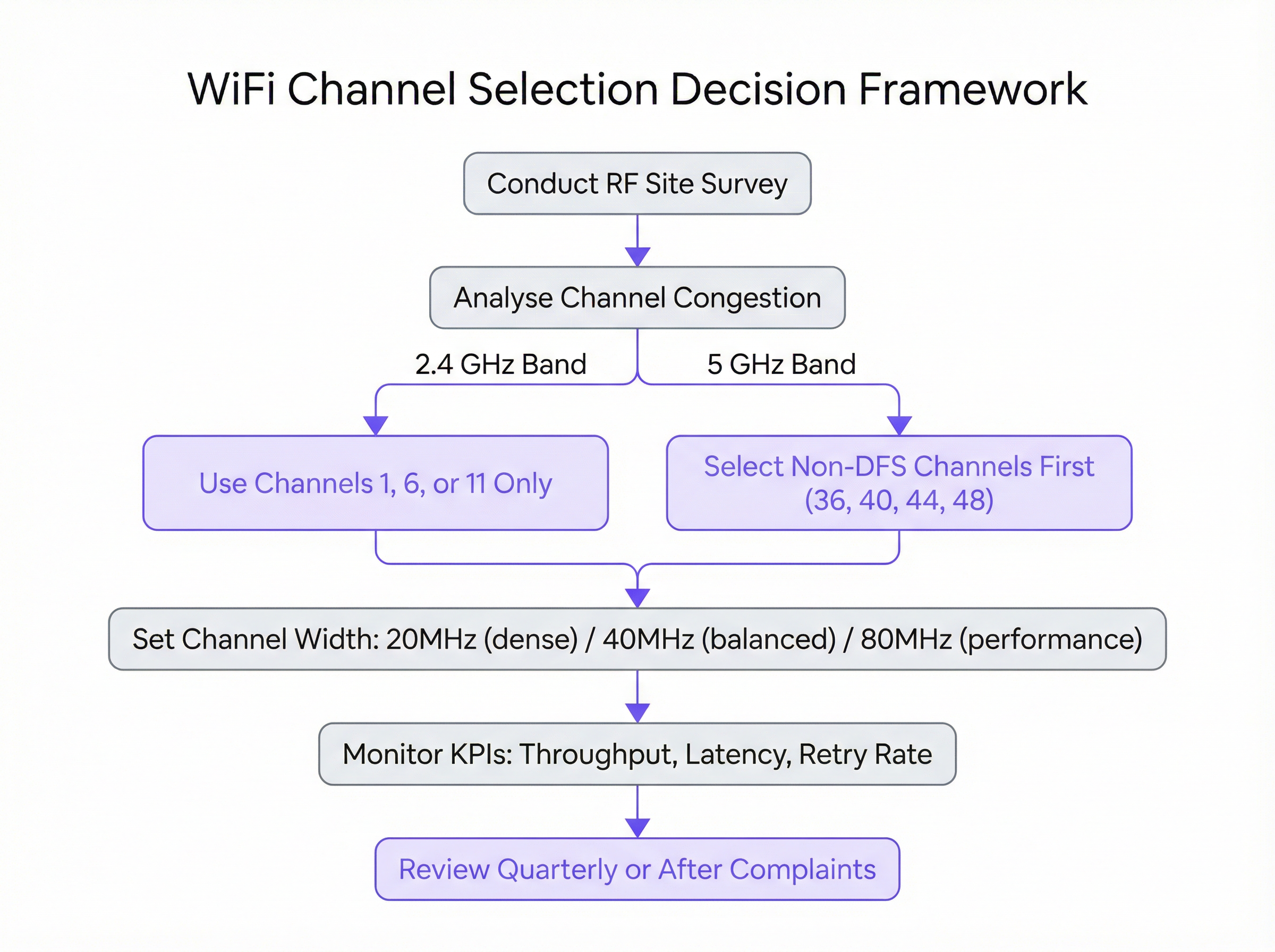
ধাপ ১: একটি বেসলাইন RF সাইট সার্ভে পরিচালনা করুন যেকোনো পরিবর্তন করার আগে, আপনাকে অবশ্যই আপনার বর্তমান RF পরিবেশ বুঝতে হবে। একটি প্রফেশনাল WiFi অ্যানালাইজার টুল (যেমন, Ekahau, NetSpot, অথবা আপনার এন্টারপ্রাইজ WLAN কন্ট্রোলারের বিল্ট-ইন টুলস) ব্যবহার করে, পিক অপারেশনাল আওয়ারে একটি বিস্তৃত সাইট সার্ভে সম্পাদন করুন। এর লক্ষ্য হলো বিদ্যমান সমস্ত WiFi নেটওয়ার্ক ম্যাপ করা এবং তাদের চ্যানেল, সিগন্যাল স্ট্রেন্থ (RSSI) এবং চ্যানেল উইডথ শনাক্ত করা। এই ডেটা আপনার নতুন চ্যানেল প্ল্যানের অভিজ্ঞতামূলক ভিত্তি তৈরি করে।
ধাপ ২: চ্যানেল প্ল্যান তৈরি করুন সাইট সার্ভের ওপর ভিত্তি করে, একটি আনুষ্ঠানিক চ্যানেল প্ল্যান তৈরি করুন।
- 2.4 GHz-এর জন্য: আপনার AP-গুলোর মধ্যে একটি রোটেটিং প্যাটার্নে 1, 6 এবং 11 চ্যানেলগুলো বরাদ্দ করুন, যাতে কোনো দুটি সংলগ্ন AP একই চ্যানেল শেয়ার না করে। এর লক্ষ্য হলো একই চ্যানেলে থাকা AP-গুলোর মধ্যে ভৌত দূরত্ব সর্বাধিক করা।
- 5 GHz-এর জন্য: প্রতিটি AP-তে 20 MHz উইডথসহ ইউনিক, নন-DFS চ্যানেল বরাদ্দ করার মাধ্যমে শুরু করুন। যদি আপনার কাছে উপলব্ধ নন-DFS চ্যানেলের চেয়ে বেশি AP থাকে, তবে আপনি চ্যানেলগুলো পুনরায় ব্যবহার করা শুরু করতে পারেন, এক্ষেত্রেও সর্বাধিক ভৌত দূরত্ব নিশ্চিত করতে হবে। শুধুমাত্র কম AP ঘনত্ব এবং উচ্চতর থ্রুপুটের প্রমাণিত প্রয়োজনীয়তা রয়েছে এমন এলাকায় 40 MHz বা 80 MHz উইডথ বিবেচনা করুন।
ধাপ ৩: পর্যায়ক্রমিক বাস্তবায়ন কখনোই আপনার সম্পূর্ণ নেটওয়ার্কে একসাথে চ্যানেল পরিবর্তন প্রয়োগ করবেন না। একটি একক AP বা একটি ছোট, কম-ঝুঁকিপূর্ণ এলাকা দিয়ে শুরু করে পর্যায়ক্রমিক পদ্ধতিতে নতুন প্ল্যানটি বাস্তবায়ন করুন। এটি আপনাকে নিয়ন্ত্রিত পদ্ধতিতে পরিবর্তনের প্রভাব যাচাই করতে দেয়। পরিবর্তনটি সফল হলে, আপনি AP-গুলোর পরবর্তী গ্রুপে এগিয়ে যেতে পারেন।
ধাপ ৪: ভেন্ডর-নির্দিষ্ট কনফিগারেশন যদিও নীতিগুলো সর্বজনীন, নির্দিষ্ট কনফিগারেশন পদক্ষেপগুলো ভেন্ডর অনুযায়ী পরিবর্তিত হয়:
- Cisco Meraki:
Wireless > Radio settings-এ নেভিগেট করুন। আপনি প্রতিটি AP-এর জন্য ম্যানুয়ালি চ্যানেল সেট করতে পারেন অথবা শুধুমাত্র আপনার নির্ধারিত চ্যানেলগুলো ব্যবহার করতেAuto RFপ্রোফাইল কনফিগার করতে পারেন। - Aruba Central:
Devices > Access Points > Config > Radios-এর অধীনে, আপনি বৈধ চ্যানেল এবং চ্যানেল উইডথ নির্ধারণ করতেAdaptive Radio Management (ARM)সেটিংস কনফিগার করতে পারেন। - Ruckus SmartZone: স্বয়ংক্রিয় ম্যানেজমেন্টের জন্য
ChannelFlyএবংBackground Scanningব্যবহার করুন, অথবা ম্যানুয়াল নিয়ন্ত্রণের জন্য প্রতিটি AP-এর ভিত্তিতে এগুলো ওভাররাইড করুন। - Juniper Mist: আপনার চ্যানেল এবং পাওয়ার সেটিংস নির্দিষ্ট করতে
Organizationট্যাবের অধীনে একটিRF Templateসংজ্ঞায়িত করুন, যা Mist AI ইঞ্জিন পরবর্তীতে এর অপারেশনাল সীমাবদ্ধতা হিসেবে ব্যবহার করবে।
বেস্ট প্র্যাকটিস
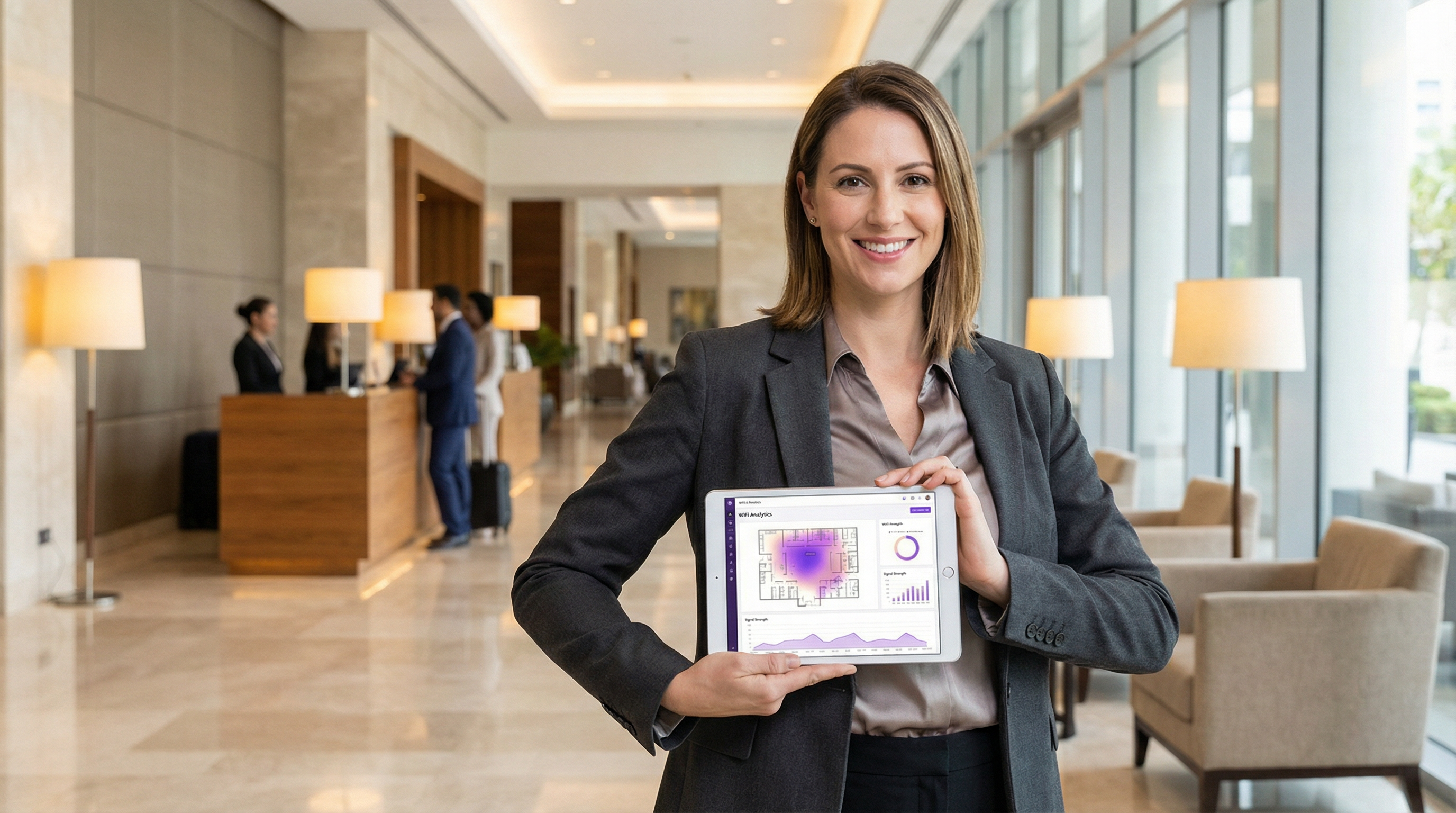
ইন্ডাস্ট্রির বেস্ট প্র্যাকটিসগুলো মেনে চলা একটি স্থিতিশীল, স্কেলেবল এবং হাই-পারফর্মিং ওয়্যারলেস নেটওয়ার্ক নিশ্চিত করে।
- 5 GHz-কে অগ্রাধিকার দিন: সক্ষম ক্লায়েন্ট ডিভাইসগুলোকে আক্রমণাত্মকভাবে 5 GHz ব্যান্ডের দিকে পরিচালিত করুন। এটি সেই ডিভাইসগুলোর জন্য পরিচ্ছন্ন এবং দ্রুততর 5 GHz স্পেকট্রাম রিজার্ভ করে যেগুলো এর সুবিধা নিতে পারে, এবং লিগ্যাসি ক্লায়েন্ট ও আইওটি (IoT) ডিভাইসগুলোর জন্য 2.4 GHz ব্যান্ডটি ছেড়ে দেয়।
- ট্রান্সমিট পাওয়ার নিয়ন্ত্রণ করুন: উচ্চ ট্রান্সমিট পাওয়ার সবসময় ভালো নয়। সর্বোচ্চ পাওয়ারে সিগন্যাল প্রদানকারী AP-গুলো কো-চ্যানেল ইন্টারফারেন্স বাড়াতে পারে এবং দুর্বল রেডিওযুক্ত ক্লায়েন্ট ডিভাইসগুলোকে (যেমন স্মার্টফোন) দূরবর্তী কোনো AP-এর সাথে আটকে রাখতে পারে। উপযুক্ত আকারের কভারেজ সেল তৈরি করতে স্বয়ংক্রিয় পাওয়ার কন্ট্রোল ব্যবহার করুন বা ম্যানুয়ালি পাওয়ার লেভেল টিউন করুন।
- নিয়মিত অডিট পরিচালনা করুন: RF পরিবেশ পরিবর্তনশীল। নতুন প্রতিবেশী নেটওয়ার্ক আবির্ভূত হয় এবং ভবনের লেআউট পরিবর্তিত হয়। আপনার চ্যানেল প্ল্যানটি সর্বোত্তম রয়েছে তা নিশ্চিত করতে ত্রৈমাসিক ভিত্তিতে একটি সংক্ষিপ্ত RF অডিট এবং বার্ষিক একটি পূর্ণাঙ্গ সাইট সার্ভে পরিচালনা করুন।
- সবকিছু ডকুমেন্ট করুন: আপনার চ্যানেল প্ল্যানের বিস্তারিত ডকুমেন্টেশন বজায় রাখুন, যার মধ্যে AP-এর অবস্থান এবং তাদের বরাদ্দকৃত চ্যানেলগুলো দেখানো ফ্লোর ম্যাপ অন্তর্ভুক্ত থাকবে। এটি ট্রাবলশুটিং এবং ভবিষ্যতের সম্প্রসারণের জন্য অমূল্য।
ট্রাবলশুটিং এবং ঝুঁকি প্রশমন
এমনকি একটি সুপরিকল্পিত প্ল্যান থাকা সত্ত্বেও, সমস্যা দেখা দিতে পারে। চ্যানেল পরিবর্তনের পর সবচেয়ে সাধারণ ব্যর্থতা হলো অপ্রত্যাশিত ইন্টারফারেন্সের সম্মুখীন হওয়া। যদি পারফরম্যান্স কমে যায়, তবে প্রাথমিক সন্দেহ হলো বিরতিহীন, নন-WiFi ইন্টারফারেন্স। একটি স্পেকট্রাম অ্যানালাইজার (WiFi অ্যানালাইজারের বিপরীতে) এই ধরনের উৎসগুলো শনাক্ত করতে সাহায্য করতে পারে।
আরেকটি সাধারণ সমস্যা হলো "স্টিকি ক্লায়েন্ট" সমস্যা, যেখানে কাছাকাছি কোনো AP উপলব্ধ থাকা সত্ত্বেও একটি ডিভাইস দূরবর্তী AP-এর সাথে যুক্ত থাকে। এটি প্রায়শই AP-গুলোতে ট্রান্সমিট পাওয়ার খুব বেশি সেট করার ফলাফল। AP-এর ট্রান্সমিট পাওয়ার কমানো কভারেজ সেলগুলোকে ছোট করতে সাহায্য করতে পারে এবং ক্লায়েন্টদের দ্রুত একটি ভালো AP-তে রোম করতে উৎসাহিত করতে পারে।
ঝুঁকি প্রশমিত করতে, সর্বদা একটি রোলব্যাক প্ল্যান রাখুন। কোনো পরিবর্তন করার আগে মূল চ্যানেল সেটিংস ডকুমেন্ট করুন এবং নতুন প্ল্যানটি যদি উল্লেখযোগ্য অপারেশনাল সমস্যার সৃষ্টি করে তবে পূর্ববর্তী কনফিগারেশনে ফিরে যাওয়ার জন্য আপনার কাছে একটি মেইনটেন্যান্স উইন্ডো রয়েছে তা নিশ্চিত করুন।
ROI এবং বিজনেস ইমপ্যাক্ট
সঠিক চ্যানেল ম্যানেজমেন্টে বিনিয়োগ একটি স্পষ্ট এবং পরিমাপযোগ্য রিটার্ন অন ইনভেস্টমেন্ট (ROI) প্রদান করে। একটি হোটেলের জন্য, এটি উচ্চতর গেস্ট স্যাটিসফ্যাকশন স্কোর এবং দুর্বল WiFi সম্পর্কিত কম নেতিবাচক রিভিউতে রূপান্তরিত হয়। একটি রিটেইল স্টোরের জন্য, এটি মোবাইল পয়েন্ট-অফ-সেল (mPOS) সিস্টেমের নির্ভরযোগ্যতা নিশ্চিত করে এবং গেস্ট নেটওয়ার্ক ব্যবহারকারী গ্রাহকদের জন্য একটি নিরবচ্ছিন্ন অভিজ্ঞতা সক্ষম করে। একটি কনফারেন্স সেন্টারে, এর অর্থ হলো ইভেন্ট আয়োজক এবং অংশগ্রহণকারীদের চাহিদাকৃত নির্ভরযোগ্য কানেক্টিভিটি প্রদান করা।
মূল বিজনেস ইমপ্যাক্টগুলো হলো:
- বর্ধিত থ্রুপুট: একটি পরিচ্ছন্ন চ্যানেল ডেটা থ্রুপুট ৫০-১০০% বা তার বেশি বাড়াতে পারে, যা সরাসরি অ্যাপ্লিকেশন পারফরম্যান্সকে প্রভাবিত করে。
- হ্রাসকৃত সাপোর্ট টিকিট: প্রোঅ্যাকটিভ চ্যানেল ম্যানেজমেন্ট ধীরগতি এবং ড্রপড কানেকশন সম্পর্কিত ব্যবহারকারীদের রিপোর্ট করা সমস্যাগুলো ব্যাপকভাবে হ্রাস করে, যা আইটি রিসোর্সগুলোকে মুক্ত করে।
- উন্নত ব্যবহারকারীর অভিজ্ঞতা: নির্ভরযোগ্য কানেক্টিভিটি এখন একটি মূল প্রত্যাশা। একটি সু-অপ্টিমাইজ করা নেটওয়ার্ক সরাসরি গ্রাহক এবং কর্মীদের সন্তুষ্টি ও বিশ্বস্ততায় অবদান রাখে।
- সর্বাধিক হার্ডওয়্যার ROI: সঠিক RF ম্যানেজমেন্ট নিশ্চিত করে যে আপনি আপনার বিদ্যমান অ্যাক্সেস পয়েন্ট হার্ডওয়্যার থেকে সর্বাধিক পারফরম্যান্স পাচ্ছেন, যা সম্ভাব্য ব্যয়বহুল আপগ্রেডগুলোকে বিলম্বিত করে।
Key Terms & Definitions
Radio Frequency (RF)
A frequency or range of frequencies in the electromagnetic spectrum suitable for transmission of information. WiFi operates in the 2.4 GHz and 5 GHz RF bands.
IT teams must manage the RF environment to minimize interference and ensure reliable communication for their wireless networks.
Channel Congestion
A scenario where multiple WiFi networks are operating on the same or overlapping channels in the same physical area, forcing devices to wait for their turn to transmit.
In a dense urban environment, high channel congestion is the primary cause of slow WiFi speeds. Identifying and moving to a less congested channel is the main goal of channel optimization.
RSSI (Received Signal Strength Indicator)
A measurement of the power present in a received radio signal, typically expressed in negative decibels-milliwatts (-dBm).
When analyzing a WiFi network, an RSSI of -50 dBm indicates a very strong signal, while -90 dBm is very weak. It's used to determine the coverage area of an AP and the potential for interference from other APs.
Co-Channel Interference (CCI)
Interference that occurs when two or more access points operating on the same channel are in close proximity. The APs must contend for the same airtime, reducing throughput for all.
A proper channel plan using staggered channels (e.g., 1, 6, 11) is designed specifically to minimize co-channel interference between a venue's own access points.
Adjacent-Channel Interference (ACI)
Interference that occurs when access points are on overlapping (but not identical) channels, such as channels 2 and 3 in the 2.4 GHz band.
ACI is a major problem in the 2.4 GHz band and is why the 1, 6, 11 channel plan is critical. It is not a significant issue in the 5 GHz band where channels do not overlap.
Dynamic Frequency Selection (DFS)
A mechanism that allows WiFi devices to use 5 GHz channels that are also used by radar systems. If radar is detected, the device must automatically switch to a different channel.
IT teams must decide whether the benefit of extra channels outweighs the risk of potential service interruptions when using DFS channels, especially in locations near airports or weather stations.
Channel Width
The width of the radio band that a WiFi channel uses to transmit data, measured in megahertz (MHz). Wider channels allow for higher data rates.
Network architects must choose an appropriate channel width (20, 40, or 80 MHz) as a trade-off between single-client speed and overall network capacity in a dense environment.
Site Survey
The process of planning and designing a wireless network to provide a solution that will deliver the required wireless coverage, data rates, network capacity, and quality of service.
A site survey is a mandatory first step before any significant WiFi deployment or optimization project. It provides the empirical data needed to make informed decisions about AP placement and channel selection.
Case Studies
A 200-room luxury hotel is experiencing frequent guest complaints about slow and unreliable WiFi, particularly during the evenings when occupancy is high. The hotel has a mix of 802.11ac and 802.11ax access points. How would you diagnose and resolve the issue?
- Diagnosis: Conduct an RF site survey between 7 PM and 10 PM to capture the network state under peak load. Use a WiFi analyzer to map channel usage on both 2.4 GHz and 5 GHz bands across all floors. The likely hypothesis is high co-channel interference from the hotel's own APs and neighboring residential networks. Pay close attention to the retransmission rate KPI in the WLAN controller, which is likely to be high.
- Channel Plan Redesign: Based on the survey, create a new channel plan. For the 2.4 GHz radios, ensure all APs are strictly on channels 1, 6, or 11, with no adjacent APs on the same channel. For the 5 GHz radios, set a uniform 20 MHz channel width to maximize the number of available channels and reduce interference in the high-density environment. Assign unique non-DFS channels first (36, 40, 44, 48, etc.).
- Implementation: Implement the new channel plan floor by floor during a low-traffic period (e.g., mid-morning). Disable lower data rates (below 12 Mbps) to encourage faster roaming and prevent clients from sticking to distant APs.
- Validation: Monitor throughput and latency metrics post-change. Solicit feedback from staff and a few friendly guests to confirm a tangible improvement in user experience.
A national retail chain with 50+ stores wants to ensure reliable performance for its new mobile point-of-sale (mPOS) terminals and guest WiFi network. The stores are often located in busy shopping malls with high levels of RF interference. What is a scalable strategy for channel management?
- Create a Standardized RF Template: Instead of creating a bespoke channel plan for each store, develop a standardized RF template within their central WLAN management platform (e.g., Meraki, Aruba Central). This template will enforce best practices across the entire estate.
- Template Configuration: The template should mandate that 2.4 GHz radios are disabled on every other AP to reduce interference, with the remaining APs locked to channels 1, 6, and 11. For the 5 GHz radios, the template should restrict channels to the non-DFS UNII-1 and UNII-3 bands (e.g., 36, 40, 44, 48 and 149, 153, 157, 161) and enforce a 20 MHz channel width. This provides a stable, predictable RF environment for the critical mPOS devices.
- Automated Deployment & Monitoring: Apply this template to all stores. Leverage the platform's automated RF management for transmit power control, but with the channel assignments locked by the template. Use the platform's reporting tools to centrally monitor key metrics like transaction success rates on the mPOS VLAN and guest WiFi satisfaction scores.
- Exception Handling: For stores that still report issues, an on-site survey can be performed to create a custom plan, but this becomes the exception rather than the rule.
Scenario Analysis
Q1. You are deploying WiFi in a new, multi-floor conference centre. The client requires seamless roaming for VoIP calls and support for high-bandwidth video streaming in the main auditorium. How do you approach your 5 GHz channel and power plan?
💡 Hint:Consider the different requirements of coverage (roaming) and capacity (auditorium). Think about how transmit power affects cell size.
Show Recommended Approach
For the general conference space, I would design a 5 GHz plan with 20 MHz channels to maximize the number of channels and minimize co-channel interference, supporting seamless roaming. Transmit power would be carefully tuned to create smaller, well-defined coverage cells to encourage clients to roam effectively. In the main auditorium, a high-density area, I would use directional antennas and a higher density of APs, also on 20 MHz channels. For the specific high-bandwidth requirement, I might consider using 40 MHz channels if the RF survey shows the spectrum is clean enough, but stability for the large number of users would be the priority.
Q2. A stadium deployment is experiencing major performance degradation during events. The existing network uses the vendor's 'auto-channel' feature. A site survey reveals extreme levels of co-channel interference on both bands. What is your immediate recommendation?
💡 Hint:Is an automated system appropriate for such a high-density, high-stakes environment?
Show Recommended Approach
My immediate recommendation is to disable the 'auto-channel' feature and implement a static, manually assigned channel plan based on a professional site survey. Automated systems are not suitable for extreme-density environments like stadiums, as they can cause unpredictable channel changes during peak usage. A meticulous manual plan, likely using 20 MHz channels on 5 GHz and a minimal 2.4 GHz deployment, is required to provide predictable capacity and performance.
Q3. Your company is located near a regional airport. You want to use 5 GHz channels to improve performance, but you are concerned about DFS events causing drops for your executive video conferencing system. What is a safe, phased approach to introducing 5 GHz?
💡 Hint:Are all 5 GHz channels DFS channels? How can you test the waters?
Show Recommended Approach
The safest approach is to begin by exclusively using the non-DFS channels (UNII-1 and UNII-3 bands). Configure the executive video conferencing system's dedicated APs to use only these channels (e.g., 36, 40, 44, 48). For the general office network, you can enable DFS channels but closely monitor the WLAN controller for any radar detection events over a period of several weeks. If no events are detected, you can be more confident in rolling out DFS channels more broadly, while still keeping the mission-critical systems on the guaranteed-stable non-DFS channels.
Key Takeaways
- ✓In the 2.4 GHz band, only use channels 1, 6, and 11 to avoid interference.
- ✓The 5 GHz band is superior for performance; use it for all critical and high-bandwidth applications.
- ✓Use 20 MHz channel widths in high-density environments to maximize capacity and stability.
- ✓A data-driven site survey is the mandatory first step before any channel plan changes.
- ✓Manual channel planning almost always outperforms automatic selection in complex, high-density venues.
- ✓Be cautious with DFS channels in locations near airports or weather radar, as they can cause connection drops.
- ✓Proper channel management delivers measurable ROI through increased throughput, reduced support tickets, and improved user experience.




