

WiFi রোমিং এবং হ্যান্ডঅফ: 802.11r এবং 802.11k এর ব্যাখ্যা
This guide provides a senior-level technical deep-dive into WiFi roaming protocols — specifically 802.11r (Fast BSS Transition), 802.11k (Neighbor Reports), and 802.11v (BSS Transition Management) — and their combined role in delivering seamless connectivity across enterprise venues. It equips IT managers, network architects, and venue operations directors with the architectural understanding, implementation steps, and business-impact metrics needed to deploy and validate fast roaming in hospitality, retail, events, and public-sector environments. The guide also addresses the critical interaction between roaming and captive portals, a common deployment failure point in guest WiFi networks.
🎧 Listen to this Guide
View Transcript

এক্সিকিউটিভ সামারি
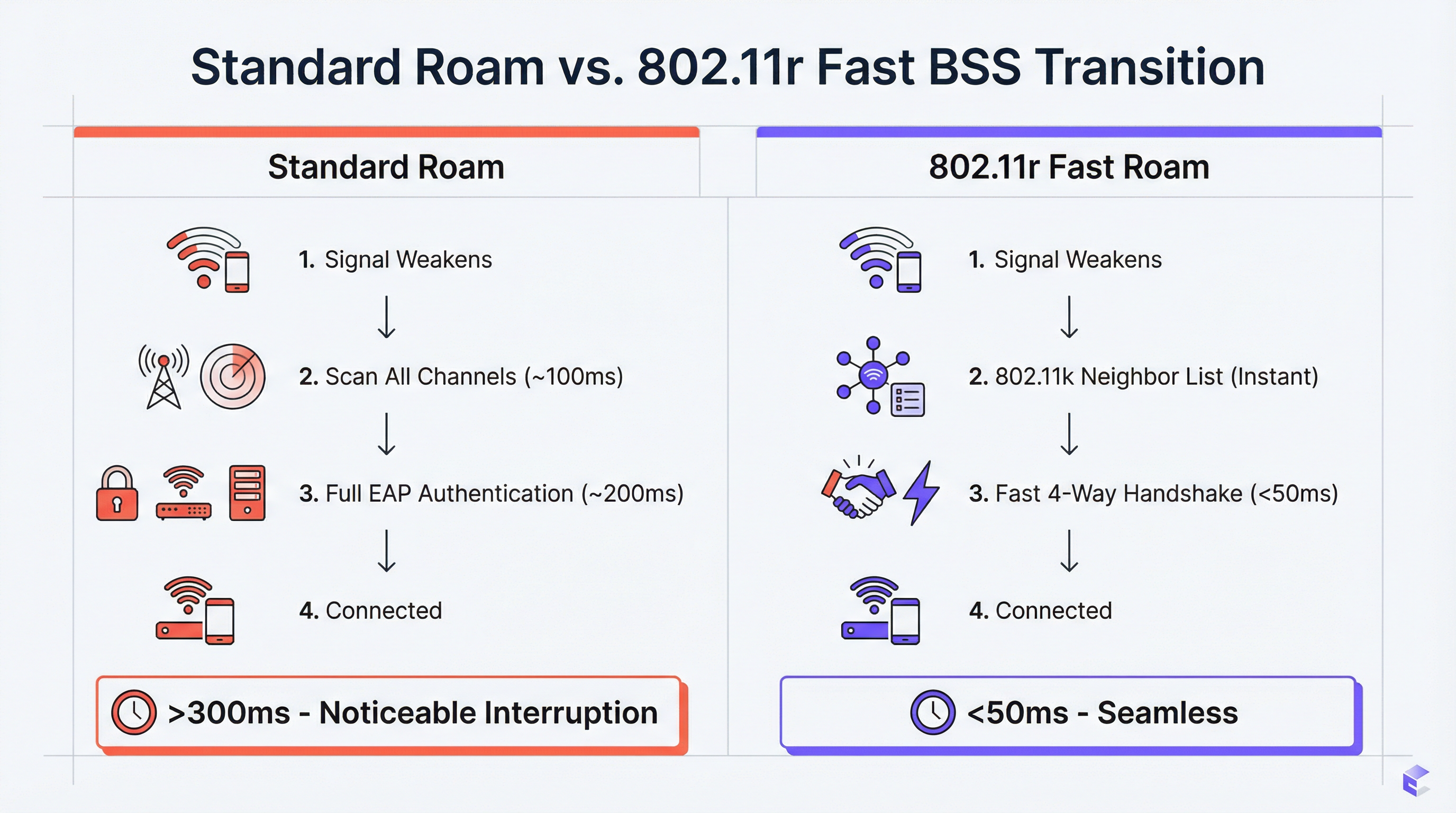
এন্টারপ্রাইজ ভেন্যুগুলোর জন্য — যেমন হোটেল, রিটেইল চেইন, স্টেডিয়াম, কনফারেন্স সেন্টার — নিরবচ্ছিন্ন WiFi একটি মূল অপারেশনাল প্রয়োজনীয়তা। ব্যবহারকারীরা যখন কোনো ফিজিক্যাল স্পেসের মধ্যে চলাফেরা করেন, তখন তাদের ডিভাইসগুলোকে কোনো কানেকশন ড্রপ না করেই অ্যাক্সেস পয়েন্টগুলোর (APs) মধ্যে সুইচ করতে হয়। দুর্বল রোমিং পারফরম্যান্সের কারণে VoIP কল ড্রপ হয়, ভিডিও স্ট্রিম আটকে যায় এবং ব্যবহারকারীরা হতাশ হন, যা সরাসরি গেস্ট স্যাটিসফ্যাকশন স্কোর এবং কর্মীদের প্রোডাক্টিভিটি মেট্রিক্সকে প্রভাবিত করে। এর সমাধান রয়েছে তিনটি পরিপূরক IEEE 802.11 সংশোধনীর মধ্যে: 802.11k, 802.11v, এবং 802.11r। এগুলো একসাথে একটি রোমিং অ্যাসিস্ট্যান্স ফ্রেমওয়ার্ক তৈরি করে, যা ক্লায়েন্ট ডিভাইসগুলোকে দ্রুত ও আরও স্মার্ট হ্যান্ডঅফ সিদ্ধান্ত নেওয়ার বুদ্ধিমত্তা প্রদান করে এবং নেটওয়ার্ককে সেই সিদ্ধান্তগুলো সক্রিয়ভাবে পরিচালনা করার টুলস দেয়। 802.11k সম্ভাব্য AP-গুলোর একটি কিউরেটেড তালিকা প্রদান করে, যা সময়সাপেক্ষ চ্যানেল স্ক্যানিং দূর করে। 802.11r (Fast BSS Transition) রি-অথেনটিকেশন হ্যান্ডশেককে ২০০-৩০০ মিলি-সেকেন্ড থেকে কমিয়ে ৫০ মিলি-সেকেন্ডের নিচে নিয়ে আসে। 802.11v লোড-ব্যালেন্সিংয়ের উদ্দেশ্যে নেটওয়ার্ককে সক্রিয়ভাবে ক্লায়েন্টদের পরিচালনা করতে সক্ষম করে। সঠিকভাবে আর্কিটেক্ট করা গেস্ট WiFi প্ল্যাটফর্মের পাশাপাশি এই স্ট্যান্ডার্ডগুলোর সঠিক বাস্তবায়ন হলো একটি মোবাইল, হাই-পারফরম্যান্স ওয়্যারলেস অভিজ্ঞতার চূড়ান্ত পথ, যা আধুনিক এন্টারপ্রাইজ পরিবেশের জন্য অপরিহার্য。
টেকনিক্যাল ডিপ-ডাইভ
চ্যালেঞ্জ: ধীরগতির রোমিং এবং স্টিকি ক্লায়েন্ট সমস্যা
রোমিং সহায়তা ছাড়া একটি স্ট্যান্ডার্ড WiFi ডিপ্লয়মেন্টে, কখন রোম করতে হবে তার সিদ্ধান্ত নেওয়ার জন্য শুধুমাত্র ক্লায়েন্ট ডিভাইসটিই দায়ী থাকে। এর সাধারণ ফলাফল হলো, ডিভাইসগুলো তাদের বর্তমান AP-এর সাথে প্রয়োজনের চেয়ে অনেক বেশি সময় ধরে যুক্ত থাকে, এমনকি যখন কাছাকাছি কোনো AP থেকে উল্লেখযোগ্যভাবে শক্তিশালী সিগন্যাল পাওয়া যায় তখনও। এটি হলো স্টিকি ক্লায়েন্ট সমস্যা, এবং এটি এন্টারপ্রাইজ পরিবেশে একটি সাধারণ বিষয়, যেখানে বিভিন্ন ধরনের ডিভাইসের মিশ্রণ থাকে — স্মার্টফোন, ল্যাপটপ, IoT সেন্সর, হ্যান্ডহেল্ড স্ক্যানার — যার প্রতিটি তাদের নিজস্ব রোমিং অ্যালগরিদম বিভিন্ন মাত্রার জটিলতার সাথে প্রয়োগ করে।
যখন ক্লায়েন্ট শেষ পর্যন্ত রোম করার সিদ্ধান্ত নেয়, তখন এটিকে নতুন AP-এর সাথে একটি সম্পূর্ণ রি-অথেনটিকেশন সাইকেল সম্পন্ন করতে হয়। একটি WPA2-Enterprise বা WPA3-Enterprise নেটওয়ার্কে, এর মধ্যে ক্লায়েন্ট, AP এবং একটি ব্যাক-এন্ড RADIUS সার্ভারের মধ্যে একাধিক EAP (Extensible Authentication Protocol) রাউন্ড ট্রিপ জড়িত থাকে। এই প্রক্রিয়ায় ২০০-৪০০ মিলি-সেকেন্ড সময় লাগতে পারে। রিয়েল-টাইম অ্যাপ্লিকেশনগুলোর জন্য — যেমন VoIP, ভিডিও কনফারেন্সিং, মোবাইল পয়েন্ট-অফ-সেল — এই ল্যাটেন্সি অগ্রহণযোগ্য। এর ফলে কল ড্রপ হয়, ভিডিও ফ্রেম আটকে যায় এবং ট্রানজ্যাকশন ব্যর্থ হয়।
802.11k: রেডিও রিসোর্স ম্যানেজমেন্ট এবং নেইবার রিপোর্টস
802.11k সংশোধনীটি Radio Resource Management (RRM) চালু করে, যা এমন একটি ফ্রেমওয়ার্ক যার মাধ্যমে AP এবং ক্লায়েন্টরা RF পরিবেশ সম্পর্কে তথ্য আদান-প্রদান করতে পারে। অপারেশনাল দিক থেকে সবচেয়ে তাৎপর্যপূর্ণ ফিচারটি হলো Neighbor Report। একটি 802.11k-সক্ষম AP ক্লায়েন্টের রিকোয়েস্টের জবাবে আশেপাশের AP-গুলোর একটি স্ট্রাকচার্ড তালিকা প্রদান করতে পারে, যার মধ্যে তাদের BSSID, অপারেটিং চ্যানেল এবং সিগন্যাল বৈশিষ্ট্য অন্তর্ভুক্ত থাকে। এটি ক্লায়েন্টের জন্য সমস্ত উপলব্ধ চ্যানেল জুড়ে প্যাসিভ বা অ্যাক্টিভ স্ক্যান করার প্রয়োজনীয়তা দূর করে — এমন একটি প্রক্রিয়া যা মাল্টি-ব্যান্ড নেটওয়ার্কে নিজেই ১০০ মিলি-সেকেন্ড বা তার বেশি সময় নিতে পারে।
এর ব্যবহারিক প্রভাব হলো, একটি AP-এর কভারেজ জোনের প্রান্তে পৌঁছানো কোনো ক্লায়েন্টের কাছে রোম করার আগেই হ্যান্ডঅফ ক্যান্ডিডেটদের একটি র্যাঙ্ক করা তালিকা থাকে। সিদ্ধান্তটি সম্পূর্ণ তথ্যের ভিত্তিতে নেওয়া হয়, কোনো ধীরগতির, অন্ধ অনুসন্ধানের মাধ্যমে নয়।
802.11r: ফাস্ট BSS ট্রানজিশন (FT)
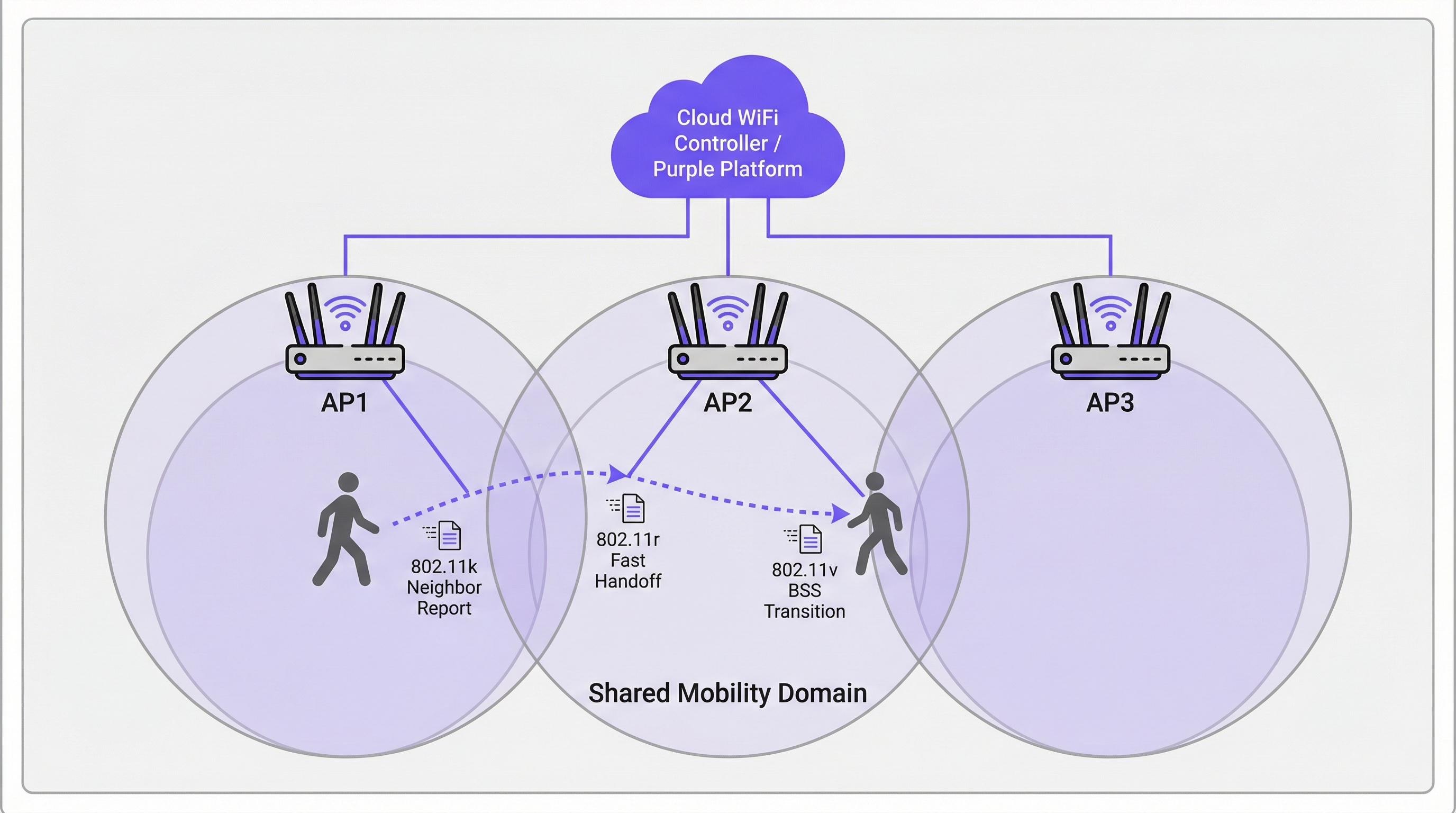
802.11r হলো ফাস্ট রোমিংয়ের মূল ভিত্তি। এর প্রাথমিক উদ্ভাবন হলো একটি নির্দিষ্ট Mobility Domain-এর মধ্যে AP-গুলোর মধ্যে কি ম্যাটেরিয়ালের প্রি-ডিস্ট্রিবিউশন (pre-distribution of key material)। যখন কোনো ক্লায়েন্ট প্রথমবার একটি 802.11r-সক্ষম নেটওয়ার্কে অথেনটিকেট করে, তখন এটি স্ট্যান্ডার্ড EAP প্রক্রিয়ার মাধ্যমে একটি Pairwise Master Key (PMK) স্থাপন করে। FT চালু থাকলে, এই কি-এর একটি ডেরিভেটিভ — PMK-R1 — কন্ট্রোলার বা ডিস্ট্রিবিউশন সিস্টেমের মাধ্যমে Mobility Domain-এর সমস্ত AP-তে আগে থেকেই ডিস্ট্রিবিউট করা হয়।
যখন ক্লায়েন্ট একটি নতুন AP-তে রোম করে, তখন একটি সম্পূর্ণ EAP এক্সচেঞ্জ শুরু করার পরিবর্তে, এটি প্রি-শেয়ার করা PMK-R1 ব্যবহার করে একটি সংক্ষিপ্ত 4-way handshake সম্পন্ন করে। এটি হ্যান্ডঅফ অথেনটিকেশনের সময়কে ৫০ মিলি-সেকেন্ডের নিচে নামিয়ে আনে — এটি এমন একটি ক্রিটিক্যাল থ্রেশহোল্ড যার নিচে একটি ভয়েস বা ভিডিও সেশনের সময় এন্ড-ইউজারের কাছে রোমটি অগোচরেই থেকে যায়।
802.11r দুটি অপারেশনাল মোড সমর্থন করে। FT over-the-Air-এ হ্যান্ডঅফের সময় ক্লায়েন্ট সরাসরি টার্গেট AP-এর সাথে যোগাযোগ করে, যা তুলনামূলক সহজ এবং বেশিরভাগ ডিপ্লয়মেন্টের জন্য প্রস্তাবিত পদ্ধতি। FT over-the-DS (Distribution System) বর্তমান AP-এর মাধ্যমে ওয়্যার্ড নেটওয়ার্ক দিয়ে FT ফ্রেমগুলোকে রাউট করে, যা নির্দিষ্ট কন্ট্রোলার আর্কিটেকচারে কার্যকর হতে পারে তবে এটি জটিলতা বাড়ায়।
802.11v: BSS ট্রানজিশন ম্যানেজমেন্ট
যেখানে 802.11k হলো রিঅ্যাক্টিভ (ক্লায়েন্ট জিজ্ঞাসা করলে তথ্য প্রদান করে) এবং 802.11r হলো ট্রানজ্যাকশনাল (হ্যান্ডঅফ দ্রুত করে), সেখানে 802.11v হলো প্রোঅ্যাক্টিভ। এটি নেটওয়ার্ককে ক্লায়েন্ট ডিভাইসে BSS Transition Management Requests পাঠানোর অনুমতি দেয়, যা তাদের একটি নির্দিষ্ট AP-তে রোম করার পরামর্শ বা নির্দেশ দেয়। এটি লোড ব্যালেন্সিংয়ের জন্য নেটওয়ার্কের প্রাথমিক টুল। যদি কোনো AP তার ক্যাপাসিটির কাছাকাছি পৌঁছায়, তবে কন্ট্রোলার কাছাকাছি থাকা কম লোডযুক্ত AP-এর সাথে শক্তিশালী সিগন্যাল থাকা কানেক্টেড ক্লায়েন্টদের শনাক্ত করতে পারে এবং তাদের একটি ট্রানজিশন রিকোয়েস্ট পাঠাতে পারে। ক্লায়েন্ট এটি মেনে চলতে বাধ্য নয়, তবে ভালোভাবে ইমপ্লিমেন্ট করা ক্লায়েন্টরা (আধুনিক iOS, Android এবং Windows ডিভাইস) সাধারণত এই রিকোয়েস্টটি মেনে চলে।
এই প্রোঅ্যাক্টিভ স্টিয়ারিং সক্ষমতা নেটওয়ার্ককে একটি প্যাসিভ ইনফ্রাস্ট্রাকচার থেকে সম্পূর্ণ ভেন্যু জুড়ে ব্যবহারকারীর অভিজ্ঞতা অপ্টিমাইজ করার ক্ষেত্রে একটি সক্রিয় অংশগ্রহণকারীতে রূপান্তরিত করে।
Captive Portal-গুলো কীভাবে রোমিংয়ের সাথে ইন্টারঅ্যাক্ট করে
গেস্ট WiFi ডিপ্লয়মেন্টে একটি ক্রিটিক্যাল এবং প্রায়শই উপেক্ষিত ফেইলিওর পয়েন্ট হলো রোমিং এবং Captive Portal অথেনটিকেশনের মধ্যে ইন্টারঅ্যাকশন। যদি কোনো গেস্ট AP1-এ একটি Captive Portal-এর মাধ্যমে অথেনটিকেট করে এবং তারপর AP2-তে রোম করে, তবে একটি সাধারণ ইমপ্লিমেন্টেশন আবার Captive Portal-টি প্রদর্শন করবে, যা পুনরায় অথেনটিকেট করতে বাধ্য করবে। এটি একটি মৌলিক UX ফেইলিওর।
সঠিক আর্কিটেকচারাল পদ্ধতি হলো গেস্ট WiFi প্ল্যাটফর্মে (যেমন Purple) সেশন স্টেট ম্যানেজমেন্টকে সেন্ট্রালাইজ করা। একবার কোনো ব্যবহারকারী অথেনটিকেট করলে, তাদের MAC অ্যাড্রেস এবং সেশন টোকেন সেন্ট্রালি স্টোর করা হয়। যখন তারা রোম করে, তখন নতুন AP সেন্ট্রাল প্ল্যাটফর্মে কোয়েরি করে, যা অ্যাক্টিভ সেশন নিশ্চিত করে এবং স্বয়ংক্রিয়ভাবে Captive Portal বাইপাস করে। এর জন্য গেস্ট WiFi প্ল্যাটফর্মটিকে ওয়্যারলেস ইনফ্রাস্ট্রাকচারের সাথে নিবিড়ভাবে ইন্টিগ্রেট করা প্রয়োজন — ভেন্ডর সলিউশনগুলো মূল্যায়ন করার সময় এটি একটি মূল বিবেচ্য বিষয়।
ইমপ্লিমেন্টেশন গাইড
নিচের ধাপগুলো যেকোনো এন্টারপ্রাইজ-গ্রেড ওয়্যারলেস ইনফ্রাস্ট্রাকচারের জন্য প্রযোজ্য একটি ভেন্ডর-নিউট্রাল ডিপ্লয়মেন্ট ফ্রেমওয়ার্ক উপস্থাপন করে।
ধাপ ১ — হার্ডওয়্যার এবং সফটওয়্যার অডিট। যাচাই করুন যে আপনার AP, ওয়্যারলেস ল্যান কন্ট্রোলার (WLC) বা ক্লাউড ম্যানেজমেন্ট প্ল্যাটফর্ম এবং টার্গেট ক্লায়েন্ট ডিভাইসগুলো 802.11k, 802.11v এবং 802.11r সমর্থন করে কিনা। আধুনিক এন্টারপ্রাইজ হার্ডওয়্যারে (Cisco Catalyst, Aruba, Juniper Mist, Ruckus) AP এবং কন্ট্রোলার সাপোর্ট প্রায় সর্বজনীন। ক্লায়েন্ট সাপোর্ট ভিন্ন হতে পারে — ডিভাইস স্পেসিফিকেশন শিটগুলো যাচাই করুন, বিশেষ করে বারকোড স্ক্যানার, মেডিকেল ডিভাইস বা IoT সেন্সরের মতো স্পেশালিস্ট হার্ডওয়্যারের ক্ষেত্রে।
ধাপ ২ — টার্গেট SSID-তে স্ট্যান্ডার্ডগুলো চালু করুন। আপনার WLC বা ক্লাউড ড্যাশবোর্ডে, SSID কনফিগারেশনে নেভিগেট করুন এবং 802.11k (Neighbor Reports), 802.11v (BSS Transition Management) এবং 802.11r (Fast BSS Transition) চালু করুন। 802.11r-এর জন্য, ডিফল্ট মোড হিসেবে FT over-the-Air নির্বাচন করুন, যদি না আপনার আর্কিটেকচারে বিশেষভাবে over-the-DS-এর প্রয়োজন হয়।
ধাপ ৩ — Mobility Domain কনফিগার করুন। নিশ্চিত করুন যে একই ফিজিক্যাল রোমিং এরিয়ার মধ্যে থাকা সমস্ত AP-কে একই Mobility Domain-এ অ্যাসাইন করা হয়েছে। এটি FT কি শেয়ারিংয়ের পূর্বশর্ত। যাচাই করুন যে ম্যানেজমেন্ট নেটওয়ার্কের ডোমেইনের সমস্ত AP-এর মধ্যে সম্পূর্ণ কানেক্টিভিটি রয়েছে।
ধাপ ৪ — সিকিউরিটি কনফিগারেশন। 802.11r WPA2/WPA3-Enterprise অথেনটিকেশনের সাথে সবচেয়ে বেশি সুবিধা প্রদান করে, কারণ FT-কে ডিজাইন করা হয়েছে জটিল EAP প্রক্রিয়াকে ত্বরান্বিত করার জন্য। স্টাফ এবং কর্পোরেট নেটওয়ার্কগুলোর জন্য, পারফরম্যান্স এবং PCI DSS কমপ্লায়েন্স উভয় দৃষ্টিকোণ থেকেই এটি অপরিহার্য। Pre-Shared Key (PSK) সহ একটি Captive Portal ব্যবহার করা গেস্ট নেটওয়ার্কগুলোর জন্য, 802.11r এখনও সুবিধা প্রদান করে তবে এর লাভ তুলনামূলকভাবে কম।
ধাপ ৫ — প্যাকেট ক্যাপচার দিয়ে ভ্যালিডেট করুন। রোমিং ইভেন্টগুলো ক্যাপচার করতে একটি WiFi অ্যানালাইসিস টুল (একটি সামঞ্জস্যপূর্ণ 802.11 অ্যাডাপ্টার সহ Wireshark, অথবা Ekahau বা AirMagnet-এর মতো কমার্শিয়াল টুল) ব্যবহার করুন। 802.11k Neighbor Report এক্সচেঞ্জ, 802.11v BSS Transition Management ফ্রেম এবং সংক্ষিপ্ত 802.11r FT অথেনটিকেশন সিকোয়েন্সের উপস্থিতি নিশ্চিত করুন। পুরানো AP-এর শেষ ডেটা ফ্রেম থেকে নতুন AP-এর প্রথম ডেটা ফ্রেম পর্যন্ত সময় পরিমাপ করুন। আপনার লক্ষ্য হলো ধারাবাহিকভাবে ৫০ মিলি-সেকেন্ডের নিচে থাকা।
ধাপ ৬ — পর্যায়ক্রমিক প্রোডাকশন রোলআউট। একটি টেস্ট SSID-তে ভ্যালিডেট করার পর, একটি একক ফ্লোর বা জোন দিয়ে শুরু করে পর্যায়ক্রমে প্রোডাকশন SSID-গুলোতে কনফিগারেশনটি রোলআউট করুন। ক্লায়েন্ট কম্প্যাটিবিলিটি সমস্যাগুলোর জন্য মনিটর করুন এবং সম্পূর্ণ ভেন্যুতে সম্প্রসারণ করার আগে যেকোনো অসঙ্গতি সমাধান করুন।
বেস্ট প্র্যাকটিস
নিচের সুপারিশগুলো ইন্ডাস্ট্রি-স্ট্যান্ডার্ড গাইডেন্স প্রতিফলিত করে এবং এগুলো বিভিন্ন ভেন্ডর প্ল্যাটফর্ম জুড়ে প্রযোজ্য।
VLAN-এর জন্য নয়, Mobility Domain-এর জন্য ডিজাইন করুন। একটি সাধারণ মিসকনফিগারেশন হলো ফিজিক্যাল রোমিং বাউন্ডারির পরিবর্তে VLAN বাউন্ডারি বরাবর Mobility Domain সংজ্ঞায়িত করা। দুটি ফ্লোরের মধ্যে হাঁটা একজন ব্যবহারকারীর একই Mobility Domain-এ থাকা উচিত, এমনকি যদি তারা একটি VLAN বাউন্ডারি অতিক্রম করে। নিশ্চিত করুন যে আপনার কন্ট্রোলার আর্কিটেকচার এটি সমর্থন করে।
নন-কমপ্লায়েন্ট ডিভাইসগুলোর জন্য একটি লিগ্যাসি SSID বজায় রাখুন। কিছু ডিভাইসে 802.11r ইমপ্লিমেন্টেশন ত্রুটিপূর্ণ বা অনুপস্থিত থাকে। সেগুলোকে সামঞ্জস্য করার জন্য নেটওয়ার্ক-ব্যাপী FT নিষ্ক্রিয় করার পরিবর্তে, লিগ্যাসি ডিভাইসগুলোর জন্য FT ছাড়া একটি সেকেন্ডারি SSID বজায় রাখুন। এটি একটি 'রেস টু দ্য বটম' পরিস্থিতি প্রতিরোধ করে যেখানে পুরো নেটওয়ার্কের সক্ষমতা সবচেয়ে পুরানো ডিভাইস দ্বারা সীমাবদ্ধ হয়ে পড়ে।
সিকিউরিটি স্ট্যান্ডার্ডগুলোর সাথে সামঞ্জস্য বজায় রাখুন। রিটেইল পরিবেশের জন্য, নিশ্চিত করুন যে আপনার ওয়্যারলেস সিকিউরিটি কনফিগারেশন PCI DSS 4.0 প্রয়োজনীয়তাগুলোর সাথে সামঞ্জস্যপূর্ণ, বিশেষ করে নেটওয়ার্ক সেগমেন্টেশন এবং এনক্রিপশনের ক্ষেত্রে। ব্যক্তিগত ডেটা পরিচালনা করা পাবলিক-সেক্টর এবং হসপিটালিটি ডিপ্লয়মেন্টের জন্য, নিশ্চিত করুন যে আপনার গেস্ট WiFi ডেটা প্র্যাকটিসগুলো GDPR এবং প্রাসঙ্গিক জাতীয় ডেটা সুরক্ষা আইনের সাথে সঙ্গতিপূর্ণ। WPA3-Enterprise, যেখানে সমর্থিত, সবচেয়ে শক্তিশালী সিকিউরিটি পসচার প্রদান করে।
আপনার Mobility Domain টপোলজি ডকুমেন্ট করুন। কোন AP-গুলো কোন Mobility Domain-এর অন্তর্গত তার একটি আপ-টু-ডেট রেকর্ড বজায় রাখুন। এটি ট্রাবলশুটিং এবং ইনফ্রাস্ট্রাকচার সম্প্রসারণের সময় নতুন AP-গুলোকে অনবোর্ড করার জন্য অপরিহার্য।
ট্রাবলশুটিং এবং ঝুঁকি প্রশমন
| লক্ষণ | সম্ভাব্য কারণ | প্রস্তাবিত পদক্ষেপ |
|---|---|---|
| 802.11r চালু করার পর ডিভাইস কানেক্ট হতে পারে না | ক্লায়েন্টের একটি ত্রুটিপূর্ণ FT ইমপ্লিমেন্টেশন রয়েছে | SSID-তে FT নিষ্ক্রিয় করুন বা প্রভাবিত ডিভাইসের জন্য FT ছাড়া একটি লিগ্যাসি SSID তৈরি করুন |
| 802.11r থাকা সত্ত্বেও রোম টাইম এখনও >১০০ মিলি-সেকেন্ড | AP-গুলো একই Mobility Domain-এ নেই | কন্ট্রোলারে Mobility Domain কনফিগারেশন যাচাই করুন; AP-গুলোর মধ্যে ম্যানেজমেন্ট নেটওয়ার্ক কানেক্টিভিটি চেক করুন |
| প্রতিটি রোমের পর গেস্ট Captive Portal-এর সম্মুখীন হন | সেশন স্টেট সেন্ট্রালাইজড নয় | নিশ্চিত করুন যে গেস্ট WiFi প্ল্যাটফর্ম সমস্ত AP জুড়ে সেন্ট্রালি MAC অ্যাড্রেস এবং সেশন টোকেন ট্র্যাক করছে |
| স্টিকি ক্লায়েন্টরা 802.11v স্টিয়ারিংয়ে সাড়া দিচ্ছে না | ক্লায়েন্ট 802.11v সমর্থন করে না বা উপেক্ষা করে | কভারেজ ওভারল্যাপ কমাতে AP ট্রান্সমিট পাওয়ার অ্যাডজাস্ট করুন, যা ক্লায়েন্টকে একটি শক্তিশালী RSSI থ্রেশহোল্ডে রোম করতে বাধ্য করে |
| উচ্চ-ঘনত্বের এলাকায় মাঝে মাঝে ডিসকানেকশন | দুটি AP-এর মধ্যে রোমিং লুপ | 802.11v ট্রানজিশন থ্রেশহোল্ড অ্যাডজাস্ট করুন; নিশ্চিত করুন যে AP প্লেসমেন্ট অতিরিক্ত কভারেজ ওভারল্যাপ কমিয়ে দেয় |
ROI এবং ব্যবসায়িক প্রভাব
সঠিকভাবে কনফিগার করা রোমিং নেটওয়ার্কে বিনিয়োগের ব্যবসায়িক কারণটি খুবই সহজ। হসপিটালিটি খাতে, নিরবচ্ছিন্ন WiFi সরাসরি গেস্ট স্যাটিসফ্যাকশন স্কোরের সাথে সম্পর্কিত। করিডোরে হাঁটার সময় যে গেস্টের Teams কল ড্রপ হয়, তিনি হোটেলের WiFi-কে খারাপ রেটিং দেবেন, রুমের ভেতরের কানেকশনের স্পিড যত বেশিই হোক না কেন। রিটেইল খাতের জন্য, নির্ভরযোগ্য হ্যান্ডহেল্ড স্ক্যানার কানেক্টিভিটি সরাসরি ইনভেন্টরির নির্ভুলতা এবং কর্মীদের দক্ষতার সাথে যুক্ত — ২০০টি স্টোরের একটি চেইন যদি স্ক্যানার ডিসকানেকশন দূর করতে পারে, তবে তারা বার্ষিক উল্লেখযোগ্য শ্রমঘণ্টা বাঁচাতে পারবে। কনফারেন্স এবং ইভেন্টগুলোর জন্য, একটি ফ্ল্যাগশিপ ইভেন্টের সময় দুর্বল কানেক্টিভিটি অভিজ্ঞতার কারণে যে সুনাম নষ্ট হয়, তা ইনফ্রাস্ট্রাকচার বিনিয়োগের খরচের চেয়ে অনেক বেশি হতে পারে।
একটি সফল রোমিং ডিপ্লয়মেন্টের পরিমাপযোগ্য KPI-গুলো হলো: গড় রোমিং ইভেন্টের সময়কাল (লক্ষ্য: <৫০ মিলি-সেকেন্ড), প্রতি ঘণ্টায় VoIP কল ড্রপের সংখ্যা (লক্ষ্য: শূন্য), এবং গেস্ট WiFi স্যাটিসফ্যাকশন স্কোর (পোস্ট-ভিজিট সার্ভের মাধ্যমে ট্র্যাক করা হয়)। 802.11k, 802.11v এবং 802.11r সহ একটি সু-কনফিগার করা নেটওয়ার্ক ডিপ্লয়মেন্টের প্রথম মাসের মধ্যেই এই তিনটি মেট্রিক্স জুড়ে পরিমাপযোগ্য উন্নতি প্রদান করতে সক্ষম।
Key Terms & Definitions
BSS (Basic Service Set)
A fundamental building block of a WiFi network, consisting of one Access Point and all the client devices associated with it. Each BSS is identified by a unique BSSID (the AP's MAC address).
When discussing roaming, a client transitions from the BSS of its current AP to the BSS of a new AP. 'Fast BSS Transition' (802.11r) is literally a faster mechanism for executing this switch.
SSID (Service Set Identifier)
The human-readable name of a WiFi network — the name users see and select on their devices. An SSID can be broadcast by multiple APs simultaneously to create a single logical network across a large area.
For roaming to function, all APs in the roaming area must broadcast the same SSID. Users should experience a single, continuous network, not a series of separate networks named 'Hotel_WiFi_Floor1', 'Hotel_WiFi_Floor2', etc.
WPA2/WPA3-Enterprise
A WiFi security standard that authenticates each user or device individually using a RADIUS server and the EAP protocol, rather than a shared password. It is the required security method for corporate and PCI DSS-compliant networks.
802.11r provides the greatest performance benefit in Enterprise networks, as it is the complex, multi-step EAP authentication process that FT is specifically designed to accelerate.
RADIUS (Remote Authentication Dial-In User Service)
A networking protocol that provides centralised Authentication, Authorisation, and Accounting (AAA) for network access. In a WiFi context, the AP acts as a RADIUS client, forwarding user credentials to the RADIUS server for validation.
In a standard WPA2-Enterprise roam, the client must complete a full EAP exchange with the RADIUS server for every new AP. 802.11r eliminates this requirement by pre-distributing key material, so the RADIUS server is only consulted during the initial authentication.
Pairwise Master Key (PMK)
The top-level cryptographic key in the WPA2/WPA3 security hierarchy, derived during the initial EAP authentication process between the client and the RADIUS server.
802.11r works by deriving a hierarchy of keys from the PMK. A derivative key (PMK-R1) is pre-distributed to APs in the Mobility Domain, allowing a roaming client to perform a fast handshake without re-deriving the PMK from scratch.
Mobility Domain
A set of APs, managed by the same controller or cloud platform, that are configured to share Fast Transition key material and allow seamless 802.11r roaming between them.
This is the foundational configuration element for 802.11r. If two APs are not in the same Mobility Domain, a client roaming between them will fall back to a full, slow re-authentication. Correctly defining Mobility Domain boundaries is the most critical implementation step.
Sticky Client
A wireless client device that fails to roam to a nearby AP with a significantly stronger signal, instead maintaining its association with a distant AP with a weak signal, resulting in degraded throughput and increased latency.
This is the primary user-experience problem that 802.11k and 802.11v are designed to address. 802.11k gives the client better information; 802.11v gives the network the ability to actively encourage the client to move.
Captive Portal
A web page that intercepts a user's initial HTTP request and redirects them to an authentication or registration page before granting full network access. Widely used in hospitality, retail, and public WiFi deployments.
A poorly architected captive portal will re-present itself every time a user roams to a new AP, breaking the seamless experience. The solution is centralised session management on the guest WiFi platform, which recognises authenticated users by their MAC address across all APs.
EAP (Extensible Authentication Protocol)
An authentication framework used in WPA2/WPA3-Enterprise networks. It supports multiple authentication methods (EAP-TLS, PEAP, EAP-TTLS) and involves a multi-step exchange between the client, the AP, and a RADIUS server.
The EAP exchange is the primary source of latency in a standard WiFi roam. 802.11r is specifically designed to bypass the need to repeat this exchange on every roam, replacing it with a much faster 4-way handshake.
Case Studies
A 500-room luxury hotel is experiencing guest complaints of dropped WiFi calls and poor connectivity in hallways and common areas. Their infrastructure consists of enterprise-grade APs from a major vendor, but roaming assistance is not configured. How would you design and implement a solution?
Phase 1 — Baseline Assessment. Conduct a site survey to confirm RF coverage and identify roaming boundaries. Use a WiFi analyser to benchmark current roaming performance. Capture packet traces in the problem corridors to measure actual handoff times. Expect to find values of 200–400 ms, confirming the slow re-authentication hypothesis.
Phase 2 — Pilot Configuration. On the hotel's Wireless LAN Controller, create a test SSID (e.g., 'HotelGuest_FT_Test'). Enable 802.11k (Neighbor Reports), 802.11v (BSS Transition Management), and 802.11r (Fast BSS Transition, over-the-Air mode) on this SSID. Set security to WPA2-Enterprise, integrating with the hotel's existing RADIUS infrastructure. Assign all APs in the pilot zone to the same Mobility Domain.
Phase 3 — Validation. Using a modern smartphone (iOS 14+ or Android 10+), connect to the test SSID and initiate a VoIP call. Walk through the previously identified problem areas. The call should remain clear and uninterrupted. Capture packets to confirm handoff times are now consistently below 50 ms.
Phase 4 — Production Rollout. Apply the configuration to the primary guest and staff SSIDs in a phased rollout, floor by floor. Monitor for client compatibility issues. Communicate the changes to the IT team and set up alerting on the management platform for any roaming anomalies.
A large retail chain wants to deploy handheld inventory scanners across its 200 stores. The scanners must maintain a persistent, low-latency connection to the central inventory management system as employees move throughout stockrooms and sales floors. What are the critical WiFi configuration requirements, and what are the key risks?
Step 1 — Device Procurement Requirement. The absolute first step is to mandate 802.11r, 802.11k, and 802.11v support as a non-negotiable requirement in the scanner procurement specification. This must be confirmed against the manufacturer's data sheet, not assumed. Failure to do this at the procurement stage is the single most common cause of project failure in IoT and specialist device deployments.
Step 2 — Dedicated SSID Architecture. Create a dedicated, hidden SSID for the scanners. This network should be configured for WPA2/WPA3-Enterprise with certificate-based authentication (EAP-TLS) using device certificates provisioned during the scanner build process. This eliminates password management overhead and provides a strong, auditable security posture aligned with PCI DSS requirements for retail networks.
Step 3 — Enable Fast Roaming. On the dedicated SSID, enable 802.11k, 802.11v, and 802.11r. Define a Mobility Domain that encompasses all APs in each store.
Step 4 — QoS Configuration. Implement Quality of Service (QoS) policies to prioritise scanner traffic (DSCP marking) over less critical traffic such as the guest WiFi network. This ensures inventory data is always given network precedence during periods of congestion.
Step 5 — Centralised Management and Monitoring. Deploy a cloud management platform that provides a single-pane-of-glass view across all 200 stores. Configure alerting for roaming failures and AP health events. This allows the central IT team to identify and remediate issues without dispatching on-site engineers.
Scenario Analysis
Q1. You are designing the WiFi for a new conference centre. The main auditorium will host 2,000 concurrent users during keynote sessions, while 20 breakout rooms need reliable connectivity for video conferencing. The AV team will be using wireless microphone systems and tablet-based presentation controllers. Which roaming standard is the single most critical to enable on the AV and staff SSID, and why?
💡 Hint:Consider the latency tolerance of the applications being used by the AV team and presenters.
Show Recommended Approach
802.11r (Fast BSS Transition) is the most critical standard for the AV and staff SSID. The AV team and presenters are running latency-sensitive, real-time applications — wireless microphone control, tablet presentation software, and video feeds — where any interruption is immediately visible to the audience. 802.11k and 802.11v are important supporting standards that help the client make better roaming decisions, but the raw speed of the handoff (the domain of 802.11r) is the primary determinant of whether a roam is noticeable. The target is consistently under 50 ms. For the general attendee SSID, all three standards should be enabled, but 802.11v's load-balancing capability becomes particularly valuable for managing 2,000 concurrent users across the auditorium's AP array.
Q2. A hotel guest complains that their WiFi is slow in their room, despite showing full signal bars on their device. A quick check on the controller shows the guest is connected to an AP two floors below them at a high RSSI, rather than the AP directly above their room. What is the technical term for this condition, and which standard is designed to address it?
💡 Hint:The problem is not signal strength — the device has a strong signal. The problem is which AP it has chosen to associate with.
Show Recommended Approach
This is the classic sticky client problem. The guest's device has associated with a distant AP that happens to have a strong signal (perhaps due to building geometry or AP placement) and is refusing to roam to the closer, more appropriate AP. The standard designed to address this is 802.11v (BSS Transition Management). With 802.11v enabled, the network controller can detect this suboptimal association — the guest is connected to an AP two floors away when a perfectly capable AP is directly above them — and send a BSS Transition Management Request to the client, suggesting it roam to the more appropriate AP. A well-implemented client (modern iOS, Android, Windows) will honour this request.
Q3. An IT administrator enables 802.11r on a hospital's staff WiFi network. Within hours, the helpdesk receives calls from nurses whose older mobile clinical workstations can no longer connect to the network at all. The workstations are running a legacy operating system and were purchased five years ago. What is the most likely cause, and what is the safest remediation strategy that does not require disabling 802.11r for all users?
💡 Hint:The problem is specific to the older devices. The solution should be targeted at those devices, not the entire network.
Show Recommended Approach
The most likely cause is that the legacy clinical workstations have a buggy or absent implementation of 802.11r. Some older devices fail to correctly negotiate the FT capability during the association process, resulting in a connection failure rather than a graceful fallback to standard authentication. The safest remediation strategy is SSID segmentation. Create a secondary staff SSID (e.g., 'ClinicalStaff_Legacy') with 802.11r disabled but 802.11k and 802.11v still enabled. Configure the legacy workstations to connect to this SSID. The primary staff SSID retains 802.11r for all modern devices. This approach avoids a 'race to the bottom' where the entire network's capabilities are constrained by the oldest device, while ensuring the legacy workstations remain operational. The long-term recommendation is to include 802.11r support as a mandatory requirement in the next device refresh cycle.
Key Takeaways
- ✓Seamless WiFi roaming is a critical operational requirement for enterprise venues — poor handoff performance directly impacts guest satisfaction and staff productivity.
- ✓802.11k eliminates slow channel scanning by providing client devices with a curated Neighbor Report of candidate APs before they need to roam.
- ✓802.11r (Fast BSS Transition) is the most impactful standard, reducing AP handoff authentication time from 200–400 ms to under 50 ms by pre-distributing cryptographic key material across the Mobility Domain.
- ✓802.11v enables the network to proactively steer sticky clients to better APs for load balancing, transforming the network from a passive infrastructure into an active participant in optimising user experience.
- ✓Client device compatibility is the most common deployment risk — always verify 802.11r/k/v support against device specification sheets at the procurement stage, not after purchase.
- ✓Captive portals must be backed by centralised session management to prevent re-authentication on every roam — this is a platform architecture requirement, not just a configuration setting.
- ✓Validate every deployment with packet captures measuring actual handoff duration; the target benchmark is consistently under 50 milliseconds.




