

802.1X-Authentifizierung: Sicherung des Netzwerkzugriffs auf modernen Geräten
This guide provides a comprehensive, actionable overview of IEEE 802.1X authentication for senior IT professionals and network architects. It details the critical steps for securing network access across diverse enterprise environments, focusing on practical, vendor-neutral deployment guidance to mitigate risk, ensure compliance, and deliver a seamless, secure user experience.
🎧 Listen to this Guide
View Transcript
Executive Summary
Dieser Leitfaden bietet leitenden IT-Experten und Netzwerkarchitekten einen umfassenden, praxisorientierten Überblick über die IEEE 802.1X-Authentifizierung. Er beschreibt die entscheidenden Schritte zur Sicherung des Netzwerkzugriffs in verschiedenen Unternehmensumgebungen – von Gastgewerbe und Einzelhandel bis hin zu großen öffentlichen Veranstaltungsorten. Wir gehen über die akademische Theorie hinaus und bieten praktische, herstellerneutrale Bereitstellungsrichtlinien, die sich auf die Risikominderung, die Gewährleistung der Compliance mit Standards wie PCI DSS und GDPR sowie die Bereitstellung einer nahtlosen, sicheren Benutzererfahrung auf modernen Geräten, einschließlich iOS und Android, konzentrieren. Durch den Einsatz von 802.1X können Unternehmen anfällige Pre-Shared Keys durch eine robuste, identitätsbasierte Zugriffskontrolle ersetzen und so sicherstellen, dass sich nur autorisierte und vertrauenswürdige Geräte mit den Netzwerkressourcen des Unternehmens verbinden können. Dieses Dokument dient als strategische Referenz für die Planung und Durchführung einer erfolgreichen 802.1X-Implementierung. Es behandelt Architektur, die Auswahl der EAP-Methode, Zertifikatsmanagement und ROI-Analysen, um Sie bei fundierten Entscheidungen zu unterstützen, die Ihre Sicherheitslage verbessern und Ihre Geschäftsziele fördern.
Technischer Deep-Dive
Der IEEE 802.1X-Standard definiert einen portbasierten Netzwerkzugriffskontrollmechanismus (PNAC), um authentifizierten Netzwerkzugriff für Ethernet- und drahtlose 802.11-Netzwerke bereitzustellen. Er stellt eine grundlegende Abkehr von veralteten Sicherheitsprotokollen dar, die sich oft auf ein einziges, gemeinsames Passwort (Pre-Shared Key oder PSK) für alle Benutzer verließen. Ein 802.1X-Framework authentifiziert den Benutzer oder das Gerät, bevor ihnen eine IP-Adresse zugewiesen und Zugriff auf das Netzwerk gewährt wird, wodurch eine starke Sicherheitsgrenze am Eintrittspunkt geschaffen wird.
Die Architektur besteht aus drei Hauptkomponenten:
- Supplicant: Das Client-Gerät, das sich mit dem Netzwerk verbinden möchte (z. B. ein Laptop, Smartphone oder IoT-Gerät). Der Supplicant ist die Software auf dem Client-Gerät, die dem Authentifikator die Anmeldeinformationen bereitstellt.
- Authenticator: Das Netzwerkgerät, das den Zugriff auf das Netzwerk steuert, typischerweise ein Wireless Access Point (AP) oder ein Switch. Der Authenticator fungiert als Vermittler und leitet Authentifizierungsnachrichten zwischen dem Supplicant und dem Authentifizierungsserver weiter.
- Authentication Server (AS): Der zentrale Server, der die Anmeldeinformationen des Supplicants validiert und die endgültige Entscheidung darüber trifft, ob der Zugriff gewährt oder verweigert wird. In fast allen Unternehmensbereitstellungen wird diese Rolle von einem RADIUS-Server (Remote Authentication Dial-In User Service) übernommen.
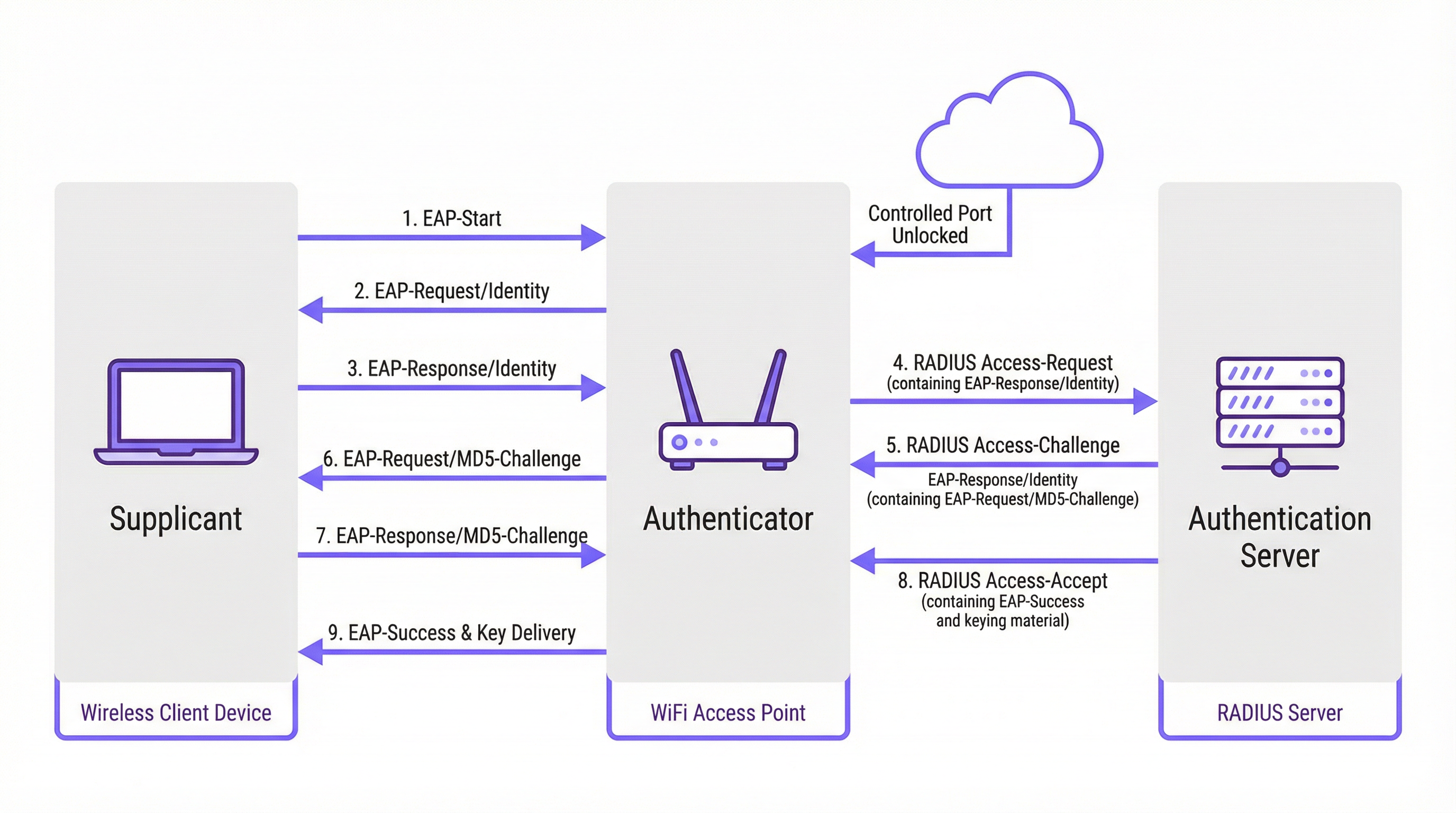
Der Authentifizierungsprozess folgt einem strukturierten Nachrichtenaustausch, der durch das Extensible Authentication Protocol (EAP) orchestriert wird. EAP ist ein flexibles Framework, das verschiedene Authentifizierungsmethoden (EAP-Typen) unterstützt und es Unternehmen ermöglicht, diejenige auszuwählen, die am besten zu ihren Sicherheitsanforderungen und der bestehenden Infrastruktur passt.
EAP-Methoden im Vergleich
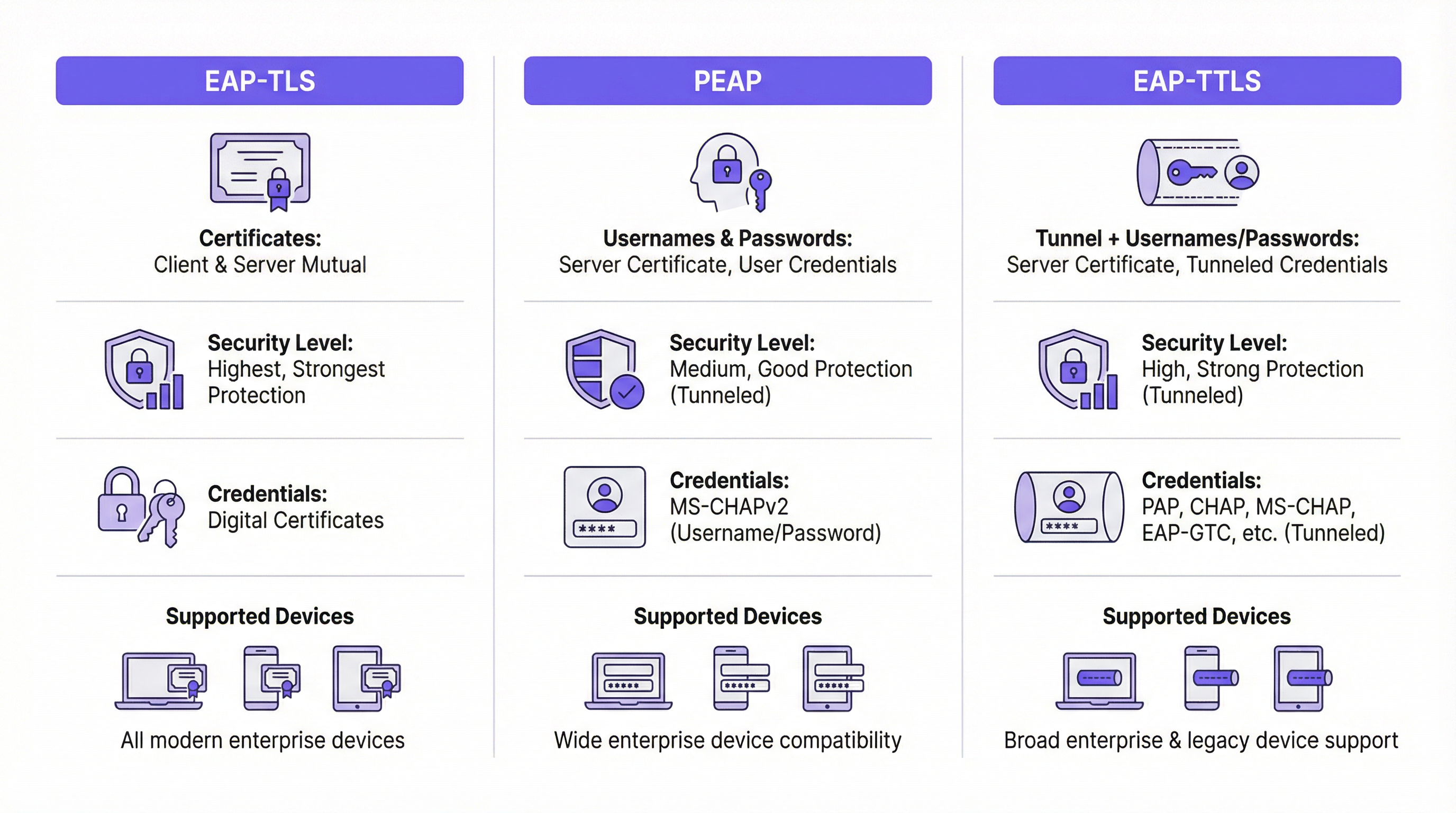
Die Wahl der richtigen EAP-Methode ist eine entscheidende Entscheidung bei der Bereitstellung. Die wichtigsten Methoden, die in modernen Unternehmensnetzwerken verwendet werden, sind EAP-TLS, PEAP und EAP-TTLS.
| Funktion | EAP-TLS (Transport Layer Security) | PEAP (Protected EAP) | EAP-TTLS (Tunneled TLS) |
|---|---|---|---|
| Sicherheitsniveau | Höchstes. Bietet gegenseitige zertifikatsbasierte Authentifizierung. | Hoch. Verschlüsselt den Austausch von Anmeldeinformationen innerhalb eines TLS-Tunnels. | Hoch. Ähnlich wie PEAP, verschlüsselt den Austausch von Anmeldeinformationen. |
| Anmeldeinformationen | Digitale Client- & Server-Zertifikate | Server-Zertifikat, Benutzeranmeldeinformationen (z. B. Benutzername/Passwort) | Server-Zertifikat, Benutzeranmeldeinformationen (flexiblere Optionen) |
| Komplexität | Hoch. Erfordert eine Public Key Infrastructure (PKI) zur Verwaltung von Zertifikaten für alle Geräte. | Mittel. Nutzt vorhandene Verzeichnis-Anmeldeinformationen (z. B. Active Directory). | Mittel. Ähnlich wie PEAP, bietet jedoch mehr Flexibilität für Authentifizierungsprotokolle. |
| Anwendungsfall | Unternehmenseigene Geräte, bei denen die Zertifikatsbereitstellung über MDM automatisiert werden kann. Hochsicherheitsumgebungen. | BYOD und Unternehmensumgebungen, in denen die Authentifizierung per Benutzername/Passwort bevorzugt wird. | Diverse Umgebungen mit einer Mischung aus Client-Betriebssystemen (z. B. macOS, Linux). |
EAP-TLS gilt weithin als Goldstandard für die 802.1X-Sicherheit. Es erfordert, dass sowohl der Client als auch der Server über ein digitales Zertifikat verfügen, was eine gegenseitige Authentifizierung ermöglicht. Dies eliminiert das Risiko passwortbasierter Angriffe, bringt jedoch den Mehraufwand mit sich, ein Zertifikat auf jedem einzelnen Client-Gerät bereitzustellen und zu verwalten.
PEAP ist der häufigste EAP-Typ in Unternehmensumgebungen. Er vereinfacht die Bereitstellung, da nur ein Zertifikat auf dem Authentifizierungsserver erforderlich ist. Der Client überprüft die Identität des Servers und erstellt dann einen verschlüsselten TLS-Tunnel. Innerhalb dieses Tunnels authentifiziert sich der Client mit weniger komplexen Methoden, typischerweise MS-CHAPv2 (Benutzername und Passwort). Obwohl sicher, ist es dennoch anfällig für Phishing-Angriffe, wenn Benutzer dazu verleitet werden, sich mit einem Rogue-AP mit einem gültig aussehenden Serverzertifikat zu verbinden.
EAP-TTLS ist funktionell ähnlich wie PEAP, bietet jedoch mehr Flexibilität. Es erstellt ebenfalls einen TLS-Tunnel, ermöglicht aber eine breitere Palette an inneren Authentifizierungsprotokollen wie PAP, CHAP oder EAP-MD5, was es zu einer vielseitigen Wahl für Umgebungen mit Legacy-Systemen oder diversen Client-Typen macht.
Implementierungsleitfaden
Eine erfolgreiche 802.1X-Bereitstellung erfordert eine sorgfältige Planung und phasenweise Ausführung. Die folgenden Schritte bieten eine herstellerneutrale Roadmap.
Phase 1: Infrastruktur & Planung
- Wählen Sie Ihren RADIUS-Server: Wählen Sie einen RADIUS-Server, der zu Ihrer bestehenden Infrastruktur passt. Der Network Policy Server (NPS) von Microsoft ist eine gängige Wahl für Windows-zentrierte Umgebungen, während Open-Source-Optionen wie FreeRADIUS hochflexibel sind. Cloudbasierte RADIUS-Dienste werden aufgrund ihrer Skalierbarkeit und des geringeren Verwaltungsaufwands ebenfalls immer beliebter.
- Wählen Sie Ihre EAP-Methode: Wählen Sie basierend auf dem obigen Vergleich die EAP-Methode, die Ihre Sicherheitsanforderungen, Benutzerbasis und administrativen Fähigkeiten am besten in Einklang bringt. Für die meisten Unternehmensumgebungen bietet PEAP eine starke Balance. Für Hochsicherheitsbereitstellungen ist EAP-TLS der empfohlene Weg.
- Planen Sie Ihre Zertifikatsstrategie: Dies ist der kritischste Schritt. Für PEAP oder EAP-TTLS benötigen Sie ein Serverzertifikat für Ihren RADIUS-Server. Dieses Zertifikat MUSS von einer vertrauenswürdigen öffentlichen Zertifizierungsstelle (CA) ausgestellt sein. Die Verwendung eines selbstsignierten Zertifikats führt zu Sicherheitswarnungen auf allen Client-Geräten und untergräbt das Vertrauen der Benutzer sowie die Sicherheit.
Phase 2: Konfiguration
- Konfigurieren Sie den RADIUS-Server: Installieren und konfigurieren Sie den gewählten RADIUS-Server. Dies umfasst:
- Installation des Serverzertifikats.
- Definition der RADIUS-Clients (Ihre Access Points und Switches).
- Erstellung von Verbindungsanforderungsrichtlinien zur Verarbeitung eingehender Anfragen.
- Erstellung von Netzwerkrichtlinien, die die Bedingungen, Einschränkungen und Einstellungen für die Authentifizierung definieren. Eine Richtlinie könnte beispielsweise besagen, dass sich nur Mitglieder einer bestimmten Active Directory-Gruppe verbinden dürfen.
- Konfigurieren Sie den Authenticator (Wireless APs/Switches):
- Konfigurieren Sie Ihren Wireless LAN Controller oder einzelne Access Points mit der IP-Adresse Ihres RADIUS-Servers und dem Shared Secret.
- Erstellen Sie ein neues WLAN/SSID, das speziell für 802.1X vorgesehen ist. Versuchen Sie nicht, 802.1X in einem bestehenden PSK- oder offenen Netzwerk auszuführen.
- Stellen Sie sicher, dass die SSID für WPA2-Enterprise oder WPA3-Enterprise konfiguriert ist.
Phase 3: Client-Onboarding & Bereitstellung
- Unternehmensgeräte: Verwenden Sie eine Mobile Device Management (MDM)- oder Group Policy (GPO)-Lösung, um unternehmenseigene Geräte automatisch zu konfigurieren. Das MDM/GPO kann das drahtlose Netzwerkprofil, einschließlich der SSID, des EAP-Typs und aller erforderlichen CA-Zertifikate, auf das Gerät pushen. Dies bietet dem Endbenutzer ein Zero-Touch-Erlebnis.
- BYOD (Bring Your Own Device): Das Onboarding persönlicher Geräte ist komplexer. Die Best Practice besteht darin, eine dedizierte Onboarding-Lösung zu verwenden. Diese Lösungen bieten eine temporäre, offene „Onboarding“-SSID. Wenn sich ein Benutzer verbindet, wird er zu einem Captive Portal weitergeleitet, wo er sich authentifizieren und ein Konfigurationsdienstprogramm oder Profil herunterladen kann, das sein Gerät automatisch für das sichere 802.1X-Netzwerk einrichtet.
Best Practices
- Segmentieren Sie Ihr Netzwerk: Verwenden Sie eine dynamische VLAN-Zuweisung basierend auf RADIUS-Attributen. Dadurch können Sie verschiedene Benutzergruppen (z. B. Mitarbeiter, Auftragnehmer, Gäste) in unterschiedlichen VLANs mit spezifischen Zugriffsrichtlinien platzieren, selbst wenn sie sich mit derselben SSID verbinden.
- Verwenden Sie immer ein öffentlich vertrauenswürdiges Zertifikat: Die Bedeutung der Verwendung eines öffentlichen Zertifikats auf Ihrem RADIUS-Server kann nicht genug betont werden. Es ist der Grundstein für das Vertrauen der Clients und verhindert Man-in-the-Middle-Angriffe.
- Überwachen und Protokollieren: Überwachen Sie aktiv die RADIUS-Authentifizierungsprotokolle. Dies ist von unschätzbarem Wert für die Fehlerbehebung bei Verbindungsproblemen und für Sicherheitsaudits. Fehlgeschlagene Authentifizierungsversuche können ein früher Indikator für einen potenziellen Angriff sein.
- Bevorzugen Sie WPA3-Enterprise: Sofern von Ihrer Hardware und Ihren Clients unterstützt, bietet WPA3-Enterprise erhebliche Sicherheitsverbesserungen gegenüber WPA2-Enterprise, einschließlich Protected Management Frames (PMF) zur Verhinderung von De-Authentifizierungsangriffen.
Fehlerbehebung & Risikominderung
| Häufiges Problem | Ursache | Minderungsstrategie |
|---|---|---|
| Verbindung schlägt fehl | Nichtübereinstimmung der EAP-Typen zwischen Client und Server. Falsches RADIUS Shared Secret. Firewall blockiert RADIUS-Ports (UDP 1812/1813). | Überprüfen Sie die EAP-Einstellungen auf Client und Server. Kontrollieren Sie das Shared Secret auf dem AP und dem RADIUS-Server. Stellen Sie sicher, dass Firewalls den RADIUS-Verkehr zulassen. |
| Zertifikatswarnungen | Der RADIUS-Server verwendet ein selbstsigniertes oder nicht vertrauenswürdiges Zertifikat. | Ersetzen Sie das selbstsignierte Zertifikat durch eines von einer vertrauenswürdigen öffentlichen CA (z. B. DigiCert, Sectigo). |
| Langsame Verbindungen | Der RADIUS-Server ist unterdimensioniert oder weist eine hohe Latenz zum Verzeichnisdienst auf. | Überwachen Sie die Leistung des RADIUS-Servers. Sorgen Sie für eine Konnektivität mit geringer Latenz zwischen dem RADIUS-Server und den Domänencontrollern. |
| Phishing/Rogue APs | Benutzer werden dazu verleitet, sich mit einem bösartigen AP zu verbinden, der dieselbe SSID ausstrahlt. | Verwenden Sie EAP-TLS, um Passwörter zu eliminieren. Stellen Sie bei PEAP/EAP-TTLS sicher, dass die Clients so konfiguriert sind, dass sie das Serverzertifikat und den Namen validieren. |
ROI & Geschäftsauswirkungen
Während die Implementierung von 802.1X eine anfängliche Investition an Zeit und Ressourcen erfordert, ist der Return on Investment (ROI) signifikant, insbesondere bei großen Veranstaltungsorten.
- Verbesserte Sicherheitslage: Durch den Wechsel von einem einzigen gemeinsamen Passwort zu eindeutigen, benutzer- oder gerätespezifischen Anmeldeinformationen reduzieren Sie das Risiko eines unbefugten Zugriffs drastisch. Dies ist ein entscheidender Schritt zur Eindämmung von Datenschutzverletzungen.
- Compliance: Für Unternehmen, die PCI DSS, GDPR oder HIPAA unterliegen, ist 802.1X eine wichtige Kontrollmaßnahme, um nachzuweisen, dass starke Zugriffskontrollmaßnahmen implementiert wurden. Die Kosten für ein fehlgeschlagenes Audit oder eine Compliance-Strafe übersteigen die Bereitstellungskosten bei weitem.
- Betriebliche Effizienz: Die Automatisierung des Onboardings und die Verwendung dynamischer VLANs verringern den administrativen Aufwand für IT-Teams. Neuen Mitarbeitern kann basierend auf ihrer Verzeichnisgruppe automatisch Zugriff gewährt werden, und der Zugriff wird sofort widerrufen, wenn sie entfernt werden.
- Verbesserte Benutzererfahrung: Bei korrekter Bereitstellung mit automatisiertem Onboarding bietet 802.1X ein nahtloses und sicheres Verbindungserlebnis. Benutzer schalten ihr Gerät einfach ein, und es verbindet sich, ohne dass sie ein Passwort erneut eingeben müssen. Dies ist eine deutliche Verbesserung gegenüber Captive Portals oder komplexen PSKs.
Key Terms & Definitions
RADIUS
Remote Authentication Dial-In User Service. A networking protocol that provides centralized Authentication, Authorization, and Accounting (AAA) management for users and devices that attempt to access a network service.
In an 802.1X context, the RADIUS server is the 'brain' of the operation. It's the server that checks the user's or device's credentials and tells the access point whether to grant or deny access. IT teams will spend most of their time configuring policies on the RADIUS server.
EAP
Extensible Authentication Protocol. An authentication framework, not a specific authentication mechanism. It provides a standardized way for clients and servers to negotiate an authentication method.
EAP is the language spoken between the client device, the access point, and the RADIUS server. Understanding that EAP is a framework helps explain why there are so many different 'types' of 802.1X (EAP-TLS, PEAP, etc.). The choice of EAP type is the most important decision in an 802.1X deployment.
Supplicant
The software on a client device (like a laptop or smartphone) that is responsible for responding to the authenticator's requests for credentials.
The supplicant is built into modern operating systems like Windows, macOS, iOS, and Android. IT teams rarely interact with the supplicant directly, but they configure it via network profiles, telling it which EAP type to use and which server to trust.
Authenticator
The network device that acts as a gatekeeper, blocking or allowing traffic from the supplicant. In a wireless network, this is the access point (AP).
The authenticator doesn't make the authentication decision itself. It's a middleman that simply passes EAP messages between the supplicant and the authentication server. Its primary job is to enforce the decision made by the RADIUS server.
PKI
Public Key Infrastructure. A set of roles, policies, hardware, software, and procedures needed to create, manage, distribute, use, store, and revoke digital certificates.
A PKI is essential for deploying EAP-TLS, the most secure form of 802.1X. While the term sounds intimidating, a basic PKI can be set up using Microsoft Active Directory Certificate Services or a cloud-based service. It's the foundation for a certificate-based security model.
MDM
Mobile Device Management. Software that allows IT administrators to control, secure, and enforce policies on smartphones, tablets, and other endpoints.
MDM is the key to a scalable and seamless 802.1X deployment for corporate-owned devices. IT teams use the MDM to automatically push the WiFi profile and client certificate to devices, meaning users can connect securely with zero manual configuration.
Dynamic VLAN Assignment
A feature that allows the RADIUS server to assign a user or device to a specific VLAN based on their identity or group membership.
This is a powerful tool for network segmentation. Instead of having multiple SSIDs for different user groups, you can have one secure SSID. The RADIUS server then places employees in the corporate VLAN, guests in the guest VLAN, and IoT devices in their own isolated VLAN, all based on the credentials they present.
WPA3-Enterprise
The latest generation of Wi-Fi security for enterprise networks, building on WPA2-Enterprise by adding stronger encryption and protection against de-authentication attacks.
When procuring new network hardware, IT managers should ensure it supports WPA3-Enterprise. It provides a significant security uplift over its predecessor and is a key component of a modern, secure wireless infrastructure. It's the 'Enterprise' version that integrates with 802.1X.
Case Studies
A 500-room luxury hotel needs to provide secure WiFi for staff (on corporate-issued tablets) and a separate, seamless experience for guests. The hotel must comply with PCI DSS due to its payment systems.
Staff Network: Implement an 802.1X EAP-TLS network. Deploy a RADIUS server and an internal Certificate Authority (or use a cloud PKI service). Use an MDM to automatically provision the corporate tablets with client certificates and the WPA2/WPA3-Enterprise network profile. This provides the highest level of security for devices handling sensitive operational data. Guest Network: Implement a separate SSID using a captive portal with a straightforward, time-limited voucher or social login. This network should be completely isolated from the staff and PCI networks using VLANs and firewall rules. This approach balances high security for corporate assets with ease of use for transient guests.
A large retail chain with 200 stores needs to secure its in-store network, which is used by Point-of-Sale (POS) terminals, employee-used handheld inventory scanners, and a guest WiFi network.
POS & Inventory Scanners: Deploy a single, hidden SSID using 802.1X EAP-TLS. Since these are corporate-controlled devices, certificates can be pre-loaded before deployment. Use MAC Authentication Bypass (MAB) as a fallback for legacy devices that may not support 802.1X, but this should be an exception. Assign this network to a secure, firewalled VLAN that only allows traffic to the payment processor and inventory management servers. Guest WiFi: Deploy a separate, public-facing SSID with a branded captive portal that requires acceptance of terms and conditions. This network must be completely isolated from the secure store network.
Scenario Analysis
Q1. Your CFO is concerned about the cost of a commercial certificate for the RADIUS server and suggests using a self-signed certificate from your internal Windows CA. How do you respond?
💡 Hint:Consider the user experience and the security implications of a client not being able to automatically trust the server.
Show Recommended Approach
A self-signed certificate will cause a security warning on every single device that connects to the network for the first time. This trains users to ignore security warnings, which is a significant security risk. A publicly trusted certificate is automatically recognized by all modern devices, providing a seamless connection experience and ensuring that clients can verify they are connecting to the legitimate server, which is crucial for preventing man-in-the-middle attacks. The annual cost of a public certificate is a small price to pay for the enhanced security and improved user experience.
Q2. A conference centre wants to use 802.1X for event attendees. They have thousands of new users each week. Is EAP-TLS a viable option? Why or why not?
💡 Hint:Think about the lifecycle of a guest user and the administrative overhead of certificate management.
Show Recommended Approach
EAP-TLS is likely not a viable option for this scenario. The primary challenge is the administrative overhead of provisioning a unique digital certificate for thousands of transient users each week. The process of generating, distributing, and then revoking these certificates would be operationally complex and costly. A better approach would be to use a simpler authentication method for guests, such as a captive portal with voucher codes or social login, while reserving 802.1X for staff and permanent infrastructure.
Q3. You are deploying a PEAP-MS-CHAPv2 network. A user reports that they can connect from their Windows laptop but not from their personal Android phone. What is the most likely cause of this issue?
💡 Hint:Consider how different operating systems handle certificate validation and network profiles.
Show Recommended Approach
The most likely cause is that the Android phone has not been configured to properly trust the RADIUS server's certificate. While a Windows laptop joined to a domain might automatically trust the certificate (if the root CA is pushed via Group Policy), a personal Android device needs to be manually configured. The user likely needs to install the root CA certificate on their phone and/or explicitly configure the network profile to validate the server certificate and specify the correct domain name. This highlights the importance of a clear and simple onboarding process for BYOD users.
Key Takeaways
- ✓802.1X provides port-based network access control, authenticating users or devices before granting network access.
- ✓The core components are the Supplicant (client), Authenticator (AP/switch), and Authentication Server (RADIUS).
- ✓EAP-TLS is the most secure method, using mutual certificate authentication, but has higher administrative overhead.
- ✓PEAP and EAP-TTLS are widely used, balancing strong security with easier deployment by using server-side certificates and user credentials.
- ✓Always use a publicly trusted certificate for your RADIUS server to avoid security warnings and prevent man-in-the-middle attacks.
- ✓Automate client configuration using MDM for corporate devices and a dedicated onboarding portal for BYOD.
- ✓Use dynamic VLAN assignment to segment users and devices into different network zones based on their identity and permissions.




