

Access-Point-Platzierung und Abdeckungsplanung für Standorte
A technical reference for IT leaders on designing high-performance WiFi networks in complex venues. This guide provides actionable best practices for access point placement, coverage planning, and capacity calculation to improve guest experience and operational ROI.
🎧 Listen to this Guide
View Transcript

Executive Summary
Ein effektives WiFi-Netzwerkdesign ist eine kritische Infrastrukturkomponente für jeden modernen Standort und wirkt sich direkt auf die Gästezufriedenheit, die betriebliche Effizienz und die Umsatzgenerierung aus. Dieser Leitfaden dient als technische Referenz für IT-Manager, Netzwerkarchitekten und Standortbetreiber und bietet herstellerneutrale, umsetzbare Best Practices für die Platzierung von Access Points (AP) und die Abdeckungsplanung. Wir gehen über theoretische Konzepte hinaus und bieten praktische Bereitstellungsstrategien, die auf die einzigartigen Herausforderungen von Gastgewerbe, Einzelhandel, großen öffentlichen Veranstaltungsorten und Unternehmensumgebungen zugeschnitten sind. Der Fokus liegt auf der Ausbalancierung der Kernsäulen einer erfolgreichen WiFi-Bereitstellung: Abdeckung, Kapazität und Client-Erfahrung. Durch die Befolgung der dargelegten Prinzipien können Unternehmen nahtloses Roaming sicherstellen, Interferenzen minimieren und die Konnektivität mit hohem Durchsatz bereitstellen, die von der heutigen geräteintensiven Nutzerbasis gefordert wird. Dieses Dokument bietet die Rahmenbedingungen zur Berechnung der angemessenen AP-Dichte, zur Planung von Signalüberlappungen und Kanalisierung sowie zur Vermeidung häufiger Bereitstellungsfehler. Letztendlich ermöglicht dies ein überlegenes und zuverlässigeres Wireless-Erlebnis, das einen messbaren Return on Investment liefert.
Technischer Deep-Dive
Eine erfolgreiche WiFi-Bereitstellung hängt von einem tiefen Verständnis des Hochfrequenzverhaltens (RF) ab. Das primäre Ziel ist es, eine flächendeckende und zuverlässige Abdeckungskarte zu erstellen und gleichzeitig ausreichend Kapazität bereitzustellen, um die erwartete Dichte an Client-Geräten zu bewältigen. Dies erfordert einen systematischen Planungsansatz.
Berechnung von AP-Dichte und Kapazität
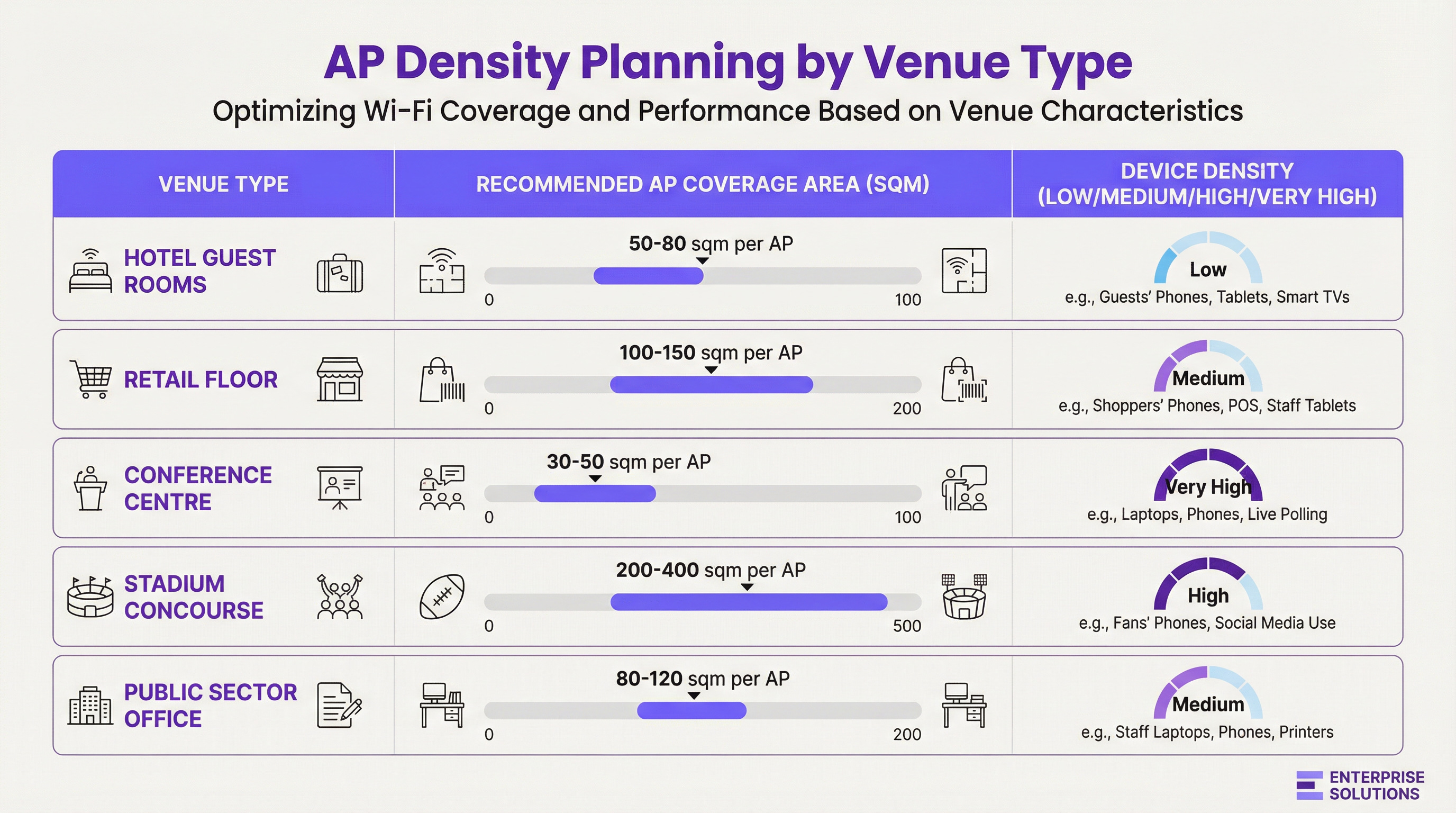
Die AP-Dichte ist keine universelle Metrik. Sie ist eine Funktion von drei Variablen: der physischen Größe des Bereichs, der Anzahl der gleichzeitigen Nutzer und der Art der Anwendungen, die sie nutzen werden.
- Abdeckungsorientiertes Design: In Umgebungen wie Hotels oder Lagerhallen ist das primäre Ziel, ein konsistentes Signal über einen großen Bereich bereitzustellen. Hier beginnt die Planung mit dem effektiven Abdeckungsradius des APs, wobei die Dämpfung durch Baumaterialien berücksichtigt wird.
- Kapazitätsorientiertes Design: In Umgebungen mit hoher Dichte wie Konferenzzentren oder Stadien muss der Plan die Anzahl der gleichzeitigen Verbindungen priorisieren, die ein AP bewältigen kann. Dies führt oft dazu, dass mehr APs bereitgestellt werden, als für die reine Abdeckung erforderlich wären, und diese mit geringerer Sendeleistung betrieben werden, um kleinere, fokussiertere Zellen zu schaffen.
Signaldämpfung und Materialeinfluss
RF-Signale werden von Baumaterialien absorbiert, reflektiert und gebeugt. Eine umfassende Standortuntersuchung (Site Survey) muss den dB-Verlust durch häufige Hindernisse berücksichtigen:
| Material | 2,4 GHz Dämpfung (ca.) | 5 GHz Dämpfung (ca.) | Auswirkung auf die Platzierung |
|---|---|---|---|
| Trockenbauwand | -3 dB | -4 bis -5 dB | Minimale Auswirkung, Standard für Büroumgebungen. |
| Betonwand | -10 bis -15 dB | -15 bis -20 dB | Hohe Auswirkung; erfordert APs auf beiden Seiten. |
| Glasfenster | -4 dB | -7 dB | Moderate Auswirkung; kann Reflexionen verursachen. |
| Metalltür/Aufzug | -15 bis -25 dB | -20 bis -30 dB | Erzeugt RF-Schatten; Abdeckung darum herum planen. |
Kanalplanung und Signalüberlappung
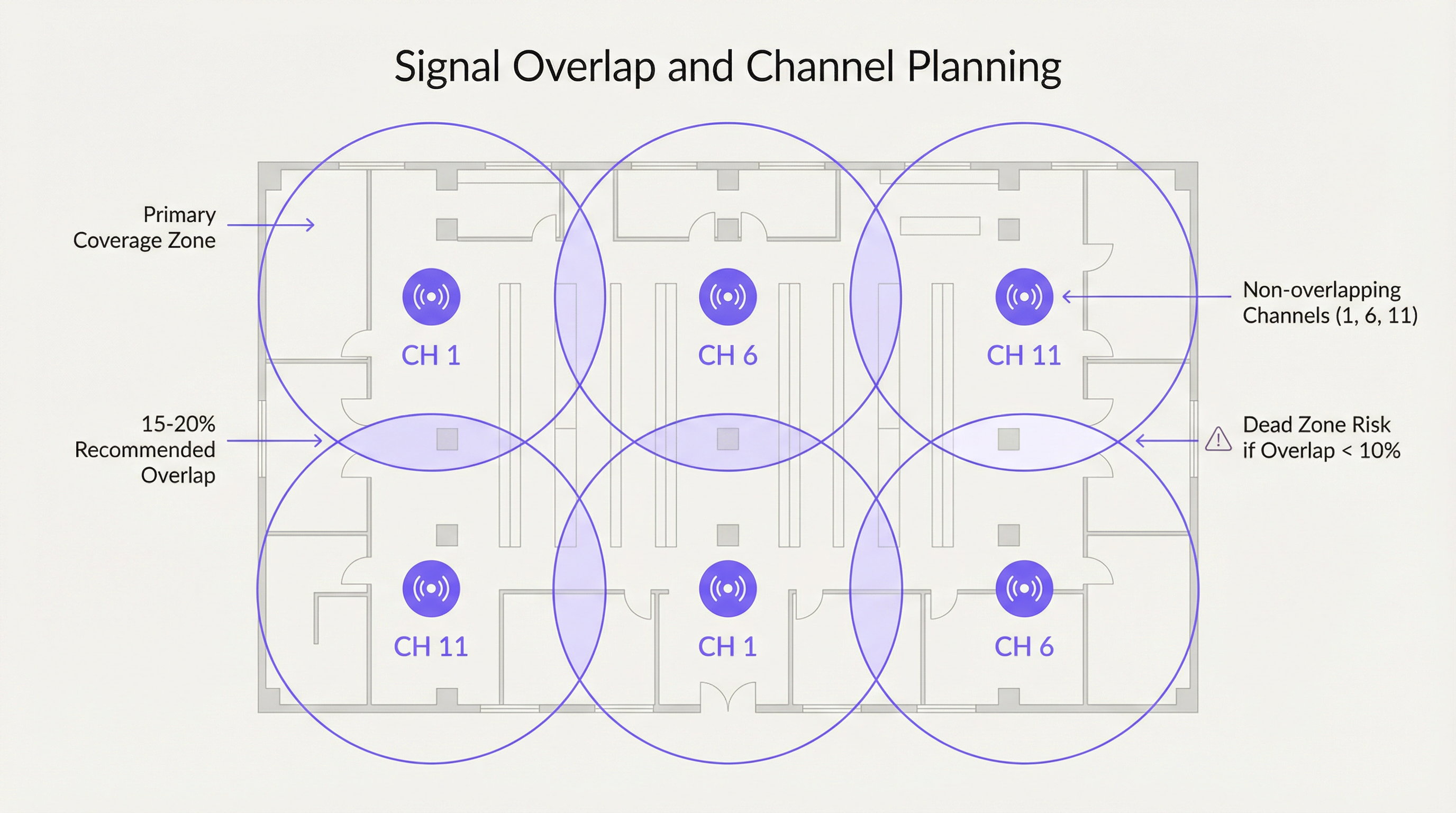
Um nahtloses Roaming zu gewährleisten, wird eine bewusste Überlappung von 15-20 % zwischen benachbarten AP-Abdeckungszellen empfohlen. Dies ermöglicht es einem Client-Gerät, einen neuen AP zu entdecken und sich mit ihm zu verbinden, bevor es das Signal des vorherigen verliert. Diese Überlappung muss jedoch mit einem ordnungsgemäßen Kanalplan verwaltet werden, um Interferenzen zu vermeiden.
- Co-Channel Interference (CCI): Tritt auf, wenn zwei APs auf demselben Kanal zu nah beieinander liegen. Sie müssen um Sendezeit (Airtime) konkurrieren, was die Leistung für alle verbundenen Clients verringert.
- Adjacent Channel Interference (ACI): Tritt auf, wenn APs auf überlappenden Kanälen zu nah beieinander liegen (z. B. Kanäle 1 und 2 im 2,4-GHz-Band).
Für das 2,4-GHz-Band sind nur die Kanäle 1, 6 und 11 überlappungsfrei und sollten in jeder Unternehmensbereitstellung exklusiv verwendet werden. Das 5-GHz-Band bietet eine viel größere Anzahl an überlappungsfreien Kanälen, was es zur bevorzugten Wahl für kapazitätsgesteuerte Designs macht.
Implementierungsleitfaden
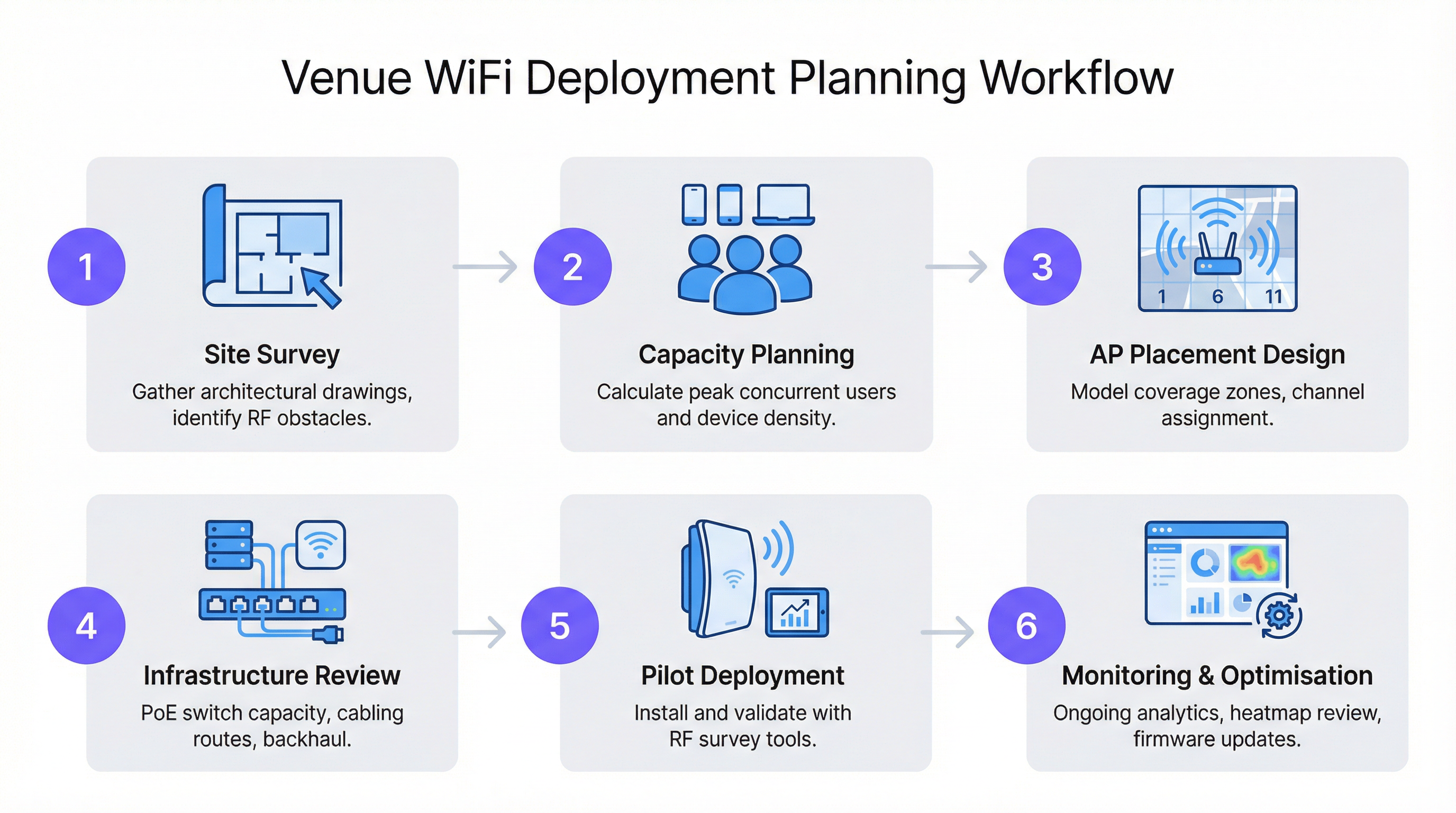
Die Befolgung eines strukturierten Workflows ist entscheidend für eine erfolgreiche und skalierbare WiFi-Bereitstellung. Dieser Prozess stellt sicher, dass alle Variablen berücksichtigt werden, von der anfänglichen Planung bis zur Optimierung nach der Installation.
Schritt 1: Die Standortuntersuchung (Site Survey)
Eine professionelle Standortuntersuchung ist der Grundstein jedes Netzwerkdesigns. Sie umfasst zwei Phasen:
- Prädiktive Untersuchung: Verwendung von Grundrissen und Software wie Ekahau oder AirMagnet, um die RF-Ausbreitung zu modellieren und eine anfängliche Karte für die AP-Platzierung zu erstellen.
- Physische Untersuchung: Eine Begehung des Standorts mit einem Spektrumanalysator und einem Survey-Tool, um das prädiktive Modell zu validieren, Quellen von RF-Interferenzen (wie Mikrowellenherde oder benachbarte Netzwerke) zu identifizieren und die RF-Eigenschaften von Baumaterialien zu bestätigen.
Schritt 2: Montage und Platzierung
- Deckenmontage: Ideal für offene Bereiche mit hohen Decken (3-5 Meter), wie Einzelhandelsflächen oder Ballsäle. Verwenden Sie ein Down-Tilt-Antennenmuster für eine fokussierte Abdeckung.
- Wandmontage: Bevorzugt im Gastgewerbe (Hotelzimmer) und in Büros. Montieren Sie APs in einer Höhe von 2,5-3 Metern, um sie über den meisten Möbeln und Hindernissen zu positionieren.
- Deckenhohlräume vermeiden: Die Platzierung von APs im Raum über einer abgehängten Decke kann die Signalstärke um 3-5 dB reduzieren und erschwert den physischen Zugang für Wartungsarbeiten.
- Vertikale Versetzung: In mehrstöckigen Gebäuden sollten APs nicht auf jedem Stockwerk an derselben Stelle platziert werden. Eine versetzte Platzierung hilft, Co-Channel Interference zwischen den Stockwerken zu minimieren.
Best Practices
- 5 GHz priorisieren: Lenken Sie fähige Clients in das 5-GHz-Band. Es bietet mehr Kanäle, weniger Interferenzen und höhere Datenraten. Nutzen Sie Band-Steering-Funktionen auf Ihren APs, um dies zu fördern.
- Sendeleistung richtig dimensionieren: Maximale Leistung ist nicht immer das Beste. In Designs mit hoher Dichte erzeugt eine Verringerung der Sendeleistung kleinere Mikrozellen, was die Gesamtkapazität des Netzwerks erhöht, da eine häufigere Wiederverwendung von Kanälen ermöglicht wird.
- Moderne Standards nutzen: Stellen Sie Wi-Fi 6 (802.11ax) oder Wi-Fi 6E fähige APs bereit. Funktionen wie OFDMA und MU-MIMO sind speziell darauf ausgelegt, die Leistung in überlasteten Umgebungen zu verbessern.
- Backhaul planen: Stellen Sie sicher, dass Ihre Switching-Infrastruktur das erforderliche Power over Ethernet (PoE)-Budget (PoE+ oder PoE++ für Hochleistungs-APs) bereitstellen kann und über ausreichend Uplink-Kapazität verfügt, um den aggregierten Wireless-Traffic zu bewältigen.
Fehlerbehebung & Risikominderung
- Symptom: Langsame Geschwindigkeiten trotz starkem Signal. Ursache: Wahrscheinlich Co-Channel Interference oder ein übersättigter AP. Lösung: Führen Sie eine Spektrumanalyse durch, um konkurrierende Netzwerke zu identifizieren. Überprüfen Sie die AP-Client-Auslastung und erwägen Sie, Kapazitäten hinzuzufügen oder Clients per Load-Balancing zu verteilen.
- Symptom: Verbindungsabbrüche bei Bewegung. Ursache: Unzureichende Abdeckungsüberlappung (<10 %) oder fehlerhafte Roaming-Konfiguration. Lösung: Erhöhen Sie die AP-Dichte im betroffenen Bereich oder passen Sie die Sendeleistung benachbarter APs an, um eine größere Überlappungszone zu schaffen.
- Symptom: Bestimmte Bereiche haben keine Abdeckung (Funklöcher). Ursache: Unvorhergesehene RF-Hindernisse (z. B. neue Metallregale). Lösung: Führen Sie eine Untersuchung nach der Installation durch, um das Funkloch zu identifizieren, und stellen Sie einen zusätzlichen AP bereit, um die Lücke zu schließen.
ROI & Geschäftsauswirkungen
Ein gut konzipiertes WiFi-Netzwerk ist kein Kostenfaktor; es ist ein Wegbereiter für Business Intelligence und ein verbessertes Kundenerlebnis. Für eine Einzelhandelskette können die aus einem Purple-fähigen WiFi-Netzwerk gesammelten Daten Entscheidungen über das Ladenlayout unterstützen, die Kundenfrequenz messen und personalisiertes Marketing vorantreiben. Im Gastgewerbe ist es ein wesentlicher Treiber für die Gästezufriedenheit und ermöglicht Services wie mobilen Check-in und In-Room-Streaming. Der ROI misst sich in:
- Gesteigerte Gästezufriedenheit & Loyalität: Hochleistungs-WiFi ist heute eine primäre Annehmlichkeit, die Buchungsentscheidungen beeinflusst.
- Verbesserte betriebliche Effizienz: Zuverlässige Konnektivität für Mitarbeitergeräte (Kassensysteme, Inventarscanner, Kommunikationstools) reduziert Ausfallzeiten.
- Neue Einnahmequellen: Standortbasierte Analysen und Captive Portal-Marketing können neue Möglichkeiten für Interaktion und Umsatz schaffen.
Key Terms & Definitions
Access Point (AP)
A networking hardware device that allows a Wi-Fi compliant device to connect to a wired network. APs are the bridge between the wireless and wired worlds.
This is the fundamental building block of your WiFi network. IT teams will be physically deploying and configuring these devices based on the network plan.
Site Survey
The process of planning and designing a wireless network to provide a solution that will deliver the required wireless coverage, data rates, network capacity, roaming capability and Quality of Service (QoS).
This is the most critical pre-deployment step. Skipping or rushing a site survey is the number one cause of poor WiFi performance. It provides the data needed to justify AP count and placement to management.
AP Density
The concentration of access points within a given physical area. High density refers to a large number of APs in a small area, typically for capacity reasons.
This term is central to budget discussions. A CTO needs to understand why a high-density area like a conference room requires a higher AP density (and thus cost) than a hallway.
Signal-to-Noise Ratio (SNR)
A measure that compares the level of a desired signal to the level of background noise. It is expressed in decibels (dB). A higher SNR means a cleaner, more reliable signal.
When troubleshooting a user's complaint of 'bad WiFi', SNR is a key metric. A strong signal is useless if the background noise (from other networks, microwaves, etc.) is also high. Aim for an SNR of 25 dB or higher for good performance.
Co-Channel Interference (CCI)
Interference that occurs when two or more access points on the same channel operate in close proximity. They are forced to share the available airtime, reducing throughput for all clients.
This is why channel planning is crucial. A network architect must design the AP layout to minimize CCI by reusing channels effectively across the venue.
Roaming
The process of a wireless client device moving from one access point to another within the same network without losing connectivity.
For venue operations, seamless roaming is essential for staff using mobile devices (e.g., scanners, tablets) and for guests on calls. It relies on having sufficient coverage overlap between APs.
Power over Ethernet (PoE)
A standard that allows electrical power to be passed along with data on twisted-pair Ethernet cabling. This allows a single cable to provide both data connection and electrical power to devices like APs.
This simplifies deployment and reduces costs by eliminating the need for a separate power outlet at every AP location. Network architects must ensure their switches have a large enough PoE budget to power all planned APs.
Wi-Fi 6 (802.11ax)
The latest generation of Wi-Fi technology, offering faster speeds and, more importantly, better performance in congested, high-density environments through technologies like OFDMA and MU-MIMO.
When planning a new deployment, especially for a high-traffic venue, specifying Wi-Fi 6 is a form of future-proofing and risk mitigation. It ensures the network can handle the increasing number of devices per user.
Case Studies
A 200-room, 5-story luxury hotel needs to upgrade its WiFi. The building is concrete and steel. The goal is to provide high-performance streaming for guests and reliable connectivity for staff operations.
A capacity-driven design is required. Plan for one AP per 2-4 guest rooms, depending on wall density. Given the concrete construction, placing APs in hallways is not viable; an in-room or near-room wall-plate AP strategy is necessary. For example, a wall-plate AP in every other room, with careful channel planning to avoid interference with rooms on adjacent floors. A staggered floor-by-floor layout is critical. For common areas like the lobby and restaurant, a ceiling-mounted, high-density AP solution is required, with APs placed approximately 10-15 meters apart. The entire network should be designed using Wi-Fi 6 APs to handle the high number of devices and streaming applications. A physical site survey is mandatory to validate RF penetration through the hotel's specific wall types.
A large retail store (5,000 sq. meters) wants to deploy guest WiFi and support staff inventory scanners and POS devices. The store has high ceilings and wide, open aisles, but also dense shelving units.
A mixed-coverage and capacity approach is needed. The primary design should be coverage-oriented, using ceiling-mounted APs with omnidirectional antennas placed in a grid pattern across the open floor areas, approximately 15-20 meters apart. However, a secondary survey must be done to identify potential RF dead zones created by high, metal shelving units. In these areas, additional, lower-power APs may be needed, mounted to the ends of aisles or on pillars. Channel planning should use a standard 1, 6, 11 rotation for 2.4 GHz and a wider range of non-overlapping channels for 5 GHz. The network must be configured with separate SSIDs and VLANs for guest and corporate traffic, in line with PCI DSS compliance for the POS systems.
Scenario Analysis
Q1. You are designing WiFi for a historic hotel with thick plaster and lath walls. A predictive survey suggests a single AP in the corridor can cover four rooms. What is your primary concern and how do you validate your design?
💡 Hint:Historic building materials are notoriously unpredictable for RF signals.
Show Recommended Approach
The primary concern is that the predictive model is inaccurate due to the variable density of the plaster and lath walls. The model should not be trusted. The only way to validate the design is with a physical pilot test. Place a single AP on a temporary stand in the corridor and use a survey tool (like Ekahau Sidekick) to measure the actual signal strength inside each of the four rooms. It is highly likely that an in-room or two-room deployment model will be required.
Q2. A conference is reporting that WiFi performance is excellent in the main hall but becomes unusable in the smaller breakout rooms. All APs are the same model. What is the most likely cause?
💡 Hint:Think about user density and the difference between a large hall and a small room.
Show Recommended Approach
The most likely cause is a capacity issue, not a coverage one. The AP density was likely planned for the lower-density main hall and not adjusted for the much higher user density in the breakout rooms. During breakout sessions, a large number of users move into small spaces, overwhelming the few APs covering those rooms. The solution is to increase the AP density in the breakout rooms and potentially use directional antennas to focus coverage and limit interference.
Q3. Your company is deploying a new network in a multi-tenant office building. You do not control the other tenants' networks. What is the most critical step in your site survey process?
💡 Hint:You can't control your neighbours, but you need to account for them.
Show Recommended Approach
The most critical step is a thorough spectrum analysis. In a multi-tenant building, the RF environment is chaotic. You must identify all other WiFi networks operating in the space, paying close attention to the channels they are using and their signal strength in your deployment area. This analysis is crucial for creating a channel plan that avoids the most congested channels, mitigating co-channel and adjacent channel interference from networks you do not control. You may need to rely more heavily on the 5 GHz band and potentially use narrower channel widths (e.g., 20 MHz) to find clean spectrum.
Key Takeaways
- ✓AP placement is a balance of providing wide coverage and sufficient capacity for users.
- ✓A physical site survey is non-negotiable to understand a building's unique RF characteristics.
- ✓Plan for 15-20% signal overlap between APs to ensure seamless roaming.
- ✓In the 2.4 GHz band, only ever use channels 1, 6, and 11 to avoid interference.
- ✓High-density venues like conference halls require more APs for capacity, not just coverage.
- ✓Deploy Wi-Fi 6 (802.11ax) for better performance in crowded environments.
- ✓A WiFi network is not 'set and forget'; it requires continuous monitoring and optimisation.




