

Band Steering und Load Balancing für High-Density WiFi
This authoritative technical reference equips IT managers, network architects, and venue operations directors with the knowledge to design, configure, and optimise high-density WiFi networks using band steering and load balancing. It covers the architectural principles behind 2.4 GHz vs. 5 GHz band selection, AP load distribution strategies, and vendor-neutral configuration best practices for demanding environments such as stadiums, hotels, and conference centres. By applying these strategies, organisations can measurably improve wireless throughput, reduce user complaints, and transform their network infrastructure into a strategic business asset.
🎧 Listen to this Guide
View Transcript

Executive Summary
Für Unternehmen, die drahtlose High-Density-Umgebungen verwalten, ist die Aufrechterhaltung einer optimalen WiFi-Leistung eine kritische betriebliche Herausforderung. Da die Anzahl der verbundenen Geräte pro Quadratmeter an Orten wie Flughäfen, Konferenzzentren und Einzelhandelszentren steigt, stoßen herkömmliche Netzwerkkonfigurationen an ihre Grenzen, was zu einer schlechten Nutzererfahrung, Verbindungsabbrüchen und einem verringerten Datendurchsatz führt. Dieser Leitfaden geht diese Herausforderungen direkt an und bietet einen technischen Deep-Dive in zwei zentrale Optimierungsstrategien: Band Steering und Load Balancing. Wir untersuchen die Architekturprinzipien, die die 2,4-GHz- und 5-GHz-Frequenzbänder unterscheiden, und erläutern detailliert, wie Dual-Band-Clients intelligent in das weniger überlastete, kapazitätsstärkere 5-GHz-Spektrum gesteuert werden können. Darüber hinaus analysieren wir Load-Balancing-Techniken für Access Points (APs), die Client-Verbindungen gleichmäßig über die verfügbaren Netzwerkressourcen verteilen und so verhindern, dass einzelne APs zu Leistungsengpässen werden. Durch die Implementierung der hier beschriebenen herstellerneutralen Best Practices und Konfigurationsrichtlinien können IT-Manager und Netzwerkarchitekten ein überlegenes, zuverlässigeres WLAN-Erlebnis bieten, das sich direkt auf die Kundenzufriedenheit, die betriebliche Effizienz und den geschäftlichen ROI auswirkt. Diese Referenz ist für die praktische Anwendung konzipiert und bietet konkrete Bereitstellungsszenarien sowie messbare Ergebnisse, um Ihre Netzwerkinfrastrukturstrategie in diesem Quartal zu unterstützen.
Technischer Deep-Dive
Frequenzbänder verstehen: 2,4 GHz vs. 5 GHz
Die Grundlage für ein effektives WiFi-Management in High-Density-Umgebungen liegt im Verständnis der grundlegenden Unterschiede zwischen den 2,4-GHz- und 5-GHz-Frequenzbändern. Diese sind nicht nur zwei Datenwege; es handelt sich um unterschiedliche HF-Umgebungen mit einzigartigen Ausbreitungseigenschaften, die ihre Eignung für verschiedene Anwendungsfälle und Bereitstellungsszenarien bestimmen.
| Merkmal | 2,4-GHz-Band | 5-GHz-Band |
|---|---|---|
| Reichweite | Längere Wellenlänge, bessere Wanddurchdringung | Kürzere Wellenlänge, leichter zu blockieren |
| Interferenz | Hoch (Mikrowellen, Bluetooth, schnurlose Telefone) | Niedrig (Weniger überlastet, mehr Kanäle) |
| Kanäle | 11-14 Kanäle, nur 3 überlappungsfrei | 23+ überlappungsfreie Kanäle |
| Bandbreite | Niedrigere potenzielle Datenraten | Höhere potenzielle Datenraten (z. B. mit 802.11ac/ax) |
| Eignung | Basis-Konnektivität, IoT, Legacy-Geräte | Anwendungen mit hoher Bandbreite (Video, Sprache), dichte Bereiche |
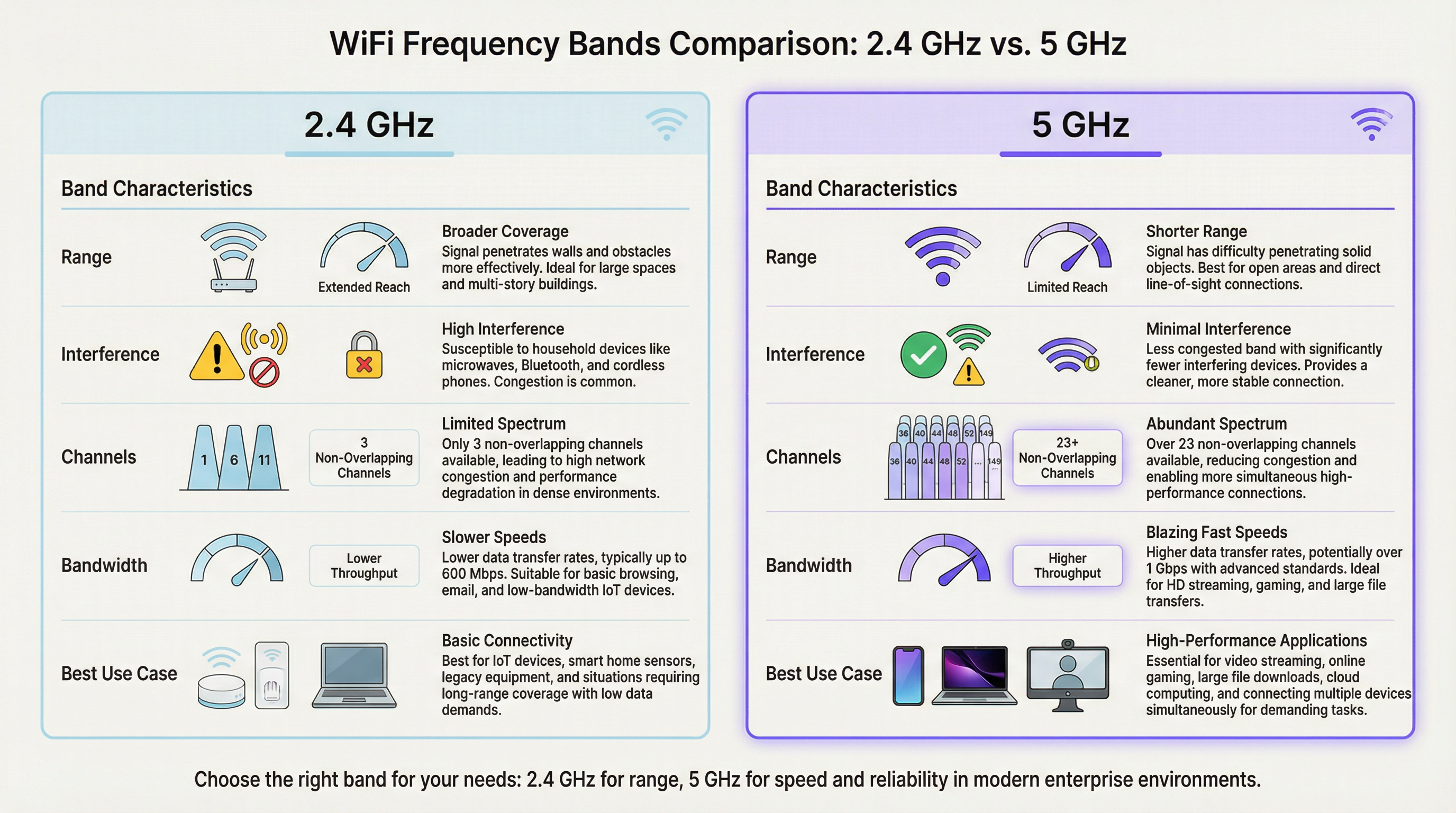
In einer High-Density-Umgebung wie einem Stadion oder Hörsaal ist das 2,4-GHz-Band schnell gesättigt. Mit nur drei überlappungsfreien Kanälen (1, 6 und 11 in Nordamerika) ist die Co-Kanal-Interferenz ein erheblicher und dauerhafter Leistungshemmer. Jeder zusätzliche AP, der auf demselben Kanal im selben Bereich betrieben wird, beeinträchtigt die Leistung aller anderen. Das 5-GHz-Band bietet im Gegensatz dazu ein viel breiteres Spektrum mit zahlreichen überlappungsfreien Kanälen, was es zur bevorzugten Wahl für leistungskritische Anwendungen macht. Das primäre Ziel von Band Steering WiFi-Implementierungen besteht darin, fähige Client-Geräte proaktiv vom überlasteten 2,4-GHz-Band in das sauberere, schnellere 5-GHz-Band zu verschieben und das 2,4-GHz-Spektrum für IoT-Sensoren, Legacy-Geräte und Clients am Rand der Abdeckung zu reservieren.
Wie Band Steering funktioniert
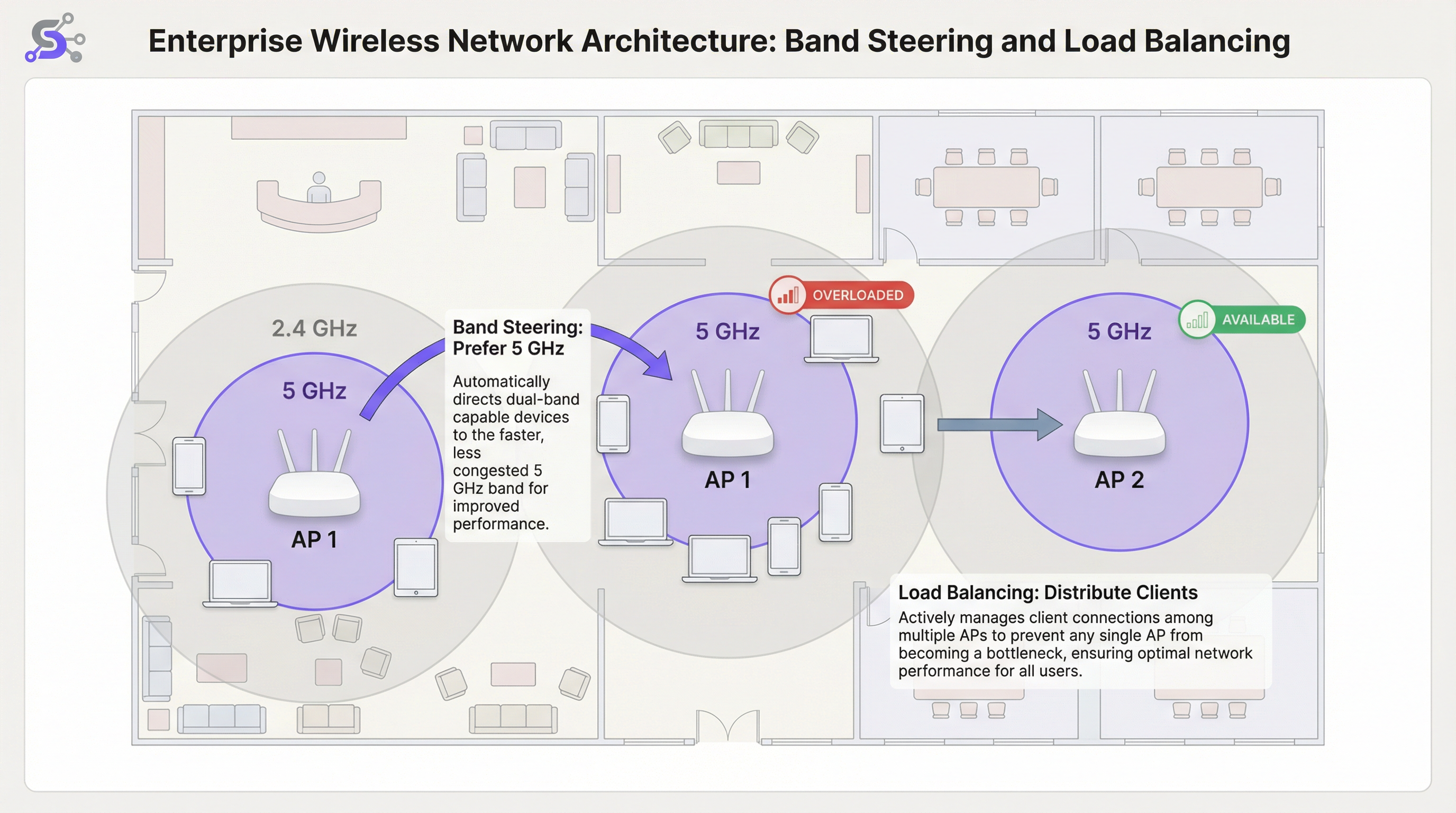
Band Steering ist kein formeller IEEE-Standard, sondern eine proprietäre Technik, die von Enterprise-WiFi-Anbietern implementiert wird. Während die spezifischen Algorithmen je nach Hersteller variieren, besteht der allgemeine Mechanismus darin, dass der Access Point einen Dual-Band-Client aktiv dazu ermutigt oder zwingt, sich mit dem 5-GHz-Funknetz zu verbinden. Dies wird typischerweise durch verschiedene Methoden erreicht, die auf der Ebene der 802.11-Management-Frames arbeiten.
Die erste Methode sind verzögerte Probe-Responses: Wenn ein Dual-Band-Client gleichzeitig auf beiden Bändern einen Probe-Request sendet, kann der AP seine Antwort auf der 2,4-GHz-Frequenz absichtlich um mehrere hundert Millisekunden verzögern. Der Client, der eine schnellere Antwort auf 5 GHz sieht, bevorzugt naturgemäß das überlegene Band und verbindet sich damit. Die zweite Methode ist die Unterdrückung von Probe-Responses: Der AP kann 2,4-GHz-Probe-Requests von Clients ignorieren, die er als 5-GHz-fähig identifiziert hat, wodurch das 2,4-GHz-Netzwerk während der anfänglichen Erkennungsphase für sie effektiv unsichtbar wird. Der dritte und modernste Ansatz ist das IEEE 802.11v BSS Transition Management: Dieser Standard-Frame ermöglicht es dem AP, explizit anzufordern, dass ein Client zu einem anderen BSS (Basic Service Set) wechselt, in diesem Fall zum 5-GHz-Funknetz auf demselben AP. Dies ist eine kooperative Methode, die auf der clientseitigen Unterstützung des 802.11v-Standards beruht und der empfohlene Ansatz für Enterprise-Bereitstellungen ist, da sie die aggressiven Unterdrückungstechniken vermeidet, die bei nicht konformen Clients zu Verbindungsproblemen führen können.
AP Load Balancing
Während Band Steering die Auswahl des Frequenzbandes pro AP optimiert, adressiert WiFi Load Balancing die umfassendere Herausforderung, Clients gleichmäßig über mehrere APs in einem bestimmten Bereich zu verteilen. In einem belebten Flughafenterminal oder einer Hotellobby kommt es häufig vor, dass sich Nutzer in der Nähe eines einzelnen, zentral gelegenen APs versammeln und diesen überlasten, während benachbarte APs nicht ausgelastet sind. Dies führt zu einem erheblichen Leistungsgefälle: Nutzer in der Nähe des überlasteten APs erleben einen verschlechterten Service, während Nutzer in der Nähe von inaktiven APs nicht den vollen Nutzen aus der verfügbaren Infrastruktur ziehen. Load-Balancing-Algorithmen verhindern dies, indem sie Schwellenwerte für die Anzahl der Clients oder die Funkauslastung auf jedem AP festlegen.
Wenn ein AP seinen konfigurierten Lastschwellenwert erreicht, kann er neue Assoziierungsanfragen ablehnen. Dies veranlasst das neue Client-Gerät, erneut zu scannen und einen nahegelegenen, weniger überlasteten AP zu entdecken. Ausgereiftere Systeme nutzen 802.11v, um dem Client proaktiv einen bestimmten alternativen AP vorzuschlagen, wodurch der Übergang für den Endnutzer nahtlos und transparent wird. Die fortschrittlichsten Implementierungen verwenden prädiktive Algorithmen, die Lastanstiege basierend auf historischen Mustern antizipieren und mit der Umverteilung von Clients beginnen, bevor ein Engpass entsteht.
Die Rolle des Wireless LAN Controllers
In Enterprise-Bereitstellungen werden Band Steering und Load Balancing nicht auf der Ebene des einzelnen APs verwaltet, sondern von einem zentralisierten Wireless LAN Controller (WLC) oder einer cloudbasierten Management-Plattform orchestriert. Der WLC behält einen globalen Überblick über alle assoziierten Clients, deren Signalstärken, die aktuelle Last auf jedem AP und die HF-Umgebung am gesamten Standort. Diese zentralisierte Intelligenz macht ein anspruchsvolles Load Balancing erst möglich: Der Controller kann fundierte Entscheidungen darüber treffen, wohin ein neuer Client umgeleitet werden soll, basierend auf Echtzeitdaten aus dem gesamten Netzwerk und nicht nur auf der begrenzten lokalen Sicht eines einzelnen APs.
Cloud-verwaltete Plattformen, wie sie von Cisco Meraki, Aruba Central und Juniper Mist angeboten werden, erweitern dieses Konzept durch die Integration von KI-gesteuertem Radio Resource Management (RRM). Diese Systeme analysieren kontinuierlich HF-Daten, Client-Verhalten und Anwendungsleistung, um Kanalzuweisungen, Sendeleistung und Steering-Schwellenwerte ohne manuelles Eingreifen dynamisch anzupassen. Für Betreiber großer Veranstaltungsorte, die Dutzende oder Hunderte von APs über mehrere Etagen oder Gebäude hinweg verwalten, ist dieses Maß an Automatisierung kein Luxus, sondern eine praktische betriebliche Notwendigkeit.
WiFi 6 und Band Steering in der 6-GHz-Ära
Die Einführung von WiFi 6E (IEEE 802.11ax) und die regulatorische Freigabe des 6-GHz-Frequenzbandes stellen eine bedeutende Weiterentwicklung für die High-Density-WiFi-Architektur dar. Das 6-GHz-Band bietet bis zu 1.200 MHz an zusätzlichem sauberem Spektrum, wobei in Märkten wie den USA und Großbritannien 59 überlappungsfreie 20-MHz-Kanäle zur Verfügung stehen. Für Veranstaltungsorte, die WiFi 6E-fähige APs einsetzen, muss sich die Band-Steering-Strategie zu einem Drei-Band-Modell entwickeln: Steuerung von Legacy-Geräten auf 2,4 GHz, fähigen Geräten auf 5 GHz und den neuesten WiFi 6E-Clients auf das unberührte 6-GHz-Band. Dieser mehrstufige Ansatz maximiert die Nutzung des gesamten verfügbaren Spektrums und stellt sicher, dass die neuesten, leistungsstärksten Geräte von der saubersten möglichen HF-Umgebung profitieren, frei von den Legacy-Interferenzen, die sich in den älteren Bändern ansammeln.
Implementierungsleitfaden
Schritt 1: Site Survey vor der Bereitstellung
Eine prädiktive Site Survey mit professionellen Tools wie Ekahau Site Survey oder iBwave Design ist für jede High-Density-Bereitstellung unverzichtbar. Hierbei geht es nicht nur um die Überprüfung der Abdeckung, sondern um die Kapazitätsplanung. Ihr Ziel ist es, Zonen mit hoher Gerätedichte zu identifizieren, die HF-Ausbreitungseigenschaften des physischen Raums zu modellieren und die AP-Platzierung sowie die Kanalzuweisung so zu planen, dass Co-Kanal-Interferenzen minimiert werden. Die Survey sollte auch die erwartete Client-Dichte während der Spitzennutzungszeiten berücksichtigen, was bei einem Konferenzzentrum eine Keynote-Session sein könnte und bei einem Stadion das 30-minütige Zeitfenster vor dem Anpfiff, wenn Zehntausende von Fans gleichzeitig versuchen, sich zu verbinden.
Schritt 2: Band Steering Konfiguration
In Ihrem Wireless LAN Controller (WLC) oder Cloud-Management-Dashboard finden Sie eine Einstellung für Band Steering oder Band Select. Zu den wichtigsten Parametern der Band Steering Konfiguration gehören die folgenden. Modus: Die meisten Enterprise-Anbieter bieten Optionen wie „Prefer 5 GHz“ (5 GHz bevorzugen), „Force 5 GHz“ (5 GHz erzwingen) oder „Balance Bands“ (Bänder ausgleichen). Für High-Density-Veranstaltungsorte ist „Prefer 5 GHz“ der empfohlene Ausgangspunkt. „Force“ kann zu aggressiv sein und Legacy-Clients, die nur 2,4 GHz unterstützen, den Dienst verweigern, was unnötige Support-Tickets generiert. Steering-Schwellenwert (RSSI): Legen Sie eine minimale Signalstärke fest, ab der ein Client auf 5 GHz gesteuert werden soll. Ein typischer Startwert ist -65 dBm. Wenn das 5-GHz-Signal des Clients schwächer als dieser Schwellenwert ist, hat er trotz der Interferenzen möglicherweise ein besseres Erlebnis auf 2,4 GHz, insbesondere in Umgebungen mit dicken Wänden oder massiven Baumaterialien, die die höhere Frequenz dämpfen.
Schritt 3: Load Balancing Konfiguration
Schwellenwert für die Client-Anzahl: Legen Sie eine maximale Anzahl von Clients pro AP-Funknetz fest. Für einen High-Density-Bereich kann dies bei nur 25 bis 30 Clients liegen, um die Servicequalität (QoS) sicherzustellen, selbst wenn die AP-Hardware technisch mehr gleichzeitige Assoziierungen unterstützt. Auslastungsschwellenwert: Ein dynamischerer und empfohlener Ansatz ist das Balancing basierend auf der Funkauslastung, ausgedrückt als Prozentsatz der Zeit, in der das Funkmedium mit Senden oder Empfangen beschäftigt ist. Ein Schwellenwert von 60 bis 70 Prozent ist eine weithin akzeptierte Best Practice, da er ausreichend Spielraum für Burst-Traffic lässt, ohne dass ein einzelner AP zu einem dauerhaften Engpass wird.
Schritt 4: Validieren und Überwachen
Nach der Bereitstellung ist eine kontinuierliche Überwachung unerlässlich. Verwenden Sie Ihren WLC oder Ihre Cloud-Management-Plattform, um das Verhältnis von Clients auf 5 GHz gegenüber 2,4 GHz, die Verteilung der Clients über die APs in jeder Zone und die durchschnittlichen Client-Datenraten im Zeitverlauf zu verfolgen. Erstellen Sie eine Baseline während einer normalen Betriebsperiode und nutzen Sie diese, um Anomalien zu identifizieren. Ein plötzlicher Anstieg der 2,4-GHz-Assoziierungen oder eine ungleichmäßige Client-Verteilung deutet oft auf einen Konfigurationsdrift, eine neue Interferenzquelle oder einen Hardwareausfall an einem der APs hin.
Best Practices
Single-SSID-Strategie: Verwenden Sie eine einzige SSID für die 2,4-GHz- und 5-GHz-Bänder. Dies ist eine unverzichtbare Voraussetzung für effektives Band Steering, da es dem Client und dem Netzwerk ermöglicht, das beste Band transparent im Hintergrund auszuhandeln. Separate SSIDs für jedes Band erfordern eine manuelle Auswahl durch die Nutzer, was den Zweck des automatisierten Steerings zunichtemacht und einen Support-Aufwand verursacht, wenn Nutzer konsequent das falsche Band wählen.
Niedrige Datenraten deaktivieren: Um zu verhindern, dass langsame Clients übermäßig viel Airtime verbrauchen, deaktivieren Sie Legacy-Datenraten unter 12 Mbit/s auf beiden Bändern. Dies verbessert die Gesamtleistung der Zelle durch eine Praxis, die als Airtime Fairness bekannt ist. In sehr dichten Umgebungen wie Stadien oder großen Konferenzsälen ist es ratsam, die Mindestrate auf 24 Mbit/s anzuheben, da dies den Overhead durch Management-Frames erheblich reduziert und sicherstellt, dass die verfügbare Airtime effizient genutzt wird.
Kanalbreite: Bevorzugen Sie in High-Density-Bereichen schmalere 20-MHz-Kanäle für 5 GHz. Während 40-MHz- oder 80-MHz-Kanäle höhere Spitzengeschwindigkeiten für einzelne Clients bieten, reduzieren sie die Gesamtzahl der verfügbaren überlappungsfreien Kanäle, was das Risiko von Co-Kanal-Interferenzen in einer Multi-AP-Umgebung erhöht. Die aggregierte Kapazität des Netzwerks, gemessen als der über alle APs verfügbare Gesamtdurchsatz, ist weitaus wichtiger als die Spitzengeschwindigkeit einer einzelnen Client-Verbindung.
Transmit Power Control (TPC): Betreiben Sie APs nicht mit maximaler Sendeleistung. Dies ist kontraintuitiv, aber eine der wirkungsvollsten Best Practices im High-Density-WiFi-Design. Hohe Leistung erhöht die Co-Kanal-Interferenz, erzeugt große überlappende Zellen, die das Roaming für Clients erschweren, und kann die Gesamtkapazität des Netzwerks tatsächlich verringern. Verwenden Sie automatisierte TPC-Algorithmen oder stellen Sie die Leistung manuell ein, um kleinere, dichtere Zellen zu erstellen, die die Gesamtnetzwerkkapazität erhöhen und das Signal-to-Interference-plus-Noise Ratio (SINR) für alle Clients verbessern.
Fehlerbehebung & Risikominderung
Sticky Clients: Das häufigste betriebliche Problem im Enterprise-WiFi ist der „Sticky Client“, der mit einem weit entfernten AP verbunden bleibt, obwohl eine bessere Option verfügbar ist. Dies ist ein Problem der clientseitigen Roaming-Logik, das nicht allein durch das Netzwerk vollständig gelöst werden kann. Aggressives Load Balancing und optimierte AP-Leistungseinstellungen können helfen, dies abzumildern, indem sie die Abdeckungsüberlappung reduzieren und Clients dazu ermutigen, häufiger zu roamen. Die Aktivierung von 802.11k (Neighbour Reports) und 802.11r (Fast BSS Transition) neben 802.11v schafft das Roaming-Trifecta, das Clients sowohl die Informationen als auch den Anreiz gibt, bessere Roaming-Entscheidungen zu treffen.
Inkompatible Clients: Einige ältere oder kostengünstigere Client-Geräte implementieren die Band-Steering-Reaktionsmechanismen nicht korrekt. Überwachen Sie Ihr Netzwerk auf Clients, die wiederholt bei der Assoziierung fehlschlagen oder Deauthentifizierungsereignisse generieren, und erwägen Sie die Erstellung einer dedizierten SSID für Legacy-Geräte, falls diese geschäftskritisch sind. Dies isoliert ihre Auswirkungen auf das primäre Hochleistungsnetzwerk und verhindert, dass ihr schlechtes Roaming-Verhalten das Erlebnis für andere Nutzer beeinträchtigt.
Zu aggressive Konfiguration: Eine „Force 5 GHz“-Richtlinie in Kombination mit einem sehr strengen Load-Balancing-Schwellenwert kann dazu führen, dass sich Clients überhaupt nicht verbinden können, insbesondere in Umgebungen, in denen das 5-GHz-Signal durch Baumaterialien gedämpft wird. Testen Sie Konfigurationsänderungen immer in einer kontrollierten Umgebung oder außerhalb der Spitzenzeiten und überwachen Sie die Assoziierungsfehlerraten sowie die von Clients gemeldeten Verbindungsprobleme nach jeder Änderung genau.
ROI & Geschäftliche Auswirkungen
Die Investition in ein richtig konzipiertes High-Density-WiFi-Netzwerk bringt bei allen Arten von Veranstaltungsorten signifikante und messbare Erträge. Für ein Hotel wird zuverlässiges Hochleistungs-WiFi durchweg als einer der wichtigsten Faktoren für die Gästezufriedenheit und in Online-Bewertungen genannt, was sich direkt auf die Buchungsraten und den Umsatz pro verfügbarem Zimmer auswirkt. Für eine Einzelhandelskette ermöglicht es den zuverlässigen Betrieb von POS-Systemen, Bestandsmanagement-Scannern und Gast-WiFi-Analyseplattformen wie Purple, die auf eine konsistente Konnektivität angewiesen sind, um Verweildauer, Laufwege und Kundenverhaltensdaten zu erfassen, die als Grundlage für Merchandising- und Personalentscheidungen dienen.
In einem Konferenz- und Veranstaltungsort ist die Netzwerkqualität ein primärer Faktor bei der Gewinnung und Bindung großer Firmenveranstaltungen. Ein einziger aufsehenerregender Verbindungsausfall während einer Keynote-Präsentation kann zum Verlust zukünftiger Buchungen führen, deren Wert deutlich über den Kosten für das Netzwerk-Upgrade liegt, das ihn verhindert hätte. Zu den Key Performance Indicators zur Erfolgsmessung gehören: eine Reduzierung der von Nutzern gemeldeten Trouble-Tickets; eine Erhöhung der durchschnittlichen Client-Datenraten; ein höheres Verhältnis von Clients auf 5 GHz gegenüber 2,4 GHz, mit einem Ziel von 70 bis 80 Prozent der Dual-Band-fähigen Clients auf 5 GHz; und eine gleichmäßige Verteilung der Clients über die APs in einer bestimmten Zone, wobei kein einzelner AP dauerhaft mehr als 20 Prozent über der durchschnittlichen Last trägt. Durch die Konzentration auf diese technischen Optimierungen können Unternehmen ihr WiFi von einem reinen Gebrauchsgut in einen strategischen Vermögenswert verwandeln, der das Kundenerlebnis verbessert, datengesteuerte Abläufe ermöglicht und messbare Geschäftsergebnisse vorantreibt.
Key Terms & Definitions
Band Steering
A technique used by WiFi access points to encourage dual-band client devices to connect to the less congested 5 GHz frequency band instead of the 2.4 GHz band, typically by manipulating probe responses or using IEEE 802.11v BSS Transition Management frames.
IT teams implement band steering WiFi configurations to improve overall network performance in areas with many connected devices. It is a foundational feature of any high-density WiFi deployment and is configured at the wireless LAN controller or cloud management layer.
WiFi Load Balancing
A process that distributes client connections evenly across multiple access points in a network to prevent any single AP from becoming overloaded, typically enforced by setting client count or radio utilisation thresholds on the wireless LAN controller.
In a busy area like a conference hall or retail floor, network architects use load balancing to ensure a stable experience for all users. It works in conjunction with band steering: steering handles the frequency band, while load balancing handles the AP selection.
RSSI (Received Signal Strength Indicator)
A measurement of the power level that a client device is receiving from an access point, expressed in decibels-milliwatts (dBm) as a negative value. A value closer to zero (e.g., -40 dBm) indicates a stronger signal than a value further from zero (e.g., -80 dBm).
A network engineer uses RSSI values to determine connection quality and to set thresholds for roaming and band steering decisions. A typical steering threshold is -65 dBm, meaning a client will only be pushed to 5 GHz if its signal on that band is at least this strong.
Co-Channel Interference (CCI)
Performance degradation that occurs when two or more access points in close proximity are operating on the same wireless channel, causing their transmissions to collide and forcing devices to wait before transmitting, which reduces overall throughput.
Proper channel planning is the primary mitigation for CCI. This is a major reason why the 5 GHz band, with its many non-overlapping channels, is preferred for high-density deployments. Poor channel planning is one of the most common causes of underperforming WiFi networks.
Airtime Fairness
A feature that allocates wireless airtime equitably across all connected clients, preventing a slow or distant device from consuming a disproportionate share of the available transmission time and degrading performance for all other users on that AP.
Venue operators enable airtime fairness to guarantee a more consistent level of performance, especially when a mix of old and new devices are connecting to the same network. It is often implemented alongside the disabling of low data rates.
IEEE 802.11v (BSS Transition Management)
An IEEE standard that allows a wireless network to send a request to a client device to transition to a different access point or frequency band, providing a cooperative and more seamless handoff than forceful deauthentication.
Modern enterprise networks leverage 802.11v to make band steering and load balancing more efficient. It is part of the 802.11k/v/r trifecta that underpins intelligent client roaming in enterprise WiFi deployments.
Single SSID
The practice of broadcasting the same network name (SSID) for both the 2.4 GHz and 5 GHz bands on a dual-band access point, presenting one unified network identity to users while the infrastructure manages band selection in the background.
Using a single SSID is a non-negotiable prerequisite for effective band steering. If separate SSIDs exist for each band, the user must manually choose, and the network loses its ability to optimise band allocation automatically.
Sticky Client
A client device that remains associated with a distant access point with a weak signal, even when a closer AP with a stronger signal is available, due to the client's conservative roaming algorithm prioritising connection stability over performance.
IT support teams frequently troubleshoot sticky client issues in enterprise environments. The primary mitigations are optimising AP transmit power to create smaller cells, and enabling 802.11k/v/r to give clients the information and incentive to roam more aggressively.
Microcell Architecture
A high-density WiFi deployment strategy that uses a large number of low-power access points, each covering a small area, rather than a small number of high-power APs covering large areas. This maximises total network capacity by increasing the number of simultaneous, non-interfering transmissions.
Microcell architecture is the standard approach for ultra-high-density venues like stadiums and arenas. It is the WiFi equivalent of the small-cell strategy used in modern cellular networks and is the key to supporting tens of thousands of simultaneous connections.
Case Studies
A 50,000-seat sports stadium is upgrading its WiFi network to support fan engagement apps, mobile ticketing, and cashless payments. The primary challenge is extreme device density during the 3-hour peak of a game. How should they configure band steering and load balancing?
Step 1 - AP Placement: Deploy a high number of low-power APs, with directional antennas focused on specific seating sections (under-seat or handrail mounting). This creates small, manageable microcells, each serving a limited number of seats.
Step 2 - Band Steering: Implement an aggressive Prefer 5 GHz policy. Given the modern smartphones expected at a live event, the vast majority of devices will be dual-band capable. Set a steering RSSI threshold of -67 dBm to strongly encourage 5 GHz connections.
Step 3 - Load Balancing: Configure a strict client count limit of 25 clients per radio. This seems low, but in such a dense RF environment, it is critical to maintain airtime fairness and prevent any single AP from degrading the experience for an entire seating section. Enable 802.11v to assist with steering and load balancing transitions.
Step 4 - Data Rates and Channels: Disable all data rates below 24 Mbps. Use only 20 MHz channel widths on the 5 GHz band to maximise the number of unique channels and minimise interference. Manually plan the channel reuse pattern across the stadium bowl to avoid co-channel interference between adjacent sections.
A historic 200-room hotel with thick masonry walls struggles with WiFi performance. Guests complain about slow speeds and dropped connections. They have modern dual-band APs, but performance is still poor. What is the likely issue and solution?
Step 1 - Problem Analysis: The thick walls cause significant attenuation of the 5 GHz signal. An aggressive band steering policy might be forcing clients onto a weak 5 GHz connection when the more resilient 2.4 GHz signal would actually provide a better experience. This is a classic case where the physical environment overrides standard best practices.
Step 2 - Site Survey: Conduct a physical walkthrough survey to measure signal strength for both bands in representative guest rooms. Pay close attention to the RSSI difference between the 5 GHz and 2.4 GHz signals from the same AP. If 5 GHz is consistently below -70 dBm in rooms, the steering policy needs adjustment.
Step 3 - Configuration Adjustment: Relax the band steering policy. Instead of Prefer 5 GHz, use a Balance Bands setting. Adjust the steering RSSI threshold to be more conservative, for example -60 dBm. This means a client will only be steered to 5 GHz if the signal is genuinely strong enough to deliver a good experience.
Step 4 - AP Power: Ensure Transmit Power Control is enabled and correctly calibrated. The APs in the corridors should be running at a power level that provides adequate coverage inside the rooms without being excessively high and causing interference with adjacent rooms on the same channel.
Scenario Analysis
Q1. You are deploying WiFi in a new multi-floor conference centre. The main keynote hall on the ground floor holds 2,000 attendees, while the upper floors have 20 smaller breakout rooms of 50 people each. How would your channel plan and band steering configuration differ between the two areas?
💡 Hint:Consider the density of APs, the potential for co-channel interference, and the physical separation between areas in each zone.
Show Recommended Approach
In the large, open keynote hall, I would deploy a high number of APs using a meticulous manual channel plan with only 20 MHz channel widths. The goal is to maximise the number of non-overlapping channels (e.g., 36, 40, 44, 48, 149, 153, 157, 161) and create a non-repeating reuse pattern to avoid CCI. Band steering would be set to Prefer 5 GHz with an aggressive RSSI threshold of -65 dBm, and load balancing would be set to a strict 25 clients per radio. On the upper floors, the walls between breakout rooms provide natural RF separation, reducing CCI risk. Here, I could use an automated RRM system and potentially allow 40 MHz channels in some rooms if density is lower. Band steering configuration would remain the same, but load balancing thresholds could be slightly more relaxed, perhaps 35 clients per radio, given the lower absolute density per room.
Q2. A retail chain uses your WiFi network for both guest access and wireless payment terminals (which must be PCI DSS compliant). The payment terminals are 2.4 GHz only. How would you configure the network to ensure the reliability of payments while still offering good performance for guests?
💡 Hint:Consider network segmentation, PCI DSS requirements for network isolation, and how to protect the 2.4 GHz spectrum for critical devices.
Show Recommended Approach
The correct approach is network segmentation with dual SSIDs. First, I would create a hidden SSID with WPA3-Enterprise security using 802.1X authentication, operating exclusively on the 2.4 GHz band and mapped to a dedicated VLAN that is PCI DSS scoped. This isolates payment terminal traffic from all other network traffic, satisfying PCI DSS segmentation requirements. Second, I would create a guest SSID broadcast on both bands with an aggressive Prefer 5 GHz band steering policy. This actively moves guest devices off the 2.4 GHz band, leaving that spectrum as clean as possible for the critical payment terminals. Load balancing would be active on the guest network. The payment terminal SSID would not use load balancing, ensuring terminals always connect to their nearest AP without being redirected.
Q3. A user reports that their laptop keeps disconnecting from the WiFi in the office. You check the controller logs and see the device has a good signal strength (-55 dBm) but is repeatedly being deauthenticated by the AP. What is the most likely cause related to band steering, and what is the remediation?
💡 Hint:Consider what happens when a band steering policy is too aggressive for a specific client device that does not correctly implement 802.11v.
Show Recommended Approach
This is a classic symptom of a client that is not correctly handling the band steering mechanism. The AP is likely sending an 802.11v BSS Transition Management request to move the client to the 5 GHz band. The client, either due to a driver bug or a non-compliant 802.11v implementation, is not responding correctly. The AP, after a timeout, may be sending a deauthentication frame to forcibly disconnect the client, expecting it to re-associate on the 5 GHz band. The remediation has two steps: first, update the client's wireless adapter driver to the latest version. Second, if the problem persists, create a client-specific policy on the WLC to disable band steering for that device's MAC address, or use a vendor feature to add it to a band steering exclusion list. If the problem is widespread across a device model, consider relaxing the overall steering policy from Prefer to Balance for that network zone.
Key Takeaways
- ✓High-density WiFi requires a fundamental shift in mindset from coverage to capacity: the goal is to maximise available airtime, not just signal strength.
- ✓Band steering intelligently pushes dual-band clients to the cleaner, faster 5 GHz band, reducing congestion on the overloaded 2.4 GHz spectrum.
- ✓Load balancing prevents any single Access Point from becoming a performance bottleneck by distributing clients evenly across available infrastructure.
- ✓A single SSID for both bands is a non-negotiable prerequisite for effective band steering: never separate them into distinct network names.
- ✓Disable low data rates (below 12 Mbps) and use narrow 20 MHz channels in dense environments to maximise airtime efficiency and channel reuse.
- ✓Run APs at optimised, not maximum, transmit power to reduce co-channel interference and create smaller, more efficient microcells.
- ✓Measure success by tracking the ratio of 5 GHz clients (target: 70-80%), evenness of client distribution across APs, and reduction in user-reported connectivity issues.




