

Entwickeln Sie Ihre eigene Captive Portal-App: Ein Leitfaden für Entwickler (mit Code-Beispielen)
This technical guide provides developers and IT leaders with a comprehensive framework for building custom captive portal applications. It covers architectural design, platform selection (iOS, Android, Web), security best practices (802.1X, GDPR), and API integration strategies to transform guest WiFi into a powerful tool for customer engagement and data analytics.
🎧 Listen to this Guide
View Transcript
Executive Summary
Dieser Leitfaden bietet IT-Managern, Netzwerkarchitekten und Entwicklern eine umfassende technische Referenz für die Entwicklung maßgeschneiderter Captive Portal-Anwendungen. Er adressiert den kritischen Bedarf von Standorten, den Netzwerkzugriff zu kontrollieren und gleichzeitig wertvolle Möglichkeiten für die Gästebindung und Datenanalyse zu schaffen. Wir befassen uns mit den Architektur-Entscheidungen, der Plattformwahl (iOS, Android, Web) und den Sicherheitsprotokollen, die für eine erfolgreiche Bereitstellung unerlässlich sind. Für den CTO bietet dieser Leitfaden einen strategischen Überblick über den ROI, Compliance-Risiken und die geschäftlichen Auswirkungen einer gut umgesetzten Captive Portal-Strategie. Dabei geht es weit über ein einfaches Konnektivitäts-Gateway hinaus und wird zu einem leistungsstarken Tool zur Verbesserung des Kundenerlebnisses und zur Umsatzsteigerung.
Technischer Deep-Dive
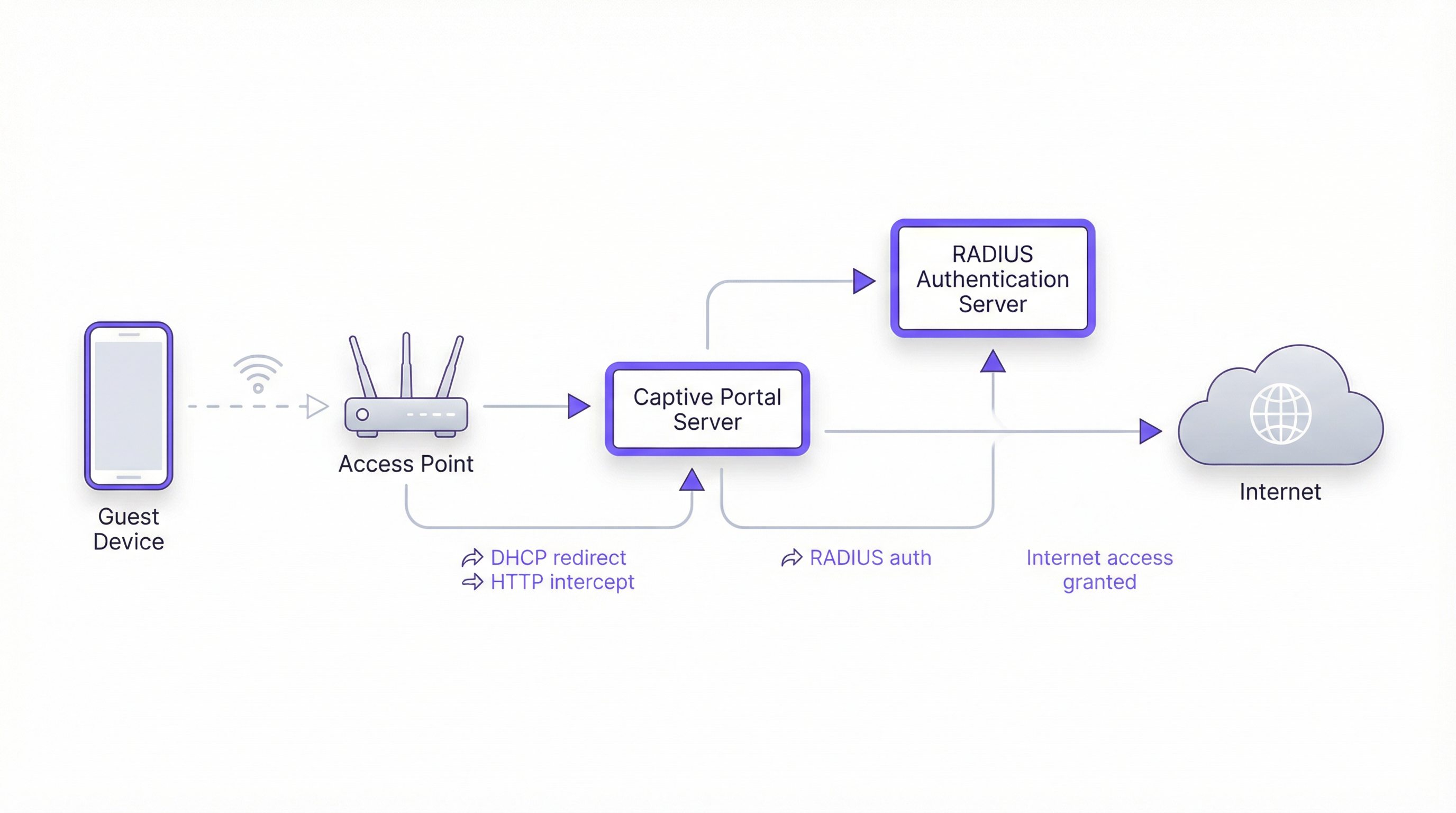
Die Entwicklung eines Captive Portal erfordert ein komplexes Zusammenspiel von Netzwerkprotokollen, Webtechnologien und Backend-Authentifizierungssystemen. Das grundlegende Ziel besteht darin, den Web-Traffic eines Nutzers abzufangen und ihn zur Authentifizierung auf ein dediziertes Portal umzuleiten, bevor ein umfassenderer Netzwerkzugriff gewährt wird. Dieser Prozess hängt von einigen Kernkomponenten ab.
Kernarchitektur
- Access Point (AP): Die drahtlose Hardware, die das WiFi-Signal sendet. Moderne Enterprise-APs verfügen über integrierte Funktionen zur Unterstützung von Captive Portals.
- DHCP-Server: Weist dem verbundenen Gerät eine IP-Adresse zu. In einem Captive Portal-Setup kann der DHCP-Server auch die URL zum Captive Portal-API-Endpunkt bereitstellen (über DHCP-Option 114). Diese in RFC7710bis standardisierte Methode verbessert die Zuverlässigkeit der Erkennung auf modernen Clients wie Android 11+.
- DNS-Interception/Redirect: Wenn das Gerät des Nutzers versucht, einen Domainnamen (z. B.
google.com) aufzulösen, gibt der DNS-Server des Netzwerks zunächst die IP-Adresse des Captive Portal-Servers zurück. Dies ist der klassische „Walled Garden“-Ansatz. - Captive Portal-Server: Ein Webserver, der die Login-/Splash-Page hostet. Dies ist die Anwendung, mit der der Endnutzer interagiert. Sie ist für die Anzeige des Anmeldeformulars, die Validierung der Anmeldedaten und die Kommunikation mit dem Authentifizierungs-Backend verantwortlich.
- Authentifizierungsserver (RADIUS): Der Remote Authentication Dial-In User Service (RADIUS) ist das branchenübliche Backend für die Netzwerkauthentifizierung. Wenn ein Nutzer seine Anmeldedaten im Portal eingibt, leitet der Portal-Server diese an den RADIUS-Server weiter, der sie mit einer Datenbank autorisierter Nutzer abgleicht. Er ist von zentraler Bedeutung für die Durchsetzung von Richtlinien basierend auf IEEE 802.1X-Standards.
Plattform- & Framework-Auswahl
Entwicklern stehen drei Hauptwege zur Verfügung, um die nutzerorientierte Captive Portal-Anwendung zu erstellen. Die Wahl hat erhebliche Auswirkungen auf die Bereitstellung, das Nutzererlebnis und den Wartungsaufwand.
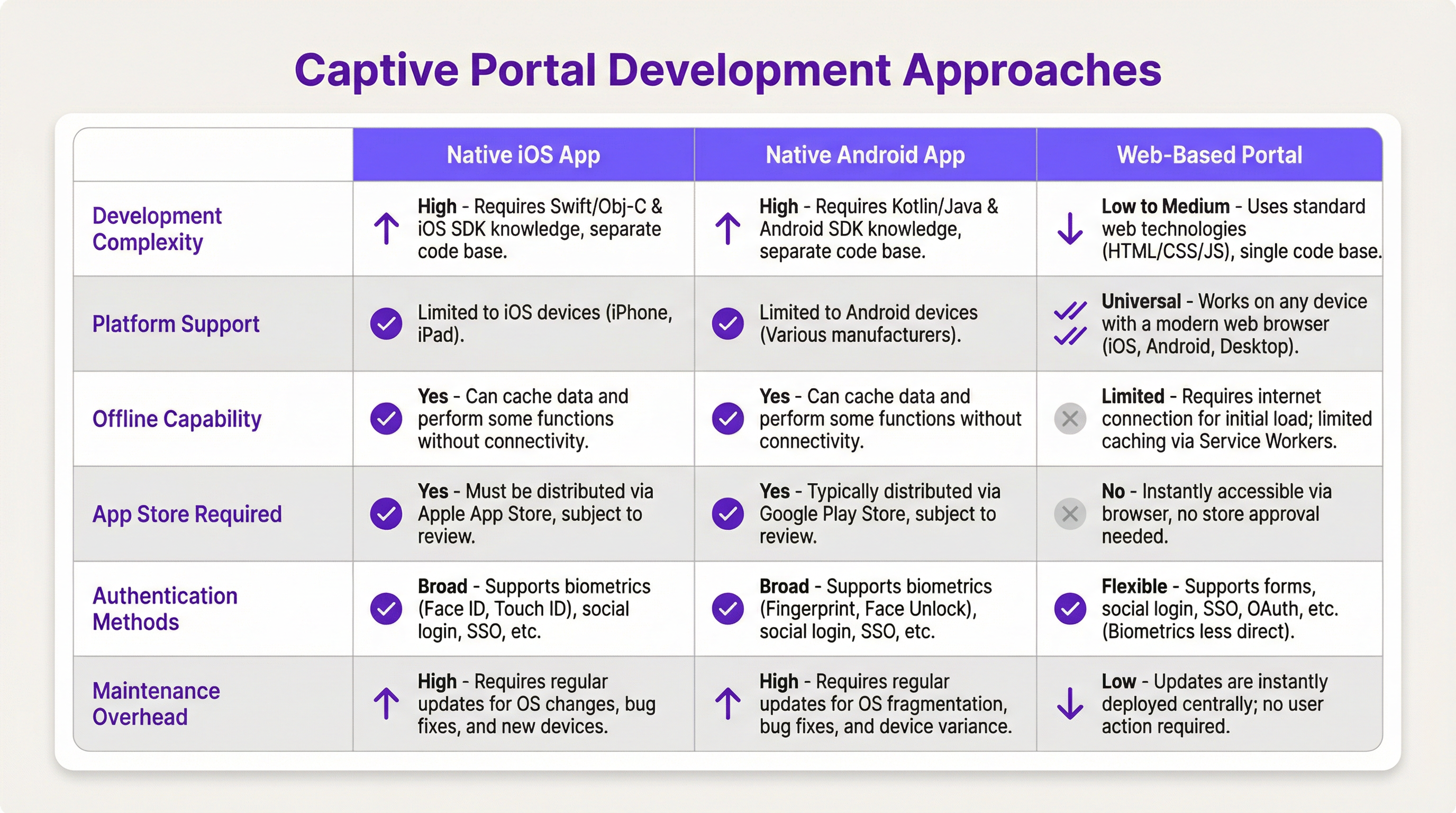
- Native iOS/Android-App: Bietet das beste Nutzererlebnis, einschließlich nahtloser Integration mit Gerätefunktionen wie Biometrie (Face ID, Fingerabdruck) und Offline-Funktionen. Dieser Weg erfordert jedoch separate Codebasen (Swift/Objective-C für iOS, Kotlin/Java für Android), App Store-Überprüfungsprozesse und zwingt die Nutzer zum Herunterladen einer Anwendung, was eine erhebliche Einstiegshürde darstellen kann.
- Webbasiertes Portal: Der gängigste und flexibelste Ansatz. Dem Browser des Nutzers wird eine responsive Webanwendung (HTML, CSS, JavaScript) bereitgestellt. Sie ist plattformunabhängig, erfordert keine Installation und Updates werden sofort bereitgestellt. Moderne Webtechnologien wie Service Worker können eine gewisse Offline-Funktionalität bieten, diese ist jedoch im Allgemeinen eingeschränkter als bei nativen Apps.
Implementierungsleitfaden
Dieser Abschnitt bietet eine allgemeine, herstellerneutrale Anleitung für die Bereitstellung eines webbasierten Captive Portal.
Schritt 1: Netzwerk- & Hardware-Setup
- Auswahl von Enterprise-APs: Wählen Sie Access Points von Anbietern wie Cisco Meraki, Ruckus oder Aruba, die externe Captive Portals und RADIUS-Authentifizierung explizit unterstützen.
- VLANs konfigurieren: Isolieren Sie den Gast-Traffic von Ihrem internen Unternehmensnetzwerk mithilfe eines dedizierten VLANs. Dies ist eine kritische Sicherheitsmaßnahme.
- DHCP & DNS einrichten: Konfigurieren Sie Ihren DHCP-Server so, dass er IPs im Gast-VLAN zuweist, und Ihren DNS-Server so, dass er die anfängliche Umleitung zu Ihrem Portal-Server durchführt.
Schritt 2: Entwicklung der Web-Portal-Anwendung
- Frontend: Verwenden Sie ein modernes JavaScript-Framework wie React, Vue oder Svelte für ein dynamisches Nutzererlebnis. Stellen Sie sicher, dass das Design responsiv ist und dem Mobile-First-Ansatz folgt.
- Backend: Ein leichtgewichtiges Backend (z. B. Node.js mit Express, Python mit Flask) wird benötigt, um das Frontend bereitzustellen und die Kommunikation mit dem RADIUS-Server abzuwickeln.
- Authentifizierungslogik: Der Kern-Workflow sieht wie folgt aus:
- Nutzer verbindet sich mit dem WiFi.
- Gerät wird zur Portal-URL umgeleitet.
- Nutzer gibt Anmeldedaten ein (z. B. Zimmernummer und Nachname, E-Mail, Social Login).
- Portal-Backend sendet einen
Access-Requestmit den Anmeldedaten des Nutzers an den RADIUS-Server. - RADIUS-Server validiert die Anmeldedaten und gibt bei Erfolg eine
Access-Accept-Nachricht zurück. - Das Portal-Backend signalisiert dem Netzwerk-Controller/Gateway, den Zugriff für die MAC-Adresse des Nutzergeräts freizugeben.
Schritt 3: API-Integrationen
- Property Management System (PMS): Für Hotels ermöglicht die Integration mit dem PMS (z. B. Oracle Opera) die Authentifizierung anhand von Gastreservierungen (Zimmernummer + Nachname).
- CRM: Die Synchronisierung gesammelter Daten (z. B. E-Mail-Adressen) mit einem CRM wie Salesforce ermöglicht eine leistungsstarke Marketing-Automatisierung.
- Social Login: Verwenden Sie OAuth2, damit sich Nutzer mit ihren Social-Media-Konten (Facebook, Google, LinkedIn) anmelden können. Dies liefert umfangreichere demografische Daten, erfordert jedoch einen sorgfältigen Umgang mit Datenschutz und Einwilligung gemäß GDPR.
Best Practices
- Security First: Verwenden Sie für Ihr Captive Portal immer HTTPS, um die Anmeldedaten der Nutzer bei der Übertragung zu verschlüsseln. Implementieren Sie Rate Limiting, um Brute-Force-Angriffe zu verhindern. Halten Sie PCI DSS ein, wenn Sie Zahlungen verarbeiten.
- Compliance: Seien Sie transparent bei der Datenerfassung. Die Splash-Page Ihres Portals muss einen klaren Link zu Ihrer Datenschutzerklärung enthalten und die ausdrückliche Einwilligung einholen, wie es die GDPR und andere Datenschutzbestimmungen vorschreiben.
- Nutzererlebnis: Gestalten Sie den Anmeldeprozess so reibungslos wie möglich. Implementieren Sie für Standorte mit mehreren Niederlassungen nahtloses Roaming, bei dem ein an einem Standort authentifizierter Nutzer automatisch an einem anderen verbunden wird.
- Bandbreitenmanagement: Implementieren Sie Quality of Service (QoS)-Richtlinien, um eine faire Bandbreitenzuweisung zu gewährleisten und zu verhindern, dass einige wenige Nutzer das Erlebnis für alle beeinträchtigen.
Fehlerbehebung & Risikominderung
- Probleme bei der Geräteerkennung: Nicht alle Geräte funktionieren reibungslos mit Captive Portals. Der Trend zu randomisierten MAC-Adressen in iOS und Android kann das Geräte-Tracking erschweren. Die Captive Portal API (RFC7710bis) ist die zuverlässigste Erkennungsmethode.
- Anmeldefehler: Implementieren Sie ein robustes Logging auf Ihrem Portal und RADIUS-Server, um Authentifizierungsprobleme zu diagnostizieren. Häufige Probleme sind falsche Anmeldedaten, abgelaufene Konten oder Netzwerkverbindungsprobleme zwischen dem Portal und dem RADIUS-Server.
- Sicherheitsrisiken: Ein unzureichend gesichertes Captive Portal kann ein Einfallstor für Man-in-the-Middle-Angriffe sein. Stellen Sie sicher, dass die gesamte Kommunikation verschlüsselt ist und dass Ihr Portal-Server gegen gängige Web-Schwachstellen gehärtet ist.
ROI & Geschäftliche Auswirkungen
Ein Captive Portal ist nicht nur ein IT-Kostenfaktor, sondern ein strategischer Vermögenswert. Der ROI misst sich durch:
- Gesteigerte Kundenbindung: Nutzen Sie das Portal, um Vor-Ort-Services zu bewerben, Veranstaltungspläne anzuzeigen oder exklusive Rabatte anzubieten.
- Erweiterte Datenanalyse: Durch die Analyse von Anmeldedaten können Standorte Laufwege, Verweildauern und Kundendemografien nachvollziehen, was zu besseren operativen Entscheidungen führt.
- Neue Einnahmequellen: Für Konferenzzentren oder Flughäfen kann ein gestufter Zugang (z. B. kostenloses Basis-WiFi, kostenpflichtiges Premium-WiFi) direkte Einnahmen generieren. Das Portal kann auch für Werbung von Drittanbietern genutzt werden.
- Verbesserte Markenwahrnehmung: Ein nahtloses, zuverlässiges WiFi-Erlebnis ist heute eine Grundvoraussetzung. Ein professionelles Captive Portal stärkt die Wahrnehmung Ihrer Marke als modern und kundenorientiert.
Key Terms & Definitions
Captive Portal
A web page that the user of a public-access network is obliged to view and interact with before access is granted. It intercepts traffic until the user completes a required action, such as authentication or accepting terms of service.
This is the core component IT teams build to manage guest WiFi. It's the gateway that controls access and provides a branding and data collection opportunity.
RADIUS (Remote Authentication Dial-In User Service)
A client/server protocol (IETF standard) that provides centralized Authentication, Authorization, and Accounting (AAA) management for users who connect and use a network service.
For developers, this is the definitive backend protocol for network authentication. Your captive portal app will act as a RADIUS client to validate users against a central directory.
IEEE 802.1X
An IEEE standard for port-based Network Access Control (PNAC). It provides an authentication mechanism to devices wishing to attach to a LAN or WLAN.
This is the enterprise-grade security standard that underpins secure WiFi. While a captive portal is a web-layer solution, 802.1X provides a deeper, more secure authentication framework that can work in conjunction with it.
VLAN (Virtual Local Area Network)
A logical grouping of devices in the same broadcast domain. A VLAN partitions a single physical network into multiple, isolated logical networks.
This is a critical security tool for network architects. Guest WiFi traffic must always be segregated onto its own VLAN to prevent any possibility of access to the internal corporate network.
DHCP (Dynamic Host Configuration Protocol)
A network management protocol used on IP networks for automatically assigning IP addresses and other communication parameters to devices.
In a captive portal context, DHCP is not just for IP assignment. Using DHCP Option 114, it can also inform client devices of the captive portal API location, improving detection reliability.
GDPR (General Data Protection Regulation)
A regulation in EU law on data protection and privacy for all individuals within the European Union and the European Economic Area. It also addresses the transfer of personal data outside the EU and EEA areas.
If your venue serves European citizens (regardless of where the venue is located), your captive portal's data collection and handling practices must be GDPR compliant. This has major implications for consent and data transparency.
PCI DSS (Payment Card Industry Data Security Standard)
An information security standard for organizations that handle branded credit cards from the major card schemes.
If your captive portal involves any form of payment (e.g., for premium access), the entire application and infrastructure falls within the scope of PCI DSS, requiring stringent security controls and regular audits.
OAuth 2.0
An open standard for access delegation, commonly used as a way for Internet users to grant websites or applications access to their information on other websites but without giving them the passwords.
This is the framework developers use to implement 'Login with Google/Facebook' functionality. It provides a secure way to authenticate users and retrieve profile data without handling their actual social media passwords.
Case Studies
A 500-room luxury hotel wants to replace its generic WiFi login with a branded captive portal. The goal is to authenticate guests using their room number and last name, offer tiered bandwidth options (free standard, paid premium), and promote spa services. The existing network uses Cisco Meraki hardware.
- Architecture: Deploy a web-based captive portal hosted on a cloud server (AWS/Azure). 2. Network Configuration: Configure the Meraki dashboard to use an external captive portal, pointing to the URL of your new web app. Create two SSIDs on a guest VLAN: 'HotelGuest_Free' and 'HotelGuest_Premium'. 3. Application Development: Build a responsive web app. The landing page will have fields for 'Room Number' and 'Last Name'. 4. API Integration: Use the hotel's PMS API (e.g., Oracle Hospitality) to validate the guest credentials in real-time. On successful validation, the app makes a RADIUS request. 5. RADIUS Configuration: Set up a RADIUS server (e.g., FreeRADIUS) with policies. If the user is on the 'Premium' SSID, the RADIUS server returns attributes to the Meraki controller to unlock higher bandwidth for that user's MAC address. 6. Post-Login Experience: After authentication, redirect the user to a page featuring a prominent advertisement for the hotel spa with a 'Book Now' button.
A national retail chain with 200 stores wants to offer free guest WiFi to gather customer email addresses for its loyalty program. The solution must be centrally managed, GDPR compliant, and provide basic analytics on visitor counts and dwell times.
- Architecture: A centralized, cloud-hosted, multi-tenant web portal is the only viable option for this scale. 2. Authentication: The portal will feature a simple form asking for an email address. A checkbox for 'I agree to the terms and consent to receive marketing communications' is mandatory and must not be pre-checked. 3. Backend: The portal backend validates the email format and sends it via API to the central CRM/loyalty database. It then sends a RADIUS Access-Request. 4. RADIUS & Analytics: The RADIUS server logs the authentication event (with a timestamp and the store ID, passed as a RADIUS attribute from the local AP). This data is used for analytics. The RADIUS accounting records (Start and Stop messages) provide the data needed to calculate session duration (dwell time). 5. Deployment: The same portal URL is configured across all 200 stores. The local network at each store is configured to pass a unique 'NAS-Identifier' attribute to the RADIUS server so that analytics can be segmented by location.
Scenario Analysis
Q1. A stadium with a capacity of 50,000 needs to provide guest WiFi. The primary goal is to manage congestion and ensure fair bandwidth usage. A secondary goal is to display advertisements for upcoming events. What is the most critical technical feature to implement?
💡 Hint:Think about network performance at scale, not just authentication.
Show Recommended Approach
The most critical feature is Quality of Service (QoS) and bandwidth throttling. With 50,000 potential users, the network would be unusable without strict policies to limit each user's bandwidth and prevent a small number of users from consuming all available throughput. While authentication and advertising are important, ensuring the core service is stable is the top priority.
Q2. A hospital wants to provide WiFi for patients and visitors. They need to comply with HIPAA regulations regarding data privacy. They also want to allow users to access the hospital's patient portal. How should they design their captive portal authentication?
💡 Hint:Consider the sensitivity of healthcare data and the need for secure, but simple, access.
Show Recommended Approach
The solution requires a two-tiered approach. 1. A simple, click-through captive portal for general internet access that collects no personal data, thus minimizing HIPAA scope. This portal should clearly state the terms of use. 2. For access to the patient portal, the user should be redirected to the portal's separate, secure login page, which uses multi-factor authentication. The captive portal itself should not handle patient portal credentials. The guest network must be strictly isolated from the hospital's internal clinical network via VLANs and firewalls.
Q3. You are deploying a captive portal for a coffee shop chain. The marketing team wants to allow login via Facebook to gather customer demographic data. What are the key technical and compliance steps you must take?
💡 Hint:Focus on the intersection of OAuth, data collection, and privacy regulations like GDPR.
Show Recommended Approach
- Technical: Implement the OAuth 2.0 protocol to securely connect with Facebook's API. Ensure you only request the minimum necessary data permissions (e.g., public profile and email). 2. Compliance (GDPR): On the login page, before the user clicks 'Login with Facebook', you must display a clear statement explaining what data will be collected and for what purpose. You must include a link to your privacy policy. The user must actively consent (e.g., by clicking the login button after reading the notice); you cannot assume consent. 3. Backend: Your backend must securely store the access tokens and handle the collected data in accordance with your privacy policy.
Key Takeaways
- ✓A captive portal is a strategic asset for controlling network access and driving guest engagement.
- ✓The industry-standard architecture uses a web-based portal with a RADIUS server for authentication.
- ✓Always segregate guest traffic onto a dedicated VLAN and enforce HTTPS for security.
- ✓Compliance with GDPR and other privacy laws requires explicit, informed user consent before data collection.
- ✓Leverage API integrations with PMS and CRM systems to automate authentication and marketing.
- ✓Focus on a frictionless user experience to enhance brand perception and guest satisfaction.
- ✓Measure ROI through increased engagement, data analytics, and new revenue opportunities.




