

Campus Area Networks (CANs): Ein umfassender Leitfaden für Design, Implementierung und Management
This comprehensive technical reference guide covers the full lifecycle of Campus Area Networks (CANs) — from architectural design and technology selection to implementation, security hardening, and ongoing management. It is written for IT managers, network architects, and CTOs at hotels, retail chains, stadiums, and corporate campuses who need to build or modernise a high-performance, resilient connectivity backbone. By combining vendor-neutral best practices, real-world case studies, and actionable frameworks, this guide equips senior technical professionals to make informed decisions that deliver measurable ROI and support long-term strategic objectives.
🎧 Listen to this Guide
View Transcript

Executive Summary
Ein Campus Area Network (CAN) ist eine kritische Infrastrukturkomponente für jeden großen Standort, von Unternehmens- und Bildungscampus bis hin zu Hotelresorts, Fachmarktzentren und Stadien. Es bietet das schnelle, zuverlässige und sichere Konnektivitäts-Backbone, das zur Unterstützung moderner digitaler Abläufe, Gästeservices und IoT-Bereitstellungen erforderlich ist. Für IT-Manager, Netzwerkarchitekten und CTOs ist ein gut konzipiertes CAN nicht nur ein Kostenfaktor, sondern ein strategischer Vermögenswert, der die betriebliche Effizienz steigert, das Nutzererlebnis verbessert und neue Umsatzmöglichkeiten erschließt.
Dieser Leitfaden bietet ein praktisches, herstellerneutrales Framework für das Design, die Implementierung und das Management eines hochleistungsfähigen CAN. Er behandelt die essenzielle dreistufige hierarchische Architektur, wichtige Technologieentscheidungen einschließlich Glasfaser und moderner Wi-Fi-Standards sowie Best Practices zur Gewährleistung von Sicherheit, Skalierbarkeit und Redundanz. Durch die Befolgung der hier dargelegten Prinzipien können Unternehmen ein zukunftssicheres Netzwerk aufbauen, das einen messbaren ROI liefert und ihre strategischen Ziele auf Jahre hinaus unterstützt.
Technischer Deep-Dive
Das dreistufige hierarchische Modell
Die am weitesten verbreitete und bewährte Architektur für ein skalierbares und ausfallsicheres Campus Area Network ist das dreistufige hierarchische Modell. Dieses Design segmentiert das Netzwerk in drei verschiedene Schichten: Core-, Distribution- und Access-Layer. Diese Modularität vereinfacht das Design, verbessert die Fehlerisolierung und ermöglicht eine vorhersehbare Skalierbarkeit.
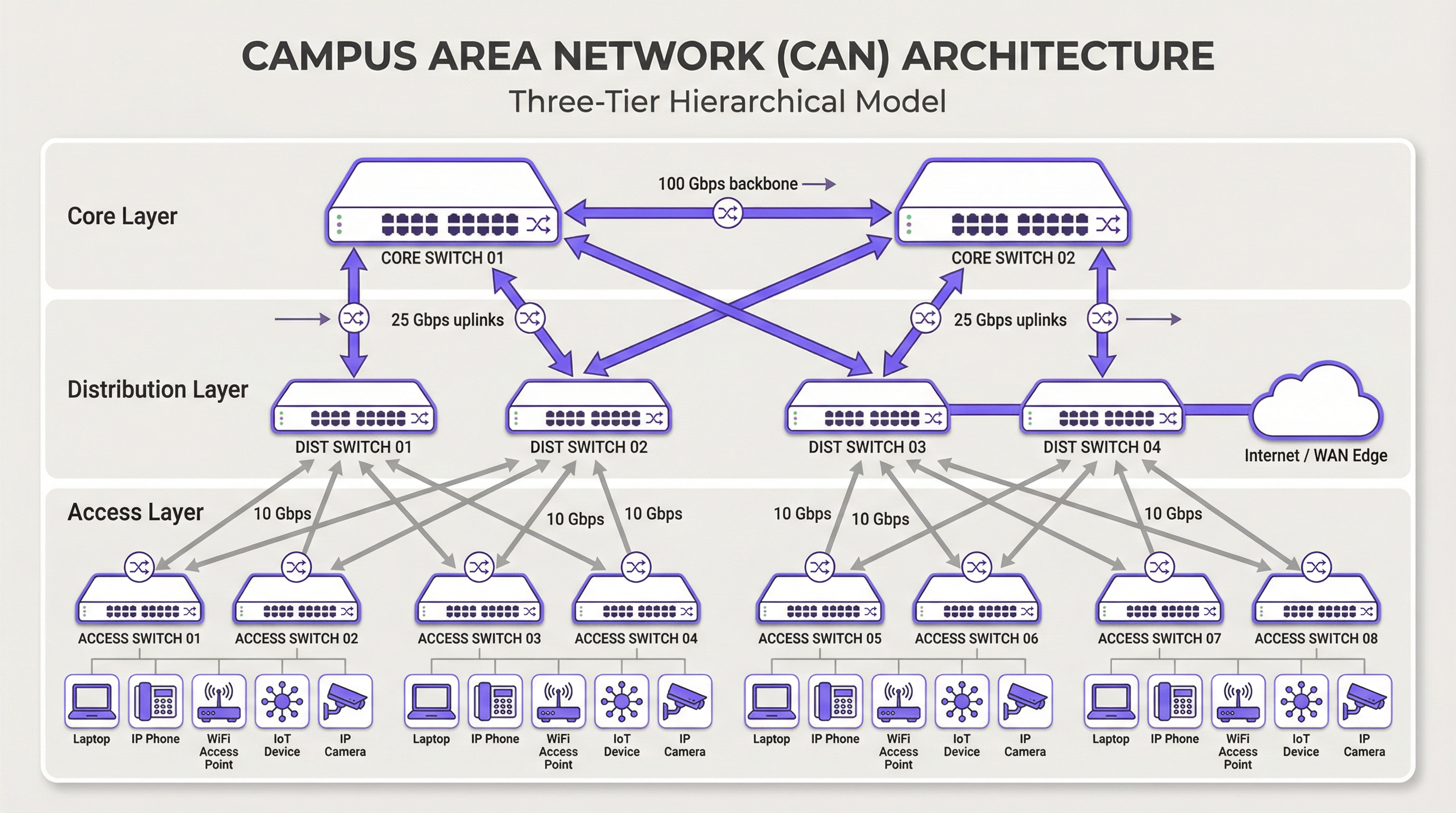
Core-Layer: Der Core ist das High-Speed-Backbone des Netzwerks. Sein einziger Zweck besteht darin, den Datenverkehr so schnell wie möglich zwischen den Geräten des Distribution-Layers zu schalten. Der Core sollte schlank und einfach gehalten werden, wobei komplexe Richtlinienimplementierungen oder Paketmanipulationen vermieden werden. Zu den Hauptmerkmalen gehören hohe Redundanz (typischerweise mit redundanten Switches und Links), hoher Durchsatz (oft 100 Gbit/s oder höher) und schnelle Konvergenz im Fehlerfall. Der Core-Layer stellt sicher, dass der Datenverkehr zwischen verschiedenen Teilen des Campus keinen Engpass bildet.
Distribution-Layer: Diese Schicht fungiert als Kommunikationsknotenpunkt zwischen dem Access- und dem Core-Layer. Sie ist ein kritischer Punkt für die Implementierung von Netzwerkrichtlinien, einschließlich Routing, Access Control Lists (ACLs), Quality of Service (QoS) und Sicherheitsfilterung. Der Distribution-Layer aggregiert den Datenverkehr von mehreren Access-Layer-Switches, bevor er an den Core weitergeleitet wird. Er definiert Broadcast-Domänen und bietet redundante Verbindungen sowohl zum Access- als auch zum Core-Layer, oft unter Verwendung von Technologien wie EtherChannel für Link-Aggregation und Redundanz.
Access-Layer: Hier verbinden sich Endbenutzergeräte mit dem Netzwerk – Workstations, Laptops, IP-Telefone, Drucker, IoT-Geräte und vor allem Wireless Access Points (APs). Der Access-Layer bietet Sicherheit auf Port-Ebene, Power over Ethernet (PoE) für Geräte wie APs und Kameras sowie VLAN-Segmentierung zur Isolierung verschiedener Arten von Datenverkehr (z. B. Unternehmen, Gäste, IoT). Switches auf dieser Schicht müssen eine hohe Portdichte und Unterstützung für moderne Standards wie Multi-Gigabit-Ethernet (IEEE 802.3bz) bieten, um die Bandbreitenanforderungen von Wi-Fi 6/6E und darüber hinaus zu bewältigen.
Kerntechnologien
Glasfaserkabel sind der Standard für die Backbone-Konnektivität innerhalb eines CAN, verbinden Gebäude und verknüpfen die Core- und Distribution-Layer. Ihre hohe Bandbreite, geringe Latenz und Unempfindlichkeit gegenüber elektromagnetischen Störungen machen sie ideal für Hochgeschwindigkeitsverbindungen über die auf einem Campus üblichen Entfernungen. Singlemode-Glasfaser wird typischerweise für längere Strecken zwischen Gebäuden verwendet, während Multimode-Glasfaser für kürzere Verbindungen mit hoher Bandbreite innerhalb des Rechenzentrums eines Gebäudes eingesetzt werden kann.
Wireless LAN (WLAN) ist nicht länger nur ein Overlay, sondern ein integraler Bestandteil des Access-Layers. Moderne CANs müssen mit einer „Wi-Fi First“-Mentalität entworfen werden. Dies erfordert eine sorgfältige Planung der AP-Platzierung durch HF-Standortuntersuchungen (RF Site Surveys), Kanalzuweisung und Kapazitätsplanung. Der neueste Standard, Wi-Fi 6E (802.11ax), der im 6-GHz-Band arbeitet, bietet deutlich mehr Kapazität und weniger Interferenzen, was ihn zu einer entscheidenden Technologie für Umgebungen mit hoher Dichte wie Konferenzzentren und Stadien macht.
Power over Ethernet (PoE) ist unerlässlich, um die Bereitstellung von Access-Layer-Geräten zu vereinfachen. Standards wie IEEE 802.3bt (PoE++) können bis zu 90 W Leistung liefern und unterstützen nicht nur Wi-Fi-APs, sondern auch hochauflösende Überwachungskameras, Digital Signage und sogar einige kleine Switches. Dies macht separate Steckdosen für jedes Gerät überflüssig und reduziert Installationskosten sowie Komplexität.
Implementierungsleitfaden
Ein strukturierter, phasenweiser Ansatz für die CAN-Bereitstellung ist unerlässlich, um Risiken zu managen und qualitativ hochwertige Ergebnisse sicherzustellen.
Phase 1 — Anforderungserfassung und Site Survey: Beginnen Sie mit der Definition der Geschäftsanforderungen. Welche Anwendungen werden im Netzwerk ausgeführt? Wie hoch sind die Erwartungen an Benutzerdichte und Gerätetypen? Führen Sie eine gründliche physische Standortuntersuchung durch, um Gebäudegrundrisse, potenzielle HF-Störquellen sowie Standorte für Verteilerschränke (IDFs) und das Hauptrechenzentrum (MDF) zu identifizieren. Diese Phase sollte auch eine Überprüfung der bestehenden Infrastruktur umfassen, um festzustellen, was beibehalten oder aufgerüstet werden kann.
Phase 2 — Architekturdesign: Entwerfen Sie basierend auf den Anforderungen die dreistufige Architektur. Bestimmen Sie die Anzahl der benötigten Access-Switches pro Etage und Gebäude, die erforderliche Kapazität auf dem Distribution-Layer und den notwendigen Durchsatz für das Core-Backbone. Planen Sie Ihre VLAN-Segmentierungsstrategie, um Datenverkehrsarten logisch zu trennen. Dokumentieren Sie das Design sorgfältig – dies wird zu Ihrer Build-Spezifikation und Change-Management-Baseline.
Phase 3 — Technologie- und Anbieterauswahl: Wählen Sie Hardware aus, die Ihren Designspezifikationen entspricht. Berücksichtigen Sie Faktoren wie die Unterstützung offener Standards, Optionen für die Verwaltungsschnittstelle (CLI vs. Cloud-managed), das PoE-Budget und die Garantiebedingungen. Für ein groß angelegtes CAN ist eine zentralisierte Managementplattform für einen effizienten Betrieb entscheidend und sollte zusammen mit der Hardware ausgewählt werden.
Phase 4 — Physische Installation: Verlegen Sie Glasfaserkabel zwischen den Gebäuden und zu jedem IDF. Installieren Sie Switches in Racks und stellen Sie eine ordnungsgemäße Stromversorgung und Kühlung sicher. Montieren Sie Wireless Access Points gemäß dem RF-Survey-Plan. Ein sorgfältiges Kabelmanagement und eine genaue Beschriftung in dieser Phase sparen bei der Fehlerbehebung und zukünftigen Upgrades erheblich Zeit.
Phase 5 — Konfiguration und Inbetriebnahme: Konfigurieren Sie die Switches, beginnend beim Core bis hinunter zum Access-Layer. Implementieren Sie VLANs, Routing-Protokolle (z. B. OSPF), Sicherheitsrichtlinien (802.1X) und QoS. Nehmen Sie das Netzwerk phasenweise in Betrieb und testen Sie die Konnektivität in jeder Phase. Validieren Sie die WLAN-Abdeckung und -Leistung anhand der ursprünglichen Designziele, bevor Sie das Netzwerk für produktionsbereit erklären.
Best Practices
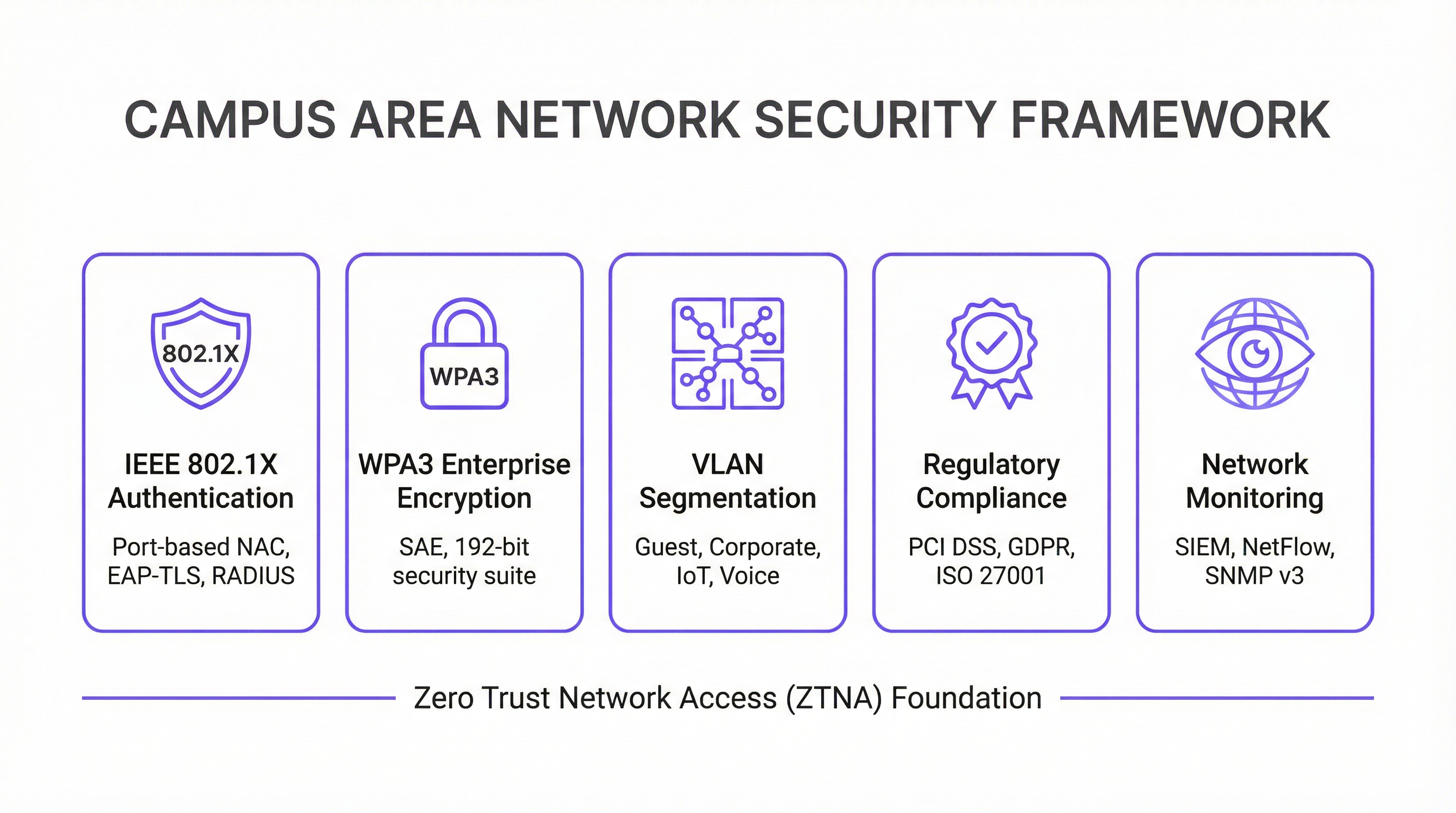
Security First — Zero Trust Architektur: Implementieren Sie vom ersten Tag an ein Zero-Trust-Sicherheitsmodell. Verwenden Sie IEEE 802.1X für die portbasierte Network Access Control (NAC), um jedes Gerät zu authentifizieren, das sich mit dem kabelgebundenen oder drahtlosen Netzwerk verbindet. Erzwingen Sie eine starke Verschlüsselung mit WPA3-Enterprise in Ihrem WLAN. Segmentieren Sie das Netzwerk mit VLANs, um Bedrohungen einzudämmen und laterale Bewegungen einzuschränken. Der gesamte Netzwerkmanagement-Datenverkehr sollte sichere Protokolle wie SSH und SNMPv3 verwenden. Für Unternehmen, die Zahlungskartendaten verarbeiten, erfordert die PCI-DSS-Compliance eine strikte Netzwerksegmentierung und Zugriffskontrolle, was durch ein gut konzipiertes CAN einfach zu implementieren und zu auditieren ist.
Design für Redundanz: Eliminieren Sie Single Points of Failure auf jeder Schicht. Verwenden Sie redundante Switches auf den Core- und Distribution-Layern. Setzen Sie Link-Aggregation (EtherChannel/LACP) ein, um sowohl eine höhere Bandbreite als auch Link-Redundanz zu bieten. Sorgen Sie für redundante Netzteile in kritischen Switches und nach Möglichkeit für diverse Glasfaserwege zwischen Gebäuden. Für geschäftskritische Umgebungen sollten Sie unterbrechungsfreie Stromversorgungen (USV) für alle Netzwerkgeräte in Betracht ziehen.
Planung für Skalierbarkeit: Planen Sie für die nächsten fünf Jahre, nicht nur für heute. Stellen Sie sicher, dass Ihre Core- und Distribution-Layer über ausreichende Kapazitäten verfügen, um das zukünftige Wachstum von Datenverkehr und verbundenen Geräten zu bewältigen. Verwenden Sie ein modulares Chassis auf dem Distribution- oder Core-Layer, um eine einfache Erweiterung zu ermöglichen. Wählen Sie Glasfaserkabel mit einer höheren Aderzahl als unmittelbar benötigt, um zukünftigen Anforderungen ohne kostspielige Neuverkabelung gerecht zu werden.
Zentralisiertes Management und Monitoring: Ein großes CAN ist zu komplex, um es auf Geräteebene zu verwalten. Verwenden Sie ein zentralisiertes Network Management System (NMS), um die Konfiguration zu automatisieren, die Leistung zu überwachen und Warnmeldungen zu erhalten. Plattformen wie die WiFi-Intelligence-Lösung von Purple bieten tiefe Einblicke in das Nutzerverhalten und den Netzwerkzustand und ermöglichen so ein proaktives Management und eine Optimierung. Die GDPR-Compliance erfordert zudem Transparenz über Datenflüsse und Benutzerzugriffe, was durch eine zentralisierte Managementplattform erleichtert wird.
Fehlerbehebung und Risikominderung
Probleme auf dem Physical-Layer sind die häufigste Ursache für Netzwerkprobleme. Defekte Kabel, ausgefallene Transceiver und lose Verbindungen sind für einen erheblichen Teil der Netzwerkausfälle verantwortlich. Eine strukturierte Fehlerbehebungsmethodik nach dem OSI-Modell – beginnend bei Layer 1 (Physical) und aufwärts arbeitend – ist der effizienteste Ansatz. Investieren Sie in hochwertige Kabeltestgeräte und führen Sie ein Ersatzteillager für kritische Komponenten.
HF-Interferenzen in einer dichten drahtlosen Umgebung können die Leistung stark beeinträchtigen. Co-Kanal- und Nachbarkanal-Interferenzen sind die Hauptursachen. Verwenden Sie ein HF-Monitoring-Tool, um Störquellen zu identifizieren, zu denen benachbarte Netzwerke, Mikrowellenherde und Bluetooth-Geräte gehören können. Dynamic Channel Assignment (DCA)-Algorithmen in modernen Wireless-Controllern können helfen, aber in anspruchsvollen Umgebungen ist manchmal eine manuelle Abstimmung erforderlich.
Configuration Drift tritt auf, wenn manuelle Änderungen an einzelnen Geräten im Laufe der Zeit zu Inkonsistenzen im gesamten Netzwerk führen. Dies führt zu unerwartetem Verhalten und erschwert die Fehlerbehebung. Verwenden Sie ein Konfigurationsmanagement-Tool, um Änderungen zu verfolgen, Standardvorlagen durchzusetzen und fehlerhafte Modifikationen rückgängig zu machen. Alle Änderungen sollten über einen formellen Change-Management-Prozess vorgenommen werden.
Sicherheitslücken: Ungepatchte Firmware ist ein ständiges Risiko. Erstellen Sie einen regelmäßigen Patch-Zeitplan für alle Netzwerkgeräte. Überwachen Sie anomale Datenverkehrsmuster mit einem SIEM-System (Security Information and Event Management). Führen Sie regelmäßige Penetrationstests durch, um Schwachstellen zu identifizieren, bevor Angreifer dies tun.
ROI und geschäftliche Auswirkungen
Ein gut ausgeführtes Campus Area Network liefert einen signifikanten und messbaren Geschäftswert über mehrere Dimensionen hinweg.
| Geschäftsergebnis | Wichtige Kennzahl | Typische Verbesserung |
|---|---|---|
| Gästezufriedenheit | NPS / Bewertungs-Scores | +25-40 % bei konnektivitätsbezogenen Bewertungen |
| IT-Betriebseffizienz | Support-Tickets | -40-60 % Reduzierung netzwerkbezogener Tickets |
| Compliance-Audit-Zeit | Tage bis zum Abschluss des PCI-DSS-Audits | -50-70 % Reduzierung |
| Netzwerkverfügbarkeit | Verfügbarkeit in % | 99,9 %+ mit redundantem Design |
| Umsatz durch neue Services | IoT- / Analytics-Services aktiviert | Erschließt Location Analytics, Asset Tracking |
Gesteigerte Produktivität: Zuverlässige High-Speed-Konnektivität ermöglicht es Mitarbeitern und Gästen, effizient und ohne Unterbrechung zu arbeiten. Im Hospitality-Kontext schlägt sich dies direkt in Gästezufriedenheitswerten und Wiederholungsbuchungen nieder.
Verbessertes Gäste- und Kundenerlebnis: Im Gastgewerbe und Einzelhandel ist schnelles und nahtloses Wi-Fi ein wesentlicher Treiber für Kundenzufriedenheit und -bindung. Analysen aus dem Wi-Fi-Netzwerk – wie Verweildauer, Laufwege und Geräteanzahl – können genutzt werden, um das Gästeerlebnis zu personalisieren und den Betrieb des Standorts zu optimieren.
Betriebliche Effizienz: Ein zentral verwaltetes CAN reduziert den operativen Aufwand für das IT-Team. PoE vereinfacht die Bereitstellung neuer Geräte, und eine ausfallsichere Architektur minimiert kostspielige Ausfallzeiten. Die Möglichkeit, den gesamten Bestand über eine einzige Konsole zu verwalten, ist besonders für Unternehmen mit mehreren Standorten wertvoll.
Ermöglichung neuer Services: Das CAN ist die Grundlage für eine Vielzahl von Smart-Venue-Services, einschließlich IoT-basierter Gebäudeautomation, standortbezogener Dienste (Location-Based Services), Asset Tracking und verbesserter Sicherheitssysteme. Diese Services stellen neue Einnahmequellen und Wettbewerbsvorteile dar, die ohne ein robustes zugrunde liegendes Netzwerk schlichtweg nicht möglich sind.
Durch die Messung von Kennzahlen wie Netzwerkverfügbarkeit, durchschnittlichem Durchsatz, Anzahl der Support-Tickets und Gästezufriedenheitswerten können Unternehmen den positiven ROI ihrer Investition in ein modernes Campus Area Network quantifizieren. Bei den meisten Enterprise-Bereitstellungen amortisiert sich ein gut konzipiertes CAN innerhalb von 18 bis 36 Monaten durch eine Kombination aus reduzierten Betriebskosten und Einnahmen aus neuen Services.
Key Terms & Definitions
Campus Area Network (CAN)
A computer network that interconnects multiple local area networks (LANs) within a geographically bounded area, such as a corporate campus, hotel resort, university, or large retail estate. A CAN is typically owned and operated by a single organisation and provides high-speed, low-latency connectivity between buildings.
IT teams encounter this term when planning network infrastructure for any multi-building facility. It is the correct technical term for what is often colloquially called 'the campus network' or 'the site network'. Understanding the distinction between a CAN, a LAN, and a WAN is essential for scoping infrastructure projects and vendor conversations.
Three-Tier Hierarchical Model
The industry-standard architectural framework for enterprise campus networks, comprising three distinct layers: the Access Layer (where end devices connect), the Distribution Layer (where policy is enforced and traffic is aggregated), and the Core Layer (the high-speed backbone). Each layer has a specific, well-defined role.
This model is the starting point for virtually every enterprise CAN design. IT teams use it to structure their design conversations, allocate budget, and plan for scalability. Deviating from this model (e.g., using a flat, single-tier design) is a common cause of scalability and performance problems in growing organisations.
IEEE 802.1X
An IEEE standard for port-based Network Access Control (NAC) that provides an authentication mechanism for devices wishing to connect to a LAN or WLAN. It uses the Extensible Authentication Protocol (EAP) and requires a RADIUS server to authenticate users and devices before granting network access.
IT teams implement 802.1X to ensure that only authorised devices can connect to the network. It is a foundational security control for PCI DSS compliance (Requirement 1.3) and is a key component of a Zero Trust network architecture. Without 802.1X, any device that can physically connect to a network port or associate with a Wi-Fi SSID can gain network access.
WPA3-Enterprise
The latest generation of Wi-Fi security protocol for enterprise environments, ratified by the Wi-Fi Alliance. WPA3-Enterprise mandates the use of 192-bit minimum-strength security protocols and uses Simultaneous Authentication of Equals (SAE) to replace the older Pre-Shared Key (PSK) mechanism, providing stronger protection against offline dictionary attacks.
IT teams should be migrating to WPA3-Enterprise as the standard for all corporate and sensitive Wi-Fi SSIDs. WPA2 remains acceptable for guest networks in many contexts, but WPA3 is the requirement for networks handling sensitive data. It is increasingly referenced in security frameworks and is expected to become mandatory in future PCI DSS and ISO 27001 guidance.
VLAN (Virtual Local Area Network)
A logical subdivision of a physical network that groups devices into separate broadcast domains, regardless of their physical location. VLANs are defined by IEEE 802.1Q and are implemented on managed switches. Traffic between VLANs requires routing (a Layer 3 function), which provides a natural security boundary.
VLAN segmentation is the primary tool for isolating different types of traffic on a shared physical network. IT teams use VLANs to separate guest traffic from corporate traffic, isolate IoT devices, and create a dedicated PCI DSS cardholder data environment. Incorrect VLAN configuration is a common cause of both security incidents and network performance problems.
Power over Ethernet (PoE)
A technology that allows network cables to carry electrical power, enabling devices like Wi-Fi access points, IP cameras, and VoIP phones to receive power through the same Ethernet cable used for data. Key standards include IEEE 802.3af (15.4W), IEEE 802.3at (30W), and IEEE 802.3bt (90W, also known as PoE++).
PoE is a critical consideration when specifying access layer switches for a CAN. IT teams must calculate the total PoE budget required for all connected devices and ensure the switch's power supply can meet that demand. Underestimating PoE requirements is a common and costly mistake, as it can require switch replacements or additional power injectors.
Wi-Fi 6E (IEEE 802.11ax)
The latest generation of the Wi-Fi standard, extending Wi-Fi 6 into the 6 GHz frequency band. Wi-Fi 6E provides access to up to 1,200 MHz of additional spectrum, significantly increasing capacity and reducing congestion compared to the 2.4 GHz and 5 GHz bands. It supports theoretical throughput of up to 9.6 Gbps.
IT teams planning new CAN deployments should specify Wi-Fi 6E-capable access points as the standard. The 6 GHz band is particularly valuable in high-density environments (conference centres, stadiums, hotel lobbies) where the 2.4 GHz and 5 GHz bands are congested. Note that client devices must also support Wi-Fi 6E to benefit from the 6 GHz band.
EtherChannel / LACP
EtherChannel is a port link aggregation technology that bundles multiple physical Ethernet links into a single logical link, providing both increased bandwidth and link redundancy. LACP (Link Aggregation Control Protocol), defined in IEEE 802.3ad, is the open-standard protocol used to negotiate and manage EtherChannel bundles.
IT teams use EtherChannel/LACP on uplinks between the access, distribution, and core layers to eliminate single points of failure and increase available bandwidth. It is a standard component of any redundant CAN design. When a single link in the bundle fails, traffic is automatically redistributed across the remaining links without interruption.
Zero Trust Network Access (ZTNA)
A security framework based on the principle of 'never trust, always verify'. In a ZTNA model, no user or device is trusted by default, regardless of whether they are inside or outside the network perimeter. Access is granted on a least-privilege basis, based on continuous verification of identity, device health, and context.
ZTNA is increasingly the recommended security architecture for enterprise CANs, replacing the older 'castle and moat' perimeter security model. IT teams implement ZTNA through a combination of 802.1X, micro-segmentation, multi-factor authentication, and continuous monitoring. It is particularly relevant for organisations with IoT devices, guest access, and remote workers connecting to campus resources.
Case Studies
A 450-room international hotel group is experiencing persistent guest complaints about Wi-Fi quality. Their current network is a flat, single-VLAN design with consumer-grade access points installed five years ago. The hotel has a main building, a conference centre, and a spa/leisure wing. The IT Director has a budget for a full network refresh and needs to deliver a measurable improvement in guest satisfaction within six months. How should the network be redesigned?
The solution requires a full three-tier CAN deployment across the property. Step 1: Conduct a detailed RF site survey across all three buildings to determine optimal AP placement, identify sources of interference, and plan for high-density areas (conference rooms, restaurant, lobby). Step 2: Design a redundant core in the main data centre, with dual core switches connected via 100 Gbps links. Step 3: Deploy distribution switches on each floor of each building, connected to the core via dual 25 Gbps fiber uplinks. Step 4: Install Wi-Fi 6E access points — one per room corridor (covering 4-6 rooms each), plus dedicated high-density APs in the conference centre and lobby. Step 5: Implement strict VLAN segmentation: VLAN 10 for guest Wi-Fi (internet access only, isolated from corporate network), VLAN 20 for staff devices (access to PMS and operational systems), VLAN 30 for building management systems (HVAC, door locks, CCTV), VLAN 40 for voice (IP phones). Step 6: Deploy IEEE 802.1X for staff devices and WPA3-Personal with a captive portal for guest access. Step 7: Integrate with Purple's WiFi intelligence platform for real-time monitoring, guest analytics, and automated alerting.
A regional retail chain operates 12 stores across a large shopping centre campus. Each store currently has its own isolated network, managed independently. The IT team is struggling with PCI DSS compliance audits (which take two weeks each time), inconsistent security policies, and an inability to deploy new services like in-store analytics and digital signage centrally. The CTO wants a unified campus network that addresses all three problems. What architecture should be recommended?
The solution is a campus-wide CAN with a shared core infrastructure and per-store logical isolation via VLANs. Step 1: Deploy a redundant core in the shopping centre's main data centre (or a dedicated co-location space), with dual core switches and diverse fiber paths to each store. Step 2: Each store gets a distribution switch connected to the core via dedicated fiber, with a separate VLAN per store for corporate traffic and a shared VLAN for guest Wi-Fi. Step 3: Implement IEEE 802.1X for all point-of-sale (POS) devices, with a dedicated PCI DSS-compliant VLAN that is strictly isolated from all other traffic. Step 4: Deploy WPA3-Enterprise for staff devices and a captive portal for customer Wi-Fi. Step 5: Centralise all management through a single NMS, giving the IT team a unified view of all 12 locations. Step 6: Integrate Purple's analytics platform to capture footfall data, dwell time, and customer device counts across the estate. Step 7: Use the centralised management platform to push consistent security policies, firmware updates, and new service configurations to all stores simultaneously.
Scenario Analysis
Q1. You are the IT Director of a 600-room conference hotel. Your network currently has 98% uptime but guests in the conference centre consistently report poor Wi-Fi during large events (500+ attendees). Your access points are Wi-Fi 5 (802.11ac) and were installed four years ago. You have budget for either (a) replacing all APs with Wi-Fi 6E models, or (b) a full network refresh including new distribution switches, fiber uplinks, and Wi-Fi 6E APs. Which option do you choose, and why?
💡 Hint:Consider where the bottleneck actually is. Is the problem at the wireless layer, the wired layer, or both? What happens to the traffic once it leaves the access point?
Show Recommended Approach
Option (b) — the full network refresh — is the correct choice, though it requires justification. The symptoms (poor performance in high-density areas during peak load) could be caused by wireless congestion (too many clients per AP, insufficient spectrum), wired bottlenecks (insufficient uplink capacity from APs to distribution switches), or both. Simply replacing the APs with Wi-Fi 6E models (Option a) addresses the wireless layer but leaves the wired infrastructure unchanged. If the distribution switches or uplinks are already at capacity, the new APs will still be bottlenecked. Furthermore, Wi-Fi 6E APs with 2.5 Gbps or 5 Gbps ports require multi-gigabit Ethernet (IEEE 802.3bz) uplinks to realise their full throughput — which older distribution switches may not support. The full refresh ensures the entire path from client to core is capable of handling the load. The additional cost of the wired infrastructure upgrade is typically 30-40% of the total project cost but eliminates the risk of a second, more disruptive upgrade within 12-18 months. Present this to the CTO as a five-year investment, not a one-time fix.
Q2. Your organisation is a retail chain preparing for its annual PCI DSS audit. The auditor has flagged that your point-of-sale (POS) terminals share a VLAN with your staff Wi-Fi network, creating an overly broad cardholder data environment (CDE) scope. You have 30 days before the audit. What immediate and medium-term actions do you take?
💡 Hint:PCI DSS Requirement 1.3 mandates that the CDE is isolated from all other networks. Focus on network segmentation as the primary control. Consider what is achievable in 30 days versus what requires a longer project.
Show Recommended Approach
Immediate actions (within 30 days): Create a dedicated VLAN (e.g., VLAN 50) for all POS terminals and configure ACLs on the distribution switches to restrict traffic from this VLAN to only the payment gateway and necessary management systems. Remove all POS terminals from the shared staff VLAN. Implement IEEE 802.1X on POS switch ports to ensure only authorised POS devices can connect to VLAN 50. Document the new network topology and VLAN map for the auditor. This reduces the CDE scope to only the POS VLAN and its connections, significantly simplifying the audit. Medium-term actions (within 90 days): Conduct a full network segmentation review to ensure all VLANs are correctly configured and that no unintended paths exist between the CDE and other network segments. Deploy a SIEM to monitor traffic to and from the CDE VLAN. Consider a penetration test specifically targeting the CDE segmentation to validate the controls. The key principle is that network segmentation is the most effective way to reduce PCI DSS audit scope and cost. Every device that is not in the CDE is outside the scope of the audit.
Q3. You are designing a CAN for a 15,000-seat stadium that hosts 80 events per year, ranging from football matches to concerts. The venue has 12 buildings (including the main bowl, corporate hospitality suites, media centre, and operations centre) connected by an existing but aging fiber ring. Peak concurrent users are estimated at 18,000 (including staff). What are the three most critical design decisions you need to make, and what is your recommendation for each?
💡 Hint:Think about the unique characteristics of a stadium environment: extreme density, highly variable load (near-zero between events, maximum during events), diverse user types (fans, corporate guests, media, staff, operations), and the need for the network to support both public-facing and operational systems.
Show Recommended Approach
Decision 1 — Wireless Density and AP Placement: In a stadium, the density challenge is extreme. The recommendation is to deploy under-seat APs in the bowl (one AP per 4-6 rows of seats), supplemented by overhead APs for concourse areas. Wi-Fi 6E is mandatory — the 6 GHz band provides the additional spectrum needed to handle 18,000 concurrent users. Each AP should be configured with a narrow beam pattern directed at the seating rows, not broadcasting broadly. Decision 2 — Network Segmentation: Implement strict VLAN segmentation for at least five zones: Fan Wi-Fi (internet access only), Corporate Hospitality (higher bandwidth, access to streaming services), Media (dedicated high-bandwidth VLAN for broadcast and press), Operations (CCTV, access control, building management), and Staff (operational systems). Each zone has different performance and security requirements. Decision 3 — Scalability of the Core and Fiber Infrastructure: The existing fiber ring must be assessed. If it is a single ring with no redundancy, it is a critical risk. The recommendation is to upgrade to a dual-ring or mesh fiber topology between buildings, with the core switches in a geographically separate location from the main distribution point. The core must be sized for 100 Gbps+ throughput to handle peak event load. Critically, the network must be designed for peak load (event day), not average load — this is the opposite of most enterprise network designs.
Key Takeaways
- ✓The three-tier hierarchical model (Core, Distribution, Access) is the proven architectural foundation for any enterprise Campus Area Network — it provides modularity, scalability, and fault isolation that flat or two-tier designs cannot match.
- ✓Security must be designed in from the start, not bolted on afterwards. IEEE 802.1X for port-based authentication, WPA3-Enterprise for wireless encryption, and strict VLAN segmentation are the non-negotiable baseline controls for any professional CAN.
- ✓Design for redundancy at every layer: dual core switches, dual distribution uplinks, redundant power supplies, and diverse fiber paths between buildings. The cost of redundancy is always less than the cost of an unplanned outage.
- ✓Wi-Fi 6E (802.11ax) in the 6 GHz band is the current standard for new deployments in high-density environments. Specifying Wi-Fi 5 or earlier for a new build is a false economy that will require premature replacement.
- ✓Centralised management is not optional for a multi-building CAN. A Network Management System (NMS) and a WiFi intelligence platform like Purple are essential for maintaining consistent security policies, monitoring performance, and demonstrating compliance during audits.
- ✓The Fiber Surplus Principle: always install at least twice as many fiber strands as you need today. Re-cabling a campus is far more expensive and disruptive than the marginal cost of additional strands during initial installation.
- ✓A well-executed CAN delivers measurable ROI through improved guest satisfaction, reduced IT support overhead, faster compliance audits, and the ability to deploy new revenue-generating services like location analytics and IoT-based building automation.




