

Captive Portal Login: Fehlerbehebung häufiger Probleme und Optimierung der Nutzererfahrung
This authoritative technical reference guide equips IT managers, network architects, and CTOs with a comprehensive framework for diagnosing and resolving captive portal login failures, selecting the optimal authentication strategy for their venue type, and measuring portal performance against business KPIs. Drawing on real-world deployment scenarios across hospitality, retail, and public-sector environments, it covers the full lifecycle from architecture and compliance to step-by-step troubleshooting for platforms including Purple AI, UniFi, Meraki, and MikroTik. For any organisation operating guest or public WiFi, a poorly performing captive portal is a direct revenue and reputation risk — this guide provides the decision frameworks and operational playbooks to eliminate that risk.
🎧 Listen to this Guide
View Transcript

Executive Summary
Der Captive Portal Login bleibt der primäre Zugangskontrollmechanismus für Gäste- und öffentliches WiFi in den Bereichen Gastgewerbe, Einzelhandel, Veranstaltungen und im öffentlichen Sektor. Dennoch ist er auch eine der am häufigsten falsch konfigurierten Komponenten in Enterprise-Netzwerk-Stacks – verantwortlich für abgebrochene Verbindungen, Compliance-Risiken und den Verlust von First-Party-Daten. Dieser Leitfaden befasst sich mit den vier Hauptfehlerkategorien, die für die Mehrheit der Captive Portal-Vorfälle verantwortlich sind: DNS- und Firewall-Fehlkonfigurationen, RADIUS-Autorisierungsfehler, Kompatibilitätsprobleme mit dem Captive Network Assistant (CNA) und Abbrüche der Sitzungspersistenz. Er bietet plattformspezifische Lösungsansätze für Purple AI, Cisco Meraki, Ubiquiti UniFi und MikroTik RouterOS sowie ein strukturiertes Framework zur Auswahl der Authentifizierungsmethode, abgestimmt auf den Standorttyp und die Datenziele. Compliance-Überlegungen gemäß GDPR, UK GDPR und PCI DSS v4.0 sind durchgehend integriert. Netzwerkteams, die die Empfehlungen in diesem Leitfaden umsetzen, können Authentifizierungserfolgsraten von über 92 %, eine messbare Reduzierung von Helpdesk-Eskalationen und eine rechtssichere Compliance-Position für personenbezogene Daten erwarten, die beim WiFi-Login erfasst werden.
Technischer Deep-Dive
Wie der Captive Portal Login funktioniert: Die Architektur
Ein Captive Portal Login funktioniert durch das gezielte Abfangen der anfänglichen Konnektivitätsprüfung eines Geräts. Wenn sich ein modernes Betriebssystem mit einem neuen WiFi-Netzwerk verbindet, sendet es sofort eine HTTP-Anfrage an einen bekannten Endpunkt, um die Erreichbarkeit des Internets zu überprüfen. Apple-Geräte fragen captive.apple.com ab; Android-Geräte fragen connectivitycheck.gstatic.com ab; Windows fragt www.msftconnecttest.com ab; Firefox fragt detectportal.firefox.com ab. Das Captive Portal-Gateway – typischerweise auf der Access-Controller-Ebene implementiert – fängt diese Prüfung ab und gibt anstelle der erwarteten Antwort eine HTTP 302-Weiterleitung zur Splash-Page-URL zurück.
Das Betriebssystem erkennt diese Weiterleitung, stuft das Netzwerk als "captive" ein und startet einen Sandboxed-Mini-Browser – Apples Captive Network Assistant (CNA), den Android Provisioning Wizard oder den Windows Network Sign-In Browser –, um die Authentifizierungsoberfläche anzuzeigen. Sobald der Nutzer die erforderliche Aktion abgeschlossen hat (Formularübermittlung, Social Login, Click-Through), kommuniziert der Portal-Server über einen API-Callback oder eine RADIUS-Autorisierung mit dem Netzwerk-Controller, um die MAC-Adresse des Geräts von der Sperrliste zu entfernen und vollen Netzwerkzugriff zu gewähren.
Diese Architektur weist drei kritische Abhängigkeiten auf, deren Ausfall jeweils zu einer fehlerhaften Login-Erfahrung führt: Die DNS-/Firewall-Ebene muss den Prüfverkehr korrekt weiterleiten; die Splash-Page muss innerhalb der CNA-Sandbox korrekt gerendert werden; und der Autorisierungs-Callback muss den Netzwerk-Controller erfolgreich erreichen.
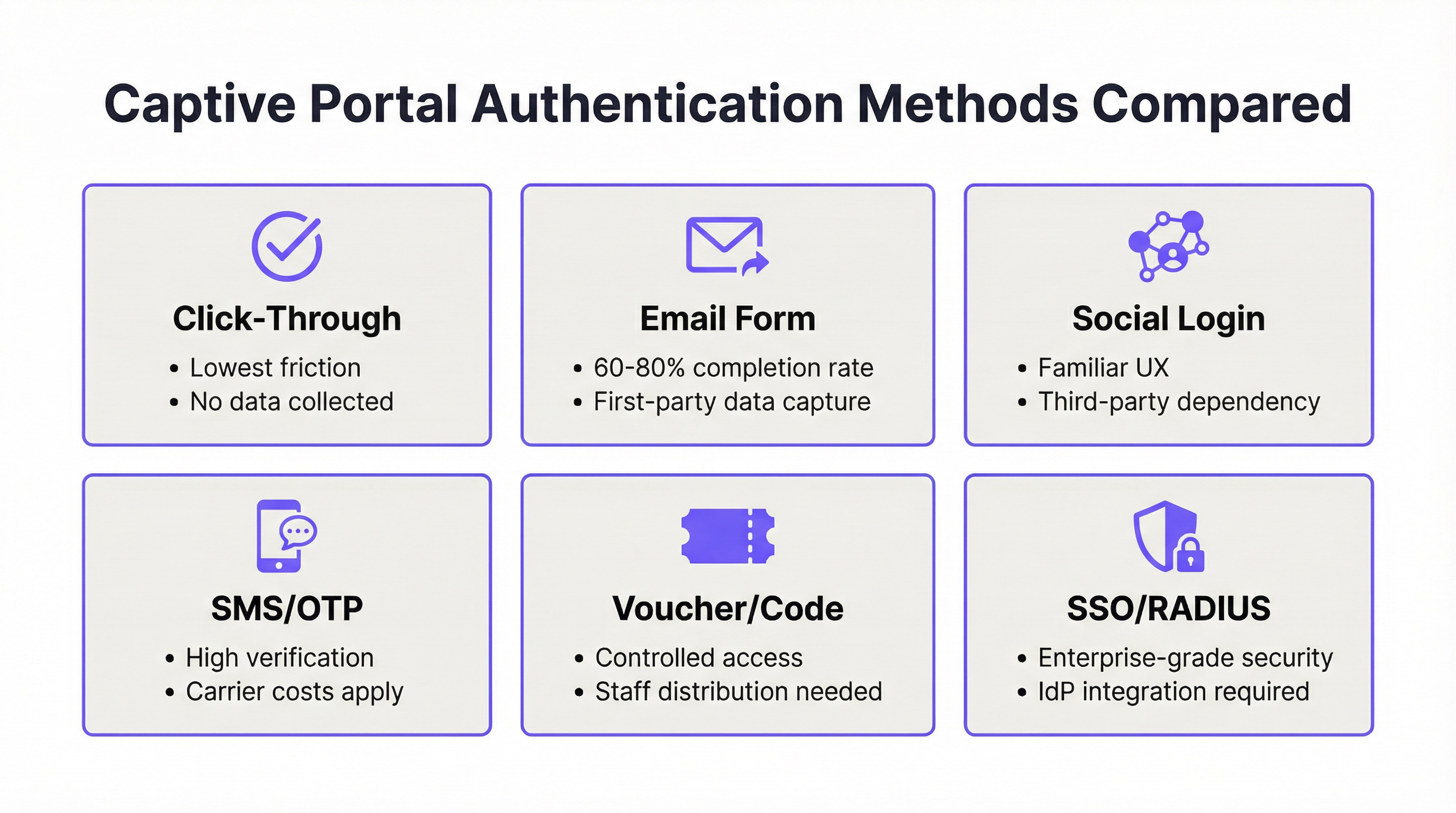
Authentifizierungsmethoden: Technischer Vergleich
Die Wahl der Authentifizierungsmethode ist gleichzeitig eine technische und strategische Entscheidung. Die folgende Tabelle bietet einen strukturierten Vergleich über die Dimensionen hinweg, die für Enterprise-Bereitstellungsentscheidungen am relevantesten sind.
| Methode | Abschlussrate | Datenausbeute | GDPR-Komplexität | Infrastrukturabhängigkeit | Bester Standorttyp |
|---|---|---|---|---|---|
| Click-Through | 95%+ | Keine | Minimal (nur AGB) | Keine | Systemgastronomie, Verkehr |
| E-Mail-Formular | 60–80% | Hoch (First-Party) | Moderat | Keine | Gastgewerbe, Einzelhandel, Events |
| Social Login | 55–70% | Moderat (Third-Party) | Hoch | Third-Party API | Gastgewerbe, Unterhaltung |
| SMS OTP | 50–65% | Hoch (verifiziert) | Moderat | SMS-Gateway | Öffentliches WiFi, Verkehrsknotenpunkte |
| Voucher/Code | 85%+ (verteilt) | Gering | Gering | Verteilungssystem | Hotels, Konferenzzentren |
| SSO/RADIUS | 90%+ (registrierte Nutzer) | Vollständige Identität | Gering (intern) | IdP / RADIUS-Server | Unternehmen, Bildungseinrichtungen |
Überlegungen zum Social Login: Die Bereitstellung von Facebook- oder Google-Social-Logins erfordert einen Auftragsverarbeitungsvertrag (AVV) mit der jeweiligen Plattform gemäß GDPR Artikel 28. Die Plattform fungiert als Auftragsverarbeiter, und Ihr Unternehmen bleibt der Verantwortliche. Jede Änderung der API-Bedingungen der sozialen Plattform – wie sie Facebook seit 2018 wiederholt vorgenommen hat – kann Ihren Authentifizierungsfluss ohne Vorankündigung unterbrechen. Bei Enterprise-Bereitstellungen sollte der Social Login als ergänzende Option und nicht als primärer Authentifizierungsweg betrachtet werden.
RADIUS und IEEE 802.1X: Für Unternehmens- und Bildungsumgebungen bietet die RADIUS-basierte Authentifizierung in Anlehnung an IEEE 802.1X die stärkste Sicherheitsposition. Das 802.1X-Framework ermöglicht Verschlüsselungsschlüssel pro Nutzer und Sitzung und lässt sich in die zertifikatsbasierte Authentifizierung (EAP-TLS) integrieren, wodurch gemeinsame Pre-Shared Keys vollständig entfallen. WPA3-Enterprise, das 802.1X vorschreibt, verstärkt dies zusätzlich mit einer kryptografischen Mindeststärke von 192 Bit für sensible Umgebungen. Die Plattform von Purple unterstützt die RADIUS-Integration nativ und ermöglicht so ein einheitliches Portal-Erlebnis auch in 802.1X-gesicherten Umgebungen.
Sicherheitsarchitektur und Compliance
Ein Captive Portal, das personenbezogene Daten erfasst, ist per Definition ein Datenverarbeitungssystem, das den geltenden Datenschutzbestimmungen unterliegt. Für Bereitstellungen in Großbritannien und der EU bedeutet dies, dass die Einhaltung der GDPR und UK GDPR ab dem Moment obligatorisch ist, in dem Sie einen Namen, eine E-Mail-Adresse oder eine Telefonnummer erfassen. Die Mindestanforderungen an die Compliance sind: eine Rechtsgrundlage gemäß Artikel 6 (berechtigtes Interesse oder Einwilligung, je nach Datennutzung); eine Datenschutzerklärung, die zum Zeitpunkt der Erfassung angezeigt wird; eine dokumentierte Richtlinie zur Datenaufbewahrung; und ein Mechanismus für Auskunftsersuchen von betroffenen Personen.
Für Bereitstellungen in Umgebungen, in denen Zahlungskartendaten über das Netzwerk übertragen werden – Hotellobbys, Einzelhandelsumgebungen, Konferenzzentren –, schreibt die PCI DSS v4.0-Anforderung 1.3 eine Netzwerksegmentierung zwischen der Karteninhaberdatenumgebung und dem Gäste-WiFi-Netzwerk vor. Eine VLAN-segmentierte Architektur, bei der das Captive Portal in einem dedizierten Gäste-VLAN ohne Routing-Zugriff auf POS-Systeme betrieben wird, ist die Standardimplementierung.
Implementierungsleitfaden
Schritt 1: Architekturüberprüfung vor der Bereitstellung
Bevor Sie eine Captive Portal-Plattform konfigurieren, validieren Sie die folgenden Netzwerkvoraussetzungen. Das Gateway oder der Access Controller muss eine externe Portal-Weiterleitung unterstützen – überprüfen Sie dies anhand der Dokumentation Ihres Hardwareanbieters. Ihre DNS-Infrastruktur muss in der Lage sein, Pre-Authentication-Anfragen abzufangen und bis zum Abschluss der Authentifizierung nur die Splash-Page-Domain aufzulösen. Ihre Firewall muss ausgehenden HTTPS-Verkehr vom Controller zu den Servern des Portalanbieters sowie eingehenden HTTPS-Verkehr vom Portalanbieter zur Management-Schnittstelle des Controllers auf dem entsprechenden Port (typischerweise 8443 für UniFi, 443 für Cloud-verwaltete Plattformen) zulassen.
Schritt 2: Walled-Garden-Konfiguration
Der Walled Garden definiert die Menge an Domains und IP-Bereichen, die für nicht authentifizierte Geräte zugänglich sind. Ein unvollständiger Walled Garden ist die häufigste Ursache für zeitweilige Portal-Ausfälle. Der minimale Walled Garden für eine Produktionsbereitstellung muss die folgenden Einträge enthalten.
| Kategorie | Domains / Bereiche | Zweck |
|---|---|---|
| OS Probe-Endpunkte | captive.apple.com, connectivitycheck.gstatic.com, www.msftconnecttest.com, detectportal.firefox.com |
Ermöglicht die Captive Portal-Erkennung durch das Betriebssystem |
| Portalanbieter | Die Domain und CDN-Bereiche Ihres Portals | Lädt die Splash-Page |
| Social Login (falls genutzt) | *.facebook.com, *.google.com, *.linkedin.com |
Ermöglicht OAuth-Flows |
| Zahlung (falls genutzt) | *.stripe.com, js.stripe.com |
Lädt Zahlungsformulare |
| Analytics (falls genutzt) | Die Domains Ihres Analytics-Anbieters | Ermöglicht Tracking-Skripte |
Schritt 3: Optimierung der Splash-Page
Die Splash-Page muss für die CNA-Umgebung konzipiert sein, nicht für einen vollständigen Browser. Das bedeutet: Gesamtseitengröße unter 500 KB; keine Abhängigkeit von externen JavaScript-CDNs, es sei denn, sie stehen auf der Whitelist; gültiges HTTPS mit einem Zertifikat einer vertrauenswürdigen CA; responsives Design, getestet bei einer Breite von 320px (iPhone SE) bis 1024px; und ein Formular mit maximal drei Feldern (Name, E-Mail und Einwilligungs-Kontrollkästchen) für maximale Abschlussraten.
Schritt 4: Sitzungs- und Richtlinienkonfiguration
Konfigurieren Sie die Sitzungsparameter passend zum Nutzungsmuster Ihres Standorts. Die folgenden Referenzwerte basieren auf den Bereitstellungsdaten von Purple an Tausenden von Standorten.
| Standorttyp | Sitzungsdauer | Idle-Timeout | Bandbreitenrichtlinie |
|---|---|---|---|
| Hotel | 24 Stunden | 60 Minuten | 10 Mbit/s pro Gerät |
| Café | 4–8 Stunden | 30 Minuten | 5 Mbit/s pro Gerät |
| Konferenzzentrum | Veranstaltungsdauer | 120 Minuten | 20 Mbit/s pro Gerät |
| Stadion / Arena | Veranstaltungsdauer | 45 Minuten | 5 Mbit/s pro Gerät |
| Einzelhandel | 2–4 Stunden | 20 Minuten | 3 Mbit/s pro Gerät |
| Öffentlicher Sektor / Bibliothek | 2 Stunden | 30 Minuten | 5 Mbit/s pro Gerät |
Schritt 5: Plattformspezifische Konfiguration — Purple AI
Das Captive Portal von Purple AI wird über das Purple-Dashboard konfiguriert. Navigieren Sie zu WiFi > Splash Pages, um Ihr Portal zu erstellen oder zu bearbeiten. Wählen Sie Ihre Authentifizierungsmethode unter Login-Optionen aus – Purple unterstützt Click-Through, E-Mail-Formular, Social Login (Facebook, Google, LinkedIn, X), SMS OTP, Voucher und SSO über Microsoft Entra ID, Google Workspace und Okta. Aktivieren Sie unter Compliance die GDPR-konforme Einwilligungserfassung und konfigurieren Sie die URL Ihrer Datenschutzerklärung. Wenden Sie unter Sitzungseinstellungen die Werte aus der obigen Tabelle an. Veröffentlichen Sie die Splash-Page und verknüpfen Sie sie im Bereich Netzwerke mit Ihrer SSID. Die Plattform von Purple übernimmt automatisch die Walled-Garden-Konfiguration für ihre eigenen Domains; Sie müssen alle Drittanbieter-Domains, auf die Ihre Splash-Page verweist, manuell hinzufügen.
Schritt 6: Testprotokoll
Führen Sie nach der Bereitstellung die folgende Testmatrix aus, bevor Sie live gehen. Verbinden Sie ein Testgerät mit der Gäste-SSID und überprüfen Sie: Das Portal erscheint innerhalb von 3 Sekunden; die Splash-Page wird korrekt gerendert und ist voll funktionsfähig; die Authentifizierung wird erfolgreich abgeschlossen; der Internetzugang wird unmittelbar nach der Authentifizierung gewährt; und das Gerät erfordert innerhalb der konfigurierten Sitzungsdauer keine erneute Authentifizierung. Wiederholen Sie diesen Test unter iOS (neueste Version), iOS (vorherige Hauptversion), Android (neueste Version), Android (vorherige Hauptversion), Windows 11 und macOS. Dokumentieren Sie die Ergebnisse und beheben Sie alle Fehler, bevor Sie das Netzwerk für Gäste öffnen.
Best Practices
Performance-Monitoring: Behandeln Sie die Authentifizierungserfolgsrate als primären Netzwerk-KPI mit einem Zielwert von 92 % oder höher. Das Analytics-Dashboard von Purple zeigt diese Metrik in Echtzeit an. Ein Abfall unter 85 % erfordert eine sofortige Untersuchung – häufige Ursachen sind abgelaufene Zertifikate, OS-Updates, die das Prüfverhalten ändern, und Änderungen an Firewall-Regeln.
Zertifikatsmanagement: SSL-Zertifikate für Splash-Page-Domains müssen vor Ablauf erneuert werden. Implementieren Sie eine automatisierte Erneuerung über Let's Encrypt oder Ihre Zertifikatsmanagement-Plattform und richten Sie Kalenderbenachrichtigungen 30 Tage vor Ablauf ein. Ein abgelaufenes Zertifikat führt dazu, dass iOS und Android Sicherheitswarnungen anzeigen, die Nutzer effektiv daran hindern, sich zu verbinden.
GDPR-Einwilligungsprotokolle: Jede am Captive Portal erfasste Einwilligung muss mit einem Zeitstempel, der Version der angezeigten Datenschutzerklärung und den spezifisch erteilten Einwilligungen protokolliert werden. Die Plattform von Purple führt diesen Audit-Trail automatisch. Stellen Sie bei manuellen Implementierungen sicher, dass Ihr Datenbankschema diese Daten erfasst und dass die Datensätze für die von Ihrer Datenaufbewahrungsrichtlinie geforderte Dauer aufbewahrt werden.
Netzwerksegmentierung: Das Gäste-WiFi muss sich in einem separaten VLAN befinden, ohne Layer-3-Routing-Zugriff auf interne Netzwerke oder POS-Systeme. Dies ist eine PCI DSS-Anforderung und eine grundlegende Sicherheitskontrolle. Überprüfen Sie die Segmentierung mindestens jährlich mit einem Penetrationstest.
Firmware- und Plattform-Updates: Halten Sie die Firmware Ihres Access Controllers und Ihre Portal-Plattform auf dem neuesten Stand. Viele CNA-Kompatibilitätsprobleme werden durch Firmware-Updates behoben – Cisco Meraki, Ubiquiti und Aruba veröffentlichen regelmäßig Updates, die OS-spezifische Änderungen bei der Portal-Erkennung adressieren. Abonnieren Sie die Sicherheitshinweise der Anbieter und spielen Sie Updates innerhalb Ihres Change-Management-Fensters ein.
Fehlerbehebung & Risikominderung
Diagnostisches Framework: Der Vier-Schichten-Check
Wenn ein Fehler beim Captive Portal Login gemeldet wird, arbeiten Sie die folgende vierstufige Diagnosesequenz ab, bevor Sie eskalieren oder Konfigurationsänderungen vornehmen.
Schicht 1 — DNS und Weiterleitung: Überprüfen Sie, ob das Gateway den Prüfverkehr abfängt und die korrekte Weiterleitung zurückgibt. Verwenden Sie ein Testgerät und ein Packet-Capture-Tool, um zu bestätigen, dass die 302-Weiterleitung ausgegeben wird. Wenn keine Weiterleitung zu sehen ist, liegt das Problem auf der Ebene der Gateway-Konfiguration.
Schicht 2 — Bereitstellung der Splash-Page: Überprüfen Sie, ob die Splash-Page im CNA korrekt geladen wird. Wenn die Seite in einem vollständigen Browser geladen wird, aber nicht im CNA, handelt es sich wahrscheinlich um eine JavaScript-Abhängigkeit oder einen fehlenden Walled-Garden-Eintrag. Verwenden Sie Browser-Entwicklertools, um blockierte Ressourcen zu identifizieren.
Schicht 3 — Authentifizierungsverarbeitung: Überprüfen Sie, ob die Authentifizierungsanfrage den Portal-Server erreicht und eine Erfolgsmeldung zurückgibt. Überprüfen Sie die Protokolle des Portalanbieters auf fehlgeschlagene Authentifizierungsversuche. Wenn die Authentifizierung stillschweigend fehlschlägt, handelt es sich typischerweise um einen Formularvalidierungsfehler oder ein fehlendes Pflichtfeld.
Schicht 4 — Autorisierungs-Callback: Überprüfen Sie, ob der Portal-Server den Netzwerk-Controller erreichen kann, um die MAC-Adresse des Geräts zu autorisieren. Überprüfen Sie die Firewall-Protokolle auf blockierte Verbindungen zwischen den IP-Bereichen des Portal-Servers und der Management-Schnittstelle des Controllers. Wenn der Callback fehlschlägt, setzen Sie die IP-Bereiche des Portalanbieters auf die Whitelist und überprüfen Sie die Erreichbarkeit des Controllers.
Häufige Fehlermodi und Behebung
| Symptom | Wahrscheinlichste Ursache | Behebung |
|---|---|---|
| Portal erscheint nicht bei Verbindung | Fehlende OS-Probe-Domains im Walled Garden; AP nach Konfigurationsänderung nicht neu gestartet | Probe-Domains zum Walled Garden hinzufügen; APs neu starten |
| Portal erscheint, aber Seite lädt nicht | JavaScript-Abhängigkeit blockiert; CDN nicht im Walled Garden | Seitenabhängigkeiten prüfen; CDN-Domains zum Walled Garden hinzufügen |
| Authentifizierung erfolgreich, kein Internet | RADIUS-Callback blockiert; Controller nicht erreichbar | IPs des Portalanbieters auf die Whitelist setzen; Erreichbarkeit des Controllers prüfen |
| Portal funktioniert unter iOS, schlägt unter Android fehl | Android-Probe-Domain blockiert; HTTPS-Zertifikatsproblem | connectivitycheck.gstatic.com zum Walled Garden hinzufügen; Zertifikat prüfen |
| Gäste müssen sich wiederholt neu einloggen | Sitzungsdauer zu kurz; MAC-Persistenz nicht konfiguriert | Sitzungsdauer erhöhen; MAC-Tracking im Controller prüfen |
| Langsamer Portal-Ladevorgang (>5 Sekunden) | Seite zu groß; DNS-Auflösung langsam; überlasteter Uplink | Seitengröße optimieren; zuverlässiges DNS nutzen (8.8.8.8); Uplink-Kapazität prüfen |
| Social Login schlägt fehl | OAuth-Domain nicht im Walled Garden; Änderung der Third-Party API | Domains der sozialen Plattformen zum Walled Garden hinzufügen; API-Status prüfen |
| Zahlungsformular lädt nicht | Stripe-Domains nicht im Walled Garden | *.stripe.com und js.stripe.com zum Walled Garden hinzufügen |
Häufig gestellte Fragen
F: Warum funktioniert mein Portal beim Testen einwandfrei, fällt aber in der Produktion zeitweise aus? Zeitweilige Ausfälle in der Produktion werden fast immer durch eine von drei Bedingungen verursacht: eine hohe gleichzeitige Verbindungslast, die die Weiterleitungskapazität des Gateways überlastet; DNS-Auflösungs-Timeouts unter Last; oder eine Race Condition zwischen dem Konfigurations-Cache des APs und einer kürzlichen Änderung. Erhöhen Sie die Größe der Connection-Tracking-Tabelle Ihres Gateways, verwenden Sie einen dedizierten DNS-Resolver (nicht den Standard des ISPs) und starten Sie APs nach Konfigurationsänderungen immer neu.
F: Kann ich eine benutzerdefinierte Domain für meine Purple Splash-Page verwenden? Ja. Purple unterstützt benutzerdefinierte Domains für Splash-Pages. Konfigurieren Sie einen CNAME-Eintrag, der Ihre gewählte Subdomain auf die Portal-Infrastruktur von Purple verweist, und stellen Sie sicher, dass Ihr SSL-Zertifikat die benutzerdefinierte Domain abdeckt. Eine gebrandete Domain stärkt das Vertrauen der Nutzer erheblich und reduziert Abbrüche.
F: Wie gehe ich mit der Umstellung von HTTP auf HTTPS für meine Splash-Page um? Alle Produktions-Splash-Pages sollten über HTTPS bereitgestellt werden. Wenn Sie von einem HTTP-Portal migrieren, aktualisieren Sie die Weiterleitungskonfiguration Ihres Gateways so, dass sie auf die HTTPS-URL verweist, besorgen Sie sich ein gültiges Zertifikat von einer vertrauenswürdigen CA und testen Sie auf allen gängigen OS- und Browser-Kombinationen, bevor Sie umstellen.
F: Welche Auswirkungen haben iOS 17 und neuere Versionen auf das Captive Portal-Verhalten? Apple hat die CNA-Einschränkungen in iOS 17 verschärft, blockiert Third-Party-Cookies und schränkt die JavaScript-Ausführung von bestimmten Ursprüngen ein. Wenn Sie Ausfälle speziell auf iOS 17+ Geräten feststellen, überprüfen Sie Ihre Splash-Page auf Abhängigkeiten von Third-Party-Cookies und JavaScript von nicht auf der Whitelist stehenden Ursprüngen. Vereinfachen Sie Ihre Splash-Page auf die minimal erforderliche Funktionalität.
F: Unterstützt Purple AI Multi-Site-Management für Einzelhandelsketten? Ja. Die Enterprise-Plattform von Purple unterstützt die zentrale Verwaltung von Captive Portal-Konfigurationen über unbegrenzt viele Standorte hinweg, mit standortspezifischer Anpassung von Splash-Pages, Authentifizierungsmethoden und Sitzungsrichtlinien. Änderungen können an alle Standorte gleichzeitig gepusht oder nach Region gestaffelt werden.
F: Wie stelle ich die GDPR-Compliance bei der Nutzung von Social Login sicher? Bei der Nutzung von Social Login müssen Sie: in Ihrer Datenschutzerklärung offenlegen, dass Daten von der sozialen Plattform bezogen werden; einen AVV mit dem Anbieter der sozialen Plattform abschließen; sicherstellen, dass Sie eine Rechtsgrundlage für die Verarbeitung der erhaltenen Daten haben; und einen Mechanismus bereitstellen, mit dem Nutzer die Löschung ihrer Daten beantragen können. Die Compliance-Tools von Purple unterstützen bei der Einwilligungserfassung und den Audit-Trails, aber der rechtliche Rahmen muss vom Datenschutzbeauftragten Ihres Unternehmens festgelegt werden.
F: Welches Monitoring sollte ich für ein Produktions-Captive Portal eingerichtet haben? Mindestens: Echtzeit-Warnungen zur Authentifizierungserfolgsrate (Schwellenwert: unter 85 %); Überwachung des Zertifikatsablaufs (Warnung bei 30 Tagen); Überwachung der Portal-Verfügbarkeit (5-Minuten-Prüfintervalle); und eine wöchentliche Überprüfung der Protokolle zu fehlgeschlagenen Authentifizierungen. Das Analytics-Dashboard von Purple stellt all diese Metriken nativ zur Verfügung.
ROI & Business Impact
Der Business Case für ein gut konfiguriertes Captive Portal geht weit über die reine Netzwerkzugangskontrolle hinaus. Für Betreiber im Gastgewerbe stellt jeder authentifizierte Gäste-WiFi-Login einen First-Party-Datenpunkt dar – Name, E-Mail, Zeitstempel des Besuchs, Gerätetyp –, der direkt in CRM-Systeme, Treueprogramme und Marketing-Automatisierung einfließt. Die Bereitstellungsdaten von Purple über den gesamten Kundenstamm hinweg zeigen einen durchschnittlichen ROI von 842 % aus Gäste-WiFi-Programmen, wenn das Captive Portal in CRM- und Marketing-Plattformen integriert ist.
Für Einzelhandelsbetreiber bieten die aus WiFi-Analytics gewonnenen Footfall-Informationen – Verweildauer, Häufigkeit wiederholter Besuche, Zonenauslastung – dieselbe Kategorie von Erkenntnissen wie ein physisches Personenzählsystem, jedoch zu einem Bruchteil der Kosten und mit dem zusätzlichen Vorteil der Datenverknüpfung auf individueller Ebene, wenn Gäste authentifiziert sind. Eine Einzelhandelskette mit 200 Filialen und durchschnittlich 500 täglichen WiFi-Logins pro Filiale generiert 100.000 First-Party-Datenpunkte pro Tag – ein Datensatz, der bei richtiger Aktivierung messbare Verbesserungen bei der Ausrichtung von Werbeaktionen, der Personalplanung und dem Ladenlayout vorantreiben kann.
Für Veranstaltungsortbetreiber – Stadien, Konferenzzentren, Flughäfen – ist das Captive Portal ein direkter Umsatzkanal durch Sponsoring der Splash-Page, zielgerichtete Werbung für authentifizierte Nutzer und Upsells für Premium-WiFi-Stufen. Der Flughafen Brüssel-Charleroi, ein Kunde von Purple, verzeichnete in den ersten 24 Monaten der Bereitstellung 9,2 Millionen Kundenbesuche, die über das Gäste-WiFi getrackt wurden, was datengesteuerte Entscheidungen zur Platzierung von Einzelhandelsgeschäften und zum Passagierflussmanagement ermöglichte.
Die Kosten eines schlecht funktionierenden Captive Portals sind ebenso quantifizierbar. Wenn 22 % der Nutzer den Login-Prozess abbrechen – der Branchendurchschnitt für schlecht gestaltete Portale – und Ihr Standort 1.000 WiFi-Verbindungsversuche pro Tag verarbeitet, verlieren Sie täglich 220 Datenpunkte oder etwa 80.000 pro Jahr. Bei einem konservativen CRM-Wert von 2 £ pro verifizierter E-Mail-Adresse entspricht dies einem jährlichen Verlust an Datenvermögenswerten in Höhe von 160.000 £, noch bevor die Marketingeinnahmen berücksichtigt werden, die diese Kontakte generiert hätten.
Die Investition, die erforderlich ist, um diese Lücke zu schließen – optimiertes Splash-Page-Design, korrekte Walled-Garden-Konfiguration, angemessene Sitzungseinstellungen und ein Monitoring-Framework –, wird in Stunden an Engineering-Zeit gemessen, nicht in Investitionsausgaben. Der ROI-Case ist eindeutig.
Key Terms & Definitions
Captive Portal
A network access control mechanism that intercepts all HTTP/HTTPS traffic from unauthenticated devices and redirects it to a designated authentication page (the splash page). The device remains in a 'captive' state — with access restricted to the splash page and any whitelisted domains — until authentication is completed and the network controller authorises the device's MAC address.
IT teams encounter captive portals as the primary guest WiFi access control mechanism in hospitality, retail, events, and public-sector environments. The term is often used interchangeably with 'splash page' or 'guest portal', though strictly the captive portal refers to the entire system (gateway + splash page + authentication backend), not just the login page.
Captive Network Assistant (CNA)
A sandboxed mini-browser built into iOS, macOS, and other Apple operating systems that automatically opens when the OS detects a captive portal redirect. The CNA has significantly more restrictive behaviour than a full browser: it blocks third-party cookies, restricts JavaScript execution from certain origins, and does not persist sessions across launches. Android has an equivalent mechanism called the Provisioning Wizard.
The CNA is the source of the majority of device-specific captive portal failures. Engineers who test only in a full browser will miss CNA-specific issues. All splash page testing must include CNA testing on the latest and previous major iOS and Android versions.
Walled Garden
The set of domains, IP ranges, and URLs that unauthenticated devices are permitted to access before completing the captive portal login. The walled garden is configured at the network gateway or access controller and must include, at minimum, the OS probe endpoints, the portal provider's domains, and any third-party services referenced by the splash page.
An incomplete walled garden is the most common cause of intermittent captive portal failures. IT teams should audit the walled garden whenever a new third-party service is added to the splash page, and after any OS update that may have changed probe endpoint behaviour.
RADIUS (Remote Authentication Dial-In User Service)
A networking protocol that provides centralised authentication, authorisation, and accounting (AAA) for network access. In captive portal deployments, RADIUS is used to verify user credentials against a central directory (Active Directory, LDAP, or a cloud IdP) and to communicate authorisation decisions back to the network access server. RADIUS operates on UDP ports 1812 (authentication) and 1813 (accounting).
RADIUS is the standard authentication backend for enterprise and education WiFi deployments. IT teams encounter RADIUS configuration issues most frequently when the shared secret between the portal server and the RADIUS client does not match, or when the RADIUS server's IP is not reachable from the access controller. Purple supports RADIUS integration natively.
IEEE 802.1X
An IEEE standard for port-based network access control that provides an authentication framework for devices attempting to connect to a LAN or WLAN. 802.1X uses the Extensible Authentication Protocol (EAP) to exchange authentication credentials between the supplicant (device), the authenticator (access point), and the authentication server (RADIUS). It is the foundation of WPA2-Enterprise and WPA3-Enterprise security.
802.1X is relevant to captive portal deployments in enterprise environments where the guest WiFi must coexist with a corporate 802.1X-secured network. IT teams must ensure that the guest SSID is not inadvertently configured to require 802.1X, which would prevent the captive portal from functioning correctly.
MAC Address Authorisation
The mechanism by which a captive portal grants network access after successful authentication. When a user completes the login process, the portal server sends the device's MAC address to the network controller, which removes it from the blocked list and allows full internet access. Session persistence is maintained by tracking the MAC address — the controller does not redirect a previously authorised MAC address until the session expires.
MAC address authorisation is the reason captive portals can be bypassed by MAC spoofing. For environments requiring strong identity assurance, MAC-based authorisation should be supplemented with certificate-based authentication (802.1X/EAP-TLS) or SMS OTP verification.
Splash Page
The web page displayed to unauthenticated users when they connect to a captive portal network. The splash page hosts the authentication interface — login form, social login buttons, click-through agreement, or voucher entry — and is the primary touchpoint for brand presentation and data collection. The splash page is served from the portal provider's infrastructure (or a self-hosted server) and is the only page accessible to unauthenticated devices before the walled garden is opened.
IT teams are responsible for ensuring the splash page renders correctly in the CNA environment, loads within acceptable time limits, and complies with GDPR requirements for data collection. Marketing teams are responsible for the brand design and messaging. The two teams must collaborate on splash page design to avoid compliance gaps and technical failures.
GDPR Article 6 Lawful Basis
Under the General Data Protection Regulation (GDPR) and UK GDPR, any processing of personal data must have a documented lawful basis. For captive portal deployments, the two most commonly applicable bases are: Article 6(1)(a) — consent, where the user explicitly agrees to data processing; and Article 6(1)(f) — legitimate interests, where the organisation has a legitimate business reason for processing that is not overridden by the individual's rights. The chosen basis determines the design of the consent capture mechanism and the data subject rights obligations.
IT teams deploying captive portals that collect personal data must ensure the lawful basis is documented before deployment. Failure to establish a lawful basis is a GDPR violation that can result in regulatory fines of up to €20 million or 4% of global annual turnover. Purple's compliance tooling supports both consent and legitimate interest frameworks.
PCI DSS Network Segmentation
A requirement under PCI DSS v4.0 (Requirement 1.3) that the cardholder data environment (CDE) must be isolated from other network segments, including guest WiFi. In practice, this means the guest WiFi network must be on a separate VLAN with no layer-3 routing access to POS systems, payment terminals, or any system that stores, processes, or transmits cardholder data. The segmentation must be verified through penetration testing at least annually.
IT teams in retail, hospitality, and events environments must ensure that the captive portal guest network is correctly segmented from the payment infrastructure. A misconfigured VLAN that allows guest devices to reach POS systems is a critical PCI DSS violation and a significant security risk.
SSO (Single Sign-On)
An authentication mechanism that allows users to authenticate once with a central identity provider (IdP) and gain access to multiple services without re-entering credentials. In captive portal deployments, SSO enables employees or students to log in to the guest WiFi using their existing corporate or institutional credentials (e.g., Microsoft Entra ID, Okta, Google Workspace), eliminating the need for separate WiFi passwords or vouchers.
SSO integration is the preferred authentication method for corporate campus and education deployments. Purple supports SSO via SAML 2.0 and OAuth 2.0, enabling integration with all major enterprise IdPs. IT teams should verify that the IdP's OAuth endpoints are included in the walled garden to prevent SSO flow failures.
Case Studies
A 350-room luxury hotel group is deploying Purple AI across 12 properties. Guests are reporting that the captive portal login works on their laptops but fails on iOS devices. The IT team has confirmed the portal renders correctly in Safari on a desktop Mac. What is the most likely cause, and how should the team diagnose and resolve it?
The symptom — portal works in a full browser but fails on iOS devices — is a classic Captive Network Assistant (CNA) compatibility issue. The CNA on iOS is a sandboxed mini-browser with significantly more restrictive behaviour than Safari. The diagnostic process should proceed as follows.
Step 1: Connect an iOS test device to the guest SSID and observe the CNA behaviour. Note whether the page fails to load entirely, loads partially, or loads but fails during authentication.
Step 2: If the page loads partially, open Safari on the iOS device and navigate to the splash page URL directly. Use Safari's developer tools (enabled via Settings > Safari > Advanced > Web Inspector) to identify any blocked resources or JavaScript errors.
Step 3: Check the walled garden configuration in Purple's dashboard. Verify that all domains referenced by the splash page — including any CDN domains for fonts, scripts, or images — are included. A common culprit is Google Fonts (fonts.googleapis.com, fonts.gstatic.com) or a social login SDK.
Step 4: If the splash page uses social login (Facebook, Google), verify that the OAuth domains are in the walled garden: accounts.google.com, graph.facebook.com, and their associated CDN domains.
Step 5: Audit the splash page for third-party cookie dependencies. iOS 17+ blocks third-party cookies in the CNA. If the authentication flow relies on a third-party session cookie, it will fail silently on iOS 17+.
Resolution: Add all missing domains to the walled garden in Purple's dashboard. Simplify the splash page to remove any third-party cookie dependencies. Test on iOS 17 (latest), iOS 16 (previous major), and iOS 15 (two versions back) before deploying to production. For the hotel group's 12 properties, push the updated walled garden configuration centrally through Purple's multi-site management interface, then restart APs at each property during a low-traffic window.
A national retail chain with 85 stores is experiencing a compliance audit finding: their captive portal collects customer email addresses but has no documented lawful basis for processing, no privacy notice at the point of collection, and no data retention policy. The CTO has been given 30 days to remediate. What is the remediation plan?
This is a GDPR compliance remediation scenario with a hard deadline. The remediation plan must address three distinct requirements: lawful basis documentation, privacy notice implementation, and data retention policy.
Week 1 — Legal and Policy Framework: Engage the organisation's Data Protection Officer (DPO) or external legal counsel to determine the appropriate lawful basis under GDPR Article 6. For marketing use of guest WiFi data, legitimate interest (Article 6(1)(f)) is typically the strongest basis, supported by a Legitimate Interest Assessment (LIA). If the data will be used for direct marketing, explicit consent (Article 6(1)(a)) may be required. Document the chosen basis and the LIA.
Week 2 — Splash Page Remediation: Update the captive portal splash page in Purple's dashboard to include: a link to the organisation's privacy notice (which must be updated to describe WiFi data collection); a clear statement of how the data will be used; and, if consent is the chosen basis, an explicit opt-in checkbox that is unchecked by default. Purple's compliance tooling supports GDPR-compliant consent capture natively — enable the consent capture module and configure the privacy policy URL.
Week 3 — Data Retention and Subject Rights: Define a data retention period (typically 12–24 months for marketing data) and configure Purple's data retention settings accordingly. Implement a data subject access request (DSAR) process — Purple provides a self-service data deletion mechanism accessible via the guest portal. Document the process in the organisation's data protection register.
Week 4 — Audit and Evidence: Conduct a full audit of the updated configuration across all 85 stores using Purple's multi-site management console. Export consent records to demonstrate that post-remediation logins are capturing compliant consent. Prepare a remediation report for the auditor, including the LIA, updated privacy notice, configuration screenshots, and sample consent records.
Scenario Analysis
Q1. Your organisation operates a 600-seat conference centre that hosts 3–5 events per week, ranging from half-day seminars to 3-day international conferences. The current captive portal uses a single click-through authentication method and a 4-hour session duration. The events team has requested that the WiFi system begin capturing delegate contact details for post-event marketing. The IT team has 6 weeks to implement the change. What authentication method should you deploy, what session configuration changes are required, and what compliance steps must be completed before go-live?
💡 Hint:Consider the operational model of a conference centre: delegates arrive at registration, receive credentials, and expect seamless connectivity throughout a multi-day event. The authentication method must balance data collection objectives with the operational reality of managing hundreds of simultaneous connections at event start.
Show Recommended Approach
The recommended authentication method is a voucher or code system combined with an email form capture at the point of voucher redemption. This approach allows the events team to distribute unique codes at registration (printed on delegate badges or sent via email confirmation), ensuring controlled access while capturing verified contact details. The session duration should be set to the maximum event duration — 72 hours for a 3-day conference — with an idle timeout of 120 minutes to accommodate breaks and overnight periods without requiring re-authentication. For compliance, the following steps must be completed before go-live: (1) determine the lawful basis for processing delegate contact data (consent is recommended for conference environments, as delegates have a clear expectation of data use); (2) update the splash page to include a GDPR-compliant privacy notice and an explicit consent checkbox; (3) configure Purple's consent capture module to log consent records with timestamps; (4) establish a data retention policy (12 months is standard for event marketing data); and (5) brief the events team on the data subject rights process. The 6-week timeline is achievable: weeks 1–2 for legal and policy framework; weeks 3–4 for platform configuration and testing; weeks 5–6 for staff training and a pilot event.
Q2. A 50-store fashion retail chain is reporting that their captive portal authentication success rate has dropped from 94% to 71% over the past two weeks, with failures concentrated on Android devices. No configuration changes have been made to the portal or network infrastructure during this period. What is your diagnostic approach, and what are the three most likely causes?
💡 Hint:A sudden drop in success rate on a specific OS platform, with no configuration changes, points to an external change — either an OS update that altered probe behaviour, or a change to a third-party service the splash page depends on.
Show Recommended Approach
The diagnostic approach follows the Four-Layer framework, but given the OS-specific nature of the failure, begin at Layer 2 (splash page delivery in the CNA). The three most likely causes are: (1) A recent Android OS update has altered the probe endpoint or the Provisioning Wizard's behaviour — check the Android security bulletin for the relevant period and verify that connectivitycheck.gstatic.com is accessible in the walled garden; (2) A third-party service used by the splash page — most likely a social login SDK or analytics script — has changed its domain or CDN configuration, and the new domain is not in the walled garden; (3) The SSL certificate for the splash page domain has expired or is being served from a different certificate chain that Android's trust store does not recognise. To diagnose: connect an Android test device to the guest SSID and capture the CNA behaviour; use Android's developer options to inspect network traffic; check the portal provider's error logs for the period in question. For Purple deployments, the analytics dashboard will show the authentication failure rate by device type and OS version, which will confirm whether the failure is concentrated on a specific Android version — pointing to an OS update as the cause.
Q3. A regional airport authority is planning to deploy guest WiFi across its terminal, with a requirement to collect passenger contact details for emergency communications and optional marketing. The deployment must comply with UK GDPR, and the IT security team has mandated that the guest network must be fully segregated from the airport's operational technology (OT) network, which includes baggage handling systems and gate management. The airport processes approximately 8,000 passenger WiFi connections per day. What architecture and authentication strategy would you recommend, and what are the key compliance and security controls required?
💡 Hint:Airport environments have dual compliance requirements: data protection (UK GDPR for passenger data) and operational security (OT network segregation). The authentication method must handle high concurrent connection volumes at peak times (flight arrivals) without degrading performance.
Show Recommended Approach
The recommended architecture uses a two-SSID model: a guest SSID for passenger WiFi, and a staff SSID secured with WPA3-Enterprise and 802.1X for airport employees. The guest SSID operates on a dedicated VLAN with no layer-3 routing to the OT network or any internal airport systems. Firewall rules must explicitly deny all traffic from the guest VLAN to OT network ranges, with the segmentation verified through quarterly penetration testing. For authentication, deploy an email form with a two-purpose consent model: mandatory consent for emergency communications (lawful basis: vital interests under GDPR Article 6(1)(d), or legitimate interests); and optional consent for marketing communications (lawful basis: consent under Article 6(1)(a)). The form should present these as two separate checkboxes, with the emergency communications checkbox pre-checked and non-removable (with clear explanation), and the marketing checkbox unchecked by default. Session duration should be set to 8 hours (covering a typical airport dwell time) with a 60-minute idle timeout. For peak load management — 8,000 daily connections with significant concurrency during flight arrivals — the gateway must be sized for at least 500 simultaneous authentication requests. Purple's platform is horizontally scalable and handles this load natively. Key compliance controls: UK GDPR privacy notice at point of collection; consent audit trail in Purple's compliance module; data retention policy (12 months for emergency contact data, 24 months for marketing data); and a DSAR process accessible via the splash page.
Key Takeaways
- ✓The four root causes of captive portal login failures are DNS and firewall misconfiguration, RADIUS authorisation callback failures, Captive Network Assistant (CNA) compatibility issues, and session persistence misconfiguration — diagnose in this sequence before making any changes.
- ✓An incomplete walled garden is the single most common cause of intermittent portal failures: always include OS probe endpoints (Apple, Google, Microsoft, Firefox), portal provider domains, and all third-party service domains referenced by the splash page.
- ✓Keep splash pages under 500KB and test specifically in the CNA environment on iOS and Android — a page that renders perfectly in a desktop browser may fail entirely in the CNA due to JavaScript restrictions and third-party cookie blocking.
- ✓Authentication method selection is a strategic decision: use the Data-Friction Matrix to identify the method that maximises data value while minimising user friction — for most hospitality and retail environments, a well-designed email form (name + email only) sits in the optimal quadrant.
- ✓GDPR compliance is non-negotiable for any captive portal that collects personal data: document your lawful basis under Article 6, display a privacy notice at the point of collection, capture and log consent records, and establish a data retention policy before deployment — not after.
- ✓Monitor authentication success rate as a primary KPI with an alert threshold at 85%: a drop below this level indicates a change in the environment — certificate expiry, OS update, or firewall modification — that requires immediate investigation.
- ✓Purple AI's enterprise platform delivers measurable ROI: 842% average return on investment when guest WiFi data is integrated with CRM and marketing automation, with built-in GDPR compliance tooling, multi-site management, and support for all major authentication methods including SSO via Microsoft Entra ID, Google Workspace, and Okta.




