

Captive Portal-Lösungen: Der ultimative Leitfaden für Unternehmen jeder Größe
This guide provides a comprehensive technical reference for IT managers, network architects, and CTOs on deploying effective captive portal solutions. It offers actionable guidance on architecture, vendor selection, and implementation to transform a network access point into a strategic asset for data collection, customer engagement, and ROI generation.
🎧 Listen to this Guide
View Transcript
Captive Portal-Lösungen: Der ultimative Leitfaden für Unternehmen jeder Größe

Executive Summary
Für jedes Unternehmen, das Gäste-WiFi anbietet, hat sich das Captive Portal von einer einfachen Anmeldeseite zu einem strategischen Asset für Sicherheit, Compliance und Marketing entwickelt. Dieser Leitfaden bietet IT-Managern, Netzwerkarchitekten und CTOs eine umfassende technische Referenz für die Bereitstellung effektiver Captive Portal-Lösungen. Er geht über die Theorie hinaus und bietet umsetzbare Anleitungen zu Architektur, Anbieterauswahl und Implementierung. Dabei wird aufgezeigt, wie ein Netzwerkzugangspunkt in ein leistungsstarkes Tool für die Datenerfassung, Kundenbindung und ROI-Generierung verwandelt werden kann. Wir untersuchen, wie Captive Portals genutzt werden können, um das Gästeerlebnis im Gastgewerbe zu verbessern, den Umsatz im Einzelhandel zu steigern und robuste Sicherheit in jeder öffentlichen Umgebung zu gewährleisten – und das alles unter Einhaltung der komplexen Landschaft von Datenschutzvorschriften wie der GDPR. Dies ist kein akademischer Überblick, sondern ein praktisches Playbook für die Bereitstellung einer Lösung, die noch in diesem Quartal messbare geschäftliche Auswirkungen liefert.
Technischer Deep-Dive
Ein Captive Portal fungiert als Gateway, das die anfängliche Webanfrage eines Benutzers abfängt und ihn auf eine dedizierte Authentifizierungsseite umleitet, bevor ein umfassenderer Netzwerkzugriff gewährt wird. Diese kontrollierte Interaktion ist grundlegend für seine Funktion und ermöglicht Authentifizierung, Richtliniendurchsetzung und Marketing-Engagement. Der Prozess beruht auf einer koordinierten Abfolge von Netzwerkereignissen, an denen typischerweise ein Wireless LAN Controller (WLC), ein Gateway oder eine Firewall sowie ein externer oder interner Portal-Server beteiligt sind.
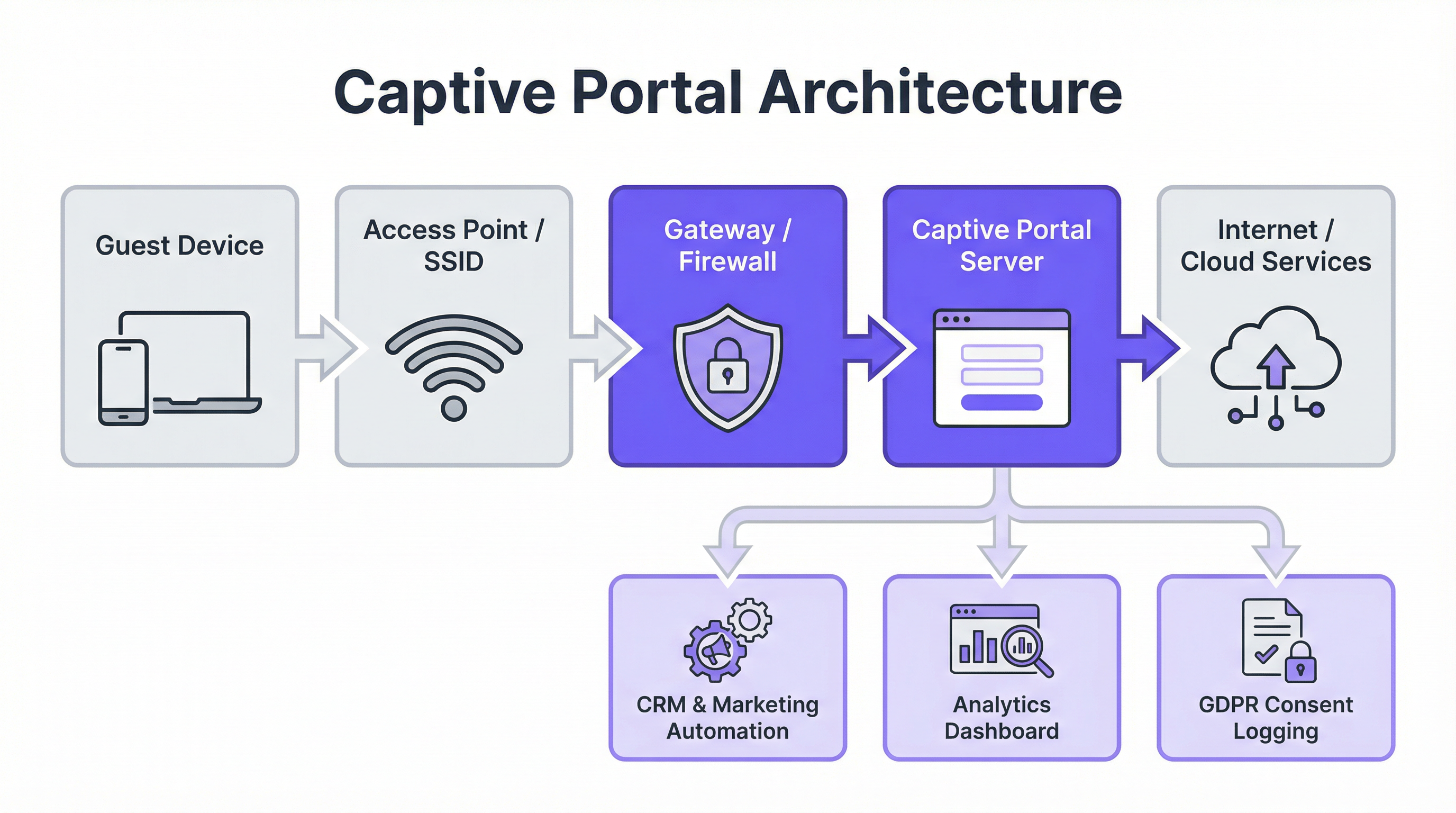
Zentrale Architekturkomponenten:
- Verbindung des Gastgeräts: Der Prozess beginnt, wenn ein Benutzer sein Gerät mit der Gast-SSID verbindet. Das Betriebssystem des Geräts führt häufig eine „Liveness“-Prüfung durch, indem es versucht, eine vordefinierte URL zu kontaktieren (z. B.
http://captive.apple.com/hotspot-detect.htmlfür iOS). - DNS- & HTTP-Interception: Das Gateway oder die Firewall des Netzwerks fängt diese anfängliche HTTP-Anfrage ab. Anstatt eine Auflösung zuzulassen, wird eine DNS-Antwort zurückgegeben, die den Browser des Benutzers auf die IP-Adresse des Captive Portal-Servers verweist. Dies wird häufig über eine DNS-Umleitung oder durch die Antwort mit einer HTTP 302/307-Umleitung erreicht.
- Portal-Authentifizierung: Dem Benutzer wird die Splash-Seite des Captive Portals angezeigt. Hier muss er eine erforderliche Aktion ausführen, z. B. eine E-Mail-Adresse eingeben, sich über einen Social-Media-Anbieter anmelden (OAuth 2.0), einen Gutscheincode eingeben oder einfach die Nutzungsbedingungen akzeptieren. Die gesamte Kommunikation in dieser Phase sollte über HTTPS gesichert sein, um die Anmeldeinformationen der Benutzer zu schützen.
- Authentifizierung & Autorisierung: Der Portal-Server validiert die Anmeldeinformationen oder die Aktion des Benutzers. Nach erfolgreicher Authentifizierung kommuniziert er mit dem Netzwerk-Controller oder Gateway und signalisiert, dass das Gerät (identifiziert durch seine MAC-Adresse) nun für den Zugriff autorisiert ist. Der Controller aktualisiert dann seine Zugriffskontrollliste (ACL), um den Datenverkehr von diesem Gerät ins Internet zuzulassen.
Wichtige Standards und Protokolle:
- IEEE 802.1X: Obwohl 802.1X häufig für den Zugriff auf Unternehmensnetzwerke verwendet wird, bietet es ein Framework für die portbasierte Netzwerkzugriffskontrolle, das für eine robustere, zertifikatsbasierte Authentifizierung in Captive Portals integriert werden kann.
- WPA3-Enterprise: Der neueste Sicherheitsstandard, der verbesserten Schutz vor Offline-Wörterbuchangriffen bietet und eine stärkere Verschlüsselung für sensible Daten gewährleistet.
- RADIUS (Remote Authentication Dial-In User Service): Ein Netzwerkprotokoll, das ein zentralisiertes Authentifizierungs-, Autorisierungs- und Accounting-Management (AAA) für Benutzer bietet, die sich verbinden und einen Netzwerkdienst nutzen. Captive Portals verwenden häufig einen RADIUS-Server im Backend, um Benutzersitzungen zu verwalten.
- GDPR & Datenschutz: Die Datenschutz-Grundverordnung schreibt eine ausdrückliche, informierte Zustimmung zur Datenerfassung vor. Ein konformes Captive Portal muss klar angeben, welche Daten zu welchem Zweck erfasst werden, und ein separates, nicht vorab angekreuztes Opt-in für Marketingkommunikation bereitstellen.
Implementierungsleitfaden
Die Bereitstellung einer Captive Portal-Lösung erfordert eine sorgfältige Planung, die auf Ihre bestehende Infrastruktur und Ihre Geschäftsziele abgestimmt ist. Die Wahl zwischen einem Controller-basierten (internen) Portal und einer externen, Cloud-basierten Lösung ist ein zentraler Entscheidungspunkt.
Schritt-für-Schritt-Bereitstellungsprozess:
- Anforderungen definieren: Bestimmen Sie das primäre Ziel. Geht es um einfachen, sicheren Zugang? Datenerfassung für das Marketing? Gestaffelte Bandbreite zur Umsatzgenerierung? Ihre Ziele bestimmen die erforderlichen Funktionen.
- Infrastruktur bewerten: Identifizieren Sie Ihre aktuelle Wireless-Hardware (Access Points, Controller) und Ihren Netzwerk-Gateway-Anbieter (z. B. Cisco, Aruba, Meraki, Ruckus). Ihre Wahl der Portallösung muss mit Ihrem Stack kompatibel sein.
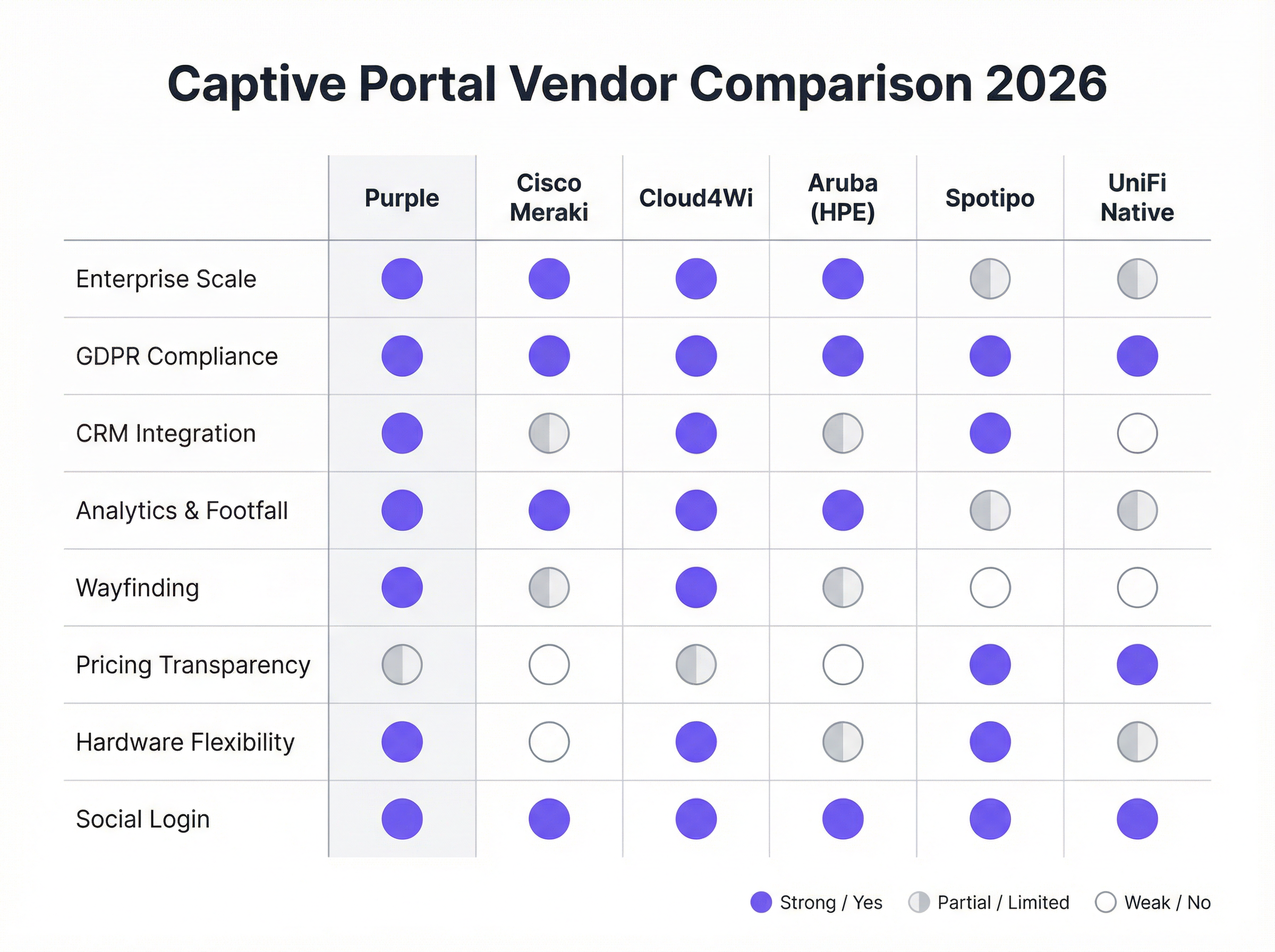
- Anbieter/Lösung auswählen:
- Hardware-native Portale (z. B. UniFi Native Portal): Kostenlos in der Hardware enthalten. Gut für grundlegende Zugriffskontrolle, aber es fehlen erweiterte Funktionen für Marketing und CRM-Integration.
- Spezialisierte Cloud-Plattformen (z. B. Purple, Cloud4Wi, Spotipo): Bieten umfangreiche Funktionssets, breite Hardwarekompatibilität und tiefe Integrationen. Diese sind ideal für Unternehmen, die sich auf Marketing und Analysen konzentrieren.
- Full-Stack-Lösungen (z. B. Cisco Meraki): Bieten eng integrierte Hardware und Software, was die Bereitstellung vereinfacht, aber einen Vendor Lock-in erzeugt.
- Splash-Seite konfigurieren: Gestalten Sie die benutzerseitige Anmeldeseite. Stellen Sie sicher, dass sie mobilgerätefreundlich (responsive) ist, Ihre Markenidentität widerspiegelt und die erforderlichen Anmeldemethoden sowie Compliance-Kontrollkästchen klar darstellt.
- Integration in Backend-Systeme: Verbinden Sie das Portal mit Ihrem CRM (z. B. Salesforce, HubSpot), Ihrer Marketing-Automatisierungsplattform (z. B. Klaviyo) und allen Property Management Systemen (PMS) für das Gastgewerbe.
- User Journey testen: Testen Sie den Verbindungs- und Authentifizierungsprozess auf verschiedenen Geräten (iOS, Android, Laptops) gründlich, um ein reibungsloses Erlebnis zu gewährleisten. Überprüfen Sie, ob die Daten korrekt in Ihre integrierten Systeme fließen.
- Überwachen und Optimieren: Nutzen Sie die Analysen der Plattform, um die Nutzung zu überwachen, Anmeldeerfolgsraten zu verfolgen und den Marketing-ROI zu messen. Verfeinern Sie Ihre Splash-Seite und Angebote basierend auf Leistungsdaten.
Best Practices
- Priorisierung der User Experience: Ein langsamer, verwirrender oder mehrstufiger Anmeldeprozess führt zu hohen Abbruchraten. Bieten Sie reibungslose Anmeldeoptionen wie Social Media oder ein einfaches „Click-to-Connect“ an, wo dies angebracht ist.
- Sicherstellung der GDPR/CCPA-Compliance: Kreuzen Sie Marketing-Opt-in-Kästchen niemals vorab an. Stellen Sie klare Links zu Ihrer Datenschutzrichtlinie und Ihren Nutzungsbedingungen bereit. Protokollieren Sie die Zustimmung der Benutzer mit Zeitstempeln für Prüfzwecke.
- Netzwerksegmentierung: Betreiben Sie Ihr Gäste-WiFi immer in einem separaten VLAN, das vollständig von Ihrem Unternehmensnetzwerk isoliert ist, um Sicherheitsrisiken zu minimieren.
- Überall HTTPS verwenden: Die Captive Portal-Seite selbst und alle nachfolgenden Interaktionen müssen mit SSL/TLS verschlüsselt sein, um Benutzerdaten bei der Übertragung zu schützen.
- Daten für Personalisierung nutzen: Verwenden Sie die gesammelten Daten, um das Erlebnis nach der Anmeldung zu personalisieren. Beispielsweise könnte ein wiederkehrender Hotelgast mit Namen begrüßt und ihm ein Treuerabatt angeboten werden.
Fehlerbehebung & Risikominderung
- Problem: Umleitung schlägt fehl (bleibt bei „Verbinden“ hängen): Wird oft durch DNS-Probleme oder Firewall-Regeln verursacht, die die Umleitung blockieren. Stellen Sie sicher, dass das Gateway korrekt auflösen und zum Portal-Server umleiten kann. Bei einigen Geräten mit VPNs oder benutzerdefinierten DNS-Einstellungen kann die Umleitung ebenfalls fehlschlagen.
- Problem: Social Login schlägt fehl: Dies kann passieren, wenn die IP-Adresse des Portal-Servers nicht in der Entwicklerkonsole des Social-Media-Anbieters (z. B. Facebook Login for Business) auf der Whitelist steht. API-Schlüssel und zulässige Umleitungs-URIs müssen korrekt konfiguriert sein.
- Risiko: „Evil Twin“-Angriffe: Ein Angreifer richtet einen Rogue Access Point mit derselben SSID wie Ihr legitimes Netzwerk ein. Benutzer verbinden sich unwissentlich mit dem Netzwerk des Angreifers, das ein gefälschtes Captive Portal präsentiert, um Anmeldeinformationen zu stehlen. Die Risikominderung umfasst den Einsatz eines Wireless Intrusion Prevention Systems (WIPS) und die Verwendung von WPA3-Enterprise-Sicherheit.
- Risiko: Datenschutzverletzung: Wenn der Captive Portal-Server oder die damit verbundene Datenbank kompromittiert wird, sind alle gesammelten Benutzerdaten gefährdet. Die Risikominderung erfordert robuste Serversicherheit, Datenverschlüsselung im Ruhezustand (Data at Rest) und die Einhaltung von PCI DSS-Standards, falls Zahlungen verarbeitet werden.
ROI & geschäftliche Auswirkungen
Der Business Case für eine strategische Captive Portal-Lösung geht weit über die Bereitstellung eines Internetzugangs hinaus. Der ROI wird durch direkte und indirekte Umsatzgenerierung, erweiterte Marketingfunktionen und verbesserte betriebliche Effizienz gemessen.
- Direkter Umsatz: Hotels und Konferenzzentren können gestaffelte Bandbreiten anbieten und einen Aufpreis für Hochgeschwindigkeitszugänge verlangen, die für Video-Streaming oder Konferenzen geeignet sind.
- Wachstum der Marketing-Datenbank: Für eine Einzelhandelskette bietet die Erfassung von 5.000 neuen, hochgradig interessierten E-Mail-Adressen pro Monat von Besuchern im Geschäft einen direkten Kanal für gezielte Werbeaktionen, was wiederholte Besuche und Verkäufe fördert.
- Gesteigerter Customer Lifetime Value (CLV): Durch die Integration in ein CRM können Unternehmen wiederkehrende Besucher identifizieren und sie in Treueprogramme aufnehmen, was die Besuchshäufigkeit und die durchschnittlichen Ausgaben erhöht.
- Betriebliche Einblicke: Frequenzanalysen, Verweildauerdaten und Besucherflusskarten ermöglichen es Veranstaltungsorten, die Personalbesetzung, das Ladenlayout und sogar die Mietpreise für bestimmte Zonen in einem Einkaufszentrum zu optimieren.
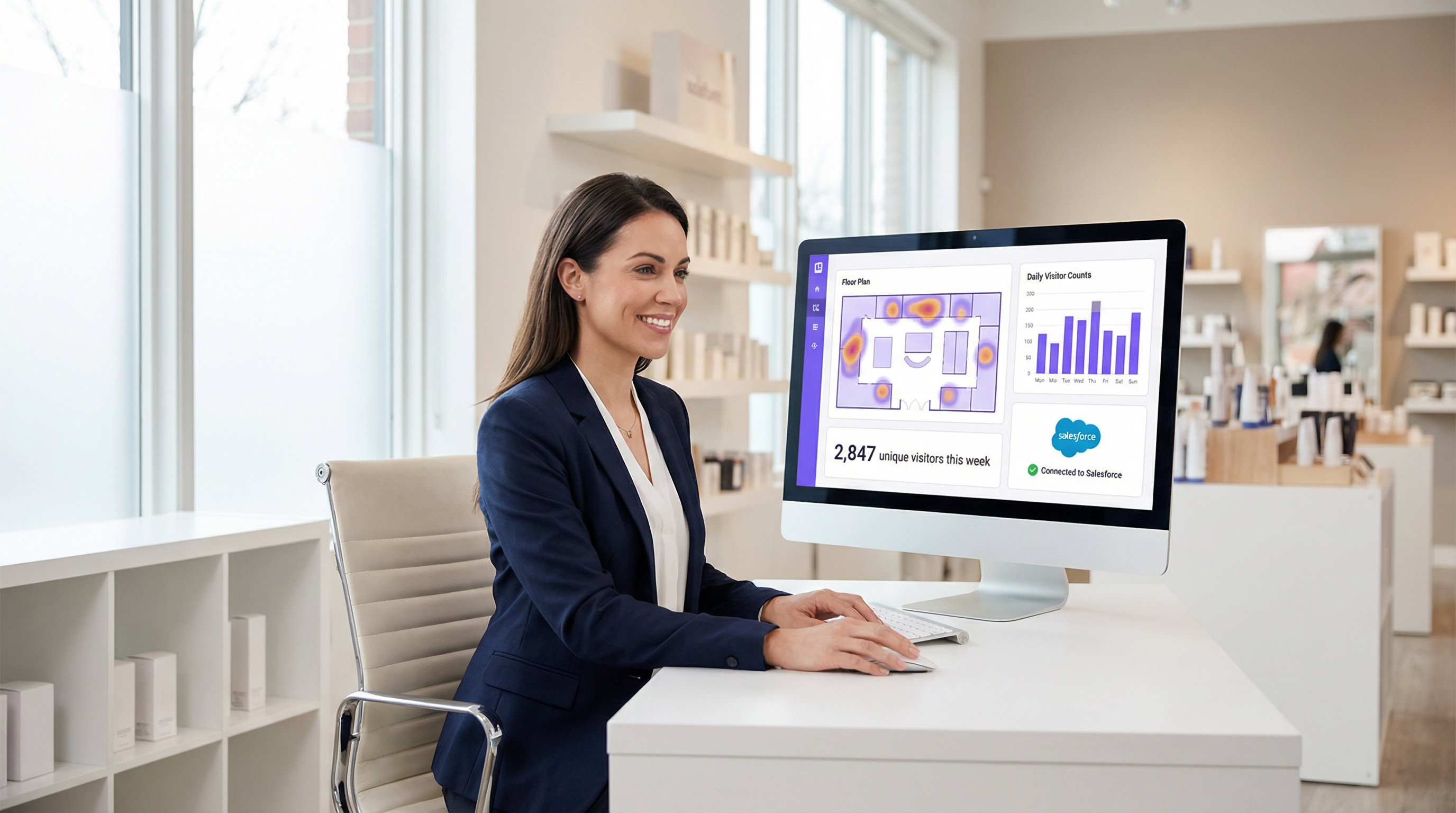
Indem Unternehmen Gäste-WiFi als Kanal für Customer Intelligence und nicht als IT-Kostenstelle betrachten, können sie erhebliche, messbare Werte erschließen, die sich direkt auf das Geschäftsergebnis auswirken.
Key Terms & Definitions
Captive Portal
A web page that the user of a public-access network is obliged to view and interact with before access is granted. It acts as a customizable gateway for authentication, policy acceptance, and marketing.
This is the core technology being discussed. IT teams deploy it to control and monetize guest WiFi access in venues like hotels, retail stores, and stadiums.
SSID (Service Set Identifier)
The name of a wireless network that is broadcasted by an access point. It's the name you see when you search for WiFi networks on your device.
IT teams configure a specific SSID for guest access (e.g., \'Hotel Guest WiFi\') which is then associated with the captive portal policy. Clear and distinct SSIDs are crucial for user experience and security.
VLAN (Virtual Local Area Network)
A method of creating logically separate networks on the same physical network infrastructure. Traffic from one VLAN is isolated from another.
This is a critical security best practice. IT architects MUST place the guest WiFi network on a separate VLAN from the corporate network to prevent guests from accessing sensitive internal resources.
MAC Address (Media Access Control Address)
A unique identifier assigned to a network interface controller (NIC) for use as a network address in communications within a network segment.
The captive portal system uses the device's MAC address to identify it and track its authentication status. Once a device is authenticated, its MAC address is added to an allow list on the gateway.
GDPR (General Data Protection Regulation)
A regulation in EU law on data protection and privacy for all individuals within the European Union and the European Economic Area. It governs how personal data is collected, processed, and stored.
For any business operating in or serving customers from the EU, the captive portal must be GDPR-compliant. This means obtaining explicit, un-coerced consent for data collection and marketing, which has major implications for portal design and data handling.
CRM (Customer Relationship Management)
Software that helps companies manage and analyze customer interactions and data throughout the customer lifecycle, with the goal of improving business relationships.
Integrating the captive portal with a CRM like Salesforce or HubSpot is how you turn WiFi access into a marketing asset. It allows guest data (email, name) to be automatically synced for targeted campaigns.
WPA3 (Wi-Fi Protected Access 3)
The latest generation of WiFi security standard, offering enhanced security features over its predecessor, WPA2, including protection against brute-force attacks.
Network architects should specify WPA3-Enterprise for the highest level of security on their guest networks. It ensures that the connection between the user's device and the access point is strongly encrypted.
Footfall Analytics
The process of analyzing data about customer traffic and behavior in a physical location, such as a retail store or a shopping mall.
Advanced captive portal solutions like Purple provide footfall analytics by analyzing WiFi connection data. This gives venue operators valuable insights into visitor numbers, dwell times, and movement patterns, which can be used to optimize operations and marketing.
Case Studies
A 250-room upscale hotel wants to replace its outdated, unreliable guest WiFi system. The goals are to provide a seamless, premium connectivity experience, gather guest data to personalize marketing, and create a new revenue stream from high-speed internet access. The existing hardware is a mix of older Cisco and Ruckus access points.
- Infrastructure Upgrade & Vendor Selection: The mixed hardware is inefficient. Standardize on a single vendor for new WiFi 6/6E access points. Select a cloud-based captive portal provider like Purple that offers broad hardware compatibility and robust PMS integration. 2. Portal Configuration: Design a branded splash page that authenticates users via Room Number + Surname. This validates their guest status via a real-time PMS lookup. 3. Tiered Access Model: Configure two tiers: a) Standard Access (Free): 5 Mbps, suitable for email and web browsing, offered complimentary. b) Premium Access ($15/day): 100 Mbps, for streaming 4K video and video conferencing. The PMS integration allows the charge to be automatically added to the guest's room bill. 4. Marketing Integration: On successful login, redirect guests to a welcome page promoting hotel amenities (spa, restaurant). Use the collected email addresses (with GDPR-compliant consent) for post-stay feedback surveys and targeted offers for future bookings. 5. Security: Deploy the guest network on a separate VLAN, isolated from the hotel's corporate and operational networks. Enforce WPA3 security on the new access points.
A national retail chain with 200 stores wants to leverage in-store guest WiFi to increase its loyalty program membership and measure the impact of digital advertising on physical foot traffic. They currently use Cisco Meraki across all locations.
- Vendor Selection: Since the hardware is standardized on Cisco Meraki, a solution with deep Meraki integration is ideal. Adentro (formerly Zenreach) is a strong candidate due to its focus on the 'Walk-Through Rate' metric, but Purple also offers robust Meraki integration with more flexible pricing. Let's proceed with Purple for its balance of features and cost-effectiveness. 2. Portal Configuration: Configure the captive portal to offer two login methods: a) Social Login (Facebook/Google) for quick access, and b) 'Join Our Loyalty Program' form that captures name, email, and mobile number in exchange for a 10% off digital coupon. 3. CRM & Ad Platform Integration: Connect the portal directly to the company's Salesforce CRM and Facebook Ads account. New loyalty sign-ups are automatically added to Salesforce. The platform will capture the MAC addresses of devices that connect to WiFi. 4. Attribution Measurement: When a customer who has previously logged into the WiFi sees a Facebook ad for the brand and subsequently enters a store (their device is detected by the WiFi network), this is recorded as a 'Walk-Through'. This allows the marketing team to directly measure the ROI of their ad spend on driving in-store traffic. 5. Analytics: Use the platform's analytics dashboard to monitor new loyalty sign-ups per store, identify peak traffic hours, and analyze customer dwell times to optimize store layouts and staffing.
Scenario Analysis
Q1. Your organization is a fast-growing chain of 50 coffee shops using a mix of different consumer-grade routers. The marketing team wants to build a customer email list. What is your primary recommendation for a captive portal strategy?
💡 Hint:Consider the challenges of managing a diverse and non-enterprise hardware environment and the primary goal of marketing data collection.
Show Recommended Approach
The primary recommendation is to deploy a hardware-agnostic, cloud-based captive portal solution like Spotipo or Purple. This approach avoids a costly and immediate hardware replacement across all 50 stores. These platforms are designed to work with a wide range of hardware and provide the centralized management and CRM integration needed to meet the marketing team's goal of building an email list. A simple, email-based login should be implemented to maximize sign-ups.
Q2. A large conference center is hosting a cybersecurity summit and needs to provide WiFi for 5,000 attendees. The summit organizers are concerned about security. How would you configure the captive portal and network?
💡 Hint:Focus on security and scalability. How do you authenticate a large number of users securely while protecting them and your network?
Show Recommended Approach
- Network Segmentation: Create a dedicated VLAN for attendee WiFi, completely isolated from the center's operational network. 2. Security Protocol: Enforce WPA3-Enterprise for robust encryption. 3. Authentication: Use a voucher-based system. Each attendee receives a unique, single-use code upon registration. This prevents unauthorized access and provides a clear audit trail. 4. Portal Configuration: The portal should be minimal, requiring only the voucher code. Disable social logins or open forms to reduce the attack surface. 5. Bandwidth Management: Implement per-user bandwidth limits to ensure fair usage and prevent network saturation. 6. Monitoring: Actively monitor the network for rogue access points or suspicious activity using a WIPS.
Q3. A hospital wants to provide guest WiFi in its waiting rooms but is extremely concerned about HIPAA compliance and protecting patient data. What is the most critical architectural decision to ensure security?
💡 Hint:What is the single most important measure to prevent any possibility of guest traffic interfering with sensitive internal systems?
Show Recommended Approach
The most critical architectural decision is the strict implementation of network segmentation using a VLAN. The guest WiFi network must be on its own VLAN, completely firewalled off from the hospital's internal clinical network where Electronic Health Records (EHR) and other sensitive patient data reside. There should be no routes and no trust between the guest VLAN and the internal VLAN. This ensures that even if a guest device is compromised, it has no network path to access sensitive internal systems, forming the foundation of a HIPAA-compliant guest WiFi strategy.
Key Takeaways
- ✓A captive portal is a strategic asset for security, compliance, and marketing, not just a login page.
- ✓The core architecture involves DNS/HTTP interception to redirect users to a portal for authentication before granting internet access.
- ✓Choosing between hardware-native portals and specialist cloud platforms depends on your business goals, particularly regarding marketing and data analytics.
- ✓GDPR and CCPA compliance are non-negotiable; portals must be designed for explicit, logged user consent.
- ✓Security best practices, like network segmentation (VLANs) and WPA3 encryption, are critical to mitigate risks like 'Evil Twin' attacks.
- ✓The ROI of a captive portal is measured in direct revenue (tiered access), marketing database growth, and operational insights from footfall analytics.
- ✓A seamless user experience is paramount; a complex login process will lead to high abandonment and low data capture.




