

Captive Portals: Ein umfassender Leitfaden für Implementierung, Anpassung und Sicherheit
This guide provides IT managers, network architects, and CTOs with a definitive technical reference for deploying, customising, and securing captive wifi portals across enterprise venues including hotels, retail chains, stadiums, and public-sector facilities. It covers authentication architectures, GDPR and PCI DSS compliance obligations, threat mitigation strategies, and the advanced analytics capabilities available through Purple's enterprise WiFi intelligence platform. Organisations that implement captive portals correctly transform a basic connectivity utility into a measurable business intelligence and revenue-generation asset.
🎧 Listen to this Guide
View Transcript

Executive Summary
Ein Captive WiFi Portal ist das kontrollierte Gateway, das jedes Gastgerät passieren muss, bevor es auf Ihr Netzwerk zugreifen kann. Für den CTO, der diese Investition evaluiert, ist der Business Case eindeutig: Ein gut implementiertes Captive Portal erfüllt gleichzeitig Ihre rechtlichen Verpflichtungen gemäß GDPR und branchenspezifischen Vorschriften, eliminiert anonymen Netzwerkzugriff und verwandelt jeden Wi-Fi-Login in ein strukturiertes First-Party-Data-Event, das Ihr CRM, Ihre Marketing-Automatisierung und Ihren operativen Analytics-Stack speist.
Der britische Markt für Captive Portals wuchs zwischen 2023 und 2024 von 0,88 Mrd. £ auf 1,01 Mrd. £, was einer durchschnittlichen jährlichen Wachstumsrate von 15,3 % entspricht, angetrieben durch die Akzeptanz im Gastgewerbe und Einzelhandel. Der Flughafen Brüssel-Charleroi meldete nach der Implementierung der Purple-Plattform einen Return on Investment von 842 %, während Enterprise-Kunden durch zentralisiertes Cloud-Management durchweg von einer 90-prozentigen Reduzierung der Vor-Ort-Einsätze von IT-Technikern berichten.
Dieser Leitfaden behandelt die technische Architektur von Captive Portals, die drei primären Authentifizierungsmodelle und deren Kompromisse, die Sicherheitshärtung gegen die häufigsten Angriffsvektoren, die Compliance-Anforderungen nach GDPR und PCI DSS sowie die erweiterten Anpassungs- und Analysefunktionen, die eine unternehmensweite Implementierung von einer gewöhnlichen Login-Seite unterscheiden.
Technischer Deep-Dive
Wie ein Captive WiFi Portal funktioniert
Im Kern ist ein Captive Portal ein Mechanismus zur Netzwerkzugriffskontrolle, der nicht authentifizierten Datenverkehr abfängt und auf eine webbasierte Authentifizierungsseite umleitet. Der Mechanismus funktioniert wie folgt: Wenn sich ein Gerät mit einer Gast-SSID verbindet, weist der Access Point über DHCP eine IP-Adresse zu und versetzt das Gerät in einen eingeschränkten Firewall-Status. Die DNS-Auflösung funktioniert normal – dies ist beabsichtigt, da die Portal-Umleitung davon abhängt –, aber der gesamte ausgehende HTTP- und HTTPS-Datenverkehr wird vom Gateway abgefangen und mit einer HTTP-302-Umleitung zur Portal-URL beantwortet.
Moderne Betriebssysteme verfügen über eine integrierte Captive Network Assistant (CNA)-Erkennung. iOS prüft captive.apple.com, Android prüft connectivitycheck.gstatic.com und Windows nutzt Network Location Awareness, um www.msftconnecttest.com abzufragen. Wenn diese Prüfungen unerwartete Antworten liefern, öffnet das Betriebssystem automatisch ein leichtgewichtiges Browserfenster, das das Portal anzeigt. Aus diesem Grund erleben Benutzer fast sofort ein Pop-up anstelle eines Browser-Timeouts.
Der vierstufige Authentifizierungsablauf stellt sich wie folgt dar:
- Verbindung und DHCP: Das Gerät verbindet sich mit der SSID und erhält eine IP-Adresse. Das Gateway markiert die Sitzung als nicht authentifiziert.
- Abfangen und Umleiten: Das Gateway fängt die erste HTTP-Anfrage ab und gibt eine 302-Umleitung zur Portal-URL aus. Bei HTTPS-Anfragen muss das Gateway entweder ein gültiges TLS-Zertifikat für die abgefangene Domain vorweisen (was Browser-Warnungen auslöst) oder sich auf den CNA-Mechanismus verlassen, um das Abfangen von HTTPS vollständig zu vermeiden.
- Authentifizierungsaktion: Der Benutzer führt die erforderliche Aktion auf der Portalseite aus – Akzeptieren einer AUP (Nutzungsrichtlinie), Eingabe von Anmeldeinformationen oder Eingabe eines Voucher-Codes.
- Sitzungsautorisierung: Der Portal-Controller teilt dem Gateway mit, dass die MAC-Adresse (oder das Sitzungs-Token) des Geräts nun autorisiert ist. Die Firewall-Regel wird aktualisiert und für die konfigurierte Sitzungsdauer wird vollständiger Internetzugang gewährt.
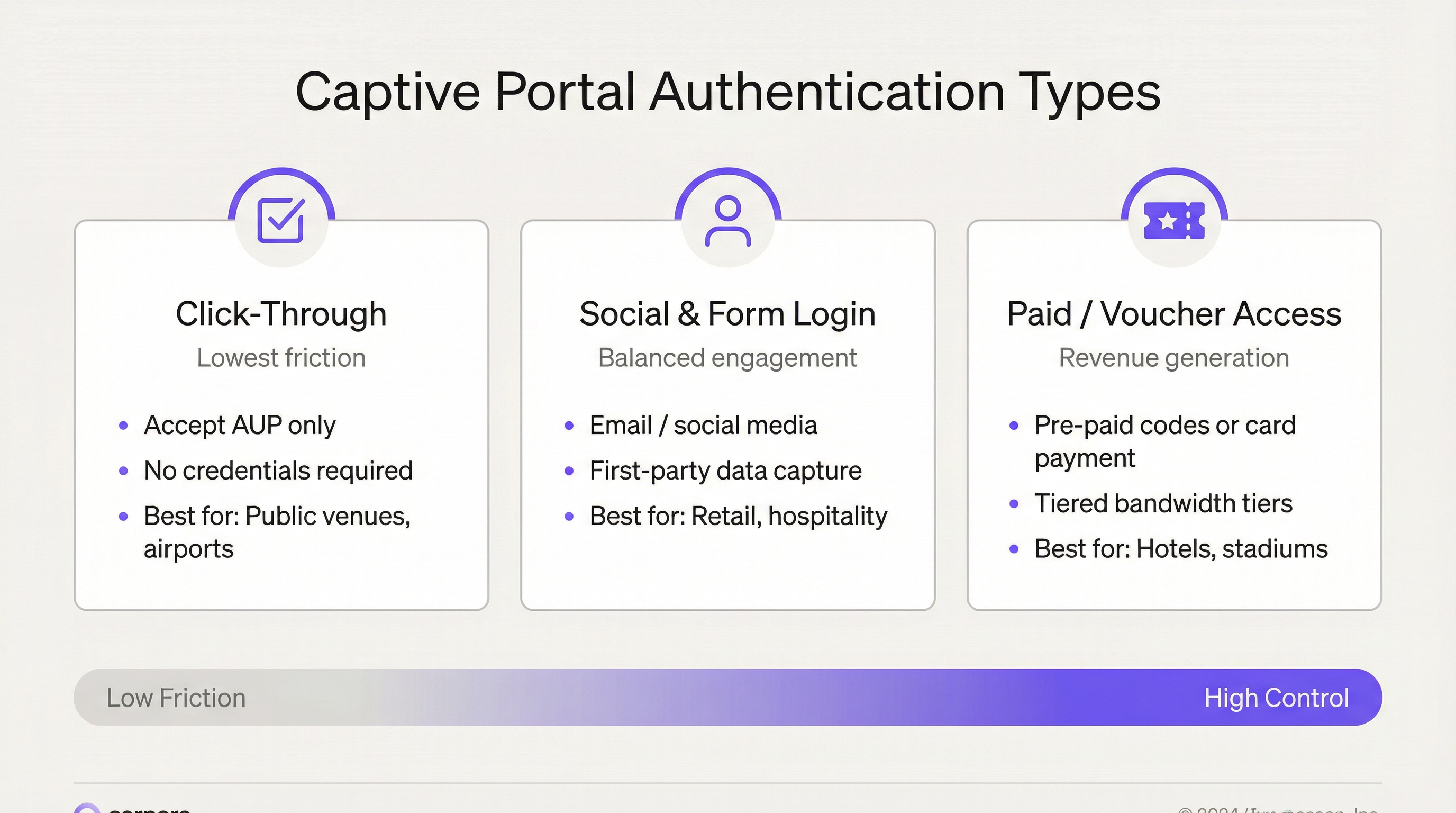
Authentifizierungsmodelle: Ein technischer Vergleich
Die Wahl des Authentifizierungsmodells ist die folgenreichste Entscheidung bei der Implementierung eines Captive Portals. Sie bestimmt Ihre Datenqualität, Ihre Compliance-Position und Ihre Metriken zur User Experience.
| Authentifizierungsmodell | Technischer Mechanismus | Erfasste Daten | Compliance-Komplexität | Am besten geeignet für |
|---|---|---|---|---|
| Click-Through (nur AUP) | Einzelne Checkbox; MAC-basierte Sitzungsautorisierung | Geräte-MAC, Zeitstempel, Sitzungsdauer | Niedrig – keine Erfassung personenbezogener Daten | Öffentlicher Sektor, Verkehrsknotenpunkte, Bibliotheken |
| E-Mail- / Formularregistrierung | Formularübermittlung; serverseitige Validierung; Ausgabe eines Sitzungs-Tokens | E-Mail, Name, Demografie, Opt-in-Status | Mittel – GDPR-Einwilligungsprozess erforderlich | Gastgewerbe, Einzelhandel, Unternehmensstandorte |
| Social Login (OAuth 2.0) | OAuth 2.0-Autorisierungsablauf über Facebook, Google, LinkedIn | Social-Profile-Daten (abhängig von Plattformbeschränkungen) | Mittel-Hoch – Verträge zur Auftragsverarbeitung mit Drittanbietern | Gastgewerbe, Events, Einzelhandel |
| Voucher / Kostenpflichtiger Zugang | Vorgenerierte Codes oder Integration von Payment-Gateways | E-Mail (für Beleg), Zahlungsreferenz | Mittel – PCI DSS-Geltungsbereich bei Kartenzahlung im Netzwerk | Hotels, Stadien, Konferenzzentren |
| PMS / Zimmernummern-Auth | Integration mit Property Management System API | Gastidentität aus PMS-Datensatz | Niedrig – Daten liegen bereits durch Hotelbuchung vor | Hotels, Resorts |
Das Social-Login-Modell verdient besondere Aufmerksamkeit. OAuth 2.0-Abläufe über Facebook und Google bieten eine reibungslose User Experience und umfangreichere demografische Daten, aber Änderungen an der Plattform-API haben die für Drittanbieter-Anwendungen zugänglichen Datenfelder zunehmend eingeschränkt. Netzwerkarchitekten sollten keine Datenpipelines entwerfen, die von Social-Profile-Feldern abhängen, die möglicherweise veraltet sind. Die E-Mail-Erfassung mit ausdrücklicher Einwilligung bleibt die beständigste First-Party-Data-Strategie.
Netzwerkarchitektur und Segmentierung
Eine ordnungsgemäße Netzwerksegmentierung ist die wichtigste Sicherheitskontrolle bei der Implementierung eines Captive Portals. Das Gastnetzwerk muss architektonisch vom Unternehmens-LAN, jeglicher PCI-relevanten Karteninhaber-Datenumgebung und allen Netzwerken der Betriebstechnik (OT) isoliert sein. Die empfohlene Architektur sieht wie folgt aus:
- Dedizierte Gast-SSID, die einem dedizierten VLAN (z. B. VLAN 100) ohne Layer-2-Nachbarschaft zu Unternehmens-VLANs zugeordnet ist.
- Inter-Client-Isolation, die auf Access-Point-Ebene erzwungen wird und verhindert, dass Gastgeräte miteinander kommunizieren.
- DMZ-Routing für den gesamten Gastdatenverkehr, mit Stateful-Firewall-Inspektion vor dem Internet-Austritt.
- Captive Portal Controller (Hardware, virtuell oder Cloud-managed), der sich in der DMZ befindet und Umleitungslogik, Sitzungsmanagement und Richtliniendurchsetzung übernimmt.
- Separate DNS-Resolver für das Gast-VLAN, mit aktivierter DNSSEC-Validierung.
Bei Multi-Site-Enterprise-Implementierungen zentralisieren Cloud-managed Plattformen wie Purple diese Architektur über Hunderte von Standorten hinweg. Eine Richtlinienänderung – die Aktualisierung des AUP-Textes, das Hinzufügen eines neuen Social-Login-Anbieters oder die Änderung von Bandbreitenstufen – wird einmalig gepusht und innerhalb von Minuten global verteilt. Dies eliminiert den standortspezifischen Konfigurationsaufwand, der controllerbasierte Implementierungen bei Skalierung operativ teuer macht.
Implementierungsleitfaden
Phase 1: Anforderungen und Compliance-Scoping
Bevor die technische Konfiguration beginnt, definieren Sie Ihre Compliance-Verpflichtungen. Für den Betrieb in der EU und in Großbritannien erfordert GDPR Artikel 6 eine rechtmäßige Grundlage für die Verarbeitung personenbezogener Daten. Bei Captive Portal-Implementierungen ist dies typischerweise Einwilligung (Artikel 6 Abs. 1 lit. a) oder berechtigte Interessen (Artikel 6 Abs. 1 lit. f). Die Einwilligung ist die sauberere Grundlage für Marketingdaten; berechtigte Interessen können für die Sicherheitsprotokollierung gelten. Dokumentieren Sie Ihre Rechtsgrundlage für jede Datenkategorie in Ihrem Verzeichnis von Verarbeitungstätigkeiten (VVT) gemäß Artikel 30.
Wenn Ihr Standort Kartenzahlungen in einem Netzwerk verarbeitet, das die Infrastruktur mit Ihrem Gast-Wi-Fi teilt – selbst über gemeinsam genutzte Uplink-Switches –, müssen Sie Ihren PCI DSS-Geltungsbereich bewerten. Der sicherste Ansatz ist eine vollständige Netzwerkisolation: Gast-Wi-Fi in einem separaten physischen oder logisch isolierten Netzwerk ohne Verbindung zur Karteninhaber-Datenumgebung.
Phase 2: Netzwerkdesign und Infrastruktur
Stellen Sie Ihre Gast-SSID in einem dedizierten VLAN bereit. Leiten Sie dieses VLAN über einen Trunk an Ihre Uplink-Switches weiter und überprüfen Sie die Trunk-Konfiguration, bevor Sie fortfahren – ein falsch konfigurierter Trunk ist die häufigste Ursache dafür, dass Gäste versehentlich im Unternehmensnetzwerk auftauchen. Konfigurieren Sie DHCP für das Gast-VLAN mit einer kurzen Lease-Zeit (1–4 Stunden), um IP-Adressen in Umgebungen mit hoher Fluktuation effizient zurückzugewinnen.
Wählen Sie Ihr Captive Portal-Bereitstellungsmodell: controllerbasiert (On-Premises-Hardware oder virtuelle Appliance) oder Cloud-managed (SaaS-Plattform). Für Organisationen mit mehr als fünf Standorten wird Cloud-managed aus Gründen der betrieblichen Effizienz dringend empfohlen. Die Plattform von Purple unterstützt über 400 Hardware-Integrationen, darunter Cisco Meraki, Aruba, Ruckus und Ubiquiti, was eine Implementierung ohne Austausch der bestehenden Access-Point-Infrastruktur ermöglicht.
Phase 3: Portal-Konfiguration und Branding
Mit der Plattform von Purple erfolgt die Anpassung der Splash-Page über einen Drag-and-Drop-Editor, der vollständige HTML/CSS-Überschreibungen für Organisationen unterstützt, die eine pixelgenaue Markenausrichtung benötigen. Zu den wichtigsten Konfigurationselementen gehören:
- Marken-Assets: Logo, Farbpalette, Hintergrundbilder und Schriftartenauswahl.
- Sprachlokalisierung: Purple unterstützt die automatische Erkennung der Gerätesprache für über 25 Sprachen und präsentiert das Portal in der Gerätesprache des Benutzers ohne manuelle Auswahl.
- Authentifizierungsablauf: Konfigurieren Sie Ihre gewählte(n) Authentifizierungsmethode(n). Es können mehrere Methoden gleichzeitig angeboten werden – zum Beispiel E-Mail-Registrierung und Click-Through –, wobei die Click-Through-Option als Fallback für Benutzer verfügbar ist, die sich nicht registrieren möchten.
- Consent Management: Konfigurieren Sie separate, unabhängig voneinander optionale Checkboxen für die AUP-Akzeptanz (für den Zugriff erforderlich) und das Marketing-Opt-in (optional). Stellen Sie sicher, dass die Marketing-Checkbox standardmäßig deaktiviert ist. Verlinken Sie Ihre Datenschutzrichtlinie auf der Portalseite.
- Post-Authentication-Redirect: Konfigurieren Sie eine sinnvolle Umleitungs-URL – Ihr Treueprogramm, eine werbliche Landingpage oder die Download-Seite Ihrer Standort-App.
- Sitzungsparameter: Legen Sie eine Sitzungsdauer fest, die zu Ihrem Standorttyp passt. Hotels nutzen typischerweise 24-Stunden-Sitzungen; der Einzelhandel mit hoher Fluktuation nutzt möglicherweise 4–8 Stunden; bei Events können Sitzungen für die Dauer der Veranstaltung genutzt werden.
Phase 4: Sicherheitshärtung
Wenden Sie vor dem Go-Live die folgenden Sicherheitskontrollen an:
- Stellen Sie das Portal ausschließlich über HTTPS mit einem gültigen TLS-Zertifikat einer vertrauenswürdigen CA bereit. Erneuern Sie Zertifikate automatisch mit Let's Encrypt oder der ACME-Protokollunterstützung Ihrer CA. Richten Sie als manuelle Absicherung eine Kalendererinnerung 30 Tage vor Ablauf ein.
- Aktivieren Sie 802.11w Management Frame Protection auf der Gast-SSID. Dies ist unter WPA3 obligatorrisch und mindert Deauthentifizierungsangriffe, die in Evil-Twin-Szenarien verwendet werden.
- Konfigurieren Sie Wireless Intrusion Detection, um bei Rogue-SSIDs zu warnen, die mit dem Namen Ihrer Gast-SSID übereinstimmen.
- Aktivieren Sie Rate Limiting pro Benutzer auf Access-Point-Ebene, um eine Monopolisierung der Bandbreite zu verhindern und Denial-of-Service-Angriffe durch einzelne Geräte zu mindern.
- Konfigurieren Sie Richtlinien für Session-Timeouts und Idle-Timeouts. Ein Idle-Timeout von 30–60 Minuten gewinnt Gateway-Sitzungen von Geräten zurück, die den Standort verlassen haben.
Phase 5: Testing und Go-Live
Testen Sie vor dem Go-Live den kompletten Authentifizierungsablauf auf den folgenden Geräte-/Betriebssystemkombinationen: iOS Safari (aktuellste Version), Android Chrome (aktuellste Version), Windows 11 Edge, macOS Safari und Android Firefox. Überprüfen Sie, ob das CNA-Pop-up unter iOS und Android korrekt ausgelöst wird. Testen Sie die Gültigkeit des Zertifikats – navigieren Sie in einem Browser direkt zur Portal-URL und vergewissern Sie sich, dass keine Zertifikatswarnungen angezeigt werden. Testen Sie den Post-Authentication-Redirect. Testen Sie die Durchsetzung der Bandbreitenstufen, falls zutreffend. Dokumentieren Sie die Testergebnisse.
Best Practices
Security Best Practices
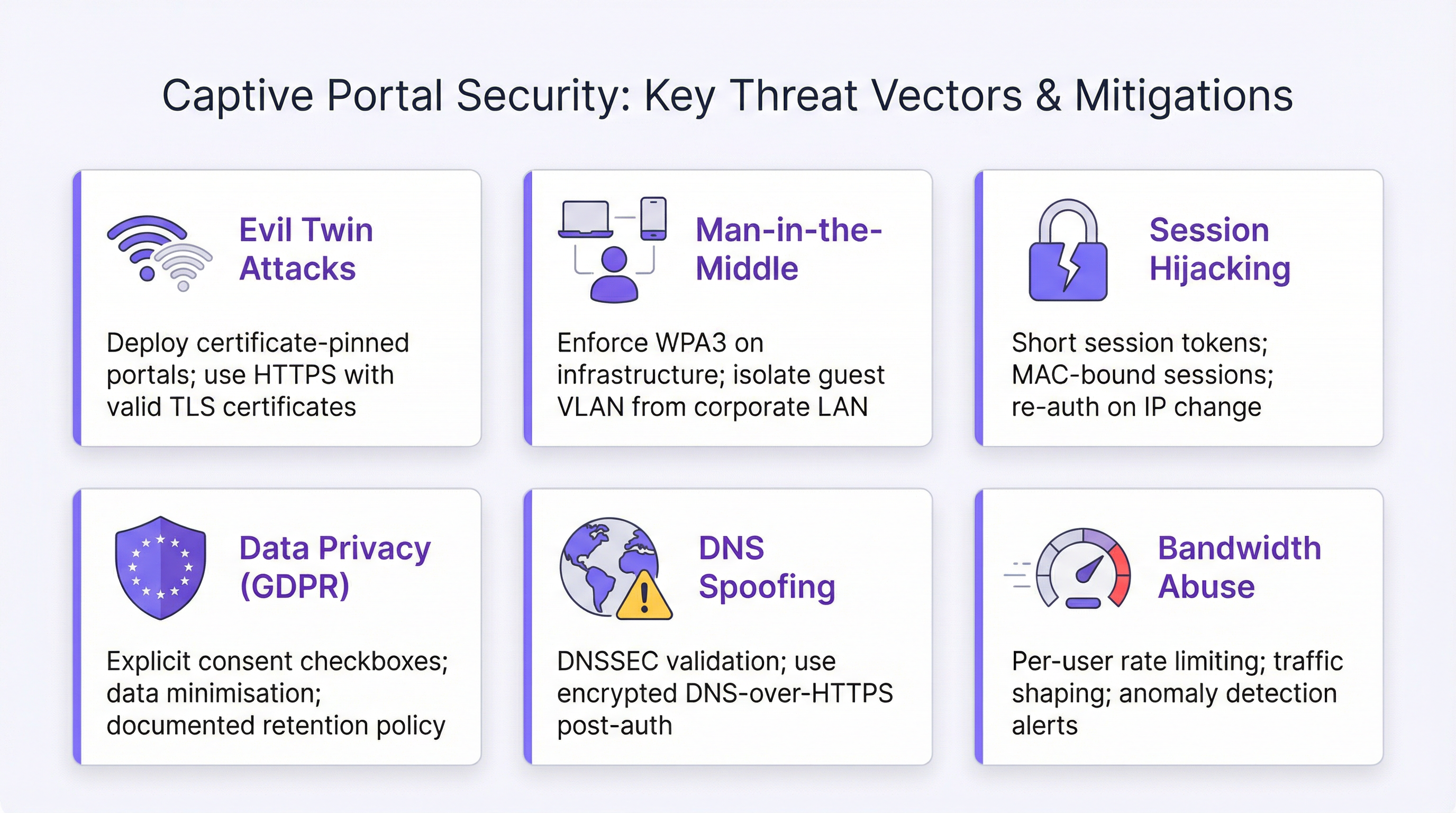
Die größten Sicherheitsrisiken im Zusammenhang mit Captive WiFi Portals sind Evil-Twin-Angriffe, Man-in-the-Middle-Interception, Session-Hijacking und DNS-Spoofing. Für jedes Risiko gibt es eine definierte Minderungsstrategie.
Evil-Twin-Angriffe werden durch HTTPS-Erzwingung mit gültigen TLS-Zertifikaten, 802.11w Management Frame Protection und Wireless-IDS-Überwachung gemindert. Ein Benutzer, der sich mit einem Rogue-AP verbindet, erhält eine Zertifikatswarnung, wenn der Angreifer kein gültiges Zertifikat für Ihre Portal-Domain erhalten kann – was er nicht kann, vorausgesetzt, Ihre Domain wird ordnungsgemäß kontrolliert.
Man-in-the-Middle-Interception wird durch strikte VLAN-Segmentierung, Inter-Client-Isolation und das Routing des gesamten Gastdatenverkehrs durch eine Stateful-Firewall adressiert. Ermutigen Sie Benutzer nach der Authentifizierung, sich über HTTPS mit Websites zu verbinden – ein Hinweis auf der Post-Auth-Landingpage ist ausreichend.
Session-Hijacking wird gemindert, indem Sitzungs-Tokens anstelle von MAC-Adressen als alleiniger Autorisierungsidentifikator verwendet werden, angemessene Sitzungsdauern festgelegt werden und Re-Authentifizierungs-Trigger bei IP-Adressänderungen implementiert werden. Beachten Sie, dass die MAC-Adressen-Randomisierung – standardmäßig aktiviert unter iOS 14+, Android 10+ und Windows 10+ – bedeutet, dass die MAC-basierte Sitzungspersistenz nicht mehr zuverlässig ist. Sitzungs-Tokens, die an eine authentifizierte Identität gebunden sind, sind der richtige Ansatz.
DNS-Spoofing wird durch DNSSEC-Validierung auf Ihren Gast-DNS-Resolvern und, nach der Authentifizierung, durch die Förderung oder Erzwingung von DNS-over-HTTPS für den Gastdatenverkehr adressiert.
GDPR-Compliance-Checkliste
Die folgenden Kontrollen sind für den GDPR-konformen Betrieb eines Captive Portals in den Gerichtsbarkeiten von Großbritannien und der EU erforderlich:
- Consent-Checkboxen sind standardmäßig deaktiviert.
- Separate, unabhängig voneinander optionale Checkboxen für die AUP-Akzeptanz und das Marketing-Opt-in.
- Klare, leicht verständliche Beschreibung, welche Daten gesammelt werden und warum.
- Link zur Datenschutzrichtlinie auf der Portalseite.
- Dokumentierte Richtlinie zur Datenaufbewahrung und -löschung.
- Verträge zur Auftragsverarbeitung (AVV) mit allen Drittverarbeitern (CRM-Plattformen, Analytics-Tools).
- Eintrag im Verzeichnis von Verarbeitungstätigkeiten (VVT), der die Datenerfassung des Captive Portals abdeckt.
- Prozess zur Beantwortung von Auskunftsersuchen von Betroffenen innerhalb von 30 Tagen.
- Prozess zur Datenlöschung auf Anfrage.
Operative Best Practices
Der häufigste operative Fehler bei Enterprise-Captive-Portal-Implementierungen ist das „Set and Forget“-Muster: Das Portal wird bereitgestellt, es funktioniert und erhält keine weitere Aufmerksamkeit, bis etwas kaputtgeht. Implementieren Sie ein vierteljährliches operatives Review, das Folgendes abdeckt: Ablaufdaten von TLS-Zertifikaten, Gültigkeit von Social-Login-API-Schlüsseln, Integrität von Datenschutzrichtlinien-Links, Aktualität des AUP-Textes (insbesondere nach regulatorischen Änderungen) und Tests des Authentifizierungsablaufs über alle unterstützten Betriebssystem-/Browserkombinationen hinweg.
Fehlerbehebung & Risikominderung
Häufige Fehlerquellen
| Fehlerquelle | Symptome | Ursache | Lösung |
|---|---|---|---|
| Portal erscheint nicht unter iOS | Gerät verbindet sich, aber kein CNA-Pop-up | Apple-Probe von Firewall blockiert | Ausgehendes HTTP zu captive.apple.com zulassen; sicherstellen, dass DNS korrekt auflöst |
| Zertifikatswarnung im Portal | Browser zeigt Warnung „Nicht sicher“ | Abgelaufenes oder selbstsigniertes TLS-Zertifikat | Zertifikat erneuern; automatische Erneuerung konfigurieren |
| Umleitungsschleife | Benutzer steckt in Endlosumleitung fest | Falsch konfigurierte Post-Auth-Redirect-URL oder Firewall-Regel nicht aktualisiert | Firewall-Sitzungsautorisierung überprüfen; Konfiguration der Redirect-URL prüfen |
| Social-Login-Fehler | OAuth-Ablauf gibt Fehler zurück | API-Schlüssel abgelaufen oder Änderung der Plattformberechtigungen | API-Schlüssel neu generieren; Entwicklerkonsole der Plattform auf Berechtigungsänderungen überprüfen |
| Gäste im Unternehmensnetzwerk | Gastgeräte erscheinen im Unternehmens-VLAN | Fehlkonfiguration des VLAN-Trunks | VLAN-Trunk am Uplink-Switch überprüfen; SSID-zu-VLAN-Zuordnung bestätigen |
| MAC-Randomisierung unterbricht Sitzungen | Benutzer werden bei erneuter Verbindung wieder zur Anmeldung aufgefordert | MAC-basierte Sitzungspersistenz schlägt bei randomisierten MACs fehl | Auf tokenbasiertes Sitzungsmanagement umstellen; Sitzungsdauer erhöhen |
| Bandbreitenstufe nicht durchgesetzt | Premium-Benutzer erhalten denselben Durchsatz wie kostenlose Benutzer | QoS-Richtlinie nicht auf AP-Ebene angewendet | Rate Limiting pro Benutzer am Access Point konfigurieren, nicht nur am Gateway |
Risikoregister
Für Zwecke des Enterprise Risk Managements stellen sich die Hauptrisiken im Zusammenhang mit Captive Portal-Implementierungen und deren Minderungsmaßnahmen wie folgt dar. GDPR-Non-Compliance (Wahrscheinlichkeit: mittel, Auswirkung: hoch) wird durch dokumentierte Consent-Abläufe, VVT-Einträge und vierteljährliche Compliance-Reviews gemindert. Ablauf des TLS-Zertifikats (Wahrscheinlichkeit: mittel, Auswirkung: hoch – Portal wird unzugänglich) wird durch automatisierte Zertifikatserneuerung und kalenderbasierte Überwachung gemindert. Evil-Twin-Angriff (Wahrscheinlichkeit: gering, Auswirkung: hoch) wird durch 802.11w, WIDS-Überwachung und HTTPS-Erzwingung gemindert. Datenleck über das Gastnetzwerk (Wahrscheinlichkeit: gering, Auswirkung: sehr hoch) wird durch strikte VLAN-Segmentierung und Firewall-Richtlinien gemindert.
ROI & Business Impact

Messung des Return on Investment
Der ROI einer Captive WiFi Portal-Implementierung wird über drei Dimensionen gemessen: direkte Umsatzgenerierung, Senkung der Betriebskosten sowie Marketing- und Datenwert.
Die direkte Umsatzgenerierung gilt in erster Linie für Standorte, die gestuften Zugang anbieten – Hotels, Stadien und Konferenzzentren, die Premium-Bandbreitenpakete verkaufen. Ein Hotel mit 200 Zimmern, das 30 % der Gäste 5 £ pro Tag für Premium-Wi-Fi berechnet, generiert etwa 110.000 £ an jährlichem Zusatzumsatz aus einer Implementierung, die nur einen Bruchteil dieses Betrags kostet.
Die Senkung der Betriebskosten wird durch zentralisiertes Management vorangetrieben. Die Enterprise-Kunden von Purple berichten von einer 90-prozentigen Reduzierung der Vor-Ort-Einsätze von IT-Technikern nach der Migration von controllerbasierten zu Cloud-managed Implementierungen. Für eine Einzelhandelskette mit 200 Standorten bedeutet die Einsparung von nur zwei Technikereinsätzen pro Standort und Jahr zu je 150 £ eine jährliche Ersparnis von 60.000 £.
Der Marketing- und Datenwert ist die strategisch bedeutendste Dimension. Ein Captive Portal, das E-Mail-Adressen mit Marketing-Einwilligung erfasst, baut einen First-Party-Data-Bestand auf, der zunehmend wertvoller wird, da die Abschaffung von Third-Party-Cookies alternative Datenquellen beseitigt. Die Plattform von Purple lässt sich in über 400 CRM- und Marketing-Automation-Konnektoren integrieren, sodass erfasste Daten direkt in Salesforce, HubSpot, Mailchimp und vergleichbare Plattformen fließen können. Die Analytics-Ebene – Footfall-Heatmaps, Verweildaueranalysen, Identifizierung wiederkehrender Besucher und Peak-Hour-Reporting – liefert operative Intelligenz, die Entscheidungen zu Personalbesetzung, Ladenlayout und Timing von Werbeaktionen fundiert unterstützt.
Key Performance Indicators
| KPI | Definition | Ziel-Benchmark |
|---|---|---|
| Portal-Adoptionsrate | % der verbundenen Geräte, die die Authentifizierung abschließen | >60 % im Gastgewerbe; >40 % im Einzelhandel |
| Datenerfassungsrate | % der authentifizierten Sitzungen, die eine E-Mail-Adresse angeben | >50 % bei formularbasierten Portalen |
| Marketing-Opt-in-Rate | % der authentifizierten Sitzungen, die dem Marketing zustimmen | 20–35 % sind typisch für das Gastgewerbe |
| Sitzungsdauer | Durchschnittliche Zeit, die ein Gerät nach der Authentifizierung verbunden bleibt | Standortabhängig; Trends im Zeitverlauf verfolgen |
| Rate wiederkehrender Besucher | % der authentifizierten Sitzungen von zuvor erfassten Identitäten | Indikator für Loyalität; Ziel >30 % für den Einzelhandel |
| Portal-Uptime | % der Zeit, in der das Portal verfügbar und funktionsfähig ist | >99,9 % SLA-Ziel |
| Verbleibende Tage des TLS-Zertifikats | Tage bis zum Ablauf des Zertifikats | Warnschwelle: <30 Tage |
Case Study: Flughafen Brüssel-Charleroi
Der Flughafen Brüssel-Charleroi implementierte die Captive Portal-Plattform von Purple, um das Gast-Wi-Fi im gesamten Terminal zu verwalten. Die Implementierung erreichte eine Fan-Verbindungsrate von 25 % pro Event, erfasste 9,2 Millionen Kundenbesuche in den ersten 24 Monaten und lieferte einen Return on Investment von 842 %. Die Umfrageintegration des Portals ermöglichte die Erfassung von Daten zur Passagierzufriedenheit in Echtzeit, ersetzte teure manuelle Umfrageprozesse und lieferte dem Standortmanagement umsetzbare operative Intelligenz.
Case Study: Große britische Einzelhandelskette
Eine große britische Einzelhandelskette mit über 150 Standorten implementierte die Plattform von Purple, um das Gast-Wi-Fi-Management und die Analytics zu vereinheitlichen. Vor der Implementierung hatte die Kette keinen Einblick in die Verweildauer in den Filialen, die Footfall-Muster oder die Beziehung zwischen Wi-Fi-Nutzung und Kaufverhalten. Nach der Implementierung stellte die Analytics-Ebene fest, dass Filialen mit überdurchschnittlicher Verweildauer im Café-Bereich 23 % höhere durchschnittliche Transaktionswerte aufwiesen. Diese Erkenntnis führte zu einem Programm zur Neugestaltung des Ladenlayouts, das innerhalb von zwei Quartalen eine messbare Umsatzsteigerung brachte. Die zentralisierte Managementfunktion reduzierte den operativen IT-Aufwand durch den Wegfall des standortspezifischen Konfigurationsmanagements, wobei die 90-prozentige Reduzierung der Technikereinsätze zu erheblichen jährlichen Kosteneinsparungen im gesamten Bestand führte.
Key Terms & Definitions
Captive WiFi Portal
A network access control mechanism that intercepts unauthenticated HTTP/HTTPS traffic from newly connected devices and redirects it to a web-based landing page. The user must complete a defined action — accepting terms, submitting credentials, or making a payment — before the network gateway grants full internet access. The portal creates a 'walled garden' that controls the initial network access event.
IT teams encounter this term when specifying guest Wi-Fi requirements, evaluating network access control solutions, or auditing existing deployments. It is the foundational concept for all guest connectivity management in hospitality, retail, events, and public-sector environments.
Captive Network Assistant (CNA)
A built-in OS mechanism that detects the presence of a captive portal and automatically launches a lightweight browser window to display the portal page. iOS probes captive.apple.com, Android probes connectivitycheck.gstatic.com, and Windows uses Network Location Awareness. When these probes return unexpected responses, the CNA triggers automatically.
Network architects must ensure their firewall and DNS configuration does not inadvertently block CNA probes, as this prevents the portal from appearing automatically on user devices — the most common cause of 'portal not showing' support tickets.
VLAN (Virtual Local Area Network)
A logical network segmentation technique that isolates traffic at Layer 2 of the OSI model. In captive portal deployments, the guest SSID is mapped to a dedicated VLAN that is architecturally isolated from corporate VLANs, preventing guest traffic from reaching internal systems.
VLAN configuration is the foundational security control in any captive portal deployment. Misconfigured VLAN trunking — where the guest VLAN is not properly isolated from corporate VLANs — is the most common and most serious security failure mode in enterprise guest Wi-Fi deployments.
OAuth 2.0
An open authorisation framework (RFC 6749) that enables third-party applications to obtain limited access to user accounts on platforms such as Facebook, Google, and LinkedIn. In captive portal deployments, OAuth 2.0 is used to implement social login — the user authorises the portal to access their social profile, providing identity verification without requiring a separate account.
IT teams evaluating social login authentication must understand that OAuth 2.0 introduces a dependency on third-party API availability and is subject to platform policy changes that may restrict the data fields accessible to the portal application. Social platform API changes have historically reduced the demographic data available via social login without advance notice.
IEEE 802.11w (Management Frame Protection)
An IEEE 802.11 amendment that provides cryptographic protection for management frames — the control messages that govern Wi-Fi association, disassociation, and authentication. Without 802.11w, management frames can be spoofed by attackers to force device disconnection (deauthentication attacks), a technique used in evil twin attacks. 802.11w is mandatory under WPA3.
Network architects deploying captive portals in high-risk environments (airports, financial institutions, healthcare) should enable 802.11w on guest SSIDs where supported by the access point hardware. It significantly raises the bar for evil twin attacks by preventing the deauthentication frames that force devices to reconnect to a rogue AP.
GDPR Article 30 (Record of Processing Activities)
A GDPR requirement for organisations processing personal data to maintain a documented record of all data processing activities, including the categories of data processed, the purposes of processing, data retention periods, and details of any third-party processors. Captive portal deployments that collect personal data (email addresses, social profile data) must have a corresponding ROPA entry.
IT managers are frequently responsible for ensuring that new data collection systems — including captive portals — are documented in the organisation's ROPA before go-live. Failure to maintain an accurate ROPA is a GDPR compliance gap that can result in ICO enforcement action, particularly following a data breach.
PCI DSS (Payment Card Industry Data Security Standard)
A set of security standards established by the PCI Security Standards Council to protect cardholder data. For captive portal deployments in retail environments, PCI DSS requires complete network isolation between the guest Wi-Fi network and any system that stores, processes, or transmits cardholder data (the Cardholder Data Environment, or CDE).
Retail IT teams must assess PCI DSS scope when deploying guest Wi-Fi. If the guest Wi-Fi network shares any infrastructure — switches, uplinks, or firewalls — with the PCI-scoped network, the guest network may be brought into PCI scope, significantly increasing compliance obligations and audit costs.
MAC Address Randomisation
A privacy feature enabled by default on iOS 14+, Android 10+, and Windows 10+ that generates a random MAC address for each Wi-Fi network a device connects to, rather than using the device's hardware MAC address. This prevents cross-network tracking of devices by their MAC address.
MAC address randomisation directly impacts captive portal session management and analytics. Any system that uses MAC addresses as stable device identifiers for repeat visitor detection, session persistence, or security policy enforcement will produce incorrect results on modern devices. The correct approach is to use authenticated identity (email, social profile ID) as the stable identifier.
Walled Garden
A network configuration in which unauthenticated devices have access only to a restricted set of IP addresses and URLs — typically the captive portal itself and any resources required for the portal to function (CDN assets, OAuth endpoints) — while all other internet traffic is blocked until authentication is complete.
IT teams configuring captive portals must carefully define the walled garden whitelist. Common omissions include: the portal's CDN asset URLs (causing the portal page to render without styling), Apple's CNA probe URL (causing the portal not to appear on iOS), and OAuth provider endpoints (causing social login to fail). A well-documented walled garden configuration is essential for reliable portal operation.
DSCP (Differentiated Services Code Point)
A field in the IP packet header used to classify and manage network traffic for Quality of Service (QoS) purposes. In captive portal deployments with tiered bandwidth, DSCP marking is used to classify traffic from premium-tier users so that QoS policies at the access point and gateway can enforce differentiated throughput limits.
IT teams implementing paid bandwidth tiers must configure DSCP marking and corresponding QoS policies at the access point level, not only at the gateway. Gateway-only QoS policies may not differentiate traffic correctly when multiple users share the same access point, resulting in premium users receiving the same throughput as free-tier users.
Case Studies
A 350-room international hotel needs to deploy a captive wifi portal that authenticates guests using their room number and surname, captures email addresses for the loyalty programme, complies with GDPR, and provides tiered bandwidth (free standard / paid premium at £8/day). The hotel uses Opera PMS and Cisco Meraki access points. What is the recommended deployment architecture and configuration?
The recommended deployment uses Purple's enterprise platform integrated with Cisco Meraki via the Meraki API. Step 1: Configure a dedicated guest SSID on Meraki mapped to VLAN 200, with client isolation enabled and a separate DHCP scope (e.g., 10.200.0.0/22 providing up to 1,022 addresses for a 350-room hotel with multiple devices per guest). Step 2: Configure Purple as the captive portal controller, pointing the Meraki splash page URL to Purple's hosted portal endpoint. Step 3: Enable the Opera PMS integration in Purple's connector library. Configure the authentication flow to present a room number and surname form as the primary authentication method, with email address capture as a mandatory second step post-PMS validation. Step 4: Configure the GDPR consent flow: AUP acceptance checkbox (required, unchecked by default) and marketing opt-in checkbox (optional, unchecked by default) with a link to the hotel's privacy policy. Step 5: Configure two bandwidth tiers in Purple — Standard (5 Mbps down / 2 Mbps up) and Premium (25 Mbps down / 10 Mbps up). Integrate with a payment gateway (Stripe is supported) for the Premium tier purchase flow. Configure Meraki QoS policies using DSCP marking to enforce tier differentiation at the AP level. Step 6: Set session duration to 24 hours with a 60-minute idle timeout. Step 7: Configure post-authentication redirect to the hotel's loyalty programme enrolment page. Step 8: Enable Purple's analytics dashboard and configure a CRM connector to push captured email addresses and opt-in status to the hotel's CRM platform. Test on iOS Safari, Android Chrome, and Windows Edge before go-live.
A national retail chain with 180 stores wants to deploy a unified captive wifi portal programme. Requirements: email capture with marketing consent, footfall analytics by store, GDPR compliance, integration with Salesforce Marketing Cloud, and no replacement of existing Aruba access points. The IT team has three engineers for the entire estate. How should this be structured?
This is a cloud-managed deployment scenario where on-premises infrastructure is non-negotiable. Step 1: Audit existing Aruba infrastructure for firmware versions and confirm compatibility with Purple's Aruba integration (Purple supports Aruba Instant and Aruba Central deployments). Step 2: Configure a standardised guest SSID template in Purple — one configuration that will be pushed to all 180 stores. Define VLAN assignment, DHCP parameters, and firewall policy in the template. Step 3: Design the portal template: brand assets, email registration form with separate AUP and marketing opt-in checkboxes, and a post-auth redirect to the chain's loyalty app download page. Configure the portal in 25+ languages to support stores in international markets if applicable. Step 4: Configure the Salesforce Marketing Cloud connector in Purple. Map captured fields (email, first name, opt-in status, store ID, visit timestamp) to the corresponding Salesforce objects. Ensure a Data Processing Agreement is in place with Salesforce. Step 5: Enable Purple's footfall analytics. Configure store-level dashboards showing daily unique visitors, peak hours, dwell time, and repeat visitor rate. Set up automated weekly reports delivered to store managers and a consolidated estate-level report for the IT and marketing leadership teams. Step 6: Roll out in waves — pilot with 10 stores, validate data flows and Salesforce integration, then deploy remaining 170 stores. With cloud management, each store deployment requires only VLAN configuration on the local switch and SSID assignment on existing APs — typically 30–45 minutes per site for a trained engineer. Step 7: Document all data flows in the ROPA. Establish a quarterly operational review process.
A 60,000-capacity stadium is deploying captive wifi for matchday use. Expected peak concurrent users: 18,000. Requirements: fast authentication (under 10 seconds), event-duration sessions, sponsor branding on the portal, data capture for the club's CRM, and integration with the club's ticketing system for fan verification. What are the key technical considerations and recommended architecture?
High-density stadium deployments require specific architectural decisions that differ from hospitality or retail scenarios. Step 1: Capacity planning. With 18,000 concurrent users, the DHCP scope must accommodate at least 25,000 addresses (allowing for churn). Use a /17 or /16 subnet for the guest VLAN. Configure DHCP lease times of 4 hours (event duration) rather than the default 24 hours to prevent address exhaustion across multiple events. Step 2: Authentication performance. Click-through with email capture is the recommended model for stadium deployments — social login OAuth flows introduce latency and depend on external API availability, which is a risk in high-concurrency scenarios. Configure the portal to be served from a CDN-backed endpoint to minimise latency under load. Step 3: Ticketing system integration. Configure a custom authentication field for ticket barcode or booking reference, validated against the ticketing system API. This provides fan identity verification and links Wi-Fi sessions to ticketing records, enabling post-event CRM segmentation by stand, ticket tier, and attendance frequency. Step 4: Sponsor branding. Purple's platform supports interstitial video and branded splash pages. Configure a sponsor-branded portal with the club's primary and secondary sponsors' assets. Rotate sponsor branding by event type if required. Step 5: Session management. Set session duration to match event duration (typically 3–4 hours) with no idle timeout — fans moving around the stadium should not be re-prompted. Step 6: Analytics. Configure Purple's real-time dashboard for the venue operations team, showing live concurrent connections by zone, authentication rate, and bandwidth utilisation.
Scenario Analysis
Q1. A conference centre hosts 50 events per year, ranging from 200-person seminars to 3,000-person trade shows. The venue's IT team has proposed a single captive portal configuration for all events, using click-through authentication with a generic venue-branded splash page. The sales team wants event-specific sponsor branding and delegate data capture for each event organiser. How would you resolve this conflict, and what is the recommended architecture?
💡 Hint:Consider whether a single portal configuration can serve both the IT team's operational simplicity requirement and the sales team's per-event customisation requirement. Evaluate whether Purple's platform supports per-event portal configurations managed from a central account.
Show Recommended Approach
The conflict is resolvable without choosing between operational simplicity and commercial flexibility. The recommended architecture uses Purple's multi-portal capability, where a single platform account manages multiple portal configurations — one per event or event type — all deployed to the same physical access point infrastructure. The IT team maintains a single platform to manage, while the sales team (or event organisers, via delegated access) can configure event-specific branding, authentication flows, and data capture fields for each event. The recommended authentication model for conference events is email registration with marketing opt-in, not click-through — event organisers have a legitimate commercial interest in capturing delegate contact data, and click-through provides no value for post-event follow-up. Configure a base portal template with the venue's brand framework, then allow per-event customisation of sponsor logos, colour accents, and post-auth redirect URLs. Set session duration to event duration (typically 8-10 hours for a full-day event). Configure data export per event so each organiser receives only their delegates' data, not a combined dataset from all events — this is both a GDPR requirement (data minimisation) and a commercial necessity. The GDPR consent flow must be configured so that the marketing opt-in clearly identifies the event organiser as the data controller, not the venue — or alternatively, the venue acts as data processor under a Data Processing Agreement with each event organiser.
Q2. Your organisation's security audit has flagged that the existing captive portal deployment uses a self-signed TLS certificate, has no inter-client isolation configured, and the guest VLAN is on the same /16 subnet as the corporate network (different VLANs, but same IP range with no firewall between them). Prioritise the remediation actions and explain your reasoning.
💡 Hint:Assess each finding by its potential impact and exploitability. Consider which finding represents an active risk to corporate data versus which represents a user experience or compliance issue.
Show Recommended Approach
Prioritise remediation in the following order. Priority 1 (Immediate): The absence of a firewall between the guest VLAN and the corporate network is a critical vulnerability. Even with VLAN separation, if there is no stateful firewall enforcing policy between the VLANs, a guest device that obtains or guesses a corporate IP address can potentially reach corporate systems. This is an active data breach risk. Remediation: implement a stateful firewall rule set that explicitly denies all traffic from the guest VLAN to the corporate VLAN, with logging enabled. This must be done before any other remediation. Priority 2 (Within 48 hours): Enable inter-client isolation on the guest SSID. Without it, guest devices can communicate directly with each other at Layer 2, enabling ARP poisoning, traffic interception between guests, and lateral movement within the guest network. Priority 3 (Within one week): Replace the self-signed TLS certificate with a certificate from a trusted CA. A self-signed certificate triggers browser warnings that train users to ignore certificate errors — a conditioning that makes them vulnerable to future MITM attacks. Use Let's Encrypt for automated, free certificate issuance and renewal. The self-signed certificate is a compliance and user experience issue rather than an active data breach risk, which is why it is Priority 3 rather than Priority 1 — but it must be remediated within the same change window if possible.
Q3. A 500-store UK retail chain is preparing for a GDPR audit. The DPO has identified that the captive portal has been collecting email addresses and marketing opt-ins for three years, but the consent flow has a pre-checked marketing opt-in checkbox. The DPO estimates that approximately 2.3 million email records in the CRM may have been collected under invalid consent. What are the immediate actions required, and how should the organisation remediate the historical data issue?
💡 Hint:Consider both the forward-looking remediation (fixing the consent flow) and the backward-looking remediation (handling the 2.3 million potentially invalid consent records). Reference GDPR Article 7 on conditions for consent and the ICO's guidance on consent.
Show Recommended Approach
Immediate actions: First, fix the portal consent flow today. Remove the pre-checked marketing opt-in checkbox and replace it with an unchecked checkbox. This stops the ongoing collection of invalid consent and is the highest-priority action. Second, document the change with a timestamp and retain evidence for the audit. Third, notify the DPO and legal counsel — this is a reportable compliance gap that should be disclosed proactively to the ICO rather than discovered during audit. For the historical 2.3 million records: GDPR Article 7(1) requires that the controller be able to demonstrate that consent was given. A pre-checked checkbox does not constitute valid consent under GDPR Recital 32, which explicitly states that silence, pre-ticked boxes or inactivity should not constitute consent. The organisation has three options for the historical records. Option 1 (Recommended): Send a re-consent campaign to the 2.3 million contacts, clearly explaining that their marketing consent is being re-confirmed, providing an easy opt-out, and stating that contacts who do not actively re-confirm will be removed from marketing lists within 30 days. This is the cleanest remediation and demonstrates good faith to the ICO. Option 2: Suppress all 2.3 million records from marketing use immediately, retaining them only for the purposes for which valid consent exists. Option 3: Delete all records collected under invalid consent. The re-consent campaign (Option 1) is recommended as it preserves commercial value while demonstrating active remediation. Document the entire remediation process for the audit.
Key Takeaways
- ✓A captive wifi portal is simultaneously a network access control mechanism, a GDPR compliance instrument, a first-party data collection tool, and — when deployed on a platform like Purple — a business intelligence gateway that delivers measurable ROI through footfall analytics, CRM integration, and operational insights.
- ✓Network segmentation is the foundational security control: the guest VLAN must be completely isolated from the corporate LAN and any PCI-scoped environment, with a stateful firewall enforcing the boundary. This must be verified before any portal configuration begins.
- ✓Authentication model selection drives everything downstream — click-through for public-sector access provision, form/social login for hospitality and retail data capture, paid/voucher for revenue generation. Changing the model post-deployment requires reconfiguring consent flows and data pipelines.
- ✓GDPR compliance requires separate, independently optional, unchecked-by-default checkboxes for AUP acceptance and marketing opt-in. Bundling these or pre-checking the marketing box is a violation that has attracted ICO enforcement action.
- ✓MAC address randomisation — enabled by default on iOS 14+, Android 10+, and Windows 10+ — makes MAC-based session management and repeat visitor analytics unreliable. Use authenticated identity (email, social profile ID) as the stable identifier for cross-session analytics.
- ✓The 'set and forget' portal is the most common enterprise failure mode. Implement a quarterly operational review covering TLS certificate expiry, social login API key validity, privacy policy link integrity, and end-to-end authentication flow testing on iOS and Android.
- ✓Cloud-managed platforms become operationally mandatory above five sites. For estates of 20+ venues, the per-site configuration overhead of controller-based deployments typically exceeds the annual platform subscription cost of cloud-managed alternatives within the first year.




