

DHCP- und DNS-Grundlagen für WiFi-Netzwerkadministratoren
An authoritative technical reference for IT leaders and network administrators on the critical roles of DHCP and DNS in enterprise WiFi deployments. This guide provides practical, vendor-neutral guidance for designing, implementing, and troubleshooting robust network services in hospitality, retail, and large-venue environments.
🎧 Listen to this Guide
View Transcript
Executive Summary
Für moderne Unternehmen ist Gäste- und Mitarbeiter-WiFi keine bloße Annehmlichkeit mehr, sondern eine zentrale Infrastruktur, die den Betrieb, die Kundenbindung und die Business Intelligence unterstützt. Die Stabilität und Sicherheit dieser Netzwerke hängen jedoch vollständig von grundlegenden Diensten ab, die oft als selbstverständlich angesehen werden: dem Dynamic Host Configuration Protocol (DHCP) und dem Domain Name System (DNS). Für CTOs, IT-Manager und Standortleiter ist ein detailliertes Verständnis dieser Protokolle nicht nur eine technische Übung – es geht um Risikominderung, Ressourcenoptimierung und die Bereitstellung einer erstklassigen Nutzererfahrung. Fehlkonfigurationen können zu kritischen Dienstausfällen, Sicherheitslücken und einer beeinträchtigten Erfahrung führen, die sich direkt auf die Kundenzufriedenheit und den Umsatz auswirkt. Dieser Leitfaden bietet ein praktisches, umsetzbares Framework für die Architektur von DHCP- und DNS-Diensten für großflächige WiFi-Netzwerke. Er geht über die akademische Theorie hinaus und behandelt reale Herausforderungen – vom IP-Adressmanagement an Standorten mit hoher Gerätedichte bis hin zu den komplexen DNS-Mechanismen, die die Funktionalität des Captive Portal steuern. Durch die Umsetzung der beschriebenen Best Practices können Unternehmen sicherstellen, dass ihre WiFi-Infrastruktur nicht nur zuverlässig und sicher ist, sondern auch ein leistungsstarkes Instrument für die Datenerfassung und das Unternehmenswachstum darstellt.
Technischer Deep-Dive
Die Rolle von DHCP in WiFi-Netzwerken
DHCP ist der Motor der IP-Adressautomatisierung. In einem WiFi-Kontext, in dem sich Hunderte oder Tausende von Geräten fließend verbinden und trennen können, ist eine manuelle IP-Zuweisung operativ unmöglich. DHCP automatisiert dies durch den vierstufigen DORA-Prozess (Discover, Offer, Request, Acknowledge) und stellt sicher, dass jeder Client eine eindeutige IP-Adresse und die erforderliche Konfiguration erhält, um im Netzwerk zu kommunizieren.
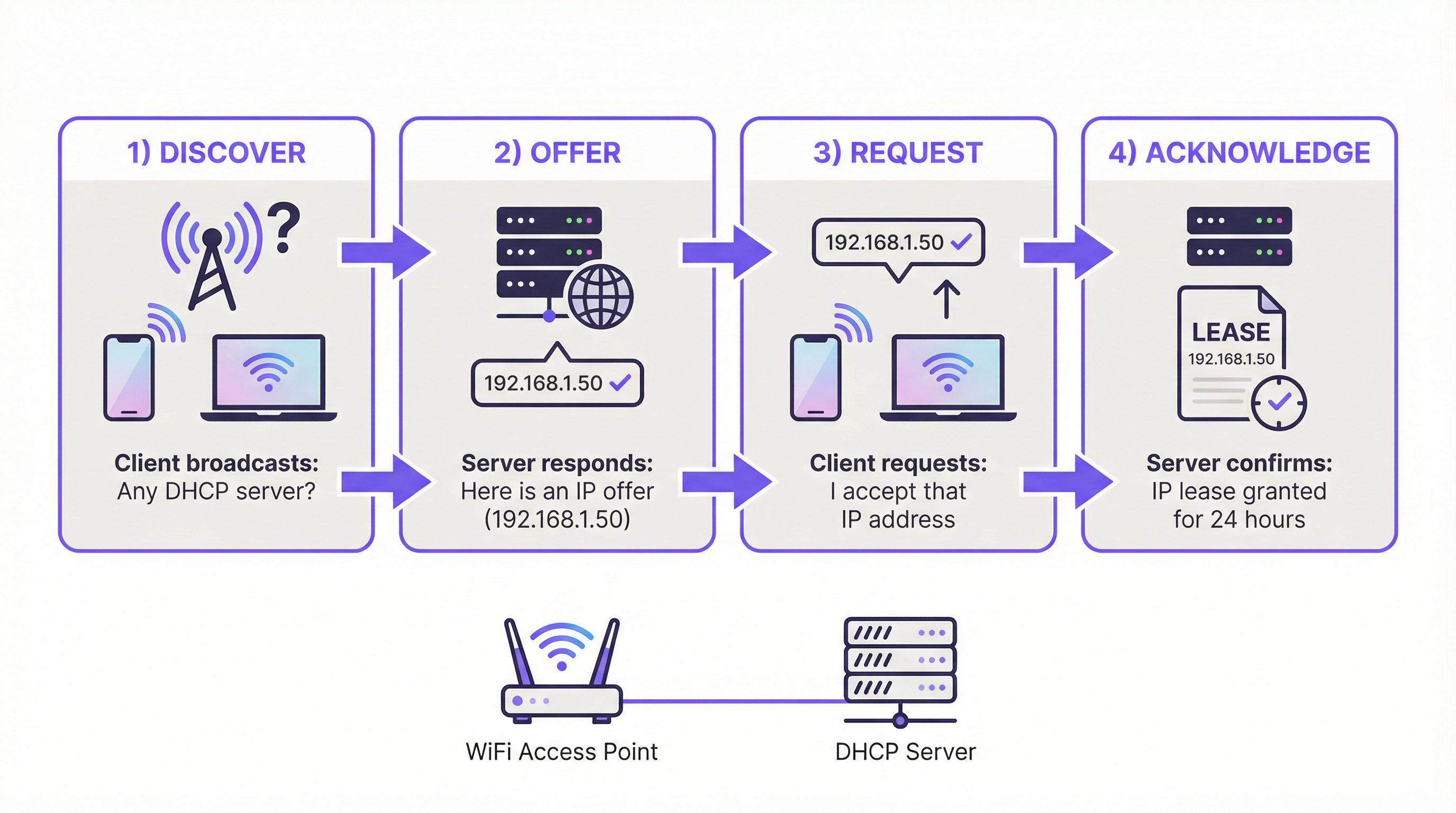
Wichtige DHCP-Parameter für WiFi:
- Lease-Zeit (Lease Time): Diese bestimmt, wie lange ein Gerät eine IP-Adresse behalten darf. In Umgebungen mit hoher Fluktuation wie einem Café oder einer Konferenz sind kurze Lease-Zeiten (z. B. 1-4 Stunden) entscheidend, um IPs effizient wiederzuverwenden. In einem Hotel oder Firmenbüro sind längere Leases (z. B. 24 Stunden) für dauerhaft anwesende Geräte besser geeignet.
- Scope-Größe (Scope Size): Eine häufige Fehlerquelle ist die Unterdimensionierung des IP-Adresspools. Ein /24-Subnetz (254 nutzbare IPs) ist für Enterprise-Gästenetzwerke oft unzureichend. Als Faustregel gilt, mindestens 2-3 Geräte pro Nutzer oder Raum einzuplanen. Für ein Hotel mit 200 Zimmern bedeutet dies die Planung für 400-600 gleichzeitige Geräte, was ein größeres Subnetz (z. B. ein /22) erfordert, um eine Erschöpfung der IP-Adressen zu Spitzenzeiten zu verhindern.
- DHCP-Optionen: Über die IP-Adresse hinaus versorgt DHCP die Clients mit wichtigen Informationen, insbesondere dem Standard-Gateway (der IP des Routers) und der DNS-Serveradresse. Option 43 kann auch verwendet werden, um Access Points herstellerspezifische Informationen für die Controller-Erkennung bereitzustellen.
DNS und seine Auswirkungen auf die WiFi-Nutzererfahrung
DNS übersetzt für Menschen lesbare Domainnamen (z. B. purple.ai) in maschinenlesbare IP-Adressen. Im Kontext von Gäste-WiFi ist seine Rolle von entscheidender Bedeutung, insbesondere für das Captive Portal.
Das Captive Portal Intercept:
Wenn sich ein neues Gästegerät verbindet, wird es durch eine Firewall vom öffentlichen Internet abgeschirmt. Wenn der Nutzer einen Browser öffnet und versucht, zu einer beliebigen Website zu navigieren, fängt der DNS-Server des Netzwerks diese Anfrage ab. Anstatt die angeforderte Domain in ihre öffentliche IP aufzulösen, antwortet der DNS-Server mit der IP-Adresse des Captive Portal-Servers selbst. Dies zwingt den Browser des Nutzers, die Authentifizierungsseite zu laden. Dies ist eine Form des kontrollierten DNS-Hijackings und grundlegend für den Captive Portal-Workflow.
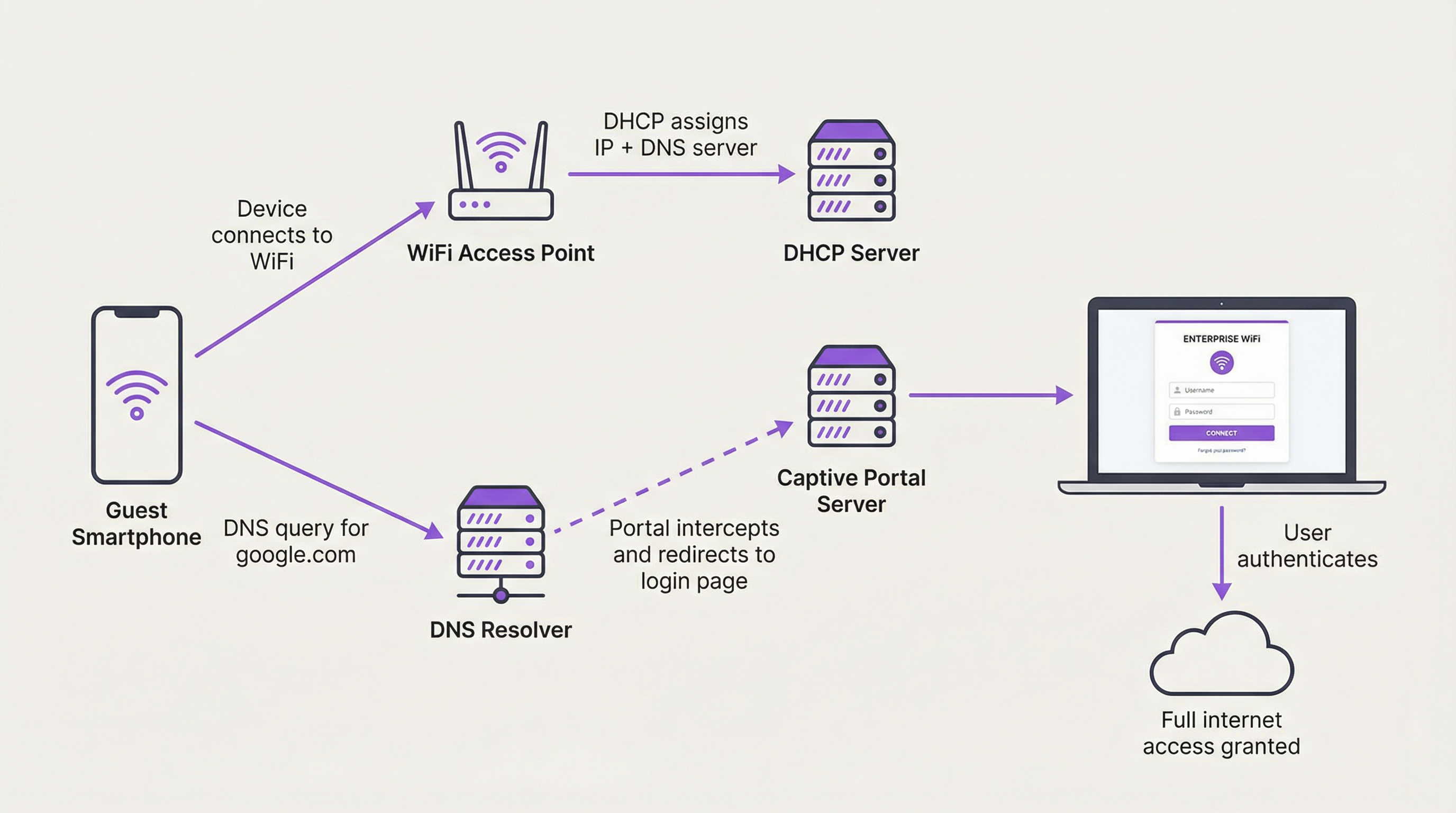
Häufige DNS-Fehlkonfigurationen:
- Zulassen von externem DNS: Wenn Firewall-Regeln es Gäste-Clients erlauben, vor der Authentifizierung DNS-Anfragen an externe Resolver (wie 8.8.8.8 von Google oder 1.1.1.1 von Cloudflare) zu senden, kann das Captive Portal umgangen werden. Der gesamte DNS-Traffic von nicht authentifizierten Clients muss auf den internen Resolver gezwungen werden.
- Split-Horizon DNS: In Umgebungen mit sowohl Gäste- als auch internen Netzwerken ist eine Split-Horizon- (oder Split-Brain-) DNS-Architektur unerlässlich. Das bedeutet, dass Ihr DNS-Server je nach Anfragendem unterschiedliche Antworten liefert. Ein Mitarbeiter im Mitarbeiter-WiFi, der einen internen Servernamen abfragt, sollte eine private IP-Adresse erhalten, während ein Gast diesen Namen überhaupt nicht auflösen können sollte. Dies ist eine kritische Sicherheitsgrenze.
Implementierungsleitfaden
Die Architektur von DHCP und DNS für Enterprise-WiFi erfordert einen strukturierten Ansatz. Im Folgenden wird ein herstellerneutrales Bereitstellungsmodell vorgestellt.
Schritt 1: Netzwerksegmentierung
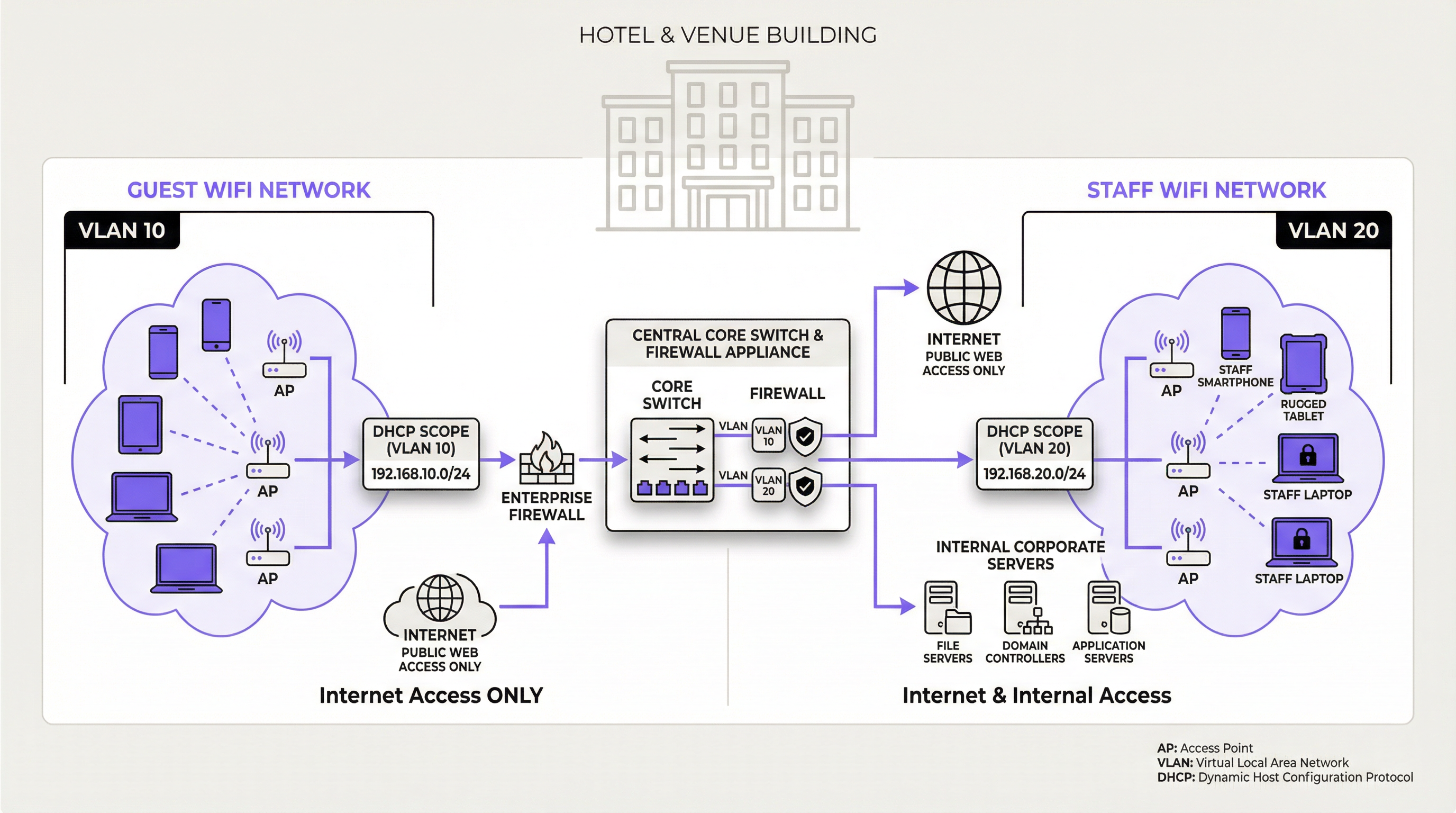
Dies ist das absolute Fundament. Gäste- und Mitarbeiter-/Unternehmens-Traffic müssen mithilfe von VLANs logisch getrennt werden. Dies ist eine grundlegende Anforderung für Sicherheitsstandards wie PCI DSS und GDPR.
- Gäste-VLAN: Uneingeschränkter Zugang zum Internet (nach der Authentifizierung), aber durch eine Firewall vollständig von allen internen Unternehmensressourcen abgeschirmt.
- Mitarbeiter-VLAN: Zugang zum Internet und spezifischer, rollenbasierter Zugriff auf interne Ressourcen (Dateiserver, Datenbanken usw.).
- Management-VLAN: Für Netzwerkinfrastrukturgeräte wie Access Points, Switches und Controller.
Schritt 2: DHCP- & DNS-Serverarchitektur
- Zentralisiertes Modell: Für Organisationen mit mehreren Standorten (z. B. Einzelhandelsketten) bietet ein zentraler DHCP-/DNS-Server in einer Hauptverwaltung oder einem Rechenzentrum eine einheitliche Verwaltung. Jeder Remote-Standort verwendet DHCP Relay Agents (IP Helper) auf seinem lokalen Router/Switch, um DHCP-Anfragen an den zentralen Server weiterzuleiten. Risiko: Hohe Abhängigkeit von der WAN-Verbindung.
- Dezentralisiertes/Verteiltes Modell: Für große Einzelstandorte (Stadien, Flughäfen) oder wenn die Autonomie des Standorts kritisch ist, ist die lokale Bereitstellung redundanter DHCP-/DNS-Server die Best Practice. Dies bietet maximale Ausfallsicherheit und Leistung, da ein WAN-Ausfall die lokalen Netzwerkdienste nicht beeinträchtigt.
- Cloud-basiertes Modell: Einige Cloud-verwaltete Netzwerklösungen bieten integrierte DHCP- und DNS-Dienste. Dies vereinfacht die Verwaltung, erfordert jedoch eine sorgfältige Bewertung der Sicherheit und des Funktionsumfangs.
Schritt 3: DHCP-Scope- und Lease-Konfiguration
Erstellen Sie für jedes VLAN einen dedizierten DHCP-Scope.
| Netzwerk | VLAN-ID | Beispiel-Subnetz | Empfohlene Lease-Zeit | Wichtige Überlegungen |
|---|---|---|---|---|
| Gäste-WiFi | 10 | 10.10.0.0/21 |
1-8 Stunden | Dimensionierung für Spitzenkapazität (3x Nutzer). Kurzer Lease. |
| Mitarbeiter-WiFi | 20 | 192.168.20.0/24 |
24 Stunden | Längerer Lease für dauerhafte Geräte. |
| IoT / Scanner | 30 | 192.168.30.0/24 |
7 Tage / Statisch | Statische Reservierungen für kritische Infrastruktur verwenden. |
Best Practices
- DHCP Snooping aktivieren: Dies ist eine Layer-2-Sicherheitsfunktion auf Switches, die DHCP-Nachrichten validiert. Sie verhindert, dass Rogue-DHCP-Server in das Netzwerk eingeschleust werden, was ein häufiger Angriffsvektor ist.
- DHCP-Scope-Auslastung überwachen: Überwachen Sie aktiv die Anzahl der verfügbaren IPs in Ihren DHCP-Pools. Richten Sie Warnmeldungen ein, die Sie benachrichtigen, wenn die Auslastung einen Schwellenwert (z. B. 85 %) überschreitet, um einer Adresserschöpfung proaktiv vorzubeugen.
- Redundante Server verwenden: Bei jeder Bereitstellung auf Enterprise-Niveau sollten DHCP- und DNS-Dienste in einem redundanten Paar (z. B. einem Failover-Cluster) bereitgestellt werden, um Single Points of Failure zu eliminieren.
- DHCP-Reservierungen dokumentieren: Verwenden Sie für kritische Infrastrukturgeräte, die eine konsistente IP-Adresse benötigen (z. B. Drucker, Server, Access Points), DHCP-Reservierungen, die an die MAC-Adresse des Geräts gebunden sind. Dies zentralisiert das IP-Management, anstatt statische IPs zu verwenden, die auf den Geräten selbst konfiguriert sind.
Fehlerbehebung & Risikominderung
| Symptom | Mögliche Ursache | Minderung / Lösung |
|---|---|---|
| Nutzer erhalten keine IP-Adresse. | Erschöpfung des DHCP-Scopes: Der Pool der verfügbaren IP-Adressen ist leer. | Vergrößern Sie das Subnetz. Verringern Sie die DHCP-Lease-Zeit, um Adressen schneller wiederzuverwenden. |
| Nutzer erhalten eine 'selbst zugewiesene' IP. | Kein DHCP-Server erreichbar: Das DHCP-Discover-Paket des Clients erreicht keinen Server. | Prüfen Sie auf VLAN-Fehlkonfigurationen. Stellen Sie sicher, dass DHCP Relay/IP Helper-Adressen auf Routern/L3-Switches korrekt konfiguriert sind. |
| Nutzer werden auf falsche Websites geleitet. | Rogue-DHCP-Server oder DNS-Hijacking: Ein nicht autorisiertes Gerät gibt bösartige Netzwerkeinstellungen aus. | Aktivieren Sie DHCP Snooping auf allen Access-Switches. Verwenden Sie DNS-Sicherheitserweiterungen (DNSSEC), falls unterstützt. |
| Captive Portal-Seite lädt nicht. | DNS-Bypass: Der Client verwendet einen externen DNS-Server. Firewall-Problem: Der Traffic zum Portal-Server ist blockiert. | Erstellen Sie Firewall-Regeln, um das gesamte ausgehende DNS (Port 53) von nicht authentifizierten Clients zu blockieren, außer zum internen Resolver. |
ROI & Business Impact
Eine gut durchdachte DHCP- und DNS-Infrastruktur liefert einen greifbaren geschäftlichen Mehrwert, der weit über die bloße Bereitstellung eines Internetzugangs hinausgeht. Der primäre ROI ergibt sich aus Risikoreduzierung und operativer Effizienz. Ein stabiles Netzwerk minimiert kostspielige Ausfallzeiten und reduziert die Anzahl der Support-Tickets im Zusammenhang mit Verbindungsproblemen. Für ein großes Hotel kann die Vermeidung einer einzigen Stunde Gäste-WiFi-Ausfall während einer großen Konferenz erhebliche Reputationsschäden und Forderungen nach Servicegutschriften verhindern. Darüber hinaus ist der zuverlässige Betrieb des Captive Portal, der von DNS abhängt, das Tor zur Erfassung wertvoller Kundendaten für Marketing und Analysen, wie es durch Plattformen wie Purple ermöglicht wird. Diese Daten ermöglichen eine personalisierte Kundenansprache, fördern die Loyalität und liefern Besucherfrequenzanalysen, die das Layout und den Betrieb des Standorts optimieren können, was sich direkt und messbar auf den Umsatz auswirkt.
Key Terms & Definitions
DHCP Lease Time
The duration for which a DHCP server grants a client the right to use an assigned IP address.
IT teams must balance lease time against device turnover. Short leases in high-traffic venues prevent IP exhaustion, while long leases in corporate environments reduce unnecessary network chatter.
DHCP Scope
A defined range of IP addresses that a DHCP server is authorized to distribute to clients on a specific subnet.
This is the pool of available addresses. If the scope is too small for the number of connecting devices, new users will be denied access, leading to service outages.
DHCP Relay Agent (IP Helper)
A router or switch configuration that forwards DHCP broadcast packets from one subnet to a DHCP server on another subnet.
This is essential for centralized DHCP management. It allows a single DHCP server in a data center to serve multiple VLANs and remote sites without needing a server in every location.
DHCP Snooping
A Layer 2 security feature that filters DHCP messages, blocking responses from untrusted ports to prevent rogue DHCP servers.
This is a critical security control to prevent man-in-the-middle attacks where an attacker's device could start issuing malicious IP configurations to clients.
Captive Portal
A web page that a user of a public-access network is obliged to view and interact with before access is granted.
For venue operators, this is the primary mechanism for user authentication, presenting terms of service, and capturing marketing data. Its functionality is entirely dependent on correct DNS and firewall configuration.
Split-Horizon DNS (Split-Brain DNS)
A DNS configuration where the server provides different responses (different IP addresses) for the same domain name depending on the source of the query.
This is used to securely separate internal and external users. It ensures an employee can resolve `intranet.company.com` to a private IP while a guest on the public WiFi cannot resolve it at all.
VLAN (Virtual Local Area Network)
A method of creating logically separate networks on the same physical network infrastructure.
This is the fundamental tool for network segmentation. IT teams must use VLANs to isolate guest traffic from secure corporate and payment-card (PCI) traffic as a baseline security measure.
IP Address Exhaustion
A state where all available IP addresses in a DHCP scope have been leased, preventing new devices from connecting to the network.
This is the most common failure mode for poorly planned guest WiFi networks. It is a direct result of underestimating device density and setting lease times that are too long for the environment.
Case Studies
A 500-room luxury hotel is experiencing frequent complaints about WiFi connectivity, especially during large conferences. Guests report being unable to connect, and the IT team is constantly "rebooting the router". They are using a single /24 subnet for their guest network, provided by their ISP's basic firewall.
The core issue is DHCP scope exhaustion and a lack of enterprise-grade architecture.
- Immediate Triage: Lower the DHCP lease time on the existing firewall from the default (often 24 hours) to 1 hour. This will more rapidly recycle the limited IP addresses as conference attendees come and go.
- Strategic Redesign: Procure and deploy two dedicated servers to run as a DHCP failover cluster. This provides redundancy.
- Implement VLANs: Create a new, dedicated Guest WiFi VLAN (e.g., VLAN 100).
- Expand IP Scope: Assign a significantly larger subnet to the new guest VLAN, such as a /21 (which provides 2046 usable IPs). This accommodates the 500 rooms plus multiple devices per guest and conference attendees (500 rooms * 3 devices/room = 1500 IPs needed at a minimum).
- Configure DHCP Relay: On the hotel's core switch/router, configure an IP Helper address on the Guest VLAN interface, pointing to the new DHCP servers. This directs all guest DHCP requests to the dedicated servers.
- Monitoring: Implement monitoring on the new DHCP servers to track scope utilization in real-time.
A retail chain with 100 stores wants to implement a branded guest WiFi captive portal to gather marketing data. They notice that some tech-savvy customers are able to get online without ever seeing the login page. Their current setup has a simple guest network at each store using the local ISP router.
The problem is DNS leakage, allowing clients to bypass the captive portal redirect.
- Firewall Policy Implementation: At each store, the firewall controlling the guest network must be configured with a new outbound rule. This rule should DENY all traffic from the Guest WiFi subnet with a destination port of 53 (DNS), for all destination IPs EXCEPT for the IP address of the store's own internal DNS resolver (which may be the router itself or a designated server).
- DNS Interception: Ensure the internal DNS resolver is configured to intercept all DNS queries from unauthenticated clients and redirect them to the captive portal's IP address.
- Centralized Management (Optional but Recommended): For better consistency, deploy a standardized firewall configuration to all 100 stores using a central management platform (e.g., Meraki, FortiManager). This ensures the anti-bypass rule is applied uniformly and cannot be accidentally misconfigured by local staff.
Scenario Analysis
Q1. You are designing the network for a new 10,000-seat sports stadium. The client wants seamless WiFi for all attendees. What DHCP lease time would you recommend for the public guest network and why?
💡 Hint:Consider the duration of an average event and the sheer volume of unique devices over a short period.
Show Recommended Approach
A very short lease time, such as 30-60 minutes, is recommended. During a 3-4 hour event, thousands of devices will connect and disconnect. A short lease ensures that IP addresses from departed fans are rapidly recycled and made available to new or reconnecting devices, preventing IP address exhaustion in such a high-density, high-turnover environment.
Q2. A hospital wants to provide guest WiFi but is concerned about security and compliance with health data regulations (e.g., HIPAA). What is the single most important architectural principle you must enforce regarding their guest and internal networks?
💡 Hint:How do you ensure guest devices can never, under any circumstances, communicate with internal clinical systems?
Show Recommended Approach
The single most important principle is strict network segmentation using VLANs and restrictive firewall rules. The guest WiFi network must be on its own isolated VLAN and all traffic from this VLAN must be explicitly denied from reaching any internal network segment, especially those containing clinical systems or patient data. There should be zero trust and zero connectivity between the two environments.
Q3. Your company's CFO is questioning the expense of dedicated DHCP/DNS servers, arguing that the firewall provided by the ISP should be sufficient. How do you justify the investment in terms of business risk?
💡 Hint:Translate technical benefits (redundancy, scalability) into business outcomes (risk mitigation, uptime, user experience).
Show Recommended Approach
The justification is a risk-mitigation and business continuity argument. While the ISP firewall provides basic functionality, it represents a single point of failure with limited scalability and management features. For an enterprise, a DHCP or DNS failure is not an IT issue; it's a business outage. For a hotel, it means unhappy guests and refunds. For a retail store, it means point-of-sale systems or customer analytics could fail. Investing in redundant, dedicated servers is like buying insurance; it protects against costly downtime and ensures the network can scale with business demand, directly protecting revenue and customer satisfaction.
Key Takeaways
- ✓DHCP and DNS are foundational services that determine the stability and security of any enterprise WiFi network.
- ✓Always right-size your DHCP scope for peak device density (The 3:1 Rule) and use short lease times in high-turnover venues.
- ✓Strict network segmentation using VLANs to separate guest and staff traffic is a non-negotiable security requirement.
- ✓Captive portal functionality relies on intercepting and redirecting DNS queries; block external DNS for unauthenticated users to prevent bypass.
- ✓Use DHCP Snooping to prevent rogue DHCP servers and other man-in-the-middle attacks.
- ✓For enterprise scale, use redundant, dedicated DHCP/DNS servers to eliminate single points of failure and ensure business continuity.
- ✓Monitor DHCP scope utilization proactively to prevent IP address exhaustion before it impacts users.




