

dotdigital (ehemals Dotmailer): Integrationsleitfaden, Best Practices und Fehlerbehebung für Purple AI-Nutzer
This guide provides Purple AI users — particularly IT managers, network architects, and CTOs at hotels, retail chains, stadiums, and conference centres — with a definitive technical reference for deploying and optimising the dotdigital (formerly Dotmailer) connector. It covers the end-to-end integration architecture, step-by-step configuration, GDPR-compliant data handling, automation programme design, and a structured troubleshooting framework. Organisations that implement this integration correctly convert guest WiFi logins into a high-value, consent-gated marketing database that drives measurable revenue outcomes.
🎧 Listen to this Guide
View Transcript

Executive Summary
Die Purple AI-Plattform erfasst First-Party-Gastdaten zum Zeitpunkt der WiFi-Authentifizierung in Hotels, Einzelhandelsimmobilien, Stadien und Einrichtungen des öffentlichen Sektors. Der dotdigital-Konnektor – ehemals unter der Marke Dotmailer bekannt – transformiert diese Rohdatenerfassung in eine produktionsreife Marketing-Automation-Pipeline. Wenn sich ein Gast mit Ihrem WiFi verbindet und Marketingmitteilungen zustimmt, überträgt Purple sein Profil in Echtzeit in ein festgelegtes dotdigital-Adressbuch. Ab diesem Moment kann die Automatisierungs-Engine von dotdigital Welcome Journeys, Einladungen zu Treueprogrammen, Re-Engagement-Kampagnen und Omnichannel-Kommunikation über E-Mail, SMS und Push-Benachrichtigungen auslösen.
Der wirtschaftliche Nutzen ist gut dokumentiert. Harrods baute durch WiFi-gesteuerte Datenerfassung eine Datenbank mit 3,6 Millionen Kontakten auf und erzielte innerhalb eines einzigen Jahres einen 54-fachen ROI auf seine Purple-Investition. AGS Airports lieferte einen ROI von 842 %. Der Flughafen Brüssel-Charleroi verzeichnete einen ROI von 10.630 % durch den Einsatz von Purples MicroSurveys in Kombination mit nachgelagerter Marketing-Automatisierung. Diese Ergebnisse sind keine Ausnahmen – sie sind das erwartete Resultat einer gut konfigurierten Integration, die mit einem durchdachten Programmdesign implementiert wurde.
Dieser Leitfaden bietet die technische Tiefe, die erforderlich ist, um die Purple-dotdigital-Integration auf Enterprise-Ebene bereitzustellen, zu optimieren und Fehler zu beheben. Er richtet sich an IT-Experten, die noch in diesem Quartal eine Lösung implementieren und nicht erst im nächsten Jahr evaluieren müssen.
Technischer Deep-Dive
Integrationsarchitektur
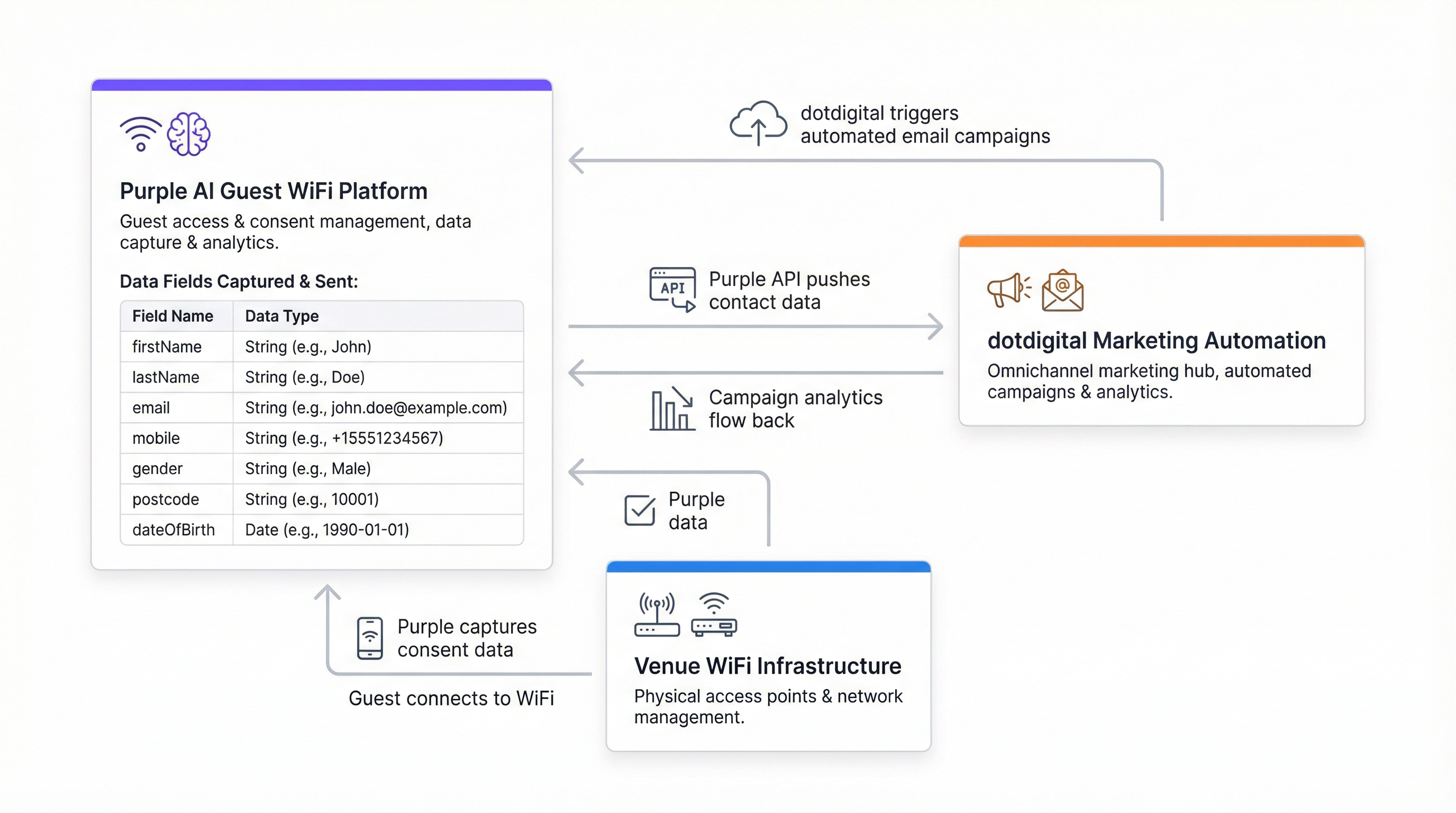
Der Purple-dotdigital-Konnektor fungiert als Server-zu-Server-REST-API-Integration. Purple agiert als Datenproduzent und dotdigital als Konsument. Die Verbindung wird über den Basic-Auth-Mechanismus von dotdigital authentifiziert: ein dediziertes API-Benutzerkonto (E-Mail-Adresse und Passwort), das innerhalb der dotdigital-Plattform erstellt wird, kombiniert mit einer regionalspezifischen API-Endpunkt-URL.
Die Architektur ist standardmäßig unidirektional – Purple überträgt Kontaktdatensätze zum Zeitpunkt der WiFi-Authentifizierung an dotdigital. Für Unternehmen, die eine bidirektionale Synchronisierung benötigen (beispielsweise um Abmeldungen oder Aktualisierungen von Sperrlisten an Purple zurückzumelden), ist eine zusätzliche Konfiguration über das Webhook-Framework von dotdigital erforderlich.
| Komponente | Rolle | Hinweise |
|---|---|---|
| Purple Captive Portal | Gastauthentifizierung und Einwilligungserfassung | Splash-Page, die beim WiFi-Login angezeigt wird |
| Purple Connector Engine | Datentransformation und API-Versand | Konfiguriert unter Management > Connectors |
| dotdigital REST API | Kontaktaufnahme und Adressbuchverwaltung | Regionalspezifischer Endpunkt erforderlich |
| dotdigital-Adressbuch | Kontaktspeicher- und Segmentierungsebene | Ein oder mehrere Bücher pro Standort/Immobilie |
| dotdigital Program Builder | Ausführung von Automatisierungsprogrammen | Ausgelöst beim Hinzufügen eines Kontakts zum Adressbuch |
Daten-Payload und Feldzuordnung
Purple überträgt für jeden zustimmenden Gast acht Datenfelder an dotdigital. Diese Felder lassen sich direkt dem Standard-Kontaktdatenmodell von dotdigital zuordnen und erfordern für Basisbereitstellungen keine benutzerdefinierte Feldkonfiguration.
| Feldname | Datentyp | Beschreibung |
|---|---|---|
firstName |
String | Vorname des Gastes |
lastName |
String | Nachname des Gastes |
userID |
Integer | Interne Benutzerkennung von Purple |
email |
String | Primäre Kontaktadresse; wird als Deduplizierungsschlüssel verwendet |
mobile |
String | Mobiltelefonnummer (E.164-Format empfohlen) |
gender |
String | Selbst angegebenes Geschlecht von der Splash-Page |
postcode |
String | Postleitzahl; ermöglicht geografische Segmentierung |
dateOfBirth |
String | Format: YYYY-MM-DD; ermöglicht Altersgruppen-Segmentierung und Geburtstags-Trigger |
Die Datenübertragung ist auf Plattformebene an eine Einwilligung gebunden. Purple sendet keinen Kontaktdatensatz an dotdigital, es sei denn, der Gast hat über das Einwilligungs-Kontrollkästchen auf der Splash-Page ausdrücklich in Marketingmitteilungen eingewilligt (Opt-in). Dies ist eine strikte Vorgabe – keine konfigurierbare Option – und der primäre Mechanismus, durch den die Integration die Einhaltung der UK GDPR, der EU GDPR und des CCPA gewährleistet.
Authentifizierung und Endpunktkonfiguration
dotdigital verwendet HTTP Basic Authentication für seine REST API. Die Anmeldeinformationen bestehen aus einer API-Benutzer-E-Mail-Adresse und einem Passwort, die als dedizierter Benutzer innerhalb des dotdigital-Kontos erstellt werden müssen – nicht als primäres Konto-Login. Die API-Endpunkt-URL ist kontospezifisch und regionsabhängig. Sie wird unter Account Settings > Access innerhalb der dotdigital-Plattform abgerufen. Ein typischer Endpunkt hat das Format https://r1-api.dotdigital.com für Konten der Region eins.
Diese Endpunktspezifität ist die häufigste Ursache für Fehler bei der Konnektor-Verifizierung. Teams, die versuchen, eine generische URL oder eine Beispiel-URL aus der Dokumentation zu verwenden, werden auf Authentifizierungsfehler stoßen. Rufen Sie den Endpunktwert immer direkt aus dem verwendeten dotdigital-Konto ab.
Bereitstellungsebenen des Konnektors
Purple unterstützt zwei Bereitstellungsebenen für den dotdigital-Konnektor:
Customer-Ebene wendet die Konnektorkonfiguration auf das gesamte Purple-Konto an und leitet alle zustimmenden Gäste von allen Standorten in ein einziges dotdigital-Adressbuch weiter. Dies eignet sich für Betreiber einzelner Standorte oder Organisationen mit einem homogenen Standortportfolio.
Venue-Ebene ermöglicht es, jeden einzelnen Standort einem bestimmten dotdigital-Adressbuch zuzuordnen. Dies ist die empfohlene Konfiguration für Betreiber mehrerer Immobilien – Hotelgruppen, Einzelhandelsketten, Stadionbetreiber –, bei denen eine Segmentierung auf Standortebene für zielgerichtetes Marketing, lokalisierte Angebote oder separate Markenidentitäten erforderlich ist.
Implementierungsleitfaden
Schritt 1: Bereiten Sie Ihr dotdigital-Konto vor
Bevor Sie den Purple-Konnektor konfigurieren, führen Sie Folgendes in Ihrem dotdigital-Konto aus. Navigieren Sie zu Account Settings und erstellen Sie einen neuen API-Benutzer mit einer dedizierten E-Mail-Adresse und einem sicheren Passwort. Notieren Sie sich die API-Endpunkt-URL, die oben auf der Access-Seite angezeigt wird. Erstellen Sie das Adressbuch oder die Adressbücher, die Purple-Kontakte empfangen sollen – eines pro Standort wird für Bereitstellungen mit mehreren Immobilien empfohlen. Erstellen Sie optional benutzerdefinierte Datenfelder in dotdigital, wenn Sie beabsichtigen, zusätzliche Attribute über die acht Standard-Purple-Felder hinaus zu erfassen.
Schritt 2: Konfigurieren Sie den Purple-Konnektor
Navigieren Sie innerhalb der Purple-Plattform zu Management > Connectors. Suchen Sie den dotdigital-Konnektor und wählen Sie Add. Füllen Sie die vier erforderlichen Felder aus: den Konnektornamen (eine beschreibende Bezeichnung für Ihre Referenz), die dotdigital API-E-Mail, das dotdigital API-Passwort und die dotdigital API-Endpunkt-URL. Wählen Sie Verify. Nach erfolgreicher Verifizierung wird ein Dropdown-Menü angezeigt, in dem die verfügbaren Adressbücher in Ihrem dotdigital-Konto aufgelistet sind. Wählen Sie das Zieladressbuch aus und speichern Sie die Konfiguration.
Wiederholen Sie diesen Vorgang bei Bereitstellungen mit mehreren Standorten auf Venue-Ebene für jede Immobilie und weisen Sie jede ihrem vorgesehenen Adressbuch zu.
Schritt 3: Konfigurieren Sie den Einwilligungsmechanismus der Splash-Page
Das Kontrollkästchen für die Marketing-Einwilligung auf Ihrer Purple-Splash-Page ist das Tor zur gesamten Integration. Navigieren Sie zu Ihrer Splash-Page-Konfiguration und stellen Sie sicher, dass das Marketing-Opt-in-Kontrollkästchen aktiviert und klar beschriftet ist. Die Formulierung der Einwilligung muss gemäß Artikel 7 der UK GDPR ausdrücklich, spezifisch und unmissverständlich sein. Ein konformes Beispiel: "Ich stimme zu, Marketingmitteilungen von [Name der Organisation] über Angebote, Veranstaltungen und Neuigkeiten zu erhalten. Sie können sich jederzeit abmelden." Setzen Sie vorab kein Häkchen in dieses Kontrollkästchen.
Wenn Ihr Marketingprogramm SMS umfasst, stellen Sie sicher, dass die Formulierung der Einwilligung ausdrücklich SMS-Kommunikation abdeckt. Ein einziges Kontrollkästchen, das sowohl E-Mail als auch SMS abdeckt, ist zulässig, sofern die Formulierung eindeutig ist.
Schritt 4: Erstellen Sie Ihre dotdigital-Automatisierungsprogramme
Stellen Sie Automatisierungsprogramme in dotdigital bereit, bevor der Konnektor live geht. Konfigurieren Sie mindestens ein Willkommensprogramm, das durch das Hinzufügen eines Kontakts zum Adressbuch ausgelöst wird. Eine empfohlene dreistufige Welcome Journey:
- Sofort (0 Minuten): Willkommens-E-Mail zur Bestätigung des WiFi-Zugangs mit einer markengerechten Einführung in Ihren Standort oder Ihre Dienstleistungen.
- Tag 2 (48 Stunden): Follow-up-E-Mail mit einem relevanten Angebot, einem Standortführer oder Inhalten, die auf den Kontext des Gastes zugeschnitten sind.
- Tag 30 (Re-Engagement): Automatisierte Re-Engagement-E-Mail für Kontakte, die nicht zurückgekehrt sind, mit einem Anreiz für einen erneuten Besuch.
Verwenden Sie für die Integration von Treueprogrammen den Program Builder von dotdigital, um Kontakte anzumelden, die bestimmte Kriterien erfüllen – beispielsweise Kontakte, die eine benutzerdefinierte Frage auf der Splash-Page zum Interesse an einem Treueprogramm bejaht haben.
Schritt 5: Konfigurieren Sie die bidirektionale Sperrlisten-Synchronisierung
Konfigurieren Sie einen dotdigital-Webhook, um Purple zu benachrichtigen, wenn sich ein Kontakt abmeldet. Dadurch wird sichergestellt, dass ein gesperrter Kontakt bei seinem nächsten WiFi-Login nicht erneut zu dotdigital hinzugefügt wird. Ohne diesen Schritt ist die Integration aus Sicht der GDPR-Compliance technisch unvollständig.
Schritt 6: Validierung und Go-Live
Führen Sie einen End-to-End-Test durch, indem Sie ein Testgerät im WiFi authentifizieren, die Splash-Page mit einer Test-E-Mail-Adresse und Marketing-Einwilligung ausfüllen und überprüfen, ob der Kontakt innerhalb von zwei bis drei Minuten im richtigen dotdigital-Adressbuch erscheint. Bestätigen Sie, dass das Willkommens-Automatisierungsprogramm korrekt ausgelöst wird. Dokumentieren Sie die Testergebnisse und fahren Sie mit der Produktionsbereitstellung fort.
Best Practices
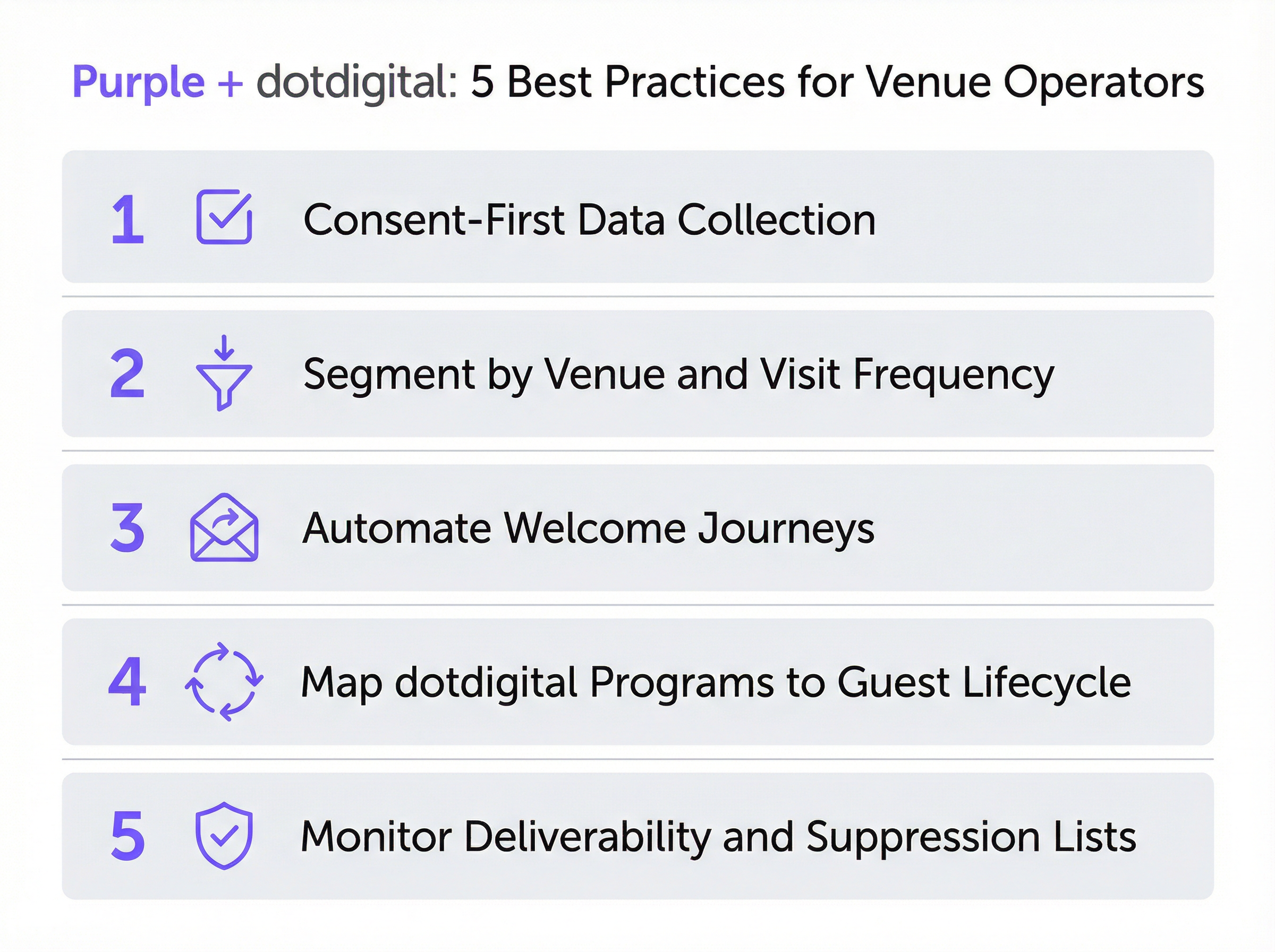
Einwilligungsarchitektur
Die Qualität Ihrer Opt-in-Datenbank ist eine direkte Funktion Ihrer Einwilligungsarchitektur. Unternehmen, die in eine klare, ehrliche Formulierung der Einwilligung investieren – selbst wenn dies die Opt-in-Raten geringfügig senkt –, bauen engagiertere, hochwertigere Kontaktlisten auf. Eine Opt-in-Rate von 30 % durch einen transparenten Einwilligungsmechanismus wird eine Opt-in-Rate von 60 % durch einen mehrdeutigen oder irreführenden Mechanismus durchweg übertreffen, da die erstgenannte Kohorte wirklich von Ihnen hören möchte. Harrods erreichte eine Opt-in-Rate von 38 % bei 581.000 WiFi-Nutzern – eine Rate, die mit einer transparenten, auf Werteaustausch basierenden Einwilligungsformulierung übereinstimmt.
Adressbuch-Taxonomie
Entwerfen Sie Ihre dotdigital-Adressbuchstruktur, bevor Sie Purple verbinden. Für eine Hotelgruppe, die 20 Immobilien betreibt, könnte dies 20 standortspezifische Adressbücher sowie ein konsolidiertes Master-Buch für standortübergreifende Kampagnen bedeuten. Für eine Einzelhandelskette könnte dies nach Region oder Filialformat segmentierte Bücher bedeuten. Das Grundprinzip lautet, dass die Adressbuchstruktur Ihre nachgelagerte Segmentierungsfähigkeit bestimmt – eine nachträgliche Anpassung nach der Datenerfassung ist kostspielig und störend.
Tiefe des Automatisierungsprogramms
Die effektivsten Purple-dotdigital-Bereitstellungen nutzen die volle Programmkapazität von dotdigital: Welcome Journeys, durch das Feld dateOfBirth ausgelöste Geburtstagskampagnen, Re-Engagement-Sequenzen für inaktive Kontakte und Umfragen nach dem Besuch. Das Feld postcode ermöglicht geografisches Targeting für lokalisierte Angebote. Das Feld gender ermöglicht demografische Personalisierung. Das Feld dateOfBirth ermöglicht Altersgruppen-Segmentierung und Geburtstags-Trigger. Nutzen Sie alle acht Felder – sie stellen eine reichhaltige Segmentierungsgrundlage dar, die von den meisten Organisationen nicht ausreichend genutzt wird.
Zustellbarkeitsmanagement
Überwachen Sie das Zustellbarkeits-Dashboard von dotdigital während der ersten 90 Tage der Bereitstellung wöchentlich. Wichtige Benchmarks: Öffnungsrate über 20 %, Klickrate über 2 %, Bounce-Rate unter 2 %, Abmelderate unter 0,5 %. Wenn die Bounce-Raten erhöht sind, implementieren Sie den Double-Opt-in-Workflow von dotdigital, um E-Mail-Adressen zu verifizieren, bevor sie in Ihre aktive Datenbank aufgenommen werden. Dies ist besonders relevant für Standorte mit hoher Laufkundschaft – Flughäfen, Bahnhöfe, Konferenzzentren –, an denen Gäste möglicherweise temporäre oder falsche E-Mail-Adressen eingeben.
GDPR- und PECR-Compliance
Die Integration ist standardmäßig auf Compliance ausgelegt, aber Compliance ist eine gemeinsame Verantwortung. Purple erzwingt die Einwilligung auf der Datenerfassungsebene; dotdigital erzwingt sie auf der Kommunikationsebene. Ihre Organisation ist verantwortlich für die Formulierung der Einwilligung auf der Splash-Page, den Inhalt der Marketingmitteilungen und die Pflege der Sperrlisten. Führen Sie eine Datenschutz-Folgenabschätzung durch, bevor Sie die Integration in Gerichtsbarkeiten bereitstellen, die unter die UK GDPR oder EU GDPR fallen, insbesondere für Organisationen des öffentlichen Sektors, die zusätzlichen Verpflichtungen gemäß dem Data Protection Act 2018 unterliegen.
Fehlerbehebung und Risikominderung
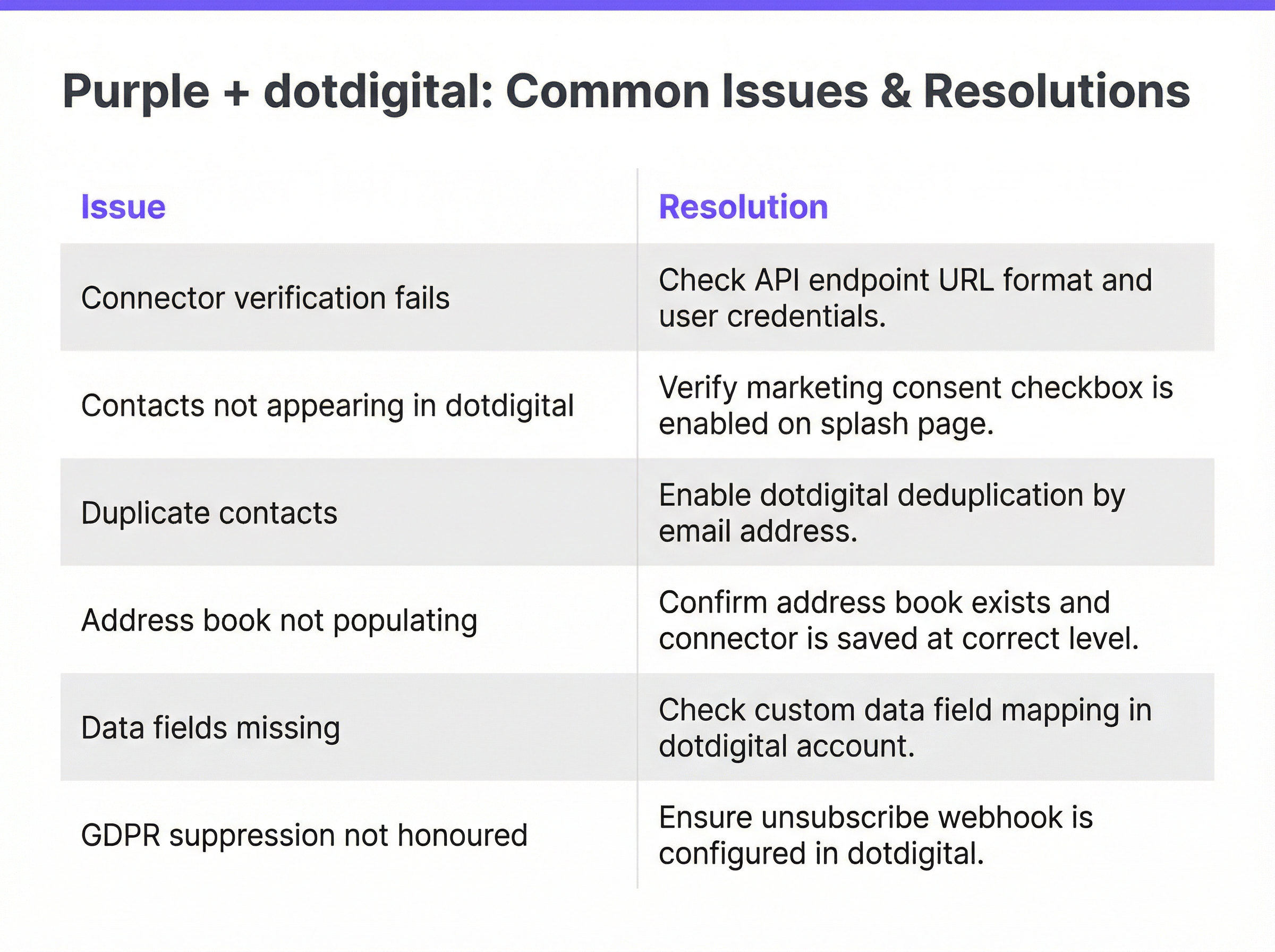
Fehler bei der Konnektor-Verifizierung
Das häufigste Bereitstellungsproblem. Wird in den meisten Fällen durch eine falsche API-Endpunkt-URL verursacht. Lösung: Melden Sie sich bei dotdigital an, navigieren Sie zu Account Settings > Access und kopieren Sie die Endpunkt-URL genau wie angezeigt. Stellen Sie sicher, dass kein abschließender Schrägstrich oder Leerzeichen enthalten ist. Überprüfen Sie, ob die API-Benutzeranmeldeinformationen für ein dediziertes API-Benutzerkonto gelten und nicht für das primäre Konto-Login. Wenn die Verifizierung weiterhin fehlschlägt, bestätigen Sie, dass für das dotdigital-Konto der API-Zugriff aktiviert ist – dies ist eine Funktion, die für einige Kontoebenen möglicherweise vom dotdigital-Support aktiviert werden muss.
Kontakte erscheinen nicht in dotdigital
Wenn der Konnektor erfolgreich verifiziert wird, aber keine Kontakte im Zieladressbuch erscheinen, ist die Hauptursache, dass das Kontrollkästchen für die Marketing-Einwilligung auf der Splash-Page nicht aktiviert ist. Purple überträgt keine Daten ohne ausdrückliche Einwilligung. Sekundäre Ursachen sind, dass der Konnektor auf der falschen Ebene konfiguriert wurde (Customer vs. Venue) oder dass sich die Adressbuch-ID seit dem Speichern des Konnektors geändert hat. Lösung: Überprüfen Sie die Einwilligungskonfiguration der Splash-Page, bestätigen Sie die Konnektorebene und verifizieren Sie den Konnektor erneut, um die Adressbuchauswahl zu aktualisieren.
Doppelte Kontaktdatensätze
Tritt auf, wenn dieselbe E-Mail-Adresse über mehrere WiFi-Sitzungen hinweg übermittelt wird, typischerweise an Standorten mit hoher Laufkundschaft. Lösung: Stellen Sie sicher, dass das Adressbuch von dotdigital so konfiguriert ist, dass vorhandene Kontakte bei Übereinstimmung der E-Mail-Adresse aktualisiert werden, anstatt neue Datensätze zu erstellen. Dies wird in den Kontakt-Importeinstellungen von dotdigital gesteuert. Überprüfen Sie außerdem, ob der Purple-Konnektor sowohl auf Customer- als auch auf Venue-Ebene für denselben Standort konfiguriert ist – eine duale Konfiguration führt zu doppelten Übertragungen.
Fehlende Datenfelder
Wenn Kontakte in dotdigital erscheinen, aber bestimmte Felder leer sind, ist die wahrscheinlichste Ursache, dass Gäste diese Felder auf der Splash-Page nicht ausgefüllt haben. Purple überträgt nur Felder, die während der Authentifizierung angegeben wurden. Bei optionalen Feldern wie Mobiltelefonnummer oder Geburtsdatum werden einige Gäste die Angabe verweigern. Wenn die Vollständigkeit bestimmter Felder für Ihre Segmentierungsstrategie entscheidend ist, sollten Sie in Erwägung ziehen, diese Felder auf der Splash-Page als Pflichtfelder festzulegen – beachten Sie jedoch, dass jedes zusätzliche Pflichtfeld Ihre allgemeine Opt-in-Konversionsrate verringert.
GDPR-Sperrlisten werden nicht beachtet
Wenn abgemeldete Kontakte bei nachfolgenden WiFi-Logins erneut zu dotdigital hinzugefügt werden, wurde der bidirektionale Sperrlisten-Webhook nicht konfiguriert. Dies stellt ein Compliance-Risiko dar. Lösung: Konfigurieren Sie einen dotdigital-Webhook, der bei Abmeldeereignissen ausgelöst wird und den entsprechenden Kontaktdatensatz in Purple aktualisiert. Konsultieren Sie die dotdigital-Entwicklerdokumentation für Anleitungen zur Webhook-Konfiguration.
Framework zur Risikominderung
| Risiko | Wahrscheinlichkeit | Auswirkung | Minderung |
|---|---|---|---|
| Falscher API-Endpunkt | Hoch | Mittel | Endpunkt direkt aus dem dotdigital-Konto abrufen |
| Einwilligungs-Kontrollkästchen deaktiviert | Mittel | Hoch | In Pre-Launch-Checkliste aufnehmen; mit echtem Gerät testen |
| Doppelte Kontakte | Mittel | Gering | E-Mail-basierte Deduplizierung in dotdigital konfigurieren |
| Sperrliste nicht synchronisiert | Gering | Hoch | Abmelde-Webhook vor dem Go-Live implementieren |
| Vollständigkeit der Datenfelder | Hoch | Gering | Feldanforderungen basierend auf Segmentierungsbedarf festlegen |
| Offenlegung von API-Anmeldeinformationen | Gering | Hoch | Dedizierten API-Benutzer verwenden; Anmeldeinformationen vierteljährlich rotieren |
ROI und geschäftliche Auswirkungen
Erfolgsmessung
Die Purple-dotdigital-Integration liefert Mehrwert in zwei unterschiedlichen Dimensionen: Datenbankwachstum und Umsatzzuordnung. Das Datenbankwachstum wird gemessen an der Anzahl der pro Monat neu hinzugefügten Opt-in-Kontakte, der Opt-in-Rate als Prozentsatz der gesamten WiFi-Authentifizierungen und der Rate der Kontaktdatenvollständigkeit (Prozentsatz der Kontakte, bei denen alle acht Felder ausgefüllt sind). Die Umsatzzuordnung wird gemessen, indem Käufe, Anmeldungen zu Treueprogrammen oder andere Konversionsereignisse verfolgt werden, die mit Kontakten verknüpft werden können, die über den WiFi-Login in die Datenbank gelangt sind.
Die Reporting-Suite von dotdigital bietet Analysen auf Kampagnenebene – Öffnungsraten, Klickraten, Konversionsraten –, die zur Berechnung des Umsatzbeitrags jedes Automatisierungsprogramms verwendet werden können. Das Analyse-Dashboard von Purple liefert die Frequenz- und Authentifizierungsdaten, die zur Berechnung der Kosten pro gewonnenem Kontakt erforderlich sind.
Benchmarks und erwartete Ergebnisse
Basierend auf dokumentierten Bereitstellungen im gesamten Purple-Portfolio:
| Standorttyp | Typische Opt-in-Rate | Erwarteter ROI-Zeitrahmen | Wichtigster Umsatztreiber |
|---|---|---|---|
| Luxuseinzelhandel | 35–45 % | 6–12 Monate | Konversion für Treueprogramme |
| Hotel (Mittelklasse) | 25–35 % | 12–18 Monate | Re-Engagement für Direktbuchungen |
| Flughafen / Verkehrsknotenpunkt | 15–25 % | 18–24 Monate | Upselling in Einzelhandel und Gastronomie |
| Stadion / Veranstaltungsort | 20–30 % | 12–18 Monate | Upselling von Merchandise und Tickets |
| Konferenzzentrum | 30–40 % | 6–12 Monate | Event-Umbuchungen und Sponsoring |
Kosten-Nutzen-Überlegungen
Die Grenzkosten des dotdigital-Konnektors innerhalb von Purple sind im Verhältnis zum Umsatzpotenzial gering. Die primäre Investition fließt in das Programmdesign und die Inhaltserstellung – die Automation Journeys, E-Mail-Vorlagen und Segmentierungslogik, die bestimmen, wie effektiv die Kontaktdatenbank monetarisiert wird. Organisationen, die die Integration als reine "Set-and-Forget"-Datenleitung betrachten, werden bescheidene Renditen erzielen. Diejenigen, die in kontinuierliche Programmoptimierung investieren – A/B-Tests von Betreffzeilen, Verfeinerung der Segmentierung, Erweiterung der Automatisierungstiefe –, werden Renditen erzielen, die mit den oben dokumentierten Benchmarks von Harrods und AGS Airports übereinstimmen.
Eine praktische Faustregel: Für jeweils 10.000 über WiFi gewonnene Opt-in-Kontakte sollte ein gut konfiguriertes dotdigital-Programm innerhalb von 90 Tagen nach der Bereitstellung messbare inkrementelle Umsätze generieren, vorausgesetzt, die Willkommensserie weist eine Mindestöffnungsrate von 20 % und eine Klickrate von 2 % auf.
Key Terms & Definitions
Captive Portal
A web page presented to a guest before they are granted access to a WiFi network. Purple's captive portal — also called a splash page — is the interface through which guests authenticate, provide profile data, and give marketing consent. It is the entry point for all data flowing into the dotdigital integration.
IT teams encounter this during network configuration and splash page design. The captive portal's consent checkbox is the legal and technical gateway to the entire marketing automation pipeline.
Address Book (dotdigital)
A named list of contacts within dotdigital, analogous to a mailing list or CRM segment. Address books are the primary organisational unit in dotdigital and serve as the target destination for Purple's data push. Automation programmes are triggered by contact addition to a specific address book.
The address book taxonomy — how many books, how named, at what level — is the most consequential architectural decision in a multi-venue deployment. It determines segmentation capability for all downstream marketing activity.
Automation Programme (dotdigital)
A configured sequence of automated actions in dotdigital, triggered by a defined event such as a contact being added to an address book. Programmes can include email sends, SMS messages, wait periods, conditional branches, and contact scoring updates. They are the mechanism through which Purple's data capture is converted into marketing communications.
IT teams are responsible for ensuring the connector triggers programme enrolment correctly. Marketing teams design the programme content. The 'Include contacts added via API' setting is a common configuration oversight that prevents programme triggering.
API Endpoint (dotdigital)
The base URL for dotdigital's REST API, specific to the regional data centre assigned to each account. It takes the form `https://r{n}-api.dotdigital.com` where `{n}` is the region number. It is retrieved from Account Settings > Access within the dotdigital platform.
This is the single most common source of connector verification failures. It must be retrieved directly from the dotdigital account — it cannot be guessed or copied from generic documentation.
Consent-Gated Data Push
A data transmission mechanism that only activates when explicit user consent has been recorded. In the Purple-dotdigital integration, Purple will only push a contact record to dotdigital if the guest has ticked the marketing consent checkbox on the splash page. This is a platform-level enforcement, not a configurable option.
This mechanism is the primary GDPR compliance control in the integration. It ensures that only genuinely opted-in contacts enter the marketing database, protecting the organisation from regulatory risk and protecting deliverability from low-engagement contacts.
Double Opt-In
A two-stage consent verification process in which a contact, after initially opting in, receives a confirmation email and must click a link to verify their email address and confirm their subscription. dotdigital supports double opt-in natively. It converts contacts from 'Pending' to 'Subscribed' status and provides an additional layer of consent documentation.
Recommended for venues with high transient footfall — airports, conference centres, train stations — where guests may enter incorrect or temporary email addresses. Double opt-in reduces bounce rates and improves deliverability, at the cost of a lower initial conversion rate.
Suppression List
A list of email addresses or contacts that must not receive marketing communications, typically because they have unsubscribed, complained, or been identified as invalid. dotdigital maintains suppression lists automatically. The Purple-dotdigital integration requires a webhook to sync suppressions back to Purple, preventing re-addition of suppressed contacts on subsequent WiFi logins.
Failure to implement bidirectional suppression sync is a GDPR compliance risk and a deliverability risk. It is a mandatory configuration step in any production deployment.
Venue-Level Connector
A Purple connector configuration scoped to a single venue, as opposed to a customer-level configuration that applies across the entire Purple account. Venue-level connectors allow different venues to be routed to different dotdigital address books, enabling venue-specific segmentation and personalisation.
Essential for multi-property operators. Hotel groups, retail chains, and stadium operators should always use venue-level configuration to maintain clean data segmentation across their estate.
First-Party Data
Data collected directly from individuals by the organisation that will use it for marketing, with the individual's knowledge and consent. WiFi login data captured through Purple's captive portal is first-party data. It is distinct from third-party data (purchased lists) and second-party data (data shared by partners). First-party data is the most valuable and most compliant form of marketing data in the post-cookie, post-GDPR landscape.
The strategic value of the Purple-dotdigital integration is that it generates high-quality first-party data at scale, from physical venue visits. This data is not available through any digital marketing channel and represents a genuine competitive advantage for venue operators.
PECR (Privacy and Electronic Communications Regulations)
UK regulations that govern direct marketing by electronic means, including email and SMS. PECR requires prior consent for marketing emails to individuals (as opposed to businesses). It works in conjunction with UK GDPR to define the legal basis for marketing communications triggered by the Purple-dotdigital integration.
IT and marketing teams must ensure that the splash page consent language covers all channels used for marketing — email, SMS, and push — and that the consent is specific to each channel where required.
Case Studies
A 450-room city-centre hotel group with 12 properties across the UK wants to use Purple's dotdigital connector to build a direct booking re-engagement programme. Each property has its own Purple venue configuration. The marketing team wants to send property-specific offers to guests who have stayed at a particular hotel, while also being able to run group-wide campaigns. How should the integration be architected?
The correct architecture uses venue-level connector configuration in Purple, with each of the 12 properties mapped to a dedicated dotdigital address book. This gives the marketing team clean, venue-specific contact lists for property-level targeting. In parallel, a dotdigital segment is created that aggregates contacts across all 12 address books — this segment is used for group-wide campaigns without duplicating contact records.
Step 1: In dotdigital, create 12 address books named by property (e.g., 'Purple - Manchester City Centre', 'Purple - Edinburgh Royal Mile'). Create a master segment using the 'Contact is in any of these address books' condition covering all 12 books.
Step 2: In Purple, navigate to each venue's settings under Management > Venues. For each venue, add a dotdigital connector at venue level, using the same API credentials but selecting the property-specific address book.
Step 3: Build a welcome automation programme in dotdigital triggered by contact addition to any of the 12 address books. Use dynamic content blocks in the email template to personalise the message based on the address book (property) the contact was added to — for example, featuring the specific hotel's amenities and a direct booking link.
Step 4: Build a re-engagement programme that fires 30 days after the last WiFi login, with a property-specific offer. Use dotdigital's contact scoring to identify high-value guests (multiple visits, high data completeness) for premium re-engagement campaigns.
Step 5: For group-wide campaigns — seasonal promotions, loyalty programme launches — use the master segment to reach the full opted-in database without duplicating sends to contacts who appear in multiple property address books.
A national retail chain with 85 stores has deployed Purple WiFi across its estate. After six months, the marketing team reports that contacts are appearing in dotdigital but the welcome automation programme is not triggering for approximately 15% of new contacts. The IT team has confirmed the connector is verified and contacts are being added to the correct address book. What is the most likely cause and how should it be resolved?
The most likely cause is a race condition between contact creation and programme enrolment in dotdigital, combined with contacts being added via the API rather than through dotdigital's native import. When contacts are added to an address book via the API — as Purple does — dotdigital's programme trigger logic may not fire if the programme is configured to trigger on 'contact added to address book via import' rather than 'contact added via API'.
Resolution Step 1: In dotdigital's Program Builder, open the welcome programme and inspect the enrolment trigger. Verify that the trigger condition is set to 'Contact added to address book' and that the 'Include contacts added via API' option is enabled. This option is not enabled by default in all dotdigital account configurations.
Resolution Step 2: If the trigger condition is correct, check whether the affected contacts have an opt-in status of 'Unknown' rather than 'Subscribed' in dotdigital. Contacts with 'Unknown' status may be excluded from programme enrolment depending on programme settings. Resolution: configure the programme to include contacts with 'Unknown' opt-in status, or implement dotdigital's double opt-in workflow to convert contacts to 'Subscribed' status on confirmation.
Resolution Step 3: Review the programme's enrolment frequency setting. If set to 'Enrol once only', contacts who have previously been enrolled — for example, from a prior WiFi session at a different store — will not be re-enrolled. For a retail chain where guests may visit multiple stores, consider whether re-enrolment on each new store visit is appropriate, and configure accordingly.
Resolution Step 4: Check for programme enrolment limits. Some dotdigital account configurations impose a maximum daily enrolment rate. If the retail chain's WiFi generates a high volume of new contacts on peak trading days, this limit may be causing the 15% gap.
Scenario Analysis
Q1. A conference centre operator runs a single Purple account covering three venues: a main auditorium, a breakout suite, and an exhibition hall. They want to use dotdigital to send post-event follow-up emails to attendees, with content specific to which space they visited. Their current connector is configured at customer level, routing all three venues into a single dotdigital address book. What change should they make, and what are the implications?
💡 Hint:Consider how venue-level configuration changes the address book structure, and what additional steps are required in dotdigital to support venue-specific content.
Show Recommended Approach
The operator should reconfigure the connector at venue level, creating three separate dotdigital address books — one per venue. This allows dotdigital to identify which venue a contact was added from, enabling venue-specific content in automation programmes. The implications are: (1) existing contacts in the single customer-level address book will need to be migrated or re-segmented; (2) three separate automation programmes will need to be created or a single programme with dynamic content blocks will need to be configured; (3) for group-wide communications, a dotdigital segment aggregating all three address books should be created. The migration of existing contacts is the most operationally complex step — it requires identifying which venue each existing contact was associated with, which may require cross-referencing Purple's analytics data with the dotdigital contact records.
Q2. A hotel group's IT team has deployed the Purple-dotdigital connector across 8 properties. Three months after go-live, the marketing team reports that the welcome email open rate is 12% — significantly below the 25% benchmark for hospitality welcome emails. Bounce rates are at 4.2%. What are the most likely causes and what remediation steps should the IT team recommend?
💡 Hint:A 4.2% bounce rate is a strong signal about data quality at the point of collection. Consider what happens to email deliverability when bounce rates are elevated, and how the consent mechanism may be contributing.
Show Recommended Approach
The 4.2% bounce rate is the primary issue and is almost certainly causing the low open rate. When bounce rates exceed 2%, inbox providers begin to treat the sending domain as a source of low-quality email, reducing inbox placement rates across the entire database — including valid, engaged contacts. The root cause of the high bounce rate is likely guests entering incorrect or temporary email addresses at the splash page, which is common in transient hospitality environments. Remediation: implement dotdigital's double opt-in workflow to verify email addresses before they enter the active database. This will reduce the volume of new contacts but will significantly improve data quality. Additionally, review whether the splash page requires email address confirmation (entering the address twice) — this simple UX change reduces typo-based bounces. For the open rate, review the welcome email send timing — if the email is sent hours after check-in rather than within minutes of WiFi connection, the contextual relevance is reduced. Also review the subject line and sender name for relevance and trust signals.
Q3. A large retail chain's data protection officer has raised a concern that the Purple-dotdigital integration may be re-adding previously unsubscribed contacts to the marketing database when they visit a store and connect to WiFi. The IT team needs to confirm whether this is happening and, if so, implement a fix. What steps should they take?
💡 Hint:This is a GDPR compliance issue, not just a technical one. Consider the data flow in both directions and what configuration is required to prevent re-addition of suppressed contacts.
Show Recommended Approach
This is a genuine GDPR risk. The scenario occurs when: (1) a contact unsubscribes from dotdigital marketing; (2) the unsubscribe is not synced back to Purple; (3) the contact subsequently visits a store and connects to WiFi; (4) Purple, unaware of the suppression, pushes the contact record to dotdigital again; (5) dotdigital re-adds the contact to the address book. To confirm whether this is happening, cross-reference dotdigital's suppression list with recent address book additions — any email address appearing in both lists indicates the problem is occurring. The fix requires two steps: (1) configure a dotdigital webhook that fires on unsubscribe events and updates the corresponding contact record in Purple to mark them as suppressed; (2) implement a pre-push check in the connector configuration to verify that the contact's email address is not on the dotdigital suppression list before transmitting. The DPO should also be advised that a Data Protection Impact Assessment should be conducted if one has not already been completed for this integration, given the cross-system personal data processing involved.
Q4. A stadium operator wants to use the Purple-dotdigital integration to send personalised post-match emails to fans who connected to the stadium WiFi during an event. They want to include the match result, a link to match highlights, and a personalised merchandise offer based on the fan's team affiliation. The current integration only captures the eight standard Purple data fields. What additional configuration is required to support this use case?
💡 Hint:Consider how event-specific data (match date, teams, result) can be associated with contacts in dotdigital, and how team affiliation can be captured at the splash page level.
Show Recommended Approach
This use case requires two enhancements beyond the standard integration. First, team affiliation must be captured at the splash page level using Purple's custom question feature on the splash page. A dropdown or radio button question — 'Which team are you supporting today?' — captures the affiliation at authentication time. This data can be passed to dotdigital as a custom contact data field, which must be created in dotdigital's account settings before the connector is configured. Second, event-specific data (match date, opponent, result) needs to be associated with the contact's session. This can be achieved by creating a separate dotdigital address book for each event, named with the match details, and configuring the Purple connector to route that event's WiFi logins to the event-specific address book. The post-match automation programme is then triggered by addition to that address book, with the match details embedded in the email template. For the merchandise offer, dotdigital's dynamic content feature can serve different product recommendations based on the team affiliation custom data field. This is a more complex deployment that benefits from Purple's Professional Services team involvement during the initial configuration.
Key Takeaways
- ✓The Purple-dotdigital connector is a real-time, consent-gated API integration that pushes eight guest profile fields to dotdigital at the point of WiFi authentication — but only when the guest has explicitly opted in to marketing communications.
- ✓Connector configuration requires four inputs: a connector name, a dotdigital API user email, the corresponding password, and the account-specific API endpoint URL retrieved from dotdigital's Account Settings > Access page. Incorrect endpoint URL is the leading cause of verification failures.
- ✓Deploy the connector at venue level for multi-property organisations to maintain clean address book segmentation per property; use customer level only for single-venue operators.
- ✓Build and test dotdigital automation programmes before activating the connector — the welcome email sent within minutes of WiFi login is the highest-engagement communication in the guest lifecycle and should not be missed.
- ✓Implement the dotdigital unsubscribe webhook to sync suppressions back to Purple; without this, the integration is non-compliant with UK GDPR and PECR and will generate deliverability problems over time.
- ✓Documented ROI benchmarks from the Purple estate include 54x return at Harrods, 842% at AGS Airports, and 10,630% at Brussels South Charleroi Airport — outcomes driven by deliberate programme design, not just a connected API.
- ✓Monitor deliverability metrics weekly during the first 90 days: target open rate above 20%, bounce rate below 2%, unsubscribe rate below 0.5%. Elevated bounce rates are the primary signal of data quality issues at the consent capture layer.




