

E-Mail-Verifizierung für die WiFi-Anmeldung: Verbesserung der Datenqualität
This guide provides IT managers, network architects, and venue operations directors with a definitive technical reference on email verification for WiFi sign-in, explaining why guest WiFi environments produce degraded email data, how Purple's Verify feature implements a layered validation architecture, and what measurable improvements operators can expect after deployment. It covers the full verification stack — from RFC 5322 syntax checking through DNS MX record validation, disposable-email blocklisting, and OTP confirmation — alongside GDPR compliance considerations and CRM integration guidance. Venue operators who act on this guidance can expect to reduce invalid email rates from an industry-average 25–35% to under 2%, materially improving marketing ROI, sender reputation, and regulatory defensibility.
🎧 Listen to this Guide
View Transcript

Executive Summary
Gäste-WiFi ist einer der volumenstärksten Touchpoints zur Erfassung von First-Party-Daten für Standortbetreiber, doch die generierten E-Mail-Daten sind häufig unzuverlässig. Ohne aktive Verifizierung am Erfassungspunkt sind zwischen 25 % und 35 % der über Captive Portals übermittelten E-Mail-Adressen entweder syntaktisch fehlerhaft, verweisen auf nicht existierende Domains oder gehören zu Wegwerf-E-Mail-Diensten, die speziell zur Umgehung von Registrierungsanforderungen entwickelt wurden. Die nachgelagerten Konsequenzen sind erheblich: aufgeblähte CRM-Datenbanken, eine verschlechterte E-Mail-Absenderreputation, verschwendete Kampagnenbudgets und ein erhöhtes GDPR-Compliance-Risiko gemäß dem Grundsatz der Richtigkeit nach Artikel 5 Absatz 1 Buchstabe d.
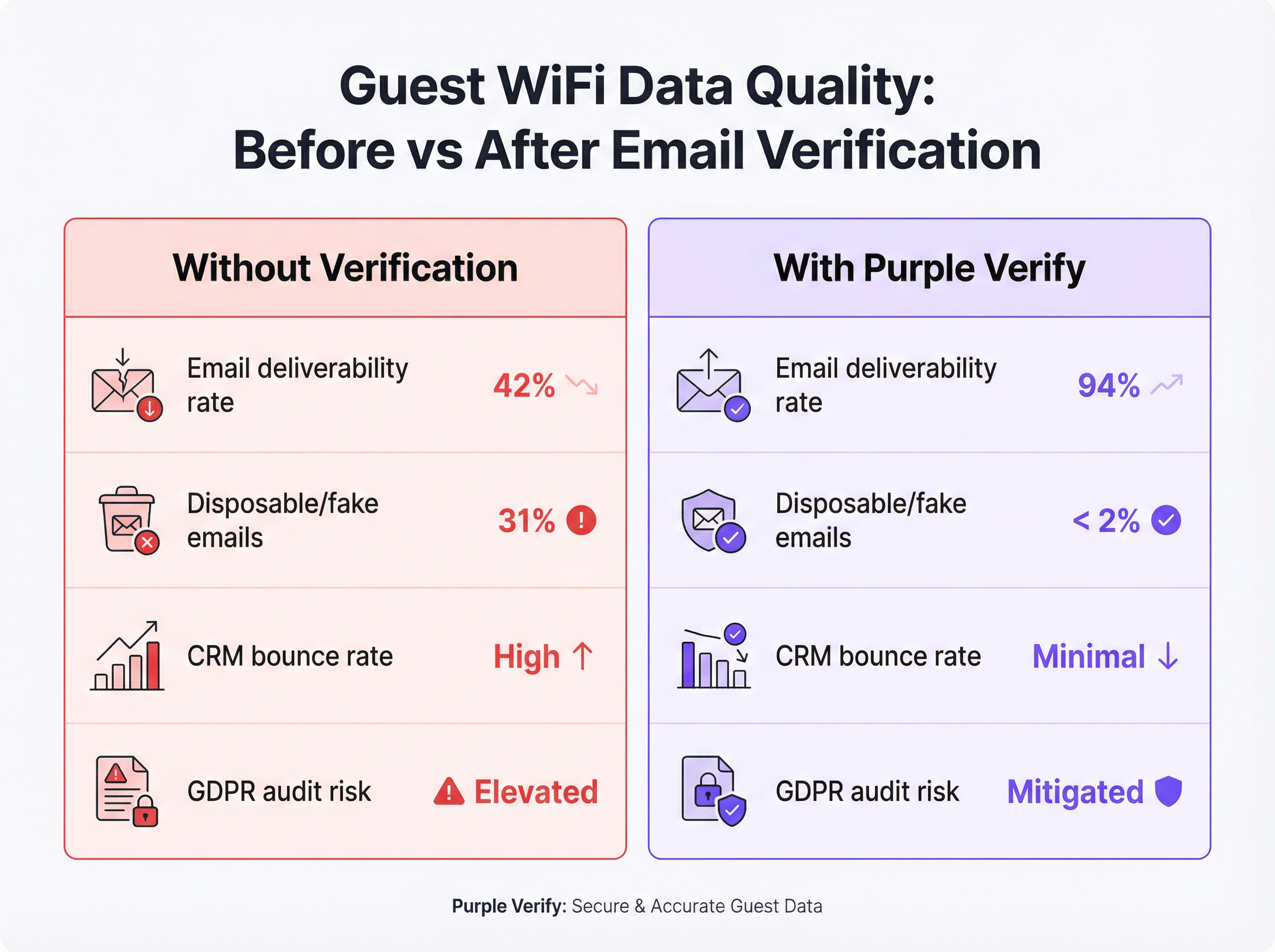
Die Verify-Funktion von Purple löst dieses Problem auf der Infrastrukturebene durch die Anwendung einer vierstufigen Validierungspipeline – Syntaxprüfung, DNS-MX-Record-Abfrage, Blocklisting von Wegwerf-E-Mail-Domains und optionale Bestätigung durch ein Einmalpasswort (OTP) – in Echtzeit, bevor einem Gast der Netzwerkzugriff gewährt wird. Implementierungen in den Bereichen Gastgewerbe, Einzelhandel und Veranstaltungen zeigen durchweg eine Reduzierung der Raten ungültiger E-Mails auf unter 2 %, wobei die E-Mail-Zustellbarkeitsraten innerhalb von 60 Tagen nach Aktivierung von einem typischen Basiswert von 42 % auf über 90 % steigen.
Für den CTO, der die Datenqualitäts-Roadmap dieses Quartals evaluiert: E-Mail-Verifizierung im WiFi ist kein Nice-to-have. Es ist die grundlegende Kontrollinstanz, die darüber entscheidet, ob Ihre Gäste-WiFi-Investition verwertbare Erkenntnisse oder eine teure Belastung hervorbringt.
Technischer Deep-Dive
Warum Gäste-WiFi schlechte E-Mail-Daten produziert
Die Ursache ist strukturell, nicht zufällig. Wenn sich ein Gast mit einem Captive Portal verbindet, ist der Austausch grundlegend asymmetrisch: Der Gast möchte sofortigen Internetzugang, und der Betreiber möchte im Gegenzug eine gültige E-Mail-Adresse. Der Gast hat jeden Anreiz, Reibungsverluste zu minimieren, und der Betreiber hat – ohne Verifizierungskontrollen – keinen Mechanismus, um die Datenqualität zum Zeitpunkt der Übermittlung durchzusetzen.
Dies führt zu vier unterschiedlichen Kategorien fehlerhafter Daten. Tippfehler sind am harmlosesten: Ein Gast beabsichtigt tatsächlich, seine echte Adresse anzugeben, vertippt sich aber unter Zeitdruck oder auf einer kleinen mobilen Tastatur. Erfundene Adressen sind absichtlich: Zeichenfolgen wie test@test.com oder noemail@noemail.com, die plausibel aussehen, aber ins Leere führen. Abgelaufene oder ungültige Domains entstehen, wenn ein Gast eine Adresse bei der Domain eines ehemaligen Arbeitgebers, einem stillgelegten ISP oder einer persönlichen Domain angibt, die er nicht mehr pflegt. Wegwerf-E-Mail-Adressen sind die raffinierteste Kategorie: Dienste wie Mailinator, Guerrilla Mail und Temp Mail bieten voll funktionsfähige Posteingänge, die nach Minuten oder Stunden ablaufen. So kann ein Gast selbst eine grundlegende Zustellbarkeitsprüfung bestehen, während gleichzeitig sichergestellt wird, dass kein langfristiger Marketingkontakt möglich ist.
Der IEEE 802.11-Standard regelt das Funk- und MAC-Layer-Verhalten von WiFi-Netzwerken, stellt jedoch keine Anforderungen an die Identitätsprüfung der sich verbindenden Nutzer. Das Verhalten von Captive Portals wird in RFC 7710 und dessen Nachfolger RFC 8910 beschrieben, von denen keiner eine E-Mail-Validierung vorschreibt. Das Datenqualitätsproblem ist daher ausschließlich ein Anliegen der Anwendungsschicht, das oberhalb des Netzwerk-Stacks angesiedelt ist und auf der Softwareebene des Captive Portal gelöst werden muss.
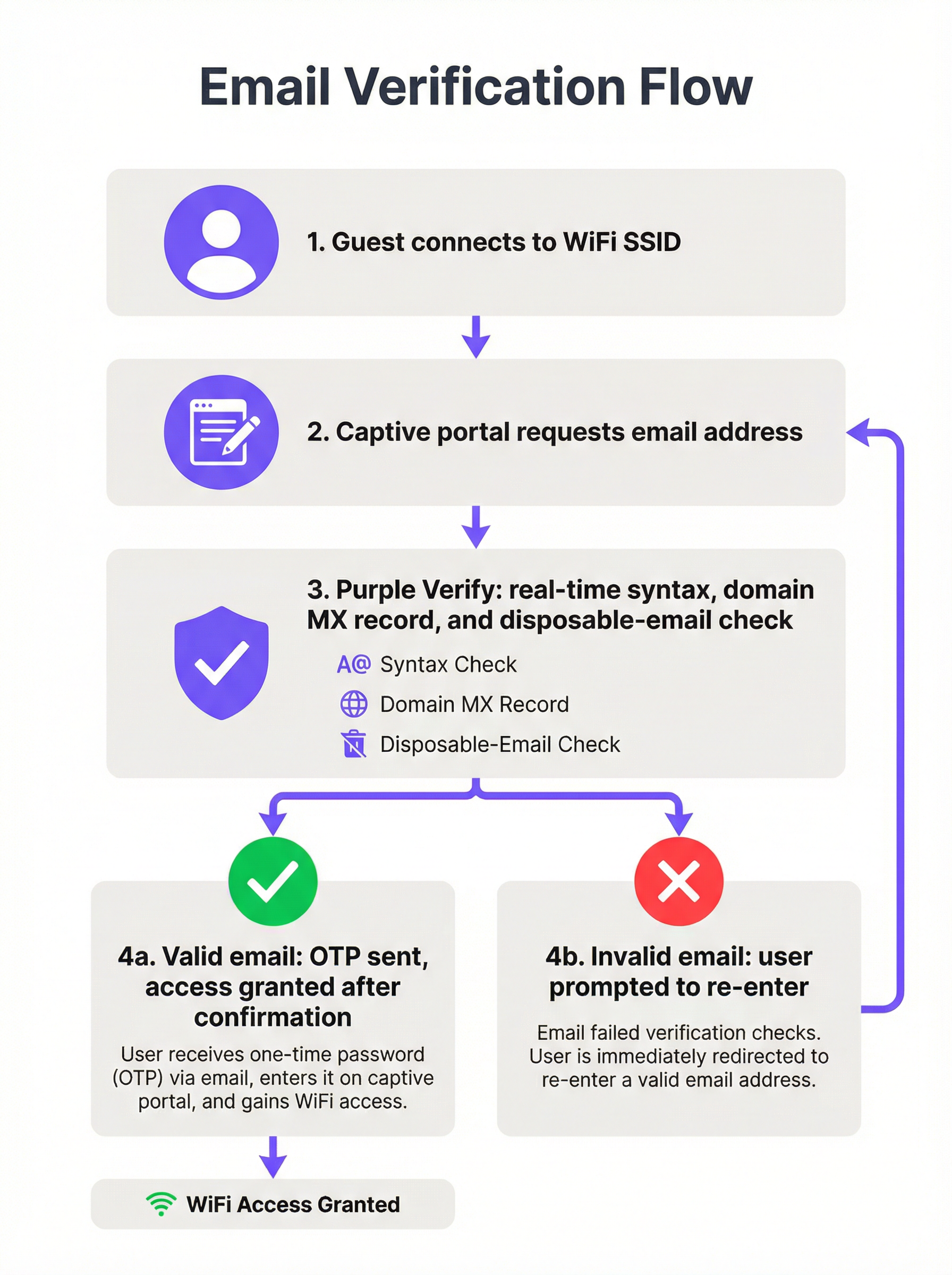
Die vierstufige Verifizierungsarchitektur
Eine produktionsreife E-Mail-Verifizierungs-Bereitstellung im WiFi implementiert vier unterschiedliche Validierungsebenen, von denen jede eine inkrementelle Qualitätssicherung bietet.
Ebene 1 — Syntax-Validierung (RFC 5322): Die übermittelte Zeichenfolge wird anhand des Internet Message Format-Standards geparst. Dies bestätigt das Vorhandensein eines lokalen Teils, eines At-Zeichens und einer Domain-Komponente mit mindestens einem Punkt. Zeichenfolgen mit unzulässigen Zeichen, mehreren At-Zeichen und anderen strukturellen Verstößen werden abgelehnt. Allein die Syntax-Validierung fängt etwa 15–20 % der fehlerhaften Eingaben ab und fügt eine vernachlässigbare Latenz hinzu (Sub-Millisekunden-Bereich, clientseitig).
Ebene 2 — Domain- und MX-Record-Verifizierung: Eine DNS-Abfrage bestätigt, dass die übermittelte Domain existiert und über einen gültigen Mail Exchange (MX)-Eintrag verfügt, was anzeigt, dass sie für den Empfang von E-Mails konfiguriert ist. Diese Prüfung wird serverseitig durchgeführt und ist in der Regel innerhalb von 100–300 Millisekunden abgeschlossen. Sie eliminiert Adressen bei abgelaufenen Domains, fiktiven Domains und stillgelegten Unternehmensdomains – eine Kategorie, die die Syntax-Validierung nicht erkennen kann.
Ebene 3 — Blocklisting von Wegwerf-E-Mail-Domains: Die Domain-Komponente wird mit einer kontinuierlich aktualisierten Blocklist bekannter Anbieter von Wegwerf- und temporären E-Mail-Diensten abgeglichen. Hier wird die Intelligence-Schicht entscheidend. Eine statische Blocklist – eine, die nicht in Echtzeit aktualisiert wird – übersieht neu eingeführte Wegwerfdienste und verliert im Laufe der Zeit an Wirksamkeit. Die Verify-Funktion von Purple pflegt eine live aktualisierte Blocklist und gewährleistet so die Abdeckung des aktuellen Wegwerf-E-Mail-Ökosystems anstelle einer historischen Momentaufnahme.
Ebene 4 — Bestätigung durch Einmalpasswort (OTP): Ein zeitlich begrenzter numerischer Code wird an die übermittelte E-Mail-Adresse gesendet. Der Gast muss diesen Code aus seinem tatsächlichen Posteingang abrufen und in das Captive Portal eingeben, um die Authentifizierung abzuschließen. Dies ist die definitive Prüfung des Eigentumsnachweises: Es ist unmöglich, sie mit einer erfundenen Adresse, einer falsch geschriebenen Adresse oder einem abgelaufenen Wegwerf-Posteingang zu bestehen. Die OTP-Bestätigung steht im Einklang mit den Prinzipien der Multi-Faktor-Authentifizierung und bietet die stärkste verfügbare Sicherheit, dass die erfasste E-Mail-Adresse sowohl gültig als auch für den Gast zugänglich ist.
| Validierungsebene | Was sie abfängt | Latenzauswirkung | Empfohlen für |
|---|---|---|---|
| Syntax (RFC 5322) | Fehlerhafte Zeichenfolgen | < 1 ms | Alle Implementierungen |
| Domain / MX-Record | Nicht existierende Domains | 100–300 ms | Alle Implementierungen |
| Wegwerf-E-Mail-Blocklist | Temporäre Posteingänge | 50–100 ms | Marketingfokussierte Implementierungen |
| OTP-Bestätigung | Alle ungültigen Adressen | 30–120 Sekunden (nutzerabhängig) | Gastgewerbe, Events, Treueprogramme |
Kontext zu Compliance und Standards
Die E-Mail-Verifizierung am WiFi-Anmeldepunkt ist direkt relevant für mehrere regulatorische und standardisierte Rahmenwerke, denen Standortbetreiber wahrscheinlich unterliegen.
GDPR Artikel 5(1)(d) schreibt vor, dass personenbezogene Daten sachlich richtig und erforderlichenfalls auf dem neuesten Stand sein müssen. Die Erfassung einer verifizierten E-Mail-Adresse am Erfassungspunkt ist bei einer Prüfung durch die Aufsichtsbehörde wesentlich besser vertretbar als die Erfassung einer unverifizierten Adresse und der Versuch einer nachträglichen Bereinigung. Der Verifizierungsprozess selbst sollte in Ihrem Verzeichnis von Verarbeitungstätigkeiten gemäß Artikel 30 dokumentiert werden.
GDPR Artikel 7 verlangt, dass die Einwilligung für Marketingkommunikation freiwillig, für den bestimmten Fall, in informierter Weise und unmissverständlich abgegeben wird. Ein OTP-Bestätigungsschritt liefert einen zeitgleichen Nachweis, dass die betroffene Person zum Zeitpunkt der Einwilligung Zugriff auf die übermittelte E-Mail-Adresse hatte, was den Audit-Trail stärkt.
PCI DSS v4.0 regelt die E-Mail-Verifizierung nicht direkt, aber Anforderung 8 (Benutzer identifizieren und Zugriff authentifizieren) und die umfassenderen Anforderungen an die Netzwerksegmentierung sind relevant, wenn sich Ihr Gäste-WiFi in einem Netzwerksegment befindet, das an Karteninhaber-Datenumgebungen angrenzt. Die durch die OTP-Verifizierung gebotene Identitätssicherheit trägt zu einer vertretbaren Zugangskontrollhaltung bei.
ISO/IEC 27001:2022 Anhang A Maßnahme 5.14 (Informationsübertragung) und Maßnahme 8.5 (Sichere Authentifizierung) sind relevant für Organisationen, die Gäste-WiFi im Rahmen eines ISMS betreiben. Die E-Mail-Verifizierung bietet eine dokumentierte, auditierbare Identitätsprüfung am Netzwerkzugangspunkt.
Implementierungsleitfaden
Bewertung vor der Implementierung
Bevor Sie die E-Mail-Verifizierung aktivieren, sollten Sie eine quantifizierte Baseline erstellen. Exportieren Sie eine repräsentative Stichprobe von mindestens 5.000 E-Mail-Adressen aus Ihrer bestehenden Gäste-WiFi-Datenbank und lassen Sie diese durch einen Bulk-E-Mail-Validierungsdienst prüfen. Notieren Sie Ihre aktuelle Rate ungültiger E-Mails, die Rate der Wegwerf-E-Mails und die Hard-Bounce-Rate aus Ihrer E-Mail-Marketing-Plattform. Diese Zahlen bilden die Ausgangsbasis, an der Sie Verbesserungen messen und den internen Business Case für die Implementierung aufbauen.
Auswahl Ihrer Verifizierungstiefe
Die geeignete Verifizierungskonfiguration hängt von drei Faktoren ab: der Art Ihrer Kundenbeziehung (transaktional versus langfristig), der Toleranz Ihrer Gästedemografie gegenüber Reibungsverlusten und dem nachgelagerten Anwendungsfall für die erfassten Daten.
Für transiente Umgebungen mit hoher Besucherfrequenz – Verkehrsknotenpunkte, Einkaufszentren, Schnellrestaurants – ist die Syntax- und Domain-Validierung mit Blockierung von Wegwerf-E-Mails das empfohlene Minimum. Der OTP-Schritt führt zu Reibungsverlusten, die in einem Kontext, in dem die Kundenbeziehung kurz ist und der primäre Anwendungsfall eher aggregierte Analysen als individuelles Marketing sind, möglicherweise in keinem Verhältnis zum Wert der Daten stehen.
Für Gastgewerbe und Veranstaltungen – Hotels, Konferenzzentren, Stadien – wird die vollständige OTP-Bestätigung dringend empfohlen. Die Kundenbeziehung ist länger, der Marketingwert einer verifizierten E-Mail ist höher, und Gäste in diesen Umgebungen haben in der Regel auf dem Gerät, das sie für die Anmeldung verwenden, Zugriff auf ihre E-Mails. Die zusätzlichen 30–60 Sekunden Reibungsverlust liegen absolut im akzeptablen Rahmen.
Für den Einzelhandel mit integrierten Treueprogrammen – wo die WiFi-Anmeldung direkt in ein Treueprogramm oder eine Personalisierungs-Engine einfließt – ist die OTP-Bestätigung unerlässlich. Die Integrität der Treuedatenbank hängt von der Eindeutigkeit und Richtigkeit der zugrunde liegenden E-Mail-Identifikatoren ab.
Konfigurationsschritte in Purple
- Navigieren Sie im Purple-Dashboard zu Standorteinstellungen > Captive Portal > Authentifizierung.
- Wählen Sie E-Mail als Authentifizierungsmethode und aktivieren Sie den Schalter Verify.
- Wählen Sie Ihre Verifizierungstiefe: Standard (Syntax + Domain + Wegwerf-Blocklist) oder Full (Standard + OTP-Bestätigung).
- Konfigurieren Sie das OTP-E-Mail-Template – stellen Sie sicher, dass es das Branding Ihres Standorts und eine klare Betreffzeile enthält (z. B. „Ihr WiFi-Zugangscode für [Standortname]“).
- Legen Sie das OTP-Ablauffenster fest. Ein 10-Minuten-Fenster wird empfohlen; kürzere Fenster erhöhen die Abbruchrate, längere Fenster verringern die Sicherheit.
- Konfigurieren Sie die Wiederholungs- und Fehlermeldungen in der Captive Portal-Benutzeroberfläche. Legen Sie eindeutige Fehlermeldungen für Syntaxfehler, Domainfehler und die Ablehnung von Wegwerf-E-Mails fest.
- Aktivieren Sie die Weitergabe von Verifizierungs-Metadaten an Ihr angebundenes CRM oder Ihre Marketing-Plattform über die Purple API oder Webhook-Integration.
- Führen Sie einen stufenweisen Rollout durch: Aktivieren Sie die Funktion zunächst für einen Standort oder eine SSID, überwachen Sie die Verifizierungs-Erfolgsquote und die OTP-Abschlussquote 7 Tage lang und weiten Sie sie dann auf den gesamten Bestand aus.
Integration mit nachgelagerten Systemen
Der Wert der E-Mail-Verifizierung wird erst dann voll ausgeschöpft, wenn der verifizierte Status an nachgelagerte Systeme weitergegeben wird. Konfigurieren Sie Ihre Purple-Integration so, dass das boolesche Flag email_verified – und, falls OTP verwendet wurde, das Flag otp_confirmed – an Ihr CRM und Ihre E-Mail-Marketing-Plattform übergeben wird. Verwenden Sie dieses Flag, um Ihre Gästedatenbank zu segmentieren: Behandeln Sie OTP-bestätigte Adressen als Ihre hochwertigste Stufe für personalisierte Kampagnen und verwenden Sie ausschließlich domainvalidierte Adressen für Kommunikation mit geringerer Priorität.
Best Practices
Behandeln Sie die E-Mail-Verifizierung als Maßnahme der Data Governance, nicht als Sicherheitskontrolle. Der Hauptnutzen liegt in der Datenqualität und der GDPR-Compliance, nicht in der Netzwerksicherheit. Formulieren Sie die Implementierung entsprechend, wenn Sie den internen Business Case erstellen.
Verwenden Sie eine live aktualisierte Blocklist für Wegwerf-E-Mails. Eine statische Blocklist verliert schnell an Wert. Wöchentlich gehen neue Wegwerf-E-Mail-Dienste an den Start. Stellen Sie sicher, dass Ihr Verifizierungsanbieter – ob Purple oder ein Drittanbieter – eine kontinuierlich aktualisierte Blocklist pflegt.
Gestalten Sie die Fehler-UX mit Blick auf den echten Nutzer. Die Mehrheit der Gäste, bei denen die Verifizierung fehlschlägt, hat einen echten Tippfehler gemacht und nicht absichtlich versucht, das System zu umgehen. Fehlermeldungen sollten spezifisch, hilfreich und nicht anklagend sein. „Wir konnten diese E-Mail-Domain nicht finden – bitte überprüfen Sie Ihre Eingabe und versuchen Sie es erneut“ ist effektiver als eine generische Meldung wie „Ungültige E-Mail-Adresse“.
Überwachen Sie Ihre OTP-Abschlussquote als Frühindikator. Eine sinkende OTP-Abschlussquote kann auf Probleme mit der Zustellungslatenz, Session-Timeouts oder eine demografische Verschiebung in Ihrer Gästepopulation hinweisen. Richten Sie automatisierte Warnmeldungen ein, wenn die Abschlussquote unter einen bestimmten Schwellenwert fällt (in der Regel sind 70 % ein vernünftiger Basiswert für das Gastgewerbe).
Dokumentieren Sie Ihren Verifizierungsprozess für die GDPR-Compliance nach Artikel 30. Ihr Verzeichnis von Verarbeitungstätigkeiten sollte die am Erfassungspunkt angewendeten Verifizierungsschritte, die Rechtsgrundlage für die Verarbeitung und die Aufbewahrungsfrist für Verifizierungsprotokolle beschreiben.
Wenden Sie die Verifizierungstiefe proportional in Ihrem gesamten Bestand an. Eine Bereitstellung an mehreren Standorten kann unterschiedliche Verifizierungskonfigurationen für verschiedene Standorttypen rechtfertigen. Nutzen Sie die standortspezifische Konfigurationsfunktion von Purple, um an jedem Standort die angemessene Tiefe anzuwenden, anstatt standardmäßig den kleinsten gemeinsamen Nenner für den gesamten Bestand zu wählen.
Fehlerbehebung & Risikominderung
Häufige Fehlerquellen
Fehlerquelle 1: Hohe OTP-Abbruchrate. Wenn Ihre OTP-Abschlussquote unter 60 % liegt, sind die häufigsten Ursachen: E-Mail-Zustellungslatenz von über 60 Sekunden; zu kurz eingestelltes Captive Portal-Session-Timeout (unter 5 Minuten); oder Gäste verwenden Webmail-Clients, die einen App-Wechsel auf dem Mobilgerät erfordern, was zu einem Reset der Captive Portal-Sitzung führt. Behebung: Überprüfen Sie das E-Mail-Zustellungs-SLA mit Ihrem SMTP-Anbieter, verlängern Sie das Session-Timeout auf mindestens 8 Minuten und erwägen Sie die Implementierung einer „Magic Link“-Alternative zum numerischen Code für Gäste, die eine Bestätigung mit nur einem Tippen bevorzugen.
Fehlerquelle 2: Legitime Unternehmens-E-Mail-Adressen werden abgelehnt. Einige Unternehmens-E-Mail-Domains weisen ungewöhnliche MX-Record-Konfigurationen auf – zum Beispiel Organisationen, die E-Mails über ein Sicherheits-Gateway von Drittanbietern mit nicht standardmäßigen DNS-Einträgen leiten. Wenn Sie feststellen, dass scheinbar legitime Adressen abgelehnt werden, überprüfen Sie Ihre Domain-Validierungslogik und erwägen Sie die Implementierung einer Whitelist für bekannte Unternehmensdomains, die False Positives erzeugen.
Fehlerquelle 3: Wegwerf-E-Mail-Blocklist deckt neue Dienste nicht ab. Überwachen Sie Ihre Post-Verifizierungs-Datenbank auf Anzeichen für das Eindringen von Wegwerf-E-Mails – zum Beispiel ein plötzlicher Anstieg von Adressen einer unbekannten Domain. Wenn Sie einen neuen Wegwerfdienst identifizieren, der nicht blockiert wird, melden Sie diesen Ihrem Verifizierungsanbieter zur Aufnahme in die Blocklist.
Fehlerquelle 4: Verifizierungs-Metadaten erreichen das CRM nicht. Wenn Ihre E-Mail-Marketing-Plattform das Flag email_verified nicht empfängt, überprüfen Sie Ihre Purple-Webhook-Konfiguration und bestätigen Sie, dass der empfangende Endpunkt den Payload korrekt parst. Verwenden Sie das Webhook-Test-Tool von Purple, um die Integration zu validieren, bevor Sie sich in der Produktion darauf verlassen.
Risikoregister
| Risiko | Wahrscheinlichkeit | Auswirkung | Minderung |
|---|---|---|---|
| OTP-Zustellungsfehler (SMTP-Ausfall) | Gering | Hoch | Konfigurieren Sie ein sekundäres SMTP-Relay; implementieren Sie ein Graceful Fallback auf reine Domain-Validierung |
| Wegwerf-E-Mail-Dienst nicht auf Blocklist | Mittel | Mittel | Verwenden Sie eine live aktualisierte Blocklist; überwachen Sie die Qualität der Post-Verifizierungs-Datenbank |
| GDPR-Anfechtung bezüglich der Aufbewahrung von Verifizierungsdaten | Gering | Hoch | Dokumentieren Sie die Aufbewahrungsrichtlinie; löschen Sie OTP-Protokolle nach 30 Tagen |
| Gästeabbruch aufgrund von OTP-Reibungsverlusten | Mittel | Mittel | Optimieren Sie die E-Mail-Zustellungslatenz; verlängern Sie das Session-Timeout; bieten Sie alternative Authentifizierungsmethoden an |
| False-Positive-Ablehnung legitimer Adressen | Gering | Mittel | Implementieren Sie eine Domain-Whitelist; stellen Sie einen manuellen Override-Pfad für das Standortpersonal bereit |
ROI & Geschäftsauswirkungen
Erfolgsmessung
Die primären KPIs für eine E-Mail-Verifizierungs-Bereitstellung im WiFi fallen in drei Kategorien: Datenqualitätsmetriken, Marketing-Performance-Metriken und Compliance-Metriken.
Datenqualitätsmetriken umfassen die Ablehnungsrate ungültiger E-Mails (der Prozentsatz der übermittelten Adressen, die auf jeder Verifizierungsebene abgelehnt werden), die OTP-Abschlussquote und die Hard-Bounce-Rate nach der Implementierung aus Ihrer E-Mail-Marketing-Plattform. Eine gut konfigurierte Bereitstellung sollte eine Rate ungültiger E-Mails von unter 2 % und eine Hard-Bounce-Rate von unter 0,5 % bei über WiFi generierten Kontakten erreichen.
Marketing-Performance-Metriken umfassen die E-Mail-Zustellbarkeitsrate, die Kampagnen-Öffnungsrate und die Click-Through-Rate für über WiFi generierte Segmente im Vergleich zu anderen Akquisitionskanälen. Verifizierte WiFi-Kontakte übertreffen unverifizierte Kontakte bei diesen Metriken durchweg, da die zugrunde liegenden Daten korrekt sind und der Gast durch den Abschluss des OTP-Schritts eine aktive Absicht gezeigt hat.
Compliance-Metriken umfassen die Anzahl der GDPR-Auskunftsersuchen von betroffenen Personen, die korrekt erfüllt werden können (eine saubere Datenbank verringert das Risiko, personenbezogene Daten an die falsche Person zu senden), sowie die Audit-Bereitschaft Ihrer Artikel-30-Verzeichnisse.
Kosten-Nutzen-Rahmen
Die direkten Kosten für die Implementierung der E-Mail-Verifizierung sind minimal: Die Verify-Funktion von Purple ist im Plattform-Abonnement enthalten, und der zusätzliche betriebliche Aufwand beschränkt sich auf die anfängliche Konfiguration und die laufende Überwachung. Die indirekten Kosten bestehen in der marginalen Zunahme der Reibungsverluste bei der Anmeldung und der geringfügigen Reduzierung des Rohdatenvolumens (da einige Gäste, die zuvor gefälschte Adressen angegeben hätten, nun den Anmeldevorgang abbrechen, anstatt eine echte Adresse anzugeben).
Die Vorteile sind quantifizierbar. Für eine Hotelgruppe mit 50 Häusern und durchschnittlich 150 Gäste-WiFi-Anmeldungen pro Tag und Haus beträgt das jährliche Datenvolumen etwa 2,7 Millionen Datensätze. Bei einer unverifizierten Ungültigkeitsrate von 30 % sind das 810.000 wertlose Datensätze pro Jahr – von denen jeder CRM-Speicherplatz und E-Mail-Versandbudget verbraucht und potenziell ein GDPR-Risiko darstellt. Bei typischen Kosten einer E-Mail-Marketing-Plattform von 0,002 £ pro Versand übersteigen die direkten verschwendeten Ausgaben allein für ungültige Adressen 1.600 £ pro Jahr und Kampagne. Für einen Betreiber, der 12 Kampagnen pro Jahr durchführt, bedeutet dies über 19.000 £ an direkter Verschwendung – noch bevor die Reputationskosten durch erhöhte Bounce-Raten berücksichtigt werden, die die Zustellbarkeit an echte Abonnenten beeinträchtigen.
Die ROI-Berechnung ist unkompliziert: Die Kosten der Verifizierung sind praktisch null (es handelt sich um einen Konfigurationsschalter in einem bestehenden Plattform-Abonnement), und die Vorteile – in Form von reduzierter Verschwendung, verbesserter Kampagnen-Performance und gemindertem Compliance-Risiko – sind materiell und innerhalb von 60–90 Tagen nach der Implementierung messbar.
Dieser Leitfaden wird von Purple, der Enterprise-WiFi-Intelligence-Plattform, herausgegeben. Für Unterstützung bei der Implementierung oder eine technische Beratung kontaktieren Sie Ihr Purple-Account-Team oder besuchen Sie purple.ai.
Key Terms & Definitions
Captive Portal
A web page presented to a guest attempting to connect to a WiFi network, requiring authentication or acceptance of terms before network access is granted. Captive portal behaviour is described in RFC 8910. The portal is the primary data collection interface in a guest WiFi deployment and the point at which email verification is applied.
IT teams encounter captive portals as the front-end interface of their guest WiFi deployment. The design and configuration of the captive portal — including its verification logic and error messaging — directly determines the quality of data collected.
MX Record (Mail Exchange Record)
A DNS resource record that specifies the mail server responsible for accepting email messages on behalf of a domain. During email verification, a DNS lookup for the MX record of the submitted domain confirms that the domain is configured to receive email. The absence of an MX record indicates that the domain cannot receive email, making any address at that domain invalid for communication purposes.
IT teams encounter MX record checks as part of the domain validation layer of email verification. Understanding MX records is also relevant for diagnosing false positive rejections of legitimate corporate email addresses with non-standard DNS configurations.
Disposable Email Address (DEA)
A temporary email address provided by a disposable email service (such as Mailinator, Guerrilla Mail, or Temp Mail) that is functional for a short period — typically minutes to hours — before expiring. DEAs are specifically designed to allow users to register for services without providing a permanent, contactable email address. They represent the most sophisticated category of invalid email data in guest WiFi deployments.
IT and marketing teams encounter DEAs as a primary source of data quality degradation in guest WiFi databases. A guest using a DEA will pass syntax and domain validation but will be unreachable for any subsequent marketing or transactional communication.
One-Time Passcode (OTP)
A time-limited numeric or alphanumeric code sent to a user's email address (or mobile number) as part of an authentication or verification flow. In the context of email verification WiFi, the OTP is dispatched to the submitted email address and must be entered into the captive portal to complete sign-in. Successful OTP entry constitutes proof of ownership of the submitted address.
IT teams configure OTP delivery as part of the captive portal authentication flow. Key configuration parameters include the OTP expiry window (typically 5–10 minutes), the SMTP relay used for delivery, and the session timeout on the captive portal (which must be long enough to allow the guest to retrieve and enter the code).
Email Deliverability Rate
The percentage of sent emails that successfully reach the recipient's inbox, as opposed to being bounced (returned as undeliverable) or filtered to spam. Deliverability rate is a function of both the quality of the underlying email list and the sender's reputation with Internet Service Providers (ISPs). A high proportion of invalid addresses in a list will generate hard bounces, which damage sender reputation and reduce deliverability even to valid addresses.
Marketing managers use deliverability rate as the primary indicator of email list health. IT teams are involved when deliverability issues are traced to infrastructure problems — such as a sender domain being flagged as high-risk by ISPs due to excessive bounce rates from WiFi-sourced contacts.
Hard Bounce
A permanent email delivery failure caused by an invalid, non-existent, or blocked recipient address. Hard bounces are distinguished from soft bounces (temporary delivery failures due to a full inbox or server unavailability). Email marketing platforms track hard bounce rates and will typically suppress addresses that generate hard bounces. A hard bounce rate above 2% is generally considered a threshold for sender reputation risk.
IT and marketing teams encounter hard bounces as the primary measurable symptom of poor email data quality. A high hard bounce rate from WiFi-sourced contacts is often the trigger for an email verification deployment project.
RFC 5322 (Internet Message Format)
The Internet Engineering Task Force (IETF) standard that defines the syntax of email messages, including the format of email addresses. RFC 5322 specifies that an email address consists of a local part (before the at-symbol) and a domain (after the at-symbol), with specific rules governing permissible characters and structure. Syntax validation in email verification checks submitted addresses against RFC 5322 requirements.
IT teams reference RFC 5322 when configuring or evaluating email validation logic. Understanding the standard helps distinguish between syntactically valid addresses (which conform to RFC 5322) and deliverable addresses (which additionally require a valid domain and MX record).
Sender Reputation
A score assigned by Internet Service Providers (ISPs) and email filtering services to a sending domain and IP address, based on factors including bounce rates, spam complaint rates, and sending volume patterns. A degraded sender reputation causes emails to be filtered to spam or rejected outright, even for valid recipient addresses. Sender reputation is directly affected by the quality of the underlying email list: high bounce rates from invalid addresses are one of the fastest ways to damage reputation.
IT teams are typically involved in sender reputation issues when the email marketing platform flags deliverability problems that trace back to infrastructure — such as a sending domain being blacklisted. Marketing managers experience sender reputation degradation as unexplained drops in campaign open rates. Email verification WiFi directly protects sender reputation by preventing invalid addresses from entering the list.
GDPR Article 5(1)(d) — Accuracy Principle
The provision of the General Data Protection Regulation that requires personal data to be 'accurate and, where necessary, kept up to date', with 'every reasonable step' taken to ensure that inaccurate personal data is erased or rectified without delay. In the context of guest WiFi data collection, this principle requires operators to take reasonable steps to ensure that email addresses collected at the point of sign-in are accurate — a requirement that email verification directly addresses.
Data protection officers and IT compliance teams reference Article 5(1)(d) when assessing the legal basis for email verification deployments. The principle provides the regulatory anchor for the business case: collecting unverified email addresses and storing them in a CRM is a potential compliance risk under GDPR, and verification is the most direct mitigation.
Case Studies
A 12-property UK hotel group has been operating guest WiFi for 18 months without email verification. Their CRM contains approximately 144,000 guest records sourced from WiFi sign-ins, but their email marketing platform is flagging their sender domain as high-risk due to a 31% hard bounce rate. The marketing director wants to launch a loyalty programme using WiFi-sourced contacts. What is the recommended approach?
The immediate priority is to stop the flow of new invalid data before addressing the existing database. Step 1: Activate Purple Verify with full OTP confirmation on all 12 properties. Configure a branded OTP email template and set the session timeout to 8 minutes. This halts the accumulation of new invalid records. Step 2: Run the existing 144,000-record database through a bulk email validation service to identify the invalid, disposable, and undeliverable addresses. Suppress these from all future sends immediately — do not attempt to re-engage them, as doing so will further damage sender reputation. Step 3: Implement a re-permission campaign to the remaining valid contacts, inviting them to opt in to the new loyalty programme. This simultaneously cleans the list and establishes a fresh, documented consent record for GDPR purposes. Step 4: Configure the Purple API integration to pass the otp_confirmed flag to the CRM, and create a segmentation rule that tags all new WiFi contacts with their verification tier. Step 5: Monitor the sender reputation score weekly using a tool such as Google Postmaster Tools or Microsoft SNDS. Expect the bounce rate to normalise to under 0.5% within 60 days as the invalid addresses are suppressed and new verified contacts replace them.
A retail chain operating 47 stores wants to use guest WiFi sign-in data to personalise in-store digital signage and feed a loyalty programme. Their current WiFi deployment captures approximately 3,200 sign-ins per day across the estate, but the data team reports that their customer segmentation models are unreliable due to a high proportion of duplicate and ghost accounts. The IT manager is concerned that adding OTP verification will reduce sign-in completion rates in a high-footfall, fast-turnover retail environment. What verification configuration is recommended, and how should the trade-off between data quality and conversion rate be managed?
For a high-footfall retail environment, the recommended configuration is syntax validation plus domain/MX record checking plus disposable email blocking, without the OTP step. This configuration eliminates the majority of low-quality data — fabricated addresses, non-existent domains, and disposable inboxes — while adding only 200–400 milliseconds of latency to the sign-in flow, which is imperceptible to the guest. The OTP step is omitted because the guest relationship in a retail context is typically brief and the device-switching friction (from captive portal to email app and back) is disproportionate to the value gained in a fast-turnover environment. To address the duplicate account problem specifically, configure the Purple platform to enforce email uniqueness at the point of sign-in: if a guest submits an address that already exists in the database, merge the session data with the existing record rather than creating a new one. This directly addresses the ghost account proliferation without requiring OTP. For the loyalty programme integration, apply a tiered trust model: contacts acquired through the WiFi flow with domain validation are treated as 'standard' tier; contacts who have additionally authenticated via a social login (which provides implicit email verification through the OAuth flow) are treated as 'verified' tier and are eligible for higher-value personalisation. Monitor the duplicate account rate monthly as the primary KPI for this deployment.
Scenario Analysis
Q1. A conference centre hosts 200 events per year, ranging from 50-person board meetings to 5,000-delegate industry conferences. Their guest WiFi currently captures approximately 180,000 email addresses per year with no verification. The events team wants to use this data for post-event marketing and delegate re-engagement. The IT manager is concerned about the compliance implications of the existing unverified database. What verification configuration would you recommend for new data collection, and how would you address the existing database?
💡 Hint:Consider the variability in event type and delegate profile. A 5,000-person conference has different data quality requirements and guest behaviour patterns than a 50-person board meeting. Also consider that conference delegates typically have their corporate email accessible on their device.
Show Recommended Approach
For new data collection, deploy full OTP confirmation for all events. Conference delegates are a high-value audience for post-event marketing, and the OTP step is well-suited to this context: delegates have their corporate email accessible on the device they are using to sign in, and the sign-in friction is proportionate to the value of the relationship. Configure the OTP email with event-specific branding (using Purple's dynamic template variables to insert the event name and date) to increase trust and completion rates. For large events (500+ delegates), pre-stage the SMTP relay capacity to handle peak OTP send volumes at event start. For the existing unverified database of 180,000 addresses, run a bulk validation audit immediately and suppress all addresses that fail domain and MX checks. For the remaining addresses, run a re-permission campaign framed around the new loyalty or delegate programme — this simultaneously cleans the list and establishes fresh GDPR consent records. Document the audit and re-permission process in the Article 30 Records of Processing Activities, noting the date of the remediation exercise and the methodology used.
Q2. A local authority is deploying free public WiFi across 23 libraries and community centres. The project is funded partly on the basis of providing anonymised footfall analytics to the council's planning department. The data protection officer has raised concerns about collecting email addresses from members of the public on council-operated infrastructure. The IT team is evaluating whether to require email sign-in at all, and if so, what verification to apply. What is your recommendation?
💡 Hint:Consider the data minimisation principle under GDPR Article 5(1)(c) — only collect data that is necessary for the specified purpose. If the primary purpose is anonymised footfall analytics, is email collection required at all? If email collection is retained, what is the legal basis and what verification depth is proportionate?
Show Recommended Approach
The data minimisation principle is the governing consideration here. If the primary purpose is anonymised footfall analytics, email collection is not required — device presence detection (using MAC address randomisation-aware counting methods) can provide footfall data without any personal data collection. Recommend separating the analytics use case from the marketing use case: deploy a no-registration WiFi option for general public access (satisfying the footfall analytics requirement with anonymised data), and offer an optional email registration path for users who wish to receive council communications or loyalty benefits. For the optional registration path, apply syntax validation and domain/MX checking as the minimum — OTP confirmation is recommended given the public-sector context and the DPO's concerns, as it provides the strongest available evidence of informed consent and accurate data collection. Document the legal basis for email processing (likely legitimate interests or consent, depending on the use case) in the Article 30 records, and ensure the captive portal privacy notice clearly distinguishes between the anonymised analytics processing and the optional email registration processing.
Q3. An IT manager at a 300-outlet fast-food chain has activated Purple Verify with syntax, domain, and disposable email blocking (no OTP) across all outlets. Three months after deployment, the marketing team reports that their email deliverability rate has improved from 48% to 71% — a significant improvement, but still below the 90%+ target. The IT manager suspects that a new category of invalid addresses is getting through the current verification stack. What diagnostic steps would you recommend, and what additional configuration changes might close the gap?
💡 Hint:A deliverability rate of 71% after deploying three-layer verification (without OTP) suggests that a significant proportion of addresses are passing all three checks but are still undeliverable. Consider what categories of address could pass syntax, domain, and disposable email checks but still be undeliverable.
Show Recommended Approach
The most likely explanation is a combination of two factors: role-based email addresses (such as info@, noreply@, admin@, or postmaster@) that are syntactically valid, have valid MX records, and are not disposable services, but are not monitored by an individual and generate soft bounces or spam complaints; and addresses at legitimate domains where the specific mailbox does not exist (the domain is valid, the MX record is valid, but the local part — the username — is fabricated). To diagnose: export a sample of 1,000 addresses that passed verification but generated bounces, and categorise them by bounce type and address pattern. If role-based addresses are a significant category, add a role-based address filter to the verification configuration. For the mailbox-existence problem, the only reliable solution is OTP confirmation — which verifies that the specific mailbox exists and is accessible to the submitting guest. Given the fast-food context, the IT manager should evaluate whether a limited OTP deployment — for example, on the loyalty programme sign-in flow only, not the general WiFi access flow — would close the remaining gap without imposing OTP friction on the full guest population. This tiered approach is a practical compromise between data quality and conversion rate in a high-footfall environment.
Key Takeaways
- ✓Between 25% and 35% of email addresses captured through unverified guest WiFi captive portals are invalid, disposable, or fabricated — making email verification WiFi a foundational data governance control, not an optional enhancement.
- ✓A production-grade verification architecture implements four layers in sequence: RFC 5322 syntax validation, DNS MX record lookup, live-updated disposable email blocklisting, and OTP confirmation. Each layer provides incremental quality assurance; the appropriate depth depends on the use case and guest context.
- ✓Purple's Verify feature implements all four layers natively within the captive portal flow, with a continuously updated disposable email blocklist and configurable OTP step — reducing invalid email rates to under 2% within 60 days of activation in documented deployments.
- ✓GDPR Article 5(1)(d)'s accuracy principle provides the regulatory anchor for email verification deployments: collecting unverified personal data and storing it in a CRM is a documentable compliance risk, and verification at the point of capture is the most direct mitigation.
- ✓The ROI is measurable and rapid: a 12-property hotel group deploying Verify saw email deliverability rise from 42% to 94% within 60 days, with the invalid email rate dropping from 31% to under 2% — directly improving campaign performance and reducing wasted send budget.
- ✓Verification depth should be calibrated to context: full OTP confirmation for hospitality, events, and loyalty programmes; syntax, domain, and disposable email blocking for high-footfall retail and transient environments; and a data minimisation review for public-sector deployments where email collection may not be required at all.
- ✓Post-deployment monitoring is essential: track the OTP completion rate, invalid email rejection rate, and sender reputation score at 30, 60, and 90 days. A declining OTP completion rate is the leading indicator of delivery latency or session timeout issues that require remediation.




