

Firewall-Regeln für Gast-WiFi-Netzwerke
This guide provides IT managers and network architects with an authoritative reference for configuring firewall rules for guest WiFi networks, specifically in support of a Purple deployment. It offers actionable, vendor-neutral guidance on network segmentation, port configuration, and security best practices to ensure both seamless guest access and robust protection of corporate assets.
🎧 Listen to this Guide
View Transcript
Executive Summary
Für moderne Unternehmen ist das Angebot von Gast-WiFi kein Luxus mehr – es ist ein geschäftskritischer Service, der die Kundenbindung fördert, wertvolle Analysen liefert und das Erlebnis vor Ort verbessert. Ein unzureichend gesichertes Gastnetzwerk stellt jedoch einen der größten Angriffsvektoren auf die Unternehmensumgebung dar. Dieser technische Leitfaden bietet IT-Führungskräften und Netzwerkarchitekten ein praxisorientiertes Framework zur Implementierung robuster, sicherer und leistungsstarker Firewall-Konfigurationen für Gast-WiFi-Netzwerke. Er konzentriert sich auf die Kernprinzipien der Netzwerkisolierung, des Least-Privilege-Zugriffs und der proaktiven Überwachung. Durch die Einhaltung dieser herstellerneutralen Best Practices können Unternehmen Sicherheitsrisiken mindern, die Einhaltung gesetzlicher Vorschriften (wie PCI DSS und GDPR) sicherstellen und den ROI ihrer WiFi-Infrastruktur maximieren. Dieses Dokument geht über akademische Theorie hinaus und bietet pragmatische Schritt-für-Schritt-Anleitungen sowie Praxisbeispiele, die speziell auf vielbeschäftigte technische Fachkräfte zugeschnitten sind, die für die Bereitstellung und Verwaltung von Unternehmensnetzwerken im Gastgewerbe, im Einzelhandel und an großen öffentlichen Veranstaltungsorten verantwortlich sind.
Technischer Deep-Dive
Das Grundprinzip einer sicheren Gast-WiFi-Architektur ist die strikte Netzwerksegmentierung. Das Gastnetzwerk muss als nicht vertrauenswürdige, externe Umgebung behandelt werden, die logisch vom vertrauenswürdigen Unternehmens-LAN getrennt ist, in dem sich kritische Geschäftssysteme, Server und Mitarbeiterdaten befinden. Dies wird am effektivsten durch Virtual LANs (VLANs) erreicht, wobei eine Firewall als Kontrollpunkt zwischen ihnen fungiert.
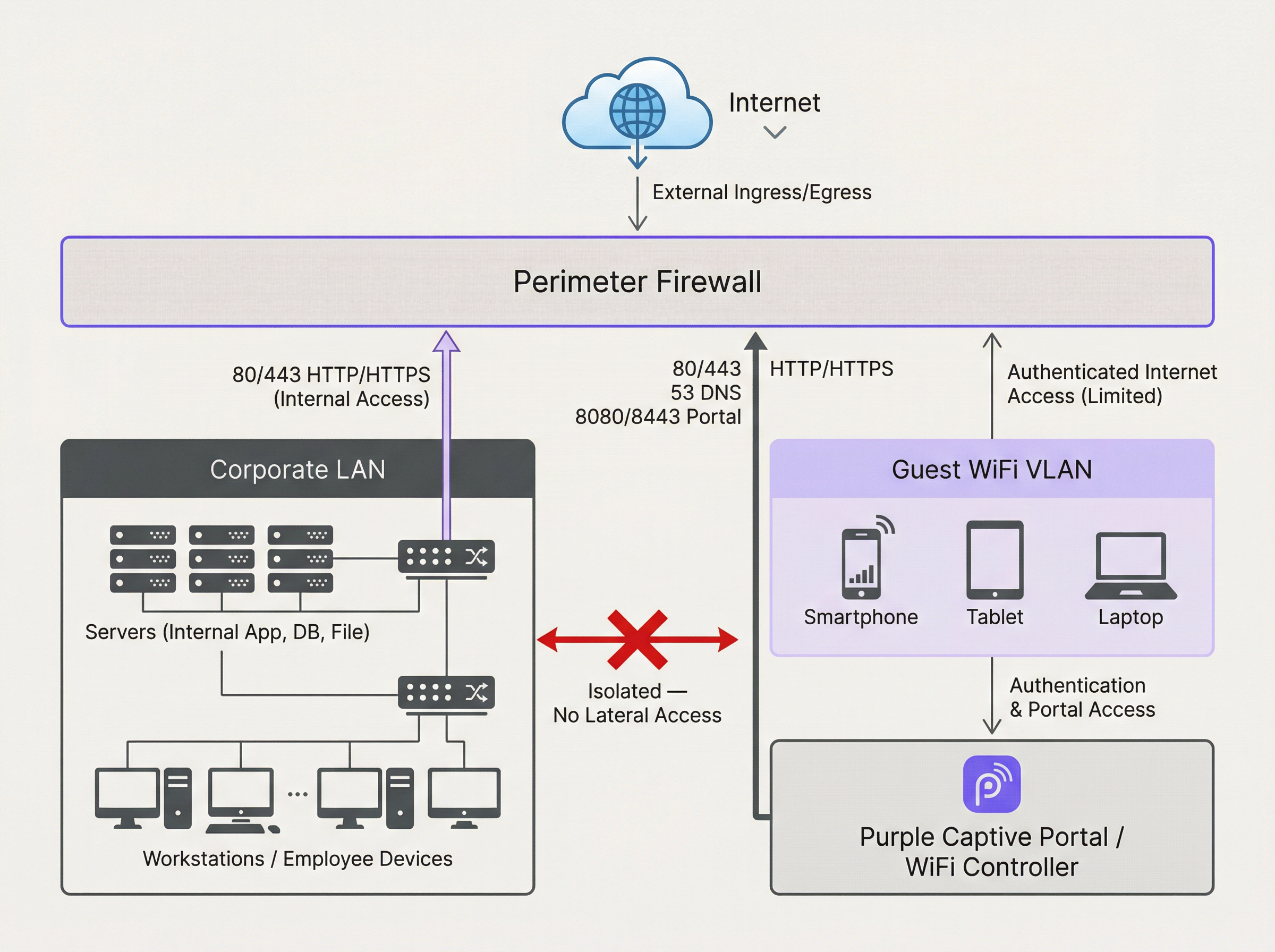
Das obige Diagramm veranschaulicht die ideale Architektur. Der gesamte Datenverkehr, der vom Gast-WiFi-VLAN ausgeht, wird durch eine Firewall geschützt und überprüft, bevor er das Internet oder ein anderes Netzwerksegment erreichen kann. Entscheidend ist, dass eine Firewall-Regel vorhanden sein muss, die jeglichen Datenverkehr, der vom Gast-VLAN zum Unternehmens-LAN initiiert wird, ausdrücklich verweigert. Dies verhindert, dass ein kompromittiertes Gastgerät als Ausgangspunkt für Angriffe auf interne Ressourcen genutzt wird.
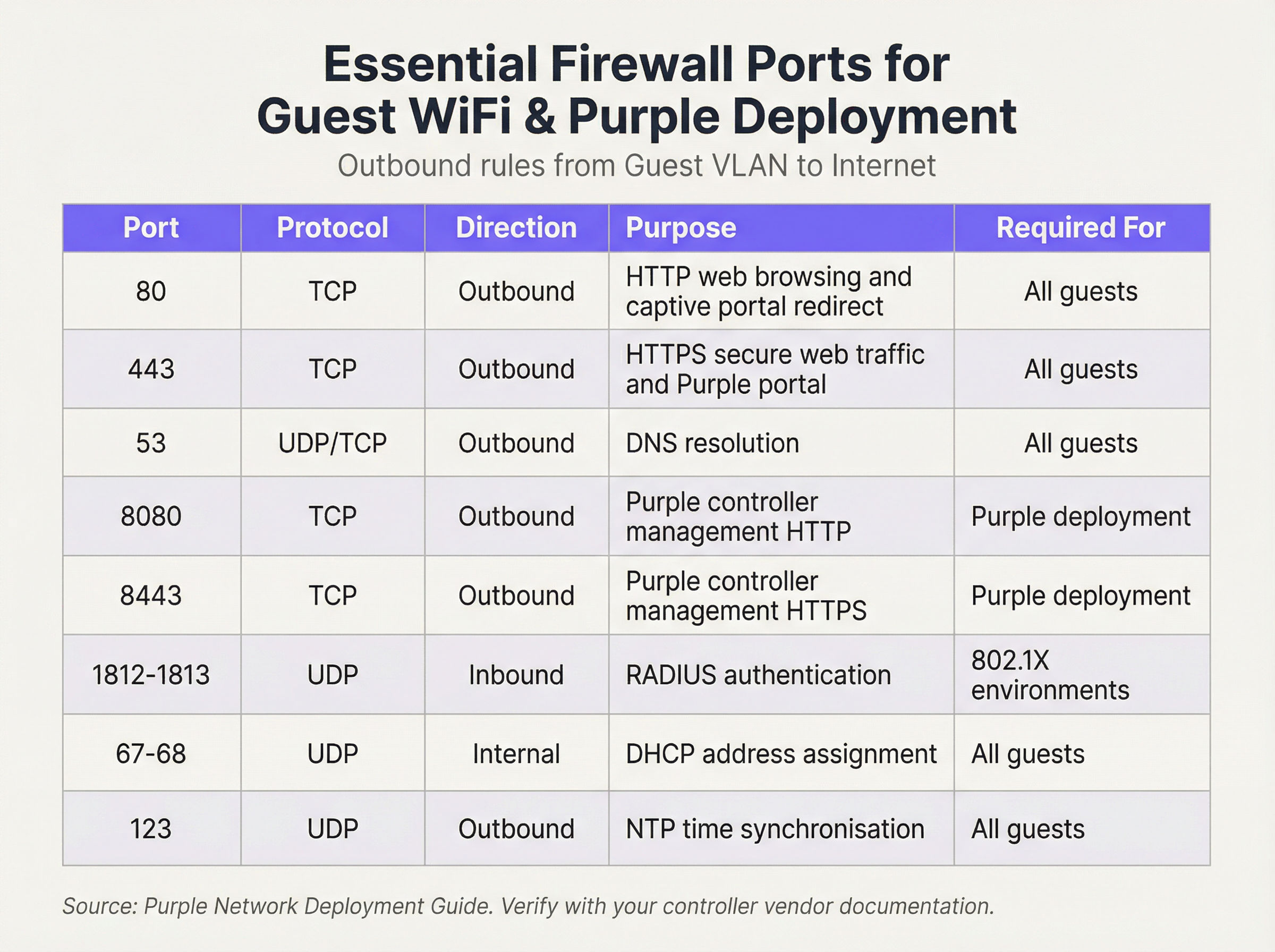
Wir arbeiten mit einer „Default Deny“-Sicherheitsrichtlinie. Das bedeutet, dass die Firewall den gesamten Datenverkehr blockiert, es sei denn, eine Regel lässt ihn ausdrücklich zu. Die folgenden ausgehenden Regeln bilden die Grundlage für ein funktionales und sicheres Gastnetzwerk:
Eingehende Regeln & Portweiterleitung:
Für das Gast-VLAN ist die Richtlinie für eingehenden Datenverkehr einfach: Verweigern Sie jeglichen aus dem Internet initiierten Datenverkehr. Es gibt keinen triftigen geschäftlichen Grund für eine externe Entität, eine Verbindung zum Gerät eines Gastes zu initiieren. Die einzige Ausnahme bildet On-Premise-Hardware. Wenn Sie Ihren eigenen WiFi-Controller oder Captive Portal-Server in Ihrem Netzwerk hosten (im Gegensatz zur Nutzung einer Cloud-basierten Lösung), müssen Sie eine spezifische Portweiterleitungs- (oder Destination NAT-) Regel erstellen. Diese Regel ordnet einen bestimmten Port Ihrer öffentlichen IP-Adresse der internen IP-Adresse und dem Port des Controllers zu, z. B. durch Weiterleitung des eingehenden Datenverkehrs auf TCP-Port 443 an 192.168.100.10:8443. Diese Regel muss so restriktiv wie möglich sein und die genaue Quelle (falls bekannt), das Ziel und den Port angeben.
Implementierungsleitfaden
- VLAN-Erstellung: Erstellen Sie in Ihren Netzwerk-Switches ein neues, dediziertes VLAN für den Gastverkehr (z. B. VLAN 100). Weisen Sie diese VLAN-ID der SSID zu, die Ihr Gastnetzwerk ausstrahlt.
- Konfiguration der Firewall-Schnittstelle: Konfigurieren Sie eine neue Schnittstelle oder Sub-Schnittstelle auf Ihrer Firewall und weisen Sie diese dem Gast-VLAN zu. Diese Schnittstelle dient als Standard-Gateway für alle Gastgeräte.
- DHCP-Dienst: Konfigurieren Sie einen DHCP-Server für das Gast-VLAN, um IP-Adressen automatisch zuzuweisen. Stellen Sie sicher, dass der DHCP-Bereich nur die IP-Adresse, die Subnetzmaske und die Gast-Schnittstelle der Firewall als Standard-Gateway bereitstellt. Die bereitgestellten DNS-Server sollten öffentliche Resolver sein (z. B. 1.1.1.1, 8.8.8.8).
- Ausgehende Firewall-Regeln: Erstellen Sie die wesentlichen ausgehenden Firewall-Regeln, wie in der Port-Referenztabelle beschrieben. Beginnen Sie mit den spezifischsten Regeln und enden Sie mit einer „Deny All“-Regel. Die Reihenfolge ist entscheidend. Die Firewall wertet Regeln von oben nach unten aus, und der erste Treffer bestimmt die Aktion.
- Client-Isolierung: Aktivieren Sie auf Ihren Wireless Access Points die Funktion „Client-Isolierung“ (manchmal auch „AP-Isolierung“ oder „Gastmodus“ genannt). Dies ist eine kritische Kontrollmaßnahme, die verhindert, dass Gastgeräte im selben WiFi-Netzwerk miteinander kommunizieren, wodurch das Risiko von Peer-to-Peer-Angriffen gemindert wird.
- Protokollierung und Überwachung: Aktivieren Sie eine detaillierte Protokollierung für alle Firewall-Regeln, insbesondere für verweigerten Datenverkehr. Leiten Sie diese Protokolle an ein zentrales SIEM-System (Security Information and Event Management) weiter, um anomale Aktivitäten zu korrelieren und zu melden.
Best Practices
- Verwenden Sie eine Stateful Firewall: Eine Stateful Firewall verfolgt den Status aktiver Verbindungen und lässt automatisch Rückverkehr für etablierte Sitzungen zu. Dies vereinfacht die Regelerstellung, da Sie nur ausgehende Regeln für vom Gast initiierten Datenverkehr definieren müssen.
- Regelmäßige Audits: Planen Sie vierteljährliche Überprüfungen Ihres Firewall-Regelwerks. Entfernen Sie temporäre, ungenutzte oder zu permissive Regeln. Sicherheit ist ein Prozess, keine einmalige Konfiguration.
- Berücksichtigen Sie IPv6: Stellen Sie sicher, dass Ihre Firewall-Regeln sowohl für IPv4- als auch für IPv6-Datenverkehr gelten. Viele moderne Geräte verwenden standardmäßig IPv6, und dessen Ignorierung kann eine erhebliche Sicherheitslücke hinterlassen.
- Beachtung von Branchenstandards: Richten Sie Ihre Konfiguration an etablierten Sicherheits-Frameworks aus. Für den Einzelhandel fordert die PCI DSS-Anforderung 1.2.1 ausdrücklich die Einschränkung des Datenverkehrs zwischen vertrauenswürdigen und nicht vertrauenswürdigen Netzwerken. Für den Umgang mit personenbezogenen Daten schreibt die GDPR „technische und organisatorische Maßnahmen“ zum Schutz der Daten vor, für die die Netzwerksegmentierung eine grundlegende Kontrollmaßnahme darstellt.
Fehlerbehebung & Risikominderung
- Problem: Captive Portal lädt nicht: Dies ist fast immer ein DNS- oder Firewall-Regel-Problem. Stellen Sie sicher, dass der Gast den Hostnamen des Portals auflösen kann (Port 53 prüfen) und dass der Datenverkehr zur IP-Adresse und zum Port des Portals (normalerweise 80/443) vor der Authentifizierung zulässig ist.
- Problem: Langsames Gast-WiFi: Zu permissive Firewall-Regeln können dazu führen, dass Broadcast-Stürme oder bösartiger Datenverkehr Bandbreite verbrauchen. Wenden Sie das Prinzip des Least Privilege an, um den Datenverkehr auf das Notwendigste zu beschränken.
- Risiko: Zero-Day-Wurm: Ein Gast verbindet sich mit einem Gerät, das mit einem Zero-Day-Wurm infiziert ist, der sich automatisch verbreitet. Minderung: Die Client-Isolierung ist Ihre primäre Verteidigungslinie, da sie verhindert, dass sich der Wurm auf andere Gäste im selben WiFi-Netzwerk ausbreitet. Strikte Egress-Filterung kann auch den Command-and-Control-Datenverkehr blockieren, den die Malware für ihren Betrieb benötigt.
ROI & Geschäftsauswirkungen
Ein sicheres und gut verwaltetes Gast-WiFi-Netzwerk trägt direkt zum Geschäftserfolg bei. Im Einzelhandel ermöglicht es den Zugriff auf die Analysen von Purple, die Einblicke in Kundenfrequenz, Verweildauer und Kundenverhalten bieten und so Marketing- und Betriebsentscheidungen direkt unterstützen. Im Gastgewerbe ist ein leistungsstarkes Gastnetzwerk ein wesentlicher Treiber für die Zufriedenheit der Gäste und positive Bewertungen. Durch die Investition in eine ordnungsgemäße Firewall-Architektur mindern Sie nicht nur Risiken; Sie gewährleisten auch die Zuverlässigkeit und Leistung einer kritischen Plattform für Business Intelligence und Kundenbindung. Eine sichere Bereitstellung schafft Vertrauen und schützt die Marke, was einen klaren Return on Investment liefert, indem kostspielige Datenschutzverletzungen und Compliance-Verstöße verhindert werden.

Podcast-Briefing
Für eine akustische Zusammenfassung dieser wichtigsten Punkte hören Sie sich unser 10-minütiges technisches Briefing an.
Key Terms & Definitions
VLAN (Virtual LAN)
A method of creating logically separate networks on the same physical network infrastructure. Devices on different VLANs cannot communicate without passing through a router or firewall.
IT teams use VLANs as the primary tool to enforce segmentation between the guest network and the corporate network, which is a foundational requirement for security and compliance.
Firewall Egress Filtering
The practice of filtering traffic as it leaves a network, as opposed to when it enters. It controls what outbound connections internal devices are permitted to make.
For a guest network, egress filtering is critical. By only allowing outbound traffic on specific ports (like 80 and 443), you can block malware, prevent users from running unauthorised services, and reduce your attack surface.
Client/AP Isolation
A security feature on wireless access points that prevents devices connected to the same WiFi network from communicating directly with each other.
This is a critical defence against peer-to-peer attacks on the guest network. If one guest's device is compromised, Client Isolation prevents it from attacking other guests' laptops or phones in the same venue.
Stateful Firewall
A firewall that tracks the state of network connections (e.g., TCP streams). It automatically allows return traffic for connections that were initiated from inside the network.
Using a stateful firewall simplifies administration. An IT manager only needs to write a rule allowing a guest to connect to a website on port 443; the firewall automatically handles the return traffic without needing a complex inbound rule.
Default Deny
A security posture where any traffic that is not explicitly permitted by a firewall rule is blocked.
This is a best-practice principle for all firewall configuration. It ensures that any new or un-categorised traffic is blocked by default, providing a much higher level of security than a 'default allow' policy.
PCI DSS
The Payment Card Industry Data Security Standard, a set of security standards designed to ensure that all companies that accept, process, store or transmit credit card information maintain a secure environment.
For any retail or hospitality business, proving that the guest WiFi network is robustly isolated from the network that handles payments (the Cardholder Data Environment) is a fundamental requirement for passing a PCI DSS audit.
Captive Portal
A web page that the user of a public-access network is obliged to view and interact with before access is granted. It is used for authentication, payment, or accepting terms of service.
The firewall must be configured to allow unauthenticated users to access the captive portal (and its supporting services like DNS) before they have full internet access. This pre-authentication access is often managed via a walled-garden configuration.
Port Forwarding (Destination NAT)
A technique used to redirect a communication request from one address and port number combination to another while the packets are traversing a network gateway, such as a router or firewall.
If a venue hosts its own on-premise WiFi controller, IT teams must configure port forwarding to allow guest devices on the internet to reach the captive portal on the internal network. This is a critical step for enabling the guest journey.
Case Studies
A 200-room hotel is experiencing frequent guest complaints about slow WiFi and connection drops. An initial check reveals a flat network architecture where guest and hotel operational traffic (CCTV, staff PCs) share the same subnet. The firewall has a permissive 'allow any-to-any' rule for all internal traffic.
- Immediate Action: Create a new Guest VLAN (e.g., VLAN 200) and a corresponding guest SSID. 2. Segmentation: Migrate all guest-facing access points to the new VLAN. 3. Firewall Policy: Create a new zone and interface for the Guest VLAN on the firewall. Implement a strict outbound policy allowing only ports 53, 80, 443, and 123. Add a rule to explicitly deny any traffic from the Guest VLAN to the corporate VLAN. 4. Enable Client Isolation: Activate AP/Client Isolation on the wireless controller for the guest SSID. 5. Remove Permissive Rule: Once guest traffic is successfully segmented, remove the legacy 'allow any-to-any' rule and replace it with specific rules for required corporate traffic.
A retail chain is opening a new flagship store and needs to provide guest WiFi that is compliant with PCI DSS 4.0. The store will have point-of-sale (POS) terminals, inventory scanners, and corporate PCs on the same physical network infrastructure.
- Define CDE: The first step is to define the Cardholder Data Environment (CDE). Create a dedicated VLAN for all POS terminals. 2. Isolate Guest Network: Create a separate VLAN for guest WiFi. 3. Isolate Corporate Services: Create a third VLAN for other corporate services like inventory scanners and staff PCs. 4. Firewall Enforcement: The firewall must enforce strict segmentation. There must be an explicit 'deny all' rule for any traffic originating from the Guest VLAN or the Corporate Services VLAN to the CDE VLAN. 5. Restrict CDE Egress: The CDE VLAN should only be allowed outbound access to the specific IP addresses of the payment processor, and nothing else. 6. Prove Isolation: Use tools like
nmapor a vulnerability scanner to run tests from the guest network to prove that no CDE hosts or ports are reachable.
Scenario Analysis
Q1. A stadium is hosting a major sporting event and expects 50,000 concurrent users on its guest WiFi. What is the most critical firewall consideration to ensure network stability and security?
💡 Hint:Consider the impact of broadcast and multicast traffic in such a high-density environment.
Show Recommended Approach
The most critical consideration is the aggressive filtering of all unnecessary traffic, particularly broadcast and multicast traffic (like mDNS), at the firewall and access point level. In a high-density environment, this traffic can quickly lead to a broadcast storm, consuming all available bandwidth and bringing the network to a halt. Strict egress rules allowing only essential web and DNS traffic, combined with Client Isolation, are paramount.
Q2. You discover that a previous administrator has configured the guest network to use the internal corporate DNS servers. What are the risks, and what is the immediate remediation?
💡 Hint:What information can be gleaned from internal DNS records?
Show Recommended Approach
The risks are significant. It exposes the names and IP addresses of all internal corporate servers (e.g., payroll.internal.corp, dc01.internal.corp) to anyone on the guest network, providing a detailed map for an attacker. It also creates a potential vector for DNS cache poisoning attacks against the corporate network. The immediate remediation is to change the DHCP configuration for the guest VLAN to assign public DNS servers only (e.g., 1.1.1.1, 8.8.8.8) and ensure the firewall blocks the guest VLAN from sending any traffic to the internal DNS servers.
Q3. A user reports they cannot access their corporate VPN over the guest WiFi. Your firewall logs show denied UDP traffic on port 500 and 4500 from the user's IP. What is the issue and how would you decide whether to resolve it?
💡 Hint:What protocol uses UDP ports 500 and 4500?
Show Recommended Approach
The issue is that the firewall is blocking the IKE and IPsec NAT-T protocols, which are commonly used to establish IPsec VPN tunnels. The decision to resolve this is a policy-level one. For a venue catering to business travellers (like a hotel or conference centre), allowing VPN access is often a business requirement. The resolution would be to create a specific outbound firewall rule to allow UDP traffic on ports 500 and 4500. For a public library or school, the policy might be to block VPNs to ensure traffic can be filtered. The decision must balance user needs against the organisation's security policy and risk tolerance.
Key Takeaways
- ✓Always isolate guest WiFi traffic on its own dedicated VLAN.
- ✓Operate on a 'Default Deny' firewall policy; only allow what is essential.
- ✓Enable Client Isolation on access points to prevent peer-to-peer attacks.
- ✓Use public DNS servers for guests; never expose internal DNS.
- ✓Strictly limit inbound traffic and only use port forwarding for specific, on-premise services.
- ✓Regularly audit firewall rules and monitor logs for anomalies.
- ✓A secure guest network is a prerequisite for compliance (PCI DSS, GDPR) and leveraging WiFi analytics.




