

Guest WiFi Captive Portals: Der ultimative Leitfaden zur Schaffung eines nahtlosen und sicheren Nutzererlebnisses
This guide provides IT leaders and venue operators with a comprehensive technical reference for designing, implementing, and securing guest WiFi captive portals at enterprise scale. It covers the full authentication architecture from RADIUS to CRM integration, GDPR compliance requirements, advanced customisation options including A/B testing and personalised content delivery for Purple AI users, and a proven ROI framework with real-world case studies from hospitality and retail environments.
🎧 Listen to this Guide
View Transcript

Executive Summary
Für IT-Manager, Netzwerkarchitekten und Betreiber von Veranstaltungsorten hat sich das Gäste-WiFi-Netzwerk von einer einfachen Annehmlichkeit zu einem kritischen Geschäftswert entwickelt. Ein gut umgesetztes Guest WiFi Captive Portal ist das Tor zu diesem Wert – der erste Interaktionspunkt mit Kunden und Besuchern und ein leistungsstarker Motor für die Datenerfassung, Markenbindung und Umsatzgenerierung. Dieser Leitfaden bietet eine umfassende technische Referenz für das Design, die Implementierung und die Sicherung von Captive Portals, um ein nahtloses Nutzererlebnis zu schaffen und gleichzeitig erheblichen geschäftlichen Mehrwert zu erschließen.
Wir untersuchen die Kernkomponenten der Captive Portal-Architektur, von der anfänglichen Nutzerzuweisung bis hin zur Backend-Authentifizierung und CRM-Integration. Zu den wichtigsten Themen gehören die Einhaltung von Datenschutzrichtlinien wie der GDPR und der UK GDPR, die Implementierung robuster Sicherheitsmaßnahmen in Übereinstimmung mit WPA3 und IEEE 802.1X, erweiterte Anpassungsoptionen einschließlich A/B-Testing und personalisierter Bereitstellung von Inhalten sowie Strategien zur Maximierung des Return on Investment. Für erfahrene IT-Experten bietet dieser Leitfaden umsetzbare, herstellerneutrale Empfehlungen, um Beschaffungsentscheidungen und Bereitstellungsstrategien in diesem Quartal zu fundieren. Durch die Fokussierung auf eine reibungslose User Journey, eine robuste Sicherheitslage und datengesteuerte Personalisierung können Unternehmen ihr Gäste-WiFi von einem Kostenfaktor in ein leistungsstarkes Tool für Kundenbindung und Business Intelligence verwandeln.
Technischer Deep-Dive
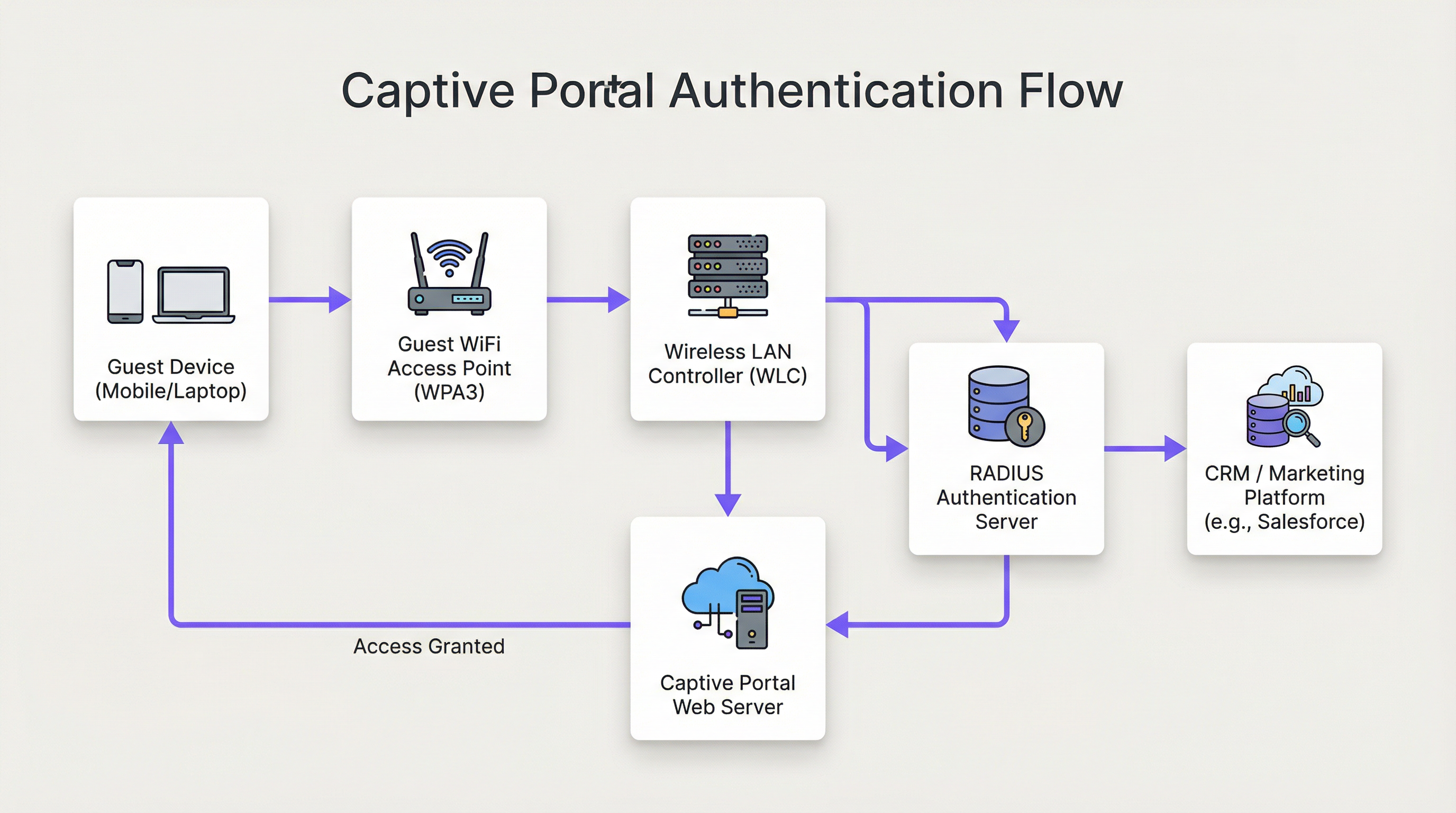
Die Architektur einer modernen Guest WiFi Captive Portal-Lösung umfasst ein komplexes Zusammenspiel von Netzwerk-Hardware, Software und Cloud-Diensten. Im Kern fängt das Captive Portal den Web-Traffic eines Nutzers ab und leitet ihn zur Authentifizierung auf eine spezifische Webseite um, bevor ein umfassenderer Netzwerkzugriff gewährt wird. Dieses detaillierte Verständnis des Ablaufs ist für jeden Netzwerkarchitekten unerlässlich, der für die Bereitstellung oder Wartung eines solchen Systems verantwortlich ist.
Phase 1 — Drahtlose Verbindung: Das Gerät des Nutzers erkennt und verbindet sich mit der Gäste-WiFi-SSID. In dieser Phase befindet sich das Gerät in einem vorauthentifizierten Walled-Garden-Zustand. Der WLC oder AP weist dem Gerät über DHCP eine IP-Adresse zu, beschränkt jedoch den gesamten ausgehenden Datenverkehr mit Ausnahme einer definierten Liste von Whitelist-Domains und dem Captive Portal-Host selbst.
Phase 2 — HTTP/S-Weiterleitung: Wenn der Nutzer einen Browser oder eine Anwendung öffnet, die eine HTTP/S-Anfrage stellt, fängt der WLC diese ab. Entweder durch DNS-Hijacking (bei dem alle DNS-Anfragen mit der IP des Portals beantwortet werden) oder durch HTTP 302-Weiterleitung wird der Nutzer an den Webserver des Captive Portals weitergeleitet. Bei modernen Bereitstellungen wird die HTTP-Weiterleitung aufgrund ihrer Zuverlässigkeit über iOS-, Android- und Windows-Clients hinweg bevorzugt.
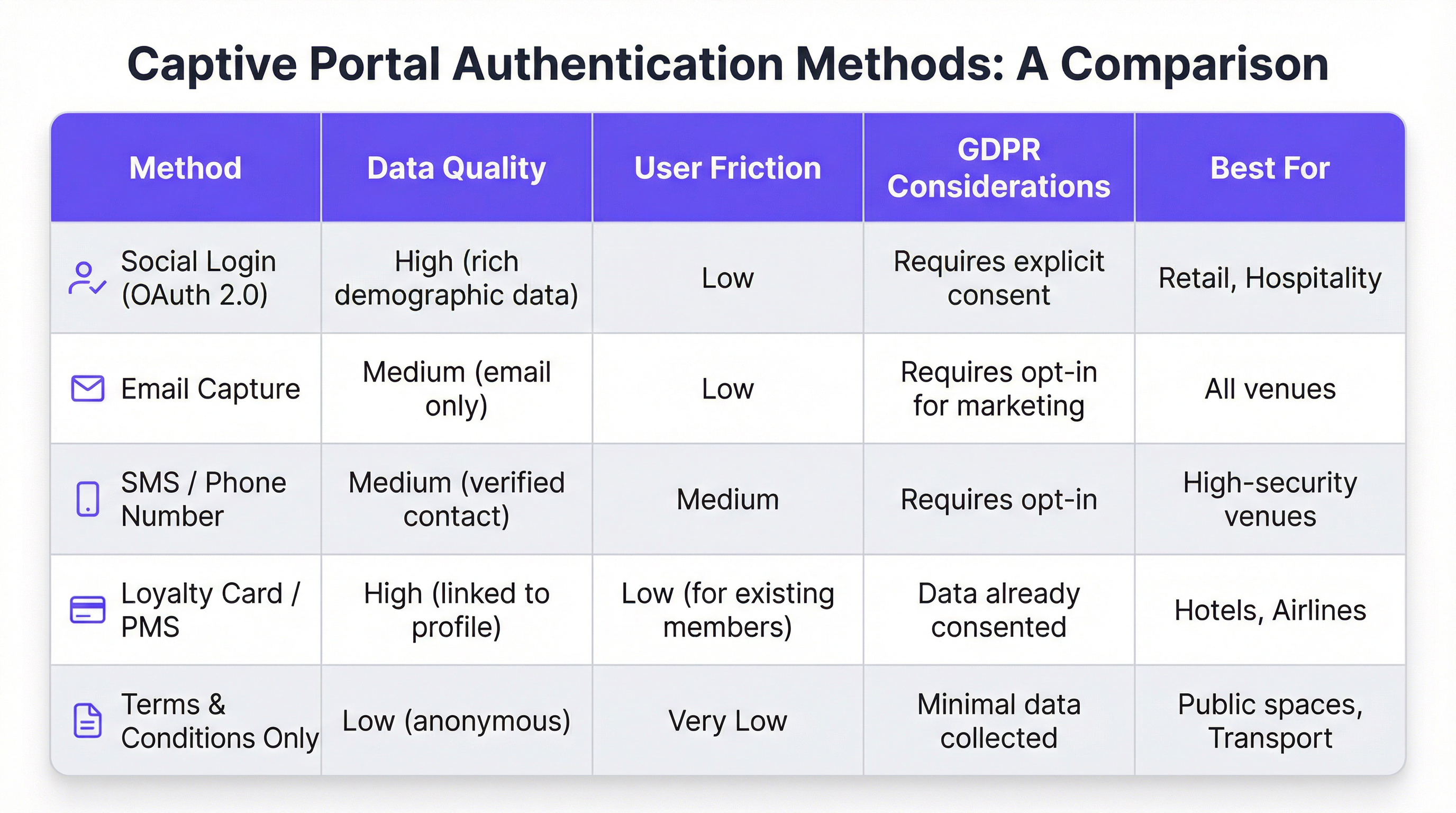
Phase 3 — Portal-Interaktion und Authentifizierung: Dem Nutzer wird die Captive Portal-Seite angezeigt. Zu den Authentifizierungsmethoden gehören Social Login über OAuth 2.0 (Facebook, Google, LinkedIn), E-Mail- oder SMS-Erfassung, die Akzeptanz von Allgemeinen Geschäftsbedingungen oder die Integration in ein Treueprogramm oder Property Management System (PMS) über eine REST-API. Die Wahl der Methode bestimmt direkt die Qualität der erfassten Daten und die Reibungsverluste innerhalb der User Journey.
Phase 4 — RADIUS-Authentifizierung: Nach dem Absenden des Formulars kommuniziert der Portal-Dienst mit einem RADIUS-Server (RFC 2865). Der RADIUS-Server validiert die Anmeldeinformationen gegen einen Backend-Datenspeicher – eine lokale Datenbank, ein LDAP-Verzeichnis, ein CRM oder eine Marketing-Automation-Plattform. RADIUS-Attribute wie Session-Timeout und Idle-Timeout werden verwendet, um Sitzungsrichtlinien durchzusetzen.
Phase 5 — Zugriff gewährt: Bei erfolgreicher Authentifizierung signalisiert der RADIUS-Server dem WLC, den Autorisierungsstatus des Nutzers zu ändern und vollen Internetzugang zu gewähren. Bandbreitenrichtlinien, Content-Filtering-Regeln und Limits für die Sitzungsdauer werden an diesem Punkt über die Policy-Engine des WLC durchgesetzt.
Aus Sicherheitssicht bietet WPA3-Enterprise mit IEEE 802.1X das höchste Schutzniveau und verschlüsselt den Datenverkehr zwischen Client und AP mit 192-Bit-Sicherheit im WPA3-Enterprise-Modus. Für das Portal selbst muss die gesamte Kommunikation über HTTPS mit TLS 1.2 oder höher erfolgen. Die Einhaltung von PCI DSS v4.0 ist zwingend erforderlich, wenn innerhalb des Portal-Ablaufs Zahlungen verarbeitet werden.
Für Nutzer von Purple AI erweitern fortschrittliche Anpassungsmöglichkeiten diese Architektur erheblich. Die Purple-Plattform unterstützt A/B-Testing von Portal-Designs auf Standortebene, sodass Betreiber verschiedene Layouts, Calls-to-Action und Authentifizierungsabläufe testen können, um die Konversionsraten zu optimieren. Die personalisierte Bereitstellung von Inhalten nach dem Login – wie z. B. gezielte Angebote basierend auf dem CRM-Profil oder der Treuestufe eines Gastes – wird über Echtzeit-API-Aufrufe an Salesforce, HubSpot oder eine beliebige Marketing-Automation-Plattform mit einer REST-API realisiert. Die Analytics-Engine von Purple bietet zudem Heatmap-Overlays und Verweildauer-Analysen, mit denen Standortbetreiber WiFi-Engagement-Daten mit physischen Besucherströmen korrelieren können.
Implementierungsleitfaden
Die Bereitstellung eines Guest WiFi Captive Portals auf Enterprise-Ebene erfordert einen strukturierten, phasenweisen Ansatz. Das folgende Framework ist herstellerneutral und anwendbar in den Bereichen Gastgewerbe, Einzelhandel, Veranstaltungen und im öffentlichen Sektor.
Phase 1 — Geschäftsziele definieren: Bevor technische Arbeiten beginnen, sollten die spezifischen Ziele des Gäste-WiFi-Dienstes dokumentiert werden. Zu den häufigsten Zielen gehören der Aufbau einer First-Party-Marketingdatenbank, die Steigerung der Besucherzahlen in bestimmten Bereichen eines Veranstaltungsortes, die Erhöhung der Zusatzeinnahmen durch gezielte Werbeaktionen oder einfach die Bereitstellung einer zuverlässigen Annehmlichkeit. Diese Ziele bestimmen jede nachfolgende Designentscheidung, von der Authentifizierungsmethode bis zur Content-Strategie nach dem Login.
Phase 2 — Bewertung der Netzwerkinfrastruktur: Führen Sie ein vollständiges Audit Ihrer bestehenden drahtlosen Infrastruktur durch. Stellen Sie sicher, dass Ihre APs und WLCs Captive Portal-Weiterleitungen, VLAN-Tagging und externe RADIUS-Integration unterstützen. Für Umgebungen mit hoher Dichte – Stadien, Konferenzzentren, Verkehrsknotenpunkte – sollten Sie eine professionelle RF-Standortuntersuchung in Auftrag geben, um eine angemessene Abdeckung und Kapazität sicherzustellen. Ein schlecht funktionierendes Netzwerk untergräbt selbst das am schönsten gestaltete Portal.
Phase 3 — Plattformauswahl: Bewerten Sie Captive Portal-Plattformen anhand Ihrer Geschäftsziele. Zu den wichtigsten Kriterien gehören Hardware-Unabhängigkeit (entscheidend für Multi-Vendor-Umgebungen), die Tiefe der CRM- und Marketing-Automation-Integrationen, die Qualität von Analysen und Berichten, Tools zur Einhaltung der GDPR sowie die Möglichkeit, das Portal-Design ohne Entwicklerressourcen anzupassen. Für Unternehmen mit komplexen Integrationsanforderungen sollten Sie die API-Dokumentation und die Webhook-Unterstützung der Plattform evaluieren.
Phase 4 — Design der User Journey: Bilden Sie das gesamte Nutzererlebnis von der WiFi-Erkennung bis zum Engagement nach dem Login ab. Streben Sie maximal drei Interaktionen an, bevor der Nutzer Internetzugang erhält. Führen Sie A/B-Tests für verschiedene Portal-Designs durch, um das Layout und den Authentifizierungsablauf zu ermitteln, die die Abschlussraten maximieren. Stellen Sie sicher, dass das Portal vollständig responsiv und für die Mobile-First-Nutzung optimiert ist.
Phase 5 — Konfiguration und Integration: Konfigurieren Sie den WLC so, dass nicht authentifizierte Nutzer zur Portal-URL weitergeleitet werden. Definieren Sie den Walled Garden, um den Zugriff auf den Portal-Host, Social-Login-Domains (accounts.google.com, www.facebook.com, www.linkedin.com) und alle CDN-Ressourcen zu ermöglichen, die zum Rendern des Portals erforderlich sind. Konfigurieren Sie RADIUS Shared Secrets und testen Sie den gesamten Authentifizierungsablauf End-to-End, bevor Sie live gehen.
Phase 6 — Pilotprojekt und Rollout: Stellen Sie die Lösung an einem einzelnen Pilotstandort bereit und überwachen Sie Authentifizierungsraten, Sitzungsdauern und Fehlerprotokolle für mindestens zwei Wochen vor einem vollständigen Rollout. Legen Sie Baseline-KPIs fest, an denen Sie den Erfolg der Bereitstellung messen werden.
Best Practices
Priorisieren Sie das Nutzererlebnis: Ein langsames, verwirrendes oder unzuverlässiges Captive Portal wirft ein schlechtes Licht auf Ihre Marke. Streben Sie eine End-to-End-Authentifizierungszeit von unter 15 Sekunden an. Halten Sie das Portal-Design übersichtlich, die Anweisungen eindeutig und den Call-to-Action prominent. Jeder zusätzliche Klick oder jedes weitere Formularfeld verringert Ihre Abschlussrate.
Setzen Sie Mobile-First-Design durch: Über 75 % der Gäste-WiFi-Verbindungen stammen von mobilen Geräten. Ihr Portal muss vollständig responsiv sein, mit touch-freundlichen UI-Elementen und Text, der ohne Zoomen lesbar ist. Testen Sie vor der Bereitstellung sowohl auf iOS als auch auf Android über mehrere Bildschirmgrößen hinweg.
Seien Sie transparent bei der Datenerfassung: Bieten Sie eine klare, leicht verständliche Erklärung darüber, welche Daten Sie erfassen und wie diese verwendet werden. Stellen Sie einen Link zu Ihrer Datenschutzrichtlinie bereit und stellen Sie sicher, dass Ihr Einwilligungsmechanismus mit Artikel 7 der GDPR konform ist. Vorab angekreuzte Einwilligungsfelder sind gemäß GDPR nicht zulässig.
Segmentieren Sie Ihr Netzwerk konsequent: Verwenden Sie VLANs, um den Gastverkehr von Ihrem Unternehmensnetzwerk zu isolieren. Dies ist eine grundlegende Sicherheitskontrolle. Implementieren Sie Firewall-Regeln, um zu verhindern, dass Gastgeräte auf den RFC 1918-Adressraum in Ihrem Unternehmensnetzwerk zugreifen. Aktivieren Sie die Client-Isolierung auf Ihren APs, um zu verhindern, dass Gastgeräte miteinander kommunizieren.
Warten und Überwachen: Captive Portal-Bereitstellungen sind keine Set-and-Forget-Lösungen. Etablieren Sie einen regelmäßigen Rhythmus zur Überprüfung von Authentifizierungsprotokollen, zur Aktualisierung der Firmware auf APs und WLCs sowie zur Überprüfung Ihrer Walled-Garden-Konfiguration. Richten Sie Warnmeldungen für Spitzen bei den Authentifizierungsfehlerraten ein, da diese oft der erste Indikator für eine Fehlkonfiguration oder einen Sicherheitsvorfall sind.
Fehlerbehebung & Risikominderung
Die häufigste Fehlerquelle bei Guest WiFi Captive Portal-Bereitstellungen ist, dass das Portal nicht geladen wird. Dies wird fast immer durch eines von drei Problemen verursacht: Fehler bei der DNS-Auflösung (der Client kann den Hostnamen des Portals nicht auflösen), ein zu restriktiver Walled Garden (die CDN-Ressourcen des Portals sind blockiert) oder eine Firewall-Regel, die den Zugriff auf den Webserver des Portals über Port 443 verhindert. Eine systematische Diagnose mittels Paketaufzeichnung an der Uplink-Schnittstelle des WLC wird die Grundursache schnell identifizieren.
Authentifizierungsfehler sind das zweithäufigste Problem. Diese resultieren typischerweise aus falschen RADIUS Shared Secrets, Zeitabweichungen zwischen dem WLC und dem RADIUS-Server (was zu EAP-Authentifizierungsfehlern führt) oder Problemen mit dem Backend-Datenspeicher. Die Aktivierung einer detaillierten RADIUS-Protokollierung und die Korrelation von Zeitstempeln über den WLC, den RADIUS-Server und die Protokolle der Portal-Anwendung hinweg ist der effizienteste Diagnoseansatz.
Aus Sicht des Sicherheitsrisikos ist der bedeutendste Bedrohungsvektor für ein Gäste-WiFi-Netzwerk eine unverschlüsselte oder schwach verschlüsselte SSID. Eine offene SSID ohne Verschlüsselung setzt den gesamten Nutzerverkehr passivem Abhören aus. Setzen Sie immer WPA2- oder WPA3-Verschlüsselung durch. Scannen Sie Ihren Luftraum regelmäßig nach Rogue Access Points, die Ihre SSID ausstrahlen – ein häufiger Angriffsvektor, der als „Evil Twin“-Angriff bekannt ist. Implementieren Sie Funktionen zur Erkennung und Verhinderung von drahtlosen Eindringlingen (WIDS/WIPS) auf Ihrem WLC oder als eigenständiges Overlay-System.
ROI & Geschäftliche Auswirkungen
Der Business Case für ein hochentwickeltes Guest WiFi Captive Portal geht weit über die Bereitstellung einer einfachen Internetverbindung hinaus. Die folgende Tabelle fasst die wichtigsten ROI-Treiber für verschiedene Arten von Veranstaltungsorten zusammen:
| Art des Veranstaltungsortes | Primärer ROI-Treiber | Typischer KPI | Beispielergebnis |
|---|---|---|---|
| Hotel | Steigerung der Zusatzeinnahmen | Spa/F&B-Buchungen von WiFi-Nutzern | +42 % Spa-Buchungen (Fallstudie: 200-Zimmer-Hotel) |
| Einzelhandel | Wachstum der Marketingdatenbank | Neue Opt-in-Kontakte pro Monat | 8.000+ Kontakte in 6 Monaten (Fallstudie: Einzelhandel mit 500 Filialen) |
| Stadion / Events | Sponsorenaktivierung | Branded Portal Impressions | 95 %+ Portal-Abschlussrate bei Großveranstaltungen |
| Konferenzzentrum | Teilnehmer-Engagement | Session-Check-in-Rate via WiFi | Echtzeit-Teilnahmedaten für Veranstalter |
| Öffentlicher Sektor | Bürgerbeteiligung | Abschlussrate von Umfragen | Gezielte öffentliche Ankündigungen an verifizierte Einwohner |
Die ROI-Berechnung für eine Gäste-WiFi-Investition sollte sowohl direkte Umsatzauswirkungen (Zusatzverkäufe, Einnahmen aus Marketingkampagnen) als auch indirekte Vorteile (verbesserte Kundenzufriedenheitswerte, geringere Abwanderung, umfangreichere First-Party-Daten) berücksichtigen. Für ein Hotel mit 200 Zimmern und einer durchschnittlichen Auslastung von 70 % kann eine Steigerung der Spa-Buchungen um 42 %, die auf WiFi-gesteuerte Werbeaktionen zurückzuführen ist, Zehntausende von Pfund an zusätzlichem Jahresumsatz bedeuten – eine Rendite, die die Plattforminvestition in der Regel bereits im ersten Jahr der Bereitstellung rechtfertigt.
Key Terms & Definitions
Captive Portal
A web page that a network operator presents to a newly connected user before granting broader access to the internet. The portal intercepts all HTTP/S traffic from the unauthenticated device and redirects it to a designated URL.
This is the primary mechanism for authenticating, communicating with, and collecting data from users on a guest WiFi network. IT teams configure this at the WLC or AP level to control access and gather marketing consent.
RADIUS (Remote Authentication Dial-In User Service)
A networking protocol (RFC 2865) that provides centralised Authentication, Authorization, and Accounting (AAA) management for users connecting to a network service. It operates over UDP and uses a shared secret for security.
RADIUS is the backend authentication engine for most enterprise captive portal deployments. When a user submits their login credentials, the portal sends an Access-Request to the RADIUS server, which responds with an Access-Accept or Access-Reject. IT teams must configure the correct RADIUS shared secret on both the WLC and the portal platform.
Walled Garden
A restricted network environment in which a pre-authenticated user can only access a defined list of approved domains and IP addresses, typically limited to the captive portal itself and any resources required to render it.
Before a user completes the captive portal login, they are in a walled garden. Network architects must carefully define the walled garden whitelist to include all resources required for the portal to function (including social login provider domains) while blocking all other internet access.
IEEE 802.1X
An IEEE standard for port-based Network Access Control (PNAC) that provides an authentication mechanism for devices wishing to attach to a LAN or WLAN. It requires a supplicant (client device), an authenticator (AP or switch), and an authentication server (RADIUS).
802.1X is the foundation of enterprise-grade wireless security. When combined with WPA3-Enterprise, it provides per-user, per-session encryption keys and strong mutual authentication. Network architects should specify 802.1X for any deployment where security is a primary concern.
WPA3 (Wi-Fi Protected Access 3)
The third generation of the WPA security certification programme for wireless networks, introduced by the Wi-Fi Alliance in 2018. WPA3-Personal uses Simultaneous Authentication of Equals (SAE) to replace the vulnerable PSK handshake, while WPA3-Enterprise offers 192-bit security mode.
WPA3 should be the default security protocol for any new guest WiFi deployment. It provides significant security improvements over WPA2, including protection against offline dictionary attacks and forward secrecy. IT teams should verify WPA3 client support before mandating it as the sole security mode.
GDPR (General Data Protection Regulation)
A regulation in EU law (Regulation 2016/679) on data protection and privacy, applicable to all organisations processing personal data of individuals in the EU/EEA. The UK GDPR is a retained version of the regulation applicable in the United Kingdom post-Brexit.
GDPR compliance is a legal obligation for any organisation collecting personal data via a guest WiFi captive portal. Key requirements include a lawful basis for processing (typically consent), transparent privacy notices, the right to erasure, and data minimisation. Non-compliance can result in fines of up to €20 million or 4% of global annual turnover, whichever is higher.
OAuth 2.0
An open standard for access delegation (RFC 6749) that allows users to grant third-party applications limited access to their accounts on other services without exposing their passwords. It is the protocol underpinning social login functionality.
OAuth 2.0 is the technology that powers 'Log in with Google/Facebook/LinkedIn' on captive portals. It provides a secure, user-friendly authentication flow and, with the user's consent, allows the portal to retrieve profile data (name, email, age range, gender) from the social platform. IT teams must register the portal as an OAuth application with each social provider and configure the correct redirect URIs.
PCI DSS (Payment Card Industry Data Security Standard)
A set of security standards (currently v4.0) designed to ensure that all companies that accept, process, store, or transmit credit card information maintain a secure environment. Compliance is mandated by the major card schemes.
PCI DSS compliance is mandatory for any captive portal that processes payments for premium WiFi access or any other service. Key requirements include network segmentation, encryption of cardholder data in transit and at rest, and regular penetration testing. IT teams should engage a Qualified Security Assessor (QSA) to validate compliance.
VLAN (Virtual Local Area Network)
A logical segmentation of a physical network into multiple isolated broadcast domains, configured at the switch or WLC level. Traffic on one VLAN cannot communicate with traffic on another VLAN without passing through a router or firewall.
VLAN segmentation is the primary mechanism for isolating guest WiFi traffic from the corporate network. IT teams should assign guest WiFi traffic to a dedicated VLAN and enforce strict firewall rules at the inter-VLAN routing point to prevent guest devices from accessing internal resources.
Case Studies
A 200-room luxury hotel wants to replace its outdated voucher-based guest WiFi system with a modern captive portal. The goals are to provide a seamless login experience for guests, promote hotel amenities, and integrate with their existing CRM (Salesforce) to track guest preferences. The hotel has a mixed-vendor wireless estate comprising both Cisco WLCs and Meraki cloud-managed APs.
The recommended approach is to deploy a cloud-based, hardware-agnostic captive portal platform such as Purple, which offers native support for both Cisco and Meraki hardware and a pre-built Salesforce integration. The implementation proceeds as follows: (1) Create a dedicated guest SSID on both the Cisco WLC and Meraki dashboard, tagged to a guest VLAN (e.g., VLAN 100) that is isolated from the corporate network. (2) Configure both controllers to redirect unauthenticated HTTP/S traffic to the Purple-hosted captive portal URL. Define the walled garden to permit access to the portal host, Salesforce domains, and social login providers. (3) Design a branded portal with two authentication paths: social login (LinkedIn, Facebook) for transient guests, and room number plus surname authentication for registered guests, validated in real-time against the hotel's PMS via a REST API call. (4) Configure the post-login redirect to a personalised welcome page that queries Salesforce for the guest's loyalty tier and surfaces relevant offers for the hotel's spa and restaurant. (5) Configure Purple's Salesforce connector to push all login events, demographic data, and session metadata to Salesforce in real-time, enriching the guest's contact record. (6) Enable Purple's analytics dashboard to track daily active users, authentication method split, and dwell time by venue zone. Establish a baseline and review monthly.
A national retail chain with 500 stores wants to implement guest WiFi to track in-store footfall, build a first-party marketing database, and send personalised promotional offers to customers. The IT team is concerned about the cost and disruption of replacing the diverse range of wireless hardware across the estate, which includes equipment from at least four different vendors.
The critical success factor for this deployment is hardware agnosticism. Select a cloud-based captive portal platform that supports all four vendors via standard RADIUS and HTTP redirection protocols, avoiding any hardware replacement. The implementation proceeds as follows: (1) Conduct a hardware audit across all 500 stores to document AP and controller models, firmware versions, and current SSID configurations. Identify any hardware that cannot support external RADIUS or HTTP redirection and plan for targeted upgrades at those locations only. (2) Deploy the captive portal platform in a phased rollout, starting with a 20-store pilot in a single region. Configure each store's hardware to redirect guest traffic to the centralised portal. (3) Design a single, mobile-optimised portal page with email capture as the primary authentication method, supplemented by social login. Ensure the consent mechanism is GDPR-compliant with a clear opt-in for marketing communications. (4) Configure the platform's marketing automation connector to push new contacts to the chain's email marketing platform (e.g., Klaviyo or Salesforce Marketing Cloud) in real-time. (5) Implement Purple's footfall analytics to track dwell time and repeat visit frequency by store. Use this data to identify high-performing stores and replicate their layout and offer strategies. (6) After a 4-week pilot, review KPIs (authentication rate, opt-in rate, email open rate) and iterate on the portal design before rolling out to the remaining 480 stores.
Scenario Analysis
Q1. A 500-store national retail chain wants to implement guest WiFi across its entire estate to build a first-party marketing database. The IT director has confirmed that the chain uses wireless hardware from four different vendors and has no budget for hardware replacement. The marketing director wants to send personalised promotional emails to customers within 24 hours of their in-store WiFi session. What is the most critical platform selection criterion, and what integration architecture would you recommend?
💡 Hint:Consider the hardware diversity challenge and the real-time data pipeline requirement between the captive portal and the email marketing platform.
Show Recommended Approach
The most critical platform selection criterion is hardware agnosticism — the platform must support all four wireless vendors via standard RADIUS and HTTP redirection protocols without requiring proprietary hardware or firmware modifications. For the integration architecture, configure the platform to push login events and contact data to the email marketing platform via a real-time webhook or API connector. This ensures that new contacts are available for campaign targeting within minutes of authentication, well within the 24-hour window. Ensure the consent mechanism on the portal captures explicit opt-in for marketing emails (GDPR Article 7), and configure the email platform to suppress contacts who have not opted in. Implement a data deduplication process to handle users who log in at multiple stores.
Q2. A conference centre is hosting a high-profile international event for 5,000 attendees over three days. The event organiser wants to provide a fast, seamless WiFi experience with a branded captive portal, but the centre's IT team is concerned about: (a) the security implications of 5,000 unknown devices on the network, (b) the performance of the captive portal under peak load, and (c) GDPR compliance given the international audience. What are your recommendations for each concern?
💡 Hint:Address each concern separately: security (segmentation and encryption), performance (load testing and CDN), and GDPR (consent mechanism and data residency).
Show Recommended Approach
(a) Security: Implement WPA3-Personal or WPA3-Enterprise on the event SSID. Create a dedicated VLAN for event traffic, completely isolated from the centre's corporate network. Enable client isolation on all APs to prevent device-to-device communication. Deploy a content filtering policy to block known malicious domains. Enable WIDS/WIPS to detect rogue APs. (b) Performance: Load test the captive portal platform to verify it can handle 5,000 concurrent authentication requests. Use a cloud-based portal platform with auto-scaling capabilities. Ensure the portal page is served from a CDN to minimise latency for international attendees. Pre-stage the RADIUS server with event attendee credentials if using pre-registration, to reduce authentication latency. (c) GDPR: Ensure the consent mechanism is available in all relevant languages. Use a cloud-based portal platform with data residency options to ensure EU citizen data is processed and stored within the EU/EEA. Implement a data retention policy that deletes personal data within the timeframe specified in your privacy notice. Appoint a Data Protection Officer if not already in place.
Q3. Following a routine security audit, your organisation's penetration testers have identified that the guest WiFi captive portal at your flagship venue is being served over HTTP rather than HTTPS, and that the guest VLAN has a misconfigured firewall rule that permits access to a subnet containing file servers. Describe the specific risks these two findings present and the remediation steps you would take.
💡 Hint:Consider the attack vectors enabled by each misconfiguration: man-in-the-middle for the HTTP finding, and lateral movement for the VLAN finding.
Show Recommended Approach
Finding 1 (HTTP portal): The risk is a man-in-the-middle (MitM) attack. An attacker on the same network segment can intercept the unencrypted HTTP traffic between the user's device and the portal server, capturing login credentials, session tokens, and any personal data submitted via the portal form. Remediation: Immediately provision a TLS certificate for the portal domain (a free Let's Encrypt certificate is acceptable for most deployments) and configure the portal web server to enforce HTTPS and redirect all HTTP requests to HTTPS. Update the WLC redirect URL to use HTTPS. Verify the certificate chain is valid and that HSTS is configured. Finding 2 (VLAN misconfiguration): The risk is lateral movement. A guest device that has authenticated to the WiFi network could access the file server subnet, potentially exfiltrating sensitive data or deploying malware. Remediation: Immediately review and correct the firewall ACL at the inter-VLAN routing point to deny all traffic from the guest VLAN to the file server subnet. Implement a default-deny policy on the guest VLAN firewall rule set, with explicit permit rules only for internet-bound traffic. Review all inter-VLAN rules as part of a broader firewall audit.
Key Takeaways
- ✓A guest WiFi captive portal is a strategic business asset — not a utility. It is the primary mechanism for customer data collection, brand engagement, and revenue generation from your wireless network.
- ✓The authentication method you choose (social login, email capture, PMS integration, T&C only) directly determines the quality of data you collect and the friction you introduce. Match the method to your business objectives.
- ✓Security is non-negotiable: enforce WPA3 encryption, segment guest traffic onto a dedicated VLAN, serve the portal over HTTPS, and comply with PCI DSS if processing payments.
- ✓GDPR compliance requires a valid lawful basis for processing (typically explicit consent), a transparent privacy notice, and a documented data retention and deletion policy. Fines of up to 4% of global turnover apply for non-compliance.
- ✓Hardware agnosticism is the most critical platform selection criterion for multi-site, multi-vendor deployments. A cloud-based platform avoids costly hardware replacement programmes.
- ✓The 15-Second Rule: if end-to-end authentication takes longer than 15 seconds, completion rates will drop significantly. Benchmark and optimise your RADIUS response times and portal page load speed.
- ✓Measure ROI using concrete business metrics: marketing database growth, ancillary revenue uplift, customer dwell time, and repeat visit frequency. These metrics justify the investment and guide ongoing optimisation.




