

Gäste-WiFi: Der ultimative Leitfaden für Unternehmen zur Verbesserung des Kundenerlebnisses und zur Erfassung wertvoller Daten
This guide is the definitive technical reference for IT leaders and venue operators on deploying enterprise-grade guest WiFi. It provides actionable guidance on network architecture, security, and data analytics to transform guest WiFi from a cost centre into a powerful tool for enhancing customer experience and driving business intelligence.
🎧 Listen to this Guide
View Transcript

Executive Summary
Für leitende IT-Experten und Operations Directors hat sich Gäste-WiFi weit über eine einfache Annehmlichkeit hinaus entwickelt. Einst als notwendiger, aber nebensächlicher Service betrachtet, stellt es heute einen strategischen Vermögenswert dar, der einen signifikanten ROI liefern kann. Bei einem professionell konzipierten Gäste-WiFi-Netzwerk geht es längst nicht mehr nur um die Bereitstellung von Internetzugang; es ist ein primäres Instrument zur Verbesserung des Kundenerlebnisses, zur Erfassung beispielloser Daten über das Verhalten vor Ort und zur Schaffung neuer Marketingmöglichkeiten. Dieser Leitfaden dient als praktische, technische Referenz für das Design, die Implementierung und die Verwaltung einer sicheren, hochleistungsfähigen Gäste-WiFi-Lösung. Wir gehen über akademische Theorie hinaus und liefern umsetzbare Erkenntnisse, die auf realen Bereitstellungen in den Bereichen Gastgewerbe, Einzelhandel und großen öffentlichen Veranstaltungsorten basieren. Der Fokus liegt auf einem dreigleisigen Ansatz: 1) Sicherheit und Architektur: Implementierung robuster Netzwerksegmentierung und Zugriffskontrollen zur Risikominderung. 2) Daten und Analysen: Nutzung eines Captive Portal und einer WiFi-Intelligence-Plattform, um zu verstehen, wer Ihre Kunden sind und wie sie sich in Ihren Räumlichkeiten verhalten. 3) Geschäftsauswirkungen: Übersetzung dieser Daten in messbare Ergebnisse, von verbesserter betrieblicher Effizienz bis hin zu gesteigerter Kundenbindung und mehr Umsatz. Für den CTO bietet dieser Leitfaden den Rahmen zur Rechtfertigung von Investitionen in eine moderne WiFi-Intelligence-Plattform wie Purple AI und verlagert die Diskussion von Kosten hin zu strategischem Mehrwert.
Technischer Deep-Dive
Eine erfolgreiche Gäste-WiFi-Bereitstellung beruht auf dem Fundament einer soliden technischen Architektur. Das primäre Ziel ist es, Gästen einen nahtlosen, hochleistungsfähigen Internetzugang zu bieten, ohne die Sicherheit oder Leistung des internen Unternehmensnetzwerks zu gefährden. Dies erfordert einen mehrschichtigen Ansatz, der Hardware, Netzwerkdesign und Sicherheitsprotokolle umfasst.
Kernarchitektur: Segmentierung ist nicht verhandelbar
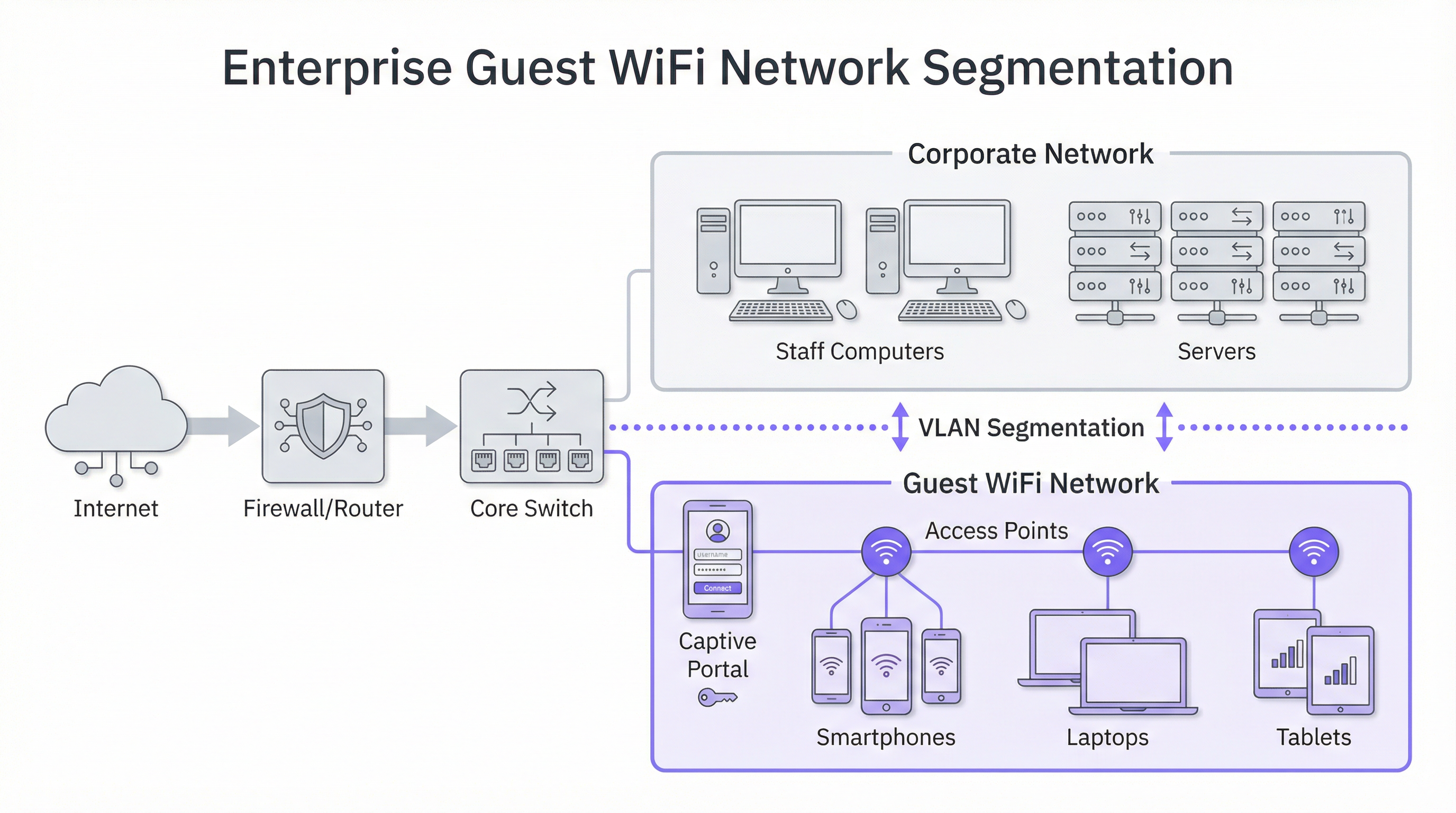
Das wichtigste Prinzip bei der Gäste-WiFi-Sicherheit ist die Netzwerksegmentierung. Ein „flaches“ Netzwerk, in dem Gastgeräte und interne Unternehmenssysteme (z. B. Point-of-Sale-Terminals, Mitarbeitercomputer, Dateiserver) dasselbe logische Netzwerk nutzen, stellt ein inakzeptables Sicherheitsrisiko dar. Eine Sicherheitsverletzung auf einem einzigen Gastgerät könnte potenziell Ihre gesamte Unternehmensinfrastruktur gefährden. Die branchenübliche Lösung ist die Implementierung von VLANs (Virtual Local Area Networks). Ein VLAN unterteilt ein einzelnes physisches Netzwerk logisch in mehrere, isolierte Broadcast-Domänen. In diesem Modell wird der gesamte Gastverkehr auf ein eigenes, dediziertes VLAN beschränkt, das direkt ins Internet geroutet und durch Firewalls von allen internen Unternehmens-VLANs abgeschottet wird. Dies stellt sicher, dass selbst bei Kompromittierung eines Gastgeräts die Angriffsfläche strikt auf das Gastnetzwerk selbst beschränkt bleibt.
Hardware-Überlegungen: Access Points und Controller
Die Qualität der User Experience ist direkt mit der Qualität und Platzierung Ihrer Wireless Access Points (APs) verbunden. Die Hardwareauswahl sollte sich an den spezifischen Anforderungen Ihrer Umgebung orientieren:
- High-Density-Umgebungen (Stadien, Konferenzzentren): Erfordern leistungsstarke 4x4 MU-MIMO (Multi-User, Multiple Input, Multiple Output) APs, die häufig die neuesten WiFi 6 (802.11ax) oder WiFi 6E Standards unterstützen. Diese sind darauf ausgelegt, eine große Anzahl gleichzeitiger Verbindungen in einem konzentrierten Bereich zu bewältigen, Interferenzen zu mindern und eine faire Airtime-Zuweisung zu gewährleisten.
- Gastgewerbe und Einzelhandel (Hotels, Geschäfte): Abdeckung und Ästhetik sind oft entscheidend. In-Room- oder Wall-Plate-APs können eine hervorragende, gezielte Abdeckung in Hotelzimmern bieten, während deckenmontierte APs mit dezentem Design für Verkaufsflächen und öffentliche Bereiche geeignet sind. Eine professionelle RF-Ausleuchtung (Radio Frequency Site Survey) ist vor der Bereitstellung unerlässlich, um optimale AP-Standorte zu identifizieren, Kanalinterferenzen zu minimieren und Abdeckungslücken zu beseitigen.
Sicherheitsprotokolle und Zugriffskontrolle
Über die Segmentierung hinaus müssen mehrere Sicherheitsschichten implementiert werden:
- WPA3-Verschlüsselung: Der aktuelle Sicherheitsstandard für WiFi-Netzwerke. WPA3-Enterprise bietet das höchste Maß an Sicherheit, indem jedem Benutzer ein individueller Verschlüsselungsschlüssel zugewiesen wird. Für öffentliche Gastnetzwerke ist jedoch WPA3-Personal üblicher. Entscheidend ist, sich wo immer möglich von veralteten Protokollen wie WEP und WPA/WPA2 zu verabschieden.
- Client-Isolierung: Dies ist eine entscheidende Funktion auf Ihrem Wireless-Controller oder Ihren APs, die verhindert, dass Gastgeräte im selben WiFi-Netzwerk miteinander kommunizieren. Sie versetzt jeden Gast effektiv in seine eigene digitale Blase und verhindert so Peer-to-Peer-Angriffe und die Verbreitung von Malware innerhalb des Gastnetzwerks.
- Captive Portal: Das Captive Portal ist die Webseite, auf die ein Benutzer umgeleitet wird, bevor ihm vollständiger Netzwerkzugriff gewährt wird. Aus technischer Sicht dient es als Authentifizierungs- und Autorisierungs-Gateway. Es fängt die anfängliche HTTP-Anfrage des Benutzers ab und leitet sie an einen Login-Server weiter. Sobald der Benutzer die definierten Kriterien erfüllt (z. B. Bedingungen akzeptiert, eine E-Mail-Adresse eingibt, sich über Social Media anmeldet), autorisiert das Portal die MAC-Adresse seines Geräts beim Netzwerk-Controller, der dann den Datenverkehr ins Internet zulässt.
Implementierungsleitfaden
Die Bereitstellung eines Gäste-WiFi-Netzwerks kann in ein phasenweises Projekt unterteilt werden, das von der Planung und dem Design bis hin zur Konfiguration und zum Testen reicht.
Phase 1: Discovery und Planung
- Geschäftsziele definieren: Was ist das primäre Ziel? Geht es um Datenerfassung für das Marketing, die Verbesserung des Erlebnisses vor Ort oder einfach um die Bereitstellung eines Basiszugangs? Die Antwort bestimmt die erforderlichen Funktionen und das Budget.
- Bestehende Infrastruktur bewerten: Kann Ihre aktuelle Switching- und Routing-Hardware VLANs unterstützen? Ist Ihr Internet-Backhaul für die erwartete Anzahl gleichzeitiger Benutzer ausreichend? Eine gängige Faustregel besagt, dass für ein gutes Erlebnis 5-10 Mbit/s pro erwartetem gleichzeitigem Benutzer eingeplant werden sollten.
- Eine Standortbegehung durchführen: Beauftragen Sie einen Netzwerkingenieur mit der Durchführung einer physischen und RF-Standortbegehung. Dadurch werden Anzahl und Platzierung der APs bestimmt, die für eine angemessene Abdeckung und Kapazität erforderlich sind.
Phase 2: Design und Konfiguration
- VLAN- und IP-Schema: Entwerfen Sie Ihre Netzwerktopologie. Definieren Sie ein separates VLAN und IP-Subnetz für das Gastnetzwerk (z. B. VLAN 100, 10.100.0.0/16). Konfigurieren Sie Ihren Core-Switch so, dass dieses VLAN an Ihren Wireless-Controller und Ihre Firewall getrunkt wird.
- Firewall-Richtlinie: Erstellen Sie eine strikte Firewall-Richtlinie für das Gast-VLAN. Diese Richtlinie sollte SÄMTLICHEN Datenverkehr blockieren, der für interne Unternehmenssubnetze bestimmt ist, und nur ausgehenden Datenverkehr auf Standard-Webports (80, 443) sowie anderen notwendigen Diensten (z. B. DNS, DHCP) zulassen.
- Konfiguration von Wireless-Controller/AP:
- Erstellen Sie ein neues WLAN/SSID (z. B. „BrandName Free WiFi“).
- Weisen Sie diese SSID dem Gast-VLAN zu.
- Aktivieren Sie die Client-Isolierung.
- Konfigurieren Sie die Sicherheitseinstellungen (WPA2/WPA3 mit einem Pre-Shared Key).
- Konfigurieren Sie die Captive Portal-Einstellungen, die auf Ihre WiFi-Intelligence-Plattform (wie Purple) verweisen.
Phase 3: Integration und Testen
- Captive Portal-Integration: Konfigurieren Sie Ihre WiFi-Analyseplattform. Dies umfasst das Hinzufügen Ihres Standorts, die Definition der Login-Journey (z. B. Social Login, Formularausfüllung) und die Anpassung des Brandings der Portalseiten.
- Testen: Testen Sie die gesamte User Journey gründlich von verschiedenen Gerätetypen aus (iOS, Android, Laptop). Überprüfen Sie, ob die VLAN-Segmentierung korrekt funktioniert, indem Sie versuchen, vom Gastnetzwerk aus auf interne Ressourcen zuzugreifen (diese Versuche sollten fehlschlagen).
- Go-Live: Sobald die Tests abgeschlossen sind, senden Sie die SSID und überwachen Sie die ersten Verbindungen über Ihr Analyse-Dashboard.
Best Practices
- Priorisieren Sie die User Experience: Der Anmeldeprozess sollte so reibungslos wie möglich sein. Ein komplexer, mehrstufiger Prozess führt zu hohen Abbruchraten. Bieten Sie mehrere Anmeldeoptionen an, wie z. B. Social-Media-Konten, um den Prozess zu beschleunigen.
- Seien Sie transparent bei der Datenerfassung: Die Allgemeinen Geschäftsbedingungen Ihres Captive Portal müssen in Übereinstimmung mit Vorschriften wie der GDPR klar angeben, welche Daten Sie erfassen und wie Sie diese verwenden möchten. Stellen Sie einen Link zu Ihrer vollständigen Datenschutzrichtlinie bereit.
- Zentralisieren Sie das Management: Für Organisationen mit mehreren Standorten ist eine cloudbasierte Managementplattform unerlässlich. Sie ermöglicht es einem kleinen IT-Team, Tausende von APs an Hunderten von Standorten über ein einziges Dashboard zu überwachen, zu verwalten und zu aktualisieren.
- Integrieren Sie andere Systeme: Der Wert von Gäste-WiFi-Daten vervielfacht sich, wenn sie in andere Geschäftssysteme integriert werden. Beispielsweise kann die Integration in ein CRM Kundenprofile anreichern, während die Integration in eine Marketing-Automation-Plattform gezielte E-Mail-Kampagnen basierend auf dem Besucherverhalten auslösen kann.
Fehlerbehebung & Risikominderung
Häufige Fehlerquellen:
- Schlechte Leistung: Wird oft durch unzureichende Internetbandbreite, schlechte AP-Platzierung (Abdeckungslücken) oder Kanalinterferenzen in dichten Umgebungen verursacht. Die regelmäßige Überwachung des Netzwerkzustands und der Auslastung ist entscheidend.
- Captive Portal-Probleme: Benutzer werden möglicherweise nicht auf die Anmeldeseite umgeleitet. Dies kann durch DNS-Probleme oder gerätespezifische Einstellungen (z. B. Private Relay) verursacht werden. Stellen Sie sicher, dass Ihr DHCP-Scope einen zuverlässigen öffentlichen DNS-Server bereitstellt.
- Authentifizierungsfehler: Eine fehlerhafte Konfiguration von RADIUS (für WPA-Enterprise) oder API-Integrationen mit dem Captive Portal kann verhindern, dass Benutzer online gehen können. Überprüfen Sie die Protokolle sowohl auf dem Netzwerk-Controller als auch auf der Portalplattform.
Strategien zur Risikominderung:
- Regelmäßige Sicherheitsaudits: Führen Sie regelmäßig Penetrationstests für Ihr Gastnetzwerk durch, um Schwachstellen zu identifizieren und zu beheben.
- Inhaltsfilterung: Implementieren Sie einen DNS-basierten Inhaltsfilterdienst im Gastnetzwerk, um den Zugriff auf bösartige oder unangemessene Websites zu blockieren.
- Sitzungs-Timeouts: Erzwingen Sie Limits für die Sitzungsdauer (z. B. 8 Stunden), um inaktive Geräte automatisch zu trennen und Netzwerkressourcen freizugeben.
ROI & Geschäftsauswirkungen
Die Investition in eine Enterprise-Gäste-WiFi-Plattform liefert Renditen in mehreren Bereichen:
- Gesteigerte Kundenbindung: Ein zuverlässiges, hochleistungsfähiges WiFi-Erlebnis wird heute erwartet. Die Erfüllung dieser Erwartung verbessert die Kundenzufriedenheit und fördert wiederkehrende Besuche.
- Datengesteuerte Abläufe: Analysen zu Besucherfrequenz und Verweildauer liefern konkrete Daten zur Optimierung von Ladenlayouts, Personalplänen und sogar Mietverhandlungen bei Gewerbeimmobilien. Beispielsweise kann ein Einzelhandelsgeschäft Heatmap-Daten nutzen, um margenstarke Produkte in den am stärksten frequentierten Zonen zu platzieren.
- Erweiterte Marketingmöglichkeiten: Indem Sie anonyme Besucher über das Captive Portal in bekannte Kunden umwandeln, bauen Sie eine wertvolle Marketingdatenbank auf. Dies ermöglicht eine personalisierte Kommunikation nach dem Besuch, gezielte Werbeaktionen und die Anmeldung zu Treueprogrammen.
- Direkte Umsatzgenerierung: An einigen Veranstaltungsorten wie Flughäfen oder Konferenzzentren kann ein gestuftes Bandbreitenmodell (z. B. kostenloser Basiszugang, kostenpflichtiger Premiumzugang) eine direkte Einnahmequelle schaffen.
Letztendlich bestehen die Geschäftsauswirkungen in der Transformation eines physischen Raums in einen Smart Venue. Die aus dem WiFi-Netzwerk gesammelten Daten bieten das gleiche Maß an Kundeneinblicken, das E-Commerce-Websites seit Jahren genießen, und schließen endlich die Lücke zwischen der physischen und der digitalen Customer Journey.

Referenzen
[1]: IEEE 802.1X Standard „Port-Based Network Access Control“ [2]: PCI Security Standards Council „Payment Card Industry Data Security Standard“ [3]: Official GDPR Information „General Data Protection Regulation (GDPR)“
Key Terms & Definitions
Captive Portal
The web page a user is required to view and interact with before being granted access to a public network. It 'captures' them to force an action, such as accepting terms, providing an email, or completing a social login.
This is the primary tool for IT teams to enforce acceptable use policies and for marketing teams to convert anonymous visitors into known customers. It is the gateway between providing a utility and gathering intelligence.
VLAN (Virtual LAN)
A technology that allows network administrators to logically segment a single physical network into multiple, isolated networks. Devices in one VLAN cannot communicate with devices in another unless explicitly allowed by a router or firewall.
For IT architects, this is the most fundamental tool for securing a guest WiFi network. It ensures that any security event on the guest network is contained and cannot impact the sensitive corporate network.
Client Isolation
A security feature on a wireless access point or controller that prevents devices connected to the same WiFi network from communicating with each other. It creates a private virtual network for each user.
In a public venue, you have no control over the security posture of guest devices. Client Isolation is a critical risk mitigation tool that prevents malware from spreading between laptops in a hotel lobby or conference hall.
SSID (Service Set Identifier)
The public name of a Wireless Local Area Network (WLAN). It is the name you see and select from the list of available WiFi networks on your device.
While a simple concept, the SSID is part of the brand experience. It should be clear, professional, and consistent across all locations (e.g., 'BrandName_Free_WiFi').
802.1X
An IEEE standard for Port-Based Network Access Control (PNAC). It provides an authentication mechanism to devices wishing to attach to a LAN or WLAN. It is often used in corporate environments to grant access based on user or machine credentials.
While typically used for corporate networks, network architects may encounter 802.1X in more advanced guest scenarios, such as providing secure, seamless access for conference attendees who are part of an educational roaming federation (eduroam).
GDPR (General Data Protection Regulation)
A regulation in EU law on data protection and privacy for all individuals within the European Union and the European Economic Area. It governs how personal data is collected, processed, and stored.
For any business with a European presence, GDPR compliance is mandatory. A guest WiFi platform must provide tools for obtaining explicit consent for data collection via the captive portal and for managing user data access requests.
Heatmap
A graphical representation of data where values are depicted by colour. In the context of WiFi analytics, it shows the physical areas of a venue with the highest and lowest concentrations of visitor devices.
For venue operations directors, heatmaps provide immediate, visual insight into how their space is being used. It helps answer questions like 'What are the most popular paths through my store?' or 'Which seating area in my lobby is underutilised?'
Dwell Time
A metric that measures the amount of time a visitor spends in a specific area or in the venue as a whole. It is calculated by tracking the duration a device is associated with the WiFi network.
This is a critical KPI for retail and hospitality. It helps managers understand engagement. Longer dwell times in a retail store often correlate with higher sales, while tracking dwell time in a restaurant can help optimise table turnover.
Case Studies
A 250-room luxury hotel wants to replace its outdated and slow guest WiFi. The goals are to provide seamless, high-performance coverage in all rooms and public areas, eliminate negative reviews about connectivity, and gather data to better understand guest behaviour in the lobby, bar, and restaurant.
- Infrastructure Upgrade: Deploy a new network core with a 10Gbps-capable firewall and core switch. 2. Site Survey & APs: Conduct a full RF site survey. Deploy one WiFi 6 wall-plate AP in each guest room for perfect coverage. Deploy ceiling-mounted WiFi 6E APs in public areas like the lobby, bar, and conference rooms to handle high device density. 3. Network Design: Create three separate VLANs: Corporate (for hotel staff and systems), Guest (for hotel visitors), and IoT (for smart room devices like thermostats and TVs). Implement strict firewall rules to prevent inter-VLAN routing. 4. Platform Integration: Integrate the network controller with the Purple AI platform. Configure the captive portal with a simple, branded login page offering two options: 'Connect with Room Number & Last Name' (integrating with the hotel's Property Management System) or a quick social media login. 5. Data Analytics: Use the Purple dashboard to create reports on dwell time in the bar, footfall patterns in the lobby throughout the day, and the percentage of guests who are repeat visitors.
A retail chain with 50 stores across the country wants to understand in-store customer behaviour. They currently offer no guest WiFi. The primary goal is to measure footfall, identify popular zones within stores, and build a marketing list, all while minimising the management burden on a small central IT team.
- Hardware Selection: Choose a template of 3-5 cost-effective, cloud-managed WiFi 6 APs per store, depending on the average store size. 2. Centralised Management: Select a cloud-native network vendor and the Purple AI platform. This allows the central IT team to configure, monitor, and manage all 50 stores from a single web-based dashboard without needing to travel to each site. 3. Deployment: Use a third-party contractor for the physical installation of APs at each store, following the template design. The central IT team can then remotely provision the devices once they are online. 4. Captive Portal: Design a simple, mobile-first captive portal that offers a 10% discount voucher in exchange for an email address. This provides a clear value exchange for the customer. 5. ROI Measurement: Use the Purple analytics dashboard to track the growth of the marketing database, view aggregated footfall across all stores, and compare dwell-time heatmaps between high-performing and low-performing locations to identify layout optimisation opportunities.
Scenario Analysis
Q1. A large conference centre is hosting a 3-day tech event with 5,000 attendees, each carrying at least two devices (laptop and smartphone). The event organiser wants to provide free, high-performance WiFi. What are the three most critical technical considerations for the network architect to ensure a successful deployment?
💡 Hint:Think about capacity, interference, and traffic management in a high-density environment.
Show Recommended Approach
- Capacity & Density Planning: The primary concern is the sheer number of concurrent connections. The architect must use high-density WiFi 6 or 6E APs and perform a detailed RF site survey to ensure sufficient APs are deployed in session halls and common areas. 2. Backhaul & Throughput: The internet connection must be able to handle the aggregated load. A 10Gbps (or higher) redundant internet connection is likely required. QoS (Quality of Service) policies should be implemented to prioritise interactive traffic (like web browsing) over bulk traffic. 3. Efficient Onboarding: With thousands of users connecting at once, the authentication process must be extremely efficient. An open network (no encryption) with a simple, click-through captive portal is the most practical approach to avoid configuration issues for non-technical users and minimise support requests.
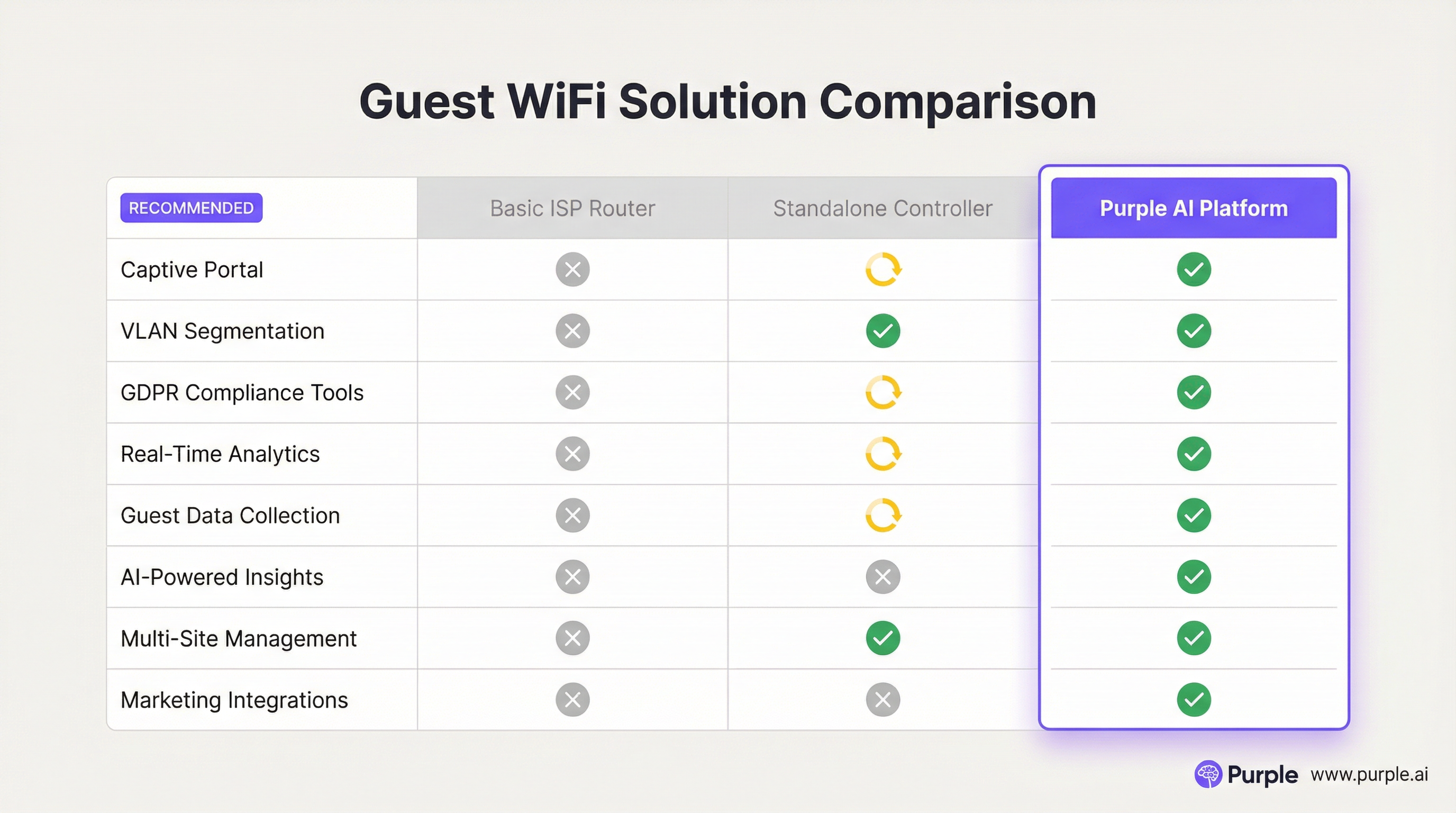
Q2. A restaurant chain is using a basic guest WiFi solution from their ISP. They have noticed that the WiFi performance is slow during peak hours, and they have no visibility into who is using the network. What is the most compelling argument for the IT manager to make to the CTO to justify an upgrade to a platform like Purple AI?
💡 Hint:Focus on the transition from a cost/utility to a business intelligence tool.
Show Recommended Approach
The most compelling argument is the shift from viewing WiFi as a cost centre to an ROI-generating asset. The IT manager should frame the investment not as an IT upgrade, but as a business intelligence project. The key points would be: 1) Problem/Opportunity: We are currently blind to our customer behaviour. We don't know our ratio of new vs. repeat diners, our busiest times by actual customer count (not just sales), or how long customers stay. 2) Solution: A platform like Purple AI will not only solve the performance issues with better hardware management but will give us a dashboard to visualise this critical data. 3. ROI: By collecting emails via a captive portal, we can build a marketing database to drive repeat business. By analysing dwell times, we can optimise seating and staffing for peak periods, improving table turnover and revenue. The cost of the platform is offset by the value of this new data and the marketing capabilities it unlocks.
Q3. A hospital wants to provide guest WiFi to patients and visitors. The hospital's CIO is extremely concerned about the security of patient data and compliance with healthcare regulations (like HIPAA). How would you design the guest network to address these specific concerns?
💡 Hint:Security and isolation are paramount. How do you create a 'hermetically sealed' guest network?
Show Recommended Approach
The design must prioritise security above all else. 1. Extreme Segmentation: Implement a guest VLAN that is completely firewalled from all other hospital networks, especially those containing Electronic Health Records (EHR). The firewall rules should be 'deny-all' by default, with an explicit rule to only allow guest VLAN traffic out to the internet. There should be absolutely no route from the guest network to any internal network. 2. Physical & Logical Separation: Where possible, use a physically separate internet line for guest traffic. If not feasible, use a high-end firewall capable of deep packet inspection and intrusion prevention on the guest traffic. 3. Strict Access Control: Enable Client Isolation on all APs to prevent any patient or visitor devices from communicating with each other. Implement a captive portal that requires acceptance of a stringent acceptable use policy and displays clear warnings against attempting to access clinical systems. 4. No Data Collection: For maximum privacy and minimum risk, the captive portal should be a simple 'click-to-accept' with no personal data collection (no email, no social login). The focus is purely on providing access, not marketing.
Key Takeaways
- ✓Guest WiFi is no longer a simple amenity; it is a strategic tool for data collection and customer engagement.
- ✓Network segmentation (using VLANs) is the most critical security measure to protect your corporate network.
- ✓A captive portal is the gateway to converting anonymous visitors into known customers and enforcing legal terms.
- ✓High-quality Access Points and a professional RF site survey are essential for a positive user experience.
- ✓WiFi analytics platforms like Purple AI provide actionable insights into footfall, dwell time, and visitor behaviour.
- ✓Compliance with data privacy regulations like GDPR is mandatory and must be designed into your solution.
- ✓The ROI of a professional guest WiFi solution is realised through improved operations, enhanced marketing, and increased customer loyalty.




