

Juniper Mist-Integration mit Purple WiFi
This guide provides a comprehensive technical reference for integrating Juniper Mist's AI-driven wireless platform with Purple's enterprise guest WiFi and analytics solution. It covers the full integration architecture — from the Mist external captive portal and REST API authorisation flow through to PurpleConnex Passpoint and RadSec configuration for seamless repeat-visitor connectivity. Venue operators and IT teams will find actionable deployment guidance, real-world implementation scenarios, and a clear framework for measuring the business impact of a Mist-Purple deployment.
🎧 Listen to this Guide
View Transcript

Executive Summary
Die Juniper Mist WiFi-Integration mit Purple stellt heute eine der leistungsfähigsten Kombinationen für Betreiber von Unternehmensstandorten dar. Die Cloud-native, KI-gesteuerte Wireless-Plattform von Mist bietet die von Netzwerkarchitekten geforderte Infrastrukturzuverlässigkeit und operative Intelligenz, während die Captive Portal-, Analytics- und Marketing-Automatisierungsebene von Purple diese Infrastruktur in einen messbaren Unternehmenswert verwandelt. Die Integration erfolgt über den externen Portal-Redirect-Mechanismus von Mist, der durch ein WLAN-spezifisches API Secret gesichert ist, und wird durch eine Passpoint-basierte, sichere WiFi-Lösung – PurpleConnex – für reibungslose Konnektivität von wiederkehrenden Besuchern mittels WPA2/WPA3-Enterprise und RadSec ergänzt. Für IT-Führungskräfte, die diese Bereitstellung evaluieren, sind die wichtigsten Entscheidungspunkte: ob nur die grundlegende Captive Portal-Integration implementiert werden soll oder zusätzlich PurpleConnex für wiederkehrende Gäste; wie der Walled Garden strukturiert werden soll; und wie die Analytics von Purple genutzt werden können, um einen messbaren ROI zu erzielen. Dieser Leitfaden behandelt alle drei Aspekte im Detail, mit spezifischen Konfigurationshinweisen, Praxisbeispielen aus dem Gastgewerbe und dem Einzelhandel sowie einem klaren Framework zur Fehlerbehebung.
Technischer Deep-Dive
Die Integration von Juniper Mist und Purple basiert auf einer klaren Aufgabentrennung. Mist ist für die Hochfrequenzumgebung, das Access-Point-Management und die Richtliniendurchsetzung verantwortlich. Purple verantwortet das Gästeerlebnis, die Datenerfassung sowie die Analytics- und Engagement-Ebene. Die beiden Plattformen kommunizieren über einen klar definierten API-Vertrag, der sowohl sicher als auch einfach zu konfigurieren ist.
Integrationsarchitektur
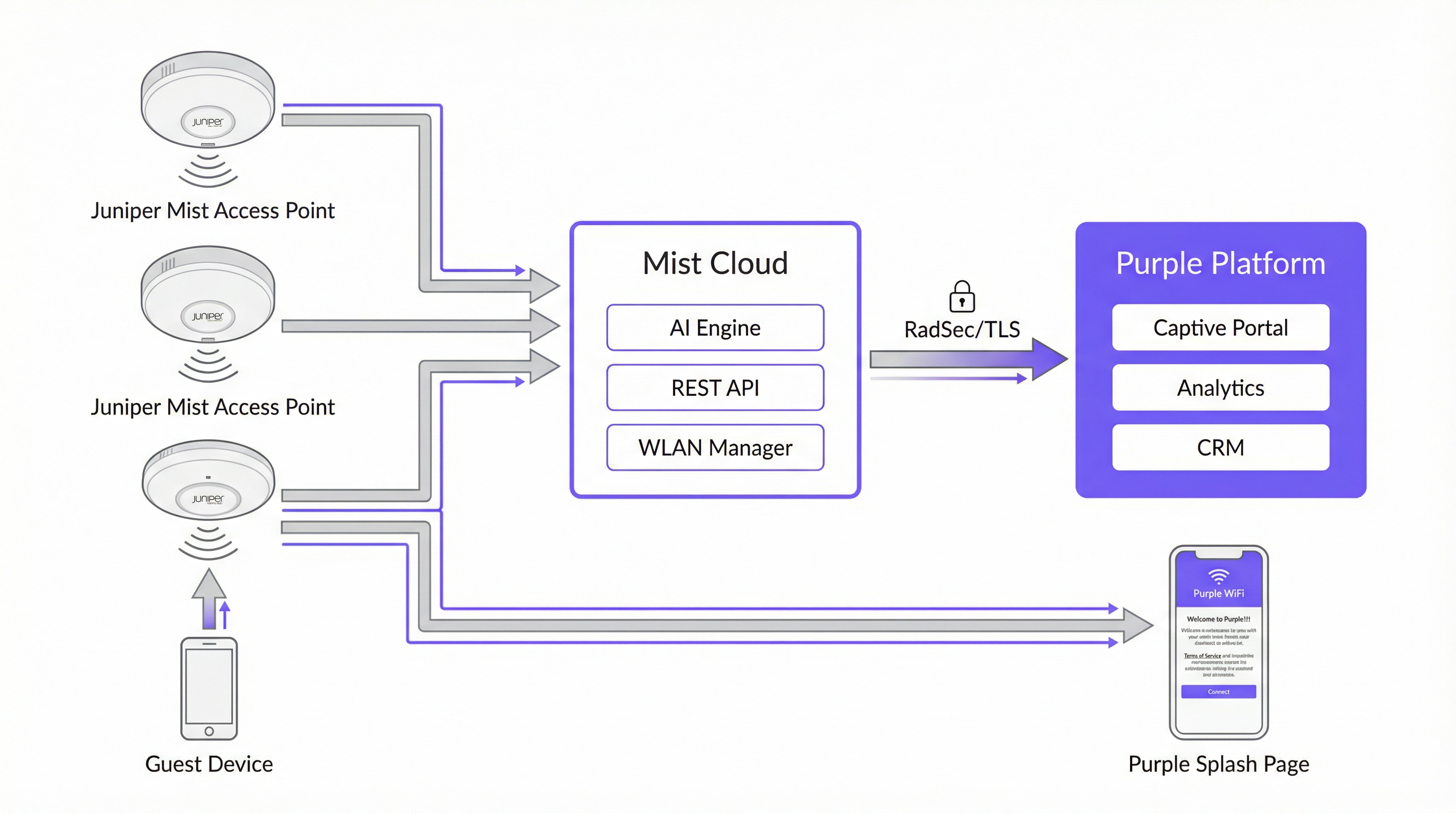
Die folgende Tabelle fasst die Rolle jeder Komponente in der Integration zusammen.
| Komponente | Rolle |
|---|---|
| Juniper Mist Access Points | Bieten WLAN-Abdeckung; setzen WLAN-Richtlinien durch; leiten nicht authentifizierte Gäste via HTTP 302 an das Captive Portal von Purple weiter. |
| Juniper Mist Cloud | Zentralisierte Cloud-Management-Plattform. Hostet die WLAN-Konfiguration, KI-gesteuertes RRM, Wi-Fi Assurance SLEs und die REST-API, die für die Autorisierung von Gästegeräten verwendet wird. |
| Purple-Plattform | Hostet das externe Captive Portal; erfasst und speichert Gästedaten richtlinienkonform; bietet Analytics-Dashboards, CRM-Integration und Marketing-Automatisierung. |
| Mist API Secret | Ein kryptografischer Schlüssel pro WLAN (HMAC-SHA1), der den Autorisierungs-Handshake zwischen Purple und der Mist Cloud absichert. |
| PurpleConnex (Passpoint) | Ein zweites WLAN, das WPA2/WPA3-Enterprise und Passpoint nutzt, um automatische, sichere Konnektivität für wiederkehrende Gäste zu bieten, ohne dass eine erneute Portal-Authentifizierung erforderlich ist. |
| RadSec (RFC 6614) | RADIUS over TLS. Sichert den Authentifizierungsverkehr zwischen der Mist Cloud und den RADIUS-Servern von Purple für das PurpleConnex-WLAN. |
Der Authentifizierungsablauf im Captive Portal
Wenn sich ein Gästegerät mit der Gäste-SSID verbindet, prüft Mist, ob die MAC-Adresse des Geräts bereits zuvor autorisiert wurde. Ist dies nicht der Fall, fängt Mist die erste HTTP-Anfrage des Gastes ab und gibt eine 302-Weiterleitung an die Purple-Portal-URL aus. Diese Weiterleitung hängt mehrere Parameter an, die Purple benötigt, um den Autorisierungszyklus abzuschließen:
| Parameter | Beschreibung | Erforderlich? |
|---|---|---|
wlan_id |
UUID des WLAN-Objekts in Mist | Ja |
ap_mac |
MAC-Adresse des bedienenden Access Points | Ja |
client_mac |
MAC-Adresse des Gästegeräts | Ja |
url |
Die ursprünglich vom Gast angeforderte URL | Nein |
ap_name |
Lesbarer Name des APs | Nein |
site_name |
Lesbarer Name des Standorts | Nein |
Sobald der Gast das Anmeldeformular im Purple-Portal ausfüllt, erstellt Purple eine signierte Autorisierungsanfrage an das Mist-Backend unter portal.mist.com/authorize. Diese Anfrage enthält eine HMAC-SHA1-Signatur, die mit dem API Secret des WLANs berechnet wird, ein Base64-codiertes Token mit wlan_id, ap_mac, client_mac und Sitzungsdauer sowie einen Ablaufzeitstempel. Mist validiert die Signatur und autorisiert bei Gültigkeit das Gästegerät für den Internetzugang.
Wichtiger Architekturhinweis: Juniper Mist unterstützt keine RADIUS-Authentifizierung oder -Abrechnung (Accounting) für den Captive Portal-Ablauf. Dies bedeutet, dass Echtzeit-Berichte zur Nutzeranzahl und bestimmte Netzwerksitzungsmetriken im Mist-Dashboard keine Captive Portal-Sitzungen widerspiegeln. Die eigene Analytics-Plattform von Purple bietet umfassende Sitzungsberichte und sollte als primäre Quelle für Gäste-WiFi-Daten genutzt werden.
PurpleConnex: Passpoint und RadSec
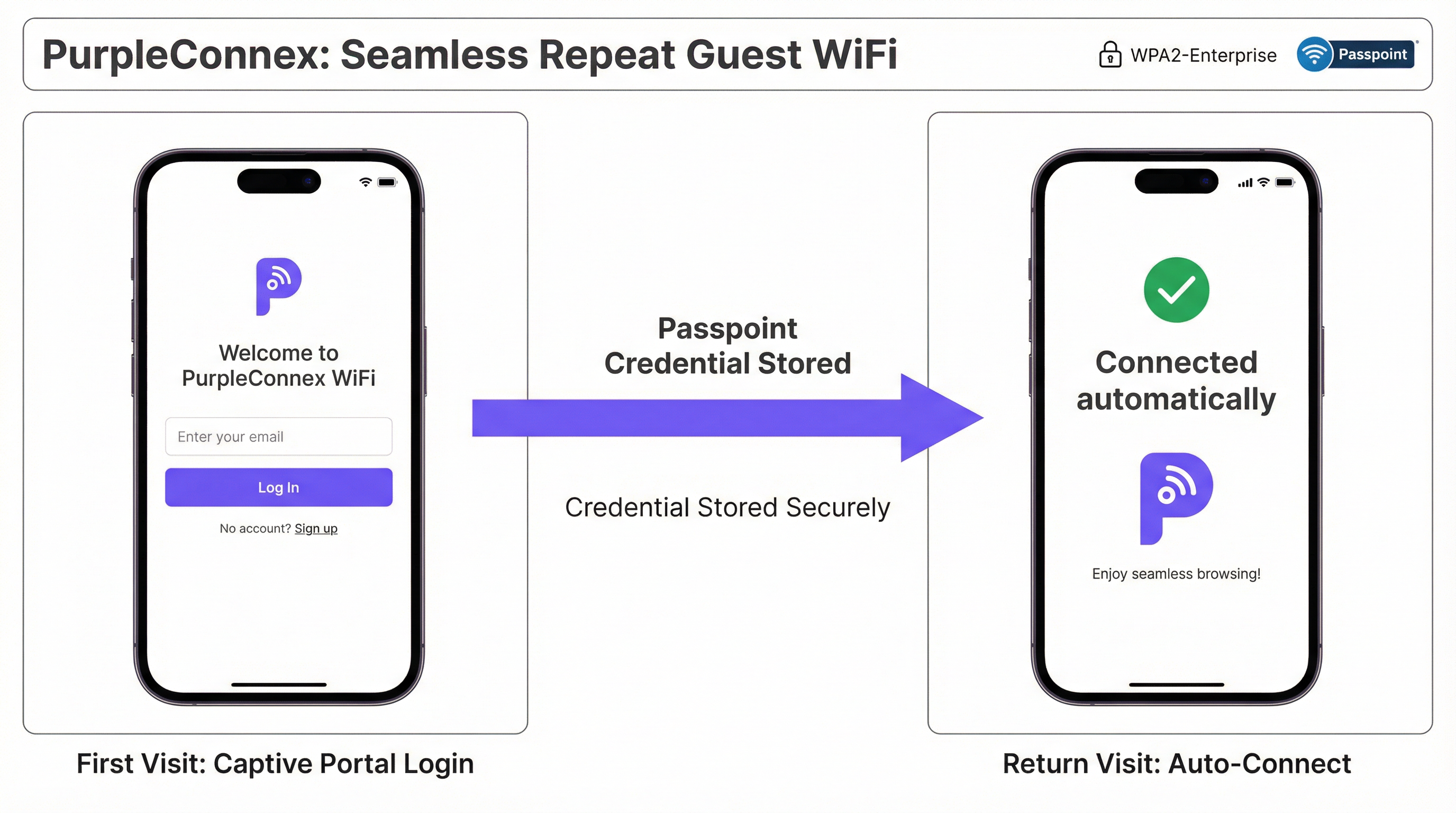
Für Standorte mit einem hohen Anteil an wiederkehrenden Besuchern – Hotels, Unternehmenscampus, Einzelhandelsketten – eliminiert die PurpleConnex-Lösung die Notwendigkeit einer wiederholten Portal-Authentifizierung. Nach der ersten Anmeldung eines Gastes über das Captive Portal stellt Purple ein Passpoint-Profil (Hotspot 2.0) auf dem Gerät des Gastes bereit. Bei allen nachfolgenden Besuchen wählt das Gerät automatisch die PurpleConnex-SSID aus und authentifiziert sich im Hintergrund mittels WPA2-Enterprise (oder WPA3-Enterprise bei 6-GHz-fähigen APs) über EAP-TTLS an den RadSec-Servern von Purple.
Die RadSec-Konfiguration in Mist erfordert zwei Servereinträge – rad1-secure.purple.ai und rad2-secure.purple.ai, beide auf Port 2083 – sowie die Installation des RadSec-Zertifikats von Purple in den Mist-Organisationseinstellungen. Der NAS-Identifier sollte auf MIST-{{DEVICE_MAC}} gesetzt werden, um sicherzustellen, dass Purple den authentifizierenden Access Point korrekt identifizieren kann.
Implementierungsleitfaden
Die folgenden Schritte setzen administrativen Zugriff sowohl auf das Juniper Mist Cloud-Dashboard (manage.mist.com) als auch auf das Purple-Portal voraus. Bei Bereitstellungen an mehreren Standorten sollten die Schritte 1 bis 3 in einer Mist-Organisationsvorlage und nicht auf Standortebene durchgeführt werden.
Phase 1: Gäste-WLAN-Konfiguration (Mist)
Schritt 1. Melden Sie sich bei manage.mist.com an und navigieren Sie zu Network > WLANs. Klicken Sie auf Add WLAN.
Schritt 2. Konfigurieren Sie das WLAN mit den folgenden Parametern:
| Einstellung | Wert |
|---|---|
| SSID | Guest WiFi (oder Ihr bevorzugter Name) |
| WLAN Status | Enabled |
| Security Type | Open Access |
| Guest Portal | Forward to an external portal |
| Portal URL | Bereitgestellt von Purple (die Zugangs-URL Ihres Standorts) |
| Allowed Hostnames | Alle Purple-Domains – siehe Purples Walled Garden Domain-Whitelist |
| Bypass portal on exception | Nicht ankreuzen (empfohlen) |
Schritt 3. Klicken Sie auf Save. Öffnen Sie das WLAN erneut und suchen Sie das API Secret. Kopieren Sie diesen Wert.
Phase 2: Purple-Standortkonfiguration
Schritt 4. Melden Sie sich im Purple-Portal an und navigieren Sie zu den Einstellungen Ihres Standorts.
Schritt 5. Fügen Sie das Mist API Secret in das Feld Mist API secret ein.
Schritt 6. Bestätigen Sie, dass die Portal-URL im Mist-WLAN mit der im Purple-Standort angezeigten Zugangs-URL übereinstimmt.
Phase 3: PurpleConnex (Passpoint) WLAN-Konfiguration (Optional, aber empfohlen)
Schritt 7. Erstellen Sie im Mist-Dashboard ein zweites WLAN mit den folgenden Einstellungen:
| Einstellung | Wert |
|---|---|
| SSID | PurpleConnex |
| Security Type | WPA2 Enterprise (802.1X) |
| Passpoint | Enabled |
| Operators | OpenRoaming-Settlement-Free |
| Venue Name | Name Ihres Standorts |
| Domain Name | securewifi.purple.ai |
| Roaming Consortium ID | 5A03BA0000, 004096 |
| NAI Realm Name | securewifi.purple.ai |
| NAI Realm EAP Type | TTLS |
| Auth Server Type | RadSec |
| Auth Server 1 | rad1-secure.purple.ai, Port 2083 |
| Auth Server 2 | rad2-secure.purple.ai, Port 2083 |
| NAS Identifier | MIST-{{DEVICE_MAC}} |
| Guest Portal | No portal (direkter Internetzugang) |
Schritt 8. Navigieren Sie zu Organisation Settings und laden Sie das RadSec-Zertifikat von Purple unter RadSec Certificates hoch.
Best Practices
Verwenden Sie Organisationsvorlagen für Bereitstellungen an mehreren Standorten. Konfigurieren Sie bei jeder Bereitstellung, die mehr als einen Standort umfasst, beide WLANs innerhalb einer Mist-Organisationsvorlage. Dies gewährleistet eine einheitliche Konfiguration über den gesamten Bestand hinweg und ermöglicht es, Änderungen gleichzeitig an alle Standorte zu übertragen. Eine Einzelhandelskette mit fünfzig Filialen kann beispielsweise ihre Gäste-Portal-URL oder Walled-Garden-Einträge einmalig aktualisieren und die Änderung innerhalb von Minuten an jeden Standort verteilen.
Pflegen Sie einen vollständigen und aktuellen Walled Garden. Der Walled Garden ist die häufigste Fehlerquelle bei der Integration. Ein unvollständiger Walled Garden führt dazu, dass nicht authentifizierte Gäste das Captive Portal nicht erreichen können, was zu einem fehlerhaften WiFi-Erlebnis führt. Führen Sie eine aktuelle Liste aller erforderlichen Purple-Domains, Domains von Social-Login-Anbietern und aller anderen Ressourcen, von denen das Portal abhängig ist. Überprüfen Sie diese Liste, wann immer Sie dem Portal neue Authentifizierungsmethoden hinzufügen.
Planen Sie von Tag eins an mit zwei SSIDs. Stellen Sie von Anfang an sowohl die offene Guest WiFi-SSID als auch die PurpleConnex Passpoint-SSID bereit, selbst wenn die Passpoint-Akzeptanz anfangs gering ist. Da die installierte Basis an Passpoint-fähigen Geräten wächst – und sie wächst rasant, da die Mehrheit der modernen iOS- und Android-Geräte den Standard unterstützt – wird das nahtlose Erlebnis für wiederkehrende Besucher zunehmend wertvoller.
Orientieren Sie sich an den Roadmaps für IEEE 802.1X und WPA3. Planen Sie bei jeder neuen Mist-Bereitstellung, insbesondere bei solchen, die 6-GHz-Frequenzbänder integrieren, WPA3-Enterprise für die PurpleConnex-SSID ein. WPA3 ist in 6-GHz-Netzwerken obligatorisch und bietet durch seinen 192-Bit-Sicherheitsmodus eine deutlich stärkere Verschlüsselung. Dies positioniert die Bereitstellung zudem für die langfristige Einhaltung sich entwickelnder Sicherheitsstandards.
Integrieren Sie Purple in Ihr CRM. Die über das Captive Portal erfassten Gästedaten haben einen erheblichen Wert, der über das WiFi-Management hinausgeht. Die Anbindung von Purple an Ihr CRM – sei es Salesforce, HubSpot oder ein branchenspezifisches PMS für das Gastgewerbe – schafft ein einheitliches Kundenprofil, das personalisiertes Marketing, die Integration von Treueprogrammen und einen verbesserten Gästeservice vorantreiben kann.
Fehlerbehebung & Risikominderung
| Symptom | Wahrscheinliche Ursache | Lösung |
|---|---|---|
| Gast wird nicht zum Captive Portal weitergeleitet | Falsche Portal-URL im Mist-WLAN, oder WLAN ist nicht auf "Forward to external portal" eingestellt | Überprüfen Sie die Portal-URL und die Guest Portal-Einstellung in der Mist-WLAN-Konfiguration. |
| Captive Portal-Seite wird nicht geladen | Unvollständiger Walled Garden – Purple-Domains sind für nicht authentifizierte Nutzer blockiert | Fügen Sie alle erforderlichen Purple-Domains und Domains von Social-Login-Anbietern zur Liste der Allowed Hostnames des Mist-WLANs hinzu. |
| Gast schließt Anmeldung ab, erhält aber keinen Internetzugang | Falsches API Secret in den Purple-Standorteinstellungen, oder Firewall blockiert Datenverkehr zu portal.mist.com |
Überprüfen Sie das API Secret und die Firewall-Regeln. Stellen Sie sicher, dass portal.mist.com (oder das regionale Äquivalent) aus der Mist Cloud erreichbar ist. |
| PurpleConnex-SSID wird auf Gästegeräten nicht angezeigt | Passpoint ist im WLAN nicht aktiviert, oder auf dem Gerät ist kein Passpoint-Profil bereitgestellt | Bestätigen Sie, dass Passpoint in den Mist-WLAN-Einstellungen aktiviert ist. Überprüfen Sie, ob sich der Gast zuvor über das Captive Portal authentifiziert hat und das Passpoint-Profil bereitgestellt wurde. |
| RadSec-Authentifizierungsfehler bei PurpleConnex | Fehlendes oder falsches RadSec-Zertifikat, oder falsche Serveradressen/Port | Laden Sie das RadSec-Zertifikat aus der Support-Dokumentation von Purple erneut hoch. Überprüfen Sie die Serveradressen und Port 2083. |
| Echtzeit-Berichte zur Nutzeranzahl in Mist nicht verfügbar | Erwartetes Verhalten – Mist unterstützt kein RADIUS-Accounting für Captive Portal-Sitzungen | Nutzen Sie das Analytics-Dashboard von Purple für Berichte zu Gästesitzungen. Dies ist die korrekte und vorgesehene Datenquelle für diese Integration. |
ROI & Geschäftsauswirkungen

Der Business Case für eine Bereitstellung von Juniper Mist und Purple geht weit über die reine Konnektivität hinaus. Die Integration schafft eine Infrastruktur zur Datenerfassung und Kundenbindung, die in mehreren Dimensionen messbare Erträge liefert.
Gäste-Engagement und Marketing-Automatisierung. Jeder Gast, der sich über das Captive Portal von Purple authentifiziert, wird zu einem bekannten Kontakt. Die Marketing-Automatisierungstools von Purple ermöglichen es Standortbetreibern, gezielte, einwilligungsbasierte Kommunikation zu versenden – Umfragen nach dem Besuch, Werbeangebote, Veranstaltungsbenachrichtigungen –, die wiederkehrende Besuche fördern und die durchschnittlichen Ausgaben erhöhen. Für eine Hotelkette bedeutet dies direkt verbesserte Direktbuchungsraten und eine geringere Abhängigkeit von OTA-Provisionen.
Operative Intelligenz. Die Foot-Traffic-Analytics von Purple liefern den operativen Teams am Standort granulare Daten zum Besucherverhalten: welche Bereiche eines Standorts die längste Verweildauer aufweisen, wie sich die Verkehrsmuster nach Tageszeit und Wochentag ändern und wie sich die Raten wiederkehrender Besucher im Laufe der Zeit entwickeln. Diese Erkenntnisse bilden die Grundlage für Personalentscheidungen, die Optimierung des Ladenlayouts und die Veranstaltungsplanung.
Umsatzgenerierung. Für Standorte wie Flughäfen, Konferenzzentren und Stadien ermöglichen die gestaffelten Bandbreitenfunktionen von Purple die Monetarisierung von Premium-WiFi-Zugängen. Ein Flughafenbetreiber meldete einen ROI von 842 % nach der Implementierung des gestaffelten Zugangsmodells von Purple, was das erhebliche Umsatzpotenzial einer gut konfigurierten Gäste-WiFi-Bereitstellung demonstriert.
Minderung von Compliance-Risiken. Ein Verstoß gegen die GDPR oder den CCPA birgt erhebliche finanzielle und rufschädigende Risiken. Das integrierte Consent-Management, die Tools für Betroffenenrechte und die richtlinienkonforme Datenverarbeitungsarchitektur von Purple reduzieren dieses Risiko erheblich und bieten eine belastbare Compliance-Position, die sowohl Rechtsteams als auch Datenschutzbeauftragte zufriedenstellt.
Dieser Leitfaden wird vom Technical Content-Team von Purple gepflegt. Die neuesten Konfigurationsdetails finden Sie im Purple Support Portal und in der Juniper Mist-Dokumentation.
Key Terms & Definitions
Captive Portal
A web page presented to newly connected WiFi users before they are granted broader network access. It is the primary mechanism for guest authentication, data capture, and terms-of-service acceptance in a guest WiFi deployment.
In the Mist-Purple integration, the captive portal is hosted by Purple and is triggered by a Mist HTTP 302 redirect. IT teams configure the Portal URL in the Mist WLAN settings and the API Secret in Purple to link the two platforms.
Walled Garden
A restricted set of hostnames and IP ranges that unauthenticated users on a captive portal network are permitted to access before completing the login process. The walled garden must include the portal itself and all resources it depends on.
Network engineers must configure the Allowed Hostnames list in the Mist WLAN settings to include all Purple domains and any social login provider domains. An incomplete walled garden is the most common cause of captive portal failures.
API Secret (Mist)
A per-WLAN cryptographic key automatically generated by Mist when a Guest WLAN with an external portal is created. It is used as the HMAC-SHA1 signing key for the authorisation requests that Purple sends to the Mist backend to grant guest devices internet access.
The API Secret must be copied from the Mist WLAN configuration and pasted into the Purple venue settings. It is the trust anchor for the entire integration and should be treated as a sensitive credential.
Passpoint (Hotspot 2.0)
An IEEE 802.11u-based standard that enables mobile devices to automatically discover, select, and connect to WiFi networks using pre-provisioned credentials, without requiring user interaction or portal authentication.
PurpleConnex uses Passpoint to provide a seamless, automatic connection experience for repeat guests. After an initial captive portal login, a Passpoint profile is provisioned to the guest's device, enabling silent authentication on all future visits.
RadSec (RADIUS over TLS)
A protocol defined in RFC 6614 that secures RADIUS authentication and accounting traffic by tunnelling it over a TLS connection. It replaces the traditional UDP-based RADIUS transport, which is vulnerable to interception and replay attacks.
The PurpleConnex WLAN uses RadSec to secure authentication traffic between the Mist Cloud and Purple's RADIUS servers. Network engineers must configure the RadSec server addresses, port (2083), and certificate in the Mist WLAN and Organisation Settings.
IEEE 802.1X
An IEEE standard for port-based Network Access Control that provides an authentication framework for devices connecting to a LAN or WLAN. It requires each user or device to authenticate with unique credentials before gaining network access.
The PurpleConnex WLAN uses WPA2/WPA3-Enterprise with 802.1X to provide strong, per-user authentication for repeat guests. This is the same authentication framework used in corporate enterprise networks and is significantly more secure than pre-shared key (PSK) authentication.
Mist AI (Wi-Fi Assurance)
Juniper Mist's cloud-based machine learning engine that continuously analyses wireless network telemetry to optimise radio resource management, predict and resolve connectivity issues, and provide service level experience (SLE) metrics for each user session.
While Mist AI operates independently of the Purple integration, it is a key reason why Mist is selected as the infrastructure platform for enterprise guest WiFi deployments. Its proactive fault detection and automated RRM reduce the operational burden on IT teams and improve the reliability of the guest WiFi experience.
GDPR (General Data Protection Regulation)
EU Regulation 2016/679, which governs the collection, processing, and storage of personal data of individuals in the European Union and European Economic Area. It requires explicit, informed consent for data collection and grants individuals rights over their personal data.
Any guest WiFi deployment that collects personal data — including email addresses, names, or device identifiers — from EU residents must comply with GDPR. Purple's platform provides built-in consent management tools, data subject rights workflows, and compliant data processing agreements to support GDPR compliance.
OpenRoaming
A Wireless Broadband Alliance (WBA) initiative that enables seamless, automatic WiFi roaming across participating networks globally, using Passpoint technology and a federated identity framework. The Settlement-Free tier allows users to roam without per-session charges.
The PurpleConnex WLAN is configured with the OpenRoaming-Settlement-Free operator profile, which enables devices with OpenRoaming credentials from other providers to connect automatically to the PurpleConnex SSID. This extends the seamless connectivity benefit beyond Purple's own user base.
NAS Identifier
A RADIUS attribute (Attribute 32) that identifies the Network Access Server — in this context, the Mist access point — to the RADIUS server. It is used by the RADIUS server to apply per-AP policies and to log authentication events with AP-level granularity.
In the PurpleConnex WLAN configuration, the NAS Identifier is set to MIST-{{DEVICE_MAC}}, where {{DEVICE_MAC}} is a Mist variable that is replaced with the MAC address of the authenticating AP at runtime. This allows Purple's RADIUS servers to identify the specific AP handling each authentication request.
Case Studies
A 200-room four-star hotel wants to provide a seamless WiFi experience for guests. The general manager requires that first-time guests see a branded captive portal, that repeat guests connect automatically without a login prompt, and that the marketing team can send post-stay email campaigns to guests who have consented. How would you configure the Juniper Mist and Purple integration to meet these requirements?
The solution requires a dual-SSID architecture. First, create a 'Guest WiFi' WLAN in the Mist dashboard with Open Access security and the Guest Portal set to 'Forward to an external portal', using the Purple portal URL. Configure the walled garden with all required Purple domains. Retrieve the Mist API Secret and enter it into the Purple venue settings. In Purple, configure the captive portal with the hotel's branding, a simple email-and-name form, and explicit marketing consent checkboxes that comply with GDPR Article 7. Second, create a 'PurpleConnex' WLAN with WPA2-Enterprise, Passpoint enabled, and the RadSec server details from Purple. Upload Purple's RadSec certificate to the Mist Organisation Settings. After a guest's first login through the captive portal, Purple automatically provisions a Passpoint profile to their device. On all subsequent visits, the device silently connects to PurpleConnex. The marketing team can then use Purple's CRM integration to push consented guest email addresses into the hotel's email marketing platform for post-stay campaigns.
A retail chain with 75 stores across the UK and Ireland wants to deploy guest WiFi to understand foot traffic patterns, measure the impact of store layout changes on dwell time, and send targeted promotions to opted-in customers. The IT team has a small central team and cannot manage per-site configurations individually. How should the Mist and Purple deployment be structured?
The deployment should be built around Mist's Organisation Templates for centralised management. Create a single WLAN template containing both the 'Guest WiFi' (open, captive portal) and 'PurpleConnex' (WPA2-Enterprise, Passpoint) WLANs, and apply this template to all 75 sites. This ensures that any configuration change — such as updating the walled garden or rotating the API Secret — propagates to all sites simultaneously without manual intervention. In Purple, create a location hierarchy that mirrors the retail estate: group stores by region or country to enable segmented analytics. Configure Purple's foot traffic analytics to track dwell time by zone within each store, using the AP placement data from Mist to map signal coverage to physical store areas. Integrate Purple with the retailer's existing marketing platform via Purple's API or native CRM connectors. Use Purple's campaign tools to send geo-targeted promotions — for example, a discount notification to customers who have been in the store for more than 15 minutes without making a purchase.
Scenario Analysis
Q1. A 500-seat conference centre is deploying a Mist and Purple guest WiFi solution. The events team wants to offer a free basic tier (2 Mbps per device) and a paid premium tier (20 Mbps per device) for delegates who need reliable video conferencing. The IT team has two network engineers and cannot manage per-event configurations manually. How would you structure the deployment to meet these requirements?
💡 Hint:Consider how Purple's tiered bandwidth feature works alongside Mist's WLAN configuration, and how Mist Organisation Templates reduce operational overhead.
Show Recommended Approach
Deploy a single 'Guest WiFi' SSID configured in a Mist Organisation Template with the Purple captive portal redirect. In Purple, configure two access tiers: a free tier with a 2 Mbps per-device bandwidth cap and a paid premium tier at 20 Mbps, with a payment gateway integrated into the portal for premium access purchases. The captive portal should clearly present both options to connecting guests. Use Purple's event management features to create event-specific portal pages that can be activated by the events team without IT involvement, reducing the operational burden on the two-engineer team. For the PurpleConnex Passpoint SSID, configure it to automatically grant premium-tier bandwidth to returning guests who have previously purchased a premium pass, using Purple's CRM data to identify them.
Q2. A hotel group's IT security team has raised a concern that the Open Access guest SSID creates a risk of guest-to-guest traffic interception. The network architect needs to address this concern without removing the captive portal functionality. What Mist configuration options are available, and how do they interact with the Purple integration?
💡 Hint:Consider Mist's client isolation features and how they apply to an Open Access WLAN. Also consider the role of WPA3 OWE (Opportunistic Wireless Encryption).
Show Recommended Approach
There are two primary mitigations. First, enable client isolation on the Guest WiFi WLAN in Mist. This prevents guest devices from communicating directly with each other at the Layer 2 level, eliminating the risk of ARP spoofing and direct traffic interception between guests on the same SSID. This setting does not affect the captive portal redirect or the Purple authorisation flow. Second, for deployments on APs that support it, consider enabling WPA3 OWE (Opportunistic Wireless Encryption) on the guest SSID. OWE provides per-session encryption for open networks without requiring a password, protecting guest traffic from passive eavesdropping. OWE is transparent to the captive portal flow — Mist still redirects unauthenticated devices to Purple regardless of the encryption mode. Note that OWE requires client device support, which is now widespread on modern iOS and Android devices but may not be universal across all guest devices.
Q3. After deploying the Mist-Purple integration at a 30-store retail chain, the IT team reports that approximately 15% of guests are completing the captive portal login but not receiving internet access. The remaining 85% are connecting successfully. What is the most likely cause, and what is the diagnostic approach?
💡 Hint:Think about what could cause the Mist authorisation API call from Purple to fail for a subset of users. Consider timing, firewall rules, and the API Secret.
Show Recommended Approach
The most likely cause is a race condition or timeout in the Purple-to-Mist authorisation API call, potentially caused by firewall rules at specific stores blocking outbound HTTPS traffic to portal.mist.com, or by network latency causing the authorisation request to expire before Mist processes it. The diagnostic approach is: (1) Check Purple's server-side logs for authorisation API call failures — Purple's support team can provide these. Look for HTTP error codes (401 Unauthorized suggests an API Secret mismatch; 504 Gateway Timeout suggests a connectivity issue). (2) Identify whether the failures are concentrated at specific stores, which would point to a per-site firewall or routing issue rather than a platform-wide problem. (3) Verify that the API Secret in Purple matches the API Secret in the Mist WLAN for the affected stores — if Organisation Templates were not used consistently, there may be mismatches. (4) Check that the correct regional Mist portal endpoint is being used — Mist API endpoints vary by region (US, EU, APAC), and using the wrong endpoint will cause authorisation failures.
Q4. A public-sector organisation — a local council — wants to deploy free guest WiFi across 12 libraries using Mist and Purple. Their data protection officer has specified that no personal data may be collected without explicit, granular consent, and that the organisation must be able to demonstrate compliance with a subject access request within 30 days. How should the Purple captive portal be configured to meet these requirements?
💡 Hint:Focus on GDPR Articles 7 (consent), 15 (right of access), and 17 (right to erasure). Consider how Purple's compliance features map to these requirements.
Show Recommended Approach
Configure the Purple captive portal with the following GDPR-compliant settings: (1) Use a simple, unbundled consent mechanism — present separate, opt-in checkboxes for each data processing purpose (e.g., 'I consent to my email being used for service notifications' and 'I consent to my usage data being used for analytics'). Pre-ticked boxes are not valid consent under GDPR Article 7. (2) Link to a clear, plain-English privacy notice that identifies the council as the data controller, lists the categories of data collected, and explains the legal basis for processing. (3) Configure Purple to capture only the minimum data necessary — for a public-sector library, this may be as simple as a device identifier and session timestamp, with no personal data required for basic access. (4) Enable Purple's data subject rights tools, which allow the DPO to respond to subject access requests by exporting all data associated with a specific email address or device, and to process erasure requests within the statutory 30-day window. (5) Ensure that a Data Processing Agreement (DPA) is in place between the council and Purple, as Purple processes personal data on behalf of the council as a data processor under GDPR Article 28.
Key Takeaways
- ✓The Juniper Mist and Purple integration uses Mist's external captive portal redirect and a per-WLAN API Secret to securely authenticate guest devices and capture visitor data through Purple's hosted portal.
- ✓A dual-SSID architecture — an open Guest WiFi SSID for first-time visitors and a WPA2/WPA3-Enterprise PurpleConnex SSID for repeat guests — is the industry best practice for balancing accessibility, security, and user experience.
- ✓The walled garden configuration in Mist is the most common source of integration failures; always ensure all Purple domains and social login provider domains are included in the Allowed Hostnames list before going live.
- ✓For multi-site deployments, Mist Organisation Templates are essential — they enable consistent configuration across the entire estate and allow changes to propagate to all sites simultaneously, dramatically reducing operational overhead.
- ✓Juniper Mist does not support RADIUS accounting for captive portal sessions; use Purple's analytics platform as the primary source of guest session reporting and business intelligence.
- ✓Purple's GDPR and CCPA compliance tools — including granular consent management, data subject rights workflows, and Data Processing Agreements — are critical for any deployment that collects personal data from EU or California residents.
- ✓The ROI of a Mist-Purple deployment extends beyond connectivity: guest data analytics, marketing automation, CRM integration, and tiered bandwidth monetisation can deliver measurable returns that far exceed the cost of the infrastructure.




