

LogicFlow: Automatisierung von WiFi-Ereignissen und -Triggern
This authoritative technical reference guide covers Purple's LogicFlow, an enterprise-grade WiFi event automation engine that enables IT managers and network architects to build intelligent, trigger-based workflows across hospitality, retail, stadium, and public-sector venues. It details the platform's Event-Decision-Action architecture, explores the full range of available triggers, and provides concrete implementation guidance with real-world case studies from hotel and retail deployments. For venue operators and IT teams, this guide demonstrates how to transform passive WiFi infrastructure into a proactive, revenue-generating, and operationally efficient platform.
🎧 Listen to this Guide
View Transcript
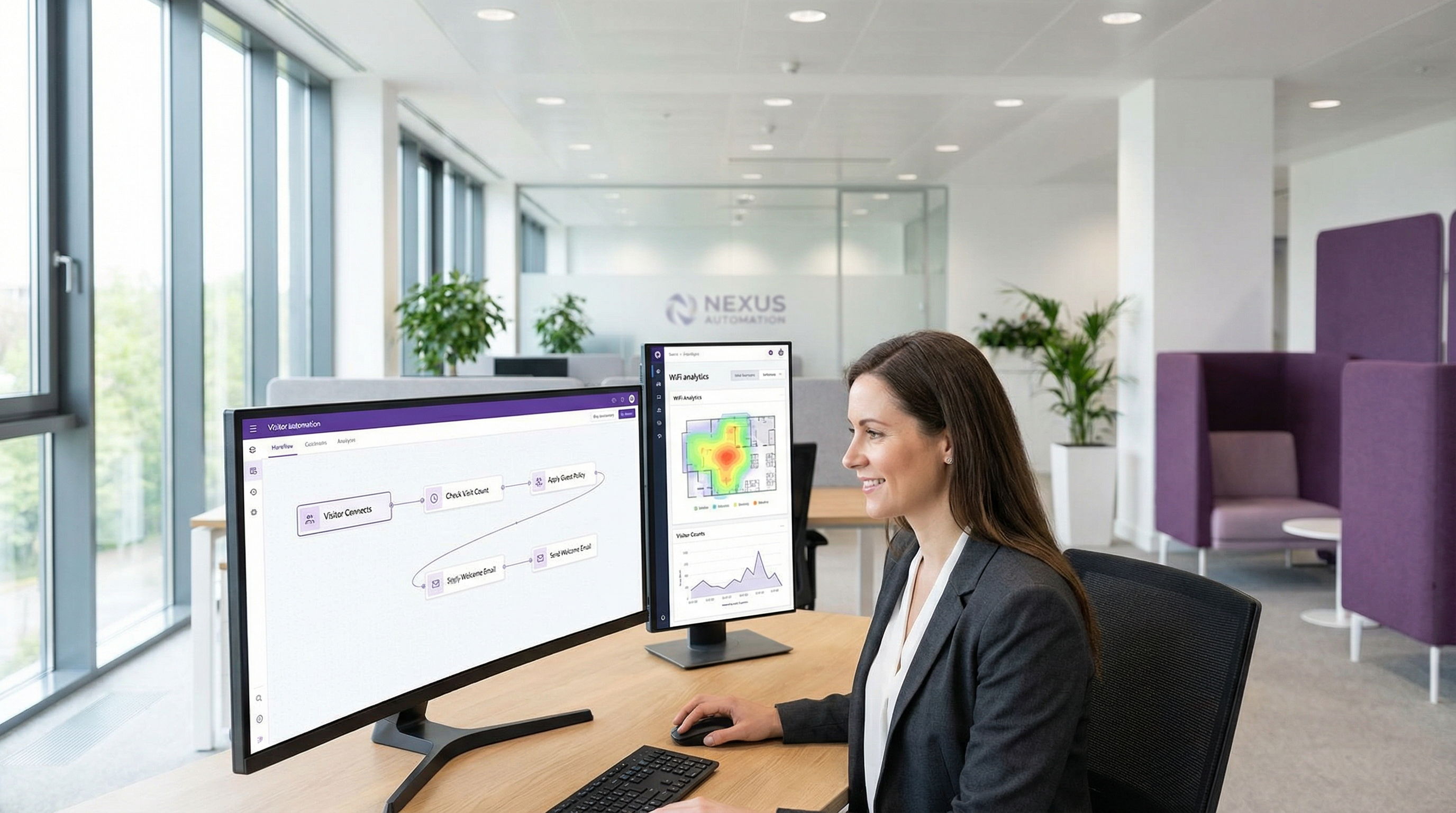
Executive Summary
Im wettbewerbsintensiven Umfeld von Unternehmensnetzwerken ist die Fähigkeit, Reaktionen auf Echtzeit-Ereignisse zu automatisieren, kein Luxus mehr, sondern eine betriebliche Grundvoraussetzung. Für IT-Manager, Netzwerkarchitekten und Betreiber von Veranstaltungsorten besteht die Herausforderung darin, rohe Netzwerkdaten in sofortige, wertschöpfende Maßnahmen umzuwandeln. LogicFlow von Purple ist eine Automatisierungs-Engine auf Enterprise-Niveau, die genau diese Herausforderung direkt angeht. Sie bietet eine visuelle Drag-and-Drop-Oberfläche zur Erstellung komplexer Workflows, die durch eine Vielzahl von WiFi- und besucherbezogenen Ereignissen ausgelöst werden. Dieser Leitfaden dient als technischer Deep-Dive in LogicFlow und geht über Marketing-Abstraktionen hinaus, um umsetzbare Implementierungsrichtlinien zu bieten. Wir analysieren die Architektur der Plattform, untersuchen gängige Bereitstellungsszenarien in Branchen wie dem Gastgewerbe und dem Einzelhandel und quantifizieren den ROI in Bezug auf betriebliche Effizienz, verbesserte Gästeinteraktion und Risikominderung. Für den CTO skizziert dieses Dokument eine Strategie, um die bestehende WiFi-Infrastruktur als proaktives, intelligentes System zu nutzen, das Geschäftsergebnisse vorantreibt. Für IT-Manager und Entwickler ist es ein praktisches Handbuch zur Bereitstellung robuster, automatisierter Workflows, die mit wichtigen Compliance-Standards wie GDPR und PCI DSS übereinstimmen und sowohl Sicherheit als auch ein nahtloses Benutzererlebnis gewährleisten.
Technischer Deep-Dive
LogicFlow fungiert als zentrales Nervensystem der Purple-Plattform und verarbeitet einen kontinuierlichen Strom von Datenpunkten, um vordefinierte Aktionen auszulösen. Die Architektur basiert auf drei Kernkonzepten: Events (Ereignisse), Decisions (Entscheidungen) und Actions (Aktionen). Dieses Modell ermöglicht die Erstellung komplexer, zustandsbehafteter Workflows, die sich in Echtzeit an veränderte Bedingungen anpassen können.
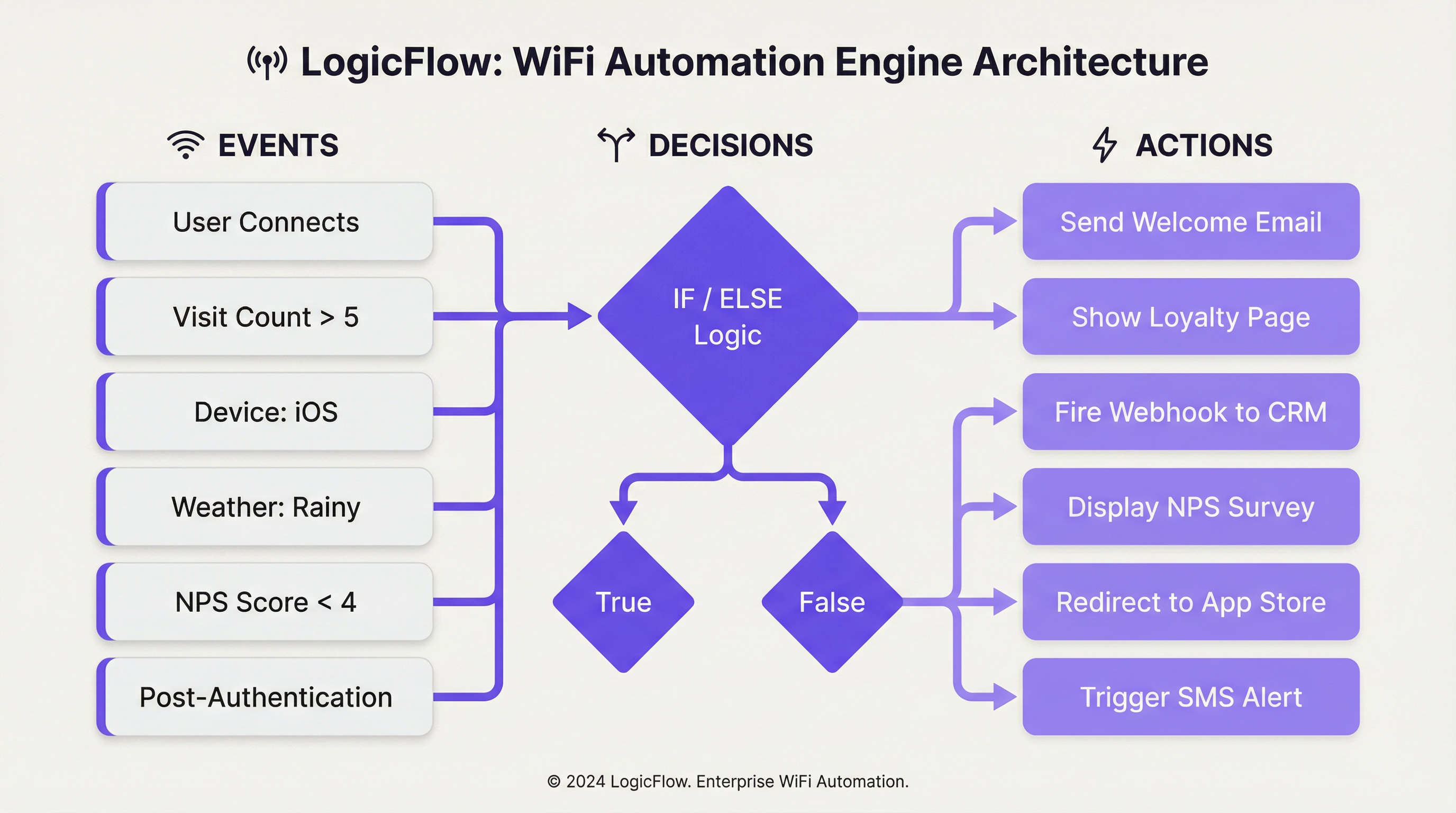
Event-Trigger: Der Prozess beginnt, wenn ein Ereignis erkannt wird. LogicFlow unterstützt ein umfassendes Set an Triggern, die grob wie folgt kategorisiert werden können:
| Kategorie | Spezifische Trigger | Technischer Kontext |
|---|---|---|
| Onboarding-Ereignisse | Pre-Authentication, Post-Authentication, Online | Diese entsprechen den verschiedenen Phasen der WiFi-Verbindungsreise des Gastes. Pre-Auth-Aktionen sind begrenzt, da der Benutzer noch nicht online ist, während Post-Auth- und Online-Trigger auf einen umfangreicheren Datensatz zugreifen können. |
| Besucherdemografie | Alter, Geschlecht, Sprache, E-Mail-Adresse, Anzahl der Besuche | Diese Daten stammen aus dem Anmeldeformular des Captive Portal oder dem Social Sign-on und ermöglichen hochgradig personalisierte User Journeys. Die Einhaltung von Datenschutzrichtlinien wie der GDPR ist bei der Nutzung dieser Daten von größter Bedeutung. |
| Gerät & Netzwerk | Betriebssystem, Browser, SSID, Access Point MAC/Name, Hersteller | Unerlässlich für gerätespezifische Optimierungen (z. B. Push eines App-Downloads für iOS-Nutzer) oder standortspezifische Aktionen, basierend darauf, mit welchem AP ein Benutzer verbunden ist. |
| Umgebungsdaten | Standort (Land, Tags), Wetter (Bedingungen, Temperatur), Uhrzeit/Tag/Datum | Ermöglicht kontextbezogene Automatisierung, wie z. B. die Anzeige eines „Regentag“-Angebots auf der Splash-Page eines Einzelhandelsgeschäfts oder die Anpassung von Inhalten an nationalen Feiertagen. |
| Benutzerverhalten | NPS-Antwort, Antworten auf Mikro-Umfragen, Anmeldemethode, Kostenpflichtiger WiFi-Plan | Trigger basierend auf direktem Benutzerfeedback oder -entscheidungen, die sofortige Service-Wiederherstellung oder Upselling-Möglichkeiten ermöglichen. |
Decision Nodes (Entscheidungsknoten): Sobald ein Ereignis ausgelöst wird, wird es an einen Decision Node weitergeleitet. Hier befindet sich die 'Logik' von LogicFlow. Mithilfe von 'Wahr/Falsch'- oder 'Wenn/Dann'-Anweisungen können Administratoren verzweigte Pfade erstellen, basierend auf den Bedingungen, die von den Ereignisdaten erfüllt werden. Beispielsweise könnte ein 'Wenn/Dann'-Knoten den visit_count eines Besuchers überprüfen. Ist dieser größer als 5 (ein treuer Kunde), folgt er dem 'Wahr'-Pfad; andernfalls folgt er dem 'Falsch'-Pfad für neue Besucher. Mehrere Bedingungen können mithilfe von 'UND'/'ODER'-Logik gruppiert werden, was ein hochgradig granulares Targeting ermöglicht.
Action Nodes (Aktionsknoten): Der letzte Schritt ist der Action Node, der eine bestimmte Aufgabe ausführt. Aktionen sind kontextabhängig und basieren auf dem Ereignistyp.
- Pre-Authentication: Hauptsächlich die Aktion
Splash Page, die ein dynamisches Branding basierend auf Standort oder Tageszeit ermöglicht. - Post-Authentication: Es steht eine breitere Palette von Aktionen zur Verfügung, einschließlich der Präsentation von
NPS/Micro-survey, dem Auslösen einesWebhookan ein Drittsystem, der Anzeige vonMedia(z. B. eine Videowerbung) oder der Zuweisung zu einerPaid WiFi-Stufe. - Online: Aktionen, die stattfinden, sobald der Benutzer vollen Netzwerkzugriff hat, wie z. B.
Redirectzu einer bestimmten URL, das Senden einerEmail/SMS Campaignoder die Anzeige einer anderenSplash Pagebei seinem nächsten Besuch.
Dieser strukturierte Ansatz stellt sicher, dass Workflows sowohl leistungsstark als auch wartbar sind und den gängigen Best Practices für Automatisierung und ereignisgesteuerte Architektur entsprechen.
Implementierungsleitfaden
Die effektive Bereitstellung von LogicFlow erfordert einen strukturierten Ansatz, der von strategischen Zielen zur taktischen Konfiguration übergeht. Die folgenden Schritte bieten ein herstellerneutrales Framework für die Implementierung.
Schritt 1 — Geschäftsziele definieren: Bevor Sie einen Workflow erstellen, definieren Sie klar das gewünschte Ergebnis. Ist das Ziel, die Downloads der Treue-App zu erhöhen, die Gästezufriedenheit zu verbessern oder die Kundenfrequenz in einem bestimmten Bereich zu steigern? Ein klares Ziel bestimmt die erforderlichen Trigger und Aktionen.
Schritt 2 — Die Customer Journey abbilden: Identifizieren Sie die wichtigsten Touchpoints im Besuchererlebnis, an denen Automatisierung einen Mehrwert bieten kann. Dies stimmt typischerweise mit den Phasen Pre-Authentication, Post-Authentication und Online der WiFi-Zugangsreise überein.
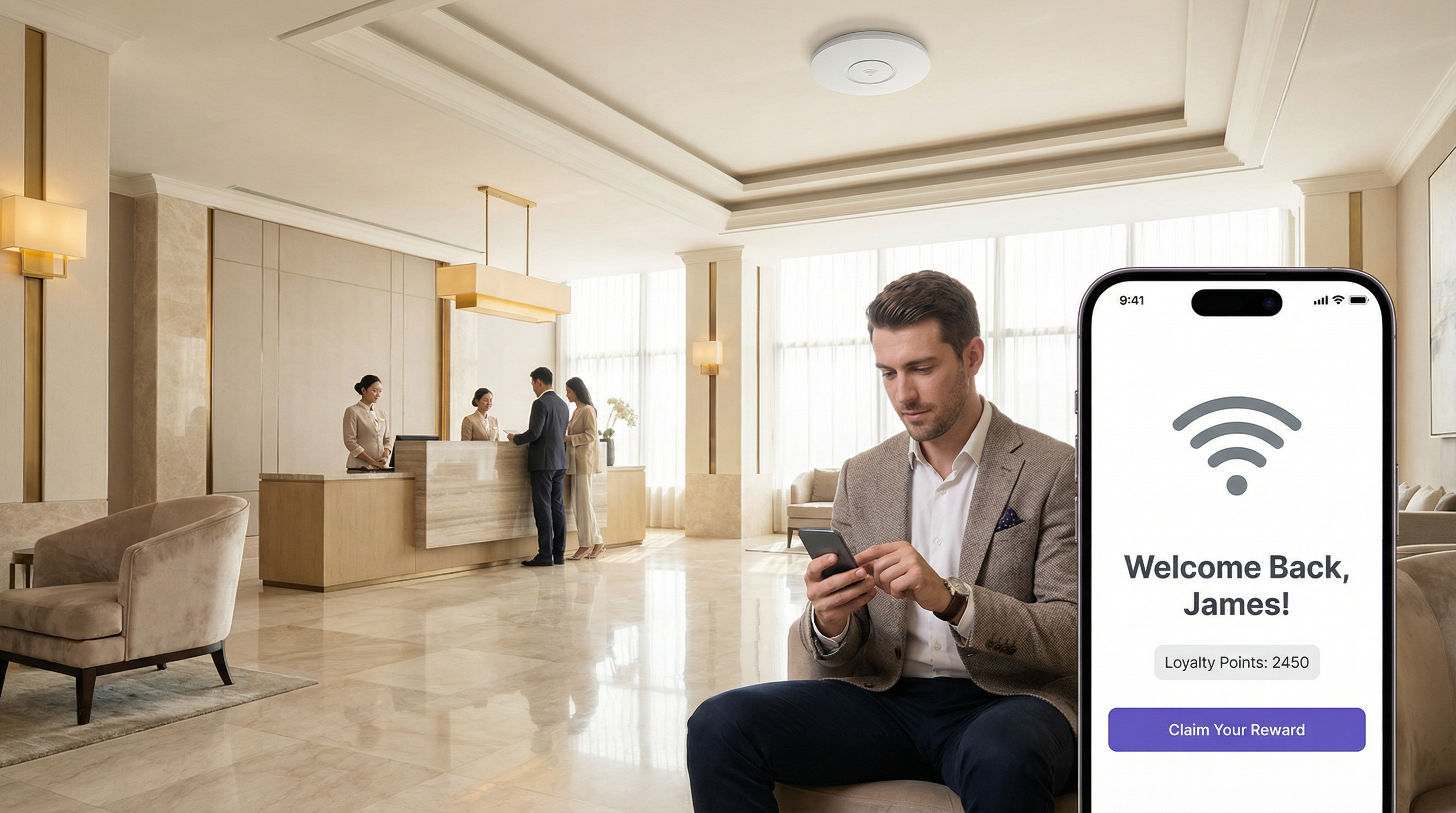
Schritt 3 — Den Workflow erstellen: Beginnen Sie mit einem einzelnen, einfachen Workflow. Zum Beispiel einer 'Willkommen zurück'-Nachricht für wiederkehrende Besucher. Wählen Sie in LogicFlow v2 'Add logic flow' und den entsprechenden Ereignistyp aus. Ziehen Sie einen 'Visitor'-Entscheidungsknoten auf die Arbeitsfläche und konfigurieren Sie ihn mit einer 'Wahr/Falsch'-Bedingung: visit_count ist greater than 1. Fügen Sie für den 'Wahr'-Pfad einen Email Campaign-Aktionsknoten hinzu und wählen Sie eine vorkonfigurierte 'Willkommen zurück'-E-Mail-Vorlage. Fügen Sie für den 'Falsch'-Pfad (neue Besucher) eine andere Aktion hinzu, z. B. eine E-Mail mit einem 'Rabatt für den ersten Besuch'. Verbinden Sie alle Knoten und stellen Sie sicher, dass jeder Pfad mit einem 'End'-Knoten endet.
Schritt 4 — Validieren und Veröffentlichen: Verwenden Sie das integrierte 'Validate'-Tool, um die Logik auf Fehler zu überprüfen. Sobald sie gültig ist, klicken Sie auf 'Publish', um den Workflow zu veröffentlichen.
Schritt 5 — Einer Access Journey zuweisen: Verknüpfen Sie den veröffentlichten LogicFlow mit einer bestimmten Access Journey (dem Captive Portal-Erlebnis für einen bestimmten Veranstaltungsort oder eine bestimmte SSID). Dadurch wird der Workflow aktiviert.
Schritt 6 — Überwachen und Iterieren: Nutzen Sie die Analysen der Plattform, um die Auswirkungen des Workflows zu messen. Verfolgen Sie E-Mail-Öffnungsraten, Einlösungsraten und Besuchshäufigkeit. Verwenden Sie diese Daten, um die Logik zu verfeinern und die Leistung im Laufe der Zeit zu verbessern.
Best Practices
Einfach anfangen, intelligent skalieren: Vermeiden Sie es, von Anfang an übermäßig komplexe, monolithische Workflows zu erstellen. Beginnen Sie mit Single-Purpose-Flows und kombinieren Sie diese, sobald Sie mehr Sicherheit gewinnen und Daten sammeln. Ein einziger gut abgestimmter Workflow, der messbare Ergebnisse liefert, ist mehr wert als zehn schlecht ausgerichtete.
Compliance-Standards einhalten: Wenn Sie demografische Daten verwenden, stellen Sie sicher, dass Ihre Logik die Zustimmung der Benutzer respektiert und mit Vorschriften wie der GDPR übereinstimmt. Erstellen Sie einen Entscheidungsknoten, der das emailable-Flag überprüft, bevor Marketingaktionen ausgelöst werden. Bei Veranstaltungsorten, die Zahlungsdaten verarbeiten, muss sichergestellt werden, dass Workflows mit Finanztransaktionen gemäß den PCI DSS-Anforderungen überprüft werden.
Webhooks für die Integration nutzen: Webhooks sind ein leistungsstarkes Tool zur Erweiterung der Funktionen von LogicFlow. Verwenden Sie sie, um Daten an externe CRM-Systeme zu übertragen, Warnmeldungen in operativen Dashboards (wie Slack oder Microsoft Teams) auszulösen oder sie in Gebäudemanagementsysteme zu integrieren. Dies fördert eine herstellerneutrale, API-First-Integrationsstrategie, die Ihre Technologieinvestitionen schützt.
Namenskonventionen verwenden: Mit zunehmender Anzahl von Workflows wird eine konsistente Namenskonvention – zum Beispiel [Venue]-[Objective]-[Trigger] – für die Wartbarkeit und die Zusammenarbeit im Team unerlässlich.
Regelmäßig prüfen und bereinigen: Überprüfen Sie regelmäßig alle aktiven Workflows, um sicherzustellen, dass sie weiterhin mit den aktuellen Geschäftszielen übereinstimmen. Deaktivieren oder archivieren Sie veraltete Flows, um die Komplexität zu reduzieren und das Risiko unbeabsichtigter Folgen zu mindern.
Fehlerbehebung & Risikominderung
Problem — Workflow wird nicht ausgelöst: Das häufigste Problem ist eine Fehlkonfiguration bei der Zuweisung. Überprüfen Sie, ob der LogicFlow korrekt veröffentlicht und der aktiven Access Journey für den Zielort oder die SSID zugewiesen ist. Überprüfen Sie auch die Logik innerhalb der Entscheidungsknoten; eine zu restriktive Bedingung kann verhindern, dass der Trigger ausgelöst wird.
Problem — Unbeabsichtigtes Benutzererlebnis: Ein komplexer Workflow mit vielen Verzweigungen kann zu unerwarteten Ergebnissen führen. Verwenden Sie das 'Validate'-Tool und testen Sie gründlich mit einer Nicht-Produktions-SSID, bevor Sie ihn in einer Live-Umgebung ausrollen. Berücksichtigen Sie die Reihenfolge der Operationen, insbesondere in Post-Authentication-Flows, in denen mehrere Aktionen (z. B. eine Umfrage und eine Weiterleitung) miteinander konkurrieren könnten.
Risiko — Alarmmüdigkeit (Alert Fatigue): Die Automatisierung von Warnmeldungen über E-Mail oder Webhooks ist leistungsstark, kann aber zu 'Alarmmüdigkeit' führen, wenn sie nicht sorgfältig verwaltet wird. Implementieren Sie eine Entscheidungslogik, die Warnmeldungen nur für Ereignisse mit hoher Priorität auslöst – zum Beispiel bei einem NPS-Wert von 1 bis 3, was auf einen erheblichen Serviceausfall hinweist – und nicht für jedes einzelne Verbindungsereignis.
Risiko — Datenschutzverletzung: Die Verwendung personenbezogener Daten (Alter, Geschlecht, E-Mail) ist eine wichtige Funktion, aber auch eine große Verantwortung. Die Risikominderung umfasst die strikte Einhaltung des Prinzips der Datenminimierung. Erfassen Sie nur die Daten, die für einen bestimmten, definierten Zweck erforderlich sind, und stellen Sie sicher, dass alle Workflows, die diese Daten verwenden, die Zustimmung des Benutzers überprüfen. Überprüfen Sie Flows regelmäßig auf GDPR-Verpflichtungen und führen Sie ein aktuelles Datenverarbeitungsverzeichnis.
ROI & Geschäftsauswirkungen
Betriebliche Effizienz: Die Automatisierung von Aufgaben wie Warnmeldungen zur Service-Wiederherstellung oder Anmeldungen zu Treueprogrammen reduziert die manuelle Arbeitsbelastung der Mitarbeiter. Ein Hotel kann automatisch ein Wartungsticket auslösen und den Empfangschef benachrichtigen, wenn ein Gast nach der Verbindung mit dem WiFi eine schlechte NPS-Bewertung abgibt, was ein sofortiges Eingreifen ermöglicht. Dies führt direkt zu geringeren Betriebskosten und einer schnelleren Problemlösung – messbar in eingesparten Arbeitsstunden und Gästezufriedenheitswerten.
Gesteigerter Customer Lifetime Value (CLV): Durch die Personalisierung des Gästeerlebnisses können Veranstaltungsorte die Loyalität und das Folgegeschäft steigern. Eine Einzelhandelskette, die LogicFlow nutzt, um einen gezielten Rabattgutschein an Besucher zu senden, die seit 90 Tagen nicht mehr gesehen wurden, arbeitet aktiv daran, Kundenabwanderung zu verhindern. Der Erfolg dieser Maßnahme kann gemessen werden, indem die Einlösungsrate dieser Angebote und die anschließende Besuchshäufigkeit der Zielkohorte verfolgt werden.
Verbesserte Venue Intelligence: Die von LogicFlow generierten Daten bieten tiefe Einblicke in das Besucherverhalten. Ein Stadion kann analysieren, welche Verkaufsbereiche zu bestimmten Zeiten am beliebtesten sind, indem es die Gerätedichte in der Nähe bestimmter APs verfolgt, und diese Daten nutzen, um Personal und Inventar für zukünftige Veranstaltungen zu optimieren. Dieser datengesteuerte Ansatz für das Venue-Management führt zu einem höheren Durchsatz und einem höheren Umsatz pro Besucher.
Compliance und Risikominderung: Die Automatisierung von Compliance-Prüfungen – wie z. B. die Sicherstellung, dass jedem Benutzer bei seinem ersten Besuch im Jahr die neuesten Allgemeinen Geschäftsbedingungen präsentiert werden – reduziert rechtliche und finanzielle Risiken. Die Kosten für die Nichteinhaltung von Vorschriften wie der GDPR können erheblich sein, was die automatisierte Durchsetzung zu einem kritischen Bestandteil jeder ROI-Berechnung macht.
Key Terms & Definitions
LogicFlow
A visual, drag-and-drop workflow automation engine within the Purple platform that enables the triggering of specific actions based on a wide range of WiFi events, visitor demographics, device data, and environmental context.
IT teams use LogicFlow to move beyond providing simple connectivity, transforming their WiFi network into an intelligent, responsive system that can drive marketing, operational, and security objectives without manual intervention.
Event-Driven Architecture (EDA)
A software architecture paradigm that promotes the production, detection, consumption of, and reaction to events. LogicFlow is a practical, no-code application of EDA principles for enterprise WiFi networks.
For a network architect, understanding that LogicFlow is based on EDA principles clarifies its asynchronous, non-blocking nature. It is not about polling for status; it is about reacting instantly when a specific event, such as a new user connection or a negative survey response, occurs.
Webhook
An automated HTTP callback sent from one application to another when a specific event occurs. In LogicFlow, a webhook is an action node that can push data to an external system in real-time upon a trigger condition being met.
A developer can use a webhook action in LogicFlow to send guest data to a corporate CRM, trigger an alert in a Slack channel, or instruct a building management system to take an action, providing limitless integration possibilities with any platform that exposes a REST API.
Access Journey
The complete sequence of steps and pages a visitor interacts with from the moment they connect to a WiFi SSID to the point they are granted online access. A published LogicFlow must be assigned to an Access Journey to become active.
Venue operations directors are concerned with the Access Journey as a whole. LogicFlow gives them the power to make this journey dynamic, ensuring the branding, messaging, and any required steps are appropriate for the specific venue, event, or user type.
Captive Portal
A web page that is displayed to newly connected users of a WiFi network before they are granted broader access to network resources. It is the primary source of demographic and consent data for many LogicFlow triggers.
While IT managers deploy captive portals for authentication and security, LogicFlow allows them to transform the portal from a simple gatekeeper into a strategic tool for data collection and personalised engagement, without requiring changes to the underlying network infrastructure.
Decision Node
A component in the LogicFlow canvas that evaluates incoming event data against a set of predefined conditions and directs the workflow down a specific path based on the outcome, using True/False or If/Else logic.
For an IT professional configuring a workflow, the Decision Node is the core component for creating targeted logic. It is where the 'if-then' intelligence of the automation is defined, ensuring actions are only performed on the intended segment of users.
SSID (Service Set Identifier)
The public name of a wireless local area network (WLAN). A single venue may broadcast multiple SSIDs — for example, 'Hotel-Guest', 'Hotel-Conference', and 'Hotel-Staff' — each of which can be assigned a different Access Journey and LogicFlow.
Network architects can use the SSID as a trigger in LogicFlow to apply completely different automation rules depending on which network a user connects to, ensuring that a conference delegate and a hotel guest in the same building have entirely different and contextually appropriate online experiences.
GDPR (General Data Protection Regulation)
A regulation in EU law on data protection and privacy for all individuals within the European Union and the European Economic Area, governing how personal data is collected, processed, and stored.
When a CTO or IT Manager designs a LogicFlow that uses personal data such as email address or age, they must build in checks to ensure compliance with GDPR. This means using LogicFlow's capabilities to verify consent before triggering any marketing actions, mitigating significant legal and financial risk.
NPS (Net Promoter Score)
A widely used customer experience metric that measures customer loyalty by asking respondents to rate, on a scale of 0 to 10, how likely they are to recommend a product or service. Scores of 9–10 are Promoters, 7–8 are Passives, and 0–6 are Detractors.
In LogicFlow, an NPS survey can be presented as a Post-Authentication or Online action, and the resulting score can be used as a decision trigger. This enables real-time service recovery for Detractors and automated review solicitation for Promoters, directly impacting online reputation management.
Case Studies
A 500-room luxury hotel wants to improve its guest satisfaction scores and encourage positive online reviews. They have identified two key visitor segments: first-time guests and returning VIP members. How can they use LogicFlow to create a tailored experience for each segment?
The IT Director implements a multi-path LogicFlow triggered on the 'Post-Authentication' event.
Workflow Configuration:
- Start Node: Triggers after a guest successfully authenticates on the hotel WiFi.
- Decision Node 1 (If/Else): Checks the visitor's profile for a 'VIP Member' tag, synced from the hotel's Property Management System via the Purple API.
- IF True (VIP Member): Route to Path A.
- ELSE (First-Time or Regular Guest): Route to Path B.
- Path A — VIP Member:
- Action Node 1:
Redirectthe guest to a personalised welcome page (https://hotel.com/vip-welcome) with exclusive offers and an upgrade prompt. - Action Node 2:
Email Campaigntriggered with a 1-hour delay, sending a 'Welcome Back' email with a direct link to book spa treatments.
- Action Node 1:
- Path B — First-Time Guest:
- Action Node 1:
NPS Surveypresented immediately to capture initial sentiment. - Decision Node 2 (If/Else): Evaluates the NPS Survey response.
- IF
NPS Scoreis between 9 and 10 (Promoter): Trigger anEmail Campaignwith a 24-hour delay, thanking the guest and providing a direct link to leave a review on TripAdvisor. - ELSE (Score 0–8): Trigger a
Webhookaction that sends an immediate alert to the Front Desk Manager's Slack channel with the guest's name and room number, enabling proactive service recovery.
- IF
- Action Node 1:
- End Node: All paths terminate here.
A large retail shopping centre with over 200 stores wants to increase downloads of its new loyalty and wayfinding app. How can they leverage their existing guest WiFi infrastructure to drive app adoption without disrupting the experience for loyal customers?
The Head of Digital Marketing deploys a LogicFlow that specifically targets users based on device type and visit frequency.
Workflow Configuration:
- Start Node: Triggers on the 'Online' event, once the visitor has full network access.
- Decision Node 1 (True/False): Checks if
visit_countisless than3. This targets newer visitors who are less likely to have downloaded the app. - Decision Node 2 (True/False): Nested under the 'True' path of Node 1. Checks if
Operating SystemisiOSORAndroid. This filters out laptops and other non-mobile devices where an app download is not relevant. - Action Node (True path of Node 2):
Redirectthe user to a custom, mobile-friendly landing page. This page explains the benefits of the app — interactive maps, exclusive offers, loyalty points — and has prominent, one-click buttons to the Apple App Store and Google Play Store. - Alternative Paths: The 'False' path from either decision node (a visitor with more than 3 visits, or a laptop user) proceeds without any redirect, ensuring a standard browsing experience for loyal customers or those on non-mobile devices.
- End Node: All paths terminate here.
Scenario Analysis
Q1. A multi-national coffee chain wants to ensure a consistent global brand experience while also promoting location-specific specials. How would you configure LogicFlow to show a global branding page to all visitors, but also surface a location-specific offer for visitors in specific cities?
💡 Hint:Consider using a combination of Pre-Authentication and Online event triggers. How can venue tags or venue names be used as decision criteria?
Show Recommended Approach
You would implement two LogicFlows. The first is a Pre-Authentication flow assigned globally to all venues. It contains a single Action node to display the main corporate-branded Splash Page, ensuring brand consistency across all locations. The second is an Online flow. It uses a Decision node based on 'Venue Name' or 'Venue Tags'. For each specific venue (e.g., tagged 'London-Covent-Garden'), you create a path that redirects the user to a page for the local special offer. Venues without a specific tag follow a default path with no redirect. This layered approach meets both requirements without requiring separate infrastructure configurations per venue.
Q2. A stadium is hosting a major sporting event and wants to manage network congestion. How could LogicFlow be used to mitigate performance issues for general attendees while preserving bandwidth for press and VIP guests?
💡 Hint:Think about how different SSIDs can be used in conjunction with LogicFlow. What actions can influence user behaviour to reduce bandwidth consumption during peak periods?
Show Recommended Approach
The network architect should configure multiple SSIDs: 'Stadium-Public', 'Stadium-VIP', and 'Stadium-Press'. The VIP and Press SSIDs receive higher QoS priority at the network infrastructure level (IEEE 802.11e/WMM). A LogicFlow is then applied to the 'Stadium-Public' Access Journey with a 'Day/Time' decision node. During peak periods such as halftime, the flow triggers a 'Redirect' action that sends public users to a cached, lightweight page with game statistics and social media feeds rather than allowing unrestricted internet access. This contains traffic and reduces load on the main internet uplink. The VIP and Press SSIDs have no such restriction, preserving their performance for critical use cases.
Q3. A conference centre wants to gather feedback on individual speaker sessions. How can they use LogicFlow to send a targeted micro-survey to attendees shortly after a specific session ends, without surveying attendees who were in a different room?
💡 Hint:This requires integrating location data from the network infrastructure. How can AP naming conventions and time-based triggers be combined to achieve room-level targeting?
Show Recommended Approach
This use case requires precise AP naming. Each conference room's access points are named with a room identifier (e.g., 'Room-101-AP1'). An Online LogicFlow uses a Decision node checking the 'Access Point Name' field. If a user was associated with an AP containing 'Room-101' between the session start and end times (using the 'Time' decision node), they are added to a tagged segment. A second LogicFlow, triggered 15 minutes after the session end time, sends an Email Campaign or Micro Survey to all visitors in that segment, asking specifically about the session in Room 101. This requires disciplined AP naming conventions and careful time-based logic, but delivers highly relevant, timely feedback that is directly attributable to a specific session.
Key Takeaways
- ✓LogicFlow is Purple's visual, event-driven automation engine that transforms passive WiFi infrastructure into an intelligent, responsive business platform.
- ✓Every workflow follows the Event-Decision-Action architecture: a trigger event feeds into If/Else logic, which executes a targeted action.
- ✓Key trigger categories include visitor demographics, device and network data, environmental context (including real-time weather), and user behaviour such as NPS responses.
- ✓Common high-value use cases include real-time service recovery, personalised loyalty engagement, targeted app download campaigns, and dynamic venue branding.
- ✓Webhooks are the primary integration mechanism, enabling LogicFlow to communicate with external CRMs, operational dashboards, and building management systems via REST APIs.
- ✓GDPR compliance must be built into every marketing workflow by checking user consent flags before triggering any communications.
- ✓Implementation best practice is to start with single-purpose, clearly-scoped workflows, validate thoroughly on a non-production SSID, and iterate based on measurable outcomes.




