

Passpoint (Hotspot 2.0): Ein umfassender Leitfaden für sicheres und nahtloses WiFi-Roaming
This guide provides a comprehensive technical overview of Passpoint (Hotspot 2.0) for IT leaders and network architects, covering the IEEE 802.11u standard, GAS/ANQP discovery protocols, WPA3-Enterprise security, and the WBA OpenRoaming federation. It delivers a vendor-neutral implementation framework with phased deployment guidance, real-world case studies from hospitality and retail, and a clear analysis of the ROI and compliance benefits for enterprise venue operators.
🎧 Listen to this Guide
View Transcript

Executive Summary
Für IT-Führungskräfte und Netzwerkarchitekten in großen Veranstaltungsorten ist die Bereitstellung eines nahtlosen und sicheren WiFi-Erlebnisses keine bloße Annehmlichkeit mehr, sondern eine zentrale betriebliche Notwendigkeit. Die Herausforderung besteht darin, die Reibungsverluste von Captive Portals und unsicheren offenen Netzwerken zu beseitigen, während gleichzeitig eine robuste Sicherheit aufrechterhalten und wertvolle Nutzereinblicke gewonnen werden. Passpoint, auch bekannt als Hotspot 2.0, geht diese Herausforderung direkt an. Es handelt sich um ein von der Wi-Fi Alliance zertifiziertes Protokoll basierend auf dem IEEE 802.11u-Standard, das es mobilen Geräten ermöglicht, WiFi-Netzwerke automatisch zu erkennen und sich mit WPA3-Sicherheit auf Unternehmensniveau zu authentifizieren, was das nahtlose Erlebnis von Mobilfunk-Roaming widerspiegelt.
Dieser Leitfaden dient als praktische Referenz für Entscheidungsträger und bietet einen technischen Deep-Dive in die Passpoint-Architektur, ein herstellerneutrales Implementierungs-Framework sowie eine Analyse des ROI. Durch die Nutzung von Passpoint können Unternehmen das Gästeerlebnis erheblich verbessern, den IT-Support-Aufwand reduzieren, ihre Sicherheitslage stärken und neue Möglichkeiten für datengesteuertes Engagement erschließen – und so letztendlich ihre WiFi-Infrastruktur von einem Kostenfaktor in einen strategischen Vermögenswert verwandeln.
Technischer Deep-Dive
Passpoint verschiebt das Paradigma der WiFi-Verbindung grundlegend von netzwerkzentriert (Verbindung mit einer bestimmten SSID) zu nutzerzentriert (Verbindung mit jedem Netzwerk, das den Anmeldeinformationen des Nutzers vertraut). Dies wird durch eine Reihe von Pre-Association-Abfragen und ein robustes Sicherheits-Framework erreicht, das auf etablierten Industriestandards aufbaut.
Kernarchitektur: GAS und ANQP
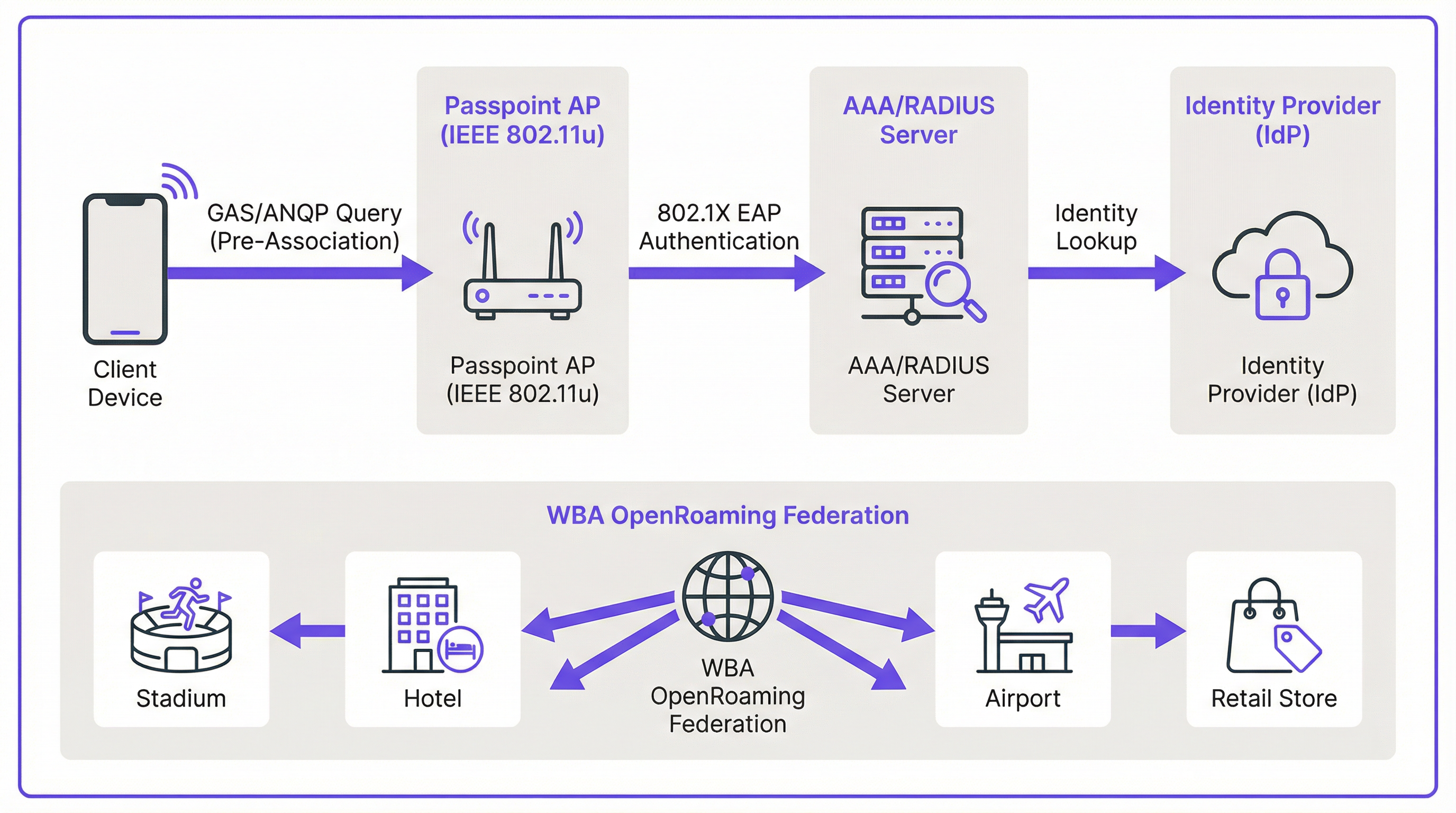
Der Mechanismus, der eine nahtlose Erkennung ermöglicht, ist in der IEEE 802.11u-Erweiterung definiert. Bevor ein Client-Gerät überhaupt versucht, sich mit einem Access Point zu verbinden, kann es das Netzwerk abfragen, um festzustellen, ob eine Roaming-Vereinbarung vorliegt. Diese Pre-Association-Kommunikation nutzt zwei Schlüsselprotokolle, die zusammenarbeiten.
Der Generic Advertisement Service (GAS) stellt die Transportschicht für Advertisement-Frames zwischen einer Client-Station und einem Server bereit, bevor die Authentifizierung erfolgt. Das Access Network Query Protocol (ANQP) ist das eigentliche Abfrageprotokoll, das innerhalb der GAS-Frames übertragen wird. Das Client-Gerät verwendet ANQP, um dem Netzwerk spezifische Fragen zu stellen, vor allem: Welche Roaming-Konsortien oder Identitätsanbieter werden unterstützt?
Der Verbindungsablauf verläuft wie folgt. Ein Passpoint-fähiger Access Point (AP) integriert ein Interworking Element in seine Beacon-Frames, das als Flag fungiert und Hotspot 2.0-Funktionen ankündigt. Ein kompatibles Gerät erkennt dieses Flag und sendet eine GAS-Anfrage mit einer ANQP-Abfrage an den AP. Die Abfrage ermittelt, welche Roaming Consortium Organizational Identifiers (RCOIs) das Netzwerk unterstützt. Wenn die Antwort des APs eine RCOI enthält, die mit einem Profil auf dem Gerät übereinstimmt – zum Beispiel einem Profil eines Mobilfunkanbieters oder einem WBA OpenRoaming-Profil –, fährt das Gerät mit dem sicheren 802.1X-Handshake fort.
Sicherheit: WPA3-Enterprise und 802.1X
Sicherheit ist der Grundpfeiler von Passpoint. Im Gegensatz zu einem Captive Portal, das häufig auf einem offenen, unverschlüsselten Netzwerk aufsetzt, schreibt Passpoint die Verwendung von WPA2-Enterprise oder WPA3-Enterprise vor. Dies erzwingt die 802.1X-Authentifizierung, bei der das Gerät jedes Nutzers individuell über einen RADIUS-Server authentifiziert wird. Diese Architektur bietet mehrere entscheidende Sicherheitsvorteile, die für die Compliance-Verpflichtungen gemäß PCI DSS und GDPR von direkter Bedeutung sind.
Der gesamte Datenverkehr zwischen dem Client-Gerät und dem Access Point wird individuell verschlüsselt, wodurch das Risiko von passivem Abhören eliminiert wird. Da die Authentifizierung auf vertrauenswürdigen Anmeldeinformationen und Zertifikaten basiert, sind Nutzer vor "Evil Twin"-Angriffen geschützt, bei denen ein böswilliger Akteur eine gefälschte SSID ausstrahlt, um den Datenverkehr abzufangen. Es gibt keine Pre-Shared Keys (PSKs), die bei einer Kompromittierung das gesamte Netzwerk für laterale Bewegungen anfällig machen könnten.
Passpoint vs. OpenRoaming: Eine wichtige Unterscheidung
Es ist wichtig, zwischen dem Passpoint-Standard und dem WBA OpenRoaming-Framework zu unterscheiden, da die beiden Begriffe häufig vermischt werden. Die treffendste Analogie ist der Unterschied zwischen einem Auto und einem Autobahnsystem.
Passpoint ist das Fahrzeug: der technische Standard (IEEE 802.11u) und die Wi-Fi Alliance-Zertifizierung, die es einem Gerät ermöglichen, ein Netzwerk automatisch zu erkennen und sich damit zu verbinden. OpenRoaming ist die Autobahn: ein globales Föderations-Framework, das von der Wireless Broadband Alliance (WBA) verwaltet wird und ein Vertrauens-Ökosystem zwischen Tausenden von Identity Providers (IdPs) – wie Mobilfunkanbietern und Geräteherstellern – und Access Network Providers (ANPs) wie Hotels, Stadien und Einzelhandelsketten schafft. Eine private Passpoint-Bereitstellung kann ohne OpenRoaming betrieben werden, aber die Teilnahme an OpenRoaming erfordert Passpoint.
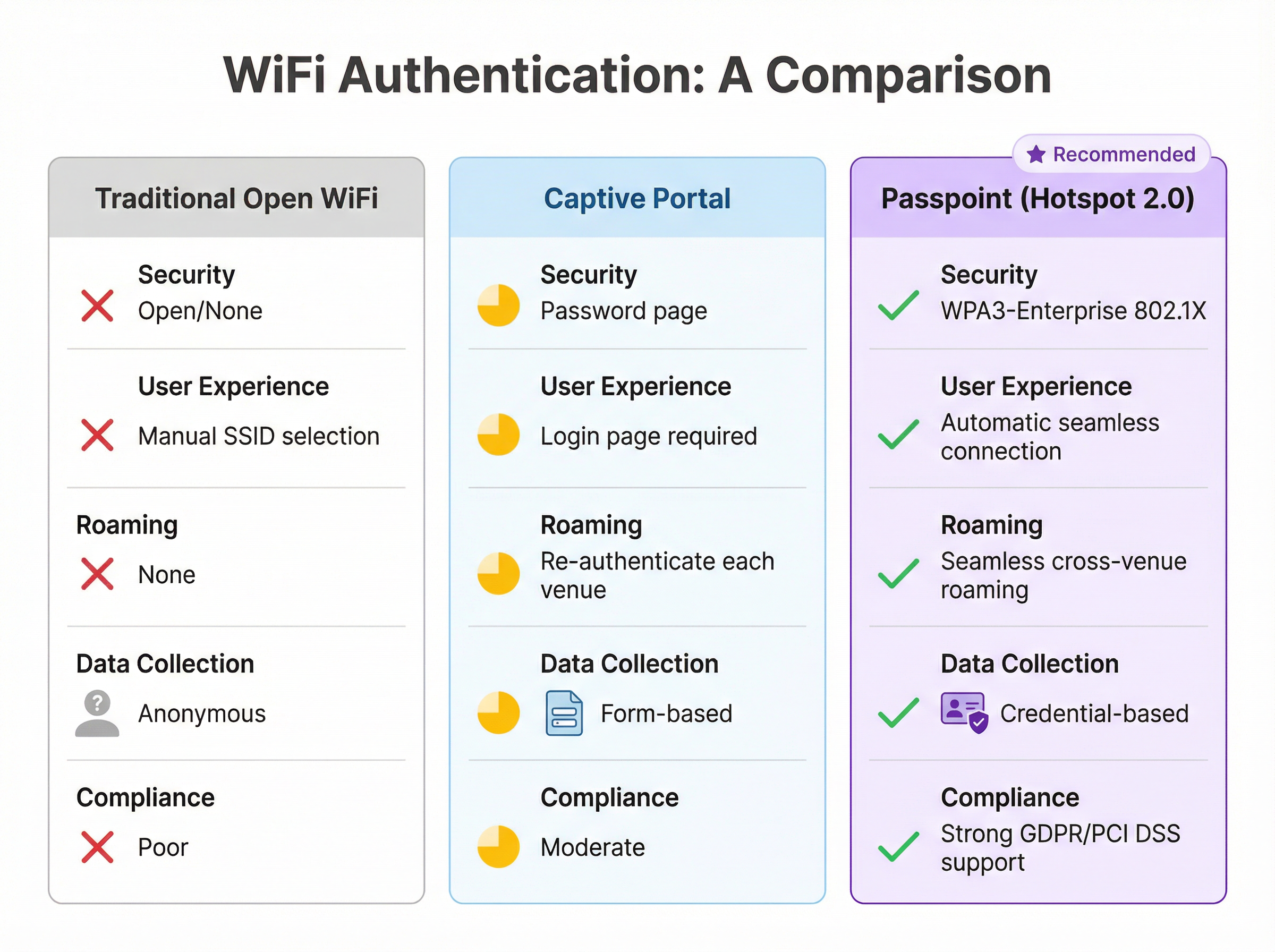
| Funktion | Traditionelles offenes WiFi | Captive Portal | Passpoint (Hotspot 2.0) |
|---|---|---|---|
| Sicherheitsstandard | Keiner (Offen) | Variiert (oft offen) | WPA3-Enterprise (802.1X) |
| Nutzererlebnis | Manuelle SSID-Auswahl | Login-Seite erforderlich | Vollautomatisch |
| Standortübergreifendes Roaming | Keines | Jedes Mal neu authentifizieren | Nahtlos |
| Datenerfassung | Anonym | Formularbasiert (GDPR-Risiko) | Anmeldedatenbasiert |
| PCI DSS-Konformität | Schwach | Moderat | Stark |
Implementierungsleitfaden
Die Bereitstellung von Passpoint ist ein strukturierter Prozess, der von der Bewertung über die Infrastrukturkonfiguration und Pilotierung bis hin zum vollständigen Rollout reicht. Ein phasenweiser Ansatz gewährleistet einen reibungslosen Übergang und minimiert Unterbrechungen für bestehende Nutzer.
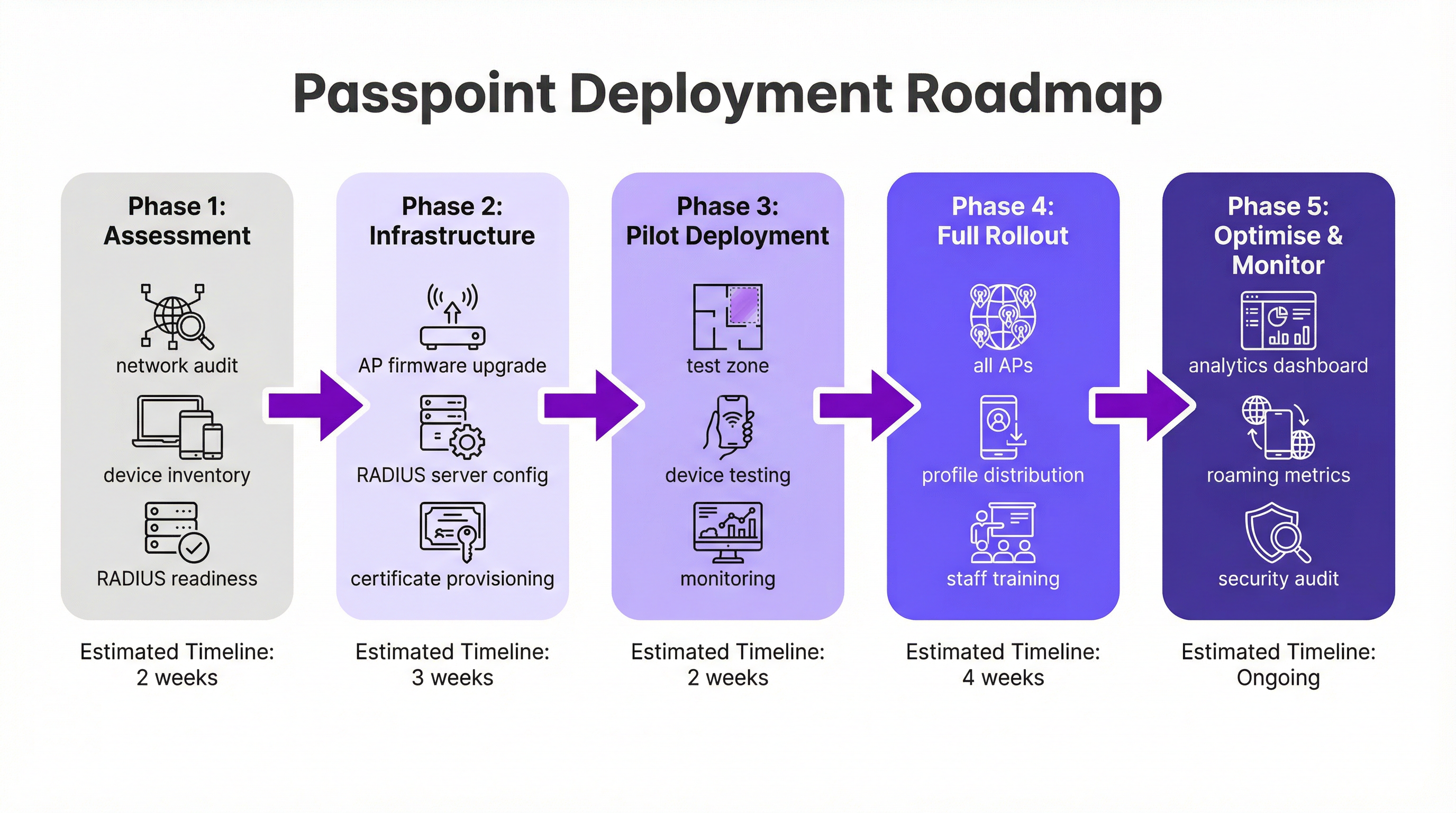
Phase 1: Bewertung und Planung (2 Wochen). Beginnen Sie mit einem vollständigen Netzwerk-Audit, um zu überprüfen, ob Ihre vorhandene WiFi-Hardware die erforderlichen IEEE 802.11u-Funktionen unterstützt. Die meiste Enterprise-Hardware, die in den letzten fünf bis sieben Jahren hergestellt wurde, ist konform, jedoch ist häufig ein Firmware-Update erforderlich. Bewerten Sie gleichzeitig Ihre RADIUS-Infrastruktur hinsichtlich Kapazität, Hochverfügbarkeit und ihrer Fähigkeit, zertifikatsbasierte EAP-Methoden zu verarbeiten. Definieren Sie Ihre Identitätsstrategie: Werden Sie Nutzer über eine Treueprogramm-Datenbank authentifizieren, sich mit einem Mobilfunkpartner integrieren oder der WBA OpenRoaming-Föderation beitreten?
Phase 2: Infrastrukturkonfiguration (3 Wochen). Rollen Sie Firmware-Updates auf alle APs und Controller aus. Konfigurieren Sie Ihren RADIUS-Server so, dass er die gewählten EAP-Typen unterstützt – EAP-TLS ist die sicherste Option für zertifikatsbasierte Authentifizierung, während EAP-TTLS eine flexiblere Alternative bietet. Wenn Sie an OpenRoaming teilnehmen, beschaffen Sie die erforderlichen WBA PKI-Zertifikate. Erstellen Sie ein dediziertes WLAN-Profil, das für WPA3-Enterprise mit aktivierten Hotspot 2.0-Funktionen konfiguriert ist, einschließlich der relevanten RCOIs. Für maximale Gerätekompatibilität sollten Sie sowohl die standardmäßige Settlement-Free RCOI (5A-03-BA) als auch die Legacy Cisco RCOI (00-40-96) ausstrahlen.
Phase 3: Pilotbereitstellung (2 Wochen). Bestimmen Sie einen begrenzten, kontrollierten Bereich Ihres Veranstaltungsortes – eine einzelne Etage, einen bestimmten Konferenzraum oder eine Zone eines Einzelhandelsgeschäfts – für den Piloten. Binden Sie Testgeräte über iOS-, Android- und Windows-Plattformen hinweg ein. Überwachen Sie RADIUS-Protokolle und die Netzwerkleistung genau, um die nahtlose Erkennung, Authentifizierung und das AP-zu-AP-Roaming zu validieren.
Phase 4: Vollständiger Rollout und Profilverteilung (4 Wochen). Wenden Sie die validierte Konfiguration auf alle APs im gesamten Veranstaltungsort an. Bestimmen Sie Ihre Strategie zur Profilverteilung: Die Integration in eine gebrandete mobile App ist der Goldstandard für das Gastgewerbe und den Einzelhandel, während eine MDM-Plattform der geeignete Kanal für Unternehmensumgebungen ist. Schulen Sie das IT-Support-Personal in der neuen Architektur und den gängigen Verfahren zur Fehlerbehebung.
Phase 5: Optimierung und Überwachung (Fortlaufend). Nutzen Sie Netzwerkanalysen, um Roaming-Muster, Erfolgsraten bei der Authentifizierung und die Verteilung von Gerätetypen zu überwachen. Verwenden Sie diese Daten, um das Nutzererlebnis zu verfeinern und Möglichkeiten für eine tiefere Integration mit CRM-, PMS- oder Marketing-Automatisierungsplattformen zu erkunden. Führen Sie regelmäßige Sicherheitsaudits durch, um die Einhaltung der PCI DSS- und GDPR-Anforderungen aufrechtzuerhalten.
Best Practices
Aus groß angelegten Passpoint-Bereitstellungen im Gastgewerbe, Einzelhandel und Transportsektor haben sich mehrere herstellerneutrale Best Practices herauskristallisiert.
Das Ausstrahlen mehrerer RCOIs ist für die Kompatibilität unerlässlich. Die standardmäßige Settlement-Free RCOI (5A-03-BA) deckt die Mehrheit der modernen Geräte ab, die bei OpenRoaming registriert sind, während die Legacy Cisco RCOI (00-40-96) für ältere Android-Geräte und Samsung-Smartphones mit OneUI entscheidend ist. Das Weglassen der Legacy RCOI kann stillschweigend einen erheblichen Teil Ihrer Nutzerbasis ausschließen.
WPA3-Enterprise sollte der Standard für alle neuen Bereitstellungen sein. Während WPA2-Enterprise weiterhin unterstützt wird, führt WPA3 Protected Management Frames (PMF) als obligatorische Funktion ein, was eine zusätzliche Schutzschicht gegen Deauthentifizierungsangriffe bietet.
Für Marken mit einer Treue- oder Gäste-App ist die direkte Integration der Passpoint-Profilinstallation in die App der effektivste Verteilungsmechanismus. Das Profil kann beim ersten Login des Nutzers automatisch gepusht werden, wodurch ein völlig reibungsloses Onboarding-Erlebnis entsteht, das bei nachfolgenden Besuchen keine Aktion des Nutzers erfordert.
Netzwerksegmentierung über VLANs ist eine nicht verhandelbare Best Practice für die Compliance. Der Passpoint-Datenverkehr sollte von internen Unternehmensnetzwerken und allen Systemen, die Zahlungskartendaten verarbeiten, isoliert werden, um eine saubere PCI DSS-Scope-Grenze zu gewährleisten.
Fehlerbehebung und Risikominderung
Das Verständnis der häufigsten Fehlermodi vor der Bereitstellung reduziert das Risiko eines problematischen Go-Lives erheblich.
Das häufigste Problem ist, dass sich ein Gerät nicht automatisch verbindet. Die Grundursache ist fast immer ein fehlendes, falsch formatiertes oder abgelaufenes Passpoint-Profil auf dem Client-Gerät. Stellen Sie sicher, dass das Profil korrekt installiert ist und dass die darin angegebene RCOI mit der vom Netzwerk ausgestrahlten RCOI übereinstimmt. Unter iOS können Profile über die Einstellungen-App überprüft werden; unter Android variiert der Prozess je nach Hersteller.
Authentifizierungsfehler sind das zweithäufigste Problem. RADIUS-Serverprotokolle sind das definitive Diagnosetool. Fehler resultieren typischerweise aus falschen Formaten der Anmeldeinformationen, abgelaufenen Zertifikaten oder einer unterbrochenen Vertrauensbeziehung zu einem vorgeschalteten Identitätsanbieter. Wenn Sie OpenRoaming beitreten, stellen Sie sicher, dass die WBA-Stammzertifikate korrekt im Trust Store Ihres RADIUS-Servers installiert sind.
Eine Fehlkonfiguration der Firewall ist ein die Bereitstellung blockierendes Risiko, das leicht übersehen wird. RadSec-Datenverkehr (TCP-Port 2083) muss zwischen Ihrem RADIUS-Server und allen föderierten Roaming-Partnern oder OpenRoaming-Proxy-Servern zugelassen werden. Validieren Sie diese Regel explizit vor dem Go-Live.
Die Hochverfügbarkeit der RADIUS-Infrastruktur ist das kritischste operationelle Risiko. Ein Ausfall des RADIUS-Servers verhindert jegliche Passpoint-Authentifizierung und legt das Netzwerk für alle registrierten Nutzer effektiv lahm. Stellen Sie ein geclustertes oder geografisch redundantes Paar von RADIUS-Servern bereit und testen Sie den Failover-Mechanismus vor dem produktiven Rollout.
ROI und geschäftliche Auswirkungen
Die Implementierung von Passpoint liefert messbaren geschäftlichen Mehrwert in mehreren Bereichen, was den Business Case sowohl für die IT als auch für das gesamte Unternehmen überzeugend macht.
Der unmittelbarste betriebliche Vorteil ist eine Reduzierung der IT-Supportkosten. Indem die Notwendigkeit entfällt, dass Nutzer SSIDs manuell auswählen, Passwörter eingeben oder sich nach Sitzungs-Timeouts neu authentifizieren müssen, reduziert Passpoint das Volumen an WiFi-bezogenen Support-Tickets drastisch. Für ein großes Hotel oder Konferenzzentrum kann dies zu einer deutlichen Entlastung der Rezeption und des IT-Helpdesks führen.
Die Gästezufriedenheit ist ein direktes und messbares Ergebnis. Im Gastgewerbe zählt die WiFi-Qualität durchweg zu den wichtigsten Faktoren in Umfragen zur Gästezufriedenheit. Ein nahtloses, automatisches Verbindungserlebnis – insbesondere für wiederkehrende Gäste, die ohne eigenes Zutun erkannt und verbunden werden – hinterlässt einen starken positiven Eindruck, der die Loyalität und das Folgegeschäft fördert.
Der Wechsel von anonymen Daten aus offenen Netzwerken zu anmeldedatenbasierten Passpoint-Daten erschließt einen erheblichen analytischen Wert. Veranstaltungsorte können Besuchshäufigkeit, Verweildauer nach Standort und Gerätedemografie mit einer Präzision nachvollziehen, die mit einem Captive Portal schlichtweg nicht möglich ist. Wenn diese Daten in CRM- und Marketingplattformen integriert werden, ermöglichen sie ein personalisiertes Engagement, das durch gezielte Werbeaktionen und Upsell-Möglichkeiten zusätzliche Einnahmen generiert.
Schließlich sollte der Wert von Passpoint für Compliance und Risikominderung nicht unterschätzt werden. In einem Umfeld zunehmender behördlicher Kontrolle gemäß GDPR und PCI DSS bietet die Sicherheit von WPA3-Enterprise auf Unternehmensniveau eine nachweislich stärkere Sicherheitslage als offene oder PSK-basierte Netzwerke. Dies verringert das Risiko einer Datenschutzverletzung und der damit verbundenen finanziellen und rufschädigenden Konsequenzen.
Key Terms & Definitions
IEEE 802.11u
An amendment to the IEEE 802.11 WiFi standard that enables network discovery and information exchange between a client device and an access point before an association is established. It is the foundational standard underpinning Passpoint.
When evaluating WiFi hardware for a Passpoint deployment, IT teams should verify that the access points and controllers explicitly list IEEE 802.11u support in their technical specifications. Its presence confirms the hardware is capable of Hotspot 2.0 features.
ANQP (Access Network Query Protocol)
The protocol used by a client device to query a Hotspot 2.0-enabled access point for information before associating, including its roaming partners, venue name, IP address type availability, and network capabilities.
During troubleshooting, a network architect can use a wireless packet analyser to inspect ANQP frames and confirm that the AP is correctly advertising its roaming consortium OIs and that the client is receiving and processing the response.
RCOI (Roaming Consortium Organizational Identifier)
A unique identifier that represents a group of network providers who have a roaming agreement. A client device will only attempt to connect to a Passpoint network if the RCOI broadcast by the AP matches an RCOI specified in one of its installed Passpoint profiles.
This is the most critical configuration parameter in a Passpoint deployment. Incorrect or missing RCOIs are the most common cause of devices failing to connect automatically. The standard OpenRoaming RCOI is 5A-03-BA; the legacy Cisco RCOI is 00-40-96.
RADIUS (Remote Authentication Dial-In User Service)
A networking protocol providing centralised Authentication, Authorization, and Accounting (AAA) management for users connecting to a network service. In a Passpoint deployment, the RADIUS server is the core authentication engine.
The RADIUS server is the single most critical piece of infrastructure in a Passpoint deployment. Its availability directly determines the availability of the Passpoint network. IT teams should deploy RADIUS in a high-availability cluster and monitor it proactively.
EAP (Extensible Authentication Protocol)
An authentication framework used in 802.1X networks that supports multiple authentication methods. Common EAP types used with Passpoint include EAP-TLS (certificate-based, highest security), EAP-TTLS (tunnelled credentials), and EAP-SIM/AKA (SIM-card based, used by mobile carriers).
The choice of EAP method determines the security level and operational complexity of the deployment. EAP-TLS requires a PKI to issue client certificates, which is operationally demanding but provides the strongest security. EAP-TTLS is a common, more manageable alternative for enterprise deployments.
WBA (Wireless Broadband Alliance)
A global industry organisation that promotes the adoption of interoperable wireless services. The WBA manages the OpenRoaming federation, including its PKI, policy framework, and the onboarding of Identity Providers and Access Network Providers.
When a venue operator decides to join OpenRoaming, they are entering into a legal and technical framework governed by the WBA. This involves signing a participation agreement, obtaining WBA PKI certificates, and configuring their network to comply with the OpenRoaming technical specifications.
Identity Provider (IdP)
An entity that creates, maintains, and manages identity information and provides authentication services to relying parties. In the Passpoint/OpenRoaming ecosystem, IdPs include mobile carriers (e.g., Verizon, EE), device manufacturers (e.g., Samsung), and enterprises.
Understanding the IdP model is essential for scoping a Passpoint deployment. The venue operator (as the Access Network Provider) does not need to manage user identities; it delegates that responsibility to trusted IdPs via the roaming federation.
RadSec (RADIUS over TLS)
A protocol that secures RADIUS communication by tunnelling it over Transport Layer Security (TLS), typically on TCP port 2083. It replaces the traditional UDP-based RADIUS transport, providing encryption and mutual authentication for RADIUS traffic.
RadSec is a mandatory component of the OpenRoaming framework. IT teams must ensure that firewall rules explicitly permit TCP port 2083 between their RADIUS server and the OpenRoaming proxy servers. This is a frequently overlooked configuration step that can block all federated authentication.
Case Studies
A 500-room luxury hotel with a large conference centre wants to replace its legacy captive portal system. The goal is to provide seamless, secure WiFi for hotel guests, conference attendees, and staff, while also enabling personalised engagement through the hotel's loyalty app.
The recommended approach is a phased Passpoint deployment integrated with the hotel's loyalty programme. Begin with a full audit of the existing Cisco Meraki network to confirm all APs support Hotspot 2.0. Configure the hotel's RADIUS server to authenticate loyalty members using EAP-TTLS against the loyalty programme's member database. Update the hotel's mobile app to include a Passpoint profile installation flow, triggered automatically upon the user's first login. Create two distinct WLAN profiles: one for guests and loyalty members broadcasting the hotel's specific RCOI, and a second for conference attendees that utilises the WBA OpenRoaming RCOI (5A-03-BA) to allow attendees from diverse organisations to connect automatically without any pre-registration. In the loyalty app, configure a trigger to send a personalised welcome notification upon guest arrival, detected via the Passpoint connection event, including their room number and a link to book restaurant reservations.
A large retail chain with 300 stores across the country uses a basic open guest WiFi network. They face challenges with network abuse, a poor user experience, and an inability to gather meaningful customer data. They need a scalable, secure solution that can be managed centrally.
The retailer should implement a Passpoint solution federated with WBA OpenRoaming, managed via a centralised cloud platform. Replace the existing consumer-grade access points with enterprise-grade hardware from a vendor such as HPE Aruba Networking, managed through Aruba Central. Deploy a cloud-based RADIUS infrastructure for scalability and simplified management across all 300 locations. Configure the WLAN profile on Aruba Central to enable Passpoint and broadcast the OpenRoaming RCOI. The RADIUS server proxies all authentication requests to the OpenRoaming federation, meaning any shopper with a Passpoint profile from their mobile carrier can connect automatically and securely at any of the 300 stores without any pre-registration. Leverage the anonymised, credential-based data from RADIUS accounting logs to analyse footfall and dwell times by store zone, without collecting personal information via a captive portal, thereby simplifying GDPR compliance significantly.
Scenario Analysis
Q1. You are the network architect for a major international airport. You have been tasked with improving the passenger WiFi experience, which currently uses a slow, cumbersome captive portal. The airport hosts dozens of different airlines, and passengers arrive from all over the world with devices from hundreds of different carriers. What is your recommended strategy for implementing Passpoint?
💡 Hint:Consider the diversity of users and the need for a globally interoperable solution. How can you avoid the operational burden of managing bilateral roaming agreements with hundreds of mobile carriers?
Show Recommended Approach
The optimal strategy is to deploy a Passpoint-certified network and join the WBA OpenRoaming federation. This allows the airport to accept credentials from a vast ecosystem of identity providers — including major global mobile carriers and device manufacturers — without negotiating individual roaming agreements. The implementation involves upgrading the airport's WiFi infrastructure to be Passpoint-compliant (802.11u-capable APs with current firmware), configuring the RADIUS servers to proxy authentication requests to the OpenRoaming network via RadSec, and broadcasting the standard OpenRoaming RCOI (5A-03-BA) alongside the legacy Cisco RCOI (00-40-96) for compatibility. This provides a seamless, secure, automatic connection experience for the majority of travellers, dramatically improving satisfaction scores and reducing WiFi-related support burden.
Q2. A large university campus wants to extend its secure Eduroam WiFi service into the surrounding student-heavy cafes and local businesses. The goal is to allow students and staff to seamlessly roam from the campus network to these partner venues. How would you use Passpoint to achieve this?
💡 Hint:Eduroam is itself a roaming federation based on 802.1X. Consider how you can extend the university's identity trust to third-party venues without requiring those venues to manage student credentials directly.
Show Recommended Approach
This is a well-suited use case for a private Passpoint federation. The university acts as the central Identity Provider. The partner cafes and shops become Access Network Providers. The university's IT department provides the partner venues with access to a cloud-based RADIUS proxy that is configured to trust the university's main RADIUS server. The cafes' APs are configured to broadcast a specific RCOI designated for this 'Campus Community' network. The university then updates the Passpoint profile on student and staff devices — distributed via the university's MDM platform — to include this new RCOI. When a student enters a partner cafe, their device recognises the RCOI, initiates an 802.1X connection, and the cafe's network proxies the authentication back to the university's trusted RADIUS server. Students are connected automatically and securely; the cafe never handles student credentials directly.
Q3. Your organisation has deployed Passpoint in its corporate headquarters. During the pilot phase, Android devices are connecting successfully, but a significant number of corporate-issued iPhones are failing to connect automatically. What is the most likely cause and how would you systematically troubleshoot it?
💡 Hint:Device operating systems handle Passpoint profiles differently. In a corporate environment, consider how profiles are created, signed, and distributed to managed iOS devices.
Show Recommended Approach
The most likely cause is an issue with the Passpoint configuration profile on the managed iPhones. iOS devices in a corporate environment are typically managed via an MDM platform, and Passpoint profiles must be correctly structured as Apple Configuration Profiles (.mobileconfig). The systematic troubleshooting process is: (1) Check the MDM console to confirm the profile has been successfully pushed to the affected devices; (2) On a test iPhone, navigate to Settings > General > VPN & Device Management to verify the profile is installed and not showing an error; (3) Manually install a known-good, manually created profile on a test iPhone to determine if the issue is with the profile content or the MDM delivery mechanism; (4) Inspect the RADIUS server logs for authentication attempts from the failing iPhones — the rejection reason (e.g., 'client certificate not trusted', 'unknown EAP type') will identify the specific misconfiguration; (5) Verify that the trusted root certificate for the RADIUS server is included in the MDM-pushed profile, as iOS requires explicit trust for the server certificate used in EAP authentication.
Key Takeaways
- ✓Passpoint (Hotspot 2.0) is a Wi-Fi Alliance certification based on IEEE 802.11u that enables automatic, secure WiFi connection without manual SSID selection or captive portal login.
- ✓The technology uses GAS and ANQP protocols for pre-association network discovery, allowing devices to identify compatible networks using Roaming Consortium Organizational Identifiers (RCOIs) before committing to a connection.
- ✓All Passpoint connections are secured with WPA2 or WPA3-Enterprise and 802.1X authentication, providing enterprise-grade encryption and eliminating the risk of rogue AP attacks.
- ✓WBA OpenRoaming is a global federation built on Passpoint that enables large-scale, interoperable roaming between thousands of networks without bilateral agreements — the recommended approach for large public venues.
- ✓A successful deployment requires three pillars: compliant 802.11u infrastructure, a highly available RADIUS server, and a clear strategy for distributing Passpoint profiles to user devices.
- ✓The business case is compelling: reduced IT support costs, measurably improved guest satisfaction, richer credential-based analytics, and a stronger compliance posture under GDPR and PCI DSS.
- ✓For maximum device compatibility, always broadcast both the standard OpenRoaming RCOI (5A-03-BA) and the legacy Cisco RCOI (00-40-96) on your Passpoint WLAN.




