

Portweiterleitung für WiFi-Controller: Ein Konfigurationsleitfaden
This guide provides a technical reference for network architects and IT managers on configuring port forwarding for on-premise WiFi controllers. It covers when port forwarding is necessary, which ports are required for major vendors, and how to mitigate the associated security risks to ensure a secure and scalable deployment.
🎧 Listen to this Guide
View Transcript

Management-Zusammenfassung
Für Enterprise-Organisationen, die WiFi über mehrere Standorte hinweg mit einem lokalen Wireless LAN Controller (WLC) verwalten, ist eine sichere und zuverlässige Konnektivität ein zentrales operatives Anliegen. Wenn sich Access Points (APs) in entfernten Niederlassungen befinden und durch das Internet vom zentralen Controller getrennt sind, wird eine Methode benötigt, um deren Kommunikation zu ermöglichen. Dieser Leitfaden befasst sich mit der Nutzung von Portweiterleitung (Inbound-NAT) als dieser Methode. Wir untersuchen den kritischen Entscheidungsrahmen dafür, wann Portweiterleitung im Vergleich zu sichereren Alternativen wie VPNs oder Cloud-Managed-Architekturen eingesetzt werden sollte. Das Dokument bietet einen herstellerneutralen Überblick über die wesentlichen Ports, die für CAPWAP-Tunnel, Management-Zugriff und Authentifizierungsdienste erforderlich sind, einschließlich spezifischer Port-Listen für Cisco-, Ruckus- und Ubiquiti-Controller. Entscheidend ist, dass wir die erheblichen Sicherheitsrisiken detailliert beschreiben – von erweiterten Angriffsflächen bis hin zu Compliance-Verstößen gemäß PCI DSS und GDPR – und umsetzbare Best Practices zur Risikominderung bereitstellen. Dies umfasst die Konfiguration von Firewall-Regeln, die Netzwerksegmentierung in einer DMZ und das Prinzip der geringsten Rechte. Ziel ist es, Netzwerkarchitekten und IT-Direktoren mit dem Wissen auszustatten, um eine robuste, sichere und leistungsstarke Multi-Site-WiFi-Architektur zu implementieren, die Geschäftsziele unterstützt, ohne die Netzwerkintegrität zu gefährden.
Technischer Deep-Dive
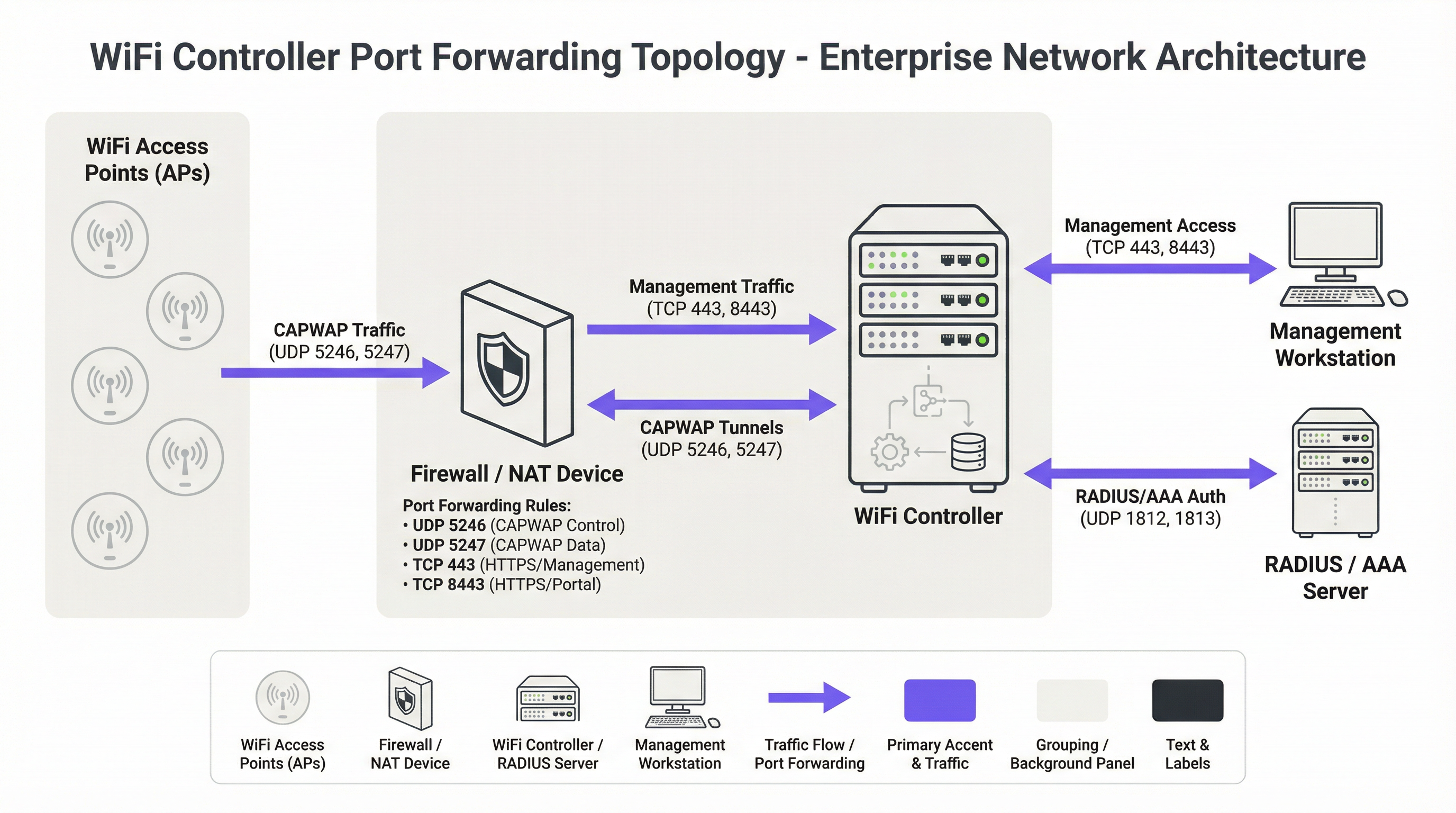
Das grundlegende Protokoll für moderne zentralisierte WiFi-Architekturen ist das Control and Provisioning of Wireless Access Points (CAPWAP)-Protokoll, standardisiert in RFC 5415 [1]. CAPWAP ermöglicht es einem WLC, eine Flotte von APs zu verwalten und zu steuern, wodurch eine einheitliche Netzwerkstruktur entsteht. Das Protokoll ist so konzipiert, dass es Router und Firewalls durchqueren kann, was es für Multi-Site-Bereitstellungen geeignet macht. Die Kommunikation erfolgt über zwei primäre UDP-Kanäle:
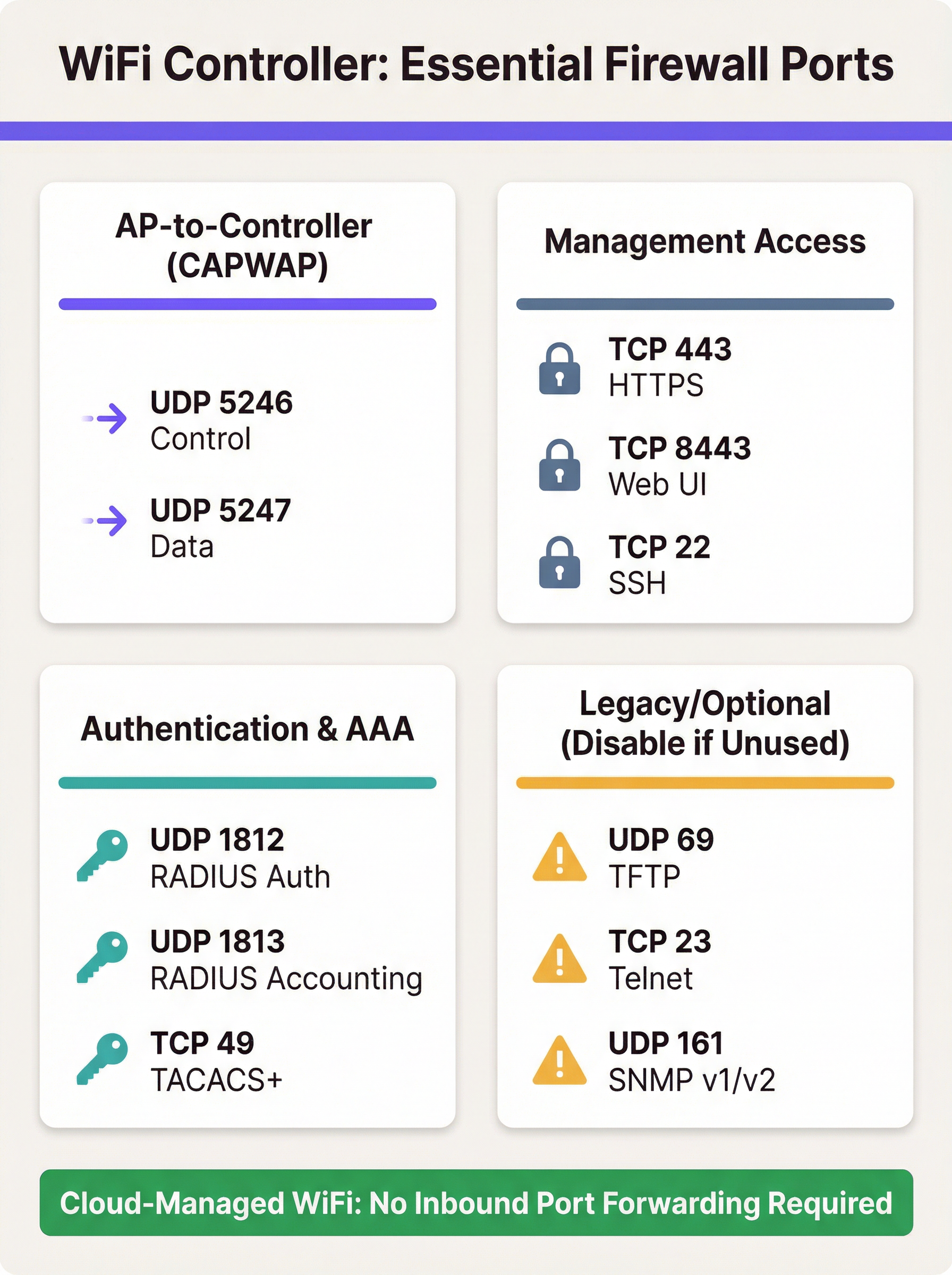
- CAPWAP Control (UDP 5246): Dieser Kanal wird für alle Management- und Steuerungsfunktionen zwischen dem AP und dem WLC verwendet. Dies umfasst Konfigurations-Pushes, Firmware-Updates und Statusüberwachung. Gemäß dem Standard ist dieser Steuerkanal zwingend mit Datagram Transport Layer Security (DTLS)-Verschlüsselung gesichert, was einen sicheren Tunnel für Management-Befehle bietet.
- CAPWAP Data (UDP 5247): In Bereitstellungen, bei denen der Client-Traffic zurück zum Controller getunnelt wird (im Gegensatz zum lokalen Bridging am AP), überträgt dieser Kanal die gekapselten Benutzerdaten. Obwohl die Verschlüsselung für diesen Kanal im Standard optional ist, schreiben Best Practices vor, dass auch er mit DTLS gesichert werden sollte, um Client-Daten während der Übertragung zu schützen.
Wenn sich ein AP hinter einem NAT-Gerät befindet, ermittelt er die öffentliche IP-Adresse des WLC (oft über DNS oder eine DHCP-Option) und initiiert eine CAPWAP-Verbindung. Die Firewall vor dem WLC muss mit Portweiterleitungsregeln konfiguriert werden, um diese eingehenden UDP-Pakete an die private IP-Adresse des Controllers weiterzuleiten.
Über das Kern-CAPWAP-Protokoll hinaus sind mehrere weitere Ports für eine voll funktionsfähige Bereitstellung erforderlich:
- Management-Zugriff: Administratoren benötigen Zugriff auf die Management-Schnittstelle des Controllers. Dies wird typischerweise über HTTPS (TCP 443 oder auf einigen Plattformen wie Ruckus und Ubiquiti TCP 8443) bereitgestellt. Secure Shell (TCP 22) bietet CLI-Zugriff. Die Freigabe dieser Ports für das Internet ist ein primäres Sicherheitsrisiko, und der Zugriff sollte stark eingeschränkt werden.
- Authentifizierung (AAA): Für Sicherheit auf Enterprise-Niveau mit WPA2/WPA3-Enterprise muss der WLC mit einem RADIUS-Server kommunizieren. Dies erfordert UDP 1812 (Authentication) und UDP 1813 (Accounting). Wenn sich der RADIUS-Server außerhalb des lokalen Netzwerks befindet, müssen diese Ports weitergeleitet werden.
- Gast- & Captive Portals: Wenn ein Captive Portal für den Gastzugang verwendet wird, muss der WLC in der Lage sein, mit diesem zu kommunizieren. Für externe Portale wie Purple bedeutet dies oft, eingehenden HTTPS-Traffic von den Servern des Portals zum Controller zuzulassen, um Authentifizierungs- und Sitzungsinformationen zu verarbeiten.
Herstellerspezifische Port-Anforderungen
Obwohl CAPWAP ein Standard ist, implementieren Hersteller zusätzliche Ports für spezifische Funktionen. Die folgende Tabelle fasst gängige Standard-Ports für wichtige lokale Controller-Plattformen zusammen. Sie ist nicht erschöpfend, und Sie sollten die neueste Dokumentation Ihres Herstellers konsultieren.
| Hersteller/Plattform | Protokoll | Port | Zweck |
|---|---|---|---|
| Cisco WLC | UDP | 5246/5247 | CAPWAP Control/Data |
| TCP | 443 | HTTPS-Management | |
| EoIP | 97 | Mobility/Anchor-Tunnel | |
| UDP | 16666 | Mobility (Ungesichert) | |
| Ruckus SmartZone | UDP | 12223 | LWAPP-Discovery |
| TCP | 91/443 | AP-Firmware-Upgrade | |
| TCP | 8443 | HTTPS Web-UI | |
| TCP | 22 | SSH-Management | |
| Ubiquiti UniFi | TCP | 8080 | Device Inform |
| TCP | 8443 | HTTPS Web-UI/API | |
| UDP | 3478 | STUN (NAT-Traversal) | |
| UDP | 10001 | AP-Discovery |
Implementierungsleitfaden
Die Implementierung der Portweiterleitung für einen WLC erfordert einen methodischen, auf Sicherheit ausgerichteten Ansatz. Das Ziel ist es, die Konnektivität entfernter APs zu ermöglichen und gleichzeitig das absolute Minimum für das Internet freizugeben.
Schritt 1: Architektur & Netzwerkplatzierung
Die kritischste Entscheidung ist die Platzierung des WLC. Er sollte niemals im vertrauenswürdigen Unternehmens-LAN platziert werden. Best Practice ist die Erstellung eines dedizierten Netzwerksegments oder einer Demilitarisierten Zone (DMZ) für den Controller. Dies isoliert den WLC und stellt sicher, dass ein Angreifer selbst bei einer Kompromittierung keinen direkten Zugriff auf das interne Unternehmensnetzwerk hätte. Die Firewall-Richtlinie sollte dann so konfiguriert werden, dass der Traffic zwischen der DMZ, dem Internet und dem vertrauenswürdigen LAN streng kontrolliert wird.
Schritt 2: Firewall-Konfiguration
- NAT- und Portweiterleitungsregeln erstellen: Erstellen Sie für jeden erforderlichen Port eine Destination-NAT (DNAT)-Regel, die die öffentliche IP-Adresse der Firewall und den externen Port in die private IP-Adresse des WLC in der DMZ und den entsprechenden internen Port übersetzt.
- Eingehende Zugriffsregeln erstellen: Dies ist der wichtigste Sicherheitsschritt. Erstellen Sie Firewall-Regeln, um Traffic zu den weitergeleiteten Ports zuzulassen, aber geben Sie immer die Quell-IP-Adresse an. Für CAPWAP-Ports sollte die Quelle die öffentlichen IP-Adressen Ihrer entfernten Standorte sein. Für Management-Ports (HTTPS/SSH) muss die Quelle auf eine Whitelist vertrauenswürdiger IP-Adressen beschränkt werden, wie z. B. Ihr Unternehmensbüro oder ein dedizierter Management-Jump-Host.
Sicherheitswarnung: Ein häufiger und gefährlicher Fehler ist es, die Quelladresse auf 'Any' oder '0.0.0.0/0' zu belassen. Dies gibt die Management-Schnittstelle Ihres Controllers für das gesamte Internet frei und lädt zu Brute-Force-Angriffen ein.
- Unnötige Protokolle blockieren: Erstellen Sie explizit Regeln, die jeglichen anderen Traffic zur öffentlichen IP des WLC verweigern. Stellen Sie außerdem sicher, dass unsichere Protokolle wie Telnet (TCP 23) und TFTP (UDP 69) auf dem Controller selbst deaktiviert und an der Firewall blockiert sind.
- Stateful Inspection aktivieren: Stellen Sie sicher, dass Ihre Firewall im Stateful-Modus arbeitet. Das bedeutet, dass sie den Status von Verbindungen verfolgt und unaufgeforderte eingehende Pakete, die nicht Teil einer erkannten Sitzung sind, automatisch ablehnt.
Schritt 3: Controller-Konfiguration
Stellen Sie auf dem WLC sicher, dass die öffentliche IP-Adresse der Firewall als primäre Schnittstelle oder NAT-Adresse des Controllers konfiguriert ist. Dies ermöglicht es dem Controller, die CAPWAP-Antworten korrekt zu erstellen, damit sie zurück zu den APs geroutet werden können. Stellen Sie sicher, dass Funktionen wie die DTLS-Verschlüsselung für CAPWAP aktiviert sind.
Best Practices
- Alternativen bevorzugen: Der sicherste Ansatz ist die Vermeidung direkter Portweiterleitung. Wenn machbar, implementieren Sie ein Site-to-Site-VPN zwischen entfernten Standorten und dem Rechenzentrum des Controllers. Dies kapselt den gesamten Traffic in einem sicheren Tunnel und eliminiert die Notwendigkeit für öffentlich zugängliche Ports.
- Die Cloud nutzen: Ziehen Sie für neue Bereitstellungen oder Hardware-Aktualisierungen eine Cloud-Managed WiFi-Lösung (z. B. Cisco Meraki, Ruckus One, Aruba Central) in Betracht. Diese Plattformen sind so konzipiert, dass APs ausgehende Verbindungen zur Cloud initiieren, wodurch eingehende Firewall-Regeln überflüssig werden und das Management vereinfacht wird.
- Regelmäßige Audits: Wie in der PCI DSS-Anforderung 1.1.6 vorgeschrieben, sollten Firewall- und Router-Regelwerke mindestens alle sechs Monate überprüft werden. Dieser Prozess sollte die geschäftliche Rechtfertigung für jede Regel verifizieren und sicherstellen, dass sie so restriktiv wie möglich sind.
- Starke Authentifizierung verwenden: Schützen Sie Management-Schnittstellen nach Möglichkeit mit Multi-Faktor-Authentifizierung (MFA). Verwenden Sie starke, komplexe Passwörter und ändern Sie diese regelmäßig.
- Protokollierung und Überwachung: Leiten Sie Firewall- und WLC-Protokolle an ein zentrales SIEM-System (Security Information and Event Management) weiter. Überwachen Sie auf anomale Verbindungsversuche, wiederholte fehlgeschlagene Anmeldungen und unerwartete Traffic-Muster.
Fehlerbehebung & Risikominderung
Häufige Fehlerquelle: APs können sich nicht mit dem Controller verbinden
- Symptom: APs an einem entfernten Standort stecken in einer Discovery-Schleife fest und erscheinen nie im Controller-Dashboard.
- Fehlerbehebung:
- Überprüfen Sie die grundlegende Netzwerkkonnektivität vom entfernten Standort zur öffentlichen IP des Controllers (Ping, Traceroute).
- Überprüfen Sie die Firewall-Protokolle auf der Controller-Seite. Sehen Sie die eingehenden UDP 5246-Pakete von der öffentlichen IP des APs? Werden sie zugelassen oder verworfen?
- Stellen Sie sicher, dass die NAT-/Portweiterleitungsregeln für die private IP des WLC korrekt konfiguriert sind.
- Stellen Sie sicher, dass am entfernten Standort keine zweite NAT-Schicht (Double NAT) vorhanden ist, die die Verbindung stören könnte.
Risiko: Kompromittierung des Controllers
- Szenario: Es wird eine Schwachstelle in der Web-Management-Schnittstelle des WLC entdeckt, und Ihre Portweiterleitungsregel für TCP 443 hat als Quelle 'Any'.
- Minderung: Dies unterstreicht, wie kritisch die Einschränkung von Quell-IPs ist. Wenn die Quelle auf Ihre Büro-IPs beschränkt ist, kann die Schwachstelle nicht aus dem weiten Internet ausgenutzt werden. Dies ist ein klassisches Beispiel für Defense-in-Depth. Weitere Maßnahmen umfassen die Platzierung des WLC in einer DMZ, um die laterale Bewegung des Angreifers einzuschränken, sowie das zeitnahe Einspielen von Sicherheits-Patches des Herstellers.
Risiko: Compliance-Verstöße
- Szenario: Ein PCI DSS-Audit stellt fest, dass der WLC APs in einem Einzelhandelsgeschäft verwaltet, das Kreditkartenzahlungen verarbeitet, und der WLC nicht ordnungsgemäß von der Cardholder Data Environment (CDE) segmentiert ist.
- Minderung: Netzwerksegmentierung ist für die PCI DSS-Compliance nicht verhandelbar [2]. Das von Zahlungsterminals genutzte drahtlose Netzwerk muss von allen anderen Netzwerken isoliert sein, einschließlich Gast- und Unternehmens-WiFi. Der WLC selbst muss für das Audit als In-Scope betrachtet werden, wenn er die Sicherheit der CDE beeinträchtigen kann. Gemäß GDPR sind Gast-WiFi-Daten personenbezogene Daten, und das Netzwerkdesign muss unbefugten Zugriff darauf verhindern [3].
ROI & Geschäftliche Auswirkungen
Obwohl es sich um ein technisches Thema handelt, hat die Wahl der WiFi-Architektur direkte geschäftliche Auswirkungen. Ein lokales Controller-Modell kann eine erhebliche Kapitalausgabe (CapEx) darstellen, bietet jedoch granulare Kontrolle und hält alle Daten innerhalb der Infrastruktur der Organisation. Die Betriebskosten dieses Modells umfassen den Personalaufwand, der für die Verwaltung, Sicherung und Prüfung der Firewall- und Controller-Konfiguration erforderlich ist. Eine Sicherheitsverletzung infolge einer schlecht konfigurierten Firewall kann zu erheblichen finanziellen Verlusten, Reputationsschäden und behördlichen Geldstrafen führen.
Im Gegensatz dazu verlagert eine Cloud-Managed-Lösung das Kostenmodell von CapEx zu OpEx (wiederkehrende Abonnementgebühren). Der ROI wird durch reduzierten IT-Overhead realisiert – keine lokale Hardware zu warten, keine komplexen Firewall-Regeln für den Controller-Zugriff zu verwalten und eine schnellere Bereitstellung neuer Standorte. Für viele verteilte Unternehmen wie Einzelhandelsketten oder Hotelgruppen bieten die Gesamtbetriebskosten (TCO) und die verbesserte Sicherheitslage einer Cloud-Managed-Plattform einen überzeugenden Business Case, der die Migration von einer veralteten lokalen Architektur rechtfertigt.
Referenzen
[1] IETF, RFC 5415: Control And Provisioning of Wireless Access Points (CAPWAP) Protocol Specification, https://datatracker.ietf.org/doc/html/rfc5415 [2] PCI Security Standards Council, PCI DSS v4.0, https://www.pcisecuritystandards.org/document_library/ [3] General Data Protection Regulation (GDPR), https://gdpr-info.eu/
Key Terms & Definitions
Port Forwarding (Inbound NAT)
A network configuration that directs traffic from a specific port on a public-facing firewall or router to a specific port on a private device within the internal network.
IT teams use this to make an on-premise WiFi controller, which has a private IP address, accessible to access points located across the public internet.
CAPWAP (Control and Provisioning of Wireless Access Points)
An IETF standard protocol (RFC 5415) that enables a central controller to manage a collection of wireless access points. It operates over UDP ports 5246 (Control) and 5247 (Data).
This is the fundamental protocol that facilitates communication between APs and the WLC. Understanding its port requirements is the first step in configuring the firewall.
DMZ (Demilitarized Zone)
A perimeter network segment that is isolated from an organization's trusted internal LAN. It is used to host public-facing services and adds a layer of security.
Placing a WiFi controller in a DMZ is a critical best practice. If the controller is compromised, the attacker is contained within the DMZ and does not have direct access to the corporate network.
Stateful Firewall
A firewall that tracks the state of active network connections and makes decisions based on the context of the traffic, not just on individual packets.
A stateful firewall is essential for secure port forwarding, as it will only allow return traffic from the WLC to an AP if it is part of an established CAPWAP session, preventing unsolicited inbound traffic.
PCI DSS
The Payment Card Industry Data Security Standard, a set of security standards designed to ensure that all companies that accept, process, store or transmit credit card information maintain a secure environment.
For any organization in retail or hospitality, ensuring the WiFi architecture complies with PCI DSS is non-negotiable. This heavily influences decisions around network segmentation and firewall configuration.
RADIUS (Remote Authentication Dial-In User Service)
A client/server protocol that provides centralized Authentication, Authorization, and Accounting (AAA) management for users who connect and use a network service.
In enterprise WiFi, RADIUS is used to enable WPA2/WPA3-Enterprise security (802.1X). The WLC acts as a RADIUS client, and firewall rules must allow it to communicate with the RADIUS server on UDP ports 1812 and 1813.
Cloud-Managed WiFi
A WiFi architecture where access points are managed by a controller platform that is hosted in the cloud by the vendor (e.g., Cisco Meraki, Aruba Central).
This architecture is a direct alternative to on-premise controllers. It simplifies deployment and eliminates the need for port forwarding because APs initiate outbound connections to the cloud, which is a more secure default posture.
Source IP Whitelisting
The practice of configuring a firewall rule to only allow traffic from a specific, pre-approved list of source IP addresses.
This is the single most important security control when port forwarding. Restricting management access (HTTPS/SSH) to a whitelist of office or VPN IPs drastically reduces the risk of unauthorized access.
Case Studies
A 250-room hotel needs to provide guest WiFi and support internal staff devices (housekeeping tablets, PoS systems). They have an on-premise Cisco 3504 WLC in their server room and want to ensure PCI DSS compliance while offering a seamless guest experience with a Purple captive portal.
- Network Segmentation: The WLC is placed in a new DMZ VLAN (e.g., VLAN 100). Three new wireless LANs are created: 'GUEST_WIFI' (VLAN 101), 'STAFF_CORP' (VLAN 102), and 'POS_SECURE' (VLAN 103). Firewall rules are configured to completely isolate these VLANs from each other. The POS_SECURE network is isolated from the internet, except for traffic to the payment processor.
- Firewall & Port Forwarding: No ports are forwarded from the public internet to the WLC. Instead, a rule is created to allow inbound HTTPS (TCP 443) traffic only from the specific IP range provided by Purple for their captive portal service. This allows the portal to communicate with the controller to authorize guest sessions. All other inbound traffic to the WLC is blocked.
- PCI DSS Compliance: The 'POS_SECURE' WLAN is configured with WPA2-Enterprise and 802.1X authentication. The firewall policy ensures this network segment is completely isolated from the guest and corporate staff networks, meeting PCI DSS Requirement 1.2.3. The WLC itself is considered in-scope and hardened according to PCI guidelines.
A retail chain with 50 stores has a central Ruckus SmartZone controller at its headquarters. Each store has 5-10 APs that need to connect back to the HQ controller over the public internet. The IT team needs to manage the controller remotely.
- VPN as Primary Choice: The recommended solution is to deploy a small firewall/VPN gateway at each retail store to create a site-to-site IPsec VPN back to the HQ firewall. All AP traffic is then routed over the secure VPN tunnel. This requires no inbound port forwarding at the HQ, making it the most secure option.
- Port Forwarding as Fallback: If VPN is not feasible due to cost or technical constraints, a port forwarding approach is used. At the HQ firewall, DNAT rules are created to forward UDP 12223 (for discovery) and TCP 91/443 (for firmware) to the SmartZone controller. Crucially, the source for these rules is a list of the static public IP addresses of all 50 stores. A separate rule forwards TCP 8443 for management, with the source restricted to the IT team's office IP.
- AP Configuration: The APs at each store are configured with the public IP address of the HQ firewall as their controller address. They will then initiate the connection, which will be forwarded to the internal SmartZone controller.
Scenario Analysis
Q1. You are deploying a new WiFi network for a conference center. The client wants to use Purple for guest analytics and has an existing on-premise Aruba Mobility Controller. What is the most critical firewall rule you need to configure to allow the Purple captive portal to function?
💡 Hint:Consider the communication flow. The external service needs to talk to the internal controller. What IP addresses are involved?
Show Recommended Approach
The most critical rule is to allow inbound HTTPS (TCP 443) traffic from Purple's specific public IP address range to the Aruba controller's public-facing IP. You must obtain this IP range from Purple's documentation or support. A rule with a source of 'Any' would be a major security risk. You would then create a DNAT rule to forward this traffic to the controller's internal IP address in the DMZ.
Q2. A junior network engineer has configured port forwarding for a new remote office. The APs are online, but he tells you he opened TCP port 23 to the controller from 'Any' source IP to "make troubleshooting easier." What is the immediate risk, and what is your instruction to him?
💡 Hint:TCP port 23 is for Telnet. What are the security characteristics of this protocol?
Show Recommended Approach
The immediate risk is severe. Telnet is an unencrypted protocol, meaning the username and password for the controller are sent in clear text. Exposing this to the entire internet makes the controller highly vulnerable to credential theft and compromise. The instruction is to immediately disable the firewall rule, disable the Telnet service on the controller itself, and use SSH (TCP 22) for all CLI management, with the source IP restricted to a trusted management network.
Q3. Your CFO is questioning the subscription cost for a cloud-managed WiFi solution for 100 new retail stores, arguing that buying on-premise controllers is a cheaper one-time cost. How do you explain the ROI of the cloud solution from a security and operational perspective?
💡 Hint:Think about the Total Cost of Ownership (TCO), not just the initial purchase price. What ongoing work is required for an on-premise, multi-site deployment?
Show Recommended Approach
The ROI of a cloud-managed solution extends beyond the initial hardware cost. Operationally, it eliminates the significant staff overhead required to configure, manage, and audit complex firewall rules and VPNs for 100 separate locations. This accelerates deployment and reduces ongoing labor costs. From a security perspective, the cloud model has a fundamentally lower risk profile. It removes the need for any inbound port forwarding, drastically reducing the network's attack surface and simplifying compliance with standards like PCI DSS. The subscription cost effectively outsources the security and maintenance of the management platform to the vendor, leading to a lower TCO and a more secure, scalable network.
Key Takeaways
- ✓Port forwarding is required for on-premise WiFi controllers when APs are at remote sites across the internet.
- ✓The core protocols are CAPWAP (UDP 5246/5247), but management (TCP 443/8443) and AAA (UDP 1812/1813) ports are also needed.
- ✓Cloud-managed WiFi and site-to-site VPNs are more secure alternatives that eliminate the need for port forwarding.
- ✓If you must use port forwarding, place the controller in a DMZ and strictly whitelist source IP addresses.
- ✓Never expose insecure protocols like Telnet (TCP 23) or TFTP (UDP 69) to the internet.
- ✓Regularly audit firewall rules to ensure they are necessary and as restrictive as possible, as required by PCI DSS.
- ✓Failing to properly segment networks can lead to serious security breaches and compliance violations (PCI DSS, GDPR).




