

Purple Portal API: Was Sie damit erreichen können
A technical reference for IT managers and network architects on leveraging the Purple Portal API. This guide details available endpoints, authentication, and real-world use cases for integrating guest WiFi data with enterprise systems to enhance business intelligence and operational efficiency. It covers both REST API and Webhook integration patterns, with concrete case studies from hospitality, retail, and events sectors.
🎧 Listen to this Guide
View Transcript

Executive Summary
Für IT-Führungskräfte an Standorten mit mehreren Niederlassungen – Hotels, Einzelhandelsketten, Stadien und Konferenzzentren – ist das Gäste-WiFi-Netzwerk mehr als nur eine einfache Annehmlichkeit. Es ist eine reichhaltige, sich kontinuierlich füllende Quelle von First-Party-Daten, die messbare geschäftliche Auswirkungen in den Bereichen Marketing, Operations und Customer Experience erzielen kann. Die Purple Portal API bietet die programmatische Schnittstelle, die erforderlich ist, um diesen Wert in großem Maßstab zu erschließen. Sie ermöglicht es technischen Teams, über die integrierten Analyse-Dashboards hinauszugehen und robuste, automatisierte Integrationen zu erstellen, die GDPR-konforme Besucherdaten direkt in zentrale Geschäftssysteme einspeisen – von CRM-Plattformen und Marketing-Automatisierungs-Tools bis hin zu Treueprogrammen und Business-Intelligence-Warehouses.
Dieser Leitfaden ist eine praxisorientierte, umsetzbare Referenz für Solutions Architects, IT-Manager und Senior Developers. Er detailliert das Authentifizierungsmodell, verfügbare Endpunkte, Integrationsmuster und reale Bereitstellungsszenarien, die zeigen, wie die Purple WiFi API eine WiFi-Bereitstellung von einem Kostenfaktor in ein strategisches Daten-Asset verwandeln kann. Unabhängig davon, ob Sie die API zum ersten Mal evaluieren oder eine produktionsreife Integration planen, bietet dieses Dokument die technischen Grundlagen und Entscheidungsrahmen, die Sie benötigen, um sicher vorzugehen.
Technischer Deep-Dive
Authentifizierung und API-Versionierung
Die Purple Portal API verwendet API-Key-Authentifizierung, ein unkompliziertes und sicheres Modell, das sich hervorragend für Server-zu-Server-Integrationen eignet. Im Gegensatz zu OAuth 2.0-Flows, die Token-Austausch und Refresh-Zyklen erfordern, beinhaltet die API-Key-Authentifizierung die Einbindung eines statischen Secrets in die Request-Header. Diese Einfachheit reduziert den Integrationsaufwand ohne Kompromisse bei der Sicherheit, vorausgesetzt, der Schlüssel wird sicher gespeichert und im Rahmen Ihrer Standardrichtlinien für das Credential-Management regelmäßig rotiert.
Die aktuelle Produktionsversion ist v1.7, die gegenüber v1.6.2 einige wichtige Verbesserungen eingeführt hat. Am wichtigsten ist, dass die Eigenschaft unsubscribed im Benutzerdatenobjekt nun klar zwischen einem Benutzer unterscheidet, der sich nach vorherigem Abonnement aktiv vom Marketing abgemeldet hat, und einem Benutzer, der sich nie angemeldet hat. Diese Unterscheidung ist entscheidend für die GDPR-Konformität und für eine genaue Zielgruppensegmentierung. Darüber hinaus geben die Endpunkte Visitors und Venues nun eine HTTP 200 OK-Antwort zurück, wenn keine Daten gefunden werden, anstatt eines 404 Not Found, was zuvor zu Verwirrung in der Monitoring- und Fehlerbehandlungslogik führte.
Verfügbare Endpunkte
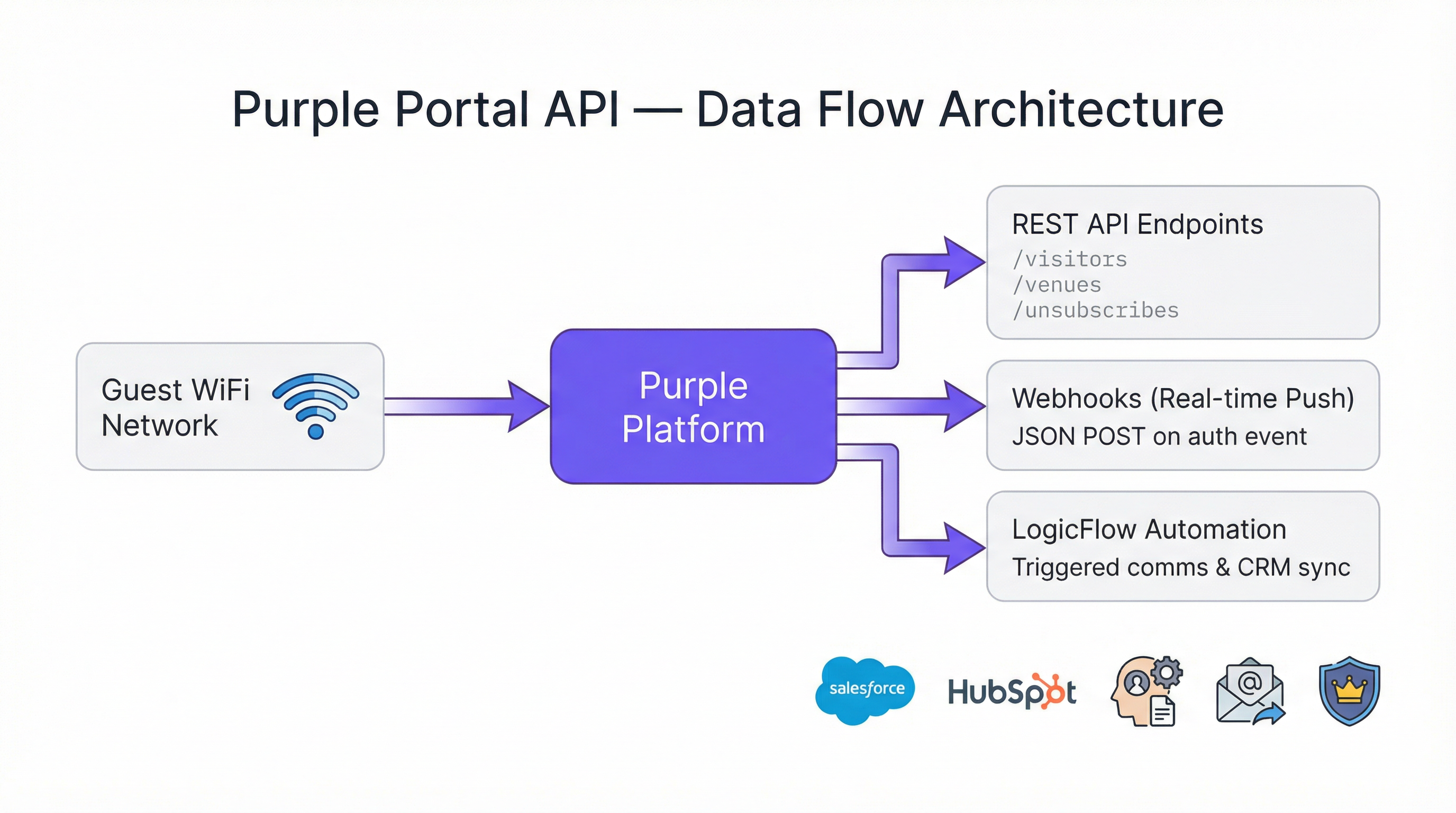
Die Portal Company API stellt drei primäre Endpunktkategorien bereit, mit denen IT-Teams regelmäßig interagieren werden.
| Endpunkt | Methode | Zweck |
|---|---|---|
/visitors |
GET | Abrufen von Gäste-Besucherprofilen, einschließlich Kontaktdaten, Demografie und Besuchshistorie |
/venues |
GET | Abrufen von Daten auf Standortebene und Konfigurations-Metadaten |
/unsubscribes |
GET | Abrufen einer Liste von Benutzern, die sich von Marketingkommunikation abgemeldet haben |
Alle Endpunkte geben Daten im JSON-Format zurück. Der Endpunkt visitors wird am häufigsten verwendet, da er die gesamte Fülle der während der Captive Portal-Authentifizierung gesammelten Gäste-Profildaten bereitstellt. Dazu gehören Vorname, Nachname, E-Mail-Adresse, Geschlecht, Geburtsdatum, Handynummer, Postleitzahl, Authentifizierungsanbieter (z. B. Registrierungsformular, Social Login), Besucherzahlen pro Standort und alle benutzerdefinierten Felder, die auf der Splash-Page konfiguriert wurden.
Rate Limits
Ein wesentlicher architektonischer Vorteil der Purple Portal API ist, dass es keine Rate Limits gibt. Die Plattform ist darauf ausgelegt, jedes Volumen an Anfragen oder Transaktionen zu unterstützen, was sie für groß angelegte Bereitstellungen geeignet macht, bei denen Skripte möglicherweise Tausende von Standortdatensätzen oder Millionen von Besucherprofilen verarbeiten müssen. Dies beseitigt eine häufige Einschränkung, die das Integrationsdesign mit anderen Plattformen verkompliziert, und macht Request-Throttling oder Back-off-Logik in Ihrem Client-Code überflüssig.
Integrationsmuster: Pull vs. Push
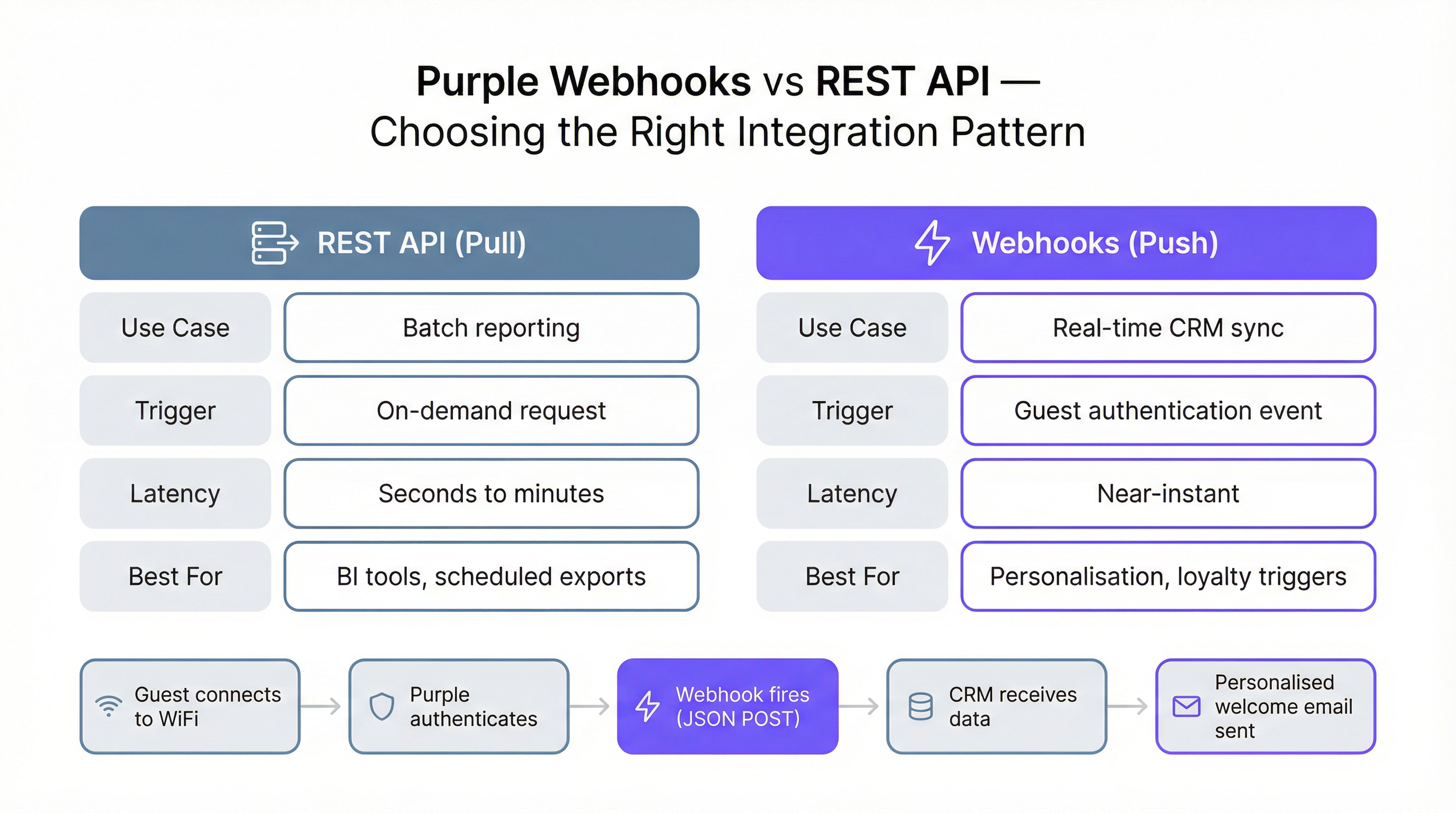
Die Purple WiFi API unterstützt zwei grundlegend verschiedene Integrationsmuster, die jeweils für unterschiedliche Anwendungsfälle geeignet sind. Zu verstehen, welches Muster in einem bestimmten Szenario anzuwenden ist, ist die wichtigste architektonische Entscheidung, die Sie treffen werden.
Das REST-API-Pull-Muster beinhaltet, dass Ihr System bei Bedarf oder nach Zeitplan Anfragen an die API-Endpunkte stellt, um Daten abzurufen. Dies ist der richtige Ansatz für Stapelverarbeitung (Batch Processing), Reporting und Business Intelligence. Ein nächtliches ETL-Skript, das alle Besucherdaten des Vortages abruft und in ein Data Warehouse lädt, ist ein klassisches Beispiel. Das Pull-Muster gibt Ihnen die volle Kontrolle darüber, wann und wie viele Daten Sie abrufen.
Das Webhook-Push-Muster beinhaltet, dass Purple Daten an Ihr System sendet, sobald ein bestimmtes Ereignis eintritt – insbesondere, wenn sich ein Gast im WiFi-Netzwerk authentifiziert. Ihr System muss einen öffentlich zugänglichen, SSL-gesicherten HTTP-Endpunkt (einen „Listener“) bereitstellen, der diese JSON-POST-Payloads empfangen und verarbeiten kann. Das Webhook-Muster ist die richtige Wahl für jeden Anwendungsfall, der Daten in Nahezu-Echtzeit erfordert, wie z. B. das Auslösen einer personalisierten Willkommensnachricht, die Aktualisierung des „Zuletzt gesehen“-Status eines Kunden in einem CRM oder die Benachrichtigung eines Hospitality-Managers über die Ankunft eines VIP-Gastes.
Webhook-Payload-Struktur
Die von einem Purple-Webhook gelieferte JSON-Payload ist in vier Hauptobjekte strukturiert, von denen jedes eine andere Kontextdimension für das Authentifizierungsereignis bietet.
| Objekt | Schlüsselfelder | Beschreibung |
|---|---|---|
client |
mac, userAgent |
Identifikatoren auf Geräteebene |
company |
id, name, uniqId |
Ihre Unternehmens-Account-Details |
venue |
id, name, latitude, longitude |
Der spezifische Standort, an dem die Authentifizierung stattfand |
session |
authenticationTime |
ISO 8601-Zeitstempel des Authentifizierungsereignisses |
user |
email, firstName, lastName, gender, provider, visitCountForVenues, customFields |
Vollständige Gäste-Profildaten |
Das Objekt user.visitCountForVenues ist für Betreiber mehrerer Standorte besonders wertvoll. Es liefert eine standortbezogene Besucherzahl zusammen mit firstVisit- und lastVisit-Zeitstempeln, sodass Sie Erstbesucher im Vergleich zu treuen wiederkehrenden Kunden zum Zeitpunkt der Authentifizierung identifizieren können – ohne zusätzliche API-Aufrufe.
Implementierungsleitfaden
Voraussetzungen und Einrichtung
Der Zugriff auf die Portal API erfordert eine Engage-Lizenz. Sobald Sie lizenziert sind, generieren Sie Ihren API-Key in den Einstellungen des Purple-Portals. Für die anfängliche Entwicklung und das Testen ist Postman das empfohlene Tool; Purple stellt einen speziellen Einrichtungsleitfaden zur Verfügung, um die korrekten Umgebungsvariablen und Request-Header zu konfigurieren. Eine PHP-Demodatei ist ebenfalls für Teams verfügbar, die einen serverseitigen Skripting-Startpunkt bevorzugen.
Konfiguration einer Webhook-Integration
Die Bereitstellung einer Webhook-Integration umfasst fünf Schritte. Erstens: Erstellen und deployen Sie Ihren Listener-Endpunkt unter einer öffentlich zugänglichen, SSL-gesicherten URL. Eine serverlose Funktion (AWS Lambda, Azure Functions oder Google Cloud Functions) ist eine architektonisch solide Wahl: Sie skaliert automatisch, verursacht bei geringem Volumen minimale Kosten und verarbeitet gleichzeitige Anfragen ohne Konfiguration. Zweitens: Validieren Sie die Listener-URL im Purple-Portal, indem Sie zu Management > Venues > Webhooks navigieren. Purple sendet eine Testanfrage, um zu bestätigen, dass der Endpunkt erreichbar ist und den erforderlichen Header wifiWebhookListener: 1 zurückgibt. Drittens: Erstellen oder bearbeiten Sie einen LogicFlow im Portal und fügen Sie einen Webhook-Action-Node hinzu, wobei Sie Ihre validierte URL auswählen. Viertens: Stellen Sie sicher, dass der LogicFlow auf den Status „Online“ gesetzt ist. Fünftens: Verknüpfen Sie den LogicFlow mit der entsprechenden Access Journey. Ab diesem Zeitpunkt löst jede Gäste-Authentifizierung auf dieser Journey Ihren Webhook aus.
Umgang mit Retries und Idempotenz
Ihr Listener muss so konzipiert sein, dass er mit den Realitäten verteilter Systeme umgehen kann. Purple wiederholt eine fehlgeschlagene Webhook-Zustellung nach drei Stunden, wenn Ihr Listener nicht reagiert (Timeout überschreitet 10 Sekunden) oder einen Fehlerstatus zurückgibt. Das bedeutet, dass Ihr Listener dasselbe Ereignis möglicherweise mehrmals empfängt. Darüber hinaus kann ein einzelner Gästebesuch mehrere Authentifizierungsereignisse auslösen – zum Beispiel, wenn sich ein Gerät nach dem Sperren des Bildschirms wieder verbindet oder wenn ein Benutzer zwischen Access Points wechselt. Ihre Verarbeitungslogik muss daher idempotent sein: Die zweimalige Anwendung desselben Ereignisses sollte dasselbe Ergebnis liefern wie die einmalige Anwendung. Ein gängiges Implementierungsmuster besteht darin, vor der Ausführung zu prüfen, ob eine Aktion (wie das Senden einer Willkommens-E-Mail) für eine bestimmte Benutzer-ID innerhalb eines definierten Zeitfensters bereits durchgeführt wurde.
Best Practices
Mehrere Prinzipien sollten jede Produktionsbereitstellung der Purple Portal API leiten. Stellen Sie immer gegen die neueste API-Version (v1.7) bereit und aktualisieren Sie Ihre URL-Pfade und Response-Parsing-Logik, wenn neue Versionen veröffentlicht werden. Behandeln Sie Ihren API-Key als sensible Anmeldeinformation: Speichern Sie ihn in einem Secrets Manager (wie AWS Secrets Manager oder Azure Key Vault) anstatt im Quellcode oder in Umgebungsvariablen auf gemeinsam genutzten Systemen. Implementieren Sie für Webhook-Listener ein strukturiertes Logging jeder eingehenden Payload und Response, um Debugging und Audit-Trails zu erleichtern. Beachten Sie die Felder unsubscribed und unsubscribedDate im Benutzerobjekt; die Verarbeitung von Marketingaktionen für abgemeldete Benutzer stellt einen GDPR-Verstoß dar. Testen Sie Ihre Integration schließlich auf die gesamte Bandbreite von Edge Cases: Benutzer ohne E-Mail-Adresse, Benutzer mit benutzerdefinierten Feldern, die null sind, und Authentifizierungsereignisse, die außerhalb der chronologischen Reihenfolge eintreffen.
Fehlerbehebung & Risikominderung
Die häufigste Fehlerquelle bei einer Webhook-Integration ist ein langsamer oder nicht verfügbarer Listener. Wenn der Endpunkt wiederholt nicht innerhalb von 10 Sekunden antwortet, deaktiviert Purple den Webhook nach einer längeren Phase der Nichtreaktion automatisch, was eine manuelle erneute Verifizierung im Portal erfordert. Um dieses Risiko zu mindern, implementieren Sie einen Health-Check-Endpunkt auf demselben Server wie Ihren Listener und binden Sie ihn in Ihr Infrastruktur-Monitoring ein. Stellen Sie sicher, dass Ihr Listener nur minimale synchrone Verarbeitungen durchführt, bevor er eine 200 OK-Antwort zurückgibt; lagern Sie rechenintensive Aufgaben oder nachgelagerte API-Aufrufe in eine asynchrone Queue aus.
Bei REST-API-Integrationen besteht das Hauptrisiko in veralteten Daten in nachgelagerten Systemen, wenn der geplante Pull-Job unbemerkt fehlschlägt. Implementieren Sie Alerting für Ihre ETL-Skripte, um das Operations-Team zu benachrichtigen, wenn ein Durchlauf fehlschlägt oder unerwartet keine Ausgabe erzeugt. Überprüfen Sie bei der Migration von API v1.6.2 auf v1.7 den gesamten Code, der auf das Feld unsubscribed und den Endpunkt Unsubscribes verweist, da der Eigenschaftsname in v1.7 von unsubcribers zu unsubscribers korrigiert wurde.
ROI & Business Impact
Der Business Case für die Integration mit der Purple Portal API ist über mehrere Branchen hinweg gut etabliert. Im Gastgewerbe berichten Hotels, die Webhook-gesteuerte CRM-Integrationen nutzen, von signifikanten Verbesserungen der E-Mail-Öffnungsraten für personalisierte Kommunikation im Vergleich zu generischen Broadcast-Kampagnen, da die Nachricht im Moment der maximalen Relevanz zugestellt wird – wenn der Gast physisch vor Ort ist. Im Einzelhandel ermöglicht die Verknüpfung von Gäste-WiFi-Daten mit einem Treueprogramm den Betreibern, hochfrequente Besucher zu identifizieren und zu belohnen, was die durchschnittlichen Ausgaben und die Wiederkehrraten erhöht. Für große öffentliche Veranstaltungsorte und Konferenzzentren liefern API-gesteuerte Analysen die granularen Besucherfrequenzdaten, die erforderlich sind, um Sponsoring-Bewertungen zu rechtfertigen und die Platzierung von Verkaufsständen zu optimieren.
Das Fehlen von Rate Limits bei der Purple WiFi API bedeutet, dass die Integrationskosten mit Ihrer Infrastruktur skalieren, nicht mit dem Datenvolumen, das Sie verarbeiten. Für eine nationale Einzelhandelskette, die täglich Hunderttausende von Authentifizierungen verarbeitet, ist dies ein wesentlicher Vorteil gegenüber Plattformen, die pro API-Aufruf abrechnen oder Durchsatzgrenzen auferlegen. Die Total Cost of Ownership für eine gut durchdachte Purple API-Integration besteht daher in erster Linie aus den einmaligen Entwicklungskosten und den laufenden Infrastrukturkosten des Listeners, die beide in der Regel bereits im ersten Quartal allein durch verbesserte Marketing-Konversionsraten amortisiert werden.

Fallstudien
Fallstudie 1: Gastgewerbe – Whitbread Group
Whitbread, das größte Hotel- und Restaurantunternehmen Großbritanniens, betreibt Tausende von Gäste-WiFi-Access-Points in seinen Premier Inn- und Restaurant-Standorten. Durch die Integration der Purple Portal API in ihre CRM-Plattform konnte die Gruppe ein einheitliches Gästeprofil erstellen, das Online-Buchungsdaten mit dem physischen Besuchsverhalten kombinierte, das am WiFi Captive Portal erfasst wurde. Die Webhook-Integration wird bei jeder Gäste-Authentifizierung ausgelöst und reichert den CRM-Datensatz mit dem neuesten Besuchszeitstempel, dem Standort und Geräteinformationen an. Dies ermöglicht es dem Marketingteam, Zielgruppen nach Aktualität, Häufigkeit und Standort zu segmentieren und hochgradig personalisierte Re-Engagement-Kampagnen auszulösen. Das wichtigste technische Ergebnis war eine Reduzierung der Zeit zwischen der Ankunft eines Gastes und seinem Eintritt in eine aktive Marketing-Journey von 24 Stunden (unter dem vorherigen Batch-Polling-Modell) auf unter 60 Sekunden.
Fallstudie 2: Einzelhandel – Modehändler mit mehreren Standorten
Ein nationaler Modehändler mit über 80 Filialen setzte die Purple Portal API ein, um eine kritische Lücke in seiner Kundendatenstrategie zu schließen: Er verfügte über starke E-Commerce-Daten, hatte aber praktisch keinen Einblick in das Besucherverhalten in den Filialen. Durch die Anbindung der Purple Gäste-WiFi-API an ihr bestehendes Data Warehouse über einen nächtlichen ETL-Prozess bauten sie zum ersten Mal eine kanalübergreifende Kundensicht auf. Der Endpunkt /visitors wurde jede Nacht für jede Filiale abgefragt, und die Daten wurden mit E-Commerce-Transaktionsdatensätzen unter Verwendung der E-Mail-Adresse als gemeinsamem Schlüssel zusammengeführt. Innerhalb von drei Monaten hatte das Analytics-Team festgestellt, dass Kunden, die sich mit dem In-Store-WiFi verbanden, bei ihrem nächsten Online-Einkauf einen um 34 % höheren durchschnittlichen Bestellwert hatten, was einen überzeugenden Business Case für weitere Investitionen in das digitale In-Store-Erlebnis lieferte. Die Integration erforderte keine Änderungen an der bestehenden E-Commerce-Infrastruktur, was die reibungslose Natur des REST-API-Pull-Musters demonstriert.
Fallstudie 3: Events – Konferenzzentrum
Ein großes Konferenzzentrum in Großbritannien nutzte die Purple Portal API, um Sponsoren zum ersten Mal verifizierte Besucherfrequenzdaten zur Verfügung zu stellen. Zuvor stützten sich Sponsorenberichte auf manuelle Zählungen und Badge-Scans, die arbeitsintensiv und ungenau waren. Durch die Bereitstellung aggregierter, anonymisierter Besucherzahlen pro Zone (zugeordnet zu Venue-IDs in der Purple-Plattform) über die API konnte das Event-Team Sponsoren Echtzeit-Dashboards zur Verfügung stellen, die die Verweildauer und das Besuchervolumen in gesponserten Bereichen anzeigten. Die Daten wurden während der Veranstaltungen alle 15 Minuten über die REST API abgerufen und auf einem maßgeschneiderten Sponsorenportal angezeigt. Diese Fähigkeit trug im ersten Jahr direkt zu einer Steigerung der Sponsoring-Verlängerungsraten um 22 % bei, da Sponsoren nun die Reichweite ihrer Aktivierungen mit verifizierten First-Party-Daten quantifizieren konnten.
Key Terms & Definitions
Webhook
An automated mechanism where a server sends a real-time data notification (a push) to another application when a specific event occurs, via an HTTP POST request.
In the Purple context, a Webhook sends a JSON payload with visitor data to your system the moment a guest authenticates on the WiFi network. This is critical for real-time marketing and CRM updates.
REST API
A standardized architectural style for building web services that allows one system to request (or pull) data from another using standard HTTP methods such as GET and POST.
IT teams use the Purple REST API to write scripts that pull bulk visitor and venue data for analysis in business intelligence tools like Power BI or Tableau.
API Key Authentication
A security model where access to an API is granted by providing a unique secret token (the key) with each request, typically in the HTTP Authorization header.
This is simpler than OAuth and ideal for server-to-server integrations. Your scripts must include the valid API Key in the request headers to access Purple's data.
Idempotency
A property of an operation meaning that it can be applied multiple times without changing the result beyond the initial application.
Your Webhook listener should be idempotent. If it receives the same authentication event twice (which can happen due to retries or device reconnections), it should not, for example, send two welcome emails.
JSON (JavaScript Object Notation)
A lightweight, text-based format for data interchange that is easy for humans to read and for machines to parse and generate.
The Purple API and Webhooks deliver all data in JSON format. Your application will need to parse this JSON to extract fields like email, name, and visit count.
LogicFlow
Purple's visual, drag-and-drop tool for creating automated marketing and engagement workflows that can trigger actions based on visitor behaviour and demographics.
You use LogicFlow to define the guest journey. It is where you attach your Webhook, telling the system to fire it when a user reaches the 'Online' state of their access journey.
Captive Portal
The web page that a user sees and must interact with before being granted access to a public WiFi network, typically requiring authentication or data capture.
The Purple platform powers the captive portal, and the data entered by the user on this page (e.g., name, email, custom fields) is what becomes available via the Portal API.
GDPR (General Data Protection Regulation)
A comprehensive data privacy law in the European Union that governs the collection, processing, and storage of personal data of EU residents.
The Purple API provides the tools to build GDPR-compliant integrations, such as respecting the unsubscribed status of a user and enabling data export for subject access requests. The v1.7 API update specifically improved the clarity of the unsubscribed field to support compliance.
ETL (Extract, Transform, Load)
A data integration process that involves extracting data from a source system, transforming it into the required format, and loading it into a destination system such as a data warehouse.
The REST API pull pattern is typically implemented as an ETL process, where data is extracted from Purple's /visitors endpoint, transformed to match the destination schema, and loaded into a CRM or data warehouse.
Case Studies
A 200-room hotel wants to automatically add new guest WiFi users to their Salesforce Marketing Cloud journey and send a welcome email.
- In the Purple Portal, validate a new Webhook URL pointing to a secure endpoint (e.g., a serverless function on AWS Lambda). 2. Create an 'Online' LogicFlow that includes the Webhook node, configured to use the validated URL. 3. Assign this LogicFlow to the hotel's guest WiFi access journey. 4. The serverless function receives the JSON payload on guest authentication, extracts the user's email and name, and makes an API call to Salesforce Marketing Cloud to add the user to the 'New Guest' journey. 5. The function returns a 200 OK response to Purple within the 10-second timeout window.
A retail chain with 50 stores wants to build a central dashboard in Power BI to analyze visitor trends across all locations.
- Create a script (e.g., in Python) that runs on a nightly schedule. 2. The script authenticates to the Purple Portal API using the company's API key. 3. It iterates through each of the 50 venue IDs, making a call to the /visitors endpoint for each to retrieve all visitor data from the previous day. 4. The script transforms and loads this data into a central data warehouse (e.g., Azure SQL or BigQuery). 5. Power BI is connected to the data warehouse to create the cross-venue analytics dashboard.
Scenario Analysis
Q1. A stadium wants to identify VIP season ticket holders when they connect to the WiFi and send a notification to the nearest hospitality manager's dashboard. Which integration pattern should they use and why?
💡 Hint:Consider the required speed of the notification and whether the action is triggered by an event.
Show Recommended Approach
They should use the Webhook (push) pattern. This is a real-time requirement: when the VIP connects, a Webhook fires immediately to a service that looks up the user's email or MAC address against the season ticket holder database. If a match is found, it pushes a notification to the relevant hospitality dashboard. A REST API (pull) pattern would be too slow, as it relies on periodic polling and could introduce delays of minutes or hours.
Q2. You are tasked with creating a daily report of the top 10 most visited venues in your national chain of coffee shops. How would you retrieve the necessary data from Purple?
💡 Hint:Is this a real-time or a batch reporting requirement? What endpoint would you query?
Show Recommended Approach
This is a batch reporting task, so the REST API (pull) pattern is appropriate. A scheduled script would run daily, query the /visitors endpoint for each venue, aggregate the visit counts for the previous day, and then calculate the top 10. There is no need for the near-instant notification provided by Webhooks. The absence of rate limits means all venues can be queried in a single script run without throttling concerns.
Q3. Your Webhook listener endpoint is failing. You check the logs and see a timeout error. What is the most likely cause according to Purple's documentation, and what are the two immediate consequences?
💡 Hint:Think about the performance requirements of a listener and what Purple does when it cannot deliver a payload.
Show Recommended Approach
The most likely cause is that the listener is taking longer than 10 seconds to process the incoming JSON payload and return a 200 OK response. The two immediate consequences are: (1) Purple will stop trying to send the current request and will requeue it for a retry attempt in 3 hours, meaning data delivery is delayed; and (2) if this continues for a prolonged period, Purple will automatically disable the Webhook entirely, requiring manual re-verification in the portal before it can be re-enabled.
Key Takeaways
- ✓The Purple Portal API provides programmatic access to guest WiFi data using simple API Key authentication, with no rate limits.
- ✓It requires an Engage license and currently operates on version v1.7, which improved GDPR compliance through clearer unsubscribed status handling.
- ✓Use the REST API (pull) for batch data exports, ETL processes, and analytics dashboards.
- ✓Use Webhooks (push) for real-time, event-driven actions like CRM syncs, personalised messaging, and loyalty triggers.
- ✓Webhook listeners must be SSL-secured, respond within 10 seconds, and be designed to handle duplicate events idempotently.
- ✓Key use cases span hospitality (real-time CRM enrichment), retail (cross-channel analytics), and events (verified footfall data for sponsors).
- ✓The API enables organizations to transform their WiFi infrastructure from a cost centre into a strategic data asset with a clear, measurable ROI.




