

Social Login für Gäste-WiFi: Facebook, Google, Apple und LinkedIn
This guide provides a comprehensive technical reference for IT managers, network architects, and venue operators deploying social login on guest WiFi networks. It covers the OAuth 2.0 Authorization Code Flow underpinning Facebook, Google, Apple, and LinkedIn authentication, the specific data each platform provides, and the critical iOS compatibility constraints affecting Google OAuth in captive portal environments. Compliance obligations under UK GDPR, platform selection frameworks, and real-world deployment case studies from hospitality and retail are included to support implementation decisions this quarter.
🎧 Listen to this Guide
View Transcript
Zusammenfassung
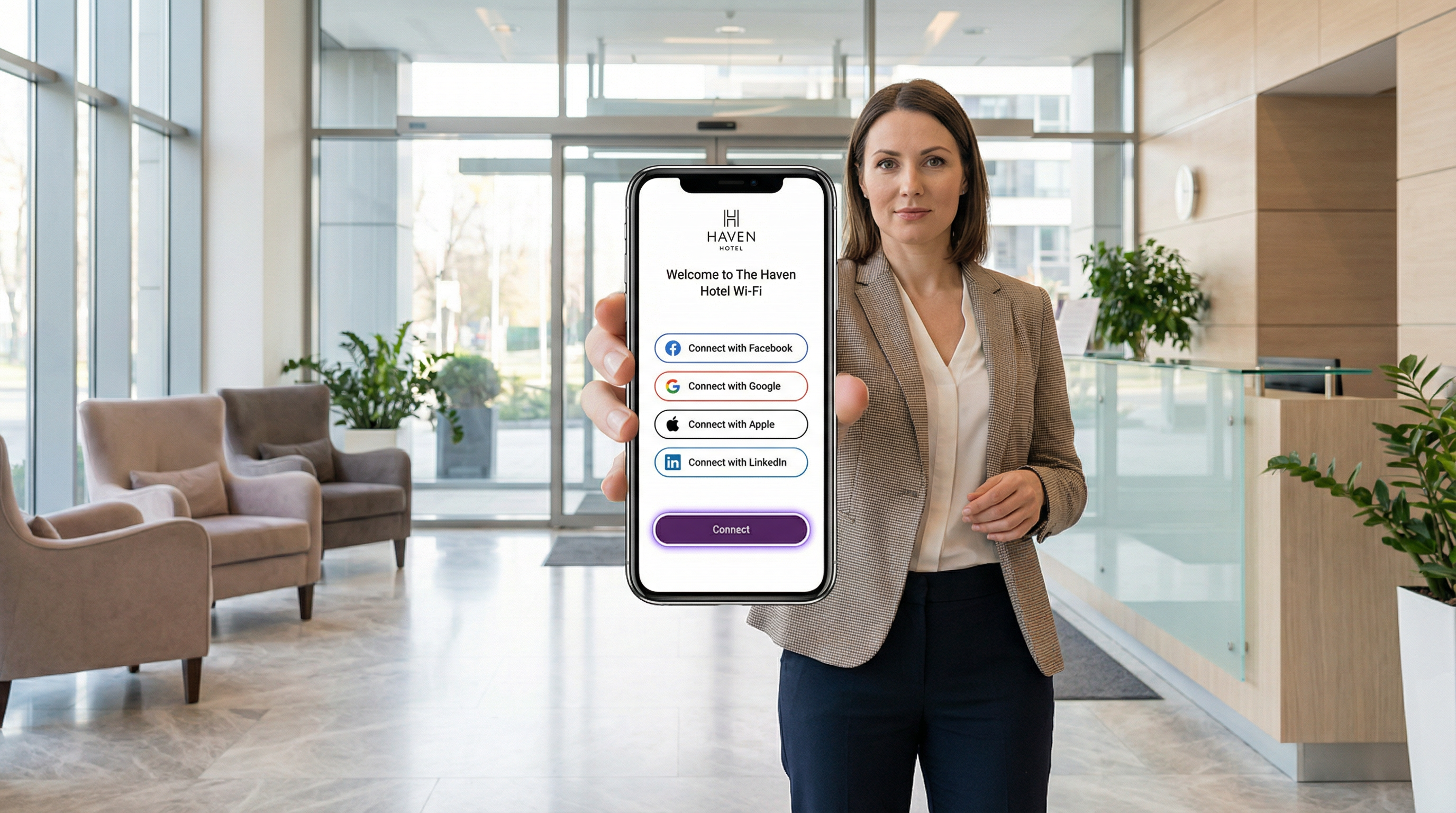
Social Login WiFi ermöglicht es Betreibern von Standorten, den anonymen Click-through-Zugang durch eine identitätsgeprüfte Authentifizierung zu ersetzen und so jede Gäste-WiFi-Verbindung in ein First-Party-Datenasset zu verwandeln. Durch die Integration von OAuth 2.0 mit Facebook, Google, Apple ID oder LinkedIn können Unternehmen in den Bereichen Gastgewerbe, Einzelhandel, Veranstaltungen und im öffentlichen Sektor verifizierte Gästeprofile – Name, E-Mail, demografische Merkmale und im Fall von LinkedIn den beruflichen Kontext – direkt am Punkt des Netzwerkzugriffs erfassen.
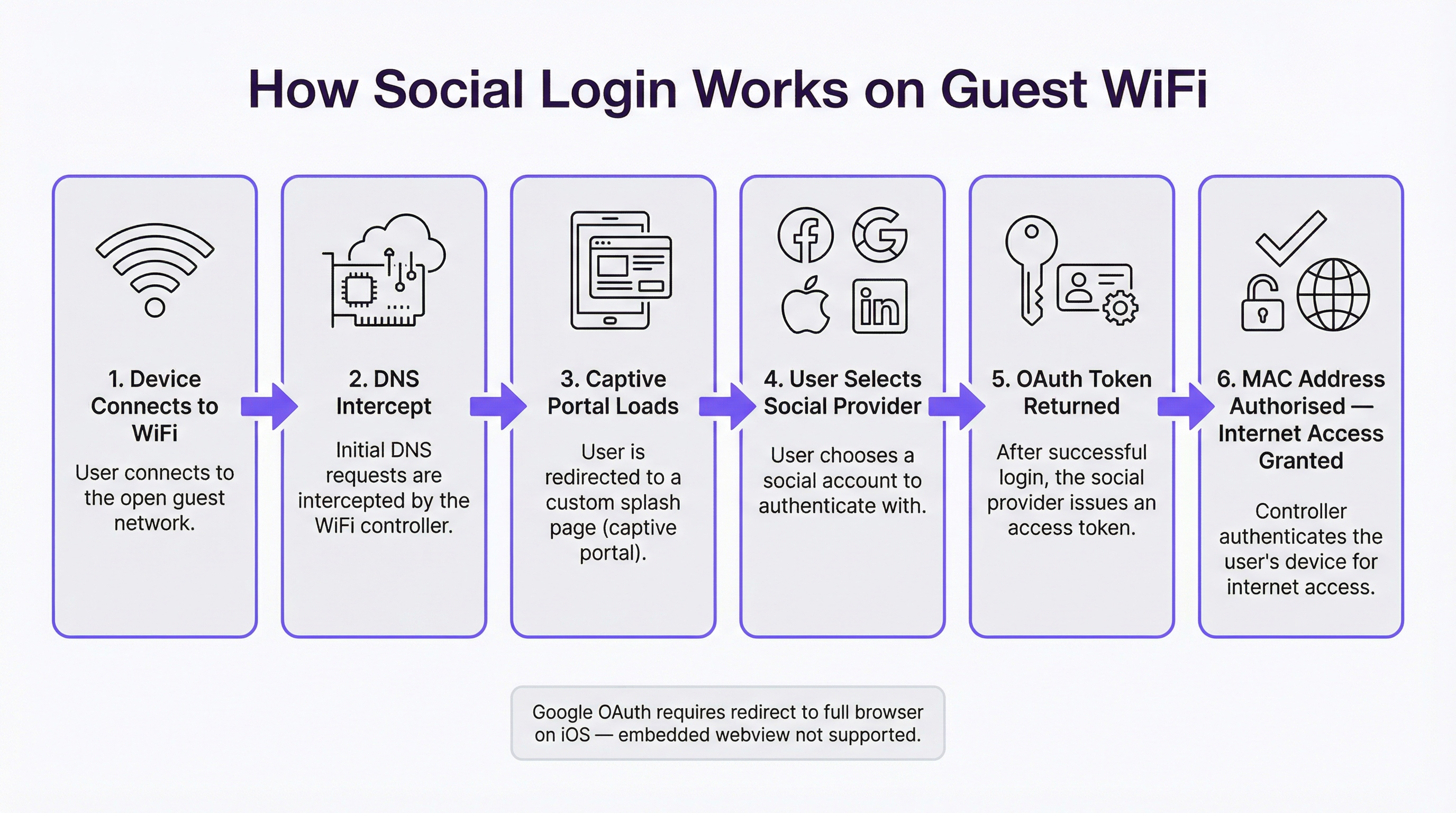
Die technische Architektur ist unkompliziert: Ein Captive Portal fängt die anfängliche DNS-Anfrage des Gastes ab, präsentiert eine gebrandete Splash-Page und initiiert einen OAuth Authorization Code Flow mit dem ausgewählten Identitätsanbieter. Das resultierende Access Token wird verwendet, um Profildaten abzurufen, die mit der MAC-Adresse des Gastes verknüpft gespeichert werden, bevor der Netzwerkzugriff gewährt wird. Der gesamte Ablauf ist unter normalen Bedingungen in drei bis acht Sekunden abgeschlossen.
Plattformspezifische Einschränkungen – insbesondere das Verbot von Google für OAuth in eingebetteten Webviews, was sich direkt auf das Verhalten von iOS Captive Portals auswirkt – erfordern jedoch bewusste technische Entscheidungen vor dem Go-Live. GDPR-Konformität, Verpflichtungen zur Datenminimierung und die Durchsetzung von Aufbewahrungsrichtlinien sind für jede Bereitstellung in Großbritannien oder der EU nicht verhandelbar. Dieser Leitfaden rüstet Ihr Team dafür, die richtige Plattformauswahl zu treffen, diese korrekt zu implementieren und innerhalb der regulatorischen Grenzen zu agieren.
Technischer Deep-Dive
Der OAuth 2.0 Authorization Code Flow im Captive Portal-Kontext
OAuth 2.0 ist ein offenes, in RFC 6749 definiertes Autorisierungs-Framework, das es einer Drittanbieter-Anwendung – in diesem Fall Ihrem Captive Portal – ermöglicht, eingeschränkten Zugriff auf das Konto eines Benutzers auf einer sozialen Plattform zu erhalten, ohne dass der Benutzer sein Passwort teilen muss. Für Gäste-WiFi-Bereitstellungen ist der relevante Ablauf der Authorization Code Flow (manchmal auch als dreistufiger OAuth-Flow bezeichnet), der die sicherste Variante darstellt und von allen vier großen Plattformen vorgeschrieben wird.
Der Ablauf ist wie folgt: Wenn sich ein Gast mit der WiFi-SSID verbindet, sendet das Betriebssystem seines Geräts eine Probe-Anfrage – typischerweise ein HTTP-GET an eine bekannte URL wie captive.apple.com oder connectivitycheck.gstatic.com –, um festzustellen, ob ein Internetzugang verfügbar ist. Der Netzwerk-Controller fängt diese Anfrage über DNS-Hijacking oder HTTP-Redirect ab und gibt stattdessen die Captive Portal-Splash-Page zurück. Das Gerät des Gastes zeigt diese Seite an, entweder in einem dedizierten Captive Network Assistant (CNA) Mini-Browser unter iOS und macOS oder im Systembrowser unter Android.
Wenn der Gast einen Social-Login-Anbieter auswählt, generiert das Portal eine Autorisierungsanfrage, die die client_id der Anwendung, die angeforderten scopes (Datenberechtigungen), eine redirect_uri, die auf den Callback-Endpunkt des Portals zurückverweist, und einen state-Parameter zum CSRF-Schutz enthält. Der Gast wird zum Autorisierungs-Endpunkt des Identitätsanbieters weitergeleitet – zum Beispiel accounts.google.com/o/oauth2/v2/auth. Der Anbieter authentifiziert den Benutzer (unter Verwendung seines bestehenden Session-Cookies, falls er bereits angemeldet ist, oder durch Aufforderung zur Eingabe von Anmeldeinformationen, falls nicht), präsentiert einen Zustimmungsbildschirm, der die angeforderten Berechtigungen auflistet, und leitet nach der Genehmigung mit einem kurzlebigen Authorization Code zurück zur Callback-URI des Portals.
Die serverseitige Komponente des Portals führt dann eine Back-Channel-POST-Anfrage an den Token-Endpunkt des Anbieters durch und tauscht den Authorization Code gegen ein Access Token und ein ID Token ein (letzteres ist ein JSON Web Token, das die Profil-Claims des Benutzers enthält). Das Portal ruft den Userinfo-API-Endpunkt des Anbieters unter Verwendung des Access Tokens auf, um die Profildaten des Gastes abzurufen, erstellt oder aktualisiert einen Gastdatensatz in seiner Datenbank und weist schließlich den Netzwerk-Controller an, die MAC-Adresse des Gastes zur Liste der autorisierten Clients hinzuzufügen. Der Internetzugriff wird gewährt.
Plattformspezifische Datenanalyse
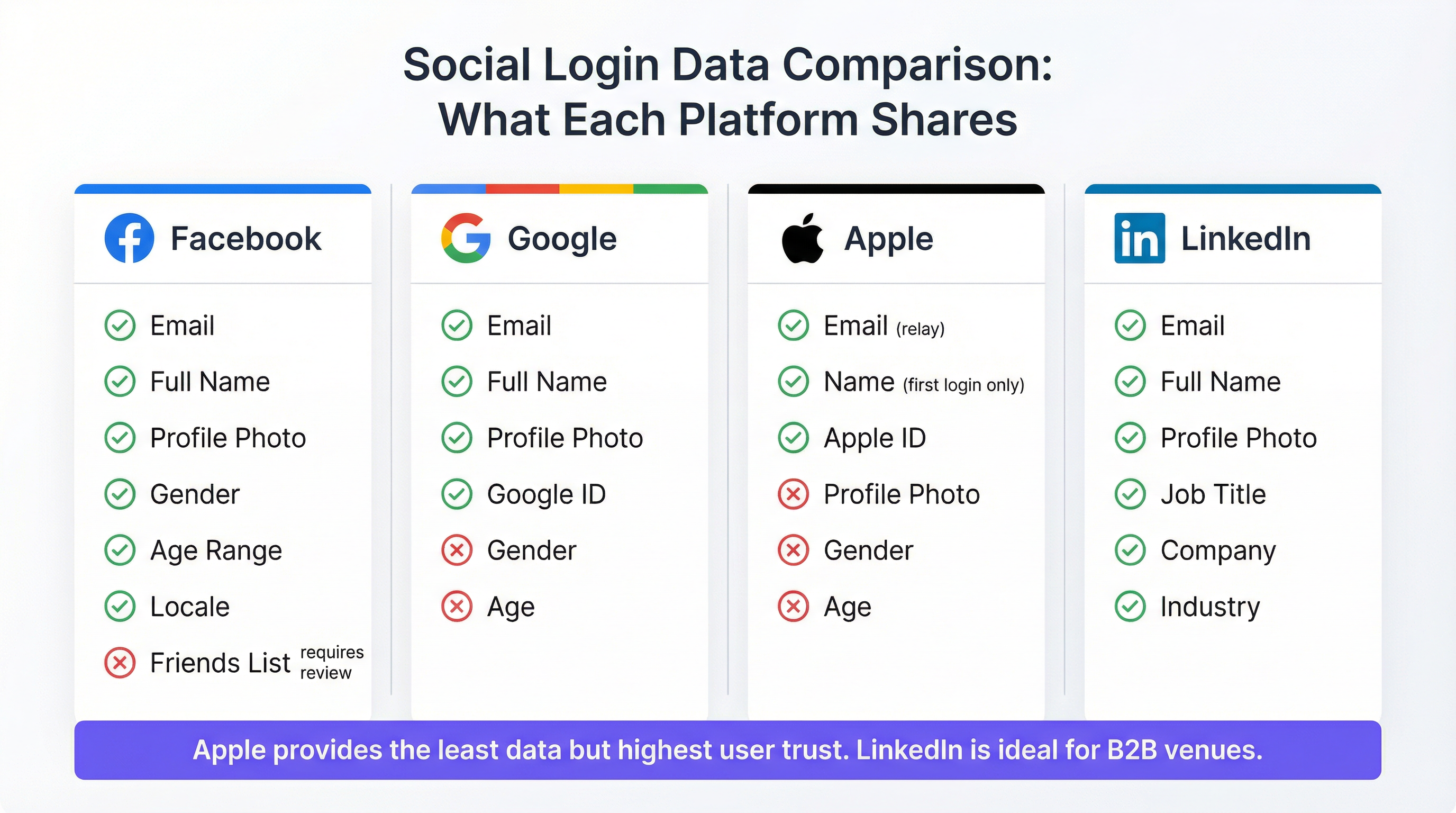
Die über die OAuth-Implementierung der jeweiligen Plattform verfügbaren Daten variieren erheblich, und diese Unterschiede haben direkte Auswirkungen auf die Marketingstrategie und die Analysefunktionen.
Facebook bleibt die datenreichste Option für Consumer-Standorte. Die Standard-Scopes public_profile und email liefern Name, E-Mail-Adresse, Profilfoto, Facebook-Benutzer-ID, Geschlecht, Altersgruppe und Gebietsschema, ohne dass ein zusätzliches App-Review erforderlich ist. Erweiterte Berechtigungen – wie Freundeslisten oder detaillierte Standortdaten – erfordern den formellen App-Review-Prozess von Facebook und werden für WiFi-Anwendungsfälle selten gewährt. Es ist wichtig zu beachten, dass Facebook sein dediziertes Produkt „Facebook WiFi“ im Jahr 2023 eingestellt hat; aktuelle Integrationen verwenden den standardmäßigen Graph API OAuth Flow. Die API-Berechtigungen von Facebook wurden seit 2018 als Reaktion auf den Cambridge Analytica-Vorfall schrittweise eingeschränkt, und Betreiber sollten den aktuellen Berechtigungsleitfaden unter developers.facebook.com überprüfen, bevor sie ihre Integration planen.
Google stellt E-Mail, vollständigen Namen, Profilfoto und eine eindeutige Google-ID über die Standard-Scopes openid, email und profile zur Verfügung. Geschlecht, Alter und Standort sind über Standard-Scopes nicht verfügbar. Die Haupteinschränkung von Google für Captive Portal-Bereitstellungen ist die Richtlinie für eingebettete Webviews, die seit September 2021 durchgesetzt wird: Google verarbeitet keine OAuth-Anfragen, die von eingebetteten Browserkomponenten wie WKWebView unter iOS oder Android WebView stammen. Da Apples Captive Network Assistant eine eingebettete Webview verwendet, um das Captive Portal anzuzeigen, schlägt die Google-Authentifizierung unter iOS fehl, es sei denn, das Portal leitet den Benutzer explizit dazu weiter, Safari zu öffnen. Dies wird im Abschnitt Fehlerbehebung ausführlich behandelt.
Apple ID (Mit Apple anmelden) ist die datenschutzfreundlichste Option. Sie liefert den Namen und die E-Mail-Adresse des Benutzers, jedoch mit zwei entscheidenden Einschränkungen. Der Name des Benutzers wird nur bei der ersten Authentifizierung übermittelt; bei nachfolgenden Anmeldungen werden die Namensdaten nicht erneut geteilt, sodass das Portal den Namen aus der ersten Anmeldung speichern muss. Apple bietet Benutzern außerdem die Möglichkeit, ihre echte E-Mail-Adresse zu verbergen und durch eine eindeutige Relay-Adresse im Format [random-string]@privaterelay.appleid.com zu ersetzen. E-Mails, die an diese Relay-Adresse gesendet werden, werden an den echten Posteingang des Benutzers weitergeleitet, was sie für Marketingkommunikation nutzbar macht, aber den Abgleich mit anderen Datenquellen verhindert. Apple stellt keine Profilfotos, Geschlechts-, Alters- oder Standortdaten zur Verfügung. Apple schreibt vor, dass jede Anwendung, die Social Logins von Drittanbietern anbietet, auch „Mit Apple anmelden“ anbieten muss, was es zu einer Compliance-Anforderung für jedes Portal macht, das andere soziale Optionen integriert.
LinkedIn ist die strategisch differenzierteste Option für professionelle Standortkontexte. Die OpenID Connect-Implementierung von LinkedIn liefert E-Mail, vollständigen Namen, Profilfoto, Berufsbezeichnung, Firmennamen und Branche. Diese beruflichen Kontextdaten sind bei keinem anderen Social-Login-Anbieter verfügbar und besonders wertvoll für Konferenzzentren, Co-Working-Spaces, Flughafen-Business-Lounges sowie Tagungs- und Veranstaltungseinrichtungen in Hotels. Die API v2 von LinkedIn beschränkt den Zugriff auf erweiterte Profilfelder ohne eine formelle Partnerschaftsvereinbarung, aber die über die Standard-Scopes openid, profile und email verfügbaren Felder sind für die meisten Anwendungsfälle der Standortanalyse ausreichend.
| Plattform | Name | Foto | Geschlecht | Altersgruppe | Berufliche Daten | iOS CNA-kompatibel | |
|---|---|---|---|---|---|---|---|
| Ja | Ja | Ja | Ja | Ja | Nein | Ja | |
| Ja | Ja | Ja | Nein | Nein | Nein | Nein – erfordert Safari-Redirect | |
| Apple ID | Ja (Relay) | Nur beim ersten Login | Nein | Nein | Nein | Nein | Ja |
| Ja | Ja | Ja | Nein | Nein | Berufsbezeichnung, Unternehmen, Branche | Ja |
Überlegungen zur Netzwerkarchitektur
Social Login WiFi arbeitet auf der Anwendungsschicht (Layer 7) und ist architektonisch unabhängig von der drahtlosen Sicherheitsschicht. Gäste-SSIDs, die Social Login einsetzen, verwenden typischerweise WPA3-SAE (Simultaneous Authentication of Equals) oder WPA2-PSK für die Over-the-Air-Verschlüsselung, wobei das Captive Portal die Identitätsprüfung auf Anwendungsebene übernimmt. Dies unterscheidet sich von der portbasierten Netzwerkzugriffskontrolle nach IEEE 802.1X, die das geeignete Framework für Unternehmens- und Mitarbeiternetzwerke ist und auf Layer 2 arbeitet.
Die empfohlene Netzwerkarchitektur trennt den Gäste- und Unternehmensverkehr auf SSID-Ebene, wobei die Gäste-SSID über ein dediziertes VLAN zu einem Internet-Breakout-Punkt geroutet wird. Der Captive Portal-Controller – ob in der Cloud gehostet (wie bei der Plattform von Purple) oder On-Premises – sitzt in-line oder in einem Redirect-Pfad, fängt nicht authentifizierten Datenverkehr ab und gibt ihn frei, sobald der OAuth-Flow abgeschlossen ist. Die MAC-Adressen-Autorisierung ist der Standardmechanismus zur Gewährung des Zugriffs nach der Authentifizierung; Richtlinien für Sitzungsdauer und Bandbreite werden auf Controller-Ebene durchgesetzt.
Für Standorte mit mehreren Access Points über ein großes Areal – ein Hotel mit 200 Zimmern, eine Einzelhandelskette mit 50 Filialen oder ein Stadion mit verteilter Abdeckung – ist eine Cloud-verwaltete Architektur gegenüber On-Premises-Controllern stark zu bevorzugen, sowohl aus Gründen der betrieblichen Skalierbarkeit als auch für die zentralisierte Aggregation von Gästedaten.
Implementierungsleitfaden
Checkliste vor der Bereitstellung
Bevor Sie Social Login in Ihrem Gäste-WiFi konfigurieren, müssen die folgenden Voraussetzungen erfüllt sein. Jede soziale Plattform erfordert eine registrierte Entwickleranwendung: eine Facebook-App (über developers.facebook.com), ein Google Cloud-Projekt mit OAuth 2.0-Anmeldeinformationen (über console.cloud.google.com), ein Apple Developer-Konto mit aktivierter „Mit Apple anmelden“-Funktion und eine LinkedIn Developer-Anwendung (über developer.linkedin.com). Jede Anwendungsregistrierung erfordert eine verifizierte Redirect-URI, die mit dem Callback-Endpunkt Ihres Captive Portals übereinstimmt – diese URI muss HTTPS verwenden.
Ihre Captive Portal-Plattform muss serverseitige OAuth 2.0-Flows unterstützen. Clientseitige (implizite) Flows sind bei allen großen Anbietern veraltet und dürfen nicht verwendet werden. Stellen Sie sicher, dass Ihre Plattform den OAuth-State-Parameter speichert und ihn beim Callback validiert, um CSRF-Angriffe zu verhindern.
Eine Datenschutz-Folgenabschätzung (DSFA) sollte vor dem Go-Live für jede Bereitstellung durchgeführt werden, die personenbezogene Daten von Einwohnern der EU oder Großbritanniens erfasst, insbesondere wenn die Daten für Marketing-Profiling verwendet werden. Ihre Datenschutzerklärung muss aktualisiert werden, um die Datenerfassung durch Social Login, die beteiligten Identitätsanbieter und die Zwecke, für die die Daten verwendet werden, widerzuspiegeln.
Schritt-für-Schritt-Bereitstellung
Der Bereitstellungsprozess folgt einem konsistenten Muster, unabhängig davon, welche sozialen Anbieter Sie aktivieren. Beginnen Sie damit, Ihre Anwendung in der Entwicklerkonsole jedes Anbieters zu registrieren und die Client-ID sowie das Client-Secret abzurufen. Konfigurieren Sie diese Anmeldeinformationen in Ihrer Captive Portal-Plattform – im Fall von Purple erfolgt dies über die Portal-Konfigurationsoberfläche, die den OAuth-Flow serverseitig abwickelt.
Konfigurieren Sie als Nächstes die Splash-Page Ihres Portals so, dass die für Ihren Standorttyp geeigneten Social-Login-Optionen angezeigt werden. Für das Consumer-Gastgewerbe sind Facebook und Google die Optionen mit der höchsten Conversion-Rate; fügen Sie Apple ID hinzu, um die Abdeckung von iOS-Benutzern zu maximieren; fügen Sie LinkedIn für professionelle Standorte hinzu. Stellen Sie sicher, dass immer eine Fallback-Authentifizierungsmethode – E-Mail-Registrierung oder Click-through-Akzeptanz der Bedingungen – verfügbar ist.
Implementieren Sie speziell für die Google-Authentifizierung eine iOS CNA-Erkennung. Der Captive Network Assistant unter iOS sendet einen markanten User-Agent-String. Wenn dieser User-Agent erkannt wird, sollte das Portal eine Aufforderung „Hier tippen, um in Safari zu öffnen“ anzeigen, anstatt zu versuchen, den Google OAuth-Flow inline zu rendern. Dieser einzige Implementierungsschritt verhindert die häufigste Fehlerquelle bei Social WiFi-Bereitstellungen.
Konfigurieren Sie Ihre GDPR-Einwilligungserfassung. Der Zustimmungsbildschirm muss die Datenschutzerklärung präsentieren, jeden sozialen Anbieter als Datenquelle identifizieren und ein explizites Opt-in für jede Marketingnutzung der Daten einholen. Der WiFi-Zugang selbst darf nicht an die Marketing-Einwilligung geknüpft sein – beides muss trennbar sein. Implementieren Sie ein Consent-Audit-Log, um den Zeitstempel, die IP-Adresse und die Einwilligungsentscheidungen für jeden Gast aufzuzeichnen.
Definieren und konfigurieren Sie abschließend Ihre Datenaufbewahrungsrichtlinie. Richten Sie eine automatisierte Löschung oder Anonymisierung von Gastdatensätzen zu Ihrem definierten Aufbewahrungshorizont ein – typischerweise 12 Monate für vorübergehende Gäste im Gastgewerbe, bis zu 24 Monate für Mitglieder von Treueprogrammen.
Best Practices
Die folgenden Empfehlungen spiegeln die branchenüblichen Praktiken für Enterprise-Gäste-WiFi-Bereitstellungen wider und basieren auf den Anforderungen der UK GDPR, den Prinzipien der IEEE 802.1X-Netzwerksegmentierung und den betrieblichen Realitäten von standortübergreifenden Immobilien.
Bieten Sie immer mehrere Social-Login-Anbieter an. Ein Portal mit nur einem Anbieter erzeugt unnötige Reibungsverluste und schließt Gäste aus, die diese Plattform deaktiviert haben oder nicht nutzen. Untersuchungen zeigen durchweg, dass das Anbieten von drei bis vier Optionen die Login-Conversion maximiert, ohne die Benutzer zu überfordern. Die Kombination aus Facebook, Google, Apple ID und einem Fallback-E-Mail-Formular deckt die überwiegende Mehrheit der Geräteprofile von Gästen ab.
Isolieren Sie Gäste- und Unternehmensverkehr auf SSID-Ebene. Gäste-WiFi – unabhängig von der Authentifizierungsmethode – muss sich auf einer separaten SSID und einem separaten VLAN von der Unternehmensinfrastruktur befinden. Social Login bietet nicht die Sicherheitsgarantien einer zertifikatsbasierten 802.1X-Authentifizierung; es ist ein Identitäts- und Datenerfassungsmechanismus, keine Netzwerksicherheitskontrolle.
Implementieren Sie HTTPS im gesamten Captive Portal-Flow. Alle Portalseiten, OAuth-Redirects und Callback-Endpunkte müssen TLS verwenden. HTTP-Captive Portals sind veraltet und lösen auf modernen Geräten Browser-Sicherheitswarnungen aus. Beziehen Sie ein gültiges Zertifikat von einer vertrauenswürdigen CA für Ihre Portal-Domain.
Wenden Sie Datenminimierung konsequent an. Fordern Sie nur die OAuth-Scopes an, für die Sie einen dokumentierten, spezifischen Zweck haben. Wenn Ihre Analyseplattform keine Geschlechtsdaten verwendet, fordern Sie den Geschlechts-Scope nicht von Facebook an. Eine unnötige Datenerfassung erhöht das Compliance-Risiko, ohne einen geschäftlichen Mehrwert zu bieten.
Testen Sie auf physischen iOS-Geräten mit dem Captive Network Assistant. Browserbasiertes Testen repliziert die CNA-Umgebung nicht. Verbinden Sie vor dem Go-Live ein physisches iPhone mit dem Testnetzwerk und überprüfen Sie, ob jede Social-Login-Option erfolgreich über das CNA-Popup abgeschlossen wird und nicht über ein manuell geöffnetes Safari.
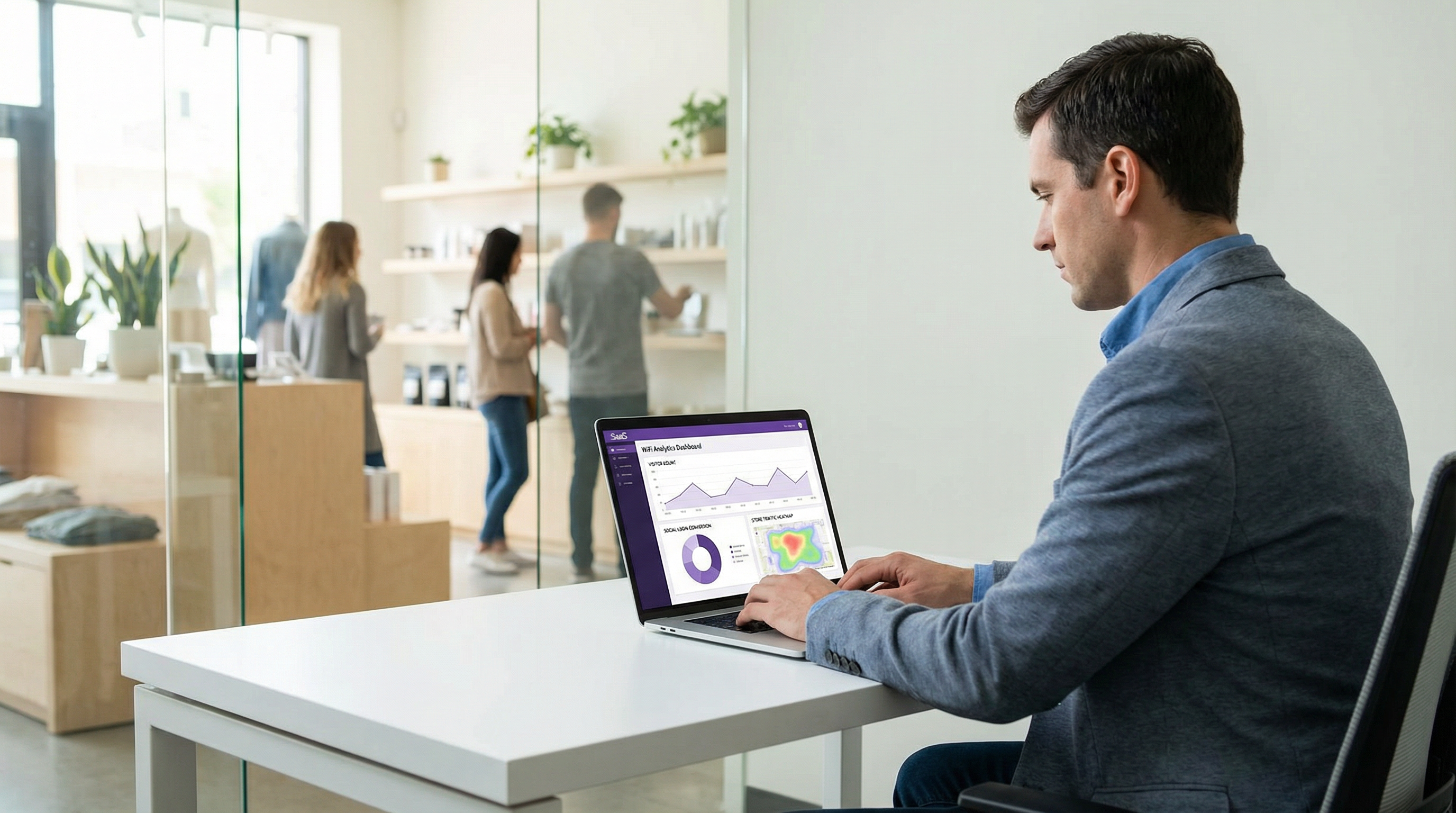
Überwachen Sie die Login-Conversion-Raten nach Anbieter. Eine gut instrumentierte Bereitstellung verfolgt, welchen sozialen Anbieter jeder Gast nutzt, die Abschlussrate für den OAuth-Flow jedes Anbieters und die Absprungpunkte. Diese Daten identifizieren plattformspezifische Probleme (wie das Google iOS-Problem) und bilden die Grundlage für Entscheidungen darüber, welche Anbieter in der Portal-Benutzeroberfläche priorisiert werden sollen.
Fehlerbehebung & Risikominderung
Google OAuth-Fehler unter iOS
Dies ist das am häufigsten auftretende Problem bei Social WiFi-Bereitstellungen. Symptome: Gäste mit iPhones wählen „Mit Google verbinden“ und erhalten eine Fehlermeldung, einen leeren Bildschirm oder werden zum Portal zurückgeleitet, ohne die Authentifizierung abzuschließen. Ursache: Die seit September 2021 durchgesetzte Richtlinie von Google für eingebettete Webviews blockiert OAuth-Anfragen von der WKWebView-Komponente, die von Apples Captive Network Assistant verwendet wird.
Lösung: Implementieren Sie eine User-Agent-Erkennung auf dem Captive Portal. Wenn der CNA-User-Agent erkannt wird (identifizierbar durch den String CaptiveNetworkSupport oder das Fehlen von Standard-Safari-Identifikatoren), ersetzen Sie den Inline-Google-OAuth-Button durch eine Aufforderung, die den Benutzer anweist, das Portal in Safari zu öffnen. Die zu öffnende URL sollte die vollständige Portal-URL sein, die Safari als Standardwebseite lädt, auf der Google OAuth normal funktioniert. Einige Portal-Plattformen handhaben dies automatisch; überprüfen Sie dies mit Ihrem Anbieter.
Apple Email Relay verursacht CRM-Abgleichfehler
Symptome: Gastdatensätze, die über den Apple ID-Login erstellt wurden, können nicht mit bestehenden CRM-Datensätzen oder Datenbanken von Treueprogrammen abgeglichen werden. Ursache: Das E-Mail-Relay von Apple generiert eine eindeutige Adresse pro Anwendung, die nicht mit der echten E-Mail-Adresse des Gastes übereinstimmt, die in anderen Systemen gespeichert ist.
Lösung: Akzeptieren Sie die Relay-Adresse als kanonischen Identifikator für Apple ID-Benutzer. Versuchen Sie nicht, die Relay-Adresse in die echte E-Mail aufzulösen – Apple bietet dafür keinen Mechanismus, und der Versuch, dies zu umgehen, verstößt gegen die Nutzungsbedingungen von Apple. Für die Integration von Treueprogrammen fordern Sie Apple ID-Benutzer auf, ihr Treuekonto nach der Verbindung mit dem WiFi manuell zu verknüpfen.
Ungültigkeit der GDPR-Einwilligung
Symptome: Eine Auskunftsanfrage einer betroffenen Person oder ein behördliches Audit deckt auf, dass die Marketing-Einwilligung mit der Einwilligung zum WiFi-Zugang gebündelt war oder dass die Datenschutzerklärung nicht vor der Datenerfassung präsentiert wurde. Risiko: Durchsetzungsmaßnahmen gemäß Artikel 83 der UK GDPR mit Geldstrafen von bis zu 17,5 Millionen Pfund oder 4 % des weltweiten Jahresumsatzes.
Lösung: Überprüfen Sie Ihren Ablauf zur Einwilligungserfassung. WiFi-Zugang und Marketing-Opt-in müssen als separate, unabhängig wählbare Optionen präsentiert werden. Die Datenschutzerklärung muss erscheinen, bevor der Gast seinen Social Login übermittelt – nicht danach. Implementieren Sie eine Consent-Management-Plattform oder stellen Sie sicher, dass die integrierten Consent-Tools Ihres Captive Portal-Anbieters diese Anforderungen erfüllen.
MAC-Adressen-Randomisierung
Symptome: Wiederkehrende Gäste werden nicht als wiederkehrende Besucher erkannt; Sitzungsdaten erscheinen fragmentiert. Ursache: iOS 14 und neuer, Android 10 und neuer sowie Windows 10 implementieren standardmäßig eine MAC-Adressen-Randomisierung, die für jede WiFi-Netzwerkverbindung eine neue pseudozufällige MAC-Adresse generiert.
Lösung: Verwenden Sie den von OAuth abgeleiteten Benutzeridentifikator (Facebook-ID, Google-ID, Apple ID oder LinkedIn-ID) als primären Gastidentifikator anstelle der MAC-Adresse. Die MAC-Adresse sollte nur für die Netzwerkautorisierung der aktuellen Sitzung verwendet werden, nicht als persistenter Identifikator. Stellen Sie sicher, dass Ihre Captive Portal-Plattform die Social-ID als Primärschlüssel für Gastdatensätze verwendet.
ROI & Geschäftliche Auswirkungen
Erfolgsmessung
Der Business Case für Social Login WiFi beruht auf drei Werttreibern: First-Party-Datenerfassung, Qualität des Gästeerlebnisses und betriebliche Effizienz. Jeder dieser Faktoren kann mit spezifischen KPIs gemessen werden.
Die First-Party-Datenerfassung wird an der verifizierten Kontaktrate gemessen – dem Prozentsatz der WiFi-Sitzungen, die zu einer verifizierten E-Mail-Adresse und einem Profildatensatz führen. Social Login übertrifft durchweg die Formularregistrierung (die unter hohen Raten gefälschter oder falsch getippter E-Mail-Adressen leidet) und übertrifft den Click-through-Zugang (der überhaupt keine Daten erfasst) deutlich. Eine gut bereitgestellte Social WiFi-Implementierung in einer Gastgewerbeumgebung erreicht typischerweise eine verifizierte Kontaktrate von 55 bis 70 Prozent der gesamten WiFi-Sitzungen.
Die Qualität des Gästeerlebnisses wird an der Login-Abschlusszeit (Ziel: unter 10 Sekunden für wiederkehrende Benutzer mit einer aktiven Social-Sitzung) und der Abbruchrate (Ziel: unter 15 Prozent) gemessen. Ein Abbruch von über 20 Prozent deutet typischerweise auf ein UX-Problem hin – zu viele Schritte, ein fehlerhafter Anbieter oder ein zu komplexer Einwilligungsablauf.
Zu den betrieblichen Effizienzgewinnen gehören die Eliminierung des Verwaltungsaufwands für Voucher-Codes, die Reduzierung von WiFi-Supportanfragen an der Rezeption und die Automatisierung der Gästedatenerfassung, die andernfalls eine manuelle Formularsammlung erfordern würde.
Fallstudie 1: Business-Hotel mit 200 Zimmern, Central London
Ein Business-Hotel mit 200 Zimmern im Zentrum von London ersetzte ein Voucher-Code-Gäste-WiFi-System durch Social Login (Facebook, Google, Apple ID), das in die Plattform von Purple integriert wurde. Vor der Bereitstellung erfasste das Hotel Gästekontaktdaten aus etwa 12 Prozent der WiFi-Sitzungen – Gäste, die beim Check-in freiwillig ihre E-Mail-Adresse angaben. Nach der Bereitstellung erreichte die verifizierte Kontaktrate innerhalb des ersten Quartals 61 Prozent der WiFi-Sitzungen. Das Marketingteam des Hotels nutzte die resultierenden First-Party-Daten, um segmentierte E-Mail-Kampagnen zu erstellen, und erzielte eine Öffnungsrate von 34 Prozent bei der Kommunikation nach dem Aufenthalt – deutlich über dem Branchendurchschnitt im Gastgewerbe von 21 Prozent. Die LinkedIn-Option wurde anschließend für die Tagungs- und Veranstaltungseinrichtungen des Hotels hinzugefügt und lieferte professionelle demografische Daten über Konferenzteilnehmer, die als Grundlage für eine erfolgreiche Verhandlung über Firmenraten mit einem großen Finanzdienstleistungsunternehmen dienten.
Fallstudie 2: Einzelhandelskette mit 45 Filialen, UK
Eine mittelständische britische Einzelhandelskette mit 45 Filialen implementierte Social WiFi in ihrem gesamten Bestand und bot Facebook- und Google-Login mit einem E-Mail-Fallback an. Das Hauptziel bestand darin, einen First-Party-Kundendatenbestand als Absicherung gegen die Abschaffung von Third-Party-Cookies aufzubauen. Innerhalb von sechs Monaten hatte die Kette 280.000 verifizierte Gästeprofile erfasst, von denen 67 Prozent dem Erhalt von Marketingkommunikation zugestimmt hatten. Die Social-Login-Daten – insbesondere Altersgruppe und Gebietsschema von Facebook – ermöglichten es dem Marketingteam zu erkennen, dass ein erheblicher Anteil der In-Store-WiFi-Nutzer in Nordengland in der Altersgruppe der 45- bis 54-Jährigen lag, einer Demografie, die im bestehenden Treueprogramm der Kette unterrepräsentiert war. Diese Erkenntnis floss direkt in eine gezielte Akquisitionskampagne ein. Das IT-Team der Kette stellte fest, dass das Google iOS-Problem etwa 8 Prozent der versuchten Google-Logins betraf, bevor der Safari-Redirect implementiert wurde – ein Wert, der nach der Behebung auf unter 1 Prozent sank.
Erwartete Ergebnisse nach Standorttyp
| Standorttyp | Empfohlene Anbieter | Erwartete verifizierte Kontaktrate | Primärer Datenwert |
|---|---|---|---|
| Hotel (Freizeit) | Facebook, Google, Apple ID | 55–65 % | E-Mail, Altersgruppe, Gebietsschema |
| Hotel (Business) | Google, LinkedIn, Apple ID | 45–55 % | Berufliches Profil, Unternehmen |
| Einzelhandel | Facebook, Google | 50–60 % | Altersgruppe, Geschlecht, Gebietsschema |
| Konferenzzentrum | LinkedIn, Google | 40–50 % | Berufsbezeichnung, Unternehmen, Branche |
| Stadion / Events | Facebook, Google, Apple ID | 60–70 % | Altersgruppe, Geschlecht |
| Öffentlicher Sektor | Primär E-Mail-Fallback | 30–40 % | Nur E-Mail (GDPR-konservativ) |
Dieser Leitfaden wird von Purple, der Enterprise WiFi Intelligence-Plattform, herausgegeben. Für Bereitstellungssupport, Plattformdokumentation und GDPR-Compliance-Tools besuchen Sie purple.ai.
Key Terms & Definitions
OAuth 2.0
An open authorisation framework (RFC 6749) that allows a third-party application to obtain limited access to a user's account on a social platform without requiring the user to share their password. In guest WiFi contexts, OAuth 2.0 is the protocol that enables the captive portal to retrieve a guest's profile data from Facebook, Google, Apple, or LinkedIn.
IT teams encounter OAuth 2.0 when configuring social login integrations. Understanding the Authorization Code Flow — specifically the distinction between the authorisation code, access token, and ID token — is essential for debugging authentication failures and for scoping the correct API permissions.
Captive Portal
A web page presented to a newly connected network user before they are granted full internet access. The captive portal intercepts the user's initial HTTP or DNS request and redirects it to a branded splash page where authentication or terms acceptance occurs. In social WiFi deployments, the captive portal hosts the OAuth login flow.
Captive portals are the user-facing component of guest WiFi systems. IT teams are responsible for configuring the portal's authentication methods, branding, consent capture, and integration with the network controller for MAC address authorisation.
Captive Network Assistant (CNA)
The system component on iOS and macOS that automatically detects captive WiFi networks and presents the captive portal in a mini-browser popup. The CNA uses an embedded WKWebView component rather than the full Safari browser, which has significant implications for social login compatibility — specifically, Google OAuth will not function in the CNA due to Google's embedded webview policy.
The CNA is the source of the most common social WiFi compatibility issue: Google authentication failing on iPhones. IT teams must implement a Safari redirect mechanism to route Google OAuth flows out of the CNA and into the full Safari browser.
Authorization Code Flow
The OAuth 2.0 flow in which the identity provider returns a short-lived authorisation code to the client application, which the application then exchanges for an access token via a back-channel server-to-server request. This is the most secure OAuth flow and is required by all major social login providers for web-based applications.
IT teams should verify that their captive portal platform uses the Authorization Code Flow (not the deprecated Implicit Flow) for all social login integrations. The back-channel token exchange is a security requirement — it prevents access tokens from being exposed in browser history or server logs.
Access Token
A credential issued by an identity provider after a successful OAuth authorisation that allows the client application to access the user's data on the provider's API. Access tokens are short-lived (typically one hour) and scoped to specific permissions. In guest WiFi contexts, the access token is used to call the provider's userinfo endpoint to retrieve the guest's profile data.
IT teams encounter access tokens when debugging social login integrations. A common failure mode is attempting to use an expired access token — the portal should handle token expiry gracefully by re-initiating the OAuth flow rather than presenting an error to the guest.
OAuth Scope
A parameter in an OAuth authorisation request that specifies which user data or API capabilities the application is requesting access to. For social login, scopes determine which profile fields are available. Examples include 'email' (email address), 'profile' (name and photo), and LinkedIn's 'r_liteprofile' (basic professional profile).
Scope selection is a GDPR data minimisation decision as well as a technical configuration choice. IT teams and data protection officers should jointly review the scopes requested for each social login integration and remove any scope for which there is no documented, specific business purpose.
MAC Address Authorisation
The mechanism by which a network controller grants internet access to a specific device after the captive portal authentication flow completes. The controller adds the device's MAC address to an authorised client list, allowing its traffic to pass through to the internet. Session duration and bandwidth policies are enforced at the MAC address level.
MAC address authorisation is the bridge between the application-layer OAuth flow and the network-layer access control. IT teams must understand that MAC address randomisation (default on iOS 14+, Android 10+, Windows 10+) means MAC addresses cannot be used as persistent guest identifiers — the OAuth-derived social ID must be used instead.
Apple Private Email Relay
A privacy feature of Sign in with Apple that allows users to hide their real email address from third-party applications. When enabled, Apple generates a unique relay address (in the format [random-string]@privaterelay.appleid.com) that forwards emails to the user's real inbox. The venue operator receives the relay address, not the user's real email.
IT teams and marketing managers must understand the email relay when planning CRM integration for Apple ID logins. The relay address is functional for email marketing but cannot be matched against existing customer records. Loyalty programme integration for Apple ID users requires a manual linking step.
IEEE 802.1X
An IEEE standard for port-based network access control that provides an authentication framework for devices wishing to attach to a LAN or WLAN. 802.1X uses the Extensible Authentication Protocol (EAP) and typically integrates with a RADIUS server for credential verification. It is the appropriate authentication standard for corporate and staff networks.
IT teams must clearly distinguish between 802.1X (for corporate/staff networks) and social login via captive portal (for guest networks). These are complementary, not competing, technologies. A correctly architected venue network uses 802.1X on the corporate SSID and social login on a separate, isolated guest SSID.
GDPR Data Minimisation
The principle under UK GDPR Article 5(1)(c) that personal data collected must be adequate, relevant, and limited to what is necessary for the specified purpose. In the context of social WiFi, this means requesting only the OAuth scopes for which there is a documented, specific business purpose — not requesting all available data by default.
Data minimisation is both a legal obligation and a risk management principle. IT teams and DPOs should conduct a joint review of social login scopes at deployment and annually thereafter, removing any scope that cannot be justified against a specific, documented data use case.
Case Studies
A 200-room business hotel in London wants to deploy social WiFi login to capture guest data for its CRM and post-stay marketing campaigns. The hotel's guest mix is approximately 60% corporate travellers and 40% leisure guests. The IT manager is concerned about iOS compatibility and GDPR compliance. Which social login providers should be configured, and what are the key implementation steps?
Given the mixed corporate and leisure guest profile, the recommended provider configuration is Google (primary for corporate guests), Facebook (primary for leisure guests), Apple ID (mandatory for iOS conversion), and LinkedIn (for meeting and events facilities). The implementation proceeds as follows.
Step 1 — Developer Application Registration. Register a Google Cloud project at console.cloud.google.com with OAuth 2.0 credentials, a Facebook App at developers.facebook.com with the public_profile and email permissions, an Apple Developer account with Sign in with Apple enabled, and a LinkedIn Developer application at developer.linkedin.com. All redirect URIs must use HTTPS and match the captive portal callback endpoint exactly.
Step 2 — Portal Configuration. Configure the captive portal (Purple or equivalent) with the client ID and client secret for each provider. Set the portal to present all four social options plus an email fallback. Configure the portal's splash page with the hotel's branding.
Step 3 — Google iOS Fix. Implement CNA user agent detection. When the portal detects the iOS Captive Network Assistant, replace the inline Google OAuth button with a 'Tap to open in Safari' prompt. Verify this works on a physical iPhone before go-live.
Step 4 — GDPR Consent Flow. Configure the consent screen to present: (a) a link to the privacy notice, (b) acceptance of terms of use as a condition of WiFi access, and (c) a separate, optional checkbox for marketing communications. Ensure these are not bundled. Implement a consent audit log.
Step 5 — Data Retention. Set automated deletion of guest records after 12 months for transient guests. For guests who opt into the loyalty programme, extend to 24 months with a re-consent prompt at 12 months.
Step 6 — Testing. Test each provider on iOS (via CNA), Android, Windows, and macOS. Verify that the Google Safari redirect works. Verify that Apple ID relay emails are stored correctly. Verify that LinkedIn job title and company fields are populated.
A national retail chain with 80 stores is planning to deploy social WiFi across its estate. The marketing director wants to use the data to build audience segments for targeted advertising and to measure footfall attribution. The legal team has flagged GDPR concerns. The IT team is worried about the operational overhead of managing social login credentials across 80 sites. How should this deployment be architected?
Architecture Decision — Cloud-Managed Platform. For an 80-site estate, a cloud-managed captive portal platform is essential. On-premises controllers at each site create an unmanageable operational overhead and prevent centralised data aggregation. The social login credentials (client IDs and secrets) are configured once at the platform level and applied across all sites — the IT team does not manage per-site OAuth configuration.
Provider Selection. For a consumer retail environment, Facebook and Google are the primary providers, with an email fallback. Apple ID should be included to maximise iOS conversion. LinkedIn is not recommended for a general retail context.
Data Architecture. The platform must use the OAuth-derived social ID (not MAC address) as the primary guest identifier to handle MAC address randomisation. Guest records should include: social ID, email, name, age range (Facebook), gender (Facebook), locale, first visit date, visit frequency, and store location. This data structure supports the footfall attribution and audience segmentation use cases.
GDPR Compliance. The legal team's concerns are valid. Key mitigations: (1) Consent must be granular — WiFi access separate from marketing opt-in. (2) A Data Protection Impact Assessment must be completed before go-live, given the scale of data collection and the profiling use case. (3) The privacy notice must explicitly describe the use of data for advertising audience creation. (4) If data is shared with advertising platforms (Meta Custom Audiences, Google Customer Match), this must be disclosed and a Data Processing Agreement must be in place with each platform. (5) A 12-month retention period with automated deletion should be enforced.
Operational Model. Designate a central IT owner for the social login developer applications. Rotate client secrets annually. Monitor login conversion rates centrally via the platform dashboard. Implement alerting for provider-level failures (e.g., a Facebook API outage affecting all 80 sites simultaneously).
A major conference centre hosts 150 events per year, with attendees ranging from technology professionals to government officials. The venue director wants to use guest WiFi data to demonstrate audience demographics to potential event sponsors. The IT manager is evaluating whether LinkedIn login is worth the additional implementation complexity. What is the recommendation?
Recommendation: Yes, implement LinkedIn login as the primary option for this venue.
The conference centre use case is precisely the scenario for which LinkedIn login provides unique value unavailable from any other social provider. The ability to capture job title, company name, and industry sector transforms the WiFi analytics from a basic visitor count into a professional audience profile — the kind of data that event sponsors pay significant premiums to access.
Implementation Approach. Register a LinkedIn Developer application and enable the Sign In with LinkedIn using OpenID Connect product. Request the openid, profile, and email scopes. Configure the captive portal to present LinkedIn as the featured option (top of the list) for conference events, with Google and email fallback as secondary options. Consider event-specific portal configurations — for a technology conference, LinkedIn is the obvious primary; for a consumer trade show, Facebook may be more appropriate.
Data Use for Sponsorship. Aggregate the LinkedIn-derived data (job titles, companies, industries) into anonymised audience reports. A report showing that 68% of WiFi users at a financial services conference were C-suite or VP-level professionals from FTSE 350 companies is a compelling sponsorship proposition. Ensure that these reports use aggregated, anonymised data — individual profiles must not be shared with sponsors without explicit consent from each guest.
GDPR Note. The purpose of collecting professional data for sponsorship reporting must be disclosed in the privacy notice. This is a legitimate interest use case, but it requires a Legitimate Interests Assessment (LIA) or explicit consent, depending on how the data is used. Consult your DPO before implementing sponsorship reporting.
Scenario Analysis
Q1. Your venue is a 500-seat conference centre that hosts 120 events per year. The commercial director wants to offer event sponsors an audience demographics report based on WiFi login data. The IT manager has configured Facebook and Google social login. The data protection officer has raised concerns. What changes, if any, should be made to the social login configuration and the data use policy?
💡 Hint:Consider both the provider selection (is LinkedIn missing?) and the GDPR implications of using guest data for commercial sponsorship reporting. What lawful basis applies, and what must be disclosed to guests?
Show Recommended Approach
Three changes are required. First, add LinkedIn as a social login option — it is the only provider that supplies professional demographic data (job title, company, industry), which is the data of highest value for sponsorship audience reports. Facebook and Google do not provide this. Second, update the privacy notice on the captive portal to explicitly disclose that anonymised, aggregated audience data may be used for commercial reporting purposes. This is a new processing purpose that was not covered by the original privacy notice and must be disclosed before data collection. Third, conduct a Legitimate Interests Assessment (LIA) for the sponsorship reporting use case, or obtain explicit consent from guests for this purpose. Using guest data for commercial benefit beyond the direct provision of WiFi service requires a clearly documented lawful basis under UK GDPR Article 6. The DPO's concerns are valid and must be resolved before the sponsorship reporting programme launches. Ensure that all sponsorship reports use aggregated, anonymised data — individual guest profiles must never be shared with sponsors.
Q2. A hotel's IT team reports that approximately 15% of guests who attempt to log in with Google on their iPhones are failing to complete authentication and abandoning the WiFi login entirely. The portal is otherwise functioning correctly. What is the most likely root cause, and what is the remediation?
💡 Hint:Consider the interaction between Google's OAuth policy (enforced since September 2021) and Apple's Captive Network Assistant. What browser environment does the CNA use, and why does this cause Google OAuth to fail?
Show Recommended Approach
The root cause is Google's embedded webview policy. Apple's Captive Network Assistant (CNA) — the system that automatically displays the captive portal popup when an iPhone joins a new WiFi network — uses a WKWebView embedded browser component, not the full Safari browser. Since September 2021, Google has blocked OAuth 2.0 authorisation requests originating from embedded webviews, returning a 'disallowed_useragent' error. The remediation is to implement iOS CNA detection on the captive portal. When the portal detects the CNA user agent string, it should replace the inline Google OAuth button with a prompt directing the user to open the portal URL in Safari (e.g., 'Tap here to sign in with Google in Safari'). Once the user opens the portal in Safari, the Google OAuth flow completes normally. This fix should be tested on a physical iPhone using the CNA — not by opening the portal URL in Safari directly — before deployment. After implementing the fix, the 15% abandonment rate for Google on iOS should drop to below 2%.
Q3. A retail chain's marketing team wants to use social WiFi data to create Custom Audience segments on Meta's advertising platform (Facebook Ads). The IT manager needs to assess the technical and compliance requirements. What are the key considerations?
💡 Hint:Consider the data flow: guest data is collected at the captive portal, then shared with Meta for audience creation. What GDPR obligations apply to this data sharing? What technical mechanism is used to create Custom Audiences from email data?
Show Recommended Approach
There are three key considerations. First, the lawful basis for data sharing with Meta must be established. Collecting an email address for WiFi access does not automatically authorise sharing that email with Meta for advertising purposes. The privacy notice must explicitly disclose that email addresses may be shared with Meta for Custom Audience creation, and either explicit consent or a documented Legitimate Interests Assessment is required. Second, a Data Processing Agreement must be in place with Meta, as Meta is acting as a data processor when creating Custom Audiences from the retailer's first-party data. Third, the technical mechanism for Custom Audience creation is hashed email matching — the retailer uploads a hashed (SHA-256) list of guest email addresses to Meta's Ads Manager, and Meta matches these against its user database to create the audience segment. The hashing provides a degree of privacy protection but does not remove the GDPR obligation to disclose the data sharing. Apple ID relay email addresses will not match against Meta's database (since the relay address is not the user's Facebook-registered email), so Apple ID users will be excluded from Custom Audience matching — this is an expected limitation, not a technical error.
Q4. A venue operator is planning a new guest WiFi deployment and is deciding between offering only Facebook login (simplest to implement) versus a multi-provider setup (Facebook, Google, Apple ID, email fallback). The IT manager argues that Facebook alone is sufficient since it has the highest adoption. What is the counter-argument, and what is the recommended approach?
💡 Hint:Consider the trends in Facebook account ownership, the iOS user base in UK hospitality, and the GDPR implications of a single-provider approach that excludes guests who do not have Facebook accounts.
Show Recommended Approach
The counter-argument rests on three points. First, Facebook account ownership has declined significantly among younger demographics and among privacy-conscious users — a meaningful proportion of guests, particularly in business travel contexts, will not have an active Facebook account or will be unwilling to use it for WiFi authentication. A single-provider portal that offers only Facebook will generate a higher abandonment rate than a multi-provider portal. Second, iPhone users represent a significant proportion of guests in UK hospitality — typically 50 to 60 percent of devices. Apple's App Store guidelines require that any application offering third-party social login must also offer Sign in with Apple. While this rule applies to native apps rather than web-based portals, offering Apple ID alongside other providers maximises conversion among iOS users who prefer the native Apple authentication experience. Third, from a GDPR perspective, a portal that offers only Facebook as a social login option and no fallback creates a situation where guests who do not have Facebook accounts cannot access the WiFi without providing personal data — this may be challenged as coercive data collection. The recommended approach is a multi-provider portal with at minimum Facebook, Google, Apple ID, and an email/click-through fallback. The marginal implementation cost of adding Google and Apple ID to an existing Facebook integration is low, and the conversion rate improvement justifies it.
Key Takeaways
- ✓Social login WiFi uses the OAuth 2.0 Authorization Code Flow to authenticate guests via Facebook, Google, Apple ID, or LinkedIn, capturing verified profile data and authorising network access via MAC address — the full flow completes in three to eight seconds.
- ✓Google OAuth is incompatible with Apple's Captive Network Assistant (iOS embedded webview) due to Google's embedded webview policy enforced since September 2021 — a Safari redirect must be implemented for Google login to function on iPhones.
- ✓Each platform provides a distinct data profile: Facebook offers the richest demographic data (age range, gender, locale); Google provides clean identity data; Apple ID maximises user trust but provides minimal data and may relay email addresses; LinkedIn uniquely provides professional context (job title, company, industry) and is the preferred option for B2B venues.
- ✓Under UK GDPR, WiFi access and marketing consent must be presented as separate, independently selectable choices — bundling them invalidates the consent and exposes the operator to enforcement risk under Article 83.
- ✓MAC address randomisation (default on iOS 14+, Android 10+, Windows 10+) makes MAC addresses unsuitable as persistent guest identifiers — the OAuth-derived social ID must be used as the primary key in the guest data model.
- ✓Always offer multiple social login providers plus a non-social fallback (email registration or click-through) — a single-provider portal creates unnecessary friction and may exclude a significant proportion of guests.
- ✓The business case for social WiFi rests on first-party data acquisition: a well-deployed implementation in hospitality achieves a verified contact rate of 55 to 70 percent of WiFi sessions, significantly outperforming voucher codes or click-through access.




