

Best Practices für das SSID-Management bei Multi-Venue-Deployments
This guide provides a technical reference for IT leaders on managing SSIDs in multi-venue deployments. It debunks common myths about SSID count impacting performance and offers actionable best practices for balancing security, user experience, and network manageability across hospitality, retail, and large public venues.
🎧 Listen to this Guide
View Transcript

Executive Summary
Für CTOs, IT-Direktoren und Netzwerkarchitekten, die Multi-Venue-Unternehmen betreuen, stellt das SSID-Management eine ständige Herausforderung dar: die Balance zwischen dem Bedarf an segmentiertem Zugriff und der Notwendigkeit, leistungsstarkes, zuverlässiges WiFi bereitzustellen. Ein weit verbreiteter Branchenmythos besagt, dass die Bereitstellung mehrerer Service Set Identifiers (SSIDs) die Netzwerkleistung aufgrund des Management-Overheads unweigerlich beeinträchtigt. Dieser Leitfaden bietet einen fundierten, technischen Deep-Dive, der diesen Mythos entlarvt und ein klares Framework für eine Best-Practice-SSID-Architektur etabliert. Wir werden zeigen, dass die Leistungseinbußen durch zusätzliche SSIDs vernachlässigbar sind, wenn ein Netzwerk auf einem soliden Fundament aus professionellem RF-Design und modernen Konfigurationsstandards aufbaut. Die wahren Ursachen für Netzwerkverlangsamungen sind fast immer Co-Channel-Interferenzen, die Unterstützung langsamer Legacy-Datenraten und eine unzureichende RF-Planung. Durch die Implementierung einer strategischen „Dreierregel“ – die Segmentierung des Datenverkehrs in Gast-, Mitarbeiter- und IoT/Betriebsnetzwerke – und die Nutzung von Technologien wie WPA3-Enterprise und dynamischen VLANs können Unternehmen robuste Sicherheit und Compliance erreichen, ohne den Durchsatz zu beeinträchtigen. Dieser Leitfaden bietet umsetzbare, herstellerneutrale Empfehlungen und praxisnahe Fallstudien, um IT-Führungskräfte in die Lage zu versetzen, skalierbare, hochleistungsfähige drahtlose Netzwerke zu entwerfen und zu verwalten, die Geschäftsziele unterstützen und ein erstklassiges Nutzererlebnis im gesamten Portfolio bieten.
Technischer Deep-Dive
Die Angst vor einer SSID-Proliferation wurzelt im Konzept des Beacon-Frame-Overheads. Jede von einem Access Point (AP) ausgestrahlte SSID muss diese Management-Frames regelmäßig senden, um ihre Präsenz anzukündigen. Gemäß dem IEEE 802.11-Standard werden Beacons etwa alle 100 Millisekunden mit der niedrigsten obligatorischen Datenrate übertragen, um sicherzustellen, dass selbst die ältesten Geräte sie empfangen können. Obwohl dies nach viel Datenverkehr klingt, ist die tatsächlich verbrauchte Airtime minimal. Wie in der folgenden Infografik dargestellt, ist der Overhead weit von den oft zitierten katastrophalen Werten entfernt. Selbst bei fünf verschiedenen SSIDs beträgt der gesamte Beacon-Overhead nur knapp über ein halbes Prozent der gesamten Kanal-Airtime – ein Wert, den die meisten Netzwerkexperten als vernachlässigbar ansehen würden.
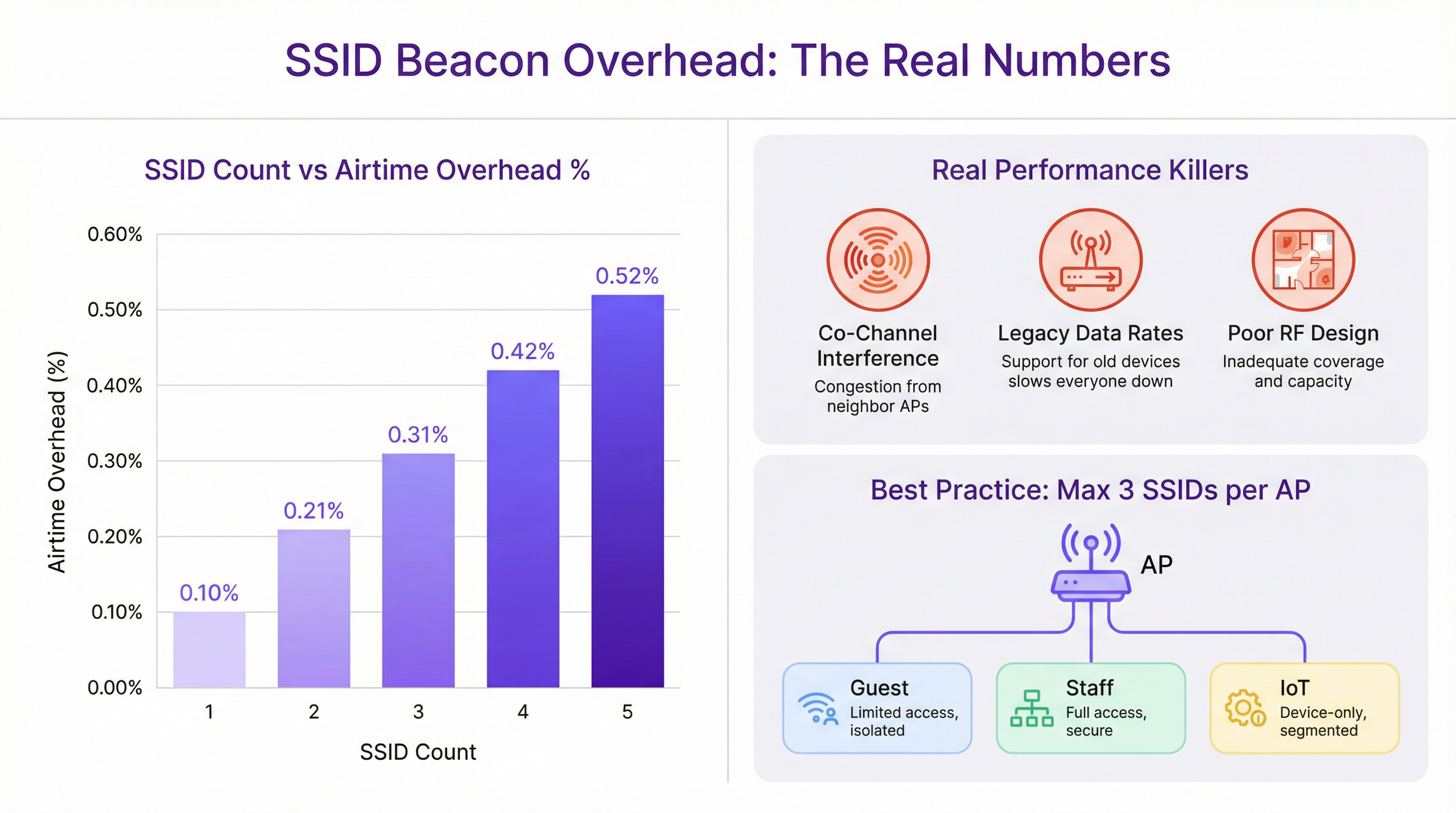
Die Leistungseinbußen, die oft mehreren SSIDs zugeschrieben werden, sind fast immer auf andere Ursachen zurückzuführen. Die wahren Schuldigen sind grundlegendere Fehler im Netzwerkdesign:
Co-Channel Interference (CCI): Wenn mehrere APs in unmittelbarer Nähe auf demselben WiFi-Kanal arbeiten, müssen sie alle um dieselbe Airtime konkurrieren. Dieser „Noisy-Neighbor“-Effekt ist die mit Abstand häufigste Ursache für Leistungseinbußen in High-Density-Deployments. Eine ordnungsgemäße Kanalplanung, die sicherstellt, dass benachbarte APs auf nicht überlappenden Kanälen (z. B. 1, 6, 11 im 2,4-GHz-Band) senden, ist von entscheidender Bedeutung.
Legacy-Datenraten: Die Unterstützung veralteter 802.11b-Datenraten (1, 2, 5,5 und 11 Mbit/s) zwingt den gesamten Management-Traffic, einschließlich Beacons, zu einer extrem langsamen Übertragung. Dies verbraucht unverhältnismäßig viel Airtime. Die Deaktivierung dieser Legacy-Raten und die Festlegung einer minimalen obligatorischen Rate von 12 Mbit/s oder höher ist ein entscheidender Optimierungsschritt.
Unzureichendes RF-Design: Ohne eine professionelle Radio Frequency (RF) Site Survey ist die Platzierung der APs reines Raten. Dies führt zu Abdeckungslücken, übermäßiger CCI und schlechter Roaming-Performance. Ein solides RF-Fundament ist die Voraussetzung für jedes hochleistungsfähige drahtlose Netzwerk, unabhängig von der Anzahl der SSIDs.
Moderne Netzwerkarchitekturen bieten Tools, um eine Segmentierung ohne übermäßige SSIDs zu erreichen. IEEE 802.1X ist ein portbasierter Standard für die Netzwerkzugriffskontrolle, der einen robusten Authentifizierungsmechanismus bietet. Wenn sich ein Nutzer mit einer 802.1X-gesicherten SSID verbindet, kann ein RADIUS-Server seine Anmeldeinformationen authentifizieren und ihn dynamisch einem bestimmten VLAN mit einer entsprechenden Sicherheitsrichtlinie zuweisen. Dies ermöglicht es einer einzigen, sicheren SSID (z. B. „Brand-Staff“), mehrere Nutzerrollen mit unterschiedlichen Zugriffsrechten zu bedienen, was den Bedarf an separaten SSIDs für jede Abteilung oder Nutzergruppe drastisch reduziert.
Implementierungsleitfaden
Die Bereitstellung einer skalierbaren und verwaltbaren SSID-Architektur über mehrere Standorte hinweg erfordert einen standardisierten, wiederholbaren Prozess. Die folgenden Schritte bieten ein herstellerneutrales Framework.
Schritt 1: Definieren Sie Ihre Zugriffsebenen Bevor Sie Hardware konfigurieren, klassifizieren Sie alle Anforderungen an den Netzwerkzugriff in verschiedene Ebenen (Tiers). Für die meisten Multi-Venue-Organisationen ergeben sich daraus drei primäre Ebenen:
- Gast/Öffentlich: Für Besucher, Kunden und die breite Öffentlichkeit. Der Zugriff ist in der Regel zeitlich begrenzt, in der Bandbreite beschränkt und von allen internen Netzwerken isoliert.
- Mitarbeiter/Betrieb: Für Angestellte und vertrauenswürdige Dienstleister. Diese Ebene bietet sicheren Zugriff auf interne Ressourcen, Unternehmensanwendungen und Kommunikationsplattformen.
- IoT/Infrastruktur: Für „Headless“-Geräte wie POS-Terminals, Digital Signage, HLK-Systeme und Überwachungskameras. Dieses Netzwerk sollte stark eingeschränkt sein, wobei der Datenverkehr auf wesentliche betriebliche Funktionen beschränkt ist.
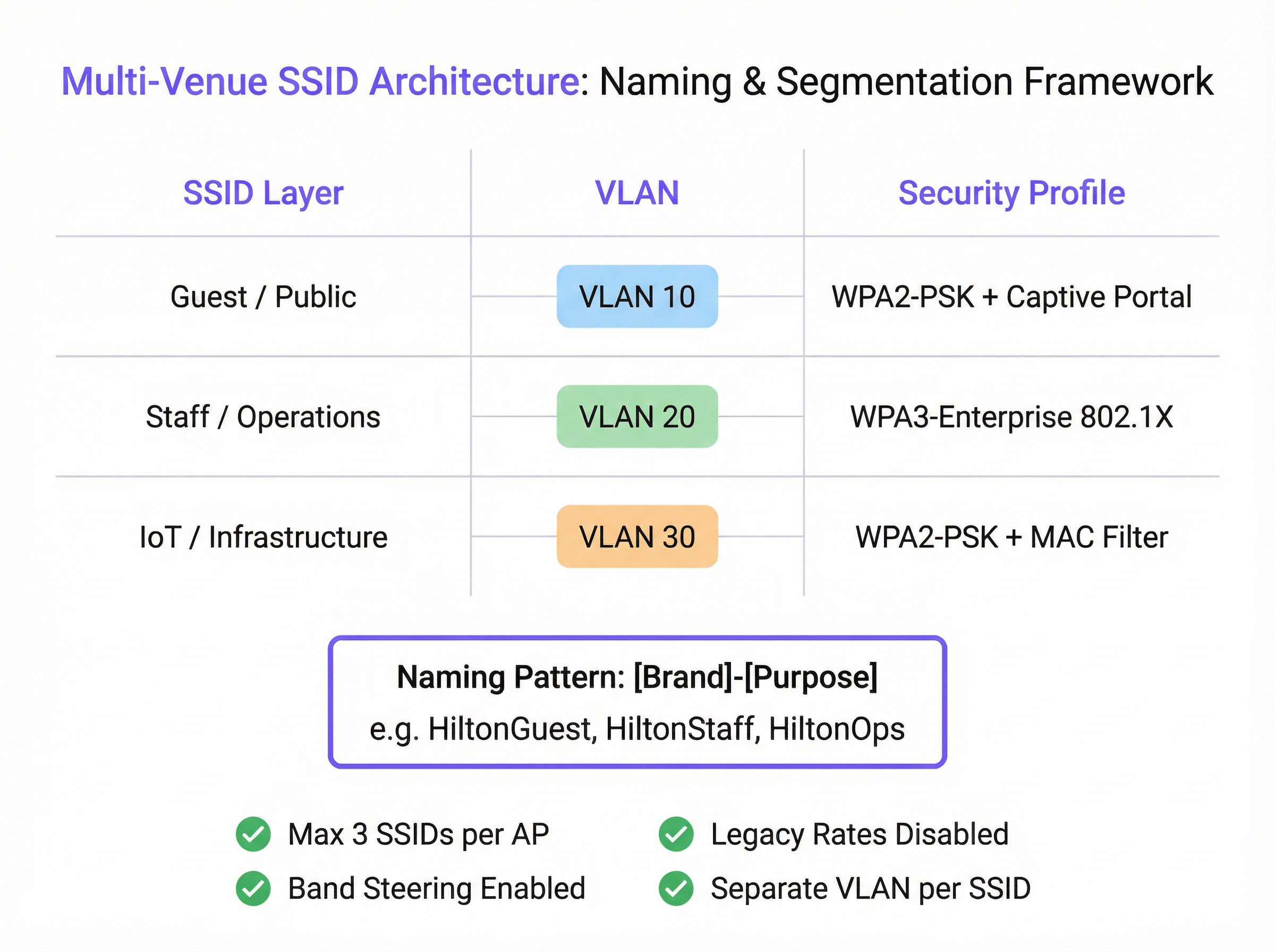
Schritt 2: Entwerfen Sie das VLAN- und IP-Schema Jede Zugriffsebene muss einem dedizierten VLAN zugeordnet werden, um eine vollständige Netzwerksegmentierung zu gewährleisten. Weisen Sie jeder SSID in Ihrem gesamten Bestand eine eindeutige VLAN-ID und ein entsprechendes IP-Subnetz zu. Zum Beispiel:
- Gast-SSID -> VLAN 10 -> 10.10.0.0/16
- Mitarbeiter-SSID -> VLAN 20 -> 10.20.0.0/16
- IoT-SSID -> VLAN 30 -> 10.30.0.0/16 Diese logische Trennung ist grundlegend für die Sicherheit und die Einhaltung von Standards wie PCI DSS.
Schritt 3: Konfigurieren Sie Sicherheitsprofile
- Gast-SSID: Verwenden Sie WPA2-PSK mit einem Captive Portal. Das Portal ist unerlässlich für die Nutzerauthentifizierung, die Präsentation der Allgemeinen Geschäftsbedingungen (für die GDPR-Compliance) und die Schaffung von Möglichkeiten für das Marketing-Engagement. Die Plattform von Purple zeichnet sich durch die Bereitstellung dieser Funktionalität aus.
- Mitarbeiter-SSID: Implementieren Sie WPA3-Enterprise mit 802.1X-Authentifizierung. Dies ist der Goldstandard für die drahtlose Unternehmenssicherheit. Es erfordert, dass jeder Nutzer über eindeutige Anmeldeinformationen verfügt, was die Risiken gemeinsam genutzter Passwörter eliminiert und eine nutzerbezogene Verantwortlichkeit ermöglicht.
- IoT-SSID: Verwenden Sie WPA2-PSK mit einem starken, komplexen Passwort. Fügen Sie nach Möglichkeit eine zusätzliche Sicherheitsebene hinzu, indem Sie eine MAC-Adressen-Whitelist implementieren, um sicherzustellen, dass sich nur vorab genehmigte Geräte verbinden können.
Schritt 4: Standardisieren Sie die SSID-Benennung
Führen Sie eine konsistente, logische Namenskonvention über alle Standorte hinweg ein, um nahtloses Roaming zu erleichtern und das Management zu vereinfachen. Ein empfohlenes Muster ist [Markenname]-[Zweck]. Zum Beispiel: Arena-Guest, Arena-Staff, Arena-POS. Dies vermeidet Verwirrung bei den Nutzern und stellt sicher, dass sich Geräte unabhängig vom Standort automatisch mit dem richtigen Netzwerk verbinden können.
Best Practices
- Die Dreierregel: Als Leitprinzip sollten Sie anstreben, maximal drei SSIDs pro Access Point auszustrahlen. Dies bietet die erforderliche Segmentierung für die meisten Anwendungsfälle und hält gleichzeitig den Management-Traffic auf einem Minimum.
- Deaktivieren Sie Legacy-Raten: Deaktivieren Sie in Ihrem Wireless-Controller alle 802.11b-Datenraten. Stellen Sie die niedrigste obligatorische Datenrate auf 12 Mbit/s oder höher ein, um sicherzustellen, dass Management-Frames effizient übertragen werden.
- Aktivieren Sie Band Steering: Konfigurieren Sie Ihre APs so, dass Dual-Band-Clients aktiv dazu ermutigt werden, sich mit den weniger überlasteten 5-GHz- und 6-GHz-Bändern zu verbinden, um das 2,4-GHz-Band für Legacy-Geräte zu reservieren, die es benötigen.
- SSID-Verfügbarkeit pro AP: Strahlen Sie nicht jede SSID von jedem AP aus. Ein Gastnetzwerk wird möglicherweise nur in öffentlichen Bereichen benötigt, während ein IoT-Netzwerk für Lager-Scanner nur im Lagerraum erforderlich ist. Verwenden Sie AP-spezifische oder gruppenbasierte SSID-Einstellungen, um Broadcasts nur auf die Bereiche zu beschränken, in denen sie notwendig sind.
Fehlerbehebung & Risikominderung
- Symptom: Langsame Performance im Mitarbeiter-Netzwerk nach der Bereitstellung einer neuen Gast-SSID.
- Wahrscheinliche Ursache: Nicht die Gast-SSID selbst, sondern zugrunde liegende Co-Channel-Interferenzen oder die Unterstützung von Legacy-Datenraten. Die zusätzliche Client-Last durch das Gastnetzwerk hat lediglich eine bereits bestehende Schwachstelle aufgedeckt.
- Behebung: Führen Sie ein RF-Audit durch, um Ihren Kanalplan zu validieren. Verwenden Sie einen WiFi-Analyzer, um auf Legacy-Datenraten zu prüfen, und deaktivieren Sie diese im Netzwerk-Controller.
- Symptom: Geräte trennen häufig die Verbindung oder können nicht zwischen APs roamen.
- Wahrscheinliche Ursache: Inkonsistente SSID-Namen oder Sicherheitseinstellungen zwischen den APs. Nicht übereinstimmende Leistungspegel zwischen benachbarten APs können ebenfalls zu „Sticky-Client“-Problemen führen.
- Behebung: Stellen Sie sicher, dass der SSID-Name, der Sicherheitstyp und das VLAN-Tagging über alle APs hinweg, die dieses Netzwerk ausstrahlen, identisch sind. Nutzen Sie die RF-Management-Funktionen Ihres Wireless-Controllers, um die Leistungspegel der APs auszugleichen.
ROI & Business Impact
Eine gut durchdachte SSID-Strategie liefert einen signifikanten ROI, der weit über die reine Konnektivität hinausgeht. Durch die Segmentierung des Gast-Traffics über eine Plattform wie Purple können Standorte wertvolle Besucherfrequenzdaten erfassen, das Besucherverhalten verstehen und zielgerichtete Marketingkampagnen erstellen, wodurch ein Kostenfaktor zum Umsatztreiber wird. Für ein Hotel mit 200 Zimmern kann die Möglichkeit, über ein gebrandetes Captive Portal mit Gästen in Kontakt zu treten, zu einem messbaren Anstieg der Anmeldungen für Treueprogramme und der Direktbuchungen führen. Für eine Einzelhandelskette liefert das Verständnis von Verweildauern und Besuchshäufigkeiten über mehrere Filialen hinweg leistungsstarke Business Intelligence. Ein sicherer, rollenbasierter Zugriff für Mitarbeiter verbessert die betriebliche Effizienz, während ein ordnungsgemäß isoliertes Netzwerk für Zahlungssysteme ein nicht verhandelbarer Bestandteil der PCI-DSS-Compliance ist, wodurch erhebliche finanzielle und rufschädigende Risiken gemindert werden.
Key Terms & Definitions
SSID (Service Set Identifier)
The public name of a WiFi network. It is a human-readable string of up to 32 characters that differentiates one wireless network from another.
IT teams configure SSIDs to provide tailored network access for different user groups, such as 'Guest' or 'Staff'. Consistent naming is crucial for roaming in multi-venue deployments.
Beacon Frame
A management frame sent periodically by an access point to announce its presence and provide network information. Each SSID has its own stream of beacons.
The fear of 'beacon overhead' is often cited as a reason to limit SSID count, but in a well-configured network, their performance impact is negligible.
VLAN (Virtual Local Area Network)
A method of creating logically separate networks on the same physical infrastructure. Traffic on one VLAN is isolated from traffic on another.
VLANs are the primary tool for segmenting different user groups (e.g., Guest vs. Staff) to enhance security and ensure compliance with standards like PCI DSS.
IEEE 802.1X
An IEEE standard for port-based Network Access Control (PNAC). It provides an authentication mechanism for devices wishing to attach to a LAN or WLAN.
This is the foundation of enterprise-grade WiFi security. IT teams use 802.1X with a RADIUS server to grant network access based on individual user credentials, rather than a shared password.
RADIUS (Remote Authentication Dial-In User Service)
A networking protocol that provides centralized Authentication, Authorization, and Accounting (AAA) management for users who connect and use a network service.
In an 802.1X deployment, the RADIUS server is what checks the user's credentials and tells the access point which VLAN and security policy to assign to that user.
Band Steering
A technique used by dual-band access points to encourage capable client devices to connect to the less-congested 5 GHz or 6 GHz frequency bands.
Network architects enable band steering to improve overall network performance by balancing the client load across available frequency bands, freeing up the crowded 2.4 GHz band.
WPA3-Enterprise
The latest generation of WiFi security for enterprise networks, combining the robust authentication of 802.1X with stronger cryptographic protocols.
For any new deployment, CTOs should mandate WPA3-Enterprise for all internal and staff networks to ensure the highest level of security and future-proof the infrastructure.
Captive Portal
A web page that is displayed to newly connected users of a WiFi network before they are granted broader access to network resources.
Venue operators use captive portals on guest networks to present terms of service, capture user data for marketing (with consent), and display branding, often managed through a platform like Purple.
Case Studies
A 200-room hotel needs to provide WiFi for guests, staff, and a new deployment of in-room smart TVs (IoT). They are concerned about performance and PCI DSS compliance for their front-desk payment terminals.
Implement a three-SSID strategy. 1. Guest SSID (HotelGuest): WPA2-PSK with a captive portal on VLAN 10. Apply bandwidth limits per user. 2. Staff SSID (HotelStaff): WPA3-Enterprise with 802.1X on VLAN 20, authenticating against the hotel's directory service. 3. IoT SSID (HotelIoT): WPA2-PSK with a complex key and MAC filtering on VLAN 30 for the smart TVs. The front-desk terminals should be on a separate, wired VLAN and completely isolated from all wireless networks to ensure PCI DSS compliance.
A retail chain with 50 stores wants to standardize its WiFi. They need to support corporate users, store associates with handheld scanners, and a public guest network. Centralized management is key.
Deploy a cloud-managed wireless solution. Use a standardized three-SSID template pushed to all stores. 1. Guest SSID (ShopFreeWiFi): Captive portal on VLAN 100. 2. Staff SSID (ShopStaff): 802.1X on VLAN 110, allowing corporate users and store associates to authenticate with their network credentials. Use RADIUS to assign store associates to a more restrictive security policy. 3. POS SSID (ShopPOS): WPA2-PSK on VLAN 120, with MAC filtering for the handheld scanners and POS devices. Use per-AP SSID availability to ensure the POS SSID is only broadcast in secure staff areas.
Scenario Analysis
Q1. You are taking over a network for a conference center that has 12 different SSIDs, one for each meeting room. Users complain of frequent disconnects when moving between rooms. What is the most likely cause and your first corrective action?
💡 Hint:Consider how client devices handle roaming between access points.
Show Recommended Approach
The most likely cause is the use of unique SSIDs for each room, which breaks client roaming. The first action is to consolidate these into a single 'Conference-Guest' SSID broadcast from all APs. This allows devices to roam seamlessly. Further segmentation for different events can be handled with different pre-shared keys or by using a captive portal with event-specific access codes.
Q2. A stadium is deploying a new high-density WiFi 6E network. They want to provide access for fans, press, and operational staff. How would you structure the SSIDs, and what key feature of the APs would you leverage heavily?
💡 Hint:Think about the different frequency bands available and how to manage congestion.
Show Recommended Approach
I would use a three-SSID model: 'Stadium-Fan', 'Stadium-Press', and 'Stadium-Ops'. I would heavily leverage band steering to push as many capable fan and press devices as possible onto the 6 GHz and 5 GHz bands, leaving the 2.4 GHz band for legacy devices and reducing overall network congestion. The 'Stadium-Press' SSID could have a higher QoS priority and a larger per-client bandwidth limit.
Q3. Your CFO is questioning the expense of a professional RF site survey for a new 5-story office building, suggesting you can 'just add more APs if the signal is weak'. How do you justify the investment in a site survey?
💡 Hint:Focus on the risks and hidden costs of not performing a survey.
Show Recommended Approach
I would explain that 'just adding more APs' without a survey is the primary cause of co-channel interference, which cripples network performance. A professional site survey is not about signal strength alone; it's about creating a precise channel and power plan to ensure APs work together, not against each other. The cost of the survey is a fraction of the productivity lost from a poorly performing network and the expense of troubleshooting and remediating it later. It's a foundational investment in network reliability and performance.
Key Takeaways
- ✓The performance impact of multiple SSIDs is negligible; the real culprits are co-channel interference and legacy data rates.
- ✓Adopt the 'Rule of Three': aim for a maximum of three SSIDs per AP (e.g., Guest, Staff, IoT).
- ✓Use VLANs to segment each SSID, creating logically separate and secure networks on the same hardware.
- ✓Secure staff networks with WPA3-Enterprise and 802.1X for robust, per-user authentication.
- ✓Always disable slow, legacy data rates (below 12 Mbps) to improve management traffic efficiency.
- ✓A professional RF site survey is a non-negotiable prerequisite for any high-performing multi-venue WiFi deployment.
- ✓Standardize SSID naming across all venues to ensure seamless client roaming and simplify management.




