

Mitarbeiter-WiFi: Ein umfassender Leitfaden für den sicheren und effizienten Netzwerkzugriff für Mitarbeiter
A comprehensive technical reference for IT leaders on designing, deploying, and managing secure, high-performance staff WiFi networks. This guide provides actionable best practices for authentication, network segmentation, and bandwidth management to enhance operational efficiency and mitigate security risks.
🎧 Listen to this Guide
View Transcript

Executive Summary
Für jedes moderne Unternehmen im Gastgewerbe, Einzelhandel oder in großen öffentlichen Einrichtungen ist Mitarbeiter-WiFi nicht länger nur eine Annehmlichkeit, sondern eine kritische betriebliche Infrastruktur. Ein gut durchdachtes drahtloses Mitarbeiternetzwerk führt direkt zu höherer Produktivität, verbessertem Kundenservice und einer gestärkten Sicherheitslage. Umgekehrt führt ein schlecht konfiguriertes Netzwerk zu erheblichen Compliance-Risiken, betrieblichen Engpässen und Schwachstellen. Dieser Leitfaden dient als maßgebliche technische Referenz für IT-Manager, Netzwerkarchitekten und CTOs, die mit der Bereitstellung eines sicheren und effizienten drahtlosen Zugangs für Mitarbeiter betraut sind. Er geht über akademische Theorie hinaus und bietet herstellerneutrale, umsetzbare Anleitungen, die auf realen Einsatzszenarien basieren. Wir behandeln die wesentlichen Architekturprinzipien der Netzwerksegmentierung, die entscheidende Bedeutung der IEEE 802.1X-Authentifizierung gegenüber unsicheren Pre-Shared Keys sowie den Business Case für die Migration zum WPA3-Enterprise-Sicherheitsstandard. Darüber hinaus bietet dieses Dokument ein schrittweises Implementierungs-Framework, detaillierte Fallstudien aus relevanten Branchen und praktische Tools zur Messung des Return on Investment (ROI) einer professionell entwickelten Mitarbeiter-WiFi-Lösung. Die wichtigste Erkenntnis ist, dass eine strategische Investition in Mitarbeiter-WiFi eine Investition in das operative Rückgrat des gesamten Unternehmens darstellt.
Technischer Deep-Dive
Der architektonische Imperativ: Segmentierung
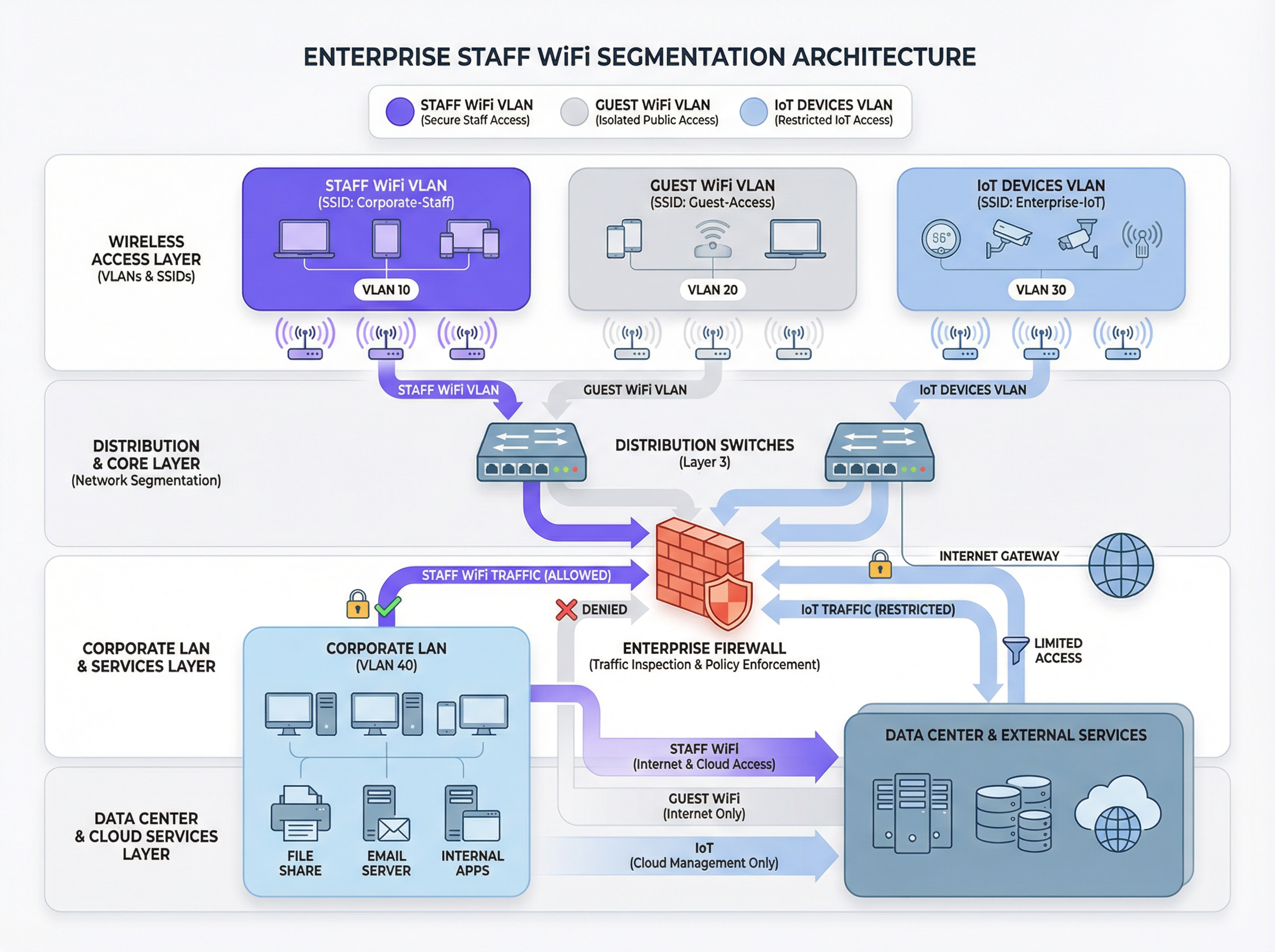
Das Grundprinzip eines sicheren Mitarbeiter-WiFi ist die Netzwerksegmentierung. Ein flaches Netzwerk, in dem Mitarbeitergeräte, Gastgeräte, IoT-Hardware und sensible Back-Office-Systeme koexistieren, stellt ein erhebliches Sicherheitsrisiko dar. Der primäre Mechanismus zur Erreichung der Segmentierung in einer drahtlosen Umgebung ist die Verwendung von VLANs (Virtual Local Area Networks). Jede SSID sollte einem eigenen VLAN zugeordnet werden, wodurch logisch isolierte Broadcast-Domänen entstehen, die auf Netzwerk-Switch-Ebene durchgesetzt werden.
Eine typische Best-Practice-Architektur umfasst mindestens drei separate VLANs:
- Mitarbeiter-VLAN: Für unternehmenseigene und verwaltete Geräte, die von Mitarbeitern genutzt werden. Diesem VLAN wird durch spezifische Firewall-Regeln kontrollierter Zugriff auf interne Ressourcen wie Dateiserver, Point-of-Sale (POS)-Systeme und Property Management Systeme (PMS) gewährt.
- Gast-VLAN: Für den öffentlichen WiFi-Zugang. Dieses VLAN muss vollständig von allen internen Unternehmensressourcen isoliert sein. Der Datenverkehr aus diesem VLAN sollte direkt ins Internet geleitet werden, wobei die Client-Isolierung aktiviert sein muss, um zu verhindern, dass Gastgeräte miteinander kommunizieren.
- IoT-VLAN: Für „Headless“-Geräte wie Überwachungskameras, Digital Signage und HLK-Systeme. Diese Geräte verfügen oft über einfachere Sicherheitsfunktionen und sollten in einem eigenen Netzwerksegment mit äußerst restriktiven Regeln isoliert werden, die nur den Zugriff auf die spezifischen Server erlauben, die sie für ihre Funktion benötigen.
Dieser segmentierte Ansatz ist nicht nur eine Empfehlung; für jedes Unternehmen, das dem Payment Card Industry Data Security Standard (PCI DSS) unterliegt, ist er eine zwingende Anforderung [1]. Die fehlende Segmentierung der Karteninhaber-Datenumgebung von anderen Netzwerken stellt einen schwerwiegenden Compliance-Verstoß dar.
Authentifizierung und Zugriffskontrolle: Jenseits des Pre-Shared Key
Der häufigste und kritischste Fehler bei der Bereitstellung von Mitarbeiter-WiFi ist die Verwendung eines einzigen Pre-Shared Key (PSK) für alle Mitarbeiter. Obwohl ein PSK einfach einzurichten ist, bietet er keine individuelle Verantwortlichkeit und stellt ein erhebliches Sicherheitsrisiko dar, wenn ein Mitarbeiter das Unternehmen verlässt. Die Branchenstandardlösung ist IEEE 802.1X, die eine portbasierte Netzwerkzugriffskontrolle bietet.
In einer 802.1X-Bereitstellung fungiert ein zentraler RADIUS (Remote Authentication Dial-In User Service)-Server als Authentifizierungsinstanz. Der Workflow sieht wie folgt aus:
- Supplicant (Client-Gerät): Das Gerät des Mitarbeiters fordert Zugriff auf die Mitarbeiter-SSID an.
- Authenticator (Wireless Access Point): Der AP fängt die Anfrage ab und fragt nach den Anmeldeinformationen.
- Authentifizierungsserver (RADIUS): Der AP leitet die Anmeldeinformationen an den RADIUS-Server weiter, der sie gegen ein Benutzerverzeichnis (z. B. Active Directory, LDAP oder einen Cloud-Identitätsanbieter wie Azure AD oder Okta) validiert.
- Autorisierung: Nach erfolgreicher Authentifizierung sendet der RADIUS-Server eine
Access-Accept-Nachricht an den AP zurück, der dem Gerät dann Zugriff auf das Netzwerk gewährt. Der RADIUS-Server kann auch Autorisierungsattribute wie eine spezifische VLAN-ID oder ein Quality-of-Service-Profil zurückgeben, was eine rollenbasierte Zugriffskontrolle ermöglicht.
Dieses Modell bietet eine benutzerbezogene Authentifizierung und einen detaillierten Audit-Trail, was für Sicherheitsuntersuchungen und Compliance-Reporting unerlässlich ist.
Sicherheitsprotokolle: WPA2-Enterprise vs. WPA3-Enterprise
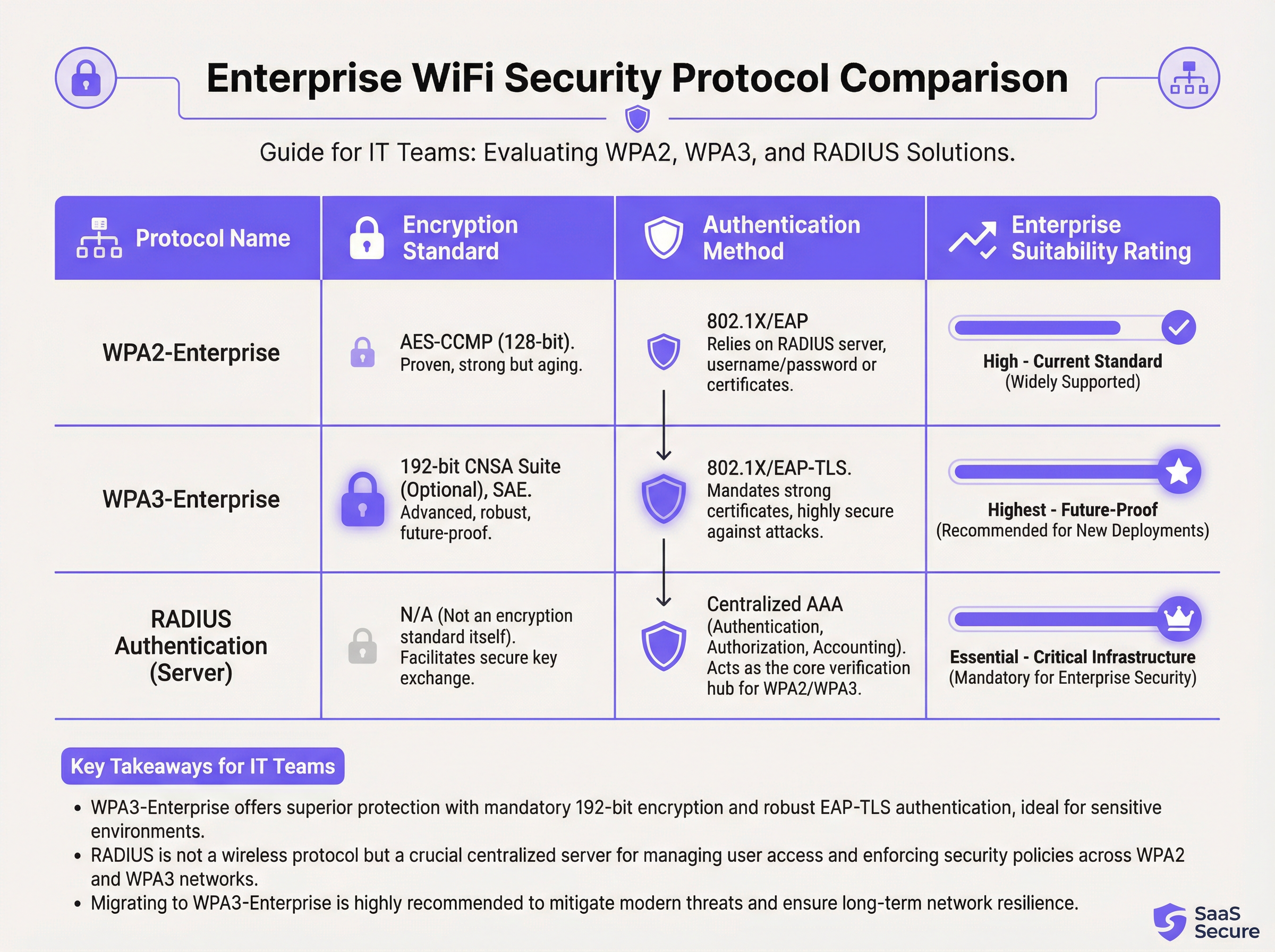
Während 802.1X die Authentifizierung übernimmt, muss der drahtlose Datenverkehr selbst verschlüsselt werden. Die Wahl des Protokolls hat erhebliche Auswirkungen auf die Sicherheit.
- WPA2-Enterprise (Wi-Fi Protected Access 2): Der langjährige Unternehmensstandard, der eine 128-Bit-AES-CCMP-Verschlüsselung verwendet. Er ist robust und wird weithin unterstützt. Er ist jedoch anfällig für Offline-Wörterbuchangriffe, wenn ein Angreifer den anfänglichen Four-Way-Handshake abfangen kann.
- WPA3-Enterprise (Wi-Fi Protected Access 3): Die aktuelle Sicherheitsgeneration. Sie ersetzt den WPA2-Handshake durch Simultaneous Authentication of Equals (SAE), das resistent gegen Offline-Wörterbuchangriffe ist. WPA3-Enterprise schreibt außerdem die Verwendung von Protected Management Frames (PMF) vor, um das Abhören und Fälschen von Management-Datenverkehr zu verhindern. Für Hochsicherheitsumgebungen bietet es eine optionale 192-Bit-Sicherheitssuite, die auf die Commercial National Security Algorithm (CNSA) Suite abgestimmt ist [2].
Für alle Neuimplementierungen oder Hardware-Aktualisierungen sollte WPA3-Enterprise der Standard sein. Die Sicherheitsvorteile überwiegen den minimalen Implementierungsaufwand bei Weitem, vorausgesetzt, die Client-Geräte und die Infrastruktur unterstützen dies.
Implementierungsleitfaden
Die Bereitstellung eines sicheren und effizienten Mitarbeiter-WiFi-Netzwerks ist ein mehrstufiger Prozess, der sorgfältige Planung erfordert.
Phase 1: Bestandsaufnahme und Design
- Audit der bestehenden Infrastruktur: Identifizieren Sie alle Geräte, die drahtlosen Zugriff benötigen, und kategorisieren Sie diese (Mitarbeiter, Gast, IoT, BYOD).
- Zugriffsrichtlinien definieren: Definieren Sie für jede Kategorie, auf welche Netzwerkressourcen zugegriffen werden muss. Erstellen Sie eine Richtlinienmatrix, die als Grundlage für Ihre Firewall-Regeln dient.
- VLAN- und IP-Schema entwerfen: Entwerfen Sie Ihre VLAN-Architektur und weisen Sie jedem VLAN IP-Subnetze zu. Stellen Sie sicher, dass Ihre Core-Netzwerk-Switches und Router so konfiguriert sind, dass sie die neuen VLANs unterstützen.
Phase 2: Bereitstellung der Infrastruktur
- RADIUS-Server bereitstellen: Richten Sie einen primären und einen sekundären RADIUS-Server für Redundanz ein. Integrieren Sie diese in Ihr gewähltes Benutzerverzeichnis.
- Wireless LAN Controller (WLC) konfigurieren: Erstellen Sie die neuen SSIDs (z. B.
Staff-Secure,Guest-WiFi). Konfigurieren Sie die Mitarbeiter-SSID für WPA3-Enterprise mit 802.1X-Authentifizierung und verweisen Sie auf Ihre RADIUS-Server. - SSIDs VLANs zuordnen: Stellen Sie sicher, dass jede SSID korrekt mit ihrer entsprechenden VLAN-ID getaggt ist.
Phase 3: Tests und Rollout
- Pilottests: Nehmen Sie eine kleine Gruppe von IT- und Betriebsmitarbeitern in ein Pilotprogramm auf. Testen Sie die Authentifizierung, den Zugriff auf Ressourcen und die Roaming-Leistung.
- Geräte-Onboarding: Entwickeln Sie einen klaren Prozess für die Registrierung neuer und bestehender Geräte. Für unternehmenseigene Geräte sollte dies über eine Mobile Device Management (MDM)-Plattform automatisiert werden.
- Vollständiger Rollout: Sobald die Pilottests erfolgreich sind, fahren Sie mit einem phasenweisen Rollout im gesamten Unternehmen fort. Stellen Sie klare Dokumentationen und Support für Endbenutzer bereit.
Phase 4: Überwachung und Optimierung
- Monitoring implementieren: Verwenden Sie eine Network-Intelligence-Plattform wie Purple, um Erfolgs-/Fehlerraten bei der Authentifizierung, die Netzwerkleistung und die Aktivitäten auf Geräteebene zu überwachen.
- QoS konfigurieren: Implementieren Sie Quality-of-Service-Richtlinien, um kritische Anwendungen (z. B. Sprache, POS-Datenverkehr) zu priorisieren und zu verhindern, dass nicht wesentlicher Datenverkehr die gesamte verfügbare Bandbreite verbraucht.
- Regelmäßige Audits: Planen Sie vierteljährliche Überprüfungen von Firewall-Regeln, Benutzerzugriffsrechten und Netzwerkleistungsmetriken.
Best Practices
- Zertifikatsbasierte Authentifizierung erzwingen: Verwenden Sie für unternehmenseigene Geräte EAP-TLS, das auf digitalen Zertifikaten anstelle von Benutzernamen und Passwörtern basiert. Dies eliminiert das Risiko von Credential-Phishing und bietet die stärkste Form der Authentifizierung.
- Fast Roaming (802.11r) implementieren: Stellen Sie in großen Veranstaltungsorten ein schnelles und nahtloses Roaming zwischen Access Points sicher, um Verbindungsabbrüche bei mobilen Mitarbeitern zu vermeiden.
- BYOD-Datenverkehr isolieren: Wenn Sie Mitarbeitern erlauben, persönliche Geräte zu verbinden (Bring Your Own Device), platzieren Sie diese in einem separaten, restriktiveren VLAN als unternehmenseigene Geräte.
- Regelmäßige RF-Surveys durchführen: Führen Sie Hochfrequenzmessungen (RF-Surveys) durch, um Störquellen zu identifizieren und zu mindern sowie eine optimale AP-Platzierung für Abdeckung und Kapazität sicherzustellen.
- Veraltete Protokolle deaktivieren: Deaktivieren Sie veraltete und unsichere Protokolle wie WEP, WPA und TKIP aktiv in Ihrer drahtlosen Infrastruktur.
Fehlerbehebung & Risikominderung
| Häufiges Problem | Grundursache | Minderungsstrategie |
|---|---|---|
| Authentifizierungsfehler | Falsche Anmeldeinformationen, abgelaufene Zertifikate, Ausfall des RADIUS-Servers. | Implementieren Sie ein robustes Monitoring auf RADIUS-Servern. Verwenden Sie MDM, um die Zertifikatserneuerung zu automatisieren. Bieten Sie Benutzern klare Anleitungen zur Verwaltung von Anmeldeinformationen. |
| Schlechte Roaming-Leistung | Fehlende Unterstützung für 802.11r/k/v, falsch konfigurierte AP-Leistungspegel. | Stellen Sie sicher, dass Controller und APs für Fast-Roaming-Standards konfiguriert sind. Führen Sie nach der Bereitstellung einen RF-Survey durch, um die AP-Einstellungen zu optimieren. |
| Netzwerküberlastung | Unzureichende Bandbreite, fehlendes QoS, Sättigung durch nicht wesentlichen Datenverkehr. | Implementieren Sie QoS-Richtlinien, um kritischen Datenverkehr zu priorisieren. Verwenden Sie eine Netzwerk-Analyseplattform, um bandbreitenintensive Anwendungen zu identifizieren und zu drosseln. |
| Rogue Access Points | Nicht autorisierte APs, die von Mitarbeitern an das Unternehmensnetzwerk angeschlossen wurden. | Aktivieren Sie die Erkennung von Rogue APs auf Ihrem Wireless Controller. Verwenden Sie 802.1X-Port-Sicherheit auf kabelgebundenen Switches, um zu verhindern, dass nicht autorisierte Geräte Netzwerkzugriff erhalten. |
ROI & Geschäftsauswirkungen
Die Investition in ein sicheres Mitarbeiter-WiFi-Netzwerk liefert messbare Erträge in mehreren Bereichen:
- Gesteigerte Produktivität: Zuverlässiges, leistungsstarkes WiFi ermöglicht es Mitarbeitern, mobile Anwendungen zu nutzen, auf Informationen zuzugreifen und ohne Unterbrechung zu kommunizieren, was die betriebliche Effizienz direkt verbessert. Eine Studie der Wi-Fi Alliance ergab, dass WiFi jährlich über 5 Billionen US-Dollar zum globalen wirtschaftlichen Wert beiträgt [3].
- Reduzierte Sicherheitsvorfälle: Eine ordnungsgemäße Segmentierung und starke Authentifizierung reduzieren die Angriffsfläche drastisch, was zu weniger Sicherheitsvorfällen, geringeren Behebungskosten und einem verringerten Risiko kostspieliger Datenschutzverletzungen führt.
- Optimierte Compliance: Ein 802.1X-basiertes Netzwerk mit detaillierter Protokollierung vereinfacht Compliance-Audits für Standards wie PCI DSS, GDPR und HIPAA und spart Hunderte von Arbeitsstunden.
- Erhöhte geschäftliche Agilität: Eine skalierbare und sichere drahtlose Grundlage ermöglicht die schnelle Bereitstellung neuer Mobile-First-Initiativen, von der Bestellung am Tisch in Restaurants bis hin zu mobilen Point-of-Sale-Systemen im Einzelhandel.
Um den ROI zu berechnen, vergleichen Sie die Gesamtbetriebskosten (Total Cost of Ownership, TCO) der neuen Infrastruktur mit den quantifizierbaren Vorteilen, wie z. B. der durch verbesserte Effizienz eingesparten Zeit, der Kostenvermeidung einer potenziellen Datenschutzverletzung und den reduzierten Kosten für Compliance-Audits.
Referenzen
[1] PCI Security Standards Council. (2022). Payment Card Industry Data Security Standard (PCI DSS) v4.0. https://www.pcisecuritystandards.org/documents/PCI-DSS-v4_0.pdf [2] Wi-Fi Alliance. (2024). WPA3™ Specification. https://www.wi-fi.org/discover-wi-fi/security [3] Wi-Fi Alliance. (2021). The Global Economic Value of Wi-Fi. https://www.wi-fi.org/file/the-global-economic-value-of-wi-fi
Key Terms & Definitions
IEEE 802.1X
An IEEE standard for port-based Network Access Control (PNAC). It provides an authentication mechanism to devices wishing to attach to a LAN or WLAN.
This is the core technology that enables per-user authentication on a WiFi network, moving away from insecure shared passwords. IT teams implement 802.1X to meet compliance requirements and enable robust access control.
RADIUS
A networking protocol that provides centralized Authentication, Authorization, and Accounting (AAA) management for users who connect and use a network service.
The RADIUS server is the 'brain' of an 802.1X deployment. It checks the user's credentials against a directory and tells the access point whether to allow or deny access. A failed RADIUS server means no one can log in.
VLAN
A Virtual Local Area Network is any broadcast domain that is partitioned and isolated in a computer network at the data link layer (OSI layer 2).
VLANs are the primary tool for segmenting a network. IT teams use VLANs to create separate, isolated networks for staff, guests, and IoT devices on the same physical hardware, preventing traffic from one from spilling over into another.
WPA3-Enterprise
The third generation of the Wi-Fi Protected Access security protocol, designed for enterprise environments. It uses 192-bit encryption and replaces the PSK handshake with Simultaneous Authentication of Equals (SAE).
This is the current, most secure standard for enterprise WiFi. Network architects should specify WPA3-Enterprise for all new deployments to protect against modern threats and ensure long-term security.
EAP-TLS
Extensible Authentication Protocol-Transport Layer Security. An EAP method that uses digital certificates for mutual authentication between the client and the server.
This is the gold standard for 802.1X authentication. Instead of a user typing a password, the device presents a certificate that is cryptographically verified. It is immune to phishing and credential theft.
QoS (Quality of Service)
The use of mechanisms or technologies to control traffic and ensure the performance of critical applications to the level required by the business.
In a staff WiFi context, QoS is used to prioritize applications like voice calls or payment processing over less important traffic like software updates or web browsing, ensuring operational systems are always responsive.
Client Isolation
A security feature on a wireless access point that prevents wireless clients connected to the same AP from communicating with each other.
This is a mandatory feature for guest WiFi networks. It prevents a malicious guest from attacking another guest's device on the same network. It should be enabled on all non-staff VLANs.
PCI DSS
The Payment Card Industry Data Security Standard is an information security standard for organizations that handle branded credit cards from the major card schemes.
For any business that processes, stores, or transmits credit card information, PCI DSS compliance is mandatory. A key requirement is the segmentation of the network that handles card data from all other networks, which directly impacts staff WiFi design.
Case Studies
A 300-room luxury hotel needs to upgrade its staff WiFi network. The current system uses a single PSK for all staff, including front desk, housekeeping, and management. The hotel uses a cloud-based Property Management System (PMS) and has corporate-owned tablets for housekeeping staff and BYOD for most other employees. They must comply with PCI DSS.
- Architecture: Design a three-VLAN architecture:
VLAN 10 (Staff-Corp)for corporate tablets,VLAN 20 (Staff-BYOD)for personal devices, andVLAN 30 (Guest). - Authentication: Deploy a redundant cloud-based RADIUS solution integrated with the hotel's Azure AD. Configure two SSIDs:
Hotel-Staffusing WPA3-Enterprise with EAP-TLS (certificate-based) for the corporate tablets, andHotel-BYODusing WPA2-Enterprise with PEAP-MSCHAPv2 (credential-based) for personal devices. - Access Control: The
Staff-CorpVLAN is granted access to the PMS cloud endpoints and internal management systems. TheStaff-BYODVLAN is only allowed internet access and access to the PMS cloud endpoints. TheGuestVLAN is completely isolated and routes directly to the internet. - Onboarding: Use the hotel's MDM (e.g., Intune) to automatically provision certificates and the
Hotel-Staffprofile to all corporate tablets. Provide a self-service portal for BYOD users to connect to theHotel-BYODnetwork after authenticating with their Azure AD credentials.
A retail chain with 50 stores wants to deploy staff WiFi for inventory management scanners and manager tablets. The scanners are ruggedized Android devices, and the tablets are iPads. The primary goal is to ensure reliable connectivity in both the front-of-store and back-of-house/stockroom areas, with secure access to the central inventory management system.
- RF Design: Conduct a predictive RF survey for a template store layout, focusing on achieving -67 dBm or better signal strength in all operational areas, especially the dense shelving of the stockroom. Plan for sufficient AP density to handle the capacity of all devices operating concurrently.
- Network Design: Implement a standardized two-VLAN staff architecture across all stores:
VLAN 50 (Scanners)andVLAN 60 (Management). Both SSIDs will use WPA3-Enterprise with 802.1X authentication against a central RADIUS server located at the corporate data center. - Authentication: Use certificate-based authentication (EAP-TLS) for both the Android scanners and the iPads, managed via an MDM platform. This avoids staff having to type complex passwords on devices without full keyboards.
- QoS: Configure QoS policies to prioritize the inventory management application's traffic over any other traffic on the network. This ensures that scanner updates and lookups are always responsive, even during busy periods.
- Roaming: Enable 802.11r (Fast BSS Transition) to ensure the inventory scanners, which are constantly in motion, can roam seamlessly between access points without dropping their connection to the inventory system.
Scenario Analysis
Q1. A large conference center is hosting a high-profile tech event with 1,000 attendees and 200 event staff. The staff need reliable access to an event management app, while attendees need basic internet access. How would you structure the wireless network to ensure the staff app remains performant?
💡 Hint:Consider both segmentation and bandwidth management.
Show Recommended Approach
Deploy at least two SSIDs: Event-Staff and Event-Guest. The Event-Staff SSID would be on its own VLAN with WPA2/3-Enterprise authentication. Crucially, implement QoS policies to prioritize the event management app's traffic and assign a guaranteed minimum bandwidth (e.g., 20% of total capacity) to the Staff VLAN. The Event-Guest SSID would be on an isolated VLAN with a per-client bandwidth limit to prevent attendees from impacting staff network performance.
Q2. Your CFO has questioned the expense of deploying a RADIUS server, suggesting that a complex, rotating PSK would be sufficient for the 150 employees in your office. How do you justify the need for 802.1X?
💡 Hint:Focus on accountability, compliance, and operational overhead.
Show Recommended Approach
The justification has three parts: 1. Accountability: With a PSK, all actions are anonymous. With 802.1X, every connection is logged against a specific user, which is essential for security incident response. 2. Compliance: Many regulatory frameworks (like PCI DSS or HIPAA) require individual accountability, making a shared key non-compliant. 3. Operational Efficiency: With 802.1X, terminating an employee's access is as simple as disabling their Active Directory account. With a PSK, the entire key must be changed and redistributed to all 149 other employees, which is inefficient and disruptive.
Q3. You are deploying a new staff WiFi network in a hospital. The primary users are doctors and nurses using corporate-owned tablets to access patient records (EHR). What is the single most effective security configuration you can implement, and why?
💡 Hint:Think beyond just encryption. How do you provide the strongest possible authentication for sensitive data?
Show Recommended Approach
The single most effective configuration is WPA3-Enterprise with EAP-TLS (certificate-based) authentication. The use of WPA3 provides the strongest available encryption. However, the critical element is EAP-TLS. By using device-specific digital certificates managed by an MDM platform, you eliminate passwords entirely for this user group. This prevents credential theft via phishing or social engineering, which is a major attack vector. Given the sensitivity of patient data (EHR), removing the password from the equation provides a fundamental security uplift that credential-based methods cannot match.
Key Takeaways
- ✓Staff WiFi is not a convenience; it is critical operational infrastructure.
- ✓Always segment staff, guest, and IoT traffic using separate VLANs.
- ✓Use IEEE 802.1X with a RADIUS server for authentication; never use a Pre-Shared Key (PSK).
- ✓Deploy WPA3-Enterprise for all new networks to ensure the strongest encryption.
- ✓For corporate-owned devices, use certificate-based authentication (EAP-TLS) to eliminate password-related risks.
- ✓Implement Quality of Service (QoS) to prioritize critical applications and guarantee performance.
- ✓A well-architected staff WiFi network delivers measurable ROI through increased productivity and reduced security risk.




