

Der ultimative Leitfaden zur WiFi-Kanalauswahl: Leistung optimieren und Interferenzen vermeiden
This guide provides a comprehensive, step-by-step explanation of how to change WiFi channels on different routers and operating systems. It covers the reasons for changing channels (interference, congestion), how to identify the least congested channels using WiFi analyzer tools (with specific recommendations and screenshots), and the potential impact on network performance. It differentiates itself by offering practical advice for both home and business users, including advanced configurations and troubleshooting tips for common issues.
🎧 Listen to this Guide
View Transcript
Executive Summary
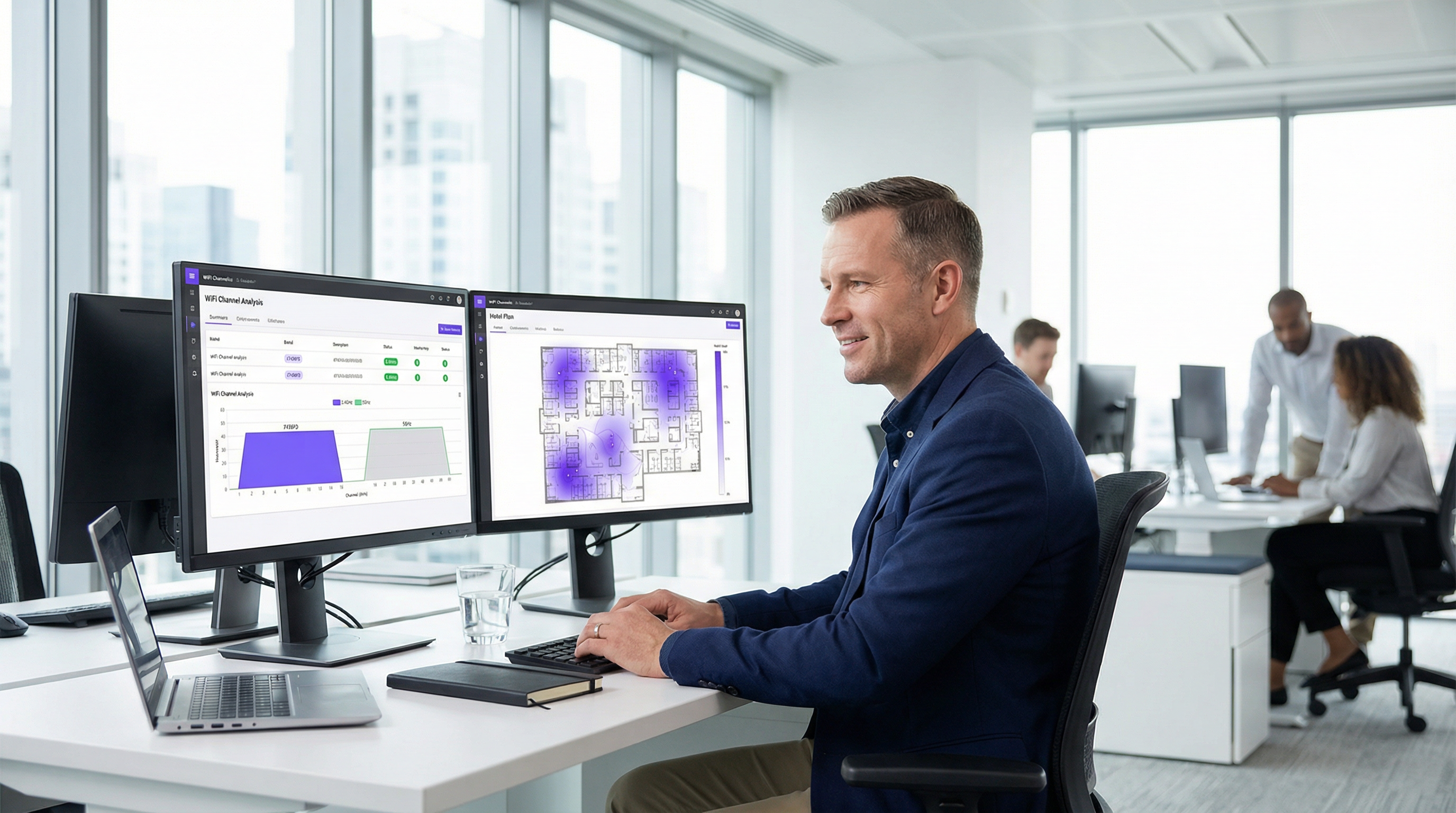
Für IT-Führungskräfte, die die Konnektivität in stark frequentierten gewerblichen Veranstaltungsorten verwalten, ist eine suboptimale WiFi-Leistung nicht nur eine bloße Unannehmlichkeit; sie ist ein direktes Hindernis für Umsatz und betriebliche Effizienz. Dieser Leitfaden bietet ein maßgebliches, umsetzbares Framework für die WiFi-Kanalauswahl, das über akademische Theorie hinausgeht und praktische Anleitungen für die Bereitstellung liefert. Wir behandeln die allgegenwärtigen Herausforderungen von Hochfrequenz-Interferenzen (RF) und Kanalüberlastungen, die den Netzwerkdurchsatz und die Zuverlässigkeit in dichten Umgebungen wie Hotels, Einzelhandelsketten und Stadien beeinträchtigen. Die Kernthese lautet, dass eine bewusste, datengesteuerte Kanalmanagement-Strategie keine optionale Anpassung ist, sondern ein grundlegender Bestandteil einer drahtlosen Architektur auf Enterprise-Niveau. Durch die Beherrschung der Prinzipien überlappungsfreier Kanäle im 2,4-GHz-Band, die strategische Nutzung von Kanalbreiten im 5-GHz-Band und das Verständnis der betrieblichen Auswirkungen der Dynamic Frequency Selection (DFS) können Netzwerkarchitekten Risiken mindern, die Benutzererfahrung verbessern und den ROI ihrer drahtlosen Infrastruktur maximieren. Diese Referenz bietet den technischen Deep-Dive, herstellerneutrale Implementierungsschritte und eine Analyse der geschäftlichen Auswirkungen, die erforderlich sind, um ein robustes Kanaloptimierungsprojekt zu rechtfertigen und durchzuführen.
Technischer Deep-Dive
Das Hochfrequenzspektrum (RF) ist eine begrenzte, gemeinsam genutzte Ressource, die physikalischen Gesetzen und regulatorischen Vorgaben unterliegt. Ein effektives WiFi-Kanalmanagement hängt von einem tiefen Verständnis darüber ab, wie dieses Spektrum zugewiesen wird und welche inhärenten Eigenschaften die primären Frequenzbänder aufweisen: 2,4 GHz und 5 GHz.
Das 2,4-GHz-Band: Ein überfüllter Frequenzbereich
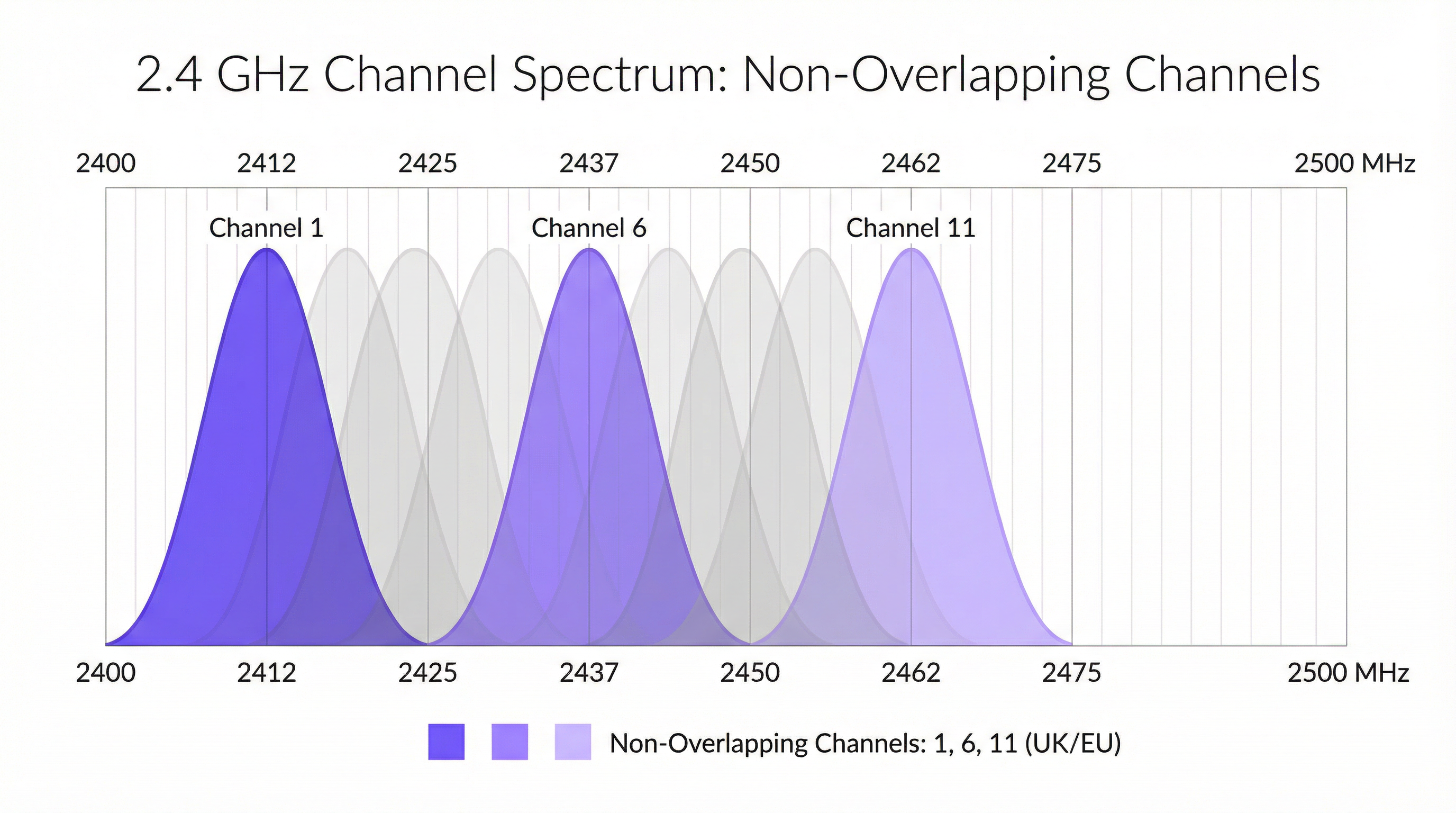
Das 2,4-GHz-Band ist das bewährte Arbeitstier des WiFi und bietet eine hervorragende Signalausbreitung und Wanddurchdringung. Es ist jedoch bekanntermaßen überfüllt und anfällig für Interferenzen. In Großbritannien und Europa ist dieses Band in 13 Kanäle unterteilt, die sich jedoch aufgrund ihres geringen Abstands (5 MHz) und ihrer Breite (20-22 MHz) erheblich überlappen. Dies führt zu Nachbarkanal- und Gleichkanalinterferenzen, bei denen Access Points (APs) sich quasi gegenseitig überschreien, was Datenpakete beschädigt und Neuübertragungen erzwingt. Die einzige Möglichkeit, dies zu mindern, ist die Nutzung der drei überlappungsfreien Kanäle: 1, 6 und 11. Dies ist eine nicht verhandelbare Best Practice für jede professionelle Bereitstellung. Jeder AP, der auf einen anderen Kanal als 1, 6 oder 11 konfiguriert ist, trägt aktiv zur Spektrumsverschmutzung bei.
Darüber hinaus ist das 2,4-GHz-Band ein unlizenziertes Spektrum, was bedeutet, dass es unzähligen anderen Geräten frei zur Verfügung steht, darunter Bluetooth-Peripheriegeräte, Mikrowellenherde, schnurlose Telefone und Zigbee-basierte IoT-Sensoren. Diese Nicht-WiFi-Interferenz fügt eine weitere Ebene unvorhersehbaren Rauschens hinzu, die die Leistung erheblich beeinträchtigen kann.
Das 5-GHz-Band: Die Hochgeschwindigkeitsautobahn
Das 5-GHz-Band ist der Schlüssel zu hochleistungsfähigem WiFi. Es bietet deutlich mehr Kanäle (über 20 in Großbritannien), die sich konstruktionsbedingt nicht überlappen, und leidet unter weitaus weniger Nicht-WiFi-Interferenzen. Dies macht es zur zwingenden Wahl für bandbreitenintensive Anwendungen wie Video-Streaming, Voice-over-IP (VoIP) und große Dateiübertragungen. Die höherfrequenten Signale haben jedoch eine geringere Reichweite und werden durch physische Hindernisse wie Wände und Böden leichter gedämpft.
Innerhalb des 5-GHz-Bandes können Netzwerkarchitekten auch die Kanalbreite konfigurieren, um den Durchsatz zu erhöhen:
- 20 MHz: Die Basisbreite. Bietet das geringste Interferenzpotenzial und ist ideal für Umgebungen mit hoher Dichte, in denen viele APs am selben Standort platziert sind.
- 40 MHz: Bündelt zwei 20-MHz-Kanäle. Verdoppelt die potenzielle Datenrate, verdoppelt aber auch den Spektrumsbedarf, was es anfälliger für Interferenzen macht.
- 80 MHz: Bündelt vier 20-MHz-Kanäle. Bietet sehr hohe Datenraten, sollte aber nur in sauberen RF-Umgebungen mit geringer AP-Dichte verwendet werden.
- 160 MHz: Bündelt acht 2,4-GHz-Kanäle. Obwohl von 802.11ac/ax unterstützt, ist dies in Unternehmensumgebungen aufgrund des massiven Spektrumsverbrauchs selten praktikabel.
Dynamic Frequency Selection (DFS)
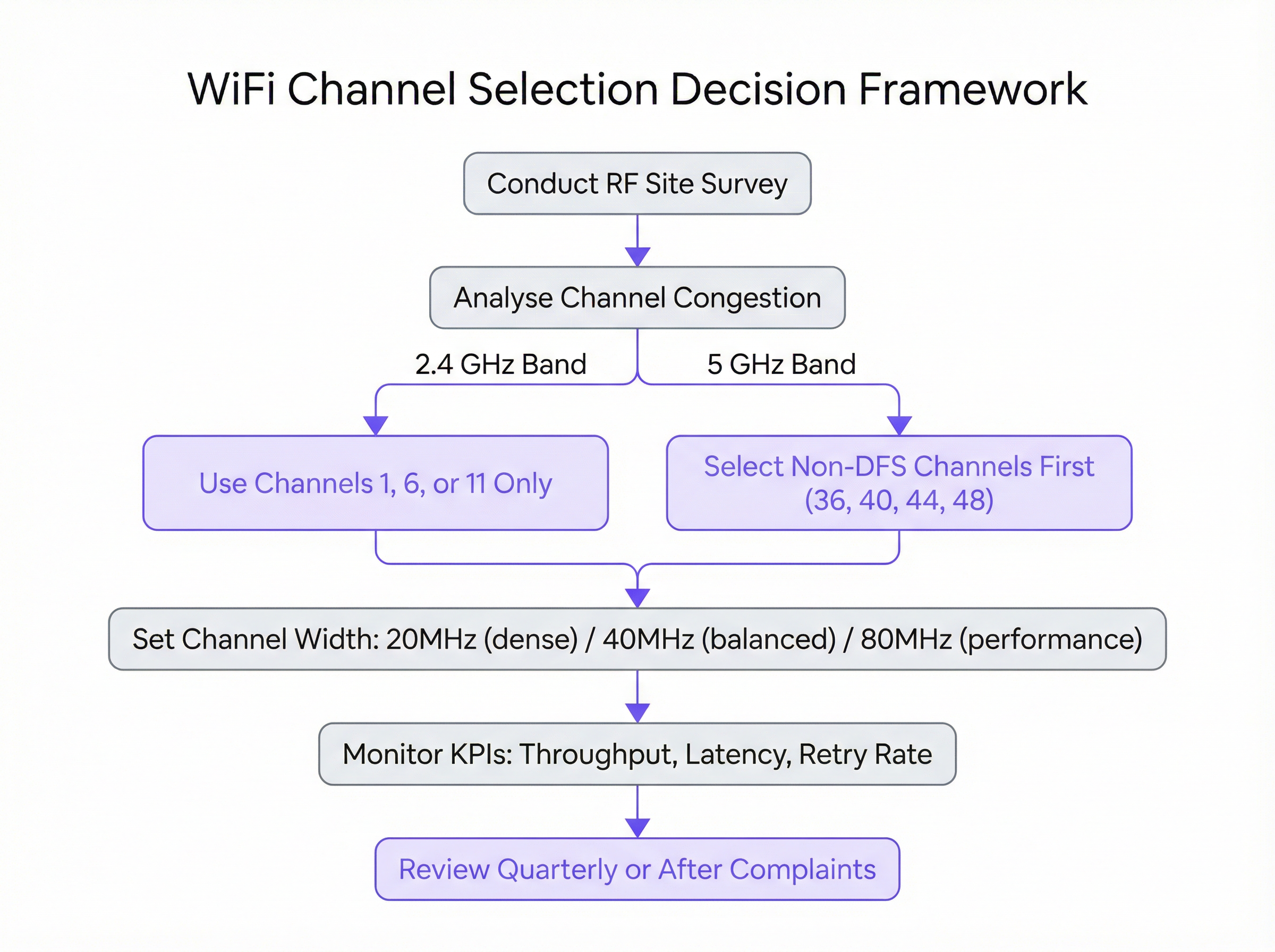
Ein kritischer Aspekt im 5-GHz-Band ist die Dynamic Frequency Selection (DFS). Bestimmte Kanäle in den UNII-2- und UNII-2e-Bändern werden mit Wetter- und Militärradarsystemen geteilt. Der IEEE 802.11h-Standard schreibt vor, dass ein AP, wenn er ein Radarsignal auf einem DFS-Kanal erkennt, diesen Kanal sofort für mindestens 30 Minuten räumen muss. Für Benutzer kann dies zu einem abrupten, wenn auch kurzen Verbindungsabbruch führen. Während DFS-Kanäle eine große Menge an zusätzlichem Spektrum eröffnen, erfordert ihre Nutzung eine sorgfältige Planung. Eine Standortuntersuchung ist unerlässlich, um das Risiko von Radarereignissen an einem bestimmten Standort zu bestimmen. Für geschäftskritische Bereitstellungen ist es oft ratsam, APs zunächst auf Nicht-DFS-Kanäle (z. B. 36, 40, 44, 48) zu beschränken, um maximale Stabilität zu gewährleisten.
Implementierungsleitfaden
Der Übergang von der Theorie in eine Live-Produktionsumgebung erfordert einen methodischen, risikoaversen Ansatz. Die folgenden Schritte bieten eine herstellerneutrale Blaupause für die Durchführung einer Kanalplan-Aktualisierung.
Schritt 1: Durchführung einer Baseline-RF-Standortuntersuchung Bevor Sie Änderungen vornehmen, müssen Sie Ihre aktuelle RF-Umgebung verstehen. Führen Sie mit einem professionellen WiFi-Analyse-Tool (z. B. Ekahau, NetSpot oder den integrierten Tools in Ihrem Enterprise-WLAN-Controller) während der Hauptbetriebszeiten eine umfassende Standortuntersuchung durch. Ziel ist es, alle vorhandenen WiFi-Netzwerke abzubilden und deren Kanäle, Signalstärken (RSSI) und Kanalbreiten zu identifizieren. Diese Daten bilden die empirische Grundlage Ihres neuen Kanalplans.
Schritt 2: Entwicklung des Kanalplans Erstellen Sie auf Basis der Standortuntersuchung einen formalen Kanalplan.
- Für 2,4 GHz: Weisen Sie die Kanäle 1, 6 und 11 in einem rotierenden Muster über Ihre APs hinweg zu und stellen Sie sicher, dass keine zwei benachbarten APs denselben Kanal nutzen. Ziel ist es, die physische Entfernung zwischen APs auf demselben Kanal zu maximieren.
- Für 5 GHz: Beginnen Sie damit, jedem AP eindeutige Nicht-DFS-Kanäle mit einer Breite von 20 MHz zuzuweisen. Wenn Sie mehr APs als verfügbare Nicht-DFS-Kanäle haben, können Sie beginnen, Kanäle wiederzuverwenden, wobei Sie erneut auf maximale physische Trennung achten. Ziehen Sie Kanalbreiten von 40 MHz oder 80 MHz nur in Bereichen mit geringer AP-Dichte und einem nachgewiesenen Bedarf an höherem Durchsatz in Betracht.
Schritt 3: Phasenweise Implementierung Wenden Sie Kanaländerungen niemals gleichzeitig auf Ihr gesamtes Netzwerk an. Implementieren Sie den neuen Plan phasenweise, beginnend mit einem einzelnen AP oder einem kleinen, risikoarmen Bereich. Dies ermöglicht es Ihnen, die Auswirkungen der Änderung kontrolliert zu validieren. Wenn die Änderung erfolgreich ist, können Sie mit der nächsten Gruppe von APs fortfahren.
Schritt 4: Herstellerspezifische Konfiguration Während die Prinzipien universell sind, variieren die spezifischen Konfigurationsschritte je nach Hersteller:
- Cisco Meraki: Navigieren Sie zu
Wireless > Radio settings. Sie können Kanäle manuell pro AP festlegen oder das ProfilAuto RFso konfigurieren, dass nur Ihre festgelegten Kanäle verwendet werden. - Aruba Central: Unter
Devices > Access Points > Config > Radioskönnen Sie die Einstellungen fürAdaptive Radio Management (ARM)konfigurieren, um gültige Kanäle und Kanalbreiten zu definieren. - Ruckus SmartZone: Verwenden Sie
ChannelFlyundBackground Scanningfür ein automatisiertes Management oder überschreiben Sie diese auf AP-Basis für eine manuelle Steuerung. - Juniper Mist: Definieren Sie ein
RF Templateunter der RegisterkarteOrganization, um Ihre Kanal- und Leistungseinstellungen festzulegen, die die Mist AI-Engine dann als ihre betrieblichen Einschränkungen verwendet.

Best Practices
Die Einhaltung von Branchen-Best-Practices gewährleistet ein stabiles, skalierbares und leistungsstarkes drahtloses Netzwerk.
- 5 GHz priorisieren: Steuern Sie fähige Client-Geräte aggressiv in Richtung des 5-GHz-Bandes. Dies reserviert das sauberere, schnellere 5-GHz-Spektrum für Geräte, die es nutzen können, und überlässt das 2,4-GHz-Band älteren Clients und IoT-Geräten.
- Sendeleistung kontrollieren: Eine hohe Sendeleistung ist nicht immer besser. APs, die mit maximaler Leistung senden, können Gleichkanalinterferenzen erhöhen und dazu führen, dass Client-Geräte mit schwächeren Funkmodulen (wie Smartphones) an einem weit entfernten AP hängen bleiben. Verwenden Sie eine automatische Leistungssteuerung oder passen Sie die Leistungspegel manuell an, um angemessen dimensionierte Abdeckungszellen zu erstellen.
- Regelmäßige Audits durchführen: Die RF-Umgebung ist dynamisch. Neue benachbarte Netzwerke tauchen auf und Gebäudegrundrisse ändern sich. Führen Sie vierteljährlich ein kurzes RF-Audit und jährlich eine vollständige Standortuntersuchung durch, um sicherzustellen, dass Ihr Kanalplan optimal bleibt.
- Alles dokumentieren: Führen Sie eine detaillierte Dokumentation Ihres Kanalplans, einschließlich Grundrissen, die die AP-Standorte und die ihnen zugewiesenen Kanäle zeigen. Dies ist von unschätzbarem Wert für die Fehlerbehebung und zukünftige Erweiterungen.
Fehlerbehebung & Risikominderung
Selbst bei einem gut durchdachten Plan können Probleme auftreten. Die häufigste Fehlerquelle nach einer Kanaländerung ist das Auftreten unvorhergesehener Interferenzen. Wenn sich die Leistung verschlechtert, ist der Hauptverdächtige eine intermittierende Nicht-WiFi-Interferenz. Ein Spektrumanalysator (im Gegensatz zu einem WiFi-Analysator) kann helfen, solche Quellen zu identifizieren.
Ein weiteres häufiges Problem ist das „Sticky Client“-Problem, bei dem ein Gerät mit einem weit entfernten AP verbunden bleibt, obwohl ein näherer verfügbar ist. Dies ist oft das Ergebnis einer zu hoch eingestellten Sendeleistung an den APs. Die Reduzierung der AP-Sendeleistung kann helfen, die Abdeckungszellen zu verkleinern und Clients dazu zu ermutigen, früher zu einem besseren AP zu wechseln.
Um Risiken zu mindern, sollten Sie immer einen Rollback-Plan haben. Dokumentieren Sie die ursprünglichen Kanaleinstellungen, bevor Sie Änderungen vornehmen, und stellen Sie sicher, dass Sie über ein Wartungsfenster verfügen, um zur vorherigen Konfiguration zurückzukehren, falls der neue Plan erhebliche betriebliche Probleme verursacht.
ROI & Geschäftliche Auswirkungen
Die Investition in ein ordnungsgemäßes Kanalmanagement liefert einen klaren und messbaren Return on Investment (ROI). Für ein Hotel bedeutet dies höhere Werte bei der Gästezufriedenheit und weniger negative Bewertungen im Zusammenhang mit schlechtem WiFi. Für ein Einzelhandelsgeschäft gewährleistet es die Zuverlässigkeit mobiler Point-of-Sale-Systeme (mPOS) und ermöglicht Kunden, die das Gastnetzwerk nutzen, ein nahtloses Erlebnis. In einem Konferenzzentrum bedeutet dies, die zuverlässige Konnektivität bereitzustellen, die Veranstalter und Teilnehmer fordern.
Die wichtigsten geschäftlichen Auswirkungen sind:
- Erhöhter Durchsatz: Ein sauberer Kanal kann den Datendurchsatz um 50–100 % oder mehr erhöhen, was sich direkt auf die Anwendungsleistung auswirkt.
- Reduzierte Support-Tickets: Proaktives Kanalmanagement reduziert von Benutzern gemeldete Probleme im Zusammenhang mit langsamen Geschwindigkeiten und Verbindungsabbrüchen drastisch und setzt so IT-Ressourcen frei.
- Verbesserte Benutzererfahrung: Zuverlässige Konnektivität ist heute eine Grunderwartung. Ein gut optimiertes Netzwerk trägt direkt zur Zufriedenheit und Loyalität von Kunden und Mitarbeitern.
- Maximierter Hardware-ROI: Ein ordnungsgemäßes RF-Management stellt sicher, dass Sie die maximale Leistung aus Ihrer vorhandenen Access-Point-Hardware herausholen, was kostspielige Upgrades möglicherweise verzögert.
Key Terms & Definitions
Radio Frequency (RF)
A frequency or range of frequencies in the electromagnetic spectrum suitable for transmission of information. WiFi operates in the 2.4 GHz and 5 GHz RF bands.
IT teams must manage the RF environment to minimize interference and ensure reliable communication for their wireless networks.
Channel Congestion
A scenario where multiple WiFi networks are operating on the same or overlapping channels in the same physical area, forcing devices to wait for their turn to transmit.
In a dense urban environment, high channel congestion is the primary cause of slow WiFi speeds. Identifying and moving to a less congested channel is the main goal of channel optimization.
RSSI (Received Signal Strength Indicator)
A measurement of the power present in a received radio signal, typically expressed in negative decibels-milliwatts (-dBm).
When analyzing a WiFi network, an RSSI of -50 dBm indicates a very strong signal, while -90 dBm is very weak. It's used to determine the coverage area of an AP and the potential for interference from other APs.
Co-Channel Interference (CCI)
Interference that occurs when two or more access points operating on the same channel are in close proximity. The APs must contend for the same airtime, reducing throughput for all.
A proper channel plan using staggered channels (e.g., 1, 6, 11) is designed specifically to minimize co-channel interference between a venue's own access points.
Adjacent-Channel Interference (ACI)
Interference that occurs when access points are on overlapping (but not identical) channels, such as channels 2 and 3 in the 2.4 GHz band.
ACI is a major problem in the 2.4 GHz band and is why the 1, 6, 11 channel plan is critical. It is not a significant issue in the 5 GHz band where channels do not overlap.
Dynamic Frequency Selection (DFS)
A mechanism that allows WiFi devices to use 5 GHz channels that are also used by radar systems. If radar is detected, the device must automatically switch to a different channel.
IT teams must decide whether the benefit of extra channels outweighs the risk of potential service interruptions when using DFS channels, especially in locations near airports or weather stations.
Channel Width
The width of the radio band that a WiFi channel uses to transmit data, measured in megahertz (MHz). Wider channels allow for higher data rates.
Network architects must choose an appropriate channel width (20, 40, or 80 MHz) as a trade-off between single-client speed and overall network capacity in a dense environment.
Site Survey
The process of planning and designing a wireless network to provide a solution that will deliver the required wireless coverage, data rates, network capacity, and quality of service.
A site survey is a mandatory first step before any significant WiFi deployment or optimization project. It provides the empirical data needed to make informed decisions about AP placement and channel selection.
Case Studies
A 200-room luxury hotel is experiencing frequent guest complaints about slow and unreliable WiFi, particularly during the evenings when occupancy is high. The hotel has a mix of 802.11ac and 802.11ax access points. How would you diagnose and resolve the issue?
- Diagnosis: Conduct an RF site survey between 7 PM and 10 PM to capture the network state under peak load. Use a WiFi analyzer to map channel usage on both 2.4 GHz and 5 GHz bands across all floors. The likely hypothesis is high co-channel interference from the hotel's own APs and neighboring residential networks. Pay close attention to the retransmission rate KPI in the WLAN controller, which is likely to be high.
- Channel Plan Redesign: Based on the survey, create a new channel plan. For the 2.4 GHz radios, ensure all APs are strictly on channels 1, 6, or 11, with no adjacent APs on the same channel. For the 5 GHz radios, set a uniform 20 MHz channel width to maximize the number of available channels and reduce interference in the high-density environment. Assign unique non-DFS channels first (36, 40, 44, 48, etc.).
- Implementation: Implement the new channel plan floor by floor during a low-traffic period (e.g., mid-morning). Disable lower data rates (below 12 Mbps) to encourage faster roaming and prevent clients from sticking to distant APs.
- Validation: Monitor throughput and latency metrics post-change. Solicit feedback from staff and a few friendly guests to confirm a tangible improvement in user experience.
A national retail chain with 50+ stores wants to ensure reliable performance for its new mobile point-of-sale (mPOS) terminals and guest WiFi network. The stores are often located in busy shopping malls with high levels of RF interference. What is a scalable strategy for channel management?
- Create a Standardized RF Template: Instead of creating a bespoke channel plan for each store, develop a standardized RF template within their central WLAN management platform (e.g., Meraki, Aruba Central). This template will enforce best practices across the entire estate.
- Template Configuration: The template should mandate that 2.4 GHz radios are disabled on every other AP to reduce interference, with the remaining APs locked to channels 1, 6, and 11. For the 5 GHz radios, the template should restrict channels to the non-DFS UNII-1 and UNII-3 bands (e.g., 36, 40, 44, 48 and 149, 153, 157, 161) and enforce a 20 MHz channel width. This provides a stable, predictable RF environment for the critical mPOS devices.
- Automated Deployment & Monitoring: Apply this template to all stores. Leverage the platform's automated RF management for transmit power control, but with the channel assignments locked by the template. Use the platform's reporting tools to centrally monitor key metrics like transaction success rates on the mPOS VLAN and guest WiFi satisfaction scores.
- Exception Handling: For stores that still report issues, an on-site survey can be performed to create a custom plan, but this becomes the exception rather than the rule.
Scenario Analysis
Q1. You are deploying WiFi in a new, multi-floor conference centre. The client requires seamless roaming for VoIP calls and support for high-bandwidth video streaming in the main auditorium. How do you approach your 5 GHz channel and power plan?
💡 Hint:Consider the different requirements of coverage (roaming) and capacity (auditorium). Think about how transmit power affects cell size.
Show Recommended Approach
For the general conference space, I would design a 5 GHz plan with 20 MHz channels to maximize the number of channels and minimize co-channel interference, supporting seamless roaming. Transmit power would be carefully tuned to create smaller, well-defined coverage cells to encourage clients to roam effectively. In the main auditorium, a high-density area, I would use directional antennas and a higher density of APs, also on 20 MHz channels. For the specific high-bandwidth requirement, I might consider using 40 MHz channels if the RF survey shows the spectrum is clean enough, but stability for the large number of users would be the priority.
Q2. A stadium deployment is experiencing major performance degradation during events. The existing network uses the vendor's 'auto-channel' feature. A site survey reveals extreme levels of co-channel interference on both bands. What is your immediate recommendation?
💡 Hint:Is an automated system appropriate for such a high-density, high-stakes environment?
Show Recommended Approach
My immediate recommendation is to disable the 'auto-channel' feature and implement a static, manually assigned channel plan based on a professional site survey. Automated systems are not suitable for extreme-density environments like stadiums, as they can cause unpredictable channel changes during peak usage. A meticulous manual plan, likely using 20 MHz channels on 5 GHz and a minimal 2.4 GHz deployment, is required to provide predictable capacity and performance.
Q3. Your company is located near a regional airport. You want to use 5 GHz channels to improve performance, but you are concerned about DFS events causing drops for your executive video conferencing system. What is a safe, phased approach to introducing 5 GHz?
💡 Hint:Are all 5 GHz channels DFS channels? How can you test the waters?
Show Recommended Approach
The safest approach is to begin by exclusively using the non-DFS channels (UNII-1 and UNII-3 bands). Configure the executive video conferencing system's dedicated APs to use only these channels (e.g., 36, 40, 44, 48). For the general office network, you can enable DFS channels but closely monitor the WLAN controller for any radar detection events over a period of several weeks. If no events are detected, you can be more confident in rolling out DFS channels more broadly, while still keeping the mission-critical systems on the guaranteed-stable non-DFS channels.
Key Takeaways
- ✓In the 2.4 GHz band, only use channels 1, 6, and 11 to avoid interference.
- ✓The 5 GHz band is superior for performance; use it for all critical and high-bandwidth applications.
- ✓Use 20 MHz channel widths in high-density environments to maximize capacity and stability.
- ✓A data-driven site survey is the mandatory first step before any channel plan changes.
- ✓Manual channel planning almost always outperforms automatic selection in complex, high-density venues.
- ✓Be cautious with DFS channels in locations near airports or weather radar, as they can cause connection drops.
- ✓Proper channel management delivers measurable ROI through increased throughput, reduced support tickets, and improved user experience.




