

WiFi Hotspot 2.0 (Passpoint): Der ultimative Leitfaden für nahtloses und sicheres WiFi-Roaming
This guide provides a comprehensive technical overview of WiFi Hotspot 2.0 (Passpoint) for IT leaders. It details the technology, security benefits, and a step-by-step implementation framework for deploying seamless, secure WiFi roaming in enterprise environments like hotels, retail, and large venues, ultimately improving user experience and reducing operational overhead.
🎧 Listen to this Guide
View Transcript

Executive Summary
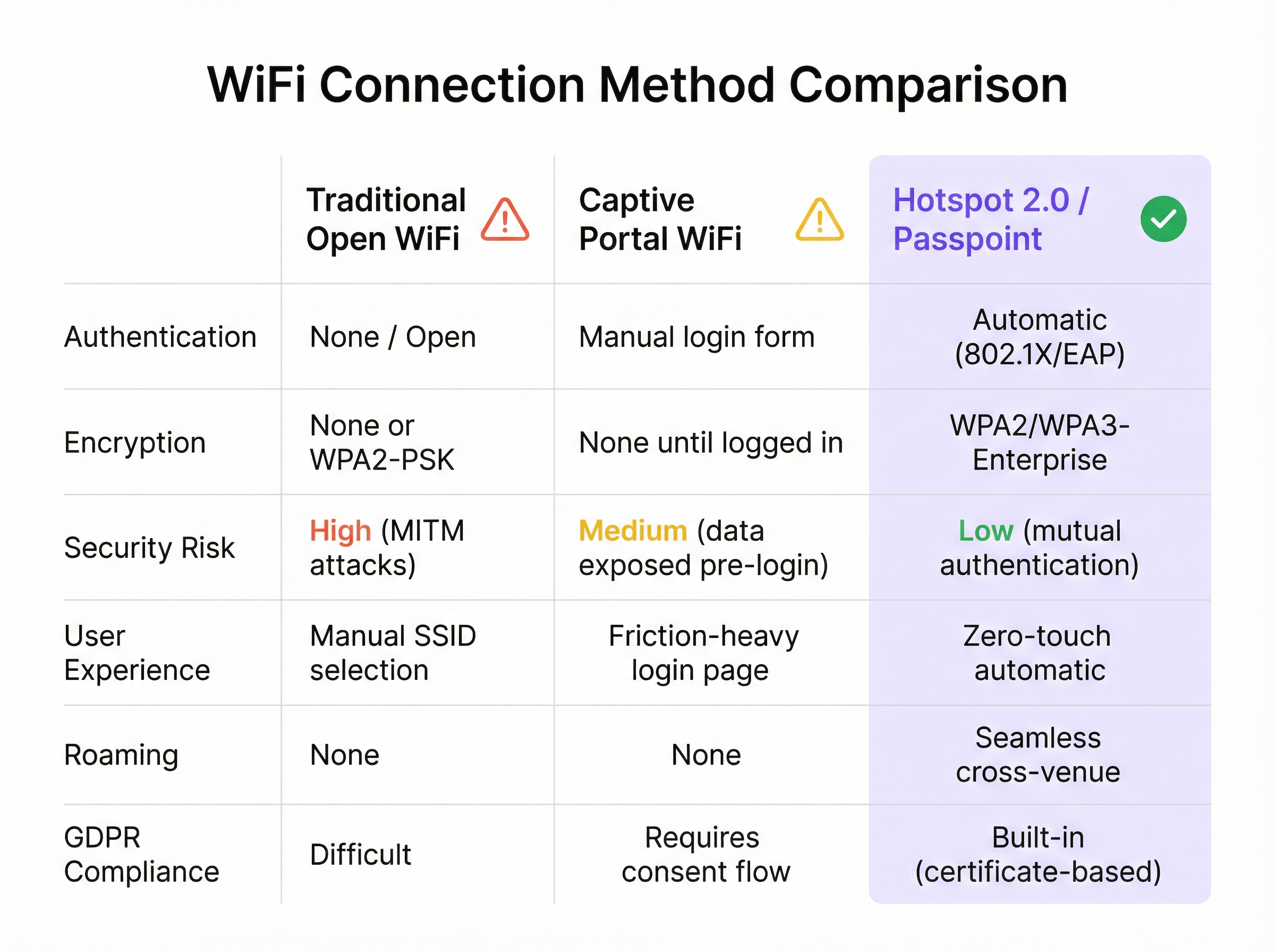
Für moderne Unternehmen ist die Bereitstellung eines nahtlosen und sicheren WiFi-Erlebnisses kein Luxus mehr, sondern eine betriebliche Grundvoraussetzung. WiFi Hotspot 2.0, auch bekannt als Passpoint, ist ein branchenübliches Framework, das entwickelt wurde, um die Reibungsverluste und Sicherheitsrisiken herkömmlicher öffentlicher und Gast-WiFi-Netzwerke zu beseitigen. Es ermöglicht mobilen Geräten die automatische Erkennung und Authentifizierung in WiFi-Netzwerken mit WPA3-Sicherheit auf Unternehmensniveau und spiegelt so das nahtlose Roaming-Erlebnis von Mobilfunknetzen wider. Für einen CTO oder IT-Direktor bedeutet dies eine deutliche Reduzierung von Verbindungsproblemen auf Anwenderseite, eine gehärtete Sicherheitsarchitektur gegen gängige WiFi-Angriffe sowie einen optimierten Authentifizierungsprozess, der sowohl GDPR-konform als auch immun gegen die Herausforderungen der MAC-Adressen-Randomisierung ist. Durch den Ersatz unsicherer, reibungsintensiver Captive Portals durch eine Zero-Touch-Authentifizierung auf Basis von Anmeldeinformationen steigert Passpoint die Gästezufriedenheit, senkt den IT-Support-Aufwand und bietet eine skalierbare Grundlage für standortübergreifendes Roaming und Data-Offload-Strategien. Dieser Leitfaden liefert die technischen Details und das Bereitstellungs-Framework, die erforderlich sind, um Passpoint in Ihre Netzwerkinfrastruktur zu integrieren und so spürbare Verbesserungen bei Sicherheit und Nutzererlebnis zu erzielen.
Technischer Deep-Dive
Hotspot 2.0 und die zugrunde liegende Zertifizierung, Passpoint, stellen einen grundlegenden architektonischen Wandel bei der Erkennung von und dem Zugriff auf WiFi-Netzwerke dar. Die Technologie basiert auf der IEEE 802.11u-Erweiterung, die eine Pre-Association-Kommunikation zwischen einem Client-Gerät und einem Access Point ermöglicht. Dadurch kann ein Gerät wichtige Informationen über ein Netzwerk sammeln, bevor es eine Verbindung herstellt. Dies ist ein Wechsel vom veralteten Modell der SSID-Erkennung hin zu einem intelligenteren Modell der Erkennung von Anmeldeinformationen.
Kernprotokolle: ANQP, GAS und 802.11u
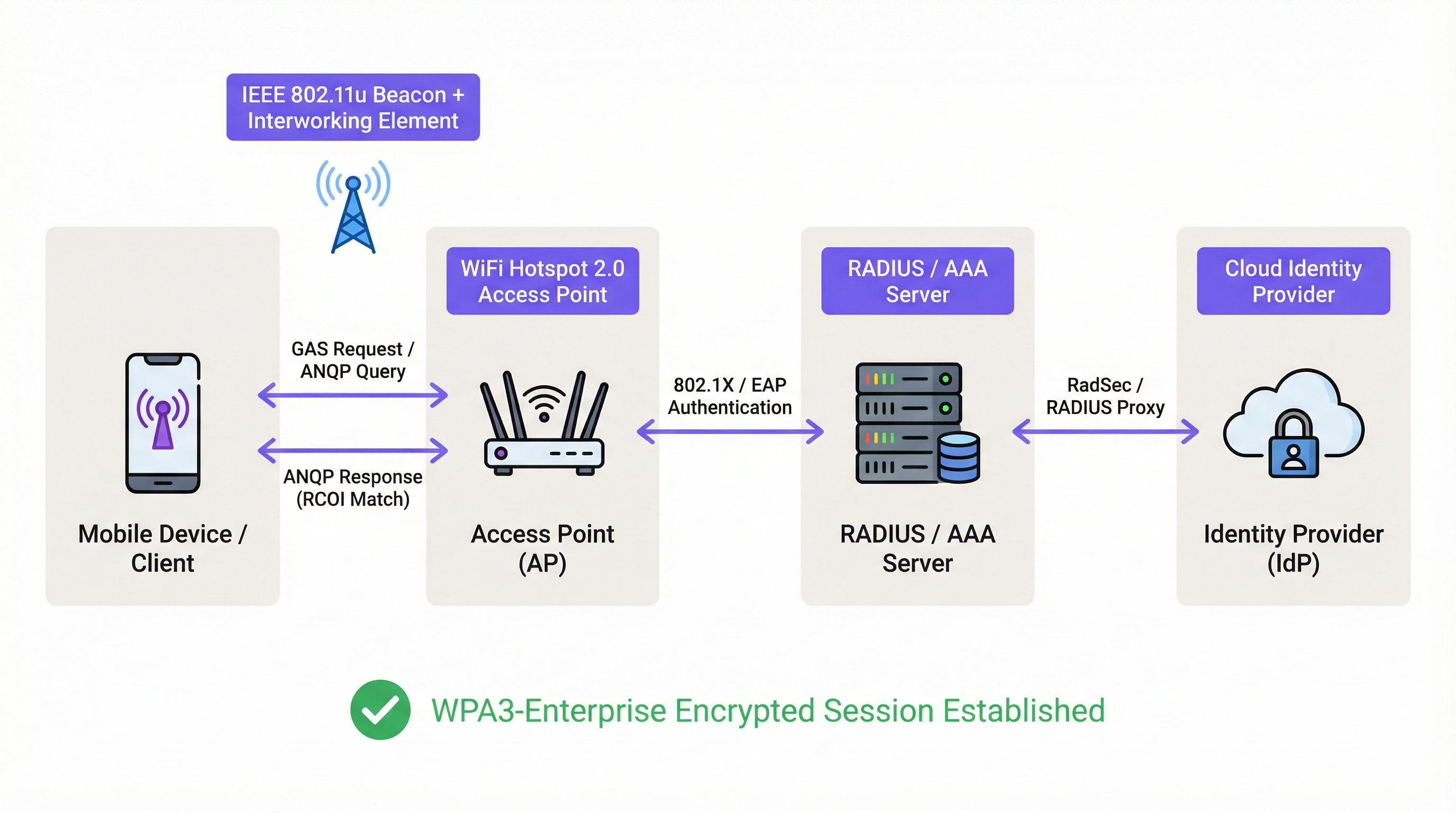
Der primäre Mechanismus, der diesen Pre-Association-Dialog ermöglicht, ist eine Kombination aus dem Generic Advertisement Service (GAS) und dem Access Network Query Protocol (ANQP). So interagieren sie:
- IEEE 802.11u Beaconing: Ein Passpoint-fähiger Access Point (AP) integriert ein Interworking Element (IE) in seine Beacon-Frames. Dies fungiert als Flagge und signalisiert Geräten in der Nähe, dass er eine erweiterte Netzwerkerkennung unterstützt.
- GAS- und ANQP-Austausch: Ein Client-Gerät, das dieses IE erkennt, kann eine GAS-Abfrage an den AP initiieren. Innerhalb dieser Abfrage nutzt es ANQP, um spezifische Fragen zur Identität und zu den Funktionen des Netzwerks zu stellen. Die wichtigste Abfrage betrifft die vom Netzwerk unterstützten Roaming Consortium Organizational Identifiers (RCOIs).
- Abgleich der Anmeldeinformationen: Der AP antwortet mit seiner Liste der unterstützten RCOIs. Wenn eine davon mit einem auf dem Client-Gerät gespeicherten Profil übereinstimmt (z. B. ein Profil für einen Mobilfunkanbieter, eine Hotelmarke oder ein Unternehmensnetzwerk), weiß das Gerät, dass es sich authentifizieren kann, und geht zum nächsten Schritt über. Wird keine Übereinstimmung gefunden, ignoriert das Gerät das Netzwerk einfach – ganz ohne Benutzerinteraktion.
Authentifizierungs- und Sicherheits-Framework
Sobald eine Übereinstimmung der Anmeldeinformationen bestätigt ist, nutzt Passpoint die robuste Sicherheit von IEEE 802.1X für die Authentifizierung, typischerweise mit WPA2-Enterprise- oder der sichereren WPA3-Enterprise-Verschlüsselung. Dies ist derselbe portbasierte Standard für die Netzwerkzugriffskontrolle, der auch in sicheren kabelgebundenen Unternehmensnetzwerken verwendet wird. Die Authentifizierung erfolgt über eine Extensible Authentication Protocol (EAP)-Methode, wie zum Beispiel:
- EAP-TLS: Zertifikatsbasierte Authentifizierung, die als Goldstandard für Sicherheit gilt. Sowohl der Client als auch der Server legen Zertifikate vor, um ihre Identität nachzuweisen.
- EAP-TTLS/PEAP: Tunnelt eine ältere Authentifizierungsmethode (wie Benutzername/Passwort) innerhalb eines sicheren TLS-Tunnels.
- EAP-SIM/AKA/AKA': SIM-basierte Authentifizierung, die es Mobilfunkbetreibern ermöglicht, ihre Abonnenten nahtlos in vertrauenswürdige WiFi-Netzwerke zu roamen.
Dieser Prozess gewährleistet eine gegenseitige Authentifizierung: Der Client validiert die Legitimität des Netzwerks (was „Evil Twin“-AP-Angriffe verhindert), und das Netzwerk validiert die Autorisierung des Clients. Der gesamte nachfolgende Datenverkehr wird verschlüsselt, wodurch das Risiko von Man-in-the-Middle (MITM)-Angriffen, die in offenen oder PSK-basierten Netzwerken häufig vorkommen, gemindert wird.
Passpoint vs. OpenRoaming
Es ist wichtig, zwischen Passpoint und OpenRoaming zu unterscheiden:
Passpoint ist das Fahrzeug; OpenRoaming ist das Autobahnsystem.
- Passpoint ist der technische Standard (802.11u, ANQP/GAS, 802.1X), der es einem Gerät ermöglicht, ein einzelnes Netzwerk oder eine Gruppe von Netzwerken unter derselben administrativen Kontrolle automatisch zu erkennen und sich dort zu authentifizieren.
- WBA OpenRoaming ist ein globales Föderations-Framework, das von der Wireless Broadband Alliance verwaltet wird. Es schafft ein Vertrauens-Ökosystem zwischen Tausenden von Identity Providern (IdPs) wie Mobilfunkanbietern und Access Network Providern (ANPs) wie Hotels, Flughäfen und Einzelhandelsketten. Dies ermöglicht es einem Nutzer mit Anmeldeinformationen eines beliebigen Mitglieds-IdP, sich automatisch an jedem Standort eines Mitglieds-ANP zu verbinden, ohne dass komplexe bilaterale Roaming-Vereinbarungen erforderlich sind.
Für maximale Kompatibilität in einer OpenRoaming-Umgebung sollten Netzwerkarchitekten sowohl die standardmäßige Settlement-Free-RCOI (5A-03-BA) als auch die Legacy-Cisco-RCOI (00-40-96) ausstrahlen.
Implementierungsleitfaden
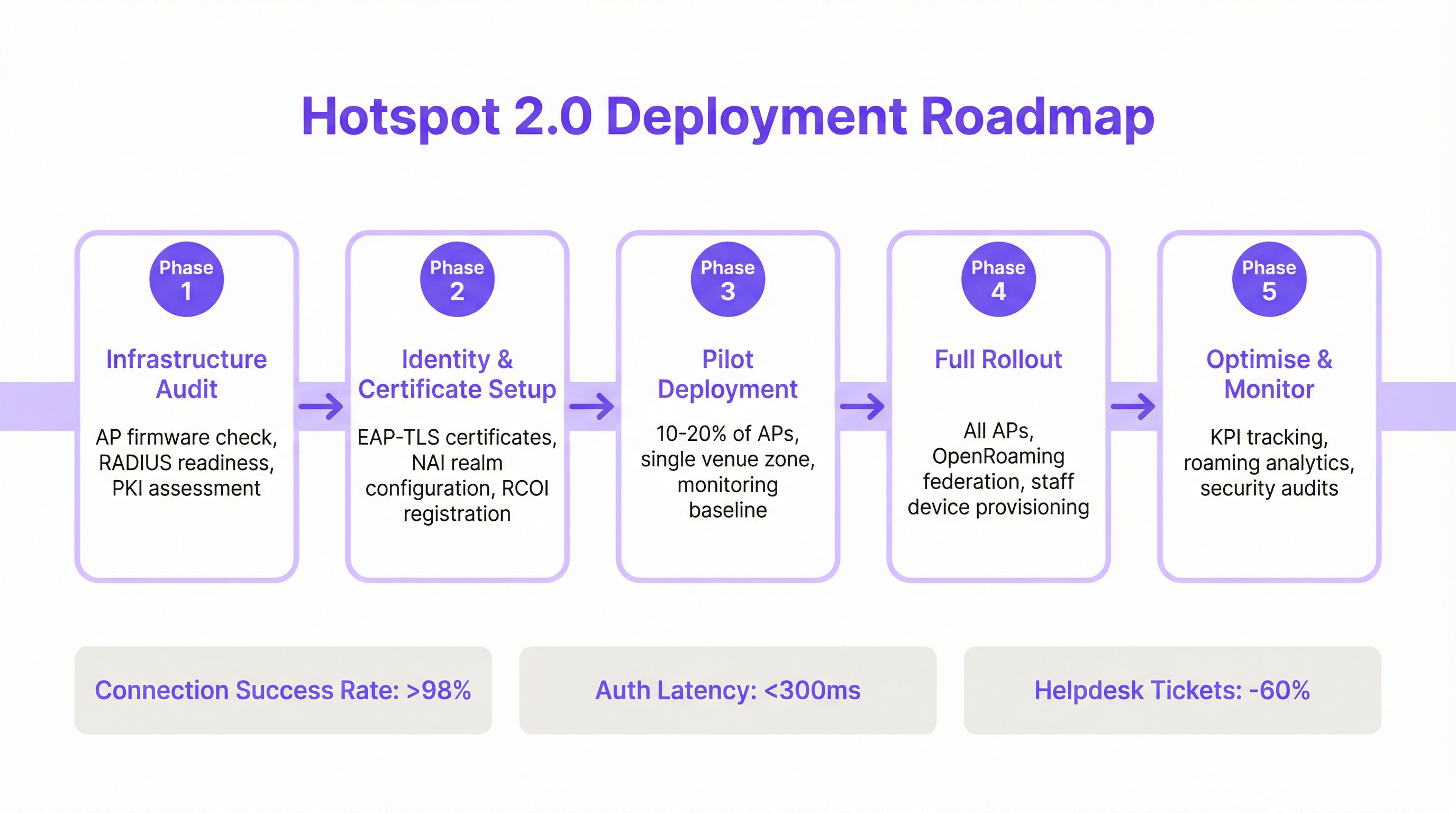
Die Bereitstellung von Passpoint ist ein strukturierter Prozess, der von der Überprüfung Ihrer bestehenden Infrastruktur bis hin zu einem phasenweisen Rollout und der Optimierung reicht. Die Befolgung dieser Roadmap gewährleistet einen reibungslosen Übergang und minimiert häufige Fehler bei der Bereitstellung.
Phase 1: Infrastruktur-Audit
Bevor Sie beginnen, sollten Sie Ihre aktuelle Netzwerk-Hardware und -Software bewerten. Zu den wichtigsten Prüfpunkten gehören:
- Access Point-Kompatibilität: Stellen Sie sicher, dass Ihre APs IEEE 802.11u unterstützen. Die meisten Enterprise-APs, die nach 2015 hergestellt wurden (von Anbietern wie Cisco, HPE Aruba, Juniper Mist, Ruckus), verfügen über die erforderliche Hardware, benötigen aber möglicherweise ein Firmware-Upgrade.
- RADIUS-Server-Bereitschaft: Sie benötigen einen RADIUS- (oder AAA-) Server, der die 802.1X EAP-Authentifizierung verarbeiten kann. Dies kann eine On-Premise-Lösung wie Cisco ISE oder ein Cloud-basierter Dienst wie SecureW2, Foxpass oder Google Cloud Identity sein.
- PKI-Bewertung: Für EAP-TLS-Bereitstellungen ist eine Public Key Infrastructure (PKI) erforderlich, um digitale Zertifikate für Client-Geräte und Server auszustellen und zu verwalten.
Phase 2: Identitäts- und Zertifikats-Setup
In dieser Phase werden die zentralen Authentifizierungskomponenten konfiguriert:
- NAI-Realm-Konfiguration: Definieren Sie Ihre Network Access Identifier (NAI)-Realms, die Ihre Authentifizierungsdomäne identifizieren (z. B.
@ihrunternehmen.com). - RCOI-Registrierung: Wenn Sie an einem Roaming-Konsortium wie OpenRoaming teilnehmen, registrieren Sie Ihre RCOIs bei der WBA.
- Zertifikatserstellung: Generieren Sie für EAP-TLS Client-Zertifikate und stellen Sie diese über eine Mobile Device Management (MDM)-Lösung auf Ihren verwalteten Geräten bereit. Für den Gastzugang benötigen Sie einen Mechanismus zur Bereitstellung eines Profils mit der erforderlichen Zertifikatsvertrauenskette.
Phase 3: Pilot-Bereitstellung
Beginnen Sie mit einem kontrollierten Piloten in einem begrenzten Bereich, z. B. auf einer einzelnen Etage oder in einer bestimmten Standortzone, der 10-20 % Ihrer APs abdeckt. Die Ziele des Piloten sind:
- Festlegung einer Baseline: Messen Sie die aktuellen Verbindungserfolgsraten, die Authentifizierungslatenz und das Volumen der WiFi-bezogenen Helpdesk-Tickets.
- Test-Gerätematrix: Testen Sie das Onboarding- und Verbindungserlebnis auf einer Vielzahl von Geräten (iOS, verschiedene Android-Hersteller wie Samsung und Google Pixel, Windows, macOS).
- Optimierung des Onboardings: Verfeinern Sie den Prozess, um das Passpoint-Profil auf nicht verwaltete Gastgeräte zu übertragen.
Phase 4: Vollständiger Rollout
Sobald der Pilot seine Erfolgskriterien erfüllt hat (z. B. >98 % Verbindungserfolg, Authentifizierungslatenz <300 ms), fahren Sie mit einem vollständigen Rollout über alle APs und Standorte hinweg fort. Diese Phase umfasst:
- Vollständige AP-Konfiguration: Übertragen Sie die standardisierte Passpoint-WLAN-Konfiguration auf alle Access Points.
- Bereitstellung für Mitarbeiter- und Unternehmensgeräte: Stellen Sie sicher, dass alle unternehmenseigenen Geräte über MDM mit dem Passpoint-Profil ausgestattet sind.
- Aktivierung der OpenRoaming-Föderation: Aktivieren Sie gegebenenfalls die RADIUS-Proxying-Regeln, um an der OpenRoaming-Föderation teilzunehmen.
Phase 5: Optimieren & Überwachen
Überwachen Sie nach dem Rollout kontinuierlich die Leistung und Sicherheit des Netzwerks:
- KPI-Tracking: Verfolgen Sie die Key Performance Indicators und vergleichen Sie diese mit der Pilot-Baseline. Zu den wichtigsten Kennzahlen gehören Verbindungserfolgsrate, Authentifizierungslatenz, Roaming-Erfolg und Datendurchsatz.
- Roaming-Analysen: Nutzen Sie Analysen, um Roaming-Muster zwischen Ihren Standorten und mit Roaming-Partnern zu verstehen.
- Sicherheitsaudits: Führen Sie regelmäßige Sicherheitsaudits durch, um die Integrität Ihrer RADIUS- und PKI-Infrastruktur zu gewährleisten.
Best Practices
Um den Erfolg und die Sicherheit Ihrer Passpoint-Bereitstellung zu maximieren, sollten Sie sich an die folgenden branchenüblichen Best Practices halten.
| Kategorie | Best Practice | Begründung |
|---|---|---|
| Sicherheit | WPA3-Enterprise vorschreiben | WPA3 bietet das höchste Maß an Sicherheit mit 192-Bit-Kryptografiestärke und Protected Management Frames (PMF), um Deauthentifizierungsangriffe zu verhindern. |
| Sicherheit | EAP-TLS für Unternehmensgeräte verwenden | Die zertifikatsbasierte Authentifizierung ist sicherer als passwortbasierte Methoden und immun gegen Phishing und den Diebstahl von Anmeldeinformationen. |
| Kompatibilität | Mehrere RCOIs ausstrahlen | Um eine breite Geräteunterstützung zu gewährleisten, sollten Sie sowohl die moderne OpenRoaming-RCOI (5A-03-BA) als auch die Legacy-Cisco-RCOI (00-40-96) ausstrahlen. |
| Nutzererlebnis | Profil-Onboarding optimieren | Das anfängliche Onboarding ist der einzige Reibungspunkt. Nutzen Sie ein einfaches, einmaliges Captive Portal oder eine schlanke App, um die Profilinstallation so einfach wie möglich zu gestalten. |
| Netzwerkdesign | IoT-Geräte segmentieren | Die meisten IoT-Geräte unterstützen kein 802.1X. Sie sollten in eine separate, angemessen gesicherte SSID (z. B. mittels MPSK- oder MAC-Authentifizierung) segmentiert und nicht mit dem Passpoint-Datenverkehr gemischt werden. |
| Betrieb | Mit Analysen integrieren | Um auch ohne Captive Portal Einblicke in das Gästeverhalten zu behalten, integrieren Sie Ihre Passpoint-Authentifizierungsprotokolle in eine WiFi-Analyseplattform wie Purple. |
Fehlerbehebung & Risikominderung
Auch bei gut geplanten Bereitstellungen können Probleme auftreten. Hier sind häufige Fehlerquellen und wie Sie diese beheben können.
| Symptom | Mögliche Ursache | Minderungsstrategie |
|---|---|---|
| Geräte versuchen nicht, sich zu verbinden | RCOI-Diskrepanz oder fehlende RCOI | Stellen Sie sicher, dass Ihre APs die korrekten RCOIs ausstrahlen, einschließlich der Legacy-OI 00-40-96. Verwenden Sie ein WiFi-Analysetool, um Beacon-Frames zu überprüfen. |
| Authentifizierungsfehler (EAP) | RADIUS-Server-Fehlkonfiguration / Zertifikatsprobleme | Überprüfen Sie die RADIUS-Protokolle auf detaillierte Fehlercodes. Stellen Sie sicher, dass die Client-Zertifikate gültig sind und der Server der ausstellenden CA des Clients vertraut. Überprüfen Sie, ob das Serverzertifikat gültig ist und von den Clients als vertrauenswürdig eingestuft wird. |
| Hohe Authentifizierungslatenz | Langsame RADIUS-Antwort / Netzwerkpfad-Probleme | Sorgen Sie für eine geringe Latenz zwischen den APs und dem RADIUS-Server. Wenn Sie einen Cloud-RADIUS verwenden, prüfen Sie auf Netzwerküberlastungen oder Routing-Probleme. Streben Sie eine Reaktionszeit von unter 300 ms an. |
| Inkonsistentes Android-Verhalten | OEM-spezifische ANQP/GAS-Implementierung | Testen Sie während der Pilotphase gründlich auf einer Reihe von Android-Geräten. Einige ältere oder weniger verbreitete Android-Builds weisen möglicherweise fehlerhafte 802.11u-Implementierungen auf. |
| Roaming-Fehler zwischen Standorten | Inkonsistente WLAN-Konfiguration | Stellen Sie sicher, dass das Passpoint-WLAN-Profil (SSID, Sicherheitseinstellungen, RCOIs) an allen Standorten, die für nahtloses Roaming vorgesehen sind, absolut identisch ist. |
ROI & Geschäftliche Auswirkungen
Obwohl Passpoint eine technische Lösung ist, werden seine Auswirkungen an den Geschäftsergebnissen gemessen. Der Return on Investment ergibt sich aus Verbesserungen der betrieblichen Effizienz, des Nutzererlebnisses und der Sicherheitsarchitektur.
Kosten-Nutzen-Analyse
Investitionskosten:
- Hardware: Mögliche AP-Upgrades, falls die vorhandene Hardware nicht 802.11u-konform ist.
- Software/Lizenzierung: Kosten für RADIUS-Server-Lizenzen (z. B. Cisco ISE) oder Cloud-AAA-Dienste.
- Föderationsgebühren: Jährliche Mitgliedsgebühren für die Teilnahme an WBA OpenRoaming.
- Implementierung: Professionelle Dienstleistungen oder interne Personalzeit für Konfiguration, Tests und Rollout.
Erwartete Renditen & Vorteile:
- Reduzierter IT-Aufwand: Eine deutliche Reduzierung von WiFi-bezogenen Helpdesk-Tickets. Ein häufiges Ergebnis ist ein Rückgang von 40-60 % bei Tickets im Zusammenhang mit WiFi-Verbindungsproblemen.
- Gesteigerte Gästezufriedenheit: Die Beseitigung von Anmeldehürden führt zu höheren Net Promoter Scores (NPS) und besseren Bewertungen, insbesondere im Gastgewerbe.
- Verbesserte Sicherheit & Compliance: Mindert das Risiko von Datenschutzverletzungen durch WiFi-basierte Angriffe, unterstützt die Einhaltung von PCI DSS und GDPR und reduziert potenzielle finanzielle Strafen.
- Verbesserter Data Offload: Für Mobilfunkbetreiber und deren Standortpartner ermöglicht Passpoint die automatische und sichere Auslagerung von Mobilfunkdaten auf WiFi, wodurch das Mobilfunknetz entlastet wird.
- Erhöhtes Engagement: Eine nahtlose Verbindung ermutigt Nutzer, länger vor Ort zu bleiben und digitale Dienste intensiver zu nutzen, was den Umsatz im Einzelhandel und Gastgewerbe steigert.
Durch die Messung von KPIs wie dem Volumen der Helpdesk-Tickets, den Werten zur Gästezufriedenheit und den Verbindungserfolgsraten vor und nach der Bereitstellung können IT-Teams einen überzeugenden Business Case erstellen, der einen klaren und messbaren ROI belegt.
Key Terms & Definitions
IEEE 802.11u
An amendment to the IEEE 802.11 standard that enables 'interworking with external networks'. It allows client devices to exchange information with an access point before establishing a connection.
This is the foundational protocol that makes Hotspot 2.0 possible. When an IT team sees that an AP is '802.11u capable', it means it can support the discovery mechanisms required for Passpoint.
ANQP (Access Network Query Protocol)
The specific protocol used by a client device to query an access point about its capabilities, such as roaming partners, venue type, and authentication methods.
Network architects will configure ANQP elements on their wireless controllers to advertise network services. Troubleshooting often involves analyzing ANQP frames to see what information the AP is providing to clients.
GAS (Generic Advertisement Service)
The transport mechanism defined in 802.11u that carries ANQP frames between the client and the access point before an association is formed.
GAS and ANQP work together. GAS is the 'envelope' and ANQP is the 'letter' inside. When troubleshooting, packet captures will show GAS frames containing the ANQP queries and responses.
RCOI (Roaming Consortium Organizational Identifier)
A unique identifier that represents a group of network providers who have a roaming agreement. It's the primary piece of information a device looks for to decide if it can automatically connect.
This is a critical configuration item. An IT manager must ensure their APs are broadcasting the correct RCOIs for their own organization and any roaming partners like OpenRoaming. A missing or incorrect RCOI is a common cause of connection failures.
WPA3-Enterprise
The highest level of WiFi security, which uses 192-bit encryption and requires 802.1X authentication. It provides robust protection against eavesdropping and other sophisticated attacks.
For any organization concerned with security and compliance (PCI DSS, GDPR), deploying WPA3-Enterprise is a non-negotiable best practice. Passpoint is the most user-friendly way to implement it at scale.
EAP-TLS (Extensible Authentication Protocol-Transport Layer Security)
An EAP method that uses client-side and server-side digital certificates for mutual authentication. It is considered the most secure EAP method.
This is the recommended method for securing corporate-owned devices. IT teams will use an MDM to push certificates to devices, enabling zero-touch, highly secure network access.
RadSec (RADIUS over TLS)
A protocol that secures RADIUS authentication traffic by tunneling it through a TLS-encrypted connection (typically over TCP port 2083).
When setting up roaming with OpenRoaming or other external partners, network architects will use RadSec to ensure that authentication requests traversing the public internet are fully encrypted and secure.
NAI (Network Access Identifier)
A standardized way of identifying a user in an 802.1X authentication request, typically formatted like an email address (e.g., 'user@realm'). The realm portion is used to route the request to the correct home RADIUS server.
IT teams configure NAI realms to define their authentication domains. In a roaming scenario, the realm of the user's NAI determines which Identity Provider's RADIUS server needs to process the authentication request.
Case Studies
A 500-room luxury hotel with multiple conference wings wants to eliminate its cumbersome captive portal. Corporate guests frequently complain about having to re-authenticate multiple times per day as they move between their room, the conference centre, and the restaurant. The hotel needs to maintain PCI DSS compliance for its payment systems.
The recommended solution is a phased Passpoint deployment integrated with WBA OpenRoaming. Phase 1 (Pilot): Deploy Passpoint in the main conference wing and on one floor of guest rooms. Configure the WLAN to broadcast the hotel's own RCOI and the OpenRoaming RCOI. Use EAP-TLS for corporate-managed devices (provisioned via MDM by their employers) and provide a simple, one-time onboarding portal for guests to install a Passpoint profile with an EAP-TTLS credential. Phase 2 (Rollout): After a successful pilot, extend the Passpoint WLAN to all guest rooms, public areas, and restaurants. Decommission the legacy captive portal SSID, but keep a single, hidden SSID for specific back-of-house devices that do not support 802.1X. Security: The use of WPA3-Enterprise and 802.1X provides traffic encryption and mutual authentication, satisfying key PCI DSS requirements for securing wireless environments.
A large retail chain with 200 stores across the country wants to offer seamless WiFi to its loyalty program members. They also want to offload traffic from their in-store staff's cellular devices to the corporate WiFi to ensure reliable access to inventory and POS applications. The existing infrastructure is a mix of Cisco Meraki and Aruba hardware.
The solution is to create a unified Passpoint strategy across the mixed-vendor environment. Step 1 (Onboarding): Integrate Passpoint profile generation into the loyalty program's mobile app. When a user signs into the app, it automatically installs the Passpoint profile with a unique EAP-TTLS credential. Step 2 (Staff Provisioning): Use the company's MDM to push a separate Passpoint profile to all corporate-owned staff devices, configured for EAP-TLS using device certificates for zero-touch authentication. Step 3 (Network Configuration): In both Cisco Meraki and Aruba Central dashboards, create a new WLAN profile for Passpoint. Enable Hotspot 2.0, set security to WPA3-Enterprise, and add the company's RCOI and the OpenRoaming RCOI. Point authentication to a central cloud RADIUS server to ensure consistent policy enforcement across all stores. Step 4 (Analytics): Ingest RADIUS authentication logs into the Purple analytics platform to correlate WiFi connections with loyalty member IDs, tracking visit frequency and dwell time without a captive portal.
Scenario Analysis
Q1. You are the network architect for a large international airport. You want to implement Passpoint to provide seamless roaming for travelers from major cellular carriers. During your pilot, you notice that a large number of Android devices are not automatically connecting, while iOS devices are connecting successfully. What is the most likely cause and your first troubleshooting step?
💡 Hint:Consider the differences in how various device manufacturers implement the 802.11u standard and what specific information they look for during discovery.
Show Recommended Approach
The most likely cause is a misconfiguration of the Roaming Consortium Organizational Identifiers (RCOIs). Many Android devices, particularly older models or those with manufacturer-customized operating systems, rely on the legacy Cisco RCOI (00-40-96) to initiate an ANQP query. If only the modern OpenRoaming RCOI (5A-03-BA) is being broadcast, these devices will not attempt to connect. The first troubleshooting step is to use a WiFi analysis tool to inspect the beacon frames from the pilot APs and verify that both the OpenRoaming and the legacy Cisco RCOIs are being broadcast.
Q2. A retail chain has successfully deployed Passpoint with OpenRoaming in all its stores. The marketing team now wants to know if they can still gather customer analytics, such as visit frequency and dwell time, which they previously collected via the captive portal. What is your recommendation?
💡 Hint:Where in the new authentication flow can user identity be correlated with a connection event? Can this be done while respecting privacy and the principles of the OpenRoaming federation?
Show Recommended Approach
While Passpoint eliminates the captive portal, it is still possible to gather valuable analytics. The recommended approach is to leverage the RADIUS authentication logs. Each time a user connects, an authentication request is sent to the RADIUS server, which contains the user's Network Access Identifier (NAI). By integrating the RADIUS server with an analytics platform like Purple, the NAI can be used as a persistent anonymous identifier to track visit frequency and dwell time. This provides the marketing team with the data they need without reintroducing login friction for the user. It's important to ensure this process is compliant with privacy policies and the terms of the roaming federation.
Q3. A conference centre is setting up a Passpoint network. They plan to use EAP-TLS for staff and event organizers, but need a solution for thousands of temporary attendees. They are considering using EAP-TTLS with usernames and passwords distributed at registration. What is a significant security risk of this approach and what is a better alternative?
💡 Hint:Think about the lifecycle of shared credentials and the security of the 'inner' authentication method in EAP-TTLS.
Show Recommended Approach
The significant risk of using shared EAP-TTLS credentials (username/password) is the lack of revocation and accountability. If a credential pair is compromised, it can be used by an unauthorized party until it expires, and it's difficult to trace activity back to a specific individual. A better and more secure alternative is to use an onboarding portal that generates a unique Passpoint profile for each attendee. This can be done by having the attendee scan a QR code or visit a one-time URL. The portal generates a profile containing a unique, short-lived digital certificate (for EAP-TLS) or a unique EAP-TTLS credential. This ensures that each user has a distinct identity, and access can be revoked on a per-user basis if necessary, providing much stronger security and accountability.
Key Takeaways
- ✓WiFi Hotspot 2.0 (Passpoint) enables seamless, zero-touch roaming for users by automatically authenticating devices to trusted WiFi networks.
- ✓It replaces insecure, high-friction captive portals with credential-based authentication using the enterprise-grade WPA3-Enterprise security standard.
- ✓The core technology relies on the IEEE 802.11u standard, which allows devices to query network information (via ANQP/GAS) before connecting.
- ✓Mutual authentication (802.1X) is a key security benefit, protecting against 'Evil Twin' and Man-in-the-Middle (MITM) attacks.
- ✓OpenRoaming is a global federation that works with Passpoint to allow seamless roaming across thousands of different network providers.
- ✓A successful deployment requires a phased approach: audit your infrastructure, run a pilot to test across all device types, and then perform a full rollout.
- ✓Key business benefits include reduced IT helpdesk costs, improved guest satisfaction, enhanced security compliance (PCI DSS, GDPR), and new opportunities for data offload and analytics.




