

WiFi-Roaming und Handoff: 802.11r und 802.11k erklärt
This guide provides a senior-level technical deep-dive into WiFi roaming protocols — specifically 802.11r (Fast BSS Transition), 802.11k (Neighbor Reports), and 802.11v (BSS Transition Management) — and their combined role in delivering seamless connectivity across enterprise venues. It equips IT managers, network architects, and venue operations directors with the architectural understanding, implementation steps, and business-impact metrics needed to deploy and validate fast roaming in hospitality, retail, events, and public-sector environments. The guide also addresses the critical interaction between roaming and captive portals, a common deployment failure point in guest WiFi networks.
🎧 Listen to this Guide
View Transcript

Executive Summary
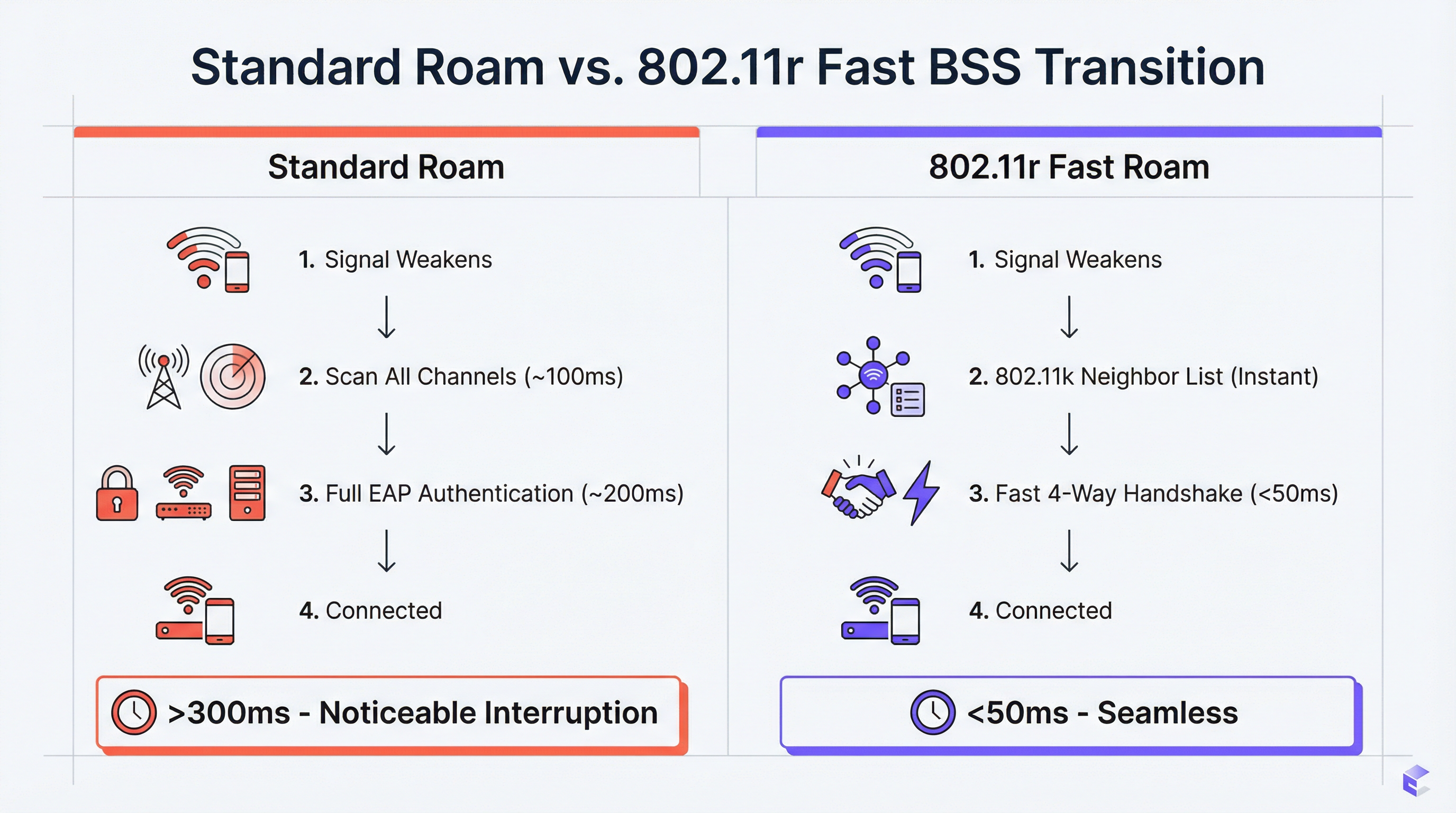
Für Unternehmensstandorte – Hotels, Einzelhandelsketten, Stadien, Konferenzzentren – ist nahtloses WiFi eine betriebliche Grundvoraussetzung. Wenn sich Benutzer durch einen physischen Raum bewegen, müssen ihre Geräte zwischen Access Points (APs) wechseln, ohne dass die Verbindung abbricht. Eine schlechte Roaming-Leistung führt zu abgebrochenen VoIP-Anrufen, stockenden Video-Streams und frustrierten Benutzern, was sich direkt auf die Gästezufriedenheit und die Produktivitätskennzahlen der Mitarbeiter auswirkt. Die Lösung liegt in drei sich ergänzenden IEEE 802.11-Erweiterungen: 802.11k, 802.11v und 802.11r. Zusammen bilden sie ein Roaming-Unterstützungs-Framework, das Client-Geräten die Intelligenz verleiht, schnellere und intelligentere Handoff-Entscheidungen zu treffen, und dem Netzwerk die Werkzeuge an die Hand gibt, diese Entscheidungen aktiv zu steuern. 802.11k stellt eine kuratierte Liste von Kandidaten-APs bereit und eliminiert so zeitaufwändige Kanal-Scans. 802.11r (Fast BSS Transition) komprimiert den Re-Authentifizierungs-Handshake von 200–300 ms auf unter 50 ms. 802.11v ermöglicht es dem Netzwerk, Clients zum Zweck des Load-Balancings proaktiv zu steuern. Die korrekte Implementierung dieser Standards – zusammen mit einer gut durchdachten Gäste-WiFi-Plattform – ist der definitive Weg zu einem mobilen, hochleistungsfähigen Wireless-Erlebnis, das moderne Unternehmensumgebungen erfordern.
Technischer Deep-Dive
Die Herausforderung: Langsames Roaming und das Sticky-Client-Problem
In einer Standard-WiFi-Bereitstellung ohne Roaming-Unterstützung ist allein das Client-Gerät dafür verantwortlich zu entscheiden, wann es roamt. Das typische Ergebnis ist, dass Geräte viel länger als optimal an ihrem aktuellen AP festhalten, selbst wenn ein deutlich stärkeres Signal von einem nahegelegenen AP verfügbar ist. Dies ist das Sticky-Client-Problem, und es ist in Unternehmensumgebungen endemisch, in denen eine Mischung aus Gerätetypen – Smartphones, Laptops, IoT-Sensoren, Handscanner – jeweils eigene Roaming-Algorithmen mit unterschiedlichem Komplexitätsgrad implementiert.
Wenn sich der Client schließlich zum Roaming entscheidet, muss er einen vollständigen Re-Authentifizierungszyklus mit dem neuen AP durchlaufen. In einem WPA2-Enterprise- oder WPA3-Enterprise-Netzwerk umfasst dies mehrere EAP-Roundtrips (Extensible Authentication Protocol) zwischen dem Client, dem AP und einem Backend-RADIUS-Server. Dieser Prozess kann 200–400 Millisekunden in Anspruch nehmen. Für Echtzeitanwendungen – VoIP, Videokonferenzen, mobile Point-of-Sale-Systeme – ist diese Latenz inakzeptabel. Das Ergebnis sind abgebrochene Anrufe, eingefrorene Videobilder und fehlgeschlagene Transaktionen.
802.11k: Radio Resource Management und Neighbor Reports
Die 802.11k-Erweiterung führt das Radio Resource Management (RRM) ein, ein Framework, das es APs und Clients ermöglicht, Informationen über die HF-Umgebung auszutauschen. Die betrieblich wichtigste Funktion ist der Neighbor Report. Ein 802.11k-fähiger AP kann auf die Anfrage eines Clients mit einer strukturierten Liste benachbarter APs antworten, einschließlich deren BSSIDs, Betriebskanälen und Signaleigenschaften. Dadurch entfällt für den Client die Notwendigkeit, einen passiven oder aktiven Scan über alle verfügbaren Kanäle durchzuführen – ein Prozess, der in einem Multi-Band-Netzwerk selbst 100 ms oder länger dauern kann.
Der praktische Effekt ist, dass ein Client, der sich dem Rand der Abdeckungszone eines APs nähert, bereits über eine priorisierte Liste von Handoff-Kandidaten verfügt, bevor er roamen muss. Die Entscheidung wird mit vollständigen Informationen getroffen, nicht durch eine langsame, blinde Suche.
802.11r: Fast BSS Transition (FT)
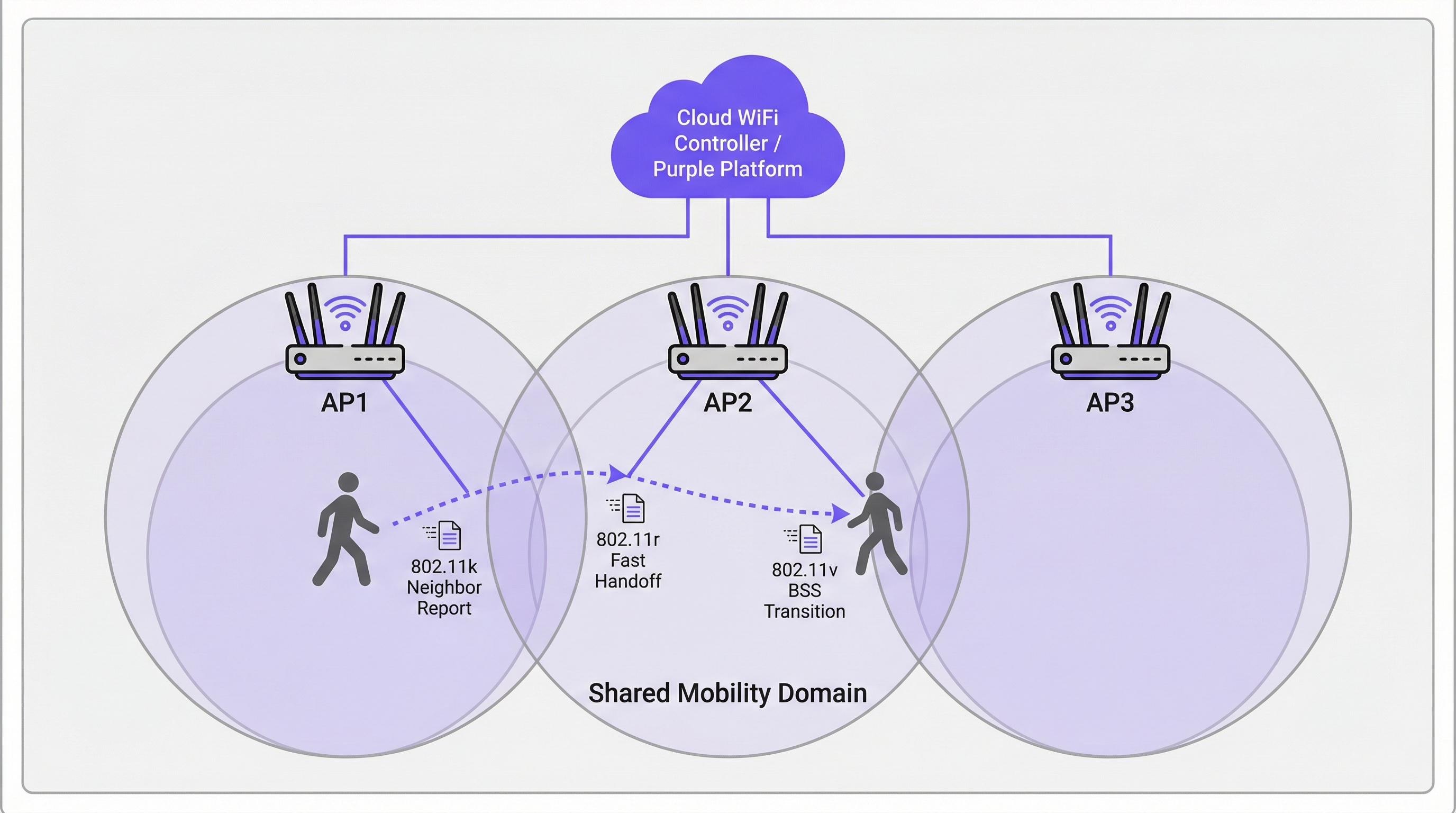
802.11r ist der Grundstein für schnelles Roaming. Seine primäre Innovation ist die Vorabverteilung von Schlüsselmaterial über APs innerhalb einer definierten Mobility Domain. Wenn sich ein Client zum ersten Mal an einem 802.11r-fähigen Netzwerk authentifiziert, richtet er über den Standard-EAP-Prozess einen Pairwise Master Key (PMK) ein. Wenn FT aktiviert ist, wird ein Derivat dieses Schlüssels – der PMK-R1 – über den Controller oder das Verteilungssystem vorab an alle APs in der Mobility Domain verteilt.
Wenn der Client zu einem neuen AP roamt, führt er anstelle eines vollständigen EAP-Austauschs einen komprimierten 4-Wege-Handshake unter Verwendung des vorab freigegebenen PMK-R1 durch. Dies reduziert die Handoff-Authentifizierungszeit auf unter 50 Millisekunden – der kritische Schwellenwert, unterhalb dessen ein Roaming für den Endbenutzer während einer Sprach- oder Videositzung nicht wahrnehmbar ist.
802.11r unterstützt zwei Betriebsmodi. Bei FT over-the-Air kommuniziert der Client während des Handoffs direkt mit dem Ziel-AP, was einfacher ist und für die meisten Bereitstellungen empfohlen wird. FT over-the-DS (Distribution System) leitet die FT-Frames über das kabelgebundene Netzwerk via den aktuellen AP weiter, was in bestimmten Controller-Architekturen nützlich sein kann, aber die Komplexität erhöht.
802.11v: BSS Transition Management
Während 802.11k reaktiv ist (Bereitstellung von Informationen auf Anfrage des Clients) und 802.11r transaktional ist (Beschleunigung des Handoffs), ist 802.11v proaktiv. Es ermöglicht dem Netzwerk, BSS Transition Management Requests an Client-Geräte zu senden, um ihnen vorzuschlagen oder sie anzuweisen, zu einem bestimmten AP zu roamen. Dies ist das primäre Werkzeug des Netzwerks für das Load-Balancing. Wenn sich ein AP seiner Kapazitätsgrenze nähert, kann der Controller verbundene Clients mit einem starken Signal zu einem nahegelegenen, weniger ausgelasteten AP identifizieren und ihnen eine Transition-Anfrage senden. Der Client ist nicht verpflichtet, dem nachzukommen, aber gut implementierte Clients (moderne iOS-, Android- und Windows-Geräte) werden der Anfrage in der Regel nachkommen.
Diese proaktive Steuerungsfähigkeit verwandelt das Netzwerk von einer passiven Infrastruktur in einen aktiven Teilnehmer bei der Optimierung der Benutzererfahrung am gesamten Standort.
Wie Captive Portals mit Roaming interagieren
Eine kritische und häufig übersehene Fehlerquelle bei Gäste-WiFi-Bereitstellungen ist die Interaktion zwischen Roaming und der Captive Portal-Authentifizierung. Wenn sich ein Gast über ein Captive Portal an AP1 authentifiziert und dann zu AP2 roamt, wird eine naive Implementierung das Captive Portal erneut anzeigen und eine erneute Authentifizierung erzwingen. Dies ist ein grundlegender UX-Fehler.
Der korrekte architektonische Ansatz besteht darin, das Session-State-Management auf der Gäste-WiFi-Plattform (wie Purple) zu zentralisieren. Sobald sich ein Benutzer authentifiziert, werden seine MAC-Adresse und sein Session-Token zentral gespeichert. Wenn er roamt, fragt der neue AP die zentrale Plattform ab, welche die aktive Sitzung bestätigt und das Captive Portal automatisch umgeht. Dies erfordert, dass die Gäste-WiFi-Plattform eng in die Wireless-Infrastruktur integriert ist – ein wichtiger Aspekt bei der Evaluierung von Anbieterlösungen.
Implementierungsleitfaden
Die folgenden Schritte stellen ein anbieterneutrales Bereitstellungs-Framework dar, das auf jede unternehmenstaugliche Wireless-Infrastruktur anwendbar ist.
Schritt 1 — Hardware- und Software-Audit. Stellen Sie sicher, dass Ihre APs, Ihr Wireless LAN Controller (WLC) oder Ihre Cloud-Management-Plattform sowie die Ziel-Client-Geräte alle 802.11k, 802.11v und 802.11r unterstützen. Die Unterstützung durch APs und Controller ist bei moderner Enterprise-Hardware (Cisco Catalyst, Aruba, Juniper Mist, Ruckus) nahezu universell. Die Client-Unterstützung variiert – überprüfen Sie dies anhand der Gerätespezifikationen, insbesondere bei spezieller Hardware wie Barcode-Scannern, medizinischen Geräten oder IoT-Sensoren.
Schritt 2 — Aktivieren der Standards auf der Ziel-SSID. Navigieren Sie in Ihrem WLC- oder Cloud-Dashboard zur SSID-Konfiguration und aktivieren Sie 802.11k (Neighbor Reports), 802.11v (BSS Transition Management) und 802.11r (Fast BSS Transition). Wählen Sie für 802.11r FT over-the-Air als Standardmodus, es sei denn, Ihre Architektur erfordert ausdrücklich over-the-DS.
Schritt 3 — Konfigurieren der Mobility Domain. Stellen Sie sicher, dass alle APs innerhalb desselben physischen Roaming-Bereichs derselben Mobility Domain zugewiesen sind. Dies ist die Voraussetzung für das FT-Key-Sharing. Stellen Sie sicher, dass das Management-Netzwerk über vollständige Konnektivität zwischen allen APs in der Domain verfügt.
Schritt 4 — Sicherheitskonfiguration. 802.11r bietet den größten Nutzen bei der WPA2/WPA3-Enterprise-Authentifizierung, da FT genau diesen komplexen EAP-Prozess beschleunigen soll. Für Mitarbeiter- und Unternehmensnetzwerke ist dies sowohl aus Leistungs- als auch aus PCI-DSS-Compliance-Sicht nicht verhandelbar. Für Gästenetzwerke, die ein Captive Portal mit einem Pre-Shared Key (PSK) verwenden, bietet 802.11r immer noch Vorteile, aber die Gewinne sind weniger dramatisch.
Schritt 5 — Validierung mit Packet Capture. Verwenden Sie ein WiFi-Analysetool (Wireshark mit einem kompatiblen 802.11-Adapter oder ein kommerzielles Tool wie Ekahau oder AirMagnet), um Roaming-Ereignisse aufzuzeichnen. Bestätigen Sie das Vorhandensein von 802.11k Neighbor Report-Austauschen, 802.11v BSS Transition Management-Frames und der verkürzten 802.11r FT-Authentifizierungssequenz. Messen Sie die Zeit vom letzten Daten-Frame auf dem alten AP bis zum ersten Daten-Frame auf dem neuen AP. Ihr Ziel ist konstant unter 50 ms.
Schritt 6 — Phasenweiser Produktions-Rollout. Sobald die Validierung auf einer Test-SSID abgeschlossen ist, rollen Sie die Konfiguration phasenweise auf Produktions-SSIDs aus, beginnend mit einer einzelnen Etage oder Zone. Überwachen Sie auf Client-Kompatibilitätsprobleme und eskalieren Sie etwaige Anomalien, bevor Sie auf den gesamten Standort erweitern.
Best Practices
Die folgenden Empfehlungen spiegeln branchenübliche Richtlinien wider und sind über verschiedene Anbieterplattformen hinweg anwendbar.
Design für die Mobility Domain, nicht für das VLAN. Eine häufige Fehlkonfiguration ist die Definition der Mobility Domain entlang von VLAN-Grenzen anstatt physischer Roaming-Grenzen. Ein Benutzer, der zwischen zwei Etagen wechselt, sollte sich in derselben Mobility Domain befinden, selbst wenn er eine VLAN-Grenze überschreitet. Stellen Sie sicher, dass Ihre Controller-Architektur dies unterstützt.
Behalten Sie eine Legacy-SSID für nicht konforme Geräte bei. Einige Geräte weisen fehlerhafte oder fehlende 802.11r-Implementierungen auf. Anstatt FT netzwerkweit zu deaktivieren, um diese zu berücksichtigen, sollten Sie eine sekundäre SSID ohne FT für Legacy-Geräte beibehalten. Dies verhindert einen „Race to the Bottom“, bei dem die Leistungsfähigkeit des gesamten Netzwerks durch das älteste Gerät eingeschränkt wird.
Ausrichtung an Sicherheitsstandards. Stellen Sie für Einzelhandelsumgebungen sicher, dass Ihre Wireless-Sicherheitskonfiguration den Anforderungen von PCI DSS 4.0 entspricht, insbesondere in Bezug auf Netzwerksegmentierung und Verschlüsselung. Stellen Sie bei Bereitstellungen im öffentlichen Sektor und im Gastgewerbe, die personenbezogene Daten verarbeiten, sicher, dass Ihre Datenpraktiken im Gäste-WiFi der GDPR und den relevanten nationalen Datenschutzgesetzen entsprechen. WPA3-Enterprise bietet, sofern unterstützt, die stärkste Sicherheitslage.
Dokumentieren Sie Ihre Mobility Domain-Topologie. Führen Sie eine aktuelle Aufzeichnung darüber, welche APs zu welcher Mobility Domain gehören. Dies ist unerlässlich für die Fehlerbehebung und für das Onboarding neuer APs während einer Infrastrukturerweiterung.
Fehlerbehebung und Risikominderung
| Symptom | Wahrscheinliche Ursache | Empfohlene Maßnahme |
|---|---|---|
| Gerät kann nach Aktivierung von 802.11r keine Verbindung herstellen | Client hat eine fehlerhafte FT-Implementierung | Deaktivieren Sie FT auf der SSID oder erstellen Sie eine Legacy-SSID ohne FT für das betroffene Gerät |
| Roaming-Zeiten sind trotz 802.11r immer noch >100 ms | APs befinden sich nicht in derselben Mobility Domain | Überprüfen Sie die Mobility Domain-Konfiguration auf dem Controller; prüfen Sie die Konnektivität des Management-Netzwerks zwischen den APs |
| Gast landet nach jedem Roaming auf dem Captive Portal | Session-State ist nicht zentralisiert | Stellen Sie sicher, dass die Gäste-WiFi-Plattform MAC-Adressen und Session-Tokens zentral über alle APs hinweg verfolgt |
| Sticky-Clients reagieren nicht auf 802.11v-Steuerung | Client unterstützt 802.11v nicht oder ignoriert es | Passen Sie die AP-Sendeleistung an, um die Abdeckungsüberschneidung zu verringern und den Client zu zwingen, bei einem stärkeren RSSI-Schwellenwert zu roamen |
| Zeitweilige Verbindungsabbrüche in Bereichen mit hoher Dichte | Roaming-Schleife zwischen zwei APs | Passen Sie die 802.11v-Transition-Schwellenwerte an; stellen Sie sicher, dass die AP-Platzierung übermäßige Abdeckungsüberschneidungen minimiert |
ROI und geschäftliche Auswirkungen
Der Business Case für die Investition in ein richtig konfiguriertes Roaming-Netzwerk ist eindeutig. Im Gastgewerbe korreliert nahtloses WiFi direkt mit der Gästezufriedenheit. Ein Gast, dessen Teams-Anruf auf dem Flur abbricht, wird das WiFi des Hotels schlecht bewerten, unabhängig von den beworbenen Geschwindigkeiten der Verbindung im Zimmer. Im Einzelhandel führt eine zuverlässige Handscanner-Konnektivität direkt zu Bestandsgenauigkeit und Mitarbeitereffizienz – eine Kette mit 200 Filialen, die Scanner-Verbindungsabbrüche eliminiert, kann jährlich erhebliche Arbeitsstunden einsparen. Bei Konferenzen und Veranstaltungen können die Reputationskosten einer schlechten Konnektivität während eines Flagship-Events die Kosten der Infrastrukturinvestition bei weitem übersteigen.
Die messbaren KPIs für eine erfolgreiche Roaming-Bereitstellung sind: durchschnittliche Dauer des Roaming-Ereignisses (Ziel: <50 ms), Anzahl der VoIP-Verbindungsabbrüche pro Stunde (Ziel: null) und Gäste-WiFi-Zufriedenheitswerte (verfolgt über Umfragen nach dem Besuch). Ein gut konfiguriertes Netzwerk mit 802.11k, 802.11v und 802.11r sollte innerhalb des ersten Monats nach der Bereitstellung messbare Verbesserungen bei allen drei Metriken liefern.
Key Terms & Definitions
BSS (Basic Service Set)
A fundamental building block of a WiFi network, consisting of one Access Point and all the client devices associated with it. Each BSS is identified by a unique BSSID (the AP's MAC address).
When discussing roaming, a client transitions from the BSS of its current AP to the BSS of a new AP. 'Fast BSS Transition' (802.11r) is literally a faster mechanism for executing this switch.
SSID (Service Set Identifier)
The human-readable name of a WiFi network — the name users see and select on their devices. An SSID can be broadcast by multiple APs simultaneously to create a single logical network across a large area.
For roaming to function, all APs in the roaming area must broadcast the same SSID. Users should experience a single, continuous network, not a series of separate networks named 'Hotel_WiFi_Floor1', 'Hotel_WiFi_Floor2', etc.
WPA2/WPA3-Enterprise
A WiFi security standard that authenticates each user or device individually using a RADIUS server and the EAP protocol, rather than a shared password. It is the required security method for corporate and PCI DSS-compliant networks.
802.11r provides the greatest performance benefit in Enterprise networks, as it is the complex, multi-step EAP authentication process that FT is specifically designed to accelerate.
RADIUS (Remote Authentication Dial-In User Service)
A networking protocol that provides centralised Authentication, Authorisation, and Accounting (AAA) for network access. In a WiFi context, the AP acts as a RADIUS client, forwarding user credentials to the RADIUS server for validation.
In a standard WPA2-Enterprise roam, the client must complete a full EAP exchange with the RADIUS server for every new AP. 802.11r eliminates this requirement by pre-distributing key material, so the RADIUS server is only consulted during the initial authentication.
Pairwise Master Key (PMK)
The top-level cryptographic key in the WPA2/WPA3 security hierarchy, derived during the initial EAP authentication process between the client and the RADIUS server.
802.11r works by deriving a hierarchy of keys from the PMK. A derivative key (PMK-R1) is pre-distributed to APs in the Mobility Domain, allowing a roaming client to perform a fast handshake without re-deriving the PMK from scratch.
Mobility Domain
A set of APs, managed by the same controller or cloud platform, that are configured to share Fast Transition key material and allow seamless 802.11r roaming between them.
This is the foundational configuration element for 802.11r. If two APs are not in the same Mobility Domain, a client roaming between them will fall back to a full, slow re-authentication. Correctly defining Mobility Domain boundaries is the most critical implementation step.
Sticky Client
A wireless client device that fails to roam to a nearby AP with a significantly stronger signal, instead maintaining its association with a distant AP with a weak signal, resulting in degraded throughput and increased latency.
This is the primary user-experience problem that 802.11k and 802.11v are designed to address. 802.11k gives the client better information; 802.11v gives the network the ability to actively encourage the client to move.
Captive Portal
A web page that intercepts a user's initial HTTP request and redirects them to an authentication or registration page before granting full network access. Widely used in hospitality, retail, and public WiFi deployments.
A poorly architected captive portal will re-present itself every time a user roams to a new AP, breaking the seamless experience. The solution is centralised session management on the guest WiFi platform, which recognises authenticated users by their MAC address across all APs.
EAP (Extensible Authentication Protocol)
An authentication framework used in WPA2/WPA3-Enterprise networks. It supports multiple authentication methods (EAP-TLS, PEAP, EAP-TTLS) and involves a multi-step exchange between the client, the AP, and a RADIUS server.
The EAP exchange is the primary source of latency in a standard WiFi roam. 802.11r is specifically designed to bypass the need to repeat this exchange on every roam, replacing it with a much faster 4-way handshake.
Case Studies
A 500-room luxury hotel is experiencing guest complaints of dropped WiFi calls and poor connectivity in hallways and common areas. Their infrastructure consists of enterprise-grade APs from a major vendor, but roaming assistance is not configured. How would you design and implement a solution?
Phase 1 — Baseline Assessment. Conduct a site survey to confirm RF coverage and identify roaming boundaries. Use a WiFi analyser to benchmark current roaming performance. Capture packet traces in the problem corridors to measure actual handoff times. Expect to find values of 200–400 ms, confirming the slow re-authentication hypothesis.
Phase 2 — Pilot Configuration. On the hotel's Wireless LAN Controller, create a test SSID (e.g., 'HotelGuest_FT_Test'). Enable 802.11k (Neighbor Reports), 802.11v (BSS Transition Management), and 802.11r (Fast BSS Transition, over-the-Air mode) on this SSID. Set security to WPA2-Enterprise, integrating with the hotel's existing RADIUS infrastructure. Assign all APs in the pilot zone to the same Mobility Domain.
Phase 3 — Validation. Using a modern smartphone (iOS 14+ or Android 10+), connect to the test SSID and initiate a VoIP call. Walk through the previously identified problem areas. The call should remain clear and uninterrupted. Capture packets to confirm handoff times are now consistently below 50 ms.
Phase 4 — Production Rollout. Apply the configuration to the primary guest and staff SSIDs in a phased rollout, floor by floor. Monitor for client compatibility issues. Communicate the changes to the IT team and set up alerting on the management platform for any roaming anomalies.
A large retail chain wants to deploy handheld inventory scanners across its 200 stores. The scanners must maintain a persistent, low-latency connection to the central inventory management system as employees move throughout stockrooms and sales floors. What are the critical WiFi configuration requirements, and what are the key risks?
Step 1 — Device Procurement Requirement. The absolute first step is to mandate 802.11r, 802.11k, and 802.11v support as a non-negotiable requirement in the scanner procurement specification. This must be confirmed against the manufacturer's data sheet, not assumed. Failure to do this at the procurement stage is the single most common cause of project failure in IoT and specialist device deployments.
Step 2 — Dedicated SSID Architecture. Create a dedicated, hidden SSID for the scanners. This network should be configured for WPA2/WPA3-Enterprise with certificate-based authentication (EAP-TLS) using device certificates provisioned during the scanner build process. This eliminates password management overhead and provides a strong, auditable security posture aligned with PCI DSS requirements for retail networks.
Step 3 — Enable Fast Roaming. On the dedicated SSID, enable 802.11k, 802.11v, and 802.11r. Define a Mobility Domain that encompasses all APs in each store.
Step 4 — QoS Configuration. Implement Quality of Service (QoS) policies to prioritise scanner traffic (DSCP marking) over less critical traffic such as the guest WiFi network. This ensures inventory data is always given network precedence during periods of congestion.
Step 5 — Centralised Management and Monitoring. Deploy a cloud management platform that provides a single-pane-of-glass view across all 200 stores. Configure alerting for roaming failures and AP health events. This allows the central IT team to identify and remediate issues without dispatching on-site engineers.
Scenario Analysis
Q1. You are designing the WiFi for a new conference centre. The main auditorium will host 2,000 concurrent users during keynote sessions, while 20 breakout rooms need reliable connectivity for video conferencing. The AV team will be using wireless microphone systems and tablet-based presentation controllers. Which roaming standard is the single most critical to enable on the AV and staff SSID, and why?
💡 Hint:Consider the latency tolerance of the applications being used by the AV team and presenters.
Show Recommended Approach
802.11r (Fast BSS Transition) is the most critical standard for the AV and staff SSID. The AV team and presenters are running latency-sensitive, real-time applications — wireless microphone control, tablet presentation software, and video feeds — where any interruption is immediately visible to the audience. 802.11k and 802.11v are important supporting standards that help the client make better roaming decisions, but the raw speed of the handoff (the domain of 802.11r) is the primary determinant of whether a roam is noticeable. The target is consistently under 50 ms. For the general attendee SSID, all three standards should be enabled, but 802.11v's load-balancing capability becomes particularly valuable for managing 2,000 concurrent users across the auditorium's AP array.
Q2. A hotel guest complains that their WiFi is slow in their room, despite showing full signal bars on their device. A quick check on the controller shows the guest is connected to an AP two floors below them at a high RSSI, rather than the AP directly above their room. What is the technical term for this condition, and which standard is designed to address it?
💡 Hint:The problem is not signal strength — the device has a strong signal. The problem is which AP it has chosen to associate with.
Show Recommended Approach
This is the classic sticky client problem. The guest's device has associated with a distant AP that happens to have a strong signal (perhaps due to building geometry or AP placement) and is refusing to roam to the closer, more appropriate AP. The standard designed to address this is 802.11v (BSS Transition Management). With 802.11v enabled, the network controller can detect this suboptimal association — the guest is connected to an AP two floors away when a perfectly capable AP is directly above them — and send a BSS Transition Management Request to the client, suggesting it roam to the more appropriate AP. A well-implemented client (modern iOS, Android, Windows) will honour this request.
Q3. An IT administrator enables 802.11r on a hospital's staff WiFi network. Within hours, the helpdesk receives calls from nurses whose older mobile clinical workstations can no longer connect to the network at all. The workstations are running a legacy operating system and were purchased five years ago. What is the most likely cause, and what is the safest remediation strategy that does not require disabling 802.11r for all users?
💡 Hint:The problem is specific to the older devices. The solution should be targeted at those devices, not the entire network.
Show Recommended Approach
The most likely cause is that the legacy clinical workstations have a buggy or absent implementation of 802.11r. Some older devices fail to correctly negotiate the FT capability during the association process, resulting in a connection failure rather than a graceful fallback to standard authentication. The safest remediation strategy is SSID segmentation. Create a secondary staff SSID (e.g., 'ClinicalStaff_Legacy') with 802.11r disabled but 802.11k and 802.11v still enabled. Configure the legacy workstations to connect to this SSID. The primary staff SSID retains 802.11r for all modern devices. This approach avoids a 'race to the bottom' where the entire network's capabilities are constrained by the oldest device, while ensuring the legacy workstations remain operational. The long-term recommendation is to include 802.11r support as a mandatory requirement in the next device refresh cycle.
Key Takeaways
- ✓Seamless WiFi roaming is a critical operational requirement for enterprise venues — poor handoff performance directly impacts guest satisfaction and staff productivity.
- ✓802.11k eliminates slow channel scanning by providing client devices with a curated Neighbor Report of candidate APs before they need to roam.
- ✓802.11r (Fast BSS Transition) is the most impactful standard, reducing AP handoff authentication time from 200–400 ms to under 50 ms by pre-distributing cryptographic key material across the Mobility Domain.
- ✓802.11v enables the network to proactively steer sticky clients to better APs for load balancing, transforming the network from a passive infrastructure into an active participant in optimising user experience.
- ✓Client device compatibility is the most common deployment risk — always verify 802.11r/k/v support against device specification sheets at the procurement stage, not after purchase.
- ✓Captive portals must be backed by centralised session management to prevent re-authentication on every roam — this is a platform architecture requirement, not just a configuration setting.
- ✓Validate every deployment with packet captures measuring actual handoff duration; the target benchmark is consistently under 50 milliseconds.




