

WPA3-Enterprise: Ein umfassender Deployment-Guide
This guide provides enterprise IT teams, network architects, and CTOs with a definitive, vendor-neutral reference for deploying WPA3-Enterprise across hospitality, retail, events, and public-sector environments. It covers the full deployment lifecycle — from hardware and RADIUS infrastructure requirements through phased migration strategy and client device configuration — while addressing the specific security improvements WPA3-Enterprise delivers over WPA2-Enterprise, including mandatory Protected Management Frames, enforced server certificate validation, and forward secrecy. Teams will find actionable configuration guidance, real-world case studies, and a structured troubleshooting framework to de-risk their migration and demonstrate compliance with PCI DSS v4.0 and GDPR Article 32.
🎧 Listen to this Guide
View Transcript
Executive Summary

WPA3-Enterprise stellt das bedeutendste Upgrade für die drahtlose Unternehmenssicherheit seit der Einführung der 802.1X-Authentifizierung dar. Für Unternehmen in den Bereichen Gastgewerbe, Einzelhandel, Veranstaltungen oder im öffentlichen Sektor ist die Migration von WPA2-Enterprise keine Frage des Ob, sondern des Wann – und wie sie ohne Betriebsunterbrechungen durchgeführt werden kann.
Die zentralen Sicherheitsverbesserungen sind konkret und messbar. Protected Management Frames (PMF) werden obligatorisch, wodurch der Deauthentifizierungs-Angriffsvektor eliminiert wird, der in Umgebungen mit hoher Dichte lange Zeit ausgenutzt wurde. Die Validierung von Serverzertifikaten während des 802.1X-Handshakes wird erzwungen, was die Lücke für das Abgreifen von Anmeldeinformationen durch Rogue Access Points schließt, die durch die optionale Validierung in WPA2 offen blieb. Die sitzungsbasierte Schlüsselableitung führt Forward Secrecy ein und stellt sicher, dass historischer Datenverkehr nicht nachträglich entschlüsselt werden kann, selbst wenn Sitzungsschlüssel später kompromittiert werden.
Für Compliance-gesteuerte Organisationen erfüllt WPA3-Enterprise die PCI DSS v4.0-Anforderung 4.2.1 für starke Kryptografie bei der Datenübertragung und entspricht den Vorgaben von Artikel 32 der GDPR für geeignete technische Sicherheitsmaßnahmen. Der 192-Bit-Sicherheitsmodus erfüllt die Anforderungen der NIST SP 800-187 und der NSA CNSA-Suite für sensible Regierungs- und Finanzumgebungen.
Dieser Leitfaden bietet einen strukturierten Bereitstellungspfad: Infrastruktur-Audit, RADIUS-Konfiguration, phasenweiser SSID-Rollout im Transition Mode, Konfiguration der Client-Geräte via MDM sowie einen klaren Eskalationspfad für die fünf häufigsten Fehlerquellen.
Technischer Deep-Dive
Die WPA3-Enterprise Sicherheitsarchitektur
WPA3-Enterprise wird durch die Wi-Fi Alliance WPA3-Spezifikation (aktuelle Version 3.3) definiert und baut direkt auf dem IEEE 802.11i-Sicherheits-Framework auf. Die Authentifizierungsschicht bleibt IEEE 802.1X – derselbe portbasierte Standard für die Netzwerkzugriffskontrolle, der auch WPA2-Enterprise zugrunde liegt –, jedoch mit drei entscheidenden, obligatorischen Erweiterungen, die in WPA2 nur optional waren.
Protected Management Frames (IEEE 802.11w) sind für alle WPA3-Verbindungen erforderlich. Bei WPA2 werden Management Frames – die 802.11-Steuernachrichten, die Assoziierung, Disassoziierung und Deauthentifizierung regeln – im Klartext übertragen. Ein Angreifer mit einem handelsüblichen WLAN-Adapter kann Deauthentifizierungs-Frames fälschen und Clients nach Belieben aus dem Netzwerk werfen. Dieser Angriff erfordert weder Anmeldeinformationen noch komplexe Tools. In Umgebungen mit hoher Dichte wie Konferenzzentren, Stadien und Hotellobbys stellt dies ein echtes operationelles Risiko dar. Das obligatorische PMF von WPA3 authentifiziert Management Frames kryptografisch und macht diese Angriffsklasse wirkungslos.
Die obligatorische Validierung von Serverzertifikaten schließt den Angriffsvektor durch Rogue Access Points. Bei WPA2-Enterprise ist der 802.1X-Supplicant auf einem Client-Gerät nicht verpflichtet, das Zertifikat des RADIUS-Servers zu validieren, bevor er Anmeldeinformationen übermittelt. In der Praxis überspringen viele Unternehmensbereitstellungen diese Konfiguration oder implementieren sie fehlerhaft, wodurch Benutzer anfällig für das Abgreifen von Anmeldeinformationen durch Evil-Twin-Access-Points werden. WPA3-Enterprise schreibt vor, dass Clients das RADIUS-Serverzertifikat gegen eine vertrauenswürdige CA prüfen, bevor sie mit der Authentifizierung fortfahren. Diese einzige Änderung eliminiert eine ganze Klasse von Man-in-the-Middle-Angriffen.
Forward Secrecy durch sitzungsbasierte Schlüsselableitung stellt sicher, dass die Kompromittierung der Schlüssel einer Sitzung keine historischen oder zukünftigen Sitzungen gefährdet. Bei WPA2 bedeutet das Fehlen von Forward Secrecy, dass ein Angreifer, der verschlüsselten Datenverkehr abfängt und später – durch eine separate Kompromittierung – an die Sitzungsschlüssel gelangt, den gesamten zuvor erfassten Datenverkehr entschlüsseln kann. Für Organisationen, die Zahlungskartendaten, persönliche Gesundheitsinformationen oder kommerziell sensible Kommunikation verarbeiten, ist dies ein erhebliches Risiko.
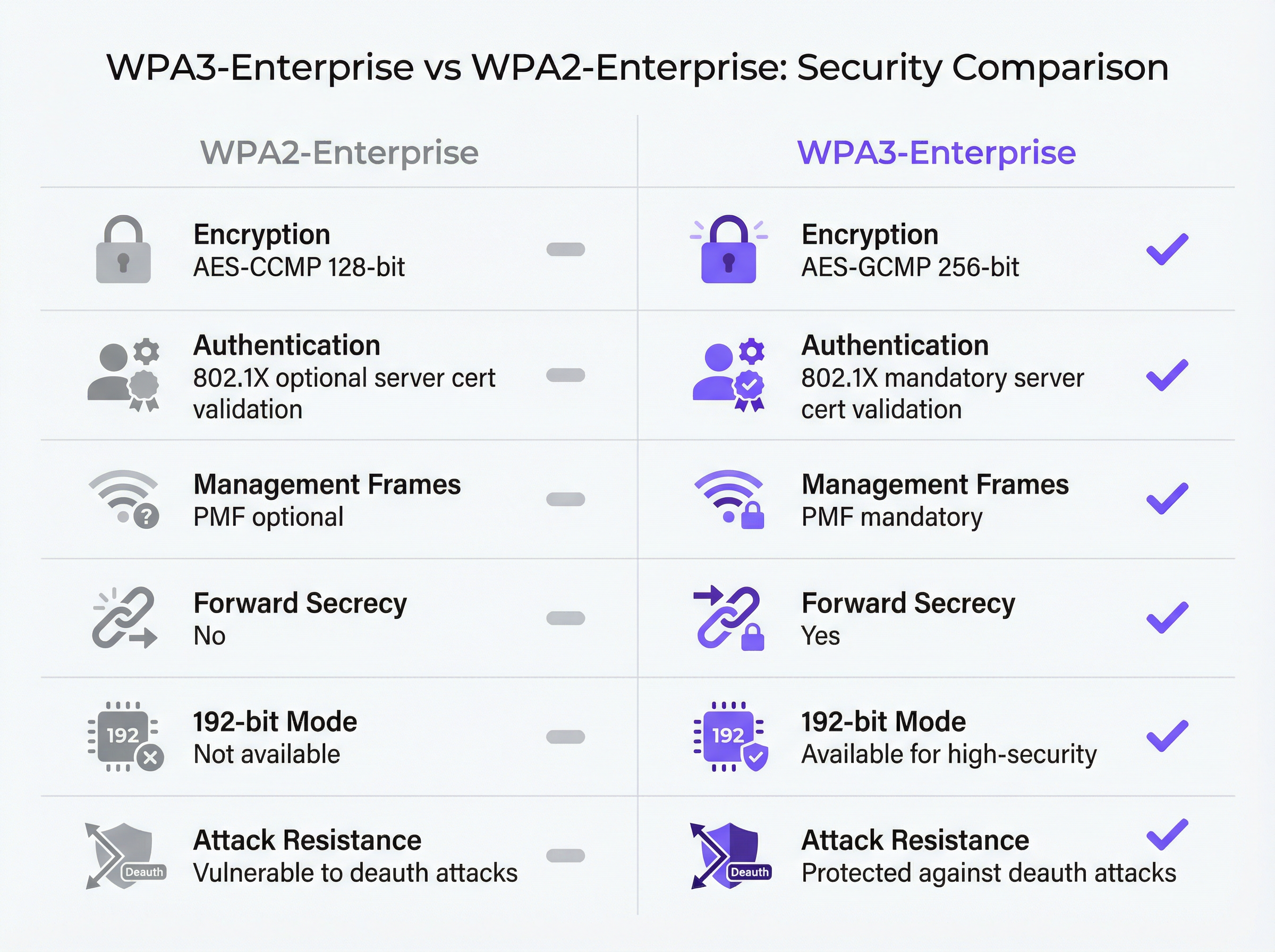
WPA3-Enterprise Betriebsmodi
Es gibt drei verschiedene Betriebsmodi, und die Auswahl des geeigneten Modus ist die erste architektonische Entscheidung bei jeder Bereitstellung.
| Modus | Verschlüsselung | EAP-Methoden | PMF | Anwendungsfall |
|---|---|---|---|---|
| WPA3-Enterprise (Standard) | AES-CCMP-128 | PEAP, EAP-TLS, EAP-TTLS | Obligatorisch | Allgemeines Unternehmen, Gastgewerbe, Einzelhandel |
| WPA3-Enterprise 192-Bit | AES-GCMP-256 + HMAC-SHA-384 | Nur EAP-TLS | Obligatorisch | Regierung, Finanzen, Verteidigung, kritische Infrastruktur |
| WPA2/WPA3-Enterprise Transition | AES-CCMP-128 / GCMP-256 | PEAP, EAP-TLS, EAP-TTLS | Optional | Migrationsphase, gemischte Geräteflotten |
Standard WPA3-Enterprise ist die richtige Wahl für die Mehrheit der Unternehmensbereitstellungen. Es bietet die drei zentralen Sicherheitsverbesserungen – obligatorisches PMF, obligatorische Validierung von Serverzertifikaten und Forward Secrecy – und unterstützt gleichzeitig die gesamte Palette an EAP-Methoden einschließlich PEAP-MSCHAPv2, was die Authentifizierung mit Benutzername und Passwort gegen Active Directory oder LDAP ermöglicht. Die Kompatibilität der Client-Geräte ist breit gefächert: Windows 10 Version 1903 und neuer, macOS 10.15 (Catalina) und neuer, iOS 13 und neuer sowie Android 10 und neuer unterstützen alle Standard-WPA3-Enterprise.
WPA3-Enterprise 192-Bit-Sicherheitsmodus wurde für Umgebungen mit erhöhten regulatorischen oder sicherheitstechnischen Anforderungen entwickelt. Die Verschlüsselungssuite – AES-GCMP-256 für Datenvertraulichkeit, HMAC-SHA-384 für Nachrichtenintegrität und ECDH/ECDSA-384 für Schlüsselaustausch und Authentifizierung – entspricht der Commercial National Security Algorithm (CNSA)-Suite der NSA und NIST SP 800-187. Die entscheidende Einschränkung besteht darin, dass EAP-TLS mit gegenseitiger Zertifikatsauthentifizierung die einzige zulässige EAP-Methode ist. Die Authentifizierung mit Benutzername und Passwort wird nicht unterstützt. Dieser Modus erfordert eine ausgereifte PKI-Infrastruktur und ist nicht für Umgebungen mit unmanaged oder BYOD-Geräten geeignet.
Transition Mode ermöglicht es WPA2- und WPA3-Clients, sich gleichzeitig mit derselben SSID zu verbinden. Clients handeln die höchste von ihnen unterstützte Sicherheitsversion aus. Dies ist der empfohlene Startpunkt für jede Migration, da das Risiko von Unterbrechungen bei Legacy-Geräten eliminiert wird, während WPA3 für fähige Clients vom ersten Tag an aktiviert ist.
Der 802.1X-Authentifizierungsablauf
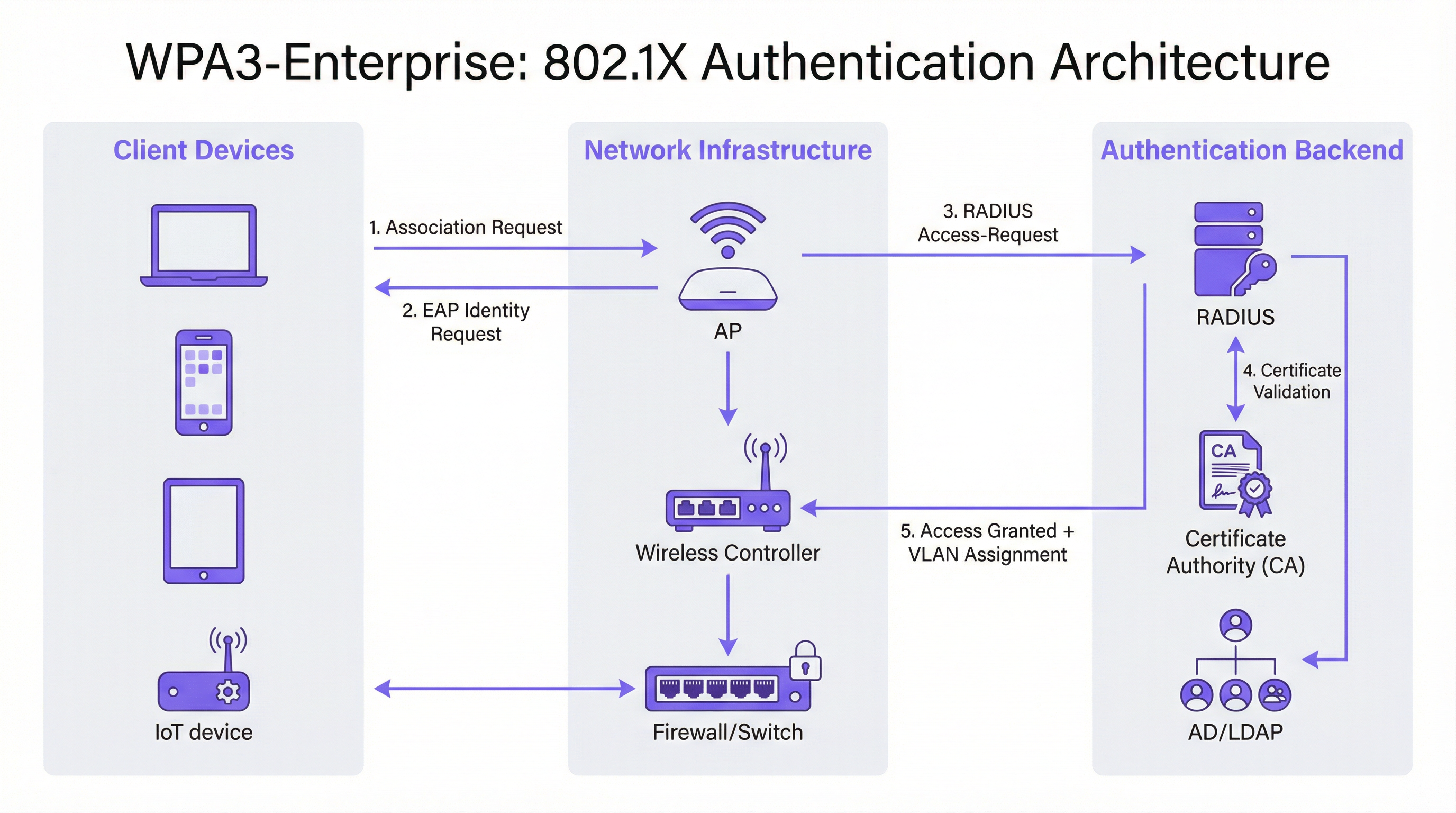
Der 802.1X-Authentifizierungsaustausch in WPA3-Enterprise umfasst drei Rollen: den Supplicant (Client-Gerät), den Authenticator (Access Point oder Wireless Controller) und den Authentifizierungsserver (RADIUS-Server). Der Ablauf ist wie folgt.
Das Client-Gerät assoziiert sich mit dem Access Point und initiiert einen EAP-Austausch. Der Access Point fungiert als transparenter Proxy und leitet EAP-Nachrichten zwischen dem Client und dem RADIUS-Server über RADIUS Access-Request- und Access-Challenge-Pakete weiter. Der RADIUS-Server präsentiert dem Client sein Zertifikat, das der Client nun gegen seinen vertrauenswürdigen CA-Speicher validieren muss – dies ist der obligatorische Validierungsschritt, den WPA3 einführt. Sobald der Client die Identität des Servers verifiziert hat, fährt er mit der Übermittlung der Anmeldeinformationen (PEAP) oder dem gegenseitigen Zertifikatsaustausch (EAP-TLS) fort. Bei erfolgreicher Authentifizierung gibt der RADIUS-Server eine Access-Accept-Nachricht zurück, die optional VLAN-Zuweisungsattribute (Tunnel-Type, Tunnel-Medium-Type, Tunnel-Private-Group-ID) enthält, mit denen der Access Point den Client im entsprechenden Netzwerksegment platziert.
Implementierungsleitfaden
Phase 1: Infrastruktur-Audit und Readiness-Assessment
Vor jeder Konfigurationsänderung ist eine gründliche Bestandsaufnahme der bestehenden Umgebung unerlässlich. Das Audit sollte vier Bereiche abdecken.
Access Point- und Controller-Firmware: Stellen Sie sicher, dass alle APs und der Wireless Controller WPA3 unterstützen. Die meiste Enterprise-Hardware, die nach 2019 ausgeliefert wurde, unterstützt WPA3 per Firmware-Update, aber die spezifisch erforderliche Firmware-Version variiert je nach Anbieter. Konsultieren Sie die Release Notes des Anbieters und stellen Sie sicher, dass auf allen APs ein WPA3-fähiger Firmware-Build ausgeführt wird, bevor Sie fortfahren.
Inventarisierung der Client-Geräte: Kategorisieren Sie Geräte nach ihrem WPA3-Support-Status. Verwaltete Endpunkte (Unternehmens-Laptops, Tablets, in MDM registrierte Smartphones) sollten einfach zu bewerten sein. Unmanaged- und IoT-Geräte – Drucker, Smart Locks, HLK-Controller, POS-Terminals – erfordern eine individuelle Bewertung. Geräte, die WPA3 nicht unterstützen können, müssen frühzeitig identifiziert werden, da sie entweder eine separate WPA2-SSID oder die Platzierung im Transition Mode benötigen.
RADIUS-Infrastruktur: Bewerten Sie den bestehenden RADIUS-Server hinsichtlich der Unterstützung von EAP-Methoden, Kapazität und Redundanz. Wenn Sie zu EAP-TLS wechseln, ermitteln Sie, ob eine interne PKI vorhanden ist oder ob eine Cloud-gehostete Zertifizierungsstelle erforderlich ist. Prüfen Sie, ob die aktuelle RADIUS-Infrastruktur über eine Hochverfügbarkeitskonfiguration verfügt – ein einzelner RADIUS-Server ohne Failover ist ein inakzeptabler Single Point of Failure in einer Produktionsumgebung.
Netzwerksegmentierung: Überprüfen Sie die bestehende VLAN-Architektur. WPA3-Enterprise-Bereitstellungen profitieren in der Regel von der dynamischen VLAN-Zuweisung über RADIUS-Attribute, wodurch eine einzige SSID mehrere Benutzergruppen mit entsprechender Netzwerkisolation bedienen kann. Bestätigen Sie, dass die Switching-Infrastruktur 802.1Q VLAN-Tagging unterstützt und dass der RADIUS-Server so konfiguriert ist, dass er die korrekten VLAN-Attribute zurückgibt.
Phase 2: RADIUS-Server-Konfiguration
Der RADIUS-Server ist das Authentifizierungs-Backbone jeder 802.1X-Bereitstellung. Die Konfigurationsanforderungen variieren je nach Plattform, aber die folgenden Schritte gelten unabhängig vom Anbieter.
Network Access Server (NAS)-Einträge definieren: Erstellen Sie für jeden Access Point oder Wireless Controller, der Authentifizierungsanfragen an den RADIUS-Server sendet, einen NAS-Eintrag, der die Quell-IP-Adresse und ein Shared Secret angibt. Dieses Shared Secret muss komplex (mindestens 24 Zeichen, Groß-/Kleinschreibung, Zahlen und Symbole) und pro NAS-Eintrag eindeutig sein.
EAP-Methode und Zertifikat konfigurieren: Installieren Sie für PEAP-MSCHAPv2-Bereitstellungen ein Serverzertifikat auf dem RADIUS-Server, das von einer CA ausgestellt wurde, der die Clients vertrauen. Konfigurieren Sie für EAP-TLS-Bereitstellungen sowohl die serverseitige als auch die clientseitige Zertifikatsvalidierung. Der Common Name oder Subject Alternative Name des RADIUS-Serverzertifikats muss mit dem in den Client-Profilen konfigurierten Wert übereinstimmen, andernfalls schlägt die Zertifikatsvalidierung fehl.
Integration in das Benutzerverzeichnis: Verbinden Sie den RADIUS-Server zur Validierung der Anmeldeinformationen mit Active Directory, LDAP oder einem Cloud-Identitätsanbieter. Konfigurieren Sie für EAP-TLS-Bereitstellungen die zertifikatsbasierte Authentifizierung mit der entsprechenden Zertifikatsvorlage und Sperrprüfung (OCSP oder CRL).
RADIUS-Accounting konfigurieren: Aktivieren Sie das Accounting auf dem RADIUS-Server und konfigurieren Sie den Wireless Controller so, dass er Accounting-Start-, Interim- und Stop-Datensätze sendet. Dies liefert den für die PCI DSS-Anforderung 8 (individuelle Benutzerverantwortlichkeit) erforderlichen Audit-Trail und unterstützt die Untersuchung von Vorfällen.
Dynamische VLAN-Zuweisung konfigurieren: Definieren Sie RADIUS-Attribute für jede Benutzergruppe oder jedes Zertifikatsprofil: Tunnel-Type (Wert 13, VLAN), Tunnel-Medium-Type (Wert 6, 802) und Tunnel-Private-Group-ID (die VLAN-ID als String). Dadurch kann der RADIUS-Server authentifizierte Clients basierend auf ihrer Identität oder ihrem Zertifikat im entsprechenden Netzwerksegment platzieren.
Phase 3: SSID-Konfiguration
Konfigurieren Sie die WPA3-Enterprise-SSID auf dem Wireless Controller mit den folgenden Parametern.
- Sicherheitsmodus: WPA2/WPA3-Enterprise (Transition Mode) für die anfängliche Bereitstellung
- PMF: Optional (Transition Mode) oder Erforderlich (WPA3-only Modus)
- EAP-Methode: PEAP oder EAP-TLS, je nach Bedarf
- RADIUS-Server: Primäre und sekundäre RADIUS-Server-IP-Adressen, Ports (1812 für Authentifizierung, 1813 für Accounting) und Shared Secrets
- RADIUS-Accounting: Aktiviert, mit konfiguriertem Accounting-Server
- Dynamisches VLAN: Aktiviert, wenn RADIUS-basierte VLAN-Zuweisung verwendet wird
Phase 4: Konfiguration der Client-Geräte
Die Client-Konfiguration ist die operativ intensivste Phase der Bereitstellung. Verwenden Sie für verwaltete Geräte MDM oder Gruppenrichtlinien, um die folgenden Konfigurationselemente zu pushen.
RADIUS-CA-Zertifikat: Das CA-Zertifikat, das das Authentifizierungszertifikat des RADIUS-Servers ausgestellt hat, muss im vertrauenswürdigen Stammzertifikatsspeicher des Clients bereitgestellt werden. Ohne dieses schlägt die Zertifikatsvalidierung fehl oder – wenn Clients falsch konfiguriert sind, um die Validierung zu überspringen – wird der Sicherheitsvorteil von WPA3-Enterprise zunichte gemacht.
SSID-Profil: Konfigurieren Sie den SSID-Namen, den Sicherheitstyp (WPA3-Enterprise oder WPA2/WPA3-Enterprise), die EAP-Methode und die Parameter für die Validierung des Serverzertifikats, einschließlich des erwarteten Servernamens oder Zertifikatssubjekts.
Für EAP-TLS-Bereitstellungen: Stellen Sie Client-Zertifikate für jedes Gerät über SCEP (Simple Certificate Enrolment Protocol) oder durch manuelle Installation bereit. Automatisieren Sie die Zertifikatserneuerung, um Authentifizierungsfehler bei Ablauf des Zertifikats zu vermeiden.
Phase 5: Überwachung und Abschluss der Migration
Sobald der Transition Mode live ist, überwachen Sie den Wireless Controller oder die Cloud-Management-Plattform auf WPA3-Adoptionsmetriken. Verfolgen Sie den Prozentsatz der Client-Assoziationen, die WPA3 im Vergleich zu WPA2 verwenden. Wenn die WPA3-Adoption 95 % übersteigt und alle verbleibenden WPA2-Clients identifiziert und entweder migriert oder auf eine dedizierte Legacy-SSID segmentiert wurden, stellen Sie die primäre SSID auf den WPA3-only Modus um.
Best Practices
Stellen Sie vom ersten Tag an redundante RADIUS-Server bereit. Der Ausfall eines einzelnen RADIUS-Servers legt das gesamte authentifizierte Netzwerk lahm. Konfigurieren Sie primäre und sekundäre RADIUS-Server auf jedem AP und Controller mit automatischem Failover. Ziehen Sie für Bereitstellungen an mehreren Standorten einen Cloud-gehosteten RADIUS-Service mit integrierter geografischer Redundanz in Betracht.
Erzwingen Sie die Validierung von Serverzertifikaten auf jedem Client. Dies ist das wichtigste Konfigurationselement in einer WPA3-Enterprise-Bereitstellung. Die Bereitstellung von WPA3-Enterprise ohne obligatorische Validierung von Serverzertifikaten auf den Clients bietet keinerlei Schutz vor Rogue-Access-Point-Angriffen. Validieren Sie diese Konfiguration explizit während der Tests – gehen Sie nicht davon aus, dass MDM-Profile korrekt angewendet wurden.
Verwenden Sie die dynamische VLAN-Zuweisung zur Netzwerksegmentierung. Anstatt mehrere SSIDs für verschiedene Benutzergruppen bereitzustellen, nutzen Sie die RADIUS-basierte dynamische VLAN-Zuweisung, um Benutzer basierend auf ihrer Identität im entsprechenden Netzwerksegment zu platzieren. Dies reduziert die RF-Überlastung (weniger SSIDs), vereinfacht die Wireless-Architektur und erhält die netzwerkseitige Isolation pro Benutzer aufrecht.
Behalten Sie eine dedizierte Legacy-SSID für unmanaged IoT-Geräte bei. Geräte, die WPA3 nicht unterstützen können – ältere POS-Terminals, ältere Drucker, IoT-Sensoren –, sollten auf einer separaten WPA2-Enterprise-SSID mit strikter VLAN-Isolation und Firewall-Regeln platziert werden. Lassen Sie nicht zu, dass diese Geräte die Migration des primären Mitarbeiternetzwerks auf WPA3 blockieren.
Verweisen Sie auf IEEE 802.1X und die Wi-Fi Alliance WPA3-Spezifikation v3.3 als maßgebliche Standards für Ihre Bereitstellungsdokumentation. Dokumentieren Sie aus Compliance-Gründen die spezifischen Cipher Suites, EAP-Methoden und die PMF-Konfiguration in Ihrer Netzwerksicherheitsrichtlinie und verweisen Sie explizit auf diese Standards.
Richten Sie sich nach der PCI DSS v4.0-Anforderung 4.2.1, indem Sie dokumentieren, dass WPA3-Enterprise mit AES-GCMP-Verschlüsselung die Anforderung an starke Kryptografie für Daten bei der Übertragung erfüllt. Bewahren Sie RADIUS-Accounting-Protokolle für den von Ihrem Compliance-Framework geforderten Zeitraum auf (in der Regel 12 Monate online, 12 Monate archiviert).
Fehlerbehebung & Risikominderung

Die folgende Tabelle fasst die fünf häufigsten Fehlerquellen bei WPA3-Enterprise-Bereitstellungen, deren Ursachen und empfohlene Behebungsmaßnahmen zusammen.
| Fehlerquelle | Ursache | Behebung |
|---|---|---|
| Client kann keine Verbindung herstellen, PMF-Fehler | Legacy-Gerät mit fehlerhafter PMF-Implementierung | Wechseln Sie in den Transition Mode (PMF optional) oder verschieben Sie das Gerät in eine WPA2-SSID |
| Authentifizierung schlägt fehl, Zertifikatsfehler | RADIUS-CA-Zertifikat nicht im Client-Trust-Store | Stellen Sie das CA-Zertifikat via MDM bereit, bevor Sie das SSID-Profil ausrollen |
| Zeitweilige Authentifizierungsfehler | RADIUS-Serverkapazität oder EAP-Timeout | Skalieren Sie die RADIUS-Infrastruktur; erhöhen Sie das EAP-Timeout auf 30s+ für Cloud-RADIUS |
| VLAN-Zuweisung nicht angewendet | Falsche RADIUS-Attribute | Überprüfen Sie Tunnel-Type (13), Tunnel-Medium-Type (6), Tunnel-Private-Group-ID (VLAN-ID als String) |
| Windows 10-Geräte können keine Verbindung herstellen | Veralteter Treiber oder OS-Build | Stellen Sie sicher, dass Windows Update aktuell ist; aktualisieren Sie den WLAN-Adapter-Treiber; testen Sie mit Windows 11 |
PMF-Kompatibilitätsprobleme: Protected Management Frames sind in WPA3-Enterprise obligatorisch, aber einige Legacy-Geräte – insbesondere ältere Android-Smartphones, ältere Drucker und bestimmte IoT-Geräte – weisen nicht konforme PMF-Implementierungen auf, die Verbindungsfehler verursachen. Die sofortige Abhilfe besteht darin, den Transition Mode zu aktivieren, wodurch PMF auf optional statt auf erforderlich gesetzt wird. Langfristig sollten diese Geräte auf eine dedizierte WPA2-SSID mit entsprechender VLAN-Isolation migriert werden.
Fehler in der Zertifikatsvertrauenskette: Die häufigste Ursache für EAP-Authentifizierungsfehler bei neuen WPA3-Enterprise-Bereitstellungen ist das Fehlen des CA-Zertifikats des RADIUS-Servers im vertrauenswürdigen Stammspeicher des Clients. Dies äußert sich als Authentifizierungsfehler mit einem Zertifikatsvalidierungsfehler im Ereignisprotokoll des Clients. Die Lösung ist einfach – stellen Sie das CA-Zertifikat via MDM bereit –, muss jedoch erfolgen, bevor das SSID-Profil an die Clients gepusht wird. Es wird dringend empfohlen, die Zertifikatsbereitstellung vor dem breiten Rollout an einer Pilotgruppe von Geräten zu testen.
RADIUS-Serverkapazität: In großen Bereitstellungen, insbesondere während der morgendlichen Anmeldespitzen, kann der RADIUS-Server zu einem Engpass werden. Überwachen Sie die CPU- und Speicherauslastung des RADIUS-Servers während der Spitzenzeiten. Ziehen Sie für Bereitstellungen mit mehr als 500 gleichzeitigen Benutzern in Betracht, mehrere RADIUS-Server hinter einem Load Balancer bereitzustellen oder einen Cloud-gehosteten RADIUS-Service mit Auto-Scaling zu verwenden.
Android-Gerätefragmentierung: Die WPA3-Enterprise-Implementierung von Android variiert erheblich zwischen Herstellern und Android-Versionen. Android 10 führte die WPA3-Unterstützung ein, aber die Qualität der Implementierung variiert. Testen Sie vor dem breiten Rollout mit einer repräsentativen Stichprobe der Android-Geräteflotte – einschließlich spezifischer Herstellermodelle. Einige Geräte erfordern spezifische EAP-Konfigurationsparameter, die vom Standardprofil abweichen.
ROI & Geschäftliche Auswirkungen
Der Business Case für die WPA3-Enterprise-Migration ruht auf drei Säulen: Risikominderung, Compliance-Effizienz und operationelle Resilienz.
Risikominderung: Die Eliminierung von Deauthentifizierungsangriffen ist in umsatzkritischen Umgebungen besonders wertvoll. Ein Konferenzzentrum oder Hotel, das während einer Großveranstaltung einen Wireless-Denial-of-Service-Angriff erleidet, ist mit direkten Umsatzverlusten und Reputationsschäden konfrontiert. Das obligatorische PMF beseitigt diesen Angriffsvektor vollständig. Die Schließung der Lücke für das Abgreifen von Anmeldeinformationen durch Rogue Access Points verringert das Risiko eines Diebstahls von Anmeldeinformationen, der zu einer umfassenderen Netzwerkkompromittierung führt – ein Vorfall, der unter der GDPR potenzielle Geldstrafen von bis zu 4 % des weltweiten Jahresumsatzes nach sich ziehen kann.
Compliance-Effizienz: Organisationen, die dem PCI DSS v4.0 unterliegen, profitieren von einer saubereren Compliance-Haltung. WPA3-Enterprise mit AES-GCMP-Verschlüsselung erfüllt die Anforderung 4.2.1 an starke Kryptografie, und RADIUS-Accounting-Protokolle erfüllen die Anforderung 8 an die individuelle Benutzerverantwortlichkeit. Die Dokumentation einer WPA3-Enterprise-Bereitstellung ist wesentlich einfacher als die Rechtfertigung einer WPA2-Bereitstellung gegenüber den aktuellen PCI DSS-Anforderungen, die die Nutzung von Legacy-Protokollen zunehmend kritisch prüfen.
Operationelle Resilienz: Der phasenweise Migrationsansatz – beginnend mit dem Transition Mode und der Überwachung der WPA3-Adoption – ermöglicht es Organisationen, ihre Sicherheitslage ohne eine disruptive Umstellung zu verbessern. Die Investition in die Redundanz der RADIUS-Infrastruktur, die Automatisierung des Zertifikatsmanagements und die MDM-basierte Client-Konfiguration zahlt sich über WPA3 hinaus aus: Diese Fähigkeiten bilden die Grundlage für jede zukünftige Initiative zur Netzwerkzugriffskontrolle.
Messbare Ergebnisse: Organisationen, die WPA3-Enterprise-Bereitstellungen abgeschlossen haben, berichten von der Eliminierung deauthentifizierungsbasierter Vorfälle, einer Reduzierung von sicherheitsrelevanten Ereignissen im Zusammenhang mit Anmeldeinformationen und optimierten PCI DSS-Auditprozessen. Für eine Hotelgruppe mit 400 Zimmern, die Zahlungskartendaten verarbeitet, rechtfertigen allein die Gewinne bei der Compliance-Effizienz – reduzierter Audit-Umfang, sauberere Beweispakete – in der Regel die Bereitstellungsinvestition innerhalb des ersten Compliance-Zyklus.
Key Terms & Definitions
WPA3-Enterprise
The enterprise mode of Wi-Fi Protected Access 3, defined by the Wi-Fi Alliance WPA3 Specification. It uses IEEE 802.1X for authentication, mandatory Protected Management Frames (IEEE 802.11w), mandatory server certificate validation, and AES-GCMP encryption. It is available in standard (128-bit) and 192-bit security modes.
IT teams encounter this when planning a wireless security upgrade from WPA2-Enterprise. It is the current best-practice standard for enterprise wireless security and is referenced in PCI DSS v4.0, NIST SP 800-187, and GDPR Article 32 compliance discussions.
IEEE 802.1X
An IEEE standard for port-based network access control. It defines an authentication framework involving three roles: the supplicant (client device), the authenticator (access point or switch), and the authentication server (RADIUS). 802.1X is the authentication backbone of both WPA2-Enterprise and WPA3-Enterprise.
Network architects encounter 802.1X when designing enterprise wireless or wired network access control. Understanding the three-party authentication model is essential for troubleshooting authentication failures and configuring RADIUS servers correctly.
RADIUS (Remote Authentication Dial-In User Service)
A networking protocol (RFC 2865) that provides centralised authentication, authorisation, and accounting (AAA) for network access. In WPA3-Enterprise deployments, the RADIUS server validates client credentials or certificates and returns access decisions, optionally including VLAN assignment attributes.
IT teams encounter RADIUS as the authentication server in any 802.1X deployment. Common implementations include Microsoft NPS (Windows Server), FreeRADIUS (open source), Cisco ISE, and Aruba ClearPass. Cloud-hosted RADIUS services are increasingly common for distributed enterprise estates.
Protected Management Frames (PMF / IEEE 802.11w)
A Wi-Fi security mechanism that cryptographically authenticates 802.11 management frames — the control messages governing device association, disassociation, and deauthentication. PMF prevents attackers from forging deauthentication frames to force clients off the network. Mandatory in WPA3; optional in WPA2.
Network architects encounter PMF when configuring WPA3-Enterprise SSIDs and when troubleshooting legacy device connectivity issues. Devices with non-compliant PMF implementations will fail to connect when PMF is set to 'required', necessitating transition mode or a separate WPA2 SSID.
EAP-TLS (Extensible Authentication Protocol - Transport Layer Security)
An EAP method that uses X.509 digital certificates for mutual authentication between the client and the RADIUS server. Both the client and the server present certificates, providing the strongest authentication assurance of any EAP method. Required for WPA3-Enterprise 192-bit mode.
IT teams encounter EAP-TLS when deploying certificate-based wireless authentication. It requires a PKI infrastructure (internal CA or cloud-hosted) and MDM-based certificate deployment to client devices. It eliminates the credential theft risk entirely, as there are no passwords to steal.
PEAP-MSCHAPv2 (Protected EAP with Microsoft Challenge Handshake Authentication Protocol v2)
An EAP method that tunnels MSCHAPv2 username and password authentication inside a TLS session established with the RADIUS server's certificate. It is the most widely deployed EAP method in enterprise wireless networks, supporting authentication against Active Directory and LDAP directories.
IT teams encounter PEAP-MSCHAPv2 as the default EAP method for WPA2-Enterprise and standard WPA3-Enterprise deployments. It is appropriate for environments with managed devices and an existing Active Directory infrastructure. Server certificate validation must be configured on clients to prevent credential interception.
Dynamic VLAN Assignment
A RADIUS feature that allows the authentication server to assign a client to a specific VLAN at authentication time, based on the user's identity, group membership, or certificate attributes. The RADIUS server returns three attributes in the Access-Accept message: Tunnel-Type (13/VLAN), Tunnel-Medium-Type (6/802), and Tunnel-Private-Group-ID (VLAN ID).
Network architects use dynamic VLAN assignment to implement per-user or per-role network segmentation without deploying multiple SSIDs. It is particularly valuable in hospitality and retail environments where different user populations (staff, management, contractors) require different network access levels.
Forward Secrecy
A cryptographic property that ensures that the compromise of a session key does not expose past or future session traffic. WPA3-Enterprise achieves forward secrecy through per-session key derivation, meaning each authentication session generates a unique key that is discarded after the session ends.
CTOs and security architects encounter forward secrecy in discussions about data protection risk. In WPA2, the absence of forward secrecy means that an attacker who captures encrypted wireless traffic today and later obtains session keys through a separate compromise can decrypt all historical traffic. Forward secrecy eliminates this retroactive decryption risk.
Transition Mode (WPA2/WPA3-Enterprise Mixed Mode)
A WPA3 operating mode that allows both WPA2-Enterprise and WPA3-Enterprise clients to connect to the same SSID simultaneously. Clients negotiate the highest security version they support. PMF is set to optional rather than required in this mode, ensuring compatibility with legacy devices.
IT teams use transition mode as the standard starting point for WPA3-Enterprise migrations. It eliminates the risk of disrupting legacy devices while enabling WPA3 for capable clients immediately. Most organisations maintain transition mode for 12-24 months before switching to WPA3-only.
WPA3-Enterprise 192-bit Security Mode
An optional high-security mode of WPA3-Enterprise using AES-GCMP-256 encryption, HMAC-SHA-384 for message integrity, and ECDH/ECDSA-384 for key exchange. Only EAP-TLS is permitted. Aligns with NIST SP 800-187 and the NSA's Commercial National Security Algorithm (CNSA) suite.
Network architects in government, financial services, and defence sectors encounter this mode when deploying wireless networks for sensitive or classified environments. It requires a mature PKI infrastructure and is not appropriate for environments with unmanaged or BYOD devices.
Case Studies
A 400-room hotel group with 12 UK properties needs to migrate their staff wireless network from WPA2-Enterprise to WPA3-Enterprise. The estate includes managed Windows laptops, iOS devices enrolled in MDM, legacy CCTV cameras running embedded firmware, and smart door lock controllers that are WPA2-only. They process payment card data through a cloud-based PMS and must maintain PCI DSS v4.0 compliance throughout the migration.
The deployment follows a five-phase approach. Phase 1 (Weeks 1-2): Conduct a full device inventory across all 12 properties. Categorise devices into three groups: WPA3-capable managed endpoints (Windows 10 1903+, iOS 13+), WPA3-incapable IoT devices (CCTV, door locks), and unknown/unmanaged devices. Audit AP firmware versions across the estate — most enterprise APs from 2019 onwards support WPA3 via firmware update. Phase 2 (Weeks 3-4): Configure the cloud-hosted RADIUS server (or Windows Server NPS at each property) with PEAP-MSCHAPv2 against Active Directory. Install a valid server certificate from a trusted CA. Configure NAS entries for each AP/controller. Enable RADIUS accounting. Phase 3 (Week 5): Deploy the RADIUS CA certificate to all managed devices via Intune MDM. Push a WPA2/WPA3-Enterprise transition mode SSID profile to managed devices, including the server certificate validation configuration pointing to the deployed CA cert. Phase 4 (Weeks 6-8): Enable the transition mode SSID on all APs. Monitor WPA3 vs WPA2 association statistics on the wireless controller. Simultaneously, create a dedicated WPA2-Enterprise SSID on a separate VLAN for CCTV cameras and door lock controllers, with strict firewall rules permitting only the specific traffic these devices require. Phase 5 (Month 3+): When WPA3 adoption on the staff SSID exceeds 95%, schedule a maintenance window to switch the staff SSID from transition mode to WPA3-only. Retain the WPA2 IoT SSID indefinitely for legacy devices. Document the configuration for PCI DSS evidence: cipher suites (AES-CCMP-128 minimum), PMF status (required), RADIUS accounting enabled, per-device authentication logs retained for 12 months.
A European retail chain with 250 stores needs to secure their staff mobile device network (tablets used for inventory management and customer service) with WPA3-Enterprise, while maintaining PCI DSS compliance for their existing WPA2-Enterprise POS terminal network. The IT team has limited on-site technical resource and needs a solution that can be managed centrally.
The architecture separates the POS and staff mobile networks at the SSID level. The POS network remains on WPA2-Enterprise with 802.1X, isolated on a dedicated VLAN with ACLs permitting only traffic to the payment processor's IP range and the PMS. This network is not migrated to WPA3 until POS terminal firmware supports it. The staff mobile network is deployed as a new WPA3-Enterprise SSID using EAP-TLS with client certificates. A cloud-hosted RADIUS service (such as Cisco ISE, Aruba ClearPass, or a cloud-native option) is selected to eliminate the need for on-site RADIUS infrastructure at each store. Certificates are deployed to staff tablets via MDM (Microsoft Intune or Jamf) using SCEP, with automatic renewal 30 days before expiry. The RADIUS server is configured for dynamic VLAN assignment: store manager tablets receive a management VLAN with broader access; standard staff tablets receive a restricted VLAN permitting only inventory system and customer service application traffic. RADIUS accounting logs are centralised and retained for 12 months to satisfy PCI DSS Requirement 8. The cloud RADIUS service provides geographic redundancy across two AWS regions, eliminating the single-point-of-failure risk. Rollout proceeds store-by-store over an 8-week period, with the IT team using the cloud management console to monitor authentication success rates and WPA3 adoption per store.
Scenario Analysis
Q1. Your organisation operates a 50,000-seat stadium with a mixed device fleet: 800 managed Windows staff laptops, 200 Android tablets used by event staff (enrolled in MDM), 150 legacy POS terminals running Windows Embedded (WPA2-only), and approximately 400 IoT devices including turnstile controllers and digital signage. You have been asked to deploy WPA3-Enterprise for the staff network within 90 days while maintaining PCI DSS compliance for the POS network. Outline your deployment architecture and phased rollout plan.
💡 Hint:Consider the POS terminals and IoT devices separately from the managed staff endpoints. The 90-day timeline requires a phased approach — identify which network segments can be migrated first and which require longer-term planning. Think about RADIUS redundancy given the high-density, event-driven nature of the environment.
Show Recommended Approach
The deployment requires a three-SSID architecture. First, a WPA3-Enterprise SSID in transition mode for managed staff devices (Windows laptops and Android tablets), using PEAP-MSCHAPv2 against Active Directory, with dynamic VLAN assignment separating operational staff from management. Second, a WPA2-Enterprise SSID for POS terminals, isolated on a dedicated VLAN with ACLs permitting only payment processor traffic — this network is not migrated to WPA3 until POS firmware supports it. Third, a WPA2 SSID for IoT devices (turnstile controllers, digital signage) on a separate VLAN with strict firewall rules. The RADIUS infrastructure must be sized for event-day peaks — a stadium environment may see 1,000+ simultaneous authentications during staff check-in. Deploy primary and secondary RADIUS servers (or a cloud-hosted service with redundancy) and test failover before the first major event. The 90-day timeline is achievable: weeks 1-2 for infrastructure audit and RADIUS configuration, weeks 3-4 for CA certificate deployment via MDM and pilot SSID testing, weeks 5-8 for phased rollout across the venue, weeks 9-12 for monitoring and documentation. The POS and IoT networks remain on WPA2 indefinitely until those device populations can be refreshed.
Q2. A government department is deploying a new wireless network for a sensitive operational environment. The security team has specified WPA3-Enterprise 192-bit security mode. The device fleet consists entirely of managed Windows 11 laptops and iOS 16 iPads, all enrolled in MDM. The IT team has no existing PKI infrastructure. What are the key prerequisites for this deployment, and what is the recommended approach to certificate management?
💡 Hint:WPA3-Enterprise 192-bit mode has specific EAP method restrictions. Consider what certificate infrastructure is required and whether an internal PKI or cloud-hosted CA is more appropriate for a government environment. Also consider the certificate lifecycle management requirements.
Show Recommended Approach
WPA3-Enterprise 192-bit mode requires EAP-TLS with mutual certificate authentication — there is no alternative EAP method. The prerequisites are: (1) a Certificate Authority infrastructure capable of issuing certificates meeting the 192-bit mode requirements (ECDSA-384 or RSA-3072 minimum); (2) a RADIUS server that supports EAP-TLS with the required cipher suites (AES-GCMP-256, HMAC-SHA-384); (3) MDM infrastructure capable of deploying client certificates via SCEP. For a government environment without existing PKI, the recommended approach is to deploy an internal CA using Windows Server Certificate Services (ADCS) with an offline root CA and an online issuing CA — this provides the audit control and air-gap security appropriate for a sensitive environment. The RADIUS server certificate should be issued by the issuing CA. Client certificates should be deployed to devices via SCEP through the MDM platform, with automatic renewal triggered 30 days before expiry. The CA root certificate must be deployed to all client devices' trusted root stores before the SSID profile is pushed. Certificate revocation should be implemented via OCSP for real-time revocation checking, with CRL as a fallback. The RADIUS server must be configured to check revocation status on every authentication. Document the PKI architecture, certificate policies, and revocation procedures for the security accreditation package.
Q3. Six weeks after deploying WPA3-Enterprise in transition mode at a 300-room hotel, your wireless controller dashboard shows that only 60% of client associations are using WPA3, with 40% still using WPA2. The IT team wants to understand why adoption is lower than expected and whether it is safe to switch to WPA3-only mode. What diagnostic steps would you take, and what criteria must be met before switching to WPA3-only?
💡 Hint:The 40% WPA2 figure could represent legacy devices that cannot support WPA3, managed devices with misconfigured profiles, or devices where the MDM profile has not yet been applied. Distinguish between devices that cannot support WPA3 and devices that have not yet been configured for it. The criteria for WPA3-only should address both categories.
Show Recommended Approach
The diagnostic process starts with identifying the WPA2 clients by MAC address and device type using the wireless controller's client association logs. Export the list of WPA2-connected clients and cross-reference against the device inventory. This will typically reveal three categories: (1) devices that are WPA3-capable but have not received the updated MDM profile (configuration issue); (2) devices that are WPA3-capable but have a driver or OS version issue preventing WPA3 association (remediation required); (3) devices that are genuinely WPA2-only — legacy IoT, older guest devices, or unmanaged personal devices (architecture decision required). For category 1, verify MDM profile deployment status and force a profile sync on affected devices. For category 2, check Windows Update and wireless adapter driver versions — many WPA3 compatibility issues are resolved by driver updates. For category 3, these devices must be accommodated: either maintain transition mode permanently, or move them to a dedicated WPA2 SSID before switching the main SSID to WPA3-only. The criteria for switching to WPA3-only are: (a) all remaining WPA2 clients have been identified by device type and owner; (b) WPA3-capable devices with configuration issues have been remediated; (c) WPA2-only devices have been moved to a dedicated SSID or the decision has been made to maintain transition mode; (d) the WPA3 adoption rate among the target device population (managed staff devices) is 100%, even if overall adoption including guest devices is lower. Do not switch to WPA3-only based solely on the overall percentage — ensure the managed device fleet is fully migrated first.
Key Takeaways
- ✓WPA3-Enterprise delivers three concrete security improvements over WPA2-Enterprise: mandatory Protected Management Frames (eliminating deauthentication attacks), mandatory server certificate validation (closing the rogue access point credential-harvesting gap), and forward secrecy through per-session key derivation.
- ✓Always begin migration in WPA2/WPA3 transition mode — never switch directly to WPA3-only. Transition mode allows both protocol versions on the same SSID and gives you a safe migration runway while you identify and accommodate legacy devices.
- ✓The RADIUS server's CA certificate must be deployed to all client devices via MDM before the SSID profile is pushed. This single sequencing rule prevents the most common cause of first-day deployment failures.
- ✓WPA3-Enterprise 192-bit security mode is for genuinely high-security environments (government, finance, defence) and requires EAP-TLS with mutual certificate authentication. For most enterprise deployments, standard WPA3-Enterprise with PEAP-MSCHAPv2 is the correct choice.
- ✓RADIUS redundancy is a hard requirement, not an optional enhancement. A single RADIUS server failure takes down the entire authenticated network. Deploy primary and secondary RADIUS servers with tested failover before go-live.
- ✓Legacy IoT devices, POS terminals, and older embedded-OS equipment are the long tail of every WPA3 migration. Identify them early, segment them on a dedicated WPA2 SSID with VLAN isolation, and do not allow them to block the migration of the primary staff network.
- ✓WPA3-Enterprise satisfies PCI DSS v4.0 Requirement 4.2.1 for strong cryptography in transit and supports GDPR Article 32 compliance. RADIUS accounting logs provide the per-device authentication audit trail required for PCI DSS Requirement 8.




