Not so long ago, 'connect to WiFi' just meant asking for a shared password scrawled on a piece of paper. For any modern business, it’s now a completely different game—one that directly shapes guest experiences, reinforces security, and can even drive revenue. This guide is all about moving away from those clunky captive portals and embracing a more seamless, identity-based approach to networking.
Rethinking How We Connect to WiFi
Let's be honest, the old ways of connecting to WiFi just don't cut it anymore. User expectations are sky-high and security threats are more sophisticated than ever. This is especially true in busy enterprise and hospitality environments, where managing network access is a complex, high-stakes job.
Clunky captive portals create a terrible first impression for guests, and shared passwords are a massive security risk for staff and internal systems. IT administrators are caught in the middle, trying to smoothly onboard guests, secure employee connections, and manage a growing number of IoT devices, all at scale.
This is where modern, passwordless solutions come in. They're about turning your WiFi from a simple utility into a powerful business tool.
The Modern Connectivity Challenge
People now expect instant, secure connectivity everywhere they go. This shift is partly down to how good home networking has become. In the UK, for example, the boom in full fibre broadband has completely changed what users expect, with subscriber numbers soaring by 45.39% to 11.5 million. This trend just highlights the growing demand for frictionless WiFi authentication over outdated shared passwords.
This expectation doesn't disappear when people walk into a commercial space. A guest checking into a hotel or a new employee on their first day shouldn't have to fight with a login screen. The experience needs to be automatic and secure. As you rethink your organisation's approach, a fundamental first step is to improve WiFi coverage to ensure that reliable access is available for everyone, everywhere on site.
The real challenge isn't just providing a signal; it's about managing identity. The goal is to know who is connecting—whether it's a guest, an employee, or a trusted device—and give them the right level of access without any hassle or manual steps.
From Cost Centre to Business Asset
Viewing WiFi as just another operational cost is a huge missed opportunity. A modernised approach does far more than solve security and user experience headaches. It can become a valuable source of first-party data, helping you understand visitor behaviour, personalise marketing, and ultimately, drive revenue.
By shifting to an identity-based model, businesses can:
- Enhance Security: Do away with the risks of shared passwords and adopt a zero-trust model for every connection.
- Improve User Experience: Offer automatic, frictionless connections for both guests and staff, boosting satisfaction and productivity.
- Gather Actionable Insights: Turn anonymous connections into known visitors, unlocking data on how long they stay, how often they visit, and their loyalty.
This transition is a crucial move from simply reacting to network issues to proactively engaging with users in a data-driven way.
Creating Effortless Guest WiFi Onboarding
For any modern venue, the guest WiFi is one of the very first interactions a visitor has with your brand. A clunky, multi-step login process creates immediate friction. It subtly suggests the rest of their experience might be just as difficult.
Get it right, though, and the opposite is true. An effortless connection sets a positive, professional tone from the moment they arrive. The goal is to make getting online so smooth that guests barely even notice it happening.
This is where simple, one-time authentication completely changes the game. Instead of fiddling with complex forms or asking staff for a shared password, a visitor just enters their email address. Once. That's it. They're online, securely, and you’ve just captured valuable, first-party data without being intrusive.
The Power of Connect-and-Forget WiFi
The real gold standard for guest access is a system where visitors connect once and never have to think about it again. This "connect-and-forget" experience is made possible by modern technologies like Passpoint (also known as Hotspot 2.0) and global federations like OpenRoaming.
Think about this real-world scenario:
A guest checks into a hotel that uses Passpoint-enabled WiFi. They connect in seconds using just their email. The next morning, they walk to a partnered coffee shop down the street. As they step inside, their phone automatically and securely connects to the café's WiFi without them lifting a finger. No login screens, no new passwords, no friction at all.
This seamless roaming is incredibly powerful. It creates a unified, high-quality experience across multiple locations, making guests feel valued. For the business, it extends the brand's digital footprint and provides a consistent, secure network environment everywhere.
OpenRoaming takes this concept global. A single, one-time authentication can grant a user access to a secure WiFi network across millions of hotspots worldwide, including airports, stadiums, and public venues. It transforms what used to be thousands of separate networks into one cohesive, trusted system.
Comparison of Guest WiFi Authentication Methods
To understand the shift, it helps to see how modern methods stack up against the legacy approaches many venues still use. Each has its place, but the differences in security, user experience, and data potential are stark.
| Method | User Experience | Security Level | Data & Marketing Potential | Best For |
|---|---|---|---|---|
| Email/One-Time Auth | Very High: Simple, fast, one-time login. | Medium: Secure connection post-login. | High: Captures first-party data for marketing and analytics. | Most hospitality, retail, and public venues wanting guest insights. |
| OpenRoaming/Passpoint | Highest: "Connect-and-forget." Automatic and seamless after first setup. | High: WPA2/WPA3-Enterprise encryption from the start. | High: Tracks anonymised roaming and footfall patterns. | Venues in high-traffic areas, multi-location brands, and smart cities. |
| Social Login | Medium: Quick for users, but privacy concerns are growing. | Medium: Secure post-login. | Medium: Relies on third-party data; less reliable than email. | Quick-service retail and venues focused on social media engagement. |
| Open/Shared Password | Low: Insecure, easily shared, requires manual entry for everyone. | Very Low: Prone to man-in-the-middle attacks. | None: No user data is captured. | Small offices or temporary events where security is not a concern. |
| Voucher/Code System | Low: Requires generating and distributing codes; cumbersome for guests. | Medium: Individual codes offer some security. | Low: Limited data, only tracks code usage. | Hotels or conference centres needing to limit access by time. |
Ultimately, moving towards methods like one-time email authentication and Passpoint isn't just a technical upgrade; it's a strategic decision to prioritise guest experience and data-driven operations.
Why Modern Onboarding Matters
Ditching old-fashioned captive portals for modern systems gives you a serious competitive edge. The benefits go far beyond simply providing an internet connection.
For your guests, the advantages are clear:
- Supreme Convenience: They authenticate once and enjoy automatic connectivity on all future visits.
- Serious Security: Connections are encrypted with WPA2/WPA3-Enterprise security from the very first packet, protecting them from the common threats found on open public networks.
- A Consistent Experience: They get the same high-quality, seamless connection whether they're in your lobby, restaurant, or a partner venue across town.
For your business, the benefits are strategic:
- Richer Data and Insights: Simple email authentication is the gateway to powerful first-party data. You can learn about visitor frequency, dwell times, and loyalty without intrusive tracking.
- Better Guest Satisfaction: A frictionless experience directly translates to higher satisfaction scores and positive reviews. It shows you value your visitors' time and digital security.
- New Engagement Opportunities: With a direct connection, you can deliver targeted marketing, personalised offers, and satisfaction surveys that build real loyalty. You can explore more about how secure guest connect to WiFi solutions make this happen.
A modern onboarding process turns a basic utility into a strategic asset. It’s the foundation for a smarter, more personalised guest journey that drives tangible business results. The first step is to stop thinking about WiFi as just an internet pipe and start seeing it as the digital welcome mat for your venue.
Implementing Zero Trust WiFi for Staff
For your staff, connecting to the company WiFi should be two things: completely secure and totally invisible. We’ve all seen the shared network password scribbled on a whiteboard, a practice that’s a massive security headache waiting to happen. The modern way forward is a zero-trust network, a model that works on a simple principle: trust no one by default. Access is only granted after a person’s identity is rigorously verified.
This approach completely flips the script on employee network access. Instead of a single, easily shared password for everyone, security is tied directly to each employee's unique digital identity. This is usually done with certificate-based authentication, which is far more secure and gets rid of the password problems caused by human error.
By hooking directly into your organisation's identity provider (IdP)—whether that’s Entra ID, Google Workspace, or Okta—the network simply becomes another part of your existing identity management strategy. This creates a seamless, automated system for controlling who gets onto your corporate network.
The Power of Identity-Driven Access
Picture a new starter on their first day. With an identity-driven system, getting them online is a non-event. The moment their account is created in your company directory, their corporate laptop is automatically given a unique digital certificate.
When they power up their device, it silently authenticates with the network using that certificate. There are no passwords to type, no captive portals to click through, and no IT support tickets to raise. They’re just online and secure from the get-go. It’s a brilliant onboarding experience that also frees up a ton of IT time.
The same magic works in reverse when an employee leaves. The second their account is deactivated in your directory, their network certificate is instantly revoked. Their access to the corporate WiFi is cut off immediately, closing a common security gap without anyone having to lift a finger.
This level of automation ensures network access rights are always perfectly in sync with an employee's current status. It’s a core piece of a true zero-trust security model, where access is granted only when needed and removed the instant it's not.
This process simplifies the user experience down to its essentials, moving from an initial connection to automatic access on all subsequent visits.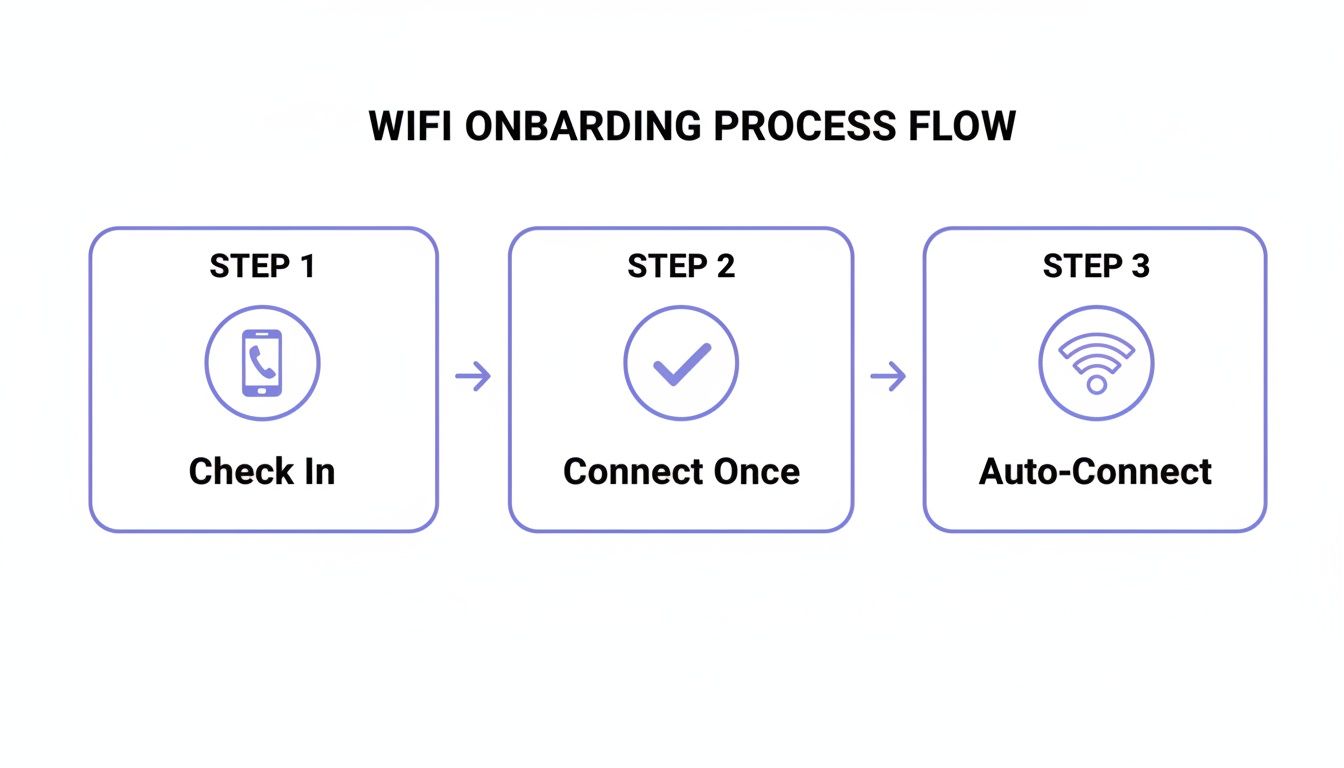
This journey shows just how simple and seamless WiFi onboarding can become for every user.
Moving Beyond Legacy RADIUS Servers
Traditionally, managing network access at this scale meant wrestling with complex, on-premise RADIUS servers. These systems were often a nightmare to configure and maintain, which put this level of security out of reach for many organisations. You can get a deeper understanding of what a RADIUS server is in our detailed guide.
Thankfully, modern cloud-based platforms have made this old way of doing things obsolete. They handle the entire authentication process in the cloud, acting as the go-between for your identity provider and your existing network hardware. This "RADIUS-as-a-Service" model gives you enterprise-grade security without the pain of managing clunky, old infrastructure.
This shift is more important than ever. With hybrid work and skyrocketing mobile data usage, the lines between networks are blurring. In the UK, mobile 5G traffic jumped a staggering 53% to 348 petabytes annually, pushing more people to offload onto WiFi wherever they can. A seamless and secure WiFi connection is no longer just a perk—it’s a core business requirement.
Switching to a zero-trust, certificate-based model brings some major wins:
- Drastically Improved Security: Unique certificates kill the risks of shared passwords and help protect against man-in-the-middle attacks.
- A Frictionless User Experience: Staff connect automatically without thinking about it, which boosts productivity and cuts down on frustration.
- Simplified IT Management: Automating access based on your existing staff directory massively reduces the admin workload for IT teams.
- Enhanced Visibility and Control: You get fine-grained control over who is on your network, with a clear audit trail of every connection.
Ultimately, integrating your WiFi with your identity provider builds a network that is intelligent, agile, and secure by design. It turns the simple act of getting online into a strategic security function that protects your business from the inside out.
Connecting Legacy and IoT Devices Securely
Modern certificate-based authentication is brilliant for the laptops and smartphones that run our businesses, but it leaves a massive blind spot in most networks. What about everything else? We're talking about printers, smart TVs in hotel rooms, vital medical equipment in hospitals, and the thousands of "headless" IoT sensors that simply can't handle that kind of complex login.
For years, the go-to solution was a single, shared password—a pre-shared key (PSK) broadcast for all these miscellaneous devices to use. It’s an easy fix, but it's also a huge security nightmare. If just one device is compromised or that single password leaks, your entire fleet of legacy and IoT devices is left wide open.
The Problem with Shared Passwords
A shared password creates a flat, insecure network. Every device, from a printer holding sensitive documents to a simple smart thermostat, is on the same level of trust. There’s no way to tell them apart, control their access, or isolate a potential threat.
This gets particularly risky in multi-tenant environments like student housing or residential buildings. Imagine a scenario where every resident's smart speakers, gaming consoles, and TVs are all on the same shared WiFi network. It's a recipe for chaos, with devices interfering with each other and creating major privacy concerns. You really don't want your neighbour accidentally casting their music to your living room speaker.
A Better Way: Identity Pre-Shared Keys
This is where Identity Pre-Shared Keys (iPSK) come in, offering a powerful and practical solution. Instead of one password for everything, iPSK technology lets you generate a unique password for every single device or user group. It’s like giving each device its own private key to the network.
This simple change has a massive impact on security and manageability. You get the simplicity of a password-based connection but with the kind of control you'd expect from an enterprise-grade system.
With an iPSK model, you can:
- Isolate Devices: Each device connects with its own credentials, stopping them from seeing or interacting with each other unless you specifically allow it.
- Get Granular Control: You can easily revoke access for a single lost or compromised device without having to disrupt hundreds of others.
- Simplify Management: These unique keys can be managed from a central cloud dashboard, making it easy to onboard new devices and handle their entire lifecycle.
By assigning a unique identity to each device, you transform a chaotic and vulnerable collection of gadgets into a securely managed ecosystem. It’s the key to making IoT and legacy devices first-class citizens on a modern, secure network.
iPSK in a Multi-Tenant Building
Let's make this real. Consider a modern Build-to-Rent (BTR) apartment complex. The property manager needs to provide reliable internet for hundreds of residents, each with a growing number of personal smart devices. A single shared password would be completely unmanageable and insecure.
Using iPSK, the property manager can create a unique network password for each apartment. When a new resident moves in, they receive their private key. They can then easily connect to WiFi with all their devices—thermostats, smart speakers, TVs, and gaming consoles—using that single, unique password.
Their devices are now on a secure, private network segment, completely isolated from their neighbours' gadgets. This delivers the simple "at-home" experience residents expect while giving the building operator the enterprise-level security and control they need. When a resident moves out, their iPSK is simply revoked, and a new one is generated for the next tenant.
This approach is essential as user expectations for constant connectivity continue to rise. With internet penetration in the UK now at 97.8%, residents expect flawless WiFi as a standard utility, and iPSK delivers it securely. You can explore more UK fibre and connectivity statistics to see how these trends are shaping what people demand from their homes.
It's a perfect example of how to solve a complex connectivity challenge with a surprisingly simple solution. You get the best of both worlds: user-friendly access and robust, centralised security.
Integrating Your New WiFi Solution
Rolling out a new, identity-based WiFi system doesn't have to be the complex, drawn-out project it once was. Modern, cloud-first platforms are designed from the ground up to work with the network hardware you already have from leading vendors like Mist, Ruckus, Aruba, and UniFi. This single fact completely changes the game, turning a months-long headache into a project that can be up and running in a matter of weeks.
The secret is that these platforms work as an intelligent overlay. You don't need to rip out and replace all your existing access points. Instead, the solution integrates directly with your hardware and your identity provider (like Entra ID or Google Workspace), managing the entire authentication process from the cloud. This approach saves a huge amount of time and money and sidesteps the risks that come with a full infrastructure overhaul.
What a Typical Deployment Looks Like
The whole process is built for speed. A typical rollout follows a clear path from planning to launch, and it's often done and dusted in under a month.
- Week 1: Discovery and Planning: We start by digging into your specific needs for guests, staff, and any other devices. This is where we map out who needs access to what and decide on the best authentication methods for each group (e.g., a simple email capture for guests, secure certificates for corporate staff).
- Weeks 2-3: Configuration and Integration: Next, we connect the cloud platform to your network hardware and identity provider. This is the hands-on part where new SSIDs are configured, and we build the access policies for different user roles.
- Week 4: Testing and Go-Live: We'll get a pilot group to test the new system to make sure everything is working perfectly. Once everyone gives the thumbs up, the solution is rolled out across the entire organisation.
Of course, for any of this to work smoothly, it all depends on having a robust network infrastructure already in place. A solid foundation is what prevents bottlenecks and guarantees a great user experience from day one.
The goal is an agile, phased rollout rather than a disruptive "big bang" launch. Starting with a single location or user group allows you to fine-tune the system and build confidence before expanding company-wide.
Essential Troubleshooting and Best Practices
Once your new system is live, keeping it running smoothly is pretty straightforward. That said, a few best practices will help you get ahead of common issues and make sure users can always connect to WiFi without any fuss.
First up is proper network segmentation. This is non-negotiable. Your guest, staff, and IoT networks absolutely must be separated using VLANs. Think of it as building digital walls between them—it’s a cornerstone of good security that prevents a potential problem on a less secure network (like guest WiFi) from ever touching your critical corporate systems.
Another common pitfall we see involves conflicts with built-in network features, especially on consumer or "prosumer" grade hardware. For example, many routers have their own "Guest Network" feature that can interfere with devices trying to communicate properly, causing random drop-offs even when everything seems to be on the right SSID. If you're seeing unexpected disconnections, disabling these secondary guest modes on your router is often a quick fix.
Finally, keep an eye on things proactively. The analytics dashboard in your platform is your best friend here.
- Successful Connections: Track the ratio of successful authentications to failures. It’s a great early warning system for potential problems.
- Device Types: Get a handle on what kinds of devices are connecting. This helps you plan for future capacity and tweak security policies.
- Dwell Times and Visit Frequency: For guest networks, these numbers give you fantastic insights into visitor behaviour and engagement.
By following these simple practices, you can give your IT team the tools and confidence to manage the network effectively, ensuring a seamless and secure connection for everyone.
Turning WiFi Connectivity into Business Intelligence

Getting your guests and staff online is really just the beginning. The true power of a modern WiFi network kicks in once everyone's connected. It’s about shifting your mindset from seeing WiFi as a simple utility—a cost centre—to recognising it as a powerful strategic asset.
This transformation happens when you start understanding the people behind the connections. The key is the first-party data you can capture during the login process. When a guest provides an email to connect to WiFi, they’re giving you a direct line of communication. Suddenly, anonymous footfall becomes identifiable, repeat visitors, opening up a goldmine of business intelligence.
Unlocking Actionable Insights from Your Network
This is where built-in analytics platforms come in. They take that raw data and turn it into something genuinely useful, revealing patterns in visitor behaviour that were completely invisible before. You can finally answer critical questions about your venue with solid data, not just guesswork.
- Dwell Times: How long do people actually spend in certain areas? This insight can shape everything from your store layout to your staffing rotas.
- Visit Frequency: Are your visitors just passing through, or are they loyal regulars? Knowing who your most frequent visitors are means you can start rewarding them.
- Peak Hours: Pinpoint exactly when your venue is busiest to optimise your operations, marketing pushes, and overall customer experience.
This data builds a detailed picture of how people move through and interact with your physical space. You can explore the power of guest WiFi analytics to see just how these metrics translate into real-world value.
By analysing how people move through and use a physical space, businesses can make smarter, data-driven decisions that directly impact their bottom line. It's about seeing the story your footfall data is telling.
Proving Marketing ROI in the Real World
Perhaps the most powerful application of this intelligence is its ability to finally connect the dots between digital marketing and what happens in your physical venue. Think about a large shopping centre running a targeted email campaign for a new retailer. How do they actually know if it worked?
With WiFi analytics, it's surprisingly straightforward. The marketing team can send a promotional offer to a specific segment of their customer database. The system then tracks precisely how many of those email recipients later walked into the shopping centre. By linking a digital campaign directly to physical footfall, marketing teams can calculate a clear return on investment.
This powerful feedback loop closes the marketing circle. It proves that the future of how we connect to WiFi isn't just about the technology itself; it’s about understanding, engaging with, and building better relationships with the people who walk through your doors.
Got Questions? We've Got Answers
Making the switch to a modern, identity-based WiFi system is a big step, and it's natural to have a few questions. We often hear from IT admins, venue operators, and marketing teams who are navigating this change, so we've put together some of the most common queries to give you clear, straightforward answers.
How Does OpenRoaming Make Things More Secure?
OpenRoaming is a major security upgrade from the standard guest portals you're used to. It locks everything down with robust WPA2/WPA3-Enterprise encryption from the very first packet of data sent. Traditional captive portals can leave a user's traffic exposed and unencrypted until after they've logged in, which creates a real window of vulnerability.
This technology secures the entire connection, automatically. Because it works on a federated identity system, users are authenticated by a trusted provider (like their mobile carrier or Google) using digital certificates. This completely removes the risk of "evil twin" attacks, where someone sets up a fake hotspot to trick people into giving away their login details. For you, it means a secure, compliant network without ever having to manage a single password.
Can I Get Zero Trust WiFi Without Replacing All My Hardware?
Yes, you absolutely can. Modern identity-based networking platforms are built to work as a smart, cloud-based layer on top of the infrastructure you already own. They plug straight into your current access points from leading names like Cisco Meraki, Aruba, and Ruckus.
The platform itself does all the heavy lifting, talking to your identity provider (like Entra ID, Okta, or Google Workspace) and your network hardware to manage authentication. This setup lets you achieve certificate-grade, zero-trust security without a costly and disruptive "rip and replace" of all your kit. It's a much faster and more efficient way to get there.
The real advantage here is leveraging the investment you've already made in your network. The focus shifts from hardware replacement to a smarter, software-defined approach to network access and security.
Why Is iPSK Better Than a Standard Password for IoT Devices?
Think of an iPSK, or Identity Pre-Shared Key, as a unique password assigned to a single device or a very small, specific group of devices. This is worlds apart from a standard PSK, where one password gets shared across every single device on the network.
If that one shared password is ever compromised, your entire IoT network is wide open. With iPSK, a breach is contained to just the single device whose key was stolen. This granular control means you can instantly revoke access for one problematic device—like a compromised printer or smart TV—without disrupting anything else. It’s the perfect solution for securely managing how your legacy devices connect to WiFi.
Ready to transform how your guests and staff connect? Purple provides a secure, passwordless WiFi experience that integrates seamlessly with your existing network. Get a demo today!