

Access Point Placement and Coverage Planning for Venues
A technical reference for IT leaders on designing high-performance WiFi networks in complex venues. This guide provides actionable best practices for access point placement, coverage planning, and capacity calculation to improve guest experience and operational ROI.
🎧 Listen to this Guide
View Transcript

Executive Summary
Effective WiFi network design is a critical infrastructure component for any modern venue, directly impacting guest satisfaction, operational efficiency, and revenue generation. This guide serves as a technical reference for IT managers, network architects, and venue operators, providing vendor-neutral, actionable best practices for access point (AP) placement and coverage planning. We move beyond theoretical concepts to offer practical deployment strategies tailored to the unique challenges of hospitality, retail, large public venues, and corporate environments. The focus is on balancing the core pillars of a successful WiFi deployment: coverage, capacity, and client experience. By following the principles outlined, organisations can ensure seamless roaming, mitigate interference, and deliver the high-throughput connectivity required by today’s device-dense user base. This document provides the frameworks to calculate appropriate AP density, plan for signal overlap and channelisation, and avoid common deployment pitfalls, ultimately enabling a superior and more reliable wireless experience that provides a measurable return on investment.
Technical Deep-Dive
Successful WiFi deployment hinges on a deep understanding of Radio Frequency (RF) behaviour. The primary goal is to create a pervasive and reliable coverage map, while simultaneously providing sufficient capacity to handle the expected density of client devices. This requires a systematic approach to planning.
Calculating AP Density and Capacity
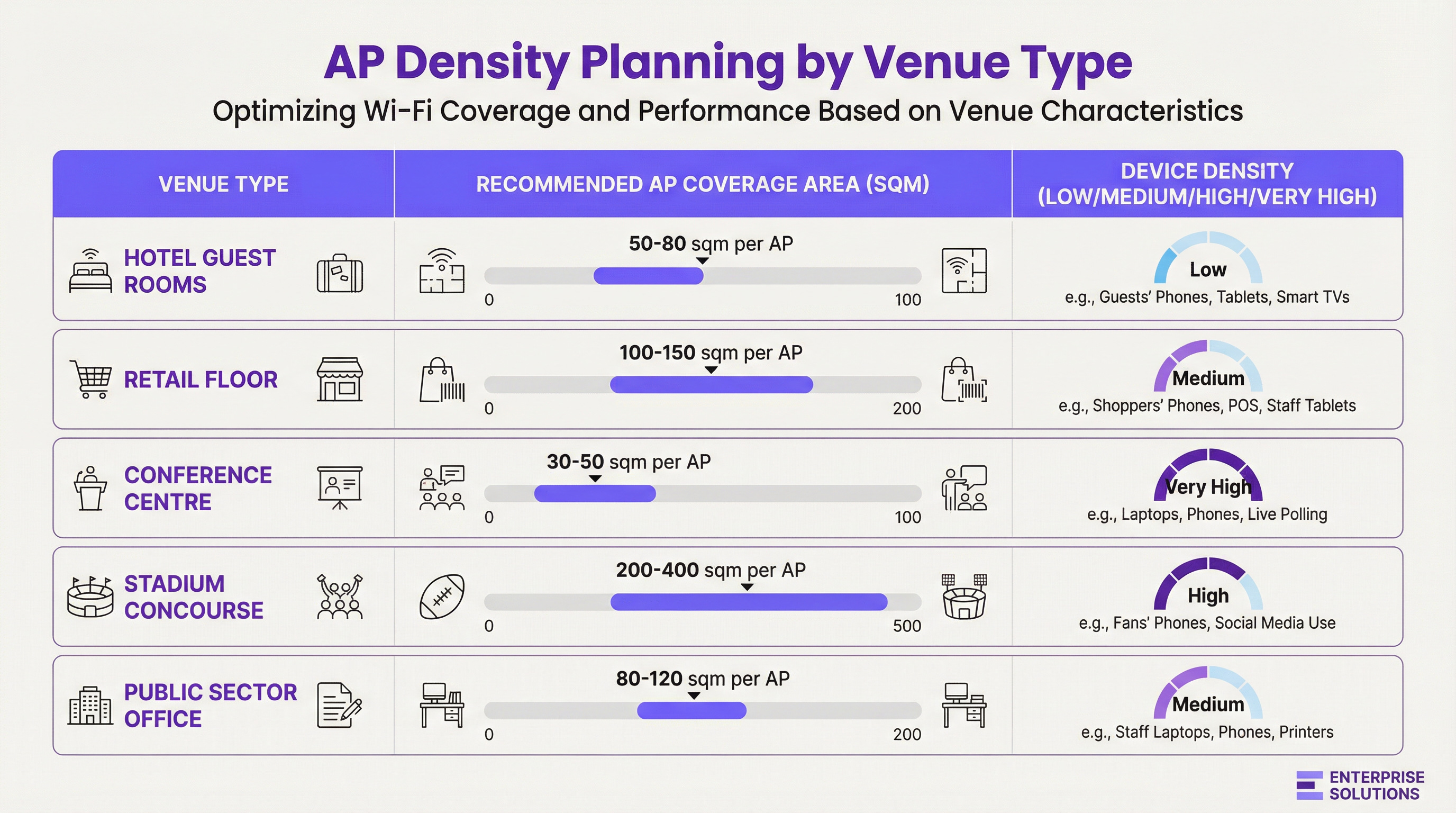
AP density is not a one-size-fits-all metric. It is a function of three variables: the physical size of the area, the number of concurrent users, and the types of applications they will be using.
- Coverage-Oriented Design: In environments like hotels or warehouses, the primary goal is to provide a consistent signal over a large area. Here, planning starts with the AP’s effective coverage radius, factoring in attenuation from building materials.
- Capacity-Oriented Design: In high-density environments like conference centres or stadiums, the plan must prioritise the number of simultaneous connections an AP can handle. This often leads to deploying more APs than required for coverage alone, operating at lower transmit power to create smaller, more focused cells.
Signal Attenuation and Material Impact
RF signals are absorbed, reflected, and diffracted by building materials. A comprehensive site survey must account for the dB loss caused by common obstructions:
| Material | 2.4 GHz Attenuation (Approx.) | 5 GHz Attenuation (Approx.) | Impact on Placement |
|---|---|---|---|
| Plasterboard | -3 dB | -4 to -5 dB | Minimal impact, standard for office environments. |
| Concrete Wall | -10 to -15 dB | -15 to -20 dB | High impact; requires APs on both sides. |
| Glass Window | -4 dB | -7 dB | Moderate impact; can cause reflections. |
| Metal Door/Lift | -15 to -25 dB | -20 to -30 dB | Creates RF shadows; plan coverage around them. |
Channel Planning and Signal Overlap
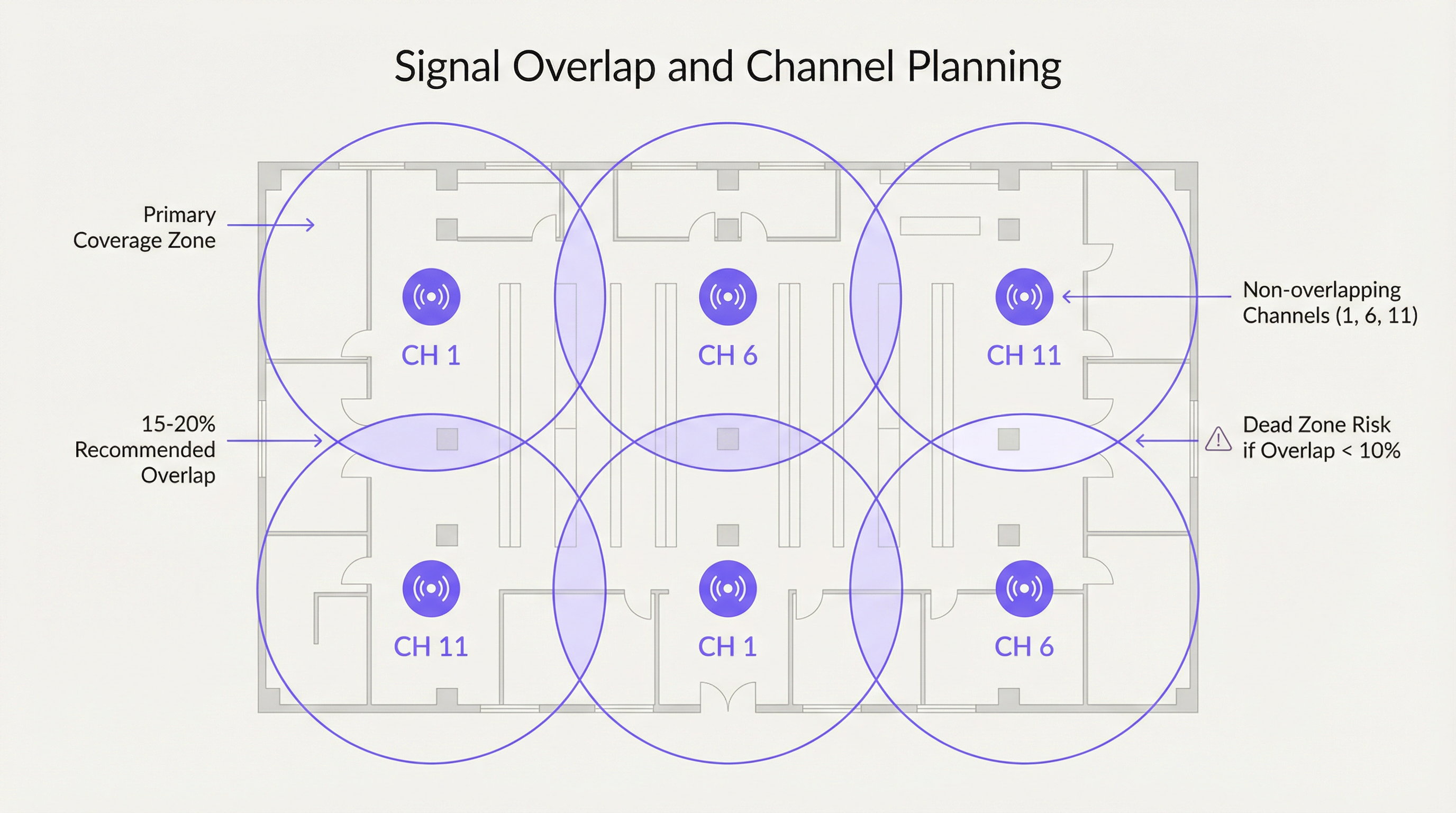
To ensure seamless roaming, a deliberate overlap of 15-20% between adjacent AP coverage cells is recommended. This allows a client device to discover and associate with a new AP before it loses the signal from the previous one. However, this overlap must be managed with a proper channel plan to avoid interference.
- Co-Channel Interference (CCI): Occurs when two APs on the same channel are too close. They must contend for airtime, reducing performance for all connected clients.
- Adjacent Channel Interference (ACI): Occurs when APs on overlapping channels are too close (e.g., channels 1 and 2 in the 2.4 GHz band).
For the 2.4 GHz band, only channels 1, 6, and 11 are non-overlapping and should be used exclusively in any enterprise deployment. The 5 GHz band offers a much larger number of non-overlapping channels, making it the preferred choice for capacity-driven designs.
Implementation Guide
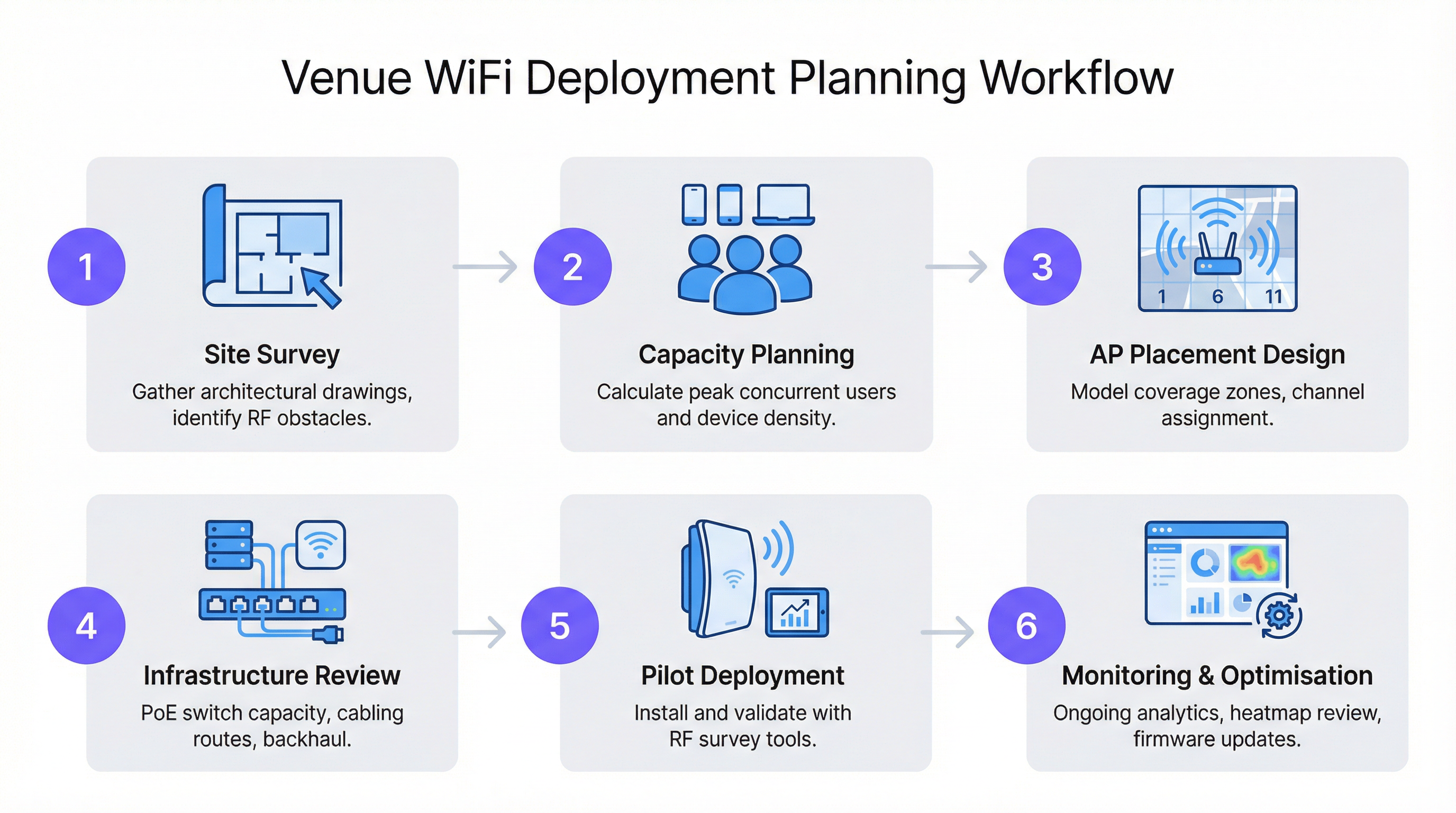
Following a structured workflow is critical to a successful and scalable WiFi deployment. This process ensures all variables are considered, from initial planning to post-installation optimisation.
Step 1: The Site Survey
A professional site survey is the cornerstone of any network design. It involves two phases:
- Predictive Survey: Using floor plans and software like Ekahau or AirMagnet to model RF propagation and create an initial AP placement map.
- Physical Survey: A walk-through of the venue with a spectrum analyser and survey tool to validate the predictive model, identify sources of RF interference (like microwave ovens or neighbouring networks), and confirm the RF properties of building materials.
Step 2: Mounting and Placement
- Ceiling Mount: Ideal for open areas with high ceilings (3-5 metres), such as retail floors or ballrooms. Use a down-tilt antenna pattern for focused coverage.
- Wall Mount: Preferred in hospitality (hotel rooms) and offices. Mount APs at a height of 2.5-3 metres to position them above most furniture and obstructions.
- Avoid Ceiling Voids: Placing APs in the space above a suspended ceiling can reduce signal strength by 3-5 dB and makes physical access for maintenance difficult.
- Vertical Staggering: In multi-storey buildings, APs should not be placed in the same location on each floor. Staggering the placement helps to mitigate co-channel interference between floors.
Best Practices
- Prioritise 5 GHz: Steer capable clients towards the 5 GHz band. It has more channels, less interference, and offers higher data rates. Use band-steering features on your APs to encourage this.
- Right-Size Transmit Power: Maximum power is not always best. In high-density designs, lowering the transmit power creates smaller microcells, which increases overall network capacity by allowing for more frequent channel reuse.
- Leverage Modern Standards: Deploy Wi-Fi 6 (802.11ax) or Wi-Fi 6E capable APs. Features like OFDMA and MU-MIMO are specifically designed to improve performance in congested environments.
- Plan for Backhaul: Ensure your switching infrastructure can provide the necessary Power over Ethernet (PoE) budget (PoE+ or PoE++ for high-performance APs) and has sufficient uplink capacity to handle the aggregated wireless traffic.
Troubleshooting & Risk Mitigation
- Symptom: Slow speeds despite strong signal. Cause: Likely co-channel interference or an over-saturated AP. Solution: Perform a spectrum analysis to identify competing networks. Review AP client load and consider adding capacity or load-balancing clients.
- Symptom: Connection dropouts when moving. Cause: Insufficient coverage overlap (<10%) or improper roaming configuration. Solution: Increase AP density in the affected area or adjust the transmit power of adjacent APs to create a larger overlap zone.
- Symptom: Certain areas have no coverage (dead zones). Cause: Unforeseen RF obstructions (e.g., new metal shelving). Solution: Conduct a post-installation survey to identify the dead zone and deploy an additional AP to fill the gap.
ROI & Business Impact
A well-designed WiFi network is not a cost centre; it is an enabler of business intelligence and improved customer experience. For a retail chain, the data gathered from a Purple-enabled WiFi network can inform store layout decisions, measure footfall, and drive personalised marketing. In hospitality, it is a key driver of guest satisfaction scores and enables services like mobile check-in and in-room streaming. The ROI is measured in:
- Increased Guest Satisfaction & Loyalty: High-performance WiFi is now a primary amenity, influencing booking decisions.
- Enhanced Operational Efficiency: Reliable connectivity for staff devices (POS systems, inventory scanners, communication tools) reduces downtime.
- New Revenue Streams: Location-based analytics and captive portal marketing can create new opportunities for engagement and sales.
Key Terms & Definitions
Access Point (AP)
A networking hardware device that allows a Wi-Fi compliant device to connect to a wired network. APs are the bridge between the wireless and wired worlds.
This is the fundamental building block of your WiFi network. IT teams will be physically deploying and configuring these devices based on the network plan.
Site Survey
The process of planning and designing a wireless network to provide a solution that will deliver the required wireless coverage, data rates, network capacity, roaming capability and Quality of Service (QoS).
This is the most critical pre-deployment step. Skipping or rushing a site survey is the number one cause of poor WiFi performance. It provides the data needed to justify AP count and placement to management.
AP Density
The concentration of access points within a given physical area. High density refers to a large number of APs in a small area, typically for capacity reasons.
This term is central to budget discussions. A CTO needs to understand why a high-density area like a conference room requires a higher AP density (and thus cost) than a hallway.
Signal-to-Noise Ratio (SNR)
A measure that compares the level of a desired signal to the level of background noise. It is expressed in decibels (dB). A higher SNR means a cleaner, more reliable signal.
When troubleshooting a user's complaint of 'bad WiFi', SNR is a key metric. A strong signal is useless if the background noise (from other networks, microwaves, etc.) is also high. Aim for an SNR of 25 dB or higher for good performance.
Co-Channel Interference (CCI)
Interference that occurs when two or more access points on the same channel operate in close proximity. They are forced to share the available airtime, reducing throughput for all clients.
This is why channel planning is crucial. A network architect must design the AP layout to minimize CCI by reusing channels effectively across the venue.
Roaming
The process of a wireless client device moving from one access point to another within the same network without losing connectivity.
For venue operations, seamless roaming is essential for staff using mobile devices (e.g., scanners, tablets) and for guests on calls. It relies on having sufficient coverage overlap between APs.
Power over Ethernet (PoE)
A standard that allows electrical power to be passed along with data on twisted-pair Ethernet cabling. This allows a single cable to provide both data connection and electrical power to devices like APs.
This simplifies deployment and reduces costs by eliminating the need for a separate power outlet at every AP location. Network architects must ensure their switches have a large enough PoE budget to power all planned APs.
Wi-Fi 6 (802.11ax)
The latest generation of Wi-Fi technology, offering faster speeds and, more importantly, better performance in congested, high-density environments through technologies like OFDMA and MU-MIMO.
When planning a new deployment, especially for a high-traffic venue, specifying Wi-Fi 6 is a form of future-proofing and risk mitigation. It ensures the network can handle the increasing number of devices per user.
Case Studies
A 200-room, 5-story luxury hotel needs to upgrade its WiFi. The building is concrete and steel. The goal is to provide high-performance streaming for guests and reliable connectivity for staff operations.
A capacity-driven design is required. Plan for one AP per 2-4 guest rooms, depending on wall density. Given the concrete construction, placing APs in hallways is not viable; an in-room or near-room wall-plate AP strategy is necessary. For example, a wall-plate AP in every other room, with careful channel planning to avoid interference with rooms on adjacent floors. A staggered floor-by-floor layout is critical. For common areas like the lobby and restaurant, a ceiling-mounted, high-density AP solution is required, with APs placed approximately 10-15 meters apart. The entire network should be designed using Wi-Fi 6 APs to handle the high number of devices and streaming applications. A physical site survey is mandatory to validate RF penetration through the hotel's specific wall types.
A large retail store (5,000 sq. meters) wants to deploy guest WiFi and support staff inventory scanners and POS devices. The store has high ceilings and wide, open aisles, but also dense shelving units.
A mixed-coverage and capacity approach is needed. The primary design should be coverage-oriented, using ceiling-mounted APs with omnidirectional antennas placed in a grid pattern across the open floor areas, approximately 15-20 meters apart. However, a secondary survey must be done to identify potential RF dead zones created by high, metal shelving units. In these areas, additional, lower-power APs may be needed, mounted to the ends of aisles or on pillars. Channel planning should use a standard 1, 6, 11 rotation for 2.4 GHz and a wider range of non-overlapping channels for 5 GHz. The network must be configured with separate SSIDs and VLANs for guest and corporate traffic, in line with PCI DSS compliance for the POS systems.
Scenario Analysis
Q1. You are designing WiFi for a historic hotel with thick plaster and lath walls. A predictive survey suggests a single AP in the corridor can cover four rooms. What is your primary concern and how do you validate your design?
💡 Hint:Historic building materials are notoriously unpredictable for RF signals.
Show Recommended Approach
The primary concern is that the predictive model is inaccurate due to the variable density of the plaster and lath walls. The model should not be trusted. The only way to validate the design is with a physical pilot test. Place a single AP on a temporary stand in the corridor and use a survey tool (like Ekahau Sidekick) to measure the actual signal strength inside each of the four rooms. It is highly likely that an in-room or two-room deployment model will be required.
Q2. A conference is reporting that WiFi performance is excellent in the main hall but becomes unusable in the smaller breakout rooms. All APs are the same model. What is the most likely cause?
💡 Hint:Think about user density and the difference between a large hall and a small room.
Show Recommended Approach
The most likely cause is a capacity issue, not a coverage one. The AP density was likely planned for the lower-density main hall and not adjusted for the much higher user density in the breakout rooms. During breakout sessions, a large number of users move into small spaces, overwhelming the few APs covering those rooms. The solution is to increase the AP density in the breakout rooms and potentially use directional antennas to focus coverage and limit interference.
Q3. Your company is deploying a new network in a multi-tenant office building. You do not control the other tenants' networks. What is the most critical step in your site survey process?
💡 Hint:You can't control your neighbours, but you need to account for them.
Show Recommended Approach
The most critical step is a thorough spectrum analysis. In a multi-tenant building, the RF environment is chaotic. You must identify all other WiFi networks operating in the space, paying close attention to the channels they are using and their signal strength in your deployment area. This analysis is crucial for creating a channel plan that avoids the most congested channels, mitigating co-channel and adjacent channel interference from networks you do not control. You may need to rely more heavily on the 5 GHz band and potentially use narrower channel widths (e.g., 20 MHz) to find clean spectrum.
Key Takeaways
- ✓AP placement is a balance of providing wide coverage and sufficient capacity for users.
- ✓A physical site survey is non-negotiable to understand a building's unique RF characteristics.
- ✓Plan for 15-20% signal overlap between APs to ensure seamless roaming.
- ✓In the 2.4 GHz band, only ever use channels 1, 6, and 11 to avoid interference.
- ✓High-density venues like conference halls require more APs for capacity, not just coverage.
- ✓Deploy Wi-Fi 6 (802.11ax) for better performance in crowded environments.
- ✓A WiFi network is not 'set and forget'; it requires continuous monitoring and optimisation.




