

Band Steering and Load Balancing for High-Density WiFi
This authoritative technical reference equips IT managers, network architects, and venue operations directors with the knowledge to design, configure, and optimise high-density WiFi networks using band steering and load balancing. It covers the architectural principles behind 2.4 GHz vs. 5 GHz band selection, AP load distribution strategies, and vendor-neutral configuration best practices for demanding environments such as stadiums, hotels, and conference centres. By applying these strategies, organisations can measurably improve wireless throughput, reduce user complaints, and transform their network infrastructure into a strategic business asset.
🎧 Listen to this Guide
View Transcript

Executive Summary
For organisations managing high-density wireless environments, maintaining optimal WiFi performance is a critical operational challenge. As the number of connected devices per square metre escalates in venues such as airports, conference centres, and retail hubs, conventional network configurations falter, leading to poor user experience, dropped connections, and reduced data throughput. This guide addresses these challenges head-on by providing a technical deep-dive into two core optimisation strategies: band steering and load balancing. We explore the architectural principles that differentiate the 2.4 GHz and 5 GHz frequency bands and detail how to intelligently steer dual-band clients to the less congested, higher-capacity 5 GHz spectrum. Furthermore, we analyse access point (AP) load balancing techniques that distribute client connections evenly across available network resources, preventing individual APs from becoming performance bottlenecks. By implementing the vendor-neutral best practices and configuration guidance outlined here, IT managers and network architects can deliver a superior, more reliable wireless experience, directly impacting customer satisfaction, operational efficiency, and business ROI. This reference is designed for practical application, offering concrete deployment scenarios and measurable outcomes to inform your network infrastructure strategy this quarter.
Technical Deep-Dive
Understanding Frequency Bands: 2.4 GHz vs. 5 GHz
The foundation of effective WiFi management in high-density environments lies in understanding the fundamental differences between the 2.4 GHz and 5 GHz frequency bands. These are not merely two pathways for data; they are distinct RF environments with unique propagation characteristics that dictate their suitability for different use cases and deployment scenarios.
| Feature | 2.4 GHz Band | 5 GHz Band |
|---|---|---|
| Range | Longer wavelength, better wall penetration | Shorter wavelength, more easily obstructed |
| Interference | High (Microwaves, Bluetooth, cordless phones) | Low (Less crowded, more channels) |
| Channels | 11-14 channels, only 3 non-overlapping | 23+ non-overlapping channels |
| Bandwidth | Lower potential data rates | Higher potential data rates (e.g., with 802.11ac/ax) |
| Suitability | Basic connectivity, IoT, legacy devices | High-bandwidth applications (video, voice), dense areas |
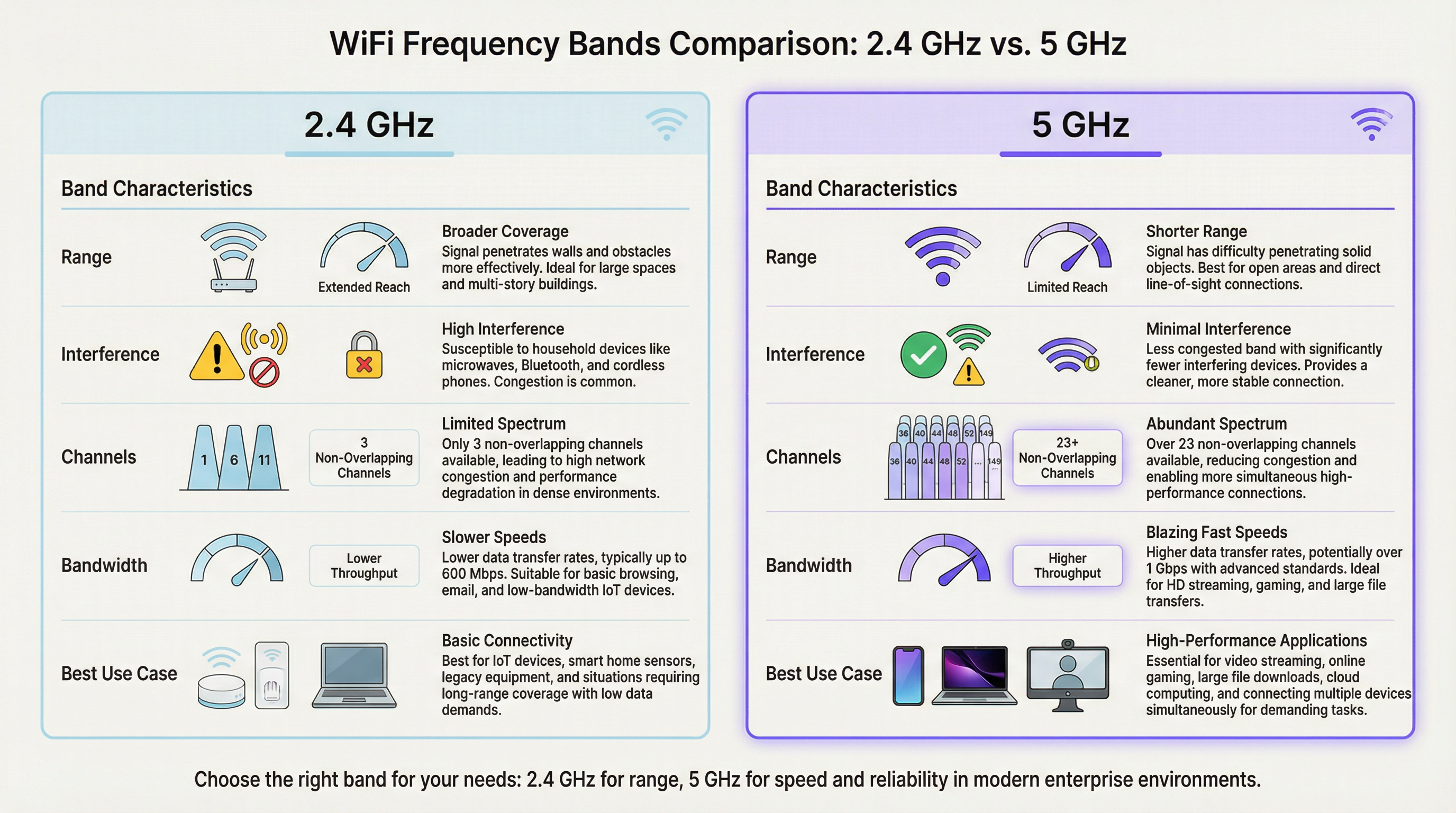
In a high-density setting like a stadium or lecture hall, the 2.4 GHz band quickly becomes saturated. With only three non-overlapping channels (1, 6, and 11 in North America), co-channel interference is a significant and persistent performance inhibitor. Every additional AP operating on the same channel in the same area degrades the performance of all others. The 5 GHz band, by contrast, offers a much wider spectrum with numerous non-overlapping channels, making it the preferred choice for performance-critical applications. The primary goal of band steering WiFi implementations is to proactively move capable client devices from the congested 2.4 GHz band to the cleaner, faster 5 GHz band, reserving the 2.4 GHz spectrum for IoT sensors, legacy devices, and clients at the edge of coverage.
How Band Steering Works
Band steering is not a formal IEEE standard but a proprietary technique implemented by enterprise WiFi vendors. While specific algorithms vary between manufacturers, the general mechanism involves the Access Point actively encouraging or compelling a dual-band client to connect to the 5 GHz radio. This is typically achieved through several methods that operate at the 802.11 management frame level.
The first is Delayed Probe Responses: when a dual-band client sends out a probe request on both bands simultaneously, the AP may intentionally delay its response on the 2.4 GHz frequency by several hundred milliseconds. The client, seeing a faster response on 5 GHz, naturally prefers and connects to the superior band. The second is Probe Response Suppression: the AP can ignore 2.4 GHz probe requests from clients it has identified as 5 GHz capable, effectively making the 2.4 GHz network invisible to them during the initial discovery phase. The third, and most modern approach, is IEEE 802.11v BSS Transition Management: this standard frame allows the AP to explicitly request that a client transition to a different BSS (Basic Service Set), in this case, the 5 GHz radio on the same AP. This is a cooperative method that relies on client-side support for the 802.11v standard and is the recommended approach for enterprise deployments, as it avoids the aggressive suppression techniques that can cause connectivity issues with non-compliant clients.
AP Load Balancing
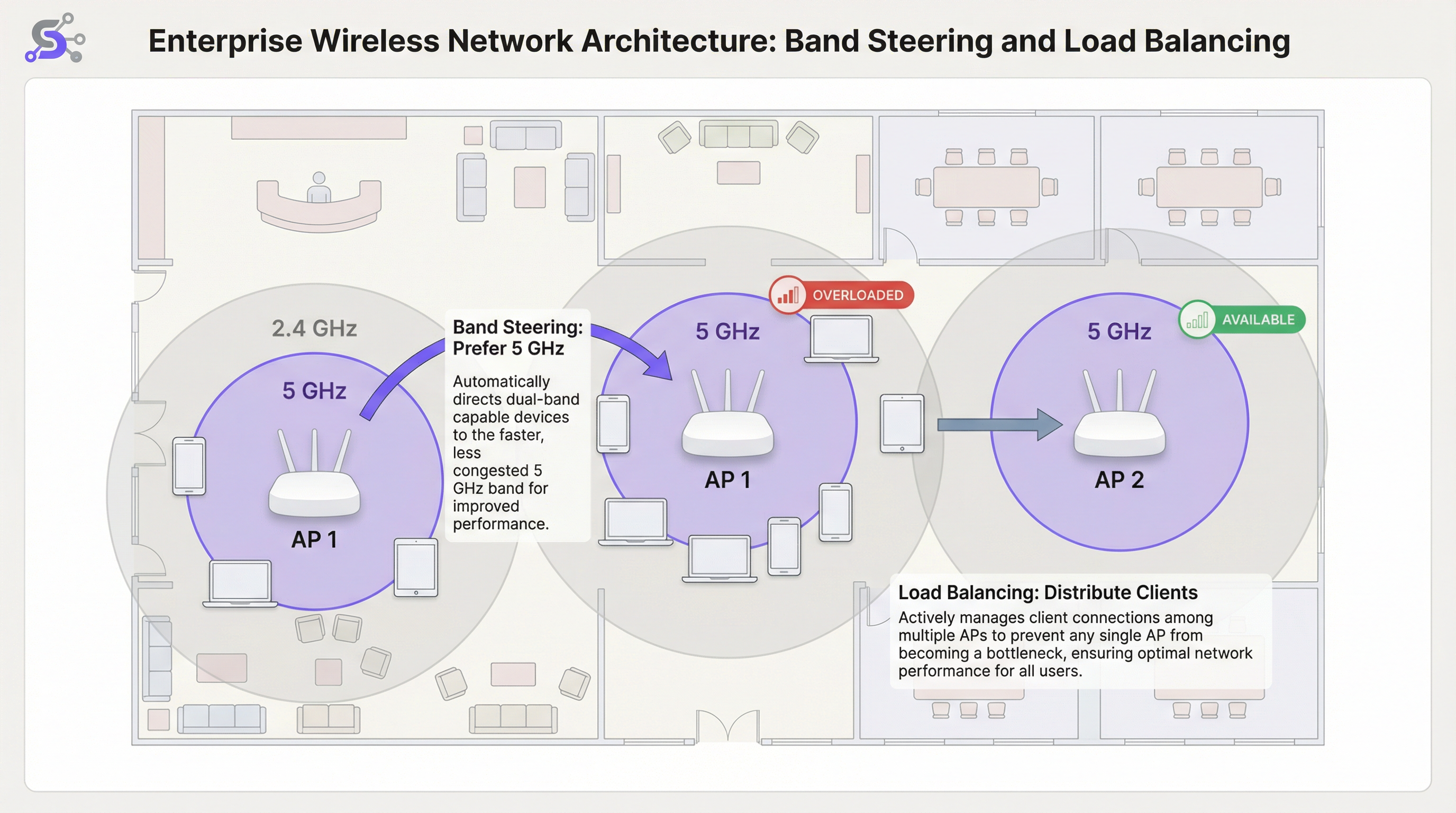
While band steering optimises the frequency band selection on a per-AP basis, WiFi load balancing addresses the broader challenge of distributing clients evenly across multiple APs in a given area. In a busy airport terminal or hotel lobby, it is common for users to congregate near a single, centrally located AP, overloading it while adjacent APs remain underutilised. This creates a significant performance disparity: users near the overloaded AP experience degraded service, while users near idle APs are not getting the full benefit of the available infrastructure. Load balancing algorithms prevent this by setting thresholds for client count or radio utilisation on each AP.
When an AP reaches its configured load threshold, it can refuse new association requests. This encourages the new client device to scan again and discover a nearby, less-congested AP. More sophisticated systems leverage 802.11v to proactively suggest a specific alternative AP to the client, making the transition seamless and transparent to the end user. The most advanced implementations use predictive algorithms that anticipate load increases based on historical patterns and begin redistributing clients before a bottleneck forms.
The Role of the Wireless LAN Controller
In enterprise deployments, band steering and load balancing are not managed at the individual AP level but are orchestrated by a centralised Wireless LAN Controller (WLC) or a cloud-based management platform. The WLC maintains a global view of all associated clients, their signal strengths, the current load on each AP, and the RF environment across the entire site. This centralised intelligence is what makes sophisticated load balancing possible: the controller can make informed decisions about where to redirect a new client based on real-time data from the entire network, not just the limited local view of a single AP.
Cloud-managed platforms, such as those offered by Cisco Meraki, Aruba Central, and Juniper Mist, extend this concept further by incorporating AI-driven radio resource management (RRM). These systems continuously analyse RF data, client behaviour, and application performance to dynamically adjust channel assignments, transmit power, and steering thresholds without manual intervention. For large venue operators managing dozens or hundreds of APs across multiple floors or buildings, this level of automation is not a luxury but a practical operational necessity.
WiFi 6 and Band Steering in the 6 GHz Era
The introduction of WiFi 6E (IEEE 802.11ax) and the regulatory opening of the 6 GHz spectrum band represents a significant evolution for high-density WiFi architecture. The 6 GHz band offers up to 1,200 MHz of additional clean spectrum, with 59 non-overlapping 20 MHz channels available in markets such as the United States and the United Kingdom. For venues deploying WiFi 6E-capable APs, the band steering strategy must evolve to a three-band model: steering legacy devices to 2.4 GHz, capable devices to 5 GHz, and the latest WiFi 6E clients to the pristine 6 GHz band. This tiered approach maximises the utilisation of all available spectrum and ensures that the newest, highest-performance devices benefit from the cleanest possible RF environment, free from the legacy interference that accumulates in the older bands.
Implementation Guide
Step 1: Pre-Deployment Site Survey
A predictive site survey using professional tools such as Ekahau Site Survey or iBwave Design is non-negotiable for any high-density deployment. This is not merely about verifying coverage but about capacity planning. Your goal is to identify zones of high device density, model the RF propagation characteristics of the physical space, and plan AP placement and channel allocation to minimise co-channel interference. The survey should also account for the expected client density during peak usage periods, which for a conference centre might be a keynote session and for a stadium is the 30-minute window before kick-off when tens of thousands of fans are simultaneously trying to connect.
Step 2: Band Steering Configuration
In your wireless LAN controller (WLC) or cloud management dashboard, you will find a setting for Band Steering or Band Select. Key band steering configuration parameters include the following. Mode: most enterprise vendors offer options such as Prefer 5 GHz, Force 5 GHz, or Balance Bands. For high-density venues, Prefer 5 GHz is the recommended starting point. Force can be too aggressive and may deny service to legacy 2.4 GHz-only clients, generating unnecessary support tickets. Steering Threshold (RSSI): set a minimum signal strength for a client to be steered to 5 GHz. A typical starting value is -65 dBm. If the client's 5 GHz signal is weaker than this threshold, it may actually have a better experience on 2.4 GHz despite the interference, particularly in environments with thick walls or significant building materials that attenuate the higher frequency.
Step 3: Load Balancing Configuration
Client Count Threshold: set a maximum number of clients per AP radio. For a high-density area, this might be as low as 25 to 30 clients to ensure quality of service, even if the AP hardware technically supports more simultaneous associations. Utilisation Threshold: a more dynamic and recommended approach is to balance based on radio utilisation, expressed as the percentage of time the radio medium is busy transmitting or receiving. A threshold of 60 to 70 per cent is a widely accepted best practice, as it leaves sufficient headroom for burst traffic without allowing any single AP to become a sustained bottleneck.
Step 4: Validate and Monitor
After deployment, continuous monitoring is essential. Use your WLC or cloud management platform to track the ratio of clients on 5 GHz versus 2.4 GHz, the distribution of clients across APs in each zone, and the average client data rates over time. Establish a baseline during a normal operational period and use it to identify anomalies. A sudden increase in 2.4 GHz associations or an uneven client distribution often indicates a configuration drift, a new source of interference, or a hardware failure on one of the APs.
Best Practices
Single SSID Strategy: use a single SSID for both 2.4 GHz and 5 GHz bands. This is a non-negotiable prerequisite for effective band steering, as it allows the client and the network to negotiate the best band transparently in the background. Separate SSIDs for each band require users to make a manual choice, which defeats the purpose of automated steering and creates a support burden when users consistently choose the wrong band.
Disable Low Data Rates: to prevent slow clients from consuming excessive airtime, disable legacy data rates below 12 Mbps on both bands. This improves overall cell performance through a practice known as airtime fairness. In very dense environments such as stadiums or large conference halls, raising the minimum rate to 24 Mbps is advisable, as it significantly reduces the overhead from management frames and ensures the available airtime is used efficiently.
Channel Width: in high-density areas, prefer narrower 20 MHz channels for 5 GHz. While 40 MHz or 80 MHz channels offer higher peak speeds for individual clients, they reduce the total number of available non-overlapping channels, increasing the risk of co-channel interference in a multi-AP environment. The aggregate capacity of the network, measured as the total throughput available across all APs, is far more important than the peak speed of any single client connection.
Transmit Power Control (TPC): do not run APs at maximum transmit power. This is counter-intuitive but is one of the most impactful best practices in high-density WiFi design. High power increases co-channel interference, creates large overlapping cells that make it harder for clients to roam, and can actually reduce the total capacity of the network. Use automated TPC algorithms or manually set power to create smaller, denser cells that increase overall network capacity and improve the signal-to-interference-plus-noise ratio (SINR) for all clients.
Troubleshooting & Risk Mitigation
Sticky Clients: the most common operational issue in enterprise WiFi is the sticky client that remains associated with a distant AP despite a better option being available. This is a client-side roaming logic issue that cannot be fully solved by the network alone. Aggressive load balancing and optimised AP power settings can help mitigate this by reducing the coverage overlap and encouraging clients to roam more frequently. Enabling 802.11k (neighbour reports) and 802.11r (fast BSS transition) alongside 802.11v creates the roaming trifecta that gives clients both the information and the incentive to make better roaming decisions.
Incompatible Clients: some older or lower-cost client devices do not correctly implement band steering response mechanisms. Monitor your network for clients that repeatedly fail to associate or that generate deauthentication events, and consider creating a dedicated SSID for legacy devices if they are business-critical. This isolates their impact on the primary high-performance network and prevents their poor roaming behaviour from degrading the experience for other users.
Over-Aggressive Configuration: a Force 5 GHz policy combined with a very strict load balancing threshold can result in clients being unable to connect at all, particularly in environments where the 5 GHz signal is attenuated by building materials. Always test configuration changes in a controlled environment or during off-peak hours, and monitor association failure rates and client-reported connectivity issues closely after any change.
ROI & Business Impact
The investment in a properly architected high-density WiFi network yields significant and measurable returns across all venue types. For a hotel, reliable high-performance WiFi is consistently cited as one of the top factors in guest satisfaction scores and online reviews, directly influencing booking rates and revenue per available room. For a retail chain, it enables the reliable operation of POS systems, inventory management scanners, and guest WiFi analytics platforms such as Purple, which depend on consistent connectivity to capture dwell time, footfall patterns, and customer behaviour data that inform merchandising and staffing decisions.
In a conference and events venue, network quality is a primary factor in attracting and retaining large-scale corporate events. A single high-profile connectivity failure during a keynote presentation can result in the loss of future bookings worth significantly more than the cost of the network upgrade that would have prevented it. The key performance indicators to measure success include: a reduction in user-reported trouble tickets; an increase in average client data rates; a higher ratio of clients on 5 GHz versus 2.4 GHz, with a target of 70 to 80 per cent of dual-band capable clients on 5 GHz; and an even distribution of clients across APs in a given zone, with no single AP consistently carrying more than 20 per cent above the average load. By focusing on these technical optimisations, organisations can transform their WiFi from a commodity utility into a strategic asset that enhances the customer experience, enables data-driven operations, and drives measurable business outcomes.
Key Terms & Definitions
Band Steering
A technique used by WiFi access points to encourage dual-band client devices to connect to the less congested 5 GHz frequency band instead of the 2.4 GHz band, typically by manipulating probe responses or using IEEE 802.11v BSS Transition Management frames.
IT teams implement band steering WiFi configurations to improve overall network performance in areas with many connected devices. It is a foundational feature of any high-density WiFi deployment and is configured at the wireless LAN controller or cloud management layer.
WiFi Load Balancing
A process that distributes client connections evenly across multiple access points in a network to prevent any single AP from becoming overloaded, typically enforced by setting client count or radio utilisation thresholds on the wireless LAN controller.
In a busy area like a conference hall or retail floor, network architects use load balancing to ensure a stable experience for all users. It works in conjunction with band steering: steering handles the frequency band, while load balancing handles the AP selection.
RSSI (Received Signal Strength Indicator)
A measurement of the power level that a client device is receiving from an access point, expressed in decibels-milliwatts (dBm) as a negative value. A value closer to zero (e.g., -40 dBm) indicates a stronger signal than a value further from zero (e.g., -80 dBm).
A network engineer uses RSSI values to determine connection quality and to set thresholds for roaming and band steering decisions. A typical steering threshold is -65 dBm, meaning a client will only be pushed to 5 GHz if its signal on that band is at least this strong.
Co-Channel Interference (CCI)
Performance degradation that occurs when two or more access points in close proximity are operating on the same wireless channel, causing their transmissions to collide and forcing devices to wait before transmitting, which reduces overall throughput.
Proper channel planning is the primary mitigation for CCI. This is a major reason why the 5 GHz band, with its many non-overlapping channels, is preferred for high-density deployments. Poor channel planning is one of the most common causes of underperforming WiFi networks.
Airtime Fairness
A feature that allocates wireless airtime equitably across all connected clients, preventing a slow or distant device from consuming a disproportionate share of the available transmission time and degrading performance for all other users on that AP.
Venue operators enable airtime fairness to guarantee a more consistent level of performance, especially when a mix of old and new devices are connecting to the same network. It is often implemented alongside the disabling of low data rates.
IEEE 802.11v (BSS Transition Management)
An IEEE standard that allows a wireless network to send a request to a client device to transition to a different access point or frequency band, providing a cooperative and more seamless handoff than forceful deauthentication.
Modern enterprise networks leverage 802.11v to make band steering and load balancing more efficient. It is part of the 802.11k/v/r trifecta that underpins intelligent client roaming in enterprise WiFi deployments.
Single SSID
The practice of broadcasting the same network name (SSID) for both the 2.4 GHz and 5 GHz bands on a dual-band access point, presenting one unified network identity to users while the infrastructure manages band selection in the background.
Using a single SSID is a non-negotiable prerequisite for effective band steering. If separate SSIDs exist for each band, the user must manually choose, and the network loses its ability to optimise band allocation automatically.
Sticky Client
A client device that remains associated with a distant access point with a weak signal, even when a closer AP with a stronger signal is available, due to the client's conservative roaming algorithm prioritising connection stability over performance.
IT support teams frequently troubleshoot sticky client issues in enterprise environments. The primary mitigations are optimising AP transmit power to create smaller cells, and enabling 802.11k/v/r to give clients the information and incentive to roam more aggressively.
Microcell Architecture
A high-density WiFi deployment strategy that uses a large number of low-power access points, each covering a small area, rather than a small number of high-power APs covering large areas. This maximises total network capacity by increasing the number of simultaneous, non-interfering transmissions.
Microcell architecture is the standard approach for ultra-high-density venues like stadiums and arenas. It is the WiFi equivalent of the small-cell strategy used in modern cellular networks and is the key to supporting tens of thousands of simultaneous connections.
Case Studies
A 50,000-seat sports stadium is upgrading its WiFi network to support fan engagement apps, mobile ticketing, and cashless payments. The primary challenge is extreme device density during the 3-hour peak of a game. How should they configure band steering and load balancing?
Step 1 - AP Placement: Deploy a high number of low-power APs, with directional antennas focused on specific seating sections (under-seat or handrail mounting). This creates small, manageable microcells, each serving a limited number of seats.
Step 2 - Band Steering: Implement an aggressive Prefer 5 GHz policy. Given the modern smartphones expected at a live event, the vast majority of devices will be dual-band capable. Set a steering RSSI threshold of -67 dBm to strongly encourage 5 GHz connections.
Step 3 - Load Balancing: Configure a strict client count limit of 25 clients per radio. This seems low, but in such a dense RF environment, it is critical to maintain airtime fairness and prevent any single AP from degrading the experience for an entire seating section. Enable 802.11v to assist with steering and load balancing transitions.
Step 4 - Data Rates and Channels: Disable all data rates below 24 Mbps. Use only 20 MHz channel widths on the 5 GHz band to maximise the number of unique channels and minimise interference. Manually plan the channel reuse pattern across the stadium bowl to avoid co-channel interference between adjacent sections.
A historic 200-room hotel with thick masonry walls struggles with WiFi performance. Guests complain about slow speeds and dropped connections. They have modern dual-band APs, but performance is still poor. What is the likely issue and solution?
Step 1 - Problem Analysis: The thick walls cause significant attenuation of the 5 GHz signal. An aggressive band steering policy might be forcing clients onto a weak 5 GHz connection when the more resilient 2.4 GHz signal would actually provide a better experience. This is a classic case where the physical environment overrides standard best practices.
Step 2 - Site Survey: Conduct a physical walkthrough survey to measure signal strength for both bands in representative guest rooms. Pay close attention to the RSSI difference between the 5 GHz and 2.4 GHz signals from the same AP. If 5 GHz is consistently below -70 dBm in rooms, the steering policy needs adjustment.
Step 3 - Configuration Adjustment: Relax the band steering policy. Instead of Prefer 5 GHz, use a Balance Bands setting. Adjust the steering RSSI threshold to be more conservative, for example -60 dBm. This means a client will only be steered to 5 GHz if the signal is genuinely strong enough to deliver a good experience.
Step 4 - AP Power: Ensure Transmit Power Control is enabled and correctly calibrated. The APs in the corridors should be running at a power level that provides adequate coverage inside the rooms without being excessively high and causing interference with adjacent rooms on the same channel.
Scenario Analysis
Q1. You are deploying WiFi in a new multi-floor conference centre. The main keynote hall on the ground floor holds 2,000 attendees, while the upper floors have 20 smaller breakout rooms of 50 people each. How would your channel plan and band steering configuration differ between the two areas?
💡 Hint:Consider the density of APs, the potential for co-channel interference, and the physical separation between areas in each zone.
Show Recommended Approach
In the large, open keynote hall, I would deploy a high number of APs using a meticulous manual channel plan with only 20 MHz channel widths. The goal is to maximise the number of non-overlapping channels (e.g., 36, 40, 44, 48, 149, 153, 157, 161) and create a non-repeating reuse pattern to avoid CCI. Band steering would be set to Prefer 5 GHz with an aggressive RSSI threshold of -65 dBm, and load balancing would be set to a strict 25 clients per radio. On the upper floors, the walls between breakout rooms provide natural RF separation, reducing CCI risk. Here, I could use an automated RRM system and potentially allow 40 MHz channels in some rooms if density is lower. Band steering configuration would remain the same, but load balancing thresholds could be slightly more relaxed, perhaps 35 clients per radio, given the lower absolute density per room.
Q2. A retail chain uses your WiFi network for both guest access and wireless payment terminals (which must be PCI DSS compliant). The payment terminals are 2.4 GHz only. How would you configure the network to ensure the reliability of payments while still offering good performance for guests?
💡 Hint:Consider network segmentation, PCI DSS requirements for network isolation, and how to protect the 2.4 GHz spectrum for critical devices.
Show Recommended Approach
The correct approach is network segmentation with dual SSIDs. First, I would create a hidden SSID with WPA3-Enterprise security using 802.1X authentication, operating exclusively on the 2.4 GHz band and mapped to a dedicated VLAN that is PCI DSS scoped. This isolates payment terminal traffic from all other network traffic, satisfying PCI DSS segmentation requirements. Second, I would create a guest SSID broadcast on both bands with an aggressive Prefer 5 GHz band steering policy. This actively moves guest devices off the 2.4 GHz band, leaving that spectrum as clean as possible for the critical payment terminals. Load balancing would be active on the guest network. The payment terminal SSID would not use load balancing, ensuring terminals always connect to their nearest AP without being redirected.
Q3. A user reports that their laptop keeps disconnecting from the WiFi in the office. You check the controller logs and see the device has a good signal strength (-55 dBm) but is repeatedly being deauthenticated by the AP. What is the most likely cause related to band steering, and what is the remediation?
💡 Hint:Consider what happens when a band steering policy is too aggressive for a specific client device that does not correctly implement 802.11v.
Show Recommended Approach
This is a classic symptom of a client that is not correctly handling the band steering mechanism. The AP is likely sending an 802.11v BSS Transition Management request to move the client to the 5 GHz band. The client, either due to a driver bug or a non-compliant 802.11v implementation, is not responding correctly. The AP, after a timeout, may be sending a deauthentication frame to forcibly disconnect the client, expecting it to re-associate on the 5 GHz band. The remediation has two steps: first, update the client's wireless adapter driver to the latest version. Second, if the problem persists, create a client-specific policy on the WLC to disable band steering for that device's MAC address, or use a vendor feature to add it to a band steering exclusion list. If the problem is widespread across a device model, consider relaxing the overall steering policy from Prefer to Balance for that network zone.
Key Takeaways
- ✓High-density WiFi requires a fundamental shift in mindset from coverage to capacity: the goal is to maximise available airtime, not just signal strength.
- ✓Band steering intelligently pushes dual-band clients to the cleaner, faster 5 GHz band, reducing congestion on the overloaded 2.4 GHz spectrum.
- ✓Load balancing prevents any single Access Point from becoming a performance bottleneck by distributing clients evenly across available infrastructure.
- ✓A single SSID for both bands is a non-negotiable prerequisite for effective band steering: never separate them into distinct network names.
- ✓Disable low data rates (below 12 Mbps) and use narrow 20 MHz channels in dense environments to maximise airtime efficiency and channel reuse.
- ✓Run APs at optimised, not maximum, transmit power to reduce co-channel interference and create smaller, more efficient microcells.
- ✓Measure success by tracking the ratio of 5 GHz clients (target: 70-80%), evenness of client distribution across APs, and reduction in user-reported connectivity issues.




