

Captive Portal Login Apps: Choosing the Right Solution for Your Business (Features, Security, and Pricing)
This guide provides a comprehensive technical reference for IT leaders evaluating, deploying, and managing captive portal login solutions across enterprise venues. It covers critical features, security protocols, authentication methods, pricing models, and integration capabilities to help businesses enhance network security, ensure regulatory compliance, and maximise the ROI of their guest WiFi infrastructure.
🎧 Listen to this Guide
View Transcript

Executive Summary
For the modern enterprise, guest WiFi is no longer a simple amenity — it is a critical infrastructure asset that directly impacts security posture, regulatory compliance, and customer engagement. A Captive Portal login app serves as the primary gateway to this asset, acting as a digital doorman that authenticates users, enforces acceptable-use policies, and unlocks actionable business intelligence from every connection. The landscape of Captive Portal solutions is complex, ranging from basic click-through agreements to sophisticated, identity-driven access systems integrated with enterprise identity providers. Selecting the wrong solution introduces significant security vulnerabilities, legal exposure under regulations such as GDPR and PCI DSS, and a missed opportunity to extract value from network traffic data. This guide provides a vendor-neutral framework for CTOs, IT managers, and network architects to evaluate and select the right Captive Portal solution. We dissect the core technical components, compare authentication architectures, outline a phased deployment methodology, and provide a clear model for measuring business impact and ROI. The focus is on moving beyond a simple login page to a secure, compliant, and intelligent network access layer that supports broader business objectives across hospitality, retail, and large public venues.
Technical Deep-Dive
A Captive Portal's primary function is to intercept all web traffic from a newly connected device and redirect it to a dedicated web page, creating a 'walled garden'. Access to the broader internet is blocked until the user successfully completes a required action on this page. This process involves a coordinated sequence between the client device, the wireless access point (AP), a network gateway or controller, and often a cloud-based management platform.
Core Architecture and Traffic Flow
Understanding the technical sequence is essential for correct configuration and troubleshooting. The flow begins the moment a device associates with the guest SSID. The device immediately sends out an HTTP connectivity probe — for example, iOS devices query http://captive.apple.com and Android devices query http://connectivitycheck.gstatic.com. The network's firewall or gateway is configured to intercept this initial traffic from any unauthenticated MAC address and perform a DNS redirect, responding not with the legitimate destination IP, but with the IP address of the Captive Portal server. This forces the device's Captive Network Assistant (CNA) or browser to load the portal's login page. Upon successful authentication, the portal backend instructs the gateway to update its session table, marking the device's MAC address as authorised. The gateway then permits traffic from that device to pass through to the internet for a predetermined session duration.
Authentication Methods: A Comparative Analysis
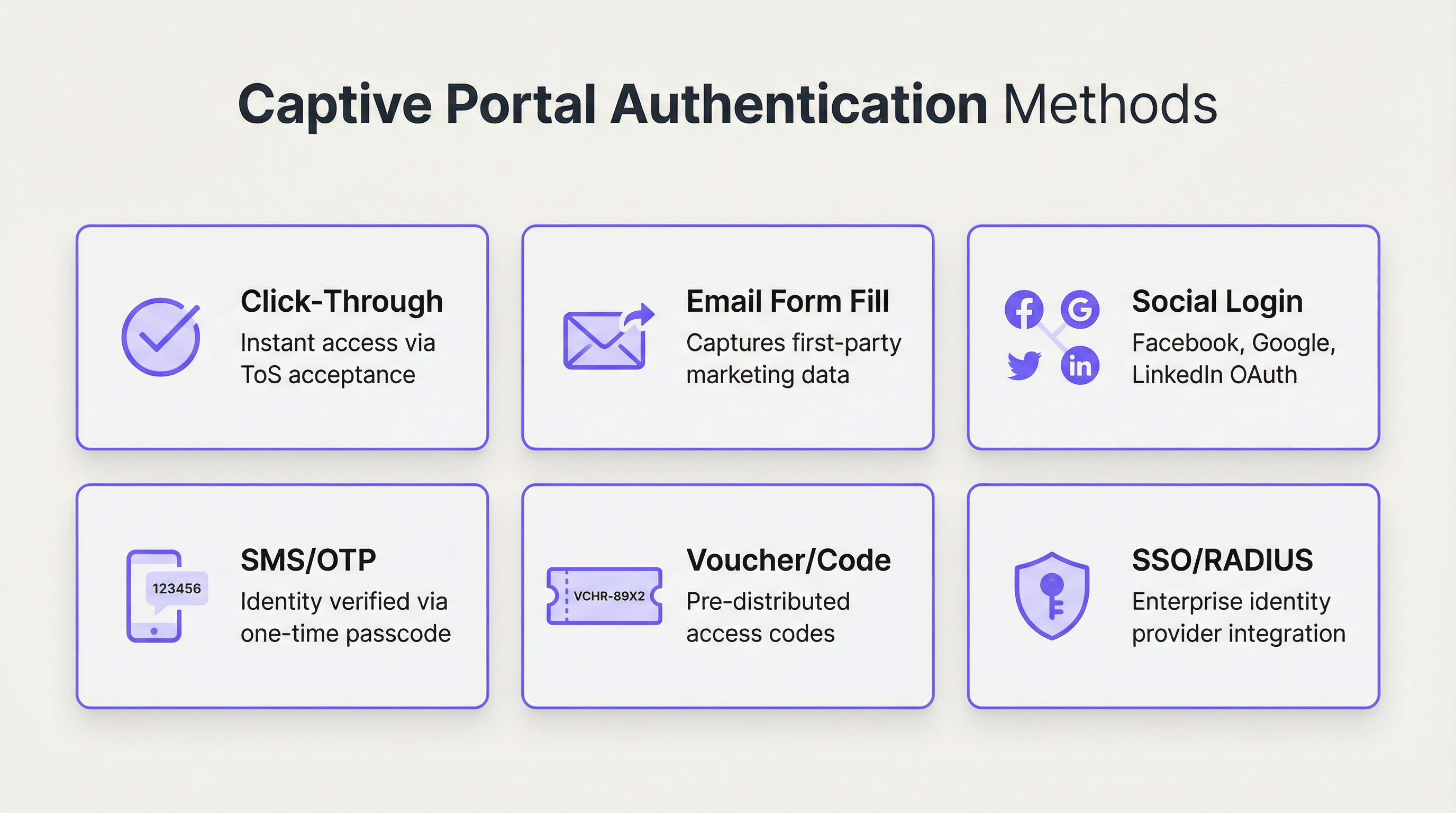
The choice of authentication method is the most consequential design decision, directly balancing user friction against security requirements and data collection objectives. Modern enterprise platforms support a wide array of options, each suited to different operational environments.
| Method | Primary Use Case | Security Level | Data Capture Potential | User Friction |
|---|---|---|---|---|
| Click-Through | Public spaces, quick-service retail | Very Low | None | Very Low |
| Email / Form Fill | Marketing-focused retail, hospitality | Low | High (first-party data) | Medium |
| Social Login | Venues targeting consumer marketing | Low–Medium | Medium (social profile) | Low–Medium |
| SMS / OTP | Hotels, conference centres, transport | Medium | Medium (phone number) | Medium |
| Voucher / Code | Paid WiFi, events, limited access | Medium | Low | Medium–High |
| RADIUS / 802.1X | Corporate, education, government | Very High | High (directory data) | Low (for users) |
| SSO (SAML / OIDC) | Enterprise guest and internal access | Very High | High (IdP data) | Very Low |
Security Protocols and Standards
A robust Captive Portal solution must be built upon a foundation of strong, industry-recognised security standards. Relying on an unencrypted open network is no longer acceptable in any enterprise context.
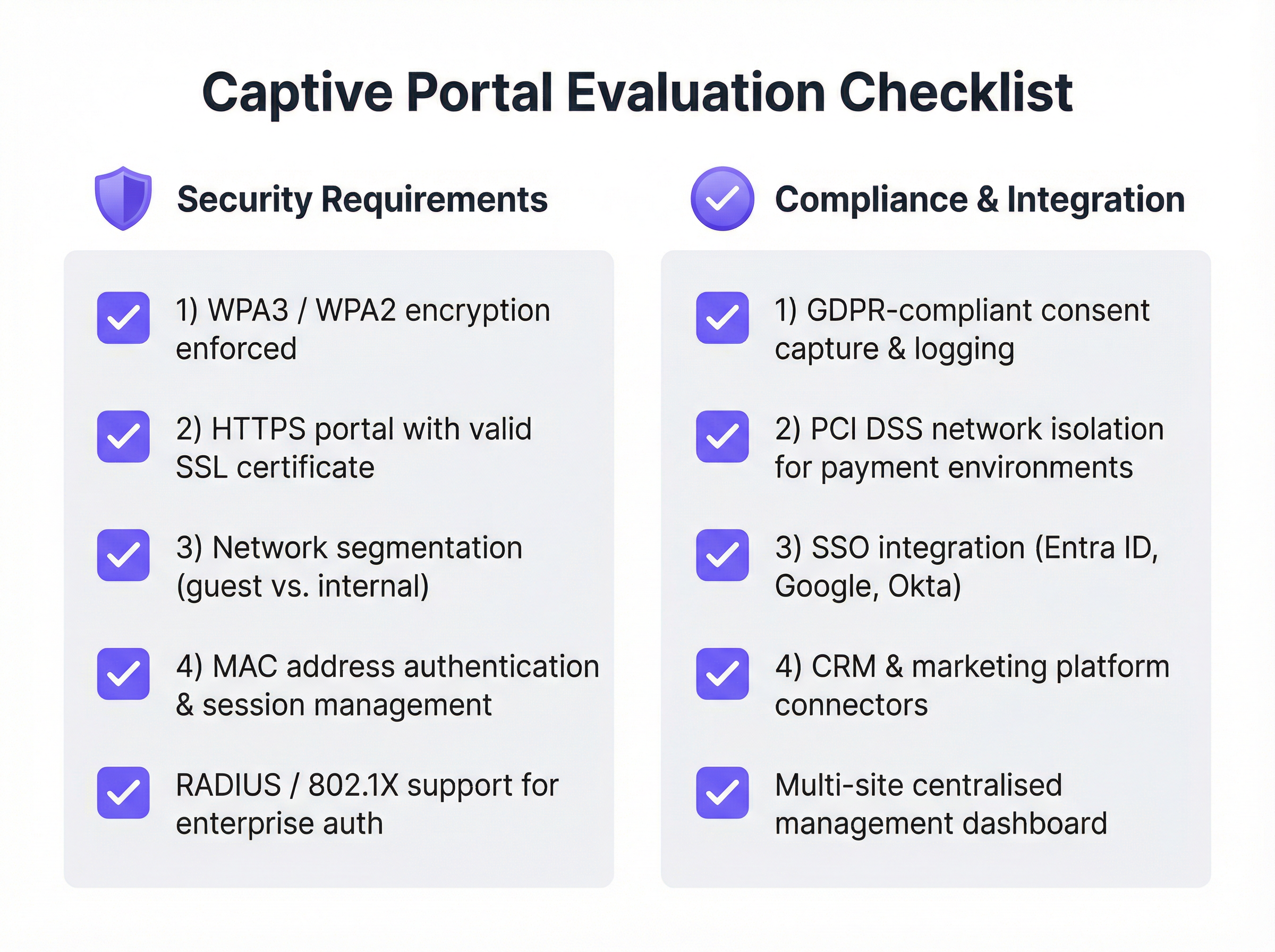
WPA3 / WPA2-Enterprise should be enforced at the wireless layer, often in conjunction with IEEE 802.1X. This encrypts traffic between the client device and the access point from the very first data packet, preventing passive eavesdropping. The Captive Portal page itself must be served over HTTPS with a valid, publicly trusted SSL certificate. This prevents man-in-the-middle attacks where an attacker could spoof the portal page to harvest credentials. Network segmentation is the most critical security control: the guest network must be completely isolated from the internal corporate network using VLANs and strict firewall rules. Finally, client isolation should be enabled on the access points to prevent connected guest devices from communicating with each other, mitigating the lateral spread of malware.
Implementation Guide
Deploying an enterprise-grade Captive Portal solution requires careful planning and a phased approach. The goal is a secure, reliable, and scalable system that meets both IT and business requirements.
Phase 1: Requirements Gathering and Vendor Selection. Define the primary objective — whether that is simple secure access, lead generation, tiered service offerings, or regulatory compliance. Identify all stakeholders, including IT, marketing, legal, and operations, to ensure all requirements are captured. Audit your current network hardware (APs, switches, firewalls) for compatibility with modern Captive Portal solutions, as most leading platforms integrate with major vendors including Cisco Meraki, Aruba, and Ubiquiti. Evaluate vendors using the checklist below, prioritise cloud-managed platforms for scalability, and run a proof-of-concept in a limited area before committing to a full deployment.
Phase 2: Design and Configuration. Finalise the network architecture, including VLAN design for guest traffic segmentation, IP addressing, and DNS configuration. Choose the authentication method or methods that align with your objectives and configure integrations with any external systems such as a RADIUS server or SSO identity provider. Design the user-facing portal pages with consistent branding and a clear user journey. Draft the Acceptable Use Policy (AUP) in collaboration with your legal team, and configure user policies including session time limits, bandwidth throttling, and content filtering rules.
Phase 3: Deployment and Testing. Deploy the solution to a single site or a small section of a large venue first. Test the complete user journey on a variety of devices — iOS, Android, Windows, and macOS — to ensure consistent behaviour across different Captive Network Assistants. Train on-site staff on how to assist users and troubleshoot common issues.
Phase 4: Monitoring and Optimisation. Regularly review the platform's analytics dashboard to monitor connection success rates, user volume, and hardware status. Collect feedback from users and staff to identify friction points, and use data to refine the portal design, adjust bandwidth policies, and optimise the overall experience.
Best Practices
Prioritise Security From Day One. Never deploy an open, unencrypted guest network. Enforce WPA3 or WPA2 and ensure your portal operates over HTTPS. Network segmentation between guest and internal traffic is non-negotiable, regardless of the size of the deployment.
Embrace Centralised Cloud Management. For multi-site organisations, a cloud-based management platform is essential for consistent policy enforcement, centralised reporting, and simplified administration. On-premises-only solutions create significant operational overhead and introduce configuration drift across sites.
Comply With Data Privacy Regulations. If you collect any personal data — including an email address or social profile — you must comply with GDPR, CCPA, and other applicable local regulations. This requires obtaining explicit, informed consent, logging that consent with a timestamp, and providing users with a clear mechanism to manage or delete their data. Work with legal counsel to draft a compliant AUP and privacy policy before go-live.
Design for the User Experience. A frustrating login process reflects poorly on your brand and increases support overhead. Keep the design clean, minimise the number of clicks, and provide clear instructions. For enterprise environments, leverage SSO or certificate-based authentication for a truly seamless experience that requires no user interaction at all.
Integrate With Your Existing Stack. The true power of a modern Captive Portal is unlocked through integration. Connect it to your CRM for marketing automation, your Property Management System (PMS) in hospitality for personalised experiences, or your business intelligence platform for deeper footfall analytics.
Troubleshooting and Risk Mitigation
| Issue or Risk | Mitigation Strategy |
|---|---|
| Portal page not loading | Verify DNS interception and redirection rules on the gateway. Check firewall rules blocking access to the portal server. Confirm the device has a valid IP address from the guest DHCP scope. |
| SSL certificate warnings | Use a valid, publicly trusted SSL certificate. Self-signed certificates trigger security warnings on all modern browsers and operating systems, and will block access on iOS and Android. |
| Device connectivity loops | Some Android devices aggressively retry connectivity checks. Ensure the portal is performant and that the gateway correctly whitelists the necessary connectivity-check URLs for all major operating systems. |
| GDPR compliance violations | Obtain explicit, logged consent before collecting any personal data. Implement a data retention policy and a mechanism for users to request deletion. Conduct a Data Protection Impact Assessment (DPIA) for large-scale deployments. |
| Guest network breach | Treat the guest network as an untrusted, hostile environment. Implement strict VLAN segmentation and client isolation. Consider deploying a Web Application Firewall (WAF) to protect the Captive Portal itself from web-based attacks. |
| High support call volume | Invest in clear, simple portal UX design. Provide staff with a quick-reference troubleshooting guide. Implement a self-service password or voucher reset mechanism where possible. |
ROI and Business Impact
The investment in an enterprise Captive Portal solution delivers measurable returns across security, operations, and marketing. Quantifying this return requires tracking metrics across three domains.
Security and Compliance Metrics include a reduction in IT support tickets related to guest access, successful outcomes in compliance audits for PCI DSS and GDPR, and zero security incidents originating from the guest network. The cost of a single data breach — including regulatory fines, reputational damage, and remediation costs — typically dwarfs the annual cost of a robust Captive Portal solution.
Operational Metrics include increased uptake of guest WiFi, positive user satisfaction scores, and reduced time for guest onboarding. For a hotel, integrating the portal with the PMS eliminates a manual check-in step for WiFi access, directly reducing front-desk workload.
Marketing and Business Metrics include growth of the marketing email database, the number of loyalty programme sign-ups via the portal, revenue from tiered or paid access tiers, and the value of footfall and dwell time data captured through WiFi analytics. For a retail chain capturing 10,000 new customer email addresses per month, the incremental revenue from a single targeted email campaign can justify the entire annual platform cost. For a hotel promoting a spa package on the post-login welcome page, the conversion rate is directly measurable and attributable. A modern Captive Portal transforms guest WiFi from a necessary cost centre into a strategic, ROI-positive asset.
Key Terms & Definitions
Captive Portal
A web-based gateway that intercepts all HTTP/HTTPS traffic from a newly connected device on a WiFi network, redirecting it to a controlled landing page where the user must complete an action before being granted internet access.
IT teams encounter captive portals as the primary mechanism for managing guest WiFi access. Understanding their architecture is essential for correct configuration, troubleshooting, and security design.
RADIUS (Remote Authentication Dial-In User Service)
A networking protocol that provides centralised Authentication, Authorisation, and Accounting (AAA) management for users connecting to a network service, typically integrating with a directory service such as Microsoft Active Directory.
For enterprise IT teams, RADIUS is the robust, scalable method for integrating WiFi authentication with a central user directory. It enables user-based policies, provides a detailed audit log, and is a cornerstone of IEEE 802.1X-based network access control.
IEEE 802.1X
An IEEE standard for port-based Network Access Control (PNAC) that provides an authentication mechanism for devices wishing to attach to a LAN or WLAN, preventing unauthorised devices from connecting before credentials are verified.
Network architects specify 802.1X when designing high-security wireless environments. It works in conjunction with RADIUS to ensure that a device must be authenticated by the network before it receives an IP address or can communicate with any other network resource.
WPA3 (Wi-Fi Protected Access 3)
The third generation of the WPA security certification programme, offering enhanced protection against offline dictionary attacks via Simultaneous Authentication of Equals (SAE), and providing Opportunistic Wireless Encryption (OWE) for open networks.
CTOs and security architects should mandate WPA3 support as a minimum requirement for any new wireless hardware procurement. It is a critical component of a modern, forward-looking security posture.
Network Segmentation (VLAN)
The practice of dividing a physical network into multiple, logically isolated virtual networks (VLANs) using network switches and firewalls, ensuring that traffic from one segment cannot reach another without explicit permission.
This is the single most important security control in a guest WiFi deployment. Without strict VLAN segmentation, a compromised guest device could potentially access internal corporate systems, POS terminals, or sensitive data stores.
SSO (Single Sign-On)
An authentication scheme that allows a user to authenticate once with a central identity provider (IdP) and gain access to multiple systems without re-entering credentials, typically implemented using SAML 2.0 or OpenID Connect (OIDC) protocols.
Enterprise IT managers use SSO to allow employees to access the corporate WiFi network using their existing credentials from providers like Microsoft Entra ID, Google Workspace, or Okta. This eliminates password management overhead and provides a seamless, secure user experience.
Passpoint (Hotspot 2.0)
A Wi-Fi Alliance certification programme based on the IEEE 802.11u standard that enables mobile devices to automatically discover and securely connect to WiFi networks without requiring any user interaction or captive portal login.
Venue operators and network architects should be aware of Passpoint as the emerging alternative to traditional captive portals. It provides a cellular-like connection experience and is increasingly supported by major identity federations through OpenRoaming.
GDPR (General Data Protection Regulation)
A regulation in EU law on data protection and privacy that mandates how organisations collect, store, process, and protect the personal data of EU residents, with significant financial penalties for non-compliance.
Any organisation deploying a captive portal that collects personal data — including email addresses, phone numbers, or social profiles — must ensure their solution and processes are fully GDPR-compliant. This includes obtaining explicit, informed consent, providing a clear privacy policy, and enabling users to exercise their data rights.
iPSK (Individual Pre-Shared Key)
A security method where each device or user is assigned a unique, individually managed pre-shared key to access a WiFi network, providing device-level accountability without requiring 802.1X infrastructure.
IT teams use iPSK as a pragmatic solution for connecting devices that do not support 802.1X, such as IoT sensors, smart displays, or legacy hardware. It provides a level of accountability and revocability that a single shared password cannot offer.
Case Studies
A 250-room upscale hotel wants to replace its outdated, unreliable guest WiFi system. The goals are to provide a seamless, secure experience for guests, reduce front-desk support calls, and use the WiFi to promote on-site amenities like the spa and restaurant. How should the captive portal be configured?
Step 1 — Infrastructure: Deploy a cloud-managed WiFi solution (such as Purple integrated with Cisco Meraki or Aruba hardware) with full venue coverage and redundant access points in high-density areas such as the lobby and conference rooms.
Step 2 — Network Design: Create two primary SSIDs. A secure WPA3-Enterprise network for staff, authenticated via RADIUS integrated with Active Directory. A guest SSID using WPA2 with a captive portal. Implement strict VLAN segmentation between guest, staff, and management networks, with firewall rules preventing any cross-VLAN traffic.
Step 3 — Guest Authentication: Configure the captive portal with a primary authentication method of 'Room Number + Surname', integrated with the hotel's Property Management System (PMS) via API. This ensures only registered guests can connect, eliminates anonymous access, and ties WiFi sessions to a known guest record.
Step 4 — Portal Logic: Upon successful PMS authentication, present guests with a branded welcome page featuring dynamic content: a 'Book a Spa Treatment' button (deep-linking to the spa booking page) and a 'View Restaurant Menu' link. These are served dynamically based on the guest's stay dates and any existing bookings.
Step 5 — Tiered Access: Implement a two-tier bandwidth policy. A complimentary 5 Mbps tier for standard browsing and email. A premium 50 Mbps tier offered for a daily fee, targeted at business travellers and families streaming content. This is presented as a clear upsell option on the welcome page.
Step 6 — Staff Training: Train front-desk staff to assist guests with the PMS login process and explain the premium speed option, with a simple troubleshooting guide for the five most common issues.
A retail chain with 50 stores across the country wants to understand customer behaviour in-store and grow its loyalty programme. They currently offer a basic, unsecured guest WiFi network with no login. What captive portal strategy should they adopt?
Step 1 — Platform Selection: Choose a captive portal platform with strong analytics, CRM integration, and multi-site management capabilities. The platform must support centralised policy management so that changes can be pushed to all 50 stores simultaneously.
Step 2 — Authentication Strategy: Set the primary authentication method to 'Email Form Fill' with an optional 'Social Login' (Google or Facebook). To incentivise sign-ups, present a 10% discount voucher on the welcome page, delivered to the user's email address after successful login. This creates a clear value exchange.
Step 3 — Loyalty Integration: Use the platform's API to connect the captive portal to the chain's loyalty programme database. When a known loyalty member logs in with their registered email, the portal displays their current points balance and a personalised offer, enhancing the experience for existing customers.
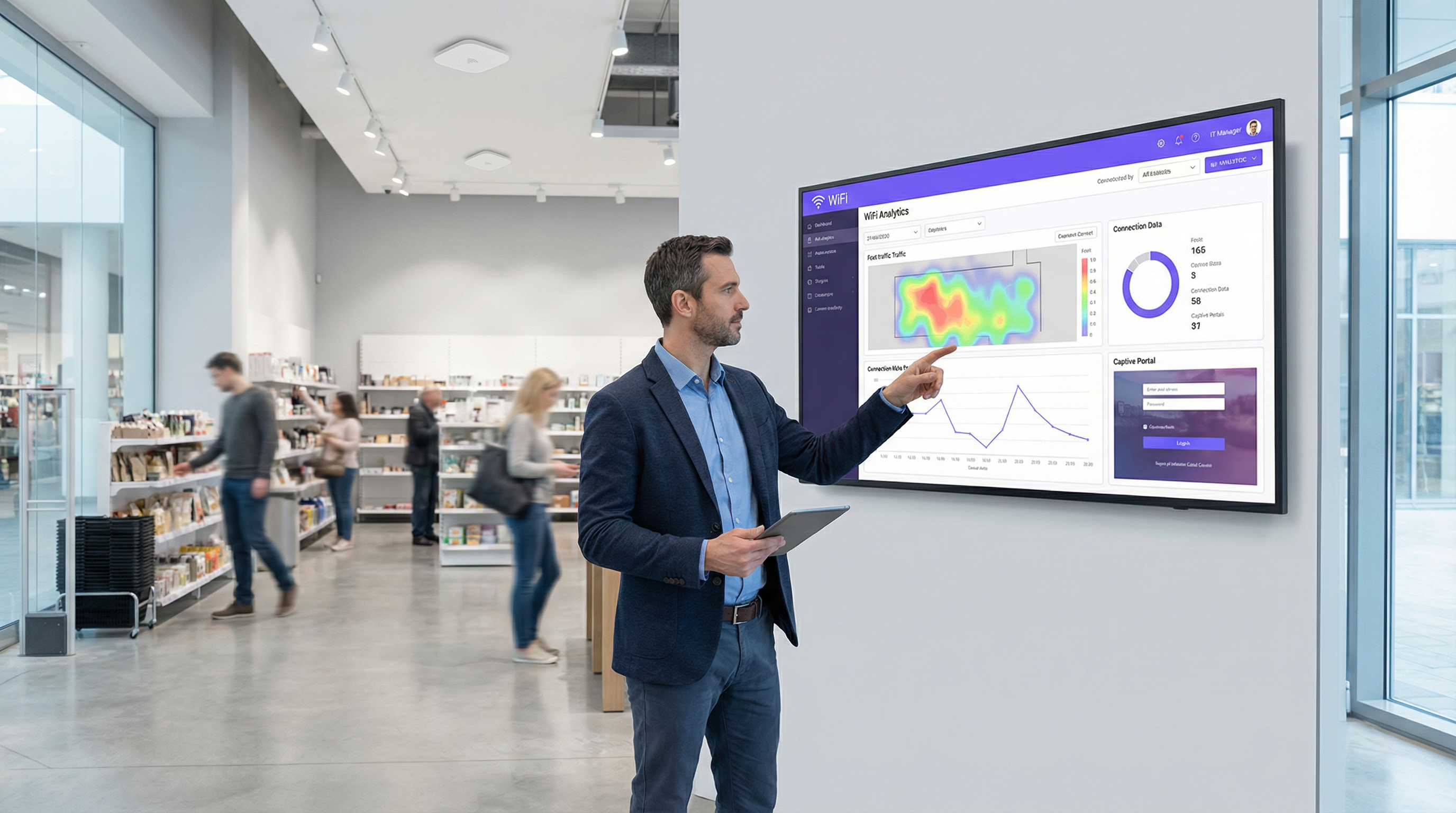
Step 4 — Analytics Deployment: Activate the platform's WiFi analytics features to generate foot traffic heatmaps, dwell time reports, and visit frequency data for each store. This data is surfaced in a centralised dashboard accessible to the operations and marketing teams.
Step 5 — Marketing Automation: Configure an integration with the company's CRM (such as HubSpot or Salesforce). All new email addresses captured via the portal are automatically added to a 'New In-Store WiFi Subscribers' segment, triggering a welcome email series and enrolling them in the loyalty programme.
Step 6 — Staged Rollout: Deploy and test at three to five pilot stores before a full chain-wide rollout. Monitor analytics to measure the impact on loyalty sign-ups, email list growth, and customer dwell time before scaling.
Scenario Analysis
Q1. You are the network architect for a large conference centre that hosts multiple simultaneous events for different corporate clients. Each client wants a branded WiFi experience for their attendees, and access must be restricted to registered attendees only. How would you design the captive portal solution to support this multi-tenant requirement?
💡 Hint:Consider how you can provide multi-tenancy and dynamic branding while ensuring secure, segregated access for each event running concurrently.
Show Recommended Approach
Implement a cloud-managed captive portal platform that supports multi-tenancy and dynamic portal customisation via API. For each event, create a unique SSID or a unique portal URL, each mapped to a separate VLAN to ensure complete traffic isolation between events. Use the Voucher or Code authentication method. Generate a batch of unique, single-use access codes for each event and provide them to the event organiser for distribution to their registered attendees. The portal for each event is dynamically branded with the client's logo, colours, and welcome message, configured via the platform's API or management dashboard. All event networks are on separate VLANs with firewall rules preventing inter-event traffic. A centralised dashboard allows the venue's IT team to monitor all events simultaneously.
Q2. A city council wants to provide free public WiFi in its downtown core. The legal department is concerned about liability for illicit user activity and the IT department is concerned about network abuse. The marketing department wants to gather data to justify the ongoing expense. What captive portal configuration would you recommend?
💡 Hint:Balance the need for maximum public accessibility with the requirements for legal protection, network stability, and justifiable data collection.
Show Recommended Approach
Deploy a Click-Through portal as the primary access method to ensure the lowest possible friction for public access. The portal must present a clear and concise Acceptable Use Policy that users must explicitly accept before connecting, with consent logged server-side. This provides a layer of legal protection by establishing that users have agreed to the terms of use. To address the IT department's concerns, implement per-user bandwidth throttling (for example, 5 Mbps per device) and DNS-based content filtering to block known malicious and illegal sites. For the marketing department, include an optional, clearly marked email sign-up form on the portal page, with a transparent explanation of how the data will be used. This captures data on a fully consented, GDPR-compliant basis while keeping the primary access path friction-free. Monthly analytics reports on connection volumes, peak usage times, and geographic distribution of access points provide the data needed to justify the infrastructure investment.
Q3. Your company is deploying a new guest WiFi network across 100 global offices. The CISO demands that guest access be as secure and auditable as employee access. The Head of HR wants employees to be able to connect their personal devices to the guest network without needing to contact IT for a password. How do you reconcile these requirements in a single architecture?
💡 Hint:Consider enterprise-grade authentication methods that provide both high security and a seamless user experience. How can you differentiate between trusted employees and external guests on the same network?
Show Recommended Approach
Deploy a unified captive portal solution that supports multiple authentication methods on the same SSID. Configure the primary authentication method as Single Sign-On integrated with the company's identity provider, for example Microsoft Entra ID. Employees can then connect their personal devices to the guest network by authenticating with their corporate credentials. This satisfies the CISO's requirement for security and auditability, as every connection is tied to a known corporate identity and logged in the IdP's audit trail. It also satisfies HR's requirement, as employees can self-serve without contacting IT. For non-employee guests and visitors, configure a secondary option on the portal for self-registration via email or SMS OTP, generating a time-limited session (for example, 8 hours) that requires renewal. This creates a two-tiered system on a single network infrastructure, with different session policies and bandwidth allocations applied based on the authentication method used. All connections are logged centrally, providing the CISO with a complete audit trail.
Key Takeaways
- ✓A captive portal is a strategic network gateway that enforces authentication, compliance, and engagement at the point of WiFi access — it is far more than a simple login page.
- ✓The choice of authentication method is the most consequential design decision, requiring a deliberate balance between user friction, security requirements, and data collection objectives.
- ✓Security is non-negotiable: enforce WPA3 or WPA2 encryption, serve the portal over HTTPS with a valid certificate, and implement strict VLAN segmentation to isolate guest traffic from internal systems.
- ✓Modern cloud-managed platforms offer centralised multi-site control, deep analytics, and seamless integration with CRM, identity providers, and property management systems.
- ✓Compliance with GDPR and other data privacy regulations is a legal requirement for any portal that collects personal data, necessitating explicit consent, audit logging, and a clear privacy policy.
- ✓Real-world deployments in hospitality and retail demonstrate that a well-configured captive portal can generate measurable ROI through ancillary revenue, loyalty programme growth, and actionable footfall analytics.
- ✓The industry is evolving towards seamless, identity-based access via Passpoint and OpenRoaming, but traditional captive portals remain the most effective tool for venues that require user engagement, data capture, or explicit terms acceptance.




