

Cisco Meraki Integration with Purple WiFi
This guide provides a definitive technical reference for deploying Purple WiFi on Cisco Meraki infrastructure, covering the dual-layer integration architecture — Dashboard API provisioning and Captive Portal API authentication — alongside step-by-step RADIUS and splash page configuration. It is designed for network engineers and IT managers who need to move from a functional guest WiFi deployment to a strategic guest intelligence platform, with measurable ROI outcomes drawn from live enterprise deployments including McDonald's Belgium, Harrods, and AGS Airports.
🎧 Listen to this Guide
View Transcript

Executive Summary
Cisco Meraki is the infrastructure backbone of choice for thousands of enterprise venues — hotels, retail chains, stadiums, and public-sector facilities. Its cloud-managed architecture delivers operational simplicity at scale, but its native guest WiFi capabilities stop well short of what a modern venue operator requires: first-party data capture, GDPR-compliant consent management, real-time footfall analytics, and marketing automation integration. Purple WiFi closes that gap decisively.
The Purple and Meraki integration operates across two technical layers. The Meraki Dashboard API enables automated bulk provisioning — importing hundreds of access points from a Meraki organisation into the Purple Portal in a single operation. The Meraki Captive Portal API, combined with RADIUS authentication, delivers the guest-facing experience: a fully branded splash page, flexible authentication options, and session accounting that feeds Purple's analytics engine. For returning guests, the PurpleConnex (SecurePass) SSID leverages Hotspot 2.0 (Passpoint, IEEE 802.11u) for seamless auto-reconnection, eliminating repeat authentication friction.
Deployments of this integration are live at scale: McDonald's Belgium, Walmart Canada, Harrods (57× ROI on 600,000 logins), and AGS Airports (842% ROI). For any IT team managing a Meraki estate and seeking to demonstrate measurable business value from guest WiFi, this integration is the most operationally efficient path to that outcome.
Technical Deep-Dive
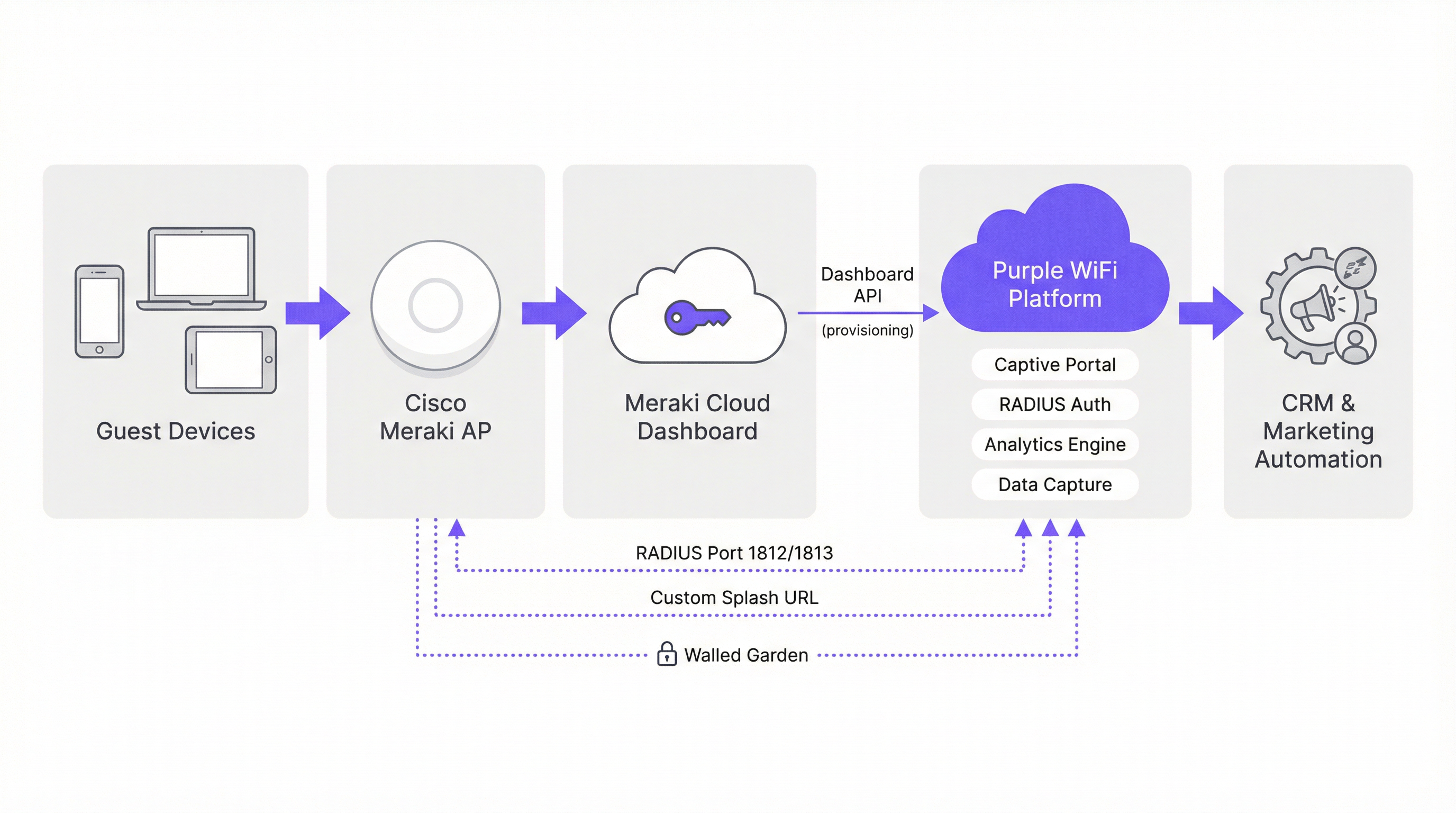
Integration Architecture
The Purple and Meraki integration is best understood as two parallel API relationships operating at different layers of the network stack. The first is a management-plane integration via the Meraki Dashboard REST API, used exclusively for provisioning and configuration. The second is a data-plane integration via the Meraki Captive Portal API and RADIUS protocol, which governs the live guest authentication flow.
Management-Plane: Dashboard API Provisioning
Meraki exposes a comprehensive REST API at api.meraki.com/api/v1. Purple's Hardware Import Wizard authenticates against this API using an organisation-scoped API key, then enumerates all networks, SSIDs, and access points within the Meraki organisation. This allows a network engineer to import an estate of 300+ access points across 50 sites in a single batch operation — a process that would otherwise require manual entry for each device. Purple's two-way integration capability also allows the platform to push captive portal, walled garden, and RADIUS configuration back to Meraki, further reducing manual configuration overhead.
To generate the required API key, navigate to Organisation > API & Webhooks > API Keys in the Meraki dashboard and select Generate API Key. This key should be treated as a privileged credential — store it in a secrets management system and rotate it on your organisation's standard credential lifecycle.
Data-Plane: Captive Portal API and RADIUS
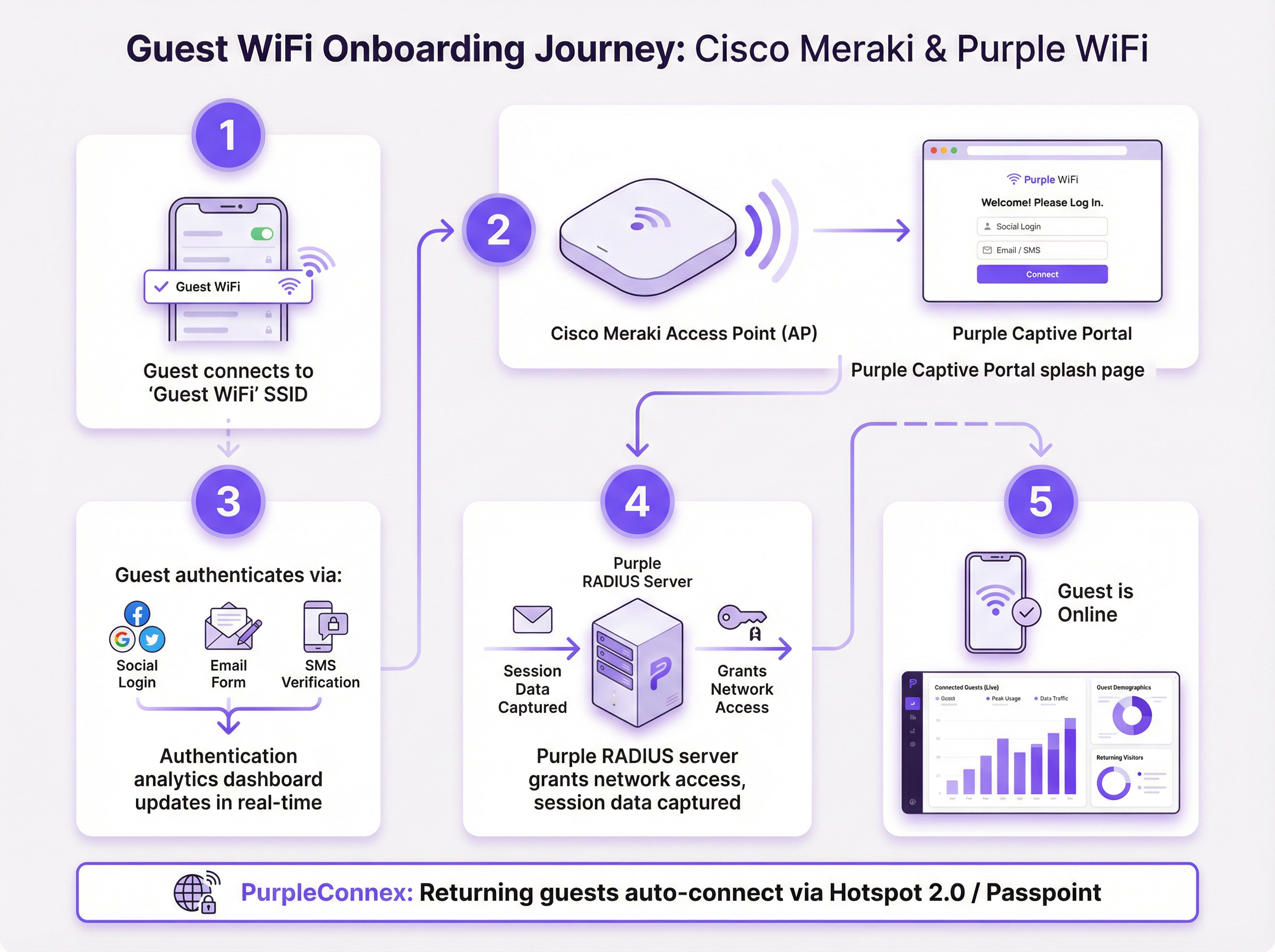
The guest authentication flow uses Meraki's Captive Portal API in Sign-on mode. When a guest associates with the guest SSID, Meraki's access control engine intercepts the first HTTP request and issues a 302 redirect to the Purple-hosted splash page URL. The splash page is served from Purple's CDN infrastructure; the walled garden configuration ensures that Purple's domains are reachable before authentication completes.
Once the guest completes authentication on the splash page, Purple's platform issues a RADIUS Access-Accept message to the Meraki AP on port 1812. Meraki then grants the device full network access. RADIUS accounting messages on port 1813 provide session start, interim update (every 4 minutes), and session stop events to Purple's analytics engine, enabling accurate dwell time, session duration, and repeat visit calculations.
Authentication Methods
Purple's captive portal supports multiple authentication mechanisms, each with different data capture implications:
| Method | Data Captured | GDPR Consent | Recommended Use Case |
|---|---|---|---|
| Social Login (Facebook, Google) | Name, email, profile data | Inline consent tick-box | Hospitality, retail loyalty |
| Email Form | Email, custom fields | Inline consent tick-box | Any venue, maximum data control |
| SMS Verification | Mobile number | Inline consent tick-box | High-security or age-gated venues |
| Click-through (ToS only) | Device MAC, session data | Terms acceptance | Low-friction public access |
PurpleConnex: SecurePass and Hotspot 2.0
PurpleConnex is a second SSID deployed alongside the primary guest SSID. It is configured as a WPA2 Enterprise network, with Purple's RadSec RADIUS servers (rad1-secure.purple.ai and rad2-secure.purple.ai) on port 2083 with TLS transport. Hotspot 2.0 (Passpoint) is enabled on this SSID, advertising the securewifi.purple.ai domain and the Purple Roaming Consortium OIs. When a returning guest's device has previously downloaded a Purple Passpoint profile, it will automatically associate with PurpleConnex and authenticate silently — no splash page, no manual login. This is particularly impactful in hotel environments, where a guest checking in for a multi-night stay should not be required to re-authenticate on every device reconnection.
The Hotspot 2.0 configuration also addresses the MAC address randomisation challenge introduced by iOS 14 and Android 10+. Because PurpleConnex authentication is credential-based rather than MAC-based, Purple can maintain a consistent guest identity record even as the device presents a different randomised MAC address on each connection attempt.
Implementation Guide
Pre-Deployment Checklist
Before beginning configuration, confirm the following prerequisites are in place. Your Meraki organisation must have API access enabled — this is an organisation-level setting under Organisation > Settings > Dashboard API Access. You will need a Purple Portal account with your venue(s) created and your SSID(s) configured. Obtain the following values from the Purple Portal before touching the Meraki dashboard: the RADIUS server hostnames and shared secret, the custom splash URL, the post-authentication redirect URL, and the current walled garden domain whitelist.
Step 1: Generate the Meraki API Key and Import Access Points
In the Meraki dashboard, navigate to Organisation > API & Webhooks > API Keys and generate a new API key. Copy this key immediately — it is only displayed once. In the Purple Portal, navigate to Venue Management > Import Hardware > Third Party API, select Cisco Meraki, and paste your API key. Purple will enumerate your entire access point estate. Select the access points you wish to associate with each Purple venue and confirm the import.
Step 2: Configure the Guest SSID — Access Control
In the Meraki dashboard, navigate to Wireless > Access Control. Select your guest SSID from the dropdown and apply the following settings:
| Parameter | Value |
|---|---|
| SSID Status | Enabled |
| Security | Open |
| Splash Page | Sign-on with my RADIUS server |
| Captive Portal Strength | Block all access until sign-on is complete |
| Walled Garden | Enabled (add all Purple domain entries) |
| Simultaneous Logins | Allow |
| Controller Disconnection Behaviour | Default |
| Client IP and VLAN | Meraki DHCP (NAT mode) |
| Data-Carrier Detect | Disabled |
Under RADIUS Servers, add two authentication servers (primary and secondary) on port 1812 with the shared secret from your Purple Portal. Add corresponding accounting servers on port 1813. Set the accounting interim interval to 4 minutes, server timeout to 5 seconds, and retry count to 3.
Under Advanced RADIUS Settings, set both Called-Station-ID and NAS-ID to AP MAC address. Remove any other values from these fields.
Step 3: Configure the Splash Page
Navigate to Wireless > Splash Page. Enter the Custom Splash URL from your Purple Portal. Set the post-splash redirect destination to the URL of your choice — typically your venue website or a specific promotional landing page. Save changes.
Step 4: Configure PurpleConnex (SecurePass SSID)
Create a new SSID named PurpleConnex. Set security to WPA2 Enterprise. Disable Wi-Fi Personal Network (WPN). Under RADIUS servers, add rad1-secure.purple.ai and rad2-secure.purple.ai on port 2083 with RadSec (RADIUS over TLS) enabled and the shared secret radsec. Set the RADSec TLS idle timeout to 15 minutes. Disable RADIUS CoA support. Enable RADIUS proxy.
Navigate to Wireless > Hotspot 2.0. Select the PurpleConnex SSID and configure as follows:
| Parameter | Value |
|---|---|
| Hotspot 2.0 | Enabled |
| Operator Name | PURPLE:GB |
| Network Type | Free public network |
| Domain List | securewifi.purple.ai |
| Roaming Consortium OIs | 5A03BA0000, 004096 |
| NAI Realm | securewifi.purple.ai (EAP-TTLS / PAP) |
Step 5: Validate and Test
Before declaring the deployment complete, test the full guest journey from a consumer device on a separate network segment. Verify that the splash page loads correctly, that all authentication methods function, that post-authentication network access is granted within 3–5 seconds, and that session data appears in the Purple analytics dashboard within 5 minutes. Test the PurpleConnex auto-reconnect flow by downloading the Passpoint profile and confirming seamless reconnection on a second visit.
Best Practices
Network Segmentation and PCI DSS Compliance. Guest WiFi traffic should be isolated on a dedicated VLAN, with firewall rules preventing lateral movement to corporate network segments. If your venue processes payment card data on the same physical network infrastructure, a formal PCI DSS scoping exercise is required. Meraki's NAT mode provides client isolation at the AP level, but VLAN segmentation at the switching layer is the appropriate control for PCI scope management.
GDPR and CCPA Data Governance. Purple's captive portal presents a consent mechanism at the point of authentication, capturing explicit opt-in for marketing communications. Ensure your Purple Portal data retention settings align with your organisation's data governance policy. Purple's platform supports data subject access requests and right-to-erasure workflows natively, which is a material compliance advantage over bespoke captive portal solutions.
Walled Garden Maintenance. The walled garden domain list is a living configuration item. Purple's CDN and platform infrastructure may change over time, and an outdated walled garden will result in a broken splash page experience. Subscribe to Purple's release notes and review the walled garden list as part of your standard change management process.
Redundancy and Failover. Purple provides two RADIUS server endpoints for both the guest SSID and PurpleConnex. Both should always be configured. In the event of a Purple platform outage, configure Meraki's controller disconnection behaviour to Default — this allows previously authenticated sessions to continue while new authentications queue for retry.
Wi-Fi 6 and Throughput Optimisation. For high-density venues such as stadiums and conference centres, Meraki's Wi-Fi 6 (802.11ax) access points provide the throughput headroom required for concurrent guest sessions. Purple's integration is hardware-generation agnostic — the RADIUS and captive portal configuration is identical across Meraki's AP product generations.
Troubleshooting and Risk Mitigation

The following table summarises the most common failure modes encountered in Meraki and Purple deployments, their root causes, and the recommended remediation.
| Symptom | Root Cause | Remediation |
|---|---|---|
| Splash page fails to load (blank or broken) | Incomplete walled garden | Add all Purple domain entries to the walled garden whitelist |
| Authentication succeeds but network access not granted | RADIUS timeout too low | Set server timeout to 5s, retry count to 3 |
| Analytics show no per-AP data | NAS-ID / Called-Station-ID misconfigured | Set both fields to AP MAC address in Advanced RADIUS Settings |
| Intermittent auth failures at peak load | Single RADIUS server configured | Add both primary and secondary Purple RADIUS endpoints |
| PurpleConnex not auto-connecting | Hotspot 2.0 misconfigured | Verify Roaming Consortium OIs and NAI Realm settings |
| Returning guests prompted to re-authenticate | PurpleConnex SSID not deployed | Deploy PurpleConnex SSID with Passpoint configuration |
| GDPR consent not captured | Splash page consent fields disabled | Enable marketing opt-in fields in Purple Portal splash editor |
MAC Address Randomisation. Modern iOS and Android devices present randomised MAC addresses by default. This affects Purple's ability to identify returning visitors on the guest SSID. The PurpleConnex / SecurePass solution resolves this by using credential-based authentication rather than MAC-based identification. For venues where deploying PurpleConnex is not feasible, Purple's platform applies probabilistic matching using session metadata to partially mitigate the impact.
Meraki Firmware Compatibility. Ensure your Meraki APs are running a firmware version that supports the Hotspot 2.0 and RadSec features required for PurpleConnex. Meraki's stable firmware channel is recommended for production deployments; beta firmware should not be used in live guest WiFi environments.
ROI and Business Impact
The business case for deploying Purple on a Meraki estate is well-evidenced by live deployments across multiple verticals. The following outcomes are drawn from published Purple case studies.
| Organisation | Sector | Outcome |
|---|---|---|
| Harrods | Luxury Retail | 57× ROI on 600,000 WiFi logins |
| AGS Airports | Travel & Transport | 842% ROI via tiered bandwidth revenue |
| McDonald's Belgium | Quick Service Restaurant | Live Purple + Cisco Meraki + Socialspot deployment |
| Walmart Canada | Big Box Retail | Enterprise-scale guest WiFi with Purple and Cisco |
| Miami HEAT (Kaseya Center) | Sports & Entertainment | 290,000 connections, 28,000 per month average |
| c2c Rail | Transport | 81,601 WiFi users → 151% ROI |
The ROI mechanism is straightforward. Purple converts guest WiFi authentication events into first-party data profiles — email addresses, demographic information, visit frequency, dwell time, and behavioural patterns. This data feeds directly into CRM and marketing automation platforms via Purple's API connectors, enabling targeted campaigns that demonstrably outperform third-party audience data in both conversion rate and cost per acquisition.
For a 200-room hotel running at 70% occupancy with an average of 1.8 guests per room, a Purple deployment on a Meraki estate will typically capture 250–300 new first-party profiles per day. At an industry-standard email marketing conversion rate of 3–5%, and an average incremental booking value of £150, the annual revenue attribution from email re-engagement alone typically exceeds the total cost of the Purple platform licence within the first operational year.
The operational efficiency gains from automated Meraki provisioning are a secondary but meaningful benefit. For a multi-site operator managing 50 locations, the reduction in manual configuration time — from an estimated 3–4 hours per site to under 30 minutes — represents a material saving in engineering resource costs.
Key Terms & Definitions
Captive Portal
A web-based authentication gateway that intercepts a guest device's initial HTTP request and redirects it to a login or terms-acceptance page before granting network access. In the Meraki-Purple integration, the captive portal is hosted by Purple and delivered via a custom splash URL configured in the Meraki dashboard.
IT teams encounter this when configuring the Splash Page settings in the Meraki dashboard. The choice between Click-through (terms acceptance only) and Sign-on (RADIUS authentication) determines the level of data capture and security the deployment provides.
RADIUS (Remote Authentication Dial-In User Service)
A networking protocol (RFC 2865) that provides centralised authentication, authorisation, and accounting (AAA) for network access. In the Meraki-Purple integration, Purple operates RADIUS servers that receive authentication requests from Meraki APs on port 1812 and return Access-Accept or Access-Reject responses. Accounting data is sent to port 1813.
RADIUS is the backbone of the guest authentication flow. Network engineers need to configure the RADIUS server IP addresses, shared secret, and port numbers in the Meraki Access Control settings. Incorrect RADIUS configuration is the most common cause of guest authentication failure.
Walled Garden
A list of network destinations (IP addresses, domain names, or CIDR blocks) that a guest device is permitted to reach before completing captive portal authentication. In the Meraki-Purple integration, the walled garden must include all domains required by Purple's splash page — CDN assets, authentication provider endpoints, and the Purple platform itself.
IT teams must maintain this list as a living configuration item. An incomplete walled garden results in a broken splash page experience for guests. Purple publishes and maintains a current whitelist of required domains in their support documentation.
RadSec (RADIUS over TLS)
An extension to the RADIUS protocol (RFC 6614) that transports RADIUS messages over a TLS-encrypted TCP connection, providing confidentiality and integrity for authentication traffic. Purple's PurpleConnex SSID uses RadSec on port 2083, replacing the standard UDP transport used by the guest SSID RADIUS configuration.
RadSec is required for the PurpleConnex SecurePass SSID. Network engineers must enable the RadSec toggle in Meraki's RADIUS server configuration and use port 2083 rather than the standard 1812/1813. Failure to enable RadSec will prevent PurpleConnex authentication from functioning.
Hotspot 2.0 / Passpoint (IEEE 802.11u)
A Wi-Fi Alliance certification programme based on the IEEE 802.11u standard that enables automatic, secure network discovery and association. A device with a Passpoint profile will automatically connect to a compatible network without user intervention, using EAP-based authentication rather than a captive portal.
In the Meraki-Purple integration, Hotspot 2.0 is configured on the PurpleConnex SSID to enable seamless auto-reconnection for returning guests. This is particularly valuable in hospitality and retail environments where repeat authentication friction reduces guest satisfaction.
NAS-ID (Network Access Server Identifier)
A RADIUS attribute (Attribute 32) that identifies the network access server — in this context, the Meraki access point — that is sending the authentication request. Purple uses the NAS-ID to attribute guest sessions to specific physical access points, enabling floor-level location analytics.
This is one of the most commonly misconfigured parameters in Meraki-Purple deployments. It must be set to AP MAC address in the Meraki Advanced RADIUS Settings. Any other value (such as SSID name or a static string) will prevent Purple from generating per-AP analytics.
Meraki Dashboard API
A RESTful API provided by Cisco Meraki that allows programmatic access to the Meraki cloud management platform. It supports read and write operations across organisations, networks, devices, and configuration objects. Purple uses this API to import access point data and push SSID/RADIUS configuration during the provisioning phase.
IT teams need to generate an API key from the Meraki dashboard (Organisation > API & Webhooks) and provide it to the Purple Portal's Hardware Import Wizard. This key should be treated as a privileged credential and stored securely.
GDPR (General Data Protection Regulation)
EU Regulation 2016/679, which governs the collection, processing, and storage of personal data of EU residents. In the context of guest WiFi, GDPR requires that venues obtain explicit, informed consent before collecting personal data (such as email addresses) through a captive portal, and provide mechanisms for data subjects to access, correct, or delete their data.
Purple was among the first WiFi providers to achieve GDPR compliance. The Purple captive portal presents a consent mechanism at the point of authentication, and the platform supports data subject access requests and right-to-erasure workflows natively. IT teams should ensure that the Purple Portal's data retention settings align with their organisation's data governance policy.
PurpleConnex (SecurePass)
Purple's seamless reconnection solution, implemented as a second SSID configured with WPA2 Enterprise security, RadSec RADIUS transport, and Hotspot 2.0 (Passpoint) advertisement. Returning guests whose devices have downloaded a Purple Passpoint profile will automatically associate with PurpleConnex without seeing a captive portal.
PurpleConnex is deployed alongside the primary guest SSID and is invisible to first-time visitors. It resolves two key challenges: repeat authentication friction for returning guests, and MAC address randomisation (iOS 14+, Android 10+) which breaks MAC-based guest identification on the primary SSID.
Called-Station-ID (RADIUS Attribute 30)
A RADIUS attribute that identifies the access point or network access server that the client connected to, typically expressed as the AP's MAC address. Purple uses this attribute in conjunction with NAS-ID to map guest sessions to specific physical access points for location analytics.
Must be set to AP MAC address in Meraki's Advanced RADIUS Settings. This attribute works in tandem with NAS-ID — both must be correctly configured for Purple's floor-level analytics to function accurately.
Case Studies
A 250-room four-star hotel group with 12 properties across the UK has a fully deployed Cisco Meraki estate (MR46 and MR57 APs, MX68 security appliances). They currently offer open guest WiFi with no captive portal. The IT Director wants to implement Purple WiFi to capture guest email addresses for the hotel's CRM, comply with GDPR, and generate analytics on peak-hour network usage. The deployment must be completed with minimal disruption to existing guests and must not require on-site engineer visits to any of the 12 properties. How should this deployment be structured?
The deployment should proceed in three phases, leveraging the Meraki Dashboard API for remote, zero-touch provisioning across all 12 properties.
Phase 1: Provisioning (Day 1, remote) Generate a Meraki API key scoped to the hotel group's Meraki organisation. In the Purple Portal, use the Hardware Import Wizard with the Third Party API option to import all access points across all 12 networks in a single batch. Assign each network to the corresponding Purple venue. This operation typically completes in under 20 minutes for an estate of this size.
Phase 2: SSID and RADIUS Configuration (Days 1–2, remote via Meraki dashboard) For each of the 12 Meraki networks, configure the existing guest SSID with the Sign-on with my RADIUS server splash page type. Add Purple's primary and secondary RADIUS servers on ports 1812 and 1813 with the shared secret from the Purple Portal. Set captive portal strength to Block all access, enable the walled garden with Purple's domain whitelist, and configure the custom splash URL. Set NAS-ID and Called-Station-ID to AP MAC address. Because Meraki's dashboard supports configuration templates, a single template can be applied across all 12 networks simultaneously, reducing per-site configuration time to near zero.
Phase 3: PurpleConnex Deployment (Days 2–3, remote) Create the PurpleConnex SSID on each network with WPA2 Enterprise and RadSec RADIUS configuration. Enable Hotspot 2.0 with the Purple operator name and domain settings. This SSID is invisible to guests who have not previously authenticated — it will auto-connect returning guests silently on subsequent visits.
Validation: Test the full guest journey remotely using a 4G-connected mobile device at one property before rolling the configuration live across all 12. Monitor the Purple analytics dashboard for session data ingestion within the first 24 hours of go-live.
The entire deployment is achievable in 2–3 days of engineering time with zero on-site visits, leveraging Meraki's cloud management and Purple's API provisioning.
A 60,000-capacity football stadium uses Cisco Meraki MR45 access points throughout the concourse, seating bowl, and hospitality suites. They want to deploy Purple WiFi to capture fan data, run in-venue surveys during matches, and integrate with their existing Salesforce CRM. The primary concern is scale: on match days, up to 35,000 concurrent WiFi sessions are expected. The stadium's IT team is concerned about RADIUS authentication performance under peak load. How should the RADIUS configuration be optimised for high-concurrency environments?
For a high-concurrency stadium deployment, the RADIUS configuration requires specific attention to redundancy, timeout parameters, and session management.
RADIUS Server Configuration for Scale: Configure both Purple RADIUS endpoints (primary and secondary) on every Meraki AP and MX in the estate. This is non-negotiable for a stadium deployment — a single RADIUS server configuration will create a single point of failure that will manifest as authentication failures precisely at kick-off, when concurrent connection attempts peak.
Set the RADIUS server timeout to 5 seconds and retry count to 3. This gives each authentication attempt up to 15 seconds before failing over to the secondary server, which is sufficient for a cloud-hosted RADIUS service under normal conditions. Do not reduce the timeout below 5 seconds in a stadium environment — the additional latency from concurrent load means that aggressive timeout values will cause false failures.
Set the accounting interim interval to 4 minutes. This generates a RADIUS Accounting-Interim-Update message every 4 minutes per active session, which Purple uses to calculate dwell time. In a stadium with 35,000 concurrent sessions, this generates approximately 145 accounting messages per second — well within Purple's platform capacity.
SSID and Network Segmentation: Deploy the guest SSID on a dedicated VLAN with a sufficiently large DHCP scope. A /16 subnet (65,534 addresses) is recommended for a 60,000-capacity venue. Ensure the DHCP lease time is set to match the expected session duration — for a 2-hour match, a 3-hour lease is appropriate. Short lease times will cause unnecessary DHCP churn and add load to the authentication infrastructure.
Salesforce CRM Integration: Purple's platform supports native Salesforce connector integration. Configure the CRM connector in the Purple Portal to push new guest profiles and session events to Salesforce in real time. Map Purple's data fields (email, visit count, dwell time, authentication method) to the corresponding Salesforce Contact and Campaign Member objects. This enables the stadium's marketing team to trigger automated post-match email campaigns within minutes of the final whistle.
In-Venue Surveys: Purple's MicroSurvey feature can be triggered post-authentication, presenting a 1–3 question survey on the splash page redirect. For a stadium deployment, configure the survey to trigger for a random 20% sample of authenticated guests to avoid survey fatigue while maintaining statistical significance.
Scenario Analysis
Q1. A retail chain with 80 stores has deployed Cisco Meraki MR33 access points throughout their estate. They want to implement Purple WiFi but their security team has raised concerns about deploying an Open SSID for guest access. The security team argues that all SSIDs should use WPA2 encryption at minimum. How do you address this concern, and what is the correct security architecture for the guest WiFi deployment?
💡 Hint:Consider the difference between link-layer encryption (WPA2) and application-layer authentication (captive portal + RADIUS). Also consider what the PurpleConnex SSID provides.
Show Recommended Approach
The security team's concern is valid in principle but reflects a conflation of two different security objectives. WPA2 encryption protects the radio link between the client device and the access point — it prevents eavesdropping on the wireless medium. However, for a public guest network, WPA2 Personal (PSK) provides minimal practical security because the pre-shared key is, by definition, publicly known to all guests. Any guest who knows the PSK can decrypt other guests' traffic using a passive capture attack.
The correct architecture is: deploy the guest SSID as Open (no WPA2) with a captive portal for authentication. This is the industry-standard approach for public guest WiFi because it allows the captive portal to function without requiring guests to know a password before they can reach the splash page. The security model relies on application-layer controls (HTTPS on the splash page, RADIUS authentication, VLAN isolation) rather than link-layer encryption.
For guests who require encrypted transport, the PurpleConnex SSID provides WPA2 Enterprise security with RadSec RADIUS — this is genuinely secure because each client receives a unique encryption key derived from their EAP credentials. Returning guests who have the PurpleConnex Passpoint profile will automatically connect to this encrypted SSID.
The complete security architecture is therefore: Open SSID for first-time guest onboarding (captive portal + RADIUS authentication + VLAN isolation) + WPA2 Enterprise PurpleConnex SSID for returning guests (RadSec + Passpoint). This satisfies both the guest experience requirement and the security team's encryption requirement for repeat visitors.
Q2. A conference centre is deploying Purple WiFi on their Meraki estate for the first time. Three weeks after go-live, the marketing team reports that the Purple analytics dashboard shows total session counts but no per-room or per-zone data — all sessions appear to be attributed to a single location. The network engineer who performed the configuration has left the organisation. What is the most likely cause, and how do you diagnose and resolve it?
💡 Hint:Think about which RADIUS attribute Purple uses to map sessions to physical locations, and what the default Meraki configuration for that attribute is.
Show Recommended Approach
The most likely cause is that the NAS-ID and/or Called-Station-ID RADIUS attributes are not configured to use AP MAC address. When these fields are set to a static string, SSID name, or left at default, every access point in the estate sends the same identifier in its RADIUS messages. Purple's analytics engine receives identical location identifiers from all APs and cannot distinguish between them, resulting in all sessions being attributed to a single (or unknown) location.
Diagnosis: In the Meraki dashboard, navigate to Wireless > Access Control for the guest SSID. Scroll to Advanced RADIUS Settings. Check the values for Called-Station-ID and NAS-ID. If either field shows anything other than AP MAC address — such as SSID name, a static string, or multiple values — this is the root cause.
Resolution: Set both Called-Station-ID and NAS-ID to AP MAC address only. Remove any other values from these fields. Save the configuration. Note that this change takes effect for new sessions — existing active sessions will not be retroactively re-attributed. Within 5–10 minutes of the configuration change, new session data in the Purple analytics dashboard should begin showing per-AP attribution.
If the issue persists after correcting the RADIUS attribute configuration, verify that the Purple Portal has the correct AP MAC addresses imported and associated with the correct floor plan zones. If APs were imported before floor plans were configured, the MAC-to-zone mapping may need to be updated in the Purple Portal's venue management settings.
Q3. A 500-bed NHS hospital trust wants to deploy Purple WiFi on their existing Cisco Meraki infrastructure to provide patient and visitor WiFi. Key requirements are: GDPR compliance for data collection, content filtering to block inappropriate content on the patient network, seamless connectivity for long-stay patients (multi-day admissions), and integration with their existing patient engagement platform via API. What Purple features and Meraki configuration elements address each requirement?
💡 Hint:Consider Purple's compliance features, Purple Shield DNS filtering, PurpleConnex for long-stay patients, and Purple's API/connector capabilities for the patient engagement platform integration.
Show Recommended Approach
Each requirement maps to a specific combination of Purple features and Meraki configuration:
GDPR Compliance: Purple's captive portal presents a consent mechanism at authentication, capturing explicit opt-in for data processing. The Purple Portal's data governance settings allow configuration of data retention periods aligned with NHS data governance policies. Purple supports data subject access requests and right-to-erasure natively. The splash page should be configured to present clear, plain-language consent language — not buried in terms and conditions — to meet the GDPR requirement for informed, unambiguous consent.
Content Filtering: Purple Shield is Purple's cloud-native DNS filtering service. It operates at the infrastructure level, filtering DNS queries before they resolve, and can be configured with category-based blocking (adult content, gambling, malware, etc.) appropriate for a patient environment. This is configured within the Purple Portal and applies to all authenticated sessions on the guest SSID without requiring additional hardware.
Seamless Connectivity for Long-Stay Patients: Deploy PurpleConnex with Hotspot 2.0 (Passpoint) configuration. Once a patient has authenticated once and downloaded the Passpoint profile, their device will auto-connect on subsequent associations — including after the device wakes from sleep, moves between wards, or reconnects after a brief disconnection. This eliminates the daily re-authentication friction that is a common complaint in hospital WiFi deployments.
Patient Engagement Platform Integration: Purple's platform exposes a REST API and supports pre-built connectors for major CRM and engagement platforms. Configure the Purple Portal's API connector to push authenticated session events (patient ID if captured at login, session start/end, ward-level location data) to the patient engagement platform in real time. If the engagement platform is not in Purple's pre-built connector library, the REST API allows custom integration development.
Key Takeaways
- ✓The Purple and Meraki integration operates across two distinct layers: the Meraki Dashboard REST API for automated bulk provisioning of access points, and the Captive Portal API with RADIUS authentication (ports 1812/1813) for the live guest experience — understanding this separation is essential for both deployment planning and troubleshooting.
- ✓The three most critical configuration parameters are: NAS-ID and Called-Station-ID set to AP MAC address (required for per-zone analytics), RADIUS server timeout of 5 seconds with retry count of 3 (required for reliability under load), and a complete walled garden domain whitelist (required for the splash page to load correctly).
- ✓PurpleConnex (SecurePass) deploys a second WPA2 Enterprise SSID with RadSec RADIUS and Hotspot 2.0 (Passpoint/IEEE 802.11u), enabling returning guests to auto-reconnect without a captive portal — this also resolves the MAC address randomisation challenge introduced by iOS 14+ and Android 10+.
- ✓GDPR and CCPA compliance is built into Purple's captive portal by design, with explicit consent capture at authentication, data subject access request workflows, and configurable data retention — making Purple a materially lower compliance risk than bespoke captive portal solutions.
- ✓The business case is well-evidenced: Harrods achieved 57× ROI on 600,000 WiFi logins, AGS Airports achieved 842% ROI, and McDonald's Belgium, Walmart Canada, and the Miami HEAT are all live Cisco Meraki and Purple deployments at enterprise scale.
- ✓For multi-site deployments, the Meraki Dashboard API enables batch import of entire access point estates into the Purple Portal in a single operation, reducing a multi-day manual configuration exercise to under an hour — the operational efficiency gain is a significant secondary benefit beyond the guest intelligence value.
- ✓Network segmentation is a non-negotiable prerequisite: guest WiFi traffic must be isolated on a dedicated VLAN with firewall rules preventing lateral movement to corporate segments, and any PCI DSS scoping implications of shared physical infrastructure must be formally assessed before go-live.




