

Device Posture Assessment for Network Access Control
This technical guide explains how device posture assessment works for Network Access Control (NAC), detailing the architecture, MDM integration, and remediation flows required to implement Zero Trust WiFi in enterprise and venue environments.
🎧 Listen to this Guide
View Transcript
Executive Summary
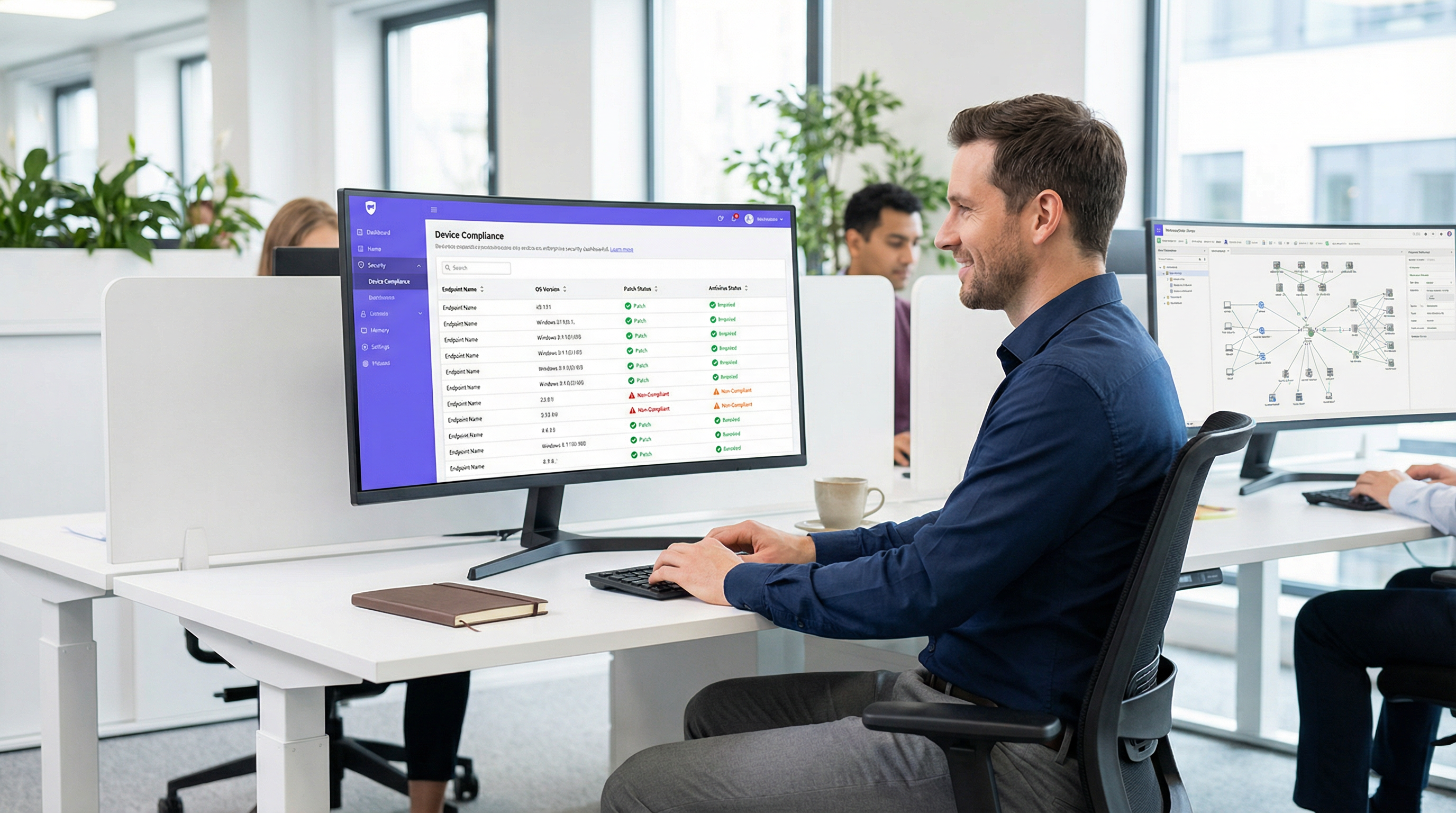
As the perimeter of the enterprise network dissolves, traditional identity-based authentication is no longer sufficient. Validating that a user is who they claim to be via 802.1X or a captive portal does not address the risk posed by the device they are using. Device posture assessment is the critical next layer of defense in a Zero Trust architecture, interrogating the health and compliance state of an endpoint before granting network access.
For IT managers and network architects managing complex environments like hotels, retail chains, stadiums, and public-sector facilities, posture-based network access ensures that unpatched, unmanaged, or compromised devices cannot move laterally across corporate VLANs. This guide provides a practical, vendor-neutral blueprint for implementing device posture assessment for network access control. It covers the architectural models, the integration points with RADIUS and Mobile Device Management (MDM) platforms, and the critical remediation workflows necessary to handle non-compliant devices without overwhelming the IT helpdesk. By the end of this guide, you will have a clear framework for deploying endpoint compliance checks over WiFi, reducing your attack surface, and maintaining continuous compliance with frameworks like PCI DSS and GDPR.
Technical Deep-Dive: The Architecture of Posture Assessment
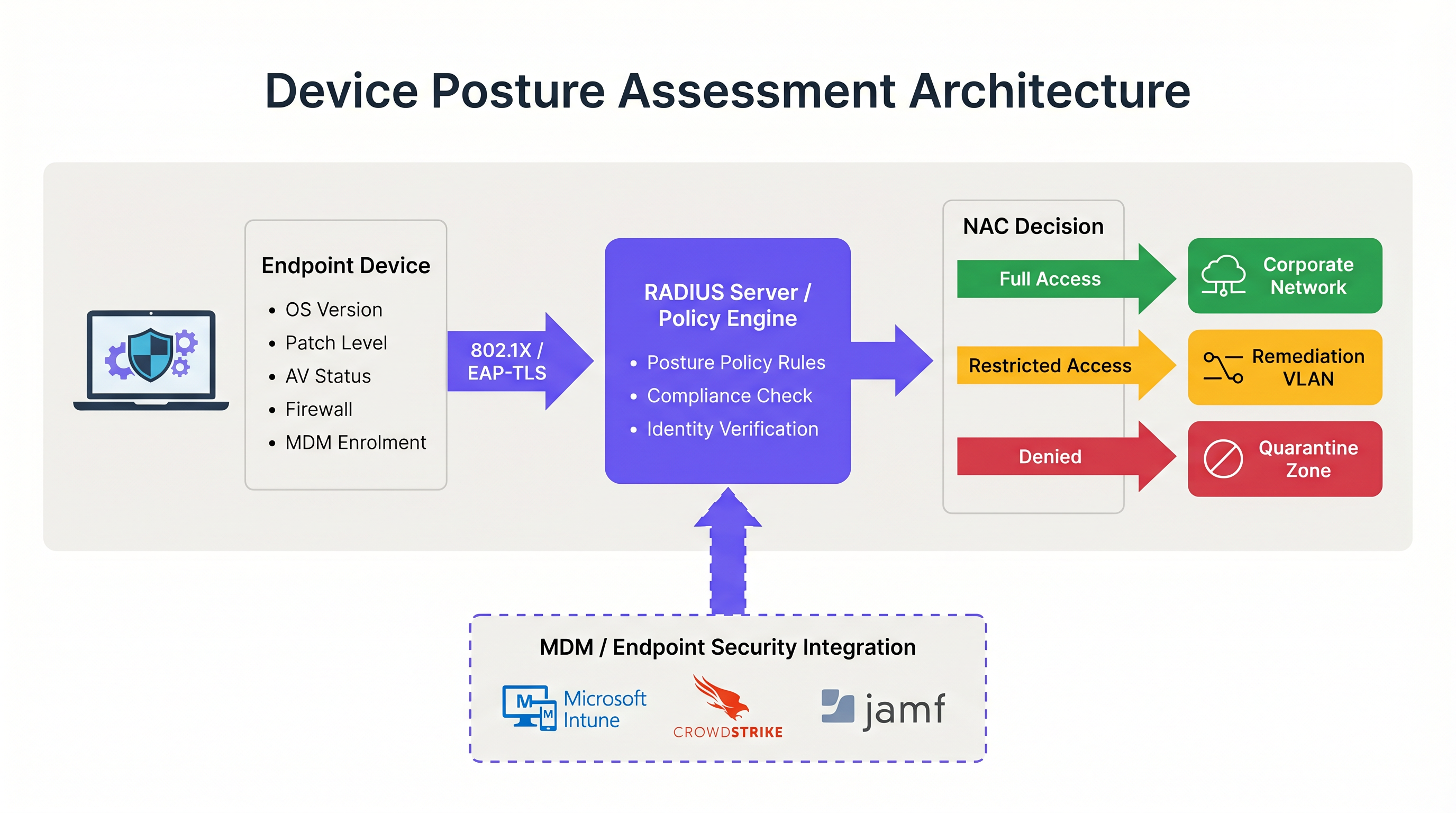
Device posture assessment fundamentally alters the traditional network authentication flow. Instead of a binary allow/deny decision based on credentials, the Network Access Control (NAC) system introduces a conditional state where access is contingent upon the device meeting specific health criteria.
The Three Architectural Models
Implementing device posture assessment requires choosing an architectural model that aligns with your endpoint management strategy. There are three primary approaches:
- Agent-Based Posture Assessment: This is the most comprehensive method. A lightweight software agent installed on the endpoint collects detailed telemetry—such as OS version, patch level, antivirus status, and running processes—and transmits this data to the NAC policy engine. The communication typically occurs via a secure protocol or API immediately following the initial 802.1X authentication. While agent-based assessment provides the highest fidelity data, it requires administrative control over the endpoint to deploy the agent, making it unsuitable for unmanaged or BYOD environments.
- Agentless (MDM-Integrated) Posture Assessment: In this model, the NAC system infers device health by querying a Mobile Device Management (MDM) or Unified Endpoint Management (UEM) platform via API. When a device authenticates, the RADIUS server calls out to platforms like Microsoft Intune or Jamf to retrieve the device's compliance record. This approach is highly effective for managed corporate devices and eliminates the need for a dedicated NAC agent. However, it relies on the MDM platform having up-to-date information; if the device has been offline, the compliance state may be stale.
- Network-Based Assessment: This passive approach involves the NAC system scanning the connecting device using techniques such as SNMP queries, WMI calls, or traffic fingerprinting. It requires no agent or MDM enrolment, making it useful for profiling IoT devices or legacy systems. However, the depth of insight is significantly limited compared to the other models, and it cannot reliably determine patch levels or antivirus signature currency.
The RADIUS and 802.1X Integration Flow
The integration of posture assessment with 802.1X authentication is where the architecture becomes operational. The process relies heavily on the RADIUS protocol and, specifically, the Change of Authorization (CoA) mechanism defined in RFC 5176.
When a supplicant (the device) initiates an 802.1X connection, it presents credentials to the authenticator (the wireless access point or switch). The authenticator forwards these to the RADIUS server. Upon successful identity verification, the RADIUS server returns an Access-Accept message. However, in a posture-aware environment, this initial acceptance places the device into a restricted state—often a dedicated quarantine or posture VLAN.
While in this restricted VLAN, the posture assessment occurs. The policy engine evaluates the device against the configured ruleset. If the device passes, the policy engine issues a RADIUS CoA message to the authenticator, instructing it to move the device from the posture VLAN to the appropriate production VLAN. If the device fails, it remains in the restricted VLAN or is moved to a remediation VLAN where it can access necessary update servers.
For optimal security, this flow should utilize EAP-TLS. EAP-TLS provides mutual certificate-based authentication, allowing the RADIUS server to cryptographically verify the device identity before the posture check even begins. This ensures that the posture data is coming from a known, trusted endpoint rather than a spoofed MAC address. For further reading on securing device access, refer to our guide on 802.1X Authentication: Securing Network Access on Modern Devices.
Implementation Guide: Deploying Posture-Based Access
Deploying device posture assessment in a live enterprise environment requires meticulous planning to avoid disrupting business operations. The following phased approach is recommended for environments ranging from corporate offices to Hospitality venues.
Phase 1: Baseline Visibility (Monitor Mode)
The most critical step in deployment is establishing a baseline. Never enable blocking or remediation policies on day one. Instead, configure the NAC system to run posture checks in a monitor-only mode. During this phase, the system evaluates devices and logs the results but does not alter VLAN assignments or restrict access.
Run this phase for a minimum of four weeks. Analyze the logs to identify the percentage of non-compliant devices, the specific attributes failing most frequently (e.g., outdated OS vs. disabled firewall), and the distribution of failures across different device types. This data allows you to calibrate your policy thresholds. For instance, if 40% of your fleet fails a 14-day patch requirement, you may need to adjust the threshold to 30 days initially to avoid overwhelming the helpdesk.
Phase 2: VLAN Segmentation Design
Before enforcing policies, you must design the network segments that will handle the different posture states. A robust posture-based network access architecture requires at least three distinct VLANs:
- Production VLAN: Full access to corporate resources for compliant, managed devices.
- Remediation VLAN: Restricted access allowing communication only with update servers (e.g., Windows Update, WSUS), MDM platforms, and the NAC remediation portal. No access to internal subnets or general internet browsing.
- Guest/BYOD VLAN: Segmented internet-only access for unmanaged personal devices that cannot be posture-checked.
Ensure that your wireless access points and core switches are configured to support dynamic VLAN assignment via RADIUS attributes. Understanding the role of your access points is crucial here; for a refresher, see Wireless Access Points Definition Your Ultimate 2026 Guide.
Phase 3: Defining the Posture Ruleset
Develop a pragmatic ruleset based on your monitor-mode data and compliance requirements. A standard enterprise baseline includes:
- Operating System: Must be a supported version (e.g., Windows 10 22H2 or later, macOS 13 or later).
- Patch Level: Critical security updates applied within the last 30 days.
- Endpoint Protection: Recognized antivirus/EDR agent installed, running, and signatures updated within the last 7 days.
- Host Firewall: Enabled for all network profiles.
- Disk Encryption: BitLocker or FileVault enabled for the system drive.
Phase 4: Enforcing Remediation Workflows
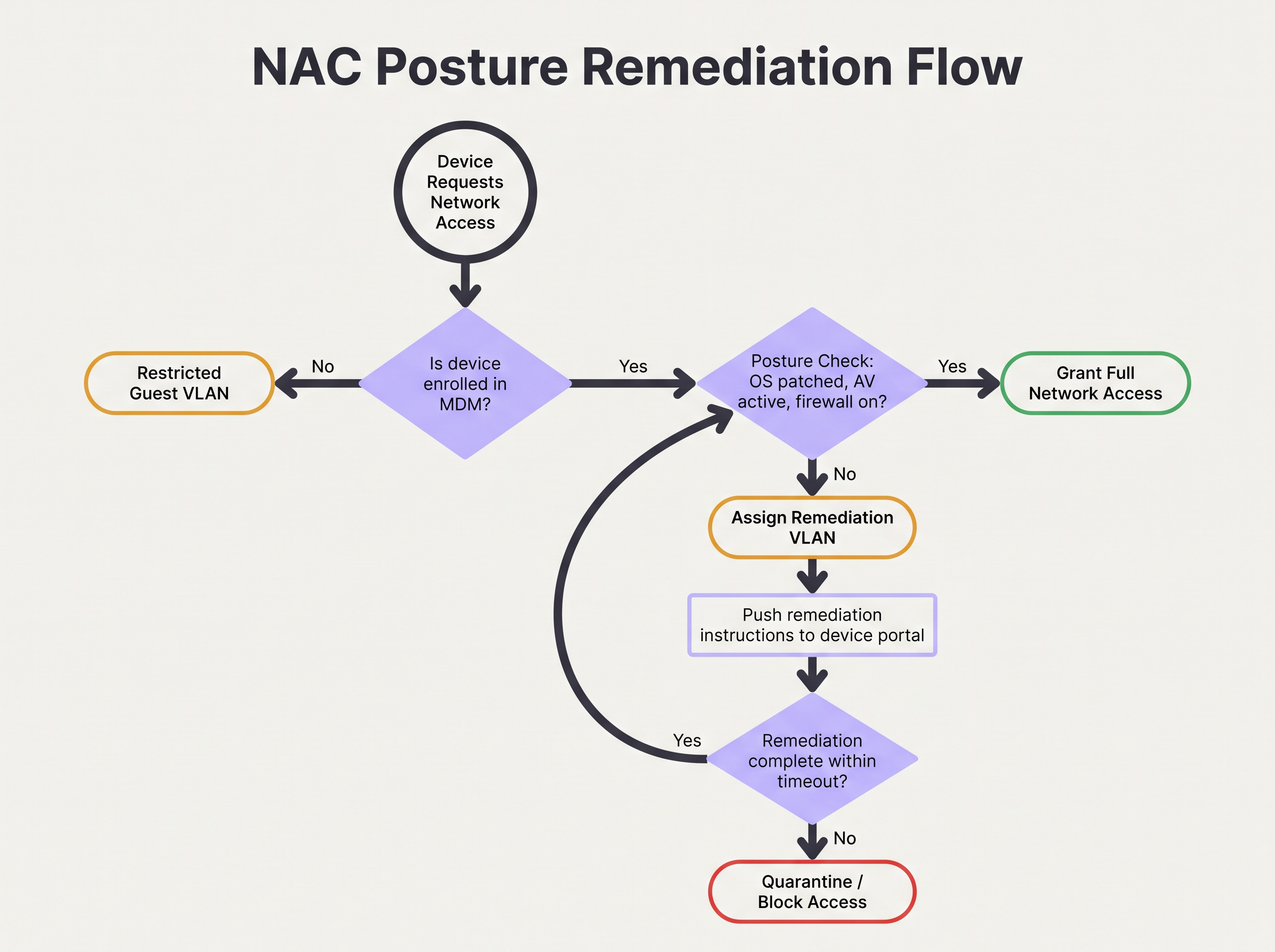
When a device fails the posture check, the remediation workflow must be automated and clear to the user. The device is assigned to the Remediation VLAN, and HTTP/HTTPS traffic should be redirected to a captive portal. This portal must explicitly inform the user why their device was quarantined (e.g., "Your antivirus is out of date") and provide actionable steps or links to resolve the issue.
Configure a remediation timeout. For example, a device might be allowed 24 hours in the remediation VLAN to pull down necessary patches. If the device does not achieve compliance within this window, it should be moved to a strict Quarantine VLAN with all access blocked until IT intervention.
Best Practices for Complex Environments
Implementing posture assessment in complex environments like Retail or large public venues introduces unique challenges, particularly concerning device diversity and scale.
Handling BYOD and IoT
In environments with high volumes of unmanaged devices, such as Transport hubs or retail spaces offering Guest WiFi, attempting to enforce posture checks on every device is operationally unviable. You must establish explicit policies for devices that cannot be assessed.
The best practice is to utilize MAC Authentication Bypass (MAB) or identity profiling to categorize these devices early in the authentication flow. Unmanaged BYOD devices should be automatically routed to the Guest VLAN. IoT devices (sensors, displays) should be placed in dedicated, micro-segmented VLANs with strict Access Control Lists (ACLs) limiting their communication to specific controllers. Purple's platform can assist in identifying and managing these diverse device types; explore our Sensors capabilities for more insight.
Optimizing for High-Density Venues
In high-density environments like stadiums, the latency introduced by posture assessment can cause authentication timeouts and connection failures. Agent-based checks can add several seconds to the connection process.
To mitigate this, implement posture caching. Configure the NAC policy engine to cache a device's compliant status for a defined period (e.g., 4 to 8 hours). When a device roams between access points or briefly disconnects, the RADIUS server can use the cached posture result to grant immediate access, bypassing the full assessment overhead. This is essential for maintaining throughput and a positive user experience. The underlying network architecture also plays a role; consider the benefits discussed in The Core SD WAN Benefits for Modern Businesses.
Troubleshooting & Risk Mitigation
Even with careful planning, posture-based access control can fail. Understanding the common failure modes is critical for maintaining network availability.
CoA Failures
The most frequent technical issue is the failure of the RADIUS Change of Authorization (CoA) message. If the NAC system determines a device is compliant but the access point drops or ignores the CoA packet, the device remains stuck in the restricted VLAN.
Mitigation: Ensure that CoA is explicitly enabled on all network access devices and that the RADIUS server is configured as a trusted CoA client. Verify that UDP port 3799 (the standard CoA port) is not blocked by firewalls between the RADIUS server and the access points. Monitor CoA acknowledgement (ACK) rates in your RADIUS logs.
MDM API Rate Limiting
In agentless deployments, a sudden influx of authenticating devices (e.g., employees arriving at 9:00 AM) can cause the NAC system to flood the MDM platform with API requests. This can trigger API rate limiting, causing posture checks to fail or time out.
Mitigation: Implement API request batching or caching within the NAC platform. If the MDM supports webhooks, configure the MDM to push compliance state changes to the NAC system proactively, rather than having the NAC system poll the MDM on every authentication.
ROI & Business Impact
The business impact of implementing device posture assessment extends beyond immediate risk reduction. It fundamentally alters the security posture of the organization and provides measurable returns.
Risk Mitigation and Compliance
The primary ROI is the prevention of lateral movement by compromised endpoints. By ensuring that only healthy devices access the corporate network, organizations significantly reduce the likelihood of ransomware propagation. Furthermore, automated posture assessment provides the continuous monitoring required to satisfy audit requirements for PCI DSS, HIPAA, and GDPR, reducing the cost and effort of manual compliance reporting.
Operational Efficiency
While the initial deployment requires effort, a well-tuned posture assessment system reduces the operational burden on IT. Automated remediation workflows empower users to resolve minor compliance issues (like outdated signatures) without raising helpdesk tickets. By integrating posture checks with broader network analytics—such as WiFi Analytics—IT teams gain unprecedented visibility into the health of their device estate, enabling proactive rather than reactive management. For venues looking to upgrade their overall network experience, see our insights on Modern Hospitality WiFi Solutions Your Guests Deserve.
Key Terms & Definitions
Device Posture Assessment
The process of evaluating an endpoint's security and compliance state (e.g., OS version, patch level, antivirus status) before or during network authentication.
Crucial for Zero Trust architecture, ensuring that compromised or vulnerable devices cannot access sensitive network segments even if the user has valid credentials.
RADIUS CoA (Change of Authorization)
An extension to the RADIUS protocol (RFC 5176) that allows a RADIUS server to dynamically modify the authorization attributes of an active session, such as changing a device's VLAN.
The essential mechanism in posture assessment that moves a device from a quarantine/remediation VLAN to a production VLAN once the health check passes.
Remediation VLAN
A restricted network segment designed specifically for devices that fail posture checks. It provides limited access only to the resources needed to fix the compliance issue (e.g., update servers, MDM).
Used to isolate vulnerable devices while allowing them to self-correct without requiring manual IT intervention.
Agentless Posture Assessment
Evaluating device health without installing dedicated NAC software on the endpoint, typically by querying an MDM/UEM platform via API for the device's compliance record.
Preferred for corporate environments with robust MDM deployments as it reduces endpoint software bloat and simplifies management.
Dissolvable Agent
A temporary, lightweight application downloaded via a captive portal that performs a posture check and then removes itself from the device.
Commonly used in BYOD or guest environments where permanent agent installation is impossible or unacceptable to the user.
EAP-TLS (Extensible Authentication Protocol-Transport Layer Security)
An 802.1X authentication method that requires both the server and the client (device) to present valid digital certificates for mutual authentication.
The most secure foundation for posture assessment, as it cryptographically proves the device identity before health checks are evaluated.
Posture Caching
Storing the result of a successful posture check for a defined period so that subsequent authentications (e.g., roaming between APs) do not require a full re-evaluation.
Vital for maintaining network performance and reducing latency in high-density environments like stadiums or large offices.
Zero Trust Network Access (ZTNA)
A security framework requiring all users and devices, whether inside or outside the organization's network, to be authenticated, authorized, and continuously validated before being granted access.
Device posture assessment is a foundational pillar of ZTNA, providing the 'continuous validation' of the device state.
Case Studies
A 500-user corporate office is implementing device posture assessment. They currently use 802.1X (PEAP-MSCHAPv2) for all corporate laptops. They want to ensure no laptop connects unless its CrowdStrike Falcon agent is running and Windows is fully patched. How should they design the integration and remediation flow?
- Architecture Selection: Since all laptops are corporate-managed, an agentless approach via MDM integration (e.g., Intune) is recommended to avoid deploying a separate NAC agent. The NAC policy engine will query Intune for compliance status.
- VLAN Design: Create three VLANs: VLAN 10 (Corporate Production), VLAN 20 (Remediation), VLAN 30 (Guest).
- Policy Configuration: Configure Intune compliance policies to require CrowdStrike running and Windows updates within 30 days. Configure the NAC policy engine to map Intune 'Compliant' status to VLAN 10, and 'Non-Compliant' to VLAN 20.
- Authentication Flow: When a laptop authenticates via PEAP, the RADIUS server places it in VLAN 20 and queries Intune. If Intune returns 'Compliant', the RADIUS server sends a CoA message to the access point to switch the port/session to VLAN 10.
- Remediation: If Intune returns 'Non-Compliant', the laptop remains in VLAN 20. DHCP provides an IP, and DNS/firewall rules redirect HTTP traffic to a portal explaining the failure and allowing access only to CrowdStrike and Windows Update servers.
A large university campus wants to implement posture checks, but 80% of the devices are student BYOD laptops and phones. They cannot force MDM enrolment on these devices. How should they approach posture assessment?
- Architecture Selection: A hybrid approach is necessary. Use agentless/MDM checks for staff/faculty corporate devices, and a captive portal with a dissolvable agent or network-based assessment for student BYOD.
- BYOD Flow: Students connect to the 'Student-WiFi' SSID. They authenticate via a captive portal using university credentials.
- Dissolvable Agent: Upon login, the portal prompts the user to run a lightweight, temporary applet (dissolvable agent) that checks basic posture (e.g., minimum OS version, active firewall) without requiring admin rights or permanent installation.
- Enforcement: If the dissolvable agent reports a pass, the device is granted access to the student VLAN. If it fails, the portal displays instructions on how to update their OS.
- Alternative (Network-based): If dissolvable agents cause too much friction, use passive network profiling (DHCP fingerprinting, HTTP user-agent parsing) to detect grossly outdated OS versions and block them, accepting a lower level of assurance for BYOD.
Scenario Analysis
Q1. Your organisation is rolling out posture assessment for 2,000 corporate laptops. You have configured the policy to require Windows 11 and an active EDR agent. On Monday morning, you plan to enable the policy in enforcement mode. What critical step have you missed?
💡 Hint:Consider the impact on the helpdesk if your assumptions about the fleet's health are wrong.
Show Recommended Approach
You have missed the 'Monitor Mode' phase. Before enforcing a blocking policy, the system must run in monitor-only mode for several weeks to establish a baseline of compliance. Enabling enforcement on day one without this data will likely result in a massive spike in helpdesk tickets from users who unexpectedly fail the posture check.
Q2. A device successfully authenticates via 802.1X and passes the MDM posture check. The RADIUS server logs show an Access-Accept and a successful posture evaluation, but the user reports they still cannot access the internet or corporate resources. What is the most likely point of failure in the architecture?
💡 Hint:Think about how the network access device (the AP or switch) is instructed to change the user's access level after the posture check completes.
Show Recommended Approach
The most likely failure is the RADIUS Change of Authorization (CoA). The device was likely placed in a restricted posture VLAN initially. Even though the posture check passed on the server side, if the CoA message was dropped, blocked by a firewall, or not processed by the access point, the device will remain stuck in the restricted VLAN.
Q3. You manage the WiFi for a retail chain. Corporate devices are managed via Intune, but store managers often connect personal iPads to the staff network. You want to implement posture checks for corporate devices. How should you handle the personal iPads?
💡 Hint:Consider whether you can perform agentless or agent-based checks on devices you don't own.
Show Recommended Approach
You cannot reliably perform deep posture checks on unmanaged personal devices without causing significant user friction. The best approach is to use identity profiling or MAB to identify the personal iPads and automatically route them to a segmented Guest or BYOD VLAN with internet-only access, bypassing the strict posture requirements applied to the corporate devices.
Key Takeaways
- ✓Device posture assessment evaluates endpoint health (OS, patches, AV) before granting network access, moving beyond simple identity verification.
- ✓It is a foundational element of Zero Trust architecture, preventing vulnerable devices from moving laterally on the network.
- ✓Architectures include agent-based (deepest visibility), agentless via MDM integration (best for corporate fleets), and network-based profiling.
- ✓The process relies heavily on RADIUS Change of Authorization (CoA) to dynamically move devices between Posture, Remediation, and Production VLANs.
- ✓Always deploy posture policies in monitor-only mode for several weeks to establish a baseline before enforcing blocking rules.
- ✓Robust remediation workflows are essential to allow users to self-correct compliance issues without overwhelming the IT helpdesk.
- ✓For BYOD and high-density environments, utilize posture caching and explicit routing to guest VLANs to minimize user friction and latency.




