

dotdigital (formerly Dotmailer): Integration Guide, Best Practices, and Troubleshooting for Purple AI Users
This guide provides Purple AI users — particularly IT managers, network architects, and CTOs at hotels, retail chains, stadiums, and conference centres — with a definitive technical reference for deploying and optimising the dotdigital (formerly Dotmailer) connector. It covers the end-to-end integration architecture, step-by-step configuration, GDPR-compliant data handling, automation programme design, and a structured troubleshooting framework. Organisations that implement this integration correctly convert guest WiFi logins into a high-value, consent-gated marketing database that drives measurable revenue outcomes.
🎧 Listen to this Guide
View Transcript

Executive Summary
The Purple AI platform captures first-party guest data at the point of WiFi authentication across hotels, retail estates, stadiums, and public-sector venues. The dotdigital connector — formerly branded as Dotmailer — transforms that raw data capture into a production-grade marketing automation pipeline. When a guest connects to your WiFi and consents to marketing communications, Purple pushes their profile to a designated dotdigital address book in real time. From that moment, dotdigital's automation engine can trigger welcome journeys, loyalty programme invitations, re-engagement campaigns, and omnichannel communications across email, SMS, and push.
The commercial case is well-documented. Harrods built a 3.6 million-contact database through WiFi-driven data capture and achieved a 54x return on their Purple investment within a single year. AGS Airports delivered an 842% ROI. Brussels South Charleroi Airport recorded a 10,630% ROI using Purple's MicroSurveys in combination with downstream marketing automation. These outcomes are not exceptional — they are the expected result of a well-configured integration deployed with deliberate programme design.
This guide provides the technical depth required to deploy, optimise, and troubleshoot the Purple-dotdigital integration at enterprise scale. It is structured for the IT professional who needs to implement a solution this quarter, not evaluate one next year.
Technical Deep-Dive
Integration Architecture
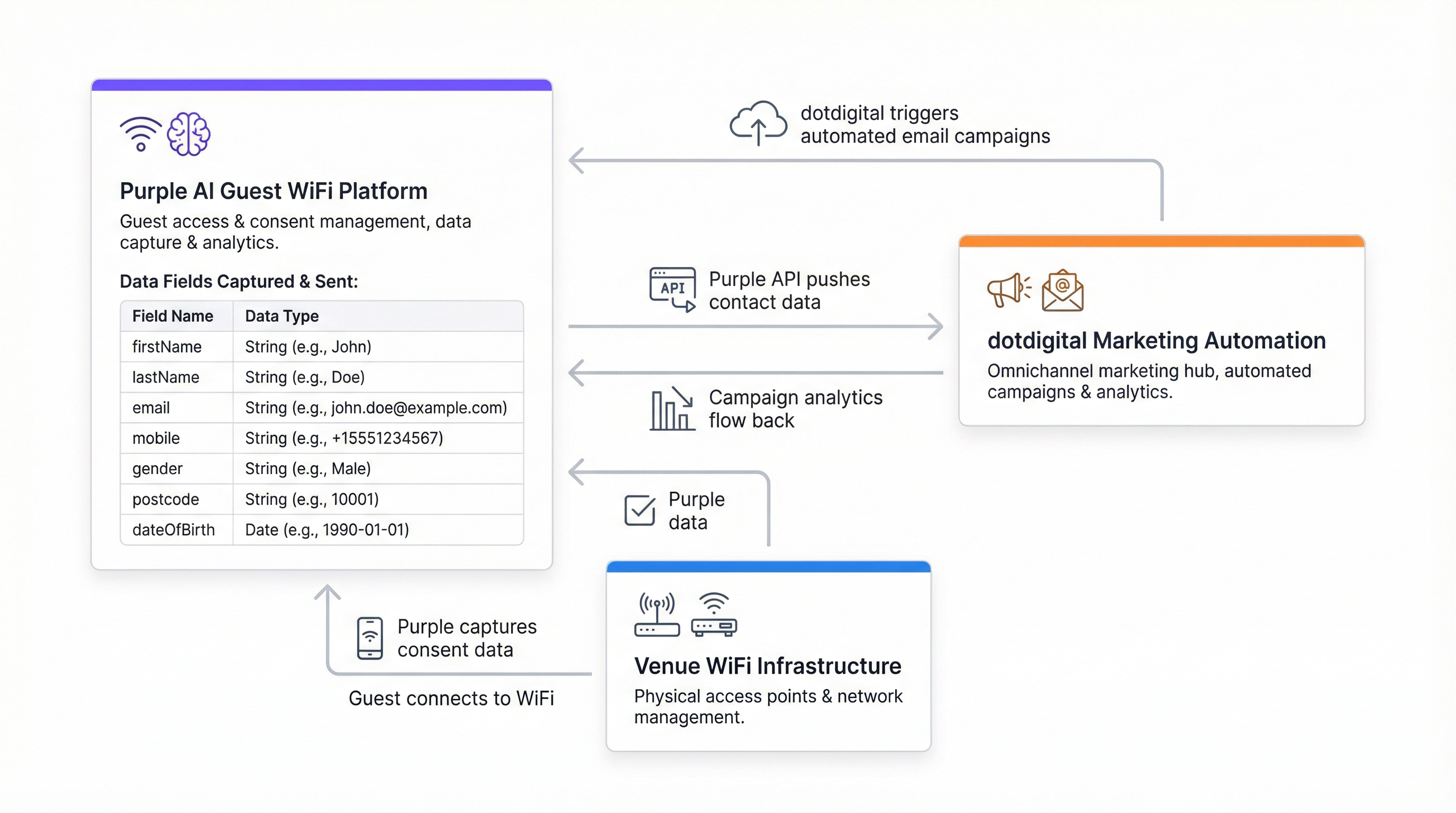
The Purple-dotdigital connector operates as a server-to-server REST API integration. Purple functions as the data producer, and dotdigital functions as the consumer. The connection is authenticated using dotdigital's Basic Auth mechanism: a dedicated API user account (email address and password) created within the dotdigital platform, combined with a region-specific API endpoint URL.
The architecture is unidirectional by default — Purple pushes contact records to dotdigital at the point of WiFi authentication. For organisations requiring bidirectional synchronisation (for example, to reflect unsubscribes or suppression list updates back into Purple), this requires additional configuration via dotdigital's webhook framework.
| Component | Role | Notes |
|---|---|---|
| Purple Captive Portal | Guest authentication and consent capture | Splash page presented at WiFi login |
| Purple Connector Engine | Data transformation and API dispatch | Configured under Management > Connectors |
| dotdigital REST API | Contact ingestion and address book management | Region-specific endpoint required |
| dotdigital Address Book | Contact storage and segmentation layer | One or more books per venue/property |
| dotdigital Program Builder | Automation programme execution | Triggered on contact addition to address book |
Data Payload and Field Mapping
Purple transmits eight data fields to dotdigital for each consenting guest. These fields map directly to dotdigital's standard contact data model and do not require custom field configuration for basic deployments.
| Field Name | Data Type | Description |
|---|---|---|
firstName |
String | Guest's forename |
lastName |
String | Guest's surname |
userID |
Integer | Purple's internal user identifier |
email |
String | Primary contact address; used as deduplication key |
mobile |
String | Mobile telephone number (E.164 format recommended) |
gender |
String | Self-declared gender from splash page |
postcode |
String | Postal code; enables geographic segmentation |
dateOfBirth |
String | Format: YYYY-MM-DD; enables age-band segmentation and birthday triggers |
Data transmission is consent-gated at the platform level. Purple will not dispatch a contact record to dotdigital unless the guest has explicitly opted in to marketing communications via the splash page consent checkbox. This is a hard enforcement — not a configurable option — and is the primary mechanism by which the integration maintains compliance with UK GDPR, the EU General Data Protection Regulation, and CCPA.
Authentication and Endpoint Configuration
dotdigital uses HTTP Basic Authentication for its REST API. The credentials consist of an API user email address and password, which must be created as a dedicated user within the dotdigital account — not the primary account login. The API endpoint URL is account-specific and region-dependent. It is retrieved from Account Settings > Access within the dotdigital platform. A typical endpoint takes the form https://r1-api.dotdigital.com for region one accounts.
This endpoint specificity is the most common source of connector verification failures. Teams that attempt to use a generic or documentation-example URL will encounter authentication errors. Always retrieve the endpoint value directly from the dotdigital account in use.
Connector Deployment Levels
Purple supports two deployment levels for the dotdigital connector:
Customer level applies the connector configuration across the entire Purple account, routing all consenting guests from all venues into a single dotdigital address book. This is appropriate for single-venue operators or organisations with a homogeneous venue estate.
Venue level allows each individual venue to be mapped to a distinct dotdigital address book. This is the recommended configuration for multi-property operators — hotel groups, retail chains, stadium operators — where venue-level segmentation is required for targeted marketing, localised offers, or separate brand identities.
Implementation Guide
Step 1: Prepare Your dotdigital Account
Before configuring the Purple connector, complete the following in your dotdigital account. Navigate to Account Settings and create a new API user with a dedicated email address and a strong password. Record the API endpoint URL displayed at the top of the Access page. Create the address book or books that will receive Purple contacts — one per venue is recommended for multi-property deployments. Optionally, create custom data fields in dotdigital if you intend to capture additional attributes beyond the eight standard Purple fields.
Step 2: Configure the Purple Connector
Within the Purple platform, navigate to Management > Connectors. Locate the dotdigital connector and select Add. Complete the four required fields: the connector name (a descriptive label for your reference), the dotdigital API email, the dotdigital API password, and the dotdigital API endpoint URL. Select Verify. On successful verification, a dropdown will appear listing the available address books in your dotdigital account. Select the target address book and save the configuration.
For multi-venue deployments, repeat this process at venue level for each property, assigning each to its designated address book.
Step 3: Configure the Splash Page Consent Mechanism
The marketing consent checkbox on your Purple splash page is the gateway to the entire integration. Navigate to your splash page configuration and ensure the marketing opt-in checkbox is enabled and clearly labelled. The consent language must be explicit, specific, and unambiguous under UK GDPR Article 7. A compliant example: "I agree to receive marketing communications from [Organisation Name] about offers, events, and news. You can unsubscribe at any time." Do not pre-tick this checkbox.
If your marketing programme includes SMS, ensure the consent language explicitly covers SMS communications. A single checkbox covering both email and SMS is permissible provided the language is clear.
Step 4: Build Your dotdigital Automation Programmes
Deploy automation programmes in dotdigital before the connector goes live. At minimum, configure a welcome programme triggered by contact addition to the address book. A recommended three-stage welcome journey:
- Immediate (0 minutes): Welcome email confirming WiFi access, with a branded introduction to your venue or services.
- Day 2 (48 hours): Follow-up email with a relevant offer, venue guide, or content piece tailored to the guest's context.
- Day 30 (re-engagement): Automated re-engagement email for contacts who have not returned, with an incentive to revisit.
For loyalty programme integration, use dotdigital's Program Builder to enrol contacts who meet specific criteria — for example, contacts who answered affirmatively to a custom splash page question about loyalty programme interest.
Step 5: Configure Bidirectional Suppression Sync
Configure a dotdigital webhook to notify Purple when a contact unsubscribes. This ensures that a suppressed contact is not re-added to dotdigital on their next WiFi login. Without this step, the integration is technically incomplete from a GDPR compliance standpoint.
Step 6: Validate and Go Live
Conduct an end-to-end test by authenticating a test device on the WiFi, completing the splash page with a test email address and marketing consent, and verifying that the contact appears in the correct dotdigital address book within two to three minutes. Confirm that the welcome automation programme triggers correctly. Document the test results and proceed to production deployment.
Best Practices
Consent Architecture
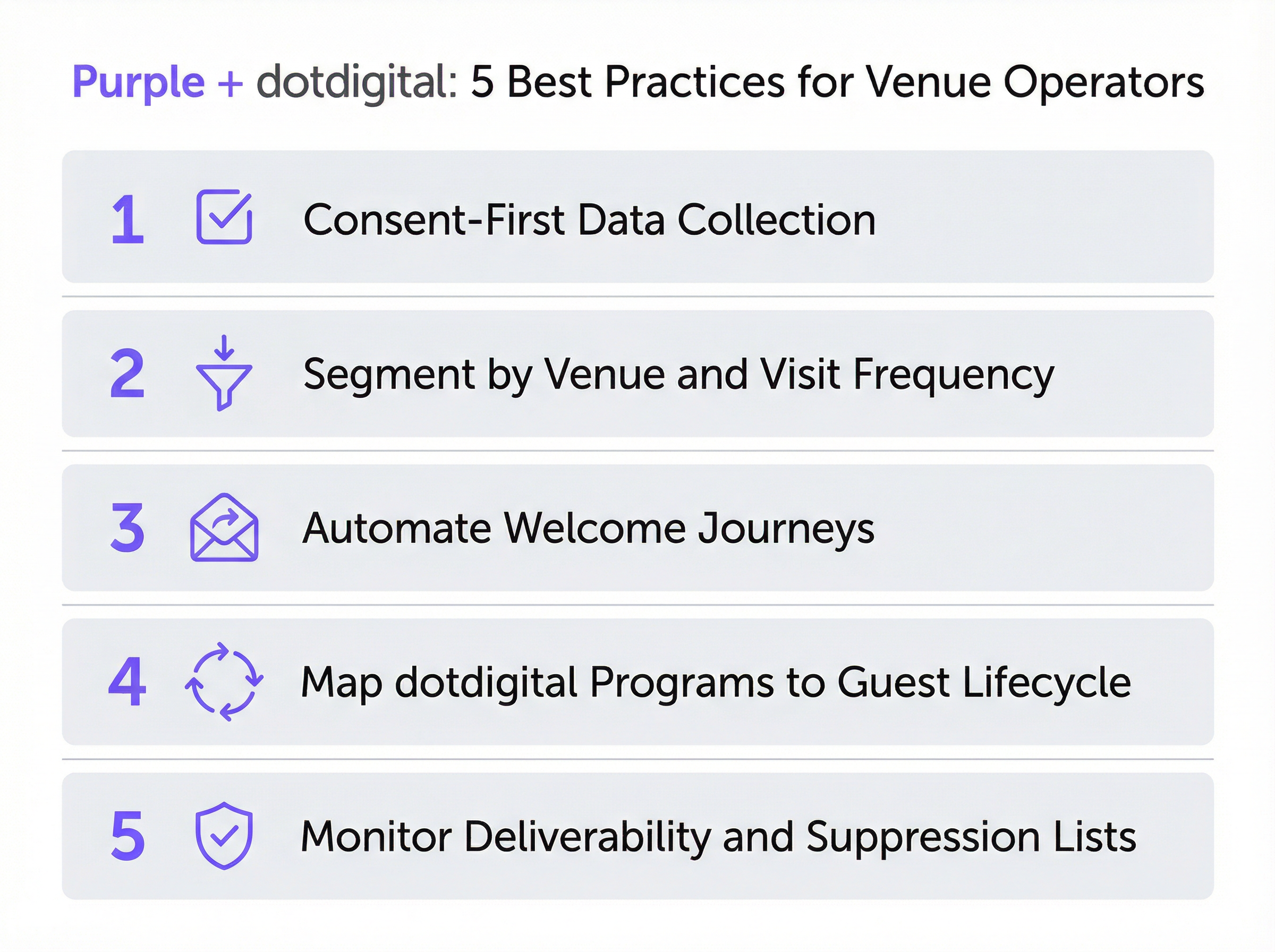
The quality of your opted-in database is a direct function of your consent architecture. Organisations that invest in clear, honest consent language — even if it reduces opt-in rates marginally — build more engaged, higher-value contact lists. A 30% opt-in rate from a transparent consent mechanism will consistently outperform a 60% opt-in rate from an ambiguous or misleading one, because the former cohort genuinely wants to hear from you. Harrods achieved a 38% opt-in rate from 581,000 WiFi users — a rate consistent with transparent, value-exchange consent language.
Address Book Taxonomy
Design your dotdigital address book structure before connecting Purple. For a hotel group operating 20 properties, this might mean 20 venue-specific address books, plus a master consolidated book for cross-property campaigns. For a retail chain, it might mean books segmented by region or store format. The key principle is that address book structure determines your segmentation capability downstream — retrofitting it after data has been collected is costly and disruptive.
Automation Programme Depth
The most effective Purple-dotdigital deployments use dotdigital's full programme capability: welcome journeys, birthday campaigns triggered by the dateOfBirth field, re-engagement sequences for lapsed contacts, and post-visit surveys. The postcode field enables geographic targeting for localised offers. The gender field enables demographic personalisation. The dateOfBirth field enables age-band segmentation and birthday triggers. Use all eight fields — they represent a rich segmentation foundation that most organisations underutilise.
Deliverability Management
Monitor dotdigital's deliverability dashboard weekly during the first 90 days of deployment. Key benchmarks: open rate above 20%, click-through rate above 2%, bounce rate below 2%, unsubscribe rate below 0.5%. If bounce rates are elevated, implement dotdigital's double opt-in workflow to verify email addresses before they enter your active database. This is particularly relevant for venues with high transient footfall — airports, train stations, conference centres — where guests may enter temporary or incorrect email addresses.
GDPR and PECR Compliance
The integration is designed to be compliant by default, but compliance is a shared responsibility. Purple enforces consent at the data capture layer; dotdigital enforces it at the communications layer. Your organisation is responsible for the consent language on the splash page, the content of marketing communications, and the maintenance of suppression lists. Conduct a Data Protection Impact Assessment before deploying the integration in jurisdictions covered by UK GDPR or EU GDPR, particularly for public-sector organisations subject to additional obligations under the Data Protection Act 2018.
Troubleshooting and Risk Mitigation
Connector Verification Failures
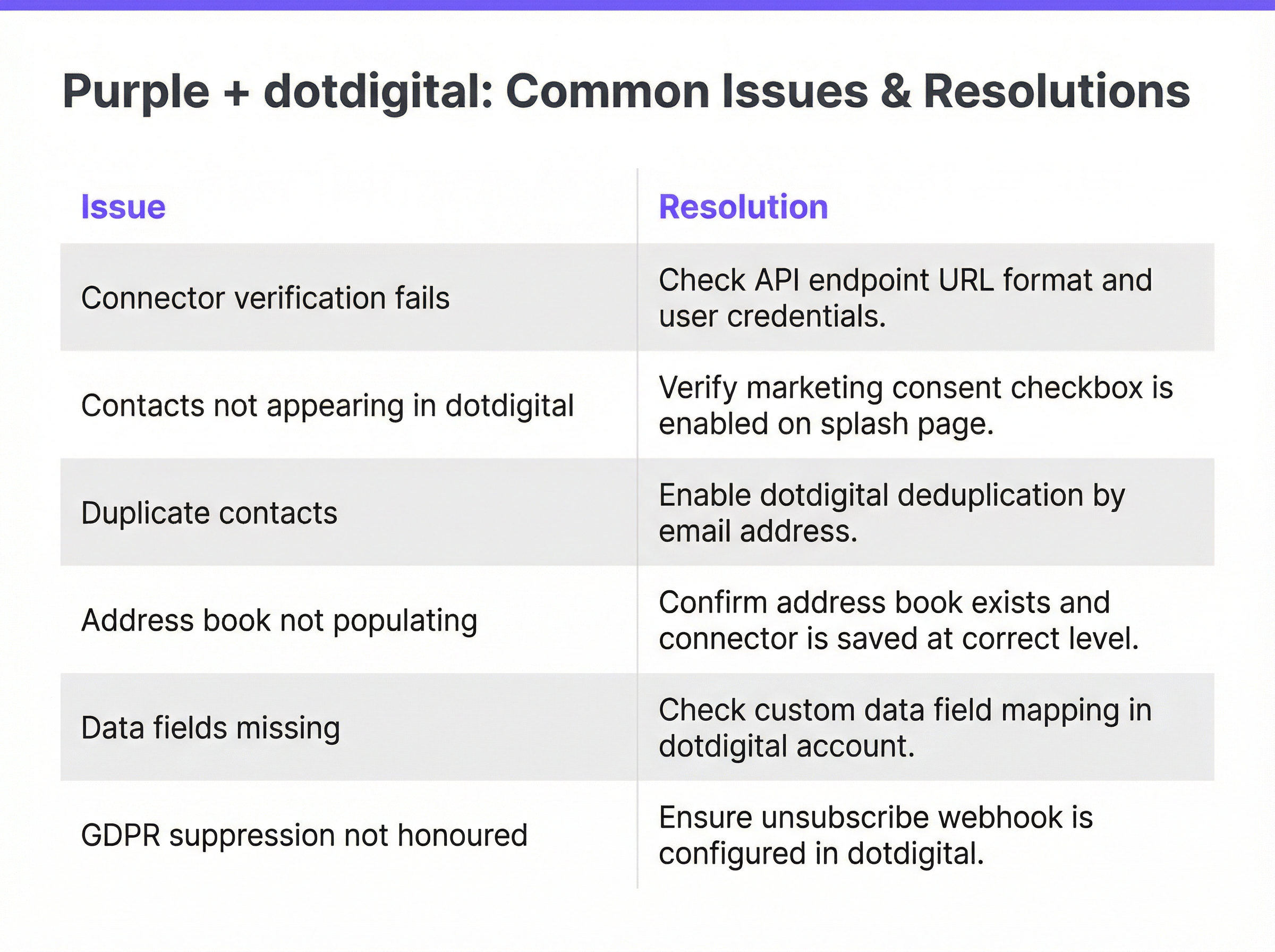
The most frequent deployment issue. Caused in the majority of cases by an incorrect API endpoint URL. Resolution: log in to dotdigital, navigate to Account Settings > Access, and copy the endpoint URL exactly as displayed. Ensure no trailing slash or whitespace is included. Verify that the API user credentials are for a dedicated API user account, not the primary account login. If verification still fails, confirm that the dotdigital account has API access enabled — this is a feature that may need to be activated by dotdigital support for some account tiers.
Contacts Not Appearing in dotdigital
If the connector verifies successfully but contacts are not appearing in the target address book, the primary cause is the marketing consent checkbox not being enabled on the splash page. Purple will not transmit data without explicit consent. Secondary causes include the connector being configured at the wrong level (customer vs. venue), or the address book ID having changed since the connector was saved. Resolution: verify the splash page consent configuration, confirm the connector level, and re-verify the connector to refresh the address book selection.
Duplicate Contact Records
Occurs when the same email address is submitted across multiple WiFi sessions, typically in high-footfall venues. Resolution: ensure dotdigital's address book is configured to update existing contacts on email address match rather than creating new records. This is controlled within dotdigital's contact import settings. Additionally, review whether the Purple connector is configured at both customer and venue level for the same venue — a dual configuration will result in duplicate pushes.
Missing Data Fields
If contacts appear in dotdigital but certain fields are empty, the most likely cause is that guests did not complete those fields on the splash page. Purple only transmits fields that were provided during authentication. For optional fields such as mobile number or date of birth, some guests will decline to provide them. If completeness of specific fields is critical to your segmentation strategy, consider making those fields required on the splash page — but note that each additional required field will reduce your overall opt-in conversion rate.
GDPR Suppression Not Honoured
If unsubscribed contacts are being re-added to dotdigital on subsequent WiFi logins, the bidirectional suppression webhook has not been configured. This is a compliance risk. Resolution: configure a dotdigital webhook that fires on unsubscribe events and updates the corresponding contact record in Purple. Consult the dotdigital developer documentation for webhook configuration guidance.
Risk Mitigation Framework
| Risk | Likelihood | Impact | Mitigation |
|---|---|---|---|
| Incorrect API endpoint | High | Medium | Retrieve endpoint directly from dotdigital account |
| Consent checkbox disabled | Medium | High | Include in pre-launch checklist; test with real device |
| Duplicate contacts | Medium | Low | Configure email-based deduplication in dotdigital |
| Suppression not synced | Low | High | Implement unsubscribe webhook before go-live |
| Data field completeness | High | Low | Set field requirements based on segmentation needs |
| API credential exposure | Low | High | Use dedicated API user; rotate credentials quarterly |
ROI and Business Impact
Measuring Success
The Purple-dotdigital integration delivers value across two distinct dimensions: database growth and revenue attribution. Database growth is measured by the number of new opted-in contacts added per month, the opt-in rate as a percentage of total WiFi authentications, and the rate of contact data completeness (percentage of contacts with all eight fields populated). Revenue attribution is measured by tracking purchases, loyalty programme sign-ups, or other conversion events that can be linked to contacts who entered the database via WiFi login.
dotdigital's reporting suite provides campaign-level analytics — open rates, click-through rates, conversion rates — that can be used to calculate the revenue contribution of each automation programme. Purple's analytics dashboard provides the footfall and authentication data required to calculate the cost per acquired contact.
Benchmarks and Expected Outcomes
Based on documented deployments across the Purple estate:
| Venue Type | Typical Opt-In Rate | Expected ROI Timeline | Key Revenue Driver |
|---|---|---|---|
| Luxury Retail | 35–45% | 6–12 months | Loyalty programme conversion |
| Hotel (mid-market) | 25–35% | 12–18 months | Direct booking re-engagement |
| Airport / Transport Hub | 15–25% | 18–24 months | Retail and F&B upsell |
| Stadium / Events Venue | 20–30% | 12–18 months | Merchandise and ticket upsell |
| Conference Centre | 30–40% | 6–12 months | Event re-booking and sponsorship |
Cost-Benefit Considerations
The marginal cost of the dotdigital connector within Purple is low relative to the revenue potential. The primary investment is in programme design and content creation — the automation journeys, email templates, and segmentation logic that determine how effectively the contact database is monetised. Organisations that treat the integration as a set-and-forget data pipe will see modest returns. Those that invest in continuous programme optimisation — A/B testing subject lines, refining segmentation, extending automation depth — will see returns consistent with the Harrods and AGS Airports benchmarks documented above.
A practical rule of thumb: for every 10,000 opted-in contacts acquired through WiFi, a well-configured dotdigital programme should generate measurable incremental revenue within 90 days of deployment, assuming a minimum open rate of 20% and a click-through rate of 2% on the welcome series.
Key Terms & Definitions
Captive Portal
A web page presented to a guest before they are granted access to a WiFi network. Purple's captive portal — also called a splash page — is the interface through which guests authenticate, provide profile data, and give marketing consent. It is the entry point for all data flowing into the dotdigital integration.
IT teams encounter this during network configuration and splash page design. The captive portal's consent checkbox is the legal and technical gateway to the entire marketing automation pipeline.
Address Book (dotdigital)
A named list of contacts within dotdigital, analogous to a mailing list or CRM segment. Address books are the primary organisational unit in dotdigital and serve as the target destination for Purple's data push. Automation programmes are triggered by contact addition to a specific address book.
The address book taxonomy — how many books, how named, at what level — is the most consequential architectural decision in a multi-venue deployment. It determines segmentation capability for all downstream marketing activity.
Automation Programme (dotdigital)
A configured sequence of automated actions in dotdigital, triggered by a defined event such as a contact being added to an address book. Programmes can include email sends, SMS messages, wait periods, conditional branches, and contact scoring updates. They are the mechanism through which Purple's data capture is converted into marketing communications.
IT teams are responsible for ensuring the connector triggers programme enrolment correctly. Marketing teams design the programme content. The 'Include contacts added via API' setting is a common configuration oversight that prevents programme triggering.
API Endpoint (dotdigital)
The base URL for dotdigital's REST API, specific to the regional data centre assigned to each account. It takes the form `https://r{n}-api.dotdigital.com` where `{n}` is the region number. It is retrieved from Account Settings > Access within the dotdigital platform.
This is the single most common source of connector verification failures. It must be retrieved directly from the dotdigital account — it cannot be guessed or copied from generic documentation.
Consent-Gated Data Push
A data transmission mechanism that only activates when explicit user consent has been recorded. In the Purple-dotdigital integration, Purple will only push a contact record to dotdigital if the guest has ticked the marketing consent checkbox on the splash page. This is a platform-level enforcement, not a configurable option.
This mechanism is the primary GDPR compliance control in the integration. It ensures that only genuinely opted-in contacts enter the marketing database, protecting the organisation from regulatory risk and protecting deliverability from low-engagement contacts.
Double Opt-In
A two-stage consent verification process in which a contact, after initially opting in, receives a confirmation email and must click a link to verify their email address and confirm their subscription. dotdigital supports double opt-in natively. It converts contacts from 'Pending' to 'Subscribed' status and provides an additional layer of consent documentation.
Recommended for venues with high transient footfall — airports, conference centres, train stations — where guests may enter incorrect or temporary email addresses. Double opt-in reduces bounce rates and improves deliverability, at the cost of a lower initial conversion rate.
Suppression List
A list of email addresses or contacts that must not receive marketing communications, typically because they have unsubscribed, complained, or been identified as invalid. dotdigital maintains suppression lists automatically. The Purple-dotdigital integration requires a webhook to sync suppressions back to Purple, preventing re-addition of suppressed contacts on subsequent WiFi logins.
Failure to implement bidirectional suppression sync is a GDPR compliance risk and a deliverability risk. It is a mandatory configuration step in any production deployment.
Venue-Level Connector
A Purple connector configuration scoped to a single venue, as opposed to a customer-level configuration that applies across the entire Purple account. Venue-level connectors allow different venues to be routed to different dotdigital address books, enabling venue-specific segmentation and personalisation.
Essential for multi-property operators. Hotel groups, retail chains, and stadium operators should always use venue-level configuration to maintain clean data segmentation across their estate.
First-Party Data
Data collected directly from individuals by the organisation that will use it for marketing, with the individual's knowledge and consent. WiFi login data captured through Purple's captive portal is first-party data. It is distinct from third-party data (purchased lists) and second-party data (data shared by partners). First-party data is the most valuable and most compliant form of marketing data in the post-cookie, post-GDPR landscape.
The strategic value of the Purple-dotdigital integration is that it generates high-quality first-party data at scale, from physical venue visits. This data is not available through any digital marketing channel and represents a genuine competitive advantage for venue operators.
PECR (Privacy and Electronic Communications Regulations)
UK regulations that govern direct marketing by electronic means, including email and SMS. PECR requires prior consent for marketing emails to individuals (as opposed to businesses). It works in conjunction with UK GDPR to define the legal basis for marketing communications triggered by the Purple-dotdigital integration.
IT and marketing teams must ensure that the splash page consent language covers all channels used for marketing — email, SMS, and push — and that the consent is specific to each channel where required.
Case Studies
A 450-room city-centre hotel group with 12 properties across the UK wants to use Purple's dotdigital connector to build a direct booking re-engagement programme. Each property has its own Purple venue configuration. The marketing team wants to send property-specific offers to guests who have stayed at a particular hotel, while also being able to run group-wide campaigns. How should the integration be architected?
The correct architecture uses venue-level connector configuration in Purple, with each of the 12 properties mapped to a dedicated dotdigital address book. This gives the marketing team clean, venue-specific contact lists for property-level targeting. In parallel, a dotdigital segment is created that aggregates contacts across all 12 address books — this segment is used for group-wide campaigns without duplicating contact records.
Step 1: In dotdigital, create 12 address books named by property (e.g., 'Purple - Manchester City Centre', 'Purple - Edinburgh Royal Mile'). Create a master segment using the 'Contact is in any of these address books' condition covering all 12 books.
Step 2: In Purple, navigate to each venue's settings under Management > Venues. For each venue, add a dotdigital connector at venue level, using the same API credentials but selecting the property-specific address book.
Step 3: Build a welcome automation programme in dotdigital triggered by contact addition to any of the 12 address books. Use dynamic content blocks in the email template to personalise the message based on the address book (property) the contact was added to — for example, featuring the specific hotel's amenities and a direct booking link.
Step 4: Build a re-engagement programme that fires 30 days after the last WiFi login, with a property-specific offer. Use dotdigital's contact scoring to identify high-value guests (multiple visits, high data completeness) for premium re-engagement campaigns.
Step 5: For group-wide campaigns — seasonal promotions, loyalty programme launches — use the master segment to reach the full opted-in database without duplicating sends to contacts who appear in multiple property address books.
A national retail chain with 85 stores has deployed Purple WiFi across its estate. After six months, the marketing team reports that contacts are appearing in dotdigital but the welcome automation programme is not triggering for approximately 15% of new contacts. The IT team has confirmed the connector is verified and contacts are being added to the correct address book. What is the most likely cause and how should it be resolved?
The most likely cause is a race condition between contact creation and programme enrolment in dotdigital, combined with contacts being added via the API rather than through dotdigital's native import. When contacts are added to an address book via the API — as Purple does — dotdigital's programme trigger logic may not fire if the programme is configured to trigger on 'contact added to address book via import' rather than 'contact added via API'.
Resolution Step 1: In dotdigital's Program Builder, open the welcome programme and inspect the enrolment trigger. Verify that the trigger condition is set to 'Contact added to address book' and that the 'Include contacts added via API' option is enabled. This option is not enabled by default in all dotdigital account configurations.
Resolution Step 2: If the trigger condition is correct, check whether the affected contacts have an opt-in status of 'Unknown' rather than 'Subscribed' in dotdigital. Contacts with 'Unknown' status may be excluded from programme enrolment depending on programme settings. Resolution: configure the programme to include contacts with 'Unknown' opt-in status, or implement dotdigital's double opt-in workflow to convert contacts to 'Subscribed' status on confirmation.
Resolution Step 3: Review the programme's enrolment frequency setting. If set to 'Enrol once only', contacts who have previously been enrolled — for example, from a prior WiFi session at a different store — will not be re-enrolled. For a retail chain where guests may visit multiple stores, consider whether re-enrolment on each new store visit is appropriate, and configure accordingly.
Resolution Step 4: Check for programme enrolment limits. Some dotdigital account configurations impose a maximum daily enrolment rate. If the retail chain's WiFi generates a high volume of new contacts on peak trading days, this limit may be causing the 15% gap.
Scenario Analysis
Q1. A conference centre operator runs a single Purple account covering three venues: a main auditorium, a breakout suite, and an exhibition hall. They want to use dotdigital to send post-event follow-up emails to attendees, with content specific to which space they visited. Their current connector is configured at customer level, routing all three venues into a single dotdigital address book. What change should they make, and what are the implications?
💡 Hint:Consider how venue-level configuration changes the address book structure, and what additional steps are required in dotdigital to support venue-specific content.
Show Recommended Approach
The operator should reconfigure the connector at venue level, creating three separate dotdigital address books — one per venue. This allows dotdigital to identify which venue a contact was added from, enabling venue-specific content in automation programmes. The implications are: (1) existing contacts in the single customer-level address book will need to be migrated or re-segmented; (2) three separate automation programmes will need to be created or a single programme with dynamic content blocks will need to be configured; (3) for group-wide communications, a dotdigital segment aggregating all three address books should be created. The migration of existing contacts is the most operationally complex step — it requires identifying which venue each existing contact was associated with, which may require cross-referencing Purple's analytics data with the dotdigital contact records.
Q2. A hotel group's IT team has deployed the Purple-dotdigital connector across 8 properties. Three months after go-live, the marketing team reports that the welcome email open rate is 12% — significantly below the 25% benchmark for hospitality welcome emails. Bounce rates are at 4.2%. What are the most likely causes and what remediation steps should the IT team recommend?
💡 Hint:A 4.2% bounce rate is a strong signal about data quality at the point of collection. Consider what happens to email deliverability when bounce rates are elevated, and how the consent mechanism may be contributing.
Show Recommended Approach
The 4.2% bounce rate is the primary issue and is almost certainly causing the low open rate. When bounce rates exceed 2%, inbox providers begin to treat the sending domain as a source of low-quality email, reducing inbox placement rates across the entire database — including valid, engaged contacts. The root cause of the high bounce rate is likely guests entering incorrect or temporary email addresses at the splash page, which is common in transient hospitality environments. Remediation: implement dotdigital's double opt-in workflow to verify email addresses before they enter the active database. This will reduce the volume of new contacts but will significantly improve data quality. Additionally, review whether the splash page requires email address confirmation (entering the address twice) — this simple UX change reduces typo-based bounces. For the open rate, review the welcome email send timing — if the email is sent hours after check-in rather than within minutes of WiFi connection, the contextual relevance is reduced. Also review the subject line and sender name for relevance and trust signals.
Q3. A large retail chain's data protection officer has raised a concern that the Purple-dotdigital integration may be re-adding previously unsubscribed contacts to the marketing database when they visit a store and connect to WiFi. The IT team needs to confirm whether this is happening and, if so, implement a fix. What steps should they take?
💡 Hint:This is a GDPR compliance issue, not just a technical one. Consider the data flow in both directions and what configuration is required to prevent re-addition of suppressed contacts.
Show Recommended Approach
This is a genuine GDPR risk. The scenario occurs when: (1) a contact unsubscribes from dotdigital marketing; (2) the unsubscribe is not synced back to Purple; (3) the contact subsequently visits a store and connects to WiFi; (4) Purple, unaware of the suppression, pushes the contact record to dotdigital again; (5) dotdigital re-adds the contact to the address book. To confirm whether this is happening, cross-reference dotdigital's suppression list with recent address book additions — any email address appearing in both lists indicates the problem is occurring. The fix requires two steps: (1) configure a dotdigital webhook that fires on unsubscribe events and updates the corresponding contact record in Purple to mark them as suppressed; (2) implement a pre-push check in the connector configuration to verify that the contact's email address is not on the dotdigital suppression list before transmitting. The DPO should also be advised that a Data Protection Impact Assessment should be conducted if one has not already been completed for this integration, given the cross-system personal data processing involved.
Q4. A stadium operator wants to use the Purple-dotdigital integration to send personalised post-match emails to fans who connected to the stadium WiFi during an event. They want to include the match result, a link to match highlights, and a personalised merchandise offer based on the fan's team affiliation. The current integration only captures the eight standard Purple data fields. What additional configuration is required to support this use case?
💡 Hint:Consider how event-specific data (match date, teams, result) can be associated with contacts in dotdigital, and how team affiliation can be captured at the splash page level.
Show Recommended Approach
This use case requires two enhancements beyond the standard integration. First, team affiliation must be captured at the splash page level using Purple's custom question feature on the splash page. A dropdown or radio button question — 'Which team are you supporting today?' — captures the affiliation at authentication time. This data can be passed to dotdigital as a custom contact data field, which must be created in dotdigital's account settings before the connector is configured. Second, event-specific data (match date, opponent, result) needs to be associated with the contact's session. This can be achieved by creating a separate dotdigital address book for each event, named with the match details, and configuring the Purple connector to route that event's WiFi logins to the event-specific address book. The post-match automation programme is then triggered by addition to that address book, with the match details embedded in the email template. For the merchandise offer, dotdigital's dynamic content feature can serve different product recommendations based on the team affiliation custom data field. This is a more complex deployment that benefits from Purple's Professional Services team involvement during the initial configuration.
Key Takeaways
- ✓The Purple-dotdigital connector is a real-time, consent-gated API integration that pushes eight guest profile fields to dotdigital at the point of WiFi authentication — but only when the guest has explicitly opted in to marketing communications.
- ✓Connector configuration requires four inputs: a connector name, a dotdigital API user email, the corresponding password, and the account-specific API endpoint URL retrieved from dotdigital's Account Settings > Access page. Incorrect endpoint URL is the leading cause of verification failures.
- ✓Deploy the connector at venue level for multi-property organisations to maintain clean address book segmentation per property; use customer level only for single-venue operators.
- ✓Build and test dotdigital automation programmes before activating the connector — the welcome email sent within minutes of WiFi login is the highest-engagement communication in the guest lifecycle and should not be missed.
- ✓Implement the dotdigital unsubscribe webhook to sync suppressions back to Purple; without this, the integration is non-compliant with UK GDPR and PECR and will generate deliverability problems over time.
- ✓Documented ROI benchmarks from the Purple estate include 54x return at Harrods, 842% at AGS Airports, and 10,630% at Brussels South Charleroi Airport — outcomes driven by deliberate programme design, not just a connected API.
- ✓Monitor deliverability metrics weekly during the first 90 days: target open rate above 20%, bounce rate below 2%, unsubscribe rate below 0.5%. Elevated bounce rates are the primary signal of data quality issues at the consent capture layer.




