

Email Verification for WiFi Sign-In: Improving Data Quality
This guide provides IT managers, network architects, and venue operations directors with a definitive technical reference on email verification for WiFi sign-in, explaining why guest WiFi environments produce degraded email data, how Purple's Verify feature implements a layered validation architecture, and what measurable improvements operators can expect after deployment. It covers the full verification stack — from RFC 5322 syntax checking through DNS MX record validation, disposable-email blocklisting, and OTP confirmation — alongside GDPR compliance considerations and CRM integration guidance. Venue operators who act on this guidance can expect to reduce invalid email rates from an industry-average 25–35% to under 2%, materially improving marketing ROI, sender reputation, and regulatory defensibility.
🎧 Listen to this Guide
View Transcript

Executive Summary
Guest WiFi is one of the highest-volume first-party data collection touchpoints available to venue operators, yet the email data it produces is frequently unreliable. Without active verification at the point of capture, between 25% and 35% of email addresses submitted through captive portals are either syntactically malformed, point to non-existent domains, or belong to disposable email services specifically designed to circumvent registration requirements. The downstream consequences are significant: inflated CRM databases, degraded email sender reputation, wasted campaign spend, and elevated GDPR compliance risk under Article 5(1)(d)'s accuracy principle.
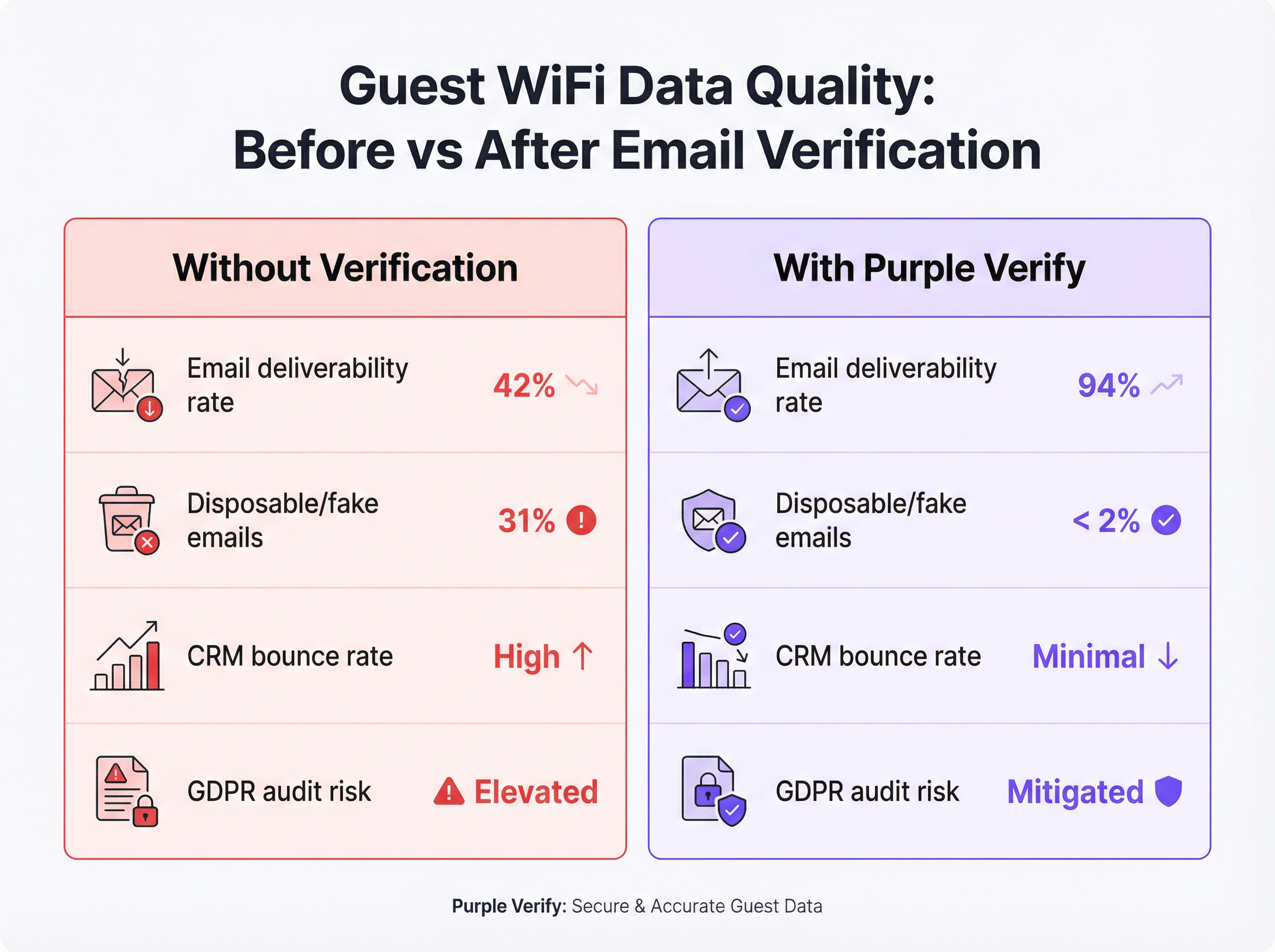
Purple's Verify feature addresses this at the infrastructure layer, applying a four-stage validation pipeline — syntax check, DNS MX record lookup, disposable-email domain blocklisting, and optional one-time passcode (OTP) confirmation — in real time, before a guest is granted network access. Deployments across hospitality, retail, and events verticals consistently demonstrate a reduction in invalid email rates to under 2%, with email deliverability rates rising from a typical baseline of 42% to over 90% within 60 days of activation.
For the CTO evaluating this quarter's data quality roadmap: email verification WiFi is not a nice-to-have. It is the foundational control that determines whether your guest WiFi investment produces actionable intelligence or an expensive liability.
Technical Deep-Dive
Why Guest WiFi Produces Bad Email Data
The root cause is structural, not accidental. When a guest connects to a captive portal, the exchange is fundamentally asymmetric: the guest wants internet access immediately, and the operator wants a valid email address in return. The guest has every incentive to minimise friction, and the operator — without verification controls — has no mechanism to enforce data quality at the point of submission.
This produces four distinct categories of bad data. Typographical errors are the most benign: a guest genuinely intends to provide their real address but mistypes it under time pressure or on a small mobile keyboard. Fabricated addresses are deliberate: strings like test@test.com or noemail@noemail.com that look plausible but resolve to nothing. Expired or invalid domains arise when a guest submits an address at a former employer's domain, a defunct ISP, or a personal domain they no longer maintain. Disposable email addresses are the most sophisticated category: services such as Mailinator, Guerrilla Mail, and Temp Mail provide fully functional inboxes that expire after minutes or hours, allowing a guest to pass even a basic deliverability check whilst ensuring no long-term marketing contact is possible.
The IEEE 802.11 standard governs the radio and MAC-layer behaviour of WiFi networks but places no requirements on the identity verification of connecting users. Captive portal behaviour is described in RFC 7710 and its successor RFC 8910, neither of which mandates email validation. The data quality problem is therefore entirely an application-layer concern, sitting above the network stack, and must be addressed at the captive portal software level.
The Four-Layer Verification Architecture
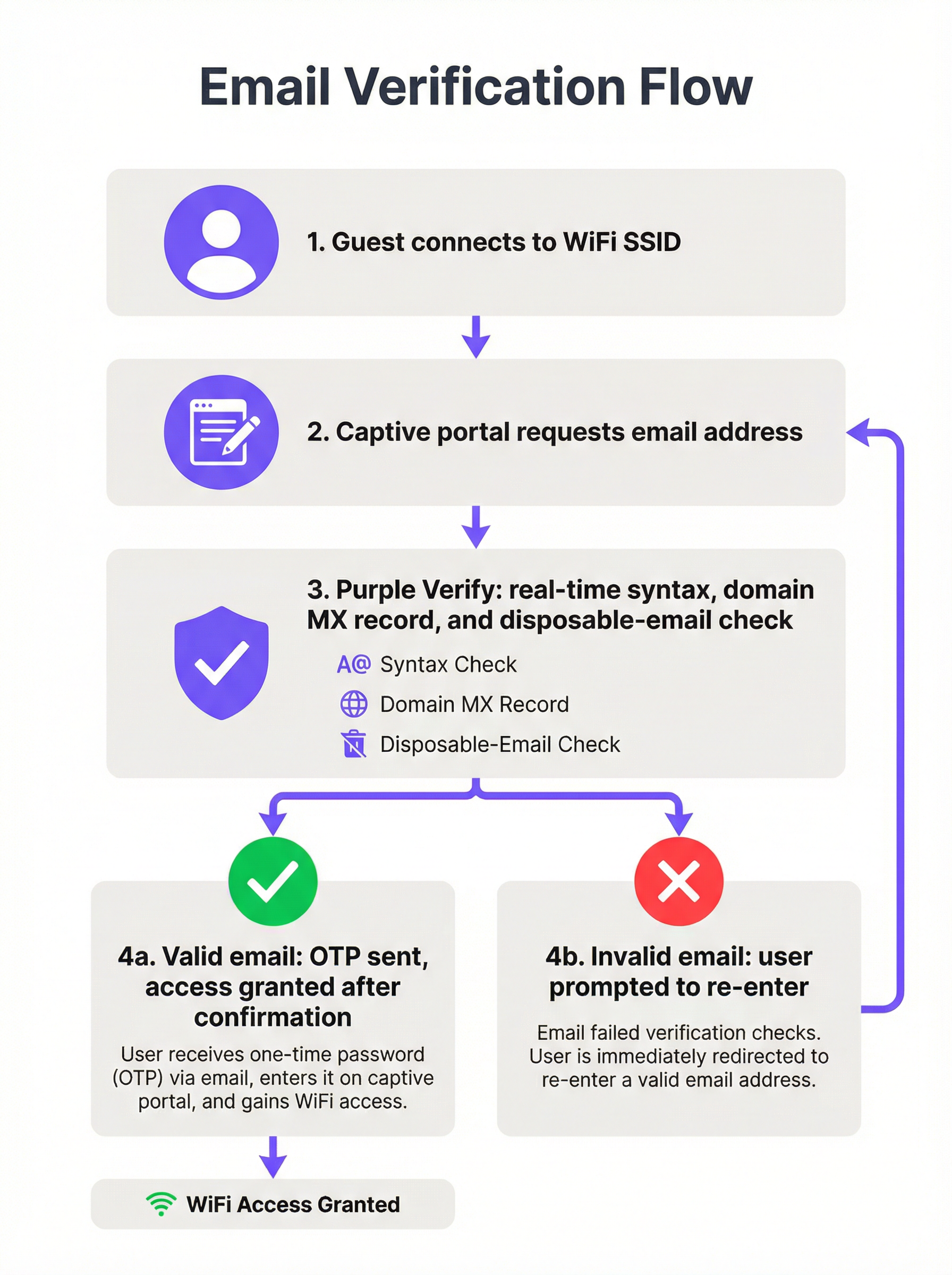
A production-grade email verification WiFi deployment implements four distinct validation layers, each providing incremental quality assurance.
Layer 1 — Syntax Validation (RFC 5322): The submitted string is parsed against the Internet Message Format standard. This confirms the presence of a local part, an at-symbol, and a domain component with at least one dot. It rejects strings with illegal characters, multiple at-symbols, and other structural violations. Syntax validation alone catches approximately 15–20% of bad submissions and adds negligible latency (sub-millisecond, client-side).
Layer 2 — Domain and MX Record Verification: A DNS lookup confirms that the submitted domain exists and has a valid Mail Exchange (MX) record, indicating it is configured to receive email. This check is performed server-side and typically completes within 100–300 milliseconds. It eliminates addresses at expired domains, fictional domains, and corporate domains that have been decommissioned — a category that syntax validation cannot detect.
Layer 3 — Disposable Email Domain Blocklisting: The domain component is cross-referenced against a continuously updated blocklist of known disposable and temporary email service providers. This is where the intelligence layer becomes critical. A static blocklist — one that is not updated in real time — will miss newly launched disposable services and will degrade in effectiveness over time. Purple's Verify feature maintains a live-updated blocklist, ensuring coverage of the current disposable email ecosystem rather than a historical snapshot.
Layer 4 — One-Time Passcode (OTP) Confirmation: A time-limited numeric code is dispatched to the submitted email address. The guest must retrieve this code from their actual inbox and enter it into the captive portal to complete authentication. This is the definitive proof-of-ownership check: it is impossible to pass with a fabricated address, a mistyped address, or a disposable inbox that has expired. OTP confirmation aligns with multi-factor authentication principles and provides the strongest available assurance that the collected email address is both valid and accessible to the guest.
| Validation Layer | What It Catches | Latency Impact | Recommended For |
|---|---|---|---|
| Syntax (RFC 5322) | Malformed strings | < 1 ms | All deployments |
| Domain / MX Record | Non-existent domains | 100–300 ms | All deployments |
| Disposable Email Blocklist | Temporary inboxes | 50–100 ms | Marketing-focused deployments |
| OTP Confirmation | All invalid addresses | 30–120 seconds (user-dependent) | Hospitality, events, loyalty programmes |
Compliance and Standards Context
Email verification at the WiFi sign-in point is directly relevant to several regulatory and standards frameworks that venue operators are likely subject to.
GDPR Article 5(1)(d) requires that personal data be accurate and, where necessary, kept up to date. Collecting a verified email address at the point of capture is substantially more defensible in a supervisory authority audit than collecting an unverified address and attempting retrospective cleaning. The verification process itself should be documented in your Article 30 Records of Processing Activities.
GDPR Article 7 requires that consent for marketing communications be freely given, specific, informed, and unambiguous. An OTP confirmation step provides a contemporaneous record that the data subject had access to the submitted email address at the time of consent, strengthening the audit trail.
PCI DSS v4.0 does not directly govern email verification, but Requirement 8 (Identify Users and Authenticate Access) and the broader network segmentation requirements are relevant if your guest WiFi is on a network segment adjacent to cardholder data environments. The identity assurance provided by OTP verification contributes to a defensible access control posture.
ISO/IEC 27001:2022 Annex A Control 5.14 (Information Transfer) and Control 8.5 (Secure Authentication) are relevant for organisations operating guest WiFi under an ISMS. Email verification provides a documented, auditable identity check at the network access point.
Implementation Guide
Pre-Deployment Assessment
Before activating email verification, establish a quantified baseline. Export a representative sample of at least 5,000 email addresses from your existing guest WiFi database and run them through a bulk email validation service. Record your current invalid rate, disposable email rate, and hard bounce rate from your email marketing platform. These figures form the baseline against which you will measure improvement and build the internal business case for the deployment.
Selecting Your Verification Depth
The appropriate verification configuration depends on three factors: the nature of your guest relationship (transactional versus long-term), your guest demographic's tolerance for friction, and the downstream use case for the collected data.
For high-footfall transient environments — transport hubs, shopping centres, quick-service restaurants — syntax and domain validation with disposable email blocking is the recommended minimum. The OTP step introduces friction that may be disproportionate to the value of the data in a context where the guest relationship is brief and the primary use case is aggregate analytics rather than individual marketing.
For hospitality and events — hotels, conference centres, stadiums — full OTP confirmation is strongly recommended. The guest relationship is longer, the marketing value of a verified email is higher, and guests in these environments typically have their email accessible on the device they are using to sign in. The additional 30–60 seconds of friction is well within acceptable bounds.
For loyalty-integrated retail — where the WiFi sign-in feeds directly into a loyalty programme or personalisation engine — OTP confirmation is essential. The integrity of the loyalty database depends on the uniqueness and accuracy of the underlying email identifiers.
Configuration Steps on Purple
- Navigate to Venue Settings > Captive Portal > Authentication in the Purple dashboard.
- Select Email as the authentication method and enable the Verify toggle.
- Choose your verification depth: Standard (syntax + domain + disposable blocklist) or Full (Standard + OTP confirmation).
- Configure the OTP email template — ensure it carries your venue branding and a clear subject line (e.g., "Your [Venue Name] WiFi access code").
- Set the OTP expiry window. A 10-minute window is recommended; shorter windows increase abandonment, longer windows reduce security.
- Configure the retry and error messaging in the captive portal UI. Specify distinct error messages for syntax failures, domain failures, and disposable email rejections.
- Enable verification metadata passthrough to your connected CRM or marketing platform via the Purple API or webhook integration.
- Conduct a staged rollout: activate on one venue or SSID first, monitor the verification pass rate and OTP completion rate for 7 days, then roll out to the full estate.
Integration with Downstream Systems
The value of email verification is only fully realised when the verified status is propagated to downstream systems. Configure your Purple integration to pass the email_verified boolean flag — and, where OTP was used, the otp_confirmed flag — to your CRM and email marketing platform. Use this flag to segment your guest database: treat OTP-confirmed addresses as your highest-quality tier for personalised campaigns, and use domain-validated-only addresses for lower-priority communications.
Best Practices
Treat email verification as a data governance control, not a security control. The primary benefit is data quality and GDPR compliance, not network security. Frame the deployment accordingly when building the internal business case.
Use a live-updated disposable email blocklist. A static blocklist degrades rapidly. New disposable email services launch weekly. Ensure your verification provider — whether Purple or a third-party service — maintains a continuously updated blocklist.
Design the error UX with the genuine user in mind. The majority of guests who fail verification have made a genuine typo, not a deliberate attempt to circumvent the system. Error messages should be specific, helpful, and non-accusatory. "We couldn't find that email domain — please check and try again" is more effective than a generic "Invalid email address" message.
Monitor your OTP completion rate as a leading indicator. A declining OTP completion rate may indicate delivery latency issues, session timeout problems, or a demographic shift in your guest population. Set up automated alerts if the completion rate drops below a threshold (typically 70% is a reasonable baseline for hospitality environments).
Document your verification process for GDPR Article 30 compliance. Your Records of Processing Activities should describe the verification steps applied at the point of data collection, the legal basis for processing, and the retention period for verification logs.
Apply verification depth proportionately across your estate. A multi-site deployment may justify different verification configurations at different venue types. Use Purple's per-venue configuration capability to apply the appropriate depth at each location rather than defaulting to the lowest common denominator across the estate.
Troubleshooting & Risk Mitigation
Common Failure Modes
Failure Mode 1: High OTP abandonment rate. If your OTP completion rate is below 60%, the most common causes are: email delivery latency exceeding 60 seconds; captive portal session timeout set too short (below 5 minutes); or guests using webmail clients that require switching apps on mobile, causing the captive portal session to reset. Remediation: check your email delivery SLA with your SMTP provider, extend the session timeout to at least 8 minutes, and consider implementing a "magic link" alternative to the numeric code for guests who prefer a single-tap confirmation.
Failure Mode 2: Legitimate corporate email addresses being rejected. Some corporate email domains have unusual MX record configurations — for example, organisations that route email through a third-party security gateway with non-standard DNS records. If you are seeing rejections of addresses that appear legitimate, review your domain validation logic and consider implementing a whitelist for known enterprise domains that are generating false positives.
Failure Mode 3: Disposable email blocklist not covering new services. Monitor your post-verification database for signs of disposable email penetration — for example, a sudden spike in addresses from an unfamiliar domain. If you identify a new disposable service that is not being blocked, report it to your verification provider for blocklist inclusion.
Failure Mode 4: Verification metadata not reaching the CRM. If your email marketing platform is not receiving the email_verified flag, check your Purple webhook configuration and confirm that the receiving endpoint is parsing the payload correctly. Use Purple's webhook test tool to validate the integration before relying on it in production.
Risk Register
| Risk | Likelihood | Impact | Mitigation |
|---|---|---|---|
| OTP delivery failure (SMTP outage) | Low | High | Configure a secondary SMTP relay; implement graceful fallback to domain-only validation |
| Disposable email service not on blocklist | Medium | Medium | Use live-updated blocklist; monitor post-verification database quality |
| GDPR challenge on verification data retention | Low | High | Document retention policy; delete OTP logs after 30 days |
| Guest abandonment due to OTP friction | Medium | Medium | Optimise email delivery latency; extend session timeout; offer alternative auth methods |
| False positive rejection of legitimate addresses | Low | Medium | Implement domain whitelist; provide manual override path for venue staff |
ROI & Business Impact
Measuring Success
The primary KPIs for an email verification WiFi deployment fall into three categories: data quality metrics, marketing performance metrics, and compliance metrics.
Data quality metrics include the invalid email rejection rate (the percentage of submitted addresses rejected at each verification layer), the OTP completion rate, and the post-deployment hard bounce rate from your email marketing platform. A well-configured deployment should achieve an invalid email rate of under 2% and a hard bounce rate of under 0.5% on WiFi-sourced contacts.
Marketing performance metrics include email deliverability rate, campaign open rate, and click-through rate for WiFi-sourced segments versus other acquisition channels. Verified WiFi contacts consistently outperform unverified contacts on these metrics because the underlying data is accurate and the guest has demonstrated active intent by completing the OTP step.
Compliance metrics include the number of GDPR data subject access requests that can be fulfilled accurately (a clean database reduces the risk of sending personal data to the wrong individual), and the audit readiness of your Article 30 records.
Cost-Benefit Framework
The direct costs of deploying email verification are minimal: Purple's Verify feature is included within the platform subscription, and the incremental operational overhead is limited to the initial configuration and ongoing monitoring. The indirect costs are the marginal increase in sign-in friction and the small reduction in raw data volume (since some guests who would previously have submitted fake addresses will now abandon the sign-in flow rather than provide a real address).
The benefits are quantifiable. For a hotel group with 50 properties, each averaging 150 guest WiFi sign-ins per day, the annual data volume is approximately 2.7 million records. At an unverified invalid rate of 30%, that is 810,000 worthless records per year — each one consuming CRM storage, email send budget, and potentially creating GDPR exposure. At a typical email marketing platform cost of £0.002 per send, the direct wasted spend on invalid addresses alone exceeds £1,600 per year per campaign. For an operator running 12 campaigns per year, that is over £19,000 in direct waste — before accounting for the reputational cost of elevated bounce rates affecting deliverability to genuine subscribers.
The ROI calculation is straightforward: the cost of verification is effectively zero (it is a configuration toggle on an existing platform subscription), and the benefits — in reduced waste, improved campaign performance, and mitigated compliance risk — are material and measurable within 60–90 days of deployment.
This guide is published by Purple, the enterprise WiFi intelligence platform. For deployment assistance or a technical consultation, contact your Purple account team or visit purple.ai.
Key Terms & Definitions
Captive Portal
A web page presented to a guest attempting to connect to a WiFi network, requiring authentication or acceptance of terms before network access is granted. Captive portal behaviour is described in RFC 8910. The portal is the primary data collection interface in a guest WiFi deployment and the point at which email verification is applied.
IT teams encounter captive portals as the front-end interface of their guest WiFi deployment. The design and configuration of the captive portal — including its verification logic and error messaging — directly determines the quality of data collected.
MX Record (Mail Exchange Record)
A DNS resource record that specifies the mail server responsible for accepting email messages on behalf of a domain. During email verification, a DNS lookup for the MX record of the submitted domain confirms that the domain is configured to receive email. The absence of an MX record indicates that the domain cannot receive email, making any address at that domain invalid for communication purposes.
IT teams encounter MX record checks as part of the domain validation layer of email verification. Understanding MX records is also relevant for diagnosing false positive rejections of legitimate corporate email addresses with non-standard DNS configurations.
Disposable Email Address (DEA)
A temporary email address provided by a disposable email service (such as Mailinator, Guerrilla Mail, or Temp Mail) that is functional for a short period — typically minutes to hours — before expiring. DEAs are specifically designed to allow users to register for services without providing a permanent, contactable email address. They represent the most sophisticated category of invalid email data in guest WiFi deployments.
IT and marketing teams encounter DEAs as a primary source of data quality degradation in guest WiFi databases. A guest using a DEA will pass syntax and domain validation but will be unreachable for any subsequent marketing or transactional communication.
One-Time Passcode (OTP)
A time-limited numeric or alphanumeric code sent to a user's email address (or mobile number) as part of an authentication or verification flow. In the context of email verification WiFi, the OTP is dispatched to the submitted email address and must be entered into the captive portal to complete sign-in. Successful OTP entry constitutes proof of ownership of the submitted address.
IT teams configure OTP delivery as part of the captive portal authentication flow. Key configuration parameters include the OTP expiry window (typically 5–10 minutes), the SMTP relay used for delivery, and the session timeout on the captive portal (which must be long enough to allow the guest to retrieve and enter the code).
Email Deliverability Rate
The percentage of sent emails that successfully reach the recipient's inbox, as opposed to being bounced (returned as undeliverable) or filtered to spam. Deliverability rate is a function of both the quality of the underlying email list and the sender's reputation with Internet Service Providers (ISPs). A high proportion of invalid addresses in a list will generate hard bounces, which damage sender reputation and reduce deliverability even to valid addresses.
Marketing managers use deliverability rate as the primary indicator of email list health. IT teams are involved when deliverability issues are traced to infrastructure problems — such as a sender domain being flagged as high-risk by ISPs due to excessive bounce rates from WiFi-sourced contacts.
Hard Bounce
A permanent email delivery failure caused by an invalid, non-existent, or blocked recipient address. Hard bounces are distinguished from soft bounces (temporary delivery failures due to a full inbox or server unavailability). Email marketing platforms track hard bounce rates and will typically suppress addresses that generate hard bounces. A hard bounce rate above 2% is generally considered a threshold for sender reputation risk.
IT and marketing teams encounter hard bounces as the primary measurable symptom of poor email data quality. A high hard bounce rate from WiFi-sourced contacts is often the trigger for an email verification deployment project.
RFC 5322 (Internet Message Format)
The Internet Engineering Task Force (IETF) standard that defines the syntax of email messages, including the format of email addresses. RFC 5322 specifies that an email address consists of a local part (before the at-symbol) and a domain (after the at-symbol), with specific rules governing permissible characters and structure. Syntax validation in email verification checks submitted addresses against RFC 5322 requirements.
IT teams reference RFC 5322 when configuring or evaluating email validation logic. Understanding the standard helps distinguish between syntactically valid addresses (which conform to RFC 5322) and deliverable addresses (which additionally require a valid domain and MX record).
Sender Reputation
A score assigned by Internet Service Providers (ISPs) and email filtering services to a sending domain and IP address, based on factors including bounce rates, spam complaint rates, and sending volume patterns. A degraded sender reputation causes emails to be filtered to spam or rejected outright, even for valid recipient addresses. Sender reputation is directly affected by the quality of the underlying email list: high bounce rates from invalid addresses are one of the fastest ways to damage reputation.
IT teams are typically involved in sender reputation issues when the email marketing platform flags deliverability problems that trace back to infrastructure — such as a sending domain being blacklisted. Marketing managers experience sender reputation degradation as unexplained drops in campaign open rates. Email verification WiFi directly protects sender reputation by preventing invalid addresses from entering the list.
GDPR Article 5(1)(d) — Accuracy Principle
The provision of the General Data Protection Regulation that requires personal data to be 'accurate and, where necessary, kept up to date', with 'every reasonable step' taken to ensure that inaccurate personal data is erased or rectified without delay. In the context of guest WiFi data collection, this principle requires operators to take reasonable steps to ensure that email addresses collected at the point of sign-in are accurate — a requirement that email verification directly addresses.
Data protection officers and IT compliance teams reference Article 5(1)(d) when assessing the legal basis for email verification deployments. The principle provides the regulatory anchor for the business case: collecting unverified email addresses and storing them in a CRM is a potential compliance risk under GDPR, and verification is the most direct mitigation.
Case Studies
A 12-property UK hotel group has been operating guest WiFi for 18 months without email verification. Their CRM contains approximately 144,000 guest records sourced from WiFi sign-ins, but their email marketing platform is flagging their sender domain as high-risk due to a 31% hard bounce rate. The marketing director wants to launch a loyalty programme using WiFi-sourced contacts. What is the recommended approach?
The immediate priority is to stop the flow of new invalid data before addressing the existing database. Step 1: Activate Purple Verify with full OTP confirmation on all 12 properties. Configure a branded OTP email template and set the session timeout to 8 minutes. This halts the accumulation of new invalid records. Step 2: Run the existing 144,000-record database through a bulk email validation service to identify the invalid, disposable, and undeliverable addresses. Suppress these from all future sends immediately — do not attempt to re-engage them, as doing so will further damage sender reputation. Step 3: Implement a re-permission campaign to the remaining valid contacts, inviting them to opt in to the new loyalty programme. This simultaneously cleans the list and establishes a fresh, documented consent record for GDPR purposes. Step 4: Configure the Purple API integration to pass the otp_confirmed flag to the CRM, and create a segmentation rule that tags all new WiFi contacts with their verification tier. Step 5: Monitor the sender reputation score weekly using a tool such as Google Postmaster Tools or Microsoft SNDS. Expect the bounce rate to normalise to under 0.5% within 60 days as the invalid addresses are suppressed and new verified contacts replace them.
A retail chain operating 47 stores wants to use guest WiFi sign-in data to personalise in-store digital signage and feed a loyalty programme. Their current WiFi deployment captures approximately 3,200 sign-ins per day across the estate, but the data team reports that their customer segmentation models are unreliable due to a high proportion of duplicate and ghost accounts. The IT manager is concerned that adding OTP verification will reduce sign-in completion rates in a high-footfall, fast-turnover retail environment. What verification configuration is recommended, and how should the trade-off between data quality and conversion rate be managed?
For a high-footfall retail environment, the recommended configuration is syntax validation plus domain/MX record checking plus disposable email blocking, without the OTP step. This configuration eliminates the majority of low-quality data — fabricated addresses, non-existent domains, and disposable inboxes — while adding only 200–400 milliseconds of latency to the sign-in flow, which is imperceptible to the guest. The OTP step is omitted because the guest relationship in a retail context is typically brief and the device-switching friction (from captive portal to email app and back) is disproportionate to the value gained in a fast-turnover environment. To address the duplicate account problem specifically, configure the Purple platform to enforce email uniqueness at the point of sign-in: if a guest submits an address that already exists in the database, merge the session data with the existing record rather than creating a new one. This directly addresses the ghost account proliferation without requiring OTP. For the loyalty programme integration, apply a tiered trust model: contacts acquired through the WiFi flow with domain validation are treated as 'standard' tier; contacts who have additionally authenticated via a social login (which provides implicit email verification through the OAuth flow) are treated as 'verified' tier and are eligible for higher-value personalisation. Monitor the duplicate account rate monthly as the primary KPI for this deployment.
Scenario Analysis
Q1. A conference centre hosts 200 events per year, ranging from 50-person board meetings to 5,000-delegate industry conferences. Their guest WiFi currently captures approximately 180,000 email addresses per year with no verification. The events team wants to use this data for post-event marketing and delegate re-engagement. The IT manager is concerned about the compliance implications of the existing unverified database. What verification configuration would you recommend for new data collection, and how would you address the existing database?
💡 Hint:Consider the variability in event type and delegate profile. A 5,000-person conference has different data quality requirements and guest behaviour patterns than a 50-person board meeting. Also consider that conference delegates typically have their corporate email accessible on their device.
Show Recommended Approach
For new data collection, deploy full OTP confirmation for all events. Conference delegates are a high-value audience for post-event marketing, and the OTP step is well-suited to this context: delegates have their corporate email accessible on the device they are using to sign in, and the sign-in friction is proportionate to the value of the relationship. Configure the OTP email with event-specific branding (using Purple's dynamic template variables to insert the event name and date) to increase trust and completion rates. For large events (500+ delegates), pre-stage the SMTP relay capacity to handle peak OTP send volumes at event start. For the existing unverified database of 180,000 addresses, run a bulk validation audit immediately and suppress all addresses that fail domain and MX checks. For the remaining addresses, run a re-permission campaign framed around the new loyalty or delegate programme — this simultaneously cleans the list and establishes fresh GDPR consent records. Document the audit and re-permission process in the Article 30 Records of Processing Activities, noting the date of the remediation exercise and the methodology used.
Q2. A local authority is deploying free public WiFi across 23 libraries and community centres. The project is funded partly on the basis of providing anonymised footfall analytics to the council's planning department. The data protection officer has raised concerns about collecting email addresses from members of the public on council-operated infrastructure. The IT team is evaluating whether to require email sign-in at all, and if so, what verification to apply. What is your recommendation?
💡 Hint:Consider the data minimisation principle under GDPR Article 5(1)(c) — only collect data that is necessary for the specified purpose. If the primary purpose is anonymised footfall analytics, is email collection required at all? If email collection is retained, what is the legal basis and what verification depth is proportionate?
Show Recommended Approach
The data minimisation principle is the governing consideration here. If the primary purpose is anonymised footfall analytics, email collection is not required — device presence detection (using MAC address randomisation-aware counting methods) can provide footfall data without any personal data collection. Recommend separating the analytics use case from the marketing use case: deploy a no-registration WiFi option for general public access (satisfying the footfall analytics requirement with anonymised data), and offer an optional email registration path for users who wish to receive council communications or loyalty benefits. For the optional registration path, apply syntax validation and domain/MX checking as the minimum — OTP confirmation is recommended given the public-sector context and the DPO's concerns, as it provides the strongest available evidence of informed consent and accurate data collection. Document the legal basis for email processing (likely legitimate interests or consent, depending on the use case) in the Article 30 records, and ensure the captive portal privacy notice clearly distinguishes between the anonymised analytics processing and the optional email registration processing.
Q3. An IT manager at a 300-outlet fast-food chain has activated Purple Verify with syntax, domain, and disposable email blocking (no OTP) across all outlets. Three months after deployment, the marketing team reports that their email deliverability rate has improved from 48% to 71% — a significant improvement, but still below the 90%+ target. The IT manager suspects that a new category of invalid addresses is getting through the current verification stack. What diagnostic steps would you recommend, and what additional configuration changes might close the gap?
💡 Hint:A deliverability rate of 71% after deploying three-layer verification (without OTP) suggests that a significant proportion of addresses are passing all three checks but are still undeliverable. Consider what categories of address could pass syntax, domain, and disposable email checks but still be undeliverable.
Show Recommended Approach
The most likely explanation is a combination of two factors: role-based email addresses (such as info@, noreply@, admin@, or postmaster@) that are syntactically valid, have valid MX records, and are not disposable services, but are not monitored by an individual and generate soft bounces or spam complaints; and addresses at legitimate domains where the specific mailbox does not exist (the domain is valid, the MX record is valid, but the local part — the username — is fabricated). To diagnose: export a sample of 1,000 addresses that passed verification but generated bounces, and categorise them by bounce type and address pattern. If role-based addresses are a significant category, add a role-based address filter to the verification configuration. For the mailbox-existence problem, the only reliable solution is OTP confirmation — which verifies that the specific mailbox exists and is accessible to the submitting guest. Given the fast-food context, the IT manager should evaluate whether a limited OTP deployment — for example, on the loyalty programme sign-in flow only, not the general WiFi access flow — would close the remaining gap without imposing OTP friction on the full guest population. This tiered approach is a practical compromise between data quality and conversion rate in a high-footfall environment.
Key Takeaways
- ✓Between 25% and 35% of email addresses captured through unverified guest WiFi captive portals are invalid, disposable, or fabricated — making email verification WiFi a foundational data governance control, not an optional enhancement.
- ✓A production-grade verification architecture implements four layers in sequence: RFC 5322 syntax validation, DNS MX record lookup, live-updated disposable email blocklisting, and OTP confirmation. Each layer provides incremental quality assurance; the appropriate depth depends on the use case and guest context.
- ✓Purple's Verify feature implements all four layers natively within the captive portal flow, with a continuously updated disposable email blocklist and configurable OTP step — reducing invalid email rates to under 2% within 60 days of activation in documented deployments.
- ✓GDPR Article 5(1)(d)'s accuracy principle provides the regulatory anchor for email verification deployments: collecting unverified personal data and storing it in a CRM is a documentable compliance risk, and verification at the point of capture is the most direct mitigation.
- ✓The ROI is measurable and rapid: a 12-property hotel group deploying Verify saw email deliverability rise from 42% to 94% within 60 days, with the invalid email rate dropping from 31% to under 2% — directly improving campaign performance and reducing wasted send budget.
- ✓Verification depth should be calibrated to context: full OTP confirmation for hospitality, events, and loyalty programmes; syntax, domain, and disposable email blocking for high-footfall retail and transient environments; and a data minimisation review for public-sector deployments where email collection may not be required at all.
- ✓Post-deployment monitoring is essential: track the OTP completion rate, invalid email rejection rate, and sender reputation score at 30, 60, and 90 days. A declining OTP completion rate is the leading indicator of delivery latency or session timeout issues that require remediation.




