

Google Workspace WiFi Authentication: Chromebook and LDAP Integration
A definitive technical reference for IT administrators deploying secure WiFi in Google Workspace environments. This guide covers 802.1X certificate deployment to managed Chromebooks via Google Admin Console, Google Secure LDAP integration as a RADIUS backend, and architecture decisions for education, media, and enterprise venues. It provides actionable implementation steps, real-world case studies, and a direct comparison of EAP methods to help teams move from vulnerable shared PSKs to robust, identity-based network access control.
🎧 Listen to this Guide
View Transcript
Executive Summary
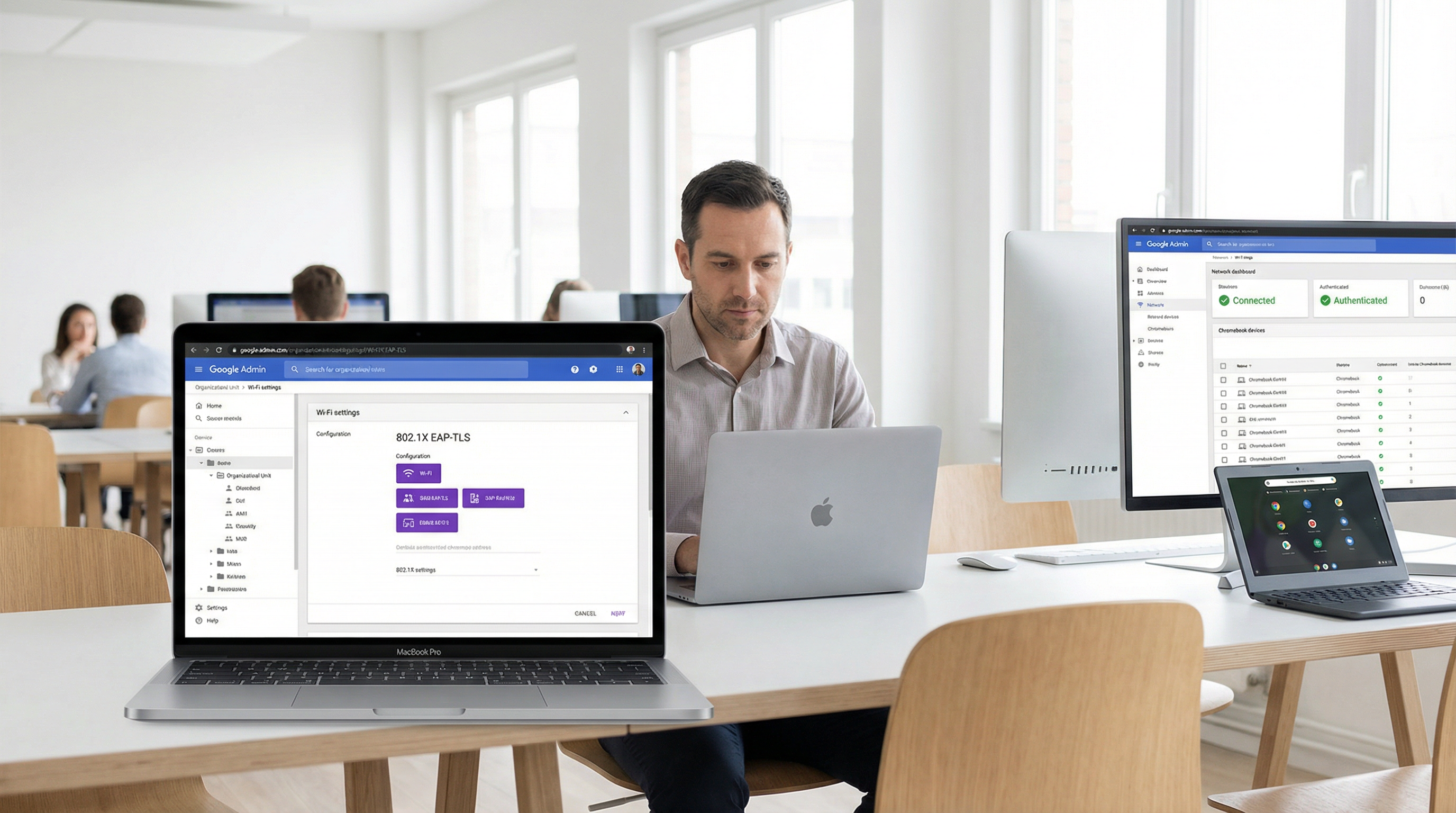
For enterprise venues, education institutions, and hospitality providers standardised on Google Workspace, implementing secure, seamless WiFi authentication has historically presented a challenge compared to Microsoft Active Directory environments. This guide details the architecture and deployment of Google Workspace WiFi authentication, specifically focusing on Chromebook 802.1X certificate deployment and Google Secure LDAP integration for RADIUS backends.
IT managers and network architects must balance security (WPA3-Enterprise, IEEE 802.1X) with user friction. While pre-shared keys (PSKs) are easily compromised and difficult to rotate, certificate-based authentication (EAP-TLS) or credential-based authentication (PEAP-MSCHAPv2) tied directly to a user's Google Workspace identity provides robust access control, granular policy enforcement, and seamless roaming across Guest WiFi and corporate networks.
This technical reference outlines the exact steps to configure Google Admin Console for automated certificate distribution, deploy Google Secure LDAP, and integrate these identity sources with enterprise RADIUS servers. By following these vendor-neutral best practices, organisations can mitigate credential theft, reduce helpdesk tickets, and ensure compliance with GDPR and PCI DSS.
Technical Deep-Dive
The Architecture of Google Workspace WiFi Authentication
Authenticating wireless clients against Google Workspace requires bridging the gap between cloud-native identity (SAML/OAuth) and legacy network protocols (RADIUS/802.1X). Unlike Active Directory, which natively speaks LDAP and integrates seamlessly with Network Policy Server (NPS), Google Workspace requires a deliberate intermediary layer.
There are two primary architectures for achieving this:
Architecture 1 — Google Secure LDAP (Cloud Identity Premium / Google Workspace Enterprise): Google provides a managed LDAP interface to your cloud directory. Your RADIUS server (e.g., FreeRADIUS, Cisco ISE, Aruba ClearPass) connects securely to ldap.google.com using client certificates. When a user attempts to connect to the WiFi, the RADIUS server validates their credentials against Google's LDAP service.
Architecture 2 — SAML-Based Captive Portals / RadSec: For BYOD (Bring Your Own Device) or guest scenarios, users connect to an open or PSK network, which redirects them to a captive portal. The portal authenticates the user via Google SSO (SAML/OAuth). Once authenticated, the system can dynamically provision a unique credential (e.g., a dynamic PSK or a temporary certificate) for subsequent connections.
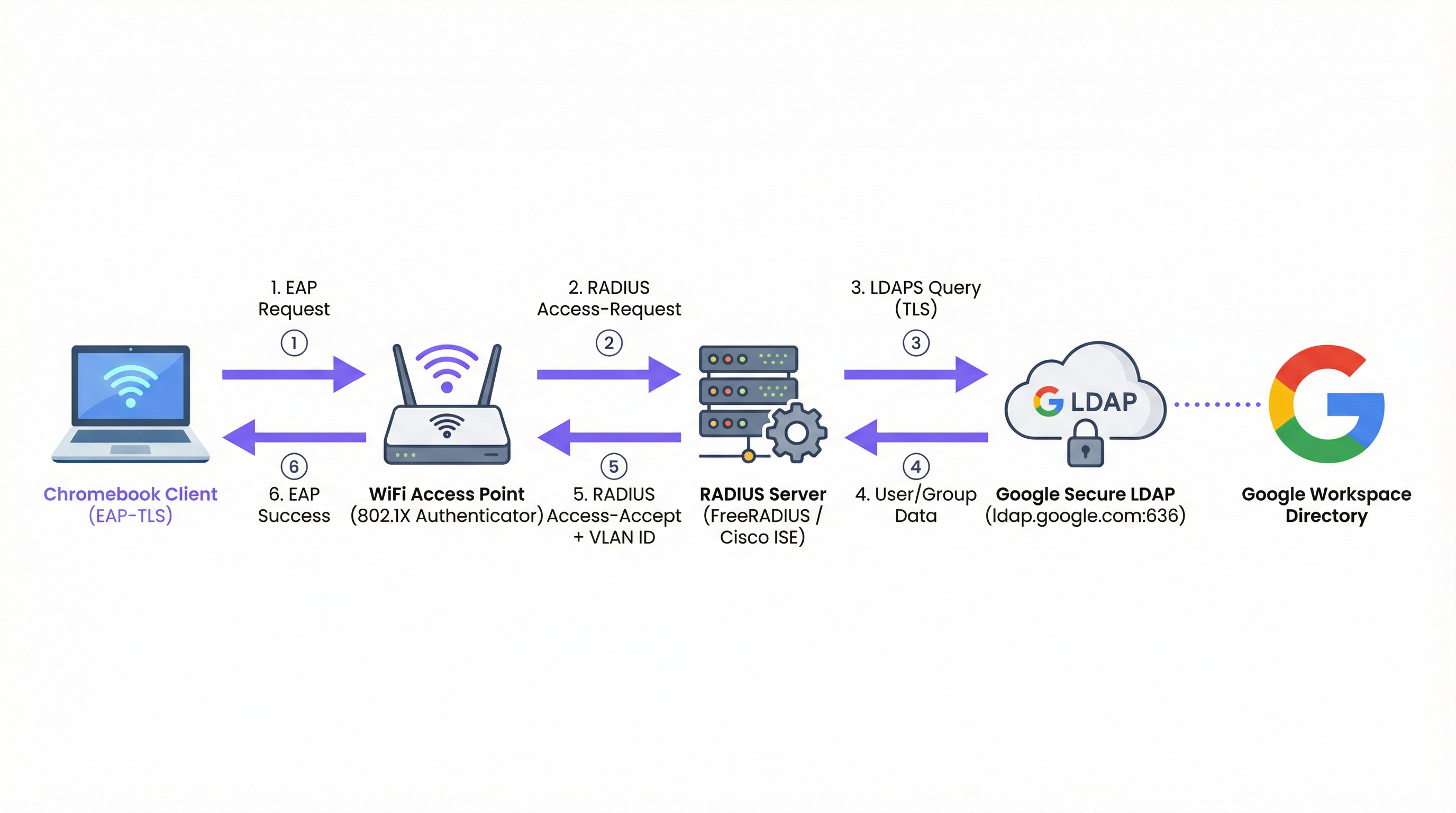
Figure 1: The 802.1X authentication flow for Google Workspace environments, showing the RADIUS server as the intermediary between the access point and Google Secure LDAP.
EAP Types and Chromebook Support
Chromebooks natively support several Extensible Authentication Protocol (EAP) types for 802.1X. The choice of EAP type dictates the security posture and deployment complexity. For a comprehensive overview of 802.1X fundamentals, see 802.1X Authentication: Securing Network Access on Modern Devices.
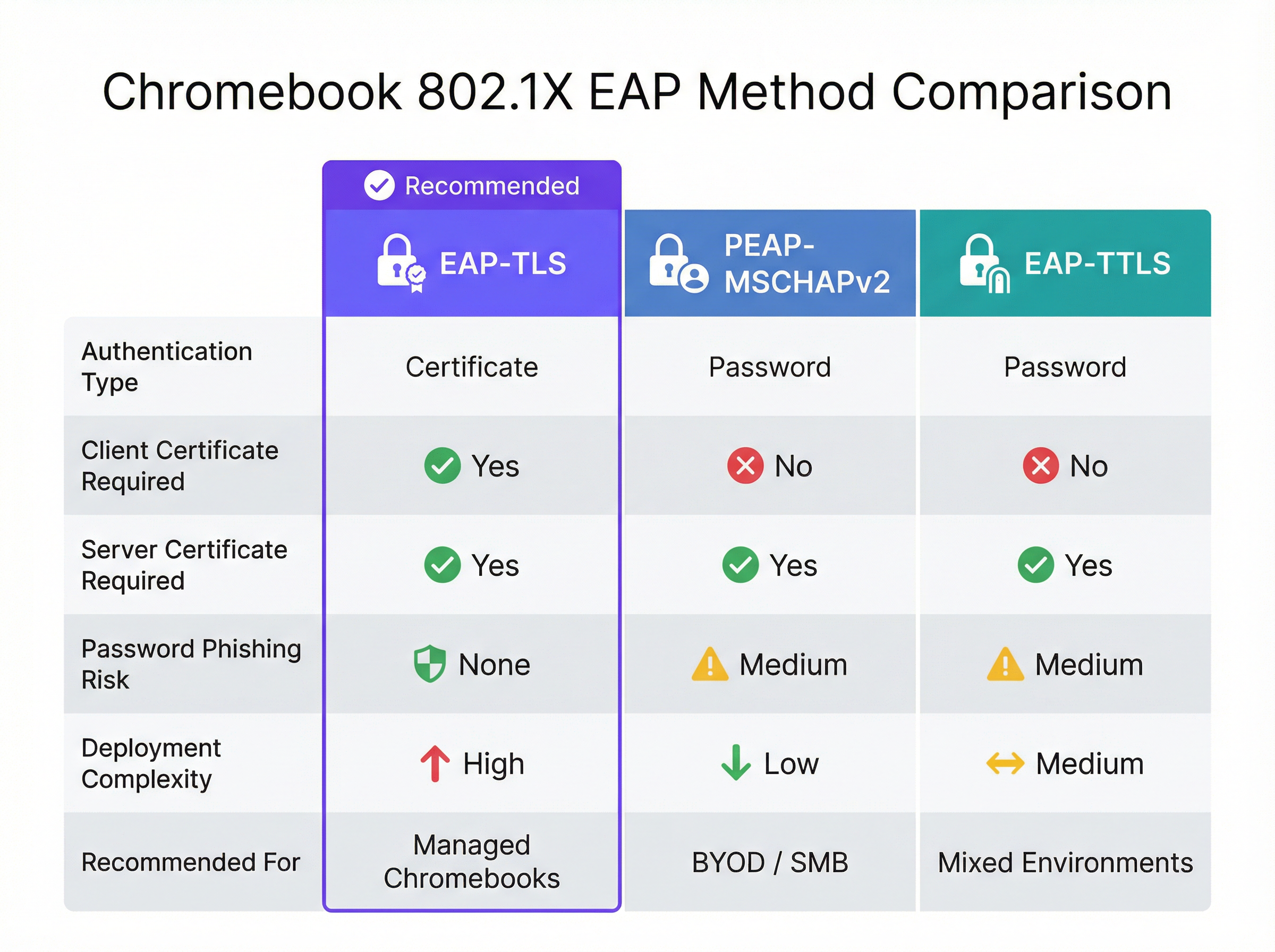
Figure 2: A direct comparison of EAP methods supported by Chromebooks, highlighting the security and complexity trade-offs.
| EAP Method | Authentication Type | Client Cert Required | Phishing Risk | Recommended For |
|---|---|---|---|---|
| EAP-TLS | Certificate | Yes | None | Managed Chromebooks |
| PEAP-MSCHAPv2 | Password | No | Medium | BYOD / SMB deployments |
| EAP-TTLS | Password | No | Medium | Mixed environments |
EAP-TLS (Transport Layer Security): The gold standard for enterprise WiFi. It requires both a server certificate (on the RADIUS server) and a client certificate (on the Chromebook). This eliminates the need for passwords, mitigating phishing risks. Google Admin Console can automatically push client certificates to managed Chromebooks via the Google Cloud Certificate Connector or third-party SCEP/EST integrations.
PEAP-MSCHAPv2 / EAP-TTLS: These protocols use a server certificate to establish a secure tunnel, inside of which the user's username and password are exchanged. While easier to deploy for unmanaged devices, they are vulnerable to credential theft if the client device does not strictly validate the server certificate.
When designing the network, consider how these authentication events correlate with downstream systems like WiFi Analytics platforms, which rely on stable MAC addresses or authenticated usernames to track user journeys and footfall.
Google Workspace vs. Microsoft and Okta: A Comparative Assessment
Organisations evaluating identity platforms for enterprise WiFi authentication should understand the inherent trade-offs. Microsoft Active Directory remains the most seamlessly integrated option, given its native LDAP support and tight NPS integration. Okta provides a robust RADIUS-as-a-Service capability via its RADIUS Agent, eliminating the need for self-managed RADIUS infrastructure. Google Workspace, via Secure LDAP, is a solid option but requires more deliberate architecture — you always need an intermediary RADIUS server, and the Secure LDAP service is only available on higher-tier licences.
| Capability | Google Workspace | Microsoft AD/Entra | Okta |
|---|---|---|---|
| Native RADIUS Support | No (requires RADIUS server) | Via NPS | Via RADIUS Agent |
| LDAP Interface | Google Secure LDAP | Native AD LDAP | LDAP Interface Agent |
| EAP-TLS Support | Yes (via PKI integration) | Yes (native) | Yes |
| Managed Device Cert Push | Google Admin Console | Intune / GPO | MDM integration |
| Licence Requirement | Enterprise / Cloud Identity Premium | Included in AD | Workforce Identity |
Implementation Guide
Deploying 802.1X to Managed Chromebooks
Deploying secure WiFi to managed Chromebooks involves configuring the Google Admin Console to push the necessary network profiles and certificates. This ensures devices connect automatically without user intervention.
Step 1: Configure the RADIUS Server
Deploy a RADIUS server (e.g., FreeRADIUS) capable of EAP-TLS or PEAP. Install a trusted server certificate on the RADIUS server. If using a private CA, ensure the Root CA certificate is exported for deployment to clients. Configure the RADIUS server to query Google Secure LDAP (if using credential-based auth) or validate client certificates against your CA (if using EAP-TLS).
Step 2: Set up Google Secure LDAP (For PEAP/EAP-TTLS)
In the Google Admin Console, navigate to Apps > LDAP. Add a new LDAP client (e.g., "Enterprise RADIUS"). Configure access permissions (read user information, verify passwords). Download the generated client certificate and key. Install these credentials on your RADIUS server and configure it to connect to ldap.google.com:636.
Step 3: Deploy Certificates to Chromebooks (For EAP-TLS)
In the Google Admin Console, navigate to Devices > Networks > Certificates. Upload your Root CA certificate and mark it as a "Trusted Certificate Authority". Configure a mechanism to issue client certificates to devices via the Google Cloud Certificate Connector or a cloud-based PKI provider that supports SCEP/EST integration.
Step 4: Create the WiFi Profile in Google Admin Console
Navigate to Devices > Networks > Wi-Fi. Create a new Wi-Fi network profile. Set the SSID and select WPA/WPA2/WPA3-Enterprise as the Security Type. Select the appropriate EAP type. If using EAP-TLS, select the deployed client certificate. If using PEAP, configure it to use the user's logged-in credentials. Critically, select the trusted Root CA certificate to ensure the Chromebook validates the RADIUS server. Apply the profile to the appropriate Organizational Units (OUs).
Best Practices
Strict Server Certificate Validation: Always enforce server certificate validation on client devices. Failure to do so exposes users to Evil Twin attacks, where an attacker broadcasts the same SSID and captures credentials. This single configuration decision is the difference between a secure deployment and a vulnerable one. For a deeper exploration of 802.1X security architecture, refer to 802.1X Authentication: Securing Network Access on Modern Devices.
Segment Networks by Role: Use RADIUS attributes (e.g., Filter-Id, Tunnel-Private-Group-Id) returned from Google LDAP to dynamically assign users to different VLANs based on their Google Workspace group membership (e.g., Staff vs. Students). This limits lateral movement and improves security posture significantly.
Monitor and Audit: Regularly review RADIUS authentication logs and Google Workspace audit logs. Integrate these logs into a SIEM system to detect anomalous authentication patterns or brute-force attempts. Consider how this data feeds into broader network intelligence platforms.
Plan for BYOD: While managed Chromebooks can use EAP-TLS, unmanaged devices (staff personal phones, guest devices) need a different approach. Implement a secure onboarding portal or use dynamic PSKs for these devices. For public access areas in Hospitality or Retail environments, consider standard Guest WiFi solutions with captive portals that capture consent and ensure GDPR compliance.
Infrastructure Redundancy: Deploy multiple RADIUS servers and configure access points to failover automatically. A single RADIUS server is a critical single point of failure — if it goes down, no managed devices can connect to the network.
Troubleshooting & Risk Mitigation
Common Failure Modes
Certificate Expiry is the most common cause of EAP-TLS failure in production environments. Implement automated monitoring and alerting for certificate validity periods at 90, 30, and 7 days before expiry. This applies to both the RADIUS server certificate and any intermediate CA certificates.
Clock Skew is a frequently overlooked cause of intermittent authentication failures. EAP-TLS relies on accurate timekeeping for certificate validation. Ensure the RADIUS server, the Certificate Authority, and the Chromebooks all synchronise via NTP. A skew of more than a few minutes can cause valid certificates to be rejected.
LDAP Connectivity Issues: If using Google Secure LDAP, ensure the RADIUS server can reach ldap.google.com on TCP port 636 and that the client certificate used for authentication has not expired or been revoked in the Google Admin Console.
Incorrect OU Application: Ensure the WiFi profile and certificates are applied to the correct Organizational Units in the Google Admin Console. A common mistake is applying a device certificate profile to a user OU, meaning the certificate is never pushed to the device.
Risk Mitigation Strategies
A phased rollout is essential. Never deploy a new 802.1X configuration to the entire organisation at once. Start with a small pilot group (e.g., the IT team), then expand to a single department or location before a global rollout. Maintain a hidden, heavily restricted fallback SSID that IT staff can use to troubleshoot devices that fail to authenticate via 802.1X.
For organisations in regulated sectors, ensure that your 802.1X deployment aligns with relevant compliance frameworks. In Healthcare environments, network segmentation via dynamic VLAN assignment directly supports HIPAA requirements for isolating clinical systems. In retail, PCI DSS mandates network separation between cardholder data environments and general corporate networks — a requirement that dynamic VLAN assignment elegantly satisfies.
ROI & Business Impact
Transitioning from PSK-based networks to 802.1X integrated with Google Workspace delivers significant, measurable benefits that justify the implementation investment.
Reduced Helpdesk Overhead: Automated certificate deployment via Google Admin Console eliminates manual WiFi configuration on managed devices. Organisations typically report a 40-60% reduction in WiFi-related helpdesk tickets following an EAP-TLS rollout, as there are no passwords to forget or rotate.
Enhanced Security Posture: EAP-TLS eliminates password-based authentication, neutralising phishing and credential-stuffing attacks. This reduces the risk of data breaches and the associated financial and reputational costs. The average cost of a data breach in 2024 exceeded $4.8 million — a figure that makes the investment in proper authentication architecture straightforward to justify.
Streamlined Offboarding: When an employee leaves, disabling their Google Workspace account immediately revokes their WiFi access. There is no need to rotate a shared PSK across the entire organisation, eliminating the window of vulnerability that exists between an employee's departure and a PSK rotation.
Improved Analytics and Intelligence: By tying network authentication to a unique identity, venues can leverage platforms like Wayfinding and WiFi Analytics to understand space utilisation and user behaviour with greater accuracy. This data can inform infrastructure investments and optimise real estate usage in complex environments like Transport hubs or large conference centres. For organisations exploring how network intelligence supports broader operational goals, the Modern Hospitality WiFi Solutions Your Guests Deserve article provides relevant context.
For organisations considering the broader network architecture context, the Wireless Access Points Definition Your Ultimate 2026 Guide and The Core SD WAN Benefits for Modern Businesses provide complementary guidance on infrastructure decisions that underpin a successful 802.1X deployment.
Key Terms & Definitions
802.1X
An IEEE standard for port-based Network Access Control (PNAC). It provides an authentication mechanism to devices wishing to attach to a LAN or WLAN, requiring each device to authenticate before being granted network access.
The foundational protocol for enterprise WiFi security, replacing shared passwords (PSKs) with individual, identity-based authentication. Supported natively by Chromebooks and all modern WiFi access points.
EAP-TLS (Extensible Authentication Protocol - Transport Layer Security)
An EAP method that uses PKI (Public Key Infrastructure) to authenticate both the client and the server using digital certificates. No passwords are exchanged during authentication.
The gold standard for managed device WiFi authentication. Requires a client certificate on the Chromebook (deployed via Google Admin Console) and a server certificate on the RADIUS server.
Google Secure LDAP
A managed service from Google that exposes a traditional LDAP interface to the Google Workspace cloud directory, allowing legacy systems like RADIUS servers to authenticate users against Google's identity platform.
Essential for organisations that want to use their Google credentials for 802.1X WiFi authentication. Available on Cloud Identity Premium and Google Workspace Enterprise licences.
RADIUS (Remote Authentication Dial-In User Service)
A networking protocol that provides centralised Authentication, Authorization, and Accounting (AAA) management for users connecting to a network service. Access points communicate with a RADIUS server to verify user or device credentials.
The intermediary server that bridges the gap between WiFi access points and identity providers like Google Workspace. Common implementations include FreeRADIUS, Cisco ISE, and Aruba ClearPass.
PEAP-MSCHAPv2 (Protected Extensible Authentication Protocol)
An EAP method that uses a server certificate to create a secure TLS tunnel, inside of which the user's username and password are validated using the MSCHAPv2 protocol.
A common alternative to EAP-TLS for BYOD or SMB environments where deploying client certificates to every device is impractical. Requires strict server certificate validation to prevent credential theft.
Dynamic VLAN Assignment
The process of placing a user or device into a specific Virtual Local Area Network (VLAN) based on their identity or group membership, determined during the 802.1X authentication process via RADIUS attributes.
Allows network administrators to segment traffic (e.g., keeping students and staff on different subnets) using a single SSID, based on Google Workspace group membership returned via Secure LDAP.
SCEP (Simple Certificate Enrollment Protocol)
A protocol designed to automate the issuance and revocation of digital certificates at scale, commonly used in MDM and device management platforms.
Used in conjunction with Google Admin Console to automatically push client certificates to managed Chromebooks for EAP-TLS authentication, without requiring manual certificate installation.
Evil Twin Attack
A fraudulent Wi-Fi access point that appears to be legitimate by broadcasting the same SSID as a trusted network, designed to intercept user credentials or traffic.
The primary threat mitigated by enforcing strict server certificate validation in 802.1X configurations. Without certificate validation, a PEAP user's Google credentials can be captured by a rogue access point.
WPA3-Enterprise
The latest generation of the Wi-Fi Protected Access security protocol for enterprise networks, providing stronger encryption (192-bit minimum in WPA3-Enterprise 192-bit mode) and improved protection against offline dictionary attacks.
The recommended security protocol for all new 802.1X deployments. Fully supported by modern Chromebooks and access points, and configurable via the Google Admin Console WiFi profile.
Case Studies
A 2,000-student university campus needs to deploy secure WiFi to both university-owned Chromebooks (managed via Google Admin) and student BYOD devices (phones, laptops). They use Google Workspace for Education as their sole identity provider and have no on-premise Active Directory.
For the managed Chromebooks, the university should deploy EAP-TLS. They configure a cloud-based PKI integrated with Google Workspace via SCEP. The Google Admin Console pushes the Root CA, the SCEP payload, and the WiFi profile (WPA3-Enterprise, EAP-TLS) to the Chromebook OUs. Devices authenticate silently and securely without any user interaction.
For BYOD devices, they deploy a secure onboarding portal. Students connect to an open 'Onboarding' SSID, authenticate via Google SAML SSO on a captive portal, and are then provisioned with a unique, device-specific certificate (or dynamic PSK) for the main 'Campus-Secure' SSID. This separates managed and unmanaged traffic while leveraging the same Google identity. The RADIUS server uses Google Secure LDAP to validate credentials and assigns students and staff to separate VLANs based on their Google Workspace group membership.
A retail chain with 50 locations uses Google Workspace. They want to provide staff WiFi on corporate-owned devices and separate Guest WiFi for customers. They currently use a single PSK for staff, which hasn't been changed in three years. A former employee is known to have the PSK.
The retail chain should implement Google Secure LDAP immediately. They deploy a central RADIUS server in the cloud, configured to authenticate against Google Secure LDAP. In the Google Admin Console, they create a WiFi profile using PEAP-MSCHAPv2, enforcing strict server certificate validation. The access points at all 50 locations point to this central RADIUS server. Staff connect using their Google Workspace credentials — no new passwords to distribute.
For customers, they deploy a separate captive portal solution on a segregated VLAN, which captures marketing consent and ensures GDPR compliance, completely isolated from the staff network. The former employee's Google account is disabled, immediately revoking their network access without requiring a PSK rotation across 50 sites.
Scenario Analysis
Q1. Your organisation is deploying 802.1X to 500 managed Chromebooks. You want the highest level of security and want to avoid users ever needing to type a password to connect to the WiFi. Which EAP method should you configure in the Google Admin Console, and what additional infrastructure component must you deploy?
💡 Hint:Which method relies entirely on certificates rather than credentials, and what must be deployed on the client device?
Show Recommended Approach
EAP-TLS. It requires a client certificate to be pushed to the Chromebook via the Google Admin Console (using SCEP or the Google Cloud Certificate Connector) and a server certificate on the RADIUS server. This eliminates password-based authentication entirely. The additional infrastructure required is a PKI (Certificate Authority) to issue and manage client certificates.
Q2. You have configured Google Secure LDAP and a FreeRADIUS server. Users can authenticate successfully, but they are all being placed on the same default VLAN regardless of whether they are staff or students. You want staff and students to be on separate VLANs. Where must this configuration be applied, and what data source enables it?
💡 Hint:Which component bridges the identity data from Google to the network equipment, and what protocol attributes carry VLAN information?
Show Recommended Approach
The RADIUS server must be configured to query the user's group membership from Google Secure LDAP and then return the appropriate RADIUS attributes (specifically Tunnel-Private-Group-Id and Tunnel-Type) back to the Access Point. The Access Point uses these attributes to place the client on the correct VLAN. The data source enabling this is the Google Workspace group membership, retrieved via the Secure LDAP query.
Q3. A user reports they cannot connect to the new 802.1X network on their BYOD Android phone. They are prompted for a username and password (PEAP), but the connection fails silently after entering them. The RADIUS logs show no authentication attempt was received. What is the most likely cause, and how do you resolve it?
💡 Hint:Think about what the client device must do before it sends the user's credentials, and what configuration is required on the device.
Show Recommended Approach
The client device is failing to validate the RADIUS server's certificate. In modern Android versions, strict certificate validation is enforced by default. If the user hasn't installed the Root CA certificate on their device, or if the domain name on the server certificate doesn't match what the device expects, the client will terminate the connection before sending credentials. Resolution: the user must install the Root CA certificate on their Android device and configure the WiFi profile to specify the CA and the expected server domain name.
Q4. A retail chain is considering moving from a static PSK to 802.1X using Google Secure LDAP. The CFO asks for the business case. What are the three most compelling financial and operational arguments you would present?
💡 Hint:Consider the costs associated with PSK management, the risk of credential exposure, and the operational overhead of distributed site management.
Show Recommended Approach
- Elimination of PSK rotation costs: With a static PSK, any staff departure requires a key rotation across all sites — a costly, disruptive operation. With identity-based auth, disabling a Google account instantly revokes access at all locations. 2. Reduced breach risk: A compromised PSK grants network access to anyone with the key. Identity-based auth limits exposure to individual accounts, which can be disabled immediately. The average cost of a data breach exceeds $4.8M, making the infrastructure investment straightforward to justify. 3. Reduced helpdesk overhead: Automated credential management via Google Workspace eliminates WiFi-related password reset tickets and manual device configuration, typically reducing WiFi helpdesk volume by 40-60%.
Key Takeaways
- ✓Google Workspace requires an intermediary RADIUS server plus Google Secure LDAP to enable native 802.1X WiFi authentication — there is no direct integration between Google and access points.
- ✓EAP-TLS is the gold standard for managed Chromebooks: it uses certificates instead of passwords, eliminating phishing risk and helpdesk overhead from password resets.
- ✓Google Admin Console automates the deployment of WiFi profiles and client certificates to managed Chromebooks via SCEP or the Google Cloud Certificate Connector.
- ✓For BYOD and guest devices, SAML-based captive portals provide a secure onboarding path tied to Google SSO, avoiding the complexity of manual certificate deployment on unmanaged devices.
- ✓Enforcing strict server certificate validation is the single most critical security configuration when using credential-based EAP methods (PEAP/EAP-TTLS) — without it, Evil Twin attacks can capture user credentials.
- ✓Dynamic VLAN assignment via RADIUS attributes enables granular network segmentation based on Google Workspace group membership, supporting compliance requirements and limiting lateral movement.
- ✓The primary business case for 802.1X over PSK is instant offboarding: disabling a Google Workspace account immediately revokes network access at all locations, eliminating the PSK rotation problem.




