

How to Integrate Guest WiFi Data with Your CRM
This guide provides a comprehensive technical reference for IT managers, network architects, and marketing leaders on integrating guest WiFi analytics with CRM platforms such as Salesforce and HubSpot. It covers the strategic rationale, core architectural patterns (Direct API and Webhooks), available data fields, and step-by-step deployment guidance. Venue operators in hospitality, retail, and events will find actionable frameworks for building a compliant, scalable, first-party data pipeline that drives measurable marketing ROI.
🎧 Listen to this Guide
View Transcript

Executive Summary
Connecting guest WiFi infrastructure to a Customer Relationship Management (CRM) system is no longer a niche tactic — it is a critical component of a modern digital engagement strategy for any physical venue. For IT managers, network architects, and operations directors at hotels, retail chains, stadiums, and large public venues, this integration represents a powerful method to convert anonymous visitor traffic into a rich, first-party data asset.
By capturing and analysing data from guest WiFi users — such as visit frequency, dwell time, and basic demographic details — organisations can unlock significant ROI through enhanced marketing personalisation, improved customer loyalty, and data-driven operational decisions. This guide provides a vendor-neutral technical blueprint for achieving a successful integration. It outlines the core architectural patterns, from direct API connections to webhook-based event streaming, and details the data fields typically available for synchronisation. We explore best practices for ensuring data quality, maintaining compliance with GDPR and PCI DSS, and mitigating common security risks. The objective is to equip technical leaders with the actionable knowledge required to design, deploy, and manage a robust, scalable, and secure guest WiFi CRM integration that delivers measurable business impact.
Listen to our 10-minute audio briefing on guest WiFi CRM integration — a senior consultant's perspective on strategy, architecture, and implementation.
Technical Deep-Dive
Integrating guest WiFi data with a CRM involves several key technical components and architectural decisions. At its core, the process is about capturing user authentication and session data from the WiFi network's access controller or captive portal and pushing it to the CRM in a structured, validated format. The primary mechanisms for this are direct API integrations, webhooks, and intermediate data connectors.
Architectural Patterns
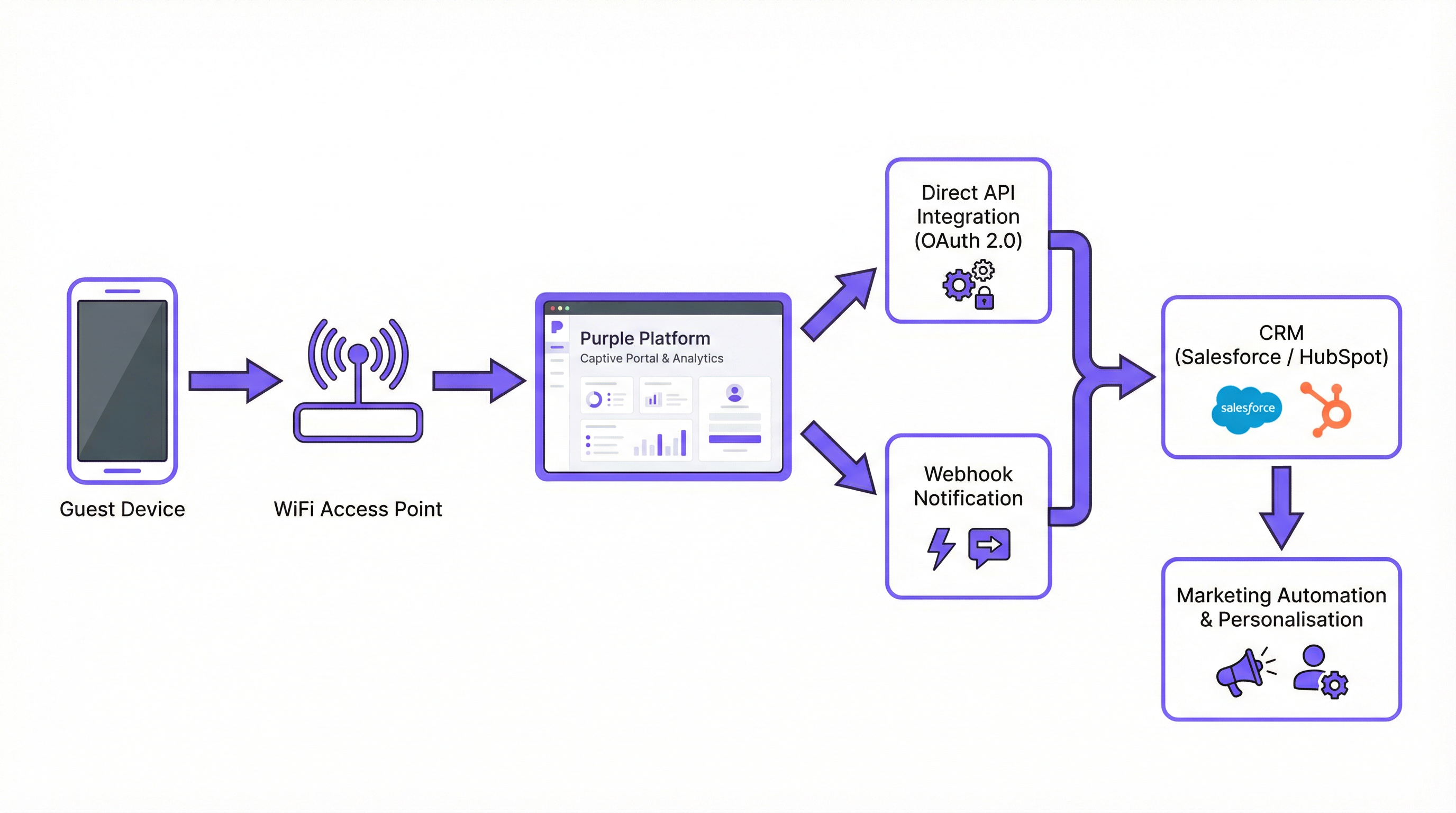
Direct API Integration is the most common and recommended method for modern enterprise deployments. The WiFi platform — such as Purple — makes authenticated API calls directly to the CRM's REST API. This is a server-to-server connection. When a user authenticates on the guest WiFi, the WiFi controller collects the data and sends it to the CRM in real-time. This pattern is ideal for deployments where data freshness is critical, such as triggering an immediate welcome email or updating a loyalty programme balance.
Webhooks offer a lightweight, event-driven alternative. In this model, the WiFi platform sends a real-time HTTP POST notification to a pre-configured URL — an endpoint in the CRM or an intermediary service — the moment a specific event occurs. A guest_connected event, for example, could trigger a webhook that creates or updates a contact in the CRM. This is highly efficient and well-suited for systems built around an event-driven architecture.
Middleware Connectors such as Zapier, MuleSoft, or a custom-built integration layer are appropriate for complex scenarios where direct integration is unavailable or where significant data transformation is required before the data reaches the CRM. This approach adds operational complexity but offers maximum flexibility.
| Pattern | Latency | Complexity | Best For |
|---|---|---|---|
| Direct API | Real-time | Low–Medium | Most modern CRMs (Salesforce, HubSpot) |
| Webhooks | Real-time | Low | Event-driven architectures |
| Middleware | Near real-time | High | Custom CRMs, complex transformations |
Data Fields and Payloads
The data available from guest WiFi authentication is considerably richer than a simple email address. A typical JSON payload sent to a CRM upon a new guest connection includes the following categories:
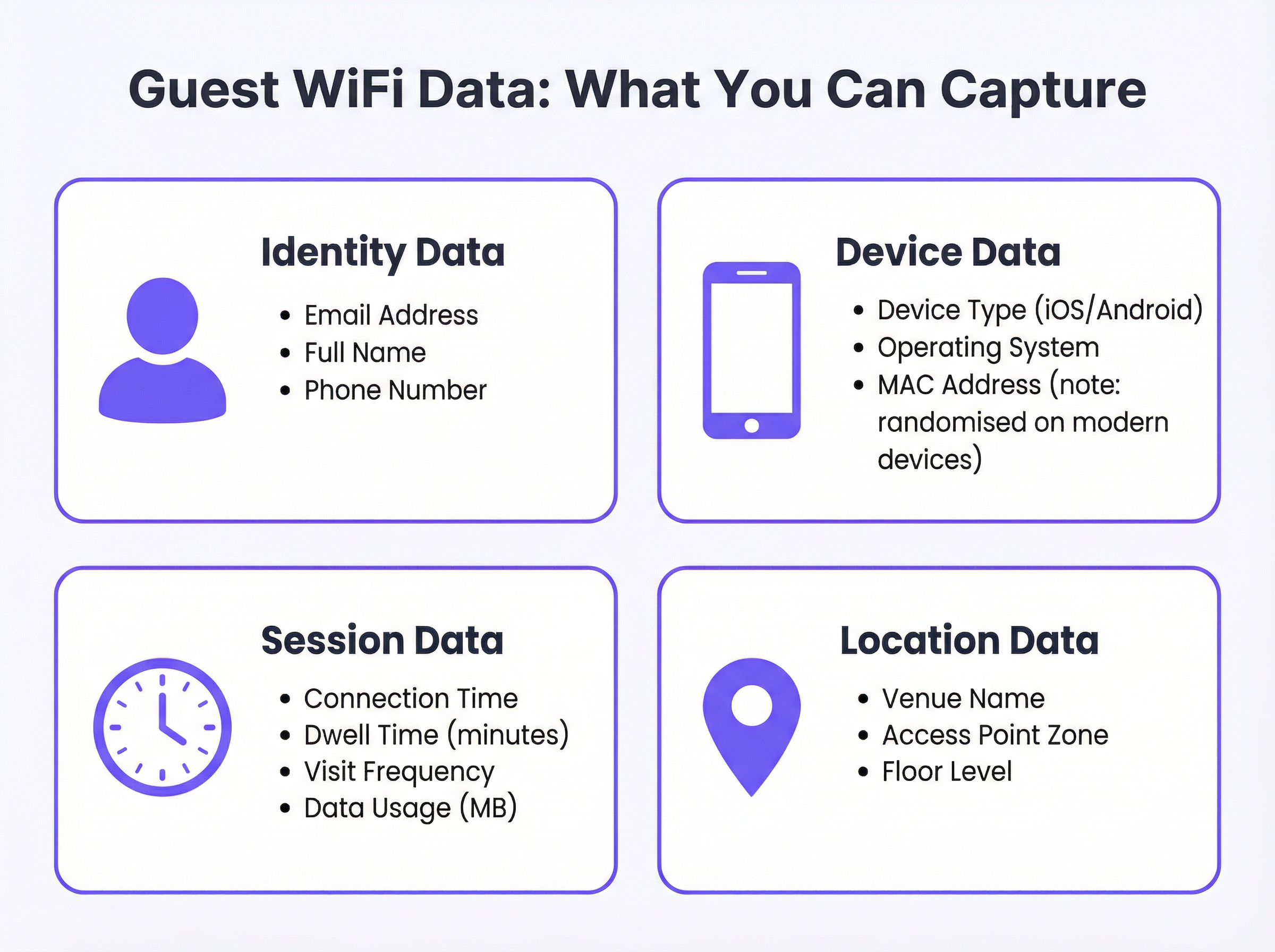
A representative API payload might be structured as follows:
{
  "email": "guest@example.com",
  "full_name": "Jane Smith",
  "phone": "+44 7700 900000",
  "device_type": "iPhone",
  "os": "iOS 17",
  "connect_time": "2025-03-15T14:32:00Z",
  "dwell_time_minutes": 47,
  "visit_count": 3,
  "venue_name": "The Grand Hotel - Manchester",
  "access_point_zone": "Lobby",
  "marketing_consent": true
}
Note the marketing_consent boolean field. This is a mandatory field in any GDPR-compliant deployment and must be explicitly set based on the user's action on the captive portal.
Authentication and Security Architecture
Security is non-negotiable. All data transmission must occur over HTTPS using TLS 1.2 or higher. Authentication with the CRM API must use OAuth 2.0, which provides secure, delegated access without exposing credentials. API keys and OAuth tokens must be stored in a dedicated secrets management system — never hardcoded in configuration files or environment variables on shared servers.
On the network side, adherence to IEEE 802.1X for port-based network access control and WPA3 for WiFi encryption ensures that user data is protected at the point of connection. For venues that process payment card data, the network segmentation required by PCI DSS must be maintained, ensuring that the guest WiFi network is isolated from any cardholder data environment.
Implementation Guide
Step 1: Discovery and Requirements Alignment
Before any technical configuration begins, convene a cross-departmental working group comprising IT, Marketing, and Legal/Compliance. Marketing must define the specific data fields required and the intended use cases. IT must assess the capabilities of the existing WiFi infrastructure and the target CRM. Legal must review the proposed captive portal copy and consent mechanism to ensure GDPR compliance. Document the outcomes of this meeting as a formal requirements specification.
Step 2: Select Your Integration Pattern
Based on the CRM's API capabilities and your infrastructure, select the appropriate architectural pattern. For Salesforce, use the REST API with OAuth 2.0 and the Connected App framework. For HubSpot, use the native Purple connector, which leverages HubSpot's Contacts API. For other platforms, assess whether a native connector exists; if not, evaluate middleware options.
Step 3: Configure the WiFi Platform
In the Purple portal, navigate to Connectors & Integrations. Select your target CRM. You will be prompted to:
- Authenticate: Click 'Connect' to initiate the OAuth 2.0 flow. You will be redirected to your CRM's authorisation page to grant Purple permission to create and update contacts.
- Configure Data Mapping: Define which Purple data fields map to which CRM fields. Pay particular attention to custom fields. For example,
dwell_time_minutesmay need to map to a custom field you have created in your CRM, such asLast_Visit_Duration__cin Salesforce. - Set Trigger Conditions: Define which events trigger a data sync. Typically, this is
on_login(when a user first authenticates) and optionallyon_return_visit(for subsequent visits by a known user).
Step 4: Test and Validate
Using a test device, connect to the guest WiFi network and complete the captive portal login. Navigate to your CRM and confirm that a new contact has been created with the correct field values. Test the following edge cases: a returning user (should update, not duplicate), a user who declines marketing consent (should be created but not added to marketing lists), and a connection event during a simulated API rate limit scenario.
Step 5: Deploy and Monitor
Enable the integration for production venues. Establish monitoring dashboards that track integration health metrics: API call success rate, error rate, average sync latency, and the number of new contacts created per day. Set up alerting for error rates exceeding a defined threshold (e.g., more than 1% of sync attempts failing). Review data quality in the CRM on a weekly basis for the first month post-deployment.
Best Practices
Data Minimisation and Consent. Collect only the data that is strictly necessary for your defined use cases. Your captive portal must present a clear, plain-language privacy notice and an explicit, unticked checkbox for marketing consent. Pre-ticked boxes are not compliant with GDPR. The consent record — including the timestamp and the exact wording of the consent statement — should be stored alongside the contact record in your CRM.
Data Quality and Hygiene. Implement server-side validation before data is written to the CRM. At a minimum, validate that email addresses conform to RFC 5322 format. Implement a de-duplication strategy to prevent the creation of multiple contact records for the same individual. A common approach is to use the email address as the primary unique identifier and configure the CRM integration to perform an 'upsert' (update if exists, create if not) rather than a simple create.
Scalability Planning. Design for peak traffic from day one. A stadium hosting a sold-out event may see tens of thousands of simultaneous connections. Implement batching for API calls — most CRM APIs support bulk operations that allow you to create or update multiple contacts in a single request, significantly reducing the number of API calls required. Consider an asynchronous processing queue (such as AWS SQS or RabbitMQ) to buffer events during traffic spikes.
Compliance and Auditability. Maintain a comprehensive data map that documents every system in which guest WiFi data is stored. This is essential for responding to GDPR data subject access requests and right-to-erasure requests within the statutory 30-day window. Automate the deletion workflow across all systems — CRM, WiFi platform, email marketing tools — to ensure complete and auditable erasure.
Troubleshooting and Risk Mitigation
API Rate Limiting. The most common technical failure mode. CRMs enforce strict API call limits — Salesforce, for example, enforces limits based on your licence tier. Exceeding these limits results in HTTP 429 errors and data loss. Mitigation: Implement batching and exponential back-off retry logic. Monitor your API usage against your allocated limits in real-time.
Incorrect Data Mapping. A misconfigured field mapping can cause data to be written to the wrong CRM field or for the sync to fail silently. Mitigation: Use a schema-validation layer that checks the outgoing payload against the CRM's field definitions before transmission. Implement comprehensive logging of all API requests and responses.
Stale or Conflicting Data. If a customer updates their details in the CRM directly (e.g., a new phone number), a subsequent WiFi login may overwrite this with outdated data. Mitigation: Define a clear 'source of truth' for each data field. For identity data like email and name, the CRM is typically the master. For behavioural data like dwell time and visit frequency, the WiFi platform is the master. Configure your integration to only update fields where the WiFi platform is the authoritative source.
GDPR Erasure Failures. A right-to-erasure request that is not fully executed across all systems creates significant legal risk. Mitigation: Implement an automated, end-to-end erasure workflow triggered from a central privacy management portal. The workflow must make deletion API calls to every system in the data map and log the confirmation of each deletion.
ROI and Business Impact
The primary justification for this integration investment is the generation of a positive, measurable return. Organisations that have successfully deployed a guest WiFi CRM integration typically report outcomes across several dimensions.
Increased Customer Lifetime Value (CLV). By using WiFi data to identify loyal, frequent visitors and send them personalised offers, venues can increase the frequency and value of repeat visits. A hotel chain that identifies a guest who has stayed three times in six months can proactively offer them a loyalty rate, converting a transient guest into a loyal customer.
Improved Marketing Attribution. For retail operators, the ability to correlate a guest's WiFi connection with their prior exposure to a digital advertising campaign provides concrete evidence of online-to-offline conversion — one of the most valuable and elusive metrics in modern marketing. This data directly informs advertising budget allocation decisions.
Operational Efficiency. Dwell time and footfall data, derived from WiFi session analytics, can be used to optimise staffing levels, store layouts, and service delivery. A venue that identifies a consistent peak in dwell time between 12:00 and 14:00 can ensure adequate staffing during that window.
Data Asset Value. A well-maintained, consent-based CRM database populated with first-party WiFi data is a long-term strategic asset. As third-party cookies are deprecated and digital advertising becomes more expensive, first-party data becomes increasingly valuable as the foundation for all marketing activity.
Key Terms & Definitions
Captive Portal
The web page that a user is redirected to and must interact with before being granted access to a public or guest WiFi network. It is the primary point of data capture, consent collection, and brand presentation.
IT teams configure the captive portal to enforce network access policies and present authentication options. Marketing teams design its user experience to maximise data capture rates while maintaining brand consistency. Legal teams review its copy to ensure the privacy notice and consent mechanism are compliant with GDPR.
Guest WiFi CRM Integration
The technical process of connecting a venue's guest WiFi platform to a Customer Relationship Management system, enabling the automated transfer of visitor authentication and session data to build and enrich customer profiles.
This is the central topic of this guide. It is the mechanism by which anonymous venue visitors are converted into known, actionable contacts in the organisation's marketing and sales systems.
API (Application Programming Interface)
A defined set of protocols and data formats that allows different software systems to communicate with each other programmatically. In this context, it refers to the CRM's REST API, which the WiFi platform uses to create and update contact records.
The CRM's API is the technical gateway for your guest WiFi data. Understanding the API's capabilities — particularly its rate limits, supported operations, and authentication requirements — is essential for designing a reliable integration.
Webhook
An automated, event-driven HTTP POST notification sent from one application to another when a specific event occurs. Unlike polling (where one system repeatedly asks another for updates), webhooks push data in real-time only when there is something to report.
Webhooks are an efficient alternative to direct API polling for real-time event notification. A 'guest_connected' webhook, for example, allows the WiFi platform to instantly notify the CRM or a middleware system the moment a new visitor authenticates, without the CRM needing to continuously query the WiFi platform.
OAuth 2.0
An industry-standard authorisation protocol that allows a user or application to grant a third-party service limited, scoped access to resources on another service, without exposing the primary credentials (username and password).
When connecting your WiFi platform to your CRM, OAuth 2.0 is the mandatory authentication mechanism. It ensures that the WiFi platform can create and update contacts in the CRM without ever having access to your CRM administrator's password. Always use OAuth 2.0; never use basic authentication for production integrations.
GDPR (General Data Protection Regulation)
A regulation in EU law (effective May 2018) governing the collection, processing, storage, and transfer of personal data for all individuals within the European Union and the European Economic Area. It applies to any organisation that processes the data of EU residents, regardless of where the organisation is based.
GDPR is the primary legal framework governing guest WiFi data collection in the UK and EU. Key requirements include lawful basis for processing (typically consent for marketing), data minimisation, the right of access, and the right to erasure. Non-compliance can result in fines of up to €20 million or 4% of global annual turnover, whichever is higher.
Dwell Time
The duration for which a specific device, and by extension a visitor, remains connected to the WiFi network within a venue. Measured in minutes or hours.
Dwell time is one of the most operationally valuable metrics derived from guest WiFi data. In retail, it correlates with customer engagement and purchase likelihood. In hospitality, it can indicate satisfaction levels. In transport hubs, it supports passenger flow analysis and resource optimisation.
MAC Address Randomisation
A privacy feature implemented in modern mobile operating systems (iOS 14+ and Android 10+) that causes the device to present a different, randomly generated MAC address to each WiFi network it connects to, rather than its permanent hardware MAC address.
This feature significantly limits the ability to use MAC addresses as a persistent identifier for tracking individual users across sessions. IT teams and data architects must account for this when designing analytics pipelines. The correct response is to rely on authenticated identifiers — specifically, the email address provided during captive portal login — rather than device-level identifiers.
Upsert
A database and API operation that combines 'update' and 'insert'. It updates an existing record if one is found matching a specified key (e.g., email address), or creates a new record if no match is found.
Configuring your CRM integration to use upsert operations rather than simple inserts is a critical data quality practice. It prevents the creation of duplicate contact records for returning visitors, which is one of the most common and damaging issues in WiFi-to-CRM integrations.
Case Studies
A 250-room luxury hotel wants to increase direct bookings and build a loyalty programme. The majority of their guests book through online travel agencies (OTAs), meaning the hotel has no direct relationship with them. How can they use guest WiFi to populate their new Salesforce CRM and begin building that direct relationship?
1. Infrastructure and Portal Design. The hotel deploys Purple across the property. The captive portal is designed to reflect the hotel's premium brand identity. It offers two login options: a quick-access option requiring only an email address and acceptance of the terms of service, and a 'Loyalty Club' sign-up option that offers premium, higher-speed internet in exchange for additional details — name, birthday, and marketing consent. This tiered approach creates a tangible incentive for guests to share more data.
2. Salesforce Integration. In the Purple dashboard, the Salesforce connector is configured using OAuth 2.0. A custom 'Guest WiFi' record type is created in Salesforce, linked to the standard Contact object. Data mapping is configured as follows: email maps to Email, full_name maps to Name, connect_time maps to First_WiFi_Connect_Date__c, and dwell_time_minutes is aggregated to a Total_Stay_Duration__c field.
3. Marketing Automation. A Salesforce Flow is triggered upon the creation of a new Guest record with marketing_consent = true. The flow sends a branded 'Welcome to our Loyalty Club' email within 15 minutes of check-in, containing a special offer for their next direct booking — bypassing the OTA commission entirely.
4. Measurement. The hotel tracks new CRM contacts generated per month, the open rate and conversion rate of the welcome email, and the revenue attributable to direct bookings made by guests who were first acquired via the WiFi loyalty programme.
A large retail chain with 100 stores wants to measure the effectiveness of their digital advertising campaigns in driving in-store visits. They are using HubSpot for marketing automation. How can they leverage guest WiFi data to build an online-to-offline attribution model?
1. Goal Definition. The primary objective is to determine whether customers who were exposed to a digital ad campaign subsequently visited a physical store. This requires correlating an online event (ad click or impression) with an offline event (in-store WiFi connection).
2. HubSpot Integration. The chain activates Purple's native HubSpot connector. Authentication is completed via OAuth 2.0. The integration is configured to create or update a HubSpot Contact upon each guest WiFi login, with the venue_name mapped to a custom contact property called Last_Visited_Store.
3. Attribution Workflow. In HubSpot, a workflow is configured as follows: when a contact connects to in-store WiFi (trigger: Last_Visited_Store property is set), the workflow checks whether the contact's email address exists in the active list of users who clicked on the current Facebook or Google ad campaign. If a match is found, the contact is enrolled in a 'Confirmed In-Store Visitor — Ad Attributed' list. This list is then used to calculate the campaign's true cost-per-store-visit.
4. Post-Visit Engagement. A second workflow sends a post-visit survey 24 hours after the WiFi connection, asking about the in-store experience and offering a discount code for the next visit. This closes the loop between the digital campaign and in-store behaviour.
5. Reporting. The marketing team builds a HubSpot report comparing the in-store visit rate for contacts who were exposed to the ad campaign versus those who were not. This provides a clear, data-driven view of the campaign's incremental impact.
Scenario Analysis
Q1. Your organisation is a fast-food chain with 500 small locations. You want to build a simple, opt-in email marketing list of customers. Your CRM is a custom-built system with a basic REST API that supports a single endpoint for creating new contacts. Which integration pattern would you recommend, and what is the most critical technical risk to mitigate at this scale?
💡 Hint:Consider both the simplicity of the CRM's API and the aggregate volume of connections across 500 locations during peak hours.
Show Recommended Approach
A direct API integration is the most suitable pattern. The custom CRM has a REST API for creating contacts, which is exactly what the Purple platform's direct API connector requires. Middleware would add unnecessary cost and complexity for a straightforward contact creation task.
However, the most critical risk at this scale is API rate limiting. With 500 locations, even a modest average of 20 new opt-in connections per hour per location generates 10,000 API calls per hour. Most APIs cannot sustain this volume of individual calls. The mitigation is to implement batching — configuring the integration to accumulate connections over a short window (e.g., 60 seconds) and then submit them as a single bulk API request. This reduces the call volume by orders of magnitude and is the single most important architectural decision for a deployment of this scale.
Q2. You are the IT Director for a large conference centre. You are hosting a major technology conference with 8,000 attendees over two days. You need to provide guest WiFi and also want to share attendee connection data with three event sponsors in near real-time. What are the key scalability and compliance challenges you must address before the event?
💡 Hint:Consider both the burst traffic pattern of a conference registration period and the legal requirements for sharing personal data with third-party sponsors.
Show Recommended Approach
Scalability: The primary challenge is the burst traffic pattern. At a conference, the majority of attendees will attempt to connect within the first 30–60 minutes of the event opening. This creates a massive, simultaneous spike — potentially thousands of authentication events in minutes. A synchronous, direct API integration will almost certainly hit rate limits and cause data loss during this window.
The correct architecture is asynchronous: implement a message queue (e.g., AWS SQS) between the Purple platform and the downstream systems. Authentication events are written to the queue immediately, and a consumer process reads from the queue and makes API calls at a controlled, sustainable rate. This decouples the ingestion rate from the processing rate and ensures no data is lost during the spike.
Compliance: Sharing personal data with sponsors is a significant GDPR risk. You cannot share attendee data with sponsors simply because they have agreed to it commercially. You must have explicit, granular consent from each attendee. The captive portal must present a separate, clearly labelled, unticked checkbox for each sponsor (e.g., 'I consent to my data being shared with [Sponsor Name] for marketing purposes'). You cannot bundle this into the general terms of service. You must also have a Data Processing Agreement (DPA) in place with each sponsor before any data is shared, clearly defining their obligations as a data processor or controller.
Q3. A hotel guest who previously consented to marketing and logged into your guest WiFi three months ago now submits a formal 'right to erasure' request under GDPR Article 17. Describe the complete technical process you must execute to fulfil this request within the 30-day statutory deadline.
💡 Hint:The erasure must be comprehensive and auditable. Consider every system in which this individual's data may reside as a result of the WiFi integration.
Show Recommended Approach
The process must be systematic, automated where possible, and fully auditable.
1. Intake and Verification. The request is received via the designated privacy channel. The individual's identity is verified against the email address used for the WiFi login.
2. Data Discovery. Using the centralised data map, identify every system in which this individual's data resides as a result of the WiFi integration. This will typically include: the Purple platform (authentication history, profile data), the CRM (contact record, interaction history), the email marketing platform (contact record, campaign history), and any analytics or data warehouse systems.
3. Automated Deletion Workflow. Trigger an automated workflow that makes deletion API calls to each identified system in sequence: a) Purple platform: delete the user's authentication history and profile via the Purple API. b) CRM (e.g., Salesforce): delete the Contact record via the REST API. c) Email marketing platform (e.g., Mailchimp): delete the subscriber record via the API. d) Analytics/data warehouse: execute a DELETE statement targeting the user's email address across all relevant tables.
4. Confirmation and Audit Log. Each system must return a confirmation of deletion. These confirmations are logged in the privacy management system with timestamps, creating an auditable record that the erasure was completed. A confirmation email is sent to the individual.
5. Deadline Management. The entire process must be completed within 30 calendar days of the request. Automated workflows with SLA monitoring should alert the Data Protection Officer if any step fails or is approaching the deadline.
Key Takeaways
- ✓A guest WiFi CRM integration converts anonymous venue visitors into first-party CRM contacts, enabling personalised marketing, loyalty programme development, and online-to-offline advertising attribution.
- ✓The two primary integration patterns are Direct API Integration (real-time, server-to-server, ideal for Salesforce and HubSpot) and Webhooks (event-driven, lightweight, ideal for event-based architectures).
- ✓Available data fields span four categories: Identity (email, name, phone), Device (type, OS), Session (dwell time, visit frequency, data usage), and Location (venue, access point zone, floor level).
- ✓GDPR compliance is non-negotiable: your captive portal must present explicit, unticked marketing consent checkboxes, and you must have an automated, auditable process for handling right-to-erasure requests across all integrated systems.
- ✓Design for peak traffic from the outset: implement API call batching and asynchronous message queuing to prevent data loss during high-traffic events such as conferences or stadium events.
- ✓Use 'upsert' operations (not simple inserts) in your CRM integration to prevent duplicate contact records for returning visitors — the most common data quality failure in WiFi-to-CRM deployments.
- ✓Measure ROI through downstream commercial metrics: direct booking conversion rates, cost-per-store-visit from ad campaigns, and customer lifetime value growth among WiFi-acquired contacts.




