

IPSK Explained: Identity Pre-Shared Keys for WiFi Access
This guide provides IT managers, network architects, and venue operations directors with a definitive technical reference on Identity Pre-Shared Keys (IPSK) for WiFi access — explaining the architecture, comparing it against standard PSK and 802.1X Enterprise, and delivering actionable deployment guidance for hospitality, retail, events, and public-sector environments. It addresses the critical operational challenge of providing secure, individually-managed WiFi access across mixed-device fleets — including IoT and headless devices — without the infrastructure overhead of a full 802.1X deployment. Purple's platform is positioned as the orchestration layer that automates IPSK key lifecycle management at scale.
🎧 Listen to this Guide
View Transcript

Executive Summary
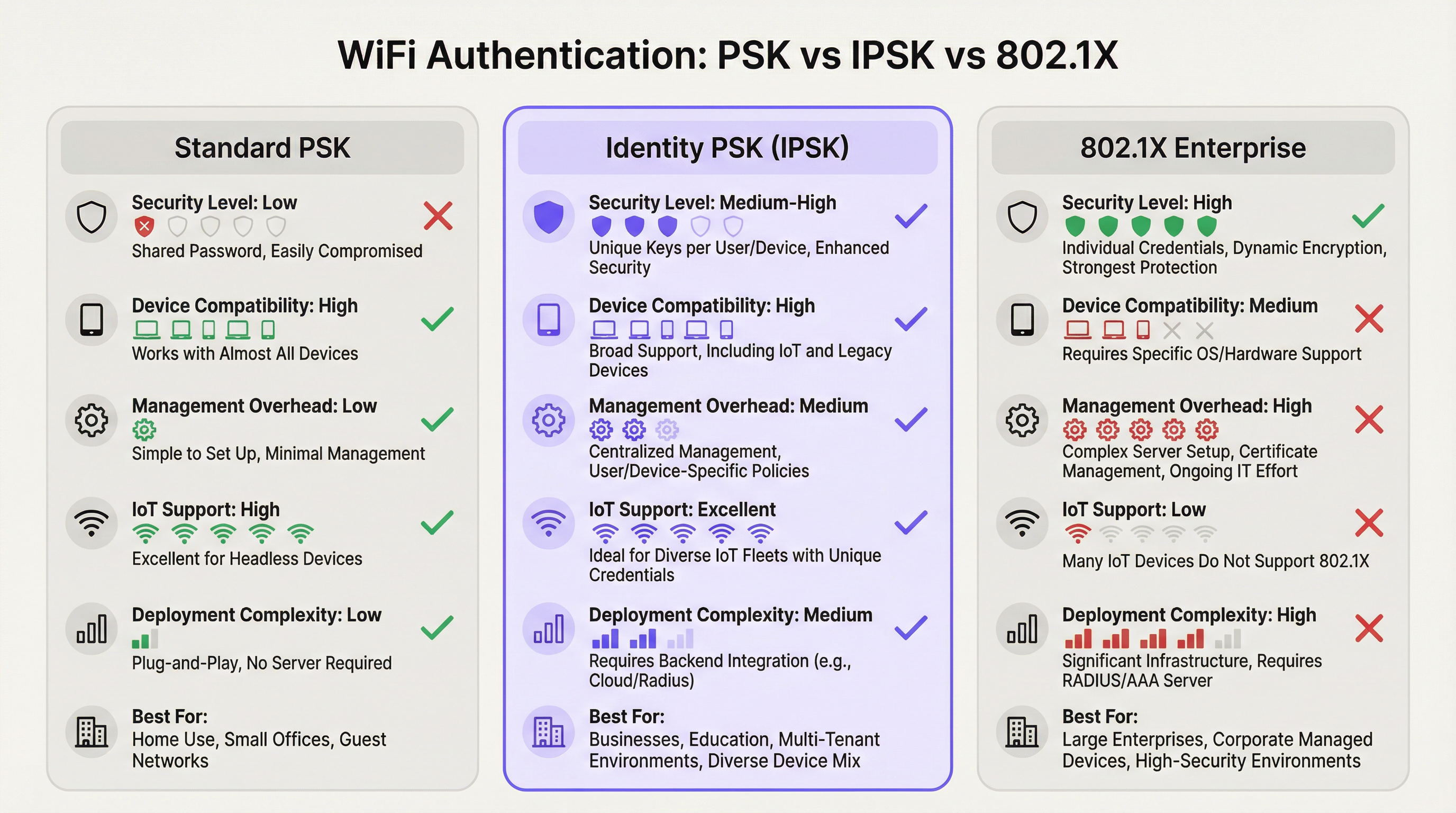
Identity Pre-Shared Key (IPSK) WiFi authentication resolves the long-standing tension between network security and operational simplicity in multi-user, mixed-device environments. Where standard WPA2-Personal (shared PSK) offers ease of use but zero individual accountability, and WPA2/WPA3-Enterprise (802.1X) delivers granular control but excludes a significant proportion of modern devices, IPSK occupies the pragmatic middle ground: every user or device receives a unique cryptographic key, all connecting to the same SSID, with per-connection policy enforcement delivered via RADIUS.
For venue operators — hotels, retail chains, conference centres, and public-sector buildings — IPSK is increasingly the default architecture for both guest and staff WiFi. It eliminates the operational burden of shared-password management, supports the full spectrum of consumer and IoT devices, and provides the auditability required for PCI DSS and GDPR compliance frameworks. When combined with an automated lifecycle management platform such as Purple, IPSK scales from a 50-room boutique hotel to a 10,000-seat stadium without proportional increases in IT overhead.
The decision to deploy IPSK should be driven by three criteria: a mixed-device fleet that includes headless or IoT endpoints; a requirement for individual access revocation without network-wide disruption; and a user base that expects a frictionless, home-like connection experience. If all three apply, IPSK is the correct architecture.
Technical Deep-Dive
The Authentication Architecture
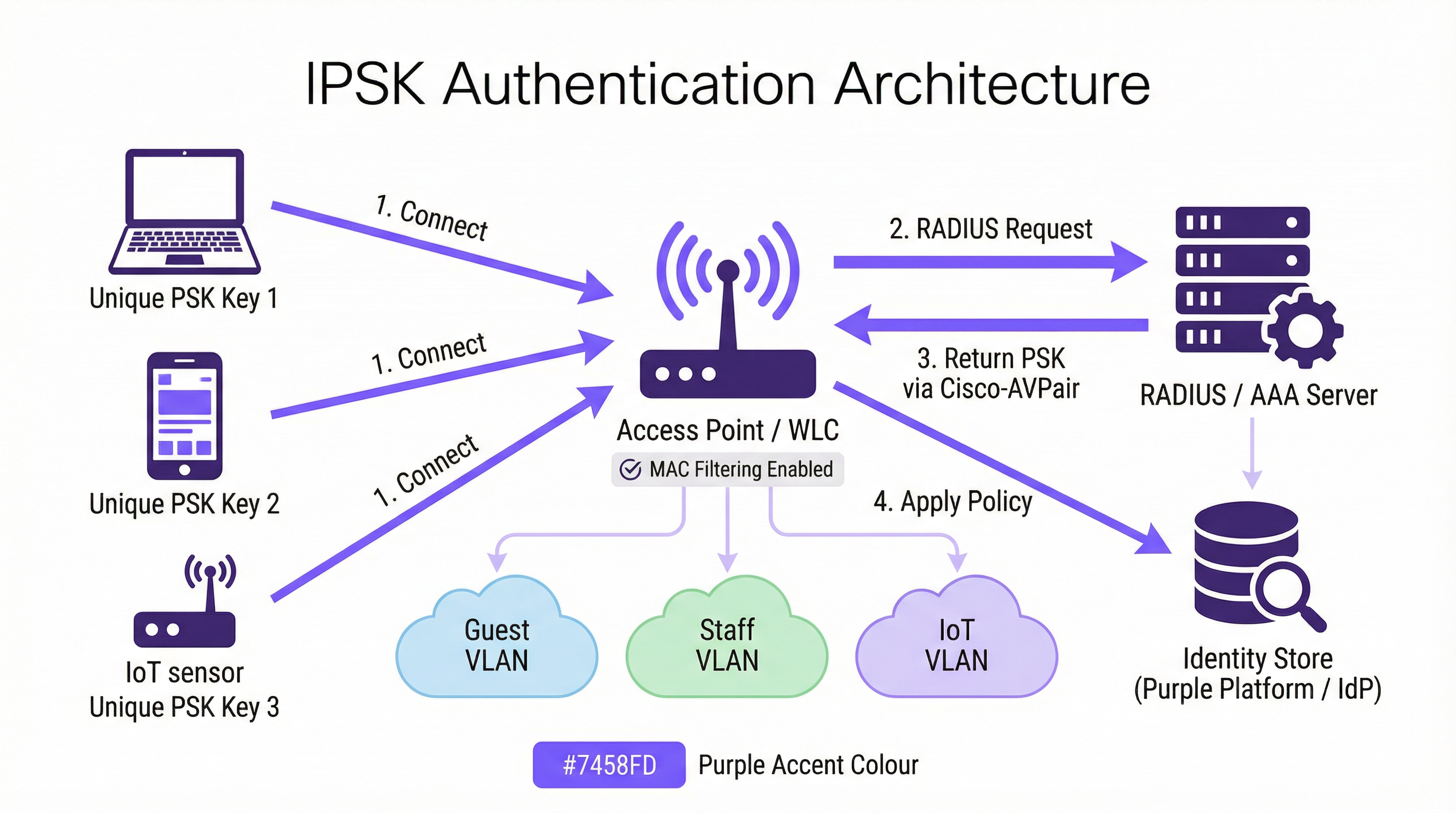
IPSK operates within the WPA2-Personal security framework but augments it with a RADIUS-backed identity layer. The authentication flow proceeds as follows. When a client device initiates an association with an IPSK-enabled SSID, the Wireless LAN Controller (WLC) — or access point in controller-less deployments — captures the device's MAC address and forwards it to a configured RADIUS server as part of a MAC Authentication Bypass (MAB) or standard 802.1X request. The RADIUS server queries its identity store, locates the record associated with that MAC address, and returns an Access-Accept response containing a Cisco Attribute-Value Pair (AVP) — specifically cisco-av-pair = psk-mode=ascii and cisco-av-pair = psk=<unique_passphrase>. The WLC extracts this per-device passphrase and uses it to validate the four-way WPA2 handshake the client presented. If the passphrase matches, the association is completed and the device is placed on its assigned VLAN with its assigned bandwidth and access policies.
This architecture means the client device never needs to know it is using IPSK rather than standard PSK. The user experience is identical: enter a passphrase, connect. The intelligence is entirely server-side.
Vendor Implementations
The three dominant enterprise wireless vendors each implement identity-based PSK under different product names, though the functional architecture is consistent:
| Vendor | Product Name | RADIUS Attribute Format |
|---|---|---|
| Cisco | iPSK (Identity PSK) | cisco-av-pair = psk=<passphrase> |
| Aruba / HPE | MPSK (Multi-PSK) | Aruba-MPSK-Passphrase |
| Ruckus / CommScope | DPSK (Dynamic PSK) | Proprietary DPSK engine or RADIUS |
| Meraki | IPSK with RADIUS | Standard Cisco AVP format |
All four implementations support VLAN assignment and QoS policy delivery via RADIUS attributes, enabling per-device network segmentation from a single SSID.
Private Area Networks and Layer 2 Isolation
A defining capability of IPSK in multi-tenant deployments is the Private Area Network (PAN). Because each device's traffic is encrypted with a unique key, Layer 2 isolation between users is inherent to the architecture. A guest in Room 412 cannot see or interact with the devices of a guest in Room 413, even though both are connected to the same Hotel-Guest SSID. This is a fundamental security improvement over shared-PSK networks, where all devices share the same broadcast domain and a determined attacker can intercept unencrypted traffic.
Combined with mDNS reflection — a feature available on most enterprise-grade controllers — IPSK enables device discovery within a user's own private segment. A guest can cast media to their own Chromecast or print to their portable printer without exposing those devices to the broader network. This is the "home-away-from-home" connectivity model that hospitality operators increasingly use as a differentiator.
WPA3 Compatibility
WPA3-SAE (Simultaneous Authentication of Equals) replaces the WPA2 four-way handshake with a Dragonfly key exchange, which changes how per-device keys are validated. Most modern controllers support IPSK in WPA2/WPA3 transition mode, providing backwards compatibility for legacy devices whilst allowing WPA3-capable clients to benefit from the stronger handshake. A pure WPA3-only SSID with IPSK requires controller firmware support that is now available on Cisco Catalyst 9800, Aruba CX, and Ruckus One platforms as of 2025.
IEEE Standards Context
IPSK operates within the IEEE 802.11 wireless LAN standard and leverages the IEEE 802.1X authentication framework for its RADIUS communication, even though the client-side authentication mechanism is PSK rather than EAP. The RADIUS protocol itself is defined in RFC 2865 and RFC 2868. The Cisco AVP format used to deliver per-device passphrases is a vendor extension to the standard RADIUS attribute set, which is why IPSK is not a formally standardised IEEE specification — it is a vendor-implemented capability built on top of standardised protocols.
Implementation Guide
Phase 1: Infrastructure Assessment
Before configuring a single access point, conduct a thorough infrastructure assessment covering four areas. First, confirm your wireless controller supports IPSK — check firmware version requirements for your specific platform. Second, evaluate your RADIUS infrastructure: do you have an existing RADIUS server (Cisco ISE, Microsoft NPS, FreeRADIUS), or will you use a cloud-based RADIUS service? Third, identify your identity provider (IdP) — Microsoft Entra ID, Okta, Google Workspace — and confirm API connectivity for automated key provisioning. Fourth, audit your device fleet to identify any legacy devices that may have MAC randomisation issues or non-standard WPA2 handshake behaviour.
Phase 2: RADIUS Configuration
Configure your RADIUS server with the following elements. Create an identity store — a database of MAC addresses mapped to unique passphrases and VLAN assignments. For a hotel deployment, this store is populated dynamically via PMS integration; for a retail deployment, via HR system or MDM integration. Create authorisation profiles that return the appropriate Cisco AVP attributes (psk-mode and psk-password) along with VLAN assignment attributes (Tunnel-Type = VLAN, Tunnel-Medium-Type = 802, Tunnel-Private-Group-ID = <VLAN_ID>). Configure policy rules that match incoming MAC address requests to the correct authorisation profile.
Phase 3: WLC/Controller Configuration
On the wireless controller, create the IPSK SSID with WPA2-PSK security and MAC filtering enabled. Configure the RADIUS server as the authentication server for this SSID and enable AAA Override to allow RADIUS-returned VLAN assignments to override the SSID's default VLAN. Set a default PSK on the SSID — this acts as a fallback for devices not found in the RADIUS identity store, and should be a strong, randomly generated passphrase that is not distributed to users. Enable Protected Management Frames (PMF) for improved security posture.
Phase 4: Key Lifecycle Automation
Manual key management does not scale. For any deployment beyond a handful of devices, automate the full key lifecycle using an orchestration platform. Purple's platform integrates with your IdP and PMS to provision keys at onboarding and revoke them at offboarding, with no manual IT intervention required. The provisioning workflow should include: key generation (cryptographically random, minimum 12 characters), key distribution (via email, SMS, or printed collateral), and key registration in the RADIUS identity store. The offboarding workflow should include: immediate key revocation in the RADIUS store, confirmation that the device has been disassociated, and audit log entry for compliance purposes.
Phase 5: MAC Randomisation Mitigation
Configure your SSID to include a network policy that requests clients to use their permanent MAC address. On iOS, this is achieved by disabling "Private Wi-Fi Address" for the specific network in the device's WiFi settings — a step that can be communicated to users during onboarding. For managed devices enrolled in MDM, push a WiFi configuration profile that sets DisableAssociationMACRandomization = true. For unmanaged devices, include MAC randomisation guidance in your user onboarding communications.
Best Practices
Enforce key uniqueness and minimum entropy. Every IPSK passphrase should be cryptographically random and a minimum of 12 characters, combining upper and lower case letters, numerals, and symbols. Avoid dictionary words, sequential patterns, or any derivation from user-identifiable information. Purple's key generation engine produces passphrases that meet NIST SP 800-63B entropy requirements by default.
Segment by function, not just by user. Use IPSK's VLAN assignment capability to enforce network segmentation by device function. IoT devices — thermostats, sensors, smart locks — should be on a dedicated IoT VLAN with restricted internet access and no lateral movement to other VLANs. Guest devices should be on a guest VLAN with internet access only. Staff devices should be on a staff VLAN with access to internal resources appropriate to their role. This segmentation is a PCI DSS requirement for any network carrying payment card data.
Implement RADIUS server redundancy. Configure a minimum of two RADIUS servers — primary and secondary — with automatic failover on the WLC. Test failover behaviour quarterly. Consider a cloud-hosted RADIUS service for deployments where on-premises server redundancy is not operationally viable.
Audit key usage regularly. RADIUS accounting logs provide a complete record of which MAC addresses authenticated, when, and from which access point. Review these logs monthly for anomalies — devices authenticating at unusual hours, devices appearing on multiple VLANs, or authentication failures that may indicate a brute-force attempt. Purple's analytics dashboard surfaces these patterns automatically.
Align key rotation with user lifecycle events. Keys should be rotated at natural lifecycle boundaries: at the end of a guest stay, at the termination of an employment contract, at the conclusion of an event. Do not implement time-based key rotation on a fixed schedule (e.g., every 90 days) without an automated rotation mechanism — manual rotation at scale is error-prone and creates security gaps.
Document your IPSK architecture for compliance purposes. PCI DSS Requirement 1.3 requires documentation of all network connections and segmentation controls. Maintain a current network diagram that shows IPSK SSID configuration, VLAN assignments, RADIUS server topology, and the identity store integration points. This documentation is required for PCI DSS assessments and is good practice for GDPR Article 30 Records of Processing Activities.
Troubleshooting & Risk Mitigation
Authentication Failures
The most common cause of IPSK authentication failure is a MAC address mismatch between the device presenting to the WLC and the MAC address registered in the RADIUS identity store. This is almost always caused by MAC address randomisation. Verify the device's MAC address using the WLC's client association logs and compare it against the RADIUS identity store. If the device is presenting a randomised MAC, guide the user through disabling private address for the network, or implement a pre-registration portal that captures the device's permanent MAC address before the first connection attempt.
The second most common failure is an incorrect or missing Cisco AVP in the RADIUS authorisation profile. Verify the AVP format matches your controller's expected syntax — cisco-av-pair = psk-mode=ascii followed by cisco-av-pair = psk=<passphrase> — and that AAA Override is enabled on the SSID.
RADIUS Server Unavailability
If the RADIUS server is unreachable, the WLC will fall back to the default PSK configured on the SSID. This default PSK should be treated as an emergency access mechanism only and should not be distributed to users. Monitor RADIUS server availability with your standard infrastructure monitoring tooling and configure alerting for RADIUS timeout events on the WLC.
IoT Device Compatibility
Some legacy IoT devices implement non-standard WPA2 handshake behaviour that can cause intermittent authentication failures with IPSK. If a specific device type is consistently failing, test it in isolation on a standard PSK SSID to confirm the device's basic WPA2 capability. If the device cannot support WPA2-PSK at all, it should be connected via a wired port or a dedicated legacy SSID with appropriate network isolation.
Key Compromise
If a device is lost, stolen, or suspected of compromise, revoke its IPSK key immediately in the RADIUS identity store. The WLC will disassociate the device on its next re-authentication attempt (typically within minutes). Generate a new key for the user's replacement device and provision it through the standard onboarding workflow. Document the incident in your security incident log for compliance purposes.
ROI & Business Impact
Quantifiable Outcomes
The business case for IPSK over shared PSK is compelling across three dimensions. The first is operational cost reduction. In a 200-room hotel operating on a shared PSK model, the reception team fields an average of 15-20 WiFi-related support requests per day — password resets, device connection issues, Captive Portal timeouts. IPSK with automated onboarding reduces this to near zero, freeing reception staff for revenue-generating activities. At a conservative estimate of 10 minutes per support interaction and a staff cost of £15 per hour, a 200-room hotel saves approximately £750-£1,000 per month in direct labour costs.
The second dimension is security incident cost avoidance. A shared PSK network breach — where a malicious actor gains access to the shared password — can expose all devices on the network to traffic interception and lateral movement attacks. The average cost of a data breach in the hospitality sector, per IBM's Cost of a Data Breach Report, exceeds £3.5 million when regulatory fines, remediation costs, and reputational damage are included. IPSK's per-device isolation means a compromised key exposes only one device, not the entire network.
The third dimension is guest satisfaction and revenue impact. In the hospitality sector, WiFi quality is consistently cited as a top-three factor in online reviews. Properties that move from Captive Portal-based WiFi to IPSK report measurable improvements in WiFi-related review scores, with corresponding improvements in overall property ratings. A one-point improvement in a hotel's TripAdvisor score correlates with an average 11% increase in revenue per available room (RevPAR), according to Cornell University's hospitality research.
Total Cost of Ownership
The TCO comparison between IPSK and 802.1X Enterprise favours IPSK significantly for venue environments. A full 802.1X deployment requires a PKI infrastructure, certificate management tooling, and ongoing certificate renewal processes — typically adding £15,000-£40,000 in initial deployment costs and £5,000-£15,000 in annual maintenance for a medium-sized venue. IPSK requires a RADIUS server (often already present in the infrastructure) and an orchestration platform such as Purple. For organisations without an existing RADIUS server, cloud-hosted RADIUS services are available from £200-£500 per month, making IPSK accessible even for smaller venue operators.

This guide is published by Purple, the enterprise WiFi intelligence platform. For a technical architecture review and IPSK deployment assessment, contact Purple's solutions team at purple.ai.
Key Terms & Definitions
IPSK (Identity Pre-Shared Key)
A WiFi authentication mechanism that assigns a unique WPA2 passphrase to each individual user or device, while all devices connect to the same SSID. The unique key is delivered to the Wireless LAN Controller by a RADIUS server at the time of authentication, enabling per-device policy enforcement without requiring 802.1X certificate infrastructure.
IT teams encounter IPSK when evaluating authentication options for mixed-device environments — hotels, retail, events — where 802.1X is too complex and shared PSK is too insecure. It is the recommended architecture for guest and staff WiFi in multi-tenant venue environments.
RADIUS (Remote Authentication Dial-In User Service)
A networking protocol (RFC 2865) that provides centralised Authentication, Authorisation, and Accounting (AAA) management for users connecting to a network. In IPSK deployments, the RADIUS server is the intelligence layer that maps device MAC addresses to unique passphrases and network policies.
IT teams interact with RADIUS when configuring the authentication backend for IPSK. Common RADIUS server implementations include Cisco ISE, Microsoft NPS, FreeRADIUS, and cloud-hosted services. RADIUS availability is critical to IPSK operation — if the RADIUS server is unreachable, new device authentications will fail.
MAC Authentication Bypass (MAB)
An authentication mechanism that uses a device's MAC address as its identity credential, rather than requiring the device to present a username/password or certificate. IPSK leverages MAB to identify devices at the point of RADIUS lookup, enabling headless devices with no user interface to authenticate based solely on their hardware address.
IT teams use MAB in IPSK deployments to support IoT devices, smart TVs, gaming consoles, and other headless endpoints that cannot present user credentials. MAB is the mechanism that makes IPSK compatible with 100% of WiFi-capable devices.
Cisco Attribute-Value Pair (AVP)
A vendor-specific RADIUS attribute format used by Cisco (and compatible) wireless controllers to exchange configuration parameters between the RADIUS server and the WLC. In IPSK deployments, the AVPs `cisco-av-pair = psk-mode=ascii` and `cisco-av-pair = psk=<passphrase>` deliver the per-device unique passphrase from the RADIUS server to the WLC.
IT teams need to understand AVP syntax when configuring RADIUS authorisation profiles for IPSK. Incorrect AVP formatting is the most common cause of IPSK authentication failures during initial deployment.
Private Area Network (PAN)
A virtual network segment created around a specific user's devices within a shared WiFi infrastructure. In IPSK deployments, each user's unique key creates cryptographic isolation from other users on the same SSID, while mDNS reflection allows the user's own devices to discover each other within their private segment.
IT teams deploy PAN capability in hospitality and multi-tenant residential environments to provide guests or residents with a home-like device ecosystem — casting, printing, gaming — without exposing their devices to other users on the shared infrastructure.
WPA2-SAE / WPA3 (Simultaneous Authentication of Equals)
The authentication handshake mechanism introduced in WPA3 that replaces the WPA2 four-way handshake with a Dragonfly key exchange, providing stronger resistance to offline dictionary attacks. WPA3-SAE changes how per-device keys are validated in IPSK deployments and requires specific controller firmware support.
IT teams evaluating WPA3 migration need to confirm their controller's IPSK support in WPA3 or transition mode. As of 2025, Cisco Catalyst 9800, Aruba CX, and Ruckus One platforms support IPSK in WPA2/WPA3 transition mode, enabling gradual migration without breaking legacy device compatibility.
AAA Override
A WLC configuration setting that allows RADIUS-returned attributes — including VLAN assignment, QoS policy, and ACLs — to override the SSID's default configuration on a per-client basis. AAA Override must be enabled on the SSID for IPSK's per-device VLAN assignment to function correctly.
IT teams must enable AAA Override when configuring IPSK SSIDs. Without it, all devices connecting to the SSID will be placed on the SSID's default VLAN regardless of what the RADIUS server returns, negating the segmentation benefits of IPSK.
MAC Address Randomisation
A privacy feature in modern operating systems (iOS 14+, Android 10+, Windows 11) that causes devices to present a randomly generated MAC address when scanning for or connecting to WiFi networks, rather than their permanent hardware MAC address. This feature is designed to prevent device tracking across networks but creates a conflict with IPSK's MAC-based identity lookup.
IT teams must address MAC randomisation in every IPSK deployment plan. The mitigation strategy depends on the device management model: MDM configuration profiles for managed devices, and user-facing guidance (disable Private Wi-Fi Address for the specific network) for unmanaged personal devices.
Key Lifecycle Management
The operational process of provisioning, distributing, rotating, and revoking cryptographic keys throughout their useful life. In IPSK deployments, key lifecycle management encompasses the automated generation of unique passphrases at user onboarding, their delivery to users, their registration in the RADIUS identity store, and their immediate revocation when the user's access should be terminated.
IT teams and venue operations directors must treat key lifecycle management as a core operational process, not an afterthought. Unrevoked keys — belonging to former guests, ex-employees, or decommissioned devices — represent an ongoing security risk. Automation via a platform such as Purple is the only viable approach at scale.
Case Studies
A 350-room full-service hotel is running a shared WPA2-PSK network across all guest floors, the lobby, restaurant, and conference facilities. The network password is printed on key card folders and changed quarterly. Guests regularly complain that their Chromecasts and smart speakers cannot connect, and the front desk fields 20+ WiFi support calls per day. The IT manager needs to modernise the WiFi architecture without replacing the existing Cisco Catalyst 9800 controller infrastructure. What is the recommended approach?
The recommended architecture is IPSK with Purple platform orchestration integrated with the hotel's Property Management System (PMS). The deployment proceeds in five stages.
Stage 1 — Infrastructure preparation: Confirm Cisco Catalyst 9800 firmware is at 17.3 or later (required for full iPSK support). Deploy or configure a RADIUS server — Cisco ISE or a cloud-hosted RADIUS service — with the hotel's PMS as the upstream identity source. Configure the RADIUS authorisation profile to return cisco-av-pair = psk-mode=ascii and cisco-av-pair = psk=<unique_key> along with VLAN assignment attributes for Guest VLAN (internet-only) and Conference VLAN (with access to AV systems).
Stage 2 — SSID configuration: Create a single Hotel-Guest SSID with WPA2-PSK security, MAC filtering enabled, and AAA Override enabled. Set a strong default PSK (not distributed to users) as the fallback. Enable mDNS reflection to support Chromecast and AirPlay within each guest's private segment.
Stage 3 — PMS integration: Configure Purple's platform to receive check-in events from the PMS via API. On check-in, Purple generates a unique 16-character alphanumeric passphrase, registers it in the RADIUS identity store against the guest's registered device MAC addresses, and triggers delivery via the hotel's chosen channel — email, SMS, or printed on the key card folder. On check-out, Purple automatically revokes the key.
Stage 4 — MAC randomisation handling: Include a one-step instruction in the guest WiFi welcome communication: 'To connect your smart TV or streaming device, please disable Private Wi-Fi Address for the Hotel-Guest network in your device settings.' For guests connecting smartphones, the randomised MAC issue is resolved by the device presenting its permanent MAC after the first manual connection.
Stage 5 — Staff WiFi: Create a separate Hotel-Staff SSID using the same IPSK architecture, with keys provisioned via integration with the hotel's HR system. Staff keys are tied to employee records and automatically revoked on termination.
Expected outcomes: WiFi support calls reduced by 85% within 30 days of deployment. Guest Chromecast and smart device connectivity issues eliminated. Network security posture improved — no shared password to leak or rotate. PCI DSS compliance for the conference centre's payment processing network maintained through VLAN segmentation.
A national retail chain with 85 stores is running a mixed network environment: each store has WPA2-PSK WiFi for staff handhelds and tablets, a separate open guest WiFi network, and wired POS terminals. The IT security team has flagged that the shared staff WiFi password is the same across all 85 stores and has not been changed in 18 months. A recent PCI DSS assessment identified the staff WiFi as a compliance risk due to lack of individual authentication. The CTO wants a solution that improves security posture, maintains PCI DSS compliance, and can be deployed across all 85 stores within a single quarter without requiring store-level IT resources.
The recommended architecture is a centralised IPSK deployment managed through Purple's platform, with keys provisioned via integration with the retailer's existing Microsoft Entra ID (Azure AD) directory.
Architecture design: Deploy a single Staff-WiFi SSID across all 85 stores using IPSK. Each store's access points connect to a centralised cloud-managed WLC (Cisco Meraki or Aruba Central) or to store-level controllers managed from a central NOC. A cloud-hosted RADIUS service — configured with Microsoft Entra ID as the identity source — handles authentication for all stores from a single management plane.
Key provisioning: Purple's platform monitors Entra ID group membership. When a staff member is added to the RetailStaff-WiFi security group, Purple automatically generates a unique IPSK passphrase, registers it in the RADIUS identity store, and delivers it to the staff member via their corporate email. When a staff member leaves or is removed from the group — triggered by the HR offboarding workflow — Purple immediately revokes the key across all stores simultaneously.
PCI DSS compliance: The IPSK architecture, combined with VLAN segmentation (staff devices on VLAN 20, POS terminals on VLAN 30 with no wireless access, guest WiFi on VLAN 40), provides the network segmentation required by PCI DSS Requirement 1.3. Each staff member's unique key provides the individual authentication audit trail required by PCI DSS Requirement 8.2. Document the architecture in the network segmentation diagram for the QSA.
Deployment at scale: The centralised management architecture means store-level deployment requires only access point firmware updates and SSID reconfiguration — tasks that can be pushed remotely via the cloud management platform. No store-level IT resources are required. Target deployment timeline: 85 stores in 8 weeks, with a phased rollout of 10-12 stores per week.
Expected outcomes: Shared password eliminated across all 85 stores. Individual staff authentication audit trail established for PCI DSS compliance. Key revocation time reduced from days (manual password change across 85 stores) to seconds (automated RADIUS revocation). Estimated reduction in IT helpdesk tickets related to WiFi access: 60%.
Scenario Analysis
Q1. A 500-bed student accommodation provider is evaluating WiFi authentication options for their new development. The student population brings an average of 7 devices each — smartphones, laptops, gaming consoles, smart speakers, and tablets. The operator wants individual access control (so that access can be revoked if a student's tenancy ends early), seamless device connectivity (including gaming consoles and Chromecasts), and a management overhead that can be handled by a two-person IT team. Which authentication architecture should they deploy, and what are the key configuration requirements?
💡 Hint:Consider the device fleet composition — specifically the proportion of headless devices — and the operational capacity of the IT team when evaluating 802.1X versus IPSK.
Show Recommended Approach
IPSK is the correct architecture for this deployment. The presence of gaming consoles and smart speakers in the device fleet immediately eliminates 802.1X as a viable option — these headless devices cannot support certificate-based authentication. Standard PSK is eliminated by the individual access control requirement. IPSK satisfies all three criteria: it supports 100% of the device fleet, enables individual key revocation when a tenancy ends, and — with automated lifecycle management via Purple integrated with the accommodation's tenancy management system — can be operated by a two-person IT team. Key configuration requirements: single SSID with IPSK, RADIUS server with tenancy system integration, mDNS reflection enabled for Private Area Networks (allowing students to use their own Chromecasts and printers within their private segment), MAC randomisation guidance included in the student onboarding pack, and automated key revocation triggered by tenancy end date in the management system.
Q2. An IT security manager at a conference centre is preparing for a major three-day industry event with 2,000 registered attendees. The event requires: secure WiFi for attendees (with access revoked after the event ends), a separate secure network for exhibitors with access to the venue's AV systems, and a dedicated network for the event management team with access to internal booking systems. The venue's existing infrastructure is Aruba-based. What IPSK architecture would you recommend, and how would you handle key provisioning at scale?
💡 Hint:Focus on the key provisioning workflow for 2,000 attendees — how keys are generated, distributed, and revoked — and how VLAN segmentation achieves the three-network requirement from a single physical infrastructure.
Show Recommended Approach
Deploy three logical network segments from a single physical infrastructure using Aruba MPSK (Aruba's implementation of IPSK). Create one SSID — Event-WiFi — with MPSK enabled. The RADIUS authorisation profiles return different VLAN assignments based on the user's registration category: attendees on VLAN 10 (internet-only), exhibitors on VLAN 20 (internet plus AV systems), event management on VLAN 30 (internet plus internal booking systems). For key provisioning at scale: integrate Purple's platform with the event registration system. At registration, each attendee receives a unique MPSK passphrase via email confirmation, along with a QR code for easy device configuration. Exhibitors receive their keys via the exhibitor portal at least 48 hours before the event. Event management keys are provisioned via the venue's HR/staff system. At event end, Purple triggers bulk revocation of all attendee and exhibitor keys simultaneously. The event management keys remain active until manually revoked. This architecture eliminates the need for a captive portal (which would be impractical for 2,000 attendees), provides individual audit trails for all connections, and achieves the three-network segmentation requirement without creating three separate SSIDs.
Q3. A regional NHS trust is deploying WiFi across a new outpatient facility. The network must support: clinical staff with managed Windows laptops (enrolled in Intune MDM); nurses and allied health professionals with personal smartphones (BYOD); medical IoT devices including infusion pumps, patient monitors, and fall detection sensors; and a patient guest WiFi network. The trust's information governance team has flagged that all clinical data must remain on an isolated network segment, and that the IoT medical devices must be on a dedicated segment with no internet access. What authentication architecture would you recommend for each user/device category?
💡 Hint:This scenario requires a hybrid architecture — not all user categories are best served by the same authentication mechanism. Consider which categories warrant 802.1X and which are better served by IPSK.
Show Recommended Approach
This scenario requires a hybrid authentication architecture. Clinical staff on managed Windows laptops should use WPA3-Enterprise with 802.1X (EAP-TLS with certificates deployed via Intune MDM) — these are fully managed endpoints where the certificate infrastructure is already in place and the stronger security posture is warranted for clinical data access. BYOD smartphones for nursing and AHP staff should use IPSK — these are unmanaged personal devices where certificate deployment is not operationally viable, but individual access control and VLAN assignment (to a clinical staff VLAN with access to clinical applications but not raw clinical data) is required. Medical IoT devices should use IPSK with MAC-based authentication — these headless devices cannot support any user-interactive authentication, and IPSK places them on a dedicated IoT VLAN with no internet access and no lateral movement to other VLANs. Patient guest WiFi should use a separate SSID with a captive portal for consent capture (required for GDPR compliance) and standard PSK or IPSK depending on the trust's guest data collection requirements. The IPSK components (BYOD staff and IoT devices) should be managed through Purple's platform with integration to the trust's Active Directory for staff key lifecycle management and a dedicated IoT device registry for medical device key management.
Key Takeaways
- ✓IPSK assigns a unique WPA2 passphrase to every user or device on a shared SSID, delivering per-device security and policy enforcement without the certificate infrastructure required by 802.1X Enterprise.
- ✓The authentication flow relies on RADIUS: the WLC forwards the device's MAC address to the RADIUS server, which returns the unique passphrase via Cisco Attribute-Value Pairs, enabling the WLC to validate the device's connection and assign it to the correct VLAN.
- ✓IPSK is the correct architecture when three conditions are simultaneously present: a mixed or unmanaged device fleet (including IoT/headless devices), a requirement for individual access revocation, and a user base that cannot or should not be asked to configure certificates.
- ✓Key lifecycle automation is non-negotiable at scale — integrate IPSK with your identity provider (Microsoft Entra ID, Okta) or property management system to provision and revoke keys automatically at onboarding and offboarding events.
- ✓MAC address randomisation in iOS 14+, Android 10+, and Windows 11 is the most common source of IPSK deployment failures — plan for it explicitly with MDM configuration profiles for managed devices and user-facing guidance for personal devices.
- ✓The business case for IPSK over shared PSK is compelling: reduced helpdesk overhead, improved security incident containment (compromised key affects one device, not the entire network), and measurable improvements in guest satisfaction scores in hospitality environments.
- ✓Purple's platform provides the orchestration layer that makes IPSK operationally viable at scale — automating key generation, distribution, lifecycle management, and compliance reporting across hotel, retail, events, and public-sector deployments.




