

NAC (Network Access Control) Explained
An authoritative technical reference for IT leaders on Network Access Control (NAC), explaining its architecture, deployment models, and critical role in enterprise WiFi security. This guide provides actionable insights for securing network access across hospitality, retail, and corporate environments, detailing how platforms like Purple integrate to enforce robust access policies.
🎧 Listen to this Guide
View Transcript

Executive Summary
Network Access Control (NAC) has evolved from a niche security measure to a foundational component of modern enterprise network strategy. For IT managers, network architects, and CTOs, implementing a robust NAC solution is no longer a question of if, but when and how. This guide serves as a practical, vendor-neutral reference for understanding and deploying NAC, particularly in the context of complex WiFi environments found in hotels, retail chains, and large venues. We will dissect the core components of NAC, contrasting it with basic authentication methods to clarify its value in mitigating security risks. The focus is on tangible outcomes: achieving endpoint compliance, enforcing granular access policies, and securing the network perimeter against an ever-expanding array of managed and unmanaged devices. By moving beyond theoretical concepts to address real-world deployment scenarios, this document provides the necessary framework for making informed decisions, calculating ROI, and aligning network security with broader business objectives. It also clarifies where solutions like the Purple platform fit within a comprehensive NAC architecture, bridging the gap between guest access, staff security, and centralised policy enforcement.
Technical Deep-Dive
At its core, Network Access Control is a security paradigm that aims to unify endpoint security technology (such as antivirus and host intrusion prevention), user or system authentication, and network security enforcement. Where a traditional password-protected WiFi network asks only "what is the password?," a NAC-enabled network asks a series of more intelligent questions: "Who are you?," "What device are you using?," "Is this device compliant with our security policies?," and "What resources are you authorised to access?"
The Core Components: 802.1X and RADIUS
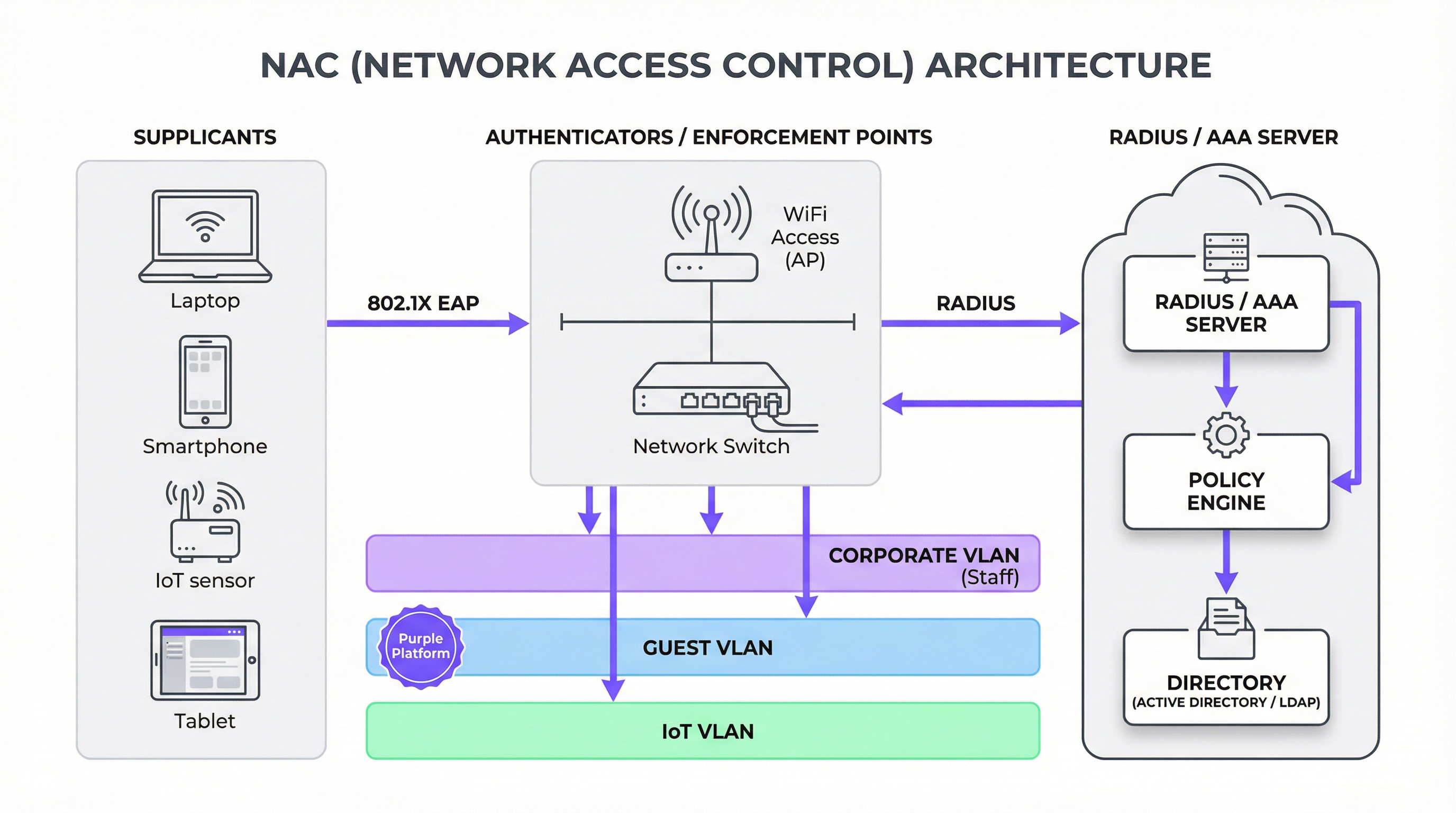
The cornerstone of most modern NAC implementations is the IEEE 802.1X standard. This isn't a single technology, but a framework for port-based network access control. It involves three key participants:
- Supplicant: The client device (e.g., a laptop, smartphone) requesting network access.
- Authenticator: The network hardware that protects the network, typically a WiFi access point or a switch. It acts as a gatekeeper, allowing or blocking traffic.
- Authentication Server: The centralised brain of the operation, almost always a RADIUS (Remote Authentication Dial-In User Service) server. It validates the supplicant's credentials and instructs the authenticator on what level of access to grant.
The process works through the Extensible Authentication Protocol (EAP), which allows for various authentication methods, from simple username/passwords (EAP-PEAP) to highly secure digital certificates (EAP-TLS). When a device connects, the authenticator blocks all traffic except for 802.1X communication. It relays the supplicant's credentials to the RADIUS server, which checks them against a directory (like Active Directory). If authentication is successful, the RADIUS server sends an "Access-Accept" message back to the authenticator, often including specific policy instructions, such as assigning the device to a particular VLAN.
NAC vs. Basic WiFi Authentication: A Critical Distinction
It is crucial for decision-makers to understand that NAC is not merely an enhanced password. The difference is fundamental to network security posture.
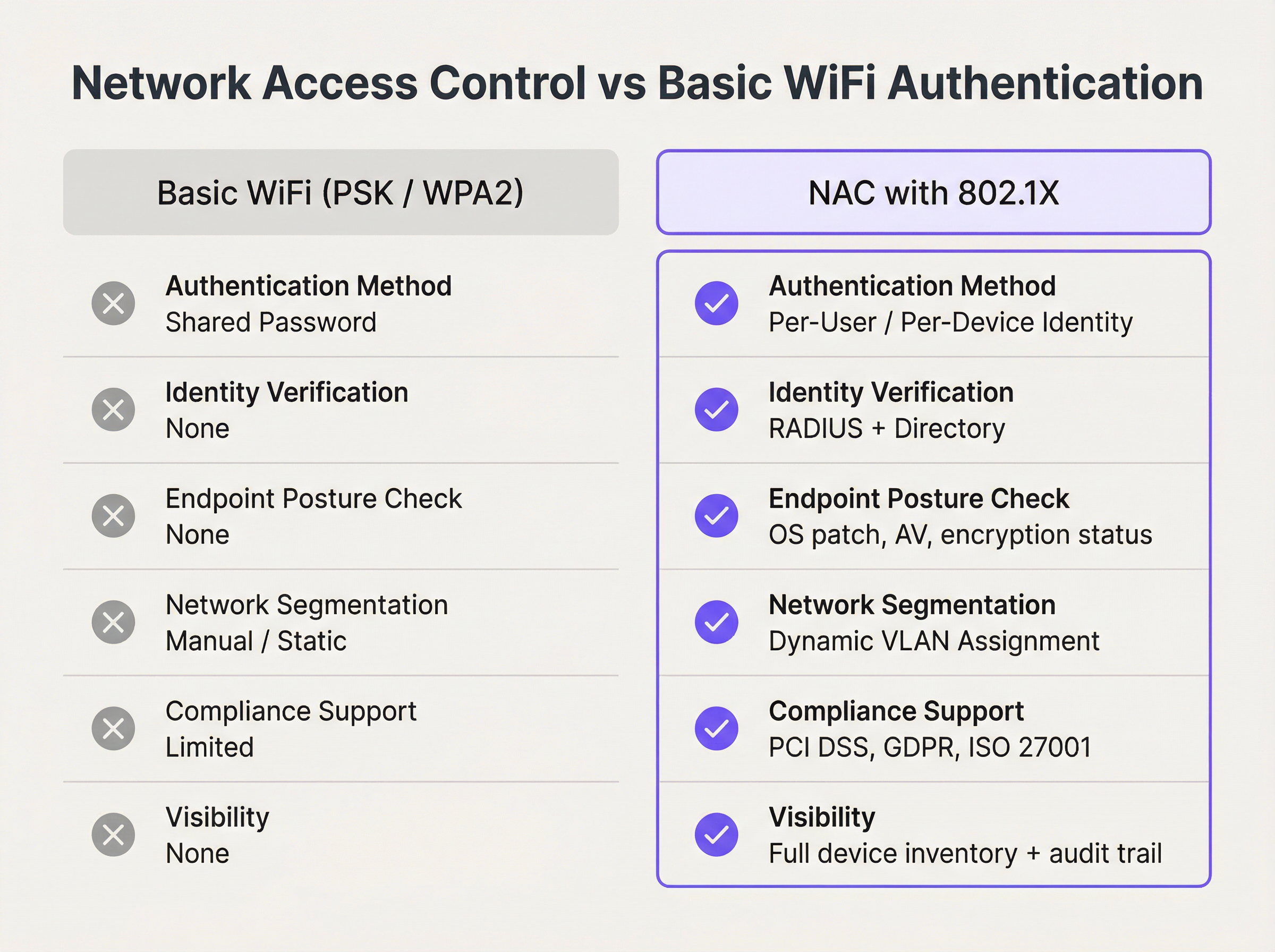
As the comparison illustrates, NAC provides identity-driven control that is impossible with shared credentials. It moves the security perimeter from the network edge to the individual device, enabling a Zero Trust approach where access is never assumed and always verified.
The Role of Endpoint Compliance
A mature NAC solution goes beyond authentication. It performs posture assessment on connecting devices to ensure they meet predefined security policies before being granted access. This can include checks for:
- Operating System Patch Level: Is the device running the latest security updates?
- Antivirus Software: Is an approved AV client installed, running, and up-to-date?
- Disk Encryption: Is the device's hard drive encrypted?
- Host Firewall: Is the local firewall enabled?
If a device fails these checks, it can be placed in a quarantined VLAN with limited access—perhaps only to remediation servers where the user can download required updates. This proactive enforcement is a powerful tool for preventing the spread of malware from compromised endpoints.
Implementation Guide
Deploying NAC is a strategic project, not a simple software installation. A phased approach is recommended to minimise disruption and ensure success.
Phase 1: Discovery and Policy Definition
Before enforcing anything, you must understand what is on your network. The initial phase should be a passive, discovery-only mode. The NAC solution will monitor network traffic to profile every connected device—from corporate laptops and staff smartphones to guest devices and IoT hardware like smart TVs, POS terminals, and HVAC systems. This visibility is critical for building a comprehensive access policy. During this phase, you will define roles (e.g., Corporate User, Guest, Contractor, IoT Device) and map out the access rights for each.
Phase 2: Phased Enforcement
Begin enforcement on a limited, low-risk segment of the network, such as the IT department's staff WiFi. This allows the team to refine policies and troubleshoot issues in a controlled environment. For corporate devices, deploying 802.1X with certificate-based authentication (EAP-TLS) is the gold standard, offering the most secure and seamless user experience. For guest and BYOD access, a captive portal approach is more practical.
Phase 3: Integrating Guest and Staff Access with Purple
In venues with distinct user populations, separating guest and staff traffic is paramount. This is where a platform like Purple integrates into the NAC architecture. The NAC policy on the authenticator (AP/switch) can identify guest traffic and redirect it to the Purple captive portal for authentication and policy acceptance. Meanwhile, staff devices can be authenticated silently via 802.1X against a RADIUS server.

This hybrid model provides the best of both worlds:
- Guest Network: Managed by Purple for a branded user journey, social login options, data analytics, and compliance with data privacy regulations like GDPR. The underlying network is isolated in a guest VLAN.
- Staff Network: Secured via 802.1X for robust, certificate-based authentication, with devices placed into a corporate VLAN with access to internal resources.
- IoT/Operational Network: Devices like POS terminals or building management systems are placed in their own highly restricted VLAN, often using MAC-based authentication as a baseline control.
Phase 4: Full Deployment and Monitoring
Once the policies have been validated and the integration tested, enforcement can be rolled out across the entire organisation. Continuous monitoring is essential. The NAC dashboard becomes a primary tool for security operations, providing real-time visibility into network access events, compliance status, and potential threats.
Best Practices
- Prioritise Certificate-Based Authentication (EAP-TLS): For corporate-managed devices, avoid passwords. Certificates are more secure and provide a frictionless user experience.
- Implement Dynamic VLAN Steering: Use RADIUS attributes to automatically assign devices to the correct network segment based on their role and posture. This is the essence of policy enforcement.
- Design for Failure: What happens if the RADIUS server is unreachable? Configure authenticators to either fail-open (allow access, less secure) or fail-closed (deny access, more secure) based on a risk assessment of the specific network segment.
- Don't Boil the Ocean: Start with a simple policy and iterate. A common starting point is to enforce posture checks for corporate devices and provide basic internet-only access for guests.
- Integrate with Your Security Ecosystem: A modern NAC solution should integrate with firewalls, SIEMs, and endpoint management tools to enable automated threat response. For example, if a firewall detects malicious traffic from an endpoint, it can signal the NAC solution to automatically quarantine that device.
Troubleshooting & Risk Mitigation
- 802.1X Supplicant Issues: The most common headache is inconsistent support for 802.1X on different operating systems and device drivers. Ensure devices are configured correctly via MDM or GPO.
- Certificate Management: EAP-TLS requires a Public Key Infrastructure (PKI). Managing the certificate lifecycle (issuance, renewal, revocation) can be complex. Plan for this operational overhead.
- MAC Address Randomisation: Modern mobile devices (iOS, Android) use randomised MAC addresses to prevent tracking, which can break MAC-based authentication rules. For guest networks, this reinforces the need for a portal-based login. For corporate BYOD, it necessitates a user-based authentication flow.
- IoT Onboarding: Many IoT devices do not support 802.1X. A combination of MAC-based authentication and profiling is often required. The NAC solution should be able to identify a device as, for example, a Samsung Smart TV and automatically assign it to the appropriate IoT VLAN.
ROI & Business Impact
Investing in NAC is not just a security expenditure; it delivers tangible business value.
| Business Impact Area | Measurement Metric | Expected Outcome |
|---|---|---|
| Risk Mitigation | Reduction in security incidents originating from compromised endpoints. | Lower cost of breach remediation and data recovery. |
| Compliance | Successful PCI DSS, GDPR, HIPAA audits. | Avoidance of regulatory fines and reputational damage. |
| Operational Efficiency | Reduction in IT helpdesk tickets for network access issues. | Automation of onboarding and policy enforcement frees up IT staff for strategic projects. |
| User Experience | Faster, more seamless connection experience for staff. | Increased productivity and reduced user frustration. |
| Business Intelligence | (With Purple) Rich analytics on guest behaviour and demographics. | Data-driven decisions for marketing, operations, and venue layout. |
By quantifying these benefits, IT leaders can build a compelling business case for NAC deployment, framing it as a strategic enabler of a secure and efficient digital workplace.
References
[1] IBM, "Cost of a Data Breach Report 2023." [2] PCI Security Standards Council, "Guidance for PCI DSS Scoping and Network Segmentation." [3] IEEE, "IEEE 802.1X-2020 - IEEE Standard for Port-Based Network Access Control."
Key Terms & Definitions
Network Access Control (NAC)
A network security solution that uses a set of protocols to define and implement a policy that describes how to secure access to network nodes by devices when they initially attempt to access the network.
IT teams deploy NAC to prevent unauthorized users and non-compliant devices from accessing corporate or private networks, thereby reducing the attack surface.
IEEE 802.1X
An IEEE standard for port-based Network Access Control (PNAC). It is part of the IEEE 802.1 group of networking protocols and provides an authentication mechanism to devices wishing to attach to a LAN or WLAN.
This is the foundational standard for enterprise-grade authentication on both wired and wireless networks, enabling per-user and per-device identity verification.
RADIUS
Remote Authentication Dial-In User Service. A networking protocol that provides centralized Authentication, Authorization, and Accounting (AAA) management for users and devices that connect and use a network service.
In a NAC architecture, the RADIUS server is the brain. It receives authentication requests from switches and APs, validates credentials against a user directory, and sends back policy decisions.
Endpoint Compliance (Posture Assessment)
The process of checking a device during authentication to ensure it complies with a predefined set of security policies, such as having an up-to-date OS, active antivirus, and enabled firewall.
This is a key feature of advanced NAC solutions. It ensures that a device is not only authorized but also healthy before it is allowed onto the network, preventing the spread of malware.
VLAN (Virtual Local Area Network)
A logical grouping of devices in the same broadcast domain. VLANs are usually configured on switches by placing some interfaces into one broadcast domain and some into another.
NAC uses VLANs as a primary enforcement tool. Based on a device's identity and posture, the NAC solution instructs the switch to place it into a specific VLAN (e.g., "Guest", "Corporate"), effectively segmenting the network.
Captive Portal
A web page that the user of a public-access network is obliged to view and interact with before access is granted. Captive portals are typically used by business centers, airports, hotel lobbies, and other venues that offer free Wi-Fi.
While not as secure as 802.1X, captive portals are the standard for guest authentication. Platforms like Purple use them to manage terms of service, collect marketing data, and enforce access policies for non-corporate users.
EAP (Extensible Authentication Protocol)
An authentication framework frequently used in network and internet connections. It is defined in RFC 3748 and provides a standard way for different authentication methods to be used within the 802.1X framework.
IT architects choose different EAP types based on security needs. EAP-TLS (using certificates) is highly secure, while PEAP (using passwords) is easier to deploy but less secure.
PCI DSS
The Payment Card Industry Data Security Standard. A set of security standards designed to ensure that all companies that accept, process, store or transmit credit card information maintain a secure environment.
A primary driver for NAC deployment in retail and hospitality is PCI DSS requirement 1.2.1, which mandates the segmentation of the network where cardholder data is stored from guest or other networks.
Case Studies
A 500-room luxury hotel needs to provide secure WiFi for guests, staff, and a growing number of IoT devices (smart TVs, thermostats, mini-bar sensors) while ensuring PCI DSS compliance for its payment systems.
- Network Segmentation: Deploy a NAC solution to create distinct SSIDs and VLANs: "HotelGuest", "HotelStaff", and "HotelIoT". A fourth, wired-only VLAN is created for the PCI-compliant payment terminals.
- Guest Access: The "HotelGuest" SSID redirects users to a Purple captive portal. Guests authenticate via social login or an email form, accepting the terms of service. Purple manages GDPR consent and provides the hotel with visitor analytics. The NAC policy places all guest devices into the Guest VLAN, which has internet-only access and is isolated from all internal hotel systems.
- Staff Access: The "HotelStaff" SSID is configured for WPA3-Enterprise with 802.1X EAP-TLS. Corporate-issued devices (laptops, tablets) are provisioned with client certificates via an MDM solution. When staff connect, their device is authenticated by the RADIUS server and placed into the Staff VLAN, granting access to internal resources like the Property Management System (PMS).
- IoT Access: The "HotelIoT" SSID uses MAC authentication. The MAC addresses of all deployed IoT devices are pre-registered in the NAC system. When a smart TV connects, its MAC is verified, and it is placed in the IoT VLAN, which only has access to its specific management server and is blocked from both the guest and staff networks.
A multi-site retail chain with 150 stores wants to replace its insecure, shared WPA2-PSK network. They need to secure corporate devices, provide guest WiFi, and ensure that in-store POS terminals are isolated.
- Centralized RADIUS: A cloud-hosted RADIUS server is deployed to manage authentication for all 150 stores, ensuring consistent policy application.
- Corporate Devices: Store manager tablets and employee handheld scanners are configured via MDM to connect to a "Corporate" SSID using 802.1X certificate-based authentication. The NAC policy also performs a posture check to ensure the devices are running the company's approved software version.
- Guest WiFi: A public "RetailGuest" SSID uses a captive portal (like Purple) to provide internet access. This isolates guest traffic and allows the chain to run targeted marketing campaigns based on location analytics.
- POS Terminal Isolation: The POS terminals are connected via wired ports. The switch ports are configured with MAC-based authentication, locking them to the specific MAC addresses of the terminals. These ports are assigned to a dedicated, highly restricted PCI VLAN that can only communicate with the payment processor.
- Phased Rollout: The solution is first deployed to a single pilot store. Once validated, the configuration is pushed remotely to the other 149 stores, leveraging the centralized NAC and MDM platforms.
Scenario Analysis
Q1. A stadium is hosting a major sporting event and needs to provide WiFi for fans, press, and operational staff. The press requires higher bandwidth and access to specific media servers. How would you design the network access policy?
💡 Hint:Consider using different SSIDs and RADIUS-based VLAN steering.
Show Recommended Approach
- Fan WiFi: An open SSID, "StadiumFanWiFi", redirects all users to a captive portal for authentication. The portal can handle high-density connections and apply bandwidth throttling to ensure fair usage. All fans are placed in a general access, internet-only VLAN.
- Press WiFi: A hidden SSID, "StadiumPress", is protected with WPA2/3-Enterprise (802.1X). Pre-registered press members are given credentials. Upon authentication, the RADIUS server identifies them as part of the "Press" group and assigns them to a dedicated Press VLAN. This VLAN has a higher QoS profile and access to the internal media servers.
- Staff WiFi: A third hidden SSID, "StadiumOps", also uses 802.1X for operational staff. They are assigned to a secure Operations VLAN with access to ticketing, security, and building management systems.
Q2. Your company is implementing a BYOD (Bring Your Own Device) policy. An employee wants to connect their personal laptop to the corporate network. What are the minimum posture checks your NAC solution should perform before granting access?
💡 Hint:Think about the most common vectors for malware and data leakage.
Show Recommended Approach
The minimum posture assessment for a BYOD device should include:
- Functional Firewall: The device's host-based firewall must be enabled to prevent unsolicited inbound connections.
- Updated Antivirus: An approved antivirus solution must be installed, running, and have received signature updates within the last 24-48 hours.
- OS Updates: The operating system must have all critical security patches installed. The policy might specify that the OS must be no more than one month behind the latest patch release.
- No Unapproved Software: A check for specific forbidden applications, such as peer-to-peer file-sharing clients, that could introduce risk. If the device fails any of these checks, it should be denied access or placed in a remediation VLAN.
Q3. A hospital wants to deploy new WiFi-connected infusion pumps. These devices do not support 802.1X. How can you securely onboard and manage them using a NAC solution?
💡 Hint:Consider a multi-factor approach for headless devices that don't support advanced authentication.
Show Recommended Approach
Since the pumps don't support 802.1X, a layered approach is needed:
- MAC Authentication: Register the MAC address of every infusion pump in the NAC system. This provides a basic level of identity.
- Device Profiling: The NAC solution should be configured to profile the device based on its network traffic (e.g., the DHCP fingerprint, protocols used). It should identify the device as an "Infusion Pump Model X".
- Combined Policy: Create a policy that requires BOTH the MAC address to be on the allow list AND the device profile to match the expected fingerprint. This prevents MAC spoofing, as an attacker's laptop might have a valid MAC but will not behave like an infusion pump on the network.
- Strict VLAN and ACLs: Once authenticated, the pump is placed into a highly restricted "Medical_IoT" VLAN. An Access Control List (ACL) is applied to its traffic, permitting it to communicate ONLY with the specific IP address of the infusion pump management server and nothing else. All other traffic is explicitly denied.
Key Takeaways
- ✓Network Access Control (NAC) enforces security policies on devices and users seeking to access network resources.
- ✓The IEEE 802.1X standard is the cornerstone of modern NAC, providing a framework for robust, identity-based authentication.
- ✓NAC goes beyond basic authentication by performing endpoint compliance checks (posture assessment) to ensure devices are healthy before they connect.
- ✓Dynamic VLAN assignment is a key NAC capability, automatically segmenting the network to isolate guests, staff, and IoT devices.
- ✓For guest WiFi, NAC integrates with captive portals like Purple to manage access, ensure compliance, and gather analytics.
- ✓Implementing NAC mitigates risk, helps achieve regulatory compliance (PCI DSS, GDPR), and improves operational efficiency.
- ✓A successful NAC deployment requires a phased approach, starting with discovery and policy definition before moving to gradual enforcement.




