

Passpoint (Hotspot 2.0): A Comprehensive Guide to Secure and Seamless WiFi Roaming
This guide provides a comprehensive technical overview of Passpoint (Hotspot 2.0) for IT leaders and network architects, covering the IEEE 802.11u standard, GAS/ANQP discovery protocols, WPA3-Enterprise security, and the WBA OpenRoaming federation. It delivers a vendor-neutral implementation framework with phased deployment guidance, real-world case studies from hospitality and retail, and a clear analysis of the ROI and compliance benefits for enterprise venue operators.
🎧 Listen to this Guide
View Transcript

Executive Summary
For IT executives and network architects at large-scale venues, delivering a seamless and secure WiFi experience is no longer a convenience but a core operational imperative. The challenge lies in eliminating the friction of captive portals and insecure open networks while maintaining robust security and gaining valuable user insight. Passpoint, also known as Hotspot 2.0, directly addresses this challenge. It is a Wi-Fi Alliance certified protocol based on the IEEE 802.11u standard that enables mobile devices to automatically discover and authenticate to WiFi networks with enterprise-grade WPA3 security, mirroring the seamless experience of mobile roaming.
This guide serves as a practical reference for decision-makers, providing a technical deep-dive into the Passpoint architecture, a vendor-neutral implementation framework, and an analysis of its ROI. By leveraging Passpoint, organisations can significantly enhance the guest experience, reduce IT support overhead, strengthen their security posture, and unlock new opportunities for data-driven engagement — ultimately transforming their WiFi infrastructure from a cost centre into a strategic asset.
Technical Deep-Dive
Passpoint fundamentally shifts the WiFi connection paradigm from network-centric (connecting to a specific SSID) to user-centric (connecting to any network that trusts the user's credentials). This is achieved through a series of pre-association queries and a robust security framework built on established industry standards.
Core Architecture: GAS and ANQP
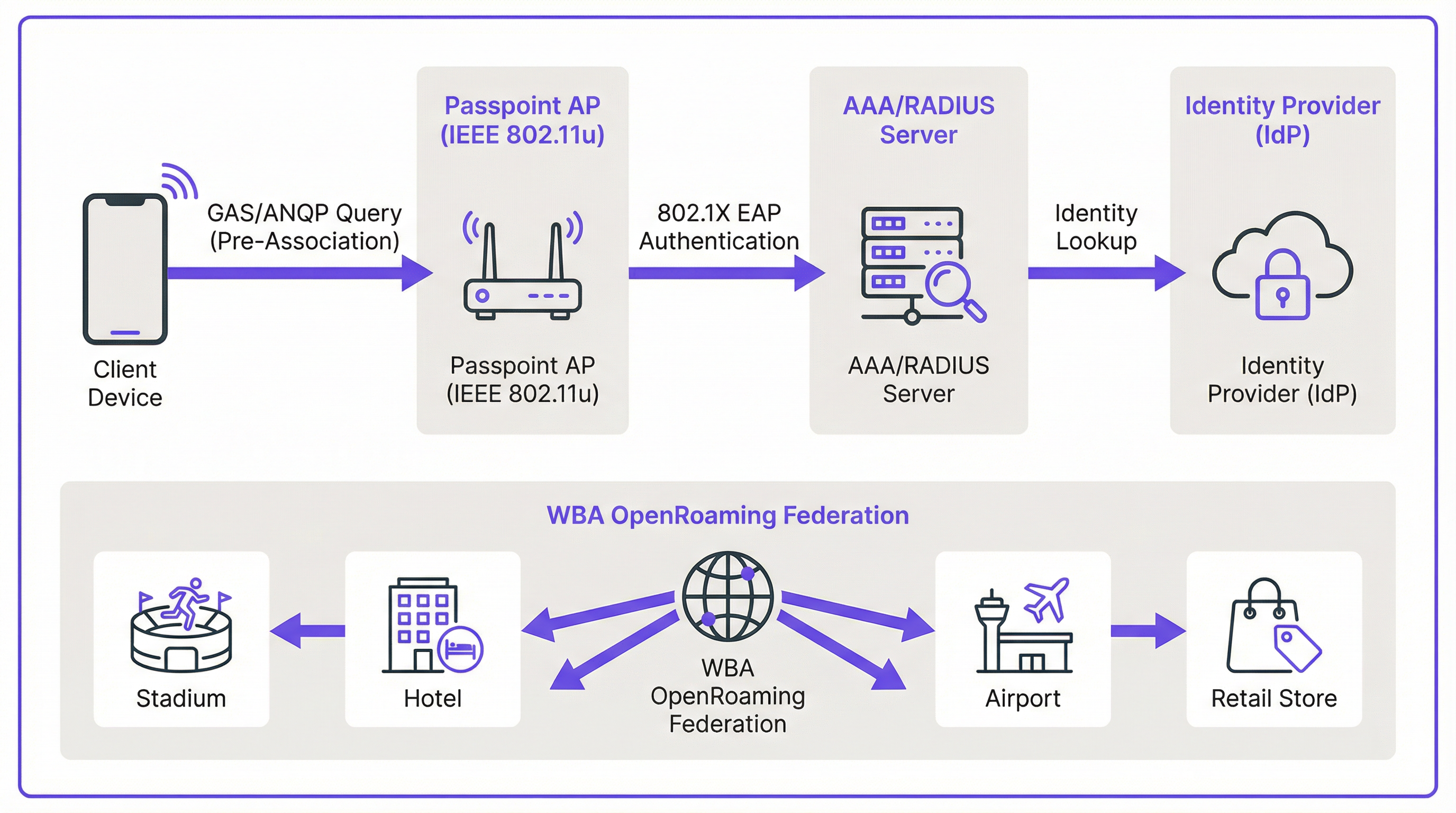
The mechanism enabling seamless discovery is defined in the IEEE 802.11u amendment. Before a client device even attempts to associate with an access point, it can query the network to determine if a roaming agreement is in place. This pre-association conversation uses two key protocols working in tandem.
The Generic Advertisement Service (GAS) provides the transport layer for advertisement frames between a client station and a server before authentication occurs. The Access Network Query Protocol (ANQP) is the query protocol itself, carried within GAS frames. The client device uses ANQP to ask the network specific questions, most critically: which roaming consortiums or identity providers does it support?
The connection flow proceeds as follows. A Passpoint-enabled Access Point (AP) includes an Interworking Element in its beacon frames, acting as a flag that announces Hotspot 2.0 capabilities. A compatible device sees this flag and sends a GAS request containing an ANQP query to the AP. The query asks which Roaming Consortium Organizational Identifiers (RCOIs) the network supports. If the AP's response contains an RCOI that matches a profile on the device — for example, a profile from a mobile operator, or a WBA OpenRoaming profile — the device proceeds with the secure 802.1X handshake.
Security: WPA3-Enterprise and 802.1X
Security is the cornerstone of Passpoint. Unlike captive portals that frequently sit atop an open, unencrypted network, Passpoint mandates the use of WPA2-Enterprise or WPA3-Enterprise. This enforces 802.1X authentication, where each user's device is authenticated individually via a RADIUS server. This architecture provides several critical security advantages that are directly relevant to PCI DSS and GDPR compliance obligations.
All traffic between the client device and the access point is individually encrypted, eliminating the risk of passive eavesdropping. Because authentication is based on trusted credentials and certificates, users are protected from 'evil twin' attacks where a malicious actor broadcasts a fake SSID to intercept traffic. There are no pre-shared keys (PSKs) that, if compromised, could expose the entire network to lateral movement.
Passpoint vs. OpenRoaming: A Critical Distinction
It is essential to distinguish between the Passpoint standard and the WBA OpenRoaming framework, as the two terms are frequently conflated. The most useful analogy is the difference between a car and a motorway network.
Passpoint is the vehicle: the technical standard (IEEE 802.11u) and Wi-Fi Alliance certification that allows a device to discover and connect to a network automatically. OpenRoaming is the motorway: a global federation framework managed by the Wireless Broadband Alliance (WBA) that creates a trust ecosystem between thousands of Identity Providers (IdPs) — such as mobile operators and device manufacturers — and Access Network Providers (ANPs) such as hotels, stadiums, and retail chains. A private Passpoint deployment can operate without OpenRoaming, but participation in OpenRoaming requires Passpoint.
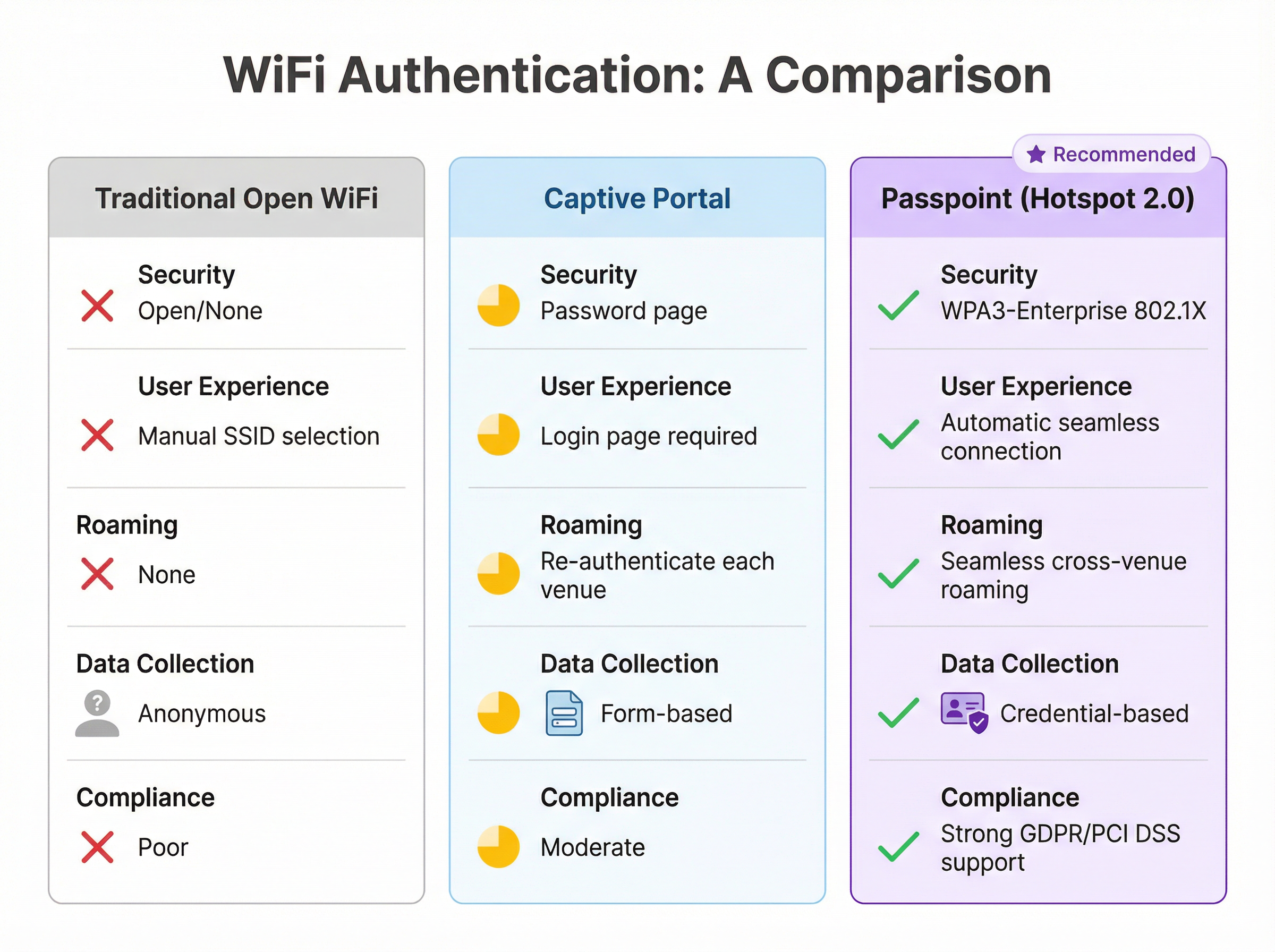
| Feature | Traditional Open WiFi | Captive Portal | Passpoint (Hotspot 2.0) |
|---|---|---|---|
| Security Standard | None (Open) | Varies (often open) | WPA3-Enterprise (802.1X) |
| User Experience | Manual SSID selection | Login page required | Fully automatic |
| Cross-Venue Roaming | None | Re-authenticate each time | Seamless |
| Data Collection | Anonymous | Form-based (GDPR risk) | Credential-based |
| PCI DSS Alignment | Poor | Moderate | Strong |
Implementation Guide
Deploying Passpoint is a structured process that moves from assessment through infrastructure configuration, pilot testing, and full rollout. A phased approach ensures a smooth transition and minimises disruption to existing users.
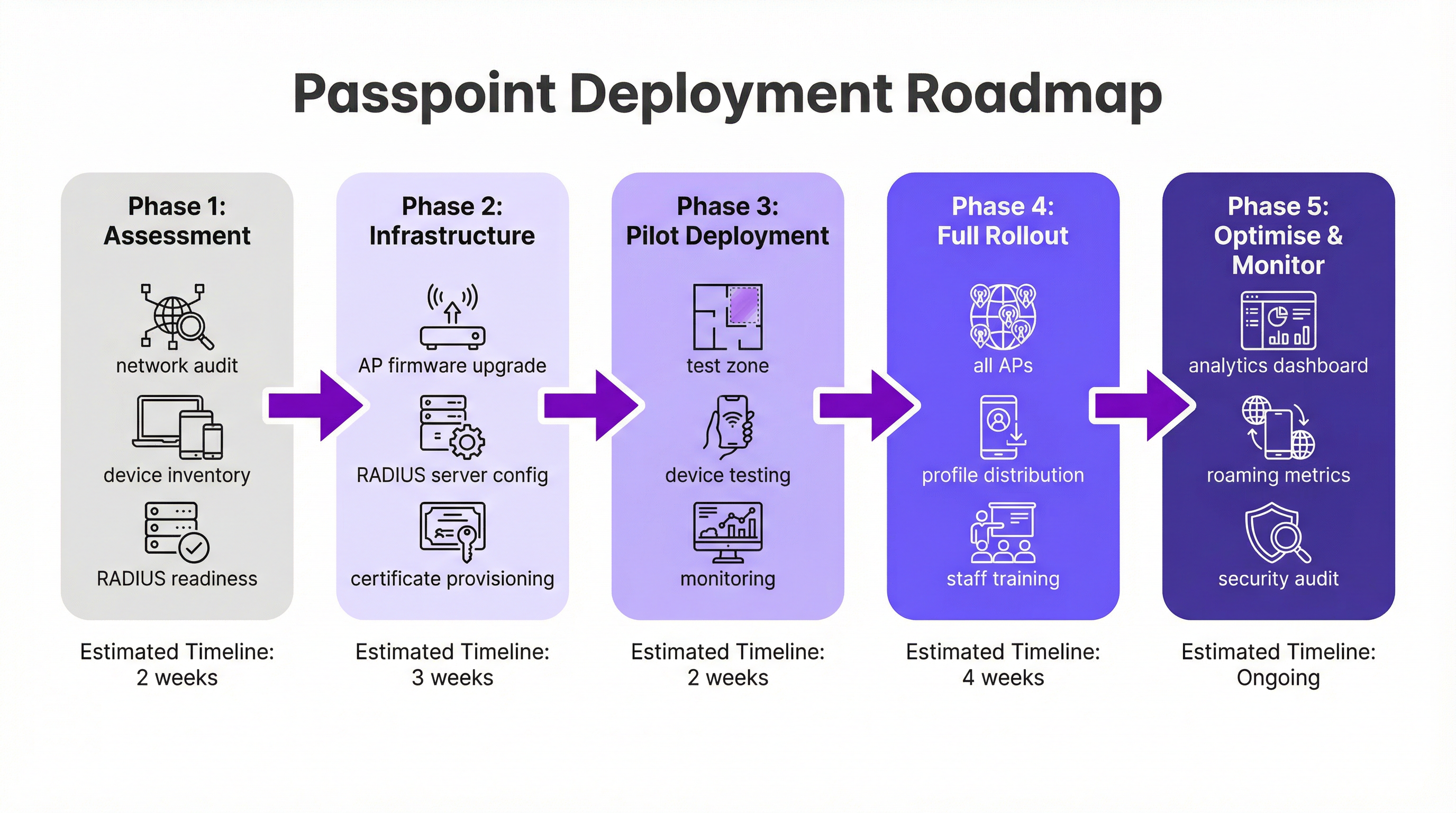
Phase 1: Assessment and Planning (2 Weeks). Begin with a full network audit to verify that your existing WiFi hardware supports the required IEEE 802.11u features. Most enterprise-grade hardware manufactured in the last five to seven years is compliant, but a firmware update is frequently necessary. Simultaneously, assess your RADIUS infrastructure for capacity, high-availability, and its ability to handle certificate-based EAP methods. Define your identity strategy: will you authenticate users against a loyalty programme database, integrate with a mobile operator partner, or join the WBA OpenRoaming federation?
Phase 2: Infrastructure Configuration (3 Weeks). Roll out firmware updates to all APs and controllers. Configure your RADIUS server to support the chosen EAP types — EAP-TLS is the most secure option for certificate-based authentication, while EAP-TTLS provides a more flexible alternative. If participating in OpenRoaming, obtain the necessary WBA PKI certificates. Create a dedicated WLAN profile configured for WPA3-Enterprise with Hotspot 2.0 features enabled, including the relevant RCOIs. For maximum device compatibility, broadcast both the standard settlement-free RCOI (5A-03-BA) and the legacy Cisco RCOI (00-40-96).
Phase 3: Pilot Deployment (2 Weeks). Designate a limited, controlled area of your venue — a single floor, a specific conference room, or one zone of a retail store — for the pilot. Onboard test devices across iOS, Android, and Windows platforms. Monitor RADIUS logs and network performance closely to validate seamless discovery, authentication, and AP-to-AP roaming.
Phase 4: Full Rollout and Profile Distribution (4 Weeks). Apply the validated configuration to all APs across the venue. Determine your profile distribution strategy: integration into a branded mobile app is the gold standard for hospitality and retail, while an MDM platform is the appropriate channel for corporate environments. Train IT support staff on the new architecture and common troubleshooting procedures.
Phase 5: Optimise and Monitor (Ongoing). Leverage network analytics to monitor roaming patterns, authentication success rates, and device type distributions. Use this data to refine the user experience and explore opportunities for deeper integration with CRM, PMS, or marketing automation platforms. Conduct regular security audits to maintain compliance with PCI DSS and GDPR requirements.
Best Practices
Several vendor-neutral best practices have emerged from large-scale Passpoint deployments across the hospitality, retail, and transport sectors.
Broadcasting multiple RCOIs is essential for compatibility. The standard settlement-free RCOI (5A-03-BA) covers the majority of modern devices enrolled in OpenRoaming, while the legacy Cisco RCOI (00-40-96) is critical for older Android devices and Samsung handsets running OneUI. Omitting the legacy RCOI can silently exclude a significant portion of your user base.
WPA3-Enterprise should be the default for all new deployments. While WPA2-Enterprise remains supported, WPA3 introduces Protected Management Frames (PMF) as a mandatory feature, providing an additional layer of protection against deauthentication attacks.
For brands with a loyalty or guest app, integrating Passpoint profile installation directly into the app is the most effective distribution mechanism. The profile can be pushed automatically upon the user's first login, creating a completely frictionless onboarding experience that requires no user action on subsequent visits.
Network segmentation via VLANs is a non-negotiable best practice for compliance. Passpoint traffic should be isolated from internal corporate networks and any systems that handle payment card data, ensuring a clean PCI DSS scope boundary.
Troubleshooting and Risk Mitigation
Understanding the most common failure modes before deployment significantly reduces the risk of a problematic go-live.
The most frequent issue is a device failing to connect automatically. The root cause is almost always a missing, incorrectly formatted, or expired Passpoint profile on the client device. Verify that the profile is correctly installed and that the RCOI it specifies matches the RCOI being broadcast by the network. On iOS, profiles can be inspected via the Settings app; on Android, the process varies by manufacturer.
Authentication failures are the second most common issue. RADIUS server logs are the definitive diagnostic tool. Failures typically stem from incorrect credential formats, expired certificates, or a broken trust relationship with an upstream identity provider. When joining OpenRoaming, ensure that the WBA root certificates are correctly installed in your RADIUS server's trust store.
Firewall misconfiguration is a deployment-blocking risk that is easily overlooked. RadSec traffic (TCP port 2083) must be permitted between your RADIUS server and any federated roaming partners or OpenRoaming proxy servers. Validate this rule explicitly before go-live.
High-availability of the RADIUS infrastructure is the most critical operational risk. A RADIUS server outage will prevent all Passpoint authentication, effectively taking down the network for all enrolled users. Deploy a clustered or geographically redundant pair of RADIUS servers and test the failover mechanism before the production rollout.
ROI and Business Impact
Implementing Passpoint delivers measurable business value across several domains, making the investment case compelling for both IT and the wider business.
The most immediate operational benefit is a reduction in IT support costs. By eliminating the need for users to manually select SSIDs, enter passwords, or re-authenticate after session timeouts, Passpoint dramatically reduces the volume of WiFi-related support tickets. For a large hotel or conference centre, this can translate to a meaningful reduction in front-desk and IT helpdesk workload.
Guest satisfaction is a direct and measurable outcome. In the hospitality sector, WiFi quality consistently ranks among the top factors in guest satisfaction surveys. A seamless, automatic connection experience — particularly for returning guests who are recognised and connected without any action on their part — creates a powerful positive impression that drives loyalty and repeat business.
The shift from anonymous open-network data to credential-based Passpoint data unlocks significant analytical value. Venues can understand visit frequency, dwell time by location, and device demographics with a level of precision that is simply not possible with a captive portal. This data, when integrated with CRM and marketing platforms, enables personalised engagement that drives incremental revenue through targeted promotions and upsell opportunities.
Finally, the compliance and risk mitigation value of Passpoint should not be underestimated. In an environment of increasing regulatory scrutiny under GDPR and PCI DSS, the enterprise-grade security of WPA3-Enterprise provides a demonstrably stronger security posture than open or PSK-based networks. This reduces the risk of a data breach and the associated financial and reputational consequences.
Key Terms & Definitions
IEEE 802.11u
An amendment to the IEEE 802.11 WiFi standard that enables network discovery and information exchange between a client device and an access point before an association is established. It is the foundational standard underpinning Passpoint.
When evaluating WiFi hardware for a Passpoint deployment, IT teams should verify that the access points and controllers explicitly list IEEE 802.11u support in their technical specifications. Its presence confirms the hardware is capable of Hotspot 2.0 features.
ANQP (Access Network Query Protocol)
The protocol used by a client device to query a Hotspot 2.0-enabled access point for information before associating, including its roaming partners, venue name, IP address type availability, and network capabilities.
During troubleshooting, a network architect can use a wireless packet analyser to inspect ANQP frames and confirm that the AP is correctly advertising its roaming consortium OIs and that the client is receiving and processing the response.
RCOI (Roaming Consortium Organizational Identifier)
A unique identifier that represents a group of network providers who have a roaming agreement. A client device will only attempt to connect to a Passpoint network if the RCOI broadcast by the AP matches an RCOI specified in one of its installed Passpoint profiles.
This is the most critical configuration parameter in a Passpoint deployment. Incorrect or missing RCOIs are the most common cause of devices failing to connect automatically. The standard OpenRoaming RCOI is 5A-03-BA; the legacy Cisco RCOI is 00-40-96.
RADIUS (Remote Authentication Dial-In User Service)
A networking protocol providing centralised Authentication, Authorization, and Accounting (AAA) management for users connecting to a network service. In a Passpoint deployment, the RADIUS server is the core authentication engine.
The RADIUS server is the single most critical piece of infrastructure in a Passpoint deployment. Its availability directly determines the availability of the Passpoint network. IT teams should deploy RADIUS in a high-availability cluster and monitor it proactively.
EAP (Extensible Authentication Protocol)
An authentication framework used in 802.1X networks that supports multiple authentication methods. Common EAP types used with Passpoint include EAP-TLS (certificate-based, highest security), EAP-TTLS (tunnelled credentials), and EAP-SIM/AKA (SIM-card based, used by mobile carriers).
The choice of EAP method determines the security level and operational complexity of the deployment. EAP-TLS requires a PKI to issue client certificates, which is operationally demanding but provides the strongest security. EAP-TTLS is a common, more manageable alternative for enterprise deployments.
WBA (Wireless Broadband Alliance)
A global industry organisation that promotes the adoption of interoperable wireless services. The WBA manages the OpenRoaming federation, including its PKI, policy framework, and the onboarding of Identity Providers and Access Network Providers.
When a venue operator decides to join OpenRoaming, they are entering into a legal and technical framework governed by the WBA. This involves signing a participation agreement, obtaining WBA PKI certificates, and configuring their network to comply with the OpenRoaming technical specifications.
Identity Provider (IdP)
An entity that creates, maintains, and manages identity information and provides authentication services to relying parties. In the Passpoint/OpenRoaming ecosystem, IdPs include mobile carriers (e.g., Verizon, EE), device manufacturers (e.g., Samsung), and enterprises.
Understanding the IdP model is essential for scoping a Passpoint deployment. The venue operator (as the Access Network Provider) does not need to manage user identities; it delegates that responsibility to trusted IdPs via the roaming federation.
RadSec (RADIUS over TLS)
A protocol that secures RADIUS communication by tunnelling it over Transport Layer Security (TLS), typically on TCP port 2083. It replaces the traditional UDP-based RADIUS transport, providing encryption and mutual authentication for RADIUS traffic.
RadSec is a mandatory component of the OpenRoaming framework. IT teams must ensure that firewall rules explicitly permit TCP port 2083 between their RADIUS server and the OpenRoaming proxy servers. This is a frequently overlooked configuration step that can block all federated authentication.
Case Studies
A 500-room luxury hotel with a large conference centre wants to replace its legacy captive portal system. The goal is to provide seamless, secure WiFi for hotel guests, conference attendees, and staff, while also enabling personalised engagement through the hotel's loyalty app.
The recommended approach is a phased Passpoint deployment integrated with the hotel's loyalty programme. Begin with a full audit of the existing Cisco Meraki network to confirm all APs support Hotspot 2.0. Configure the hotel's RADIUS server to authenticate loyalty members using EAP-TTLS against the loyalty programme's member database. Update the hotel's mobile app to include a Passpoint profile installation flow, triggered automatically upon the user's first login. Create two distinct WLAN profiles: one for guests and loyalty members broadcasting the hotel's specific RCOI, and a second for conference attendees that utilises the WBA OpenRoaming RCOI (5A-03-BA) to allow attendees from diverse organisations to connect automatically without any pre-registration. In the loyalty app, configure a trigger to send a personalised welcome notification upon guest arrival, detected via the Passpoint connection event, including their room number and a link to book restaurant reservations.
A large retail chain with 300 stores across the country uses a basic open guest WiFi network. They face challenges with network abuse, a poor user experience, and an inability to gather meaningful customer data. They need a scalable, secure solution that can be managed centrally.
The retailer should implement a Passpoint solution federated with WBA OpenRoaming, managed via a centralised cloud platform. Replace the existing consumer-grade access points with enterprise-grade hardware from a vendor such as HPE Aruba Networking, managed through Aruba Central. Deploy a cloud-based RADIUS infrastructure for scalability and simplified management across all 300 locations. Configure the WLAN profile on Aruba Central to enable Passpoint and broadcast the OpenRoaming RCOI. The RADIUS server proxies all authentication requests to the OpenRoaming federation, meaning any shopper with a Passpoint profile from their mobile carrier can connect automatically and securely at any of the 300 stores without any pre-registration. Leverage the anonymised, credential-based data from RADIUS accounting logs to analyse footfall and dwell times by store zone, without collecting personal information via a captive portal, thereby simplifying GDPR compliance significantly.
Scenario Analysis
Q1. You are the network architect for a major international airport. You have been tasked with improving the passenger WiFi experience, which currently uses a slow, cumbersome captive portal. The airport hosts dozens of different airlines, and passengers arrive from all over the world with devices from hundreds of different carriers. What is your recommended strategy for implementing Passpoint?
💡 Hint:Consider the diversity of users and the need for a globally interoperable solution. How can you avoid the operational burden of managing bilateral roaming agreements with hundreds of mobile carriers?
Show Recommended Approach
The optimal strategy is to deploy a Passpoint-certified network and join the WBA OpenRoaming federation. This allows the airport to accept credentials from a vast ecosystem of identity providers — including major global mobile carriers and device manufacturers — without negotiating individual roaming agreements. The implementation involves upgrading the airport's WiFi infrastructure to be Passpoint-compliant (802.11u-capable APs with current firmware), configuring the RADIUS servers to proxy authentication requests to the OpenRoaming network via RadSec, and broadcasting the standard OpenRoaming RCOI (5A-03-BA) alongside the legacy Cisco RCOI (00-40-96) for compatibility. This provides a seamless, secure, automatic connection experience for the majority of travellers, dramatically improving satisfaction scores and reducing WiFi-related support burden.
Q2. A large university campus wants to extend its secure Eduroam WiFi service into the surrounding student-heavy cafes and local businesses. The goal is to allow students and staff to seamlessly roam from the campus network to these partner venues. How would you use Passpoint to achieve this?
💡 Hint:Eduroam is itself a roaming federation based on 802.1X. Consider how you can extend the university's identity trust to third-party venues without requiring those venues to manage student credentials directly.
Show Recommended Approach
This is a well-suited use case for a private Passpoint federation. The university acts as the central Identity Provider. The partner cafes and shops become Access Network Providers. The university's IT department provides the partner venues with access to a cloud-based RADIUS proxy that is configured to trust the university's main RADIUS server. The cafes' APs are configured to broadcast a specific RCOI designated for this 'Campus Community' network. The university then updates the Passpoint profile on student and staff devices — distributed via the university's MDM platform — to include this new RCOI. When a student enters a partner cafe, their device recognises the RCOI, initiates an 802.1X connection, and the cafe's network proxies the authentication back to the university's trusted RADIUS server. Students are connected automatically and securely; the cafe never handles student credentials directly.
Q3. Your organisation has deployed Passpoint in its corporate headquarters. During the pilot phase, Android devices are connecting successfully, but a significant number of corporate-issued iPhones are failing to connect automatically. What is the most likely cause and how would you systematically troubleshoot it?
💡 Hint:Device operating systems handle Passpoint profiles differently. In a corporate environment, consider how profiles are created, signed, and distributed to managed iOS devices.
Show Recommended Approach
The most likely cause is an issue with the Passpoint configuration profile on the managed iPhones. iOS devices in a corporate environment are typically managed via an MDM platform, and Passpoint profiles must be correctly structured as Apple Configuration Profiles (.mobileconfig). The systematic troubleshooting process is: (1) Check the MDM console to confirm the profile has been successfully pushed to the affected devices; (2) On a test iPhone, navigate to Settings > General > VPN & Device Management to verify the profile is installed and not showing an error; (3) Manually install a known-good, manually created profile on a test iPhone to determine if the issue is with the profile content or the MDM delivery mechanism; (4) Inspect the RADIUS server logs for authentication attempts from the failing iPhones — the rejection reason (e.g., 'client certificate not trusted', 'unknown EAP type') will identify the specific misconfiguration; (5) Verify that the trusted root certificate for the RADIUS server is included in the MDM-pushed profile, as iOS requires explicit trust for the server certificate used in EAP authentication.
Key Takeaways
- ✓Passpoint (Hotspot 2.0) is a Wi-Fi Alliance certification based on IEEE 802.11u that enables automatic, secure WiFi connection without manual SSID selection or captive portal login.
- ✓The technology uses GAS and ANQP protocols for pre-association network discovery, allowing devices to identify compatible networks using Roaming Consortium Organizational Identifiers (RCOIs) before committing to a connection.
- ✓All Passpoint connections are secured with WPA2 or WPA3-Enterprise and 802.1X authentication, providing enterprise-grade encryption and eliminating the risk of rogue AP attacks.
- ✓WBA OpenRoaming is a global federation built on Passpoint that enables large-scale, interoperable roaming between thousands of networks without bilateral agreements — the recommended approach for large public venues.
- ✓A successful deployment requires three pillars: compliant 802.11u infrastructure, a highly available RADIUS server, and a clear strategy for distributing Passpoint profiles to user devices.
- ✓The business case is compelling: reduced IT support costs, measurably improved guest satisfaction, richer credential-based analytics, and a stronger compliance posture under GDPR and PCI DSS.
- ✓For maximum device compatibility, always broadcast both the standard OpenRoaming RCOI (5A-03-BA) and the legacy Cisco RCOI (00-40-96) on your Passpoint WLAN.




