

PKI Fundamentals for WiFi Administrators: Certificates, CAs, and Trust Chains
This technical reference guide explains the foundational concepts of Public Key Infrastructure (PKI) for enterprise WiFi administrators, covering certificate authorities, trust chains, and X.509 certificates. It details how PKI underpins EAP-TLS mutual authentication and provides actionable deployment guidance for IT teams in hospitality, retail, and public-sector environments. Understanding PKI is a mandatory prerequisite for deploying certificate-based staff WiFi authentication with Purple.
🎧 Listen to this Guide
View Transcript

Executive Summary
For IT managers, network architects, and venue operations directors, securing corporate and staff WiFi networks is a critical compliance and operational requirement. Legacy authentication methods such as Pre-Shared Keys (PSKs) or MAC address filtering are insufficient for modern enterprise environments, leaving networks vulnerable to credential theft and device spoofing. To achieve robust, auditable security, organisations must transition to certificate-based authentication — specifically EAP-TLS (Extensible Authentication Protocol-Transport Layer Security).
Deploying EAP-TLS requires a solid understanding of Public Key Infrastructure (PKI). This guide demystifies PKI for WiFi administrators, explaining the roles of Certificate Authorities (CAs), the mechanics of the trust chain, and the practical differences between server and client certificates. By mastering these fundamentals, IT teams can confidently design and implement secure, scalable network access solutions across Hospitality, Retail, and public-sector venues, ensuring compliance with standards such as PCI DSS and GDPR while providing seamless, password-free connectivity for managed devices. Understanding PKI is also the foundational prerequisite for deploying certificate-based staff WiFi authentication with Purple.
Technical Deep-Dive
The Architecture of Trust: What Is Public Key Infrastructure?
Public Key Infrastructure (PKI) is a cryptographic framework that enables secure communication and mutual authentication over an untrusted network. In the context of enterprise WiFi, PKI acts as a digital passport system, verifying the identity of both the client device (the supplicant) and the network authentication server (the RADIUS server) before any data is exchanged.
This system relies on X.509 certificates, which bind a public key to a verified identity — such as a server hostname or a user's email address — and are digitally signed by a trusted third party known as a Certificate Authority (CA). The CA's signature is the cryptographic guarantee that the identity claim is legitimate.
The Certificate Hierarchy and Trust Chain
The strength of PKI lies in its hierarchical structure, known as the trust chain. This hierarchy ensures that any certificate presented by a device or server can be cryptographically traced back to a universally trusted source. The three tiers are as follows.
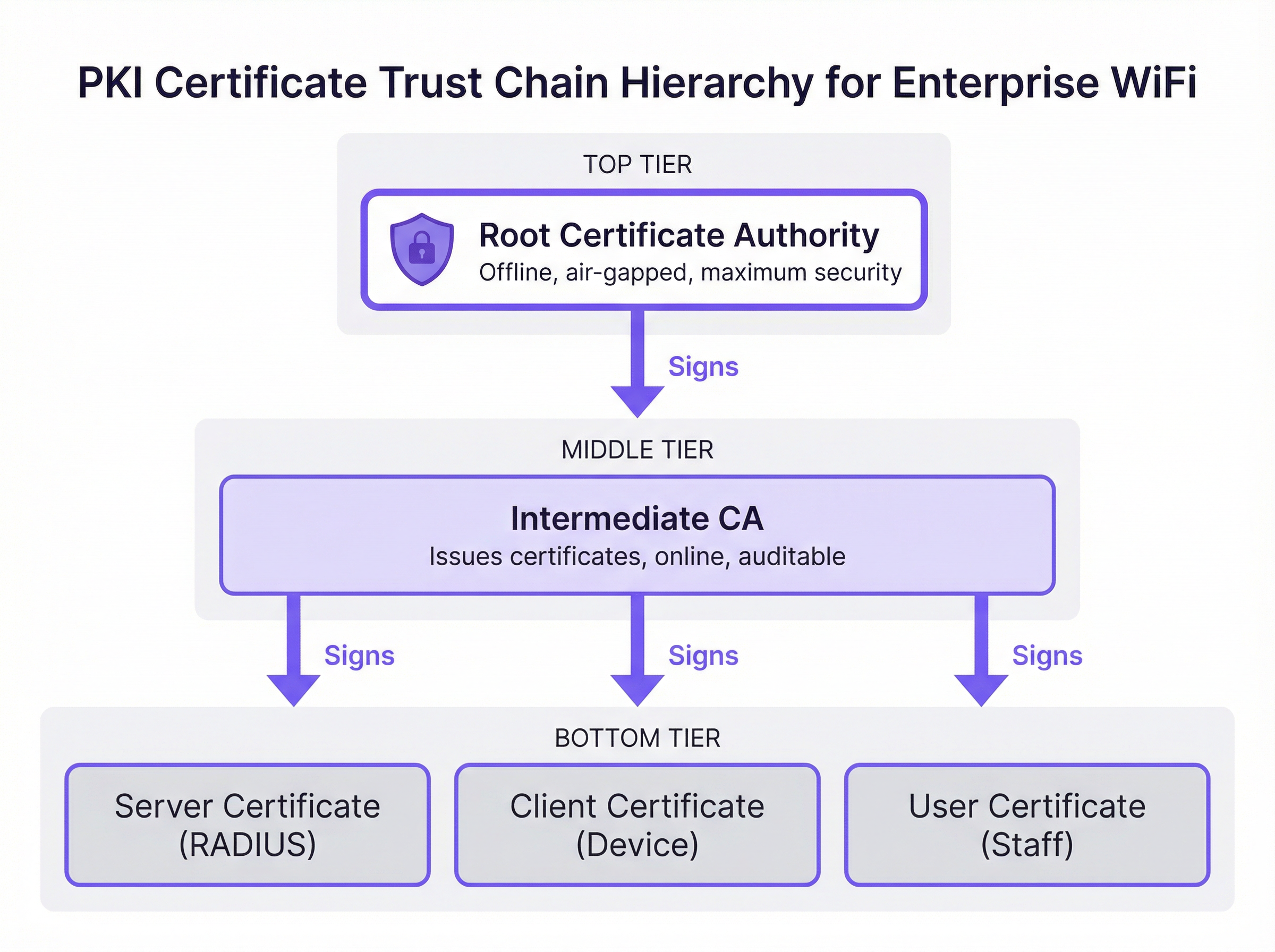
Root Certificate Authority (Root CA): The Root CA is the cryptographic anchor of the entire PKI ecosystem. It issues a self-signed certificate and is inherently trusted by client devices and servers. In a secure enterprise deployment, the Root CA is kept offline and air-gapped to protect its private key from network-based compromise. Its sole operational purpose is to sign the certificates of Intermediate CAs.
Intermediate Certificate Authority (Intermediate CA): The Intermediate CA acts as a buffer between the highly secure Root CA and the operational environment. It is online and handles the day-to-day issuance and revocation of leaf certificates. This separation is a critical risk mitigation strategy: if an Intermediate CA is compromised, it can be revoked by the Root CA without invalidating the entire PKI infrastructure or requiring every client device to be reconfigured.
Leaf Certificates (End-Entity Certificates): These are the certificates installed on individual servers and client devices. They sit at the bottom of the trust chain and cannot themselves sign other certificates. There are two primary types relevant to WiFi deployment. The Server Certificate is installed on the RADIUS server, allowing client devices to verify they are connecting to the legitimate corporate network. The Client Certificate is installed on staff laptops, mobile devices, or point-of-sale terminals, allowing the RADIUS server to verify the identity of each specific device or user.
How PKI Underpins EAP-TLS Authentication
EAP-TLS is the gold standard for secure WiFi authentication because it mandates mutual certificate-based authentication. This means both the client device and the RADIUS server must prove their identities to each other using certificates validated against the PKI trust chain — eliminating the risks inherent in password-based approaches.
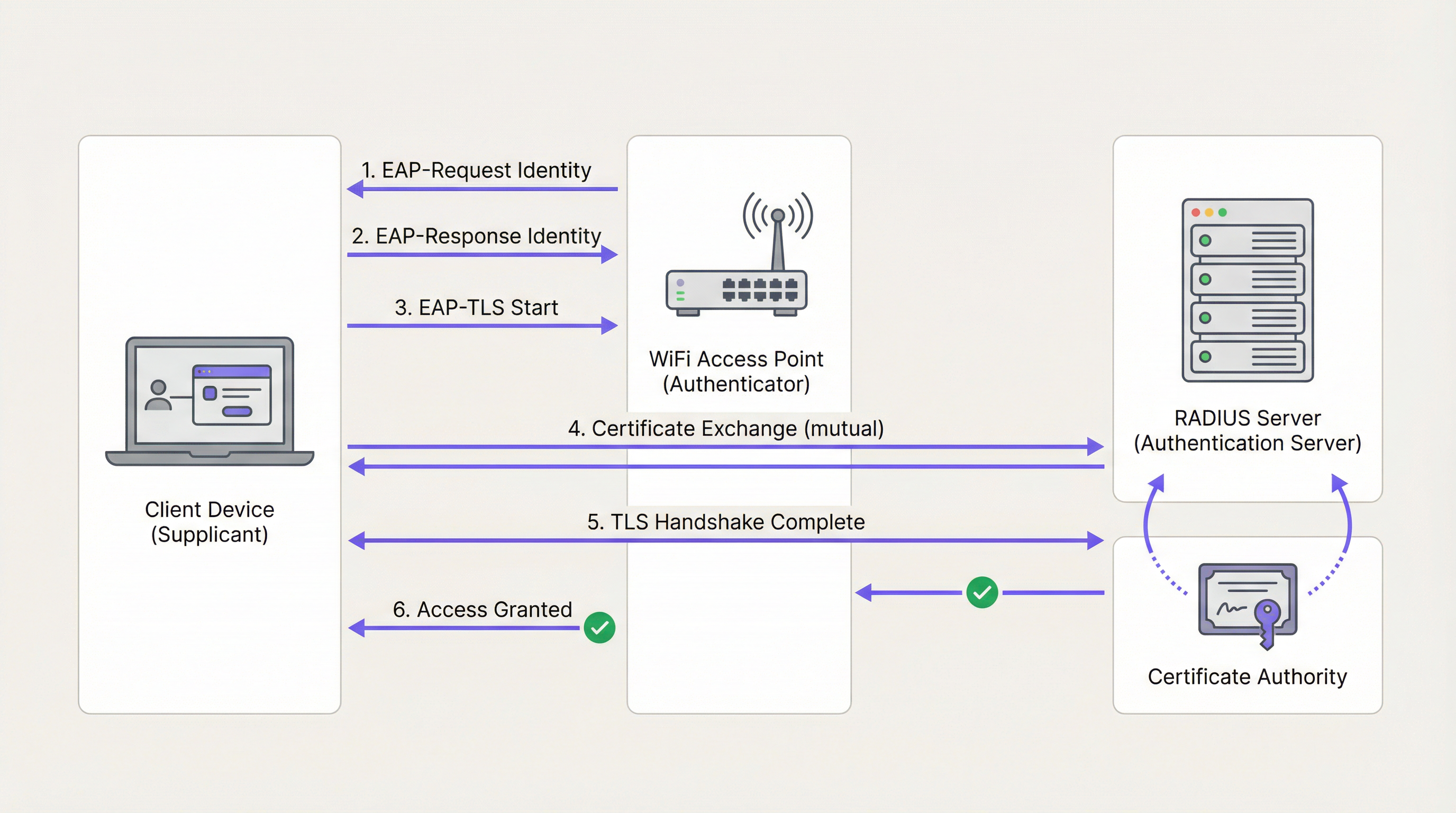
During the EAP-TLS handshake, which operates within the IEEE 802.1X framework, the RADIUS server first presents its Server Certificate to the client device. The device validates the certificate's signature against its trusted Root CA store. If valid, the device has cryptographic proof that it is connecting to the legitimate corporate network — not a rogue access point or evil twin. The client device then presents its own Client Certificate to the RADIUS server, which validates it against the CA. Once both parties are authenticated, a secure TLS tunnel is established and network access is granted. No passwords are transmitted, and no shared secrets exist to be stolen.
This architecture is also the foundation of WPA3-Enterprise, which mandates 192-bit security mode and relies on the same PKI and 802.1X underpinnings. For organisations deploying Wireless Access Points in high-security environments, WPA3-Enterprise with EAP-TLS represents the current best practice.
Public CA vs. Private CA: The Deployment Decision
One of the most consequential architectural decisions in a PKI deployment is the choice between a Public CA and a Private CA. The table below summarises the trade-offs.
| Criterion | Public CA | Private CA |
|---|---|---|
| Cost | Per-certificate fee (viable for a small number of servers) | Infrastructure cost, but no per-certificate fee at scale |
| Device Trust | Trusted by default on most OSes and devices | Requires Root CA to be pushed to all devices via MDM |
| Control | Limited; CA controls issuance policies | Full control over issuance, revocation, and lifecycle |
| Best Use Case | RADIUS Server Certificate | Client Certificates for managed corporate devices |
| Compliance | Auditable via public CT logs | Requires internal audit processes |
The recommended approach for most enterprise WiFi deployments is a hybrid model: use a Public CA for the RADIUS Server Certificate to ensure broad compatibility, and deploy a Private CA (such as Microsoft Active Directory Certificate Services or a cloud-based PKI provider) for issuing Client Certificates to managed devices at scale.
Implementation Guide
Step 1: Design the CA Architecture
Begin by mapping your certificate requirements. Identify the number of managed devices, the operating systems in use, and the MDM platform available. Determine whether a two-tier (Root CA + Intermediate CA) or three-tier hierarchy is appropriate for your organisation's scale and risk profile.
Step 2: Deploy and Secure the Root and Intermediate CAs
Establish the offline Root CA on a dedicated, air-gapped machine. Use the Root CA to sign the Intermediate CA certificate. Ensure the Intermediate CA is securely deployed in your data centre or cloud environment and integrated with your identity provider (IdP) or MDM solution. Store the Root CA private key in a Hardware Security Module (HSM) where budget permits.
Step 3: Configure the RADIUS Server
Install the Server Certificate on your RADIUS server. Configure the server to require EAP-TLS for the secure corporate SSID. Ensure the RADIUS server trusts the Intermediate CA that issued the Client Certificates, and configure it to perform revocation checking via OCSP.
Step 4: Distribute Certificates via MDM
Never attempt manual certificate installation at scale. Use an MDM platform such as Microsoft Intune or Jamf to push the Root CA certificate, the Intermediate CA certificate, and unique Client Certificates to all managed devices via automated policy. This ensures consistent deployment and enables automated renewal.
Step 5: Implement and Test Revocation Mechanisms
Configure Certificate Revocation Lists (CRLs) or the Online Certificate Status Protocol (OCSP). Test the revocation workflow end-to-end by revoking a test certificate and confirming the RADIUS server denies access within the expected timeframe. For environments requiring near-instant revocation — such as Retail POS networks — OCSP is mandatory.
Step 6: Monitor and Automate Lifecycle Management
Implement automated monitoring for certificate expiry across all tiers of the hierarchy. Configure alerts at 90, 60, and 30 days before expiry. Automate renewal at 60 days. This is the single most impactful operational step to prevent network outages.
Best Practices
Enforce Mutual Authentication Without Exception: Ensure client devices are configured to strictly validate the RADIUS server's certificate. Disabling server certificate validation — a common shortcut during initial deployment — leaves devices vulnerable to man-in-the-middle attacks and credential harvesting, and violates PCI DSS requirements.
Segregate Networks by Authentication Method: Use EAP-TLS for corporate and staff devices on a dedicated SSID. For public visitor access, deploy a robust captive portal solution like Guest WiFi on a fully segregated network. Do not attempt to deploy PKI to unmanaged guest devices.
Audit the PKI Infrastructure Regularly: Conduct quarterly audits of CA access controls, revocation lists, and certificate issuance logs. In Healthcare and Retail environments, this is a compliance requirement under HIPAA and PCI DSS respectively.
Integrate with Network Analytics: Once secure authentication is in place, layer on WiFi Analytics to gain visibility into device behaviour, connection patterns, and potential anomalies. A secure network is the foundation for trusted data.
Consider SD-WAN Integration: For multi-site deployments across hotel chains or retail estates, PKI integrates naturally with SD-WAN architectures. For context on how these technologies complement each other, see The Core SD-WAN Benefits for Modern Businesses.
Troubleshooting & Risk Mitigation
The table below maps common failure modes to their root causes and recommended mitigations.
| Symptom | Root Cause | Mitigation |
|---|---|---|
| Devices cannot connect; RADIUS logs show 'Unknown CA' | Client device does not trust the CA that issued the RADIUS server certificate | Push the Root CA to all devices via MDM |
| Sudden network-wide outage for all corporate devices | RADIUS Server Certificate or Intermediate CA certificate has expired | Implement automated monitoring and renewal; alert at 90/60/30 days |
| Stolen laptop can still access the network | CRL is stale or OCSP is not configured | Switch to OCSP for real-time revocation checking |
| New devices cannot connect after MDM enrolment | Client Certificate not yet pushed by MDM policy | Verify MDM policy assignment and force a device sync |
| Intermittent authentication failures | Clock skew between client and RADIUS server | Ensure all devices use NTP time synchronisation |
For a deeper understanding of 802.1X configuration and troubleshooting, the guide 802.1X Authentication: Securing Network Access on Modern Devices provides detailed vendor-neutral configuration guidance.
ROI & Business Impact
Transitioning to a PKI-backed EAP-TLS architecture delivers measurable business value for venue operators across multiple dimensions.
Risk Mitigation and Compliance: Eliminating password-based authentication removes the most common attack vector for network compromise. This directly reduces the likelihood of costly data breaches and simplifies compliance with PCI DSS (required for payment processing), GDPR (for data protection), and sector-specific regulations. For venues deploying IoT Sensors or location-based Wayfinding systems, a cryptographically secured network is a prerequisite for trusted data integrity.
Operational Efficiency: Automating certificate deployment via MDM eliminates the operational overhead of password management, reducing IT helpdesk tickets related to WiFi connectivity. In high-turnover environments such as hotels and retail, where staff onboarding and offboarding is frequent, automated certificate issuance and revocation provides significant time savings compared to managing shared credentials.
Foundation for Advanced Services: A secure, authenticated corporate network is the trusted foundation upon which advanced operational services are built. Whether deploying WiFi Analytics for footfall intelligence, Sensors for real-time occupancy data, or Wayfinding for large venues, each of these capabilities benefits from the integrity guarantees that PKI provides.
For Hospitality operators specifically, the combination of a secure staff network and a well-designed guest portal — as explored in Modern Hospitality WiFi Solutions Your Guests Deserve — represents the complete enterprise WiFi architecture. For Transport hubs and large public venues, the same principles apply at scale.
Key Terms & Definitions
Public Key Infrastructure (PKI)
A framework of roles, policies, hardware, software, and procedures needed to create, manage, distribute, use, store, and revoke digital certificates and manage public-key encryption.
The foundational architecture that must be in place before an IT team can deploy secure, certificate-based WiFi authentication using EAP-TLS.
Certificate Authority (CA)
A trusted entity that issues digital certificates, verifying the identity of the certificate subject and binding that identity to a public key with a cryptographic signature.
The central authority in your network that acts as the source of truth for all device and server identities. Without a trusted CA, no certificate-based authentication is possible.
X.509 Certificate
The standard format for public key certificates, defined in RFC 5280. Contains the subject identity, public key, issuer identity, validity period, and the CA's digital signature.
The actual digital passport installed on a laptop or server that proves its identity during the EAP-TLS handshake.
EAP-TLS (Extensible Authentication Protocol-Transport Layer Security)
An 802.1X authentication method that requires mutual certificate-based authentication between the client device (supplicant) and the authentication server (RADIUS). Defined in RFC 5216.
The most secure method for authenticating corporate devices to a WiFi network. Eliminates the need for passwords and provides cryptographic proof of identity for both parties.
Trust Chain
A hierarchical sequence of certificates used to authenticate an entity, starting from the leaf certificate and tracing upward through the Intermediate CA to the Root CA.
The mechanism by which a laptop verifies that a RADIUS server's certificate is legitimate. Each link in the chain is validated until a trusted Root CA is reached.
Certificate Revocation List (CRL)
A periodically published list of digital certificates that have been revoked by the issuing CA before their scheduled expiration date and should no longer be trusted.
A mechanism for blocking access from lost or stolen devices. CRLs are cached and updated on a schedule, meaning revocation may not be immediate — a limitation addressed by OCSP.
Online Certificate Status Protocol (OCSP)
An internet protocol (RFC 6960) used for obtaining the real-time revocation status of an X.509 digital certificate by querying the CA's OCSP responder.
The preferred revocation mechanism for high-security environments. Enables the RADIUS server to check certificate validity in real-time during each authentication attempt, providing near-instant revocation enforcement.
RADIUS (Remote Authentication Dial-In User Service)
A networking protocol that provides centralised Authentication, Authorisation, and Accounting (AAA) management for users and devices connecting to a network.
The central server in an enterprise WiFi deployment that validates certificates and makes the final access control decision. The RADIUS server is the operational core of an EAP-TLS deployment.
IEEE 802.1X
An IEEE standard for port-based Network Access Control (PNAC) that provides an authentication mechanism for devices wishing to attach to a LAN or WLAN.
The overarching framework within which EAP-TLS operates. Understanding 802.1X is essential for configuring access points and switches to enforce certificate-based authentication.
Mobile Device Management (MDM)
A software platform used by IT administrators to remotely manage, configure, and secure mobile devices and laptops across an organisation.
The essential operational tool for deploying certificates at scale. MDM platforms such as Microsoft Intune and Jamf automate the distribution of Root CA certificates, Intermediate CA certificates, and Client Certificates to all managed devices.
Case Studies
A 500-room luxury hotel in London needs to secure its staff WiFi network for housekeeping tablets and point-of-sale (POS) terminals. Currently, they use a single Pre-Shared Key (PSK) that has not been rotated in three years and is known to all permanent and agency staff. The IT Director has been tasked with transitioning to a certificate-based architecture before the next PCI DSS audit. How should this be approached?
Phase 1 — Architecture Design: Deploy a cloud-based Private PKI (e.g., Microsoft NDES via Intune, or a dedicated cloud PKI provider) integrated with the hotel's MDM platform. Obtain a RADIUS Server Certificate from a Public CA such as DigiCert.
Phase 2 — Infrastructure Deployment: Configure the RADIUS server with the new Server Certificate and enable EAP-TLS on a new hidden SSID designated for staff devices. Configure OCSP for real-time revocation checking.
Phase 3 — Device Enrolment: Use the MDM platform to push the Private Root CA, the Intermediate CA, and unique Client Certificates to all housekeeping tablets and POS terminals. Verify successful certificate installation on a pilot group of 20 devices before full rollout.
Phase 4 — Migration and Decommission: Migrate all devices to the new EAP-TLS SSID via MDM policy. Confirm connectivity across all device types. After a two-week parallel running period, decommission the legacy PSK network.
Phase 5 — Operational Handover: Document the certificate lifecycle, revocation procedures, and MDM policies. Configure automated expiry alerts and schedule quarterly PKI audits.
A national retail chain is deploying EAP-TLS across 200 stores. During pilot testing across five stores, the IT team discovers that when a store manager's laptop is reported stolen and the certificate is revoked in the PKI system, the device can still successfully authenticate to the corporate WiFi for up to 18 hours after revocation. The security team considers this an unacceptable risk given that the device may have access to inventory management systems. How should this be resolved?
The 18-hour delay is caused by the RADIUS server relying on a cached, infrequently downloaded Certificate Revocation List (CRL). CRLs are typically published on a schedule (e.g., every 24 hours) and cached by the RADIUS server, meaning revocation is not reflected in real-time.
The resolution is to reconfigure the RADIUS server to use the Online Certificate Status Protocol (OCSP) as the primary revocation checking mechanism. OCSP allows the RADIUS server to query the CA's OCSP responder in real-time during each EAP-TLS handshake, receiving an immediate 'good', 'revoked', or 'unknown' response for the specific certificate being presented.
Configuration steps: (1) Ensure the Private CA is configured with an OCSP responder endpoint. (2) Update the RADIUS server configuration to query the OCSP endpoint for every authentication attempt. (3) Configure OCSP stapling where supported to reduce latency. (4) Test by revoking a certificate and confirming the RADIUS server denies access within 60 seconds.
Scenario Analysis
Q1. Your organisation is migrating from PEAP-MSCHAPv2 (username and password) to EAP-TLS for the corporate WiFi. The network team proposes using the existing Active Directory Certificate Services (AD CS) infrastructure to issue certificates to both the RADIUS servers and all corporate laptops. A member of the team points out that the organisation also has 50 contractor laptops that are not domain-joined. What is the primary compatibility risk, and how should it be addressed?
💡 Hint:Consider how non-domain joined devices will validate the RADIUS server's identity when it presents a certificate signed by your Private AD CS Root CA.
Show Recommended Approach
The primary risk is that the 50 non-domain joined contractor laptops will not have the private AD CS Root CA in their trusted certificate store. When the RADIUS server presents its Server Certificate during the EAP-TLS handshake, these devices will receive an 'Untrusted Certificate' error and fail to connect. The recommended resolution is to obtain the RADIUS Server Certificate from a Public CA (such as DigiCert or Sectigo) rather than the private AD CS. Public CA roots are pre-installed in the trust stores of all major operating systems, ensuring compatibility with both domain-joined and non-domain joined devices. The private AD CS should be retained solely for issuing Client Certificates to managed, domain-joined devices.
Q2. During a compliance audit for a large NHS hospital trust, the auditor notes that the Root CA is running as a virtual machine in the primary data centre and is permanently connected to the hospital's internal network. The auditor flags this as a critical finding. What architectural change must be implemented, and why is the current configuration a significant risk?
💡 Hint:Consider what would happen to every certificate in the organisation if the Root CA's private key were compromised by a ransomware attack or insider threat.
Show Recommended Approach
The Root CA must be immediately taken offline and air-gapped. The current configuration is a critical risk because the Root CA's private key is exposed to network-based attacks, including ransomware, lateral movement from a compromised domain account, or insider threats. If the Root CA's private key is stolen or used to sign malicious certificates, the entire PKI infrastructure — and therefore every certificate-authenticated system in the trust — is compromised. Recovery would require revoking the Root CA and re-issuing every certificate in the organisation, a catastrophic operational event. The correct architecture requires the Root CA to be powered on only when signing or revoking an Intermediate CA certificate, with all day-to-day issuance handled by an online Intermediate CA. The Root CA's private key should be stored in a Hardware Security Module (HSM).
Q3. A large conference centre operator wants to implement certificate-based authentication for both their permanent IT staff and the thousands of exhibitors and visitors who attend events. They ask you to design a single PKI infrastructure to serve both groups. What is your recommendation, and why?
💡 Hint:Consider the operational feasibility of distributing certificates to thousands of unmanaged, temporary visitors who may attend an event for a single day.
Show Recommended Approach
You should strongly advise against using PKI and EAP-TLS for public visitors and exhibitors. Certificate-based authentication requires installing a Client Certificate and often a Root CA profile on the end-user device, which is operationally impossible for unmanaged, temporary devices and creates an extremely poor user experience. EAP-TLS should be strictly reserved for permanent IT staff using managed corporate devices enrolled in the organisation's MDM platform. For exhibitors and visitors, a captive portal solution should be deployed on a completely separate, segregated SSID. This two-network architecture — secure EAP-TLS for staff, captive portal for guests — is the industry standard for venue operators and is the model supported by Purple's platform.
Q4. An IT manager at a retail chain has successfully deployed EAP-TLS across all 150 stores. Six months later, the RADIUS server at 12 stores simultaneously stops accepting client connections. Investigation reveals no certificate revocations have occurred. What is the most likely cause, and what process failure allowed this to happen?
💡 Hint:Consider what all 12 affected stores might have in common from a certificate perspective, and what event could cause simultaneous failures.
Show Recommended Approach
The most likely cause is that the Intermediate CA certificate — or the RADIUS Server Certificate — has expired. If all 12 stores were configured using the same Intermediate CA or the same batch of RADIUS Server Certificates issued at the same time, they would all expire simultaneously. This is a lifecycle management failure: the organisation did not implement automated certificate expiry monitoring and alerting. The resolution requires renewing the expired certificate(s) and immediately implementing automated monitoring with alerts at 90, 60, and 30 days before expiry for all certificates in the hierarchy, including the Intermediate CA, the RADIUS Server Certificate, and the Root CA.
Key Takeaways
- ✓PKI is the cryptographic trust framework that must be in place before deploying EAP-TLS or WPA3-Enterprise certificate-based WiFi authentication.
- ✓The trust chain has three tiers: an offline Root CA (the trust anchor), an online Intermediate CA (the operational issuer), and Leaf Certificates installed on servers and client devices.
- ✓EAP-TLS provides mutual authentication — the client verifies the network and the network verifies the client — eliminating the password-based attack surface entirely.
- ✓Use a Public CA for your RADIUS Server Certificate (for broad device compatibility) and a Private CA for Client Certificates (for cost control and lifecycle management at scale).
- ✓Always keep the Root CA offline and air-gapped; if it is compromised, the entire PKI infrastructure must be rebuilt from scratch.
- ✓Implement OCSP for real-time certificate revocation checking — CRL-based revocation introduces unacceptable delays in high-security environments.
- ✓Automate certificate lifecycle management via MDM and monitoring tools; expired certificates are the leading cause of EAP-TLS network outages.




