

Port Forwarding for WiFi Controllers: A Configuration Guide
This guide provides a technical reference for network architects and IT managers on configuring port forwarding for on-premise WiFi controllers. It covers when port forwarding is necessary, which ports are required for major vendors, and how to mitigate the associated security risks to ensure a secure and scalable deployment.
🎧 Listen to this Guide
View Transcript

Executive Summary
For enterprise organisations managing WiFi across multiple sites with an on-premises Wireless LAN Controller (WLC), secure and reliable connectivity is a primary operational concern. When access points (APs) are located at remote branches, separated from the central controller by the internet, a method for enabling their communication is required. This guide addresses the use of port forwarding (inbound NAT) as that method. We will explore the critical decision framework for when to use port forwarding versus more secure alternatives like VPNs or cloud-managed architectures. The document provides a vendor-neutral overview of the essential ports required for CAPWAP tunnels, management access, and authentication services, including specific port lists for Cisco, Ruckus, and Ubiquiti controllers. Crucially, we detail the significant security risks—from expanded attack surfaces to compliance violations under PCI DSS and GDPR—and provide actionable best practices for risk mitigation. This includes firewall rule configuration, network segmentation in a DMZ, and the principle of least privilege. The objective is to equip network architects and IT directors with the knowledge to implement a robust, secure, and high-performing multi-site WiFi architecture that supports business objectives without compromising network integrity.
Technical Deep-Dive
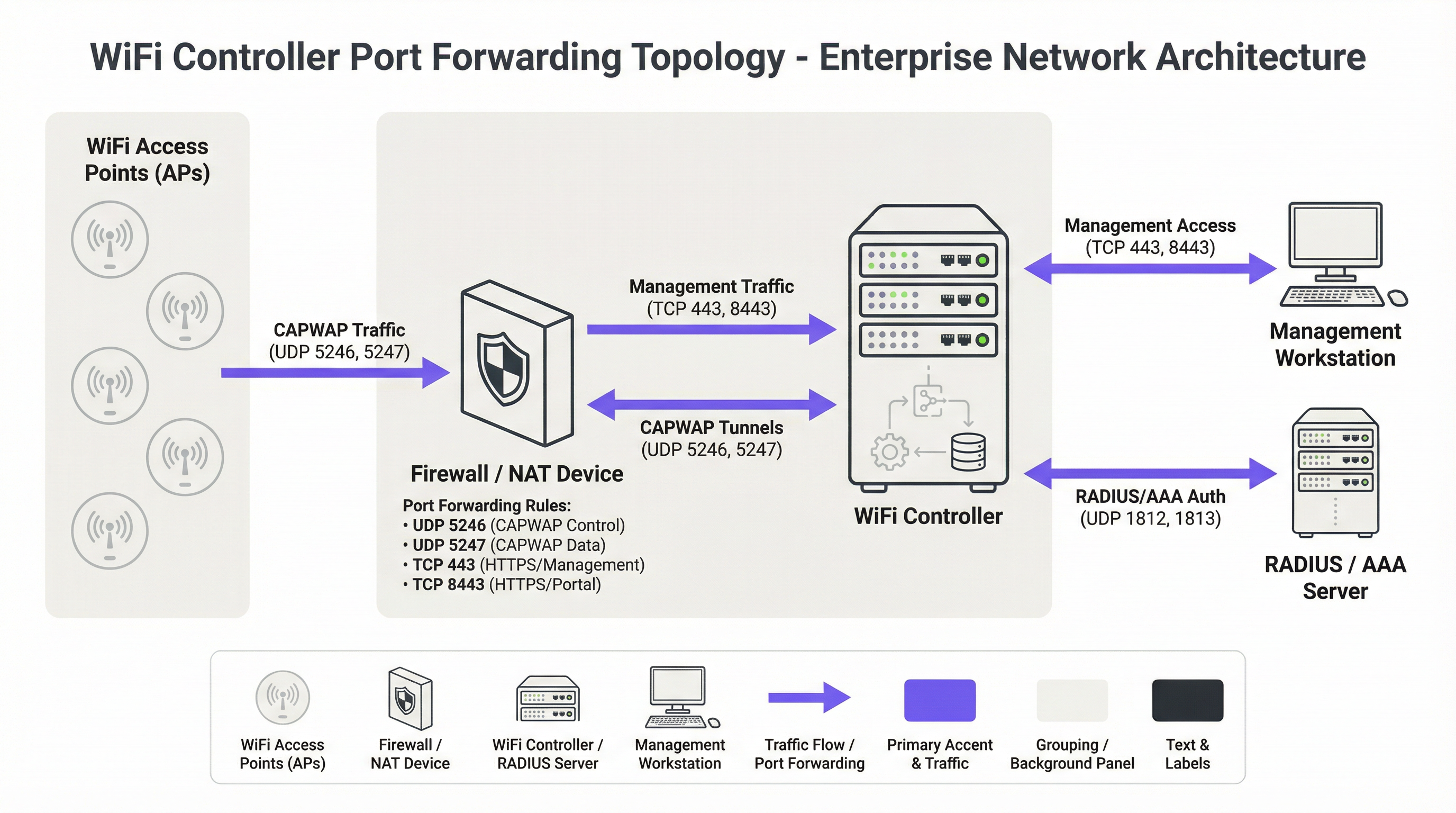
The foundational protocol for modern centralised WiFi architectures is the Control and Provisioning of Wireless Access Points (CAPWAP) protocol, standardised in RFC 5415 [1]. CAPWAP enables a WLC to manage and control a fleet of APs, creating a unified network fabric. The protocol is designed to traverse routers and firewalls, making it suitable for multi-site deployments. Communication occurs over two primary UDP channels:
- CAPWAP Control (UDP 5246): This channel is used for all management and control functions between the AP and the WLC. This includes configuration pushes, firmware updates, and status monitoring. Per the standard, this control channel is mandatorily secured using Datagram Transport Layer Security (DTLS) encryption, providing a secure tunnel for management commands.
- CAPWAP Data (UDP 5247): In deployments where client traffic is tunnelled back to the controller (as opposed to being bridged locally at the AP), this channel carries the encapsulated user data. While encryption for this channel is optional in the standard, best practice dictates that it should also be secured with DTLS to protect client data in transit.
When an AP is behind a NAT device, it discovers the WLC's public IP address (often via DNS or a DHCP option) and initiates a CAPWAP connection. The firewall fronting the WLC must be configured with port forwarding rules to direct these incoming UDP packets to the controller's private IP address.
Beyond the core CAPWAP protocol, several other ports are necessary for a fully functional deployment:
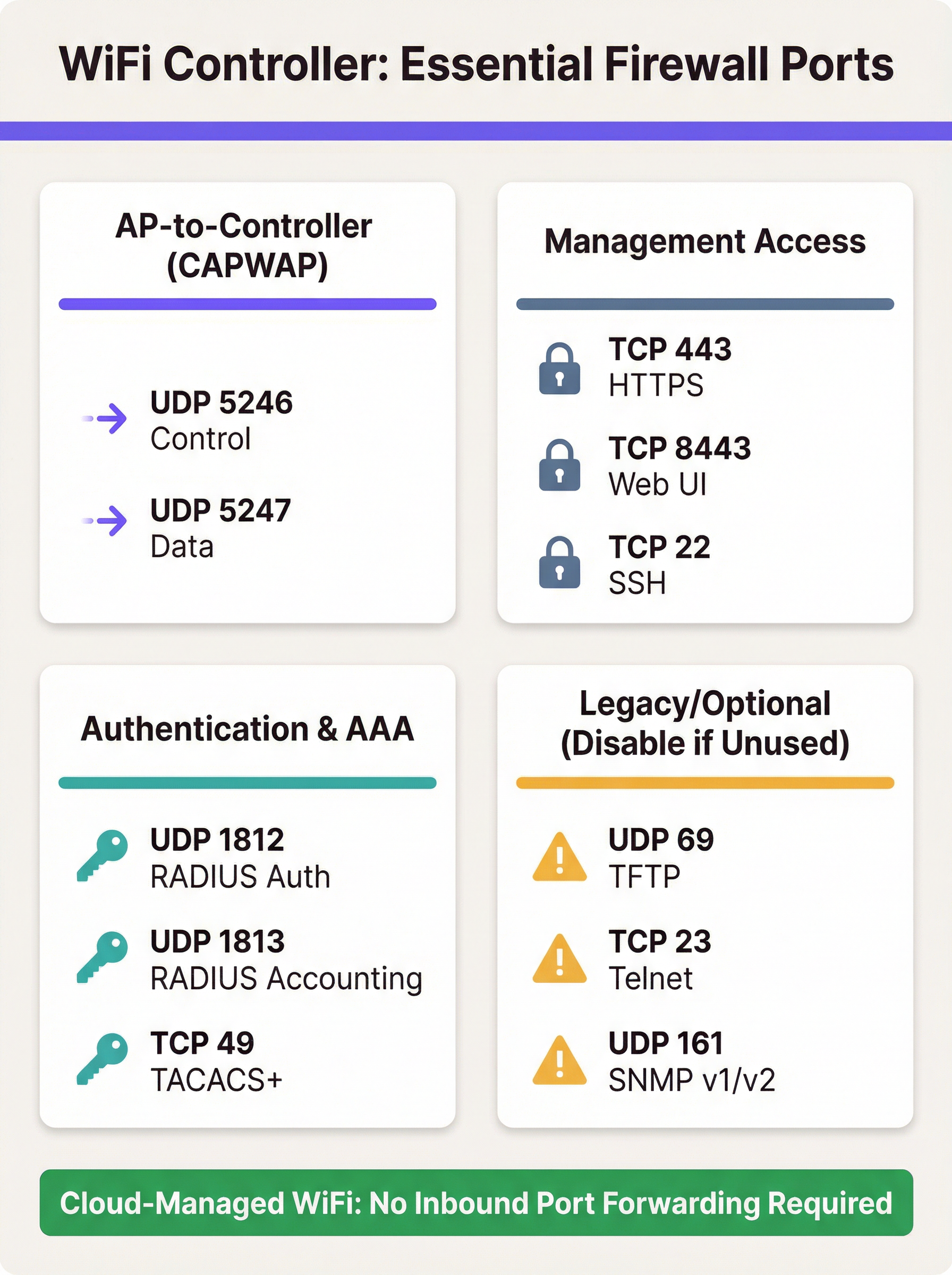
- Management Access: Administrators require access to the controller's management interface. This is typically provided via HTTPS (TCP 443 or, on some platforms like Ruckus and Ubiquiti, TCP 8443). Secure Shell (TCP 22) provides CLI access. Exposing these ports to the internet is a primary security concern and access should be heavily restricted.
- Authentication (AAA): For enterprise-grade security using WPA2/WPA3-Enterprise, the WLC must communicate with a RADIUS server. This requires UDP 1812 (Authentication) and UDP 1813 (Accounting). If the RADIUS server is external to the local network, these ports must be forwarded.
- Guest & Captive Portals: If a captive portal is used for guest access, the WLC must be able to communicate with it. For external portals like Purple, this often means allowing inbound HTTPS traffic from the portal's servers to the controller to process authentication and session information.
Vendor-Specific Port Requirements
While CAPWAP is a standard, vendors implement additional ports for specific features. The table below summarises common default ports for major on-premises controller platforms. It is not exhaustive and you must consult your vendor's latest documentation.
| Vendor/Platform | Protocol | Port | Purpose |
|---|---|---|---|
| Cisco WLC | UDP | 5246/5247 | CAPWAP Control/Data |
| TCP | 443 | HTTPS Management | |
| EoIP | 97 | Mobility/Anchor Tunnels | |
| UDP | 16666 | Mobility (Unsecured) | |
| Ruckus SmartZone | UDP | 12223 | LWAPP Discovery |
| TCP | 91/443 | AP Firmware Upgrade | |
| TCP | 8443 | HTTPS Web UI | |
| TCP | 22 | SSH Management | |
| Ubiquiti UniFi | TCP | 8080 | Device Inform |
| TCP | 8443 | HTTPS Web UI/API | |
| UDP | 3478 | STUN (NAT Traversal) | |
| UDP | 10001 | AP Discovery |
Implementation Guide
Implementing port forwarding for a WLC requires a methodical approach focused on security. The goal is to enable remote AP connectivity while exposing the absolute minimum necessary to the internet.
Step 1: Architecture & Network Placement
The most critical decision is where to place the WLC. It should never be placed on the trusted corporate LAN. The best practice is to create a dedicated network segment, or Demilitarised Zone (DMZ), for the controller. This isolates the WLC and ensures that even if it were compromised, the attacker would not have direct access to the internal corporate network. The firewall policy should then be configured to strictly control traffic between the DMZ, the internet, and the trusted LAN.
Step 2: Firewall Configuration
- Create NAT and Port Forwarding Rules: For each required port, create a Destination NAT (DNAT) rule that translates the firewall's public IP address and the external port to the WLC's private IP address in the DMZ and the corresponding internal port.
- Create Inbound Access Rules: This is the most important security step. Create firewall rules to allow traffic to the forwarded ports, but always specify the source IP address. For CAPWAP ports, the source should be the public IP addresses of your remote sites. For management ports (HTTPS/SSH), the source must be restricted to a whitelist of trusted IP addresses, such as your corporate office or a dedicated management jump host.
Security Warning: A common and dangerous mistake is to leave the source address as 'Any' or '0.0.0.0/0'. This exposes your controller's management interface to the entire internet, inviting brute-force attacks.
- Block Unnecessary Protocols: Explicitly create rules that deny all other traffic to the WLC's public IP. Additionally, ensure that insecure protocols like Telnet (TCP 23) and TFTP (UDP 69) are disabled on the controller itself and blocked at the firewall.
- Enable Stateful Inspection: Ensure your firewall is operating in a stateful mode. This means it tracks the state of connections and will automatically deny unsolicited inbound packets that are not part of a recognised session.
Step 3: Controller Configuration
On the WLC, ensure that the public IP address of the firewall is configured as the controller's primary interface or NAT'd address. This allows the controller to correctly build the CAPWAP responses so they can be routed back to the APs. Ensure that features like DTLS encryption for CAPWAP are enabled.
Best Practices
- Prefer Alternatives: The most secure approach is to avoid direct port forwarding. If feasible, implement a site-to-site VPN between remote locations and the controller's data centre. This encapsulates all traffic in a secure tunnel, eliminating the need for public-facing ports.
- Embrace the Cloud: For new deployments or hardware refreshes, strongly consider a cloud-managed WiFi solution (e.g., Cisco Meraki, Ruckus One, Aruba Central). These platforms are designed so that APs initiate outbound connections to the cloud, removing the need for any inbound firewall rules and simplifying management.
- Regular Audits: As mandated by PCI DSS Requirement 1.1.6, firewall and router rule sets should be reviewed at least every six months. This process should verify the business justification for each rule and ensure they are as restrictive as possible.
- Use Strong Authentication: Protect management interfaces with multi-factor authentication (MFA) where possible. Use strong, complex passwords and change them regularly.
- Logging and Monitoring: Forward firewall and WLC logs to a central SIEM (Security Information and Event Management) system. Monitor for anomalous connection attempts, repeated failed logins, and unexpected traffic patterns.
Troubleshooting & Risk Mitigation
Common Failure Mode: APs Fail to Join Controller
- Symptom: APs at a remote site are stuck in a discovery loop and never appear in the controller dashboard.
- Troubleshooting:
- Verify basic network connectivity from the remote site to the controller's public IP (ping, traceroute).
- Check the firewall logs at the controller side. Are you seeing the inbound UDP 5246 packets from the AP's public IP? Are they being allowed or dropped?
- Verify the NAT/port forwarding rules are correctly configured for the WLC's private IP.
- Ensure there isn't a second layer of NAT at the remote site (double NAT) that could be interfering with the connection.
Risk: Controller Compromise
- Scenario: A vulnerability is discovered in the WLC's web management interface, and your port forwarding rule for TCP 443 has a source of 'Any'.
- Mitigation: This highlights the criticality of restricting source IPs. If the source is limited to your office IPs, the vulnerability is not exploitable from the wider internet. This is a classic example of defence-in-depth. Further mitigation includes placing the WLC in a DMZ to limit the attacker's lateral movement and applying security patches from the vendor in a timely manner.
Risk: Compliance Violations
- Scenario: A PCI DSS audit finds that the WLC is managing APs in a retail store that processes credit card payments, and the WLC is not properly segmented from the Cardholder Data Environment (CDE).
- Mitigation: Network segmentation is non-negotiable for PCI DSS compliance [2]. The wireless network used by payment terminals must be isolated from all other networks, including guest and corporate WiFi. The WLC itself must be considered in-scope for the audit if it can impact the security of the CDE. For GDPR, guest WiFi data is personal data, and network design must prevent unauthorised access to it [3].
ROI & Business Impact
While a technical topic, the choice of WiFi architecture has direct business implications. An on-premises controller model can represent a significant capital expenditure, but it offers granular control and keeps all data within the organisation's infrastructure. The operational cost of this model includes the staff time required to manage, secure, and audit the firewall and controller configuration. A security breach resulting from a poorly configured firewall can lead to significant financial losses, reputational damage, and regulatory fines.
In contrast, a cloud-managed solution shifts the cost model from CapEx to OpEx (recurring subscription fees). The ROI is realised through reduced IT overhead—no on-premises hardware to maintain, no complex firewall rules to manage for controller access, and faster deployment of new sites. For many distributed enterprises like retail chains or hospitality groups, the total cost of ownership (TCO) and improved security posture of a cloud-managed platform provide a compelling business case, justifying the migration from a legacy on-premises architecture.
References
[1] IETF, RFC 5415: Control And Provisioning of Wireless Access Points (CAPWAP) Protocol Specification, https://datatracker.ietf.org/doc/html/rfc5415 [2] PCI Security Standards Council, PCI DSS v4.0, https://www.pcisecuritystandards.org/document_library/ [3] General Data Protection Regulation (GDPR), https://gdpr-info.eu/
Key Terms & Definitions
Port Forwarding (Inbound NAT)
A network configuration that directs traffic from a specific port on a public-facing firewall or router to a specific port on a private device within the internal network.
IT teams use this to make an on-premise WiFi controller, which has a private IP address, accessible to access points located across the public internet.
CAPWAP (Control and Provisioning of Wireless Access Points)
An IETF standard protocol (RFC 5415) that enables a central controller to manage a collection of wireless access points. It operates over UDP ports 5246 (Control) and 5247 (Data).
This is the fundamental protocol that facilitates communication between APs and the WLC. Understanding its port requirements is the first step in configuring the firewall.
DMZ (Demilitarized Zone)
A perimeter network segment that is isolated from an organization's trusted internal LAN. It is used to host public-facing services and adds a layer of security.
Placing a WiFi controller in a DMZ is a critical best practice. If the controller is compromised, the attacker is contained within the DMZ and does not have direct access to the corporate network.
Stateful Firewall
A firewall that tracks the state of active network connections and makes decisions based on the context of the traffic, not just on individual packets.
A stateful firewall is essential for secure port forwarding, as it will only allow return traffic from the WLC to an AP if it is part of an established CAPWAP session, preventing unsolicited inbound traffic.
PCI DSS
The Payment Card Industry Data Security Standard, a set of security standards designed to ensure that all companies that accept, process, store or transmit credit card information maintain a secure environment.
For any organization in retail or hospitality, ensuring the WiFi architecture complies with PCI DSS is non-negotiable. This heavily influences decisions around network segmentation and firewall configuration.
RADIUS (Remote Authentication Dial-In User Service)
A client/server protocol that provides centralized Authentication, Authorization, and Accounting (AAA) management for users who connect and use a network service.
In enterprise WiFi, RADIUS is used to enable WPA2/WPA3-Enterprise security (802.1X). The WLC acts as a RADIUS client, and firewall rules must allow it to communicate with the RADIUS server on UDP ports 1812 and 1813.
Cloud-Managed WiFi
A WiFi architecture where access points are managed by a controller platform that is hosted in the cloud by the vendor (e.g., Cisco Meraki, Aruba Central).
This architecture is a direct alternative to on-premise controllers. It simplifies deployment and eliminates the need for port forwarding because APs initiate outbound connections to the cloud, which is a more secure default posture.
Source IP Whitelisting
The practice of configuring a firewall rule to only allow traffic from a specific, pre-approved list of source IP addresses.
This is the single most important security control when port forwarding. Restricting management access (HTTPS/SSH) to a whitelist of office or VPN IPs drastically reduces the risk of unauthorized access.
Case Studies
A 250-room hotel needs to provide guest WiFi and support internal staff devices (housekeeping tablets, PoS systems). They have an on-premise Cisco 3504 WLC in their server room and want to ensure PCI DSS compliance while offering a seamless guest experience with a Purple captive portal.
- Network Segmentation: The WLC is placed in a new DMZ VLAN (e.g., VLAN 100). Three new wireless LANs are created: 'GUEST_WIFI' (VLAN 101), 'STAFF_CORP' (VLAN 102), and 'POS_SECURE' (VLAN 103). Firewall rules are configured to completely isolate these VLANs from each other. The POS_SECURE network is isolated from the internet, except for traffic to the payment processor.
- Firewall & Port Forwarding: No ports are forwarded from the public internet to the WLC. Instead, a rule is created to allow inbound HTTPS (TCP 443) traffic only from the specific IP range provided by Purple for their captive portal service. This allows the portal to communicate with the controller to authorize guest sessions. All other inbound traffic to the WLC is blocked.
- PCI DSS Compliance: The 'POS_SECURE' WLAN is configured with WPA2-Enterprise and 802.1X authentication. The firewall policy ensures this network segment is completely isolated from the guest and corporate staff networks, meeting PCI DSS Requirement 1.2.3. The WLC itself is considered in-scope and hardened according to PCI guidelines.
A retail chain with 50 stores has a central Ruckus SmartZone controller at its headquarters. Each store has 5-10 APs that need to connect back to the HQ controller over the public internet. The IT team needs to manage the controller remotely.
- VPN as Primary Choice: The recommended solution is to deploy a small firewall/VPN gateway at each retail store to create a site-to-site IPsec VPN back to the HQ firewall. All AP traffic is then routed over the secure VPN tunnel. This requires no inbound port forwarding at the HQ, making it the most secure option.
- Port Forwarding as Fallback: If VPN is not feasible due to cost or technical constraints, a port forwarding approach is used. At the HQ firewall, DNAT rules are created to forward UDP 12223 (for discovery) and TCP 91/443 (for firmware) to the SmartZone controller. Crucially, the source for these rules is a list of the static public IP addresses of all 50 stores. A separate rule forwards TCP 8443 for management, with the source restricted to the IT team's office IP.
- AP Configuration: The APs at each store are configured with the public IP address of the HQ firewall as their controller address. They will then initiate the connection, which will be forwarded to the internal SmartZone controller.
Scenario Analysis
Q1. You are deploying a new WiFi network for a conference center. The client wants to use Purple for guest analytics and has an existing on-premise Aruba Mobility Controller. What is the most critical firewall rule you need to configure to allow the Purple captive portal to function?
💡 Hint:Consider the communication flow. The external service needs to talk to the internal controller. What IP addresses are involved?
Show Recommended Approach
The most critical rule is to allow inbound HTTPS (TCP 443) traffic from Purple's specific public IP address range to the Aruba controller's public-facing IP. You must obtain this IP range from Purple's documentation or support. A rule with a source of 'Any' would be a major security risk. You would then create a DNAT rule to forward this traffic to the controller's internal IP address in the DMZ.
Q2. A junior network engineer has configured port forwarding for a new remote office. The APs are online, but he tells you he opened TCP port 23 to the controller from 'Any' source IP to "make troubleshooting easier." What is the immediate risk, and what is your instruction to him?
💡 Hint:TCP port 23 is for Telnet. What are the security characteristics of this protocol?
Show Recommended Approach
The immediate risk is severe. Telnet is an unencrypted protocol, meaning the username and password for the controller are sent in clear text. Exposing this to the entire internet makes the controller highly vulnerable to credential theft and compromise. The instruction is to immediately disable the firewall rule, disable the Telnet service on the controller itself, and use SSH (TCP 22) for all CLI management, with the source IP restricted to a trusted management network.
Q3. Your CFO is questioning the subscription cost for a cloud-managed WiFi solution for 100 new retail stores, arguing that buying on-premise controllers is a cheaper one-time cost. How do you explain the ROI of the cloud solution from a security and operational perspective?
💡 Hint:Think about the Total Cost of Ownership (TCO), not just the initial purchase price. What ongoing work is required for an on-premise, multi-site deployment?
Show Recommended Approach
The ROI of a cloud-managed solution extends beyond the initial hardware cost. Operationally, it eliminates the significant staff overhead required to configure, manage, and audit complex firewall rules and VPNs for 100 separate locations. This accelerates deployment and reduces ongoing labor costs. From a security perspective, the cloud model has a fundamentally lower risk profile. It removes the need for any inbound port forwarding, drastically reducing the network's attack surface and simplifying compliance with standards like PCI DSS. The subscription cost effectively outsources the security and maintenance of the management platform to the vendor, leading to a lower TCO and a more secure, scalable network.
Key Takeaways
- ✓Port forwarding is required for on-premise WiFi controllers when APs are at remote sites across the internet.
- ✓The core protocols are CAPWAP (UDP 5246/5247), but management (TCP 443/8443) and AAA (UDP 1812/1813) ports are also needed.
- ✓Cloud-managed WiFi and site-to-site VPNs are more secure alternatives that eliminate the need for port forwarding.
- ✓If you must use port forwarding, place the controller in a DMZ and strictly whitelist source IP addresses.
- ✓Never expose insecure protocols like Telnet (TCP 23) or TFTP (UDP 69) to the internet.
- ✓Regularly audit firewall rules to ensure they are necessary and as restrictive as possible, as required by PCI DSS.
- ✓Failing to properly segment networks can lead to serious security breaches and compliance violations (PCI DSS, GDPR).




