

How to Set Up Purple WiFi for the First Time: A Technical Overview
This technical reference guide provides IT managers, network architects, and CTOs with a comprehensive overview of the Purple WiFi platform's initial setup process. It covers the core technical architecture, hardware integration, portal configuration, and best practices for a successful deployment in enterprise environments like hotels, retail, and stadiums. Following this guide, IT teams can confidently deploy a secure, GDPR-compliant guest WiFi solution that delivers both seamless connectivity and actionable business intelligence.
🎧 Listen to this Guide
View Transcript
Executive Summary
Deploying a new guest WiFi solution in an enterprise environment requires a clear understanding of the technical architecture, implementation steps, and potential return on investment. This guide serves as a technical overview for IT professionals tasked with setting up the Purple WiFi intelligence platform for the first time. It details the seven-phase cloud-based deployment model, which leverages existing network infrastructure to minimise on-premises hardware footprint. The process begins with account registration and culminates in a live, data-capturing guest WiFi network. Key considerations covered include network segmentation for security, RADIUS-based authentication for access control, and walled garden configuration for a seamless user experience. The guide also explores the platform's extensive hardware compatibility, supporting over 50 leading vendors including Cisco, Aruba, and Ruckus. By following the outlined steps, organisations can expect to deploy a secure, compliant, and scalable guest WiFi solution that not only provides seamless connectivity but also delivers rich analytics and business intelligence to drive operational efficiency and enhance customer engagement. The expected outcome is a robust guest WiFi network that meets the stringent security and compliance demands of the modern enterprise whilst unlocking valuable data-driven insights into visitor behaviour.
Technical Deep-Dive
At its core, Purple is a cloud-hosted platform that acts as an intelligent overlay for your existing WiFi hardware. Unlike traditional on-premises solutions that require dedicated server infrastructure for RADIUS, portal hosting, and analytics, Purple's architecture centralises all of these functions in the cloud. This model significantly reduces the complexity and total cost of ownership of deployment, as there is no need for dedicated on-site servers. The primary technical components are the Purple Cloud Platform — which houses the analytics engine, RADIUS server, and portal management system — the venue's local network infrastructure, and the end-user's guest devices.
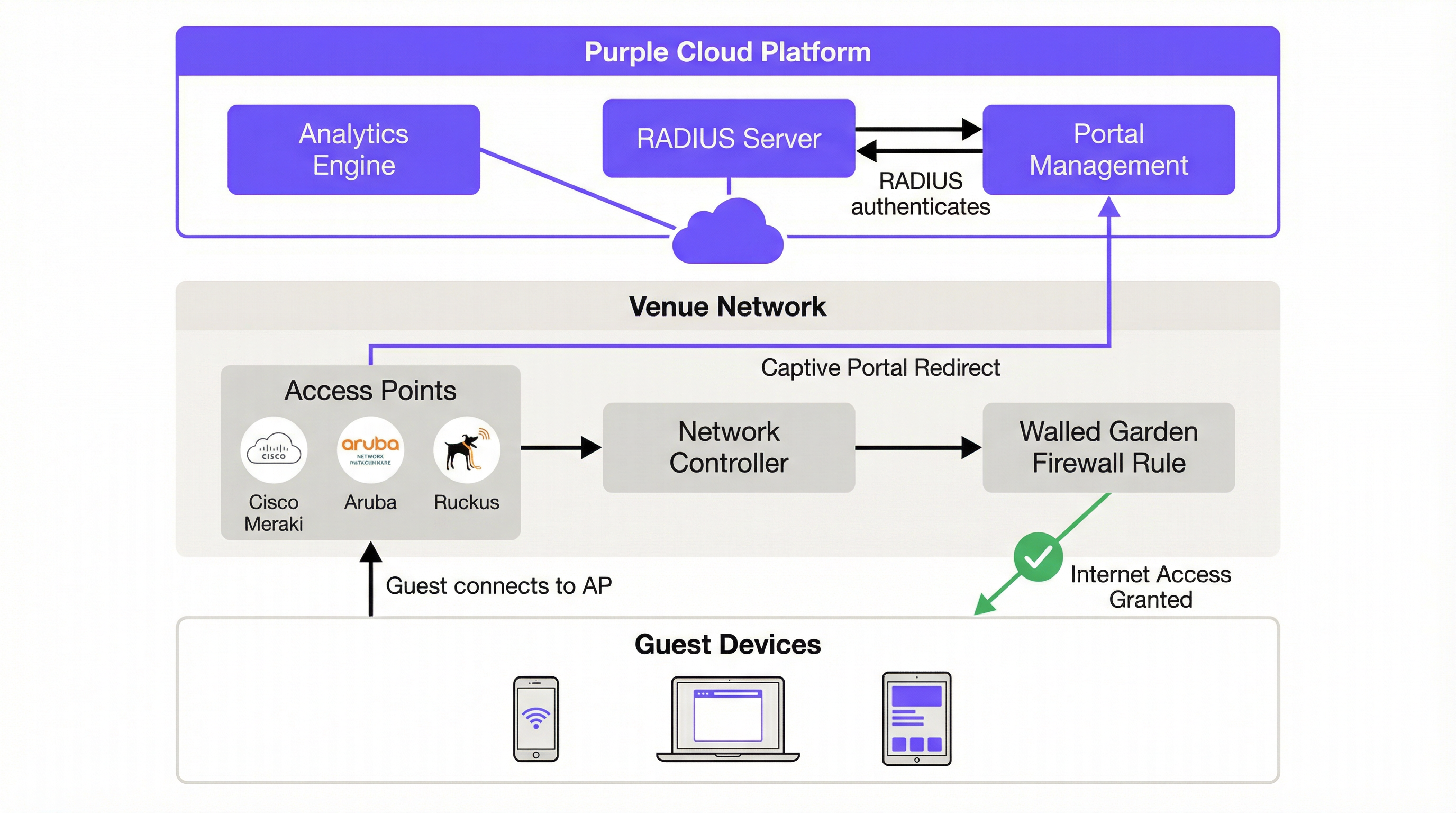
The authentication flow begins the moment a guest connects to the designated SSID. The device's Captive Network Assistant (CNA) automatically attempts to contact a predefined URL — captive.apple.com on iOS, or connectivitycheck.gstatic.com on Android — to determine whether the network provides unrestricted internet access. The on-premises network controller intercepts this request and, based on the captive portal rules you configure, redirects the user's browser to Purple's cloud-hosted splash page. This HTTP 302 redirect is the fundamental mechanism that initiates the guest's authentication journey.
Before authentication, the user exists in a 'walled garden' environment — a firewall policy that restricts their access to a specific set of whitelisted domains. This walled garden must include Purple's portal domain, any social login providers (Facebook, Google), and their associated content delivery networks (CDNs). The precision of this configuration is critical. An incomplete walled garden is the single most common cause of deployment failures, as it prevents the portal from loading or breaks the OAuth flow for social logins.
Authentication itself is handled by Purple's cloud-based RADIUS (Remote Authentication Dial-In User Service) server, operating in accordance with the IEEE 802.1X standard. When a user submits their credentials via the captive portal — whether through a social login, a form fill, a voucher code, or simply accepting terms and conditions — the request is processed by Purple's platform. The cloud RADIUS server validates the request and sends an 'Access-Accept' message back to the on-premises network controller, which then opens the firewall rule and grants the device full internet access. A unique session key is assigned to each authenticated session, preventing network sniffing and protecting user data in transit. This entire flow is transparent to the end user, who simply sees a login page and, moments later, a connected device.
For enterprise deployments that require a higher security posture, Purple also supports SecurePass, which leverages WPA2-Enterprise (IEEE 802.1X with EAP) for certificate-based or credential-based authentication without a captive portal. This is particularly relevant for corporate guest networks where IT policy mandates stronger authentication than a simple form fill.
Implementation Guide
The implementation of Purple WiFi follows a structured, seven-step process designed for clarity and efficiency. Following these steps methodically ensures a smooth and successful deployment, whether you are configuring a single venue or rolling out across a multi-site estate.
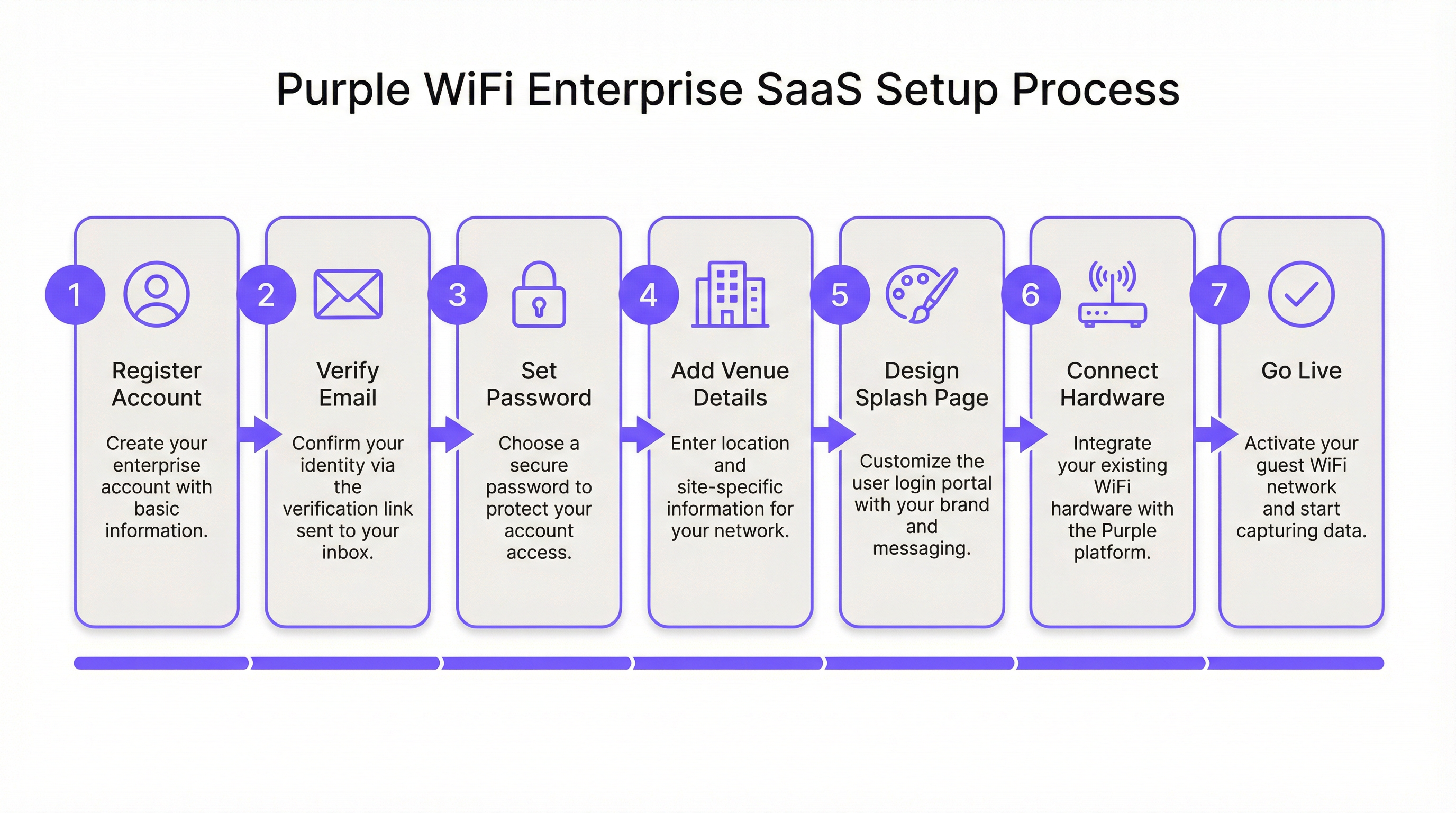
Step 1: Account Registration and Verification. The process begins at purple.ai, where you complete the customer registration form. A verification email is dispatched immediately; this link must be actioned within 24 hours, as it expires automatically. Upon verification, a second email provides the 'Get Started' link to initiate the onboarding wizard. At this stage, you will create a secure portal password. It is advisable to use a password manager and to configure multi-factor authentication if your organisation's security policy mandates it.
Step 2: Venue and Group Configuration. The first substantive task within the Purple portal is creating a Venue — the logical entity that maps to a physical location. You will enter the venue name, address, and category (hotel, retail, stadium, conference centre, etc.). This metadata is not merely administrative; Purple's analytics engine uses it to contextualise visitor data and enable meaningful comparisons across your estate. For multi-site operators, Groups provide a hierarchical management layer, allowing you to apply consistent policies, access journey templates, and reporting configurations across multiple venues simultaneously. A retail chain with 50 stores, for example, would create a single Group and then add each store as a child Venue, enabling both centralised management and granular per-store analytics.
Step 3: Splash Page Design. Purple provides two distinct splash page types that serve different purposes in the user journey. The Offline Splash Page is the captive portal itself — the first thing a guest sees upon connecting to the SSID, before they have authenticated. This page must load quickly, present your brand clearly, and make the authentication action obvious. The Online Splash Page is displayed after successful authentication, serving as a landing page that confirms connectivity and can be used to deliver promotional messages, loyalty programme information, or a redirect to a specific URL such as the hotel's booking engine or a retailer's promotional page. Purple's standard drag-and-drop editor is sufficient for the vast majority of deployments. The Custom HTML editor is available for teams requiring pixel-perfect brand alignment, advanced form logic, or integration with third-party tracking scripts.
Step 4: Access Journey Configuration. An Access Journey is the orchestration layer that ties together the splash page, authentication method, data capture requirements, terms and conditions, session policies, and post-authentication redirect. This is where the business logic of your guest WiFi is defined. A single venue can support multiple concurrent Access Journeys, enabling differentiated experiences for different user segments. A conference centre, for instance, might configure one journey for general public visitors (click-through with minimal data capture), another for event delegates (form-based with full data capture and consent for marketing communications), and a third for exhibitors (voucher-based with higher bandwidth allocation). Each journey is published independently, giving IT teams and marketing teams the flexibility to iterate on the user experience without disrupting live deployments.
Step 5: Hardware Integration. This is the most technically demanding phase for network engineers. Purple supports over 50 hardware vendors, encompassing the full spectrum of enterprise WiFi infrastructure. The integration approach is consistent across vendors: you register your access point or Wireless LAN Controller (WLC) in the Purple portal by specifying the vendor, model, and MAC address. Purple then generates a set of vendor-specific placeholder settings — including the RADIUS server IP address, the shared secret, the captive portal URL, and the walled garden domain list — which you apply to your hardware's configuration interface.
For Cisco Meraki deployments, the configuration is performed in the Meraki Dashboard: create a new guest SSID, set the splash page type to 'Sign-on with Purple', enter the RADIUS server details, and populate the walled garden with the domains provided by Purple. For Aruba Instant APs, the process involves configuring an external captive portal profile on the IAP cluster, pointing to Purple's portal URL, and configuring the RADIUS server settings. For Ruckus SmartZone, the configuration is performed at the controller level, creating a WLAN profile with external captive portal and RADIUS settings. Each vendor has a dedicated, step-by-step guide available in the Purple support portal and, crucially, accessible directly from within the Purple portal under Management > Venues > Hardware.
Step 6: Testing and Validation. Before going live, a comprehensive test of the full guest journey is non-negotiable. Connect a test device to the guest SSID and verify the following: the captive portal loads correctly and promptly on iOS, Android, and Windows (each handles the CNA differently and may require specific walled garden entries); each configured authentication method completes successfully; the post-authentication redirect URL functions as expected; and authenticated sessions appear in the Purple analytics dashboard in near real time. It is also advisable to test the journey on a device that has previously connected, to verify that returning user behaviour is handled correctly.
Step 7: Go-Live and Ongoing Monitoring. Once testing is complete, publish the Access Journey in the Purple portal. From this point, all guest traffic on the designated SSID is managed by Purple. The Welcome Dashboard provides immediate access to live analytics, including current active sessions, authentication method breakdown, and new versus returning visitor ratios. Establish a regular cadence for reviewing analytics reports — Purple's dashboard supports custom reporting and can be configured to deliver scheduled reports to stakeholders.

Best Practices
Network segmentation is the foundational security requirement for any guest WiFi deployment. The guest SSID must be placed on a dedicated VLAN, with strict firewall rules preventing any traffic from the guest segment reaching corporate, operational, or PCI-scoped networks. This is not merely a best practice recommendation; it is a compliance requirement under PCI DSS 4.0 for any organisation processing card payments on the same physical network infrastructure, and it aligns with the data minimisation principles of GDPR. In hotel environments, this means the property management system (PMS), point-of-sale terminals, and back-office systems must be on entirely separate network segments.
For multi-site deployments, the pilot-first approach is strongly recommended. Select a single venue that is representative of your broader estate, complete the full deployment and testing cycle, and use the resulting configuration as a validated template for subsequent rollouts. This approach reduces risk, accelerates the broader deployment, and provides a reference environment for troubleshooting.
When configuring authentication methods, consider the data quality implications of each option. Social login provides rich demographic data but is subject to the accuracy of the user's social profile. Form-based authentication allows you to capture specific fields but introduces friction that can reduce completion rates. Click-through authentication maximises connection rates but yields minimal data. The optimal choice depends on the balance between data capture objectives and user experience requirements, and this balance should be agreed between IT and marketing stakeholders before deployment begins.
Troubleshooting & Risk Mitigation
| Common Issue | Root Cause | Mitigation Strategy |
|---|---|---|
| Captive portal does not appear on iOS | iOS 14+ uses MAC randomisation by default, and the CNA probe may be blocked by DNS or firewall rules. | Verify that DNS resolution for captive.apple.com is not blocked on the guest VLAN. Ensure the captive portal redirect rule is correctly applied in the network controller. |
| Social login buttons are unresponsive | Required CDN and API domains for the social provider are not included in the walled garden. | Add all authentication-related domains from Purple's documentation to the walled garden whitelist. For Facebook, this includes connect.facebook.net, graph.facebook.com, and associated CDN domains. |
| Users are frequently asked to re-authenticate | Short session timeout settings or the impact of MAC address randomisation causing the network to treat the device as new. | Review and extend the session timeout in the Access Journey settings. For persistent recognition, encourage users to use the Purple App or email-based authentication. |
| Slow connection speeds after authentication | Insufficient internet bandwidth or overly restrictive per-device bandwidth throttling in the Access Journey. | Conduct a bandwidth capacity assessment. Adjust per-device bandwidth limits in the Access Journey to balance user experience with fair usage across all connected devices. |
| Analytics dashboard not populating | RADIUS accounting packets are not reaching Purple's cloud platform, or the hardware is not configured to send accounting data. | Verify that RADIUS accounting is enabled on the network controller and that the accounting server IP and port match Purple's provided settings. Check firewall rules to ensure UDP port 1813 is open outbound from the controller. |
ROI & Business Impact
The business case for deploying Purple extends well beyond the provision of internet access. The platform transforms the guest WiFi network into a strategic data asset. For hospitality operators, the analytics on visitor demographics, dwell times, and return visit frequency directly inform revenue management and marketing strategies. A hotel that understands which guest segments return most frequently can tailor loyalty programme incentives accordingly. A retail chain that can measure the correlation between WiFi dwell time and transaction value can optimise store layout and staffing.
The integration capabilities of the platform amplify this value further. Purple's native connectors for Salesforce, HubSpot, and other leading CRM platforms enable automatic enrichment of customer records with WiFi visit data, creating a unified view of the customer that spans both digital and physical interactions. This data integration is the foundation of effective omnichannel marketing.
From an IT operational perspective, the cloud-based architecture delivers measurable efficiency gains. A major global fast-food chain reported a 90% reduction in the need for on-site IT engineer visits after deploying Purple, as the centralised management and remote diagnostics capabilities allowed the IT team to resolve the majority of network issues without physical attendance. For a chain with hundreds of locations, this represents a substantial reduction in operational expenditure. The 99.99% uptime SLA provided by Purple's cloud infrastructure further reduces the risk of service disruption and the associated costs of reactive support.
For public-sector organisations deploying guest WiFi in libraries, council buildings, or transport hubs, the ROI calculation is framed differently — in terms of digital inclusion, citizen engagement, and compliance with public access obligations. Purple's GDPR-compliant data capture and content filtering (Shield) capabilities make it a suitable platform for these environments, where regulatory compliance is paramount.
Key Terms & Definitions
Captive Portal
A web page that a user is obligated to view and interact with before being granted access to the internet. It intercepts the initial web traffic from a newly connected device and presents an authentication or consent interface.
This is the core mechanism for user authentication and for presenting terms and conditions. IT teams configure their network hardware to redirect unauthenticated users to the captive portal hosted on Purple's cloud platform.
RADIUS (Remote Authentication Dial-In User Service)
A client/server networking protocol that provides centralised Authentication, Authorization, and Accounting (AAA) management for users connecting to a network service. Defined in RFC 2865.
Purple uses a cloud-based RADIUS server to authenticate guest users. Your access points and controllers act as RADIUS clients, forwarding authentication requests to Purple's cloud server, which eliminates the need for an on-premise RADIUS server and its associated maintenance overhead.
Walled Garden
A firewall policy that restricts a user's network access to a limited set of pre-approved domains and IP addresses before they have completed the authentication process on a captive portal network.
This is a critical firewall configuration step. If the walled garden does not include all the domains required for the captive portal and its authentication providers to function, the login process will fail. IT teams must configure this on their network gateway or firewall using the domain list provided by Purple.
SSID (Service Set Identifier)
The public name of a wireless local area network (WLAN) that is broadcast to nearby devices. It is the network name that appears in a device's list of available WiFi connections.
IT teams create a specific SSID for guest access (e.g., 'Hotel_Guest_WiFi') and associate it with the captive portal redirect, the VLAN, and the RADIUS configuration for the Purple service. This SSID should be kept separate from any corporate or operational SSIDs.
VLAN (Virtual Local Area Network)
A method of creating logically independent network segments over a single physical network infrastructure. Devices on different VLANs cannot communicate with each other without being explicitly routed through a firewall or router.
For security and compliance, the guest WiFi SSID must be placed on its own dedicated VLAN. This isolates guest traffic from sensitive corporate or operational network traffic. This is a prerequisite for PCI DSS compliance and aligns with GDPR data minimisation principles.
MAC Address (Media Access Control Address)
A unique hardware identifier assigned to a network interface card (NIC). It is a 48-bit address, typically displayed as six groups of two hexadecimal digits (e.g., 00:1A:2B:3C:4D:5E).
Purple uses the MAC address to identify unique devices and track returning visitors. However, MAC address randomisation in modern iOS and Android devices means this identifier changes on each connection, which can affect the accuracy of return visitor analytics. This limitation should be communicated to marketing stakeholders.
Access Journey
A Purple platform-specific term for the complete, configurable end-to-end authentication flow that a guest user experiences when connecting to the WiFi network. It encompasses the splash page, authentication method, data capture forms, session policies, and post-authentication redirect.
This is the primary configuration object within the Purple portal. IT managers and marketing teams collaborate to define Access Journeys that balance security requirements, data capture objectives, and user experience. Multiple journeys can be active simultaneously for different user segments.
IEEE 802.1X
An IEEE standard for port-based Network Access Control (PNAC). It provides an authentication mechanism to devices wishing to attach to a LAN or WLAN, using the Extensible Authentication Protocol (EAP) framework.
This is the enterprise-grade authentication standard that underpins WPA2-Enterprise and WPA3-Enterprise. Purple's RADIUS-based authentication aligns with this standard. For deployments requiring the highest security posture, Purple's SecurePass feature leverages 802.1X for certificate or credential-based authentication without a captive portal.
Case Studies
A 250-room luxury hotel needs to replace its legacy guest WiFi system. They have existing Cisco WLC (AireOS) infrastructure and require a solution that offers tiered access: free standard access for all guests and a premium, high-speed option for conference attendees and VIP guests. They also need to ensure full compliance with GDPR for all data captured.
The hotel would deploy Purple as an overlay on their existing Cisco WLC infrastructure, avoiding any capital expenditure on new hardware. Two separate Access Journeys would be configured in the Purple portal. The 'Standard Guest' journey would use form-based authentication, capturing the guest's name and email address, with clearly worded consent checkboxes for GDPR compliance (separate consents for terms of service and marketing communications). This journey would have bandwidth limits of 5 Mbps per device and a session duration of 24 hours. The 'Premium Access' journey would be configured with voucher-based authentication. The hotel's event coordination team would generate batches of unique, time-limited vouchers from the Purple portal and distribute them to conference organisers. This journey would offer higher bandwidth limits (25 Mbps per device) and a 72-hour session duration. Both journeys would be linked to the same guest SSID, and the captive portal would present guests with a clear choice between the free tier and the premium voucher entry field. All captured data would be automatically synchronised to the hotel's CRM via Purple's integration connector.
A retail chain with 50 stores across the UK wants to understand customer loyalty and in-store behaviour. They have a mix of Cisco Meraki and Aruba IAP hardware across their estate. The marketing team wants to integrate the WiFi analytics with their Salesforce CRM to enable targeted re-engagement campaigns.
The retail chain would use Purple's multi-venue management capabilities to create a 'Group' for their entire estate, with each of the 50 stores configured as a separate child 'Venue'. This enables both centralised management and per-store analytics. A single, standardised Access Journey template would be configured and applied across all venues, using social login (Facebook or Google) as the primary authentication method to gather rich demographic data with minimal friction. The hardware integration would be performed in two batches: the Meraki stores would be configured via the Meraki Dashboard using Purple's SSID and RADIUS settings, while the Aruba IAP stores would be configured via the Aruba Central or Instant AP controller. The key integration step is activating the Purple Salesforce Connector. In the Purple portal, the data fields captured during WiFi authentication (name, email, age, gender, visit frequency) would be mapped to the corresponding fields on the Contact object in Salesforce. This would automatically create or update a contact record in Salesforce for every user who authenticates, enriching the CRM with physical visit data that can be used to trigger automated re-engagement campaigns.
Scenario Analysis
Q1. You are deploying Purple in a 20,000-capacity stadium with high-density WiFi requirements. During peak event times, you anticipate over 12,000 concurrent authenticated users. What is your primary technical consideration regarding the underlying network infrastructure, and how does Purple's architecture mitigate or exacerbate this challenge?
💡 Hint:Consider the path of both the authentication traffic and the subsequent internet traffic, and where the bottlenecks are most likely to occur.
Show Recommended Approach
The primary consideration is the capacity and performance of the on-premise Wireless LAN Controller (WLC) and the internet gateway. While Purple's authentication is cloud-based, all guest traffic — including the initial captive portal redirect, the RADIUS accounting packets, and the subsequent internet traffic — must pass through the venue's own network hardware. The WLC must be able to handle the high volume of RADIUS authentication and accounting packets during peak connection events (e.g., when gates open and thousands of devices connect simultaneously). The internet gateway must have sufficient bandwidth and processing power to manage 12,000+ concurrent sessions. Purple's cloud architecture mitigates the server-side load by handling the portal and RADIUS processing in the cloud, but the on-premise hardware remains the critical bottleneck. The recommended approach is to ensure the WLC is properly sized, the internet uplink has sufficient headroom, and bandwidth-per-device limits are configured in the Access Journey to prevent any single user from consuming a disproportionate share of capacity.
Q2. Your marketing team wants to use a highly stylised, graphically-intensive video on the captive portal splash page to promote a new product launch. What is the main technical risk associated with this request, and how would you advise them to achieve their marketing objective without compromising the user experience?
💡 Hint:Consider the user's network state and available bandwidth at the precise moment the splash page is displayed.
Show Recommended Approach
The main risk is poor user experience and high abandonment rates. Before authentication, the user is on a restricted network with limited bandwidth — they are in the walled garden, and only the portal's whitelisted domains are accessible. A large video file will load slowly or fail to load entirely, leading to user frustration and a high proportion of guests abandoning the connection attempt. I would advise the marketing team to use a lightweight, optimised static image on the Offline Splash Page (the captive portal) to ensure a fast loading time and a high authentication completion rate. The video would be far more effective on the Online Splash Page, which is displayed after the user has successfully authenticated and has full, high-speed internet access. This approach achieves the marketing objective without compromising the critical first-impression user experience.
Q3. A public-sector client wants to provide free WiFi in a city library. They are concerned about their legal obligations regarding illegal content and the safeguarding of vulnerable users, including children. Which Purple feature would you highlight to address this concern, and what additional steps would you recommend to ensure the client has a defensible compliance position?
💡 Hint:Think about both the technical controls available and the policy and legal framework that must surround them.
Show Recommended Approach
I would highlight Purple's Shield content filtering feature, which allows the organisation to block access to specific categories of websites — including adult content, gambling, extremist material, and malware sites — at the network level. This provides a meaningful technical control. However, I would strongly advise the client that technical filtering alone is not sufficient for a defensible compliance position. Additional steps should include: publishing a clear Acceptable Use Policy (AUP) that users must accept before connecting; configuring the Access Journey to require explicit acceptance of the AUP; retaining session logs for a legally appropriate period in accordance with data retention policies; and conducting a Data Protection Impact Assessment (DPIA) under GDPR Article 35, given the likelihood of processing data relating to children. The client should also be advised that no content filtering system is 100% effective, and that the AUP acceptance creates a clear record of the user's agreement to the terms of use.
Key Takeaways
- ✓Purple WiFi is a cloud-hosted overlay platform that integrates with your existing network hardware from over 50 vendors, requiring no on-premise server infrastructure.
- ✓The setup is a seven-step process: Register, Verify, Configure Venue, Design Splash Pages, Set Up Access Journeys, Integrate Hardware, and Go Live.
- ✓Proper network segmentation — placing guest traffic on a dedicated, isolated VLAN — is the most critical security and compliance measure before any Purple configuration begins.
- ✓Correctly configuring the Walled Garden in your firewall is essential for the captive portal and social logins to function; an incomplete walled garden is the most common cause of deployment failures.
- ✓Authentication is handled by Purple's cloud-based RADIUS server, aligned with IEEE 802.1X standards, eliminating the need for on-premise AAA infrastructure.
- ✓The platform delivers significant business value through rich visitor analytics and CRM integrations (Salesforce, HubSpot), transforming guest WiFi from an amenity into a data asset.
- ✓MAC address randomisation in modern iOS and Android devices affects return visitor tracking accuracy; communicate this limitation to marketing stakeholders and consider the Purple App for persistent user identification.




