

RADIUS Accounting: Tracking Sessions, Usage, and Audit Logs
This guide provides a comprehensive technical reference on RADIUS accounting — how it records WiFi session start, stop, and interim-update data, what attributes are captured, and how to leverage that data for security auditing, GDPR compliance, and capacity planning. It is essential reading for network operations and security teams who need defensible audit trails from WiFi authentication events, and for venue operators seeking to integrate session data into SIEM platforms and analytics dashboards.
🎧 Listen to this Guide
View Transcript

Executive Summary
For enterprise IT and network operations teams, authenticating users onto a WiFi network is only half the battle. Once a device is connected, understanding what that device does — how long it stays connected, how much data it consumes, and when it disconnects — is critical for security, capacity planning, and regulatory compliance. This is where RADIUS accounting becomes indispensable. While RADIUS authentication handles the who and how of network access, RADIUS accounting meticulously records the what, when, and how much.
This guide provides a technical deep-dive into RADIUS accounting, exploring the mechanics of Start, Stop, and Interim-Update packets, and the attributes that make them valuable. It outlines how venue operators in Hospitality, Retail, and other sectors can leverage this data to maintain robust audit trails, ensure GDPR compliance, and feed actionable intelligence into SIEM platforms or WiFi Analytics systems. By mastering RADIUS accounting, network architects can transform raw session logs into strategic assets that drive operational efficiency and mitigate risk.
Technical Deep-Dive
RADIUS Accounting vs. RADIUS Authentication
RADIUS (Remote Authentication Dial-In User Service), defined in RFC 2865 and extended for accounting in RFC 2866, operates on a client-server model. In a typical enterprise WiFi deployment, the Access Point (AP) or Wireless LAN Controller (WLC) acts as the Network Access Server (NAS) — the RADIUS client. The RADIUS server (e.g., FreeRADIUS, Cisco ISE, Aruba ClearPass) receives and processes requests.
The distinction between authentication and accounting is fundamental:
| Dimension | RADIUS Authentication | RADIUS Accounting |
|---|---|---|
| Purpose | Verify identity and grant/deny access | Record session usage and activity |
| UDP Port | 1812 | 1813 |
| RFC Reference | RFC 2865 | RFC 2866 |
| Packet Types | Access-Request, Access-Accept, Access-Reject | Accounting-Request (Start/Stop/Interim) |
| Data Captured | Credentials, VLAN assignment, policy | Session time, bytes transferred, IP address |
| Compliance Role | Access control | Audit trail, lawful intercept |
For teams deploying Guest WiFi at scale, both functions are necessary — but accounting is the one that keeps you compliant and defensible.
The Three Accounting Packet Types
RADIUS accounting relies on three primary Accounting-Request packet types, each defined by the Acct-Status-Type attribute:
Start (Acct-Status-Type = 1): Sent by the NAS when a user successfully connects and a session begins. It establishes the baseline record in the accounting database, capturing the user identity, device MAC address, assigned IP address, and the AP the user connected to.
Interim-Update (Acct-Status-Type = 3): Sent periodically during an active session. These packets provide running snapshots of current usage — bytes transferred, session duration, and packet counts. They act as a heartbeat to confirm the session is still alive and provide visibility into long-running sessions without waiting for disconnection.
Stop (Acct-Status-Type = 2): Sent when the session terminates — whether due to a user-initiated disconnect, AP reboot, idle timeout, or session timeout. It contains the final, cumulative statistics for the entire session.
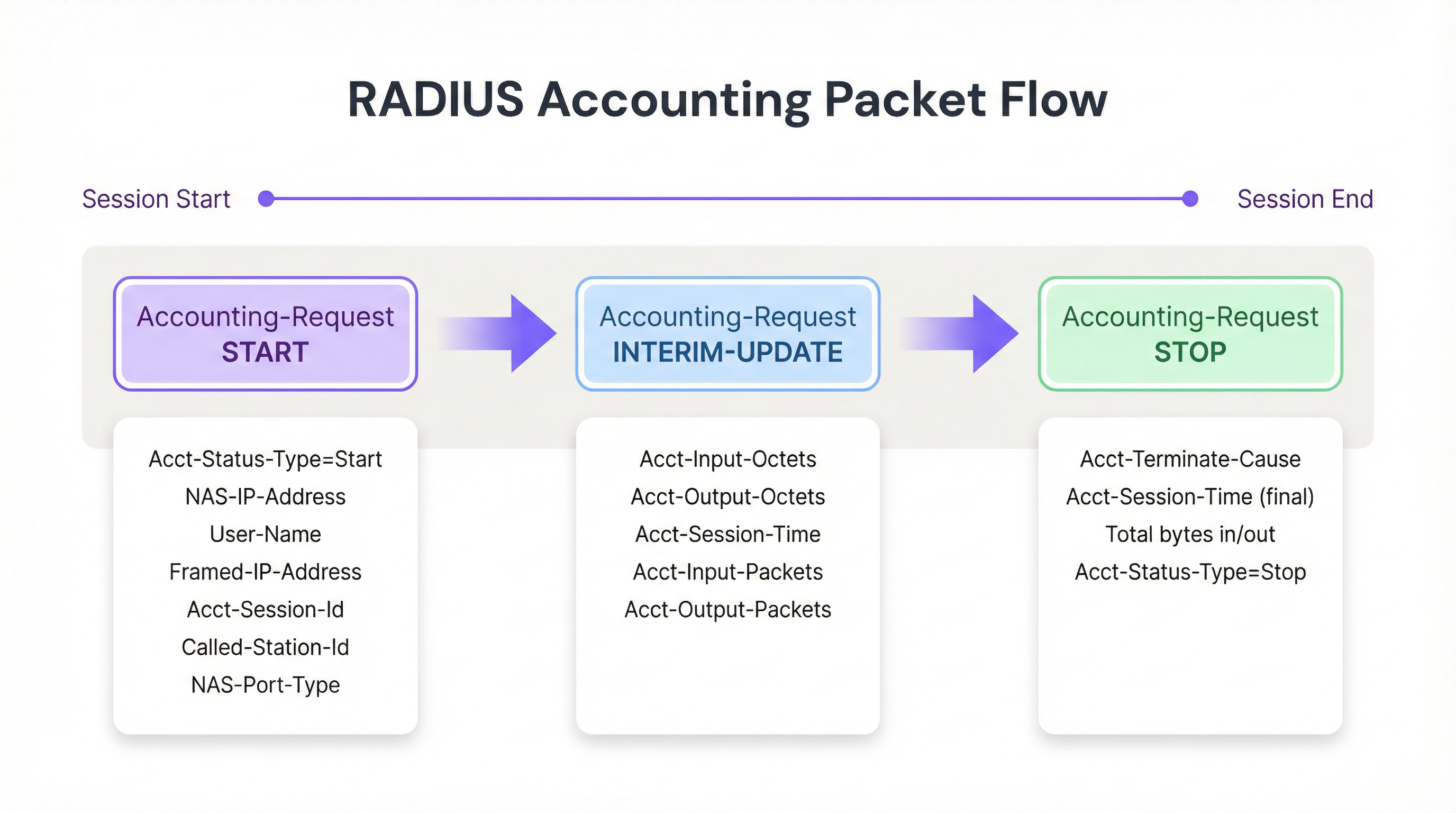
Figure 1: The RADIUS accounting packet lifecycle across a WiFi session.
Key Accounting Attributes
To effectively track sessions and build defensible audit logs, the NAS populates Accounting-Request packets with specific attributes. The following are the most operationally significant:
| Attribute | Description | Compliance Relevance |
|---|---|---|
| Acct-Session-Id | Unique session identifier generated by the NAS | Primary key for correlating Start, Interim, and Stop records |
| User-Name | Authenticated identity (username or MAC address) | Maps session to a specific user or device |
| NAS-IP-Address | IP address of the reporting AP or WLC | Identifies the network segment and physical location |
| Framed-IP-Address | IP address assigned to the client device | Critical for correlating with firewall and web proxy logs |
| Calling-Station-Id | MAC address of the client device | Device-layer identity for audit trail |
| Called-Station-Id | MAC address of the AP and SSID | Identifies the specific radio and network the user connected to |
| Acct-Input-Octets | Bytes received from the client | Bandwidth monitoring and capacity planning |
| Acct-Output-Octets | Bytes sent to the client | Bandwidth monitoring and capacity planning |
| Acct-Session-Time | Session duration in seconds | Dwell time analytics and billing |
| Acct-Terminate-Cause | Reason the session ended | Troubleshooting and anomaly detection |
For teams working with 802.1X Authentication, the User-Name attribute will contain the authenticated identity from the EAP exchange, providing a richer audit trail than MAC Authentication Bypass (MAB) alone.
Implementation Guide
Deploying a robust RADIUS accounting infrastructure requires careful configuration at both the NAS and the RADIUS server levels. The following is a vendor-neutral approach to establishing a reliable accounting pipeline.
Step 1: Configure the NAS (Access Points / Controllers)
The NAS configuration is where most deployments fail. Administrators often configure authentication correctly but leave accounting at default settings or disabled entirely.
- Define the Accounting Server: Specify the IP address of the RADIUS server and the shared secret for UDP port 1813. In high-availability deployments, configure a secondary accounting server to prevent data loss if the primary becomes unreachable.
- Enable Interim Updates: This is the single most important configuration step. Set an appropriate interval — typically 10 to 15 minutes for enterprise deployments. Shorter intervals (e.g., 1 minute) provide more granular data but generate unsustainable write load at scale; longer intervals (e.g., 30 minutes) reduce overhead but delay visibility into active sessions.
- Ensure Time Synchronisation: Configure NTP on all NAS devices and the RADIUS server. Accurate timestamps are non-negotiable for audit logs and SIEM correlation. A 5-minute clock drift can invalidate an audit trail in a lawful intercept scenario.
Step 2: Configure the RADIUS Server
- Database Integration: Configure the RADIUS server to log accounting data to a structured relational database (e.g., PostgreSQL, MySQL) rather than flat text files. Structured storage enables efficient querying, indexing, and integration with downstream systems. Ensure indexes exist on
Acct-Session-Id,User-Name,Framed-IP-Address, and the session start timestamp. - Data Retention Policies: Implement automated archival or purge scripts aligned with your compliance requirements. GDPR Article 5(1)(e) requires data to be kept no longer than necessary; however, lawful intercept regulations in many jurisdictions (e.g., the UK's Investigatory Powers Act 2016) may require retention of up to 12 months.
Step 3: Build the Data Pipeline
To maximise the value of accounting data, it must be exported to consumption platforms where it can be queried, correlated, and visualised.
- SIEM Integration: Configure the RADIUS server or the underlying database to forward logs to your SIEM (e.g., Splunk, Microsoft Sentinel, IBM QRadar) using Syslog or a REST API. This enables security teams to correlate WiFi authentication events with firewall blocks, intrusion detection alerts, or data loss prevention triggers.
- Analytics Integration: Feed session data into platforms like Purple's WiFi Analytics to transform raw bytes and MAC addresses into actionable insights regarding footfall, dwell time, and peak usage periods. This is particularly valuable for Retail and Hospitality operators who need to align staffing and infrastructure investment with actual usage patterns.
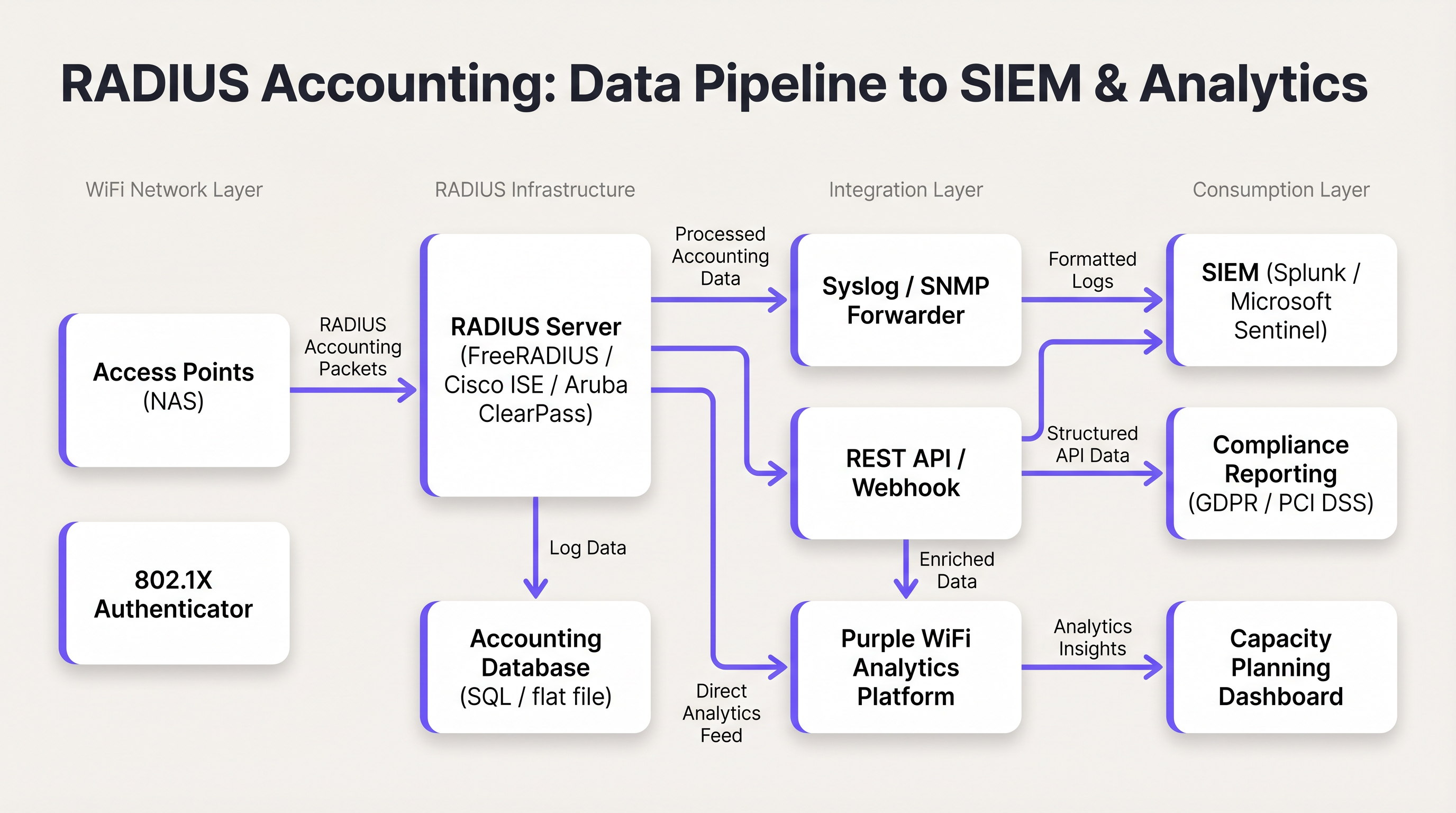
Figure 2: The RADIUS accounting data pipeline from Access Points to SIEM and analytics platforms.
Best Practices
Always Use Interim Updates. Relying solely on Start and Stop packets creates operational blind spots. A dropped connection or AP power failure may prevent a Stop packet from being sent, leaving a stale session in the database indefinitely. Interim updates provide the mechanism to detect and close these stale sessions. The rule of thumb: if a session hasn't sent an interim update within two to three times the configured interval, treat it as terminated.
Correlate RADIUS Accounting with DHCP Logs. RADIUS accounting provides the Framed-IP-Address, but DHCP lease times can be shorter than session durations in some environments. Maintaining DHCP logs alongside RADIUS logs provides a more resilient audit trail, particularly in high-density venues where IP address recycling is frequent.
Secure the Transport with RadSec. Traditional RADIUS traffic is transmitted over UDP with minimal encryption — only the user password field is obfuscated. In distributed deployments, particularly those spanning multiple sites or cloud-hosted RADIUS servers, use RadSec (RADIUS over TLS, defined in RFC 6614) or IPsec tunnels to protect accounting data in transit. This is a requirement under PCI DSS 4.0 for any network handling cardholder data.
Monitor the Accounting Queue. If the RADIUS server becomes unreachable, NAS devices will queue accounting packets locally. Monitor this queue length; a full queue will result in dropped packets and lost audit data. Configure alerting on queue depth and implement a secondary accounting server for high-availability deployments.
Separate Authentication and Accounting Servers at Scale. In deployments exceeding 5,000 concurrent users, the write load from accounting can degrade authentication response times. Dedicated accounting servers with separate database instances prevent this contention.
Troubleshooting & Risk Mitigation
The Stale Session Problem
Symptom: The RADIUS database shows a user has been connected for 48 hours, but the venue closed overnight.
Root Cause: The NAS failed to send a Stop packet — typically due to a power failure, AP reboot, or network interruption — and the packet was never received by the RADIUS server.
Mitigation: Implement a dead-session cleanup script on the RADIUS server. The script should periodically scan for active sessions where the last received packet (Start or Interim-Update) is older than a defined threshold (e.g., 2.5x the interim update interval). Sessions exceeding this threshold should be forcefully closed with a synthetic Stop record, noting the termination cause as 'Lost-Carrier' or 'Admin-Reset'.
High RADIUS Server CPU and I/O Load
Symptom: Authentication response times degrade during peak hours; the RADIUS server reports high CPU and disk I/O.
Root Cause: An overly aggressive interim update interval (e.g., 1 minute) across thousands of APs generates an unsustainable volume of database writes.
Mitigation: Increase the interim update interval to 15 minutes. Verify that the accounting database has appropriate indexes. Consider separating authentication and accounting onto dedicated server instances. Evaluate whether a time-series database (e.g., InfluxDB) is more appropriate than a relational database for high-volume accounting data.
Missing Framed-IP-Address in Accounting Records
Symptom: RADIUS accounting records exist, but the Framed-IP-Address field is empty or absent, making IP-to-MAC correlation impossible.
Root Cause: The NAS may be sending the Start packet before DHCP has assigned an IP address to the client. The IP is only available after the DHCP exchange completes.
Mitigation: Configure the NAS to delay sending the Start packet until after DHCP assignment, if the platform supports it. Alternatively, rely on the Interim-Update packets, which are sent after DHCP assignment and will contain the Framed-IP-Address. Ensure your audit queries account for this by checking Interim-Update records if the Start record lacks an IP.
ROI & Business Impact
Implementing robust RADIUS accounting delivers measurable business value across three dimensions:
Compliance and Legal Risk Mitigation. In the event of a security incident, a data subject access request under GDPR, or a lawful intercept order, accurate accounting logs provide the audit trail necessary to identify which user or device held a specific IP address at a specific time. Without this, organisations face potential regulatory penalties under GDPR (up to 4% of global annual turnover) and reputational damage. The cost of implementing proper accounting infrastructure is a fraction of the cost of a single regulatory enforcement action.
Capacity Planning and Infrastructure ROI. By analysing Acct-Input-Octets and Acct-Output-Octets trends over time, network architects can identify bandwidth consumption patterns, peak usage periods, and the specific APs or SSIDs driving the highest load. This data directly informs WAN upgrade decisions and AP placement strategies, ensuring infrastructure investment is directed where it delivers the greatest impact. For Transport hubs and large venues, this can represent significant capital expenditure savings.
Enhanced Analytics and Venue Intelligence. When RADIUS session data is combined with platforms like Purple's WiFi Analytics and Sensors, the raw accounting data is transformed into venue intelligence. Dwell time metrics derived from session duration, repeat visitor identification from Calling-Station-Id history, and peak occupancy analysis from concurrent session counts all become available. For Hospitality operators, this data directly informs staffing models, F&B placement, and marketing personalisation strategies. For further context on how WiFi infrastructure underpins these capabilities, see our guides on Wireless Access Points and Modern Hospitality WiFi Solutions.
Key Terms & Definitions
RADIUS Accounting
The process of collecting and recording data about user network resource consumption, including session start and end times, data volume transferred, and IP address assignment. Defined in RFC 2866.
Essential for billing, capacity planning, GDPR compliance, and maintaining security audit trails in any enterprise WiFi deployment.
Acct-Status-Type
A RADIUS attribute (Attribute ID 40) that indicates the purpose of an accounting packet. Values include Start (1), Stop (2), and Interim-Update (3).
Used by the RADIUS server to determine whether to create a new session record, update an existing one, or close it. The most fundamental attribute in any accounting packet.
Interim-Update
A periodic RADIUS accounting packet sent by the NAS during an active session to report current usage statistics, including bytes transferred and session duration.
Critical for tracking long-lived sessions and detecting stale sessions if a client disconnects unexpectedly without sending a Stop packet.
Acct-Session-Id
A unique string generated by the NAS to identify a specific user connection instance. This value is consistent across all accounting packets (Start, Interim-Update, Stop) for the same session.
The primary key used to correlate all accounting records belonging to the same session. Without this, it is impossible to reconstruct a complete session history.
NAS (Network Access Server)
The device — typically a Wireless Access Point or Wireless LAN Controller — that controls physical access to the network and acts as the RADIUS client, generating and sending accounting packets.
The NAS is responsible for the accuracy and completeness of accounting data. Misconfiguration at the NAS level (e.g., disabled accounting, missing attributes) cannot be remediated at the RADIUS server level.
Framed-IP-Address
The IP address assigned to the client device for the duration of the session, included in RADIUS accounting packets.
Critical for correlating RADIUS accounting logs with other network logs such as firewall, web proxy, or DNS logs. The absence of this attribute makes IP-to-device correlation impossible.
Calling-Station-Id
Typically the MAC address of the client device connecting to the network, formatted as a colon-separated hexadecimal string (e.g., AA:BB:CC:DD:EE:FF).
Used to identify the specific hardware device, regardless of the IP address it is assigned. The device-layer anchor of the audit trail.
Acct-Terminate-Cause
An attribute included in Stop packets that specifies the reason a session ended. Common values include User-Request, Lost-Carrier, Idle-Timeout, Session-Timeout, and Admin-Reset.
Valuable for troubleshooting connectivity issues and for anomaly detection — for example, a high rate of Lost-Carrier terminations on a specific AP may indicate a hardware or interference problem.
RadSec
RADIUS over TLS (Transport Layer Security), defined in RFC 6614. Provides encrypted and authenticated transport for RADIUS packets, replacing the traditional UDP-based transport.
Required in any deployment where RADIUS traffic traverses untrusted networks (e.g., internet-connected cloud RADIUS servers). Increasingly mandated by PCI DSS 4.0 for cardholder data environments.
Case Studies
A 300-room hotel with conference facilities is deploying a new guest WiFi network. The IT manager needs to ensure that the deployment meets GDPR requirements for data minimisation and audit trail completeness, while also providing the marketing team with dwell time and repeat visitor analytics. The hotel uses a cloud-hosted RADIUS server and Cisco Meraki APs.
The deployment should be configured as follows. On the Meraki dashboard, navigate to Network-wide > RADIUS servers and add the cloud RADIUS server on port 1813 with a strong shared secret. Enable accounting and set the interim update interval to 15 minutes. On the RADIUS server, configure accounting to write to a PostgreSQL database with the following schema: session_id (primary key), user_name, nas_ip, framed_ip, calling_station_id, called_station_id, session_start, session_end, input_octets, output_octets, terminate_cause. Implement a data retention policy that automatically archives records older than 12 months to cold storage and purges records older than 24 months, documented in the hotel's GDPR Record of Processing Activities. Configure a Purple WiFi Analytics integration to ingest the session data, enabling the marketing team to access dwell time reports and repeat visitor frequency dashboards. Ensure NTP is synchronised across all Meraki APs and the RADIUS server to within 1 second.
A retail chain with 150 stores needs to comply with PCI DSS 4.0 requirements for network access monitoring. Their point-of-sale terminals use MAC Authentication Bypass (MAB) on the WiFi network. The security team has received a request from their QSA (Qualified Security Assessor) to demonstrate that they can identify which specific POS terminal accessed the payment network at any given time, using only a source IP address and timestamp from a firewall log.
The solution requires a three-component integration. First, verify that all Wireless LAN Controllers are configured to include the Framed-IP-Address attribute in RADIUS accounting packets. This is not always enabled by default and must be explicitly configured. Second, integrate the RADIUS accounting database with the SIEM platform (e.g., Splunk). Create a lookup table in Splunk that maps Framed-IP-Address and session time ranges to Calling-Station-Id (MAC address). Third, create a Splunk saved search that accepts a source IP and timestamp as inputs and returns the corresponding MAC address, NAS-IP-Address (identifying the store and AP), and User-Name from the RADIUS accounting records. The QSA can then be demonstrated this workflow: given a firewall log entry showing source IP 10.5.12.44 at 14:23:07 on a specific date, the search returns the MAC address of the POS terminal, the AP it was connected to, and the store location.
Scenario Analysis
Q1. A hotel IT manager notices that the WiFi analytics dashboard shows very few active users during the day, even though the lobby and restaurant are visibly busy. However, the historical reports for the previous day show a massive spike in data usage. The RADIUS server logs confirm that Start packets are being received, but the database shows very few Interim-Update records. What is the most likely misconfiguration, and how would you resolve it?
💡 Hint:Consider how data usage is reported during an active session versus at the point of disconnection.
Show Recommended Approach
The most likely cause is that Interim-Updates are disabled or not configured on the Wireless LAN Controller. Without interim updates, the RADIUS server only receives a Start packet when the user connects and a Stop packet when they disconnect. The analytics dashboard cannot display current usage because no in-session data is being reported. Once users leave and disconnect, the Stop packets arrive with the total accumulated data, causing the delayed spike in historical reports. The resolution is to enable Interim-Updates on the WLC and set an appropriate interval — 15 minutes is recommended for a hotel environment. After enabling, verify that the RADIUS server is receiving Interim-Update packets by checking the accounting database for records with Acct-Status-Type = 3.
Q2. During a security incident investigation, your SIEM has flagged that an IP address on the guest WiFi network accessed a known command-and-control server at 09:47:23 on a specific date. You need to identify the physical device responsible. Your DHCP lease time is set to 30 minutes. Describe the exact query logic you would use against the RADIUS accounting database to identify the device.
💡 Hint:IP addresses are not static. You must use a time-range query, not a point-in-time lookup, and account for DHCP lease recycling.
Show Recommended Approach
You must query the RADIUS accounting database for sessions where: (1) the Framed-IP-Address equals the flagged IP address, AND (2) the session_start timestamp is earlier than or equal to 09:47:23, AND (3) either the session_end timestamp is later than or equal to 09:47:23, OR the session_end is NULL (session still active at query time). If multiple sessions match (possible with a 30-minute DHCP lease), review the Interim-Update records to confirm which session was actively reporting usage at 09:47:23. The matching session record will contain the Calling-Station-Id (MAC address of the device) and the User-Name (authenticated identity, if 802.1X was used). Cross-reference the MAC address with your device inventory or DHCP server logs to identify the physical device and its owner.
Q3. You are the network architect for a conference centre that hosts events with up to 8,000 concurrent WiFi users. Your current RADIUS server is experiencing database write saturation during peak events, causing authentication delays of 3-5 seconds. Your current interim update interval is set to 2 minutes. Describe a multi-step remediation plan that addresses both the immediate performance issue and the underlying architectural risk.
💡 Hint:Consider both configuration changes and architectural changes. The goal is to maintain audit trail completeness while reducing write load.
Show Recommended Approach
The remediation plan should address three layers. First, as an immediate fix, increase the interim update interval from 2 minutes to 15 minutes on all Wireless Controllers. This reduces the accounting write load by approximately 87% (from one write per 2 minutes to one per 15 minutes per session), which should immediately relieve the database I/O pressure. Second, separate the authentication and accounting workloads onto dedicated server instances. The authentication server handles Access-Request/Accept/Reject packets, while a dedicated accounting server handles Accounting-Request packets and writes to a separate database. This prevents accounting write load from affecting authentication response times. Third, for the underlying architectural risk, evaluate whether a time-series database (e.g., InfluxDB or TimescaleDB) is more appropriate than a relational database for the accounting workload. Time-series databases are optimised for high-volume sequential writes and time-range queries, which matches the accounting data pattern exactly. Migrate accounting writes to the time-series database while retaining the relational database for compliance reporting queries.
Key Takeaways
- ✓RADIUS accounting (RFC 2866) is distinct from authentication: it records session usage data — duration, bytes transferred, IP assignment — rather than making access control decisions.
- ✓The three packet types — Start, Interim-Update, and Stop — must all be configured and operational for a complete audit trail. Interim-Updates are the most commonly missed configuration.
- ✓The Acct-Session-Id, Framed-IP-Address, and Calling-Station-Id attributes form the minimum viable audit trail, enabling IP-to-device correlation for compliance and security investigations.
- ✓Stale sessions (caused by missing Stop packets) must be managed with a dead-session cleanup script using the 2.5x interim update interval rule.
- ✓RADIUS accounting data must be exported to a structured database and integrated with a SIEM and analytics platform to deliver its full compliance and operational value.
- ✓For PCI DSS, GDPR, and lawful intercept compliance, the ability to tie an IP address to a MAC address at a specific point in time is the core requirement that RADIUS accounting fulfils.
- ✓At scale (5,000+ concurrent users), separate authentication and accounting server instances and consider a time-series database for accounting writes to prevent performance degradation.




