

The Ultimate Guide to WiFi Channel Selection: Optimising Performance and Avoiding Interference
This guide provides a comprehensive, step-by-step explanation of how to change WiFi channels on different routers and operating systems. It covers the reasons for changing channels (interference, congestion), how to identify the least congested channels using WiFi analyzer tools (with specific recommendations and screenshots), and the potential impact on network performance. It differentiates itself by offering practical advice for both home and business users, including advanced configurations and troubleshooting tips for common issues.
🎧 Listen to this Guide
View Transcript
Executive Summary
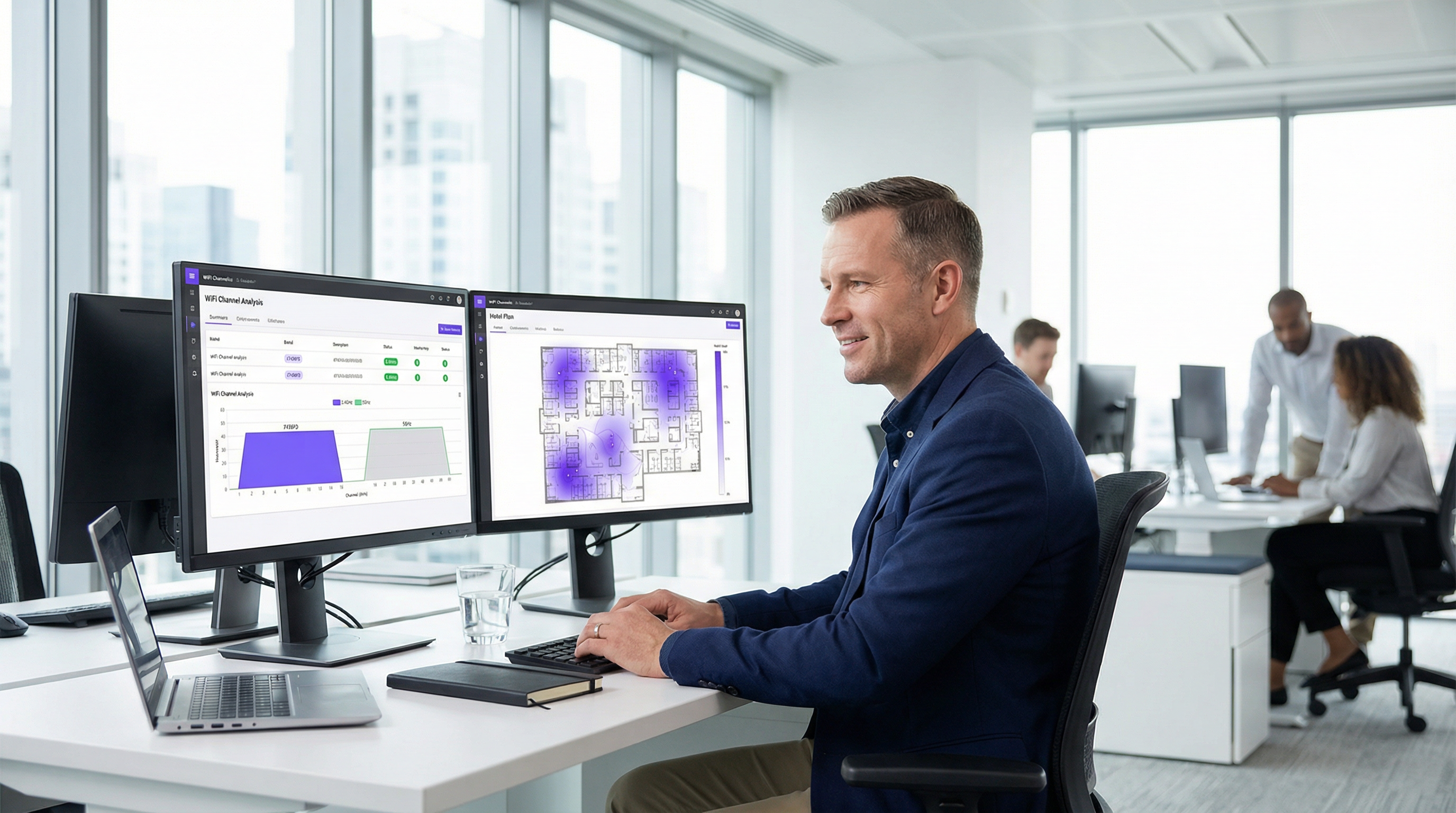
For the IT leaders managing connectivity in high-traffic commercial venues, suboptimal WiFi performance is not a mere inconvenience; it is a direct impediment to revenue and operational efficiency. This guide provides an authoritative, actionable framework for WiFi channel selection, moving beyond academic theory to deliver practical deployment guidance. We address the pervasive challenges of radio frequency (RF) interference and channel congestion that degrade network throughput and reliability in dense environments like hotels, retail chains, and stadiums. The core thesis is that a deliberate, data-driven channel management strategy is not a discretionary tweak but a foundational component of enterprise-grade wireless architecture. By mastering the principles of non-overlapping channels in the 2.4GHz band, strategically leveraging channel widths in the 5GHz band, and understanding the operational implications of Dynamic Frequency Selection (DFS), network architects can mitigate risk, enhance user experience, and maximise the ROI of their wireless infrastructure. This reference provides the technical deep-dive, vendor-neutral implementation steps, and business-impact analysis required to justify and execute a robust channel optimisation project.
Technical Deep-Dive
The radio frequency (RF) spectrum is a finite, shared resource governed by physical laws and regulatory domains. Effective WiFi channel management hinges on a deep understanding of how this spectrum is allocated and the inherent characteristics of the primary frequency bands: 2.4 GHz and 5 GHz.
The 2.4 GHz Band: A Crowded Utility Lane
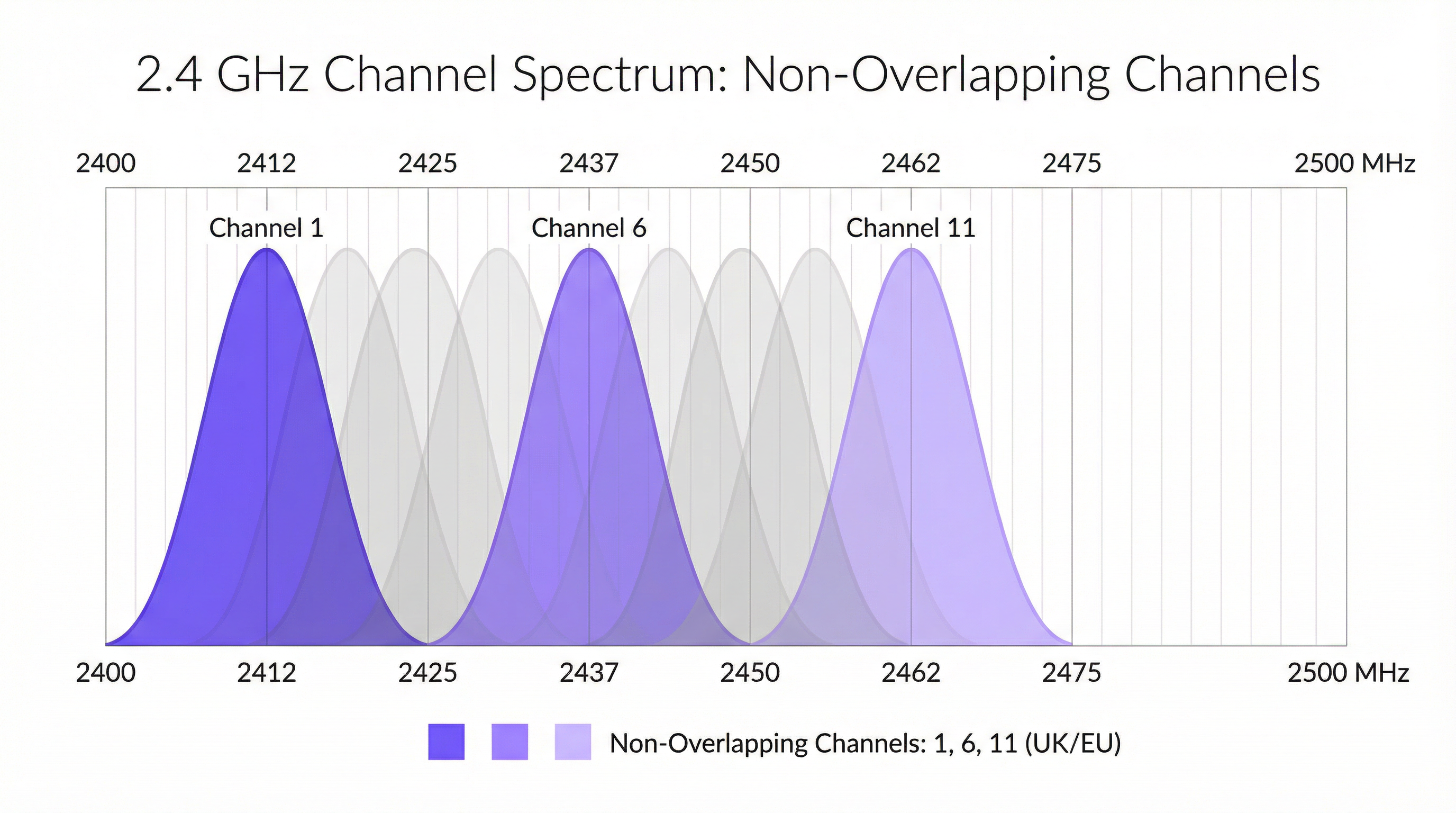
The 2.4 GHz band is the legacy workhorse of WiFi, offering excellent signal propagation and wall penetration. However, it is notoriously crowded and susceptible to interference. In the UK and Europe, this band is divided into 13 channels, but due to their close spacing (5 MHz) and width (20-22 MHz), they significantly overlap. This creates adjacent-channel and co-channel interference, where access points (APs) effectively shout over one another, corrupting data packets and forcing retransmissions. The only way to mitigate this is to use the three channels that do not overlap: 1, 6, and 11. This is a non-negotiable best practice for any professional deployment. Any AP configured to a channel other than 1, 6, or 11 is actively contributing to spectrum pollution.
Furthermore, the 2.4 GHz band is an unlicensed spectrum, meaning it is a free-for-all for countless other devices, including Bluetooth peripherals, microwave ovens, cordless phones, and Zigbee-based IoT sensors. This non-WiFi interference adds another layer of unpredictable noise that can severely degrade performance.
The 5 GHz Band: The High-Speed Motorway
The 5 GHz band is the key to high-performance WiFi. It offers significantly more channels (over 20 in the UK) that are all non-overlapping by design, and it suffers from far less non-WiFi interference. This makes it the mandatory choice for bandwidth-intensive applications like video streaming, voice-over-IP (VoIP), and large file transfers. However, its higher frequency signals have shorter range and are more easily attenuated by physical obstructions like walls and floors.
Within the 5 GHz band, network architects can also configure channel width to increase throughput:
- 20 MHz: The baseline width. Offers the least interference potential and is ideal for high-density environments where many APs are co-located.
- 40 MHz: Bonds two 20 MHz channels. Doubles the potential data rate but also doubles the spectrum footprint, making it more susceptible to interference.
- 80 MHz: Bonds four 20 MHz channels. Offers very high data rates but should only be used in clean RF environments with low AP density.
- 160 MHz: Bonds eight 2.4 GHz channels. While supported by 802.11ac/ax, it is rarely practical in enterprise settings due to its massive spectrum consumption.
Dynamic Frequency Selection (DFS)
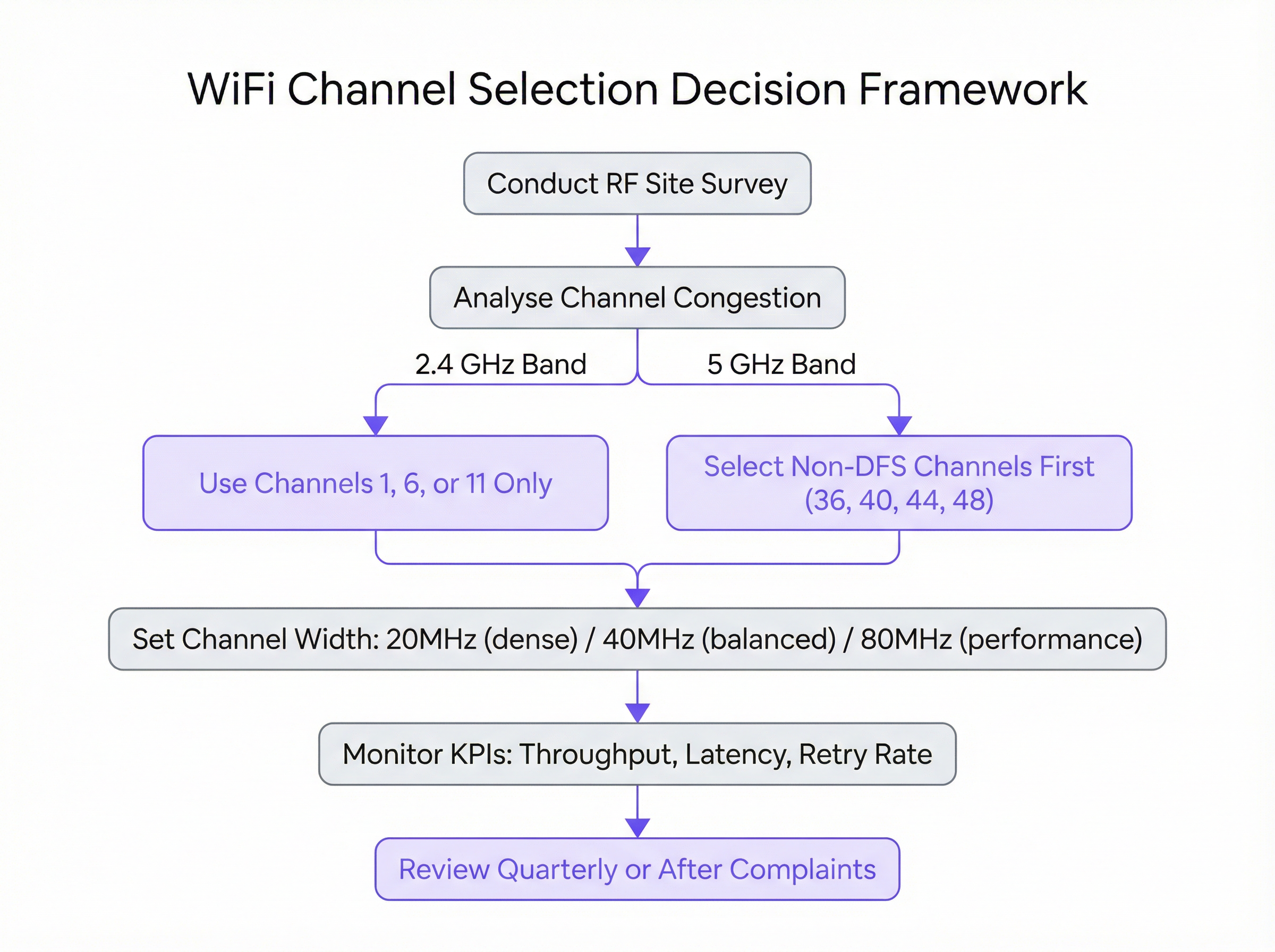
A critical consideration in the 5 GHz band is Dynamic Frequency Selection (DFS). Certain channels in the UNII-2 and UNII-2e bands are shared with weather and military radar systems. The IEEE 802.11h standard mandates that if an AP detects a radar signal on a DFS channel, it must immediately vacate that channel for at least 30 minutes. For users, this can cause an abrupt, albeit brief, connection drop. While DFS channels open up a vast amount of additional spectrum, their use requires careful planning. A site survey is essential to determine the risk of radar events in a specific location. For mission-critical deployments, it is often prudent to initially restrict APs to the non-DFS channels (e.g., 36, 40, 44, 48) to ensure maximum stability.
Implementation Guide
Transitioning from theory to a live production environment requires a methodical, risk-averse approach. The following steps provide a vendor-neutral blueprint for executing a channel plan update.
Step 1: Conduct a Baseline RF Site Survey Before making any changes, you must understand your current RF environment. Using a professional WiFi analyser tool (e.g., Ekahau, NetSpot, or the built-in tools in your enterprise WLAN controller), perform a comprehensive site survey during peak operational hours. The goal is to map out all existing WiFi networks, identifying their channels, signal strengths (RSSI), and channel widths. This data forms the empirical foundation of your new channel plan.
Step 2: Develop the Channel Plan Based on the site survey, create a formal channel plan.
- For 2.4 GHz: Assign channels 1, 6, and 11 in a rotating pattern across your APs, ensuring no two adjacent APs share the same channel. The goal is to maximise the physical distance between APs on the same channel.
- For 5 GHz: Start by assigning unique, non-DFS channels with a 20 MHz width to each AP. If you have more APs than available non-DFS channels, you can begin to reuse channels, again ensuring maximum physical separation. Only consider 40 MHz or 80 MHz widths in areas with low AP density and a demonstrated need for higher throughput.
Step 3: Phased Implementation Never apply channel changes to your entire network simultaneously. Implement the new plan in a phased manner, starting with a single AP or a small, low-risk area. This allows you to validate the impact of the change in a controlled manner. If the change is successful, you can proceed to the next group of APs.
Step 4: Vendor-Specific Configuration While the principles are universal, the specific configuration steps vary by vendor:
- Cisco Meraki: Navigate to
Wireless > Radio settings. You can set channels manually per-AP or configure theAuto RFprofile to use only your designated channels. - Aruba Central: Under
Devices > Access Points > Config > Radios, you can configure theAdaptive Radio Management (ARM)settings to define valid channels and channel widths. - Ruckus SmartZone: Use
ChannelFlyandBackground Scanningfor automated management, or override these on a per-AP basis for manual control. - Juniper Mist: Define an
RF Templateunder theOrganizationtab to specify your channel and power settings, which the Mist AI engine will then use as its operational constraints.

Best Practices
Adhering to industry best practices ensures a stable, scalable, and high-performing wireless network.
- Prioritise 5 GHz: Steer capable client devices aggressively towards the 5 GHz band. This reserves the cleaner, faster 5 GHz spectrum for devices that can take advantage of it, leaving the 2.4 GHz band for legacy clients and IoT devices.
- Control Transmit Power: High transmit power is not always better. APs shouting at maximum power can increase co-channel interference and cause client devices with weaker radios (like smartphones) to remain stuck to a distant AP. Use automatic power control or manually tune power levels to create appropriately sized coverage cells.
- Conduct Regular Audits: The RF environment is dynamic. New neighbouring networks appear, and building layouts change. Conduct a brief RF audit on a quarterly basis and a full site survey annually to ensure your channel plan remains optimal.
- Document Everything: Maintain detailed documentation of your channel plan, including floor maps showing AP locations and their assigned channels. This is invaluable for troubleshooting and future expansion.
Troubleshooting & Risk Mitigation
Even with a well-designed plan, issues can arise. The most common failure mode after a channel change is encountering unforeseen interference. If performance degrades, the primary suspect is intermittent, non-WiFi interference. A spectrum analyser (as opposed to a WiFi analyser) can help identify such sources.
Another common issue is the "sticky client" problem, where a device remains associated with a distant AP despite a closer one being available. This is often a result of transmit power being set too high on the APs. Reducing AP transmit power can help shrink coverage cells and encourage clients to roam to a better AP sooner.
To mitigate risk, always have a rollback plan. Document the original channel settings before making any changes, and ensure you have a maintenance window to revert to the previous configuration if the new plan causes significant operational issues.
ROI & Business Impact
The investment in proper channel management delivers a clear and measurable return on investment (ROI). For a hotel, it translates to higher guest satisfaction scores and fewer negative reviews related to poor WiFi. For a retail store, it ensures the reliability of mobile point-of-sale (mPOS) systems and enables a seamless experience for customers using the guest network. In a conference centre, it means delivering the reliable connectivity that event organisers and attendees demand.
The key business impacts are:
- Increased Throughput: A clean channel can increase data throughput by 50-100% or more, directly impacting application performance.
- Reduced Support Tickets: Proactive channel management drastically reduces user-reported issues related to slow speeds and dropped connections, freeing up IT resources.
- Enhanced User Experience: Reliable connectivity is now a core expectation. A well-optimised network directly contributes to customer and employee satisfaction and loyalty.
- Maximised Hardware ROI: Proper RF management ensures you are getting the maximum performance out of your existing access point hardware, potentially delaying costly upgrades.
Key Terms & Definitions
Radio Frequency (RF)
A frequency or range of frequencies in the electromagnetic spectrum suitable for transmission of information. WiFi operates in the 2.4 GHz and 5 GHz RF bands.
IT teams must manage the RF environment to minimize interference and ensure reliable communication for their wireless networks.
Channel Congestion
A scenario where multiple WiFi networks are operating on the same or overlapping channels in the same physical area, forcing devices to wait for their turn to transmit.
In a dense urban environment, high channel congestion is the primary cause of slow WiFi speeds. Identifying and moving to a less congested channel is the main goal of channel optimization.
RSSI (Received Signal Strength Indicator)
A measurement of the power present in a received radio signal, typically expressed in negative decibels-milliwatts (-dBm).
When analyzing a WiFi network, an RSSI of -50 dBm indicates a very strong signal, while -90 dBm is very weak. It's used to determine the coverage area of an AP and the potential for interference from other APs.
Co-Channel Interference (CCI)
Interference that occurs when two or more access points operating on the same channel are in close proximity. The APs must contend for the same airtime, reducing throughput for all.
A proper channel plan using staggered channels (e.g., 1, 6, 11) is designed specifically to minimize co-channel interference between a venue's own access points.
Adjacent-Channel Interference (ACI)
Interference that occurs when access points are on overlapping (but not identical) channels, such as channels 2 and 3 in the 2.4 GHz band.
ACI is a major problem in the 2.4 GHz band and is why the 1, 6, 11 channel plan is critical. It is not a significant issue in the 5 GHz band where channels do not overlap.
Dynamic Frequency Selection (DFS)
A mechanism that allows WiFi devices to use 5 GHz channels that are also used by radar systems. If radar is detected, the device must automatically switch to a different channel.
IT teams must decide whether the benefit of extra channels outweighs the risk of potential service interruptions when using DFS channels, especially in locations near airports or weather stations.
Channel Width
The width of the radio band that a WiFi channel uses to transmit data, measured in megahertz (MHz). Wider channels allow for higher data rates.
Network architects must choose an appropriate channel width (20, 40, or 80 MHz) as a trade-off between single-client speed and overall network capacity in a dense environment.
Site Survey
The process of planning and designing a wireless network to provide a solution that will deliver the required wireless coverage, data rates, network capacity, and quality of service.
A site survey is a mandatory first step before any significant WiFi deployment or optimization project. It provides the empirical data needed to make informed decisions about AP placement and channel selection.
Case Studies
A 200-room luxury hotel is experiencing frequent guest complaints about slow and unreliable WiFi, particularly during the evenings when occupancy is high. The hotel has a mix of 802.11ac and 802.11ax access points. How would you diagnose and resolve the issue?
- Diagnosis: Conduct an RF site survey between 7 PM and 10 PM to capture the network state under peak load. Use a WiFi analyzer to map channel usage on both 2.4 GHz and 5 GHz bands across all floors. The likely hypothesis is high co-channel interference from the hotel's own APs and neighboring residential networks. Pay close attention to the retransmission rate KPI in the WLAN controller, which is likely to be high.
- Channel Plan Redesign: Based on the survey, create a new channel plan. For the 2.4 GHz radios, ensure all APs are strictly on channels 1, 6, or 11, with no adjacent APs on the same channel. For the 5 GHz radios, set a uniform 20 MHz channel width to maximize the number of available channels and reduce interference in the high-density environment. Assign unique non-DFS channels first (36, 40, 44, 48, etc.).
- Implementation: Implement the new channel plan floor by floor during a low-traffic period (e.g., mid-morning). Disable lower data rates (below 12 Mbps) to encourage faster roaming and prevent clients from sticking to distant APs.
- Validation: Monitor throughput and latency metrics post-change. Solicit feedback from staff and a few friendly guests to confirm a tangible improvement in user experience.
A national retail chain with 50+ stores wants to ensure reliable performance for its new mobile point-of-sale (mPOS) terminals and guest WiFi network. The stores are often located in busy shopping malls with high levels of RF interference. What is a scalable strategy for channel management?
- Create a Standardized RF Template: Instead of creating a bespoke channel plan for each store, develop a standardized RF template within their central WLAN management platform (e.g., Meraki, Aruba Central). This template will enforce best practices across the entire estate.
- Template Configuration: The template should mandate that 2.4 GHz radios are disabled on every other AP to reduce interference, with the remaining APs locked to channels 1, 6, and 11. For the 5 GHz radios, the template should restrict channels to the non-DFS UNII-1 and UNII-3 bands (e.g., 36, 40, 44, 48 and 149, 153, 157, 161) and enforce a 20 MHz channel width. This provides a stable, predictable RF environment for the critical mPOS devices.
- Automated Deployment & Monitoring: Apply this template to all stores. Leverage the platform's automated RF management for transmit power control, but with the channel assignments locked by the template. Use the platform's reporting tools to centrally monitor key metrics like transaction success rates on the mPOS VLAN and guest WiFi satisfaction scores.
- Exception Handling: For stores that still report issues, an on-site survey can be performed to create a custom plan, but this becomes the exception rather than the rule.
Scenario Analysis
Q1. You are deploying WiFi in a new, multi-floor conference centre. The client requires seamless roaming for VoIP calls and support for high-bandwidth video streaming in the main auditorium. How do you approach your 5 GHz channel and power plan?
💡 Hint:Consider the different requirements of coverage (roaming) and capacity (auditorium). Think about how transmit power affects cell size.
Show Recommended Approach
For the general conference space, I would design a 5 GHz plan with 20 MHz channels to maximize the number of channels and minimize co-channel interference, supporting seamless roaming. Transmit power would be carefully tuned to create smaller, well-defined coverage cells to encourage clients to roam effectively. In the main auditorium, a high-density area, I would use directional antennas and a higher density of APs, also on 20 MHz channels. For the specific high-bandwidth requirement, I might consider using 40 MHz channels if the RF survey shows the spectrum is clean enough, but stability for the large number of users would be the priority.
Q2. A stadium deployment is experiencing major performance degradation during events. The existing network uses the vendor's 'auto-channel' feature. A site survey reveals extreme levels of co-channel interference on both bands. What is your immediate recommendation?
💡 Hint:Is an automated system appropriate for such a high-density, high-stakes environment?
Show Recommended Approach
My immediate recommendation is to disable the 'auto-channel' feature and implement a static, manually assigned channel plan based on a professional site survey. Automated systems are not suitable for extreme-density environments like stadiums, as they can cause unpredictable channel changes during peak usage. A meticulous manual plan, likely using 20 MHz channels on 5 GHz and a minimal 2.4 GHz deployment, is required to provide predictable capacity and performance.
Q3. Your company is located near a regional airport. You want to use 5 GHz channels to improve performance, but you are concerned about DFS events causing drops for your executive video conferencing system. What is a safe, phased approach to introducing 5 GHz?
💡 Hint:Are all 5 GHz channels DFS channels? How can you test the waters?
Show Recommended Approach
The safest approach is to begin by exclusively using the non-DFS channels (UNII-1 and UNII-3 bands). Configure the executive video conferencing system's dedicated APs to use only these channels (e.g., 36, 40, 44, 48). For the general office network, you can enable DFS channels but closely monitor the WLAN controller for any radar detection events over a period of several weeks. If no events are detected, you can be more confident in rolling out DFS channels more broadly, while still keeping the mission-critical systems on the guaranteed-stable non-DFS channels.
Key Takeaways
- ✓In the 2.4 GHz band, only use channels 1, 6, and 11 to avoid interference.
- ✓The 5 GHz band is superior for performance; use it for all critical and high-bandwidth applications.
- ✓Use 20 MHz channel widths in high-density environments to maximize capacity and stability.
- ✓A data-driven site survey is the mandatory first step before any channel plan changes.
- ✓Manual channel planning almost always outperforms automatic selection in complex, high-density venues.
- ✓Be cautious with DFS channels in locations near airports or weather radar, as they can cause connection drops.
- ✓Proper channel management delivers measurable ROI through increased throughput, reduced support tickets, and improved user experience.




